openapi: 3.1.0
servers:
- url: https://console.jumpcloud.com/api/v2
description: United States (US)
x-jc-region: us
- url: https://console.eu.jumpcloud.com/api/v2
description: European Union (EU)
x-jc-region: eu
- url: https://console.in.jumpcloud.com/api/v2
description: India (IN)
x-jc-region: in
info:
contact:
name: JumpCloud Support
url: https://jumpcloud.com/support/contact-jumpcloud-support
description: |
# Overview
JumpCloud's V2 API. This set of endpoints allows JumpCloud customers to manage objects, groupings and mappings and interact with the JumpCloud Graph.
> **Note:** See [JumpCloud Data Centers: Login URLs and Service Endpoints](https://jumpcloud.com/support/jumpcloud-data-centers-login-urls-and-service-endpoints) to learn more.
## API Best Practices
Read the linked Help Article below for guidance on retrying failed requests to JumpCloud's REST API, as well as best practices for structuring subsequent retry requests. Customizing retry mechanisms based on these recommendations will increase the reliability and dependability of your API calls.
Covered topics include:
1. Important Considerations
2. Supported HTTP Request Methods
3. Response codes
4. API Key rotation
5. Paginating
6. Error handling
7. Retry rates
[JumpCloud Help Center - API Best Practices](https://support.jumpcloud.com/support/s/article/JumpCloud-API-Best-Practices)
# Directory Objects
This API offers the ability to interact with some of our core features; otherwise known as Directory Objects. The Directory Objects are:
* Commands
* Policies
* Policy Groups
* Applications
* Systems
* Users
* User Groups
* System Groups
* Radius Servers
* Directories: Office 365, LDAP,G-Suite, Active Directory
* Duo accounts and applications.
The Directory Object is an important concept to understand in order to successfully use JumpCloud API.
## JumpCloud Graph
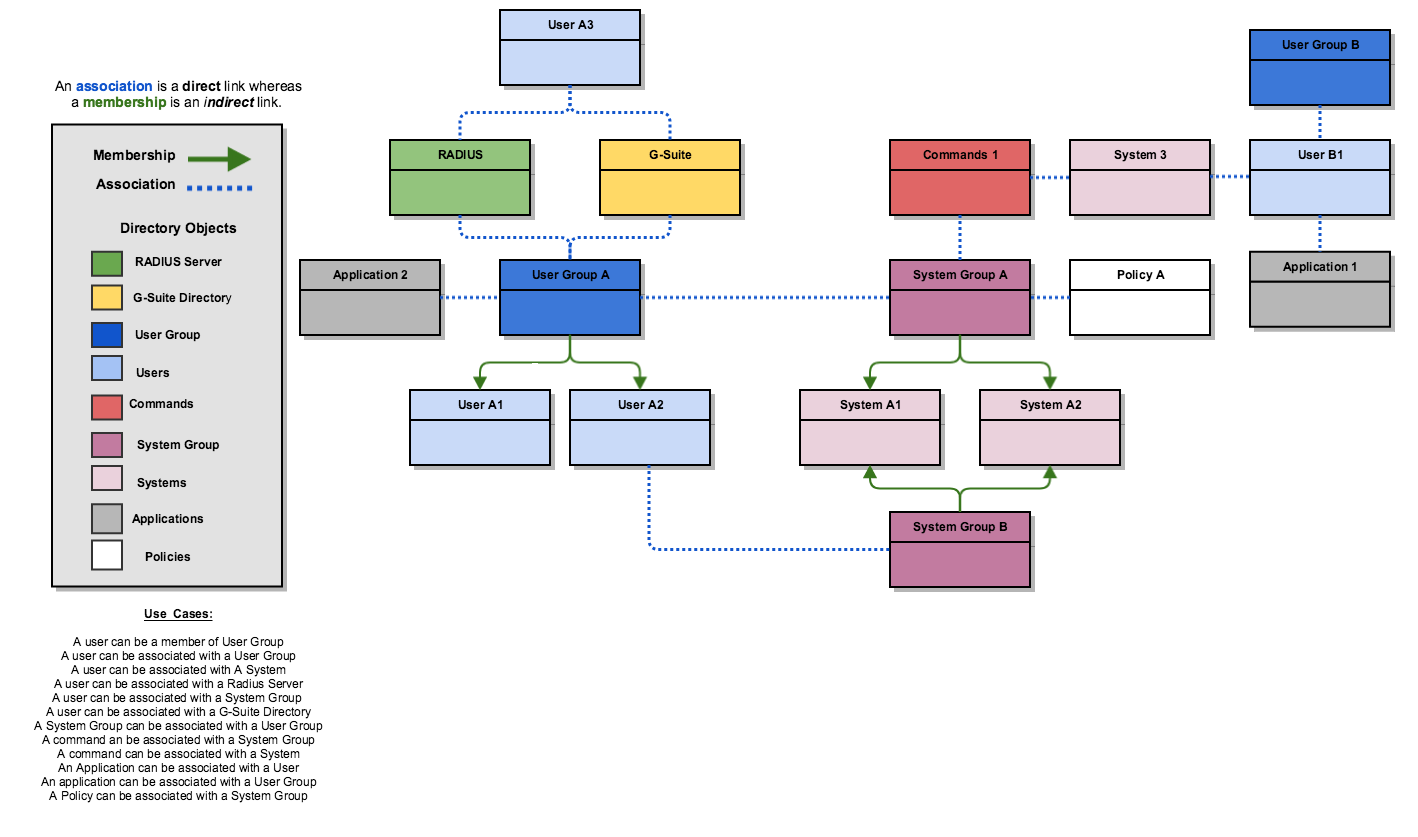
We've also introduced the concept of the JumpCloud Graph along with Directory Objects. The Graph is a powerful aspect of our platform which will enable you to associate objects with each other, or establish membership for certain objects to become members of other objects.
Specific `GET` endpoints will allow you to traverse the JumpCloud Graph to return all indirect and directly bound objects in your organization.
|  |
|:--:|
| **This diagram highlights our association and membership model as it relates to Directory Objects.** |
# API Key
## Access Your API Key
To locate your API Key:
1. Log into the [JumpCloud Admin Console](https://console.jumpcloud.com/).
2. Go to the username drop down located in the top-right of the Console.
3. Retrieve your API key from API Settings.
## API Key Considerations
This API key is associated to the currently logged in administrator. Other admins will have different API keys.
**WARNING** Please keep this API key secret, as it grants full access to any data accessible via your JumpCloud console account.
You can also reset your API key in the same location in the JumpCloud Admin Console.
## Recycling or Resetting Your API Key
In order to revoke access with the current API key, simply reset your API key. This will render all calls using the previous API key inaccessible.
Your API key will be passed in as a header with the header name "x-api-key".
```bash
curl -H "x-api-key: [YOUR_API_KEY_HERE]" "https://console.jumpcloud.com/api/v2/systemgroups"
```
# System Context
* [Introduction](#introduction)
* [Supported endpoints](#supported-endpoints)
* [Response codes](#response-codes)
* [Authentication](#authentication)
* [Additional examples](#additional-examples)
* [Third party](#third-party)
## Introduction
JumpCloud System Context Authorization is an alternative way to authenticate with a subset of JumpCloud's REST APIs. Using this method, a system can manage its information and resource associations, allowing modern auto provisioning environments to scale as needed.
**Notes:**
* The following documentation applies to Linux Operating Systems only.
* Systems that have been automatically enrolled using Apple's Device Enrollment Program (DEP) or systems enrolled using the User Portal install are not eligible to use the System Context API to prevent unauthorized access to system groups and resources. If a script that utilizes the System Context API is invoked on a system enrolled in this way, it will display an error.
## Supported Endpoints
JumpCloud System Context Authorization can be used in conjunction with Systems endpoints found in the V1 API and certain System Group endpoints found in the v2 API.
* A system may fetch, alter, and delete metadata about itself, including manipulating a system's Group and Systemuser associations,
* `/api/systems/{system_id}` | [`GET`](https://docs.jumpcloud.com/api/1.0/index.html#operation/systems_get) [`PUT`](https://docs.jumpcloud.com/api/1.0/index.html#operation/systems_put)
* A system may delete itself from your JumpCloud organization
* `/api/systems/{system_id}` | [`DELETE`](https://docs.jumpcloud.com/api/1.0/index.html#operation/systems_delete)
* A system may fetch its direct resource associations under v2 (Groups)
* `/api/v2/systems/{system_id}/memberof` | [`GET`](https://docs.jumpcloud.com/api/2.0/index.html#operation/graph_systemGroupMembership)
* `/api/v2/systems/{system_id}/associations` | [`GET`](https://docs.jumpcloud.com/api/2.0/index.html#operation/graph_systemAssociationsList)
* `/api/v2/systems/{system_id}/users` | [`GET`](https://docs.jumpcloud.com/api/2.0/index.html#operation/graph_systemTraverseUser)
* A system may alter its direct resource associations under v2 (Groups)
* `/api/v2/systems/{system_id}/associations` | [`POST`](https://docs.jumpcloud.com/api/2.0/index.html#operation/graph_systemAssociationsPost)
* A system may alter its System Group associations
* `/api/v2/systemgroups/{group_id}/members` | [`POST`](https://docs.jumpcloud.com/api/2.0/index.html#operation/graph_systemGroupMembersPost)
* _NOTE_ If a system attempts to alter the system group membership of a different system the request will be rejected
## Response Codes
If endpoints other than those described above are called using the System Context API, the server will return a `401` response.
## Authentication
To allow for secure access to our APIs, you must authenticate each API request.
JumpCloud System Context Authorization uses [HTTP Signatures](https://tools.ietf.org/html/draft-cavage-http-signatures-00) to authenticate API requests.
The HTTP Signatures sent with each request are similar to the signatures used by the Amazon Web Services REST API.
To help with the request-signing process, we have provided an [example bash script](https://github.com/TheJumpCloud/SystemContextAPI/blob/master/examples/shell/SigningExample.sh). This example API request simply requests the entire system record. You must be root, or have permissions to access the contents of the `/opt/jc` directory to generate a signature.
Here is a breakdown of the example script with explanations.
First, the script extracts the systemKey from the JSON formatted `/opt/jc/jcagent.conf` file.
```bash
#!/bin/bash
conf="`cat /opt/jc/jcagent.conf`"
regex="systemKey\":\"(\w+)\""
if [[ $conf =~ $regex ]] ; then
systemKey="${BASH_REMATCH[1]}"
fi
```
Then, the script retrieves the current date in the correct format.
```bash
now=`date -u "+%a, %d %h %Y %H:%M:%S GMT"`;
```
Next, we build a signing string to demonstrate the expected signature format. The signed string must consist of the [request-line](https://tools.ietf.org/html/rfc2616#page-35) and the date header, separated by a newline character.
```bash
signstr="GET /api/systems/${systemKey} HTTP/1.1\ndate: ${now}"
```
The next step is to calculate and apply the signature. This is a two-step process:
1. Create a signature from the signing string using the JumpCloud Agent private key: ``printf "$signstr" | openssl dgst -sha256 -sign /opt/jc/client.key``
2. Then Base64-encode the signature string and trim off the newline characters: ``| openssl enc -e -a | tr -d '\n'``
The combined steps above result in:
```bash
signature=`printf "$signstr" | openssl dgst -sha256 -sign /opt/jc/client.key | openssl enc -e -a | tr -d '\n'` ;
```
Finally, we make sure the API call sending the signature has the same Authorization and Date header values, HTTP method, and URL that were used in the signing string.
```bash
curl -iq \
-H "Accept: application/json" \
-H "Content-Type: application/json" \
-H "Date: ${now}" \
-H "Authorization: Signature keyId=\"system/${systemKey}\",headers=\"request-line date\",algorithm=\"rsa-sha256\",signature=\"${signature}\"" \
--url https://console.jumpcloud.com/api/systems/${systemKey}
```
### Input Data
All PUT and POST methods should use the HTTP Content-Type header with a value of 'application/json'. PUT methods are used for updating a record. POST methods are used to create a record.
The following example demonstrates how to update the `displayName` of the system.
```bash
signstr="PUT /api/systems/${systemKey} HTTP/1.1\ndate: ${now}"
signature=`printf "$signstr" | openssl dgst -sha256 -sign /opt/jc/client.key | openssl enc -e -a | tr -d '\n'` ;
curl -iq \
-d "{\"displayName\" : \"updated-system-name-1\"}" \
-X "PUT" \
-H "Content-Type: application/json" \
-H "Accept: application/json" \
-H "Date: ${now}" \
-H "Authorization: Signature keyId=\"system/${systemKey}\",headers=\"request-line date\",algorithm=\"rsa-sha256\",signature=\"${signature}\"" \
--url https://console.jumpcloud.com/api/systems/${systemKey}
```
### Output Data
All results will be formatted as JSON.
Here is an abbreviated example of response output:
```json
{
"_id": "625ee96f52e144993e000015",
"agentServer": "lappy386",
"agentVersion": "0.9.42",
"arch": "x86_64",
"displayName": "ubuntu-1204",
"firstContact": "2013-10-16T19:30:55.611Z",
"hostname": "ubuntu-1204"
...
```
## Additional Examples
### Signing Authentication Example
This example demonstrates how to make an authenticated request to fetch the JumpCloud record for this system.
[SigningExample.sh](https://github.com/TheJumpCloud/SystemContextAPI/blob/master/examples/shell/SigningExample.sh)
### Shutdown Hook
This example demonstrates how to make an authenticated request on system shutdown.
Using an init.d script registered at run level 0, you can call the System Context API as the system is shutting down.
[Instance-shutdown-initd](https://github.com/TheJumpCloud/SystemContextAPI/blob/master/examples/instance-shutdown-initd) is an example of an init.d script that only runs at system shutdown.
After customizing the [instance-shutdown-initd](https://github.com/TheJumpCloud/SystemContextAPI/blob/master/examples/instance-shutdown-initd) script, you should install it on the system(s) running the JumpCloud agent.
1. Copy the modified [instance-shutdown-initd](https://github.com/TheJumpCloud/SystemContextAPI/blob/master/examples/instance-shutdown-initd) to `/etc/init.d/instance-shutdown`.
2. On Ubuntu systems, run `update-rc.d instance-shutdown defaults`. On RedHat/CentOS systems, run `chkconfig --add instance-shutdown`.
## Third Party
### Chef Cookbooks
[https://github.com/nshenry03/jumpcloud](https://github.com/nshenry03/jumpcloud)
[https://github.com/cjs226/jumpcloud](https://github.com/cjs226/jumpcloud)
# Multi-Tenant Portal Headers
Multi-Tenant Organization API Headers are available for JumpCloud Admins to use when making API requests from Organizations that have multiple managed organizations.
The `x-org-id` is a required header for all multi-tenant admins when making API requests to JumpCloud. This header will define to which organization you would like to make the request.
**NOTE** Single Tenant Admins do not need to provide this header when making an API request.
## Header Value
`x-org-id`
## API Response Codes
* `400` Malformed ID.
* `400` x-org-id and Organization path ID do not match.
* `401` ID not included for multi-tenant admin
* `403` ID included on unsupported route.
* `404` Organization ID Not Found.
```bash
curl -X GET https://console.jumpcloud.com/api/v2/directories \
-H 'accept: application/json' \
-H 'content-type: application/json' \
-H 'x-api-key: {API_KEY}' \
-H 'x-org-id: {ORG_ID}'
```
## To Obtain an Individual Organization ID via the UI
As a prerequisite, your Primary Organization will need to be setup for Multi-Tenancy. This provides access to the Multi-Tenant Organization Admin Portal.
1. Log into JumpCloud [Admin Console](https://console.jumpcloud.com). If you are a multi-tenant Admin, you will automatically be routed to the Multi-Tenant Admin Portal.
2. From the Multi-Tenant Portal's primary navigation bar, select the Organization you'd like to access.
3. You will automatically be routed to that Organization's Admin Console.
4. Go to Settings in the sub-tenant's primary navigation.
5. You can obtain your Organization ID below your Organization's Contact Information on the Settings page.
## To Obtain All Organization IDs via the API
* You can make an API request to this endpoint using the API key of your Primary Organization. `https://console.jumpcloud.com/api/organizations/` This will return all your managed organizations.
```bash
curl -X GET \
https://console.jumpcloud.com/api/organizations/ \
-H 'Accept: application/json' \
-H 'Content-Type: application/json' \
-H 'x-api-key: {API_KEY}'
```
# SDKs
You can find language specific SDKs that can help you kickstart your Integration with JumpCloud in the following GitHub repositories:
* [Python](https://github.com/TheJumpCloud/jcapi-python)
* [Go](https://github.com/TheJumpCloud/jcapi-go)
* [Ruby](https://github.com/TheJumpCloud/jcapi-ruby)
* [Java](https://github.com/TheJumpCloud/jcapi-java)
title: JumpCloud API
version: '2.0'
paths:
/activedirectories:
get:
description: |-
This endpoint allows you to list all your Active Directory Instances.
#### Sample Request
```
curl -X GET https://console.jumpcloud.com/api/v2/activedirectories/ \
-H 'accept: application/json' \
-H 'content-type: application/json' \
-H 'x-api-key: {API_KEY}'
```
operationId: activedirectories_list
parameters:
- $ref: '#/components/parameters/trait_fields_fields'
- $ref: '#/components/parameters/trait_filter_filter'
- $ref: '#/components/parameters/trait_limit_limit'
- $ref: '#/components/parameters/trait_skip_skip'
- $ref: '#/components/parameters/trait_sort_sort'
- $ref: '#/components/parameters/trait_multiTenantRequestHeaders_x-org-id'
responses:
'200':
description: ''
content:
application/json:
schema:
items:
$ref: '#/components/schemas/active-directory'
type: array
security:
- x-api-key: []
summary: List Active Directories
tags:
- Active Directory
x-scopes:
- directories
- directories.readonly
x-codeSamples:
- lang: Shell
source: |-
curl --request GET \
--url 'https://console.jumpcloud.com/api/v2/activedirectories?fields=SOME_ARRAY_VALUE&filter=SOME_ARRAY_VALUE&limit=SOME_INTEGER_VALUE&skip=SOME_INTEGER_VALUE&sort=SOME_ARRAY_VALUE' \
--header 'x-api-key: REPLACE_KEY_VALUE' \
--header 'x-org-id: SOME_STRING_VALUE'
- lang: Python
source: |-
import requests
url = "https://console.jumpcloud.com/api/v2/activedirectories"
querystring = {"fields":"SOME_ARRAY_VALUE","filter":"SOME_ARRAY_VALUE","limit":"SOME_INTEGER_VALUE","skip":"SOME_INTEGER_VALUE","sort":"SOME_ARRAY_VALUE"}
headers = {
"x-org-id": "SOME_STRING_VALUE",
"x-api-key": "REPLACE_KEY_VALUE"
}
response = requests.request("GET", url, headers=headers, params=querystring)
print(response.text)
- lang: Powershell
source: |-
$headers=@{}
$headers.Add("x-org-id", "SOME_STRING_VALUE")
$headers.Add("x-api-key", "REPLACE_KEY_VALUE")
$response = Invoke-RestMethod -Uri 'https://console.jumpcloud.com/api/v2/activedirectories?fields=SOME_ARRAY_VALUE&filter=SOME_ARRAY_VALUE&limit=SOME_INTEGER_VALUE&skip=SOME_INTEGER_VALUE&sort=SOME_ARRAY_VALUE' -Method GET -Headers $headers
post:
description: |-
This endpoint allows you to create a new Active Directory.
#### Sample Request
```
curl -X POST https://console.jumpcloud.com/api/v2/activedirectories/ \
-H 'accept: application/json' \
-H 'content-type: application/json' \
-H 'x-api-key: {API_KEY}' \
-d '{
"domain": "{DC=AD_domain_name;DC=com}"
}'
```
operationId: activedirectories_post
parameters:
- $ref: '#/components/parameters/trait_multiTenantRequestHeaders_x-org-id'
requestBody:
$ref: '#/components/requestBodies/active-directory'
responses:
'201':
description: ''
content:
application/json:
schema:
$ref: '#/components/schemas/active-directory'
security:
- x-api-key: []
summary: Create a new Active Directory
tags:
- Active Directory
x-scopes:
- directories
x-codeSamples:
- lang: Shell
source: |-
curl --request POST \
--url https://console.jumpcloud.com/api/v2/activedirectories \
--header 'content-type: application/json' \
--header 'x-api-key: REPLACE_KEY_VALUE' \
--header 'x-org-id: SOME_STRING_VALUE' \
--data '{"domain":"string","useCase":"UNSET","groupsEnabled":true,"delegationState":"ENABLED","updatedAt":"2019-08-24T14:15:22Z"}'
- lang: Python
source: |-
import requests
url = "https://console.jumpcloud.com/api/v2/activedirectories"
payload = {
"domain": "string",
"useCase": "UNSET",
"groupsEnabled": True,
"delegationState": "ENABLED",
"updatedAt": "2019-08-24T14:15:22Z"
}
headers = {
"x-org-id": "SOME_STRING_VALUE",
"x-api-key": "REPLACE_KEY_VALUE",
"content-type": "application/json"
}
response = requests.request("POST", url, json=payload, headers=headers)
print(response.text)
- lang: Powershell
source: |-
$headers=@{}
$headers.Add("x-org-id", "SOME_STRING_VALUE")
$headers.Add("x-api-key", "REPLACE_KEY_VALUE")
$headers.Add("content-type", "application/json")
$response = Invoke-RestMethod -Uri 'https://console.jumpcloud.com/api/v2/activedirectories' -Method POST -Headers $headers -ContentType 'application/json' -Body '{"domain":"string","useCase":"UNSET","groupsEnabled":true,"delegationState":"ENABLED","updatedAt":"2019-08-24T14:15:22Z"}'
parameters: []
x-functionalities-tags:
- active-directory
/activedirectories/{activedirectory_id}/agents:
get:
description: |-
This endpoint allows you to list all your Active Directory Agents for a given Instance.
#### Sample Request
```
curl -X GET https://console.jumpcloud.com/api/v2/activedirectories/{activedirectory_id}/agents \
-H 'accept: application/json' \
-H 'content-type: application/json' \
-H 'x-api-key: {API_KEY}'
```
operationId: activedirectories_agentsList
parameters:
- $ref: '#/components/parameters/trait_limit_limit'
- $ref: '#/components/parameters/trait_skip_skip'
- $ref: '#/components/parameters/trait_sort_sort'
- $ref: '#/components/parameters/trait_multiTenantRequestHeaders_x-org-id'
responses:
'200':
description: ''
content:
application/json:
schema:
items:
$ref: '#/components/schemas/active-directory-agent-list'
type: array
security:
- x-api-key: []
summary: List Active Directory Agents
tags:
- Active Directory
x-scopes:
- directories
- directories.readonly
x-codeSamples:
- lang: Shell
source: |-
curl --request GET \
--url 'https://console.jumpcloud.com/api/v2/activedirectories/{activedirectory_id}/agents?limit=SOME_INTEGER_VALUE&skip=SOME_INTEGER_VALUE&sort=SOME_ARRAY_VALUE' \
--header 'x-api-key: REPLACE_KEY_VALUE' \
--header 'x-org-id: SOME_STRING_VALUE'
- lang: Python
source: |-
import requests
url = "https://console.jumpcloud.com/api/v2/activedirectories/{activedirectory_id}/agents"
querystring = {"limit":"SOME_INTEGER_VALUE","skip":"SOME_INTEGER_VALUE","sort":"SOME_ARRAY_VALUE"}
headers = {
"x-org-id": "SOME_STRING_VALUE",
"x-api-key": "REPLACE_KEY_VALUE"
}
response = requests.request("GET", url, headers=headers, params=querystring)
print(response.text)
- lang: Powershell
source: |-
$headers=@{}
$headers.Add("x-org-id", "SOME_STRING_VALUE")
$headers.Add("x-api-key", "REPLACE_KEY_VALUE")
$response = Invoke-RestMethod -Uri 'https://console.jumpcloud.com/api/v2/activedirectories/{activedirectory_id}/agents?limit=SOME_INTEGER_VALUE&skip=SOME_INTEGER_VALUE&sort=SOME_ARRAY_VALUE' -Method GET -Headers $headers
parameters:
- in: path
name: activedirectory_id
required: true
schema:
type: string
post:
description: |-
This endpoint allows you to create a new Active Directory Agent.
#### Sample Request
```
curl -X POST https://console.jumpcloud.com/api/v2/activedirectories/{activedirectory_id}/agents \
-H 'accept: application/json' \
-H 'content-type: application/json' \
-H 'x-api-key: {API_KEY}' \
-d '{ "agent_type":"{SYNC}" }'
```
operationId: activedirectories_agentsPost
parameters:
- $ref: '#/components/parameters/trait_multiTenantRequestHeaders_x-org-id'
requestBody:
content:
application/json:
schema:
$ref: '#/components/schemas/active-directory-agent'
responses:
'201':
description: ''
content:
application/json:
schema:
$ref: '#/components/schemas/active-directory-agent-get'
security:
- x-api-key: []
summary: Create a new Active Directory Agent
tags:
- Active Directory
x-scopes:
- directories
x-codeSamples:
- lang: Shell
source: |-
curl --request POST \
--url https://console.jumpcloud.com/api/v2/activedirectories/{activedirectory_id}/agents \
--header 'content-type: application/json' \
--header 'x-api-key: REPLACE_KEY_VALUE' \
--header 'x-org-id: SOME_STRING_VALUE' \
--data '{"agentType":"SYNC"}'
- lang: Python
source: |-
import requests
url = "https://console.jumpcloud.com/api/v2/activedirectories/{activedirectory_id}/agents"
payload = {"agentType": "SYNC"}
headers = {
"x-org-id": "SOME_STRING_VALUE",
"x-api-key": "REPLACE_KEY_VALUE",
"content-type": "application/json"
}
response = requests.request("POST", url, json=payload, headers=headers)
print(response.text)
- lang: Powershell
source: |-
$headers=@{}
$headers.Add("x-org-id", "SOME_STRING_VALUE")
$headers.Add("x-api-key", "REPLACE_KEY_VALUE")
$headers.Add("content-type", "application/json")
$response = Invoke-RestMethod -Uri 'https://console.jumpcloud.com/api/v2/activedirectories/{activedirectory_id}/agents' -Method POST -Headers $headers -ContentType 'application/json' -Body '{"agentType":"SYNC"}'
x-functionalities-tags:
- active-directory
/activedirectories/{activedirectory_id}/agents/{agent_id}:
delete:
operationId: activedirectories_agentsDelete
parameters:
- $ref: '#/components/parameters/trait_multiTenantRequestHeaders_x-org-id'
responses:
'204':
description: ''
security:
- x-api-key: []
summary: Delete Active Directory Agent
tags:
- Active Directory
x-scopes:
- directories
description: |-
This endpoint deletes an Active Directory agent.
#### Sample Request
```
curl -X DELETE https://console.jumpcloud.com/api/v2/activedirectories/{activedirectory_id}/agents/{agent_id} \
-H 'accept: application/json' \
-H 'content-type: application/json' \
-H 'x-api-key: {API_KEY}'
```
x-codeSamples:
- lang: Shell
source: |-
curl --request DELETE \
--url https://console.jumpcloud.com/api/v2/activedirectories/{activedirectory_id}/agents/{agent_id} \
--header 'x-api-key: REPLACE_KEY_VALUE' \
--header 'x-org-id: SOME_STRING_VALUE'
- lang: Python
source: |-
import requests
url = "https://console.jumpcloud.com/api/v2/activedirectories/{activedirectory_id}/agents/{agent_id}"
headers = {
"x-org-id": "SOME_STRING_VALUE",
"x-api-key": "REPLACE_KEY_VALUE"
}
response = requests.request("DELETE", url, headers=headers)
print(response.text)
- lang: Powershell
source: |-
$headers=@{}
$headers.Add("x-org-id", "SOME_STRING_VALUE")
$headers.Add("x-api-key", "REPLACE_KEY_VALUE")
$response = Invoke-RestMethod -Uri 'https://console.jumpcloud.com/api/v2/activedirectories/{activedirectory_id}/agents/{agent_id}' -Method DELETE -Headers $headers
get:
description: |-
This endpoint returns an Active Directory agent.
#### Sample Request
```
curl -X GET https://console.jumpcloud.com/api/v2/activedirectories/{activedirectory_id}/agents/{agent_id} \
-H 'accept: application/json' \
-H 'content-type: application/json' \
-H 'x-api-key: {API_KEY}'
```
operationId: activedirectories_agentsGet
parameters:
- $ref: '#/components/parameters/trait_multiTenantRequestHeaders_x-org-id'
responses:
'200':
description: ''
content:
application/json:
schema:
$ref: '#/components/schemas/active-directory-agent-list'
security:
- x-api-key: []
summary: Get Active Directory Agent
tags:
- Active Directory
x-scopes:
- directories
- directories.readonly
x-codeSamples:
- lang: Shell
source: |-
curl --request GET \
--url https://console.jumpcloud.com/api/v2/activedirectories/{activedirectory_id}/agents/{agent_id} \
--header 'x-api-key: REPLACE_KEY_VALUE' \
--header 'x-org-id: SOME_STRING_VALUE'
- lang: Python
source: |-
import requests
url = "https://console.jumpcloud.com/api/v2/activedirectories/{activedirectory_id}/agents/{agent_id}"
headers = {
"x-org-id": "SOME_STRING_VALUE",
"x-api-key": "REPLACE_KEY_VALUE"
}
response = requests.request("GET", url, headers=headers)
print(response.text)
- lang: Powershell
source: |-
$headers=@{}
$headers.Add("x-org-id", "SOME_STRING_VALUE")
$headers.Add("x-api-key", "REPLACE_KEY_VALUE")
$response = Invoke-RestMethod -Uri 'https://console.jumpcloud.com/api/v2/activedirectories/{activedirectory_id}/agents/{agent_id}' -Method GET -Headers $headers
parameters:
- in: path
name: activedirectory_id
required: true
schema:
type: string
- in: path
name: agent_id
required: true
schema:
type: string
x-functionalities-tags:
- active-directory
/activedirectories/{activedirectory_id}/associations:
get:
description: |-
This endpoint returns the direct associations of this Active Directory instance.
A direct association can be a non-homogeneous relationship between 2 different objects, for example Active Directory and Users.
#### Sample Request
```
curl -X GET 'https://console.jumpcloud.com/api/v2/activedirectories/{ActiveDirectory_ID}/associations?targets=user \
-H 'accept: application/json' \
-H 'content-type: application/json' \
-H 'x-api-key: {API_KEY}'
```
operationId: graph_activeDirectoryAssociationsList
parameters:
- $ref: '#/components/parameters/trait_graphTargetsActiveDirectory_targets'
- $ref: '#/components/parameters/trait_limit_limit'
- $ref: '#/components/parameters/trait_skip_skip'
- $ref: '#/components/parameters/trait_multiTenantRequestHeaders_x-org-id'
responses:
'200':
description: ''
content:
application/json:
schema:
items:
$ref: '#/components/schemas/GraphConnection'
type: array
security:
- x-api-key: []
summary: List the associations of an Active Directory instance
tags:
- Graph
- Active Directory
x-scopes:
- associations.directories
- associations.directories.readonly
- associations
- associations.readonly
x-codeSamples:
- lang: Shell
source: |-
curl --request GET \
--url 'https://console.jumpcloud.com/api/v2/activedirectories/{activedirectory_id}/associations?targets=SOME_ARRAY_VALUE&limit=SOME_INTEGER_VALUE&skip=SOME_INTEGER_VALUE' \
--header 'x-api-key: REPLACE_KEY_VALUE' \
--header 'x-org-id: SOME_STRING_VALUE'
- lang: Python
source: |-
import requests
url = "https://console.jumpcloud.com/api/v2/activedirectories/{activedirectory_id}/associations"
querystring = {"targets":"SOME_ARRAY_VALUE","limit":"SOME_INTEGER_VALUE","skip":"SOME_INTEGER_VALUE"}
headers = {
"x-org-id": "SOME_STRING_VALUE",
"x-api-key": "REPLACE_KEY_VALUE"
}
response = requests.request("GET", url, headers=headers, params=querystring)
print(response.text)
- lang: Powershell
source: |-
$headers=@{}
$headers.Add("x-org-id", "SOME_STRING_VALUE")
$headers.Add("x-api-key", "REPLACE_KEY_VALUE")
$response = Invoke-RestMethod -Uri 'https://console.jumpcloud.com/api/v2/activedirectories/{activedirectory_id}/associations?targets=SOME_ARRAY_VALUE&limit=SOME_INTEGER_VALUE&skip=SOME_INTEGER_VALUE' -Method GET -Headers $headers
parameters:
- in: path
name: activedirectory_id
required: true
schema:
type: string
post:
description: |-
This endpoint allows you to manage the _direct_ associations of an Active Directory instance.
A direct association can be a non-homogeneous relationship between 2 different objects, for example Active Directory and Users.
#### Sample Request
```
curl -X POST https://console.jumpcloud.com/api/v2/activedirectories/{AD_Instance_ID}/associations \
-H 'accept: application/json' \
-H 'content-type: application/json' \
-H 'x-api-key: {API_KEY}' \
-d '{
"op": "add",
"type": "user",
"id": "{User_ID}"
}'
```
operationId: graph_activeDirectoryAssociationsPost
parameters:
- $ref: '#/components/parameters/trait_multiTenantRequestHeaders_x-org-id'
requestBody:
content:
application/json:
schema:
$ref: '#/components/schemas/GraphOperation-ActiveDirectory'
responses:
'204':
description: ''
security:
- x-api-key: []
summary: Manage the associations of an Active Directory instance
tags:
- Graph
- Active Directory
x-scopes:
- associations.directories
- associations
x-codeSamples:
- lang: Shell
source: |-
curl --request POST \
--url https://console.jumpcloud.com/api/v2/activedirectories/{activedirectory_id}/associations \
--header 'content-type: application/json' \
--header 'x-api-key: REPLACE_KEY_VALUE' \
--header 'x-org-id: SOME_STRING_VALUE' \
--data '{"id":"string","op":"add","attributes":{},"type":"user"}'
- lang: Python
source: |-
import requests
url = "https://console.jumpcloud.com/api/v2/activedirectories/{activedirectory_id}/associations"
payload = {
"id": "string",
"op": "add",
"attributes": {},
"type": "user"
}
headers = {
"x-org-id": "SOME_STRING_VALUE",
"x-api-key": "REPLACE_KEY_VALUE",
"content-type": "application/json"
}
response = requests.request("POST", url, json=payload, headers=headers)
print(response.text)
- lang: Powershell
source: |-
$headers=@{}
$headers.Add("x-org-id", "SOME_STRING_VALUE")
$headers.Add("x-api-key", "REPLACE_KEY_VALUE")
$headers.Add("content-type", "application/json")
$response = Invoke-RestMethod -Uri 'https://console.jumpcloud.com/api/v2/activedirectories/{activedirectory_id}/associations' -Method POST -Headers $headers -ContentType 'application/json' -Body '{"id":"string","op":"add","attributes":{},"type":"user"}'
x-functionalities-tags:
- active-directory
/activedirectories/{activedirectory_id}/usergroups:
get:
description: |-
This endpoint will return all Users Groups bound to an Active Directory instance, either directly or indirectly, essentially traversing the JumpCloud Graph for your Organization.
Each element will contain the group's type, id, attributes and paths.
The `attributes` object is a key/value hash of compiled graph attributes for all paths followed.
The `paths` array enumerates each path from this Active Directory instance to the corresponding User Group; this array represents all grouping and/or associations that would have to be removed to deprovision the User Group from this Active Directory instance.
See `/members` and `/associations` endpoints to manage those collections.
#### Sample Request
```
curl -X GET https://console.jumpcloud.com/api/v2/activedirectories/{ActiveDirectory_ID}/usergroups \
-H 'accept: application/json' \
-H 'content-type: application/json' \
-H 'x-api-key: {API_KEY}'
```
operationId: graph_activeDirectoryTraverseUserGroup
parameters:
- $ref: '#/components/parameters/trait_limit_limit'
- $ref: '#/components/parameters/trait_multiTenantRequestHeaders_x-org-id'
- $ref: '#/components/parameters/trait_skip_skip'
- $ref: '#/components/parameters/trait_filter_filter'
responses:
'200':
description: ''
content:
application/json:
schema:
items:
$ref: '#/components/schemas/GraphObjectWithPaths'
type: array
security:
- x-api-key: []
summary: List the User Groups bound to an Active Directory instance
tags:
- Graph
- Active Directory
x-scopes:
- groups
- groups.readonly
x-codeSamples:
- lang: Shell
source: |-
curl --request GET \
--url 'https://console.jumpcloud.com/api/v2/activedirectories/{activedirectory_id}/usergroups?limit=SOME_INTEGER_VALUE&skip=SOME_INTEGER_VALUE&filter=SOME_ARRAY_VALUE' \
--header 'x-api-key: REPLACE_KEY_VALUE' \
--header 'x-org-id: SOME_STRING_VALUE'
- lang: Python
source: |-
import requests
url = "https://console.jumpcloud.com/api/v2/activedirectories/{activedirectory_id}/usergroups"
querystring = {"limit":"SOME_INTEGER_VALUE","skip":"SOME_INTEGER_VALUE","filter":"SOME_ARRAY_VALUE"}
headers = {
"x-org-id": "SOME_STRING_VALUE",
"x-api-key": "REPLACE_KEY_VALUE"
}
response = requests.request("GET", url, headers=headers, params=querystring)
print(response.text)
- lang: Powershell
source: |-
$headers=@{}
$headers.Add("x-org-id", "SOME_STRING_VALUE")
$headers.Add("x-api-key", "REPLACE_KEY_VALUE")
$response = Invoke-RestMethod -Uri 'https://console.jumpcloud.com/api/v2/activedirectories/{activedirectory_id}/usergroups?limit=SOME_INTEGER_VALUE&skip=SOME_INTEGER_VALUE&filter=SOME_ARRAY_VALUE' -Method GET -Headers $headers
parameters:
- description: ObjectID of the Active Directory instance.
in: path
name: activedirectory_id
required: true
schema:
type: string
x-functionalities-tags:
- active-directory
/activedirectories/{activedirectory_id}/user/update:
parameters:
- description: ObjectID of the Active Directory instance.
in: path
name: activedirectory_id
required: true
schema:
type: string
x-functionalities-tags:
- active-directory
/activedirectories/{activedirectory_id}/group/update:
parameters:
- description: ObjectID of the Active Directory instance.
in: path
name: activedirectory_id
required: true
schema:
type: string
x-functionalities-tags:
- active-directory
/activedirectories/{activedirectory_id}/users:
get:
description: |-
This endpoint will return all Users bound to an Active Directory instance, either directly or indirectly, essentially traversing the JumpCloud Graph for your Organization.
Each element will contain the type, id, attributes and paths.
The `attributes` object is a key/value hash of compiled graph attributes for all paths followed.
The `paths` array enumerates each path from this Active Directory instance to the corresponding User; this array represents all grouping and/or associations that would have to be removed to deprovision the User from this Active Directory instance.
See `/members` and `/associations` endpoints to manage those collections.
#### Sample Request
```
curl -X GET https://console.jumpcloud.com/api/v2/activedirectories/{ActiveDirectory_ID}/users \
-H 'accept: application/json' \
-H 'content-type: application/json' \
-H 'x-api-key: {API_KEY}'
```
operationId: graph_activeDirectoryTraverseUser
parameters:
- $ref: '#/components/parameters/trait_filter_filter'
- $ref: '#/components/parameters/trait_limit_limit'
- $ref: '#/components/parameters/trait_multiTenantRequestHeaders_x-org-id'
- $ref: '#/components/parameters/trait_skip_skip'
- in: query
name: syncStatus
description: Include sync status for users
schema:
type: boolean
responses:
'200':
description: ''
content:
application/json:
schema:
items:
$ref: '#/components/schemas/GraphObjectWithPaths'
type: array
security:
- x-api-key: []
summary: List the Users bound to an Active Directory instance
tags:
- Graph
- Active Directory
x-scopes:
- users
- users.readonly
x-codeSamples:
- lang: Shell
source: |-
curl --request GET \
--url 'https://console.jumpcloud.com/api/v2/activedirectories/{activedirectory_id}/users?filter=SOME_ARRAY_VALUE&limit=SOME_INTEGER_VALUE&skip=SOME_INTEGER_VALUE&syncStatus=SOME_BOOLEAN_VALUE' \
--header 'x-api-key: REPLACE_KEY_VALUE' \
--header 'x-org-id: SOME_STRING_VALUE'
- lang: Python
source: |-
import requests
url = "https://console.jumpcloud.com/api/v2/activedirectories/{activedirectory_id}/users"
querystring = {"filter":"SOME_ARRAY_VALUE","limit":"SOME_INTEGER_VALUE","skip":"SOME_INTEGER_VALUE","syncStatus":"SOME_BOOLEAN_VALUE"}
headers = {
"x-org-id": "SOME_STRING_VALUE",
"x-api-key": "REPLACE_KEY_VALUE"
}
response = requests.request("GET", url, headers=headers, params=querystring)
print(response.text)
- lang: Powershell
source: |-
$headers=@{}
$headers.Add("x-org-id", "SOME_STRING_VALUE")
$headers.Add("x-api-key", "REPLACE_KEY_VALUE")
$response = Invoke-RestMethod -Uri 'https://console.jumpcloud.com/api/v2/activedirectories/{activedirectory_id}/users?filter=SOME_ARRAY_VALUE&limit=SOME_INTEGER_VALUE&skip=SOME_INTEGER_VALUE&syncStatus=SOME_BOOLEAN_VALUE' -Method GET -Headers $headers
parameters:
- description: ObjectID of the Active Directory instance.
in: path
name: activedirectory_id
required: true
schema:
type: string
x-functionalities-tags:
- active-directory
/activedirectories/{id}:
delete:
description: |-
This endpoint allows you to delete an Active Directory Instance.
#### Sample Request
```
curl -X DELETE https://console.jumpcloud.com/api/v2/activedirectories/{ActiveDirectory_ID} \
-H 'accept: application/json' \
-H 'content-type: application/json' \
-H 'x-api-key: {API_KEY}'
```
operationId: activedirectories_delete
parameters:
- $ref: '#/components/parameters/trait_multiTenantRequestHeaders_x-org-id'
responses:
'200':
description: OK
content:
application/json:
schema:
$ref: '#/components/schemas/active-directory'
security:
- x-api-key: []
summary: Delete an Active Directory
tags:
- Active Directory
x-scopes:
- directories
x-codeSamples:
- lang: Shell
source: |-
curl --request DELETE \
--url https://console.jumpcloud.com/api/v2/activedirectories/{id} \
--header 'x-api-key: REPLACE_KEY_VALUE' \
--header 'x-org-id: SOME_STRING_VALUE'
- lang: Python
source: |-
import requests
url = "https://console.jumpcloud.com/api/v2/activedirectories/{id}"
headers = {
"x-org-id": "SOME_STRING_VALUE",
"x-api-key": "REPLACE_KEY_VALUE"
}
response = requests.request("DELETE", url, headers=headers)
print(response.text)
- lang: Powershell
source: |-
$headers=@{}
$headers.Add("x-org-id", "SOME_STRING_VALUE")
$headers.Add("x-api-key", "REPLACE_KEY_VALUE")
$response = Invoke-RestMethod -Uri 'https://console.jumpcloud.com/api/v2/activedirectories/{id}' -Method DELETE -Headers $headers
get:
description: |-
This endpoint returns a specific Active Directory.
#### Sample Request
```
curl -X GET https://console.jumpcloud.com/api/v2/activedirectories/{ActiveDirectory_ID} \
-H 'accept: application/json' \
-H 'content-type: application/json' \
-H 'x-api-key: {API_KEY}'
```
operationId: activedirectories_get
parameters:
- $ref: '#/components/parameters/trait_multiTenantRequestHeaders_x-org-id'
responses:
'200':
description: ''
content:
application/json:
schema:
$ref: '#/components/schemas/active-directory'
security:
- x-api-key: []
summary: Get an Active Directory
tags:
- Active Directory
x-scopes:
- directories
- directories.readonly
x-codeSamples:
- lang: Shell
source: |-
curl --request GET \
--url https://console.jumpcloud.com/api/v2/activedirectories/{id} \
--header 'x-api-key: REPLACE_KEY_VALUE' \
--header 'x-org-id: SOME_STRING_VALUE'
- lang: Python
source: |-
import requests
url = "https://console.jumpcloud.com/api/v2/activedirectories/{id}"
headers = {
"x-org-id": "SOME_STRING_VALUE",
"x-api-key": "REPLACE_KEY_VALUE"
}
response = requests.request("GET", url, headers=headers)
print(response.text)
- lang: Powershell
source: |-
$headers=@{}
$headers.Add("x-org-id", "SOME_STRING_VALUE")
$headers.Add("x-api-key", "REPLACE_KEY_VALUE")
$response = Invoke-RestMethod -Uri 'https://console.jumpcloud.com/api/v2/activedirectories/{id}' -Method GET -Headers $headers
patch:
description: |-
This endpoint allows you to update Active Directory.
Here use case can be one of:
- AD as Authority - password in AD - 2-way sync use case is selected.
- JC as Authority - one-way sync from AD.
- Two way sync - 2-way sync use case is selected
#### Sample Request
```
curl -X PATCH https://console.jumpcloud.com/api/v2/activedirectories/{Domain_ID} \
-H 'accept: application/json' \
-H 'content-type: application/json' \
-H 'x-api-key: {API_KEY}' \
-d '{
"domain": "{DC=DOMAIN;DC=COM}",
"use_case": "{ADASAUTHORITY}",
"delegation_state": "{ENABLED}"
}' \
```
operationId: activedirectories_patch
parameters:
- $ref: '#/components/parameters/trait_multiTenantRequestHeaders_x-org-id'
requestBody:
$ref: '#/components/requestBodies/active-directory'
responses:
'200':
description: ''
content:
application/json:
schema:
$ref: '#/components/schemas/active-directory'
security:
- x-api-key: []
summary: Update Active Directory
tags:
- Active Directory
x-scopes:
- directories
x-codeSamples:
- lang: Shell
source: |-
curl --request PATCH \
--url https://console.jumpcloud.com/api/v2/activedirectories/{id} \
--header 'content-type: application/json' \
--header 'x-api-key: REPLACE_KEY_VALUE' \
--header 'x-org-id: SOME_STRING_VALUE' \
--data '{"domain":"string","useCase":"UNSET","groupsEnabled":true,"delegationState":"ENABLED","updatedAt":"2019-08-24T14:15:22Z"}'
- lang: Python
source: |-
import requests
url = "https://console.jumpcloud.com/api/v2/activedirectories/{id}"
payload = {
"domain": "string",
"useCase": "UNSET",
"groupsEnabled": True,
"delegationState": "ENABLED",
"updatedAt": "2019-08-24T14:15:22Z"
}
headers = {
"x-org-id": "SOME_STRING_VALUE",
"x-api-key": "REPLACE_KEY_VALUE",
"content-type": "application/json"
}
response = requests.request("PATCH", url, json=payload, headers=headers)
print(response.text)
- lang: Powershell
source: |-
$headers=@{}
$headers.Add("x-org-id", "SOME_STRING_VALUE")
$headers.Add("x-api-key", "REPLACE_KEY_VALUE")
$headers.Add("content-type", "application/json")
$response = Invoke-RestMethod -Uri 'https://console.jumpcloud.com/api/v2/activedirectories/{id}' -Method PATCH -Headers $headers -ContentType 'application/json' -Body '{"domain":"string","useCase":"UNSET","groupsEnabled":true,"delegationState":"ENABLED","updatedAt":"2019-08-24T14:15:22Z"}'
parameters:
- description: ObjectID of this Active Directory instance.
in: path
name: id
required: true
schema:
type: string
x-functionalities-tags:
- active-directory
/activedirectories/{activedirectory_id}/translation-rules/bulk:
parameters:
- in: path
name: activedirectory_id
required: true
schema:
type: string
post:
tags:
- Translation Rules
- Active Directory
summary: Bulk Translation Rules Operations
operationId: activedirectoriesTranslationRules_bulk
description: |
This endpoint allows performing multiple translation rule operations (insert, update, delete) in a single request.
#### Sample Request
```
curl -X POST '[https://console.jumpcloud.com/api/v2/activedirectories/](https://console.jumpcloud.com/api/v2/activedirectories/){activedirectory_id}/translationrules/bulk' \
-H 'accept: application/json' \
-H 'content-type: application/json' \
-H 'x-api-key: {API_KEY}' \
-H 'x-org-id: {ORG_ID}' \
-d '{
"insertTranslationRule": [
{
"source": "title",
"destination": "jobTitle",
"sourceType": "PATH",
"direction": "EXPORT",
"appliedOn": [
"CREATE",
"UPDATE"
]
}
],
"updateTranslationRule": [
{
"objectId": "{RULE_ID_BASE64_1}",
"source": "department",
"destination": "customDepartmentV3",
"sourceType": "GOLANG_TEMPLATE",
"appliedOn": [
"UPDATE"
]
}
],
"deleteTranslationRuleObjectIds": [
"{RULE_ID_BASE64_2}",
"{RULE_ID_BASE64_3}"
]
}'
```
parameters:
- $ref: '#/components/parameters/trait_multiTenantRequestHeaders_x-org-id'
requestBody:
content:
application/json:
schema:
$ref: '#/components/schemas/ActiveDirectoriesTranslationRulesBulkRequest'
responses:
'200':
description: Result of the bulk operation.
content:
application/json:
schema:
$ref: '#/components/schemas/jumpcloud.idm.TranslationRulesBulkResponse'
default:
description: Error response
content:
application/json:
schema:
$ref: '#/components/schemas/Error'
security:
- x-api-key: []
x-scopes:
- directories
x-codeSamples:
- lang: Shell
source: |-
curl --request POST \
--url https://console.jumpcloud.com/api/v2/activedirectories/{activedirectory_id}/translation-rules/bulk \
--header 'content-type: application/json' \
--header 'x-api-key: REPLACE_KEY_VALUE' \
--header 'x-org-id: SOME_STRING_VALUE' \
--data '{"insertTranslationRules":[{"appliedOn":["CREATE"],"destination":"string","direction":"UNSPECIFIED","source":"string","sourceType":"PATH"}],"updateTranslationRules":[{"objectId":"string","source":"string","destination":"string","direction":"UNSPECIFIED","sourceType":"PATH","appliedOn":["CREATE"]}],"deleteTranslationRuleObjectIds":["string"]}'
- lang: Python
source: |-
import requests
url = "https://console.jumpcloud.com/api/v2/activedirectories/{activedirectory_id}/translation-rules/bulk"
payload = {
"insertTranslationRules": [
{
"appliedOn": ["CREATE"],
"destination": "string",
"direction": "UNSPECIFIED",
"source": "string",
"sourceType": "PATH"
}
],
"updateTranslationRules": [
{
"objectId": "string",
"source": "string",
"destination": "string",
"direction": "UNSPECIFIED",
"sourceType": "PATH",
"appliedOn": ["CREATE"]
}
],
"deleteTranslationRuleObjectIds": ["string"]
}
headers = {
"x-org-id": "SOME_STRING_VALUE",
"x-api-key": "REPLACE_KEY_VALUE",
"content-type": "application/json"
}
response = requests.request("POST", url, json=payload, headers=headers)
print(response.text)
- lang: Powershell
source: |-
$headers=@{}
$headers.Add("x-org-id", "SOME_STRING_VALUE")
$headers.Add("x-api-key", "REPLACE_KEY_VALUE")
$headers.Add("content-type", "application/json")
$response = Invoke-RestMethod -Uri 'https://console.jumpcloud.com/api/v2/activedirectories/{activedirectory_id}/translation-rules/bulk' -Method POST -Headers $headers -ContentType 'application/json' -Body '{"insertTranslationRules":[{"appliedOn":["CREATE"],"destination":"string","direction":"UNSPECIFIED","source":"string","sourceType":"PATH"}],"updateTranslationRules":[{"objectId":"string","source":"string","destination":"string","direction":"UNSPECIFIED","sourceType":"PATH","appliedOn":["CREATE"]}],"deleteTranslationRuleObjectIds":["string"]}'
/activedirectories/{activedirectory_id}/translation-rules:
parameters:
- description: ObjectID of the Active Directory instance.
in: path
name: activedirectory_id
required: true
schema:
type: string
get:
tags:
- Translation Rules
- Active Directory
summary: List Translation Rules of the given active directory
description: |
This endpoint allows you to list all translation rules for a given Active Directory domain instance.
#### Sample Request
```
curl -X GET '[https://console.jumpcloud.com/api/v2/activedirectories/](https://console.jumpcloud.com/api/v2/activedirectories/){activedirectory_id}/translationrules?limit=100&skip=0' \
-H 'accept: application/json' \
-H 'content-type: application/json' \
-H 'x-api-key: {API_KEY}' \
-H 'x-org-id: {ORG_ID}'
```
operationId: activedirectoriesTranslationRules_list
parameters:
- $ref: '#/components/parameters/trait_filter_filter'
- $ref: '#/components/parameters/trait_limit_limit'
- $ref: '#/components/parameters/trait_multiTenantRequestHeaders_x-org-id'
- $ref: '#/components/parameters/trait_skip_skip'
responses:
'200':
description: A list of translation rules.
content:
application/json:
schema:
$ref: '#/components/schemas/ActiveDirectoriesTranslationRulesListResponse'
security:
- x-api-key: []
x-scopes:
- directories
- directories.readonly
x-codeSamples:
- lang: Shell
source: |-
curl --request GET \
--url 'https://console.jumpcloud.com/api/v2/activedirectories/{activedirectory_id}/translation-rules?filter=SOME_ARRAY_VALUE&limit=SOME_INTEGER_VALUE&skip=SOME_INTEGER_VALUE' \
--header 'x-api-key: REPLACE_KEY_VALUE' \
--header 'x-org-id: SOME_STRING_VALUE'
- lang: Python
source: |-
import requests
url = "https://console.jumpcloud.com/api/v2/activedirectories/{activedirectory_id}/translation-rules"
querystring = {"filter":"SOME_ARRAY_VALUE","limit":"SOME_INTEGER_VALUE","skip":"SOME_INTEGER_VALUE"}
headers = {
"x-org-id": "SOME_STRING_VALUE",
"x-api-key": "REPLACE_KEY_VALUE"
}
response = requests.request("GET", url, headers=headers, params=querystring)
print(response.text)
- lang: Powershell
source: |-
$headers=@{}
$headers.Add("x-org-id", "SOME_STRING_VALUE")
$headers.Add("x-api-key", "REPLACE_KEY_VALUE")
$response = Invoke-RestMethod -Uri 'https://console.jumpcloud.com/api/v2/activedirectories/{activedirectory_id}/translation-rules?filter=SOME_ARRAY_VALUE&limit=SOME_INTEGER_VALUE&skip=SOME_INTEGER_VALUE' -Method GET -Headers $headers
post:
tags:
- Translation Rules
- Active Directory
summary: Create Translation Rule
operationId: activedirectoriesTranslationRules_post
description: |
This endpoint allows you to create a new translation rule for a given Active Directory domain instance.
#### Sample Request
```
curl -X POST '[https://console.jumpcloud.com/api/v2/activedirectories/](https://console.jumpcloud.com/api/v2/activedirectories/){activedirectory_id}/translationrules' \
-H 'accept: application/json' \
-H 'content-type: application/json' \
-H 'x-api-key: {API_KEY}' \
-H 'x-org-id: {ORG_ID}' \
-d '{
"organization_object_id": "{ORG_ID_BASE64}",
"domain_object_id": "{AD_ID_BASE64}",
"translation_rule": {
"source": "department",
"destination": "customDepartment",
"source_type": "PATH",
"direction": "EXPORT",
"applied_on": [
"CREATE",
"UPDATE"
]
}
}'
```
parameters:
- $ref: '#/components/parameters/trait_multiTenantRequestHeaders_x-org-id'
requestBody:
content:
application/json:
schema:
$ref: '#/components/schemas/jumpcloud.idm.IdmTranslationRulesInsertRequest'
responses:
'200':
description: The created translation rule's object ID.
content:
application/json:
schema:
$ref: '#/components/schemas/ActiveDirectoriesTranslationRulesInsertResponse'
default:
description: Error response
content:
application/json:
schema:
$ref: '#/components/schemas/Error'
security:
- x-api-key: []
x-scopes:
- directories
x-codeSamples:
- lang: Shell
source: |-
curl --request POST \
--url https://console.jumpcloud.com/api/v2/activedirectories/{activedirectory_id}/translation-rules \
--header 'content-type: application/json' \
--header 'x-api-key: REPLACE_KEY_VALUE' \
--header 'x-org-id: SOME_STRING_VALUE' \
--data '{"appliedOn":["CREATE"],"destination":"string","direction":"UNSPECIFIED","source":"string","sourceType":"PATH"}'
- lang: Python
source: |-
import requests
url = "https://console.jumpcloud.com/api/v2/activedirectories/{activedirectory_id}/translation-rules"
payload = {
"appliedOn": ["CREATE"],
"destination": "string",
"direction": "UNSPECIFIED",
"source": "string",
"sourceType": "PATH"
}
headers = {
"x-org-id": "SOME_STRING_VALUE",
"x-api-key": "REPLACE_KEY_VALUE",
"content-type": "application/json"
}
response = requests.request("POST", url, json=payload, headers=headers)
print(response.text)
- lang: Powershell
source: |-
$headers=@{}
$headers.Add("x-org-id", "SOME_STRING_VALUE")
$headers.Add("x-api-key", "REPLACE_KEY_VALUE")
$headers.Add("content-type", "application/json")
$response = Invoke-RestMethod -Uri 'https://console.jumpcloud.com/api/v2/activedirectories/{activedirectory_id}/translation-rules' -Method POST -Headers $headers -ContentType 'application/json' -Body '{"appliedOn":["CREATE"],"destination":"string","direction":"UNSPECIFIED","source":"string","sourceType":"PATH"}'
/activedirectories/{provider_name}/translation-rules/recommendation:
parameters:
- description: Provider name.
in: path
name: provider_name
required: true
schema:
type: string
get:
tags:
- Translation Rules
- Active Directory
summary: List Recommendation Translation Rules of the given active directory
description: |
This endpoint allows you to list all translation rules for a given Active Directory domain instance.
#### Sample Request
```
curl -X GET '[https://console.jumpcloud.com/api/v2/activedirectories/](https://console.jumpcloud.com/api/v2/activedirectories/){provider_name}/translationrules/recommendations?limit=100&skip=0' \
-H 'accept: application/json' \
-H 'content-type: application/json' \
-H 'x-api-key: {API_KEY}' \
-H 'x-org-id: {ORG_ID}'
```
operationId: activedirectoriesTranslationRules_recommendations
parameters:
- $ref: '#/components/parameters/trait_filter_filter'
- $ref: '#/components/parameters/trait_limit_limit'
- $ref: '#/components/parameters/trait_multiTenantRequestHeaders_x-org-id'
- $ref: '#/components/parameters/trait_skip_skip'
responses:
'200':
description: A list of translation rules.
content:
application/json:
schema:
$ref: '#/components/schemas/ActiveDirectoriesTranslationRulesListResponse'
default:
description: Error response
content:
application/json:
schema:
$ref: '#/components/schemas/Error'
security:
- x-api-key: []
x-scopes:
- directories
- directories.readonly
x-codeSamples:
- lang: Shell
source: |-
curl --request GET \
--url 'https://console.jumpcloud.com/api/v2/activedirectories/{provider_name}/translation-rules/recommendation?filter=SOME_ARRAY_VALUE&limit=SOME_INTEGER_VALUE&skip=SOME_INTEGER_VALUE' \
--header 'x-api-key: REPLACE_KEY_VALUE' \
--header 'x-org-id: SOME_STRING_VALUE'
- lang: Python
source: |-
import requests
url = "https://console.jumpcloud.com/api/v2/activedirectories/{provider_name}/translation-rules/recommendation"
querystring = {"filter":"SOME_ARRAY_VALUE","limit":"SOME_INTEGER_VALUE","skip":"SOME_INTEGER_VALUE"}
headers = {
"x-org-id": "SOME_STRING_VALUE",
"x-api-key": "REPLACE_KEY_VALUE"
}
response = requests.request("GET", url, headers=headers, params=querystring)
print(response.text)
- lang: Powershell
source: |-
$headers=@{}
$headers.Add("x-org-id", "SOME_STRING_VALUE")
$headers.Add("x-api-key", "REPLACE_KEY_VALUE")
$response = Invoke-RestMethod -Uri 'https://console.jumpcloud.com/api/v2/activedirectories/{provider_name}/translation-rules/recommendation?filter=SOME_ARRAY_VALUE&limit=SOME_INTEGER_VALUE&skip=SOME_INTEGER_VALUE' -Method GET -Headers $headers
/activedirectories/{activedirectory_id}/translation-rules/{translation_rule_object_id}:
parameters:
- in: path
name: activedirectory_id
required: true
schema:
type: string
- in: path
name: translation_rule_object_id
required: true
schema:
type: string
put:
tags:
- Translation Rules
- Active Directory
summary: Update Translation Rule
operationId: activedirectoriesTranslationRules_update
description: |
This endpoint allows you to update an existing translation rule. It supports partial updates using PATCH.
#### Sample Request
```
curl -X PUT '[https://console.jumpcloud.com/api/v2/activedirectories/](https://console.jumpcloud.com/api/v2/activedirectories/){activedirectory_id}/translationrules/{translation_rule_object_id}' \
-H 'accept: application/json' \
-H 'content-type: application/json' \
-H 'x-api-key: {API_KEY}' \
-H 'x-org-id: {ORG_ID}' \
-d '{
"organization_object_id": "{ORG_ID_BASE64}",
"domain_object_id": "{AD_ID_BASE64}",
"translation_rule_object_id": "{RULE_ID_BASE64}",
"translation_rule": {
"source": "department",
"destination": "customDepartmentV2",
"source_type": "PATH",
"applied_on": [
"UPDATE"
]
}
}'
```
parameters:
- $ref: '#/components/parameters/trait_multiTenantRequestHeaders_x-org-id'
requestBody:
content:
application/json:
schema:
$ref: '#/components/schemas/jumpcloud.idm.IdmTranslationRulesUpdateRequest'
responses:
'200':
description: The updated translation rule's object ID.
content:
application/json:
schema:
$ref: '#/components/schemas/ActiveDirectoriesTranslationRulesUpdateResponse'
default:
description: Error response
content:
application/json:
schema:
$ref: '#/components/schemas/Error'
security:
- x-api-key: []
x-scopes:
- directories
x-codeSamples:
- lang: Shell
source: |-
curl --request PUT \
--url https://console.jumpcloud.com/api/v2/activedirectories/{activedirectory_id}/translation-rules/{translation_rule_object_id} \
--header 'content-type: application/json' \
--header 'x-api-key: REPLACE_KEY_VALUE' \
--header 'x-org-id: SOME_STRING_VALUE' \
--data '{"appliedOn":["CREATE"],"destination":"string","source":"string","sourceType":"PATH"}'
- lang: Python
source: |-
import requests
url = "https://console.jumpcloud.com/api/v2/activedirectories/{activedirectory_id}/translation-rules/{translation_rule_object_id}"
payload = {
"appliedOn": ["CREATE"],
"destination": "string",
"source": "string",
"sourceType": "PATH"
}
headers = {
"x-org-id": "SOME_STRING_VALUE",
"x-api-key": "REPLACE_KEY_VALUE",
"content-type": "application/json"
}
response = requests.request("PUT", url, json=payload, headers=headers)
print(response.text)
- lang: Powershell
source: |-
$headers=@{}
$headers.Add("x-org-id", "SOME_STRING_VALUE")
$headers.Add("x-api-key", "REPLACE_KEY_VALUE")
$headers.Add("content-type", "application/json")
$response = Invoke-RestMethod -Uri 'https://console.jumpcloud.com/api/v2/activedirectories/{activedirectory_id}/translation-rules/{translation_rule_object_id}' -Method PUT -Headers $headers -ContentType 'application/json' -Body '{"appliedOn":["CREATE"],"destination":"string","source":"string","sourceType":"PATH"}'
delete:
tags:
- Translation Rules
- Active Directory
summary: Delete Translation Rule
operationId: activedirectoriesTranslationRules_delete
description: |
This endpoint allows you to delete a specific translation rule.
#### Sample Request
```
curl -X DELETE '[https://console.jumpcloud.com/api/v2/activedirectories/](https://console.jumpcloud.com/api/v2/activedirectories/){activedirectory_id}/translationrules/{translation_rule_object_id}' \
-H 'accept: application/json' \
-H 'x-api-key: {API_KEY}' \
-H 'x-org-id: {ORG_ID}'
```
parameters:
- $ref: '#/components/parameters/trait_multiTenantRequestHeaders_x-org-id'
responses:
'200':
description: Translation rule deleted successfully.
content:
application/json:
schema:
type: boolean
examples:
- true
default:
description: Error response
content:
application/json:
schema:
$ref: '#/components/schemas/Error'
security:
- x-api-key: []
x-scopes:
- directories
x-codeSamples:
- lang: Shell
source: |-
curl --request DELETE \
--url https://console.jumpcloud.com/api/v2/activedirectories/{activedirectory_id}/translation-rules/{translation_rule_object_id} \
--header 'x-api-key: REPLACE_KEY_VALUE' \
--header 'x-org-id: SOME_STRING_VALUE'
- lang: Python
source: |-
import requests
url = "https://console.jumpcloud.com/api/v2/activedirectories/{activedirectory_id}/translation-rules/{translation_rule_object_id}"
headers = {
"x-org-id": "SOME_STRING_VALUE",
"x-api-key": "REPLACE_KEY_VALUE"
}
response = requests.request("DELETE", url, headers=headers)
print(response.text)
- lang: Powershell
source: |-
$headers=@{}
$headers.Add("x-org-id", "SOME_STRING_VALUE")
$headers.Add("x-api-key", "REPLACE_KEY_VALUE")
$response = Invoke-RestMethod -Uri 'https://console.jumpcloud.com/api/v2/activedirectories/{activedirectory_id}/translation-rules/{translation_rule_object_id}' -Method DELETE -Headers $headers
/activedirectories/translation-rules/preview:
post:
tags:
- Translation Rules
- Active Directory
summary: Preview of Translation Rules
operationId: activedirectoriesTranslationRules_preview
description: |
This endpoint previews the translation rules for a user.
#### Sample Request
```
curl -X POST '[https://console.jumpcloud.com/api/v2/activedirectories/](https://console.jumpcloud.com/api/v2/activedirectories/){activedirectory_id}/translationrules/preview' \
-H 'accept: application/json' \
-H 'content-type: application/json' \
-H 'x-api-key: {API_KEY}' \
-H 'x-org-id: {ORG_ID}' \
-d '{
"userObjectId": "{USER_ID_HEX}",
"idmTranslationRules": [
{
"source": "department",
"destination": "customDepartment",
"sourceType": "PATH",
"direction": "IMPORT",
"appliedOn": [
"CREATE"
]
}
]
}'
```
parameters:
- $ref: '#/components/parameters/trait_multiTenantRequestHeaders_x-org-id'
requestBody:
content:
application/json:
schema:
$ref: '#/components/schemas/ActiveDirectoriesTranslationRulesPreviewRequest'
responses:
'200':
description: Result of the preview operation.
content:
application/json:
schema:
$ref: '#/components/schemas/ActiveDirectoriesTranslationRulesPreviewResponse'
default:
description: Error response
content:
application/json:
schema:
$ref: '#/components/schemas/Error'
security:
- x-api-key: []
x-scopes:
- directories
- directories.readonly
x-codeSamples:
- lang: Shell
source: |-
curl --request POST \
--url https://console.jumpcloud.com/api/v2/activedirectories/translation-rules/preview \
--header 'content-type: application/json' \
--header 'x-api-key: REPLACE_KEY_VALUE' \
--header 'x-org-id: SOME_STRING_VALUE' \
--data '{"translationRules":[{"appliedOn":["CREATE"],"default":true,"destination":"string","direction":"UNSPECIFIED","editable":true,"id":"string","required":true,"source":"string","sourceType":"PATH"}],"userObjectId":"string","activeDirectoryId":"string"}'
- lang: Python
source: |-
import requests
url = "https://console.jumpcloud.com/api/v2/activedirectories/translation-rules/preview"
payload = {
"translationRules": [
{
"appliedOn": ["CREATE"],
"default": True,
"destination": "string",
"direction": "UNSPECIFIED",
"editable": True,
"id": "string",
"required": True,
"source": "string",
"sourceType": "PATH"
}
],
"userObjectId": "string",
"activeDirectoryId": "string"
}
headers = {
"x-org-id": "SOME_STRING_VALUE",
"x-api-key": "REPLACE_KEY_VALUE",
"content-type": "application/json"
}
response = requests.request("POST", url, json=payload, headers=headers)
print(response.text)
- lang: Powershell
source: |-
$headers=@{}
$headers.Add("x-org-id", "SOME_STRING_VALUE")
$headers.Add("x-api-key", "REPLACE_KEY_VALUE")
$headers.Add("content-type", "application/json")
$response = Invoke-RestMethod -Uri 'https://console.jumpcloud.com/api/v2/activedirectories/translation-rules/preview' -Method POST -Headers $headers -ContentType 'application/json' -Body '{"translationRules":[{"appliedOn":["CREATE"],"default":true,"destination":"string","direction":"UNSPECIFIED","editable":true,"id":"string","required":true,"source":"string","sourceType":"PATH"}],"userObjectId":"string","activeDirectoryId":"string"}'
/administrators/{id}/organizationlinks:
parameters:
- name: id
in: path
required: true
schema:
type: string
get:
description: This endpoint returns the association links between an Administrator and Organizations.
operationId: administratorOrganizations_listByAdministrator
parameters:
- $ref: '#/components/parameters/trait_limit_limit'
- $ref: '#/components/parameters/trait_skip_skip'
responses:
'200':
description: OK
content:
application/json:
schema:
items:
$ref: '#/components/schemas/AdministratorOrganizationLink'
type: array
'400':
$ref: '#/components/responses/trait_standardErrors_400'
'401':
$ref: '#/components/responses/trait_standardErrors_401'
'403':
$ref: '#/components/responses/trait_standardErrors_403'
'404':
$ref: '#/components/responses/trait_standardErrors_404'
'500':
$ref: '#/components/responses/trait_standardErrors_500'
security:
- x-api-key: []
summary: List the association links between an Administrator and Organizations.
tags:
- Administrators
- Organizations
- Managed Service Provider
x-scopes:
- administrators
- administrators.readonly
x-codeSamples:
- lang: Shell
source: |-
curl --request GET \
--url 'https://console.jumpcloud.com/api/v2/administrators/{id}/organizationlinks?limit=SOME_INTEGER_VALUE&skip=SOME_INTEGER_VALUE' \
--header 'x-api-key: REPLACE_KEY_VALUE'
- lang: Python
source: |-
import requests
url = "https://console.jumpcloud.com/api/v2/administrators/{id}/organizationlinks"
querystring = {"limit":"SOME_INTEGER_VALUE","skip":"SOME_INTEGER_VALUE"}
headers = {"x-api-key": "REPLACE_KEY_VALUE"}
response = requests.request("GET", url, headers=headers, params=querystring)
print(response.text)
- lang: Powershell
source: |-
$headers=@{}
$headers.Add("x-api-key", "REPLACE_KEY_VALUE")
$response = Invoke-RestMethod -Uri 'https://console.jumpcloud.com/api/v2/administrators/{id}/organizationlinks?limit=SOME_INTEGER_VALUE&skip=SOME_INTEGER_VALUE' -Method GET -Headers $headers
post:
description: This endpoint allows you to grant Administrator access to an Organization.
operationId: administratorOrganizations_createByAdministrator
requestBody:
content:
application/json:
schema:
$ref: '#/components/schemas/AdministratorOrganizationLinkReq'
responses:
'201':
description: OK
content:
application/json:
schema:
$ref: '#/components/schemas/AdministratorOrganizationLink'
'400':
$ref: '#/components/responses/trait_standardErrors_400'
'401':
$ref: '#/components/responses/trait_standardErrors_401'
'403':
$ref: '#/components/responses/trait_standardErrors_403'
'404':
$ref: '#/components/responses/trait_standardErrors_404'
'500':
$ref: '#/components/responses/trait_standardErrors_500'
security:
- x-api-key: []
summary: Allow Adminstrator access to an Organization.
tags:
- Administrators
- Organizations
- Managed Service Provider
x-scopes:
- administrators
x-codeSamples:
- lang: Shell
source: |-
curl --request POST \
--url https://console.jumpcloud.com/api/v2/administrators/{id}/organizationlinks \
--header 'content-type: application/json' \
--header 'x-api-key: REPLACE_KEY_VALUE' \
--data '{"organization":"6230a0d26a4e4bc86c6b36f1"}'
- lang: Python
source: |-
import requests
url = "https://console.jumpcloud.com/api/v2/administrators/{id}/organizationlinks"
payload = {"organization": "6230a0d26a4e4bc86c6b36f1"}
headers = {
"x-api-key": "REPLACE_KEY_VALUE",
"content-type": "application/json"
}
response = requests.request("POST", url, json=payload, headers=headers)
print(response.text)
- lang: Powershell
source: |-
$headers=@{}
$headers.Add("x-api-key", "REPLACE_KEY_VALUE")
$headers.Add("content-type", "application/json")
$response = Invoke-RestMethod -Uri 'https://console.jumpcloud.com/api/v2/administrators/{id}/organizationlinks' -Method POST -Headers $headers -ContentType 'application/json' -Body '{"organization":"6230a0d26a4e4bc86c6b36f1"}'
x-functionalities-tags:
- admin
/administrators/{administrator_id}/organizationlinks/{id}:
parameters:
- name: administrator_id
in: path
required: true
schema:
type: string
- name: id
in: path
required: true
schema:
type: string
delete:
summary: Remove association between an Administrator and an Organization.
tags:
- Administrators
- Organizations
- Managed Service Provider
responses:
'204':
description: No Content
'400':
$ref: '#/components/responses/trait_standardErrors_400'
'401':
$ref: '#/components/responses/trait_standardErrors_401'
'403':
$ref: '#/components/responses/trait_standardErrors_403'
'404':
$ref: '#/components/responses/trait_standardErrors_404'
'500':
$ref: '#/components/responses/trait_standardErrors_500'
operationId: administratorOrganizations_removeByAdministrator
description: This endpoint removes the association link between an Administrator and an Organization.
security:
- x-api-key: []
x-scopes:
- administrators
x-codeSamples:
- lang: Shell
source: |-
curl --request DELETE \
--url https://console.jumpcloud.com/api/v2/administrators/{administrator_id}/organizationlinks/{id} \
--header 'x-api-key: REPLACE_KEY_VALUE'
- lang: Python
source: |-
import requests
url = "https://console.jumpcloud.com/api/v2/administrators/{administrator_id}/organizationlinks/{id}"
headers = {"x-api-key": "REPLACE_KEY_VALUE"}
response = requests.request("DELETE", url, headers=headers)
print(response.text)
- lang: Powershell
source: |-
$headers=@{}
$headers.Add("x-api-key", "REPLACE_KEY_VALUE")
$response = Invoke-RestMethod -Uri 'https://console.jumpcloud.com/api/v2/administrators/{administrator_id}/organizationlinks/{id}' -Method DELETE -Headers $headers
x-functionalities-tags:
- admin
/applemdms:
get:
description: |-
Get a list of all Apple MDM configurations. An empty topic indicates that a signed certificate from Apple has not been provided to the PUT endpoint yet.
Note: currently only one MDM configuration per organization is supported.
#### Sample Request
```
curl https://console.jumpcloud.com/api/v2/applemdms \
-H 'accept: application/json' \
-H 'content-type: application/json' \
-H 'x-api-key: {API_KEY}'
```
operationId: applemdms_list
parameters:
- $ref: '#/components/parameters/trait_multiTenantRequestHeaders_x-org-id'
- $ref: '#/components/parameters/trait_limitDefault1_limit'
- $ref: '#/components/parameters/trait_skip_skip'
- $ref: '#/components/parameters/trait_filter_filter'
responses:
'200':
description: ''
content:
application/json:
schema:
items:
$ref: '#/components/schemas/AppleMDM'
type: array
security:
- x-api-key: []
summary: List Apple MDMs
tags:
- Apple MDM
x-scopes:
- mdm
- mdm.readonly
x-codeSamples:
- lang: Shell
source: |-
curl --request GET \
--url 'https://console.jumpcloud.com/api/v2/applemdms?limit=SOME_INTEGER_VALUE&skip=SOME_INTEGER_VALUE&filter=SOME_ARRAY_VALUE' \
--header 'x-api-key: REPLACE_KEY_VALUE' \
--header 'x-org-id: SOME_STRING_VALUE'
- lang: Python
source: |-
import requests
url = "https://console.jumpcloud.com/api/v2/applemdms"
querystring = {"limit":"SOME_INTEGER_VALUE","skip":"SOME_INTEGER_VALUE","filter":"SOME_ARRAY_VALUE"}
headers = {
"x-org-id": "SOME_STRING_VALUE",
"x-api-key": "REPLACE_KEY_VALUE"
}
response = requests.request("GET", url, headers=headers, params=querystring)
print(response.text)
- lang: Powershell
source: |-
$headers=@{}
$headers.Add("x-org-id", "SOME_STRING_VALUE")
$headers.Add("x-api-key", "REPLACE_KEY_VALUE")
$response = Invoke-RestMethod -Uri 'https://console.jumpcloud.com/api/v2/applemdms?limit=SOME_INTEGER_VALUE&skip=SOME_INTEGER_VALUE&filter=SOME_ARRAY_VALUE' -Method GET -Headers $headers
x-functionalities-tags:
- mdm
/applemdms/{id}:
delete:
description: |-
Removes an Apple MDM configuration.
Warning: This is a destructive operation and will remove your Apple Push Certificates. We will no longer be able to manage your devices and the only recovery option is to re-register all devices into MDM.
#### Sample Request
```
curl -X DELETE https://console.jumpcloud.com/api/v2/applemdms/{id} \
-H 'accept: application/json' \
-H 'content-type: application/json' \
-H 'x-api-key: {API_KEY}'
```
operationId: applemdms_delete
parameters:
- $ref: '#/components/parameters/trait_multiTenantRequestHeaders_x-org-id'
responses:
'200':
description: ''
content:
application/json:
schema:
$ref: '#/components/schemas/AppleMDM'
'400':
$ref: '#/components/responses/trait_standardErrors_400'
'401':
$ref: '#/components/responses/trait_standardErrors_401'
'403':
$ref: '#/components/responses/trait_standardErrors_403'
'404':
$ref: '#/components/responses/trait_standardErrors_404'
'409':
$ref: '#/components/responses/trait_standardErrors_409'
'500':
$ref: '#/components/responses/trait_standardErrors_500'
security:
- x-api-key: []
summary: Delete an Apple MDM
tags:
- Apple MDM
x-scopes:
- mdm
x-codeSamples:
- lang: Shell
source: |-
curl --request DELETE \
--url https://console.jumpcloud.com/api/v2/applemdms/{id} \
--header 'x-api-key: REPLACE_KEY_VALUE' \
--header 'x-org-id: SOME_STRING_VALUE'
- lang: Python
source: |-
import requests
url = "https://console.jumpcloud.com/api/v2/applemdms/{id}"
headers = {
"x-org-id": "SOME_STRING_VALUE",
"x-api-key": "REPLACE_KEY_VALUE"
}
response = requests.request("DELETE", url, headers=headers)
print(response.text)
- lang: Powershell
source: |-
$headers=@{}
$headers.Add("x-org-id", "SOME_STRING_VALUE")
$headers.Add("x-api-key", "REPLACE_KEY_VALUE")
$response = Invoke-RestMethod -Uri 'https://console.jumpcloud.com/api/v2/applemdms/{id}' -Method DELETE -Headers $headers
parameters:
- name: id
in: path
required: true
schema:
type: string
put:
description: |-
Updates an Apple MDM configuration. This endpoint is used to supply JumpCloud with a signed certificate from Apple in order to finalize the setup and allow JumpCloud to manage your devices. It may also be used to update the DEP Settings.
#### Sample Request
```
curl -X PUT https://console.jumpcloud.com/api/v2/applemdms/{ID} \
-H 'accept: application/json' \
-H 'content-type: application/json' \
-H 'x-api-key: {API_KEY}' \
-d '{
"name": "MDM name",
"appleSignedCert": "{CERTIFICATE}",
"encryptedDepServerToken": "{SERVER_TOKEN}",
"dep": {
"welcomeScreen": {
"title": "Welcome",
"paragraph": "In just a few steps, you will be working securely from your Mac.",
"button": "continue",
},
},
}'
```
operationId: applemdms_put
parameters:
- $ref: '#/components/parameters/trait_multiTenantRequestHeaders_x-org-id'
requestBody:
content:
application/json:
schema:
$ref: '#/components/schemas/apple-mdm-patch'
responses:
'200':
description: ''
content:
application/json:
schema:
$ref: '#/components/schemas/AppleMDM'
'400':
$ref: '#/components/responses/trait_standardErrors_400'
'401':
$ref: '#/components/responses/trait_standardErrors_401'
'403':
$ref: '#/components/responses/trait_standardErrors_403'
'404':
$ref: '#/components/responses/trait_standardErrors_404'
'409':
$ref: '#/components/responses/trait_standardErrors_409'
'500':
$ref: '#/components/responses/trait_standardErrors_500'
security:
- x-api-key: []
summary: Update an Apple MDM
tags:
- Apple MDM
x-scopes:
- mdm
x-codeSamples:
- lang: Shell
source: |-
curl --request PUT \
--url https://console.jumpcloud.com/api/v2/applemdms/{id} \
--header 'content-type: application/json' \
--header 'x-api-key: REPLACE_KEY_VALUE' \
--header 'x-org-id: SOME_STRING_VALUE' \
--data '{"appleSignedCert":"string","encryptedDepServerToken":"string","name":"string","defaultSystemGroupID":"string","defaultIosUserEnrollmentDeviceGroupID":"string","allowMobileUserEnrollment":true,"dep":{"welcomeScreen":{"title":"string","paragraph":"string","button":"string"},"setupAssistantOptions":[{"option":"accessibility"}],"enableZeroTouchEnrollment":true},"ades":{"macos":{"welcomeScreen":{"title":"string","paragraph":"string","button":"string"},"setupAssistantOptions":[{"option":"accessibility"}],"setupOptions":["accessibility"],"enableZeroTouchEnrollment":true,"defaultDeviceGroupObjectIds":["string"]},"ios":{"welcomeScreen":{"title":"string","paragraph":"string","button":"string"},"setupAssistantOptions":[{"option":"accessibility"}],"setupOptions":["accessibility"],"enableZeroTouchEnrollment":true,"defaultDeviceGroupObjectIds":["string"]}},"appleCertCreatorAppleID":"string"}'
- lang: Python
source: |-
import requests
url = "https://console.jumpcloud.com/api/v2/applemdms/{id}"
payload = {
"appleSignedCert": "string",
"encryptedDepServerToken": "string",
"name": "string",
"defaultSystemGroupID": "string",
"defaultIosUserEnrollmentDeviceGroupID": "string",
"allowMobileUserEnrollment": True,
"dep": {
"welcomeScreen": {
"title": "string",
"paragraph": "string",
"button": "string"
},
"setupAssistantOptions": [{"option": "accessibility"}],
"enableZeroTouchEnrollment": True
},
"ades": {
"macos": {
"welcomeScreen": {
"title": "string",
"paragraph": "string",
"button": "string"
},
"setupAssistantOptions": [{"option": "accessibility"}],
"setupOptions": ["accessibility"],
"enableZeroTouchEnrollment": True,
"defaultDeviceGroupObjectIds": ["string"]
},
"ios": {
"welcomeScreen": {
"title": "string",
"paragraph": "string",
"button": "string"
},
"setupAssistantOptions": [{"option": "accessibility"}],
"setupOptions": ["accessibility"],
"enableZeroTouchEnrollment": True,
"defaultDeviceGroupObjectIds": ["string"]
}
},
"appleCertCreatorAppleID": "string"
}
headers = {
"x-org-id": "SOME_STRING_VALUE",
"x-api-key": "REPLACE_KEY_VALUE",
"content-type": "application/json"
}
response = requests.request("PUT", url, json=payload, headers=headers)
print(response.text)
- lang: Powershell
source: |-
$headers=@{}
$headers.Add("x-org-id", "SOME_STRING_VALUE")
$headers.Add("x-api-key", "REPLACE_KEY_VALUE")
$headers.Add("content-type", "application/json")
$response = Invoke-RestMethod -Uri 'https://console.jumpcloud.com/api/v2/applemdms/{id}' -Method PUT -Headers $headers -ContentType 'application/json' -Body '{"appleSignedCert":"string","encryptedDepServerToken":"string","name":"string","defaultSystemGroupID":"string","defaultIosUserEnrollmentDeviceGroupID":"string","allowMobileUserEnrollment":true,"dep":{"welcomeScreen":{"title":"string","paragraph":"string","button":"string"},"setupAssistantOptions":[{"option":"accessibility"}],"enableZeroTouchEnrollment":true},"ades":{"macos":{"welcomeScreen":{"title":"string","paragraph":"string","button":"string"},"setupAssistantOptions":[{"option":"accessibility"}],"setupOptions":["accessibility"],"enableZeroTouchEnrollment":true,"defaultDeviceGroupObjectIds":["string"]},"ios":{"welcomeScreen":{"title":"string","paragraph":"string","button":"string"},"setupAssistantOptions":[{"option":"accessibility"}],"setupOptions":["accessibility"],"enableZeroTouchEnrollment":true,"defaultDeviceGroupObjectIds":["string"]}},"appleCertCreatorAppleID":"string"}'
x-functionalities-tags:
- mdm
/applemdms/{apple_mdm_id}/csr:
get:
description: |-
Retrieves an Apple MDM signed CSR Plist for an organization. The user must supply the returned plist to Apple for signing, and then provide the certificate provided by Apple back into the PUT API.
#### Sample Request
```
curl -X GET https://console.jumpcloud.com/api/v2/applemdms/{APPLE_MDM_ID}/csr \
-H 'accept: application/json' \
-H 'content-type: application/json' \
-H 'x-api-key: {API_KEY}'
```
operationId: applemdms_csrget
parameters:
- $ref: '#/components/parameters/trait_multiTenantRequestHeaders_x-org-id'
responses:
'200':
description: ''
content:
application/octet-stream:
schema:
$ref: '#/components/schemas/apple-mdm-signed-csr-plist'
'400':
$ref: '#/components/responses/trait_standardErrors_400'
'401':
$ref: '#/components/responses/trait_standardErrors_401'
'403':
$ref: '#/components/responses/trait_standardErrors_403'
'404':
$ref: '#/components/responses/trait_standardErrors_404'
'409':
$ref: '#/components/responses/trait_standardErrors_409'
'500':
$ref: '#/components/responses/trait_standardErrors_500'
security:
- x-api-key: []
summary: Get Apple MDM CSR Plist
tags:
- Apple MDM
x-scopes:
- mdm
- mdm.readonly
x-codeSamples:
- lang: Shell
source: |-
curl --request GET \
--url https://console.jumpcloud.com/api/v2/applemdms/{apple_mdm_id}/csr \
--header 'x-api-key: REPLACE_KEY_VALUE' \
--header 'x-org-id: SOME_STRING_VALUE'
- lang: Python
source: |-
import requests
url = "https://console.jumpcloud.com/api/v2/applemdms/{apple_mdm_id}/csr"
headers = {
"x-org-id": "SOME_STRING_VALUE",
"x-api-key": "REPLACE_KEY_VALUE"
}
response = requests.request("GET", url, headers=headers)
print(response.text)
- lang: Powershell
source: |-
$headers=@{}
$headers.Add("x-org-id", "SOME_STRING_VALUE")
$headers.Add("x-api-key", "REPLACE_KEY_VALUE")
$response = Invoke-RestMethod -Uri 'https://console.jumpcloud.com/api/v2/applemdms/{apple_mdm_id}/csr' -Method GET -Headers $headers
parameters:
- in: path
name: apple_mdm_id
required: true
schema:
type: string
x-functionalities-tags:
- mdm
/applemdms/{apple_mdm_id}/depkey:
get:
description: |-
Retrieves an Apple MDM DEP Public Key.
#### Sample Request
```
curl https://console.jumpcloud.com/api/v2/applemdms/{APPLE_MDM_ID}/depkey \
-H 'accept: application/x-pem-file' \
-H 'content-type: application/json' \
-H 'x-api-key: {API_KEY}'
```
operationId: applemdms_depkeyget
parameters:
- $ref: '#/components/parameters/trait_multiTenantRequestHeaders_x-org-id'
responses:
'200':
description: ''
content:
application/x-pem-file:
schema:
$ref: '#/components/schemas/apple-mdm-public-key-cert'
'400':
$ref: '#/components/responses/trait_standardErrors_400'
'401':
$ref: '#/components/responses/trait_standardErrors_401'
'403':
$ref: '#/components/responses/trait_standardErrors_403'
'404':
$ref: '#/components/responses/trait_standardErrors_404'
'409':
$ref: '#/components/responses/trait_standardErrors_409'
'500':
$ref: '#/components/responses/trait_standardErrors_500'
security:
- x-api-key: []
summary: Get Apple MDM DEP Public Key
tags:
- Apple MDM
x-scopes:
- mdm
- mdm.readonly
x-codeSamples:
- lang: Shell
source: |-
curl --request GET \
--url https://console.jumpcloud.com/api/v2/applemdms/{apple_mdm_id}/depkey \
--header 'x-api-key: REPLACE_KEY_VALUE' \
--header 'x-org-id: SOME_STRING_VALUE'
- lang: Python
source: |-
import requests
url = "https://console.jumpcloud.com/api/v2/applemdms/{apple_mdm_id}/depkey"
headers = {
"x-org-id": "SOME_STRING_VALUE",
"x-api-key": "REPLACE_KEY_VALUE"
}
response = requests.request("GET", url, headers=headers)
print(response.text)
- lang: Powershell
source: |-
$headers=@{}
$headers.Add("x-org-id", "SOME_STRING_VALUE")
$headers.Add("x-api-key", "REPLACE_KEY_VALUE")
$response = Invoke-RestMethod -Uri 'https://console.jumpcloud.com/api/v2/applemdms/{apple_mdm_id}/depkey' -Method GET -Headers $headers
parameters:
- in: path
name: apple_mdm_id
required: true
schema:
type: string
x-functionalities-tags:
- mdm
/applemdms/{apple_mdm_id}/enrollmentprofiles:
get:
description: |-
Get a list of enrollment profiles for an apple mdm.
Note: currently only one enrollment profile is supported.
#### Sample Request
```
curl https://console.jumpcloud.com/api/v2/applemdms/{APPLE_MDM_ID}/enrollmentprofiles \
-H 'accept: application/json' \
-H 'content-type: application/json' \
-H 'x-api-key: {API_KEY}'
```
operationId: applemdms_enrollmentprofileslist
parameters:
- $ref: '#/components/parameters/trait_multiTenantRequestHeaders_x-org-id'
responses:
'200':
description: ''
content:
application/json:
schema:
items:
$ref: '#/components/schemas/AppleMDM'
type: array
security:
- x-api-key: []
summary: List Apple MDM Enrollment Profiles
tags:
- Apple MDM
x-scopes:
- mdm
- mdm.readonly
x-codeSamples:
- lang: Shell
source: |-
curl --request GET \
--url https://console.jumpcloud.com/api/v2/applemdms/{apple_mdm_id}/enrollmentprofiles \
--header 'x-api-key: REPLACE_KEY_VALUE' \
--header 'x-org-id: SOME_STRING_VALUE'
- lang: Python
source: |-
import requests
url = "https://console.jumpcloud.com/api/v2/applemdms/{apple_mdm_id}/enrollmentprofiles"
headers = {
"x-org-id": "SOME_STRING_VALUE",
"x-api-key": "REPLACE_KEY_VALUE"
}
response = requests.request("GET", url, headers=headers)
print(response.text)
- lang: Powershell
source: |-
$headers=@{}
$headers.Add("x-org-id", "SOME_STRING_VALUE")
$headers.Add("x-api-key", "REPLACE_KEY_VALUE")
$response = Invoke-RestMethod -Uri 'https://console.jumpcloud.com/api/v2/applemdms/{apple_mdm_id}/enrollmentprofiles' -Method GET -Headers $headers
parameters:
- in: path
name: apple_mdm_id
required: true
schema:
type: string
x-functionalities-tags:
- mdm
/applemdms/{apple_mdm_id}/enrollmentprofiles/{id}:
get:
description: |-
Get an enrollment profile
Currently only requesting the mobileconfig is supported.
#### Sample Request
```
curl https://console.jumpcloud.com/api/v2/applemdms/{APPLE_MDM_ID}/enrollmentprofiles/{ID} \
-H 'accept: application/x-apple-aspen-config' \
-H 'content-type: application/json' \
-H 'x-api-key: {API_KEY}'
```
operationId: applemdms_enrollmentprofilesget
parameters:
- $ref: '#/components/parameters/trait_multiTenantRequestHeaders_x-org-id'
responses:
'200':
description: ''
content:
application/x-apple-aspen-config:
schema:
$ref: '#/components/schemas/mobileconfig'
security:
- x-api-key: []
summary: Get an Apple MDM Enrollment Profile
tags:
- Apple MDM
x-scopes:
- mdm
- mdm.readonly
x-codeSamples:
- lang: Shell
source: |-
curl --request GET \
--url https://console.jumpcloud.com/api/v2/applemdms/{apple_mdm_id}/enrollmentprofiles/{id} \
--header 'x-api-key: REPLACE_KEY_VALUE' \
--header 'x-org-id: SOME_STRING_VALUE'
- lang: Python
source: |-
import requests
url = "https://console.jumpcloud.com/api/v2/applemdms/{apple_mdm_id}/enrollmentprofiles/{id}"
headers = {
"x-org-id": "SOME_STRING_VALUE",
"x-api-key": "REPLACE_KEY_VALUE"
}
response = requests.request("GET", url, headers=headers)
print(response.text)
- lang: Powershell
source: |-
$headers=@{}
$headers.Add("x-org-id", "SOME_STRING_VALUE")
$headers.Add("x-api-key", "REPLACE_KEY_VALUE")
$response = Invoke-RestMethod -Uri 'https://console.jumpcloud.com/api/v2/applemdms/{apple_mdm_id}/enrollmentprofiles/{id}' -Method GET -Headers $headers
parameters:
- in: path
name: apple_mdm_id
required: true
schema:
type: string
- name: id
in: path
required: true
schema:
type: string
x-functionalities-tags:
- mdm
/applemdms/{apple_mdm_id}/enrollmentprofiles/{id}/downloadurl:
parameters:
- in: path
name: apple_mdm_id
required: true
schema:
type: string
- name: id
in: path
required: true
schema:
type: string
x-functionalities-tags:
- mdm
/applemdms/{apple_mdm_id}/refreshdepdevices:
parameters:
- in: path
name: apple_mdm_id
required: true
schema:
type: string
post:
description: |-
Refreshes the list of devices that a JumpCloud admin has added to their virtual MDM in Apple Business Manager - ABM so that they can be DEP enrolled with JumpCloud.
#### Sample Request
```
curl -X POST https://console.jumpcloud.com/api/v2/applemdms/{apple_mdm_id}/refreshdepdevices \
-H 'accept: application/json' \
-H 'content-type: application/json' \
-H 'x-api-key: {API_KEY}' \
-d '{}'
```
operationId: applemdms_refreshdepdevices
parameters:
- $ref: '#/components/parameters/trait_multiTenantRequestHeaders_x-org-id'
responses:
'204':
description: ''
'400':
description: ''
content:
application/json:
schema:
properties:
message:
type: string
type: object
'401':
$ref: '#/components/responses/trait_standardErrors_401'
'403':
$ref: '#/components/responses/trait_standardErrors_403'
'404':
$ref: '#/components/responses/trait_standardErrors_404'
'409':
$ref: '#/components/responses/trait_standardErrors_409'
'500':
description: ''
content:
application/json:
schema:
properties:
message:
type: string
type: object
security:
- x-api-key: []
summary: Refresh DEP Devices
tags:
- Apple MDM
x-scopes:
- mdm
x-codeSamples:
- lang: Shell
source: |-
curl --request POST \
--url https://console.jumpcloud.com/api/v2/applemdms/{apple_mdm_id}/refreshdepdevices \
--header 'x-api-key: REPLACE_KEY_VALUE' \
--header 'x-org-id: SOME_STRING_VALUE'
- lang: Python
source: |-
import requests
url = "https://console.jumpcloud.com/api/v2/applemdms/{apple_mdm_id}/refreshdepdevices"
headers = {
"x-org-id": "SOME_STRING_VALUE",
"x-api-key": "REPLACE_KEY_VALUE"
}
response = requests.request("POST", url, headers=headers)
print(response.text)
- lang: Powershell
source: |-
$headers=@{}
$headers.Add("x-org-id", "SOME_STRING_VALUE")
$headers.Add("x-api-key", "REPLACE_KEY_VALUE")
$response = Invoke-RestMethod -Uri 'https://console.jumpcloud.com/api/v2/applemdms/{apple_mdm_id}/refreshdepdevices' -Method POST -Headers $headers
x-functionalities-tags:
- mdm
/applemdms/{apple_mdm_id}/devices/{device_id}/bypasscodes:
parameters:
- in: path
name: apple_mdm_id
required: true
schema:
type: string
- in: path
name: device_id
required: true
schema:
type: string
x-functionalities-tags:
- mdm
/applemdms/{apple_mdm_id}/devices/{device_id}/availableOsUpdates:
parameters:
- in: path
name: apple_mdm_id
required: true
schema:
type: string
- in: path
name: device_id
required: true
schema:
type: string
x-functionalities-tags:
- mdm
/applemdms/{apple_mdm_id}/devices/{device_id}/erase:
parameters:
- in: path
name: apple_mdm_id
required: true
schema:
type: string
- in: path
name: device_id
required: true
schema:
type: string
post:
description: |-
Erases a DEP-enrolled device.
#### Sample Request
```
curl -X POST https://console.jumpcloud.com/api/v2/applemdms/{apple_mdm_id}/devices/{device_id}/erase \
-H 'accept: application/json' \
-H 'content-type: application/json' \
-H 'x-api-key: {API_KEY}' \
-d '{}'
```
operationId: applemdms_deviceserase
parameters:
- $ref: '#/components/parameters/trait_multiTenantRequestHeaders_x-org-id'
requestBody:
content:
application/json:
schema:
properties:
pin:
description: 6-digit PIN, required for MacOS, to erase the device
examples:
- '123456'
pattern: ^[0-9]{6}$
type: string
type: object
responses:
'204':
description: ''
'400':
description: ''
content:
application/json:
schema:
properties:
message:
type: string
type: object
'401':
$ref: '#/components/responses/trait_standardErrors_401'
'403':
$ref: '#/components/responses/trait_standardErrors_403'
'404':
$ref: '#/components/responses/trait_standardErrors_404'
'409':
$ref: '#/components/responses/trait_standardErrors_409'
'500':
description: ''
content:
application/json:
schema:
properties:
message:
type: string
type: object
security:
- x-api-key: []
summary: Erase Device
tags:
- Apple MDM
x-scopes:
- mdm
x-codeSamples:
- lang: Shell
source: |-
curl --request POST \
--url https://console.jumpcloud.com/api/v2/applemdms/{apple_mdm_id}/devices/{device_id}/erase \
--header 'content-type: application/json' \
--header 'x-api-key: REPLACE_KEY_VALUE' \
--header 'x-org-id: SOME_STRING_VALUE' \
--data '{"pin":"123456"}'
- lang: Python
source: |-
import requests
url = "https://console.jumpcloud.com/api/v2/applemdms/{apple_mdm_id}/devices/{device_id}/erase"
payload = {"pin": "123456"}
headers = {
"x-org-id": "SOME_STRING_VALUE",
"x-api-key": "REPLACE_KEY_VALUE",
"content-type": "application/json"
}
response = requests.request("POST", url, json=payload, headers=headers)
print(response.text)
- lang: Powershell
source: |-
$headers=@{}
$headers.Add("x-org-id", "SOME_STRING_VALUE")
$headers.Add("x-api-key", "REPLACE_KEY_VALUE")
$headers.Add("content-type", "application/json")
$response = Invoke-RestMethod -Uri 'https://console.jumpcloud.com/api/v2/applemdms/{apple_mdm_id}/devices/{device_id}/erase' -Method POST -Headers $headers -ContentType 'application/json' -Body '{"pin":"123456"}'
x-functionalities-tags:
- mdm
- devices-darwin-security-command
/applemdms/{apple_mdm_id}/devices/{device_id}/clearPasscode:
parameters:
- in: path
name: apple_mdm_id
required: true
schema:
type: string
- in: path
name: device_id
required: true
schema:
type: string
post:
description: |-
Clear Passcode of MDM enrolled device.
#### Sample Request
```
curl -X POST https://console.jumpcloud.com/api/v2/applemdms/{apple_mdm_id}/devices/{device_id}/clearPasscode \
-H 'accept: application/json' \
-H 'content-type: application/json' \
-H 'x-api-key: {API_KEY}' \
-d '{}'
```
operationId: applemdms_deviceClearPasscode
parameters:
- $ref: '#/components/parameters/trait_multiTenantRequestHeaders_x-org-id'
responses:
'204':
description: ''
'400':
description: ''
content:
application/json:
schema:
properties:
message:
type: string
type: object
'401':
$ref: '#/components/responses/trait_standardErrors_401'
'403':
$ref: '#/components/responses/trait_standardErrors_403'
'409':
$ref: '#/components/responses/trait_standardErrors_409'
'412':
description: Precondition Failed
content:
application/json:
schema:
$ref: '#/components/schemas/Error'
'500':
description: ''
content:
application/json:
schema:
properties:
message:
type: string
type: object
security:
- x-api-key: []
summary: Clear Passcode
tags:
- Apple MDM
x-scopes:
- mdm
x-codeSamples:
- lang: Shell
source: |-
curl --request POST \
--url https://console.jumpcloud.com/api/v2/applemdms/{apple_mdm_id}/devices/{device_id}/clearPasscode \
--header 'x-api-key: REPLACE_KEY_VALUE' \
--header 'x-org-id: SOME_STRING_VALUE'
- lang: Python
source: |-
import requests
url = "https://console.jumpcloud.com/api/v2/applemdms/{apple_mdm_id}/devices/{device_id}/clearPasscode"
headers = {
"x-org-id": "SOME_STRING_VALUE",
"x-api-key": "REPLACE_KEY_VALUE"
}
response = requests.request("POST", url, headers=headers)
print(response.text)
- lang: Powershell
source: |-
$headers=@{}
$headers.Add("x-org-id", "SOME_STRING_VALUE")
$headers.Add("x-api-key", "REPLACE_KEY_VALUE")
$response = Invoke-RestMethod -Uri 'https://console.jumpcloud.com/api/v2/applemdms/{apple_mdm_id}/devices/{device_id}/clearPasscode' -Method POST -Headers $headers
x-functionalities-tags:
- mdm
- devices-darwin-security-command
/applemdms/{apple_mdm_id}/devices/{device_id}/lock:
parameters:
- in: path
name: apple_mdm_id
required: true
schema:
type: string
- in: path
name: device_id
required: true
schema:
type: string
post:
description: |-
Locks a DEP-enrolled device.
#### Sample Request
```
curl -X POST https://console.jumpcloud.com/api/v2/applemdms/{apple_mdm_id}/devices/{device_id}/lock \
-H 'accept: application/json' \
-H 'content-type: application/json' \
-H 'x-api-key: {API_KEY}' \
-d '{}'
```
operationId: applemdms_deviceslock
parameters:
- $ref: '#/components/parameters/trait_multiTenantRequestHeaders_x-org-id'
requestBody:
content:
application/json:
schema:
type: object
properties:
pin:
description: 6-digit PIN, required for MacOS, to lock the device
examples:
- '123456'
pattern: ^[0-9]{6}$
type: string
responses:
'204':
description: ''
'400':
description: ''
content:
application/json:
schema:
properties:
message:
type: string
type: object
'401':
$ref: '#/components/responses/trait_standardErrors_401'
'403':
$ref: '#/components/responses/trait_standardErrors_403'
'404':
$ref: '#/components/responses/trait_standardErrors_404'
'409':
$ref: '#/components/responses/trait_standardErrors_409'
'500':
description: ''
content:
application/json:
schema:
properties:
message:
type: string
type: object
security:
- x-api-key: []
summary: Lock Device
tags:
- Apple MDM
x-scopes:
- mdm
- systems.management
x-codeSamples:
- lang: Shell
source: |-
curl --request POST \
--url https://console.jumpcloud.com/api/v2/applemdms/{apple_mdm_id}/devices/{device_id}/lock \
--header 'content-type: application/json' \
--header 'x-api-key: REPLACE_KEY_VALUE' \
--header 'x-org-id: SOME_STRING_VALUE' \
--data '{"pin":"123456"}'
- lang: Python
source: |-
import requests
url = "https://console.jumpcloud.com/api/v2/applemdms/{apple_mdm_id}/devices/{device_id}/lock"
payload = {"pin": "123456"}
headers = {
"x-org-id": "SOME_STRING_VALUE",
"x-api-key": "REPLACE_KEY_VALUE",
"content-type": "application/json"
}
response = requests.request("POST", url, json=payload, headers=headers)
print(response.text)
- lang: Powershell
source: |-
$headers=@{}
$headers.Add("x-org-id", "SOME_STRING_VALUE")
$headers.Add("x-api-key", "REPLACE_KEY_VALUE")
$headers.Add("content-type", "application/json")
$response = Invoke-RestMethod -Uri 'https://console.jumpcloud.com/api/v2/applemdms/{apple_mdm_id}/devices/{device_id}/lock' -Method POST -Headers $headers -ContentType 'application/json' -Body '{"pin":"123456"}'
x-functionalities-tags:
- mdm
- devices-darwin-security-command
/applemdms/{apple_mdm_id}/devices/{device_id}/restart:
parameters:
- in: path
name: apple_mdm_id
required: true
schema:
type: string
- in: path
name: device_id
required: true
schema:
type: string
post:
description: |-
Restarts a DEP-enrolled device.
#### Sample Request
```
curl -X POST https://console.jumpcloud.com/api/v2/applemdms/{apple_mdm_id}/devices/{device_id}/restart \
-H 'accept: application/json' \
-H 'content-type: application/json' \
-H 'x-api-key: {API_KEY}' \
-d '{"kextPaths": ["Path1", "Path2"]}'
```
operationId: applemdms_devicesrestart
parameters:
- $ref: '#/components/parameters/trait_multiTenantRequestHeaders_x-org-id'
requestBody:
content:
application/json:
schema:
type: object
properties:
kextPaths:
type: array
description: The string to pass when doing a restart and performing a RebuildKernelCache.
items:
type: string
x-examples:
example-1:
kextPaths:
- /path/to/kext1
- /path/to/kext2
responses:
'204':
description: ''
'400':
description: ''
content:
application/json:
schema:
properties:
message:
type: string
type: object
'401':
$ref: '#/components/responses/trait_standardErrors_401'
'403':
$ref: '#/components/responses/trait_standardErrors_403'
'404':
$ref: '#/components/responses/trait_standardErrors_404'
'409':
$ref: '#/components/responses/trait_standardErrors_409'
'500':
description: ''
content:
application/json:
schema:
properties:
message:
type: string
type: object
security:
- x-api-key: []
summary: Restart Device
tags:
- Apple MDM
x-scopes:
- mdm
- systems.management
x-codeSamples:
- lang: Shell
source: |-
curl --request POST \
--url https://console.jumpcloud.com/api/v2/applemdms/{apple_mdm_id}/devices/{device_id}/restart \
--header 'content-type: application/json' \
--header 'x-api-key: REPLACE_KEY_VALUE' \
--header 'x-org-id: SOME_STRING_VALUE' \
--data '{"kextPaths":["string"]}'
- lang: Python
source: |-
import requests
url = "https://console.jumpcloud.com/api/v2/applemdms/{apple_mdm_id}/devices/{device_id}/restart"
payload = {"kextPaths": ["string"]}
headers = {
"x-org-id": "SOME_STRING_VALUE",
"x-api-key": "REPLACE_KEY_VALUE",
"content-type": "application/json"
}
response = requests.request("POST", url, json=payload, headers=headers)
print(response.text)
- lang: Powershell
source: |-
$headers=@{}
$headers.Add("x-org-id", "SOME_STRING_VALUE")
$headers.Add("x-api-key", "REPLACE_KEY_VALUE")
$headers.Add("content-type", "application/json")
$response = Invoke-RestMethod -Uri 'https://console.jumpcloud.com/api/v2/applemdms/{apple_mdm_id}/devices/{device_id}/restart' -Method POST -Headers $headers -ContentType 'application/json' -Body '{"kextPaths":["string"]}'
x-functionalities-tags:
- mdm
- devices-darwin-security-command
/applemdms/{apple_mdm_id}/devices/{device_id}/shutdown:
parameters:
- in: path
name: apple_mdm_id
required: true
schema:
type: string
- in: path
name: device_id
required: true
schema:
type: string
post:
description: |-
Shuts down a DEP-enrolled device.
#### Sample Request
```
curl -X POST https://console.jumpcloud.com/api/v2/applemdms/{apple_mdm_id}/devices/{device_id}/shutdown \
-H 'accept: application/json' \
-H 'content-type: application/json' \
-H 'x-api-key: {API_KEY}' \
-d '{}'
```
operationId: applemdms_devicesshutdown
parameters:
- $ref: '#/components/parameters/trait_multiTenantRequestHeaders_x-org-id'
responses:
'204':
description: ''
'400':
description: ''
content:
application/json:
schema:
properties:
message:
type: string
type: object
'401':
$ref: '#/components/responses/trait_standardErrors_401'
'403':
$ref: '#/components/responses/trait_standardErrors_403'
'404':
$ref: '#/components/responses/trait_standardErrors_404'
'409':
$ref: '#/components/responses/trait_standardErrors_409'
'500':
description: ''
content:
application/json:
schema:
properties:
message:
type: string
type: object
security:
- x-api-key: []
summary: Shut Down Device
tags:
- Apple MDM
x-scopes:
- mdm
- systems.management
x-codeSamples:
- lang: Shell
source: |-
curl --request POST \
--url https://console.jumpcloud.com/api/v2/applemdms/{apple_mdm_id}/devices/{device_id}/shutdown \
--header 'x-api-key: REPLACE_KEY_VALUE' \
--header 'x-org-id: SOME_STRING_VALUE'
- lang: Python
source: |-
import requests
url = "https://console.jumpcloud.com/api/v2/applemdms/{apple_mdm_id}/devices/{device_id}/shutdown"
headers = {
"x-org-id": "SOME_STRING_VALUE",
"x-api-key": "REPLACE_KEY_VALUE"
}
response = requests.request("POST", url, headers=headers)
print(response.text)
- lang: Powershell
source: |-
$headers=@{}
$headers.Add("x-org-id", "SOME_STRING_VALUE")
$headers.Add("x-api-key", "REPLACE_KEY_VALUE")
$response = Invoke-RestMethod -Uri 'https://console.jumpcloud.com/api/v2/applemdms/{apple_mdm_id}/devices/{device_id}/shutdown' -Method POST -Headers $headers
x-functionalities-tags:
- mdm
- devices-darwin-security-command
/applemdms/{apple_mdm_id}/devices/{device_id}/clearRestrictionsPassword:
parameters:
- in: path
name: apple_mdm_id
required: true
schema:
type: string
- in: path
name: device_id
required: true
schema:
type: string
post:
description: |-
Clear the restrictions password of a DEP-enrolled device.
#### Sample Request
```
curl -X POST https://console.jumpcloud.com/api/v2/applemdms/{apple_mdm_id}/devices/{device_id}/clearRestrictionsPassword \
-H 'accept: application/json' \
-H 'content-type: application/json' \
-H 'x-api-key: {API_KEY}' \
-d '{}'
```
operationId: applemdms_devicesClearRestrictionsPassword
parameters:
- $ref: '#/components/parameters/trait_multiTenantRequestHeaders_x-org-id'
responses:
'204':
description: ''
'400':
description: ''
content:
application/json:
schema:
properties:
message:
type: string
type: object
'401':
$ref: '#/components/responses/trait_standardErrors_401'
'403':
$ref: '#/components/responses/trait_standardErrors_403'
'404':
$ref: '#/components/responses/trait_standardErrors_404'
'409':
$ref: '#/components/responses/trait_standardErrors_409'
'500':
description: ''
content:
application/json:
schema:
properties:
message:
type: string
type: object
security:
- x-api-key: []
summary: Clear Restrictions Password
tags:
- Apple MDM
x-scopes:
- mdm
x-codeSamples:
- lang: Shell
source: |-
curl --request POST \
--url https://console.jumpcloud.com/api/v2/applemdms/{apple_mdm_id}/devices/{device_id}/clearRestrictionsPassword \
--header 'x-api-key: REPLACE_KEY_VALUE' \
--header 'x-org-id: SOME_STRING_VALUE'
- lang: Python
source: |-
import requests
url = "https://console.jumpcloud.com/api/v2/applemdms/{apple_mdm_id}/devices/{device_id}/clearRestrictionsPassword"
headers = {
"x-org-id": "SOME_STRING_VALUE",
"x-api-key": "REPLACE_KEY_VALUE"
}
response = requests.request("POST", url, headers=headers)
print(response.text)
- lang: Powershell
source: |-
$headers=@{}
$headers.Add("x-org-id", "SOME_STRING_VALUE")
$headers.Add("x-api-key", "REPLACE_KEY_VALUE")
$response = Invoke-RestMethod -Uri 'https://console.jumpcloud.com/api/v2/applemdms/{apple_mdm_id}/devices/{device_id}/clearRestrictionsPassword' -Method POST -Headers $headers
x-functionalities-tags:
- mdm
- devices-darwin-security-command
/applemdms/{apple_mdm_id}/devices/{device_id}/clearActivationLock:
parameters:
- in: path
name: apple_mdm_id
required: true
schema:
type: string
- in: path
name: device_id
required: true
schema:
type: string
post:
description: |-
Clears the activation lock on the specified device.
#### Sample Request
```
curl -X POST https://console.jumpcloud.com/api/v2/applemdms/{apple_mdm_id}/devices/{device_id}/clearActivationLock \
-H 'accept: application/json' \
-H 'content-type: application/json' \
-H 'x-api-key: {API_KEY}' \
-d '{}'
```
operationId: applemdms_devicesClearActivationLock
parameters:
- $ref: '#/components/parameters/trait_multiTenantRequestHeaders_x-org-id'
responses:
'204':
description: ''
'400':
description: ''
content:
application/json:
schema:
properties:
message:
type: string
type: object
'401':
$ref: '#/components/responses/trait_standardErrors_401'
'403':
$ref: '#/components/responses/trait_standardErrors_403'
'404':
$ref: '#/components/responses/trait_standardErrors_404'
'409':
$ref: '#/components/responses/trait_standardErrors_409'
'500':
description: ''
content:
application/json:
schema:
properties:
message:
type: string
type: object
security:
- x-api-key: []
summary: Clears the Activation Lock for a Device
tags:
- Apple MDM
x-scopes:
- mdm
x-codeSamples:
- lang: Shell
source: |-
curl --request POST \
--url https://console.jumpcloud.com/api/v2/applemdms/{apple_mdm_id}/devices/{device_id}/clearActivationLock \
--header 'x-api-key: REPLACE_KEY_VALUE' \
--header 'x-org-id: SOME_STRING_VALUE'
- lang: Python
source: |-
import requests
url = "https://console.jumpcloud.com/api/v2/applemdms/{apple_mdm_id}/devices/{device_id}/clearActivationLock"
headers = {
"x-org-id": "SOME_STRING_VALUE",
"x-api-key": "REPLACE_KEY_VALUE"
}
response = requests.request("POST", url, headers=headers)
print(response.text)
- lang: Powershell
source: |-
$headers=@{}
$headers.Add("x-org-id", "SOME_STRING_VALUE")
$headers.Add("x-api-key", "REPLACE_KEY_VALUE")
$response = Invoke-RestMethod -Uri 'https://console.jumpcloud.com/api/v2/applemdms/{apple_mdm_id}/devices/{device_id}/clearActivationLock' -Method POST -Headers $headers
x-functionalities-tags:
- mdm
- devices-darwin-security-command
/applevpp/locations:
x-functionalities-tags:
- vpp
/applevpp/locations/{id}:
parameters:
- name: id
in: path
required: true
description: The Location's Object ID
schema:
type: string
x-functionalities-tags:
- vpp
/applications/{application_id}:
get:
description: The endpoint retrieves an Application.
operationId: applications_get
parameters:
- $ref: '#/components/parameters/trait_multiTenantRequestHeaders_x-org-id'
responses:
'200':
description: OK
content:
application/json:
schema:
type: object
security:
- x-api-key: []
summary: Get an Application
tags:
- Applications
x-scopes:
- applications
- applications.readonly
x-codeSamples:
- lang: Shell
source: |-
curl --request GET \
--url https://console.jumpcloud.com/api/v2/applications/{application_id} \
--header 'x-api-key: REPLACE_KEY_VALUE' \
--header 'x-org-id: SOME_STRING_VALUE'
- lang: Python
source: |-
import requests
url = "https://console.jumpcloud.com/api/v2/applications/{application_id}"
headers = {
"x-org-id": "SOME_STRING_VALUE",
"x-api-key": "REPLACE_KEY_VALUE"
}
response = requests.request("GET", url, headers=headers)
print(response.text)
- lang: Powershell
source: |-
$headers=@{}
$headers.Add("x-org-id", "SOME_STRING_VALUE")
$headers.Add("x-api-key", "REPLACE_KEY_VALUE")
$response = Invoke-RestMethod -Uri 'https://console.jumpcloud.com/api/v2/applications/{application_id}' -Method GET -Headers $headers
parameters:
- description: ObjectID of the Application.
in: path
name: application_id
required: true
schema:
type: string
x-functionalities-tags:
- user-portal-applications
/applications/{application_id}/associations:
get:
description: |-
This endpoint will return the _direct_ associations of an Application. A direct association can be a non-homogeneous relationship between 2 different objects, for example Applications and User Groups.
#### Sample Request
```
curl -X GET 'https://console.jumpcloud.com/api/v2/applications/{Application_ID}/associations?targets=user_group \
-H 'accept: application/json' \
-H 'content-type: application/json' \
-H 'x-api-key: {API_KEY}'
```
operationId: graph_applicationAssociationsList
parameters:
- $ref: '#/components/parameters/trait_graphTargetsApplication_targets'
- $ref: '#/components/parameters/trait_limit_limit'
- $ref: '#/components/parameters/trait_skip_skip'
- $ref: '#/components/parameters/trait_multiTenantRequestHeaders_x-org-id'
responses:
'200':
description: OK
content:
application/json:
schema:
items:
$ref: '#/components/schemas/GraphConnection'
type: array
security:
- x-api-key: []
summary: List the associations of an Application
tags:
- Graph
- Applications
x-scopes:
- associations.applications
- associations.applications.readonly
- associations
- associations.readonly
x-codeSamples:
- lang: Shell
source: |-
curl --request GET \
--url 'https://console.jumpcloud.com/api/v2/applications/{application_id}/associations?targets=SOME_ARRAY_VALUE&limit=SOME_INTEGER_VALUE&skip=SOME_INTEGER_VALUE' \
--header 'x-api-key: REPLACE_KEY_VALUE' \
--header 'x-org-id: SOME_STRING_VALUE'
- lang: Python
source: |-
import requests
url = "https://console.jumpcloud.com/api/v2/applications/{application_id}/associations"
querystring = {"targets":"SOME_ARRAY_VALUE","limit":"SOME_INTEGER_VALUE","skip":"SOME_INTEGER_VALUE"}
headers = {
"x-org-id": "SOME_STRING_VALUE",
"x-api-key": "REPLACE_KEY_VALUE"
}
response = requests.request("GET", url, headers=headers, params=querystring)
print(response.text)
- lang: Powershell
source: |-
$headers=@{}
$headers.Add("x-org-id", "SOME_STRING_VALUE")
$headers.Add("x-api-key", "REPLACE_KEY_VALUE")
$response = Invoke-RestMethod -Uri 'https://console.jumpcloud.com/api/v2/applications/{application_id}/associations?targets=SOME_ARRAY_VALUE&limit=SOME_INTEGER_VALUE&skip=SOME_INTEGER_VALUE' -Method GET -Headers $headers
parameters:
- description: ObjectID of the Application.
in: path
name: application_id
required: true
schema:
type: string
post:
description: |-
This endpoint allows you to manage the _direct_ associations of an Application. A direct association can be a non-homogeneous relationship between 2 different objects, for example Application and User Groups.
#### Sample Request
```
curl -X POST 'https://console.jumpcloud.com/api/v2/applications/{Application_ID}/associations' \
-H 'accept: application/json' \
-H 'content-type: application/json' \
-H 'x-api-key: {API_KEY}' \
-d '{
"op": "add",
"type": "user_group",
"id": "{Group_ID}"
}'
```
operationId: graph_applicationAssociationsPost
parameters:
- $ref: '#/components/parameters/trait_multiTenantRequestHeaders_x-org-id'
requestBody:
content:
application/json:
schema:
$ref: '#/components/schemas/GraphOperation-Application'
responses:
'204':
description: OK
security:
- x-api-key: []
summary: Manage the associations of an Application
tags:
- Graph
- Applications
x-scopes:
- associations.applications
- associations
x-codeSamples:
- lang: Shell
source: |-
curl --request POST \
--url https://console.jumpcloud.com/api/v2/applications/{application_id}/associations \
--header 'content-type: application/json' \
--header 'x-api-key: REPLACE_KEY_VALUE' \
--header 'x-org-id: SOME_STRING_VALUE' \
--data '{"id":"string","op":"add","attributes":{},"type":"user"}'
- lang: Python
source: |-
import requests
url = "https://console.jumpcloud.com/api/v2/applications/{application_id}/associations"
payload = {
"id": "string",
"op": "add",
"attributes": {},
"type": "user"
}
headers = {
"x-org-id": "SOME_STRING_VALUE",
"x-api-key": "REPLACE_KEY_VALUE",
"content-type": "application/json"
}
response = requests.request("POST", url, json=payload, headers=headers)
print(response.text)
- lang: Powershell
source: |-
$headers=@{}
$headers.Add("x-org-id", "SOME_STRING_VALUE")
$headers.Add("x-api-key", "REPLACE_KEY_VALUE")
$headers.Add("content-type", "application/json")
$response = Invoke-RestMethod -Uri 'https://console.jumpcloud.com/api/v2/applications/{application_id}/associations' -Method POST -Headers $headers -ContentType 'application/json' -Body '{"id":"string","op":"add","attributes":{},"type":"user"}'
x-functionalities-tags:
- user-portal-applications
/applications/{application_id}/import/jobs:
post:
description: |-
This endpoint allows you to create a user import job that will import new users and/or update existing users in JumpCloud from the application. The endpoint can currently only be used for applications that have an active Identity Management custom API integration. The request will fail with a “Not found” error for applications if that type of integration is not configured. To learn more about configuring this type of integration, read [Import users from an external identity source using a custom API integration](https://support.jumpcloud.com/support/s/article/Import-users-from-a-custom-rest-API-integration).
#### Sample Request
```
curl -X POST https://console.jumpcloud.com/api/v2/applications/{application_id}/import/jobs \
-H 'Accept: application/json' \
-H 'Content-Type: application/json' \
-H 'x-api-key: {API_KEY}' \
-H 'x-org-id: {ORG_ID}' \
-d '{
"allowUserReactivation": true,
"operations": [
"users.create",
"users.update"
]
"queryString": "location=Chicago&department=IT"
}'
```
operationId: import_create
parameters:
- $ref: '#/components/parameters/trait_multiTenantRequestHeaders_x-org-id'
requestBody:
content:
application/json:
schema:
$ref: '#/components/schemas/ImportUsersRequest'
responses:
'200':
description: OK
content:
application/json:
schema:
$ref: '#/components/schemas/job-id'
'400':
$ref: '#/components/responses/trait_standardErrors_400'
'401':
$ref: '#/components/responses/trait_standardErrors_401'
'403':
$ref: '#/components/responses/trait_standardErrors_403'
'404':
$ref: '#/components/responses/trait_standardErrors_404'
'500':
$ref: '#/components/responses/trait_standardErrors_500'
security:
- x-api-key: []
summary: Create an import job
tags:
- Applications
x-scopes:
- applications
x-codeSamples:
- lang: Shell
source: |-
curl --request POST \
--url https://console.jumpcloud.com/api/v2/applications/{application_id}/import/jobs \
--header 'content-type: application/json' \
--header 'x-api-key: REPLACE_KEY_VALUE' \
--header 'x-org-id: SOME_STRING_VALUE' \
--data '{"queryString":"","allowUserReactivation":true,"operations":["users.create","users.update"]}'
- lang: Python
source: |-
import requests
url = "https://console.jumpcloud.com/api/v2/applications/{application_id}/import/jobs"
payload = {
"queryString": "",
"allowUserReactivation": True,
"operations": ["users.create", "users.update"]
}
headers = {
"x-org-id": "SOME_STRING_VALUE",
"x-api-key": "REPLACE_KEY_VALUE",
"content-type": "application/json"
}
response = requests.request("POST", url, json=payload, headers=headers)
print(response.text)
- lang: Powershell
source: |-
$headers=@{}
$headers.Add("x-org-id", "SOME_STRING_VALUE")
$headers.Add("x-api-key", "REPLACE_KEY_VALUE")
$headers.Add("content-type", "application/json")
$response = Invoke-RestMethod -Uri 'https://console.jumpcloud.com/api/v2/applications/{application_id}/import/jobs' -Method POST -Headers $headers -ContentType 'application/json' -Body '{"queryString":"","allowUserReactivation":true,"operations":["users.create","users.update"]}'
parameters:
- description: ObjectID of the Application.
in: path
name: application_id
required: true
schema:
type: string
x-functionalities-tags:
- user-portal-applications
/applications/import/{job_id}/detailedresults:
parameters:
- description: ObjectID of the Import Job.
in: path
name: job_id
required: true
schema:
type: string
x-functionalities-tags:
- user-portal-applications
/devices/os_aggregation:
x-functionalities-tags:
- reports-devices
/directoryinsights/events:
x-functionalities-tags:
- di-events
/directoryinsights/events/count:
x-functionalities-tags:
- di-events
/directoryinsights/events/distinct:
x-functionalities-tags:
- di-events
/directoryinsights/events/interval:
x-functionalities-tags:
- di-events
/directoryinsights/reports:
x-functionalities-tags:
- reports-directories
/directoryinsights/reports/{report_object_key}/artifacts/{artifact_object_key}:
x-functionalities-tags:
- reports-directories
/directoryinsights/reports/{report_object_key}/artifacts/{artifact_object_key}/content:
x-functionalities-tags:
- reports-directories
/directoryinsights/reports/{report_type}:
x-functionalities-tags:
- reports-directories
/directoryinsights/views:
x-functionalities-tags:
- di-views
/directoryinsights/views/{view_id}:
parameters:
- in: path
name: view_id
required: true
schema:
type: string
x-functionalities-tags:
- di-views
/directoryinsights/graph_view:
x-functionalities-tags:
- di-views
/applications/{application_id}/provision:
parameters:
- in: path
name: application_id
required: true
schema:
type: string
x-functionalities-tags:
- user-portal-applications
/applications/{application_id}/sso:
parameters:
- in: path
name: application_id
required: true
schema:
type: string
x-functionalities-tags:
- user-portal-applications
/applications/{application_id}/logo:
post:
summary: Save application logo
tags:
- Applications
operationId: applications_postLogo
responses:
'204':
description: NO_CONTENT
'400':
$ref: '#/components/responses/trait_standardErrors_400'
'401':
$ref: '#/components/responses/trait_standardErrors_401'
'403':
$ref: '#/components/responses/trait_standardErrors_403'
'404':
$ref: '#/components/responses/trait_standardErrors_404'
'409':
$ref: '#/components/responses/trait_standardErrors_409'
'500':
$ref: '#/components/responses/trait_standardErrors_500'
security:
- x-api-key: []
x-scopes:
- applications
- applications.update
parameters:
- name: application_id
in: path
required: true
schema:
type: string
- $ref: '#/components/parameters/trait_multiTenantRequestHeaders_x-org-id'
requestBody:
content:
multipart/form-data:
schema:
type: object
properties:
image:
description: The file to upload.
type: string
contentMediaType: application/octet-stream
description: |-
This endpoint sets the logo for an application.
#### Sample Request
```
curl -X POST 'https://console.jumpcloud.com/api/v2/applications/{Application_ID}/logo \
-H 'accept: application/json' \
-H 'content-type: application/json' \
-H 'x-api-key: {API_KEY}'
```
x-codeSamples:
- lang: Shell
source: |-
curl --request POST \
--url https://console.jumpcloud.com/api/v2/applications/{application_id}/logo \
--header 'content-type: multipart/form-data' \
--header 'x-api-key: REPLACE_KEY_VALUE' \
--header 'x-org-id: SOME_STRING_VALUE' \
--form image=string
- lang: Python
source: |-
import requests
url = "https://console.jumpcloud.com/api/v2/applications/{application_id}/logo"
payload = "-----011000010111000001101001\r\nContent-Disposition: form-data; name=\"image\"\r\n\r\nstring\r\n-----011000010111000001101001--\r\n"
headers = {
"x-org-id": "SOME_STRING_VALUE",
"x-api-key": "REPLACE_KEY_VALUE",
"content-type": "multipart/form-data"
}
response = requests.request("POST", url, data=payload, headers=headers)
print(response.text)
- lang: Powershell
source: "$headers=@{}\n$headers.Add(\"x-org-id\", \"SOME_STRING_VALUE\")\n$headers.Add(\"x-api-key\", \"REPLACE_KEY_VALUE\")\n$headers.Add(\"content-type\", \"multipart/form-data\")\n$response = Invoke-RestMethod -Uri 'https://console.jumpcloud.com/api/v2/applications/{application_id}/logo' -Method POST -Headers $headers -ContentType 'multipart/form-data' -Body '-----011000010111000001101001\r\nContent-Disposition: form-data; name=\"image\"\r\n\r\nstring\r\n-----011000010111000001101001--\r\n'"
delete:
description: Deletes the specified image from an application
operationId: applications_deleteLogo
parameters:
- name: application_id
in: path
required: true
schema:
type: string
- $ref: '#/components/parameters/trait_multiTenantRequestHeaders_x-org-id'
responses:
'204':
description: NO_CONTENT
'400':
$ref: '#/components/responses/trait_standardErrors_400'
'401':
$ref: '#/components/responses/trait_standardErrors_401'
'403':
$ref: '#/components/responses/trait_standardErrors_403'
'404':
$ref: '#/components/responses/trait_standardErrors_404'
'409':
$ref: '#/components/responses/trait_standardErrors_409'
'500':
$ref: '#/components/responses/trait_standardErrors_500'
security:
- x-api-key: []
summary: Delete application image
tags:
- Applications
- Image
x-scopes:
- applications
- applications.update
x-codeSamples:
- lang: Shell
source: |-
curl --request DELETE \
--url https://console.jumpcloud.com/api/v2/applications/{application_id}/logo \
--header 'x-api-key: REPLACE_KEY_VALUE' \
--header 'x-org-id: SOME_STRING_VALUE'
- lang: Python
source: |-
import requests
url = "https://console.jumpcloud.com/api/v2/applications/{application_id}/logo"
headers = {
"x-org-id": "SOME_STRING_VALUE",
"x-api-key": "REPLACE_KEY_VALUE"
}
response = requests.request("DELETE", url, headers=headers)
print(response.text)
- lang: Powershell
source: |-
$headers=@{}
$headers.Add("x-org-id", "SOME_STRING_VALUE")
$headers.Add("x-api-key", "REPLACE_KEY_VALUE")
$response = Invoke-RestMethod -Uri 'https://console.jumpcloud.com/api/v2/applications/{application_id}/logo' -Method DELETE -Headers $headers
x-functionalities-tags:
- user-portal-applications
/application/catalog:
x-functionalities-tags:
- user-portal-applications
/application/catalog/{item_id}:
parameters:
- in: path
name: item_id
required: true
schema:
type: string
x-functionalities-tags:
- user-portal-applications
/applications/{application_id}/provision/activate:
parameters:
- in: path
name: application_id
required: true
schema:
type: string
- in: header
name: X-Requested-With
required: false
schema:
type: string
x-functionalities-tags:
- user-portal-applications
/applications/{application_id}/provision/reactivate:
parameters:
- in: path
name: application_id
required: true
schema:
type: string
- in: header
name: X-Requested-With
required: false
schema:
type: string
x-functionalities-tags:
- user-portal-applications
/applications/{application_id}/usergroups:
get:
description: |-
This endpoint will return all Users Groups bound to an Application, either directly or indirectly, essentially traversing the JumpCloud Graph for your Organization.
Each element will contain the group's type, id, attributes and paths.
The `attributes` object is a key/value hash of compiled graph attributes for all paths followed.
The `paths` array enumerates each path from this Application to the corresponding User Group; this array represents all grouping and/or associations that would have to be removed to deprovision the User Group from this Application.
See `/members` and `/associations` endpoints to manage those collections.
#### Sample Request
```
curl -X GET https://console.jumpcloud.com/api/v2/applications/{Application_ID}/usergroups \
-H 'accept: application/json' \
-H 'content-type: application/json' \
-H 'x-api-key: {API_KEY}'
```
operationId: graph_applicationTraverseUserGroup
parameters:
- $ref: '#/components/parameters/trait_limit_limit'
- $ref: '#/components/parameters/trait_multiTenantRequestHeaders_x-org-id'
- $ref: '#/components/parameters/trait_skip_skip'
- $ref: '#/components/parameters/trait_filter_filter'
responses:
'200':
description: OK
content:
application/json:
schema:
items:
$ref: '#/components/schemas/GraphObjectWithPaths'
type: array
security:
- x-api-key: []
summary: List the User Groups bound to an Application
tags:
- Graph
- Applications
x-scopes:
- groups
- groups.readonly
x-codeSamples:
- lang: Shell
source: |-
curl --request GET \
--url 'https://console.jumpcloud.com/api/v2/applications/{application_id}/usergroups?limit=SOME_INTEGER_VALUE&skip=SOME_INTEGER_VALUE&filter=SOME_ARRAY_VALUE' \
--header 'x-api-key: REPLACE_KEY_VALUE' \
--header 'x-org-id: SOME_STRING_VALUE'
- lang: Python
source: |-
import requests
url = "https://console.jumpcloud.com/api/v2/applications/{application_id}/usergroups"
querystring = {"limit":"SOME_INTEGER_VALUE","skip":"SOME_INTEGER_VALUE","filter":"SOME_ARRAY_VALUE"}
headers = {
"x-org-id": "SOME_STRING_VALUE",
"x-api-key": "REPLACE_KEY_VALUE"
}
response = requests.request("GET", url, headers=headers, params=querystring)
print(response.text)
- lang: Powershell
source: |-
$headers=@{}
$headers.Add("x-org-id", "SOME_STRING_VALUE")
$headers.Add("x-api-key", "REPLACE_KEY_VALUE")
$response = Invoke-RestMethod -Uri 'https://console.jumpcloud.com/api/v2/applications/{application_id}/usergroups?limit=SOME_INTEGER_VALUE&skip=SOME_INTEGER_VALUE&filter=SOME_ARRAY_VALUE' -Method GET -Headers $headers
parameters:
- description: ObjectID of the Application.
in: path
name: application_id
required: true
schema:
type: string
x-functionalities-tags:
- user-portal-applications
/applications/{application_id}/users:
get:
description: |-
This endpoint will return all Users bound to an Application, either directly or indirectly, essentially traversing the JumpCloud Graph for your Organization.
Each element will contain the type, id, attributes and paths.
The `attributes` object is a key/value hash of compiled graph attributes for all paths followed.
The `paths` array enumerates each path from this Application to the corresponding User; this array represents all grouping and/or associations that would have to be removed to deprovision the User from this Application.
See `/members` and `/associations` endpoints to manage those collections.
#### Sample Request
```
curl -X GET https://console.jumpcloud.com/api/v2/applications/{Application_ID}/users \
-H 'accept: application/json' \
-H 'content-type: application/json' \
-H 'x-api-key: {API_KEY}'
```
operationId: graph_applicationTraverseUser
parameters:
- $ref: '#/components/parameters/trait_limit_limit'
- $ref: '#/components/parameters/trait_multiTenantRequestHeaders_x-org-id'
- $ref: '#/components/parameters/trait_skip_skip'
- $ref: '#/components/parameters/trait_filter_filter'
responses:
'200':
description: OK
content:
application/json:
schema:
items:
$ref: '#/components/schemas/GraphObjectWithPaths'
type: array
security:
- x-api-key: []
summary: List the Users bound to an Application
tags:
- Graph
- Applications
x-scopes:
- users
- users.readonly
x-codeSamples:
- lang: Shell
source: |-
curl --request GET \
--url 'https://console.jumpcloud.com/api/v2/applications/{application_id}/users?limit=SOME_INTEGER_VALUE&skip=SOME_INTEGER_VALUE&filter=SOME_ARRAY_VALUE' \
--header 'x-api-key: REPLACE_KEY_VALUE' \
--header 'x-org-id: SOME_STRING_VALUE'
- lang: Python
source: |-
import requests
url = "https://console.jumpcloud.com/api/v2/applications/{application_id}/users"
querystring = {"limit":"SOME_INTEGER_VALUE","skip":"SOME_INTEGER_VALUE","filter":"SOME_ARRAY_VALUE"}
headers = {
"x-org-id": "SOME_STRING_VALUE",
"x-api-key": "REPLACE_KEY_VALUE"
}
response = requests.request("GET", url, headers=headers, params=querystring)
print(response.text)
- lang: Powershell
source: |-
$headers=@{}
$headers.Add("x-org-id", "SOME_STRING_VALUE")
$headers.Add("x-api-key", "REPLACE_KEY_VALUE")
$response = Invoke-RestMethod -Uri 'https://console.jumpcloud.com/api/v2/applications/{application_id}/users?limit=SOME_INTEGER_VALUE&skip=SOME_INTEGER_VALUE&filter=SOME_ARRAY_VALUE' -Method GET -Headers $headers
parameters:
- description: ObjectID of the Application.
in: path
name: application_id
required: true
schema:
type: string
x-functionalities-tags:
- user-portal-applications
/applications/{application_id}/import/users:
get:
description: Get a list of users to import from an Application IdM service provider.
operationId: import_users
parameters:
- in: query
name: filter
description: Filter users by a search term
schema:
type: string
default: ''
allowReserved: true
- in: query
name: query
description: URL query to merge with the service provider request
schema:
type: string
default: ''
allowReserved: true
- in: query
name: sort
description: Sort users by supported fields
schema:
type: string
enum:
- ''
- firstname
- lastname
- email
default: ''
allowReserved: true
- in: query
name: sortOrder
schema:
type: string
enum:
- asc
- desc
default: asc
- in: query
name: sessionId
description: Import sessionId for manual select and view user
schema:
type: string
default: ''
- in: query
name: isCount
description: IsCount indicates if the request is only for getting the total count of users.
schema:
type: boolean
default: false
- in: query
name: isCursor
description: Enable cursor-based pagination
schema:
type: boolean
default: false
- in: query
name: cursor
description: Cursor token for pagination
schema:
type: string
default: ''
- $ref: '#/components/parameters/trait_multiTenantRequestHeaders_x-org-id'
- $ref: '#/components/parameters/trait_limit_limit'
- $ref: '#/components/parameters/trait_skip_skip'
responses:
'200':
description: OK
content:
application/json:
schema:
$ref: '#/components/schemas/importUsersResponse'
security:
- x-api-key: []
summary: Get a list of users to import from an Application IdM service provider
tags:
- Applications
- SCIM Import
x-scopes:
- applications
- applications.readonly
x-codeSamples:
- lang: Shell
source: |-
curl --request GET \
--url 'https://console.jumpcloud.com/api/v2/applications/{application_id}/import/users?filter=SOME_STRING_VALUE&query=SOME_STRING_VALUE&sort=SOME_STRING_VALUE&sortOrder=SOME_STRING_VALUE&sessionId=SOME_STRING_VALUE&isCount=SOME_BOOLEAN_VALUE&isCursor=SOME_BOOLEAN_VALUE&cursor=SOME_STRING_VALUE&limit=SOME_INTEGER_VALUE&skip=SOME_INTEGER_VALUE' \
--header 'x-api-key: REPLACE_KEY_VALUE' \
--header 'x-org-id: SOME_STRING_VALUE'
- lang: Python
source: |-
import requests
url = "https://console.jumpcloud.com/api/v2/applications/{application_id}/import/users"
querystring = {"filter":"SOME_STRING_VALUE","query":"SOME_STRING_VALUE","sort":"SOME_STRING_VALUE","sortOrder":"SOME_STRING_VALUE","sessionId":"SOME_STRING_VALUE","isCount":"SOME_BOOLEAN_VALUE","isCursor":"SOME_BOOLEAN_VALUE","cursor":"SOME_STRING_VALUE","limit":"SOME_INTEGER_VALUE","skip":"SOME_INTEGER_VALUE"}
headers = {
"x-org-id": "SOME_STRING_VALUE",
"x-api-key": "REPLACE_KEY_VALUE"
}
response = requests.request("GET", url, headers=headers, params=querystring)
print(response.text)
- lang: Powershell
source: |-
$headers=@{}
$headers.Add("x-org-id", "SOME_STRING_VALUE")
$headers.Add("x-api-key", "REPLACE_KEY_VALUE")
$response = Invoke-RestMethod -Uri 'https://console.jumpcloud.com/api/v2/applications/{application_id}/import/users?filter=SOME_STRING_VALUE&query=SOME_STRING_VALUE&sort=SOME_STRING_VALUE&sortOrder=SOME_STRING_VALUE&sessionId=SOME_STRING_VALUE&isCount=SOME_BOOLEAN_VALUE&isCursor=SOME_BOOLEAN_VALUE&cursor=SOME_STRING_VALUE&limit=SOME_INTEGER_VALUE&skip=SOME_INTEGER_VALUE' -Method GET -Headers $headers
parameters:
- description: ObjectID of the Application.
in: path
name: application_id
required: true
schema:
type: string
x-functionalities-tags:
- user-portal-applications
/applications:
x-functionalities-tags:
- user-portal-applications
/bulk/users:
patch:
description: "The endpoint allows you to create a bulk job to asynchronously update users. See [Update a System User](https://docs.jumpcloud.com/api/1.0/index.html#operation/systemusers_put) for full list of attributes.\n\n#### Sample Request \n```\ncurl -X PATCH https://console.jumpcloud.com/api/v2/bulk/users \\\n -H 'Accept: application/json' \\\n -H 'Content-Type: application/json' \\\n -H 'x-api-key: {API_KEY}' \\\n -d '[\n\t{\n\t \"id\":\"5be9fb4ddb01290001e85109\",\n\t\t\"firstname\":\"{UPDATED_FIRSTNAME}\",\n\t\t\"department\":\"{UPDATED_DEPARTMENT}\",\n\t\t\"attributes\":[\n\t\t\t{\"name\":\"Custom\",\"value\":\"{ATTRIBUTE_VALUE}\"}\n\t\t]\n\t},\n\t{\n\t \"id\":\"5be9fb4ddb01290001e85109\",\n\t\t\"firstname\":\"{UPDATED_FIRSTNAME}\",\n\t\t\"costCenter\":\"{UPDATED_COST_CENTER}\",\n\t\t\"phoneNumbers\":[\n\t\t\t{\"type\":\"home\",\"number\":\"{HOME_PHONE_NUMBER}\"},\n\t\t\t{\"type\":\"work\",\"number\":\"{WORK_PHONE_NUMBER}\"}\n\t\t]\n\t}\n]\n```"
operationId: bulk_usersUpdate
parameters:
- $ref: '#/components/parameters/trait_bulkJobQueryParameters_suppressEmail'
- $ref: '#/components/parameters/trait_multiTenantRequestHeaders_x-org-id'
requestBody:
content:
application/json:
schema:
items:
$ref: '#/components/schemas/bulk-user-update'
type: array
responses:
'201':
description: ''
content:
application/json:
schema:
$ref: '#/components/schemas/job-id'
security:
- x-api-key: []
summary: Bulk Users Update
tags:
- Bulk Job Requests
x-scopes:
- users
- users.properties
- users.properties.update
x-codeSamples:
- lang: Shell
source: |-
curl --request PATCH \
--url 'https://console.jumpcloud.com/api/v2/bulk/users?suppressEmail=SOME_BOOLEAN_VALUE' \
--header 'content-type: application/json' \
--header 'x-api-key: REPLACE_KEY_VALUE' \
--header 'x-org-id: SOME_STRING_VALUE' \
--data '[{"attributes":[{}],"email":"string","firstname":"string","id":"string","organization":"string","lastname":"string","username":"string"}]'
- lang: Python
source: |-
import requests
url = "https://console.jumpcloud.com/api/v2/bulk/users"
querystring = {"suppressEmail":"SOME_BOOLEAN_VALUE"}
payload = [
{
"attributes": [{}],
"email": "string",
"firstname": "string",
"id": "string",
"organization": "string",
"lastname": "string",
"username": "string"
}
]
headers = {
"x-org-id": "SOME_STRING_VALUE",
"x-api-key": "REPLACE_KEY_VALUE",
"content-type": "application/json"
}
response = requests.request("PATCH", url, json=payload, headers=headers, params=querystring)
print(response.text)
- lang: Powershell
source: |-
$headers=@{}
$headers.Add("x-org-id", "SOME_STRING_VALUE")
$headers.Add("x-api-key", "REPLACE_KEY_VALUE")
$headers.Add("content-type", "application/json")
$response = Invoke-RestMethod -Uri 'https://console.jumpcloud.com/api/v2/bulk/users?suppressEmail=SOME_BOOLEAN_VALUE' -Method PATCH -Headers $headers -ContentType 'application/json' -Body '[{"attributes":[{}],"email":"string","firstname":"string","id":"string","organization":"string","lastname":"string","username":"string"}]'
post:
description: |-
The endpoint allows you to create a bulk job to asynchronously create users.
See [Create a System User](https://docs.jumpcloud.com/api/1.0/index.html#operation/systemusers_post)
for the full list of attributes.
#### Default User State
The `state` of each user in the request can be explicitly passed in or
omitted. If `state` is omitted, then the user will get created
using the value returned from the
[Get an Organization](https://docs.jumpcloud.com/api/1.0/index.html#operation/organizations_get)
endpoint. The default user state for bulk created users depends on the
`creation-source` header. For `creation-source:jumpcloud:bulk` the
default state is stored in `settings.newSystemUserStateDefaults.csvImport`.
For other `creation-source` header values, the default state is stored in
`settings.newSystemUserStateDefaults.applicationImport`
These default state values can be changed in the admin portal settings
or by using the
[Update an Organization](https://docs.jumpcloud.com/api/1.0/index.html#operation/organization_put)
endpoint.
#### Sample Request
```
curl -X POST https://console.jumpcloud.com/api/v2/bulk/users \
-H 'Accept: application/json' \
-H 'Content-Type: application/json' \
-H 'x-api-key: {API_KEY}' \
-d '[
{
"email":"{email}",
"firstname":"{firstname}",
"lastname":"{firstname}",
"username":"{username}",
"attributes":[
{
"name":"EmployeeID",
"value":"0000"
},
{
"name":"Custom",
"value":"attribute"
}
]
}
]'
```
operationId: bulk_usersCreate
parameters:
- $ref: '#/components/parameters/trait_bulkJobQueryParameters_suppressEmail'
- $ref: '#/components/parameters/trait_multiTenantRequestHeaders_x-org-id'
- in: header
description: |
Defines the creation-source header for gapps, o365 and workdays requests.
If the header isn't sent, the default value is `jumpcloud:bulk`, if you send the header with a malformed value you receive a 400 error.
name: creation-source
schema:
type: string
enum:
- jumpcloud:gapps
- jumpcloud:o365
- jumpcloud:workday
- jumpcloud:scim
- jumpcloud:bulk
- jumpcloud:custom_integration
default: jumpcloud:bulk
requestBody:
$ref: '#/components/requestBodies/bulk-user-createArray'
responses:
'201':
description: ''
content:
application/json:
schema:
$ref: '#/components/schemas/job-id'
security:
- x-api-key: []
summary: Bulk Users Create
tags:
- Bulk Job Requests
x-scopes:
- users
- users.create
x-codeSamples:
- lang: Shell
source: |-
curl --request POST \
--url 'https://console.jumpcloud.com/api/v2/bulk/users?suppressEmail=SOME_BOOLEAN_VALUE' \
--header 'content-type: application/json' \
--header 'creation-source: SOME_STRING_VALUE' \
--header 'x-api-key: REPLACE_KEY_VALUE' \
--header 'x-org-id: SOME_STRING_VALUE' \
--data '[{"attributes":[{}],"email":"string","firstname":"string","lastname":"string","username":"string"}]'
- lang: Python
source: |-
import requests
url = "https://console.jumpcloud.com/api/v2/bulk/users"
querystring = {"suppressEmail":"SOME_BOOLEAN_VALUE"}
payload = [
{
"attributes": [{}],
"email": "string",
"firstname": "string",
"lastname": "string",
"username": "string"
}
]
headers = {
"x-org-id": "SOME_STRING_VALUE",
"creation-source": "SOME_STRING_VALUE",
"x-api-key": "REPLACE_KEY_VALUE",
"content-type": "application/json"
}
response = requests.request("POST", url, json=payload, headers=headers, params=querystring)
print(response.text)
- lang: Powershell
source: |-
$headers=@{}
$headers.Add("x-org-id", "SOME_STRING_VALUE")
$headers.Add("creation-source", "SOME_STRING_VALUE")
$headers.Add("x-api-key", "REPLACE_KEY_VALUE")
$headers.Add("content-type", "application/json")
$response = Invoke-RestMethod -Uri 'https://console.jumpcloud.com/api/v2/bulk/users?suppressEmail=SOME_BOOLEAN_VALUE' -Method POST -Headers $headers -ContentType 'application/json' -Body '[{"attributes":[{}],"email":"string","firstname":"string","lastname":"string","username":"string"}]'
x-functionalities-tags:
- users-bulk-activate
- users-bulk-suspend
/bulk/user/expires:
post:
description: The endpoint allows you to start a bulk job to asynchronously expire users.
operationId: bulk_userExpires
parameters:
- $ref: '#/components/parameters/trait_multiTenantRequestHeaders_x-org-id'
requestBody:
content:
application/json:
schema:
items:
$ref: '#/components/schemas/bulk-user-expire'
type: array
responses:
'201':
description: Created
content:
application/json:
schema:
$ref: '#/components/schemas/job-id'
security:
- x-api-key: []
summary: Bulk Expire Users
tags:
- Bulk Job Requests
x-scopes:
- users
- users.password
- users.password.expire
x-codeSamples:
- lang: Shell
source: |-
curl --request POST \
--url https://console.jumpcloud.com/api/v2/bulk/user/expires \
--header 'content-type: application/json' \
--header 'x-api-key: REPLACE_KEY_VALUE' \
--header 'x-org-id: SOME_STRING_VALUE' \
--data '[{"attributes":[{}],"id":"string","organization":"string"}]'
- lang: Python
source: |-
import requests
url = "https://console.jumpcloud.com/api/v2/bulk/user/expires"
payload = [
{
"attributes": [{}],
"id": "string",
"organization": "string"
}
]
headers = {
"x-org-id": "SOME_STRING_VALUE",
"x-api-key": "REPLACE_KEY_VALUE",
"content-type": "application/json"
}
response = requests.request("POST", url, json=payload, headers=headers)
print(response.text)
- lang: Powershell
source: |-
$headers=@{}
$headers.Add("x-org-id", "SOME_STRING_VALUE")
$headers.Add("x-api-key", "REPLACE_KEY_VALUE")
$headers.Add("content-type", "application/json")
$response = Invoke-RestMethod -Uri 'https://console.jumpcloud.com/api/v2/bulk/user/expires' -Method POST -Headers $headers -ContentType 'application/json' -Body '[{"attributes":[{}],"id":"string","organization":"string"}]'
/bulk/user/unlocks:
post:
description: The endpoint allows you to start a bulk job to asynchronously unlock users.
operationId: bulk_userUnlocks
parameters:
- $ref: '#/components/parameters/trait_multiTenantRequestHeaders_x-org-id'
requestBody:
content:
application/json:
schema:
items:
$ref: '#/components/schemas/bulk-user-unlock'
type: array
responses:
'201':
description: Created
content:
application/json:
schema:
$ref: '#/components/schemas/job-id'
security:
- x-api-key: []
summary: Bulk Unlock Users
tags:
- Bulk Job Requests
x-scopes:
- users
- users.state
- users.state.unlock
x-codeSamples:
- lang: Shell
source: |-
curl --request POST \
--url https://console.jumpcloud.com/api/v2/bulk/user/unlocks \
--header 'content-type: application/json' \
--header 'x-api-key: REPLACE_KEY_VALUE' \
--header 'x-org-id: SOME_STRING_VALUE' \
--data '[{"attributes":[{}],"id":"string","organization":"string"}]'
- lang: Python
source: |-
import requests
url = "https://console.jumpcloud.com/api/v2/bulk/user/unlocks"
payload = [
{
"attributes": [{}],
"id": "string",
"organization": "string"
}
]
headers = {
"x-org-id": "SOME_STRING_VALUE",
"x-api-key": "REPLACE_KEY_VALUE",
"content-type": "application/json"
}
response = requests.request("POST", url, json=payload, headers=headers)
print(response.text)
- lang: Powershell
source: |-
$headers=@{}
$headers.Add("x-org-id", "SOME_STRING_VALUE")
$headers.Add("x-api-key", "REPLACE_KEY_VALUE")
$headers.Add("content-type", "application/json")
$response = Invoke-RestMethod -Uri 'https://console.jumpcloud.com/api/v2/bulk/user/unlocks' -Method POST -Headers $headers -ContentType 'application/json' -Body '[{"attributes":[{}],"id":"string","organization":"string"}]'
/bulk/users/{job_id}/results:
get:
description: |-
This endpoint will return the results of particular user import or update job request.
#### Sample Request
```
curl -X GET \
https://console.jumpcloud.com/api/v2/bulk/users/{ImportJobID}/results \
-H 'Accept: application/json' \
-H 'Content-Type: application/json' \
-H 'x-api-key: {API_KEY}'
```
operationId: bulk_usersCreateResults
parameters:
- $ref: '#/components/parameters/trait_limit_limit'
- $ref: '#/components/parameters/trait_skip_skip'
- $ref: '#/components/parameters/trait_multiTenantRequestHeaders_x-org-id'
responses:
'200':
description: ''
content:
application/json:
schema:
items:
$ref: '#/components/schemas/job-workresult'
type: array
security:
- x-api-key: []
summary: List Bulk Users Results
tags:
- Bulk Job Requests
x-scopes:
- users
- users.readonly
x-codeSamples:
- lang: Shell
source: |-
curl --request GET \
--url 'https://console.jumpcloud.com/api/v2/bulk/users/{job_id}/results?limit=SOME_INTEGER_VALUE&skip=SOME_INTEGER_VALUE' \
--header 'x-api-key: REPLACE_KEY_VALUE' \
--header 'x-org-id: SOME_STRING_VALUE'
- lang: Python
source: |-
import requests
url = "https://console.jumpcloud.com/api/v2/bulk/users/{job_id}/results"
querystring = {"limit":"SOME_INTEGER_VALUE","skip":"SOME_INTEGER_VALUE"}
headers = {
"x-org-id": "SOME_STRING_VALUE",
"x-api-key": "REPLACE_KEY_VALUE"
}
response = requests.request("GET", url, headers=headers, params=querystring)
print(response.text)
- lang: Powershell
source: |-
$headers=@{}
$headers.Add("x-org-id", "SOME_STRING_VALUE")
$headers.Add("x-api-key", "REPLACE_KEY_VALUE")
$response = Invoke-RestMethod -Uri 'https://console.jumpcloud.com/api/v2/bulk/users/{job_id}/results?limit=SOME_INTEGER_VALUE&skip=SOME_INTEGER_VALUE' -Method GET -Headers $headers
parameters:
- in: path
name: job_id
required: true
schema:
type: string
x-functionalities-tags:
- users-bulk-activate
- users-bulk-suspend
/bulk/userstates:
get:
summary: List Scheduled Userstate Change Jobs
description: |-
The endpoint allows you to list scheduled statechange jobs.
#### Sample Request
```
curl -X GET "https://console.jumpcloud.com/api/v2/bulk/userstates" \
-H 'x-api-key: {API_KEY}' \
-H 'Content-Type: application/json' \
-H 'Accept: application/json'
```
tags:
- Bulk Job Requests
responses:
'200':
description: OK
content:
application/json:
schema:
type: array
items:
$ref: '#/components/schemas/scheduled-userstate-result'
'400':
$ref: '#/components/responses/trait_standardErrors_400'
'401':
$ref: '#/components/responses/trait_standardErrors_401'
'403':
$ref: '#/components/responses/trait_standardErrors_403'
'404':
$ref: '#/components/responses/trait_standardErrors_404'
'409':
$ref: '#/components/responses/trait_standardErrors_409'
'500':
$ref: '#/components/responses/trait_standardErrors_500'
security:
- x-api-key: []
x-scopes:
- users
- users.readonly
- users.state
- users.state.readonly
operationId: bulk_userStatesList
parameters:
- $ref: '#/components/parameters/trait_limit_limit'
- $ref: '#/components/parameters/trait_filter_filter'
- $ref: '#/components/parameters/trait_skip_skip'
- $ref: '#/components/parameters/trait_multiTenantRequestHeaders_x-org-id'
- in: query
name: userid
description: The systemuser id to filter by.
schema:
type: string
x-codeSamples:
- lang: Shell
source: |-
curl --request GET \
--url 'https://console.jumpcloud.com/api/v2/bulk/userstates?limit=SOME_INTEGER_VALUE&filter=SOME_ARRAY_VALUE&skip=SOME_INTEGER_VALUE&userid=SOME_STRING_VALUE' \
--header 'x-api-key: REPLACE_KEY_VALUE' \
--header 'x-org-id: SOME_STRING_VALUE'
- lang: Python
source: |-
import requests
url = "https://console.jumpcloud.com/api/v2/bulk/userstates"
querystring = {"limit":"SOME_INTEGER_VALUE","filter":"SOME_ARRAY_VALUE","skip":"SOME_INTEGER_VALUE","userid":"SOME_STRING_VALUE"}
headers = {
"x-org-id": "SOME_STRING_VALUE",
"x-api-key": "REPLACE_KEY_VALUE"
}
response = requests.request("GET", url, headers=headers, params=querystring)
print(response.text)
- lang: Powershell
source: |-
$headers=@{}
$headers.Add("x-org-id", "SOME_STRING_VALUE")
$headers.Add("x-api-key", "REPLACE_KEY_VALUE")
$response = Invoke-RestMethod -Uri 'https://console.jumpcloud.com/api/v2/bulk/userstates?limit=SOME_INTEGER_VALUE&filter=SOME_ARRAY_VALUE&skip=SOME_INTEGER_VALUE&userid=SOME_STRING_VALUE' -Method GET -Headers $headers
post:
summary: Create Scheduled Userstate Job
description: |-
This endpoint allows you to create scheduled statechange jobs.
#### Sample Request
```
curl -X POST "https://console.jumpcloud.com/api/v2/bulk/userstates" \
-H 'x-api-key: {API_KEY}' \
-H 'Content-Type: application/json' \
-H 'Accept: application/json' \
-d '{
"user_ids": ["{User_ID_1}", "{User_ID_2}", "{User_ID_3}"],
"state": "SUSPENDED",
"start_date": "2000-01-01T00:00:00.000Z"
}'
```
tags:
- Bulk Job Requests
responses:
'201':
description: Created
content:
application/json:
schema:
type: array
items:
$ref: '#/components/schemas/scheduled-userstate-result'
'400':
description: Bad Request
content:
application/json:
schema:
type: object
properties: {}
'401':
description: Unauthorized
content:
application/json:
schema:
type: object
properties: {}
'500':
description: Internal Server Error
content:
application/json:
schema:
type: object
properties: {}
security:
- x-api-key: []
x-scopes:
- users
- users.state
- users.state.update
operationId: bulk_userStatesCreate
parameters:
- $ref: '#/components/parameters/trait_multiTenantRequestHeaders_x-org-id'
requestBody:
content:
application/json:
schema:
$ref: '#/components/schemas/bulk-scheduled-statechange-create'
x-codeSamples:
- lang: Shell
source: |-
curl --request POST \
--url https://console.jumpcloud.com/api/v2/bulk/userstates \
--header 'content-type: application/json' \
--header 'x-api-key: REPLACE_KEY_VALUE' \
--header 'x-org-id: SOME_STRING_VALUE' \
--data '{"user_ids":["string"],"state":"ACTIVATED","start_date":"2019-08-24T14:15:22Z","send_activation_emails":true,"activation_email_override":"string"}'
- lang: Python
source: |-
import requests
url = "https://console.jumpcloud.com/api/v2/bulk/userstates"
payload = {
"user_ids": ["string"],
"state": "ACTIVATED",
"start_date": "2019-08-24T14:15:22Z",
"send_activation_emails": True,
"activation_email_override": "string"
}
headers = {
"x-org-id": "SOME_STRING_VALUE",
"x-api-key": "REPLACE_KEY_VALUE",
"content-type": "application/json"
}
response = requests.request("POST", url, json=payload, headers=headers)
print(response.text)
- lang: Powershell
source: |-
$headers=@{}
$headers.Add("x-org-id", "SOME_STRING_VALUE")
$headers.Add("x-api-key", "REPLACE_KEY_VALUE")
$headers.Add("content-type", "application/json")
$response = Invoke-RestMethod -Uri 'https://console.jumpcloud.com/api/v2/bulk/userstates' -Method POST -Headers $headers -ContentType 'application/json' -Body '{"user_ids":["string"],"state":"ACTIVATED","start_date":"2019-08-24T14:15:22Z","send_activation_emails":true,"activation_email_override":"string"}'
x-functionalities-tags:
- users-bulk-activate
- users-bulk-suspend
/bulk/userstates/{id}:
delete:
summary: Delete Scheduled Userstate Job
description: |-
This endpoint deletes a scheduled statechange job.
#### Sample Request
```
curl -X DELETE "https://console.jumpcloud.com/api/v2/bulk/userstates/{ScheduledJob_ID}" \
-H 'x-api-key: {API_KEY}' \
-H 'Content-Type: application/json' \
-H 'Accept: application/json'
```
operationId: bulk_userStatesDelete
tags:
- Bulk Job Requests
responses:
'204':
description: No Content
headers: {}
'400':
$ref: '#/components/responses/trait_standardErrors_400'
'401':
$ref: '#/components/responses/trait_standardErrors_401'
'403':
$ref: '#/components/responses/trait_standardErrors_403'
'404':
$ref: '#/components/responses/trait_standardErrors_404'
'409':
$ref: '#/components/responses/trait_standardErrors_409'
'500':
$ref: '#/components/responses/trait_standardErrors_500'
security:
- x-api-key: []
parameters:
- $ref: '#/components/parameters/trait_multiTenantRequestHeaders_x-org-id'
x-scopes:
- users
- users.state
- users.state.delete
x-codeSamples:
- lang: Shell
source: |-
curl --request DELETE \
--url https://console.jumpcloud.com/api/v2/bulk/userstates/{id} \
--header 'x-api-key: REPLACE_KEY_VALUE' \
--header 'x-org-id: SOME_STRING_VALUE'
- lang: Python
source: |-
import requests
url = "https://console.jumpcloud.com/api/v2/bulk/userstates/{id}"
headers = {
"x-org-id": "SOME_STRING_VALUE",
"x-api-key": "REPLACE_KEY_VALUE"
}
response = requests.request("DELETE", url, headers=headers)
print(response.text)
- lang: Powershell
source: |-
$headers=@{}
$headers.Add("x-org-id", "SOME_STRING_VALUE")
$headers.Add("x-api-key", "REPLACE_KEY_VALUE")
$response = Invoke-RestMethod -Uri 'https://console.jumpcloud.com/api/v2/bulk/userstates/{id}' -Method DELETE -Headers $headers
parameters:
- description: Unique identifier of the scheduled statechange job.
in: path
name: id
required: true
schema:
type: string
x-functionalities-tags:
- users-bulk-activate
- users-bulk-suspend
/bulk/userstates/eventlist/next:
get:
summary: Get the next scheduled state change for a list of users
tags:
- Bulk Job Requests
responses:
'200':
description: OK
content:
application/json:
schema:
type: object
properties:
events_count:
type: integer
description: |-
The total number of ACTIVATED and SUSPENDED events to a max depth of 1 for
all of the users in the query. A value larger than the limit specified on
the query indicates that additional calls are needed, using a skip greater
than 0, to retrieve the full set of results.
results:
type: array
items:
$ref: '#/components/schemas/scheduled-userstate-result'
'400':
$ref: '#/components/responses/trait_standardErrors_400'
'401':
$ref: '#/components/responses/trait_standardErrors_401'
'403':
$ref: '#/components/responses/trait_standardErrors_403'
'404':
$ref: '#/components/responses/trait_standardErrors_404'
'500':
$ref: '#/components/responses/trait_standardErrors_500'
operationId: bulk_userStatesGetNextScheduled
description: |-
This endpoint is used to lookup the next upcoming scheduled state change for each user in the
given list. The users parameter is limited to 100 items per request. The results are also limited
to 100 items. This endpoint returns a max of 1 event per state per user. For example, if a user
has 3 ACTIVATED events scheduled it will return the next upcoming activation event. However, if a
user also has a SUSPENDED event scheduled along with the ACTIVATED events it will return the next
upcoming activation event _and_ the next upcoming suspension event.
parameters:
- in: query
name: users
description: A list of system user IDs, limited to 100 items.
required: true
style: form
explode: false
schema:
type: array
items:
type: string
minItems: 0
maxItems: 100
- $ref: '#/components/parameters/trait_limit_limit'
- $ref: '#/components/parameters/trait_skip_skip'
x-scopes:
- users
- users.readonly
- users.state
- users.state.readonly
security:
- x-api-key: []
x-codeSamples:
- lang: Shell
source: |-
curl --request GET \
--url 'https://console.jumpcloud.com/api/v2/bulk/userstates/eventlist/next?users=SOME_ARRAY_VALUE&limit=SOME_INTEGER_VALUE&skip=SOME_INTEGER_VALUE' \
--header 'x-api-key: REPLACE_KEY_VALUE'
- lang: Python
source: |-
import requests
url = "https://console.jumpcloud.com/api/v2/bulk/userstates/eventlist/next"
querystring = {"users":"SOME_ARRAY_VALUE","limit":"SOME_INTEGER_VALUE","skip":"SOME_INTEGER_VALUE"}
headers = {"x-api-key": "REPLACE_KEY_VALUE"}
response = requests.request("GET", url, headers=headers, params=querystring)
print(response.text)
- lang: Powershell
source: |-
$headers=@{}
$headers.Add("x-api-key", "REPLACE_KEY_VALUE")
$response = Invoke-RestMethod -Uri 'https://console.jumpcloud.com/api/v2/bulk/userstates/eventlist/next?users=SOME_ARRAY_VALUE&limit=SOME_INTEGER_VALUE&skip=SOME_INTEGER_VALUE' -Method GET -Headers $headers
parameters: []
x-functionalities-tags:
- users-bulk-activate
- users-bulk-suspend
/commands/{command_id}/associations:
get:
description: |-
This endpoint will return the _direct_ associations of this Command.
A direct association can be a non-homogeneous relationship between 2 different objects, for example Commands and User Groups.
#### Sample Request
```
curl -X GET https://console.jumpcloud.com/api/v2/commands/{Command_ID}/associations?targets=system_group \
-H 'accept: application/json' \
-H 'content-type: application/json' \
-H 'x-api-key: {API_KEY}'
```
operationId: graph_commandAssociationsList
parameters:
- $ref: '#/components/parameters/trait_graphTargetsCommand_targets'
- $ref: '#/components/parameters/trait_limit_limit'
- $ref: '#/components/parameters/trait_skip_skip'
- $ref: '#/components/parameters/trait_multiTenantRequestHeaders_x-org-id'
responses:
'200':
description: OK
content:
application/json:
schema:
items:
$ref: '#/components/schemas/GraphConnection'
type: array
security:
- x-api-key: []
summary: List the associations of a Command
tags:
- Graph
- Commands
x-scopes:
- associations.commands
- associations.commands.readonly
- associations
- associations.readonly
x-codeSamples:
- lang: Shell
source: |-
curl --request GET \
--url 'https://console.jumpcloud.com/api/v2/commands/{command_id}/associations?targets=SOME_ARRAY_VALUE&limit=SOME_INTEGER_VALUE&skip=SOME_INTEGER_VALUE' \
--header 'x-api-key: REPLACE_KEY_VALUE' \
--header 'x-org-id: SOME_STRING_VALUE'
- lang: Python
source: |-
import requests
url = "https://console.jumpcloud.com/api/v2/commands/{command_id}/associations"
querystring = {"targets":"SOME_ARRAY_VALUE","limit":"SOME_INTEGER_VALUE","skip":"SOME_INTEGER_VALUE"}
headers = {
"x-org-id": "SOME_STRING_VALUE",
"x-api-key": "REPLACE_KEY_VALUE"
}
response = requests.request("GET", url, headers=headers, params=querystring)
print(response.text)
- lang: Powershell
source: |-
$headers=@{}
$headers.Add("x-org-id", "SOME_STRING_VALUE")
$headers.Add("x-api-key", "REPLACE_KEY_VALUE")
$response = Invoke-RestMethod -Uri 'https://console.jumpcloud.com/api/v2/commands/{command_id}/associations?targets=SOME_ARRAY_VALUE&limit=SOME_INTEGER_VALUE&skip=SOME_INTEGER_VALUE' -Method GET -Headers $headers
parameters:
- description: ObjectID of the Command.
in: path
name: command_id
required: true
schema:
type: string
post:
description: |-
This endpoint will allow you to manage the _direct_ associations of this Command.
A direct association can be a non-homogeneous relationship between 2 different objects, for example Commands and User Groups.
#### Sample Request
```
curl -X POST https://console.jumpcloud.com/api/v2/commands/{Command_ID}/associations \
-H 'accept: application/json' \
-H 'content-type: application/json' \
-H 'x-api-key: {API_KEY}' \
-d '{
"op": "add",
"type": "system_group",
"id": "Group_ID"
}'
```
operationId: graph_commandAssociationsPost
parameters:
- $ref: '#/components/parameters/trait_multiTenantRequestHeaders_x-org-id'
requestBody:
content:
application/json:
schema:
$ref: '#/components/schemas/GraphOperation-Command'
responses:
'204':
description: OK
security:
- x-api-key: []
summary: Manage the associations of a Command
tags:
- Graph
- Commands
x-scopes:
- associations.commands
- associations
x-codeSamples:
- lang: Shell
source: |-
curl --request POST \
--url https://console.jumpcloud.com/api/v2/commands/{command_id}/associations \
--header 'content-type: application/json' \
--header 'x-api-key: REPLACE_KEY_VALUE' \
--header 'x-org-id: SOME_STRING_VALUE' \
--data '{"id":"string","op":"add","attributes":{},"type":"system"}'
- lang: Python
source: |-
import requests
url = "https://console.jumpcloud.com/api/v2/commands/{command_id}/associations"
payload = {
"id": "string",
"op": "add",
"attributes": {},
"type": "system"
}
headers = {
"x-org-id": "SOME_STRING_VALUE",
"x-api-key": "REPLACE_KEY_VALUE",
"content-type": "application/json"
}
response = requests.request("POST", url, json=payload, headers=headers)
print(response.text)
- lang: Powershell
source: |-
$headers=@{}
$headers.Add("x-org-id", "SOME_STRING_VALUE")
$headers.Add("x-api-key", "REPLACE_KEY_VALUE")
$headers.Add("content-type", "application/json")
$response = Invoke-RestMethod -Uri 'https://console.jumpcloud.com/api/v2/commands/{command_id}/associations' -Method POST -Headers $headers -ContentType 'application/json' -Body '{"id":"string","op":"add","attributes":{},"type":"system"}'
x-functionalities-tags:
- commands
/commands/{command_id}/systemgroups:
get:
description: |-
This endpoint will return all System Groups bound to a Command, either directly or indirectly, essentially traversing the JumpCloud Graph for your Organization.
Each element will contain the group's type, id, attributes and paths.
The `attributes` object is a key/value hash of compiled graph attributes for all paths followed.
The `paths` array enumerates each path from this Command to the corresponding System Group; this array represents all grouping and/or associations that would have to be removed to deprovision the System Group from this Command.
See `/members` and `/associations` endpoints to manage those collections.
#### Sample Request
```
curl -X GET https://console.jumpcloud.com/api/v2/commands/{Command_ID}/systemgroups \
-H 'accept: application/json' \
-H 'content-type: application/json' \
-H 'x-api-key: {API_KEY}'
```
operationId: graph_commandTraverseSystemGroup
parameters:
- $ref: '#/components/parameters/trait_limit_limit'
- $ref: '#/components/parameters/trait_multiTenantRequestHeaders_x-org-id'
- $ref: '#/components/parameters/trait_skip_skip'
- $ref: '#/components/parameters/trait_filter_filter'
responses:
'200':
description: OK
content:
application/json:
schema:
items:
$ref: '#/components/schemas/GraphObjectWithPaths'
type: array
security:
- x-api-key: []
summary: List the System Groups bound to a Command
tags:
- Graph
- Commands
x-scopes:
- groups
- groups.readonly
x-codeSamples:
- lang: Shell
source: |-
curl --request GET \
--url 'https://console.jumpcloud.com/api/v2/commands/{command_id}/systemgroups?limit=SOME_INTEGER_VALUE&skip=SOME_INTEGER_VALUE&filter=SOME_ARRAY_VALUE' \
--header 'x-api-key: REPLACE_KEY_VALUE' \
--header 'x-org-id: SOME_STRING_VALUE'
- lang: Python
source: |-
import requests
url = "https://console.jumpcloud.com/api/v2/commands/{command_id}/systemgroups"
querystring = {"limit":"SOME_INTEGER_VALUE","skip":"SOME_INTEGER_VALUE","filter":"SOME_ARRAY_VALUE"}
headers = {
"x-org-id": "SOME_STRING_VALUE",
"x-api-key": "REPLACE_KEY_VALUE"
}
response = requests.request("GET", url, headers=headers, params=querystring)
print(response.text)
- lang: Powershell
source: |-
$headers=@{}
$headers.Add("x-org-id", "SOME_STRING_VALUE")
$headers.Add("x-api-key", "REPLACE_KEY_VALUE")
$response = Invoke-RestMethod -Uri 'https://console.jumpcloud.com/api/v2/commands/{command_id}/systemgroups?limit=SOME_INTEGER_VALUE&skip=SOME_INTEGER_VALUE&filter=SOME_ARRAY_VALUE' -Method GET -Headers $headers
parameters:
- description: ObjectID of the Command.
in: path
name: command_id
required: true
schema:
type: string
x-functionalities-tags:
- systemgroups
- commands
/commands/{command_id}/systems:
get:
description: |-
This endpoint will return all Systems bound to a Command, either directly or indirectly, essentially traversing the JumpCloud Graph for your Organization.
Each element will contain the type, id, attributes and paths.
The `attributes` object is a key/value hash of compiled graph attributes for all paths followed.
The `paths` array enumerates each path from this Command to the corresponding System; this array represents all grouping and/or associations that would have to be removed to deprovision the System from this Command.
See `/members` and `/associations` endpoints to manage those collections.
#### Sample Request
```
curl -X GET https://console.jumpcloud.com/api/v2/commands/{Command_ID}/systems \
-H 'accept: application/json' \
-H 'content-type: application/json' \
-H 'x-api-key: {API_KEY}'
```
operationId: graph_commandTraverseSystem
parameters:
- $ref: '#/components/parameters/trait_limit_limit'
- $ref: '#/components/parameters/trait_multiTenantRequestHeaders_x-org-id'
- $ref: '#/components/parameters/trait_skip_skip'
- $ref: '#/components/parameters/trait_filter_filter'
responses:
'200':
description: OK
content:
application/json:
schema:
items:
$ref: '#/components/schemas/GraphObjectWithPaths'
type: array
security:
- x-api-key: []
summary: List the Systems bound to a Command
tags:
- Graph
- Commands
x-scopes:
- systems
- systems.readonly
x-codeSamples:
- lang: Shell
source: |-
curl --request GET \
--url 'https://console.jumpcloud.com/api/v2/commands/{command_id}/systems?limit=SOME_INTEGER_VALUE&skip=SOME_INTEGER_VALUE&filter=SOME_ARRAY_VALUE' \
--header 'x-api-key: REPLACE_KEY_VALUE' \
--header 'x-org-id: SOME_STRING_VALUE'
- lang: Python
source: |-
import requests
url = "https://console.jumpcloud.com/api/v2/commands/{command_id}/systems"
querystring = {"limit":"SOME_INTEGER_VALUE","skip":"SOME_INTEGER_VALUE","filter":"SOME_ARRAY_VALUE"}
headers = {
"x-org-id": "SOME_STRING_VALUE",
"x-api-key": "REPLACE_KEY_VALUE"
}
response = requests.request("GET", url, headers=headers, params=querystring)
print(response.text)
- lang: Powershell
source: |-
$headers=@{}
$headers.Add("x-org-id", "SOME_STRING_VALUE")
$headers.Add("x-api-key", "REPLACE_KEY_VALUE")
$response = Invoke-RestMethod -Uri 'https://console.jumpcloud.com/api/v2/commands/{command_id}/systems?limit=SOME_INTEGER_VALUE&skip=SOME_INTEGER_VALUE&filter=SOME_ARRAY_VALUE' -Method GET -Headers $headers
parameters:
- description: ObjectID of the Command.
in: path
name: command_id
required: true
schema:
type: string
x-functionalities-tags:
- systems
- commands
/queuedcommand/workflows:
get:
description: |-
This endpoint will return all queued Commands for an Organization.
Each element will contain the workflow ID, the command name, the launch type (e.g. manual, triggered, or scheduled), the target OS, the number of assigned devices, and the number of pending devices that have not yet ran the command.
#### Sample Request
```
curl -X GET https://console.jumpcloud.com/api/v2/queuedcommand/workflows \
-H 'accept: application/json' \
-H 'content-type: application/json' \
-H 'x-api-key: {API_KEY}'
```
operationId: commands_getQueuedCommandsByWorkflow
parameters:
- $ref: '#/components/parameters/trait_multiTenantRequestHeaders_x-org-id'
- $ref: '#/components/parameters/trait_limitMax100_limit'
- $ref: '#/components/parameters/trait_filter_filter'
- $ref: '#/components/parameters/trait_skip_skip'
- $ref: '#/components/parameters/trait_sort_sort'
- $ref: '#/components/parameters/trait_search_search'
responses:
'200':
description: OK
content:
application/json:
schema:
$ref: '#/components/schemas/QueuedCommandList'
'400':
$ref: '#/components/responses/trait_standardErrors_400'
'401':
$ref: '#/components/responses/trait_standardErrors_401'
'403':
$ref: '#/components/responses/trait_standardErrors_403'
'404':
$ref: '#/components/responses/trait_standardErrors_404'
'409':
$ref: '#/components/responses/trait_standardErrors_409'
'500':
$ref: '#/components/responses/trait_standardErrors_500'
security:
- x-api-key: []
summary: Fetch the queued Commands for an Organization
tags:
- Commands
x-scopes:
- commands
- commands.readonly
x-codeSamples:
- lang: Shell
source: |-
curl --request GET \
--url 'https://console.jumpcloud.com/api/v2/queuedcommand/workflows?limit=SOME_INTEGER_VALUE&filter=SOME_ARRAY_VALUE&skip=SOME_INTEGER_VALUE&sort=SOME_ARRAY_VALUE&search=SOME_STRING_VALUE' \
--header 'x-api-key: REPLACE_KEY_VALUE' \
--header 'x-org-id: SOME_STRING_VALUE'
- lang: Python
source: |-
import requests
url = "https://console.jumpcloud.com/api/v2/queuedcommand/workflows"
querystring = {"limit":"SOME_INTEGER_VALUE","filter":"SOME_ARRAY_VALUE","skip":"SOME_INTEGER_VALUE","sort":"SOME_ARRAY_VALUE","search":"SOME_STRING_VALUE"}
headers = {
"x-org-id": "SOME_STRING_VALUE",
"x-api-key": "REPLACE_KEY_VALUE"
}
response = requests.request("GET", url, headers=headers, params=querystring)
print(response.text)
- lang: Powershell
source: |-
$headers=@{}
$headers.Add("x-org-id", "SOME_STRING_VALUE")
$headers.Add("x-api-key", "REPLACE_KEY_VALUE")
$response = Invoke-RestMethod -Uri 'https://console.jumpcloud.com/api/v2/queuedcommand/workflows?limit=SOME_INTEGER_VALUE&filter=SOME_ARRAY_VALUE&skip=SOME_INTEGER_VALUE&sort=SOME_ARRAY_VALUE&search=SOME_STRING_VALUE' -Method GET -Headers $headers
parameters: []
x-functionalities-tags:
- queued-commands
/commandqueue/{workflow_instance_id}:
parameters:
- name: workflow_instance_id
in: path
required: true
description: Workflow instance Id of the queued commands to cancel.
schema:
type: string
delete:
description: |-
This endpoint allows all queued commands for one workflow instance to be canceled.
#### Sample Request
```
curl -X DELETE https://console.jumpcloud.com/api/v2/commandqueue/{workflow_instance_id} \
-H 'accept: application/json' \
-H 'content-type: application/json' \
-H 'x-api-key: {API_KEY}'
```
operationId: commands_cancelQueuedCommandsByWorkflowInstanceId
responses:
'204':
description: OK
'400':
$ref: '#/components/responses/trait_standardErrors_400'
'401':
$ref: '#/components/responses/trait_standardErrors_401'
'403':
$ref: '#/components/responses/trait_standardErrors_403'
'404':
$ref: '#/components/responses/trait_standardErrors_404'
'409':
$ref: '#/components/responses/trait_standardErrors_409'
'500':
$ref: '#/components/responses/trait_standardErrors_500'
security:
- x-api-key: []
parameters:
- $ref: '#/components/parameters/trait_multiTenantRequestHeaders_x-org-id'
summary: Cancel all queued commands for an organization by workflow instance Id
tags:
- Commands
x-scopes:
- systems
- systems.readonly
x-codeSamples:
- lang: Shell
source: |-
curl --request DELETE \
--url https://console.jumpcloud.com/api/v2/commandqueue/{workflow_instance_id} \
--header 'x-api-key: REPLACE_KEY_VALUE' \
--header 'x-org-id: SOME_STRING_VALUE'
- lang: Python
source: |-
import requests
url = "https://console.jumpcloud.com/api/v2/commandqueue/{workflow_instance_id}"
headers = {
"x-org-id": "SOME_STRING_VALUE",
"x-api-key": "REPLACE_KEY_VALUE"
}
response = requests.request("DELETE", url, headers=headers)
print(response.text)
- lang: Powershell
source: |-
$headers=@{}
$headers.Add("x-org-id", "SOME_STRING_VALUE")
$headers.Add("x-api-key", "REPLACE_KEY_VALUE")
$response = Invoke-RestMethod -Uri 'https://console.jumpcloud.com/api/v2/commandqueue/{workflow_instance_id}' -Method DELETE -Headers $headers
x-functionalities-tags:
- queued-commands
/queuedcommands:
x-functionalities-tags:
- queued-commands
/directories:
get:
description: |-
This endpoint returns all active directories (LDAP, O365 Suite, G-Suite).
#### Sample Request
```
curl -X GET https://console.jumpcloud.com/api/v2/directories \
-H 'accept: application/json' \
-H 'content-type: application/json' \
-H 'x-api-key: {API_KEY}'
```
operationId: directories_list
parameters:
- $ref: '#/components/parameters/trait_fields_fields'
- $ref: '#/components/parameters/trait_limit_limit'
- $ref: '#/components/parameters/trait_sort_sort'
- $ref: '#/components/parameters/trait_skip_skip'
- $ref: '#/components/parameters/trait_multiTenantRequestHeaders_x-org-id'
responses:
'200':
description: OK
content:
application/json:
schema:
items:
$ref: '#/components/schemas/Directory'
type: array
examples:
response:
value:
- id: 5f91c8695e980f0001c44619
type: active_directory
name: string
- id: 5f91c8695e980f0001c44618
name: string
defaultDomain:
domain: string
id: string
type: office_365
- id: 5f91c8695e980f0001c44617
name: string
defaultDomain:
domain: string
id: string
type: g_suite
default:
description: Unexpected error
content:
application/json:
schema:
$ref: '#/components/schemas/Error'
security:
- x-api-key: []
summary: List All Directories
tags:
- Directories
x-scopes:
- directories
- directories.readonly
x-codeSamples:
- lang: Shell
source: |-
curl --request GET \
--url 'https://console.jumpcloud.com/api/v2/directories?fields=SOME_ARRAY_VALUE&limit=SOME_INTEGER_VALUE&sort=SOME_ARRAY_VALUE&skip=SOME_INTEGER_VALUE' \
--header 'x-api-key: REPLACE_KEY_VALUE' \
--header 'x-org-id: SOME_STRING_VALUE'
- lang: Python
source: |-
import requests
url = "https://console.jumpcloud.com/api/v2/directories"
querystring = {"fields":"SOME_ARRAY_VALUE","limit":"SOME_INTEGER_VALUE","sort":"SOME_ARRAY_VALUE","skip":"SOME_INTEGER_VALUE"}
headers = {
"x-org-id": "SOME_STRING_VALUE",
"x-api-key": "REPLACE_KEY_VALUE"
}
response = requests.request("GET", url, headers=headers, params=querystring)
print(response.text)
- lang: Powershell
source: |-
$headers=@{}
$headers.Add("x-org-id", "SOME_STRING_VALUE")
$headers.Add("x-api-key", "REPLACE_KEY_VALUE")
$response = Invoke-RestMethod -Uri 'https://console.jumpcloud.com/api/v2/directories?fields=SOME_ARRAY_VALUE&limit=SOME_INTEGER_VALUE&sort=SOME_ARRAY_VALUE&skip=SOME_INTEGER_VALUE' -Method GET -Headers $headers
x-functionalities-tags:
- directories
/duo/accounts:
get:
description: |-
This endpoint returns all the Duo accounts for your organization. Note: There can currently only be one Duo account for your organization.
#### Sample Request
```
curl https://console.jumpcloud.com/api/v2/duo/accounts \
-H 'accept: application/json' \
-H 'content-type: application/json' \
-H 'x-api-key: {API_KEY}'
```
operationId: duo_accountList
parameters:
- $ref: '#/components/parameters/trait_multiTenantRequestHeaders_x-org-id'
responses:
'200':
description: ''
content:
application/json:
schema:
items:
$ref: '#/components/schemas/DuoAccount'
type: array
security:
- x-api-key: []
summary: List Duo Accounts
tags:
- Duo
x-scopes:
- mfa
- mfa.readonly
x-codeSamples:
- lang: Shell
source: |-
curl --request GET \
--url https://console.jumpcloud.com/api/v2/duo/accounts \
--header 'x-api-key: REPLACE_KEY_VALUE' \
--header 'x-org-id: SOME_STRING_VALUE'
- lang: Python
source: |-
import requests
url = "https://console.jumpcloud.com/api/v2/duo/accounts"
headers = {
"x-org-id": "SOME_STRING_VALUE",
"x-api-key": "REPLACE_KEY_VALUE"
}
response = requests.request("GET", url, headers=headers)
print(response.text)
- lang: Powershell
source: |-
$headers=@{}
$headers.Add("x-org-id", "SOME_STRING_VALUE")
$headers.Add("x-api-key", "REPLACE_KEY_VALUE")
$response = Invoke-RestMethod -Uri 'https://console.jumpcloud.com/api/v2/duo/accounts' -Method GET -Headers $headers
post:
description: |-
Registers a Duo account for an organization. Only one Duo account will be allowed,
in case an organization has a Duo account already a 409 (Conflict) code will be returned.
#### Sample Request
```
curl -X POST https://console.jumpcloud.com/api/v2/duo/accounts \
-H 'accept: application/json' \
-H 'content-type: application/json' \
-H 'x-api-key: {API_KEY}' \
-d '{}'
```
operationId: duo_accountPost
parameters:
- $ref: '#/components/parameters/trait_multiTenantRequestHeaders_x-org-id'
responses:
'201':
description: ''
content:
application/json:
schema:
$ref: '#/components/schemas/DuoAccount'
'400':
$ref: '#/components/responses/trait_standardErrors_400'
'401':
$ref: '#/components/responses/trait_standardErrors_401'
'403':
$ref: '#/components/responses/trait_standardErrors_403'
'404':
$ref: '#/components/responses/trait_standardErrors_404'
'409':
$ref: '#/components/responses/trait_standardErrors_409'
'500':
$ref: '#/components/responses/trait_standardErrors_500'
security:
- x-api-key: []
summary: Create Duo Account
tags:
- Duo
x-scopes:
- mfa
x-codeSamples:
- lang: Shell
source: |-
curl --request POST \
--url https://console.jumpcloud.com/api/v2/duo/accounts \
--header 'x-api-key: REPLACE_KEY_VALUE' \
--header 'x-org-id: SOME_STRING_VALUE'
- lang: Python
source: |-
import requests
url = "https://console.jumpcloud.com/api/v2/duo/accounts"
headers = {
"x-org-id": "SOME_STRING_VALUE",
"x-api-key": "REPLACE_KEY_VALUE"
}
response = requests.request("POST", url, headers=headers)
print(response.text)
- lang: Powershell
source: |-
$headers=@{}
$headers.Add("x-org-id", "SOME_STRING_VALUE")
$headers.Add("x-api-key", "REPLACE_KEY_VALUE")
$response = Invoke-RestMethod -Uri 'https://console.jumpcloud.com/api/v2/duo/accounts' -Method POST -Headers $headers
x-functionalities-tags:
- duo
/duo/accounts/{account_id}/applications:
get:
description: |-
This endpoint returns all the Duo applications for the specified Duo account. Note: There can currently only be one Duo application for your organization.
#### Sample Request
```
curl https://console.jumpcloud.com/api/v2/duo/accounts/{ACCOUNT_ID}/applications \
-H 'accept: application/json' \
-H 'content-type: application/json' \
-H 'x-api-key: {API_KEY}'
```
operationId: duo_applicationList
parameters:
- $ref: '#/components/parameters/trait_multiTenantRequestHeaders_x-org-id'
responses:
'200':
description: ''
content:
application/json:
schema:
items:
$ref: '#/components/schemas/DuoApplication'
type: array
'400':
$ref: '#/components/responses/trait_standardErrors_400'
'401':
$ref: '#/components/responses/trait_standardErrors_401'
'403':
$ref: '#/components/responses/trait_standardErrors_403'
'404':
$ref: '#/components/responses/trait_standardErrors_404'
'409':
$ref: '#/components/responses/trait_standardErrors_409'
'500':
$ref: '#/components/responses/trait_standardErrors_500'
security:
- x-api-key: []
summary: List Duo Applications
tags:
- Duo
x-scopes:
- mfa
- mfa.readonly
x-codeSamples:
- lang: Shell
source: |-
curl --request GET \
--url https://console.jumpcloud.com/api/v2/duo/accounts/{account_id}/applications \
--header 'x-api-key: REPLACE_KEY_VALUE' \
--header 'x-org-id: SOME_STRING_VALUE'
- lang: Python
source: |-
import requests
url = "https://console.jumpcloud.com/api/v2/duo/accounts/{account_id}/applications"
headers = {
"x-org-id": "SOME_STRING_VALUE",
"x-api-key": "REPLACE_KEY_VALUE"
}
response = requests.request("GET", url, headers=headers)
print(response.text)
- lang: Powershell
source: |-
$headers=@{}
$headers.Add("x-org-id", "SOME_STRING_VALUE")
$headers.Add("x-api-key", "REPLACE_KEY_VALUE")
$response = Invoke-RestMethod -Uri 'https://console.jumpcloud.com/api/v2/duo/accounts/{account_id}/applications' -Method GET -Headers $headers
parameters:
- in: path
name: account_id
required: true
schema:
type: string
post:
description: |-
Creates a Duo application for your organization and the specified account.
#### Sample Request
```
curl -X POST https://console.jumpcloud.com/api/v2/duo/accounts/{ACCOUNT_ID}/applications \
-H 'accept: application/json' \
-H 'content-type: application/json' \
-H 'x-api-key: {API_KEY}' \
-d '{
"name": "Application Name",
"apiHost": "api-1234.duosecurity.com",
"integrationKey": "1234",
"secretKey": "5678"
}'
```
operationId: duo_applicationPost
parameters:
- $ref: '#/components/parameters/trait_multiTenantRequestHeaders_x-org-id'
requestBody:
content:
application/json:
schema:
$ref: '#/components/schemas/DuoApplicationReq'
responses:
'201':
description: ''
content:
application/json:
schema:
$ref: '#/components/schemas/DuoApplication'
'400':
$ref: '#/components/responses/trait_standardErrors_400'
'401':
$ref: '#/components/responses/trait_standardErrors_401'
'403':
$ref: '#/components/responses/trait_standardErrors_403'
'404':
$ref: '#/components/responses/trait_standardErrors_404'
'409':
$ref: '#/components/responses/trait_standardErrors_409'
'500':
$ref: '#/components/responses/trait_standardErrors_500'
security:
- x-api-key: []
summary: Create Duo Application
tags:
- Duo
x-scopes:
- mfa
x-codeSamples:
- lang: Shell
source: |-
curl --request POST \
--url https://console.jumpcloud.com/api/v2/duo/accounts/{account_id}/applications \
--header 'content-type: application/json' \
--header 'x-api-key: REPLACE_KEY_VALUE' \
--header 'x-org-id: SOME_STRING_VALUE' \
--data '{"apiHost":"string","integrationKey":"string","name":"string","secretKey":"string"}'
- lang: Python
source: |-
import requests
url = "https://console.jumpcloud.com/api/v2/duo/accounts/{account_id}/applications"
payload = {
"apiHost": "string",
"integrationKey": "string",
"name": "string",
"secretKey": "string"
}
headers = {
"x-org-id": "SOME_STRING_VALUE",
"x-api-key": "REPLACE_KEY_VALUE",
"content-type": "application/json"
}
response = requests.request("POST", url, json=payload, headers=headers)
print(response.text)
- lang: Powershell
source: |-
$headers=@{}
$headers.Add("x-org-id", "SOME_STRING_VALUE")
$headers.Add("x-api-key", "REPLACE_KEY_VALUE")
$headers.Add("content-type", "application/json")
$response = Invoke-RestMethod -Uri 'https://console.jumpcloud.com/api/v2/duo/accounts/{account_id}/applications' -Method POST -Headers $headers -ContentType 'application/json' -Body '{"apiHost":"string","integrationKey":"string","name":"string","secretKey":"string"}'
x-functionalities-tags:
- duo
- user-portal-applications
/duo/accounts/{account_id}/applications/{application_id}:
delete:
description: |-
Deletes the specified Duo application, an error will be returned if the application is used in a protected resource.
#### Sample Request
```
curl -X DELETE https://console.jumpcloud.com/api/v2/duo/accounts/{ACCOUNT_ID}/applications/{APPLICATION_ID} \
-H 'accept: application/json' \
-H 'content-type: application/json' \
-H 'x-api-key: {API_KEY}''
```
operationId: duo_applicationDelete
parameters:
- $ref: '#/components/parameters/trait_multiTenantRequestHeaders_x-org-id'
responses:
'200':
description: ''
content:
application/json:
schema:
$ref: '#/components/schemas/DuoApplication'
'400':
$ref: '#/components/responses/trait_standardErrors_400'
'401':
$ref: '#/components/responses/trait_standardErrors_401'
'403':
$ref: '#/components/responses/trait_standardErrors_403'
'404':
$ref: '#/components/responses/trait_standardErrors_404'
'409':
$ref: '#/components/responses/trait_standardErrors_409'
'500':
$ref: '#/components/responses/trait_standardErrors_500'
security:
- x-api-key: []
summary: Delete a Duo Application
tags:
- Duo
x-scopes:
- mfa
x-codeSamples:
- lang: Shell
source: |-
curl --request DELETE \
--url https://console.jumpcloud.com/api/v2/duo/accounts/{account_id}/applications/{application_id} \
--header 'x-api-key: REPLACE_KEY_VALUE' \
--header 'x-org-id: SOME_STRING_VALUE'
- lang: Python
source: |-
import requests
url = "https://console.jumpcloud.com/api/v2/duo/accounts/{account_id}/applications/{application_id}"
headers = {
"x-org-id": "SOME_STRING_VALUE",
"x-api-key": "REPLACE_KEY_VALUE"
}
response = requests.request("DELETE", url, headers=headers)
print(response.text)
- lang: Powershell
source: |-
$headers=@{}
$headers.Add("x-org-id", "SOME_STRING_VALUE")
$headers.Add("x-api-key", "REPLACE_KEY_VALUE")
$response = Invoke-RestMethod -Uri 'https://console.jumpcloud.com/api/v2/duo/accounts/{account_id}/applications/{application_id}' -Method DELETE -Headers $headers
get:
description: |-
This endpoint returns a specific Duo application that is associated with the specified Duo account.
#### Sample Request
```
curl https://console.jumpcloud.com/api/v2/duo/accounts/{ACCOUNT_ID}/applications/{APPLICATION_ID} \
-H 'accept: application/json' \
-H 'content-type: application/json' \
-H 'x-api-key: {API_KEY}'
```
operationId: duo_applicationGet
parameters:
- $ref: '#/components/parameters/trait_multiTenantRequestHeaders_x-org-id'
responses:
'200':
description: ''
content:
application/json:
schema:
$ref: '#/components/schemas/DuoApplication'
'400':
$ref: '#/components/responses/trait_standardErrors_400'
'401':
$ref: '#/components/responses/trait_standardErrors_401'
'403':
$ref: '#/components/responses/trait_standardErrors_403'
'404':
$ref: '#/components/responses/trait_standardErrors_404'
'409':
$ref: '#/components/responses/trait_standardErrors_409'
'500':
$ref: '#/components/responses/trait_standardErrors_500'
security:
- x-api-key: []
summary: Get a Duo application
tags:
- Duo
x-scopes:
- mfa
- mfa.readonly
x-codeSamples:
- lang: Shell
source: |-
curl --request GET \
--url https://console.jumpcloud.com/api/v2/duo/accounts/{account_id}/applications/{application_id} \
--header 'x-api-key: REPLACE_KEY_VALUE' \
--header 'x-org-id: SOME_STRING_VALUE'
- lang: Python
source: |-
import requests
url = "https://console.jumpcloud.com/api/v2/duo/accounts/{account_id}/applications/{application_id}"
headers = {
"x-org-id": "SOME_STRING_VALUE",
"x-api-key": "REPLACE_KEY_VALUE"
}
response = requests.request("GET", url, headers=headers)
print(response.text)
- lang: Powershell
source: |-
$headers=@{}
$headers.Add("x-org-id", "SOME_STRING_VALUE")
$headers.Add("x-api-key", "REPLACE_KEY_VALUE")
$response = Invoke-RestMethod -Uri 'https://console.jumpcloud.com/api/v2/duo/accounts/{account_id}/applications/{application_id}' -Method GET -Headers $headers
parameters:
- in: path
name: account_id
required: true
schema:
type: string
- in: path
name: application_id
required: true
schema:
type: string
put:
description: |-
Updates the specified Duo application.
#### Sample Request
```
curl -X PUT https://console.jumpcloud.com/api/v2/duo/accounts/{ACCOUNT_ID}/applications/{APPLICATION_ID} \
-H 'accept: application/json' \
-H 'content-type: application/json' \
-H 'x-api-key: {API_KEY}' \
-d '{
"name": "Application Name",
"apiHost": "api-1234.duosecurity.com",
"integrationKey": "1234",
"secretKey": "5678"
}'
```
operationId: duo_applicationUpdate
parameters:
- $ref: '#/components/parameters/trait_multiTenantRequestHeaders_x-org-id'
requestBody:
content:
application/json:
schema:
$ref: '#/components/schemas/DuoApplicationUpdateReq'
responses:
'200':
description: ''
content:
application/json:
schema:
$ref: '#/components/schemas/DuoApplication'
'400':
$ref: '#/components/responses/trait_standardErrors_400'
'401':
$ref: '#/components/responses/trait_standardErrors_401'
'403':
$ref: '#/components/responses/trait_standardErrors_403'
'404':
$ref: '#/components/responses/trait_standardErrors_404'
'409':
$ref: '#/components/responses/trait_standardErrors_409'
'500':
$ref: '#/components/responses/trait_standardErrors_500'
security:
- x-api-key: []
summary: Update Duo Application
tags:
- Duo
x-scopes:
- mfa
x-codeSamples:
- lang: Shell
source: |-
curl --request PUT \
--url https://console.jumpcloud.com/api/v2/duo/accounts/{account_id}/applications/{application_id} \
--header 'content-type: application/json' \
--header 'x-api-key: REPLACE_KEY_VALUE' \
--header 'x-org-id: SOME_STRING_VALUE' \
--data '{"apiHost":"string","integrationKey":"string","name":"string","secretKey":"string"}'
- lang: Python
source: |-
import requests
url = "https://console.jumpcloud.com/api/v2/duo/accounts/{account_id}/applications/{application_id}"
payload = {
"apiHost": "string",
"integrationKey": "string",
"name": "string",
"secretKey": "string"
}
headers = {
"x-org-id": "SOME_STRING_VALUE",
"x-api-key": "REPLACE_KEY_VALUE",
"content-type": "application/json"
}
response = requests.request("PUT", url, json=payload, headers=headers)
print(response.text)
- lang: Powershell
source: |-
$headers=@{}
$headers.Add("x-org-id", "SOME_STRING_VALUE")
$headers.Add("x-api-key", "REPLACE_KEY_VALUE")
$headers.Add("content-type", "application/json")
$response = Invoke-RestMethod -Uri 'https://console.jumpcloud.com/api/v2/duo/accounts/{account_id}/applications/{application_id}' -Method PUT -Headers $headers -ContentType 'application/json' -Body '{"apiHost":"string","integrationKey":"string","name":"string","secretKey":"string"}'
x-functionalities-tags:
- duo
- user-portal-applications
/duo/accounts/{id}:
delete:
description: |-
Removes the specified Duo account, an error will be returned if the account has some Duo application used in a protected resource.
#### Sample Request
```
curl -X DELETE https://console.jumpcloud.com/api/v2/duo/accounts/{id} \
-H 'accept: application/json' \
-H 'content-type: application/json' \
-H 'x-api-key: {API_KEY}'
```
operationId: duo_accountDelete
parameters:
- $ref: '#/components/parameters/trait_multiTenantRequestHeaders_x-org-id'
responses:
'200':
description: ''
content:
application/json:
schema:
$ref: '#/components/schemas/DuoAccount'
'400':
$ref: '#/components/responses/trait_standardErrors_400'
'401':
$ref: '#/components/responses/trait_standardErrors_401'
'403':
$ref: '#/components/responses/trait_standardErrors_403'
'404':
$ref: '#/components/responses/trait_standardErrors_404'
'409':
$ref: '#/components/responses/trait_standardErrors_409'
'500':
$ref: '#/components/responses/trait_standardErrors_500'
security:
- x-api-key: []
summary: Delete a Duo Account
tags:
- Duo
x-scopes:
- mfa
x-codeSamples:
- lang: Shell
source: |-
curl --request DELETE \
--url https://console.jumpcloud.com/api/v2/duo/accounts/{id} \
--header 'x-api-key: REPLACE_KEY_VALUE' \
--header 'x-org-id: SOME_STRING_VALUE'
- lang: Python
source: |-
import requests
url = "https://console.jumpcloud.com/api/v2/duo/accounts/{id}"
headers = {
"x-org-id": "SOME_STRING_VALUE",
"x-api-key": "REPLACE_KEY_VALUE"
}
response = requests.request("DELETE", url, headers=headers)
print(response.text)
- lang: Powershell
source: |-
$headers=@{}
$headers.Add("x-org-id", "SOME_STRING_VALUE")
$headers.Add("x-api-key", "REPLACE_KEY_VALUE")
$response = Invoke-RestMethod -Uri 'https://console.jumpcloud.com/api/v2/duo/accounts/{id}' -Method DELETE -Headers $headers
get:
description: |-
This endpoint returns a specific Duo account.
#### Sample Request
```
curl https://console.jumpcloud.com/api/v2/duo/accounts/{id} \
-H 'accept: application/json' \
-H 'content-type: application/json' \
-H 'x-api-key: {API_KEY}'
```
operationId: duo_accountGet
parameters:
- $ref: '#/components/parameters/trait_multiTenantRequestHeaders_x-org-id'
responses:
'200':
description: ''
content:
application/json:
schema:
$ref: '#/components/schemas/DuoAccount'
security:
- x-api-key: []
summary: Get a Duo Acount
tags:
- Duo
x-scopes:
- mfa
- mfa.readonly
x-codeSamples:
- lang: Shell
source: |-
curl --request GET \
--url https://console.jumpcloud.com/api/v2/duo/accounts/{id} \
--header 'x-api-key: REPLACE_KEY_VALUE' \
--header 'x-org-id: SOME_STRING_VALUE'
- lang: Python
source: |-
import requests
url = "https://console.jumpcloud.com/api/v2/duo/accounts/{id}"
headers = {
"x-org-id": "SOME_STRING_VALUE",
"x-api-key": "REPLACE_KEY_VALUE"
}
response = requests.request("GET", url, headers=headers)
print(response.text)
- lang: Powershell
source: |-
$headers=@{}
$headers.Add("x-org-id", "SOME_STRING_VALUE")
$headers.Add("x-api-key", "REPLACE_KEY_VALUE")
$response = Invoke-RestMethod -Uri 'https://console.jumpcloud.com/api/v2/duo/accounts/{id}' -Method GET -Headers $headers
parameters:
- description: ObjectID of the Duo Account
in: path
name: id
required: true
schema:
type: string
x-functionalities-tags:
- duo
/groups:
get:
description: |-
This endpoint returns all Groups that exist in your organization.
#### Available filter fields:
- `name`
- `disabled`
- `type`
- `memberQueryErrorFlags`
#### Sample Request
```
curl -X GET \
https://console.jumpcloud.com/api/v2/groups \
-H 'accept: application/json' \
-H 'content-type: application/json' \
-H 'x-api-key: {API_KEY}'
```
operationId: groups_list
parameters:
- $ref: '#/components/parameters/trait_fields_fields'
- $ref: '#/components/parameters/trait_filter_filter'
- $ref: '#/components/parameters/trait_limit_limit'
- $ref: '#/components/parameters/trait_skip_skip'
- $ref: '#/components/parameters/trait_sort_sort'
- $ref: '#/components/parameters/trait_multiTenantRequestHeaders_x-org-id'
- $ref: '#/components/parameters/trait_listCount_x-unfiltered-total-count'
responses:
'200':
description: OK
content:
application/json:
schema:
items:
$ref: '#/components/schemas/Group'
type: array
default:
description: Unexpected error
content:
application/json:
schema:
$ref: '#/components/schemas/Error'
security:
- x-api-key: []
summary: List All Groups
tags:
- Groups
x-scopes:
- groups
- groups.readonly
x-codeSamples:
- lang: Shell
source: |-
curl --request GET \
--url 'https://console.jumpcloud.com/api/v2/groups?fields=SOME_ARRAY_VALUE&filter=SOME_ARRAY_VALUE&limit=SOME_INTEGER_VALUE&skip=SOME_INTEGER_VALUE&sort=SOME_ARRAY_VALUE' \
--header 'x-api-key: REPLACE_KEY_VALUE' \
--header 'x-org-id: SOME_STRING_VALUE' \
--header 'x-unfiltered-total-count: SOME_INTEGER_VALUE'
- lang: Python
source: |-
import requests
url = "https://console.jumpcloud.com/api/v2/groups"
querystring = {"fields":"SOME_ARRAY_VALUE","filter":"SOME_ARRAY_VALUE","limit":"SOME_INTEGER_VALUE","skip":"SOME_INTEGER_VALUE","sort":"SOME_ARRAY_VALUE"}
headers = {
"x-org-id": "SOME_STRING_VALUE",
"x-unfiltered-total-count": "SOME_INTEGER_VALUE",
"x-api-key": "REPLACE_KEY_VALUE"
}
response = requests.request("GET", url, headers=headers, params=querystring)
print(response.text)
- lang: Powershell
source: |-
$headers=@{}
$headers.Add("x-org-id", "SOME_STRING_VALUE")
$headers.Add("x-unfiltered-total-count", "SOME_INTEGER_VALUE")
$headers.Add("x-api-key", "REPLACE_KEY_VALUE")
$response = Invoke-RestMethod -Uri 'https://console.jumpcloud.com/api/v2/groups?fields=SOME_ARRAY_VALUE&filter=SOME_ARRAY_VALUE&limit=SOME_INTEGER_VALUE&skip=SOME_INTEGER_VALUE&sort=SOME_ARRAY_VALUE' -Method GET -Headers $headers
parameters: []
x-functionalities-tags:
- groups
/gsuites/{gsuite_id}/associations:
get:
description: |-
This endpoint returns the _direct_ associations of this G Suite instance.
A direct association can be a non-homogeneous relationship between 2 different objects, for example G Suite and Users.
#### Sample Request
```
curl -X GET 'https://console.jumpcloud.com/api/v2/gsuites/{Gsuite_ID}/associations?targets=user_group \
-H 'accept: application/json' \
-H 'content-type: application/json' \
-H 'x-api-key: {API_KEY}'
```
operationId: graph_gSuiteAssociationsList
parameters:
- $ref: '#/components/parameters/trait_graphTargetsGSuite_targets'
- $ref: '#/components/parameters/trait_limit_limit'
- $ref: '#/components/parameters/trait_skip_skip'
- $ref: '#/components/parameters/trait_multiTenantRequestHeaders_x-org-id'
responses:
'200':
description: OK
content:
application/json:
schema:
items:
$ref: '#/components/schemas/GraphConnection'
type: array
security:
- x-api-key: []
summary: List the associations of a G Suite instance
tags:
- Graph
- G Suite
x-scopes:
- associations.directories
- associations.directories.readonly
- associations
- associations.readonly
x-codeSamples:
- lang: Shell
source: |-
curl --request GET \
--url 'https://console.jumpcloud.com/api/v2/gsuites/{gsuite_id}/associations?targets=SOME_ARRAY_VALUE&limit=SOME_INTEGER_VALUE&skip=SOME_INTEGER_VALUE' \
--header 'x-api-key: REPLACE_KEY_VALUE' \
--header 'x-org-id: SOME_STRING_VALUE'
- lang: Python
source: |-
import requests
url = "https://console.jumpcloud.com/api/v2/gsuites/{gsuite_id}/associations"
querystring = {"targets":"SOME_ARRAY_VALUE","limit":"SOME_INTEGER_VALUE","skip":"SOME_INTEGER_VALUE"}
headers = {
"x-org-id": "SOME_STRING_VALUE",
"x-api-key": "REPLACE_KEY_VALUE"
}
response = requests.request("GET", url, headers=headers, params=querystring)
print(response.text)
- lang: Powershell
source: |-
$headers=@{}
$headers.Add("x-org-id", "SOME_STRING_VALUE")
$headers.Add("x-api-key", "REPLACE_KEY_VALUE")
$response = Invoke-RestMethod -Uri 'https://console.jumpcloud.com/api/v2/gsuites/{gsuite_id}/associations?targets=SOME_ARRAY_VALUE&limit=SOME_INTEGER_VALUE&skip=SOME_INTEGER_VALUE' -Method GET -Headers $headers
parameters:
- description: ObjectID of the G Suite instance.
in: path
name: gsuite_id
required: true
schema:
type: string
post:
description: |-
This endpoint returns the _direct_ associations of this G Suite instance.
A direct association can be a non-homogeneous relationship between 2 different objects, for example G Suite and Users.
#### Sample Request
```
curl -X POST https://console.jumpcloud.com/api/v2/gsuites/{Gsuite_ID}/associations \
-H 'accept: application/json' \
-H 'content-type: application/json' \
-H 'x-api-key: {API_KEY}' \
-d '{
"op": "add",
"type": "user_group",
"id": "{Group_ID}"
}'
```
operationId: graph_gSuiteAssociationsPost
parameters:
- $ref: '#/components/parameters/trait_multiTenantRequestHeaders_x-org-id'
requestBody:
content:
application/json:
schema:
$ref: '#/components/schemas/GraphOperation-GSuite'
responses:
'204':
description: OK
security:
- x-api-key: []
summary: Manage the associations of a G Suite instance
tags:
- Graph
- G Suite
x-scopes:
- associations.directories
- associations
x-codeSamples:
- lang: Shell
source: |-
curl --request POST \
--url https://console.jumpcloud.com/api/v2/gsuites/{gsuite_id}/associations \
--header 'content-type: application/json' \
--header 'x-api-key: REPLACE_KEY_VALUE' \
--header 'x-org-id: SOME_STRING_VALUE' \
--data '{"id":"string","op":"add","attributes":{},"type":"user"}'
- lang: Python
source: |-
import requests
url = "https://console.jumpcloud.com/api/v2/gsuites/{gsuite_id}/associations"
payload = {
"id": "string",
"op": "add",
"attributes": {},
"type": "user"
}
headers = {
"x-org-id": "SOME_STRING_VALUE",
"x-api-key": "REPLACE_KEY_VALUE",
"content-type": "application/json"
}
response = requests.request("POST", url, json=payload, headers=headers)
print(response.text)
- lang: Powershell
source: |-
$headers=@{}
$headers.Add("x-org-id", "SOME_STRING_VALUE")
$headers.Add("x-api-key", "REPLACE_KEY_VALUE")
$headers.Add("content-type", "application/json")
$response = Invoke-RestMethod -Uri 'https://console.jumpcloud.com/api/v2/gsuites/{gsuite_id}/associations' -Method POST -Headers $headers -ContentType 'application/json' -Body '{"id":"string","op":"add","attributes":{},"type":"user"}'
x-functionalities-tags:
- gsuites
/gsuites/{gsuite_id}/translationrules:
get:
description: |-
This endpoint returns all graph translation rules for a specific G Suite instance. These rules specify how JumpCloud attributes translate to [G Suite Admin SDK](https://developers.google.com/admin-sdk/directory/) attributes.
##### Sample Request
```
curl -X GET https://console.jumpcloud.com/api/v2/gsuites/{gsuite_id}/translationrules \
-H 'Accept: application/json' \
-H 'Content-Type: application/json' \
-H 'x-api-key: {API_KEY}'
```
operationId: translationRules_gSuiteList
parameters:
- $ref: '#/components/parameters/trait_fields_fields'
- $ref: '#/components/parameters/trait_filter_filter'
- $ref: '#/components/parameters/trait_limit_limit'
- $ref: '#/components/parameters/trait_skip_skip'
- $ref: '#/components/parameters/trait_sort_sort'
responses:
'200':
description: ''
content:
application/json:
schema:
items:
$ref: '#/components/schemas/GSuiteTranslationRule'
type: array
examples:
response:
value:
- field: g_suite_work_addresses
id: 5f91c8695e980f0001c44612
source_type: user
security:
- x-api-key: []
summary: List all the G Suite Translation Rules
tags:
- G Suite
x-scopes:
- directories
- directories.readonly
x-codeSamples:
- lang: Shell
source: |-
curl --request GET \
--url 'https://console.jumpcloud.com/api/v2/gsuites/{gsuite_id}/translationrules?fields=SOME_ARRAY_VALUE&filter=SOME_ARRAY_VALUE&limit=SOME_INTEGER_VALUE&skip=SOME_INTEGER_VALUE&sort=SOME_ARRAY_VALUE' \
--header 'x-api-key: REPLACE_KEY_VALUE'
- lang: Python
source: |-
import requests
url = "https://console.jumpcloud.com/api/v2/gsuites/{gsuite_id}/translationrules"
querystring = {"fields":"SOME_ARRAY_VALUE","filter":"SOME_ARRAY_VALUE","limit":"SOME_INTEGER_VALUE","skip":"SOME_INTEGER_VALUE","sort":"SOME_ARRAY_VALUE"}
headers = {"x-api-key": "REPLACE_KEY_VALUE"}
response = requests.request("GET", url, headers=headers, params=querystring)
print(response.text)
- lang: Powershell
source: |-
$headers=@{}
$headers.Add("x-api-key", "REPLACE_KEY_VALUE")
$response = Invoke-RestMethod -Uri 'https://console.jumpcloud.com/api/v2/gsuites/{gsuite_id}/translationrules?fields=SOME_ARRAY_VALUE&filter=SOME_ARRAY_VALUE&limit=SOME_INTEGER_VALUE&skip=SOME_INTEGER_VALUE&sort=SOME_ARRAY_VALUE' -Method GET -Headers $headers
parameters:
- in: path
name: gsuite_id
required: true
schema:
type: string
post:
description: |-
This endpoint allows you to create a translation rule for a specific G Suite instance. These rules specify how JumpCloud attributes translate to [G Suite Admin SDK](https://developers.google.com/admin-sdk/directory/) attributes.
##### Sample Request
```
curl -X POST https://console.jumpcloud.com/api/v2/gsuites/{gsuite_id}/translationrules \
-H 'Accept: application/json' \
-H 'Content-Type: application/json' \
-H 'x-api-key: {API_KEY}' \
-d '{
{Translation Rule Parameters}
}'
```
operationId: translationRules_gSuitePost
requestBody:
content:
application/json:
schema:
$ref: '#/components/schemas/GSuiteTranslationRuleRequest'
responses:
'201':
description: ''
content:
application/json:
schema:
$ref: '#/components/schemas/GSuiteTranslationRule'
security:
- x-api-key: []
summary: Create a new G Suite Translation Rule
tags:
- G Suite
x-scopes:
- directories
x-codeSamples:
- lang: Shell
source: |-
curl --request POST \
--url https://console.jumpcloud.com/api/v2/gsuites/{gsuite_id}/translationrules \
--header 'content-type: application/json' \
--header 'x-api-key: REPLACE_KEY_VALUE' \
--data '{"builtIn":"user_home_addresses","direction":"export"}'
- lang: Python
source: |-
import requests
url = "https://console.jumpcloud.com/api/v2/gsuites/{gsuite_id}/translationrules"
payload = {
"builtIn": "user_home_addresses",
"direction": "export"
}
headers = {
"x-api-key": "REPLACE_KEY_VALUE",
"content-type": "application/json"
}
response = requests.request("POST", url, json=payload, headers=headers)
print(response.text)
- lang: Powershell
source: |-
$headers=@{}
$headers.Add("x-api-key", "REPLACE_KEY_VALUE")
$headers.Add("content-type", "application/json")
$response = Invoke-RestMethod -Uri 'https://console.jumpcloud.com/api/v2/gsuites/{gsuite_id}/translationrules' -Method POST -Headers $headers -ContentType 'application/json' -Body '{"builtIn":"user_home_addresses","direction":"export"}'
x-functionalities-tags:
- gsuites
/gsuites/{gsuite_id}/translationrules/{id}:
delete:
description: |-
This endpoint allows you to delete a translation rule for a specific G Suite instance. These rules specify how JumpCloud attributes translate to [G Suite Admin SDK](https://developers.google.com/admin-sdk/directory/) attributes.
#### Sample Request
```
curl -X DELETE https://console.jumpcloud.com/api/v2/gsuites/{gsuite_id}/translationrules/{id} \
-H 'Accept: application/json' \
-H 'Content-Type: application/json' \
-H 'x-api-key: {API_KEY}'
```
operationId: translationRules_gSuiteDelete
responses:
'204':
description: ''
security:
- x-api-key: []
summary: Deletes a G Suite translation rule
tags:
- G Suite
x-scopes:
- directories
x-codeSamples:
- lang: Shell
source: |-
curl --request DELETE \
--url https://console.jumpcloud.com/api/v2/gsuites/{gsuite_id}/translationrules/{id} \
--header 'x-api-key: REPLACE_KEY_VALUE'
- lang: Python
source: |-
import requests
url = "https://console.jumpcloud.com/api/v2/gsuites/{gsuite_id}/translationrules/{id}"
headers = {"x-api-key": "REPLACE_KEY_VALUE"}
response = requests.request("DELETE", url, headers=headers)
print(response.text)
- lang: Powershell
source: |-
$headers=@{}
$headers.Add("x-api-key", "REPLACE_KEY_VALUE")
$response = Invoke-RestMethod -Uri 'https://console.jumpcloud.com/api/v2/gsuites/{gsuite_id}/translationrules/{id}' -Method DELETE -Headers $headers
get:
description: |-
This endpoint returns a specific translation rule for a specific G Suite instance. These rules specify how JumpCloud attributes translate to [G Suite Admin SDK](https://developers.google.com/admin-sdk/directory/) attributes.
###### Sample Request
```
curl -X GET https://console.jumpcloud.com/api/v2/gsuites/{gsuite_id}/translationrules/{id} \
-H 'Accept: application/json' \
-H 'Content-Type: application/json' \
-H 'x-api-key: {API_KEY}'
```
operationId: translationRules_gSuiteGet
responses:
'200':
description: ''
content:
application/json:
schema:
$ref: '#/components/schemas/GSuiteTranslationRule'
security:
- x-api-key: []
summary: Gets a specific G Suite translation rule
tags:
- G Suite
x-scopes:
- directories
- directories.readonly
x-codeSamples:
- lang: Shell
source: |-
curl --request GET \
--url https://console.jumpcloud.com/api/v2/gsuites/{gsuite_id}/translationrules/{id} \
--header 'x-api-key: REPLACE_KEY_VALUE'
- lang: Python
source: |-
import requests
url = "https://console.jumpcloud.com/api/v2/gsuites/{gsuite_id}/translationrules/{id}"
headers = {"x-api-key": "REPLACE_KEY_VALUE"}
response = requests.request("GET", url, headers=headers)
print(response.text)
- lang: Powershell
source: |-
$headers=@{}
$headers.Add("x-api-key", "REPLACE_KEY_VALUE")
$response = Invoke-RestMethod -Uri 'https://console.jumpcloud.com/api/v2/gsuites/{gsuite_id}/translationrules/{id}' -Method GET -Headers $headers
parameters:
- in: path
name: gsuite_id
required: true
schema:
type: string
- in: path
name: id
required: true
schema:
type: string
x-functionalities-tags:
- gsuites
/gsuites/{gsuite_id}/usergroups:
get:
description: |-
This endpoint will return all User Groups bound to an G Suite instance, either directly or indirectly, essentially traversing the JumpCloud Graph for your Organization.
Each element will contain the group's type, id, attributes and paths.
The `attributes` object is a key/value hash of compiled graph attributes for all paths followed.
The `paths` array enumerates each path from this G Suite instance to the corresponding User Group; this array represents all grouping and/or associations that would have to be removed to deprovision the User Group from this G Suite instance.
See `/members` and `/associations` endpoints to manage those collections.
#### Sample Request
```
curl -X GET https://console.jumpcloud.com/api/v2/gsuites/{GSuite_ID}/usergroups \
-H 'accept: application/json' \
-H 'content-type: application/json' \
-H 'x-api-key: {API_KEY}'
```
operationId: graph_gSuiteTraverseUserGroup
parameters:
- $ref: '#/components/parameters/trait_limit_limit'
- $ref: '#/components/parameters/trait_multiTenantRequestHeaders_x-org-id'
- $ref: '#/components/parameters/trait_skip_skip'
- $ref: '#/components/parameters/trait_filter_filter'
responses:
'200':
description: OK
content:
application/json:
schema:
items:
$ref: '#/components/schemas/GraphObjectWithPaths'
type: array
security:
- x-api-key: []
summary: List the User Groups bound to a G Suite instance
tags:
- Graph
- G Suite
x-scopes:
- groups
- groups.readonly
x-codeSamples:
- lang: Shell
source: |-
curl --request GET \
--url 'https://console.jumpcloud.com/api/v2/gsuites/{gsuite_id}/usergroups?limit=SOME_INTEGER_VALUE&skip=SOME_INTEGER_VALUE&filter=SOME_ARRAY_VALUE' \
--header 'x-api-key: REPLACE_KEY_VALUE' \
--header 'x-org-id: SOME_STRING_VALUE'
- lang: Python
source: |-
import requests
url = "https://console.jumpcloud.com/api/v2/gsuites/{gsuite_id}/usergroups"
querystring = {"limit":"SOME_INTEGER_VALUE","skip":"SOME_INTEGER_VALUE","filter":"SOME_ARRAY_VALUE"}
headers = {
"x-org-id": "SOME_STRING_VALUE",
"x-api-key": "REPLACE_KEY_VALUE"
}
response = requests.request("GET", url, headers=headers, params=querystring)
print(response.text)
- lang: Powershell
source: |-
$headers=@{}
$headers.Add("x-org-id", "SOME_STRING_VALUE")
$headers.Add("x-api-key", "REPLACE_KEY_VALUE")
$response = Invoke-RestMethod -Uri 'https://console.jumpcloud.com/api/v2/gsuites/{gsuite_id}/usergroups?limit=SOME_INTEGER_VALUE&skip=SOME_INTEGER_VALUE&filter=SOME_ARRAY_VALUE' -Method GET -Headers $headers
parameters:
- description: ObjectID of the G Suite instance.
in: path
name: gsuite_id
required: true
schema:
type: string
x-functionalities-tags:
- gsuites
/gsuites/{gsuite_id}/users:
get:
description: |-
This endpoint will return all Users bound to a G Suite instance, either directly or indirectly, essentially traversing the JumpCloud Graph for your Organization.
Each element will contain the type, id, attributes and paths.
The `attributes` object is a key/value hash of compiled graph attributes for all paths followed.
The `paths` array enumerates each path from this G Suite instance to the corresponding User; this array represents all grouping and/or associations that would have to be removed to deprovision the User from this G Suite instance.
See `/members` and `/associations` endpoints to manage those collections.
#### Sample Request
```
curl -X GET https://console.jumpcloud.com/api/v2/gsuites/{Gsuite_ID}/users \
-H 'accept: application/json' \
-H 'content-type: application/json' \
-H 'x-api-key: {API_KEY}'
```
operationId: graph_gSuiteTraverseUser
parameters:
- $ref: '#/components/parameters/trait_limit_limit'
- $ref: '#/components/parameters/trait_multiTenantRequestHeaders_x-org-id'
- $ref: '#/components/parameters/trait_skip_skip'
- $ref: '#/components/parameters/trait_filter_filter'
- in: query
name: syncStatus
description: Include sync status for users
schema:
type: boolean
responses:
'200':
description: OK
content:
application/json:
schema:
items:
$ref: '#/components/schemas/GraphObjectWithPaths'
type: array
security:
- x-api-key: []
summary: List the Users bound to a G Suite instance
tags:
- Graph
- G Suite
x-scopes:
- users
- users.readonly
x-codeSamples:
- lang: Shell
source: |-
curl --request GET \
--url 'https://console.jumpcloud.com/api/v2/gsuites/{gsuite_id}/users?limit=SOME_INTEGER_VALUE&skip=SOME_INTEGER_VALUE&filter=SOME_ARRAY_VALUE&syncStatus=SOME_BOOLEAN_VALUE' \
--header 'x-api-key: REPLACE_KEY_VALUE' \
--header 'x-org-id: SOME_STRING_VALUE'
- lang: Python
source: |-
import requests
url = "https://console.jumpcloud.com/api/v2/gsuites/{gsuite_id}/users"
querystring = {"limit":"SOME_INTEGER_VALUE","skip":"SOME_INTEGER_VALUE","filter":"SOME_ARRAY_VALUE","syncStatus":"SOME_BOOLEAN_VALUE"}
headers = {
"x-org-id": "SOME_STRING_VALUE",
"x-api-key": "REPLACE_KEY_VALUE"
}
response = requests.request("GET", url, headers=headers, params=querystring)
print(response.text)
- lang: Powershell
source: |-
$headers=@{}
$headers.Add("x-org-id", "SOME_STRING_VALUE")
$headers.Add("x-api-key", "REPLACE_KEY_VALUE")
$response = Invoke-RestMethod -Uri 'https://console.jumpcloud.com/api/v2/gsuites/{gsuite_id}/users?limit=SOME_INTEGER_VALUE&skip=SOME_INTEGER_VALUE&filter=SOME_ARRAY_VALUE&syncStatus=SOME_BOOLEAN_VALUE' -Method GET -Headers $headers
parameters:
- description: ObjectID of the G Suite instance.
in: path
name: gsuite_id
required: true
schema:
type: string
x-functionalities-tags:
- gsuites
/gsuites/{id}:
get:
description: |-
This endpoint returns a specific G Suite.
##### Sample Request
```
curl -X GET https://console.jumpcloud.com/api/v2/gsuites/{GSUITE_ID} \
-H 'Accept: application/json' \
-H 'Content-Type: application/json' \
-H 'x-api-key: {API_KEY}'
```
operationId: gsuites_get
parameters:
- $ref: '#/components/parameters/trait_multiTenantRequestHeaders_x-org-id'
responses:
'200':
description: ''
content:
application/json:
schema:
$ref: '#/components/schemas/gsuite'
security:
- x-api-key: []
summary: Get G Suite
tags:
- G Suite
x-scopes:
- directories
- directories.readonly
x-codeSamples:
- lang: Shell
source: |-
curl --request GET \
--url https://console.jumpcloud.com/api/v2/gsuites/{id} \
--header 'x-api-key: REPLACE_KEY_VALUE' \
--header 'x-org-id: SOME_STRING_VALUE'
- lang: Python
source: |-
import requests
url = "https://console.jumpcloud.com/api/v2/gsuites/{id}"
headers = {
"x-org-id": "SOME_STRING_VALUE",
"x-api-key": "REPLACE_KEY_VALUE"
}
response = requests.request("GET", url, headers=headers)
print(response.text)
- lang: Powershell
source: |-
$headers=@{}
$headers.Add("x-org-id", "SOME_STRING_VALUE")
$headers.Add("x-api-key", "REPLACE_KEY_VALUE")
$response = Invoke-RestMethod -Uri 'https://console.jumpcloud.com/api/v2/gsuites/{id}' -Method GET -Headers $headers
parameters:
- description: Unique identifier of the GSuite.
in: path
name: id
required: true
schema:
type: string
patch:
description: |-
This endpoint allows updating some attributes of a G Suite.
##### Sample Request
```
curl -X PATCH https://console.jumpcloud.com/api/v2/gsuites/{GSUITE_ID} \
-H 'Accept: application/json' \
-H 'Content-Type: application/json' \
-H 'x-api-key: {API_KEY}' \
-d '{
"userLockoutAction": "suspend",
"userPasswordExpirationAction": "maintain"
}'
```
Sample Request, set a default domain
```
curl -X PATCH https://console.jumpcloud.com/api/v2/gsuites/{GSUITE_ID} \
-H 'Accept: application/json' \
-H 'Content-Type: application/json' \
-H 'x-api-key: {API_KEY}' \
-d '{
"defaultDomain": {
"id": "{domainObjectID}"
}
}'
```
Sample Request, unset the default domain
```
curl -X PATCH https://console.jumpcloud.com/api/v2/gsuites/{GSUITE_ID} \
-H 'Accept: application/json' \
-H 'Content-Type: application/json' \
-H 'x-api-key: {API_KEY}' \
-d '{
"defaultDomain": {}
}'
```
operationId: gsuites_patch
parameters:
- $ref: '#/components/parameters/trait_multiTenantRequestHeaders_x-org-id'
requestBody:
content:
application/json:
schema:
$ref: '#/components/schemas/gsuite'
responses:
'200':
description: ''
content:
application/json:
schema:
$ref: '#/components/schemas/gsuite'
summary: Update existing G Suite
tags:
- G Suite
x-scopes:
- directories
x-codeSamples:
- lang: Shell
source: |-
curl --request PATCH \
--url https://console.jumpcloud.com/api/v2/gsuites/{id} \
--header 'content-type: application/json' \
--header 'x-org-id: SOME_STRING_VALUE' \
--data '{"userLockoutAction":"suspend","userPasswordExpirationAction":"suspend","name":"string","groupsEnabled":true,"importFilter":"string","defaultDomain":{"id":"string"},"organizationObjectId":"string"}'
- lang: Python
source: |-
import requests
url = "https://console.jumpcloud.com/api/v2/gsuites/{id}"
payload = {
"userLockoutAction": "suspend",
"userPasswordExpirationAction": "suspend",
"name": "string",
"groupsEnabled": True,
"importFilter": "string",
"defaultDomain": {"id": "string"},
"organizationObjectId": "string"
}
headers = {
"x-org-id": "SOME_STRING_VALUE",
"content-type": "application/json"
}
response = requests.request("PATCH", url, json=payload, headers=headers)
print(response.text)
- lang: Powershell
source: |-
$headers=@{}
$headers.Add("x-org-id", "SOME_STRING_VALUE")
$headers.Add("content-type", "application/json")
$response = Invoke-RestMethod -Uri 'https://console.jumpcloud.com/api/v2/gsuites/{id}' -Method PATCH -Headers $headers -ContentType 'application/json' -Body '{"userLockoutAction":"suspend","userPasswordExpirationAction":"suspend","name":"string","groupsEnabled":true,"importFilter":"string","defaultDomain":{"id":"string"},"organizationObjectId":"string"}'
x-functionalities-tags:
- gsuites
/iplists:
get:
summary: List IP Lists
tags:
- IP Lists
responses:
'200':
description: OK
content:
application/json:
schema:
type: array
items:
$ref: '#/components/schemas/IPList'
'400':
$ref: '#/components/responses/trait_standardErrors_400'
'401':
$ref: '#/components/responses/trait_standardErrors_401'
'403':
$ref: '#/components/responses/trait_standardErrors_403'
'404':
$ref: '#/components/responses/trait_standardErrors_404'
'409':
$ref: '#/components/responses/trait_standardErrors_409'
'500':
$ref: '#/components/responses/trait_standardErrors_500'
operationId: iplists_list
parameters:
- $ref: '#/components/parameters/trait_multiTenantRequestHeaders_x-org-id'
- $ref: '#/components/parameters/trait_listCount_x-total-count'
- $ref: '#/components/parameters/trait_limit_limit'
- $ref: '#/components/parameters/trait_skip_skip'
- $ref: '#/components/parameters/trait_filter_filter'
- $ref: '#/components/parameters/trait_sort_sort'
description: |-
Retrieve all IP lists.
#### Sample Request
```
curl https://console.jumpcloud.com/api/v2/iplists \
-H 'accept: application/json' \
-H 'content-type: application/json' \
-H 'x-api-key: {API_KEY}'
```
security:
- x-api-key: []
x-scopes:
- authn
- authn.readonly
x-codeSamples:
- lang: Shell
source: |-
curl --request GET \
--url 'https://console.jumpcloud.com/api/v2/iplists?limit=SOME_INTEGER_VALUE&skip=SOME_INTEGER_VALUE&filter=SOME_ARRAY_VALUE&sort=SOME_ARRAY_VALUE' \
--header 'x-api-key: REPLACE_KEY_VALUE' \
--header 'x-org-id: SOME_STRING_VALUE' \
--header 'x-total-count: SOME_INTEGER_VALUE'
- lang: Python
source: |-
import requests
url = "https://console.jumpcloud.com/api/v2/iplists"
querystring = {"limit":"SOME_INTEGER_VALUE","skip":"SOME_INTEGER_VALUE","filter":"SOME_ARRAY_VALUE","sort":"SOME_ARRAY_VALUE"}
headers = {
"x-org-id": "SOME_STRING_VALUE",
"x-total-count": "SOME_INTEGER_VALUE",
"x-api-key": "REPLACE_KEY_VALUE"
}
response = requests.request("GET", url, headers=headers, params=querystring)
print(response.text)
- lang: Powershell
source: |-
$headers=@{}
$headers.Add("x-org-id", "SOME_STRING_VALUE")
$headers.Add("x-total-count", "SOME_INTEGER_VALUE")
$headers.Add("x-api-key", "REPLACE_KEY_VALUE")
$response = Invoke-RestMethod -Uri 'https://console.jumpcloud.com/api/v2/iplists?limit=SOME_INTEGER_VALUE&skip=SOME_INTEGER_VALUE&filter=SOME_ARRAY_VALUE&sort=SOME_ARRAY_VALUE' -Method GET -Headers $headers
post:
summary: Create IP List
operationId: iplists_post
responses:
'201':
description: Created
content:
application/json:
schema:
$ref: '#/components/schemas/IPList'
'400':
$ref: '#/components/responses/trait_standardErrors_400'
'401':
$ref: '#/components/responses/trait_standardErrors_401'
'403':
$ref: '#/components/responses/trait_standardErrors_403'
'404':
$ref: '#/components/responses/trait_standardErrors_404'
'409':
$ref: '#/components/responses/trait_standardErrors_409'
'500':
$ref: '#/components/responses/trait_standardErrors_500'
description: |-
Create an IP list.
#### Sample Request
```
curl -X POST https://console.jumpcloud.com/api/v2/iplists \
-H 'accept: application/json' \
-H 'content-type: application/json' \
-H 'x-api-key: {API_KEY}' \
-d '{
"name": "Sample IP List",
"ips": [
"192.168.10.12",
"192.168.10.20 - 192.168.10.30",
"123.225.10.0/32"
]
}'
```
tags:
- IP Lists
security:
- x-api-key: []
parameters:
- $ref: '#/components/parameters/trait_multiTenantRequestHeaders_x-org-id'
requestBody:
$ref: '#/components/requestBodies/IPListRequest'
x-scopes:
- authn
x-codeSamples:
- lang: Shell
source: |-
curl --request POST \
--url https://console.jumpcloud.com/api/v2/iplists \
--header 'content-type: application/json' \
--header 'x-api-key: REPLACE_KEY_VALUE' \
--header 'x-org-id: SOME_STRING_VALUE' \
--data '{"name":"string","description":"string","ips":["string"]}'
- lang: Python
source: |-
import requests
url = "https://console.jumpcloud.com/api/v2/iplists"
payload = {
"name": "string",
"description": "string",
"ips": ["string"]
}
headers = {
"x-org-id": "SOME_STRING_VALUE",
"x-api-key": "REPLACE_KEY_VALUE",
"content-type": "application/json"
}
response = requests.request("POST", url, json=payload, headers=headers)
print(response.text)
- lang: Powershell
source: |-
$headers=@{}
$headers.Add("x-org-id", "SOME_STRING_VALUE")
$headers.Add("x-api-key", "REPLACE_KEY_VALUE")
$headers.Add("content-type", "application/json")
$response = Invoke-RestMethod -Uri 'https://console.jumpcloud.com/api/v2/iplists' -Method POST -Headers $headers -ContentType 'application/json' -Body '{"name":"string","description":"string","ips":["string"]}'
x-functionalities-tags:
- ip-lists
/geolocation/countries:
x-functionalities-tags:
- geolocation
/jobs/{id}:
parameters:
- in: path
name: id
required: true
schema:
type: string
x-functionalities-tags:
- jobs
/jobs/{id}/results:
parameters:
- in: path
name: id
required: true
schema:
type: string
x-functionalities-tags:
- jobs
/knowledge/articles:
x-functionalities-tags:
- knowledge-articles
/ldapservers:
get:
description: |-
This endpoint returns the object IDs of your LDAP servers.
##### Sample Request
```
curl -X GET https://console.jumpcloud.com/api/v2/ldapservers/ \
-H 'Accept: application/json' \
-H 'Content-Type: application/json' \
-H 'x-api-key: {API_KEY}'
operationId: ldapservers_list
parameters:
- $ref: '#/components/parameters/trait_fields_fields'
- $ref: '#/components/parameters/trait_filter_filter'
- $ref: '#/components/parameters/trait_limit_limit'
- $ref: '#/components/parameters/trait_skip_skip'
- $ref: '#/components/parameters/trait_sort_sort'
- $ref: '#/components/parameters/trait_multiTenantRequestHeaders_x-org-id'
responses:
'200':
description: ''
content:
application/json:
schema:
items:
$ref: '#/components/schemas/ldap-server'
type: array
security:
- x-api-key: []
summary: List LDAP Servers
tags:
- LDAP Servers
x-scopes:
- directories
- directories.readonly
x-codeSamples:
- lang: Shell
source: |-
curl --request GET \
--url 'https://console.jumpcloud.com/api/v2/ldapservers?fields=SOME_ARRAY_VALUE&filter=SOME_ARRAY_VALUE&limit=SOME_INTEGER_VALUE&skip=SOME_INTEGER_VALUE&sort=SOME_ARRAY_VALUE' \
--header 'x-api-key: REPLACE_KEY_VALUE' \
--header 'x-org-id: SOME_STRING_VALUE'
- lang: Python
source: |-
import requests
url = "https://console.jumpcloud.com/api/v2/ldapservers"
querystring = {"fields":"SOME_ARRAY_VALUE","filter":"SOME_ARRAY_VALUE","limit":"SOME_INTEGER_VALUE","skip":"SOME_INTEGER_VALUE","sort":"SOME_ARRAY_VALUE"}
headers = {
"x-org-id": "SOME_STRING_VALUE",
"x-api-key": "REPLACE_KEY_VALUE"
}
response = requests.request("GET", url, headers=headers, params=querystring)
print(response.text)
- lang: Powershell
source: |-
$headers=@{}
$headers.Add("x-org-id", "SOME_STRING_VALUE")
$headers.Add("x-api-key", "REPLACE_KEY_VALUE")
$response = Invoke-RestMethod -Uri 'https://console.jumpcloud.com/api/v2/ldapservers?fields=SOME_ARRAY_VALUE&filter=SOME_ARRAY_VALUE&limit=SOME_INTEGER_VALUE&skip=SOME_INTEGER_VALUE&sort=SOME_ARRAY_VALUE' -Method GET -Headers $headers
x-functionalities-tags:
- ldap-management
/ldapservers/{id}:
get:
description: |-
This endpoint returns a specific LDAP server.
##### Sample Request
```
curl -X GET https://console.jumpcloud.com/api/v2/ldapservers/{LDAP_ID} \
-H 'Accept: application/json' \
-H 'Content-Type: application/json' \
-H 'x-api-key: {API_KEY}'
```
operationId: ldapservers_get
parameters:
- $ref: '#/components/parameters/trait_multiTenantRequestHeaders_x-org-id'
responses:
'200':
description: ''
content:
application/json:
schema:
$ref: '#/components/schemas/ldap-server'
security:
- x-api-key: []
summary: Get LDAP Server
tags:
- LDAP Servers
x-scopes:
- directories
- directories.readonly
x-functionalities-tags:
- ldap-management
x-codeSamples:
- lang: Shell
source: |-
curl --request GET \
--url https://console.jumpcloud.com/api/v2/ldapservers/{id} \
--header 'x-api-key: REPLACE_KEY_VALUE' \
--header 'x-org-id: SOME_STRING_VALUE'
- lang: Python
source: |-
import requests
url = "https://console.jumpcloud.com/api/v2/ldapservers/{id}"
headers = {
"x-org-id": "SOME_STRING_VALUE",
"x-api-key": "REPLACE_KEY_VALUE"
}
response = requests.request("GET", url, headers=headers)
print(response.text)
- lang: Powershell
source: |-
$headers=@{}
$headers.Add("x-org-id", "SOME_STRING_VALUE")
$headers.Add("x-api-key", "REPLACE_KEY_VALUE")
$response = Invoke-RestMethod -Uri 'https://console.jumpcloud.com/api/v2/ldapservers/{id}' -Method GET -Headers $headers
parameters:
- description: Unique identifier of the LDAP server.
in: path
name: id
required: true
schema:
type: string
patch:
description: |-
This endpoint allows updating some attributes of an LDAP server.
Sample Request
```
curl -X PATCH https://console.jumpcloud.com/api/v2/ldapservers/{LDAP_ID} \
-H 'Accept: application/json' \
-H 'Content-Type: application/json' \
-H 'x-api-key: {API_KEY}' \
-d '{
"userLockoutAction": "remove",
"userPasswordExpirationAction": "disable"
}'
```
operationId: ldapservers_patch
parameters:
- $ref: '#/components/parameters/trait_multiTenantRequestHeaders_x-org-id'
requestBody:
content:
application/json:
schema:
properties:
id:
type: string
userLockoutAction:
$ref: '#/components/schemas/LdapServerAction'
userPasswordExpirationAction:
$ref: '#/components/schemas/LdapServerAction'
type: object
responses:
'200':
description: ''
content:
application/json:
schema:
properties:
id:
type: string
name:
type: string
userLockoutAction:
$ref: '#/components/schemas/LdapServerAction'
userPasswordExpirationAction:
$ref: '#/components/schemas/LdapServerAction'
type: object
'400':
description: ''
content:
application/json:
schema:
properties:
message:
type: string
type: object
security:
- x-api-key: []
summary: Update existing LDAP server
tags:
- LDAP Servers
x-scopes:
- directories
x-functionalities-tags:
- ldap-management
x-codeSamples:
- lang: Shell
source: |-
curl --request PATCH \
--url https://console.jumpcloud.com/api/v2/ldapservers/{id} \
--header 'content-type: application/json' \
--header 'x-api-key: REPLACE_KEY_VALUE' \
--header 'x-org-id: SOME_STRING_VALUE' \
--data '{"id":"string","userLockoutAction":"disable","userPasswordExpirationAction":"disable"}'
- lang: Python
source: |-
import requests
url = "https://console.jumpcloud.com/api/v2/ldapservers/{id}"
payload = {
"id": "string",
"userLockoutAction": "disable",
"userPasswordExpirationAction": "disable"
}
headers = {
"x-org-id": "SOME_STRING_VALUE",
"x-api-key": "REPLACE_KEY_VALUE",
"content-type": "application/json"
}
response = requests.request("PATCH", url, json=payload, headers=headers)
print(response.text)
- lang: Powershell
source: |-
$headers=@{}
$headers.Add("x-org-id", "SOME_STRING_VALUE")
$headers.Add("x-api-key", "REPLACE_KEY_VALUE")
$headers.Add("content-type", "application/json")
$response = Invoke-RestMethod -Uri 'https://console.jumpcloud.com/api/v2/ldapservers/{id}' -Method PATCH -Headers $headers -ContentType 'application/json' -Body '{"id":"string","userLockoutAction":"disable","userPasswordExpirationAction":"disable"}'
/ldapservers/{ldapserver_id}/associations:
get:
description: |-
This endpoint returns the _direct_ associations of this LDAP Server.
A direct association can be a non-homogeneous relationship between 2 different objects, for example LDAP and Users.
#### Sample Request
```
curl -X GET 'https://console.jumpcloud.com/api/v2/ldapservers/{LDAP_ID}/associations?targets=user_group \
-H 'accept: application/json' \
-H 'content-type: application/json' \
-H 'x-api-key: {API_KEY}'
```
operationId: graph_ldapServerAssociationsList
parameters:
- $ref: '#/components/parameters/trait_graphTargetsLdapServer_targets'
- $ref: '#/components/parameters/trait_limit_limit'
- $ref: '#/components/parameters/trait_skip_skip'
- $ref: '#/components/parameters/trait_multiTenantRequestHeaders_x-org-id'
responses:
'200':
description: OK
content:
application/json:
schema:
items:
$ref: '#/components/schemas/GraphConnection'
type: array
security:
- x-api-key: []
summary: List the associations of a LDAP Server
tags:
- Graph
- LDAP Servers
x-scopes:
- associations.directories
- associations.directories.readonly
- associations
- associations.readonly
x-functionalities-tags:
- ldap-management
x-codeSamples:
- lang: Shell
source: |-
curl --request GET \
--url 'https://console.jumpcloud.com/api/v2/ldapservers/{ldapserver_id}/associations?targets=SOME_ARRAY_VALUE&limit=SOME_INTEGER_VALUE&skip=SOME_INTEGER_VALUE' \
--header 'x-api-key: REPLACE_KEY_VALUE' \
--header 'x-org-id: SOME_STRING_VALUE'
- lang: Python
source: |-
import requests
url = "https://console.jumpcloud.com/api/v2/ldapservers/{ldapserver_id}/associations"
querystring = {"targets":"SOME_ARRAY_VALUE","limit":"SOME_INTEGER_VALUE","skip":"SOME_INTEGER_VALUE"}
headers = {
"x-org-id": "SOME_STRING_VALUE",
"x-api-key": "REPLACE_KEY_VALUE"
}
response = requests.request("GET", url, headers=headers, params=querystring)
print(response.text)
- lang: Powershell
source: |-
$headers=@{}
$headers.Add("x-org-id", "SOME_STRING_VALUE")
$headers.Add("x-api-key", "REPLACE_KEY_VALUE")
$response = Invoke-RestMethod -Uri 'https://console.jumpcloud.com/api/v2/ldapservers/{ldapserver_id}/associations?targets=SOME_ARRAY_VALUE&limit=SOME_INTEGER_VALUE&skip=SOME_INTEGER_VALUE' -Method GET -Headers $headers
parameters:
- description: ObjectID of the LDAP Server.
in: path
name: ldapserver_id
required: true
schema:
type: string
post:
description: |-
This endpoint allows you to manage the _direct_ associations of a LDAP Server.
A direct association can be a non-homogeneous relationship between 2 different objects, for example LDAP and Users.
#### Sample Request
```
curl -X POST https://console.jumpcloud.com/api/v2/ldapservers/{LDAP_ID}/associations \
-H 'Accept: application/json' \
-H 'Content-Type: application/json' \
-H 'x-api-key: {API_KEY}' \
-d '{
"op": "add",
"type": "user",
"id": "{User_ID}"
}'
```
operationId: graph_ldapServerAssociationsPost
parameters:
- $ref: '#/components/parameters/trait_multiTenantRequestHeaders_x-org-id'
requestBody:
content:
application/json:
schema:
$ref: '#/components/schemas/GraphOperation-LdapServer'
responses:
'204':
description: OK
security:
- x-api-key: []
summary: Manage the associations of a LDAP Server
tags:
- Graph
- LDAP Servers
x-scopes:
- associations.directories
- associations
x-functionalities-tags:
- ldap-management
x-codeSamples:
- lang: Shell
source: |-
curl --request POST \
--url https://console.jumpcloud.com/api/v2/ldapservers/{ldapserver_id}/associations \
--header 'content-type: application/json' \
--header 'x-api-key: REPLACE_KEY_VALUE' \
--header 'x-org-id: SOME_STRING_VALUE' \
--data '{"id":"string","op":"add","attributes":{},"type":"user"}'
- lang: Python
source: |-
import requests
url = "https://console.jumpcloud.com/api/v2/ldapservers/{ldapserver_id}/associations"
payload = {
"id": "string",
"op": "add",
"attributes": {},
"type": "user"
}
headers = {
"x-org-id": "SOME_STRING_VALUE",
"x-api-key": "REPLACE_KEY_VALUE",
"content-type": "application/json"
}
response = requests.request("POST", url, json=payload, headers=headers)
print(response.text)
- lang: Powershell
source: |-
$headers=@{}
$headers.Add("x-org-id", "SOME_STRING_VALUE")
$headers.Add("x-api-key", "REPLACE_KEY_VALUE")
$headers.Add("content-type", "application/json")
$response = Invoke-RestMethod -Uri 'https://console.jumpcloud.com/api/v2/ldapservers/{ldapserver_id}/associations' -Method POST -Headers $headers -ContentType 'application/json' -Body '{"id":"string","op":"add","attributes":{},"type":"user"}'
x-functionalities-tags:
- ldap-associations
/ldapservers/{ldapserver_id}/sambadomains:
get:
description: |-
This endpoint returns all samba domains for an LDAP server.
##### Sample Request
```
curl -X GET https://console.jumpcloud.com/api/v2/ldapservers/{LDAP_ID}/sambadomains \
-H 'Accept: application/json' \
-H 'Content-Type: application/json' \
-H 'x-api-key: {API_KEY}'
```
operationId: ldapservers_sambaDomainsList
parameters:
- $ref: '#/components/parameters/trait_fields_fields'
- $ref: '#/components/parameters/trait_filter_filter'
- $ref: '#/components/parameters/trait_limit_limit'
- $ref: '#/components/parameters/trait_skip_skip'
- $ref: '#/components/parameters/trait_sort_sort'
- $ref: '#/components/parameters/trait_multiTenantRequestHeaders_x-org-id'
responses:
'200':
description: ''
content:
application/json:
schema:
items:
$ref: '#/components/schemas/samba-domain'
type: array
default:
description: ''
content:
application/json:
schema:
$ref: '#/components/schemas/Error'
security:
- x-api-key: []
summary: List Samba Domains
tags:
- Samba Domains
x-scopes:
- directories
- directories.readonly
x-functionalities-tags:
- ldap-samba
x-codeSamples:
- lang: Shell
source: |-
curl --request GET \
--url 'https://console.jumpcloud.com/api/v2/ldapservers/{ldapserver_id}/sambadomains?fields=SOME_ARRAY_VALUE&filter=SOME_ARRAY_VALUE&limit=SOME_INTEGER_VALUE&skip=SOME_INTEGER_VALUE&sort=SOME_ARRAY_VALUE' \
--header 'x-api-key: REPLACE_KEY_VALUE' \
--header 'x-org-id: SOME_STRING_VALUE'
- lang: Python
source: |-
import requests
url = "https://console.jumpcloud.com/api/v2/ldapservers/{ldapserver_id}/sambadomains"
querystring = {"fields":"SOME_ARRAY_VALUE","filter":"SOME_ARRAY_VALUE","limit":"SOME_INTEGER_VALUE","skip":"SOME_INTEGER_VALUE","sort":"SOME_ARRAY_VALUE"}
headers = {
"x-org-id": "SOME_STRING_VALUE",
"x-api-key": "REPLACE_KEY_VALUE"
}
response = requests.request("GET", url, headers=headers, params=querystring)
print(response.text)
- lang: Powershell
source: |-
$headers=@{}
$headers.Add("x-org-id", "SOME_STRING_VALUE")
$headers.Add("x-api-key", "REPLACE_KEY_VALUE")
$response = Invoke-RestMethod -Uri 'https://console.jumpcloud.com/api/v2/ldapservers/{ldapserver_id}/sambadomains?fields=SOME_ARRAY_VALUE&filter=SOME_ARRAY_VALUE&limit=SOME_INTEGER_VALUE&skip=SOME_INTEGER_VALUE&sort=SOME_ARRAY_VALUE' -Method GET -Headers $headers
parameters:
- description: Unique identifier of the LDAP server.
in: path
name: ldapserver_id
required: true
schema:
type: string
post:
description: |-
This endpoint allows you to create a samba domain for an LDAP server.
##### Sample Request
```
curl -X POST https://console.jumpcloud.com/api/v2/ldapservers/{LDAP_ID}/sambadomains \
-H 'Accept: application/json' \
-H 'Content-Type: application/json' \
-H 'x-api-key: {API_KEY}' \
-d '{
"sid":"{SID_ID}",
"name":"{WORKGROUP_NAME}"
}'
```
operationId: ldapservers_sambaDomainsPost
parameters:
- $ref: '#/components/parameters/trait_multiTenantRequestHeaders_x-org-id'
requestBody:
$ref: '#/components/requestBodies/samba-domain'
responses:
'201':
description: ''
content:
application/json:
schema:
$ref: '#/components/schemas/samba-domain'
security:
- x-api-key: []
summary: Create Samba Domain
tags:
- Samba Domains
x-scopes:
- directories
x-codeSamples:
- lang: Shell
source: |-
curl --request POST \
--url https://console.jumpcloud.com/api/v2/ldapservers/{ldapserver_id}/sambadomains \
--header 'content-type: application/json' \
--header 'x-api-key: REPLACE_KEY_VALUE' \
--header 'x-org-id: SOME_STRING_VALUE' \
--data '{"name":"string","sid":"string"}'
- lang: Python
source: |-
import requests
url = "https://console.jumpcloud.com/api/v2/ldapservers/{ldapserver_id}/sambadomains"
payload = {
"name": "string",
"sid": "string"
}
headers = {
"x-org-id": "SOME_STRING_VALUE",
"x-api-key": "REPLACE_KEY_VALUE",
"content-type": "application/json"
}
response = requests.request("POST", url, json=payload, headers=headers)
print(response.text)
- lang: Powershell
source: |-
$headers=@{}
$headers.Add("x-org-id", "SOME_STRING_VALUE")
$headers.Add("x-api-key", "REPLACE_KEY_VALUE")
$headers.Add("content-type", "application/json")
$response = Invoke-RestMethod -Uri 'https://console.jumpcloud.com/api/v2/ldapservers/{ldapserver_id}/sambadomains' -Method POST -Headers $headers -ContentType 'application/json' -Body '{"name":"string","sid":"string"}'
x-functionalities-tags:
- ldap-samba
/ldapservers/{ldapserver_id}/sambadomains/{id}:
delete:
description: |-
This endpoint allows you to delete a samba domain from an LDAP server.
##### Sample Request
```
curl -X DELETE https://console.jumpcloud.com/api/v2/ldapservers/{LDAP_ID}/sambadomains/{SAMBA_ID} \
-H 'Accept: application/json' \
-H 'Content-Type: application/json' \
-H 'x-api-key: {API_KEY}'
```
operationId: ldapservers_sambaDomainsDelete
parameters:
- $ref: '#/components/parameters/trait_multiTenantRequestHeaders_x-org-id'
responses:
'200':
description: ''
content:
application/json:
schema:
type: string
'204':
description: ''
security:
- x-api-key: []
summary: Delete Samba Domain
tags:
- Samba Domains
x-scopes:
- directories
x-functionalities-tags:
- ldap-samba
x-codeSamples:
- lang: Shell
source: |-
curl --request DELETE \
--url https://console.jumpcloud.com/api/v2/ldapservers/{ldapserver_id}/sambadomains/{id} \
--header 'x-api-key: REPLACE_KEY_VALUE' \
--header 'x-org-id: SOME_STRING_VALUE'
- lang: Python
source: |-
import requests
url = "https://console.jumpcloud.com/api/v2/ldapservers/{ldapserver_id}/sambadomains/{id}"
headers = {
"x-org-id": "SOME_STRING_VALUE",
"x-api-key": "REPLACE_KEY_VALUE"
}
response = requests.request("DELETE", url, headers=headers)
print(response.text)
- lang: Powershell
source: |-
$headers=@{}
$headers.Add("x-org-id", "SOME_STRING_VALUE")
$headers.Add("x-api-key", "REPLACE_KEY_VALUE")
$response = Invoke-RestMethod -Uri 'https://console.jumpcloud.com/api/v2/ldapservers/{ldapserver_id}/sambadomains/{id}' -Method DELETE -Headers $headers
get:
description: |-
This endpoint returns a specific samba domain for an LDAP server.
##### Sample Request
```
curl -X GET \
https://console.jumpcloud.com/api/v2/ldapservers/ldapservers/{LDAP_ID}/sambadomains/{SAMBA_ID} \
-H 'Accept: application/json' \
-H 'Content-Type: application/json' \
-H 'x-api-key: {API_KEY}'
```
operationId: ldapservers_sambaDomainsGet
parameters:
- $ref: '#/components/parameters/trait_multiTenantRequestHeaders_x-org-id'
responses:
'200':
description: ''
content:
application/json:
schema:
$ref: '#/components/schemas/samba-domain'
security:
- x-api-key: []
summary: Get Samba Domain
tags:
- Samba Domains
x-scopes:
- directories
- directories.readonly
x-functionalities-tags:
- ldap-samba
x-codeSamples:
- lang: Shell
source: |-
curl --request GET \
--url https://console.jumpcloud.com/api/v2/ldapservers/{ldapserver_id}/sambadomains/{id} \
--header 'x-api-key: REPLACE_KEY_VALUE' \
--header 'x-org-id: SOME_STRING_VALUE'
- lang: Python
source: |-
import requests
url = "https://console.jumpcloud.com/api/v2/ldapservers/{ldapserver_id}/sambadomains/{id}"
headers = {
"x-org-id": "SOME_STRING_VALUE",
"x-api-key": "REPLACE_KEY_VALUE"
}
response = requests.request("GET", url, headers=headers)
print(response.text)
- lang: Powershell
source: |-
$headers=@{}
$headers.Add("x-org-id", "SOME_STRING_VALUE")
$headers.Add("x-api-key", "REPLACE_KEY_VALUE")
$response = Invoke-RestMethod -Uri 'https://console.jumpcloud.com/api/v2/ldapservers/{ldapserver_id}/sambadomains/{id}' -Method GET -Headers $headers
parameters:
- description: Unique identifier of the LDAP server.
in: path
name: ldapserver_id
required: true
schema:
type: string
- description: Unique identifier of the samba domain.
in: path
name: id
required: true
schema:
type: string
put:
description: |-
This endpoint allows you to update the samba domain information for an LDAP server.
##### Sample Request
```
curl -X PUT https://console.jumpcloud.com/api/v2/ldapservers/{LDAP_ID}/sambadomains/{SAMBA_ID} \
-H 'Accept: application/json' \
-H 'Content-Type: application/json' \
-H 'x-api-key: {API_KEY}' \
-d '{
"sid":"{SID_ID}",
"name":"{WORKGROUP_NAME}"
}'
```
operationId: ldapservers_sambaDomainsPut
requestBody:
$ref: '#/components/requestBodies/samba-domain'
responses:
'200':
description: ''
content:
application/json:
schema:
$ref: '#/components/schemas/samba-domain'
security:
- x-api-key: []
summary: Update Samba Domain
tags:
- Samba Domains
x-scopes:
- directories
x-codeSamples:
- lang: Shell
source: |-
curl --request PUT \
--url https://console.jumpcloud.com/api/v2/ldapservers/{ldapserver_id}/sambadomains/{id} \
--header 'content-type: application/json' \
--header 'x-api-key: REPLACE_KEY_VALUE' \
--data '{"name":"string","sid":"string"}'
- lang: Python
source: |-
import requests
url = "https://console.jumpcloud.com/api/v2/ldapservers/{ldapserver_id}/sambadomains/{id}"
payload = {
"name": "string",
"sid": "string"
}
headers = {
"x-api-key": "REPLACE_KEY_VALUE",
"content-type": "application/json"
}
response = requests.request("PUT", url, json=payload, headers=headers)
print(response.text)
- lang: Powershell
source: |-
$headers=@{}
$headers.Add("x-api-key", "REPLACE_KEY_VALUE")
$headers.Add("content-type", "application/json")
$response = Invoke-RestMethod -Uri 'https://console.jumpcloud.com/api/v2/ldapservers/{ldapserver_id}/sambadomains/{id}' -Method PUT -Headers $headers -ContentType 'application/json' -Body '{"name":"string","sid":"string"}'
x-functionalities-tags:
- ldap-samba
/ldapservers/{ldapserver_id}/translationrules:
parameters:
- in: path
name: ldapserver_id
required: true
schema:
type: string
x-functionalities-tags:
- ldap-translation
/ldapservers/{ldapserver_id}/translationrules/{id}:
parameters:
- in: path
name: ldapserver_id
required: true
schema:
type: string
- in: path
name: id
required: true
schema:
type: string
x-functionalities-tags:
- ldap-translation
/ldapservers/{ldapserver_id}/usergroups:
get:
description: |-
This endpoint will return all Users Groups bound to a LDAP Server, either directly or indirectly, essentially traversing the JumpCloud Graph for your Organization.
Each element will contain the group's type, id, attributes and paths.
The `attributes` object is a key/value hash of compiled graph attributes for all paths followed.
The `paths` array enumerates each path from this LDAP server instance to the corresponding User Group; this array represents all grouping and/or associations that would have to be removed to deprovision the User Group from this LDAP server instance.
See `/members` and `/associations` endpoints to manage those collections.
#### Sample Request
```
curl -X GET https://console.jumpcloud.com/api/v2/ldapservers/{LDAP_ID}/usergroups \
-H 'Accept: application/json' \
-H 'Content-Type: application/json' \
-H 'x-api-key: {API_KEY}'
```
operationId: graph_ldapServerTraverseUserGroup
parameters:
- $ref: '#/components/parameters/trait_limit_limit'
- $ref: '#/components/parameters/trait_multiTenantRequestHeaders_x-org-id'
- $ref: '#/components/parameters/trait_skip_skip'
- $ref: '#/components/parameters/trait_filter_filter'
responses:
'200':
description: OK
content:
application/json:
schema:
items:
$ref: '#/components/schemas/GraphObjectWithPaths'
type: array
security:
- x-api-key: []
summary: List the User Groups bound to a LDAP Server
tags:
- Graph
- LDAP Servers
x-scopes:
- groups
- groups.readonly
x-functionalities-tags:
- ldap-associations
x-codeSamples:
- lang: Shell
source: |-
curl --request GET \
--url 'https://console.jumpcloud.com/api/v2/ldapservers/{ldapserver_id}/usergroups?limit=SOME_INTEGER_VALUE&skip=SOME_INTEGER_VALUE&filter=SOME_ARRAY_VALUE' \
--header 'x-api-key: REPLACE_KEY_VALUE' \
--header 'x-org-id: SOME_STRING_VALUE'
- lang: Python
source: |-
import requests
url = "https://console.jumpcloud.com/api/v2/ldapservers/{ldapserver_id}/usergroups"
querystring = {"limit":"SOME_INTEGER_VALUE","skip":"SOME_INTEGER_VALUE","filter":"SOME_ARRAY_VALUE"}
headers = {
"x-org-id": "SOME_STRING_VALUE",
"x-api-key": "REPLACE_KEY_VALUE"
}
response = requests.request("GET", url, headers=headers, params=querystring)
print(response.text)
- lang: Powershell
source: |-
$headers=@{}
$headers.Add("x-org-id", "SOME_STRING_VALUE")
$headers.Add("x-api-key", "REPLACE_KEY_VALUE")
$response = Invoke-RestMethod -Uri 'https://console.jumpcloud.com/api/v2/ldapservers/{ldapserver_id}/usergroups?limit=SOME_INTEGER_VALUE&skip=SOME_INTEGER_VALUE&filter=SOME_ARRAY_VALUE' -Method GET -Headers $headers
parameters:
- description: ObjectID of the LDAP Server.
in: path
name: ldapserver_id
required: true
schema:
type: string
x-functionalities-tags:
- ldap-management
/ldapservers/{ldapserver_id}/users:
get:
description: |-
This endpoint will return all Users bound to an LDAP Server, either directly or indirectly, essentially traversing the JumpCloud Graph for your Organization.
Each element will contain the type, id, attributes and paths.
The `attributes` object is a key/value hash of compiled graph attributes for all paths followed.
The `paths` array enumerates each path from this LDAP server instance to the corresponding User; this array represents all grouping and/or associations that would have to be removed to deprovision the User from this LDAP server instance.
See `/members` and `/associations` endpoints to manage those collections.
#### Sample Request
```
curl -X GET https://console.jumpcloud.com/api/v2/ldapservers/{LDAP_ID}/users \
-H 'Accept: application/json' \
-H 'Content-Type: application/json' \
-H 'x-api-key: {API_KEY}'
```
operationId: graph_ldapServerTraverseUser
parameters:
- $ref: '#/components/parameters/trait_limit_limit'
- $ref: '#/components/parameters/trait_multiTenantRequestHeaders_x-org-id'
- $ref: '#/components/parameters/trait_skip_skip'
- $ref: '#/components/parameters/trait_filter_filter'
responses:
'200':
description: OK
content:
application/json:
schema:
items:
$ref: '#/components/schemas/GraphObjectWithPaths'
type: array
security:
- x-api-key: []
summary: List the Users bound to a LDAP Server
tags:
- Graph
- LDAP Servers
x-scopes:
- users
- users.readonly
x-functionalities-tags:
- ldap-associations
x-codeSamples:
- lang: Shell
source: |-
curl --request GET \
--url 'https://console.jumpcloud.com/api/v2/ldapservers/{ldapserver_id}/users?limit=SOME_INTEGER_VALUE&skip=SOME_INTEGER_VALUE&filter=SOME_ARRAY_VALUE' \
--header 'x-api-key: REPLACE_KEY_VALUE' \
--header 'x-org-id: SOME_STRING_VALUE'
- lang: Python
source: |-
import requests
url = "https://console.jumpcloud.com/api/v2/ldapservers/{ldapserver_id}/users"
querystring = {"limit":"SOME_INTEGER_VALUE","skip":"SOME_INTEGER_VALUE","filter":"SOME_ARRAY_VALUE"}
headers = {
"x-org-id": "SOME_STRING_VALUE",
"x-api-key": "REPLACE_KEY_VALUE"
}
response = requests.request("GET", url, headers=headers, params=querystring)
print(response.text)
- lang: Powershell
source: |-
$headers=@{}
$headers.Add("x-org-id", "SOME_STRING_VALUE")
$headers.Add("x-api-key", "REPLACE_KEY_VALUE")
$response = Invoke-RestMethod -Uri 'https://console.jumpcloud.com/api/v2/ldapservers/{ldapserver_id}/users?limit=SOME_INTEGER_VALUE&skip=SOME_INTEGER_VALUE&filter=SOME_ARRAY_VALUE' -Method GET -Headers $headers
parameters:
- description: ObjectID of the LDAP Server.
in: path
name: ldapserver_id
required: true
schema:
type: string
x-functionalities-tags:
- ldap-management
/passwordmanageritems/{passwordmanageritem_id}/associations:
post:
description: |-
This endpoint manages the _direct_ associations of a Password Manager Item.
A direct association can be a non-homogeneous relationship between 2 different objects, for example a Password Manager Item and Users.
#### Sample Request
```
curl -X POST https://console.jumpcloud.com/api/v2/passwordmanageritems/{passwordmanageritem_id}/associations?targets=user \
-H 'Accept: application/json' \
-H 'Content-Type: application/json' \
-H 'x-api-key: {API_KEY}'
-d '{"type":"user", "id":"{USER_ID}", "op":"add"}'
```
operationId: graph_passwordManagerItemAssociationsPost
parameters:
- $ref: '#/components/parameters/trait_multiTenantRequestHeaders_x-org-id'
requestBody:
content:
application/json:
schema:
$ref: '#/components/schemas/GraphOperation-PasswordManagerItem'
responses:
'204':
description: OK
security:
- x-api-key: []
summary: Manage the associations of a Password Manager Item
tags:
- Graph
- PasswordManagerItem
x-scopes:
- associations.directories
- associations
x-codeSamples:
- lang: Shell
source: |-
curl --request POST \
--url https://console.jumpcloud.com/api/v2/passwordmanageritems/{passwordmanageritem_id}/associations \
--header 'content-type: application/json' \
--header 'x-api-key: REPLACE_KEY_VALUE' \
--header 'x-org-id: SOME_STRING_VALUE' \
--data '{"id":"string","op":"add","attributes":{},"type":"user"}'
- lang: Python
source: |-
import requests
url = "https://console.jumpcloud.com/api/v2/passwordmanageritems/{passwordmanageritem_id}/associations"
payload = {
"id": "string",
"op": "add",
"attributes": {},
"type": "user"
}
headers = {
"x-org-id": "SOME_STRING_VALUE",
"x-api-key": "REPLACE_KEY_VALUE",
"content-type": "application/json"
}
response = requests.request("POST", url, json=payload, headers=headers)
print(response.text)
- lang: Powershell
source: |-
$headers=@{}
$headers.Add("x-org-id", "SOME_STRING_VALUE")
$headers.Add("x-api-key", "REPLACE_KEY_VALUE")
$headers.Add("content-type", "application/json")
$response = Invoke-RestMethod -Uri 'https://console.jumpcloud.com/api/v2/passwordmanageritems/{passwordmanageritem_id}/associations' -Method POST -Headers $headers -ContentType 'application/json' -Body '{"id":"string","op":"add","attributes":{},"type":"user"}'
get:
description: |-
This endpoint returns _direct_ associations of a Password Manager Item.
A direct association can be a non-homogeneous relationship between 2 different objects, for example Password Mangager Item and Users.
#### Sample Request
```
curl -X GET 'https://console.jumpcloud.com/api/v2/passwordmanageritems/{passwordmanageritem_id}/associations?targets=user_group' \
-H 'Accept: application/json' \
-H 'Content-Type: application/json' \
-H 'x-api-key: {API_KEY}'
```
operationId: graph_passwordManagerItemAssociationsList
parameters:
- $ref: '#/components/parameters/trait_graphTargetsPasswordManagerItem_targets'
- $ref: '#/components/parameters/trait_limit_limit'
- $ref: '#/components/parameters/trait_skip_skip'
- $ref: '#/components/parameters/trait_multiTenantRequestHeaders_x-org-id'
responses:
'200':
description: OK
content:
application/json:
schema:
items:
$ref: '#/components/schemas/GraphConnection'
type: array
security:
- x-api-key: []
summary: List the associations of an Password Manager item
tags:
- Graph
- PasswordManagerItem
x-scopes:
- associations.directories
- associations.directories.readonly
- associations
- associations.readonly
x-codeSamples:
- lang: Shell
source: |-
curl --request GET \
--url 'https://console.jumpcloud.com/api/v2/passwordmanageritems/{passwordmanageritem_id}/associations?targets=SOME_ARRAY_VALUE&limit=SOME_INTEGER_VALUE&skip=SOME_INTEGER_VALUE' \
--header 'x-api-key: REPLACE_KEY_VALUE' \
--header 'x-org-id: SOME_STRING_VALUE'
- lang: Python
source: |-
import requests
url = "https://console.jumpcloud.com/api/v2/passwordmanageritems/{passwordmanageritem_id}/associations"
querystring = {"targets":"SOME_ARRAY_VALUE","limit":"SOME_INTEGER_VALUE","skip":"SOME_INTEGER_VALUE"}
headers = {
"x-org-id": "SOME_STRING_VALUE",
"x-api-key": "REPLACE_KEY_VALUE"
}
response = requests.request("GET", url, headers=headers, params=querystring)
print(response.text)
- lang: Powershell
source: |-
$headers=@{}
$headers.Add("x-org-id", "SOME_STRING_VALUE")
$headers.Add("x-api-key", "REPLACE_KEY_VALUE")
$response = Invoke-RestMethod -Uri 'https://console.jumpcloud.com/api/v2/passwordmanageritems/{passwordmanageritem_id}/associations?targets=SOME_ARRAY_VALUE&limit=SOME_INTEGER_VALUE&skip=SOME_INTEGER_VALUE' -Method GET -Headers $headers
parameters:
- description: ObjectID of the Password Manager Item.
in: path
name: passwordmanageritem_id
required: true
schema:
type: string
/passwordmanageritems/{passwordmanageritem_id}/users:
get:
description: |-
This endpoint will return all Users bound to a Password Manager Item, either directly or indirectly, essentially traversing the JumpCloud Graph for your Organization.
Each element will contain the type, id, attributes and paths.
The `attributes` object is a key/value hash of compiled graph attributes for all paths followed.
The `paths` array enumerates each path from this Password Manager Item to the corresponding User.
#### Sample Request
```
curl -X GET https://console.jumpcloud.com/api/v2/passwordmanageritems/{passwordmanageritem_id}/users \
-H 'Accept: application/json' \
-H 'Content-Type: application/json' \
-H 'x-api-key: {API_KEY}'
```
operationId: graph_passwordManagerItemTraverseUser
parameters:
- $ref: '#/components/parameters/trait_limit_limit'
- $ref: '#/components/parameters/trait_multiTenantRequestHeaders_x-org-id'
- $ref: '#/components/parameters/trait_skip_skip'
- $ref: '#/components/parameters/trait_filter_filter'
responses:
'200':
description: OK
content:
application/json:
schema:
items:
$ref: '#/components/schemas/GraphObjectWithPaths'
type: array
security:
- x-api-key: []
summary: List the Users bound to a Password Manager Item
tags:
- Graph
- PasswordManagerItem
x-scopes:
- users
- users.readonly
x-codeSamples:
- lang: Shell
source: |-
curl --request GET \
--url 'https://console.jumpcloud.com/api/v2/passwordmanageritems/{passwordmanageritem_id}/users?limit=SOME_INTEGER_VALUE&skip=SOME_INTEGER_VALUE&filter=SOME_ARRAY_VALUE' \
--header 'x-api-key: REPLACE_KEY_VALUE' \
--header 'x-org-id: SOME_STRING_VALUE'
- lang: Python
source: |-
import requests
url = "https://console.jumpcloud.com/api/v2/passwordmanageritems/{passwordmanageritem_id}/users"
querystring = {"limit":"SOME_INTEGER_VALUE","skip":"SOME_INTEGER_VALUE","filter":"SOME_ARRAY_VALUE"}
headers = {
"x-org-id": "SOME_STRING_VALUE",
"x-api-key": "REPLACE_KEY_VALUE"
}
response = requests.request("GET", url, headers=headers, params=querystring)
print(response.text)
- lang: Powershell
source: |-
$headers=@{}
$headers.Add("x-org-id", "SOME_STRING_VALUE")
$headers.Add("x-api-key", "REPLACE_KEY_VALUE")
$response = Invoke-RestMethod -Uri 'https://console.jumpcloud.com/api/v2/passwordmanageritems/{passwordmanageritem_id}/users?limit=SOME_INTEGER_VALUE&skip=SOME_INTEGER_VALUE&filter=SOME_ARRAY_VALUE' -Method GET -Headers $headers
parameters:
- description: ObjectID of the Password Manager Item.
in: path
name: passwordmanageritem_id
required: true
schema:
type: string
/passwordmanageritems/{passwordmanageritem_id}/usergroups:
get:
description: |-
This endpoint will return all Users Groups bound to Password Manager Item, either directly or indirectly, essentially traversing the JumpCloud Graph for your Organization.
Each element will contain the group's type, id, attributes and paths.
The `attributes` object is a key/value hash of compiled graph attributes for all paths followed.
The `paths` array enumerates each path from this Password Manager Item to the corresponding User Group.
#### Sample Request
```
curl -X GET https://console.jumpcloud.com/api/v2/passwordmanageritems/{passwordmanageritem_id}/usergroups \
-H 'Accept: application/json' \
-H 'Content-Type: application/json' \
-H 'x-api-key: {API_KEY}'
```
operationId: graph_passwordManagerItemTraverseUserGroup
parameters:
- $ref: '#/components/parameters/trait_limit_limit'
- $ref: '#/components/parameters/trait_multiTenantRequestHeaders_x-org-id'
- $ref: '#/components/parameters/trait_skip_skip'
- $ref: '#/components/parameters/trait_filter_filter'
responses:
'200':
description: OK
content:
application/json:
schema:
items:
$ref: '#/components/schemas/GraphObjectWithPaths'
type: array
security:
- x-api-key: []
summary: List the User Groups bound to a Password Manager Item
tags:
- Graph
- PasswordManagerItem
x-scopes:
- groups
- groups.readonly
x-codeSamples:
- lang: Shell
source: |-
curl --request GET \
--url 'https://console.jumpcloud.com/api/v2/passwordmanageritems/{passwordmanageritem_id}/usergroups?limit=SOME_INTEGER_VALUE&skip=SOME_INTEGER_VALUE&filter=SOME_ARRAY_VALUE' \
--header 'x-api-key: REPLACE_KEY_VALUE' \
--header 'x-org-id: SOME_STRING_VALUE'
- lang: Python
source: |-
import requests
url = "https://console.jumpcloud.com/api/v2/passwordmanageritems/{passwordmanageritem_id}/usergroups"
querystring = {"limit":"SOME_INTEGER_VALUE","skip":"SOME_INTEGER_VALUE","filter":"SOME_ARRAY_VALUE"}
headers = {
"x-org-id": "SOME_STRING_VALUE",
"x-api-key": "REPLACE_KEY_VALUE"
}
response = requests.request("GET", url, headers=headers, params=querystring)
print(response.text)
- lang: Powershell
source: |-
$headers=@{}
$headers.Add("x-org-id", "SOME_STRING_VALUE")
$headers.Add("x-api-key", "REPLACE_KEY_VALUE")
$response = Invoke-RestMethod -Uri 'https://console.jumpcloud.com/api/v2/passwordmanageritems/{passwordmanageritem_id}/usergroups?limit=SOME_INTEGER_VALUE&skip=SOME_INTEGER_VALUE&filter=SOME_ARRAY_VALUE' -Method GET -Headers $headers
parameters:
- description: ObjectID of the Password Manager item.
in: path
name: passwordmanageritem_id
required: true
schema:
type: string
/office365s/{office365_id}:
get:
description: |-
This endpoint returns a specific Office 365 instance.
#####
Sample Request
```
curl -X GET https://console.jumpcloud.com/api/v2/office365s/{OFFICE365_ID} \
-H 'Accept: application/json' \
-H 'Content-Type: application/json' \
-H 'x-api-key: {API_KEY}'
```
operationId: office365s_get
parameters:
- $ref: '#/components/parameters/trait_multiTenantRequestHeaders_x-org-id'
responses:
'200':
description: ''
content:
application/json:
schema:
$ref: '#/components/schemas/office365'
security:
- x-api-key: []
summary: Get Office 365 instance
tags:
- Office 365
x-scopes:
- directories
- directories.readonly
x-functionalities-tags:
- m365-read
x-codeSamples:
- lang: Shell
source: |-
curl --request GET \
--url https://console.jumpcloud.com/api/v2/office365s/{office365_id} \
--header 'x-api-key: REPLACE_KEY_VALUE' \
--header 'x-org-id: SOME_STRING_VALUE'
- lang: Python
source: |-
import requests
url = "https://console.jumpcloud.com/api/v2/office365s/{office365_id}"
headers = {
"x-org-id": "SOME_STRING_VALUE",
"x-api-key": "REPLACE_KEY_VALUE"
}
response = requests.request("GET", url, headers=headers)
print(response.text)
- lang: Powershell
source: |-
$headers=@{}
$headers.Add("x-org-id", "SOME_STRING_VALUE")
$headers.Add("x-api-key", "REPLACE_KEY_VALUE")
$response = Invoke-RestMethod -Uri 'https://console.jumpcloud.com/api/v2/office365s/{office365_id}' -Method GET -Headers $headers
parameters:
- description: ObjectID of the Office 365 instance.
in: path
name: office365_id
required: true
schema:
type: string
patch:
description: |-
This endpoint allows updating some attributes of an Office 365 instance.
#####
Sample Request
```
curl -X PATCH https://console.jumpcloud.com/api/v2/office365s/{OFFICE365_ID} \
-H 'Accept: application/json' \
-H 'Content-Type: application/json' \
-H 'x-api-key: {API_KEY}' \
-d '{
"userLockoutAction": "maintain",
"userPasswordExpirationAction": "suspend",
}'
```
Sample Request, set a default domain
```
curl -X PATCH https://console.jumpcloud.com/api/v2/office365s/{OFFICE365_ID} \
-H 'Accept: application/json' \
-H 'Content-Type: application/json' \
-H 'x-api-key: {API_KEY}' \
-d '{
"defaultDomain": {
"id": "{domainObjectID}"
}
}'
```
Sample Request, unset the default domain
```
curl -X PATCH https://console.jumpcloud.com/api/v2/office365s/{OFFICE365_ID} \
-H 'Accept: application/json' \
-H 'Content-Type: application/json' \
-H 'x-api-key: {API_KEY}' \
-d '{
"defaultDomain": {}
}'
```
operationId: office365s_patch
parameters:
- $ref: '#/components/parameters/trait_multiTenantRequestHeaders_x-org-id'
requestBody:
content:
application/json:
schema:
$ref: '#/components/schemas/office365'
responses:
'200':
description: ''
content:
application/json:
schema:
$ref: '#/components/schemas/office365'
security:
- x-api-key: []
summary: Update existing Office 365 instance.
tags:
- Office 365
x-scopes:
- directories
x-functionalities-tags:
- m365-update
x-codeSamples:
- lang: Shell
source: |-
curl --request PATCH \
--url https://console.jumpcloud.com/api/v2/office365s/{office365_id} \
--header 'content-type: application/json' \
--header 'x-api-key: REPLACE_KEY_VALUE' \
--header 'x-org-id: SOME_STRING_VALUE' \
--data '{"name":"string","groupsEnabled":true,"defaultDomain":{"id":"string"}}'
- lang: Python
source: |-
import requests
url = "https://console.jumpcloud.com/api/v2/office365s/{office365_id}"
payload = {
"name": "string",
"groupsEnabled": True,
"defaultDomain": {"id": "string"}
}
headers = {
"x-org-id": "SOME_STRING_VALUE",
"x-api-key": "REPLACE_KEY_VALUE",
"content-type": "application/json"
}
response = requests.request("PATCH", url, json=payload, headers=headers)
print(response.text)
- lang: Powershell
source: |-
$headers=@{}
$headers.Add("x-org-id", "SOME_STRING_VALUE")
$headers.Add("x-api-key", "REPLACE_KEY_VALUE")
$headers.Add("content-type", "application/json")
$response = Invoke-RestMethod -Uri 'https://console.jumpcloud.com/api/v2/office365s/{office365_id}' -Method PATCH -Headers $headers -ContentType 'application/json' -Body '{"name":"string","groupsEnabled":true,"defaultDomain":{"id":"string"}}'
/office365s/{office365_id}/associations:
get:
description: |-
This endpoint returns _direct_ associations of an Office 365 instance.
A direct association can be a non-homogeneous relationship between 2 different objects, for example Office 365 and Users.
#### Sample Request
```
curl -X GET 'https://console.jumpcloud.com/api/v2/office365s/{OFFICE365_ID}/associations?targets=user_group' \
-H 'Accept: application/json' \
-H 'Content-Type: application/json' \
-H 'x-api-key: {API_KEY}'
```
operationId: graph_office365AssociationsList
parameters:
- $ref: '#/components/parameters/trait_graphTargetsOffice365_targets'
- $ref: '#/components/parameters/trait_limit_limit'
- $ref: '#/components/parameters/trait_skip_skip'
- $ref: '#/components/parameters/trait_multiTenantRequestHeaders_x-org-id'
responses:
'200':
description: OK
content:
application/json:
schema:
items:
$ref: '#/components/schemas/GraphConnection'
type: array
security:
- x-api-key: []
summary: List the associations of an Office 365 instance
tags:
- Graph
- Office 365
x-scopes:
- associations.directories
- associations.directories.readonly
- associations
- associations.readonly
x-codeSamples:
- lang: Shell
source: |-
curl --request GET \
--url 'https://console.jumpcloud.com/api/v2/office365s/{office365_id}/associations?targets=SOME_ARRAY_VALUE&limit=SOME_INTEGER_VALUE&skip=SOME_INTEGER_VALUE' \
--header 'x-api-key: REPLACE_KEY_VALUE' \
--header 'x-org-id: SOME_STRING_VALUE'
- lang: Python
source: |-
import requests
url = "https://console.jumpcloud.com/api/v2/office365s/{office365_id}/associations"
querystring = {"targets":"SOME_ARRAY_VALUE","limit":"SOME_INTEGER_VALUE","skip":"SOME_INTEGER_VALUE"}
headers = {
"x-org-id": "SOME_STRING_VALUE",
"x-api-key": "REPLACE_KEY_VALUE"
}
response = requests.request("GET", url, headers=headers, params=querystring)
print(response.text)
- lang: Powershell
source: |-
$headers=@{}
$headers.Add("x-org-id", "SOME_STRING_VALUE")
$headers.Add("x-api-key", "REPLACE_KEY_VALUE")
$response = Invoke-RestMethod -Uri 'https://console.jumpcloud.com/api/v2/office365s/{office365_id}/associations?targets=SOME_ARRAY_VALUE&limit=SOME_INTEGER_VALUE&skip=SOME_INTEGER_VALUE' -Method GET -Headers $headers
parameters:
- description: ObjectID of the Office 365 instance.
in: path
name: office365_id
required: true
schema:
type: string
post:
description: |-
This endpoint allows you to manage the _direct_ associations of a Office 365 instance.
A direct association can be a non-homogeneous relationship between 2 different objects, for example Office 365 and Users.
#### Sample Request
```
curl -X POST https://console.jumpcloud.com/api/v2/office365s/{OFFICE365_ID}/associations \
-H 'Accept: application/json' \
-H 'Content-Type: application/json' \
-H 'x-api-key: {API_KEY}' \
-d '{
"op": "add",
"type": "user_group",
"id": "{Group_ID}"
}'
```
operationId: graph_office365AssociationsPost
parameters:
- $ref: '#/components/parameters/trait_multiTenantRequestHeaders_x-org-id'
requestBody:
content:
application/json:
schema:
$ref: '#/components/schemas/GraphOperation-Office365'
responses:
'204':
description: OK
security:
- x-api-key: []
summary: Manage the associations of an Office 365 instance
tags:
- Graph
- Office 365
x-scopes:
- associations.directories
- associations
x-codeSamples:
- lang: Shell
source: |-
curl --request POST \
--url https://console.jumpcloud.com/api/v2/office365s/{office365_id}/associations \
--header 'content-type: application/json' \
--header 'x-api-key: REPLACE_KEY_VALUE' \
--header 'x-org-id: SOME_STRING_VALUE' \
--data '{"id":"string","op":"add","attributes":{},"type":"user"}'
- lang: Python
source: |-
import requests
url = "https://console.jumpcloud.com/api/v2/office365s/{office365_id}/associations"
payload = {
"id": "string",
"op": "add",
"attributes": {},
"type": "user"
}
headers = {
"x-org-id": "SOME_STRING_VALUE",
"x-api-key": "REPLACE_KEY_VALUE",
"content-type": "application/json"
}
response = requests.request("POST", url, json=payload, headers=headers)
print(response.text)
- lang: Powershell
source: |-
$headers=@{}
$headers.Add("x-org-id", "SOME_STRING_VALUE")
$headers.Add("x-api-key", "REPLACE_KEY_VALUE")
$headers.Add("content-type", "application/json")
$response = Invoke-RestMethod -Uri 'https://console.jumpcloud.com/api/v2/office365s/{office365_id}/associations' -Method POST -Headers $headers -ContentType 'application/json' -Body '{"id":"string","op":"add","attributes":{},"type":"user"}'
x-functionalities-tags:
- m365-associations
/office365s/{office365_id}/translationrules:
get:
description: |-
This endpoint returns all translation rules for a specific Office 365 instance. These rules specify how JumpCloud attributes translate to [Microsoft Graph](https://developer.microsoft.com/en-us/graph) attributes.
##### Sample Request
```
curl -X GET https://console.jumpcloud.com/api/v2/office365s/{office365_id}/translationrules \
-H 'Accept: application/json' \
-H 'Content-Type: application/json' \
-H 'x-api-key: {API_KEY}'
```
operationId: translationRules_office365List
parameters:
- $ref: '#/components/parameters/trait_fields_fields'
- $ref: '#/components/parameters/trait_filter_filter'
- $ref: '#/components/parameters/trait_limit_limit'
- $ref: '#/components/parameters/trait_skip_skip'
- $ref: '#/components/parameters/trait_sort_sort'
responses:
'200':
description: ''
content:
application/json:
schema:
items:
$ref: '#/components/schemas/Office365TranslationRule'
type: array
examples:
response:
value:
- field: office_365_state
id: 5f91c8695e980f0001c44616
source_type: user
security:
- x-api-key: []
summary: List all the Office 365 Translation Rules
tags:
- Office 365
x-scopes:
- directories
- directories.readonly
x-codeSamples:
- lang: Shell
source: |-
curl --request GET \
--url 'https://console.jumpcloud.com/api/v2/office365s/{office365_id}/translationrules?fields=SOME_ARRAY_VALUE&filter=SOME_ARRAY_VALUE&limit=SOME_INTEGER_VALUE&skip=SOME_INTEGER_VALUE&sort=SOME_ARRAY_VALUE' \
--header 'x-api-key: REPLACE_KEY_VALUE'
- lang: Python
source: |-
import requests
url = "https://console.jumpcloud.com/api/v2/office365s/{office365_id}/translationrules"
querystring = {"fields":"SOME_ARRAY_VALUE","filter":"SOME_ARRAY_VALUE","limit":"SOME_INTEGER_VALUE","skip":"SOME_INTEGER_VALUE","sort":"SOME_ARRAY_VALUE"}
headers = {"x-api-key": "REPLACE_KEY_VALUE"}
response = requests.request("GET", url, headers=headers, params=querystring)
print(response.text)
- lang: Powershell
source: |-
$headers=@{}
$headers.Add("x-api-key", "REPLACE_KEY_VALUE")
$response = Invoke-RestMethod -Uri 'https://console.jumpcloud.com/api/v2/office365s/{office365_id}/translationrules?fields=SOME_ARRAY_VALUE&filter=SOME_ARRAY_VALUE&limit=SOME_INTEGER_VALUE&skip=SOME_INTEGER_VALUE&sort=SOME_ARRAY_VALUE' -Method GET -Headers $headers
parameters:
- in: path
name: office365_id
required: true
schema:
type: string
post:
description: |-
This endpoint allows you to create a translation rule for a specific Office 365 instance. These rules specify how JumpCloud attributes translate to [Microsoft Graph](https://developer.microsoft.com/en-us/graph) attributes.
##### Sample Request
```
curl -X POST https://console.jumpcloud.com/api/v2/office365s/{office365_id}/translationrules \
-H 'Accept: application/json' \
-H 'Content-Type: application/json' \
-H 'x-api-key: {API_KEY}' \
-d '{
{Translation Rule Parameters}
}'
```
operationId: translationRules_office365Post
requestBody:
content:
application/json:
schema:
$ref: '#/components/schemas/Office365TranslationRuleRequest'
responses:
'201':
description: ''
content:
application/json:
schema:
$ref: '#/components/schemas/Office365TranslationRule'
'400':
$ref: '#/components/responses/trait_standardErrors_400'
security:
- x-api-key: []
summary: Create a new Office 365 Translation Rule
tags:
- Office 365
x-scopes:
- directories
x-codeSamples:
- lang: Shell
source: |-
curl --request POST \
--url https://console.jumpcloud.com/api/v2/office365s/{office365_id}/translationrules \
--header 'content-type: application/json' \
--header 'x-api-key: REPLACE_KEY_VALUE' \
--data '{"builtIn":"user_department","direction":"export"}'
- lang: Python
source: |-
import requests
url = "https://console.jumpcloud.com/api/v2/office365s/{office365_id}/translationrules"
payload = {
"builtIn": "user_department",
"direction": "export"
}
headers = {
"x-api-key": "REPLACE_KEY_VALUE",
"content-type": "application/json"
}
response = requests.request("POST", url, json=payload, headers=headers)
print(response.text)
- lang: Powershell
source: |-
$headers=@{}
$headers.Add("x-api-key", "REPLACE_KEY_VALUE")
$headers.Add("content-type", "application/json")
$response = Invoke-RestMethod -Uri 'https://console.jumpcloud.com/api/v2/office365s/{office365_id}/translationrules' -Method POST -Headers $headers -ContentType 'application/json' -Body '{"builtIn":"user_department","direction":"export"}'
x-functionalities-tags:
- m365-translations
/office365s/{office365_id}/translationrules/{id}:
delete:
description: |-
This endpoint allows you to delete a translation rule for a specific Office 365 instance. These rules specify how JumpCloud attributes translate to [Microsoft Graph](https://developer.microsoft.com/en-us/graph) attributes.
#### Sample Request
```
curl -X DELETE https://console.jumpcloud.com/api/v2/office365s/{office365_id}/translationrules/{id} \
-H 'Accept: application/json' \
-H 'Content-Type: application/json' \
-H 'x-api-key: {API_KEY}'
```
operationId: translationRules_office365Delete
responses:
'204':
description: ''
security:
- x-api-key: []
summary: Deletes a Office 365 translation rule
tags:
- Office 365
x-scopes:
- directories
x-codeSamples:
- lang: Shell
source: |-
curl --request DELETE \
--url https://console.jumpcloud.com/api/v2/office365s/{office365_id}/translationrules/{id} \
--header 'x-api-key: REPLACE_KEY_VALUE'
- lang: Python
source: |-
import requests
url = "https://console.jumpcloud.com/api/v2/office365s/{office365_id}/translationrules/{id}"
headers = {"x-api-key": "REPLACE_KEY_VALUE"}
response = requests.request("DELETE", url, headers=headers)
print(response.text)
- lang: Powershell
source: |-
$headers=@{}
$headers.Add("x-api-key", "REPLACE_KEY_VALUE")
$response = Invoke-RestMethod -Uri 'https://console.jumpcloud.com/api/v2/office365s/{office365_id}/translationrules/{id}' -Method DELETE -Headers $headers
get:
description: |-
This endpoint returns a specific translation rule for a specific Office 365 instance. These rules specify how JumpCloud attributes translate to [Microsoft Graph](https://developer.microsoft.com/en-us/graph) attributes.
###### Sample Request
```
curl -X GET https://console.jumpcloud.com/api/v2/office365s/{office365_id}/translationrules/{id} \
-H 'Accept: application/json' \
-H 'Content-Type: application/json' \
-H 'x-api-key: {API_KEY}'
```
operationId: translationRules_office365Get
responses:
'200':
description: ''
content:
application/json:
schema:
$ref: '#/components/schemas/Office365TranslationRule'
security:
- x-api-key: []
summary: Gets a specific Office 365 translation rule
tags:
- Office 365
x-scopes:
- directories
- directories.readonly
x-codeSamples:
- lang: Shell
source: |-
curl --request GET \
--url https://console.jumpcloud.com/api/v2/office365s/{office365_id}/translationrules/{id} \
--header 'x-api-key: REPLACE_KEY_VALUE'
- lang: Python
source: |-
import requests
url = "https://console.jumpcloud.com/api/v2/office365s/{office365_id}/translationrules/{id}"
headers = {"x-api-key": "REPLACE_KEY_VALUE"}
response = requests.request("GET", url, headers=headers)
print(response.text)
- lang: Powershell
source: |-
$headers=@{}
$headers.Add("x-api-key", "REPLACE_KEY_VALUE")
$response = Invoke-RestMethod -Uri 'https://console.jumpcloud.com/api/v2/office365s/{office365_id}/translationrules/{id}' -Method GET -Headers $headers
parameters:
- in: path
name: office365_id
required: true
schema:
type: string
- in: path
name: id
required: true
schema:
type: string
x-functionalities-tags:
- m365-translations
/office365s/{office365_id}/usergroups:
get:
description: |-
This endpoint will return all Users Groups bound to an Office 365 instance, either directly or indirectly, essentially traversing the JumpCloud Graph for your Organization.
Each element will contain the group's type, id, attributes and paths.
The `attributes` object is a key/value hash of compiled graph attributes for all paths followed.
The `paths` array enumerates each path from this Office 365 instance to the corresponding User Group; this array represents all grouping and/or associations that would have to be removed to deprovision the User Group from this Office 365 instance.
See `/members` and `/associations` endpoints to manage those collections.
#### Sample Request
```
curl -X GET https://console.jumpcloud.com/api/v2/office365s/{OFFICE365_ID/usergroups \
-H 'Accept: application/json' \
-H 'Content-Type: application/json' \
-H 'x-api-key: {API_KEY}'
```
operationId: graph_office365TraverseUserGroup
parameters:
- $ref: '#/components/parameters/trait_limit_limit'
- $ref: '#/components/parameters/trait_multiTenantRequestHeaders_x-org-id'
- $ref: '#/components/parameters/trait_skip_skip'
- $ref: '#/components/parameters/trait_filter_filter'
responses:
'200':
description: OK
content:
application/json:
schema:
items:
$ref: '#/components/schemas/GraphObjectWithPaths'
type: array
security:
- x-api-key: []
summary: List the User Groups bound to an Office 365 instance
tags:
- Graph
- Office 365
x-scopes:
- groups
- groups.readonly
x-codeSamples:
- lang: Shell
source: |-
curl --request GET \
--url 'https://console.jumpcloud.com/api/v2/office365s/{office365_id}/usergroups?limit=SOME_INTEGER_VALUE&skip=SOME_INTEGER_VALUE&filter=SOME_ARRAY_VALUE' \
--header 'x-api-key: REPLACE_KEY_VALUE' \
--header 'x-org-id: SOME_STRING_VALUE'
- lang: Python
source: |-
import requests
url = "https://console.jumpcloud.com/api/v2/office365s/{office365_id}/usergroups"
querystring = {"limit":"SOME_INTEGER_VALUE","skip":"SOME_INTEGER_VALUE","filter":"SOME_ARRAY_VALUE"}
headers = {
"x-org-id": "SOME_STRING_VALUE",
"x-api-key": "REPLACE_KEY_VALUE"
}
response = requests.request("GET", url, headers=headers, params=querystring)
print(response.text)
- lang: Powershell
source: |-
$headers=@{}
$headers.Add("x-org-id", "SOME_STRING_VALUE")
$headers.Add("x-api-key", "REPLACE_KEY_VALUE")
$response = Invoke-RestMethod -Uri 'https://console.jumpcloud.com/api/v2/office365s/{office365_id}/usergroups?limit=SOME_INTEGER_VALUE&skip=SOME_INTEGER_VALUE&filter=SOME_ARRAY_VALUE' -Method GET -Headers $headers
parameters:
- description: ObjectID of the Office 365 suite.
in: path
name: office365_id
required: true
schema:
type: string
x-functionalities-tags:
- m365-read
/office365s/{office365_id}/users:
get:
description: |-
This endpoint will return all Users bound to an Office 365 instance, either directly or indirectly, essentially traversing the JumpCloud Graph for your Organization.
Each element will contain the type, id, attributes and paths.
The `attributes` object is a key/value hash of compiled graph attributes for all paths followed.
The `paths` array enumerates each path from this Office 365 instance to the corresponding User; this array represents all grouping and/or associations that would have to be removed to deprovision the User from this Office 365 instance.
See `/members` and `/associations` endpoints to manage those collections.
#### Sample Request
```
curl -X GET https://console.jumpcloud.com/api/v2/office365s/{OFFICE365_ID}/users \
-H 'Accept: application/json' \
-H 'Content-Type: application/json' \
-H 'x-api-key: {API_KEY}'
```
operationId: graph_office365TraverseUser
parameters:
- $ref: '#/components/parameters/trait_limit_limit'
- $ref: '#/components/parameters/trait_multiTenantRequestHeaders_x-org-id'
- $ref: '#/components/parameters/trait_skip_skip'
- $ref: '#/components/parameters/trait_filter_filter'
- in: query
name: syncStatus
description: Include sync status for users
schema:
type: boolean
responses:
'200':
description: OK
content:
application/json:
schema:
items:
$ref: '#/components/schemas/GraphObjectWithPaths'
type: array
security:
- x-api-key: []
summary: List the Users bound to an Office 365 instance
tags:
- Graph
- Office 365
x-scopes:
- users
- users.readonly
x-codeSamples:
- lang: Shell
source: |-
curl --request GET \
--url 'https://console.jumpcloud.com/api/v2/office365s/{office365_id}/users?limit=SOME_INTEGER_VALUE&skip=SOME_INTEGER_VALUE&filter=SOME_ARRAY_VALUE&syncStatus=SOME_BOOLEAN_VALUE' \
--header 'x-api-key: REPLACE_KEY_VALUE' \
--header 'x-org-id: SOME_STRING_VALUE'
- lang: Python
source: |-
import requests
url = "https://console.jumpcloud.com/api/v2/office365s/{office365_id}/users"
querystring = {"limit":"SOME_INTEGER_VALUE","skip":"SOME_INTEGER_VALUE","filter":"SOME_ARRAY_VALUE","syncStatus":"SOME_BOOLEAN_VALUE"}
headers = {
"x-org-id": "SOME_STRING_VALUE",
"x-api-key": "REPLACE_KEY_VALUE"
}
response = requests.request("GET", url, headers=headers, params=querystring)
print(response.text)
- lang: Powershell
source: |-
$headers=@{}
$headers.Add("x-org-id", "SOME_STRING_VALUE")
$headers.Add("x-api-key", "REPLACE_KEY_VALUE")
$response = Invoke-RestMethod -Uri 'https://console.jumpcloud.com/api/v2/office365s/{office365_id}/users?limit=SOME_INTEGER_VALUE&skip=SOME_INTEGER_VALUE&filter=SOME_ARRAY_VALUE&syncStatus=SOME_BOOLEAN_VALUE' -Method GET -Headers $headers
parameters:
- description: ObjectID of the Office 365 suite.
in: path
name: office365_id
required: true
schema:
type: string
x-functionalities-tags:
- m365-read
/commandTemplates:
x-functionalities-tags:
- command-templates
/organizations/{organization_id}/commandTemplates:
parameters:
- in: path
name: organization_id
required: true
schema:
type: string
x-functionalities-tags:
- command-templates
- organizations
/organizations/{organization_id}/commandTemplates/{id}:
parameters:
- in: path
name: organization_id
required: true
schema:
type: string
- in: path
name: id
required: true
schema:
type: string
x-functionalities-tags:
- command-templates
- organizations
/organizations/{id}/administratorlinks:
parameters:
- name: id
in: path
required: true
schema:
type: string
get:
summary: List the association links between an Organization and Administrators.
tags:
- Administrators
- Organizations
- Managed Service Provider
responses:
'200':
description: ''
content:
application/json:
schema:
items:
$ref: '#/components/schemas/AdministratorOrganizationLink'
type: array
'400':
$ref: '#/components/responses/trait_standardErrors_400'
'401':
$ref: '#/components/responses/trait_standardErrors_401'
'403':
$ref: '#/components/responses/trait_standardErrors_403'
'404':
$ref: '#/components/responses/trait_standardErrors_404'
'500':
$ref: '#/components/responses/trait_standardErrors_500'
operationId: administratorOrganizations_listByOrganization
description: This endpoint returns the association links between an Organization and Administrators.
parameters:
- $ref: '#/components/parameters/trait_limit_limit'
- $ref: '#/components/parameters/trait_skip_skip'
security:
- x-api-key: []
x-scopes:
- organizations
- organizations.readonly
x-codeSamples:
- lang: Shell
source: |-
curl --request GET \
--url 'https://console.jumpcloud.com/api/v2/organizations/{id}/administratorlinks?limit=SOME_INTEGER_VALUE&skip=SOME_INTEGER_VALUE' \
--header 'x-api-key: REPLACE_KEY_VALUE'
- lang: Python
source: |-
import requests
url = "https://console.jumpcloud.com/api/v2/organizations/{id}/administratorlinks"
querystring = {"limit":"SOME_INTEGER_VALUE","skip":"SOME_INTEGER_VALUE"}
headers = {"x-api-key": "REPLACE_KEY_VALUE"}
response = requests.request("GET", url, headers=headers, params=querystring)
print(response.text)
- lang: Powershell
source: |-
$headers=@{}
$headers.Add("x-api-key", "REPLACE_KEY_VALUE")
$response = Invoke-RestMethod -Uri 'https://console.jumpcloud.com/api/v2/organizations/{id}/administratorlinks?limit=SOME_INTEGER_VALUE&skip=SOME_INTEGER_VALUE' -Method GET -Headers $headers
x-functionalities-tags:
- organizations
/organizations/invoices/{ID}:
parameters:
- name: ID
in: path
required: true
schema:
type: string
x-functionalities-tags:
- organizations
/organizations/cases:
get:
summary: Get all cases (Support/Feature requests) for organization
tags:
- Organizations
responses:
'200':
description: OK
content:
application/json:
schema:
$ref: '#/components/schemas/CasesResponse'
parameters:
- $ref: '#/components/parameters/trait_skip_skip'
- $ref: '#/components/parameters/trait_sort_sort'
- $ref: '#/components/parameters/trait_limit_limit'
- $ref: '#/components/parameters/trait_filter_filter'
operationId: organizations_orgListCases
description: This endpoint returns the cases (Support/Feature requests) for the organization
security:
- x-api-key: []
x-scopes:
- support
- support.readonly
x-codeSamples:
- lang: Shell
source: |-
curl --request GET \
--url 'https://console.jumpcloud.com/api/v2/organizations/cases?skip=SOME_INTEGER_VALUE&sort=SOME_ARRAY_VALUE&limit=SOME_INTEGER_VALUE&filter=SOME_ARRAY_VALUE' \
--header 'x-api-key: REPLACE_KEY_VALUE'
- lang: Python
source: |-
import requests
url = "https://console.jumpcloud.com/api/v2/organizations/cases"
querystring = {"skip":"SOME_INTEGER_VALUE","sort":"SOME_ARRAY_VALUE","limit":"SOME_INTEGER_VALUE","filter":"SOME_ARRAY_VALUE"}
headers = {"x-api-key": "REPLACE_KEY_VALUE"}
response = requests.request("GET", url, headers=headers, params=querystring)
print(response.text)
- lang: Powershell
source: |-
$headers=@{}
$headers.Add("x-api-key", "REPLACE_KEY_VALUE")
$response = Invoke-RestMethod -Uri 'https://console.jumpcloud.com/api/v2/organizations/cases?skip=SOME_INTEGER_VALUE&sort=SOME_ARRAY_VALUE&limit=SOME_INTEGER_VALUE&filter=SOME_ARRAY_VALUE' -Method GET -Headers $headers
x-functionalities-tags:
- organizations
- cases
/sample-data:
post:
summary: This endpoint creates sample data for trial organizations as part of the Sample data Opt-In functionality.
tags:
- Sample Data
responses:
'200':
description: OK
content:
application/json:
schema:
type: object
properties:
message:
type: string
description: Response message describing the outcome.
examples:
- Sample data created successfully.
results:
type: object
description: Detailed results of the sample data creation operation.
properties:
created:
type: array
description: List of successfully created resources.
items:
type: object
properties:
resourceType:
type: string
description: The type of resource that was created.
count:
type: integer
description: Number of resources created.
skipped:
type: array
description: List of resources that were skipped (e.g., already exist).
items:
type: object
properties:
resourceType:
type: string
description: The type of resource that was skipped.
reason:
type: string
description: Reason why the resource was skipped.
failed:
type: array
description: List of resources that failed to create.
items:
type: object
properties:
resourceType:
type: string
description: The type of resource that failed.
error:
type: string
description: Error message describing the failure.
'403':
description: Forbidden - Feature flag is disabled
content:
application/json:
schema:
type: object
'422':
description: Unprocessable Entity - One or more resources failed to create
content:
application/json:
schema:
type: object
properties:
message:
type: string
description: Error message.
examples:
- Some sample data resources failed to create.
results:
type: object
description: Detailed results including failures.
properties:
created:
type: array
description: List of successfully created resources.
items:
type: object
properties:
resourceType:
type: string
count:
type: integer
skipped:
type: array
description: List of resources that were skipped.
items:
type: object
properties:
resourceType:
type: string
reason:
type: string
failed:
type: array
description: List of resources that failed to create.
items:
type: object
properties:
resourceType:
type: string
error:
type: string
requestBody:
content:
application/json:
schema:
type: object
required:
- resourceTypes
properties:
resourceTypes:
type: array
minItems: 1
items:
type: string
enum:
- users
- usergroups
description: Array of resource types to create. Each resource type is processed independently.
examples:
- - users
- usergroups
required: true
operationId: sampleData_post
description: |
This endpoint creates sample data for the organization based on the requested resource types.
Supported resource types:
- `users`: Creates 6 sample users (2 activated, 2 staged, 2 suspended) with varying attributes
- `usergroups`: Creates a dynamic user group that automatically includes users in the Sales department
Each resource type is processed independently. If one fails, others may still succeed.
The response includes detailed results showing what was created, skipped, or failed.
security:
- x-api-key: []
x-scopes:
- users
- groups
x-codeSamples:
- lang: Shell
source: |-
curl --request POST \
--url https://console.jumpcloud.com/api/v2/sample-data \
--header 'content-type: application/json' \
--header 'x-api-key: REPLACE_KEY_VALUE' \
--data '{"resourceTypes":["users","usergroups"]}'
- lang: Python
source: |-
import requests
url = "https://console.jumpcloud.com/api/v2/sample-data"
payload = {"resourceTypes": ["users", "usergroups"]}
headers = {
"x-api-key": "REPLACE_KEY_VALUE",
"content-type": "application/json"
}
response = requests.request("POST", url, json=payload, headers=headers)
print(response.text)
- lang: Powershell
source: |-
$headers=@{}
$headers.Add("x-api-key", "REPLACE_KEY_VALUE")
$headers.Add("content-type", "application/json")
$response = Invoke-RestMethod -Uri 'https://console.jumpcloud.com/api/v2/sample-data' -Method POST -Headers $headers -ContentType 'application/json' -Body '{"resourceTypes":["users","usergroups"]}'
x-functionalities-tags:
- sample-data
/providers/{provider_id}/cases:
get:
summary: Get all cases (Support/Feature requests) for provider
tags:
- Providers
- Managed Service Provider
responses:
'200':
description: OK
content:
application/json:
schema:
$ref: '#/components/schemas/CasesResponse'
parameters:
- $ref: '#/components/parameters/trait_skip_skip'
- $ref: '#/components/parameters/trait_sort_sort'
- $ref: '#/components/parameters/trait_limit_limit'
- $ref: '#/components/parameters/trait_filter_filter'
operationId: providers_providerListCase
description: This endpoint returns the cases (Support/Feature requests) for the provider
security:
- x-api-key: []
x-scopes:
- support
- support.readonly
x-codeSamples:
- lang: Shell
source: |-
curl --request GET \
--url 'https://console.jumpcloud.com/api/v2/providers/{provider_id}/cases?skip=SOME_INTEGER_VALUE&sort=SOME_ARRAY_VALUE&limit=SOME_INTEGER_VALUE&filter=SOME_ARRAY_VALUE' \
--header 'x-api-key: REPLACE_KEY_VALUE'
- lang: Python
source: |-
import requests
url = "https://console.jumpcloud.com/api/v2/providers/{provider_id}/cases"
querystring = {"skip":"SOME_INTEGER_VALUE","sort":"SOME_ARRAY_VALUE","limit":"SOME_INTEGER_VALUE","filter":"SOME_ARRAY_VALUE"}
headers = {"x-api-key": "REPLACE_KEY_VALUE"}
response = requests.request("GET", url, headers=headers, params=querystring)
print(response.text)
- lang: Powershell
source: |-
$headers=@{}
$headers.Add("x-api-key", "REPLACE_KEY_VALUE")
$response = Invoke-RestMethod -Uri 'https://console.jumpcloud.com/api/v2/providers/{provider_id}/cases?skip=SOME_INTEGER_VALUE&sort=SOME_ARRAY_VALUE&limit=SOME_INTEGER_VALUE&filter=SOME_ARRAY_VALUE' -Method GET -Headers $headers
parameters:
- in: path
name: provider_id
required: true
schema:
type: string
x-functionalities-tags:
- cases
/cases/metadata:
get:
summary: Get the metadata for cases
tags:
- Providers
- Managed Service Provider
responses:
'200':
description: OK
content:
application/json:
schema:
$ref: '#/components/schemas/CasesMetadataResponse'
operationId: organizations_casesMetadata
description: This endpoint returns the metadata for cases
security:
- x-api-key: []
x-scopes:
- support
- support.readonly
x-codeSamples:
- lang: Shell
source: |-
curl --request GET \
--url https://console.jumpcloud.com/api/v2/cases/metadata \
--header 'x-api-key: REPLACE_KEY_VALUE'
- lang: Python
source: |-
import requests
url = "https://console.jumpcloud.com/api/v2/cases/metadata"
headers = {"x-api-key": "REPLACE_KEY_VALUE"}
response = requests.request("GET", url, headers=headers)
print(response.text)
- lang: Powershell
source: |-
$headers=@{}
$headers.Add("x-api-key", "REPLACE_KEY_VALUE")
$response = Invoke-RestMethod -Uri 'https://console.jumpcloud.com/api/v2/cases/metadata' -Method GET -Headers $headers
x-functionalities-tags:
- cases
/partners:
x-functionalities-tags:
- partners-cs-discover-page
/partners/{id}:
parameters:
- description: ObjectID of the Partner
in: path
name: id
required: true
schema:
type: string
x-functionalities-tags:
- partners-cs-discover-page
/partners/{id}/allow:
parameters:
- description: ObjectID of the Partner
in: path
name: id
required: true
schema:
type: string
x-functionalities-tags:
- partners-confirm-partner-link-request
/partners/{id}/deny:
parameters:
- description: ObjectID of the Partner
in: path
name: id
required: true
schema:
type: string
x-functionalities-tags:
- partners-deny-partner-link-request
/partners/{id}/disconnect:
parameters:
- description: ObjectID of the Partner
in: path
name: id
required: true
schema:
type: string
x-functionalities-tags:
- partners-disconnect
/subscriptions:
get:
description: |-
This endpoint returns all pricing & packaging subscriptions.
##### Sample Request
```
curl -X GET https://console.jumpcloud.com/api/v2/subscriptions \
-H 'Accept: application/json' \
-H 'Content-Type: application/json' \
-H 'x-api-key: {API_KEY}'
```
operationId: subscriptions_get
responses:
'200':
description: OK
content:
application/json:
schema:
items:
$ref: '#/components/schemas/subscription'
type: array
summary: Lists all the Pricing & Packaging Subscriptions
tags:
- Subscriptions
x-scopes:
- subscriptions.readonly
x-codeSamples:
- lang: Shell
source: |-
curl --request GET \
--url https://console.jumpcloud.com/api/v2/subscriptions
- lang: Python
source: |-
import requests
url = "https://console.jumpcloud.com/api/v2/subscriptions"
response = requests.request("GET", url)
print(response.text)
- lang: Powershell
source: '$response = Invoke-RestMethod -Uri ''https://console.jumpcloud.com/api/v2/subscriptions'' -Method GET '
x-functionalities-tags:
- pricing-page
/subscriptions/{product_code}/components:
parameters:
- name: product_code
in: path
required: true
schema:
type: string
x-functionalities-tags:
- pricing-page
/subscriptions/{product_code}:
parameters:
- name: product_code
in: path
required: true
schema:
type: string
x-functionalities-tags:
- pricing-page
/policies:
get:
description: |-
This endpoint returns all policies.
##### Sample Request
```
curl -X GET https://console.jumpcloud.com/api/v2/policies \
-H 'Accept: application/json' \
-H 'Content-Type: application/json' \
-H 'x-api-key: {API_KEY}'
```
operationId: policies_list
parameters:
- $ref: '#/components/parameters/trait_fields_fields'
- $ref: '#/components/parameters/trait_filter_filter'
- $ref: '#/components/parameters/trait_limit_limit'
- $ref: '#/components/parameters/trait_skip_skip'
- $ref: '#/components/parameters/trait_sort_sort'
- $ref: '#/components/parameters/trait_multiTenantRequestHeaders_x-org-id'
responses:
'200':
description: OK
content:
application/json:
schema:
items:
$ref: '#/components/schemas/Policy'
type: array
'500':
description: Unexpected error.
content:
application/json:
schema:
$ref: '#/components/schemas/Error'
security:
- x-api-key: []
summary: Lists all the Policies
tags:
- Policies
x-scopes:
- systems
- systems.readonly
x-codeSamples:
- lang: Shell
source: |-
curl --request GET \
--url 'https://console.jumpcloud.com/api/v2/policies?fields=SOME_ARRAY_VALUE&filter=SOME_ARRAY_VALUE&limit=SOME_INTEGER_VALUE&skip=SOME_INTEGER_VALUE&sort=SOME_ARRAY_VALUE' \
--header 'x-api-key: REPLACE_KEY_VALUE' \
--header 'x-org-id: SOME_STRING_VALUE'
- lang: Python
source: |-
import requests
url = "https://console.jumpcloud.com/api/v2/policies"
querystring = {"fields":"SOME_ARRAY_VALUE","filter":"SOME_ARRAY_VALUE","limit":"SOME_INTEGER_VALUE","skip":"SOME_INTEGER_VALUE","sort":"SOME_ARRAY_VALUE"}
headers = {
"x-org-id": "SOME_STRING_VALUE",
"x-api-key": "REPLACE_KEY_VALUE"
}
response = requests.request("GET", url, headers=headers, params=querystring)
print(response.text)
- lang: Powershell
source: |-
$headers=@{}
$headers.Add("x-org-id", "SOME_STRING_VALUE")
$headers.Add("x-api-key", "REPLACE_KEY_VALUE")
$response = Invoke-RestMethod -Uri 'https://console.jumpcloud.com/api/v2/policies?fields=SOME_ARRAY_VALUE&filter=SOME_ARRAY_VALUE&limit=SOME_INTEGER_VALUE&skip=SOME_INTEGER_VALUE&sort=SOME_ARRAY_VALUE' -Method GET -Headers $headers
post:
description: |-
This endpoint allows you to create a policy. Given the amount of configurable parameters required to create a Policy, we suggest you use the JumpCloud Admin Console to create new policies.
##### Sample Request
```
curl -X POST https://console.jumpcloud.com/api/v2/policies \
-H 'Accept: application/json' \
-H 'Content-Type: application/json' \
-H 'x-api-key: {API_KEY}' \
-d '{
{Policy_Parameters}
}'
```
operationId: policies_post
parameters:
- $ref: '#/components/parameters/trait_multiTenantRequestHeaders_x-org-id'
requestBody:
content:
application/json:
schema:
$ref: '#/components/schemas/PolicyCreateRequest'
responses:
'201':
description: Created
content:
application/json:
schema:
$ref: '#/components/schemas/PolicyWithDetails'
security:
- x-api-key: []
summary: Create a new Policy
tags:
- Policies
x-scopes:
- systems
x-codeSamples:
- lang: Shell
source: |-
curl --request POST \
--url https://console.jumpcloud.com/api/v2/policies \
--header 'content-type: application/json' \
--header 'x-api-key: REPLACE_KEY_VALUE' \
--header 'x-org-id: SOME_STRING_VALUE' \
--data '{"name":"string","notes":"string","template":{"id":"string"},"values":[{"configFieldID":"string","value":"string","sensitive":true}]}'
- lang: Python
source: |-
import requests
url = "https://console.jumpcloud.com/api/v2/policies"
payload = {
"name": "string",
"notes": "string",
"template": {"id": "string"},
"values": [
{
"configFieldID": "string",
"value": "string",
"sensitive": True
}
]
}
headers = {
"x-org-id": "SOME_STRING_VALUE",
"x-api-key": "REPLACE_KEY_VALUE",
"content-type": "application/json"
}
response = requests.request("POST", url, json=payload, headers=headers)
print(response.text)
- lang: Powershell
source: |-
$headers=@{}
$headers.Add("x-org-id", "SOME_STRING_VALUE")
$headers.Add("x-api-key", "REPLACE_KEY_VALUE")
$headers.Add("content-type", "application/json")
$response = Invoke-RestMethod -Uri 'https://console.jumpcloud.com/api/v2/policies' -Method POST -Headers $headers -ContentType 'application/json' -Body '{"name":"string","notes":"string","template":{"id":"string"},"values":[{"configFieldID":"string","value":"string","sensitive":true}]}'
x-functionalities-tags:
- devices-windows-policy-crud
- devices-darwin-policy-crud
- devices-linux-policy-crud
- devices-ios-policy-crud
/policies/{id}:
delete:
description: |-
This endpoint allows you to delete a policy.
#### Sample Request
```
curl -X DELETE https://console.jumpcloud.com/api/v2/policies/5a837ecd232e110d4291e6b9 \
-H 'Accept: application/json' \
-H 'Content-Type: application/json' \
-H 'x-api-key: {API_KEY}'
```
operationId: policies_delete
parameters:
- $ref: '#/components/parameters/trait_multiTenantRequestHeaders_x-org-id'
responses:
'204':
description: No Content
security:
- x-api-key: []
summary: Deletes a Policy
tags:
- Policies
x-scopes:
- systems
x-codeSamples:
- lang: Shell
source: |-
curl --request DELETE \
--url https://console.jumpcloud.com/api/v2/policies/{id} \
--header 'x-api-key: REPLACE_KEY_VALUE' \
--header 'x-org-id: SOME_STRING_VALUE'
- lang: Python
source: |-
import requests
url = "https://console.jumpcloud.com/api/v2/policies/{id}"
headers = {
"x-org-id": "SOME_STRING_VALUE",
"x-api-key": "REPLACE_KEY_VALUE"
}
response = requests.request("DELETE", url, headers=headers)
print(response.text)
- lang: Powershell
source: |-
$headers=@{}
$headers.Add("x-org-id", "SOME_STRING_VALUE")
$headers.Add("x-api-key", "REPLACE_KEY_VALUE")
$response = Invoke-RestMethod -Uri 'https://console.jumpcloud.com/api/v2/policies/{id}' -Method DELETE -Headers $headers
get:
description: |-
This endpoint returns a specific policy.
###### Sample Request
```
curl -X GET https://console.jumpcloud.com/api/v2/policies/{PolicyID} \
-H 'Accept: application/json' \
-H 'Content-Type: application/json' \
-H 'x-api-key: {API_KEY}'
```
operationId: policies_get
parameters:
- $ref: '#/components/parameters/trait_multiTenantRequestHeaders_x-org-id'
responses:
'200':
description: OK
content:
application/json:
schema:
$ref: '#/components/schemas/PolicyWithDetails'
security:
- x-api-key: []
summary: Gets a specific Policy.
tags:
- Policies
x-scopes:
- systems
- systems.readonly
x-codeSamples:
- lang: Shell
source: |-
curl --request GET \
--url https://console.jumpcloud.com/api/v2/policies/{id} \
--header 'x-api-key: REPLACE_KEY_VALUE' \
--header 'x-org-id: SOME_STRING_VALUE'
- lang: Python
source: |-
import requests
url = "https://console.jumpcloud.com/api/v2/policies/{id}"
headers = {
"x-org-id": "SOME_STRING_VALUE",
"x-api-key": "REPLACE_KEY_VALUE"
}
response = requests.request("GET", url, headers=headers)
print(response.text)
- lang: Powershell
source: |-
$headers=@{}
$headers.Add("x-org-id", "SOME_STRING_VALUE")
$headers.Add("x-api-key", "REPLACE_KEY_VALUE")
$response = Invoke-RestMethod -Uri 'https://console.jumpcloud.com/api/v2/policies/{id}' -Method GET -Headers $headers
parameters:
- description: ObjectID of the Policy object.
in: path
name: id
required: true
schema:
type: string
put:
description: |-
This endpoint allows you to update a policy. Given the amount of configurable parameters required to update a Policy, we suggest you use the JumpCloud Admin Console to create new policies.
##### Sample Request
```
curl -X PUT https://console.jumpcloud.com/api/v2/policies/59fced45c9118022172547ff \
-H 'Accept: application/json' \
-H 'Content-Type: application/json' \
-H 'x-api-key: {API_KEY}' \
-d '{
{Policy_Parameters}
}'
```
operationId: policies_put
parameters:
- $ref: '#/components/parameters/trait_multiTenantRequestHeaders_x-org-id'
requestBody:
content:
application/json:
schema:
$ref: '#/components/schemas/PolicyUpdateRequest'
responses:
'200':
description: OK
content:
application/json:
schema:
$ref: '#/components/schemas/Policy'
security:
- x-api-key: []
summary: Update an existing Policy
tags:
- Policies
x-scopes:
- systems
x-codeSamples:
- lang: Shell
source: |-
curl --request PUT \
--url https://console.jumpcloud.com/api/v2/policies/{id} \
--header 'content-type: application/json' \
--header 'x-api-key: REPLACE_KEY_VALUE' \
--header 'x-org-id: SOME_STRING_VALUE' \
--data '{"name":"string","notes":"string","values":[{"configFieldID":"string","value":"string","sensitive":true}]}'
- lang: Python
source: |-
import requests
url = "https://console.jumpcloud.com/api/v2/policies/{id}"
payload = {
"name": "string",
"notes": "string",
"values": [
{
"configFieldID": "string",
"value": "string",
"sensitive": True
}
]
}
headers = {
"x-org-id": "SOME_STRING_VALUE",
"x-api-key": "REPLACE_KEY_VALUE",
"content-type": "application/json"
}
response = requests.request("PUT", url, json=payload, headers=headers)
print(response.text)
- lang: Powershell
source: |-
$headers=@{}
$headers.Add("x-org-id", "SOME_STRING_VALUE")
$headers.Add("x-api-key", "REPLACE_KEY_VALUE")
$headers.Add("content-type", "application/json")
$response = Invoke-RestMethod -Uri 'https://console.jumpcloud.com/api/v2/policies/{id}' -Method PUT -Headers $headers -ContentType 'application/json' -Body '{"name":"string","notes":"string","values":[{"configFieldID":"string","value":"string","sensitive":true}]}'
x-functionalities-tags:
- devices-windows-policy-crud
- devices-darwin-policy-crud
- devices-linux-policy-crud
- devices-ios-policy-crud
/policies/{policy_id}/associations:
get:
description: |-
This endpoint returns the _direct_ associations of a Policy.
A direct association can be a non-homogeneous relationship between 2 different objects, for example Policies and Systems.
#### Sample Request
```
curl -X GET 'https://console.jumpcloud.com/api/v2/policies/{Policy_ID}/associations?targets=system_group \
-H 'Accept: application/json' \
-H 'Content-Type: application/json' \
-H 'x-api-key: {API_KEY}'
```
operationId: graph_policyAssociationsList
parameters:
- $ref: '#/components/parameters/trait_graphTargetsPolicy_targets'
- $ref: '#/components/parameters/trait_limit_limit'
- $ref: '#/components/parameters/trait_skip_skip'
- $ref: '#/components/parameters/trait_multiTenantRequestHeaders_x-org-id'
responses:
'200':
description: OK
content:
application/json:
schema:
items:
$ref: '#/components/schemas/GraphConnection'
type: array
security:
- x-api-key: []
summary: List the associations of a Policy
tags:
- Graph
- Policies
x-scopes:
- associations.systems
- associations.systems.readonly
- associations
- associations.readonly
x-codeSamples:
- lang: Shell
source: |-
curl --request GET \
--url 'https://console.jumpcloud.com/api/v2/policies/{policy_id}/associations?targets=SOME_ARRAY_VALUE&limit=SOME_INTEGER_VALUE&skip=SOME_INTEGER_VALUE' \
--header 'x-api-key: REPLACE_KEY_VALUE' \
--header 'x-org-id: SOME_STRING_VALUE'
- lang: Python
source: |-
import requests
url = "https://console.jumpcloud.com/api/v2/policies/{policy_id}/associations"
querystring = {"targets":"SOME_ARRAY_VALUE","limit":"SOME_INTEGER_VALUE","skip":"SOME_INTEGER_VALUE"}
headers = {
"x-org-id": "SOME_STRING_VALUE",
"x-api-key": "REPLACE_KEY_VALUE"
}
response = requests.request("GET", url, headers=headers, params=querystring)
print(response.text)
- lang: Powershell
source: |-
$headers=@{}
$headers.Add("x-org-id", "SOME_STRING_VALUE")
$headers.Add("x-api-key", "REPLACE_KEY_VALUE")
$response = Invoke-RestMethod -Uri 'https://console.jumpcloud.com/api/v2/policies/{policy_id}/associations?targets=SOME_ARRAY_VALUE&limit=SOME_INTEGER_VALUE&skip=SOME_INTEGER_VALUE' -Method GET -Headers $headers
parameters:
- description: ObjectID of the Policy.
in: path
name: policy_id
required: true
schema:
type: string
post:
description: |-
This endpoint allows you to manage the _direct_ associations of a Policy.
A direct association can be a non-homogeneous relationship between 2 different objects, for example Policies and Systems.
#### Sample Request
```
curl -X POST https://console.jumpcloud.com/api/v2/policies/{Policy_ID}/associations/ \
-H 'Accept: application/json' \
-H 'Content-Type: application/json' \
-H 'x-api-key: {API_KEY}' \
-d '{
"op": "add",
"type": "system_group",
"id": "{Group_ID}"
}'
```
operationId: graph_policyAssociationsPost
parameters:
- $ref: '#/components/parameters/trait_multiTenantRequestHeaders_x-org-id'
requestBody:
content:
application/json:
schema:
$ref: '#/components/schemas/GraphOperation-Policy'
responses:
'204':
description: ''
security:
- x-api-key: []
summary: Manage the associations of a Policy
tags:
- Graph
- Policies
x-scopes:
- associations.systems
- associations
x-codeSamples:
- lang: Shell
source: |-
curl --request POST \
--url https://console.jumpcloud.com/api/v2/policies/{policy_id}/associations \
--header 'content-type: application/json' \
--header 'x-api-key: REPLACE_KEY_VALUE' \
--header 'x-org-id: SOME_STRING_VALUE' \
--data '{"id":"string","op":"add","attributes":{},"type":"system"}'
- lang: Python
source: |-
import requests
url = "https://console.jumpcloud.com/api/v2/policies/{policy_id}/associations"
payload = {
"id": "string",
"op": "add",
"attributes": {},
"type": "system"
}
headers = {
"x-org-id": "SOME_STRING_VALUE",
"x-api-key": "REPLACE_KEY_VALUE",
"content-type": "application/json"
}
response = requests.request("POST", url, json=payload, headers=headers)
print(response.text)
- lang: Powershell
source: |-
$headers=@{}
$headers.Add("x-org-id", "SOME_STRING_VALUE")
$headers.Add("x-api-key", "REPLACE_KEY_VALUE")
$headers.Add("content-type", "application/json")
$response = Invoke-RestMethod -Uri 'https://console.jumpcloud.com/api/v2/policies/{policy_id}/associations' -Method POST -Headers $headers -ContentType 'application/json' -Body '{"id":"string","op":"add","attributes":{},"type":"system"}'
x-functionalities-tags:
- policy-associations
/policies/{policy_id}/memberof:
get:
description: |-
This endpoint returns all the Policy Groups a Policy is a member of.
#### Sample Request
```
curl -X GET https://console.jumpcloud.com/api/v2/policies/{Policy_ID}/memberof \
-H 'Accept: application/json' \
-H 'Content-Type: application/json' \
-H 'x-api-key: {API_KEY}'
```
operationId: graph_policyMemberOf
parameters:
- $ref: '#/components/parameters/trait_filter_filter'
- $ref: '#/components/parameters/trait_limit_limit'
- $ref: '#/components/parameters/trait_skip_skip'
- $ref: '#/components/parameters/trait_systemContextAuth_Date'
- $ref: '#/components/parameters/trait_systemContextAuth_Authorization'
- $ref: '#/components/parameters/trait_sort_sort'
- $ref: '#/components/parameters/trait_multiTenantRequestHeaders_x-org-id'
responses:
'200':
description: OK
content:
application/json:
schema:
items:
$ref: '#/components/schemas/GraphObjectWithPaths'
type: array
security:
- x-api-key: []
summary: List the parent Groups of a Policy
tags:
- Graph
- Policies
x-scopes:
- groups
- groups.readonly
- groups.self
x-codeSamples:
- lang: Shell
source: |-
curl --request GET \
--url 'https://console.jumpcloud.com/api/v2/policies/{policy_id}/memberof?filter=SOME_ARRAY_VALUE&limit=SOME_INTEGER_VALUE&skip=SOME_INTEGER_VALUE&sort=SOME_ARRAY_VALUE' \
--header 'Authorization: SOME_STRING_VALUE' \
--header 'Date: SOME_STRING_VALUE' \
--header 'x-api-key: REPLACE_KEY_VALUE' \
--header 'x-org-id: SOME_STRING_VALUE'
- lang: Python
source: |-
import requests
url = "https://console.jumpcloud.com/api/v2/policies/{policy_id}/memberof"
querystring = {"filter":"SOME_ARRAY_VALUE","limit":"SOME_INTEGER_VALUE","skip":"SOME_INTEGER_VALUE","sort":"SOME_ARRAY_VALUE"}
headers = {
"Date": "SOME_STRING_VALUE",
"Authorization": "SOME_STRING_VALUE",
"x-org-id": "SOME_STRING_VALUE",
"x-api-key": "REPLACE_KEY_VALUE"
}
response = requests.request("GET", url, headers=headers, params=querystring)
print(response.text)
- lang: Powershell
source: |-
$headers=@{}
$headers.Add("Date", "SOME_STRING_VALUE")
$headers.Add("Authorization", "SOME_STRING_VALUE")
$headers.Add("x-org-id", "SOME_STRING_VALUE")
$headers.Add("x-api-key", "REPLACE_KEY_VALUE")
$response = Invoke-RestMethod -Uri 'https://console.jumpcloud.com/api/v2/policies/{policy_id}/memberof?filter=SOME_ARRAY_VALUE&limit=SOME_INTEGER_VALUE&skip=SOME_INTEGER_VALUE&sort=SOME_ARRAY_VALUE' -Method GET -Headers $headers
parameters:
- description: ObjectID of the Policy.
in: path
name: policy_id
required: true
schema:
type: string
x-functionalities-tags:
- policy-members
/policies/{policy_id}/policyresults:
get:
description: |-
This endpoint returns all policies results for a specific policy.
##### Sample Request
```
curl -X GET https://console.jumpcloud.com/api/v2/policies/{Policy_ID}/policyresults \
-H 'Accept: application/json' \
-H 'Content-Type: application/json' \
-H 'x-api-key: {API_KEY}'
```
operationId: policyresults_list
parameters:
- $ref: '#/components/parameters/trait_fields_fields'
- $ref: '#/components/parameters/trait_filter_filter'
- $ref: '#/components/parameters/trait_limit_limit'
- $ref: '#/components/parameters/trait_multiTenantRequestHeaders_x-org-id'
- $ref: '#/components/parameters/trait_skip_skip'
- $ref: '#/components/parameters/trait_sort_sort'
responses:
'200':
description: ''
content:
application/json:
schema:
items:
$ref: '#/components/schemas/PolicyResult'
type: array
security:
- x-api-key: []
summary: Lists all the policy results of a policy.
tags:
- Policies
x-scopes:
- systems
- systems.readonly
x-codeSamples:
- lang: Shell
source: |-
curl --request GET \
--url 'https://console.jumpcloud.com/api/v2/policies/{policy_id}/policyresults?fields=SOME_ARRAY_VALUE&filter=SOME_ARRAY_VALUE&limit=SOME_INTEGER_VALUE&skip=SOME_INTEGER_VALUE&sort=SOME_ARRAY_VALUE' \
--header 'x-api-key: REPLACE_KEY_VALUE' \
--header 'x-org-id: SOME_STRING_VALUE'
- lang: Python
source: |-
import requests
url = "https://console.jumpcloud.com/api/v2/policies/{policy_id}/policyresults"
querystring = {"fields":"SOME_ARRAY_VALUE","filter":"SOME_ARRAY_VALUE","limit":"SOME_INTEGER_VALUE","skip":"SOME_INTEGER_VALUE","sort":"SOME_ARRAY_VALUE"}
headers = {
"x-org-id": "SOME_STRING_VALUE",
"x-api-key": "REPLACE_KEY_VALUE"
}
response = requests.request("GET", url, headers=headers, params=querystring)
print(response.text)
- lang: Powershell
source: |-
$headers=@{}
$headers.Add("x-org-id", "SOME_STRING_VALUE")
$headers.Add("x-api-key", "REPLACE_KEY_VALUE")
$response = Invoke-RestMethod -Uri 'https://console.jumpcloud.com/api/v2/policies/{policy_id}/policyresults?fields=SOME_ARRAY_VALUE&filter=SOME_ARRAY_VALUE&limit=SOME_INTEGER_VALUE&skip=SOME_INTEGER_VALUE&sort=SOME_ARRAY_VALUE' -Method GET -Headers $headers
parameters:
- in: path
name: policy_id
required: true
schema:
type: string
x-functionalities-tags:
- policy-results
/policies/{policy_id}/policystatuses:
get:
description: |-
This endpoint returns the latest policy results for a specific policy.
##### Sample Request
```
curl -X GET https://console.jumpcloud.com/api/v2/policies/{Policy_ID}/policystatuses \
-H 'Accept: application/json' \
-H 'Content-Type: application/json' \
-H 'x-api-key: {API_KEY}'
```
operationId: policystatuses_policiesList
parameters:
- $ref: '#/components/parameters/trait_fields_fields'
- $ref: '#/components/parameters/trait_filter_filter'
- $ref: '#/components/parameters/trait_limit_limit'
- $ref: '#/components/parameters/trait_skip_skip'
- $ref: '#/components/parameters/trait_sort_sort'
- $ref: '#/components/parameters/trait_multiTenantRequestHeaders_x-org-id'
responses:
'200':
description: ''
content:
application/json:
schema:
items:
$ref: '#/components/schemas/PolicyResult'
type: array
security:
- x-api-key: []
summary: Lists the latest policy results of a policy.
tags:
- Policies
x-scopes:
- systems
- systems.readonly
x-codeSamples:
- lang: Shell
source: |-
curl --request GET \
--url 'https://console.jumpcloud.com/api/v2/policies/{policy_id}/policystatuses?fields=SOME_ARRAY_VALUE&filter=SOME_ARRAY_VALUE&limit=SOME_INTEGER_VALUE&skip=SOME_INTEGER_VALUE&sort=SOME_ARRAY_VALUE' \
--header 'x-api-key: REPLACE_KEY_VALUE' \
--header 'x-org-id: SOME_STRING_VALUE'
- lang: Python
source: |-
import requests
url = "https://console.jumpcloud.com/api/v2/policies/{policy_id}/policystatuses"
querystring = {"fields":"SOME_ARRAY_VALUE","filter":"SOME_ARRAY_VALUE","limit":"SOME_INTEGER_VALUE","skip":"SOME_INTEGER_VALUE","sort":"SOME_ARRAY_VALUE"}
headers = {
"x-org-id": "SOME_STRING_VALUE",
"x-api-key": "REPLACE_KEY_VALUE"
}
response = requests.request("GET", url, headers=headers, params=querystring)
print(response.text)
- lang: Powershell
source: |-
$headers=@{}
$headers.Add("x-org-id", "SOME_STRING_VALUE")
$headers.Add("x-api-key", "REPLACE_KEY_VALUE")
$response = Invoke-RestMethod -Uri 'https://console.jumpcloud.com/api/v2/policies/{policy_id}/policystatuses?fields=SOME_ARRAY_VALUE&filter=SOME_ARRAY_VALUE&limit=SOME_INTEGER_VALUE&skip=SOME_INTEGER_VALUE&sort=SOME_ARRAY_VALUE' -Method GET -Headers $headers
parameters:
- in: path
name: policy_id
required: true
schema:
type: string
x-functionalities-tags:
- policy-results
/policies/{policy_id}/systemgroups:
get:
description: |-
This endpoint will return all Systems Groups bound to a Policy, either directly or indirectly, essentially traversing the JumpCloud Graph for your Organization.
Each element will contain the group's type, id, attributes and paths.
The `attributes` object is a key/value hash of compiled graph attributes for all paths followed.
The `paths` array enumerates each path from this Policy to the corresponding System Group; this array represents all grouping and/or associations that would have to be removed to deprovision the System Group from this Policy.
See `/members` and `/associations` endpoints to manage those collections.
#### Sample Request
```
curl -X GET https://console.jumpcloud.com/api/v2/policies/{Policy_ID}/systemgroups \
-H 'Accept: application/json' \
-H 'Content-Type: application/json' \
-H 'x-api-key: {API_KEY}'
```
operationId: graph_policyTraverseSystemGroup
parameters:
- $ref: '#/components/parameters/trait_limit_limit'
- $ref: '#/components/parameters/trait_multiTenantRequestHeaders_x-org-id'
- $ref: '#/components/parameters/trait_skip_skip'
- $ref: '#/components/parameters/trait_filter_filter'
responses:
'200':
description: OK
content:
application/json:
schema:
items:
$ref: '#/components/schemas/GraphObjectWithPaths'
type: array
security:
- x-api-key: []
summary: List the System Groups bound to a Policy
tags:
- Graph
- Policies
x-scopes:
- groups
- groups.readonly
x-codeSamples:
- lang: Shell
source: |-
curl --request GET \
--url 'https://console.jumpcloud.com/api/v2/policies/{policy_id}/systemgroups?limit=SOME_INTEGER_VALUE&skip=SOME_INTEGER_VALUE&filter=SOME_ARRAY_VALUE' \
--header 'x-api-key: REPLACE_KEY_VALUE' \
--header 'x-org-id: SOME_STRING_VALUE'
- lang: Python
source: |-
import requests
url = "https://console.jumpcloud.com/api/v2/policies/{policy_id}/systemgroups"
querystring = {"limit":"SOME_INTEGER_VALUE","skip":"SOME_INTEGER_VALUE","filter":"SOME_ARRAY_VALUE"}
headers = {
"x-org-id": "SOME_STRING_VALUE",
"x-api-key": "REPLACE_KEY_VALUE"
}
response = requests.request("GET", url, headers=headers, params=querystring)
print(response.text)
- lang: Powershell
source: |-
$headers=@{}
$headers.Add("x-org-id", "SOME_STRING_VALUE")
$headers.Add("x-api-key", "REPLACE_KEY_VALUE")
$response = Invoke-RestMethod -Uri 'https://console.jumpcloud.com/api/v2/policies/{policy_id}/systemgroups?limit=SOME_INTEGER_VALUE&skip=SOME_INTEGER_VALUE&filter=SOME_ARRAY_VALUE' -Method GET -Headers $headers
parameters:
- description: ObjectID of the Command.
in: path
name: policy_id
required: true
schema:
type: string
x-functionalities-tags:
- devices-windows-policy-crud
- devices-darwin-policy-crud
- devices-linux-policy-crud
- devices-ios-policy-crud
/policies/{policy_id}/users:
get:
description: |-
This endpoint will return all Users bound to a Policy, either directly or indirectly, essentially traversing the JumpCloud Graph for your Organization.
Each element will contain the type, id, attributes and paths.
The `attributes` object is a key/value hash of compiled graph attributes for all paths followed.
The `paths` array enumerates each path from this Policy to the corresponding User; this array represents all grouping and/or associations that would have to be removed to deprovision the User from this Policy.
See `/members` and `/associations` endpoints to manage those collections.
#### Sample Request
```
curl -X GET https://console.jumpcloud.com/api/v2/policies/{Policy_ID}/users \
-H 'Accept: application/json' \
-H 'Content-Type: application/json' \
-H 'x-api-key: {API_KEY}'
```
operationId: graph_policyTraverseUser
parameters:
- $ref: '#/components/parameters/trait_limit_limit'
- $ref: '#/components/parameters/trait_multiTenantRequestHeaders_x-org-id'
- $ref: '#/components/parameters/trait_skip_skip'
- $ref: '#/components/parameters/trait_filter_filter'
responses:
'200':
description: OK
content:
application/json:
schema:
items:
$ref: '#/components/schemas/GraphObjectWithPaths'
type: array
security:
- x-api-key: []
summary: List the Users bound to a Policy
tags:
- Graph
- Policies
x-scopes:
- users
- users.readonly
x-codeSamples:
- lang: Shell
source: |-
curl --request GET \
--url 'https://console.jumpcloud.com/api/v2/policies/{policy_id}/users?limit=SOME_INTEGER_VALUE&skip=SOME_INTEGER_VALUE&filter=SOME_ARRAY_VALUE' \
--header 'x-api-key: REPLACE_KEY_VALUE' \
--header 'x-org-id: SOME_STRING_VALUE'
- lang: Python
source: |-
import requests
url = "https://console.jumpcloud.com/api/v2/policies/{policy_id}/users"
querystring = {"limit":"SOME_INTEGER_VALUE","skip":"SOME_INTEGER_VALUE","filter":"SOME_ARRAY_VALUE"}
headers = {
"x-org-id": "SOME_STRING_VALUE",
"x-api-key": "REPLACE_KEY_VALUE"
}
response = requests.request("GET", url, headers=headers, params=querystring)
print(response.text)
- lang: Powershell
source: |-
$headers=@{}
$headers.Add("x-org-id", "SOME_STRING_VALUE")
$headers.Add("x-api-key", "REPLACE_KEY_VALUE")
$response = Invoke-RestMethod -Uri 'https://console.jumpcloud.com/api/v2/policies/{policy_id}/users?limit=SOME_INTEGER_VALUE&skip=SOME_INTEGER_VALUE&filter=SOME_ARRAY_VALUE' -Method GET -Headers $headers
parameters:
- description: ObjectID of the Policy.
in: path
name: policy_id
required: true
schema:
type: string
x-functionalities-tags:
- devices-windows-policy-crud
- devices-darwin-policy-crud
- devices-linux-policy-crud
- devices-ios-policy-crud
- users-read
/policies/{policy_id}/usergroups:
get:
description: |-
This endpoint will return all User Groups bound to a Policy, either directly or indirectly, essentially traversing the JumpCloud Graph for your Organization.
Each element will contain the type, id, attributes and paths.
The `attributes` object is a key/value hash of compiled graph attributes for all paths followed.
The `paths` array enumerates each path from this Policy to the corresponding User Group; this array represents all grouping and/or associations that would have to be removed to deprovision the User Group from this Policy.
See `/members` and `/associations` endpoints to manage those collections.
#### Sample Request
```
curl -X GET https://console.jumpcloud.com/api/v2/policies/{Policy_ID}/usergroups \
-H 'Accept: application/json' \
-H 'Content-Type: application/json' \
-H 'x-api-key: {API_KEY}'
```
operationId: graph_policyTraverseUserGroup
parameters:
- $ref: '#/components/parameters/trait_limit_limit'
- $ref: '#/components/parameters/trait_multiTenantRequestHeaders_x-org-id'
- $ref: '#/components/parameters/trait_skip_skip'
- $ref: '#/components/parameters/trait_filter_filter'
responses:
'200':
description: OK
content:
application/json:
schema:
items:
$ref: '#/components/schemas/GraphObjectWithPaths'
type: array
security:
- x-api-key: []
summary: List the User Groups bound to a Policy
tags:
- Graph
- Policies
x-scopes:
- groups
- groups.readonly
x-codeSamples:
- lang: Shell
source: |-
curl --request GET \
--url 'https://console.jumpcloud.com/api/v2/policies/{policy_id}/usergroups?limit=SOME_INTEGER_VALUE&skip=SOME_INTEGER_VALUE&filter=SOME_ARRAY_VALUE' \
--header 'x-api-key: REPLACE_KEY_VALUE' \
--header 'x-org-id: SOME_STRING_VALUE'
- lang: Python
source: |-
import requests
url = "https://console.jumpcloud.com/api/v2/policies/{policy_id}/usergroups"
querystring = {"limit":"SOME_INTEGER_VALUE","skip":"SOME_INTEGER_VALUE","filter":"SOME_ARRAY_VALUE"}
headers = {
"x-org-id": "SOME_STRING_VALUE",
"x-api-key": "REPLACE_KEY_VALUE"
}
response = requests.request("GET", url, headers=headers, params=querystring)
print(response.text)
- lang: Powershell
source: |-
$headers=@{}
$headers.Add("x-org-id", "SOME_STRING_VALUE")
$headers.Add("x-api-key", "REPLACE_KEY_VALUE")
$response = Invoke-RestMethod -Uri 'https://console.jumpcloud.com/api/v2/policies/{policy_id}/usergroups?limit=SOME_INTEGER_VALUE&skip=SOME_INTEGER_VALUE&filter=SOME_ARRAY_VALUE' -Method GET -Headers $headers
parameters:
- description: ObjectID of the Policy.
in: path
name: policy_id
required: true
schema:
type: string
x-functionalities-tags:
- devices-windows-policy-crud
- devices-darwin-policy-crud
- devices-linux-policy-crud
- devices-ios-policy-crud
- groups
/policies/{policy_id}/systems:
get:
description: |-
This endpoint will return all Systems bound to a Policy, either directly or indirectly, essentially traversing the JumpCloud Graph for your Organization.
Each element will contain the type, id, attributes and paths.
The `attributes` object is a key/value hash of compiled graph attributes for all paths followed.
The `paths` array enumerates each path from this Policy to the corresponding System; this array represents all grouping and/or associations that would have to be removed to deprovision the System from this Policy.
See `/members` and `/associations` endpoints to manage those collections.
#### Sample Request
```
curl -X GET https://console.jumpcloud.com/api/v2/policies/{Policy_ID}/systems \
-H 'Accept: application/json' \
-H 'Content-Type: application/json' \
-H 'x-api-key: {API_KEY}'
```
operationId: graph_policyTraverseSystem
parameters:
- $ref: '#/components/parameters/trait_limit_limit'
- $ref: '#/components/parameters/trait_multiTenantRequestHeaders_x-org-id'
- $ref: '#/components/parameters/trait_skip_skip'
- $ref: '#/components/parameters/trait_filter_filter'
responses:
'200':
description: OK
content:
application/json:
schema:
items:
$ref: '#/components/schemas/GraphObjectWithPaths'
type: array
security:
- x-api-key: []
summary: List the Systems bound to a Policy
tags:
- Graph
- Policies
x-scopes:
- systems
- systems.readonly
x-codeSamples:
- lang: Shell
source: |-
curl --request GET \
--url 'https://console.jumpcloud.com/api/v2/policies/{policy_id}/systems?limit=SOME_INTEGER_VALUE&skip=SOME_INTEGER_VALUE&filter=SOME_ARRAY_VALUE' \
--header 'x-api-key: REPLACE_KEY_VALUE' \
--header 'x-org-id: SOME_STRING_VALUE'
- lang: Python
source: |-
import requests
url = "https://console.jumpcloud.com/api/v2/policies/{policy_id}/systems"
querystring = {"limit":"SOME_INTEGER_VALUE","skip":"SOME_INTEGER_VALUE","filter":"SOME_ARRAY_VALUE"}
headers = {
"x-org-id": "SOME_STRING_VALUE",
"x-api-key": "REPLACE_KEY_VALUE"
}
response = requests.request("GET", url, headers=headers, params=querystring)
print(response.text)
- lang: Powershell
source: |-
$headers=@{}
$headers.Add("x-org-id", "SOME_STRING_VALUE")
$headers.Add("x-api-key", "REPLACE_KEY_VALUE")
$response = Invoke-RestMethod -Uri 'https://console.jumpcloud.com/api/v2/policies/{policy_id}/systems?limit=SOME_INTEGER_VALUE&skip=SOME_INTEGER_VALUE&filter=SOME_ARRAY_VALUE' -Method GET -Headers $headers
parameters:
- description: ObjectID of the Command.
in: path
name: policy_id
required: true
schema:
type: string
x-functionalities-tags:
- devices-windows-policy-crud
- devices-darwin-policy-crud
- devices-linux-policy-crud
- devices-ios-policy-crud
/policygroups:
get:
description: |-
This endpoint returns all Policy Groups.
Available filter fields:
- `name`
- `disabled`
- `type`
#### Sample Request
```
curl -X GET https://console.jumpcloud.com/api/v2/policygroups \
-H 'Accept: application/json' \
-H 'Content-Type: application/json' \
-H 'x-api-key: {API_KEY}'
```
operationId: groups_policy_list
parameters:
- $ref: '#/components/parameters/trait_fields_fields'
- $ref: '#/components/parameters/trait_filter_filter'
- $ref: '#/components/parameters/trait_limit_limit'
- $ref: '#/components/parameters/trait_skip_skip'
- $ref: '#/components/parameters/trait_sort_sort'
- $ref: '#/components/parameters/trait_multiTenantRequestHeaders_x-org-id'
responses:
'200':
description: OK
content:
application/json:
schema:
items:
$ref: '#/components/schemas/PolicyGroup'
type: array
default:
description: Unexpected error
content:
application/json:
schema:
$ref: '#/components/schemas/Error'
security:
- x-api-key: []
summary: List all Policy Groups
tags:
- Policy Groups
x-scopes:
- groups
- groups.readonly
x-codeSamples:
- lang: Shell
source: |-
curl --request GET \
--url 'https://console.jumpcloud.com/api/v2/policygroups?fields=SOME_ARRAY_VALUE&filter=SOME_ARRAY_VALUE&limit=SOME_INTEGER_VALUE&skip=SOME_INTEGER_VALUE&sort=SOME_ARRAY_VALUE' \
--header 'x-api-key: REPLACE_KEY_VALUE' \
--header 'x-org-id: SOME_STRING_VALUE'
- lang: Python
source: |-
import requests
url = "https://console.jumpcloud.com/api/v2/policygroups"
querystring = {"fields":"SOME_ARRAY_VALUE","filter":"SOME_ARRAY_VALUE","limit":"SOME_INTEGER_VALUE","skip":"SOME_INTEGER_VALUE","sort":"SOME_ARRAY_VALUE"}
headers = {
"x-org-id": "SOME_STRING_VALUE",
"x-api-key": "REPLACE_KEY_VALUE"
}
response = requests.request("GET", url, headers=headers, params=querystring)
print(response.text)
- lang: Powershell
source: |-
$headers=@{}
$headers.Add("x-org-id", "SOME_STRING_VALUE")
$headers.Add("x-api-key", "REPLACE_KEY_VALUE")
$response = Invoke-RestMethod -Uri 'https://console.jumpcloud.com/api/v2/policygroups?fields=SOME_ARRAY_VALUE&filter=SOME_ARRAY_VALUE&limit=SOME_INTEGER_VALUE&skip=SOME_INTEGER_VALUE&sort=SOME_ARRAY_VALUE' -Method GET -Headers $headers
post:
description: |-
This endpoint allows you to create a new Policy Group.
#### Sample Request
```
curl -X POST https://console.jumpcloud.com/api/v2/policygroups \
-H 'Accept: application/json' \
-H 'Content-Type: application/json' \
-H 'x-api-key: {API_KEY}' \
-d '{
"name": "{Group_Name}"
}'
```
operationId: groups_policy_post
parameters:
- $ref: '#/components/parameters/trait_multiTenantRequestHeaders_x-org-id'
requestBody:
$ref: '#/components/requestBodies/PolicyGroupData'
responses:
'201':
description: Created
content:
application/json:
schema:
$ref: '#/components/schemas/PolicyGroup'
security:
- x-api-key: []
summary: Create a new Policy Group
tags:
- Policy Groups
x-scopes:
- groups
x-codeSamples:
- lang: Shell
source: |-
curl --request POST \
--url https://console.jumpcloud.com/api/v2/policygroups \
--header 'content-type: application/json' \
--header 'x-api-key: REPLACE_KEY_VALUE' \
--header 'x-org-id: SOME_STRING_VALUE' \
--data '{"name":"string"}'
- lang: Python
source: |-
import requests
url = "https://console.jumpcloud.com/api/v2/policygroups"
payload = {"name": "string"}
headers = {
"x-org-id": "SOME_STRING_VALUE",
"x-api-key": "REPLACE_KEY_VALUE",
"content-type": "application/json"
}
response = requests.request("POST", url, json=payload, headers=headers)
print(response.text)
- lang: Powershell
source: |-
$headers=@{}
$headers.Add("x-org-id", "SOME_STRING_VALUE")
$headers.Add("x-api-key", "REPLACE_KEY_VALUE")
$headers.Add("content-type", "application/json")
$response = Invoke-RestMethod -Uri 'https://console.jumpcloud.com/api/v2/policygroups' -Method POST -Headers $headers -ContentType 'application/json' -Body '{"name":"string"}'
x-functionalities-tags:
- policy-groups
/policygroups/{group_id}/associations:
get:
description: |-
This endpoint returns the _direct_ associations of this Policy Group.
A direct association can be a non-homogeneous relationship between 2 different objects, for example Policy Groups and Policies.
#### Sample Request
```
curl -X GET https://console.jumpcloud.com/api/v2/policygroups/{GroupID}/associations?targets=system \
-H 'Accept: application/json' \
-H 'Content-Type: application/json' \
-H 'x-api-key: {API_KEY}'
```
operationId: graph_policyGroupAssociationsList
parameters:
- $ref: '#/components/parameters/trait_graphTargetsPolicyGroup_targets'
- $ref: '#/components/parameters/trait_limit_limit'
- $ref: '#/components/parameters/trait_skip_skip'
- $ref: '#/components/parameters/trait_multiTenantRequestHeaders_x-org-id'
responses:
'200':
description: OK
content:
application/json:
schema:
items:
$ref: '#/components/schemas/GraphConnection'
type: array
security:
- x-api-key: []
summary: List the associations of a Policy Group.
tags:
- Graph
- Policy Group Associations
- Policy Groups
x-scopes:
- associations.groups
- associations.groups.readonly
- associations
- associations.readonly
x-codeSamples:
- lang: Shell
source: |-
curl --request GET \
--url 'https://console.jumpcloud.com/api/v2/policygroups/{group_id}/associations?targets=SOME_ARRAY_VALUE&limit=SOME_INTEGER_VALUE&skip=SOME_INTEGER_VALUE' \
--header 'x-api-key: REPLACE_KEY_VALUE' \
--header 'x-org-id: SOME_STRING_VALUE'
- lang: Python
source: |-
import requests
url = "https://console.jumpcloud.com/api/v2/policygroups/{group_id}/associations"
querystring = {"targets":"SOME_ARRAY_VALUE","limit":"SOME_INTEGER_VALUE","skip":"SOME_INTEGER_VALUE"}
headers = {
"x-org-id": "SOME_STRING_VALUE",
"x-api-key": "REPLACE_KEY_VALUE"
}
response = requests.request("GET", url, headers=headers, params=querystring)
print(response.text)
- lang: Powershell
source: |-
$headers=@{}
$headers.Add("x-org-id", "SOME_STRING_VALUE")
$headers.Add("x-api-key", "REPLACE_KEY_VALUE")
$response = Invoke-RestMethod -Uri 'https://console.jumpcloud.com/api/v2/policygroups/{group_id}/associations?targets=SOME_ARRAY_VALUE&limit=SOME_INTEGER_VALUE&skip=SOME_INTEGER_VALUE' -Method GET -Headers $headers
parameters:
- description: ObjectID of the Policy Group.
in: path
name: group_id
required: true
schema:
type: string
post:
description: |-
This endpoint manages the _direct_ associations of this Policy Group.
A direct association can be a non-homogeneous relationship between 2 different objects, for example Policy Groups and Policies.
#### Sample Request
```
curl -X POST https://console.jumpcloud.com/api/v2/policygroups/{GroupID}/associations \
-H 'Accept: application/json' \
-H 'Content-Type: application/json' \
-H 'x-api-key: {API_KEY}' \
-d '{
"op": "add",
"type": "system",
"id": "{SystemID}"
}'
```
operationId: graph_policyGroupAssociationsPost
parameters:
- $ref: '#/components/parameters/trait_multiTenantRequestHeaders_x-org-id'
requestBody:
content:
application/json:
schema:
$ref: '#/components/schemas/GraphOperation-PolicyGroup'
responses:
'204':
description: OK
security:
- x-api-key: []
summary: Manage the associations of a Policy Group
tags:
- Graph
- Policy Group Associations
- Policy Groups
x-scopes:
- associations.groups
- associations
x-codeSamples:
- lang: Shell
source: |-
curl --request POST \
--url https://console.jumpcloud.com/api/v2/policygroups/{group_id}/associations \
--header 'content-type: application/json' \
--header 'x-api-key: REPLACE_KEY_VALUE' \
--header 'x-org-id: SOME_STRING_VALUE' \
--data '{"id":"string","op":"add","attributes":{},"type":"system"}'
- lang: Python
source: |-
import requests
url = "https://console.jumpcloud.com/api/v2/policygroups/{group_id}/associations"
payload = {
"id": "string",
"op": "add",
"attributes": {},
"type": "system"
}
headers = {
"x-org-id": "SOME_STRING_VALUE",
"x-api-key": "REPLACE_KEY_VALUE",
"content-type": "application/json"
}
response = requests.request("POST", url, json=payload, headers=headers)
print(response.text)
- lang: Powershell
source: |-
$headers=@{}
$headers.Add("x-org-id", "SOME_STRING_VALUE")
$headers.Add("x-api-key", "REPLACE_KEY_VALUE")
$headers.Add("content-type", "application/json")
$response = Invoke-RestMethod -Uri 'https://console.jumpcloud.com/api/v2/policygroups/{group_id}/associations' -Method POST -Headers $headers -ContentType 'application/json' -Body '{"id":"string","op":"add","attributes":{},"type":"system"}'
x-functionalities-tags:
- policy-groups
- policy-associations
/policygroups/{group_id}/memberof:
parameters:
- description: ObjectID of the Policy Group.
in: path
name: group_id
required: true
schema:
type: string
x-functionalities-tags:
- policy-groups
- policy-members
/policygroups/{group_id}/members:
get:
description: |-
This endpoint returns the Policy members of a Policy Group.
#### Sample Request
```
curl -X GET https://console.jumpcloud.com/api/v2/policygroups/{GroupID}/members \
-H 'Accept: application/json' \
-H 'Content-Type: application/json' \
-H 'x-api-key: {API_KEY}'
```
operationId: graph_policyGroupMembersList
parameters:
- $ref: '#/components/parameters/trait_limit_limit'
- $ref: '#/components/parameters/trait_skip_skip'
- $ref: '#/components/parameters/trait_multiTenantRequestHeaders_x-org-id'
responses:
'200':
description: OK
content:
application/json:
schema:
items:
$ref: '#/components/schemas/GraphConnection'
type: array
security:
- x-api-key: []
summary: List the members of a Policy Group
tags:
- Graph
- Policy Group Members & Membership
- Policy Groups
x-scopes:
- systems
- systems.readonly
x-codeSamples:
- lang: Shell
source: |-
curl --request GET \
--url 'https://console.jumpcloud.com/api/v2/policygroups/{group_id}/members?limit=SOME_INTEGER_VALUE&skip=SOME_INTEGER_VALUE' \
--header 'x-api-key: REPLACE_KEY_VALUE' \
--header 'x-org-id: SOME_STRING_VALUE'
- lang: Python
source: |-
import requests
url = "https://console.jumpcloud.com/api/v2/policygroups/{group_id}/members"
querystring = {"limit":"SOME_INTEGER_VALUE","skip":"SOME_INTEGER_VALUE"}
headers = {
"x-org-id": "SOME_STRING_VALUE",
"x-api-key": "REPLACE_KEY_VALUE"
}
response = requests.request("GET", url, headers=headers, params=querystring)
print(response.text)
- lang: Powershell
source: |-
$headers=@{}
$headers.Add("x-org-id", "SOME_STRING_VALUE")
$headers.Add("x-api-key", "REPLACE_KEY_VALUE")
$response = Invoke-RestMethod -Uri 'https://console.jumpcloud.com/api/v2/policygroups/{group_id}/members?limit=SOME_INTEGER_VALUE&skip=SOME_INTEGER_VALUE' -Method GET -Headers $headers
parameters:
- description: ObjectID of the Policy Group.
in: path
name: group_id
required: true
schema:
type: string
post:
description: |-
This endpoint allows you to manage the Policy members of a Policy Group.
#### Sample Request
```
curl -X POST https://console.jumpcloud.com/api/v2/policygroups/{GroupID}/members \
-H 'Accept: application/json' \
-H 'Content-Type: application/json' \
-H 'x-api-key: {API_KEY}' \
-d '{
"op": "add",
"type": "policy",
"id": "{Policy_ID}"
}'
```
operationId: graph_policyGroupMembersPost
parameters:
- $ref: '#/components/parameters/trait_multiTenantRequestHeaders_x-org-id'
requestBody:
content:
application/json:
schema:
$ref: '#/components/schemas/GraphOperation-PolicyGroup-Member'
responses:
'204':
description: OK
security:
- x-api-key: []
summary: Manage the members of a Policy Group
tags:
- Graph
- Policy Group Members & Membership
- Policy Groups
x-scopes:
- groups
x-codeSamples:
- lang: Shell
source: |-
curl --request POST \
--url https://console.jumpcloud.com/api/v2/policygroups/{group_id}/members \
--header 'content-type: application/json' \
--header 'x-api-key: REPLACE_KEY_VALUE' \
--header 'x-org-id: SOME_STRING_VALUE' \
--data '{"id":"string","op":"add","attributes":{},"type":"policy"}'
- lang: Python
source: |-
import requests
url = "https://console.jumpcloud.com/api/v2/policygroups/{group_id}/members"
payload = {
"id": "string",
"op": "add",
"attributes": {},
"type": "policy"
}
headers = {
"x-org-id": "SOME_STRING_VALUE",
"x-api-key": "REPLACE_KEY_VALUE",
"content-type": "application/json"
}
response = requests.request("POST", url, json=payload, headers=headers)
print(response.text)
- lang: Powershell
source: |-
$headers=@{}
$headers.Add("x-org-id", "SOME_STRING_VALUE")
$headers.Add("x-api-key", "REPLACE_KEY_VALUE")
$headers.Add("content-type", "application/json")
$response = Invoke-RestMethod -Uri 'https://console.jumpcloud.com/api/v2/policygroups/{group_id}/members' -Method POST -Headers $headers -ContentType 'application/json' -Body '{"id":"string","op":"add","attributes":{},"type":"policy"}'
x-functionalities-tags:
- policy-groups
- policy-members
/policygroups/{group_id}/membership:
get:
description: |-
This endpoint returns all Policy members that are a member of this Policy Group.
#### Sample Request
```
curl -X GET https://console.jumpcloud.com/api/v2/policygroups/{GroupID}/membership \
-H 'Accept: application/json' \
-H 'Content-Type: application/json' \
-H 'x-api-key: {API_KEY}'
```
operationId: graph_policyGroupMembership
parameters:
- $ref: '#/components/parameters/trait_filter_filter'
- $ref: '#/components/parameters/trait_limit_limit'
- $ref: '#/components/parameters/trait_skip_skip'
- $ref: '#/components/parameters/trait_sort_sort'
- $ref: '#/components/parameters/trait_multiTenantRequestHeaders_x-org-id'
responses:
'200':
description: OK
content:
application/json:
schema:
items:
$ref: '#/components/schemas/GraphObjectWithPaths'
type: array
security:
- x-api-key: []
summary: List the Policy Group's membership
tags:
- Graph
- Policy Group Members & Membership
- Policy Groups
x-scopes:
- systems
- systems.readonly
x-codeSamples:
- lang: Shell
source: |-
curl --request GET \
--url 'https://console.jumpcloud.com/api/v2/policygroups/{group_id}/membership?filter=SOME_ARRAY_VALUE&limit=SOME_INTEGER_VALUE&skip=SOME_INTEGER_VALUE&sort=SOME_ARRAY_VALUE' \
--header 'x-api-key: REPLACE_KEY_VALUE' \
--header 'x-org-id: SOME_STRING_VALUE'
- lang: Python
source: |-
import requests
url = "https://console.jumpcloud.com/api/v2/policygroups/{group_id}/membership"
querystring = {"filter":"SOME_ARRAY_VALUE","limit":"SOME_INTEGER_VALUE","skip":"SOME_INTEGER_VALUE","sort":"SOME_ARRAY_VALUE"}
headers = {
"x-org-id": "SOME_STRING_VALUE",
"x-api-key": "REPLACE_KEY_VALUE"
}
response = requests.request("GET", url, headers=headers, params=querystring)
print(response.text)
- lang: Powershell
source: |-
$headers=@{}
$headers.Add("x-org-id", "SOME_STRING_VALUE")
$headers.Add("x-api-key", "REPLACE_KEY_VALUE")
$response = Invoke-RestMethod -Uri 'https://console.jumpcloud.com/api/v2/policygroups/{group_id}/membership?filter=SOME_ARRAY_VALUE&limit=SOME_INTEGER_VALUE&skip=SOME_INTEGER_VALUE&sort=SOME_ARRAY_VALUE' -Method GET -Headers $headers
parameters:
- description: ObjectID of the Policy Group.
in: path
name: group_id
required: true
schema:
type: string
x-functionalities-tags:
- policy-groups
- policy-members
/policygroups/{group_id}/systemgroups:
get:
description: |-
This endpoint will return all System Groups bound to a Policy Group, either directly or indirectly, essentially traversing the JumpCloud Graph for your Organization.
Each element will contain the type, id, attributes and paths.
The `attributes` object is a key/value hash of compiled graph attributes for all paths followed.
The `paths` array enumerates each path from this Policy Group to the corresponding System Group; this array represents all grouping and/or associations that would have to be removed to deprovision the System Group from this Policy Group.
See `/members` and `/associations` endpoints to manage those collections.
#### Sample Request
```
curl -X GET https://console.jumpcloud.com/api/v2/policygroups/{GroupID}/systemgroups \
-H 'Accept: application/json' \
-H 'Content-Type: application/json' \
-H 'x-api-key: {API_KEY}'
```
operationId: graph_policyGroupTraverseSystemGroup
parameters:
- $ref: '#/components/parameters/trait_limit_limit'
- $ref: '#/components/parameters/trait_multiTenantRequestHeaders_x-org-id'
- $ref: '#/components/parameters/trait_skip_skip'
- $ref: '#/components/parameters/trait_filter_filter'
responses:
'200':
description: OK
content:
application/json:
schema:
items:
$ref: '#/components/schemas/GraphObjectWithPaths'
type: array
security:
- x-api-key: []
summary: List the System Groups bound to Policy Groups
tags:
- Graph
- Policy Group Associations
- Policy Groups
x-scopes:
- groups
- groups.readonly
x-codeSamples:
- lang: Shell
source: |-
curl --request GET \
--url 'https://console.jumpcloud.com/api/v2/policygroups/{group_id}/systemgroups?limit=SOME_INTEGER_VALUE&skip=SOME_INTEGER_VALUE&filter=SOME_ARRAY_VALUE' \
--header 'x-api-key: REPLACE_KEY_VALUE' \
--header 'x-org-id: SOME_STRING_VALUE'
- lang: Python
source: |-
import requests
url = "https://console.jumpcloud.com/api/v2/policygroups/{group_id}/systemgroups"
querystring = {"limit":"SOME_INTEGER_VALUE","skip":"SOME_INTEGER_VALUE","filter":"SOME_ARRAY_VALUE"}
headers = {
"x-org-id": "SOME_STRING_VALUE",
"x-api-key": "REPLACE_KEY_VALUE"
}
response = requests.request("GET", url, headers=headers, params=querystring)
print(response.text)
- lang: Powershell
source: |-
$headers=@{}
$headers.Add("x-org-id", "SOME_STRING_VALUE")
$headers.Add("x-api-key", "REPLACE_KEY_VALUE")
$response = Invoke-RestMethod -Uri 'https://console.jumpcloud.com/api/v2/policygroups/{group_id}/systemgroups?limit=SOME_INTEGER_VALUE&skip=SOME_INTEGER_VALUE&filter=SOME_ARRAY_VALUE' -Method GET -Headers $headers
parameters:
- description: ObjectID of the Policy Group.
in: path
name: group_id
required: true
schema:
type: string
x-functionalities-tags:
- policy-groups
/policygroups/{group_id}/systems:
get:
description: |-
This endpoint will return all Systems bound to a Policy Group, either directly or indirectly, essentially traversing the JumpCloud Graph for your Organization.
Each element will contain the type, id, attributes and paths
The `attributes` object is a key/value hash of compiled graph attributes for all paths followed.
The `paths` array enumerates each path from this Policy Group to the corresponding System; this array represents all grouping and/or associations that would have to be removed to deprovision the System from this Policy Group.
See `/members` and `/associations` endpoints to manage those collections.
#### Sample Request
```
curl -X GET https://console.jumpcloud.com/api/v2/policygroups/{GroupID}/systems \
-H 'Accept: application/json' \
-H 'Content-Type: application/json' \
-H 'x-api-key: {API_KEY}'
```
operationId: graph_policyGroupTraverseSystem
parameters:
- $ref: '#/components/parameters/trait_limit_limit'
- $ref: '#/components/parameters/trait_multiTenantRequestHeaders_x-org-id'
- $ref: '#/components/parameters/trait_skip_skip'
- $ref: '#/components/parameters/trait_filter_filter'
responses:
'200':
description: OK
content:
application/json:
schema:
items:
$ref: '#/components/schemas/GraphObjectWithPaths'
type: array
security:
- x-api-key: []
summary: List the Systems bound to a Policy Group
tags:
- Graph
- Policy Group Associations
- Policy Groups
x-scopes:
- systems
- systems.readonly
x-codeSamples:
- lang: Shell
source: |-
curl --request GET \
--url 'https://console.jumpcloud.com/api/v2/policygroups/{group_id}/systems?limit=SOME_INTEGER_VALUE&skip=SOME_INTEGER_VALUE&filter=SOME_ARRAY_VALUE' \
--header 'x-api-key: REPLACE_KEY_VALUE' \
--header 'x-org-id: SOME_STRING_VALUE'
- lang: Python
source: |-
import requests
url = "https://console.jumpcloud.com/api/v2/policygroups/{group_id}/systems"
querystring = {"limit":"SOME_INTEGER_VALUE","skip":"SOME_INTEGER_VALUE","filter":"SOME_ARRAY_VALUE"}
headers = {
"x-org-id": "SOME_STRING_VALUE",
"x-api-key": "REPLACE_KEY_VALUE"
}
response = requests.request("GET", url, headers=headers, params=querystring)
print(response.text)
- lang: Powershell
source: |-
$headers=@{}
$headers.Add("x-org-id", "SOME_STRING_VALUE")
$headers.Add("x-api-key", "REPLACE_KEY_VALUE")
$response = Invoke-RestMethod -Uri 'https://console.jumpcloud.com/api/v2/policygroups/{group_id}/systems?limit=SOME_INTEGER_VALUE&skip=SOME_INTEGER_VALUE&filter=SOME_ARRAY_VALUE' -Method GET -Headers $headers
parameters:
- description: ObjectID of the Policy Group.
in: path
name: group_id
required: true
schema:
type: string
x-functionalities-tags:
- policy-groups
/policygroups/{group_id}/users:
get:
description: |-
This endpoint will return all Users bound to a Policy Group, either directly or indirectly, essentially traversing the JumpCloud Graph for your Organization.
Each element will contain the type, id, attributes and paths.
The `attributes` object is a key/value hash of compiled graph attributes for all paths followed.
The `paths` array enumerates each path from this Policy Group to the corresponding User; this array represents all grouping and/or associations that would have to be removed to deprovision the User from this Policy Group.
See `/members` and `/associations` endpoints to manage those collections.
#### Sample Request
```
curl -X GET https://console.jumpcloud.com/api/v2/policygroups/{GroupID}/users \
-H 'Accept: application/json' \
-H 'Content-Type: application/json' \
-H 'x-api-key: {API_KEY}'
```
operationId: graph_policyGroupTraverseUser
parameters:
- $ref: '#/components/parameters/trait_limit_limit'
- $ref: '#/components/parameters/trait_multiTenantRequestHeaders_x-org-id'
- $ref: '#/components/parameters/trait_skip_skip'
- $ref: '#/components/parameters/trait_filter_filter'
responses:
'200':
description: OK
content:
application/json:
schema:
items:
$ref: '#/components/schemas/GraphObjectWithPaths'
type: array
security:
- x-api-key: []
summary: List the Users bound to a Policy Group
tags:
- Graph
- Policy Group Associations
- Policy Groups
x-scopes:
- users
- users.readonly
x-codeSamples:
- lang: Shell
source: |-
curl --request GET \
--url 'https://console.jumpcloud.com/api/v2/policygroups/{group_id}/users?limit=SOME_INTEGER_VALUE&skip=SOME_INTEGER_VALUE&filter=SOME_ARRAY_VALUE' \
--header 'x-api-key: REPLACE_KEY_VALUE' \
--header 'x-org-id: SOME_STRING_VALUE'
- lang: Python
source: |-
import requests
url = "https://console.jumpcloud.com/api/v2/policygroups/{group_id}/users"
querystring = {"limit":"SOME_INTEGER_VALUE","skip":"SOME_INTEGER_VALUE","filter":"SOME_ARRAY_VALUE"}
headers = {
"x-org-id": "SOME_STRING_VALUE",
"x-api-key": "REPLACE_KEY_VALUE"
}
response = requests.request("GET", url, headers=headers, params=querystring)
print(response.text)
- lang: Powershell
source: |-
$headers=@{}
$headers.Add("x-org-id", "SOME_STRING_VALUE")
$headers.Add("x-api-key", "REPLACE_KEY_VALUE")
$response = Invoke-RestMethod -Uri 'https://console.jumpcloud.com/api/v2/policygroups/{group_id}/users?limit=SOME_INTEGER_VALUE&skip=SOME_INTEGER_VALUE&filter=SOME_ARRAY_VALUE' -Method GET -Headers $headers
parameters:
- description: ObjectID of the Policy Group.
in: path
name: group_id
required: true
schema:
type: string
x-functionalities-tags:
- policy-groups
- users-read
/policygroups/{group_id}/usergroups:
get:
description: |-
This endpoint will return all User Groups bound to a Policy Group, either directly or indirectly, essentially traversing the JumpCloud Graph for your Organization.
Each element will contain the type, id, attributes and paths.
The `attributes` object is a key/value hash of compiled graph attributes for all paths followed.
The `paths` array enumerates each path from this Policy Group to the corresponding User Group; this array represents all grouping and/or associations that would have to be removed to deprovision the User Group from this Policy Group.
See `/members` and `/associations` endpoints to manage those collections.
#### Sample Request
```
curl -X GET https://console.jumpcloud.com/api/v2/policygroups/{GroupID}/usergroups \
-H 'Accept: application/json' \
-H 'Content-Type: application/json' \
-H 'x-api-key: {API_KEY}'
```
operationId: graph_policyGroupTraverseUserGroup
parameters:
- $ref: '#/components/parameters/trait_limit_limit'
- $ref: '#/components/parameters/trait_multiTenantRequestHeaders_x-org-id'
- $ref: '#/components/parameters/trait_skip_skip'
- $ref: '#/components/parameters/trait_filter_filter'
responses:
'200':
description: OK
content:
application/json:
schema:
items:
$ref: '#/components/schemas/GraphObjectWithPaths'
type: array
security:
- x-api-key: []
summary: List the User Groups bound to a Policy Group
tags:
- Graph
- Policy Group Associations
- Policy Groups
x-scopes:
- groups
- groups.readonly
x-codeSamples:
- lang: Shell
source: |-
curl --request GET \
--url 'https://console.jumpcloud.com/api/v2/policygroups/{group_id}/usergroups?limit=SOME_INTEGER_VALUE&skip=SOME_INTEGER_VALUE&filter=SOME_ARRAY_VALUE' \
--header 'x-api-key: REPLACE_KEY_VALUE' \
--header 'x-org-id: SOME_STRING_VALUE'
- lang: Python
source: |-
import requests
url = "https://console.jumpcloud.com/api/v2/policygroups/{group_id}/usergroups"
querystring = {"limit":"SOME_INTEGER_VALUE","skip":"SOME_INTEGER_VALUE","filter":"SOME_ARRAY_VALUE"}
headers = {
"x-org-id": "SOME_STRING_VALUE",
"x-api-key": "REPLACE_KEY_VALUE"
}
response = requests.request("GET", url, headers=headers, params=querystring)
print(response.text)
- lang: Powershell
source: |-
$headers=@{}
$headers.Add("x-org-id", "SOME_STRING_VALUE")
$headers.Add("x-api-key", "REPLACE_KEY_VALUE")
$response = Invoke-RestMethod -Uri 'https://console.jumpcloud.com/api/v2/policygroups/{group_id}/usergroups?limit=SOME_INTEGER_VALUE&skip=SOME_INTEGER_VALUE&filter=SOME_ARRAY_VALUE' -Method GET -Headers $headers
parameters:
- description: ObjectID of the Policy Group.
in: path
name: group_id
required: true
schema:
type: string
x-functionalities-tags:
- policy-groups
/policygroups/{id}:
delete:
description: |-
This endpoint allows you to delete a Policy Group.
#### Sample Request
```
curl -X DELETE https://console.jumpcloud.com/api/v2/policygroups/{GroupID} \
-H 'Accept: application/json' \
-H 'Content-Type: application/json' \
-H 'x-api-key: {API_KEY}'
```
operationId: groups_policy_delete
parameters:
- $ref: '#/components/parameters/trait_multiTenantRequestHeaders_x-org-id'
responses:
'200':
description: OK
content:
application/json:
schema:
$ref: '#/components/schemas/PolicyGroup'
'204':
description: No Content
security:
- x-api-key: []
summary: Delete a Policy Group
tags:
- Policy Groups
x-scopes:
- groups
x-codeSamples:
- lang: Shell
source: |-
curl --request DELETE \
--url https://console.jumpcloud.com/api/v2/policygroups/{id} \
--header 'x-api-key: REPLACE_KEY_VALUE' \
--header 'x-org-id: SOME_STRING_VALUE'
- lang: Python
source: |-
import requests
url = "https://console.jumpcloud.com/api/v2/policygroups/{id}"
headers = {
"x-org-id": "SOME_STRING_VALUE",
"x-api-key": "REPLACE_KEY_VALUE"
}
response = requests.request("DELETE", url, headers=headers)
print(response.text)
- lang: Powershell
source: |-
$headers=@{}
$headers.Add("x-org-id", "SOME_STRING_VALUE")
$headers.Add("x-api-key", "REPLACE_KEY_VALUE")
$response = Invoke-RestMethod -Uri 'https://console.jumpcloud.com/api/v2/policygroups/{id}' -Method DELETE -Headers $headers
get:
description: |-
This endpoint returns the details of a Policy Group.
#### Sample Request
```
curl -X GET https://console.jumpcloud.com/api/v2/policygroups/{GroupID} \
-H 'Accept: application/json' \
-H 'Content-Type: application/json' \
-H 'x-api-key: {API_KEY}'
```
operationId: groups_policy_get
parameters:
- $ref: '#/components/parameters/trait_multiTenantRequestHeaders_x-org-id'
responses:
'200':
description: OK
content:
application/json:
schema:
$ref: '#/components/schemas/PolicyGroup'
security:
- x-api-key: []
summary: View an individual Policy Group details
tags:
- Policy Groups
x-scopes:
- groups
- groups.readonly
x-codeSamples:
- lang: Shell
source: |-
curl --request GET \
--url https://console.jumpcloud.com/api/v2/policygroups/{id} \
--header 'x-api-key: REPLACE_KEY_VALUE' \
--header 'x-org-id: SOME_STRING_VALUE'
- lang: Python
source: |-
import requests
url = "https://console.jumpcloud.com/api/v2/policygroups/{id}"
headers = {
"x-org-id": "SOME_STRING_VALUE",
"x-api-key": "REPLACE_KEY_VALUE"
}
response = requests.request("GET", url, headers=headers)
print(response.text)
- lang: Powershell
source: |-
$headers=@{}
$headers.Add("x-org-id", "SOME_STRING_VALUE")
$headers.Add("x-api-key", "REPLACE_KEY_VALUE")
$response = Invoke-RestMethod -Uri 'https://console.jumpcloud.com/api/v2/policygroups/{id}' -Method GET -Headers $headers
parameters:
- description: ObjectID of the Policy Group.
in: path
name: id
required: true
schema:
type: string
put:
description: |-
This endpoint allows you to do a full update of the Policy Group.
#### Sample Request
```
curl -X PUT https://console.jumpcloud.com/api/v2/policygroups/{Group_ID} \
-H 'Accept: application/json' \
-H 'Content-Type: application/json' \
-H 'x-api-key: {API_KEY}' \
-d '{
"name": "group_update"
}'
```
operationId: groups_policy_put
parameters:
- $ref: '#/components/parameters/trait_multiTenantRequestHeaders_x-org-id'
requestBody:
$ref: '#/components/requestBodies/PolicyGroupData'
responses:
'200':
description: OK
content:
application/json:
schema:
$ref: '#/components/schemas/PolicyGroup'
security:
- x-api-key: []
summary: Update a Policy Group
tags:
- Policy Groups
x-scopes:
- groups
x-codeSamples:
- lang: Shell
source: |-
curl --request PUT \
--url https://console.jumpcloud.com/api/v2/policygroups/{id} \
--header 'content-type: application/json' \
--header 'x-api-key: REPLACE_KEY_VALUE' \
--header 'x-org-id: SOME_STRING_VALUE' \
--data '{"name":"string"}'
- lang: Python
source: |-
import requests
url = "https://console.jumpcloud.com/api/v2/policygroups/{id}"
payload = {"name": "string"}
headers = {
"x-org-id": "SOME_STRING_VALUE",
"x-api-key": "REPLACE_KEY_VALUE",
"content-type": "application/json"
}
response = requests.request("PUT", url, json=payload, headers=headers)
print(response.text)
- lang: Powershell
source: |-
$headers=@{}
$headers.Add("x-org-id", "SOME_STRING_VALUE")
$headers.Add("x-api-key", "REPLACE_KEY_VALUE")
$headers.Add("content-type", "application/json")
$response = Invoke-RestMethod -Uri 'https://console.jumpcloud.com/api/v2/policygroups/{id}' -Method PUT -Headers $headers -ContentType 'application/json' -Body '{"name":"string"}'
x-functionalities-tags:
- policy-groups
/policyresults:
get:
description: |-
This endpoint returns all policy results for an organization.
##### Sample Request
```
curl -X GET https://console.jumpcloud.com/api/v2/policyresults \
-H 'Accept: application/json' \
-H 'Content-Type: application/json' \
-H 'x-api-key: {API_KEY}'
```
operationId: policyresults_org_list
parameters:
- $ref: '#/components/parameters/trait_fields_fields'
- $ref: '#/components/parameters/trait_filter_filter'
- $ref: '#/components/parameters/trait_limit_limit'
- $ref: '#/components/parameters/trait_multiTenantRequestHeaders_x-org-id'
- $ref: '#/components/parameters/trait_skip_skip'
- $ref: '#/components/parameters/trait_sort_sort'
responses:
'200':
description: ''
content:
application/json:
schema:
items:
$ref: '#/components/schemas/PolicyResult'
type: array
security:
- x-api-key: []
summary: Lists all of the policy results for an organization.
tags:
- Policies
x-scopes:
- systems
- systems.readonly
x-codeSamples:
- lang: Shell
source: |-
curl --request GET \
--url 'https://console.jumpcloud.com/api/v2/policyresults?fields=SOME_ARRAY_VALUE&filter=SOME_ARRAY_VALUE&limit=SOME_INTEGER_VALUE&skip=SOME_INTEGER_VALUE&sort=SOME_ARRAY_VALUE' \
--header 'x-api-key: REPLACE_KEY_VALUE' \
--header 'x-org-id: SOME_STRING_VALUE'
- lang: Python
source: |-
import requests
url = "https://console.jumpcloud.com/api/v2/policyresults"
querystring = {"fields":"SOME_ARRAY_VALUE","filter":"SOME_ARRAY_VALUE","limit":"SOME_INTEGER_VALUE","skip":"SOME_INTEGER_VALUE","sort":"SOME_ARRAY_VALUE"}
headers = {
"x-org-id": "SOME_STRING_VALUE",
"x-api-key": "REPLACE_KEY_VALUE"
}
response = requests.request("GET", url, headers=headers, params=querystring)
print(response.text)
- lang: Powershell
source: |-
$headers=@{}
$headers.Add("x-org-id", "SOME_STRING_VALUE")
$headers.Add("x-api-key", "REPLACE_KEY_VALUE")
$response = Invoke-RestMethod -Uri 'https://console.jumpcloud.com/api/v2/policyresults?fields=SOME_ARRAY_VALUE&filter=SOME_ARRAY_VALUE&limit=SOME_INTEGER_VALUE&skip=SOME_INTEGER_VALUE&sort=SOME_ARRAY_VALUE' -Method GET -Headers $headers
x-functionalities-tags:
- policy-results
/policyresults/{id}:
get:
description: |-
This endpoint will return the policy results for a specific policy.
##### Sample Request
```
curl -X GET https://console.jumpcloud.com/api/v2/policyresults/{Policy_ID} \
-H 'Accept: application/json' \
-H 'Content-Type: application/json' \
-H 'x-api-key: {API_KEY}'
```
operationId: policyresults_get
parameters:
- $ref: '#/components/parameters/trait_multiTenantRequestHeaders_x-org-id'
responses:
'200':
description: OK
content:
application/json:
schema:
$ref: '#/components/schemas/PolicyResult'
security:
- x-api-key: []
summary: Get a specific Policy Result.
tags:
- Policies
x-scopes:
- systems
- systems.readonly
x-codeSamples:
- lang: Shell
source: |-
curl --request GET \
--url https://console.jumpcloud.com/api/v2/policyresults/{id} \
--header 'x-api-key: REPLACE_KEY_VALUE' \
--header 'x-org-id: SOME_STRING_VALUE'
- lang: Python
source: |-
import requests
url = "https://console.jumpcloud.com/api/v2/policyresults/{id}"
headers = {
"x-org-id": "SOME_STRING_VALUE",
"x-api-key": "REPLACE_KEY_VALUE"
}
response = requests.request("GET", url, headers=headers)
print(response.text)
- lang: Powershell
source: |-
$headers=@{}
$headers.Add("x-org-id", "SOME_STRING_VALUE")
$headers.Add("x-api-key", "REPLACE_KEY_VALUE")
$response = Invoke-RestMethod -Uri 'https://console.jumpcloud.com/api/v2/policyresults/{id}' -Method GET -Headers $headers
parameters:
- description: ObjectID of the Policy Result.
in: path
name: id
required: true
schema:
type: string
x-functionalities-tags:
- policy-results
/policytemplates:
get:
description: |-
This endpoint returns all policy templates.
#### Sample Request
```
curl -X GET https://console.jumpcloud.com/api/v2/policytemplates \
-H 'Accept: application/json' \
-H 'Content-Type: application/json' \
-H 'x-api-key: {API_KEY}'
```
operationId: policytemplates_list
parameters:
- $ref: '#/components/parameters/trait_fields_fields'
- $ref: '#/components/parameters/trait_filter_filter'
- $ref: '#/components/parameters/trait_limit_limit'
- $ref: '#/components/parameters/trait_skip_skip'
- $ref: '#/components/parameters/trait_sort_sort'
- $ref: '#/components/parameters/trait_multiTenantRequestHeaders_x-org-id'
responses:
'200':
description: OK
content:
application/json:
schema:
items:
$ref: '#/components/schemas/PolicyTemplate'
type: array
'500':
description: Unexpected error.
content:
application/json:
schema:
$ref: '#/components/schemas/Error'
security:
- x-api-key: []
summary: Lists all of the Policy Templates
tags:
- Policytemplates
- Policies
x-scopes:
- systems
- systems.readonly
x-codeSamples:
- lang: Shell
source: |-
curl --request GET \
--url 'https://console.jumpcloud.com/api/v2/policytemplates?fields=SOME_ARRAY_VALUE&filter=SOME_ARRAY_VALUE&limit=SOME_INTEGER_VALUE&skip=SOME_INTEGER_VALUE&sort=SOME_ARRAY_VALUE' \
--header 'x-api-key: REPLACE_KEY_VALUE' \
--header 'x-org-id: SOME_STRING_VALUE'
- lang: Python
source: |-
import requests
url = "https://console.jumpcloud.com/api/v2/policytemplates"
querystring = {"fields":"SOME_ARRAY_VALUE","filter":"SOME_ARRAY_VALUE","limit":"SOME_INTEGER_VALUE","skip":"SOME_INTEGER_VALUE","sort":"SOME_ARRAY_VALUE"}
headers = {
"x-org-id": "SOME_STRING_VALUE",
"x-api-key": "REPLACE_KEY_VALUE"
}
response = requests.request("GET", url, headers=headers, params=querystring)
print(response.text)
- lang: Powershell
source: |-
$headers=@{}
$headers.Add("x-org-id", "SOME_STRING_VALUE")
$headers.Add("x-api-key", "REPLACE_KEY_VALUE")
$response = Invoke-RestMethod -Uri 'https://console.jumpcloud.com/api/v2/policytemplates?fields=SOME_ARRAY_VALUE&filter=SOME_ARRAY_VALUE&limit=SOME_INTEGER_VALUE&skip=SOME_INTEGER_VALUE&sort=SOME_ARRAY_VALUE' -Method GET -Headers $headers
x-functionalities-tags:
- policy-templates
/policytemplates/{id}:
get:
description: |-
This endpoint returns a specific policy template.
#### Sample Request
```
curl -X GET https://console.jumpcloud.com/api/v2/policytemplates/{Policy_Template_ID}\
-H 'Accept: application/json' \
-H 'Content-Type: application/json' \
-H 'x-api-key: {API_KEY}'
```
operationId: policytemplates_get
parameters:
- $ref: '#/components/parameters/trait_multiTenantRequestHeaders_x-org-id'
responses:
'200':
description: OK
content:
application/json:
schema:
$ref: '#/components/schemas/PolicyTemplateWithDetails'
security:
- x-api-key: []
summary: Get a specific Policy Template
tags:
- Policytemplates
- Policies
x-scopes:
- systems
- systems.readonly
x-codeSamples:
- lang: Shell
source: |-
curl --request GET \
--url https://console.jumpcloud.com/api/v2/policytemplates/{id} \
--header 'x-api-key: REPLACE_KEY_VALUE' \
--header 'x-org-id: SOME_STRING_VALUE'
- lang: Python
source: |-
import requests
url = "https://console.jumpcloud.com/api/v2/policytemplates/{id}"
headers = {
"x-org-id": "SOME_STRING_VALUE",
"x-api-key": "REPLACE_KEY_VALUE"
}
response = requests.request("GET", url, headers=headers)
print(response.text)
- lang: Powershell
source: |-
$headers=@{}
$headers.Add("x-org-id", "SOME_STRING_VALUE")
$headers.Add("x-api-key", "REPLACE_KEY_VALUE")
$response = Invoke-RestMethod -Uri 'https://console.jumpcloud.com/api/v2/policytemplates/{id}' -Method GET -Headers $headers
parameters:
- description: ObjectID of the Policy Template.
in: path
name: id
required: true
schema:
type: string
x-functionalities-tags:
- policy-templates
/providers:
get:
description: This endpoint returns details about your providers
operationId: providers_getProviders
parameters:
- $ref: '#/components/parameters/trait_listCount_x-total-count'
responses:
'200':
description: ''
content:
application/json:
schema:
items:
$ref: '#/components/schemas/Provider'
type: array
'400':
$ref: '#/components/responses/trait_standardErrors_400'
'401':
$ref: '#/components/responses/trait_standardErrors_401'
'403':
$ref: '#/components/responses/trait_standardErrors_403'
'404':
$ref: '#/components/responses/trait_standardErrors_404'
'500':
$ref: '#/components/responses/trait_standardErrors_500'
security:
- x-api-key: []
summary: Retrieve Providers
tags:
- Providers
- Managed Service Provider
x-scopes:
- providers
- providers.readonly
x-codeSamples:
- lang: Shell
source: |-
curl --request GET \
--url https://console.jumpcloud.com/api/v2/providers \
--header 'x-api-key: REPLACE_KEY_VALUE' \
--header 'x-total-count: SOME_INTEGER_VALUE'
- lang: Python
source: |-
import requests
url = "https://console.jumpcloud.com/api/v2/providers"
headers = {
"x-total-count": "SOME_INTEGER_VALUE",
"x-api-key": "REPLACE_KEY_VALUE"
}
response = requests.request("GET", url, headers=headers)
print(response.text)
- lang: Powershell
source: |-
$headers=@{}
$headers.Add("x-total-count", "SOME_INTEGER_VALUE")
$headers.Add("x-api-key", "REPLACE_KEY_VALUE")
$response = Invoke-RestMethod -Uri 'https://console.jumpcloud.com/api/v2/providers' -Method GET -Headers $headers
x-functionalities-tags:
- mtp-read-org
/providers/{provider_id}/applications:
parameters:
- name: provider_id
in: path
required: true
schema:
type: string
format: byte
get:
description: The endpoint returns all Provider SSO / SAML Applications
operationId: applications_listProviderApplications
parameters:
- $ref: '#/components/parameters/trait_filter_filter'
- $ref: '#/components/parameters/trait_search_search'
- $ref: '#/components/parameters/trait_limit_limit'
- $ref: '#/components/parameters/trait_skip_skip'
- $ref: '#/components/parameters/trait_sort_sort'
responses:
'200':
description: ''
content:
application/json:
schema:
type: array
items:
$ref: '#/components/schemas/application'
'400':
description: Bad Request
content:
application/json:
schema:
$ref: '#/components/schemas/ErrorDetails'
'401':
description: Unauthorized
content:
application/json:
schema:
$ref: '#/components/schemas/Error'
'403':
description: Forbidden
content:
application/json:
schema:
$ref: '#/components/schemas/Error'
'404':
description: Not Found
content:
application/json:
schema:
$ref: '#/components/schemas/Error'
'500':
description: Internal Server Error
content:
application/json:
schema:
$ref: '#/components/schemas/Error'
security:
- x-api-key: []
summary: List Provider Applications
tags:
- Applications
x-scopes:
- applications
- applications.readonly
x-codeSamples:
- lang: Shell
source: |-
curl --request GET \
--url 'https://console.jumpcloud.com/api/v2/providers/{provider_id}/applications?filter=SOME_ARRAY_VALUE&search=SOME_STRING_VALUE&limit=SOME_INTEGER_VALUE&skip=SOME_INTEGER_VALUE&sort=SOME_ARRAY_VALUE' \
--header 'x-api-key: REPLACE_KEY_VALUE'
- lang: Python
source: |-
import requests
url = "https://console.jumpcloud.com/api/v2/providers/{provider_id}/applications"
querystring = {"filter":"SOME_ARRAY_VALUE","search":"SOME_STRING_VALUE","limit":"SOME_INTEGER_VALUE","skip":"SOME_INTEGER_VALUE","sort":"SOME_ARRAY_VALUE"}
headers = {"x-api-key": "REPLACE_KEY_VALUE"}
response = requests.request("GET", url, headers=headers, params=querystring)
print(response.text)
- lang: Powershell
source: |-
$headers=@{}
$headers.Add("x-api-key", "REPLACE_KEY_VALUE")
$response = Invoke-RestMethod -Uri 'https://console.jumpcloud.com/api/v2/providers/{provider_id}/applications?filter=SOME_ARRAY_VALUE&search=SOME_STRING_VALUE&limit=SOME_INTEGER_VALUE&skip=SOME_INTEGER_VALUE&sort=SOME_ARRAY_VALUE' -Method GET -Headers $headers
x-functionalities-tags:
- applications
/providers/{provider_id}/activedirectories/{ad_id}/associations:
parameters:
- name: provider_id
in: path
required: true
description: The ID of the provider
schema:
type: string
- name: ad_id
in: path
required: true
description: The ID of the Active Directory integration
schema:
type: string
get:
description: |-
This endpoint allows you to list all the associations for an Active Directory integration.
#### Sample Request
```
curl -X GET https://console.jumpcloud.com/api/v2/providers/{provider_id}/activedirectories/{ad_id}/associations \
-H 'accept: application/json' \
-H 'content-type: application/json' \
-H 'x-org-id: -' \
-H 'x-api-key: {API_KEY}'
```
operationId: providers_listAssociations
responses:
'200':
description: ''
content:
application/json:
schema:
items:
$ref: '#/components/schemas/GraphConnection'
type: array
security:
- x-api-key: []
summary: List Associations for an Active Directory Integration
tags:
- Providers
- Active Directory
x-scopes:
- providers.readonly
- directories.readonly
x-codeSamples:
- lang: Shell
source: |-
curl --request GET \
--url https://console.jumpcloud.com/api/v2/providers/{provider_id}/activedirectories/{ad_id}/associations \
--header 'x-api-key: REPLACE_KEY_VALUE'
- lang: Python
source: |-
import requests
url = "https://console.jumpcloud.com/api/v2/providers/{provider_id}/activedirectories/{ad_id}/associations"
headers = {"x-api-key": "REPLACE_KEY_VALUE"}
response = requests.request("GET", url, headers=headers)
print(response.text)
- lang: Powershell
source: |-
$headers=@{}
$headers.Add("x-api-key", "REPLACE_KEY_VALUE")
$response = Invoke-RestMethod -Uri 'https://console.jumpcloud.com/api/v2/providers/{provider_id}/activedirectories/{ad_id}/associations' -Method GET -Headers $headers
post:
description: |-
Creates or deletes an association between an Active Directory integration and a secondary organization.
This endpoint is the core mechanism for sharing or un-sharing an integration.
The caller must belong to the owner organization (the provider's primary organization).
#### Sample Request
```
curl -X POST https://console.jumpcloud.com/api/v2/providers/{provider_id}/activedirectories/{ad_id}/associations \
-H 'accept: application/json' \
-H 'content-type: application/json' \
-H 'x-org-id: -' \
-H 'x-api-key: {API_KEY}' \
-d '{
"op": "add",
"type": "organization",
"id": "org-secondary-12345"
}'
```
operationId: providers_adbridgeManageAssociations
requestBody:
content:
application/json:
schema:
$ref: '#/components/schemas/ManageAssociations-ActiveDirectory'
required: true
responses:
'204':
description: Association successfully created or deleted
'400':
description: Bad Request
content:
application/json:
schema:
$ref: '#/components/schemas/ErrorDetails'
'401':
description: Unauthorized
content:
application/json:
schema:
$ref: '#/components/schemas/Error'
'403':
description: Forbidden - caller does not belong to the owner organization
content:
application/json:
schema:
$ref: '#/components/schemas/Error'
'404':
description: Not Found - provider, AD integration, or organization not found
content:
application/json:
schema:
$ref: '#/components/schemas/Error'
'500':
description: Internal Server Error
content:
application/json:
schema:
$ref: '#/components/schemas/Error'
security:
- x-api-key: []
summary: Manage Active Directory Integration Associations for Provider
tags:
- Providers
- Graph
- Active Directory
x-scopes:
- providers
- directories
x-codeSamples:
- lang: Shell
source: |-
curl --request POST \
--url https://console.jumpcloud.com/api/v2/providers/{provider_id}/activedirectories/{ad_id}/associations \
--header 'content-type: application/json' \
--header 'x-api-key: REPLACE_KEY_VALUE' \
--data '{"id":"string","op":"add","attributes":{},"type":"organization"}'
- lang: Python
source: |-
import requests
url = "https://console.jumpcloud.com/api/v2/providers/{provider_id}/activedirectories/{ad_id}/associations"
payload = {
"id": "string",
"op": "add",
"attributes": {},
"type": "organization"
}
headers = {
"x-api-key": "REPLACE_KEY_VALUE",
"content-type": "application/json"
}
response = requests.request("POST", url, json=payload, headers=headers)
print(response.text)
- lang: Powershell
source: |-
$headers=@{}
$headers.Add("x-api-key", "REPLACE_KEY_VALUE")
$headers.Add("content-type", "application/json")
$response = Invoke-RestMethod -Uri 'https://console.jumpcloud.com/api/v2/providers/{provider_id}/activedirectories/{ad_id}/associations' -Method POST -Headers $headers -ContentType 'application/json' -Body '{"id":"string","op":"add","attributes":{},"type":"organization"}'
x-functionalities-tags:
- active-directory
- mtp-account-overview
/providers/{provider_id}/g_suites/{gsuite_id}/associations:
parameters:
- name: provider_id
in: path
required: true
description: The ID of the provider
schema:
type: string
- name: gsuite_id
in: path
required: true
description: The ID of the G Suite account integration
schema:
type: string
get:
description: |-
This endpoint allows you to list all the associations for a G Suites Account
#### Sample Request
```
curl -X GET https://console.jumpcloud.com/api/v2/providers/{provider_id}/g_suite/{gsuite_id}/associations \
-H 'accept: application/json' \
-H 'content-type: application/json' \
-H 'x-org-id: -' \
-H 'x-api-key: {API_KEY}'
```
operationId: providers_gSuitesListAssociations
responses:
'200':
description: ''
content:
application/json:
schema:
items:
$ref: '#/components/schemas/GraphConnection'
type: array
security:
- x-api-key: []
summary: List Associations for a G Suites Account
tags:
- Providers
- G Suite
x-scopes:
- providers.readonly
- directories.readonly
x-codeSamples:
- lang: Shell
source: |-
curl --request GET \
--url https://console.jumpcloud.com/api/v2/providers/{provider_id}/g_suites/{gsuite_id}/associations \
--header 'x-api-key: REPLACE_KEY_VALUE'
- lang: Python
source: |-
import requests
url = "https://console.jumpcloud.com/api/v2/providers/{provider_id}/g_suites/{gsuite_id}/associations"
headers = {"x-api-key": "REPLACE_KEY_VALUE"}
response = requests.request("GET", url, headers=headers)
print(response.text)
- lang: Powershell
source: |-
$headers=@{}
$headers.Add("x-api-key", "REPLACE_KEY_VALUE")
$response = Invoke-RestMethod -Uri 'https://console.jumpcloud.com/api/v2/providers/{provider_id}/g_suites/{gsuite_id}/associations' -Method GET -Headers $headers
post:
description: |-
Creates or deletes an association between an G Suite Account and a secondary organization.
This endpoint is the core mechanism for sharing or un-sharing an integration.
The caller must belong to the owner organization (the provider's primary organization).
#### Sample Request
```
curl -X POST https://console.jumpcloud.com/api/v2/providers/{provider_id}/g_suite/{gsuite_id}/associations \
-H 'accept: application/json' \
-H 'content-type: application/json' \
-H 'x-org-id: -' \
-H 'x-api-key: {API_KEY}' \
-d '{
"op": "add",
"type": "organization",
"id": "org-secondary-12345"
}'
```
operationId: providers_gSuitesManageAssociations
requestBody:
content:
application/json:
schema:
$ref: '#/components/schemas/ManageAssociations-GSuiteAccount'
required: true
responses:
'204':
description: Association successfully created or deleted
'400':
description: Bad Request
content:
application/json:
schema:
$ref: '#/components/schemas/ErrorDetails'
'401':
description: Unauthorized
content:
application/json:
schema:
$ref: '#/components/schemas/Error'
'403':
description: Forbidden - caller does not belong to the owner organization
content:
application/json:
schema:
$ref: '#/components/schemas/Error'
'404':
description: Not Found - provider, GSuite account or organization not found
content:
application/json:
schema:
$ref: '#/components/schemas/Error'
'500':
description: Internal Server Error
content:
application/json:
schema:
$ref: '#/components/schemas/Error'
security:
- x-api-key: []
summary: Manage GSuite account Associations for Provider
tags:
- Providers
- Graph
- G Suite
x-scopes:
- providers
- directories
x-codeSamples:
- lang: Shell
source: |-
curl --request POST \
--url https://console.jumpcloud.com/api/v2/providers/{provider_id}/g_suites/{gsuite_id}/associations \
--header 'content-type: application/json' \
--header 'x-api-key: REPLACE_KEY_VALUE' \
--data '{"id":"string","op":"add","attributes":{},"type":"organization"}'
- lang: Python
source: |-
import requests
url = "https://console.jumpcloud.com/api/v2/providers/{provider_id}/g_suites/{gsuite_id}/associations"
payload = {
"id": "string",
"op": "add",
"attributes": {},
"type": "organization"
}
headers = {
"x-api-key": "REPLACE_KEY_VALUE",
"content-type": "application/json"
}
response = requests.request("POST", url, json=payload, headers=headers)
print(response.text)
- lang: Powershell
source: |-
$headers=@{}
$headers.Add("x-api-key", "REPLACE_KEY_VALUE")
$headers.Add("content-type", "application/json")
$response = Invoke-RestMethod -Uri 'https://console.jumpcloud.com/api/v2/providers/{provider_id}/g_suites/{gsuite_id}/associations' -Method POST -Headers $headers -ContentType 'application/json' -Body '{"id":"string","op":"add","attributes":{},"type":"organization"}'
x-functionalities-tags:
- gsuites
- mtp-account-overview
/providers/{provider_id}/usergroups/{group_id}/associations:
parameters:
- name: provider_id
in: path
required: true
description: The ID of the provider
schema:
type: string
- name: group_id
in: path
required: true
description: The ID of the user group
schema:
type: string
post:
description: |-
Creates or deletes an association between a user group and a secondary organization.
This endpoint is the core mechanism for sharing or un-sharing a user group.
The caller must belong to the owner organization (the provider's primary organization).
#### Sample Request
```
curl -X POST https://console.jumpcloud.com/api/v2/providers/{provider_id}/usergroups/{group_id}/associations \
-H 'accept: application/json' \
-H 'content-type: application/json' \
-H 'x-org-id: -' \
-H 'x-api-key: {API_KEY}' \
-d '{
"op": "add",
"type": "organization",
"id": "org-secondary-12345"
}'
```
operationId: providers_userGroupsManageAssociations
requestBody:
$ref: '#/components/requestBodies/ManageAssociations-Group'
responses:
'204':
description: Association successfully created or deleted
'400':
description: Bad Request
content:
application/json:
schema:
$ref: '#/components/schemas/ErrorDetails'
'401':
description: Unauthorized
content:
application/json:
schema:
$ref: '#/components/schemas/Error'
'403':
description: Forbidden
content:
application/json:
schema:
$ref: '#/components/schemas/Error'
'404':
description: Not Found - provider, group, or organization not found
content:
application/json:
schema:
$ref: '#/components/schemas/Error'
'409':
description: Conflict - group is already shared to the target organization
content:
application/json:
schema:
$ref: '#/components/schemas/Error'
'500':
description: Internal Server Error
content:
application/json:
schema:
$ref: '#/components/schemas/Error'
security:
- x-api-key: []
summary: Manage User Group Associations for Provider
tags:
- Providers
- Groups
x-scopes:
- providers
- directories
x-codeSamples:
- lang: Shell
source: |-
curl --request POST \
--url https://console.jumpcloud.com/api/v2/providers/{provider_id}/usergroups/{group_id}/associations \
--header 'content-type: application/json' \
--header 'x-api-key: REPLACE_KEY_VALUE' \
--data '{"id":"string","op":"add","attributes":{},"type":"organization"}'
- lang: Python
source: |-
import requests
url = "https://console.jumpcloud.com/api/v2/providers/{provider_id}/usergroups/{group_id}/associations"
payload = {
"id": "string",
"op": "add",
"attributes": {},
"type": "organization"
}
headers = {
"x-api-key": "REPLACE_KEY_VALUE",
"content-type": "application/json"
}
response = requests.request("POST", url, json=payload, headers=headers)
print(response.text)
- lang: Powershell
source: |-
$headers=@{}
$headers.Add("x-api-key", "REPLACE_KEY_VALUE")
$headers.Add("content-type", "application/json")
$response = Invoke-RestMethod -Uri 'https://console.jumpcloud.com/api/v2/providers/{provider_id}/usergroups/{group_id}/associations' -Method POST -Headers $headers -ContentType 'application/json' -Body '{"id":"string","op":"add","attributes":{},"type":"organization"}'
x-functionalities-tags:
- groups
- mtp-account-overview
/providers/{provider_id}/systemgroups/{group_id}/associations:
parameters:
- name: provider_id
in: path
required: true
description: The ID of the provider
schema:
type: string
- name: group_id
in: path
required: true
description: The ID of the system group
schema:
type: string
post:
description: |-
Creates or deletes an association between a system group and a secondary organization.
This endpoint is the core mechanism for sharing or un-sharing a system group.
The caller must belong to the owner organization (the provider's primary organization).
#### Sample Request
```
curl -X POST https://console.jumpcloud.com/api/v2/providers/{provider_id}/systemgroups/{group_id}/associations \
-H 'accept: application/json' \
-H 'content-type: application/json' \
-H 'x-org-id: -' \
-H 'x-api-key: {API_KEY}' \
-d '{
"op": "add",
"type": "organization",
"id": "org-secondary-12345"
}'
```
operationId: providers_systemGroupsManageAssociations
requestBody:
$ref: '#/components/requestBodies/ManageAssociations-Group'
responses:
'204':
description: Association successfully created or deleted
'400':
description: Bad Request
content:
application/json:
schema:
$ref: '#/components/schemas/ErrorDetails'
'401':
description: Unauthorized
content:
application/json:
schema:
$ref: '#/components/schemas/Error'
'403':
description: Forbidden
content:
application/json:
schema:
$ref: '#/components/schemas/Error'
'404':
description: Not Found - provider, group, or organization not found
content:
application/json:
schema:
$ref: '#/components/schemas/Error'
'409':
description: Conflict - group is already shared to the target organization
content:
application/json:
schema:
$ref: '#/components/schemas/Error'
'500':
description: Internal Server Error
content:
application/json:
schema:
$ref: '#/components/schemas/Error'
security:
- x-api-key: []
summary: Manage System Group Associations for Provider
tags:
- Providers
- Groups
x-scopes:
- providers
- directories
x-codeSamples:
- lang: Shell
source: |-
curl --request POST \
--url https://console.jumpcloud.com/api/v2/providers/{provider_id}/systemgroups/{group_id}/associations \
--header 'content-type: application/json' \
--header 'x-api-key: REPLACE_KEY_VALUE' \
--data '{"id":"string","op":"add","attributes":{},"type":"organization"}'
- lang: Python
source: |-
import requests
url = "https://console.jumpcloud.com/api/v2/providers/{provider_id}/systemgroups/{group_id}/associations"
payload = {
"id": "string",
"op": "add",
"attributes": {},
"type": "organization"
}
headers = {
"x-api-key": "REPLACE_KEY_VALUE",
"content-type": "application/json"
}
response = requests.request("POST", url, json=payload, headers=headers)
print(response.text)
- lang: Powershell
source: |-
$headers=@{}
$headers.Add("x-api-key", "REPLACE_KEY_VALUE")
$headers.Add("content-type", "application/json")
$response = Invoke-RestMethod -Uri 'https://console.jumpcloud.com/api/v2/providers/{provider_id}/systemgroups/{group_id}/associations' -Method POST -Headers $headers -ContentType 'application/json' -Body '{"id":"string","op":"add","attributes":{},"type":"organization"}'
x-functionalities-tags:
- groups
- mtp-account-overview
/providers/{provider_id}/policygroups/{group_id}/associations:
parameters:
- name: provider_id
in: path
required: true
description: The ID of the provider
schema:
type: string
- name: group_id
in: path
required: true
description: The ID of the policy group
schema:
type: string
post:
description: |-
Creates or deletes an association between a policy group and a secondary organization.
This endpoint is the core mechanism for sharing or un-sharing a policy group.
The caller must belong to the owner organization (the provider's primary organization).
#### Sample Request
```
curl -X POST https://console.jumpcloud.com/api/v2/providers/{provider_id}/policygroups/{group_id}/associations \
-H 'accept: application/json' \
-H 'content-type: application/json' \
-H 'x-org-id: -' \
-H 'x-api-key: {API_KEY}' \
-d '{
"op": "add",
"type": "organization",
"id": "org-secondary-12345"
}'
```
operationId: providers_policyGroupsManageAssociations
requestBody:
$ref: '#/components/requestBodies/ManageAssociations-Group'
responses:
'204':
description: Association successfully created or deleted
'400':
description: Bad Request
content:
application/json:
schema:
$ref: '#/components/schemas/ErrorDetails'
'401':
description: Unauthorized
content:
application/json:
schema:
$ref: '#/components/schemas/Error'
'403':
description: Forbidden
content:
application/json:
schema:
$ref: '#/components/schemas/Error'
'404':
description: Not Found - provider, group, or organization not found
content:
application/json:
schema:
$ref: '#/components/schemas/Error'
'409':
description: Conflict - group is already shared to the target organization
content:
application/json:
schema:
$ref: '#/components/schemas/Error'
'500':
description: Internal Server Error
content:
application/json:
schema:
$ref: '#/components/schemas/Error'
security:
- x-api-key: []
summary: Manage Policy Group Associations for Provider
tags:
- Providers
- Groups
x-scopes:
- providers
- directories
x-codeSamples:
- lang: Shell
source: |-
curl --request POST \
--url https://console.jumpcloud.com/api/v2/providers/{provider_id}/policygroups/{group_id}/associations \
--header 'content-type: application/json' \
--header 'x-api-key: REPLACE_KEY_VALUE' \
--data '{"id":"string","op":"add","attributes":{},"type":"organization"}'
- lang: Python
source: |-
import requests
url = "https://console.jumpcloud.com/api/v2/providers/{provider_id}/policygroups/{group_id}/associations"
payload = {
"id": "string",
"op": "add",
"attributes": {},
"type": "organization"
}
headers = {
"x-api-key": "REPLACE_KEY_VALUE",
"content-type": "application/json"
}
response = requests.request("POST", url, json=payload, headers=headers)
print(response.text)
- lang: Powershell
source: |-
$headers=@{}
$headers.Add("x-api-key", "REPLACE_KEY_VALUE")
$headers.Add("content-type", "application/json")
$response = Invoke-RestMethod -Uri 'https://console.jumpcloud.com/api/v2/providers/{provider_id}/policygroups/{group_id}/associations' -Method POST -Headers $headers -ContentType 'application/json' -Body '{"id":"string","op":"add","attributes":{},"type":"organization"}'
x-functionalities-tags:
- groups
- mtp-account-overview
/providers/{provider_id}/softwareapps/{resource_id}/associations:
parameters:
- name: provider_id
in: path
required: true
description: The ID of the provider
schema:
type: string
- name: resource_id
in: path
required: true
description: The ID of the software app
schema:
type: string
x-functionalities-tags:
- software-apps
- associations
/providers/{provider_id}/policies/{resource_id}/associations:
parameters:
- name: provider_id
in: path
required: true
description: The ID of the provider
schema:
type: string
- name: resource_id
in: path
required: true
description: The ID of the policy
schema:
type: string
x-functionalities-tags:
- policies
- associations
/providers/{provider_id}/activedirectories:
get:
description: |-
This endpoint allows you to list all your Active Directory Instances for a Providers primary organization.
#### Sample Request
```
curl -X GET https://console.jumpcloud.com/api/v2/providers/{provider_id}/activedirectories \
-H 'accept: application/json' \
-H 'content-type: application/json' \
-H 'x-org-id: -' \
-H 'x-api-key: {API_KEY}'
```
operationId: providers_listProvidersPrimaryOrganizationDomains
parameters:
- name: provider_id
in: path
required: true
description: The ID of the provider
schema:
type: string
- $ref: '#/components/parameters/trait_fields_fields'
- $ref: '#/components/parameters/trait_filter_filter'
- $ref: '#/components/parameters/trait_limit_limit'
- $ref: '#/components/parameters/trait_skip_skip'
- $ref: '#/components/parameters/trait_sort_sort'
- $ref: '#/components/parameters/trait_multiTenantRequestHeaders_x-org-id'
responses:
'200':
description: ''
content:
application/json:
schema:
items:
$ref: '#/components/schemas/active-directory'
type: array
security:
- x-api-key: []
summary: List Active Directories
tags:
- Providers
- Active Directory
x-scopes:
- providers.readonly
- directories.readonly
x-codeSamples:
- lang: Shell
source: |-
curl --request GET \
--url 'https://console.jumpcloud.com/api/v2/providers/{provider_id}/activedirectories?fields=SOME_ARRAY_VALUE&filter=SOME_ARRAY_VALUE&limit=SOME_INTEGER_VALUE&skip=SOME_INTEGER_VALUE&sort=SOME_ARRAY_VALUE' \
--header 'x-api-key: REPLACE_KEY_VALUE' \
--header 'x-org-id: SOME_STRING_VALUE'
- lang: Python
source: |-
import requests
url = "https://console.jumpcloud.com/api/v2/providers/{provider_id}/activedirectories"
querystring = {"fields":"SOME_ARRAY_VALUE","filter":"SOME_ARRAY_VALUE","limit":"SOME_INTEGER_VALUE","skip":"SOME_INTEGER_VALUE","sort":"SOME_ARRAY_VALUE"}
headers = {
"x-org-id": "SOME_STRING_VALUE",
"x-api-key": "REPLACE_KEY_VALUE"
}
response = requests.request("GET", url, headers=headers, params=querystring)
print(response.text)
- lang: Powershell
source: |-
$headers=@{}
$headers.Add("x-org-id", "SOME_STRING_VALUE")
$headers.Add("x-api-key", "REPLACE_KEY_VALUE")
$response = Invoke-RestMethod -Uri 'https://console.jumpcloud.com/api/v2/providers/{provider_id}/activedirectories?fields=SOME_ARRAY_VALUE&filter=SOME_ARRAY_VALUE&limit=SOME_INTEGER_VALUE&skip=SOME_INTEGER_VALUE&sort=SOME_ARRAY_VALUE' -Method GET -Headers $headers
parameters: []
x-functionalities-tags:
- active-directory
- mtp-account-overview
/providers/{provider_id}/g_suites:
get:
description: |-
This endpoint allows you to list all your g_suites accounts for a Providers primary organization.
#### Sample Request
```
curl -X GET https://console.jumpcloud.com/api/v2/providers/{provider_id}/g_suites \
-H 'accept: application/json' \
-H 'content-type: application/json' \
-H 'x-org-id: -' \
-H 'x-api-key: {API_KEY}'
```
operationId: providers_gSuitesListProvidersPrimaryOrganizationAccounts
parameters:
- name: provider_id
in: path
required: true
description: The ID of the provider
schema:
type: string
- $ref: '#/components/parameters/trait_fields_fields'
- $ref: '#/components/parameters/trait_filter_filter'
- $ref: '#/components/parameters/trait_limit_limit'
- $ref: '#/components/parameters/trait_skip_skip'
- $ref: '#/components/parameters/trait_sort_sort'
- $ref: '#/components/parameters/trait_multiTenantRequestHeaders_x-org-id'
responses:
'200':
description: ''
content:
application/json:
schema:
items:
$ref: '#/components/schemas/gsuite'
type: array
security:
- x-api-key: []
summary: List GSuite Accounts
tags:
- Providers
- G Suite
x-scopes:
- providers.readonly
- directories.readonly
x-codeSamples:
- lang: Shell
source: |-
curl --request GET \
--url 'https://console.jumpcloud.com/api/v2/providers/{provider_id}/g_suites?fields=SOME_ARRAY_VALUE&filter=SOME_ARRAY_VALUE&limit=SOME_INTEGER_VALUE&skip=SOME_INTEGER_VALUE&sort=SOME_ARRAY_VALUE' \
--header 'x-api-key: REPLACE_KEY_VALUE' \
--header 'x-org-id: SOME_STRING_VALUE'
- lang: Python
source: |-
import requests
url = "https://console.jumpcloud.com/api/v2/providers/{provider_id}/g_suites"
querystring = {"fields":"SOME_ARRAY_VALUE","filter":"SOME_ARRAY_VALUE","limit":"SOME_INTEGER_VALUE","skip":"SOME_INTEGER_VALUE","sort":"SOME_ARRAY_VALUE"}
headers = {
"x-org-id": "SOME_STRING_VALUE",
"x-api-key": "REPLACE_KEY_VALUE"
}
response = requests.request("GET", url, headers=headers, params=querystring)
print(response.text)
- lang: Powershell
source: |-
$headers=@{}
$headers.Add("x-org-id", "SOME_STRING_VALUE")
$headers.Add("x-api-key", "REPLACE_KEY_VALUE")
$response = Invoke-RestMethod -Uri 'https://console.jumpcloud.com/api/v2/providers/{provider_id}/g_suites?fields=SOME_ARRAY_VALUE&filter=SOME_ARRAY_VALUE&limit=SOME_INTEGER_VALUE&skip=SOME_INTEGER_VALUE&sort=SOME_ARRAY_VALUE' -Method GET -Headers $headers
parameters: []
x-functionalities-tags:
- gsuites
- mtp-account-overview
/providers/{provider_id}/applications/{id}/associations:
parameters:
- name: provider_id
in: path
required: true
schema:
type: string
format: byte
- name: id
in: path
required: true
schema:
type: string
format: byte
get:
description: Get the associations of a Provider SSO Application by ID. Returns organization IDs associated with the provider.
operationId: providerApplications_getAssociations
responses:
'200':
description: Successfully retrieved application associations
content:
application/json:
schema:
type: object
properties:
totalCount:
type: integer
description: Total number of associated organizations
examples:
- 2
results:
type: array
items:
type: string
description: Organization ID
description: Array of organization IDs associated with the provider
examples:
- - org-id-one
- org-id-two
'400':
description: Bad Request
content:
application/json:
schema:
$ref: '#/components/schemas/ErrorDetails'
'401':
description: Unauthorized
content:
application/json:
schema:
$ref: '#/components/schemas/Error'
'403':
description: Forbidden
content:
application/json:
schema:
$ref: '#/components/schemas/Error'
'404':
description: Not Found
content:
application/json:
schema:
$ref: '#/components/schemas/Error'
'500':
description: Internal Server Error
content:
application/json:
schema:
$ref: '#/components/schemas/Error'
security:
- x-api-key: []
summary: Get Provider Application Associations
tags:
- Applications
x-scopes:
- associations.applications
- associations.applications.readonly
- associations
- associations.readonly
x-codeSamples:
- lang: Shell
source: |-
curl --request GET \
--url https://console.jumpcloud.com/api/v2/providers/{provider_id}/applications/{id}/associations \
--header 'x-api-key: REPLACE_KEY_VALUE'
- lang: Python
source: |-
import requests
url = "https://console.jumpcloud.com/api/v2/providers/{provider_id}/applications/{id}/associations"
headers = {"x-api-key": "REPLACE_KEY_VALUE"}
response = requests.request("GET", url, headers=headers)
print(response.text)
- lang: Powershell
source: |-
$headers=@{}
$headers.Add("x-api-key", "REPLACE_KEY_VALUE")
$response = Invoke-RestMethod -Uri 'https://console.jumpcloud.com/api/v2/providers/{provider_id}/applications/{id}/associations' -Method GET -Headers $headers
post:
description: |-
Associates a Provider's SSO Application with an organization.
#### Sample Request
```
curl -X POST 'https://console.jumpcloud.com/api/v2/providers/{provider_id}/applications/{application_id}/associations' \
-H 'accept: application/json' \
-H 'content-type: application/json' \
-H 'x-api-key: {API_KEY}' \
-d '{
"op": "add",
"type": "Organization",
"id": "{Org_ID}"
}'
```
operationId: providerApplications_editAssociations
parameters:
- name: provider_id
in: path
required: true
description: ObjectID of the Provider
schema:
type: string
format: byte
- name: id
in: path
required: true
description: ObjectID of the Provider Application
schema:
type: string
requestBody:
content:
application/json:
schema:
$ref: '#/components/schemas/ApplicationAssociationRequest'
required: true
responses:
'204':
description: OK
'400':
description: Bad Request
content:
application/json:
schema:
$ref: '#/components/schemas/Error'
'401':
description: Unauthorized
content:
application/json:
schema:
$ref: '#/components/schemas/Error'
'403':
description: Forbidden
content:
application/json:
schema:
$ref: '#/components/schemas/Error'
'404':
description: Not Found
content:
application/json:
schema:
$ref: '#/components/schemas/Error'
'500':
description: Internal Server Error
content:
application/json:
schema:
$ref: '#/components/schemas/Error'
security:
- x-api-key: []
summary: Edit associations of a Provider Application
tags:
- Applications
- Providers
x-scopes:
- applications
x-codeSamples:
- lang: Shell
source: |-
curl --request POST \
--url https://console.jumpcloud.com/api/v2/providers/{provider_id}/applications/{id}/associations \
--header 'content-type: application/json' \
--header 'x-api-key: REPLACE_KEY_VALUE' \
--data '{"id":"string","op":"add"}'
- lang: Python
source: |-
import requests
url = "https://console.jumpcloud.com/api/v2/providers/{provider_id}/applications/{id}/associations"
payload = {
"id": "string",
"op": "add"
}
headers = {
"x-api-key": "REPLACE_KEY_VALUE",
"content-type": "application/json"
}
response = requests.request("POST", url, json=payload, headers=headers)
print(response.text)
- lang: Powershell
source: |-
$headers=@{}
$headers.Add("x-api-key", "REPLACE_KEY_VALUE")
$headers.Add("content-type", "application/json")
$response = Invoke-RestMethod -Uri 'https://console.jumpcloud.com/api/v2/providers/{provider_id}/applications/{id}/associations' -Method POST -Headers $headers -ContentType 'application/json' -Body '{"id":"string","op":"add"}'
x-functionalities-tags:
- applications
/providers/{provider_id}/administrators:
get:
description: This endpoint returns a list of the Administrators associated with the Provider. You must be associated with the provider to use this route.
operationId: providers_listAdministrators
parameters:
- $ref: '#/components/parameters/trait_fields_fields'
- $ref: '#/components/parameters/trait_filter_filter'
- $ref: '#/components/parameters/trait_limit_limit'
- $ref: '#/components/parameters/trait_skip_skip'
- $ref: '#/components/parameters/trait_sort_sort'
- $ref: '#/components/parameters/trait_sortIgnoreCase_sortIgnoreCase'
responses:
'200':
description: ''
content:
application/json:
schema:
properties:
results:
items:
$ref: '#/components/schemas/Administrator'
type: array
totalCount:
type: integer
type: object
examples:
response:
value:
results:
- _id: 5c3536e9e0a6840001872782
email: joe@example.com
enableMultiFactor: false
firstname: ''
lastname: ''
registered: true
role: 5c3536e9e0a6840001872788
roleName: Help Desk
organizationAccessTotal: 10
- _id: 5c35370ae0a6840001872784
email: mildred@example.com
enableMultiFactor: false
firstname: ''
lastname: ''
registered: true
role: 5c3536e9e0a684000187279a
roleName: Multi Role
roles:
- 5c3536e9e0a6840001872799
- 5c3536e9e0a6840001872788
roleNames:
- Administrator
- Help Desk
organizationAccessTotal: 1
totalCount: 2
'401':
description: ''
content:
application/json:
schema:
properties:
message:
type: string
type: object
examples:
response:
value:
message: Unauthorized
security:
- x-api-key: []
summary: List Provider Administrators
tags:
- Providers
- Managed Service Provider
x-scopes:
- commandrunner.legacy
- providers
- providers.readonly
x-codeSamples:
- lang: Shell
source: |-
curl --request GET \
--url 'https://console.jumpcloud.com/api/v2/providers/{provider_id}/administrators?fields=SOME_ARRAY_VALUE&filter=SOME_ARRAY_VALUE&limit=SOME_INTEGER_VALUE&skip=SOME_INTEGER_VALUE&sort=SOME_ARRAY_VALUE&sortIgnoreCase=SOME_ARRAY_VALUE' \
--header 'x-api-key: REPLACE_KEY_VALUE'
- lang: Python
source: |-
import requests
url = "https://console.jumpcloud.com/api/v2/providers/{provider_id}/administrators"
querystring = {"fields":"SOME_ARRAY_VALUE","filter":"SOME_ARRAY_VALUE","limit":"SOME_INTEGER_VALUE","skip":"SOME_INTEGER_VALUE","sort":"SOME_ARRAY_VALUE","sortIgnoreCase":"SOME_ARRAY_VALUE"}
headers = {"x-api-key": "REPLACE_KEY_VALUE"}
response = requests.request("GET", url, headers=headers, params=querystring)
print(response.text)
- lang: Powershell
source: |-
$headers=@{}
$headers.Add("x-api-key", "REPLACE_KEY_VALUE")
$response = Invoke-RestMethod -Uri 'https://console.jumpcloud.com/api/v2/providers/{provider_id}/administrators?fields=SOME_ARRAY_VALUE&filter=SOME_ARRAY_VALUE&limit=SOME_INTEGER_VALUE&skip=SOME_INTEGER_VALUE&sort=SOME_ARRAY_VALUE&sortIgnoreCase=SOME_ARRAY_VALUE' -Method GET -Headers $headers
parameters:
- in: path
name: provider_id
required: true
schema:
type: string
post:
description: This endpoint allows you to create a provider administrator. You must be associated with the provider to use this route. You must provide either `role` or `roleName`.
operationId: providers_postAdmins
requestBody:
content:
application/json:
schema:
$ref: '#/components/schemas/ProviderAdminReq'
responses:
'200':
description: ''
content:
application/json:
schema:
$ref: '#/components/schemas/Administrator'
'401':
description: ''
content:
application/json:
schema:
properties:
message:
type: string
type: object
security:
- x-api-key: []
summary: Create a new Provider Administrator
tags:
- Providers
- Managed Service Provider
x-scopes:
- providers
x-codeSamples:
- lang: Shell
source: |-
curl --request POST \
--url https://console.jumpcloud.com/api/v2/providers/{provider_id}/administrators \
--header 'content-type: application/json' \
--header 'x-api-key: REPLACE_KEY_VALUE' \
--data '{"bindNoOrgs":false,"email":"joe@example.com","enableMultiFactor":true,"firstname":"Joe","lastname":"Blough","role":"5c3536e9e0a6840001872799","roleName":"Administrator"}'
- lang: Python
source: |-
import requests
url = "https://console.jumpcloud.com/api/v2/providers/{provider_id}/administrators"
payload = {
"bindNoOrgs": False,
"email": "joe@example.com",
"enableMultiFactor": True,
"firstname": "Joe",
"lastname": "Blough",
"role": "5c3536e9e0a6840001872799",
"roleName": "Administrator"
}
headers = {
"x-api-key": "REPLACE_KEY_VALUE",
"content-type": "application/json"
}
response = requests.request("POST", url, json=payload, headers=headers)
print(response.text)
- lang: Powershell
source: |-
$headers=@{}
$headers.Add("x-api-key", "REPLACE_KEY_VALUE")
$headers.Add("content-type", "application/json")
$response = Invoke-RestMethod -Uri 'https://console.jumpcloud.com/api/v2/providers/{provider_id}/administrators' -Method POST -Headers $headers -ContentType 'application/json' -Body '{"bindNoOrgs":false,"email":"joe@example.com","enableMultiFactor":true,"firstname":"Joe","lastname":"Blough","role":"5c3536e9e0a6840001872799","roleName":"Administrator"}'
x-functionalities-tags:
- mtp-account-overview
/providers/{provider_id}/administrators/{id}:
parameters:
- name: provider_id
in: path
required: true
schema:
type: string
- name: id
in: path
required: true
schema:
type: string
delete:
summary: Delete Provider Administrator
tags:
- Providers
responses:
'204':
description: No Content
'400':
$ref: '#/components/responses/trait_standardErrors_400'
'401':
$ref: '#/components/responses/trait_standardErrors_401'
'403':
$ref: '#/components/responses/trait_standardErrors_403'
'404':
$ref: '#/components/responses/trait_standardErrors_404'
'500':
$ref: '#/components/responses/trait_standardErrors_500'
operationId: providers_removeAdministrator
description: This endpoint removes an Administrator associated with the Provider. You must be associated with the provider to use this route.
security:
- x-api-key: []
x-scopes:
- providers
x-codeSamples:
- lang: Shell
source: |-
curl --request DELETE \
--url https://console.jumpcloud.com/api/v2/providers/{provider_id}/administrators/{id} \
--header 'x-api-key: REPLACE_KEY_VALUE'
- lang: Python
source: |-
import requests
url = "https://console.jumpcloud.com/api/v2/providers/{provider_id}/administrators/{id}"
headers = {"x-api-key": "REPLACE_KEY_VALUE"}
response = requests.request("DELETE", url, headers=headers)
print(response.text)
- lang: Powershell
source: |-
$headers=@{}
$headers.Add("x-api-key", "REPLACE_KEY_VALUE")
$response = Invoke-RestMethod -Uri 'https://console.jumpcloud.com/api/v2/providers/{provider_id}/administrators/{id}' -Method DELETE -Headers $headers
x-functionalities-tags:
- mtp-account-overview
/providers/{provider_id}/integrations:
parameters:
- name: provider_id
in: path
required: true
schema:
type: string
get:
summary: Retrieve Integrations for Provider
operationId: providers_retrieveIntegrations
tags:
- Providers
responses:
'200':
description: OK
content:
application/json:
schema:
$ref: '#/components/schemas/IntegrationsResponse'
'400':
$ref: '#/components/responses/trait_standardErrors_400'
'401':
$ref: '#/components/responses/trait_standardErrors_401'
'403':
$ref: '#/components/responses/trait_standardErrors_403'
'404':
$ref: '#/components/responses/trait_standardErrors_404'
'500':
$ref: '#/components/responses/trait_standardErrors_409'
description: Retrieves a list of integrations this provider has configured. You must be associated to the provider to use this endpoint.
security:
- x-api-key: []
x-scopes:
- providers
parameters:
- $ref: '#/components/parameters/trait_filter_filter'
- $ref: '#/components/parameters/trait_limit_limit'
- $ref: '#/components/parameters/trait_skip_skip'
- $ref: '#/components/parameters/trait_sort_sort'
x-codeSamples:
- lang: Shell
source: |-
curl --request GET \
--url 'https://console.jumpcloud.com/api/v2/providers/{provider_id}/integrations?filter=SOME_ARRAY_VALUE&limit=SOME_INTEGER_VALUE&skip=SOME_INTEGER_VALUE&sort=SOME_ARRAY_VALUE' \
--header 'x-api-key: REPLACE_KEY_VALUE'
- lang: Python
source: |-
import requests
url = "https://console.jumpcloud.com/api/v2/providers/{provider_id}/integrations"
querystring = {"filter":"SOME_ARRAY_VALUE","limit":"SOME_INTEGER_VALUE","skip":"SOME_INTEGER_VALUE","sort":"SOME_ARRAY_VALUE"}
headers = {"x-api-key": "REPLACE_KEY_VALUE"}
response = requests.request("GET", url, headers=headers, params=querystring)
print(response.text)
- lang: Powershell
source: |-
$headers=@{}
$headers.Add("x-api-key", "REPLACE_KEY_VALUE")
$response = Invoke-RestMethod -Uri 'https://console.jumpcloud.com/api/v2/providers/{provider_id}/integrations?filter=SOME_ARRAY_VALUE&limit=SOME_INTEGER_VALUE&skip=SOME_INTEGER_VALUE&sort=SOME_ARRAY_VALUE' -Method GET -Headers $headers
x-functionalities-tags:
- mtp-account-overview
/providers/{provider_id}/integrations/connectwise:
parameters:
- name: provider_id
in: path
required: true
schema:
type: string
post:
summary: Creates a new ConnectWise integration for the provider
tags:
- Providers
responses:
'201':
description: Created
content:
application/json:
schema:
type: object
properties:
integrationId:
type: string
description: The identifier of the created integration
required:
- integrationId
'400':
$ref: '#/components/responses/trait_standardErrors_400'
'401':
$ref: '#/components/responses/trait_standardErrors_401'
'403':
$ref: '#/components/responses/trait_standardErrors_403'
'404':
$ref: '#/components/responses/trait_standardErrors_404'
'409':
$ref: '#/components/responses/trait_standardErrors_409'
'422':
description: Unprocessable Entity. The server failed to validate credentials with ConnectWise.
content:
application/json:
schema:
type: object
properties: {}
'500':
$ref: '#/components/responses/trait_standardErrors_500'
operationId: connectwise_createConfiguration
description: Creates a new ConnectWise integration for the provider. You must be associated with the provider to use this route. A 422 Unprocessable Entity response means the server failed to validate with ConnectWise.
security:
- x-api-key: []
x-scopes:
- providers
requestBody:
content:
application/json:
schema:
$ref: '#/components/schemas/ConnectwiseIntegrationReq'
x-codeSamples:
- lang: Shell
source: |-
curl --request POST \
--url https://console.jumpcloud.com/api/v2/providers/{provider_id}/integrations/connectwise \
--header 'content-type: application/json' \
--header 'x-api-key: REPLACE_KEY_VALUE' \
--data '{"url":"string","companyId":"string","publicKey":"string","privateKey":"string"}'
- lang: Python
source: |-
import requests
url = "https://console.jumpcloud.com/api/v2/providers/{provider_id}/integrations/connectwise"
payload = {
"url": "string",
"companyId": "string",
"publicKey": "string",
"privateKey": "string"
}
headers = {
"x-api-key": "REPLACE_KEY_VALUE",
"content-type": "application/json"
}
response = requests.request("POST", url, json=payload, headers=headers)
print(response.text)
- lang: Powershell
source: |-
$headers=@{}
$headers.Add("x-api-key", "REPLACE_KEY_VALUE")
$headers.Add("content-type", "application/json")
$response = Invoke-RestMethod -Uri 'https://console.jumpcloud.com/api/v2/providers/{provider_id}/integrations/connectwise' -Method POST -Headers $headers -ContentType 'application/json' -Body '{"url":"string","companyId":"string","publicKey":"string","privateKey":"string"}'
x-functionalities-tags:
- mtp-create-connectwise-ticketing
/providers/{provider_id}/invoices:
parameters:
- name: provider_id
in: path
required: true
schema:
type: string
get:
parameters:
- $ref: '#/components/parameters/trait_skip_skip'
- $ref: '#/components/parameters/trait_sort_sort'
- $ref: '#/components/parameters/trait_limit_limit'
- $ref: '#/components/parameters/trait_filter_filter'
tags:
- Providers
- Managed Service Provider
responses:
'200':
description: OK
content:
application/json:
schema:
$ref: '#/components/schemas/ProviderInvoiceResponse'
'400':
$ref: '#/components/responses/trait_standardErrors_400'
'401':
$ref: '#/components/responses/trait_standardErrors_401'
'403':
$ref: '#/components/responses/trait_standardErrors_403'
'404':
$ref: '#/components/responses/trait_standardErrors_404'
'500':
$ref: '#/components/responses/trait_standardErrors_500'
operationId: providers_retrieveInvoices
description: Retrieves a list of invoices for this provider. You must be associated to the provider to use this endpoint.
summary: List a provider's invoices.
security:
- x-api-key: []
x-scopes:
- providers
- billing
x-codeSamples:
- lang: Shell
source: |-
curl --request GET \
--url 'https://console.jumpcloud.com/api/v2/providers/{provider_id}/invoices?skip=SOME_INTEGER_VALUE&sort=SOME_ARRAY_VALUE&limit=SOME_INTEGER_VALUE&filter=SOME_ARRAY_VALUE' \
--header 'x-api-key: REPLACE_KEY_VALUE'
- lang: Python
source: |-
import requests
url = "https://console.jumpcloud.com/api/v2/providers/{provider_id}/invoices"
querystring = {"skip":"SOME_INTEGER_VALUE","sort":"SOME_ARRAY_VALUE","limit":"SOME_INTEGER_VALUE","filter":"SOME_ARRAY_VALUE"}
headers = {"x-api-key": "REPLACE_KEY_VALUE"}
response = requests.request("GET", url, headers=headers, params=querystring)
print(response.text)
- lang: Powershell
source: |-
$headers=@{}
$headers.Add("x-api-key", "REPLACE_KEY_VALUE")
$response = Invoke-RestMethod -Uri 'https://console.jumpcloud.com/api/v2/providers/{provider_id}/invoices?skip=SOME_INTEGER_VALUE&sort=SOME_ARRAY_VALUE&limit=SOME_INTEGER_VALUE&filter=SOME_ARRAY_VALUE' -Method GET -Headers $headers
x-functionalities-tags:
- mtp-billing-information
/providers/{provider_id}/invoices/{ID}:
parameters:
- name: provider_id
in: path
required: true
schema:
type: string
- name: ID
in: path
required: true
schema:
type: string
get:
tags:
- Providers
- Managed Service Provider
responses:
'200':
description: OK
content:
application/pdf:
schema:
type: string
format: binary
'400':
$ref: '#/components/responses/trait_standardErrors_400'
'401':
$ref: '#/components/responses/trait_standardErrors_401'
'403':
$ref: '#/components/responses/trait_standardErrors_403'
'404':
$ref: '#/components/responses/trait_standardErrors_404'
'500':
$ref: '#/components/responses/trait_standardErrors_500'
operationId: providers_retrieveInvoice
description: Retrieves an invoice for this provider. You must be associated to the provider to use this endpoint.
summary: Download a provider's invoice.
security:
- x-api-key: []
x-scopes:
- providers
- billing
x-codeSamples:
- lang: Shell
source: |-
curl --request GET \
--url https://console.jumpcloud.com/api/v2/providers/{provider_id}/invoices/{ID} \
--header 'x-api-key: REPLACE_KEY_VALUE'
- lang: Python
source: |-
import requests
url = "https://console.jumpcloud.com/api/v2/providers/{provider_id}/invoices/{ID}"
headers = {"x-api-key": "REPLACE_KEY_VALUE"}
response = requests.request("GET", url, headers=headers)
print(response.text)
- lang: Powershell
source: |-
$headers=@{}
$headers.Add("x-api-key", "REPLACE_KEY_VALUE")
$response = Invoke-RestMethod -Uri 'https://console.jumpcloud.com/api/v2/providers/{provider_id}/invoices/{ID}' -Method GET -Headers $headers
x-functionalities-tags:
- mtp-billing-information
/providers/{provider_id}/configuredpolicytemplates/{id}:
parameters:
- name: provider_id
in: path
required: true
schema:
type: string
- name: id
in: path
required: true
schema:
type: string
get:
responses:
'200':
description: OK
content:
application/json:
schema:
$ref: '#/components/schemas/ConfiguredPolicyTemplate'
'400':
$ref: '#/components/responses/trait_standardErrors_400'
'401':
$ref: '#/components/responses/trait_standardErrors_401'
'403':
$ref: '#/components/responses/trait_standardErrors_403'
'404':
$ref: '#/components/responses/trait_standardErrors_404'
'500':
$ref: '#/components/responses/trait_standardErrors_500'
operationId: policyGroupTemplates_getConfiguredPolicyTemplate
description: Retrieves a Configured Policy Templates for this provider and Id.
summary: Retrieve a configured policy template by id.
security:
- x-api-key: []
tags:
- Providers
- Managed Service Provider
- Policy Group Templates
x-scopes:
- groups
- groups.readonly
x-codeSamples:
- lang: Shell
source: |-
curl --request GET \
--url https://console.jumpcloud.com/api/v2/providers/{provider_id}/configuredpolicytemplates/{id} \
--header 'x-api-key: REPLACE_KEY_VALUE'
- lang: Python
source: |-
import requests
url = "https://console.jumpcloud.com/api/v2/providers/{provider_id}/configuredpolicytemplates/{id}"
headers = {"x-api-key": "REPLACE_KEY_VALUE"}
response = requests.request("GET", url, headers=headers)
print(response.text)
- lang: Powershell
source: |-
$headers=@{}
$headers.Add("x-api-key", "REPLACE_KEY_VALUE")
$response = Invoke-RestMethod -Uri 'https://console.jumpcloud.com/api/v2/providers/{provider_id}/configuredpolicytemplates/{id}' -Method GET -Headers $headers
x-functionalities-tags:
- policy-group-templates
/providers/{provider_id}/configuredpolicytemplates:
parameters:
- name: provider_id
in: path
required: true
schema:
type: string
get:
parameters:
- $ref: '#/components/parameters/trait_skip_skip'
- $ref: '#/components/parameters/trait_sort_sort'
- $ref: '#/components/parameters/trait_limit_limit'
- $ref: '#/components/parameters/trait_filter_filter'
responses:
'200':
description: OK
content:
application/json:
schema:
type: object
properties:
totalCount:
type: integer
records:
$ref: '#/components/schemas/ConfiguredPolicyTemplate'
'400':
$ref: '#/components/responses/trait_standardErrors_400'
'401':
$ref: '#/components/responses/trait_standardErrors_401'
'403':
$ref: '#/components/responses/trait_standardErrors_403'
'404':
$ref: '#/components/responses/trait_standardErrors_404'
'500':
$ref: '#/components/responses/trait_standardErrors_500'
operationId: policyGroupTemplates_listConfiguredPolicyTemplates
description: Retrieves a list of Configured Policy Templates for this provider.
summary: List a provider's configured policy templates.
security:
- x-api-key: []
tags:
- Providers
- Managed Service Provider
- Policy Group Templates
x-scopes:
- groups
- groups.readonly
x-codeSamples:
- lang: Shell
source: |-
curl --request GET \
--url 'https://console.jumpcloud.com/api/v2/providers/{provider_id}/configuredpolicytemplates?skip=SOME_INTEGER_VALUE&sort=SOME_ARRAY_VALUE&limit=SOME_INTEGER_VALUE&filter=SOME_ARRAY_VALUE' \
--header 'x-api-key: REPLACE_KEY_VALUE'
- lang: Python
source: |-
import requests
url = "https://console.jumpcloud.com/api/v2/providers/{provider_id}/configuredpolicytemplates"
querystring = {"skip":"SOME_INTEGER_VALUE","sort":"SOME_ARRAY_VALUE","limit":"SOME_INTEGER_VALUE","filter":"SOME_ARRAY_VALUE"}
headers = {"x-api-key": "REPLACE_KEY_VALUE"}
response = requests.request("GET", url, headers=headers, params=querystring)
print(response.text)
- lang: Powershell
source: |-
$headers=@{}
$headers.Add("x-api-key", "REPLACE_KEY_VALUE")
$response = Invoke-RestMethod -Uri 'https://console.jumpcloud.com/api/v2/providers/{provider_id}/configuredpolicytemplates?skip=SOME_INTEGER_VALUE&sort=SOME_ARRAY_VALUE&limit=SOME_INTEGER_VALUE&filter=SOME_ARRAY_VALUE' -Method GET -Headers $headers
x-functionalities-tags:
- policy-group-templates
/defaultpolicygrouptemplates:
x-functionalities-tags:
- policy-group-templates
/providers/{provider_id}/policygrouptemplates:
parameters:
- name: provider_id
in: path
required: true
schema:
type: string
get:
parameters:
- $ref: '#/components/parameters/trait_fields_fields'
- $ref: '#/components/parameters/trait_skip_skip'
- $ref: '#/components/parameters/trait_sort_sort'
- $ref: '#/components/parameters/trait_limit_limit'
- $ref: '#/components/parameters/trait_filter_filter'
responses:
'200':
description: OK
content:
application/json:
schema:
$ref: '#/components/schemas/PolicyGroupTemplates'
'400':
$ref: '#/components/responses/trait_standardErrors_400'
'401':
$ref: '#/components/responses/trait_standardErrors_401'
'403':
$ref: '#/components/responses/trait_standardErrors_403'
'404':
$ref: '#/components/responses/trait_standardErrors_404'
'500':
$ref: '#/components/responses/trait_standardErrors_500'
operationId: policyGroupTemplates_list
description: Retrieves a list of Policy Group Templates for this provider.
summary: List a provider's policy group templates.
security:
- x-api-key: []
tags:
- Providers
- Managed Service Provider
- Policy Group Templates
x-scopes:
- groups
- groups.readonly
x-codeSamples:
- lang: Shell
source: |-
curl --request GET \
--url 'https://console.jumpcloud.com/api/v2/providers/{provider_id}/policygrouptemplates?fields=SOME_ARRAY_VALUE&skip=SOME_INTEGER_VALUE&sort=SOME_ARRAY_VALUE&limit=SOME_INTEGER_VALUE&filter=SOME_ARRAY_VALUE' \
--header 'x-api-key: REPLACE_KEY_VALUE'
- lang: Python
source: |-
import requests
url = "https://console.jumpcloud.com/api/v2/providers/{provider_id}/policygrouptemplates"
querystring = {"fields":"SOME_ARRAY_VALUE","skip":"SOME_INTEGER_VALUE","sort":"SOME_ARRAY_VALUE","limit":"SOME_INTEGER_VALUE","filter":"SOME_ARRAY_VALUE"}
headers = {"x-api-key": "REPLACE_KEY_VALUE"}
response = requests.request("GET", url, headers=headers, params=querystring)
print(response.text)
- lang: Powershell
source: |-
$headers=@{}
$headers.Add("x-api-key", "REPLACE_KEY_VALUE")
$response = Invoke-RestMethod -Uri 'https://console.jumpcloud.com/api/v2/providers/{provider_id}/policygrouptemplates?fields=SOME_ARRAY_VALUE&skip=SOME_INTEGER_VALUE&sort=SOME_ARRAY_VALUE&limit=SOME_INTEGER_VALUE&filter=SOME_ARRAY_VALUE' -Method GET -Headers $headers
x-functionalities-tags:
- policy-group-templates
/providers/{provider_id}/policygrouptemplates/{id}:
parameters:
- name: provider_id
in: path
required: true
schema:
type: string
- name: id
in: path
required: true
schema:
type: string
get:
responses:
'200':
description: OK
content:
application/json:
schema:
$ref: '#/components/schemas/PolicyGroupTemplate'
'400':
$ref: '#/components/responses/trait_standardErrors_400'
'401':
$ref: '#/components/responses/trait_standardErrors_401'
'403':
$ref: '#/components/responses/trait_standardErrors_403'
'404':
$ref: '#/components/responses/trait_standardErrors_404'
'500':
$ref: '#/components/responses/trait_standardErrors_500'
operationId: policyGroupTemplates_get
description: Retrieves a Policy Group Template for this provider.
summary: Gets a provider's policy group template.
security:
- x-api-key: []
tags:
- Providers
- Managed Service Provider
- Policy Group Templates
x-scopes:
- groups
- groups.readonly
x-codeSamples:
- lang: Shell
source: |-
curl --request GET \
--url https://console.jumpcloud.com/api/v2/providers/{provider_id}/policygrouptemplates/{id} \
--header 'x-api-key: REPLACE_KEY_VALUE'
- lang: Python
source: |-
import requests
url = "https://console.jumpcloud.com/api/v2/providers/{provider_id}/policygrouptemplates/{id}"
headers = {"x-api-key": "REPLACE_KEY_VALUE"}
response = requests.request("GET", url, headers=headers)
print(response.text)
- lang: Powershell
source: |-
$headers=@{}
$headers.Add("x-api-key", "REPLACE_KEY_VALUE")
$response = Invoke-RestMethod -Uri 'https://console.jumpcloud.com/api/v2/providers/{provider_id}/policygrouptemplates/{id}' -Method GET -Headers $headers
delete:
responses:
'201':
description: NO_CONTENT
'400':
$ref: '#/components/responses/trait_standardErrors_400'
'401':
$ref: '#/components/responses/trait_standardErrors_401'
'403':
$ref: '#/components/responses/trait_standardErrors_403'
'404':
$ref: '#/components/responses/trait_standardErrors_404'
'500':
$ref: '#/components/responses/trait_standardErrors_500'
operationId: policyGroupTemplates_delete
description: Deletes a Policy Group Template.
summary: Deletes policy group template.
security:
- x-api-key: []
tags:
- Providers
- Managed Service Provider
- Policy Group Templates
x-scopes:
- groups
x-codeSamples:
- lang: Shell
source: |-
curl --request DELETE \
--url https://console.jumpcloud.com/api/v2/providers/{provider_id}/policygrouptemplates/{id} \
--header 'x-api-key: REPLACE_KEY_VALUE'
- lang: Python
source: |-
import requests
url = "https://console.jumpcloud.com/api/v2/providers/{provider_id}/policygrouptemplates/{id}"
headers = {"x-api-key": "REPLACE_KEY_VALUE"}
response = requests.request("DELETE", url, headers=headers)
print(response.text)
- lang: Powershell
source: |-
$headers=@{}
$headers.Add("x-api-key", "REPLACE_KEY_VALUE")
$response = Invoke-RestMethod -Uri 'https://console.jumpcloud.com/api/v2/providers/{provider_id}/policygrouptemplates/{id}' -Method DELETE -Headers $headers
x-functionalities-tags:
- policy-group-templates
/providers/{provider_id}/policygrouptemplates/{id}/members:
parameters:
- name: provider_id
in: path
required: true
schema:
type: string
- name: id
in: path
required: true
schema:
type: string
get:
parameters:
- $ref: '#/components/parameters/trait_skip_skip'
- $ref: '#/components/parameters/trait_sort_sort'
- $ref: '#/components/parameters/trait_limit_limit'
- $ref: '#/components/parameters/trait_filter_filter'
responses:
'200':
description: OK
content:
application/json:
schema:
$ref: '#/components/schemas/PolicyGroupTemplateMembers'
'400':
$ref: '#/components/responses/trait_standardErrors_400'
'401':
$ref: '#/components/responses/trait_standardErrors_401'
'403':
$ref: '#/components/responses/trait_standardErrors_403'
'404':
$ref: '#/components/responses/trait_standardErrors_404'
'500':
$ref: '#/components/responses/trait_standardErrors_500'
operationId: policyGroupTemplates_listMembers
description: Retrieves a Policy Group Template's Members.
summary: Gets the list of members from a policy group template.
security:
- x-api-key: []
tags:
- Providers
- Managed Service Provider
- Policy Group Templates
x-scopes:
- groups
- groups.readonly
x-codeSamples:
- lang: Shell
source: |-
curl --request GET \
--url 'https://console.jumpcloud.com/api/v2/providers/{provider_id}/policygrouptemplates/{id}/members?skip=SOME_INTEGER_VALUE&sort=SOME_ARRAY_VALUE&limit=SOME_INTEGER_VALUE&filter=SOME_ARRAY_VALUE' \
--header 'x-api-key: REPLACE_KEY_VALUE'
- lang: Python
source: |-
import requests
url = "https://console.jumpcloud.com/api/v2/providers/{provider_id}/policygrouptemplates/{id}/members"
querystring = {"skip":"SOME_INTEGER_VALUE","sort":"SOME_ARRAY_VALUE","limit":"SOME_INTEGER_VALUE","filter":"SOME_ARRAY_VALUE"}
headers = {"x-api-key": "REPLACE_KEY_VALUE"}
response = requests.request("GET", url, headers=headers, params=querystring)
print(response.text)
- lang: Powershell
source: |-
$headers=@{}
$headers.Add("x-api-key", "REPLACE_KEY_VALUE")
$response = Invoke-RestMethod -Uri 'https://console.jumpcloud.com/api/v2/providers/{provider_id}/policygrouptemplates/{id}/members?skip=SOME_INTEGER_VALUE&sort=SOME_ARRAY_VALUE&limit=SOME_INTEGER_VALUE&filter=SOME_ARRAY_VALUE' -Method GET -Headers $headers
x-functionalities-tags:
- policy-group-templates
/integrations/{integration_type}/{UUID}/errors:
parameters:
- name: UUID
in: path
required: true
schema:
type: string
- name: integration_type
in: path
required: true
schema:
type: string
get:
summary: Retrieve Recent Integration Sync Errors
tags:
- Providers
operationId: mtpIntegration_retrieveSyncErrors
description: Retrieves recent sync errors for given integration type and integration id. You must be associated to the provider the integration is tied to in order to use this api.
security:
- x-api-key: []
x-scopes:
- providers
responses:
'200':
description: OK
content:
application/json:
schema:
$ref: '#/components/schemas/IntegrationSyncErrorResp'
'400':
$ref: '#/components/responses/trait_standardErrors_400'
'401':
$ref: '#/components/responses/trait_standardErrors_401'
'403':
$ref: '#/components/responses/trait_standardErrors_403'
'404':
$ref: '#/components/responses/trait_standardErrors_404'
'500':
$ref: '#/components/responses/trait_standardErrors_500'
x-codeSamples:
- lang: Shell
source: |-
curl --request GET \
--url https://console.jumpcloud.com/api/v2/integrations/{integration_type}/{UUID}/errors \
--header 'x-api-key: REPLACE_KEY_VALUE'
- lang: Python
source: |-
import requests
url = "https://console.jumpcloud.com/api/v2/integrations/{integration_type}/{UUID}/errors"
headers = {"x-api-key": "REPLACE_KEY_VALUE"}
response = requests.request("GET", url, headers=headers)
print(response.text)
- lang: Powershell
source: |-
$headers=@{}
$headers.Add("x-api-key", "REPLACE_KEY_VALUE")
$response = Invoke-RestMethod -Uri 'https://console.jumpcloud.com/api/v2/integrations/{integration_type}/{UUID}/errors' -Method GET -Headers $headers
x-functionalities-tags:
- mtp-account-overview
/integrations/connectwise/{UUID}:
parameters:
- name: UUID
in: path
required: true
schema:
type: string
get:
summary: Retrieve ConnectWise Integration Configuration
tags:
- Providers
operationId: connectwise_getConfiguration
description: Retrieves configuration for given ConnectWise integration id. You must be associated to the provider the integration is tied to in order to use this api.
security:
- x-api-key: []
x-scopes:
- providers
responses:
'200':
description: OK
x-examples:
example-1:
id: dbcc5f61-9e9d-47fd-9bf1-7f7dc6c13d02
url: https://www.example.com
companyId: c18d01e8-b531-45cb-bf33-cd3962ae0b94
content:
application/json:
schema:
$ref: '#/components/schemas/ConnectwiseIntegration'
'400':
$ref: '#/components/responses/trait_standardErrors_400'
'401':
$ref: '#/components/responses/trait_standardErrors_401'
'403':
$ref: '#/components/responses/trait_standardErrors_403'
'404':
$ref: '#/components/responses/trait_standardErrors_404'
'500':
$ref: '#/components/responses/trait_standardErrors_500'
x-codeSamples:
- lang: Shell
source: |-
curl --request GET \
--url https://console.jumpcloud.com/api/v2/integrations/connectwise/{UUID} \
--header 'x-api-key: REPLACE_KEY_VALUE'
- lang: Python
source: |-
import requests
url = "https://console.jumpcloud.com/api/v2/integrations/connectwise/{UUID}"
headers = {"x-api-key": "REPLACE_KEY_VALUE"}
response = requests.request("GET", url, headers=headers)
print(response.text)
- lang: Powershell
source: |-
$headers=@{}
$headers.Add("x-api-key", "REPLACE_KEY_VALUE")
$response = Invoke-RestMethod -Uri 'https://console.jumpcloud.com/api/v2/integrations/connectwise/{UUID}' -Method GET -Headers $headers
delete:
summary: Delete ConnectWise Integration
operationId: connectwise_deleteConfiguration
tags:
- Providers
responses:
'204':
description: No Content
'400':
$ref: '#/components/responses/trait_standardErrors_400'
'401':
$ref: '#/components/responses/trait_standardErrors_401'
'403':
$ref: '#/components/responses/trait_standardErrors_403'
'404':
$ref: '#/components/responses/trait_standardErrors_404'
'500':
$ref: '#/components/responses/trait_standardErrors_500'
description: Removes a ConnectWise integration.
security:
- x-api-key: []
x-scopes:
- providers
x-codeSamples:
- lang: Shell
source: |-
curl --request DELETE \
--url https://console.jumpcloud.com/api/v2/integrations/connectwise/{UUID} \
--header 'x-api-key: REPLACE_KEY_VALUE'
- lang: Python
source: |-
import requests
url = "https://console.jumpcloud.com/api/v2/integrations/connectwise/{UUID}"
headers = {"x-api-key": "REPLACE_KEY_VALUE"}
response = requests.request("DELETE", url, headers=headers)
print(response.text)
- lang: Powershell
source: |-
$headers=@{}
$headers.Add("x-api-key", "REPLACE_KEY_VALUE")
$response = Invoke-RestMethod -Uri 'https://console.jumpcloud.com/api/v2/integrations/connectwise/{UUID}' -Method DELETE -Headers $headers
patch:
summary: Update ConnectWise Integration configuration
operationId: connectwise_updateConfiguration
tags:
- Providers
responses:
'200':
description: OK
content:
application/json:
schema:
$ref: '#/components/schemas/ConnectwiseIntegration'
'400':
$ref: '#/components/responses/trait_standardErrors_400'
'401':
$ref: '#/components/responses/trait_standardErrors_401'
'403':
$ref: '#/components/responses/trait_standardErrors_403'
'404':
$ref: '#/components/responses/trait_standardErrors_404'
'422':
description: Unprocessable Entity. The server failed to validate credentials with ConnectWise.
content:
application/json:
schema:
type: object
properties: {}
'500':
$ref: '#/components/responses/trait_standardErrors_500'
description: Update the ConnectWise integration configuration. A 422 Unprocessable Entity response means the server failed to validate with ConnectWise.
security:
- x-api-key: []
x-scopes:
- providers
requestBody:
content:
application/json:
schema:
$ref: '#/components/schemas/ConnectwiseIntegrationPatchReq'
x-codeSamples:
- lang: Shell
source: |-
curl --request PATCH \
--url https://console.jumpcloud.com/api/v2/integrations/connectwise/{UUID} \
--header 'content-type: application/json' \
--header 'x-api-key: REPLACE_KEY_VALUE' \
--data '{"url":"string","companyId":"string","publicKey":"string","privateKey":"string"}'
- lang: Python
source: |-
import requests
url = "https://console.jumpcloud.com/api/v2/integrations/connectwise/{UUID}"
payload = {
"url": "string",
"companyId": "string",
"publicKey": "string",
"privateKey": "string"
}
headers = {
"x-api-key": "REPLACE_KEY_VALUE",
"content-type": "application/json"
}
response = requests.request("PATCH", url, json=payload, headers=headers)
print(response.text)
- lang: Powershell
source: |-
$headers=@{}
$headers.Add("x-api-key", "REPLACE_KEY_VALUE")
$headers.Add("content-type", "application/json")
$response = Invoke-RestMethod -Uri 'https://console.jumpcloud.com/api/v2/integrations/connectwise/{UUID}' -Method PATCH -Headers $headers -ContentType 'application/json' -Body '{"url":"string","companyId":"string","publicKey":"string","privateKey":"string"}'
x-functionalities-tags:
- mtp-create-connectwise-integration
/integrations/connectwise/{UUID}/agreements:
get:
description: Retrieves a list of ConnectWise agreements for the given ConnectWise id. You must be associated to the same provider as the ConnectWise integration to use this endpoint.
summary: Retrieve ConnectWise Agreements
operationId: connectwise_retrieveAgreements
tags:
- Providers
security:
- x-api-key: []
x-scopes:
- providers
responses:
'200':
description: ''
content:
application/json:
schema:
properties:
results:
items:
$ref: '#/components/schemas/ConnectwiseAgreement'
type: array
totalCount:
type: integer
type: object
'400':
$ref: '#/components/responses/trait_standardErrors_400'
'401':
$ref: '#/components/responses/trait_standardErrors_401'
'403':
$ref: '#/components/responses/trait_standardErrors_403'
'404':
$ref: '#/components/responses/trait_standardErrors_404'
'500':
$ref: '#/components/responses/trait_standardErrors_500'
parameters:
- $ref: '#/components/parameters/trait_fields_fields'
- $ref: '#/components/parameters/trait_filter_filter'
- $ref: '#/components/parameters/trait_limit_limit'
- $ref: '#/components/parameters/trait_skip_skip'
- $ref: '#/components/parameters/trait_sort_sort'
x-codeSamples:
- lang: Shell
source: |-
curl --request GET \
--url 'https://console.jumpcloud.com/api/v2/integrations/connectwise/{UUID}/agreements?fields=SOME_ARRAY_VALUE&filter=SOME_ARRAY_VALUE&limit=SOME_INTEGER_VALUE&skip=SOME_INTEGER_VALUE&sort=SOME_ARRAY_VALUE' \
--header 'x-api-key: REPLACE_KEY_VALUE'
- lang: Python
source: |-
import requests
url = "https://console.jumpcloud.com/api/v2/integrations/connectwise/{UUID}/agreements"
querystring = {"fields":"SOME_ARRAY_VALUE","filter":"SOME_ARRAY_VALUE","limit":"SOME_INTEGER_VALUE","skip":"SOME_INTEGER_VALUE","sort":"SOME_ARRAY_VALUE"}
headers = {"x-api-key": "REPLACE_KEY_VALUE"}
response = requests.request("GET", url, headers=headers, params=querystring)
print(response.text)
- lang: Powershell
source: |-
$headers=@{}
$headers.Add("x-api-key", "REPLACE_KEY_VALUE")
$response = Invoke-RestMethod -Uri 'https://console.jumpcloud.com/api/v2/integrations/connectwise/{UUID}/agreements?fields=SOME_ARRAY_VALUE&filter=SOME_ARRAY_VALUE&limit=SOME_INTEGER_VALUE&skip=SOME_INTEGER_VALUE&sort=SOME_ARRAY_VALUE' -Method GET -Headers $headers
parameters:
- name: UUID
in: path
required: true
schema:
type: string
x-functionalities-tags:
- mtp-create-connectwise-integration
/integrations/connectwise/{UUID}/agreements/{agreement_ID}/additions:
get:
description: Retrieves a list of ConnectWise additions for the given ConnectWise id and Agreement id. You must be associated to the same provider as the ConnectWise integration to use this endpoint.
summary: Retrieve ConnectWise Additions
operationId: connectwise_retrieveAdditions
tags:
- Providers
security:
- x-api-key: []
x-scopes:
- providers
responses:
'200':
description: ''
content:
application/json:
schema:
properties:
results:
items:
$ref: '#/components/schemas/ConnectwiseAddition'
type: array
totalCount:
type: integer
type: object
'400':
$ref: '#/components/responses/trait_standardErrors_400'
'401':
$ref: '#/components/responses/trait_standardErrors_401'
'403':
$ref: '#/components/responses/trait_standardErrors_403'
'404':
$ref: '#/components/responses/trait_standardErrors_404'
'500':
$ref: '#/components/responses/trait_standardErrors_500'
parameters:
- $ref: '#/components/parameters/trait_fields_fields'
- $ref: '#/components/parameters/trait_filter_filter'
- $ref: '#/components/parameters/trait_limit_limit'
- $ref: '#/components/parameters/trait_skip_skip'
- $ref: '#/components/parameters/trait_sort_sort'
x-codeSamples:
- lang: Shell
source: |-
curl --request GET \
--url 'https://console.jumpcloud.com/api/v2/integrations/connectwise/{UUID}/agreements/{agreement_ID}/additions?fields=SOME_ARRAY_VALUE&filter=SOME_ARRAY_VALUE&limit=SOME_INTEGER_VALUE&skip=SOME_INTEGER_VALUE&sort=SOME_ARRAY_VALUE' \
--header 'x-api-key: REPLACE_KEY_VALUE'
- lang: Python
source: |-
import requests
url = "https://console.jumpcloud.com/api/v2/integrations/connectwise/{UUID}/agreements/{agreement_ID}/additions"
querystring = {"fields":"SOME_ARRAY_VALUE","filter":"SOME_ARRAY_VALUE","limit":"SOME_INTEGER_VALUE","skip":"SOME_INTEGER_VALUE","sort":"SOME_ARRAY_VALUE"}
headers = {"x-api-key": "REPLACE_KEY_VALUE"}
response = requests.request("GET", url, headers=headers, params=querystring)
print(response.text)
- lang: Powershell
source: |-
$headers=@{}
$headers.Add("x-api-key", "REPLACE_KEY_VALUE")
$response = Invoke-RestMethod -Uri 'https://console.jumpcloud.com/api/v2/integrations/connectwise/{UUID}/agreements/{agreement_ID}/additions?fields=SOME_ARRAY_VALUE&filter=SOME_ARRAY_VALUE&limit=SOME_INTEGER_VALUE&skip=SOME_INTEGER_VALUE&sort=SOME_ARRAY_VALUE' -Method GET -Headers $headers
parameters:
- name: UUID
in: path
required: true
schema:
type: string
- name: agreement_ID
in: path
required: true
schema:
type: string
x-functionalities-tags:
- mtp-create-connectwise-integration
/integrations/connectwise/{UUID}/companies:
get:
description: Retrieves a list of ConnectWise companies for the given ConnectWise id. You must be associated to the same provider as the ConnectWise integration to use this endpoint.
summary: Retrieve ConnectWise Companies
operationId: connectwise_retrieveCompanies
tags:
- Providers
security:
- x-api-key: []
x-scopes:
- providers
responses:
'200':
description: OK
content:
application/json:
schema:
$ref: '#/components/schemas/ConnectwiseCompanyResp'
'400':
$ref: '#/components/responses/trait_standardErrors_400'
'401':
$ref: '#/components/responses/trait_standardErrors_401'
'403':
$ref: '#/components/responses/trait_standardErrors_403'
'404':
$ref: '#/components/responses/trait_standardErrors_404'
'500':
$ref: '#/components/responses/trait_standardErrors_500'
parameters:
- $ref: '#/components/parameters/trait_fields_fields'
- $ref: '#/components/parameters/trait_filter_filter'
- $ref: '#/components/parameters/trait_limit_limit'
- $ref: '#/components/parameters/trait_skip_skip'
- $ref: '#/components/parameters/trait_sort_sort'
x-codeSamples:
- lang: Shell
source: |-
curl --request GET \
--url 'https://console.jumpcloud.com/api/v2/integrations/connectwise/{UUID}/companies?fields=SOME_ARRAY_VALUE&filter=SOME_ARRAY_VALUE&limit=SOME_INTEGER_VALUE&skip=SOME_INTEGER_VALUE&sort=SOME_ARRAY_VALUE' \
--header 'x-api-key: REPLACE_KEY_VALUE'
- lang: Python
source: |-
import requests
url = "https://console.jumpcloud.com/api/v2/integrations/connectwise/{UUID}/companies"
querystring = {"fields":"SOME_ARRAY_VALUE","filter":"SOME_ARRAY_VALUE","limit":"SOME_INTEGER_VALUE","skip":"SOME_INTEGER_VALUE","sort":"SOME_ARRAY_VALUE"}
headers = {"x-api-key": "REPLACE_KEY_VALUE"}
response = requests.request("GET", url, headers=headers, params=querystring)
print(response.text)
- lang: Powershell
source: |-
$headers=@{}
$headers.Add("x-api-key", "REPLACE_KEY_VALUE")
$response = Invoke-RestMethod -Uri 'https://console.jumpcloud.com/api/v2/integrations/connectwise/{UUID}/companies?fields=SOME_ARRAY_VALUE&filter=SOME_ARRAY_VALUE&limit=SOME_INTEGER_VALUE&skip=SOME_INTEGER_VALUE&sort=SOME_ARRAY_VALUE' -Method GET -Headers $headers
parameters:
- name: UUID
in: path
required: true
schema:
type: string
x-functionalities-tags:
- mtp-create-connectwise-integration
/integrations/connectwise/{UUID}/companytypes:
get:
description: Retrieves a list of user defined company types from ConnectWise for the given ConnectWise id.
summary: Retrieve ConnectWise Company Types
operationId: connectwise_retrieveCompanyTypes
tags:
- Providers
security:
- x-api-key: []
x-scopes:
- providers
responses:
'200':
description: OK
content:
application/json:
schema:
$ref: '#/components/schemas/ConnectwiseCompanyTypeResp'
'400':
$ref: '#/components/responses/trait_standardErrors_400'
'401':
$ref: '#/components/responses/trait_standardErrors_401'
'403':
$ref: '#/components/responses/trait_standardErrors_403'
'404':
$ref: '#/components/responses/trait_standardErrors_404'
'500':
$ref: '#/components/responses/trait_standardErrors_500'
x-codeSamples:
- lang: Shell
source: |-
curl --request GET \
--url https://console.jumpcloud.com/api/v2/integrations/connectwise/{UUID}/companytypes \
--header 'x-api-key: REPLACE_KEY_VALUE'
- lang: Python
source: |-
import requests
url = "https://console.jumpcloud.com/api/v2/integrations/connectwise/{UUID}/companytypes"
headers = {"x-api-key": "REPLACE_KEY_VALUE"}
response = requests.request("GET", url, headers=headers)
print(response.text)
- lang: Powershell
source: |-
$headers=@{}
$headers.Add("x-api-key", "REPLACE_KEY_VALUE")
$response = Invoke-RestMethod -Uri 'https://console.jumpcloud.com/api/v2/integrations/connectwise/{UUID}/companytypes' -Method GET -Headers $headers
parameters:
- name: UUID
in: path
required: true
schema:
type: string
x-functionalities-tags:
- mtp-create-connectwise-integration
/integrations/connectwise/{UUID}/mappings:
parameters:
- name: UUID
in: path
required: true
schema:
type: string
get:
summary: Retrieve ConnectWise mappings
tags:
- Providers
x-scopes:
- providers
responses:
'200':
description: OK
content:
application/json:
schema:
type: object
properties:
totalCount:
type: number
records:
type: array
items:
$ref: '#/components/schemas/ConnectWiseMappingResponse'
'400':
$ref: '#/components/responses/trait_standardErrors_400'
'401':
$ref: '#/components/responses/trait_standardErrors_401'
'403':
$ref: '#/components/responses/trait_standardErrors_403'
'404':
$ref: '#/components/responses/trait_standardErrors_404'
'500':
$ref: '#/components/responses/trait_standardErrors_500'
parameters:
- $ref: '#/components/parameters/trait_fields_fields'
- $ref: '#/components/parameters/trait_filter_filter'
- $ref: '#/components/parameters/trait_limit_limit'
- $ref: '#/components/parameters/trait_skip_skip'
- $ref: '#/components/parameters/trait_sort_sort'
operationId: connectwise_retrieveMappings
description: Retrieves the list of mappings for this ConnectWise integration. You must be associated to the same provider as the ConnectWise integration to use this api.
security:
- x-api-key: []
x-codeSamples:
- lang: Shell
source: |-
curl --request GET \
--url 'https://console.jumpcloud.com/api/v2/integrations/connectwise/{UUID}/mappings?fields=SOME_ARRAY_VALUE&filter=SOME_ARRAY_VALUE&limit=SOME_INTEGER_VALUE&skip=SOME_INTEGER_VALUE&sort=SOME_ARRAY_VALUE' \
--header 'x-api-key: REPLACE_KEY_VALUE'
- lang: Python
source: |-
import requests
url = "https://console.jumpcloud.com/api/v2/integrations/connectwise/{UUID}/mappings"
querystring = {"fields":"SOME_ARRAY_VALUE","filter":"SOME_ARRAY_VALUE","limit":"SOME_INTEGER_VALUE","skip":"SOME_INTEGER_VALUE","sort":"SOME_ARRAY_VALUE"}
headers = {"x-api-key": "REPLACE_KEY_VALUE"}
response = requests.request("GET", url, headers=headers, params=querystring)
print(response.text)
- lang: Powershell
source: |-
$headers=@{}
$headers.Add("x-api-key", "REPLACE_KEY_VALUE")
$response = Invoke-RestMethod -Uri 'https://console.jumpcloud.com/api/v2/integrations/connectwise/{UUID}/mappings?fields=SOME_ARRAY_VALUE&filter=SOME_ARRAY_VALUE&limit=SOME_INTEGER_VALUE&skip=SOME_INTEGER_VALUE&sort=SOME_ARRAY_VALUE' -Method GET -Headers $headers
patch:
summary: Create, edit, and/or delete ConnectWise Mappings
operationId: connectwise_patchMappings
tags:
- Providers
x-scopes:
- providers
requestBody:
content:
application/json:
schema:
$ref: '#/components/schemas/ConnectWiseMappingRequest'
responses:
'204':
description: No Content
content:
application/json:
schema:
$ref: '#/components/schemas/ConnectWiseMappingRequest'
'400':
$ref: '#/components/responses/trait_standardErrors_400'
'401':
$ref: '#/components/responses/trait_standardErrors_401'
'403':
$ref: '#/components/responses/trait_standardErrors_403'
'404':
$ref: '#/components/responses/trait_standardErrors_404'
'500':
$ref: '#/components/responses/trait_standardErrors_500'
description: Create, edit, and/or delete mappings between Jumpcloud organizations and ConnectWise companies/agreements/additions. You must be associated to the same provider as the ConnectWise integration to use this api.
security:
- x-api-key: []
x-codeSamples:
- lang: Shell
source: |-
curl --request PATCH \
--url https://console.jumpcloud.com/api/v2/integrations/connectwise/{UUID}/mappings \
--header 'content-type: application/json' \
--header 'x-api-key: REPLACE_KEY_VALUE' \
--data '{"data":[{"organization":{"id":"string","name":"string"},"delete":true,"company":{"id":"string","name":"string"},"agreement":{"id":"string","name":"string"},"addition":{"id":"string","name":"string"}}]}'
- lang: Python
source: |-
import requests
url = "https://console.jumpcloud.com/api/v2/integrations/connectwise/{UUID}/mappings"
payload = {"data": [
{
"organization": {
"id": "string",
"name": "string"
},
"delete": True,
"company": {
"id": "string",
"name": "string"
},
"agreement": {
"id": "string",
"name": "string"
},
"addition": {
"id": "string",
"name": "string"
}
}
]}
headers = {
"x-api-key": "REPLACE_KEY_VALUE",
"content-type": "application/json"
}
response = requests.request("PATCH", url, json=payload, headers=headers)
print(response.text)
- lang: Powershell
source: |-
$headers=@{}
$headers.Add("x-api-key", "REPLACE_KEY_VALUE")
$headers.Add("content-type", "application/json")
$response = Invoke-RestMethod -Uri 'https://console.jumpcloud.com/api/v2/integrations/connectwise/{UUID}/mappings' -Method PATCH -Headers $headers -ContentType 'application/json' -Body '{"data":[{"organization":{"id":"string","name":"string"},"delete":true,"company":{"id":"string","name":"string"},"agreement":{"id":"string","name":"string"},"addition":{"id":"string","name":"string"}}]}'
x-functionalities-tags:
- mtp-create-connectwise-integration
/integrations/connectwise/{UUID}/settings:
parameters:
- name: UUID
in: path
required: true
schema:
type: string
patch:
summary: Create, edit, and/or delete ConnectWise Integration settings
description: Create, edit, and/or delete ConnectWiseIntegration settings. You must be associated to the same provider as the ConnectWise integration to use this endpoint.
operationId: connectwise_patchSettings
tags:
- Providers
responses:
'200':
description: OK
x-examples:
example-1:
companyTypeIds:
- 0
- 1
automaticTicketing: true
content:
application/json:
schema:
$ref: '#/components/schemas/ConnectWiseSettings'
'400':
$ref: '#/components/responses/trait_standardErrors_400'
'401':
$ref: '#/components/responses/trait_standardErrors_401'
'403':
$ref: '#/components/responses/trait_standardErrors_403'
'404':
$ref: '#/components/responses/trait_standardErrors_404'
'500':
$ref: '#/components/responses/trait_standardErrors_500'
security:
- x-api-key: []
x-scopes:
- providers
requestBody:
content:
application/json:
schema:
$ref: '#/components/schemas/ConnectWiseSettingsPatchReq'
x-codeSamples:
- lang: Shell
source: |-
curl --request PATCH \
--url https://console.jumpcloud.com/api/v2/integrations/connectwise/{UUID}/settings \
--header 'content-type: application/json' \
--header 'x-api-key: REPLACE_KEY_VALUE' \
--data '{"companyTypeIds":[0],"automaticTicketing":true}'
- lang: Python
source: |-
import requests
url = "https://console.jumpcloud.com/api/v2/integrations/connectwise/{UUID}/settings"
payload = {
"companyTypeIds": [0],
"automaticTicketing": True
}
headers = {
"x-api-key": "REPLACE_KEY_VALUE",
"content-type": "application/json"
}
response = requests.request("PATCH", url, json=payload, headers=headers)
print(response.text)
- lang: Powershell
source: |-
$headers=@{}
$headers.Add("x-api-key", "REPLACE_KEY_VALUE")
$headers.Add("content-type", "application/json")
$response = Invoke-RestMethod -Uri 'https://console.jumpcloud.com/api/v2/integrations/connectwise/{UUID}/settings' -Method PATCH -Headers $headers -ContentType 'application/json' -Body '{"companyTypeIds":[0],"automaticTicketing":true}'
get:
summary: Retrieve ConnectWise Integration settings
description: Retrieve the ConnectWise integration settings. You must be associated to the same provider as the ConnectWise integration to use this endpoint.
operationId: connectwise_retrieveSettings
tags:
- Providers
responses:
'200':
description: OK
x-examples:
example-1:
companyTypeIds:
- 0
- 1
automaticTicketing: true
content:
application/json:
schema:
$ref: '#/components/schemas/ConnectWiseSettings'
'400':
$ref: '#/components/responses/trait_standardErrors_400'
'401':
$ref: '#/components/responses/trait_standardErrors_401'
'403':
$ref: '#/components/responses/trait_standardErrors_403'
'404':
$ref: '#/components/responses/trait_standardErrors_404'
'500':
$ref: '#/components/responses/trait_standardErrors_500'
security:
- x-api-key: []
x-scopes:
- providers
x-codeSamples:
- lang: Shell
source: |-
curl --request GET \
--url https://console.jumpcloud.com/api/v2/integrations/connectwise/{UUID}/settings \
--header 'x-api-key: REPLACE_KEY_VALUE'
- lang: Python
source: |-
import requests
url = "https://console.jumpcloud.com/api/v2/integrations/connectwise/{UUID}/settings"
headers = {"x-api-key": "REPLACE_KEY_VALUE"}
response = requests.request("GET", url, headers=headers)
print(response.text)
- lang: Powershell
source: |-
$headers=@{}
$headers.Add("x-api-key", "REPLACE_KEY_VALUE")
$response = Invoke-RestMethod -Uri 'https://console.jumpcloud.com/api/v2/integrations/connectwise/{UUID}/settings' -Method GET -Headers $headers
x-functionalities-tags:
- mtp-create-connectwise-integration
/providers/{provider_id}/integrations/connectwise/alerts/{alert_UUID}/configuration:
parameters:
- name: provider_id
in: path
required: true
schema:
type: string
- name: alert_UUID
in: path
required: true
schema:
type: string
put:
summary: Update a ConnectWise ticketing alert's configuration
description: Update a ConnectWise ticketing alert's configuration.
operationId: connectwise_updateAlertConfiguration
tags:
- Providers
x-scopes:
- providers
security:
- x-api-key: []
requestBody:
content:
application/json:
schema:
$ref: '#/components/schemas/ConnectWiseTicketingAlertConfigurationRequest'
responses:
'200':
description: OK
content:
application/json:
schema:
$ref: '#/components/schemas/ConnectWiseTicketingAlertConfiguration'
'400':
$ref: '#/components/responses/trait_standardErrors_400'
'401':
$ref: '#/components/responses/trait_standardErrors_401'
'403':
$ref: '#/components/responses/trait_standardErrors_403'
'404':
$ref: '#/components/responses/trait_standardErrors_404'
'500':
$ref: '#/components/responses/trait_standardErrors_500'
x-codeSamples:
- lang: Shell
source: |-
curl --request PUT \
--url https://console.jumpcloud.com/api/v2/providers/{provider_id}/integrations/connectwise/alerts/{alert_UUID}/configuration \
--header 'content-type: application/json' \
--header 'x-api-key: REPLACE_KEY_VALUE' \
--data '{"shouldCreateTickets":true,"priority":{"id":0,"name":"string"},"source":{"id":0,"name":"string"},"dueDays":0}'
- lang: Python
source: |-
import requests
url = "https://console.jumpcloud.com/api/v2/providers/{provider_id}/integrations/connectwise/alerts/{alert_UUID}/configuration"
payload = {
"shouldCreateTickets": True,
"priority": {
"id": 0,
"name": "string"
},
"source": {
"id": 0,
"name": "string"
},
"dueDays": 0
}
headers = {
"x-api-key": "REPLACE_KEY_VALUE",
"content-type": "application/json"
}
response = requests.request("PUT", url, json=payload, headers=headers)
print(response.text)
- lang: Powershell
source: |-
$headers=@{}
$headers.Add("x-api-key", "REPLACE_KEY_VALUE")
$headers.Add("content-type", "application/json")
$response = Invoke-RestMethod -Uri 'https://console.jumpcloud.com/api/v2/providers/{provider_id}/integrations/connectwise/alerts/{alert_UUID}/configuration' -Method PUT -Headers $headers -ContentType 'application/json' -Body '{"shouldCreateTickets":true,"priority":{"id":0,"name":"string"},"source":{"id":0,"name":"string"},"dueDays":0}'
x-functionalities-tags:
- mtp-create-connectwise-integration
/providers/{provider_id}/integrations/connectwise/alerts/configuration:
parameters:
- name: provider_id
in: path
required: true
schema:
type: string
get:
summary: Get all ConnectWise ticketing alert configurations for a provider
description: Get all ConnectWise ticketing alert configurations for a provider.
operationId: connectwise_retrieveAllAlertConfigurations
tags:
- Providers
x-scopes:
- providers
security:
- x-api-key: []
responses:
'200':
description: OK
content:
application/json:
schema:
$ref: '#/components/schemas/ConnectWiseTicketingAlertConfigurationList'
'400':
$ref: '#/components/responses/trait_standardErrors_400'
'401':
$ref: '#/components/responses/trait_standardErrors_401'
'403':
$ref: '#/components/responses/trait_standardErrors_403'
'404':
$ref: '#/components/responses/trait_standardErrors_404'
'500':
$ref: '#/components/responses/trait_standardErrors_500'
x-codeSamples:
- lang: Shell
source: |-
curl --request GET \
--url https://console.jumpcloud.com/api/v2/providers/{provider_id}/integrations/connectwise/alerts/configuration \
--header 'x-api-key: REPLACE_KEY_VALUE'
- lang: Python
source: |-
import requests
url = "https://console.jumpcloud.com/api/v2/providers/{provider_id}/integrations/connectwise/alerts/configuration"
headers = {"x-api-key": "REPLACE_KEY_VALUE"}
response = requests.request("GET", url, headers=headers)
print(response.text)
- lang: Powershell
source: |-
$headers=@{}
$headers.Add("x-api-key", "REPLACE_KEY_VALUE")
$response = Invoke-RestMethod -Uri 'https://console.jumpcloud.com/api/v2/providers/{provider_id}/integrations/connectwise/alerts/configuration' -Method GET -Headers $headers
x-functionalities-tags:
- mtp-create-connectwise-integration
/providers/{provider_id}/integrations/connectwise/alerts/configuration/options:
parameters:
- name: provider_id
in: path
required: true
schema:
type: string
get:
summary: Get all ConnectWise ticketing alert configuration options for a provider
description: Get all ConnectWise ticketing alert configuration options for a provider.
operationId: connectwise_retrieveAllAlertConfigurationOptions
tags:
- Providers
x-scopes:
- providers
security:
- x-api-key: []
responses:
'200':
description: OK
content:
application/json:
schema:
$ref: '#/components/schemas/ConnectWiseTicketingAlertConfigurationOptions'
'400':
$ref: '#/components/responses/trait_standardErrors_400'
'401':
$ref: '#/components/responses/trait_standardErrors_401'
'403':
$ref: '#/components/responses/trait_standardErrors_403'
'404':
$ref: '#/components/responses/trait_standardErrors_404'
'500':
$ref: '#/components/responses/trait_standardErrors_500'
x-codeSamples:
- lang: Shell
source: |-
curl --request GET \
--url https://console.jumpcloud.com/api/v2/providers/{provider_id}/integrations/connectwise/alerts/configuration/options \
--header 'x-api-key: REPLACE_KEY_VALUE'
- lang: Python
source: |-
import requests
url = "https://console.jumpcloud.com/api/v2/providers/{provider_id}/integrations/connectwise/alerts/configuration/options"
headers = {"x-api-key": "REPLACE_KEY_VALUE"}
response = requests.request("GET", url, headers=headers)
print(response.text)
- lang: Powershell
source: |-
$headers=@{}
$headers.Add("x-api-key", "REPLACE_KEY_VALUE")
$response = Invoke-RestMethod -Uri 'https://console.jumpcloud.com/api/v2/providers/{provider_id}/integrations/connectwise/alerts/configuration/options' -Method GET -Headers $headers
x-functionalities-tags:
- mtp-create-connectwise-integration
/providers/{provider_id}/integrations/autotask:
parameters:
- name: provider_id
in: path
required: true
schema:
type: string
post:
summary: Creates a new Autotask integration for the provider
tags:
- Providers
responses:
'201':
description: Created
content:
application/json:
schema:
type: object
properties:
integrationId:
type: string
description: The identifier of the created integration
required:
- integrationId
'400':
$ref: '#/components/responses/trait_standardErrors_400'
'401':
$ref: '#/components/responses/trait_standardErrors_401'
'403':
$ref: '#/components/responses/trait_standardErrors_403'
'404':
$ref: '#/components/responses/trait_standardErrors_404'
'409':
$ref: '#/components/responses/trait_standardErrors_409'
'422':
description: Unprocessable Entity. The server failed to validate credentials with ConnectWise.
content:
application/json:
schema:
type: object
properties: {}
'500':
$ref: '#/components/responses/trait_standardErrors_500'
operationId: autotask_createConfiguration
description: Creates a new Autotask integration for the provider. You must be associated with the provider to use this route. A 422 Unprocessable Entity response means the server failed to validate with Autotask.
security:
- x-api-key: []
x-scopes:
- providers
requestBody:
content:
application/json:
schema:
$ref: '#/components/schemas/AutotaskIntegrationReq'
x-codeSamples:
- lang: Shell
source: |-
curl --request POST \
--url https://console.jumpcloud.com/api/v2/providers/{provider_id}/integrations/autotask \
--header 'content-type: application/json' \
--header 'x-api-key: REPLACE_KEY_VALUE' \
--data '{"username":"string","secret":"string"}'
- lang: Python
source: |-
import requests
url = "https://console.jumpcloud.com/api/v2/providers/{provider_id}/integrations/autotask"
payload = {
"username": "string",
"secret": "string"
}
headers = {
"x-api-key": "REPLACE_KEY_VALUE",
"content-type": "application/json"
}
response = requests.request("POST", url, json=payload, headers=headers)
print(response.text)
- lang: Powershell
source: |-
$headers=@{}
$headers.Add("x-api-key", "REPLACE_KEY_VALUE")
$headers.Add("content-type", "application/json")
$response = Invoke-RestMethod -Uri 'https://console.jumpcloud.com/api/v2/providers/{provider_id}/integrations/autotask' -Method POST -Headers $headers -ContentType 'application/json' -Body '{"username":"string","secret":"string"}'
x-functionalities-tags:
- mtp-create-autotask-integration
/integrations/autotask/{UUID}:
parameters:
- name: UUID
in: path
required: true
schema:
type: string
get:
summary: Retrieve Autotask Integration Configuration
tags:
- Providers
operationId: autotask_getConfiguration
description: Retrieves configuration for given Autotask integration id. You must be associated to the provider the integration is tied to in order to use this api.
security:
- x-api-key: []
x-scopes:
- providers
responses:
'200':
description: OK
x-examples:
example-1:
id: dbcc5f61-9e9d-47fd-9bf1-7f7dc6c13d02
url: https://www.example.com
companyId: c18d01e8-b531-45cb-bf33-cd3962ae0b94
content:
application/json:
schema:
$ref: '#/components/schemas/AutotaskIntegration'
'400':
$ref: '#/components/responses/trait_standardErrors_400'
'401':
$ref: '#/components/responses/trait_standardErrors_401'
'403':
$ref: '#/components/responses/trait_standardErrors_403'
'404':
$ref: '#/components/responses/trait_standardErrors_404'
'500':
$ref: '#/components/responses/trait_standardErrors_500'
x-codeSamples:
- lang: Shell
source: |-
curl --request GET \
--url https://console.jumpcloud.com/api/v2/integrations/autotask/{UUID} \
--header 'x-api-key: REPLACE_KEY_VALUE'
- lang: Python
source: |-
import requests
url = "https://console.jumpcloud.com/api/v2/integrations/autotask/{UUID}"
headers = {"x-api-key": "REPLACE_KEY_VALUE"}
response = requests.request("GET", url, headers=headers)
print(response.text)
- lang: Powershell
source: |-
$headers=@{}
$headers.Add("x-api-key", "REPLACE_KEY_VALUE")
$response = Invoke-RestMethod -Uri 'https://console.jumpcloud.com/api/v2/integrations/autotask/{UUID}' -Method GET -Headers $headers
delete:
summary: Delete Autotask Integration
operationId: autotask_deleteConfiguration
tags:
- Providers
responses:
'204':
description: No Content
'400':
$ref: '#/components/responses/trait_standardErrors_400'
'401':
$ref: '#/components/responses/trait_standardErrors_401'
'403':
$ref: '#/components/responses/trait_standardErrors_403'
'404':
$ref: '#/components/responses/trait_standardErrors_404'
'500':
$ref: '#/components/responses/trait_standardErrors_500'
description: Removes a Autotask integration.
security:
- x-api-key: []
x-scopes:
- providers
x-codeSamples:
- lang: Shell
source: |-
curl --request DELETE \
--url https://console.jumpcloud.com/api/v2/integrations/autotask/{UUID} \
--header 'x-api-key: REPLACE_KEY_VALUE'
- lang: Python
source: |-
import requests
url = "https://console.jumpcloud.com/api/v2/integrations/autotask/{UUID}"
headers = {"x-api-key": "REPLACE_KEY_VALUE"}
response = requests.request("DELETE", url, headers=headers)
print(response.text)
- lang: Powershell
source: |-
$headers=@{}
$headers.Add("x-api-key", "REPLACE_KEY_VALUE")
$response = Invoke-RestMethod -Uri 'https://console.jumpcloud.com/api/v2/integrations/autotask/{UUID}' -Method DELETE -Headers $headers
patch:
summary: Update Autotask Integration configuration
operationId: autotask_updateConfiguration
tags:
- Providers
responses:
'200':
description: OK
content:
application/json:
schema:
$ref: '#/components/schemas/AutotaskIntegration'
'400':
$ref: '#/components/responses/trait_standardErrors_400'
'401':
$ref: '#/components/responses/trait_standardErrors_401'
'403':
$ref: '#/components/responses/trait_standardErrors_403'
'404':
$ref: '#/components/responses/trait_standardErrors_404'
'422':
description: Unprocessable Entity. The server failed to validate credentials with Autotask.
content:
application/json:
schema:
type: object
properties: {}
'500':
$ref: '#/components/responses/trait_standardErrors_500'
description: Update the Autotask integration configuration. A 422 Unprocessable Entity response means the server failed to validate with Autotask.
security:
- x-api-key: []
x-scopes:
- providers
requestBody:
content:
application/json:
schema:
$ref: '#/components/schemas/AutotaskIntegrationPatchReq'
x-codeSamples:
- lang: Shell
source: |-
curl --request PATCH \
--url https://console.jumpcloud.com/api/v2/integrations/autotask/{UUID} \
--header 'content-type: application/json' \
--header 'x-api-key: REPLACE_KEY_VALUE' \
--data '{"username":"string","secret":"string"}'
- lang: Python
source: |-
import requests
url = "https://console.jumpcloud.com/api/v2/integrations/autotask/{UUID}"
payload = {
"username": "string",
"secret": "string"
}
headers = {
"x-api-key": "REPLACE_KEY_VALUE",
"content-type": "application/json"
}
response = requests.request("PATCH", url, json=payload, headers=headers)
print(response.text)
- lang: Powershell
source: |-
$headers=@{}
$headers.Add("x-api-key", "REPLACE_KEY_VALUE")
$headers.Add("content-type", "application/json")
$response = Invoke-RestMethod -Uri 'https://console.jumpcloud.com/api/v2/integrations/autotask/{UUID}' -Method PATCH -Headers $headers -ContentType 'application/json' -Body '{"username":"string","secret":"string"}'
x-functionalities-tags:
- mtp-create-autotask-integration
/integrations/autotask/{UUID}/companytypes:
get:
description: Retrieves a list of user defined company types from Autotask for the given Autotask id.
summary: Retrieve Autotask Company Types
operationId: autotask_retrieveCompanyTypes
tags:
- Providers
security:
- x-api-key: []
x-scopes:
- providers
responses:
'200':
description: OK
content:
application/json:
schema:
$ref: '#/components/schemas/AutotaskCompanyTypeResp'
'400':
$ref: '#/components/responses/trait_standardErrors_400'
'401':
$ref: '#/components/responses/trait_standardErrors_401'
'403':
$ref: '#/components/responses/trait_standardErrors_403'
'404':
$ref: '#/components/responses/trait_standardErrors_404'
'500':
$ref: '#/components/responses/trait_standardErrors_500'
x-codeSamples:
- lang: Shell
source: |-
curl --request GET \
--url https://console.jumpcloud.com/api/v2/integrations/autotask/{UUID}/companytypes \
--header 'x-api-key: REPLACE_KEY_VALUE'
- lang: Python
source: |-
import requests
url = "https://console.jumpcloud.com/api/v2/integrations/autotask/{UUID}/companytypes"
headers = {"x-api-key": "REPLACE_KEY_VALUE"}
response = requests.request("GET", url, headers=headers)
print(response.text)
- lang: Powershell
source: |-
$headers=@{}
$headers.Add("x-api-key", "REPLACE_KEY_VALUE")
$response = Invoke-RestMethod -Uri 'https://console.jumpcloud.com/api/v2/integrations/autotask/{UUID}/companytypes' -Method GET -Headers $headers
parameters:
- name: UUID
in: path
required: true
schema:
type: string
x-functionalities-tags:
- mtp-create-autotask-integration
/integrations/autotask/{UUID}/settings:
parameters:
- name: UUID
in: path
required: true
schema:
type: string
patch:
summary: Create, edit, and/or delete Autotask Integration settings
description: Create, edit, and/or delete Autotask settings. You must be associated to the same provider as the Autotask integration to use this endpoint.
operationId: autotask_patchSettings
tags:
- Providers
responses:
'200':
description: OK
x-examples:
example-1:
companyTypeIds:
- 0
- 1
automaticTicketing: true
content:
application/json:
schema:
$ref: '#/components/schemas/AutotaskSettings'
'400':
$ref: '#/components/responses/trait_standardErrors_400'
'401':
$ref: '#/components/responses/trait_standardErrors_401'
'403':
$ref: '#/components/responses/trait_standardErrors_403'
'404':
$ref: '#/components/responses/trait_standardErrors_404'
'500':
$ref: '#/components/responses/trait_standardErrors_500'
security:
- x-api-key: []
x-scopes:
- providers
requestBody:
content:
application/json:
schema:
$ref: '#/components/schemas/AutotaskSettingsPatchReq'
x-codeSamples:
- lang: Shell
source: |-
curl --request PATCH \
--url https://console.jumpcloud.com/api/v2/integrations/autotask/{UUID}/settings \
--header 'content-type: application/json' \
--header 'x-api-key: REPLACE_KEY_VALUE' \
--data '{"companyTypeIds":[0],"automaticTicketing":true}'
- lang: Python
source: |-
import requests
url = "https://console.jumpcloud.com/api/v2/integrations/autotask/{UUID}/settings"
payload = {
"companyTypeIds": [0],
"automaticTicketing": True
}
headers = {
"x-api-key": "REPLACE_KEY_VALUE",
"content-type": "application/json"
}
response = requests.request("PATCH", url, json=payload, headers=headers)
print(response.text)
- lang: Powershell
source: |-
$headers=@{}
$headers.Add("x-api-key", "REPLACE_KEY_VALUE")
$headers.Add("content-type", "application/json")
$response = Invoke-RestMethod -Uri 'https://console.jumpcloud.com/api/v2/integrations/autotask/{UUID}/settings' -Method PATCH -Headers $headers -ContentType 'application/json' -Body '{"companyTypeIds":[0],"automaticTicketing":true}'
get:
summary: Retrieve Autotask Integration settings
description: Retrieve the Autotask integration settings. You must be associated to the same provider as the Autotask integration to use this endpoint.
operationId: autotask_retrieveSettings
tags:
- Providers
responses:
'200':
description: OK
x-examples:
example-1:
companyTypeIds:
- 0
- 1
automaticTicketing: true
content:
application/json:
schema:
$ref: '#/components/schemas/AutotaskSettings'
'400':
$ref: '#/components/responses/trait_standardErrors_400'
'401':
$ref: '#/components/responses/trait_standardErrors_401'
'403':
$ref: '#/components/responses/trait_standardErrors_403'
'404':
$ref: '#/components/responses/trait_standardErrors_404'
'500':
$ref: '#/components/responses/trait_standardErrors_500'
security:
- x-api-key: []
x-scopes:
- providers
x-codeSamples:
- lang: Shell
source: |-
curl --request GET \
--url https://console.jumpcloud.com/api/v2/integrations/autotask/{UUID}/settings \
--header 'x-api-key: REPLACE_KEY_VALUE'
- lang: Python
source: |-
import requests
url = "https://console.jumpcloud.com/api/v2/integrations/autotask/{UUID}/settings"
headers = {"x-api-key": "REPLACE_KEY_VALUE"}
response = requests.request("GET", url, headers=headers)
print(response.text)
- lang: Powershell
source: |-
$headers=@{}
$headers.Add("x-api-key", "REPLACE_KEY_VALUE")
$response = Invoke-RestMethod -Uri 'https://console.jumpcloud.com/api/v2/integrations/autotask/{UUID}/settings' -Method GET -Headers $headers
x-functionalities-tags:
- mtp-create-autotask-integration
/integrations/autotask/{UUID}/contracts:
get:
description: Retrieves a list of Autotask contracts for the given Autotask integration id. You must be associated to the same provider as the Autotask integration to use this endpoint.
summary: Retrieve Autotask Contracts
operationId: autotask_retrieveContracts
tags:
- Providers
security:
- x-api-key: []
x-scopes:
- providers
responses:
'200':
description: ''
content:
application/json:
schema:
properties:
results:
items:
$ref: '#/components/schemas/AutotaskContract'
type: array
totalCount:
type: integer
type: object
'400':
$ref: '#/components/responses/trait_standardErrors_400'
'401':
$ref: '#/components/responses/trait_standardErrors_401'
'403':
$ref: '#/components/responses/trait_standardErrors_403'
'404':
$ref: '#/components/responses/trait_standardErrors_404'
'500':
$ref: '#/components/responses/trait_standardErrors_500'
parameters:
- $ref: '#/components/parameters/trait_fields_fields'
- $ref: '#/components/parameters/trait_filter_filter'
- $ref: '#/components/parameters/trait_limit_limit'
- $ref: '#/components/parameters/trait_skip_skip'
- $ref: '#/components/parameters/trait_sort_sort'
x-codeSamples:
- lang: Shell
source: |-
curl --request GET \
--url 'https://console.jumpcloud.com/api/v2/integrations/autotask/{UUID}/contracts?fields=SOME_ARRAY_VALUE&filter=SOME_ARRAY_VALUE&limit=SOME_INTEGER_VALUE&skip=SOME_INTEGER_VALUE&sort=SOME_ARRAY_VALUE' \
--header 'x-api-key: REPLACE_KEY_VALUE'
- lang: Python
source: |-
import requests
url = "https://console.jumpcloud.com/api/v2/integrations/autotask/{UUID}/contracts"
querystring = {"fields":"SOME_ARRAY_VALUE","filter":"SOME_ARRAY_VALUE","limit":"SOME_INTEGER_VALUE","skip":"SOME_INTEGER_VALUE","sort":"SOME_ARRAY_VALUE"}
headers = {"x-api-key": "REPLACE_KEY_VALUE"}
response = requests.request("GET", url, headers=headers, params=querystring)
print(response.text)
- lang: Powershell
source: |-
$headers=@{}
$headers.Add("x-api-key", "REPLACE_KEY_VALUE")
$response = Invoke-RestMethod -Uri 'https://console.jumpcloud.com/api/v2/integrations/autotask/{UUID}/contracts?fields=SOME_ARRAY_VALUE&filter=SOME_ARRAY_VALUE&limit=SOME_INTEGER_VALUE&skip=SOME_INTEGER_VALUE&sort=SOME_ARRAY_VALUE' -Method GET -Headers $headers
parameters:
- name: UUID
in: path
required: true
schema:
type: string
x-functionalities-tags:
- mtp-create-autotask-integration
/integrations/autotask/{UUID}/contracts/services:
get:
description: Retrieves a list of Autotask contract services for the given Autotask integration id. You must be associated to the same provider as the Autotask integration to use this endpoint.
summary: Retrieve Autotask Contract Services
operationId: autotask_retrieveServices
tags:
- Providers
security:
- x-api-key: []
x-scopes:
- providers
responses:
'200':
description: ''
content:
application/json:
schema:
properties:
results:
items:
$ref: '#/components/schemas/AutotaskService'
type: array
totalCount:
type: integer
type: object
'400':
$ref: '#/components/responses/trait_standardErrors_400'
'401':
$ref: '#/components/responses/trait_standardErrors_401'
'403':
$ref: '#/components/responses/trait_standardErrors_403'
'404':
$ref: '#/components/responses/trait_standardErrors_404'
'500':
$ref: '#/components/responses/trait_standardErrors_500'
parameters:
- $ref: '#/components/parameters/trait_fields_fields'
- $ref: '#/components/parameters/trait_filter_filter'
- $ref: '#/components/parameters/trait_limit_limit'
- $ref: '#/components/parameters/trait_skip_skip'
- $ref: '#/components/parameters/trait_sort_sort'
x-codeSamples:
- lang: Shell
source: |-
curl --request GET \
--url 'https://console.jumpcloud.com/api/v2/integrations/autotask/{UUID}/contracts/services?fields=SOME_ARRAY_VALUE&filter=SOME_ARRAY_VALUE&limit=SOME_INTEGER_VALUE&skip=SOME_INTEGER_VALUE&sort=SOME_ARRAY_VALUE' \
--header 'x-api-key: REPLACE_KEY_VALUE'
- lang: Python
source: |-
import requests
url = "https://console.jumpcloud.com/api/v2/integrations/autotask/{UUID}/contracts/services"
querystring = {"fields":"SOME_ARRAY_VALUE","filter":"SOME_ARRAY_VALUE","limit":"SOME_INTEGER_VALUE","skip":"SOME_INTEGER_VALUE","sort":"SOME_ARRAY_VALUE"}
headers = {"x-api-key": "REPLACE_KEY_VALUE"}
response = requests.request("GET", url, headers=headers, params=querystring)
print(response.text)
- lang: Powershell
source: |-
$headers=@{}
$headers.Add("x-api-key", "REPLACE_KEY_VALUE")
$response = Invoke-RestMethod -Uri 'https://console.jumpcloud.com/api/v2/integrations/autotask/{UUID}/contracts/services?fields=SOME_ARRAY_VALUE&filter=SOME_ARRAY_VALUE&limit=SOME_INTEGER_VALUE&skip=SOME_INTEGER_VALUE&sort=SOME_ARRAY_VALUE' -Method GET -Headers $headers
parameters:
- name: UUID
in: path
required: true
schema:
type: string
x-functionalities-tags:
- mtp-create-autotask-integration
/integrations/autotask/{UUID}/contracts/fields:
get:
description: Retrieves a list of Autotask contract fields for the given Autotask integration id. You must be associated to the same provider as the Autotask integration to use this endpoint.
summary: Retrieve Autotask Contract Fields
operationId: autotask_retrieveContractsFields
tags:
- Providers
security:
- x-api-key: []
x-scopes:
- providers
responses:
'200':
description: ''
content:
application/json:
schema:
properties:
results:
items:
$ref: '#/components/schemas/AutotaskContractField'
type: array
totalCount:
type: integer
type: object
'400':
$ref: '#/components/responses/trait_standardErrors_400'
'401':
$ref: '#/components/responses/trait_standardErrors_401'
'403':
$ref: '#/components/responses/trait_standardErrors_403'
'404':
$ref: '#/components/responses/trait_standardErrors_404'
'500':
$ref: '#/components/responses/trait_standardErrors_500'
x-codeSamples:
- lang: Shell
source: |-
curl --request GET \
--url https://console.jumpcloud.com/api/v2/integrations/autotask/{UUID}/contracts/fields \
--header 'x-api-key: REPLACE_KEY_VALUE'
- lang: Python
source: |-
import requests
url = "https://console.jumpcloud.com/api/v2/integrations/autotask/{UUID}/contracts/fields"
headers = {"x-api-key": "REPLACE_KEY_VALUE"}
response = requests.request("GET", url, headers=headers)
print(response.text)
- lang: Powershell
source: |-
$headers=@{}
$headers.Add("x-api-key", "REPLACE_KEY_VALUE")
$response = Invoke-RestMethod -Uri 'https://console.jumpcloud.com/api/v2/integrations/autotask/{UUID}/contracts/fields' -Method GET -Headers $headers
parameters:
- name: UUID
in: path
required: true
schema:
type: string
x-functionalities-tags:
- mtp-create-autotask-integration
/integrations/autotask/{UUID}/companies:
get:
description: Retrieves a list of Autotask companies for the given Autotask id. You must be associated to the same provider as the Autotask integration to use this endpoint.
summary: Retrieve Autotask Companies
operationId: autotask_retrieveCompanies
tags:
- Providers
security:
- x-api-key: []
x-scopes:
- providers
responses:
'200':
description: OK
content:
application/json:
schema:
$ref: '#/components/schemas/AutotaskCompanyResp'
'400':
$ref: '#/components/responses/trait_standardErrors_400'
'401':
$ref: '#/components/responses/trait_standardErrors_401'
'403':
$ref: '#/components/responses/trait_standardErrors_403'
'404':
$ref: '#/components/responses/trait_standardErrors_404'
'500':
$ref: '#/components/responses/trait_standardErrors_500'
parameters:
- $ref: '#/components/parameters/trait_fields_fields'
- $ref: '#/components/parameters/trait_filter_filter'
- $ref: '#/components/parameters/trait_limit_limit'
- $ref: '#/components/parameters/trait_skip_skip'
- $ref: '#/components/parameters/trait_sort_sort'
x-codeSamples:
- lang: Shell
source: |-
curl --request GET \
--url 'https://console.jumpcloud.com/api/v2/integrations/autotask/{UUID}/companies?fields=SOME_ARRAY_VALUE&filter=SOME_ARRAY_VALUE&limit=SOME_INTEGER_VALUE&skip=SOME_INTEGER_VALUE&sort=SOME_ARRAY_VALUE' \
--header 'x-api-key: REPLACE_KEY_VALUE'
- lang: Python
source: |-
import requests
url = "https://console.jumpcloud.com/api/v2/integrations/autotask/{UUID}/companies"
querystring = {"fields":"SOME_ARRAY_VALUE","filter":"SOME_ARRAY_VALUE","limit":"SOME_INTEGER_VALUE","skip":"SOME_INTEGER_VALUE","sort":"SOME_ARRAY_VALUE"}
headers = {"x-api-key": "REPLACE_KEY_VALUE"}
response = requests.request("GET", url, headers=headers, params=querystring)
print(response.text)
- lang: Powershell
source: |-
$headers=@{}
$headers.Add("x-api-key", "REPLACE_KEY_VALUE")
$response = Invoke-RestMethod -Uri 'https://console.jumpcloud.com/api/v2/integrations/autotask/{UUID}/companies?fields=SOME_ARRAY_VALUE&filter=SOME_ARRAY_VALUE&limit=SOME_INTEGER_VALUE&skip=SOME_INTEGER_VALUE&sort=SOME_ARRAY_VALUE' -Method GET -Headers $headers
parameters:
- name: UUID
in: path
required: true
schema:
type: string
x-functionalities-tags:
- mtp-create-autotask-integration
/integrations/autotask/{UUID}/mappings:
parameters:
- name: UUID
in: path
required: true
schema:
type: string
get:
summary: Retrieve Autotask mappings
tags:
- Providers
x-scopes:
- providers
responses:
'200':
description: OK
content:
application/json:
schema:
type: object
properties:
totalCount:
type: number
records:
type: array
items:
$ref: '#/components/schemas/AutotaskMappingResponse'
'400':
$ref: '#/components/responses/trait_standardErrors_400'
'401':
$ref: '#/components/responses/trait_standardErrors_401'
'403':
$ref: '#/components/responses/trait_standardErrors_403'
'404':
$ref: '#/components/responses/trait_standardErrors_404'
'500':
$ref: '#/components/responses/trait_standardErrors_500'
parameters:
- $ref: '#/components/parameters/trait_fields_fields'
- $ref: '#/components/parameters/trait_filter_filter'
- $ref: '#/components/parameters/trait_limit_limit'
- $ref: '#/components/parameters/trait_skip_skip'
- $ref: '#/components/parameters/trait_sort_sort'
operationId: autotask_retrieveMappings
description: Retrieves the list of mappings for this Autotask integration. You must be associated to the same provider as the Autotask integration to use this api.
security:
- x-api-key: []
x-codeSamples:
- lang: Shell
source: |-
curl --request GET \
--url 'https://console.jumpcloud.com/api/v2/integrations/autotask/{UUID}/mappings?fields=SOME_ARRAY_VALUE&filter=SOME_ARRAY_VALUE&limit=SOME_INTEGER_VALUE&skip=SOME_INTEGER_VALUE&sort=SOME_ARRAY_VALUE' \
--header 'x-api-key: REPLACE_KEY_VALUE'
- lang: Python
source: |-
import requests
url = "https://console.jumpcloud.com/api/v2/integrations/autotask/{UUID}/mappings"
querystring = {"fields":"SOME_ARRAY_VALUE","filter":"SOME_ARRAY_VALUE","limit":"SOME_INTEGER_VALUE","skip":"SOME_INTEGER_VALUE","sort":"SOME_ARRAY_VALUE"}
headers = {"x-api-key": "REPLACE_KEY_VALUE"}
response = requests.request("GET", url, headers=headers, params=querystring)
print(response.text)
- lang: Powershell
source: |-
$headers=@{}
$headers.Add("x-api-key", "REPLACE_KEY_VALUE")
$response = Invoke-RestMethod -Uri 'https://console.jumpcloud.com/api/v2/integrations/autotask/{UUID}/mappings?fields=SOME_ARRAY_VALUE&filter=SOME_ARRAY_VALUE&limit=SOME_INTEGER_VALUE&skip=SOME_INTEGER_VALUE&sort=SOME_ARRAY_VALUE' -Method GET -Headers $headers
patch:
summary: Create, edit, and/or delete Autotask Mappings
operationId: autotask_patchMappings
tags:
- Providers
x-scopes:
- providers
requestBody:
content:
application/json:
schema:
$ref: '#/components/schemas/AutotaskMappingRequest'
responses:
'204':
description: No Content
content:
application/json:
schema:
$ref: '#/components/schemas/AutotaskMappingResponse'
'400':
$ref: '#/components/responses/trait_standardErrors_400'
'401':
$ref: '#/components/responses/trait_standardErrors_401'
'403':
$ref: '#/components/responses/trait_standardErrors_403'
'404':
$ref: '#/components/responses/trait_standardErrors_404'
'500':
$ref: '#/components/responses/trait_standardErrors_500'
description: Create, edit, and/or delete mappings between Jumpcloud organizations and Autotask companies/contracts/services. You must be associated to the same provider as the Autotask integration to use this api.
security:
- x-api-key: []
x-codeSamples:
- lang: Shell
source: |-
curl --request PATCH \
--url https://console.jumpcloud.com/api/v2/integrations/autotask/{UUID}/mappings \
--header 'content-type: application/json' \
--header 'x-api-key: REPLACE_KEY_VALUE' \
--data '{"data":[{"organization":{"id":"string","name":"string"},"delete":true,"company":{"id":"string","name":"string"},"contract":{"id":"string","name":"string"},"service":{"id":"string","name":"string","nonBillableUsers":0}}]}'
- lang: Python
source: |-
import requests
url = "https://console.jumpcloud.com/api/v2/integrations/autotask/{UUID}/mappings"
payload = {"data": [
{
"organization": {
"id": "string",
"name": "string"
},
"delete": True,
"company": {
"id": "string",
"name": "string"
},
"contract": {
"id": "string",
"name": "string"
},
"service": {
"id": "string",
"name": "string",
"nonBillableUsers": 0
}
}
]}
headers = {
"x-api-key": "REPLACE_KEY_VALUE",
"content-type": "application/json"
}
response = requests.request("PATCH", url, json=payload, headers=headers)
print(response.text)
- lang: Powershell
source: |-
$headers=@{}
$headers.Add("x-api-key", "REPLACE_KEY_VALUE")
$headers.Add("content-type", "application/json")
$response = Invoke-RestMethod -Uri 'https://console.jumpcloud.com/api/v2/integrations/autotask/{UUID}/mappings' -Method PATCH -Headers $headers -ContentType 'application/json' -Body '{"data":[{"organization":{"id":"string","name":"string"},"delete":true,"company":{"id":"string","name":"string"},"contract":{"id":"string","name":"string"},"service":{"id":"string","name":"string","nonBillableUsers":0}}]}'
x-functionalities-tags:
- mtp-create-autotask-billing-mapping
/providers/{provider_id}/integrations/ticketing/alerts:
parameters:
- name: provider_id
in: path
required: true
schema:
type: string
get:
summary: Get all ticketing alerts available for a provider's ticketing integration.
description: Get all ticketing alerts available for a provider's ticketing integration.
operationId: mtpIntegration_retrieveAlerts
tags:
- Providers
x-scopes:
- providers
security:
- x-api-key: []
responses:
'200':
description: OK
content:
application/json:
schema:
$ref: '#/components/schemas/TicketingIntegrationAlertsResp'
'400':
$ref: '#/components/responses/trait_standardErrors_400'
'401':
$ref: '#/components/responses/trait_standardErrors_401'
'403':
$ref: '#/components/responses/trait_standardErrors_403'
'404':
$ref: '#/components/responses/trait_standardErrors_404'
'500':
$ref: '#/components/responses/trait_standardErrors_500'
x-codeSamples:
- lang: Shell
source: |-
curl --request GET \
--url https://console.jumpcloud.com/api/v2/providers/{provider_id}/integrations/ticketing/alerts \
--header 'x-api-key: REPLACE_KEY_VALUE'
- lang: Python
source: |-
import requests
url = "https://console.jumpcloud.com/api/v2/providers/{provider_id}/integrations/ticketing/alerts"
headers = {"x-api-key": "REPLACE_KEY_VALUE"}
response = requests.request("GET", url, headers=headers)
print(response.text)
- lang: Powershell
source: |-
$headers=@{}
$headers.Add("x-api-key", "REPLACE_KEY_VALUE")
$response = Invoke-RestMethod -Uri 'https://console.jumpcloud.com/api/v2/providers/{provider_id}/integrations/ticketing/alerts' -Method GET -Headers $headers
x-functionalities-tags:
- mtp-create-autotask-ticketing
/providers/{provider_id}/integrations/autotask/alerts/{alert_UUID}/configuration:
parameters:
- name: provider_id
in: path
required: true
schema:
type: string
- name: alert_UUID
in: path
required: true
schema:
type: string
put:
summary: Update an Autotask ticketing alert's configuration
description: Update an Autotask ticketing alert's configuration
operationId: autotask_updateAlertConfiguration
tags:
- Providers
x-scopes:
- providers
security:
- x-api-key: []
requestBody:
content:
application/json:
schema:
$ref: '#/components/schemas/AutotaskTicketingAlertConfigurationRequest'
responses:
'200':
description: OK
content:
application/json:
schema:
$ref: '#/components/schemas/AutotaskTicketingAlertConfiguration'
'400':
$ref: '#/components/responses/trait_standardErrors_400'
'401':
$ref: '#/components/responses/trait_standardErrors_401'
'403':
$ref: '#/components/responses/trait_standardErrors_403'
'404':
$ref: '#/components/responses/trait_standardErrors_404'
'500':
$ref: '#/components/responses/trait_standardErrors_500'
x-codeSamples:
- lang: Shell
source: |-
curl --request PUT \
--url https://console.jumpcloud.com/api/v2/providers/{provider_id}/integrations/autotask/alerts/{alert_UUID}/configuration \
--header 'content-type: application/json' \
--header 'x-api-key: REPLACE_KEY_VALUE' \
--data '{"shouldCreateTickets":true,"priority":{"id":0,"name":"string"},"status":{"id":0,"name":"string"},"source":{"id":0,"name":"string"},"dueDays":0,"destination":"queue","resource":{"id":0,"name":"string","role":{"id":0,"name":"string"}},"queue":{"id":0,"name":"string"}}'
- lang: Python
source: |-
import requests
url = "https://console.jumpcloud.com/api/v2/providers/{provider_id}/integrations/autotask/alerts/{alert_UUID}/configuration"
payload = {
"shouldCreateTickets": True,
"priority": {
"id": 0,
"name": "string"
},
"status": {
"id": 0,
"name": "string"
},
"source": {
"id": 0,
"name": "string"
},
"dueDays": 0,
"destination": "queue",
"resource": {
"id": 0,
"name": "string",
"role": {
"id": 0,
"name": "string"
}
},
"queue": {
"id": 0,
"name": "string"
}
}
headers = {
"x-api-key": "REPLACE_KEY_VALUE",
"content-type": "application/json"
}
response = requests.request("PUT", url, json=payload, headers=headers)
print(response.text)
- lang: Powershell
source: |-
$headers=@{}
$headers.Add("x-api-key", "REPLACE_KEY_VALUE")
$headers.Add("content-type", "application/json")
$response = Invoke-RestMethod -Uri 'https://console.jumpcloud.com/api/v2/providers/{provider_id}/integrations/autotask/alerts/{alert_UUID}/configuration' -Method PUT -Headers $headers -ContentType 'application/json' -Body '{"shouldCreateTickets":true,"priority":{"id":0,"name":"string"},"status":{"id":0,"name":"string"},"source":{"id":0,"name":"string"},"dueDays":0,"destination":"queue","resource":{"id":0,"name":"string","role":{"id":0,"name":"string"}},"queue":{"id":0,"name":"string"}}'
x-functionalities-tags:
- mtp-create-autotask-ticketing
/providers/{provider_id}/integrations/autotask/alerts/configuration:
parameters:
- name: provider_id
in: path
required: true
schema:
type: string
get:
summary: Get all Autotask ticketing alert configurations for a provider
description: Get all Autotask ticketing alert configurations for a provider.
operationId: autotask_retrieveAllAlertConfigurations
tags:
- Providers
x-scopes:
- providers
security:
- x-api-key: []
responses:
'200':
description: OK
content:
application/json:
schema:
$ref: '#/components/schemas/AutotaskTicketingAlertConfigurationList'
'400':
$ref: '#/components/responses/trait_standardErrors_400'
'401':
$ref: '#/components/responses/trait_standardErrors_401'
'403':
$ref: '#/components/responses/trait_standardErrors_403'
'404':
$ref: '#/components/responses/trait_standardErrors_404'
'500':
$ref: '#/components/responses/trait_standardErrors_500'
x-codeSamples:
- lang: Shell
source: |-
curl --request GET \
--url https://console.jumpcloud.com/api/v2/providers/{provider_id}/integrations/autotask/alerts/configuration \
--header 'x-api-key: REPLACE_KEY_VALUE'
- lang: Python
source: |-
import requests
url = "https://console.jumpcloud.com/api/v2/providers/{provider_id}/integrations/autotask/alerts/configuration"
headers = {"x-api-key": "REPLACE_KEY_VALUE"}
response = requests.request("GET", url, headers=headers)
print(response.text)
- lang: Powershell
source: |-
$headers=@{}
$headers.Add("x-api-key", "REPLACE_KEY_VALUE")
$response = Invoke-RestMethod -Uri 'https://console.jumpcloud.com/api/v2/providers/{provider_id}/integrations/autotask/alerts/configuration' -Method GET -Headers $headers
x-functionalities-tags:
- mtp-create-autotask-ticketing
/providers/{provider_id}/integrations/autotask/alerts/configuration/options:
parameters:
- name: provider_id
in: path
required: true
schema:
type: string
get:
summary: Get all Autotask ticketing alert configuration options for a provider
description: Get all Autotask ticketing alert configuration options for a provider.
operationId: autotask_retrieveAllAlertConfigurationOptions
tags:
- Providers
x-scopes:
- providers
security:
- x-api-key: []
responses:
'200':
description: OK
content:
application/json:
schema:
$ref: '#/components/schemas/AutotaskTicketingAlertConfigurationOptions'
'400':
$ref: '#/components/responses/trait_standardErrors_400'
'401':
$ref: '#/components/responses/trait_standardErrors_401'
'403':
$ref: '#/components/responses/trait_standardErrors_403'
'404':
$ref: '#/components/responses/trait_standardErrors_404'
'500':
$ref: '#/components/responses/trait_standardErrors_500'
x-codeSamples:
- lang: Shell
source: |-
curl --request GET \
--url https://console.jumpcloud.com/api/v2/providers/{provider_id}/integrations/autotask/alerts/configuration/options \
--header 'x-api-key: REPLACE_KEY_VALUE'
- lang: Python
source: |-
import requests
url = "https://console.jumpcloud.com/api/v2/providers/{provider_id}/integrations/autotask/alerts/configuration/options"
headers = {"x-api-key": "REPLACE_KEY_VALUE"}
response = requests.request("GET", url, headers=headers)
print(response.text)
- lang: Powershell
source: |-
$headers=@{}
$headers.Add("x-api-key", "REPLACE_KEY_VALUE")
$response = Invoke-RestMethod -Uri 'https://console.jumpcloud.com/api/v2/providers/{provider_id}/integrations/autotask/alerts/configuration/options' -Method GET -Headers $headers
x-functionalities-tags:
- mtp-create-autotask-ticketing
/providers/{provider_id}/integrations/syncro:
parameters:
- name: provider_id
in: path
required: true
schema:
type: string
post:
summary: Creates a new Syncro integration for the provider
tags:
- Providers
responses:
'201':
description: Created
content:
application/json:
schema:
type: object
properties:
integrationId:
type: string
description: The identifier of the created integration
required:
- integrationId
'400':
$ref: '#/components/responses/trait_standardErrors_400'
'401':
$ref: '#/components/responses/trait_standardErrors_401'
'403':
$ref: '#/components/responses/trait_standardErrors_403'
'404':
$ref: '#/components/responses/trait_standardErrors_404'
'409':
$ref: '#/components/responses/trait_standardErrors_409'
'422':
description: Unprocessable Entity. The server failed to validate credentials with Syncro.
content:
application/json:
schema:
type: object
properties: {}
'500':
$ref: '#/components/responses/trait_standardErrors_500'
operationId: syncro_createConfiguration
description: Creates a new Syncro integration for the provider. You must be associated with the provider to use this route. A 422 Unprocessable Entity response means the server failed to validate with Syncro.
security:
- x-api-key: []
x-scopes:
- providers
requestBody:
content:
application/json:
schema:
$ref: '#/components/schemas/SyncroIntegrationReq'
x-codeSamples:
- lang: Shell
source: |-
curl --request POST \
--url https://console.jumpcloud.com/api/v2/providers/{provider_id}/integrations/syncro \
--header 'content-type: application/json' \
--header 'x-api-key: REPLACE_KEY_VALUE' \
--data '{"subdomain":"string","apiToken":"string"}'
- lang: Python
source: |-
import requests
url = "https://console.jumpcloud.com/api/v2/providers/{provider_id}/integrations/syncro"
payload = {
"subdomain": "string",
"apiToken": "string"
}
headers = {
"x-api-key": "REPLACE_KEY_VALUE",
"content-type": "application/json"
}
response = requests.request("POST", url, json=payload, headers=headers)
print(response.text)
- lang: Powershell
source: |-
$headers=@{}
$headers.Add("x-api-key", "REPLACE_KEY_VALUE")
$headers.Add("content-type", "application/json")
$response = Invoke-RestMethod -Uri 'https://console.jumpcloud.com/api/v2/providers/{provider_id}/integrations/syncro' -Method POST -Headers $headers -ContentType 'application/json' -Body '{"subdomain":"string","apiToken":"string"}'
x-functionalities-tags:
- mtp-create-syncro-ticketing
/integrations/syncro/{UUID}:
parameters:
- name: UUID
in: path
required: true
schema:
type: string
get:
summary: Retrieve Syncro Integration Configuration
tags:
- Providers
operationId: syncro_getConfiguration
description: Retrieves configuration for given Syncro integration id. You must be associated to the provider the integration is tied to in order to use this api.
security:
- x-api-key: []
x-scopes:
- providers
responses:
'200':
description: OK
x-examples:
example-1:
subdomain: mysyncrodomain
apiToken: c18d01e8-b531-45cb-bf33-cd3962ae0b94
content:
application/json:
schema:
$ref: '#/components/schemas/SyncroIntegration'
'400':
$ref: '#/components/responses/trait_standardErrors_400'
'401':
$ref: '#/components/responses/trait_standardErrors_401'
'403':
$ref: '#/components/responses/trait_standardErrors_403'
'404':
$ref: '#/components/responses/trait_standardErrors_404'
'500':
$ref: '#/components/responses/trait_standardErrors_500'
x-codeSamples:
- lang: Shell
source: |-
curl --request GET \
--url https://console.jumpcloud.com/api/v2/integrations/syncro/{UUID} \
--header 'x-api-key: REPLACE_KEY_VALUE'
- lang: Python
source: |-
import requests
url = "https://console.jumpcloud.com/api/v2/integrations/syncro/{UUID}"
headers = {"x-api-key": "REPLACE_KEY_VALUE"}
response = requests.request("GET", url, headers=headers)
print(response.text)
- lang: Powershell
source: |-
$headers=@{}
$headers.Add("x-api-key", "REPLACE_KEY_VALUE")
$response = Invoke-RestMethod -Uri 'https://console.jumpcloud.com/api/v2/integrations/syncro/{UUID}' -Method GET -Headers $headers
delete:
summary: Delete Syncro Integration
operationId: syncro_deleteConfiguration
tags:
- Providers
responses:
'204':
description: No Content
'400':
$ref: '#/components/responses/trait_standardErrors_400'
'401':
$ref: '#/components/responses/trait_standardErrors_401'
'403':
$ref: '#/components/responses/trait_standardErrors_403'
'404':
$ref: '#/components/responses/trait_standardErrors_404'
'500':
$ref: '#/components/responses/trait_standardErrors_500'
description: Removes a Syncro integration.
security:
- x-api-key: []
x-scopes:
- providers
x-codeSamples:
- lang: Shell
source: |-
curl --request DELETE \
--url https://console.jumpcloud.com/api/v2/integrations/syncro/{UUID} \
--header 'x-api-key: REPLACE_KEY_VALUE'
- lang: Python
source: |-
import requests
url = "https://console.jumpcloud.com/api/v2/integrations/syncro/{UUID}"
headers = {"x-api-key": "REPLACE_KEY_VALUE"}
response = requests.request("DELETE", url, headers=headers)
print(response.text)
- lang: Powershell
source: |-
$headers=@{}
$headers.Add("x-api-key", "REPLACE_KEY_VALUE")
$response = Invoke-RestMethod -Uri 'https://console.jumpcloud.com/api/v2/integrations/syncro/{UUID}' -Method DELETE -Headers $headers
patch:
summary: Update Syncro Integration configuration
operationId: syncro_updateConfiguration
tags:
- Providers
responses:
'200':
description: OK
content:
application/json:
schema:
$ref: '#/components/schemas/SyncroIntegration'
'400':
$ref: '#/components/responses/trait_standardErrors_400'
'401':
$ref: '#/components/responses/trait_standardErrors_401'
'403':
$ref: '#/components/responses/trait_standardErrors_403'
'404':
$ref: '#/components/responses/trait_standardErrors_404'
'422':
description: Unprocessable Entity. The server failed to validate credentials with Syncro.
content:
application/json:
schema:
type: object
properties: {}
'500':
$ref: '#/components/responses/trait_standardErrors_500'
description: Update the Syncro integration configuration. A 422 Unprocessable Entity response means the server failed to validate with Syncro.
security:
- x-api-key: []
x-scopes:
- providers
requestBody:
content:
application/json:
schema:
$ref: '#/components/schemas/SyncroIntegrationPatchReq'
x-codeSamples:
- lang: Shell
source: |-
curl --request PATCH \
--url https://console.jumpcloud.com/api/v2/integrations/syncro/{UUID} \
--header 'content-type: application/json' \
--header 'x-api-key: REPLACE_KEY_VALUE' \
--data '{"subdomain":"string","apiToken":"string"}'
- lang: Python
source: |-
import requests
url = "https://console.jumpcloud.com/api/v2/integrations/syncro/{UUID}"
payload = {
"subdomain": "string",
"apiToken": "string"
}
headers = {
"x-api-key": "REPLACE_KEY_VALUE",
"content-type": "application/json"
}
response = requests.request("PATCH", url, json=payload, headers=headers)
print(response.text)
- lang: Powershell
source: |-
$headers=@{}
$headers.Add("x-api-key", "REPLACE_KEY_VALUE")
$headers.Add("content-type", "application/json")
$response = Invoke-RestMethod -Uri 'https://console.jumpcloud.com/api/v2/integrations/syncro/{UUID}' -Method PATCH -Headers $headers -ContentType 'application/json' -Body '{"subdomain":"string","apiToken":"string"}'
x-functionalities-tags:
- mtp-create-syncro-ticketing
/integrations/syncro/{UUID}/settings:
parameters:
- name: UUID
in: path
required: true
schema:
type: string
patch:
summary: Create, edit, and/or delete Syncro Integration settings
description: Create, edit, and/or delete SyncroIntegration settings. You must be associated to the same provider as the Syncro integration to use this endpoint.
operationId: syncro_patchSettings
tags:
- Providers
responses:
'200':
description: OK
x-examples:
example-1:
automaticTicketing: true
content:
application/json:
schema:
$ref: '#/components/schemas/SyncroSettings'
'400':
$ref: '#/components/responses/trait_standardErrors_400'
'401':
$ref: '#/components/responses/trait_standardErrors_401'
'403':
$ref: '#/components/responses/trait_standardErrors_403'
'404':
$ref: '#/components/responses/trait_standardErrors_404'
'500':
$ref: '#/components/responses/trait_standardErrors_500'
security:
- x-api-key: []
x-scopes:
- providers
requestBody:
content:
application/json:
schema:
$ref: '#/components/schemas/SyncroSettingsPatchReq'
x-codeSamples:
- lang: Shell
source: |-
curl --request PATCH \
--url https://console.jumpcloud.com/api/v2/integrations/syncro/{UUID}/settings \
--header 'content-type: application/json' \
--header 'x-api-key: REPLACE_KEY_VALUE' \
--data '{"automaticTicketing":true}'
- lang: Python
source: |-
import requests
url = "https://console.jumpcloud.com/api/v2/integrations/syncro/{UUID}/settings"
payload = {"automaticTicketing": True}
headers = {
"x-api-key": "REPLACE_KEY_VALUE",
"content-type": "application/json"
}
response = requests.request("PATCH", url, json=payload, headers=headers)
print(response.text)
- lang: Powershell
source: |-
$headers=@{}
$headers.Add("x-api-key", "REPLACE_KEY_VALUE")
$headers.Add("content-type", "application/json")
$response = Invoke-RestMethod -Uri 'https://console.jumpcloud.com/api/v2/integrations/syncro/{UUID}/settings' -Method PATCH -Headers $headers -ContentType 'application/json' -Body '{"automaticTicketing":true}'
get:
summary: Retrieve Syncro Integration settings
description: Retrieve the Syncro integration settings. You must be associated to the same provider as the Syncro integration to use this endpoint.
operationId: syncro_retrieveSettings
tags:
- Providers
responses:
'200':
description: OK
x-examples:
example-1:
automaticTicketing: true
content:
application/json:
schema:
$ref: '#/components/schemas/SyncroSettings'
'400':
$ref: '#/components/responses/trait_standardErrors_400'
'401':
$ref: '#/components/responses/trait_standardErrors_401'
'403':
$ref: '#/components/responses/trait_standardErrors_403'
'404':
$ref: '#/components/responses/trait_standardErrors_404'
'500':
$ref: '#/components/responses/trait_standardErrors_500'
security:
- x-api-key: []
x-scopes:
- providers
x-codeSamples:
- lang: Shell
source: |-
curl --request GET \
--url https://console.jumpcloud.com/api/v2/integrations/syncro/{UUID}/settings \
--header 'x-api-key: REPLACE_KEY_VALUE'
- lang: Python
source: |-
import requests
url = "https://console.jumpcloud.com/api/v2/integrations/syncro/{UUID}/settings"
headers = {"x-api-key": "REPLACE_KEY_VALUE"}
response = requests.request("GET", url, headers=headers)
print(response.text)
- lang: Powershell
source: |-
$headers=@{}
$headers.Add("x-api-key", "REPLACE_KEY_VALUE")
$response = Invoke-RestMethod -Uri 'https://console.jumpcloud.com/api/v2/integrations/syncro/{UUID}/settings' -Method GET -Headers $headers
x-functionalities-tags:
- mtp-create-syncro-ticketing
/providers/{provider_id}/integrations/syncro/alerts/{alert_UUID}/configuration:
parameters:
- name: provider_id
in: path
required: true
schema:
type: string
- name: alert_UUID
in: path
required: true
schema:
type: string
put:
summary: Update a Syncro ticketing alert's configuration
description: Update a Syncro ticketing alert's configuration
operationId: syncro_updateAlertConfiguration
tags:
- Providers
x-scopes:
- providers
security:
- x-api-key: []
requestBody:
content:
application/json:
schema:
$ref: '#/components/schemas/SyncroTicketingAlertConfigurationRequest'
responses:
'200':
description: OK
content:
application/json:
schema:
$ref: '#/components/schemas/SyncroTicketingAlertConfiguration'
'400':
$ref: '#/components/responses/trait_standardErrors_400'
'401':
$ref: '#/components/responses/trait_standardErrors_401'
'403':
$ref: '#/components/responses/trait_standardErrors_403'
'404':
$ref: '#/components/responses/trait_standardErrors_404'
'500':
$ref: '#/components/responses/trait_standardErrors_500'
x-codeSamples:
- lang: Shell
source: |-
curl --request PUT \
--url https://console.jumpcloud.com/api/v2/providers/{provider_id}/integrations/syncro/alerts/{alert_UUID}/configuration \
--header 'content-type: application/json' \
--header 'x-api-key: REPLACE_KEY_VALUE' \
--data '{"shouldCreateTickets":true,"priority":"string","status":"string","problemType":"string","dueDays":0,"userId":0,"username":"string"}'
- lang: Python
source: |-
import requests
url = "https://console.jumpcloud.com/api/v2/providers/{provider_id}/integrations/syncro/alerts/{alert_UUID}/configuration"
payload = {
"shouldCreateTickets": True,
"priority": "string",
"status": "string",
"problemType": "string",
"dueDays": 0,
"userId": 0,
"username": "string"
}
headers = {
"x-api-key": "REPLACE_KEY_VALUE",
"content-type": "application/json"
}
response = requests.request("PUT", url, json=payload, headers=headers)
print(response.text)
- lang: Powershell
source: |-
$headers=@{}
$headers.Add("x-api-key", "REPLACE_KEY_VALUE")
$headers.Add("content-type", "application/json")
$response = Invoke-RestMethod -Uri 'https://console.jumpcloud.com/api/v2/providers/{provider_id}/integrations/syncro/alerts/{alert_UUID}/configuration' -Method PUT -Headers $headers -ContentType 'application/json' -Body '{"shouldCreateTickets":true,"priority":"string","status":"string","problemType":"string","dueDays":0,"userId":0,"username":"string"}'
x-functionalities-tags:
- mtp-create-syncro-ticketing
/providers/{provider_id}/integrations/syncro/alerts/configuration:
parameters:
- name: provider_id
in: path
required: true
schema:
type: string
get:
summary: Get all Syncro ticketing alert configurations for a provider
description: Get all Syncro ticketing alert configurations for a provider.
operationId: syncro_retrieveAllAlertConfigurations
tags:
- Providers
x-scopes:
- providers
security:
- x-api-key: []
responses:
'200':
description: OK
content:
application/json:
schema:
$ref: '#/components/schemas/SyncroTicketingAlertConfigurationList'
'400':
$ref: '#/components/responses/trait_standardErrors_400'
'401':
$ref: '#/components/responses/trait_standardErrors_401'
'403':
$ref: '#/components/responses/trait_standardErrors_403'
'404':
$ref: '#/components/responses/trait_standardErrors_404'
'500':
$ref: '#/components/responses/trait_standardErrors_500'
x-codeSamples:
- lang: Shell
source: |-
curl --request GET \
--url https://console.jumpcloud.com/api/v2/providers/{provider_id}/integrations/syncro/alerts/configuration \
--header 'x-api-key: REPLACE_KEY_VALUE'
- lang: Python
source: |-
import requests
url = "https://console.jumpcloud.com/api/v2/providers/{provider_id}/integrations/syncro/alerts/configuration"
headers = {"x-api-key": "REPLACE_KEY_VALUE"}
response = requests.request("GET", url, headers=headers)
print(response.text)
- lang: Powershell
source: |-
$headers=@{}
$headers.Add("x-api-key", "REPLACE_KEY_VALUE")
$response = Invoke-RestMethod -Uri 'https://console.jumpcloud.com/api/v2/providers/{provider_id}/integrations/syncro/alerts/configuration' -Method GET -Headers $headers
/providers/{provider_id}/integrations/syncro/alerts/configuration/options:
parameters:
- name: provider_id
in: path
required: true
schema:
type: string
get:
summary: Get all Syncro ticketing alert configuration options for a provider
description: Get all Syncro ticketing alert configuration options for a provider.
operationId: syncro_retrieveAllAlertConfigurationOptions
tags:
- Providers
x-scopes:
- providers
security:
- x-api-key: []
responses:
'200':
description: OK
content:
application/json:
schema:
$ref: '#/components/schemas/SyncroTicketingAlertConfigurationOptions'
'400':
$ref: '#/components/responses/trait_standardErrors_400'
'401':
$ref: '#/components/responses/trait_standardErrors_401'
'403':
$ref: '#/components/responses/trait_standardErrors_403'
'404':
$ref: '#/components/responses/trait_standardErrors_404'
'500':
$ref: '#/components/responses/trait_standardErrors_500'
x-codeSamples:
- lang: Shell
source: |-
curl --request GET \
--url https://console.jumpcloud.com/api/v2/providers/{provider_id}/integrations/syncro/alerts/configuration/options \
--header 'x-api-key: REPLACE_KEY_VALUE'
- lang: Python
source: |-
import requests
url = "https://console.jumpcloud.com/api/v2/providers/{provider_id}/integrations/syncro/alerts/configuration/options"
headers = {"x-api-key": "REPLACE_KEY_VALUE"}
response = requests.request("GET", url, headers=headers)
print(response.text)
- lang: Powershell
source: |-
$headers=@{}
$headers.Add("x-api-key", "REPLACE_KEY_VALUE")
$response = Invoke-RestMethod -Uri 'https://console.jumpcloud.com/api/v2/providers/{provider_id}/integrations/syncro/alerts/configuration/options' -Method GET -Headers $headers
x-functionalities-tags:
- mtp-create-syncro-ticketing
/integrations/syncro/{UUID}/companies:
get:
description: Retrieves a list of Syncro companies for the given Syncro id. You must be associated to the same provider as the Syncro integration to use this endpoint.
summary: Retrieve Syncro Companies
operationId: syncro_retrieveCompanies
tags:
- Providers
security:
- x-api-key: []
x-scopes:
- providers
responses:
'200':
description: OK
content:
application/json:
schema:
$ref: '#/components/schemas/SyncroCompanyResp'
'400':
$ref: '#/components/responses/trait_standardErrors_400'
'401':
$ref: '#/components/responses/trait_standardErrors_401'
'403':
$ref: '#/components/responses/trait_standardErrors_403'
'404':
$ref: '#/components/responses/trait_standardErrors_404'
'500':
$ref: '#/components/responses/trait_standardErrors_500'
parameters:
- $ref: '#/components/parameters/trait_fields_fields'
- $ref: '#/components/parameters/trait_filter_filter'
- $ref: '#/components/parameters/trait_limit_limit'
- $ref: '#/components/parameters/trait_skip_skip'
- $ref: '#/components/parameters/trait_sort_sort'
x-codeSamples:
- lang: Shell
source: |-
curl --request GET \
--url 'https://console.jumpcloud.com/api/v2/integrations/syncro/{UUID}/companies?fields=SOME_ARRAY_VALUE&filter=SOME_ARRAY_VALUE&limit=SOME_INTEGER_VALUE&skip=SOME_INTEGER_VALUE&sort=SOME_ARRAY_VALUE' \
--header 'x-api-key: REPLACE_KEY_VALUE'
- lang: Python
source: |-
import requests
url = "https://console.jumpcloud.com/api/v2/integrations/syncro/{UUID}/companies"
querystring = {"fields":"SOME_ARRAY_VALUE","filter":"SOME_ARRAY_VALUE","limit":"SOME_INTEGER_VALUE","skip":"SOME_INTEGER_VALUE","sort":"SOME_ARRAY_VALUE"}
headers = {"x-api-key": "REPLACE_KEY_VALUE"}
response = requests.request("GET", url, headers=headers, params=querystring)
print(response.text)
- lang: Powershell
source: |-
$headers=@{}
$headers.Add("x-api-key", "REPLACE_KEY_VALUE")
$response = Invoke-RestMethod -Uri 'https://console.jumpcloud.com/api/v2/integrations/syncro/{UUID}/companies?fields=SOME_ARRAY_VALUE&filter=SOME_ARRAY_VALUE&limit=SOME_INTEGER_VALUE&skip=SOME_INTEGER_VALUE&sort=SOME_ARRAY_VALUE' -Method GET -Headers $headers
parameters:
- name: UUID
in: path
required: true
schema:
type: string
x-functionalities-tags:
- mtp-create-syncro-integration
/integrations/syncro/{UUID}/mappings:
parameters:
- name: UUID
in: path
required: true
schema:
type: string
get:
summary: Retrieve Syncro mappings
tags:
- Providers
x-scopes:
- providers
responses:
'200':
description: OK
content:
application/json:
schema:
type: object
properties:
totalCount:
type: number
records:
type: array
items:
$ref: '#/components/schemas/SyncroMappingResponse'
'400':
$ref: '#/components/responses/trait_standardErrors_400'
'401':
$ref: '#/components/responses/trait_standardErrors_401'
'403':
$ref: '#/components/responses/trait_standardErrors_403'
'404':
$ref: '#/components/responses/trait_standardErrors_404'
'500':
$ref: '#/components/responses/trait_standardErrors_500'
parameters:
- $ref: '#/components/parameters/trait_fields_fields'
- $ref: '#/components/parameters/trait_filter_filter'
- $ref: '#/components/parameters/trait_limit_limit'
- $ref: '#/components/parameters/trait_skip_skip'
- $ref: '#/components/parameters/trait_sort_sort'
operationId: syncro_retrieveMappings
description: Retrieves the list of mappings for this Syncro integration. You must be associated to the same provider as the Syncro integration to use this api.
security:
- x-api-key: []
x-codeSamples:
- lang: Shell
source: |-
curl --request GET \
--url 'https://console.jumpcloud.com/api/v2/integrations/syncro/{UUID}/mappings?fields=SOME_ARRAY_VALUE&filter=SOME_ARRAY_VALUE&limit=SOME_INTEGER_VALUE&skip=SOME_INTEGER_VALUE&sort=SOME_ARRAY_VALUE' \
--header 'x-api-key: REPLACE_KEY_VALUE'
- lang: Python
source: |-
import requests
url = "https://console.jumpcloud.com/api/v2/integrations/syncro/{UUID}/mappings"
querystring = {"fields":"SOME_ARRAY_VALUE","filter":"SOME_ARRAY_VALUE","limit":"SOME_INTEGER_VALUE","skip":"SOME_INTEGER_VALUE","sort":"SOME_ARRAY_VALUE"}
headers = {"x-api-key": "REPLACE_KEY_VALUE"}
response = requests.request("GET", url, headers=headers, params=querystring)
print(response.text)
- lang: Powershell
source: |-
$headers=@{}
$headers.Add("x-api-key", "REPLACE_KEY_VALUE")
$response = Invoke-RestMethod -Uri 'https://console.jumpcloud.com/api/v2/integrations/syncro/{UUID}/mappings?fields=SOME_ARRAY_VALUE&filter=SOME_ARRAY_VALUE&limit=SOME_INTEGER_VALUE&skip=SOME_INTEGER_VALUE&sort=SOME_ARRAY_VALUE' -Method GET -Headers $headers
patch:
summary: Create, edit, and/or delete Syncro Mappings
operationId: syncro_patchMappings
tags:
- Providers
x-scopes:
- providers
requestBody:
content:
application/json:
schema:
$ref: '#/components/schemas/SyncroMappingRequest'
responses:
'204':
description: No Content
content:
application/json:
schema:
$ref: '#/components/schemas/SyncroMappingRequest'
'400':
$ref: '#/components/responses/trait_standardErrors_400'
'401':
$ref: '#/components/responses/trait_standardErrors_401'
'403':
$ref: '#/components/responses/trait_standardErrors_403'
'404':
$ref: '#/components/responses/trait_standardErrors_404'
'500':
$ref: '#/components/responses/trait_standardErrors_500'
description: Create, edit, and/or delete mappings between Jumpcloud organizations and Syncro companies. You must be associated to the same provider as the Syncro integration to use this api.
security:
- x-api-key: []
x-codeSamples:
- lang: Shell
source: |-
curl --request PATCH \
--url https://console.jumpcloud.com/api/v2/integrations/syncro/{UUID}/mappings \
--header 'content-type: application/json' \
--header 'x-api-key: REPLACE_KEY_VALUE' \
--data '{"data":[{"organization":{"id":"string","name":"string"},"delete":true,"company":{"id":"string","name":"string"},"billingConfigurations":{"fields":{"line_item_name":{"stringValue":"string","kind":"string"},"line_item_id":{"numberValue":0,"kind":"string"},"schedule_name":{"stringValue":"string","kind":"string"},"schedule_id":{"numberValue":0,"kind":"string"}}}}]}'
- lang: Python
source: |-
import requests
url = "https://console.jumpcloud.com/api/v2/integrations/syncro/{UUID}/mappings"
payload = {"data": [
{
"organization": {
"id": "string",
"name": "string"
},
"delete": True,
"company": {
"id": "string",
"name": "string"
},
"billingConfigurations": {"fields": {
"line_item_name": {
"stringValue": "string",
"kind": "string"
},
"line_item_id": {
"numberValue": 0,
"kind": "string"
},
"schedule_name": {
"stringValue": "string",
"kind": "string"
},
"schedule_id": {
"numberValue": 0,
"kind": "string"
}
}}
}
]}
headers = {
"x-api-key": "REPLACE_KEY_VALUE",
"content-type": "application/json"
}
response = requests.request("PATCH", url, json=payload, headers=headers)
print(response.text)
- lang: Powershell
source: |-
$headers=@{}
$headers.Add("x-api-key", "REPLACE_KEY_VALUE")
$headers.Add("content-type", "application/json")
$response = Invoke-RestMethod -Uri 'https://console.jumpcloud.com/api/v2/integrations/syncro/{UUID}/mappings' -Method PATCH -Headers $headers -ContentType 'application/json' -Body '{"data":[{"organization":{"id":"string","name":"string"},"delete":true,"company":{"id":"string","name":"string"},"billingConfigurations":{"fields":{"line_item_name":{"stringValue":"string","kind":"string"},"line_item_id":{"numberValue":0,"kind":"string"},"schedule_name":{"stringValue":"string","kind":"string"},"schedule_id":{"numberValue":0,"kind":"string"}}}}]}'
x-functionalities-tags:
- mtp-create-syncro-integration
/integrations/syncro/{UUID}/billing_mapping_configuration_options:
get:
description: Retrieves a list of dependencies for Syncro billing mappings.
summary: Retrieve Syncro billing mappings dependencies
operationId: syncro_retrieveBillingMappingConfigurationOptions
tags:
- Providers
security:
- x-api-key: []
x-scopes:
- providers
responses:
'200':
description: OK
content:
application/json:
schema:
$ref: '#/components/schemas/SyncroBillingMappingConfigurationOptionsResp'
'400':
$ref: '#/components/responses/trait_standardErrors_400'
'401':
$ref: '#/components/responses/trait_standardErrors_401'
'403':
$ref: '#/components/responses/trait_standardErrors_403'
'404':
$ref: '#/components/responses/trait_standardErrors_404'
'500':
$ref: '#/components/responses/trait_standardErrors_500'
parameters:
- $ref: '#/components/parameters/trait_fields_fields'
- $ref: '#/components/parameters/trait_filter_filter'
- $ref: '#/components/parameters/trait_limit_limit'
- $ref: '#/components/parameters/trait_skip_skip'
- $ref: '#/components/parameters/trait_sort_sort'
x-codeSamples:
- lang: Shell
source: |-
curl --request GET \
--url 'https://console.jumpcloud.com/api/v2/integrations/syncro/{UUID}/billing_mapping_configuration_options?fields=SOME_ARRAY_VALUE&filter=SOME_ARRAY_VALUE&limit=SOME_INTEGER_VALUE&skip=SOME_INTEGER_VALUE&sort=SOME_ARRAY_VALUE' \
--header 'x-api-key: REPLACE_KEY_VALUE'
- lang: Python
source: |-
import requests
url = "https://console.jumpcloud.com/api/v2/integrations/syncro/{UUID}/billing_mapping_configuration_options"
querystring = {"fields":"SOME_ARRAY_VALUE","filter":"SOME_ARRAY_VALUE","limit":"SOME_INTEGER_VALUE","skip":"SOME_INTEGER_VALUE","sort":"SOME_ARRAY_VALUE"}
headers = {"x-api-key": "REPLACE_KEY_VALUE"}
response = requests.request("GET", url, headers=headers, params=querystring)
print(response.text)
- lang: Powershell
source: |-
$headers=@{}
$headers.Add("x-api-key", "REPLACE_KEY_VALUE")
$response = Invoke-RestMethod -Uri 'https://console.jumpcloud.com/api/v2/integrations/syncro/{UUID}/billing_mapping_configuration_options?fields=SOME_ARRAY_VALUE&filter=SOME_ARRAY_VALUE&limit=SOME_INTEGER_VALUE&skip=SOME_INTEGER_VALUE&sort=SOME_ARRAY_VALUE' -Method GET -Headers $headers
parameters:
- name: UUID
in: path
required: true
schema:
type: string
x-functionalities-tags:
- mtp-create-syncro-integration
/providers/{provider_id}:
put:
description: This endpoint edit settings about a provider
operationId: providers_putProvider
requestBody:
content:
application/json:
schema:
properties:
name:
type: string
maxLength: 255
description: MSP display name
settings:
$ref: '#/components/schemas/ProviderSettingsPut'
contact:
$ref: '#/components/schemas/ProviderContactPut'
type: object
responses:
'200':
description: ''
content:
application/json:
schema:
$ref: '#/components/schemas/Provider'
'400':
$ref: '#/components/responses/trait_standardErrors_400'
'401':
$ref: '#/components/responses/trait_standardErrors_401'
'403':
$ref: '#/components/responses/trait_standardErrors_403'
'404':
$ref: '#/components/responses/trait_standardErrors_404'
'500':
$ref: '#/components/responses/trait_standardErrors_500'
security:
- x-api-key: []
summary: Update provider name, settings, and contact
tags:
- Providers
- Managed Service Provider
x-scopes:
- providers
x-codeSamples:
- lang: Shell
source: |-
curl --request PUT \
--url https://console.jumpcloud.com/api/v2/providers/{provider_id} \
--header 'content-type: application/json' \
--header 'x-api-key: REPLACE_KEY_VALUE' \
--data '{"name":"string","settings":{"allowMfaOverride":true,"requireAdminMFA":true},"contact":{"name":"string","email":"string"}}'
- lang: Python
source: |-
import requests
url = "https://console.jumpcloud.com/api/v2/providers/{provider_id}"
payload = {
"name": "string",
"settings": {
"allowMfaOverride": True,
"requireAdminMFA": True
},
"contact": {
"name": "string",
"email": "string"
}
}
headers = {
"x-api-key": "REPLACE_KEY_VALUE",
"content-type": "application/json"
}
response = requests.request("PUT", url, json=payload, headers=headers)
print(response.text)
- lang: Powershell
source: |-
$headers=@{}
$headers.Add("x-api-key", "REPLACE_KEY_VALUE")
$headers.Add("content-type", "application/json")
$response = Invoke-RestMethod -Uri 'https://console.jumpcloud.com/api/v2/providers/{provider_id}' -Method PUT -Headers $headers -ContentType 'application/json' -Body '{"name":"string","settings":{"allowMfaOverride":true,"requireAdminMFA":true},"contact":{"name":"string","email":"string"}}'
get:
description: This endpoint returns details about a provider
operationId: providers_getProvider
parameters:
- $ref: '#/components/parameters/trait_fields_fields'
responses:
'200':
description: ''
content:
application/json:
schema:
$ref: '#/components/schemas/Provider'
'400':
$ref: '#/components/responses/trait_standardErrors_400'
'401':
$ref: '#/components/responses/trait_standardErrors_401'
'403':
$ref: '#/components/responses/trait_standardErrors_403'
'404':
$ref: '#/components/responses/trait_standardErrors_404'
'500':
$ref: '#/components/responses/trait_standardErrors_500'
security:
- x-api-key: []
summary: Retrieve Provider
tags:
- Providers
- Managed Service Provider
x-scopes:
- providers.readonly
x-codeSamples:
- lang: Shell
source: |-
curl --request GET \
--url 'https://console.jumpcloud.com/api/v2/providers/{provider_id}?fields=SOME_ARRAY_VALUE' \
--header 'x-api-key: REPLACE_KEY_VALUE'
- lang: Python
source: |-
import requests
url = "https://console.jumpcloud.com/api/v2/providers/{provider_id}"
querystring = {"fields":"SOME_ARRAY_VALUE"}
headers = {"x-api-key": "REPLACE_KEY_VALUE"}
response = requests.request("GET", url, headers=headers, params=querystring)
print(response.text)
- lang: Powershell
source: |-
$headers=@{}
$headers.Add("x-api-key", "REPLACE_KEY_VALUE")
$response = Invoke-RestMethod -Uri 'https://console.jumpcloud.com/api/v2/providers/{provider_id}?fields=SOME_ARRAY_VALUE' -Method GET -Headers $headers
parameters:
- in: path
name: provider_id
required: true
schema:
type: string
x-functionalities-tags:
- mtp-read-org
/providers/{provider_id}/commandtemplates:
parameters:
- in: path
name: provider_id
required: true
schema:
type: string
x-functionalities-tags:
- command-templates
/providers/{provider_id}/commandtemplates/{id}:
parameters:
- in: path
name: provider_id
required: true
schema:
type: string
- in: path
name: id
required: true
schema:
type: string
x-functionalities-tags:
- command-templates
/providers/{provider_id}/organizations:
get:
description: This endpoint returns a list of the Organizations associated with the Provider. You must be associated with the provider to use this route.
operationId: providers_listOrganizations
parameters:
- $ref: '#/components/parameters/trait_fields_fields'
- $ref: '#/components/parameters/trait_filter_filter'
- $ref: '#/components/parameters/trait_limit_limit'
- $ref: '#/components/parameters/trait_skip_skip'
- $ref: '#/components/parameters/trait_sort_sort'
- $ref: '#/components/parameters/trait_sortIgnoreCase_sortIgnoreCase'
responses:
'200':
description: ''
content:
application/json:
schema:
properties:
results:
items:
$ref: '#/components/schemas/Organization'
type: array
totalCount:
type: integer
type: object
'400':
$ref: '#/components/responses/trait_standardErrors_400'
'401':
$ref: '#/components/responses/trait_standardErrors_401'
'403':
$ref: '#/components/responses/trait_standardErrors_403'
'404':
$ref: '#/components/responses/trait_standardErrors_404'
'500':
$ref: '#/components/responses/trait_standardErrors_500'
security:
- x-api-key: []
summary: List Provider Organizations
tags:
- Providers
- Managed Service Provider
x-scopes:
- providers
- providers.readonly
x-functionalities-tags:
- mtp-read-org
x-codeSamples:
- lang: Shell
source: |-
curl --request GET \
--url 'https://console.jumpcloud.com/api/v2/providers/{provider_id}/organizations?fields=SOME_ARRAY_VALUE&filter=SOME_ARRAY_VALUE&limit=SOME_INTEGER_VALUE&skip=SOME_INTEGER_VALUE&sort=SOME_ARRAY_VALUE&sortIgnoreCase=SOME_ARRAY_VALUE' \
--header 'x-api-key: REPLACE_KEY_VALUE'
- lang: Python
source: |-
import requests
url = "https://console.jumpcloud.com/api/v2/providers/{provider_id}/organizations"
querystring = {"fields":"SOME_ARRAY_VALUE","filter":"SOME_ARRAY_VALUE","limit":"SOME_INTEGER_VALUE","skip":"SOME_INTEGER_VALUE","sort":"SOME_ARRAY_VALUE","sortIgnoreCase":"SOME_ARRAY_VALUE"}
headers = {"x-api-key": "REPLACE_KEY_VALUE"}
response = requests.request("GET", url, headers=headers, params=querystring)
print(response.text)
- lang: Powershell
source: |-
$headers=@{}
$headers.Add("x-api-key", "REPLACE_KEY_VALUE")
$response = Invoke-RestMethod -Uri 'https://console.jumpcloud.com/api/v2/providers/{provider_id}/organizations?fields=SOME_ARRAY_VALUE&filter=SOME_ARRAY_VALUE&limit=SOME_INTEGER_VALUE&skip=SOME_INTEGER_VALUE&sort=SOME_ARRAY_VALUE&sortIgnoreCase=SOME_ARRAY_VALUE' -Method GET -Headers $headers
post:
description: This endpoint creates a new organization under the provider
operationId: providerOrganizations_createOrg
requestBody:
content:
application/json:
schema:
$ref: '#/components/schemas/CreateOrganization'
security:
- x-api-key: []
summary: Create Provider Organization
tags:
- Providers
- Managed Service Provider
x-scopes:
- providers
responses:
'201':
description: CREATED
content:
application/json:
schema:
$ref: '#/components/schemas/Organization'
'400':
description: |-
A 'Bad Request' error will be returned in one of the following scenarios:
* The request payload contains fields that are not allowed (only 'name' and 'maxSystemUsers' are allowed).
* The user creating the org specifies 'maxSystemUsers' in the request payload but does not have the organizations.billing scope.
* The required field 'name' is missing from the request payload or is an empty string or a string that only contains whitespaces.
content:
application/json:
schema:
$ref: '#/components/schemas/Error'
'403':
description: A 'Forbidden' error will be returned if organization creation is disabled for the provider.
content:
application/json:
schema:
$ref: '#/components/schemas/Error'
'500':
$ref: '#/components/responses/trait_standardErrors_500'
x-functionalities-tags:
- mtp-create-org
x-codeSamples:
- lang: Shell
source: |-
curl --request POST \
--url https://console.jumpcloud.com/api/v2/providers/{provider_id}/organizations \
--header 'content-type: application/json' \
--header 'x-api-key: REPLACE_KEY_VALUE' \
--data '{"name":"Acme Inc","maxSystemUsers":10}'
- lang: Python
source: |-
import requests
url = "https://console.jumpcloud.com/api/v2/providers/{provider_id}/organizations"
payload = {
"name": "Acme Inc",
"maxSystemUsers": 10
}
headers = {
"x-api-key": "REPLACE_KEY_VALUE",
"content-type": "application/json"
}
response = requests.request("POST", url, json=payload, headers=headers)
print(response.text)
- lang: Powershell
source: |-
$headers=@{}
$headers.Add("x-api-key", "REPLACE_KEY_VALUE")
$headers.Add("content-type", "application/json")
$response = Invoke-RestMethod -Uri 'https://console.jumpcloud.com/api/v2/providers/{provider_id}/organizations' -Method POST -Headers $headers -ContentType 'application/json' -Body '{"name":"Acme Inc","maxSystemUsers":10}'
parameters:
- in: path
name: provider_id
required: true
schema:
type: string
/providers/{provider_id}/organizations/{id}:
put:
description: This endpoint updates a provider's organization
operationId: providerOrganizations_updateOrg
requestBody:
content:
application/json:
schema:
$ref: '#/components/schemas/Organization'
security:
- x-api-key: []
summary: Update Provider Organization
tags:
- Providers
- Managed Service Provider
x-scopes:
- organizations
- organizations.billing
responses:
'200':
description: OK
content:
application/json:
schema:
$ref: '#/components/schemas/Organization'
x-codeSamples:
- lang: Shell
source: |-
curl --request PUT \
--url https://console.jumpcloud.com/api/v2/providers/{provider_id}/organizations/{id} \
--header 'content-type: application/json' \
--header 'x-api-key: REPLACE_KEY_VALUE' \
--data '{"id":"624d9eae6849cf3b3f93dc56","name":"Acme Inc"}'
- lang: Python
source: |-
import requests
url = "https://console.jumpcloud.com/api/v2/providers/{provider_id}/organizations/{id}"
payload = {
"id": "624d9eae6849cf3b3f93dc56",
"name": "Acme Inc"
}
headers = {
"x-api-key": "REPLACE_KEY_VALUE",
"content-type": "application/json"
}
response = requests.request("PUT", url, json=payload, headers=headers)
print(response.text)
- lang: Powershell
source: |-
$headers=@{}
$headers.Add("x-api-key", "REPLACE_KEY_VALUE")
$headers.Add("content-type", "application/json")
$response = Invoke-RestMethod -Uri 'https://console.jumpcloud.com/api/v2/providers/{provider_id}/organizations/{id}' -Method PUT -Headers $headers -ContentType 'application/json' -Body '{"id":"624d9eae6849cf3b3f93dc56","name":"Acme Inc"}'
parameters:
- in: path
name: provider_id
required: true
schema:
type: string
- in: path
name: id
required: true
schema:
type: string
x-functionalities-tags:
- mtp-update-org
/providers/{provider_id}/directoryinsights/events:
post:
description: |-
Provider-scoped Directory Insights events query for converged (hybrid) audit logs.
Proxies to insights-internal ``POST /v1/providers/events``.
The ``provider_id`` in the path must match the authenticated provider (see ``providerTenancy``).
``x-org-id`` is optional: when omitted, insights-internal may query provider-level logs only; when
provided (comma-separated org IDs), child-org scope is included per backend logic.
Optional body field ``exclude_provider_activity`` (boolean): when true, excludes master
provider-level activity and limits results to child-organization activity.
#### Sample Request
```
curl -X POST 'https://console.jumpcloud.com/api/v2/providers/{provider_id}/directoryinsights/events' \
-H 'accept: application/json' \
-H 'content-type: application/json' \
-H 'x-api-key: {API_KEY}' \
-H 'x-org-id: {OPTIONAL_COMMA_SEPARATED_ORG_IDS}' \
-d '{"service": ["radius"], "start_time": "2019-01-12T20:00:00Z", "exclude_provider_activity": true }'
```
operationId: providers_directoryInsightsEventsPost
parameters:
- $ref: '#/components/parameters/trait_multiTenantRequestHeaders_x-org-id'
requestBody:
$ref: '#/components/requestBodies/providers_directoryInsightsEventsPostBody'
responses:
'200':
description: directory insights provider-scoped events query
content:
application/json:
schema:
type: array
items:
type: object
'400':
$ref: '#/components/responses/trait_standardErrors_400'
'401':
$ref: '#/components/responses/trait_standardErrors_401'
'403':
$ref: '#/components/responses/trait_standardErrors_403'
'404':
$ref: '#/components/responses/trait_standardErrors_404'
'409':
$ref: '#/components/responses/trait_standardErrors_409'
'500':
$ref: '#/components/responses/trait_standardErrors_500'
summary: POST provider Directory Insights events query (converged audit)
tags:
- Providers
- Directory Insights
security:
- x-api-key: []
x-scopes:
- directoryinsights.readonly
- providers.readonly
x-codeSamples:
- lang: Shell
source: |-
curl --request POST \
--url https://console.jumpcloud.com/api/v2/providers/{provider_id}/directoryinsights/events \
--header 'content-type: application/json' \
--header 'x-api-key: REPLACE_KEY_VALUE' \
--header 'x-org-id: SOME_STRING_VALUE' \
--data '{"exclude_provider_activity":true}'
- lang: Python
source: |-
import requests
url = "https://console.jumpcloud.com/api/v2/providers/{provider_id}/directoryinsights/events"
payload = {"exclude_provider_activity": True}
headers = {
"x-org-id": "SOME_STRING_VALUE",
"x-api-key": "REPLACE_KEY_VALUE",
"content-type": "application/json"
}
response = requests.request("POST", url, json=payload, headers=headers)
print(response.text)
- lang: Powershell
source: |-
$headers=@{}
$headers.Add("x-org-id", "SOME_STRING_VALUE")
$headers.Add("x-api-key", "REPLACE_KEY_VALUE")
$headers.Add("content-type", "application/json")
$response = Invoke-RestMethod -Uri 'https://console.jumpcloud.com/api/v2/providers/{provider_id}/directoryinsights/events' -Method POST -Headers $headers -ContentType 'application/json' -Body '{"exclude_provider_activity":true}'
parameters:
- in: path
name: provider_id
required: true
schema:
type: string
x-functionalities-tags:
- di-events
/providers/{provider_id}/directoryinsights/events/distinct:
post:
description: |-
Provider-scoped Directory Insights distinct field values for converged (hybrid) audit logs.
Proxies to insights-internal ``POST /v1/providers/events/distinct``.
The ``provider_id`` in the path must match the authenticated provider (see ``providerTenancy``).
``x-org-id`` is optional: when omitted, insights-internal may query provider-level logs only; when
provided (comma-separated org IDs), child-org scope is included per backend logic.
Optional body field ``exclude_provider_activity`` (boolean): when true, excludes master
provider-level activity and limits results to child-organization activity.
#### Sample Request
```
curl -X POST 'https://console.jumpcloud.com/api/v2/providers/{provider_id}/directoryinsights/events/distinct' \
-H 'accept: application/json' \
-H 'content-type: application/json' \
-H 'x-api-key: {API_KEY}' \
-H 'x-org-id: {OPTIONAL_COMMA_SEPARATED_ORG_IDS}' \
-d '{"service": ["radius"], "start_time": "2019-01-12T20:00:00Z", "field": "client_ip", "exclude_provider_activity": true }'
```
operationId: providers_directoryInsightsEventsDistinctPost
parameters:
- $ref: '#/components/parameters/trait_multiTenantRequestHeaders_x-org-id'
requestBody:
$ref: '#/components/requestBodies/providers_directoryInsightsEventsPostBody'
responses:
'200':
description: directory insights provider-scoped events distinct query
content:
application/json:
schema:
type: object
'400':
$ref: '#/components/responses/trait_standardErrors_400'
'401':
$ref: '#/components/responses/trait_standardErrors_401'
'403':
$ref: '#/components/responses/trait_standardErrors_403'
'404':
$ref: '#/components/responses/trait_standardErrors_404'
'409':
$ref: '#/components/responses/trait_standardErrors_409'
'500':
$ref: '#/components/responses/trait_standardErrors_500'
summary: POST provider Directory Insights distinct event field values (converged audit)
tags:
- Providers
- Directory Insights
security:
- x-api-key: []
x-scopes:
- directoryinsights.readonly
- providers.readonly
x-codeSamples:
- lang: Shell
source: |-
curl --request POST \
--url https://console.jumpcloud.com/api/v2/providers/{provider_id}/directoryinsights/events/distinct \
--header 'content-type: application/json' \
--header 'x-api-key: REPLACE_KEY_VALUE' \
--header 'x-org-id: SOME_STRING_VALUE' \
--data '{"exclude_provider_activity":true}'
- lang: Python
source: |-
import requests
url = "https://console.jumpcloud.com/api/v2/providers/{provider_id}/directoryinsights/events/distinct"
payload = {"exclude_provider_activity": True}
headers = {
"x-org-id": "SOME_STRING_VALUE",
"x-api-key": "REPLACE_KEY_VALUE",
"content-type": "application/json"
}
response = requests.request("POST", url, json=payload, headers=headers)
print(response.text)
- lang: Powershell
source: |-
$headers=@{}
$headers.Add("x-org-id", "SOME_STRING_VALUE")
$headers.Add("x-api-key", "REPLACE_KEY_VALUE")
$headers.Add("content-type", "application/json")
$response = Invoke-RestMethod -Uri 'https://console.jumpcloud.com/api/v2/providers/{provider_id}/directoryinsights/events/distinct' -Method POST -Headers $headers -ContentType 'application/json' -Body '{"exclude_provider_activity":true}'
parameters:
- in: path
name: provider_id
required: true
schema:
type: string
x-functionalities-tags:
- di-events
/providers/{provider_id}/directoryinsights/events/count:
post:
description: |-
Provider-scoped Directory Insights events count for converged (hybrid) audit logs.
Proxies to insights-internal ``POST /v1/providers/events/count``.
The ``provider_id`` in the path must match the authenticated provider (see ``providerTenancy``).
``x-org-id`` is optional: when omitted, insights-internal may query provider-level logs only; when
provided (comma-separated org IDs), child-org scope is included per backend logic.
Optional body field ``exclude_provider_activity`` (boolean): when true, excludes master
provider-level activity and limits results to child-organization activity (requires org scope;
insights-internal returns 400 if org scope is missing).
#### Sample Request
```
curl -X POST 'https://console.jumpcloud.com/api/v2/providers/{provider_id}/directoryinsights/events/count' \
-H 'accept: application/json' \
-H 'content-type: application/json' \
-H 'x-api-key: {API_KEY}' \
-H 'x-org-id: {OPTIONAL_COMMA_SEPARATED_ORG_IDS}' \
-d '{"service": ["radius"], "start_time": "2019-01-12T20:00:00Z", "exclude_provider_activity": true }'
```
operationId: providers_directoryInsightsEventsCountPost
parameters:
- $ref: '#/components/parameters/trait_multiTenantRequestHeaders_x-org-id'
requestBody:
$ref: '#/components/requestBodies/providers_directoryInsightsEventsPostBody'
responses:
'200':
description: directory insights provider-scoped events count query
content:
application/json:
schema:
type: object
'400':
$ref: '#/components/responses/trait_standardErrors_400'
'401':
$ref: '#/components/responses/trait_standardErrors_401'
'403':
$ref: '#/components/responses/trait_standardErrors_403'
'404':
$ref: '#/components/responses/trait_standardErrors_404'
'409':
$ref: '#/components/responses/trait_standardErrors_409'
'500':
$ref: '#/components/responses/trait_standardErrors_500'
summary: POST provider Directory Insights events count (converged audit)
tags:
- Providers
- Directory Insights
security:
- x-api-key: []
x-scopes:
- directoryinsights.readonly
- providers.readonly
x-codeSamples:
- lang: Shell
source: |-
curl --request POST \
--url https://console.jumpcloud.com/api/v2/providers/{provider_id}/directoryinsights/events/count \
--header 'content-type: application/json' \
--header 'x-api-key: REPLACE_KEY_VALUE' \
--header 'x-org-id: SOME_STRING_VALUE' \
--data '{"exclude_provider_activity":true}'
- lang: Python
source: |-
import requests
url = "https://console.jumpcloud.com/api/v2/providers/{provider_id}/directoryinsights/events/count"
payload = {"exclude_provider_activity": True}
headers = {
"x-org-id": "SOME_STRING_VALUE",
"x-api-key": "REPLACE_KEY_VALUE",
"content-type": "application/json"
}
response = requests.request("POST", url, json=payload, headers=headers)
print(response.text)
- lang: Powershell
source: |-
$headers=@{}
$headers.Add("x-org-id", "SOME_STRING_VALUE")
$headers.Add("x-api-key", "REPLACE_KEY_VALUE")
$headers.Add("content-type", "application/json")
$response = Invoke-RestMethod -Uri 'https://console.jumpcloud.com/api/v2/providers/{provider_id}/directoryinsights/events/count' -Method POST -Headers $headers -ContentType 'application/json' -Body '{"exclude_provider_activity":true}'
parameters:
- in: path
name: provider_id
required: true
schema:
type: string
x-functionalities-tags:
- di-events
/providers/{provider_id}/directoryinsights/events/interval:
post:
description: |-
Provider-scoped Directory Insights events interval for converged (hybrid) audit logs.
Proxies to insights-internal ``POST /v1/providers/events/interval``.
The ``provider_id`` in the path must match the authenticated provider (see ``providerTenancy``).
``x-org-id`` is optional: when omitted, insights-internal may query provider-level logs only; when
provided (comma-separated org IDs), child-org scope is included per backend logic.
Optional body field ``exclude_provider_activity`` (boolean): when true, excludes master
provider-level activity and limits results to child-organization activity (requires org scope;
insights-internal returns 400 if org scope is missing).
#### Sample Request
```
curl -X POST 'https://console.jumpcloud.com/api/v2/providers/{provider_id}/directoryinsights/events/interval' \
-H 'accept: application/json' \
-H 'content-type: application/json' \
-H 'x-api-key: {API_KEY}' \
-H 'x-org-id: {OPTIONAL_COMMA_SEPARATED_ORG_IDS}' \
-d '{"service": ["radius"], "start_time": "2019-01-12T20:00:00Z", "interval_unit": "d", "exclude_provider_activity": true }'
```
operationId: providers_directoryInsightsEventsIntervalPost
parameters:
- $ref: '#/components/parameters/trait_multiTenantRequestHeaders_x-org-id'
requestBody:
$ref: '#/components/requestBodies/providers_directoryInsightsEventsPostBody'
responses:
'200':
description: directory insights provider-scoped events interval query
content:
application/json:
schema:
type: object
'400':
$ref: '#/components/responses/trait_standardErrors_400'
'401':
$ref: '#/components/responses/trait_standardErrors_401'
'403':
$ref: '#/components/responses/trait_standardErrors_403'
'404':
$ref: '#/components/responses/trait_standardErrors_404'
'409':
$ref: '#/components/responses/trait_standardErrors_409'
'500':
$ref: '#/components/responses/trait_standardErrors_500'
summary: POST provider Directory Insights events interval (converged audit)
tags:
- Providers
- Directory Insights
security:
- x-api-key: []
x-scopes:
- directoryinsights.readonly
- providers.readonly
x-codeSamples:
- lang: Shell
source: |-
curl --request POST \
--url https://console.jumpcloud.com/api/v2/providers/{provider_id}/directoryinsights/events/interval \
--header 'content-type: application/json' \
--header 'x-api-key: REPLACE_KEY_VALUE' \
--header 'x-org-id: SOME_STRING_VALUE' \
--data '{"exclude_provider_activity":true}'
- lang: Python
source: |-
import requests
url = "https://console.jumpcloud.com/api/v2/providers/{provider_id}/directoryinsights/events/interval"
payload = {"exclude_provider_activity": True}
headers = {
"x-org-id": "SOME_STRING_VALUE",
"x-api-key": "REPLACE_KEY_VALUE",
"content-type": "application/json"
}
response = requests.request("POST", url, json=payload, headers=headers)
print(response.text)
- lang: Powershell
source: |-
$headers=@{}
$headers.Add("x-org-id", "SOME_STRING_VALUE")
$headers.Add("x-api-key", "REPLACE_KEY_VALUE")
$headers.Add("content-type", "application/json")
$response = Invoke-RestMethod -Uri 'https://console.jumpcloud.com/api/v2/providers/{provider_id}/directoryinsights/events/interval' -Method POST -Headers $headers -ContentType 'application/json' -Body '{"exclude_provider_activity":true}'
parameters:
- in: path
name: provider_id
required: true
schema:
type: string
x-functionalities-tags:
- di-events
/providers/{provider_id}/paymentdetails:
parameters:
- in: path
name: provider_id
required: true
schema:
type: string
x-functionalities-tags:
- mtp-billing-information
/providers/{provider_id}/paymentparams:
parameters:
- in: path
name: provider_id
required: true
schema:
type: string
x-functionalities-tags:
- mtp-billing-information
/provision/client/verify:
x-functionalities-tags:
- mtp-validate-config
/provision/{type}/callback:
parameters:
- in: path
name: type
required: true
schema:
type: string
x-functionalities-tags:
- mtp-auth
/provision/{type}/config:
parameters:
- in: path
name: type
required: true
schema:
type: string
x-functionalities-tags:
- mtp-auth
/radiusservers/{radiusserver_id}/associations:
get:
description: |-
This endpoint returns the _direct_ associations of a Radius Server.
A direct association can be a non-homogeneous relationship between 2 different objects, for example Radius Servers and Users.
#### Sample Request
```
curl -X GET https://console.jumpcloud.com/api/v2/radiusservers/{RADIUS_ID}/associations?targets=user_group \
-H 'Accept: application/json' \
-H 'Content-Type: application/json' \
-H 'x-api-key: {API_KEY}'
```
operationId: graph_radiusServerAssociationsList
parameters:
- $ref: '#/components/parameters/trait_graphTargetsRadiusServer_targets'
- $ref: '#/components/parameters/trait_limit_limit'
- $ref: '#/components/parameters/trait_skip_skip'
- $ref: '#/components/parameters/trait_multiTenantRequestHeaders_x-org-id'
responses:
'200':
description: OK
content:
application/json:
schema:
items:
$ref: '#/components/schemas/GraphConnection'
type: array
security:
- x-api-key: []
summary: List the associations of a RADIUS Server
tags:
- Graph
- RADIUS Servers
x-scopes:
- associations.radius
- associations.radius.readonly
- associations
- associations.readonly
x-codeSamples:
- lang: Shell
source: |-
curl --request GET \
--url 'https://console.jumpcloud.com/api/v2/radiusservers/{radiusserver_id}/associations?targets=SOME_ARRAY_VALUE&limit=SOME_INTEGER_VALUE&skip=SOME_INTEGER_VALUE' \
--header 'x-api-key: REPLACE_KEY_VALUE' \
--header 'x-org-id: SOME_STRING_VALUE'
- lang: Python
source: |-
import requests
url = "https://console.jumpcloud.com/api/v2/radiusservers/{radiusserver_id}/associations"
querystring = {"targets":"SOME_ARRAY_VALUE","limit":"SOME_INTEGER_VALUE","skip":"SOME_INTEGER_VALUE"}
headers = {
"x-org-id": "SOME_STRING_VALUE",
"x-api-key": "REPLACE_KEY_VALUE"
}
response = requests.request("GET", url, headers=headers, params=querystring)
print(response.text)
- lang: Powershell
source: |-
$headers=@{}
$headers.Add("x-org-id", "SOME_STRING_VALUE")
$headers.Add("x-api-key", "REPLACE_KEY_VALUE")
$response = Invoke-RestMethod -Uri 'https://console.jumpcloud.com/api/v2/radiusservers/{radiusserver_id}/associations?targets=SOME_ARRAY_VALUE&limit=SOME_INTEGER_VALUE&skip=SOME_INTEGER_VALUE' -Method GET -Headers $headers
parameters:
- description: ObjectID of the Radius Server.
in: path
name: radiusserver_id
required: true
schema:
type: string
post:
description: "This endpoint allows you to manage the _direct_ associations of a Radius Server.\n\nA direct association can be a non-homogeneous relationship between 2 different objects, for example Radius Servers and Users.\n\n#### Sample Request\n```\ncurl -X POST https://console.jumpcloud.com/api/v2/radiusservers/{RADIUS_ID}/associations \\\n -H 'Accept: application/json' \\\n -H 'Content-Type: application/json' \\\n -H 'x-api-key: {API_KEY}' \\\n -d '{\n\n\t\n\"type\":\"user\", \n\"id\":\"{USER_ID}\", \n\"op\":\"add\"\n\t\n}'\n```"
operationId: graph_radiusServerAssociationsPost
parameters:
- $ref: '#/components/parameters/trait_multiTenantRequestHeaders_x-org-id'
requestBody:
content:
application/json:
schema:
$ref: '#/components/schemas/GraphOperation-RadiusServer'
responses:
'204':
description: OK
security:
- x-api-key: []
summary: Manage the associations of a RADIUS Server
tags:
- Graph
- RADIUS Servers
x-scopes:
- associations.radius
- associations
x-codeSamples:
- lang: Shell
source: |-
curl --request POST \
--url https://console.jumpcloud.com/api/v2/radiusservers/{radiusserver_id}/associations \
--header 'content-type: application/json' \
--header 'x-api-key: REPLACE_KEY_VALUE' \
--header 'x-org-id: SOME_STRING_VALUE' \
--data '{"id":"string","op":"add","attributes":{},"type":"user"}'
- lang: Python
source: |-
import requests
url = "https://console.jumpcloud.com/api/v2/radiusservers/{radiusserver_id}/associations"
payload = {
"id": "string",
"op": "add",
"attributes": {},
"type": "user"
}
headers = {
"x-org-id": "SOME_STRING_VALUE",
"x-api-key": "REPLACE_KEY_VALUE",
"content-type": "application/json"
}
response = requests.request("POST", url, json=payload, headers=headers)
print(response.text)
- lang: Powershell
source: |-
$headers=@{}
$headers.Add("x-org-id", "SOME_STRING_VALUE")
$headers.Add("x-api-key", "REPLACE_KEY_VALUE")
$headers.Add("content-type", "application/json")
$response = Invoke-RestMethod -Uri 'https://console.jumpcloud.com/api/v2/radiusservers/{radiusserver_id}/associations' -Method POST -Headers $headers -ContentType 'application/json' -Body '{"id":"string","op":"add","attributes":{},"type":"user"}'
x-functionalities-tags:
- radius-associations
/radiusservers/{radiusserver_id}/usergroups:
get:
description: |-
This endpoint will return all Users Groups bound to a RADIUS Server, either directly or indirectly, essentially traversing the JumpCloud Graph for your Organization.
Each element will contain the group's type, id, attributes and paths.
The `attributes` object is a key/value hash of compiled graph attributes for all paths followed.
The `paths` array enumerates each path from this RADIUS server instance to the corresponding User Group; this array represents all grouping and/or associations that would have to be removed to deprovision the User Group from this RADIUS server instance.
See `/members` and `/associations` endpoints to manage those collections.
#### Sample Request
```
curl -X GET https://console.jumpcloud.com/api/v2/radiusservers/{RADIUS_ID}/usergroups \
-H 'Accept: application/json' \
-H 'Content-Type: application/json' \
-H 'x-api-key: {API_KEY}'
```
operationId: graph_radiusServerTraverseUserGroup
parameters:
- $ref: '#/components/parameters/trait_limit_limit'
- $ref: '#/components/parameters/trait_multiTenantRequestHeaders_x-org-id'
- $ref: '#/components/parameters/trait_skip_skip'
- $ref: '#/components/parameters/trait_filter_filter'
responses:
'200':
description: OK
content:
application/json:
schema:
items:
$ref: '#/components/schemas/GraphObjectWithPaths'
type: array
security:
- x-api-key: []
summary: List the User Groups bound to a RADIUS Server
tags:
- Graph
- RADIUS Servers
x-scopes:
- groups
- groups.readonly
x-codeSamples:
- lang: Shell
source: |-
curl --request GET \
--url 'https://console.jumpcloud.com/api/v2/radiusservers/{radiusserver_id}/usergroups?limit=SOME_INTEGER_VALUE&skip=SOME_INTEGER_VALUE&filter=SOME_ARRAY_VALUE' \
--header 'x-api-key: REPLACE_KEY_VALUE' \
--header 'x-org-id: SOME_STRING_VALUE'
- lang: Python
source: |-
import requests
url = "https://console.jumpcloud.com/api/v2/radiusservers/{radiusserver_id}/usergroups"
querystring = {"limit":"SOME_INTEGER_VALUE","skip":"SOME_INTEGER_VALUE","filter":"SOME_ARRAY_VALUE"}
headers = {
"x-org-id": "SOME_STRING_VALUE",
"x-api-key": "REPLACE_KEY_VALUE"
}
response = requests.request("GET", url, headers=headers, params=querystring)
print(response.text)
- lang: Powershell
source: |-
$headers=@{}
$headers.Add("x-org-id", "SOME_STRING_VALUE")
$headers.Add("x-api-key", "REPLACE_KEY_VALUE")
$response = Invoke-RestMethod -Uri 'https://console.jumpcloud.com/api/v2/radiusservers/{radiusserver_id}/usergroups?limit=SOME_INTEGER_VALUE&skip=SOME_INTEGER_VALUE&filter=SOME_ARRAY_VALUE' -Method GET -Headers $headers
parameters:
- description: ObjectID of the Radius Server.
in: path
name: radiusserver_id
required: true
schema:
type: string
x-functionalities-tags:
- radius-groups
/radiusservers/{radiusserver_id}/users:
get:
description: |-
This endpoint will return all Users bound to a RADIUS Server, either directly or indirectly, essentially traversing the JumpCloud Graph for your Organization.
Each element will contain the type, id, attributes and paths.
The `attributes` object is a key/value hash of compiled graph attributes for all paths followed.
The `paths` array enumerates each path from this RADIUS server instance to the corresponding User; this array represents all grouping and/or associations that would have to be removed to deprovision the User from this RADIUS server instance.
See `/members` and `/associations` endpoints to manage those collections.
#### Sample Request
```
curl -X GET https://console.jumpcloud.com/api/v2/ldapservers/{LDAP_ID}/users \
-H 'Accept: application/json' \
-H 'Content-Type: application/json' \
-H 'x-api-key: {API_KEY}'
```
operationId: graph_radiusServerTraverseUser
parameters:
- $ref: '#/components/parameters/trait_limit_limit'
- $ref: '#/components/parameters/trait_multiTenantRequestHeaders_x-org-id'
- $ref: '#/components/parameters/trait_skip_skip'
- $ref: '#/components/parameters/trait_filter_filter'
responses:
'200':
description: OK
content:
application/json:
schema:
items:
$ref: '#/components/schemas/GraphObjectWithPaths'
type: array
security:
- x-api-key: []
summary: List the Users bound to a RADIUS Server
tags:
- Graph
- RADIUS Servers
x-scopes:
- users
- users.readonly
x-codeSamples:
- lang: Shell
source: |-
curl --request GET \
--url 'https://console.jumpcloud.com/api/v2/radiusservers/{radiusserver_id}/users?limit=SOME_INTEGER_VALUE&skip=SOME_INTEGER_VALUE&filter=SOME_ARRAY_VALUE' \
--header 'x-api-key: REPLACE_KEY_VALUE' \
--header 'x-org-id: SOME_STRING_VALUE'
- lang: Python
source: |-
import requests
url = "https://console.jumpcloud.com/api/v2/radiusservers/{radiusserver_id}/users"
querystring = {"limit":"SOME_INTEGER_VALUE","skip":"SOME_INTEGER_VALUE","filter":"SOME_ARRAY_VALUE"}
headers = {
"x-org-id": "SOME_STRING_VALUE",
"x-api-key": "REPLACE_KEY_VALUE"
}
response = requests.request("GET", url, headers=headers, params=querystring)
print(response.text)
- lang: Powershell
source: |-
$headers=@{}
$headers.Add("x-org-id", "SOME_STRING_VALUE")
$headers.Add("x-api-key", "REPLACE_KEY_VALUE")
$response = Invoke-RestMethod -Uri 'https://console.jumpcloud.com/api/v2/radiusservers/{radiusserver_id}/users?limit=SOME_INTEGER_VALUE&skip=SOME_INTEGER_VALUE&filter=SOME_ARRAY_VALUE' -Method GET -Headers $headers
parameters:
- description: ObjectID of the Radius Server.
in: path
name: radiusserver_id
required: true
schema:
type: string
x-functionalities-tags:
- radius-users
/healthmonitoring/rules/{rule_id}/associations:
get:
description: |-
This endpoint returns the _direct_ associations of a Health monitoring Rule.
A direct association can be a non-homogeneous relationship between 2 different objects, for example Rules and Systems.
#### Sample Request
```
curl -X GET 'https://console.jumpcloud.com/api/v2/healthmonitoring/rules/{rule_id}/associations?targets=system_group \
-H 'Accept: application/json' \
-H 'Content-Type: application/json' \
-H 'x-api-key: {API_KEY}'
```
operationId: graph_ruleAssociationsList
parameters:
- $ref: '#/components/parameters/trait_graphTargetsRule_targets'
- $ref: '#/components/parameters/trait_limit_limit'
- $ref: '#/components/parameters/trait_skip_skip'
- $ref: '#/components/parameters/trait_multiTenantRequestHeaders_x-org-id'
responses:
'200':
description: OK
content:
application/json:
schema:
items:
$ref: '#/components/schemas/GraphConnection'
type: array
security:
- x-api-key: []
summary: List the associations of a Rule
tags:
- Graph
- Rules
x-scopes:
- healthmonitoring.rules
- healthmonitoring.rules.readonly
x-codeSamples:
- lang: Shell
source: |-
curl --request GET \
--url 'https://console.jumpcloud.com/api/v2/healthmonitoring/rules/{rule_id}/associations?targets=SOME_ARRAY_VALUE&limit=SOME_INTEGER_VALUE&skip=SOME_INTEGER_VALUE' \
--header 'x-api-key: REPLACE_KEY_VALUE' \
--header 'x-org-id: SOME_STRING_VALUE'
- lang: Python
source: |-
import requests
url = "https://console.jumpcloud.com/api/v2/healthmonitoring/rules/{rule_id}/associations"
querystring = {"targets":"SOME_ARRAY_VALUE","limit":"SOME_INTEGER_VALUE","skip":"SOME_INTEGER_VALUE"}
headers = {
"x-org-id": "SOME_STRING_VALUE",
"x-api-key": "REPLACE_KEY_VALUE"
}
response = requests.request("GET", url, headers=headers, params=querystring)
print(response.text)
- lang: Powershell
source: |-
$headers=@{}
$headers.Add("x-org-id", "SOME_STRING_VALUE")
$headers.Add("x-api-key", "REPLACE_KEY_VALUE")
$response = Invoke-RestMethod -Uri 'https://console.jumpcloud.com/api/v2/healthmonitoring/rules/{rule_id}/associations?targets=SOME_ARRAY_VALUE&limit=SOME_INTEGER_VALUE&skip=SOME_INTEGER_VALUE' -Method GET -Headers $headers
parameters:
- description: ObjectID of the Rule.
in: path
name: rule_id
required: true
schema:
type: string
post:
description: |-
This endpoint allows you to manage the _direct_ associations of a Health monitoring rule.
A direct association can be a non-homogeneous relationship between 2 different objects, for example Rules and Systems.
#### Sample Request
```
curl -X POST https://console.jumpcloud.com/api/v2/healthmonitoring/rules/{rule_id}/associations/ \
-H 'Accept: application/json' \
-H 'Content-Type: application/json' \
-H 'x-api-key: {API_KEY}' \
-d '{
"op": "add",
"type": "system_group",
"id": "{Group_ID}"
}'
```
operationId: graph_ruleAssociationsPost
parameters:
- $ref: '#/components/parameters/trait_multiTenantRequestHeaders_x-org-id'
requestBody:
content:
application/json:
schema:
$ref: '#/components/schemas/GraphOperation-Rule'
responses:
'204':
description: ''
security:
- x-api-key: []
summary: Manage the associations of a Rules
tags:
- Graph
- Rules
x-scopes:
- healthmonitoring.rules
x-codeSamples:
- lang: Shell
source: |-
curl --request POST \
--url https://console.jumpcloud.com/api/v2/healthmonitoring/rules/{rule_id}/associations \
--header 'content-type: application/json' \
--header 'x-api-key: REPLACE_KEY_VALUE' \
--header 'x-org-id: SOME_STRING_VALUE' \
--data '{"id":"string","op":"add","attributes":{},"type":"system"}'
- lang: Python
source: |-
import requests
url = "https://console.jumpcloud.com/api/v2/healthmonitoring/rules/{rule_id}/associations"
payload = {
"id": "string",
"op": "add",
"attributes": {},
"type": "system"
}
headers = {
"x-org-id": "SOME_STRING_VALUE",
"x-api-key": "REPLACE_KEY_VALUE",
"content-type": "application/json"
}
response = requests.request("POST", url, json=payload, headers=headers)
print(response.text)
- lang: Powershell
source: |-
$headers=@{}
$headers.Add("x-org-id", "SOME_STRING_VALUE")
$headers.Add("x-api-key", "REPLACE_KEY_VALUE")
$headers.Add("content-type", "application/json")
$response = Invoke-RestMethod -Uri 'https://console.jumpcloud.com/api/v2/healthmonitoring/rules/{rule_id}/associations' -Method POST -Headers $headers -ContentType 'application/json' -Body '{"id":"string","op":"add","attributes":{},"type":"system"}'
x-functionalities-tags:
- rule-associations
/healthmonitoring/rules/{rule_id}/systemgroups:
get:
description: |-
This endpoint will return all Systems Groups bound to a Health Monitoring Rule, either directly or indirectly, essentially traversing the JumpCloud Graph for your Organization.
Each element will contain the group's type, id, attributes and paths.
The `attributes` object is a key/value hash of compiled graph attributes for all paths followed.
The `paths` array enumerates each path from this Policy to the corresponding System Group; this array represents all grouping and/or associations that would have to be removed to deprovision the System Group from this Policy.
See `/members` and `/associations` endpoints to manage those collections.
#### Sample Request
```
curl -X GET https://console.jumpcloud.com/api/v2/rules/{rule_id}/systemgroups \
-H 'Accept: application/json' \
-H 'Content-Type: application/json' \
-H 'x-api-key: {API_KEY}'
```
operationId: graph_ruleTraverseSystemGroup
parameters:
- $ref: '#/components/parameters/trait_limit_limit'
- $ref: '#/components/parameters/trait_multiTenantRequestHeaders_x-org-id'
- $ref: '#/components/parameters/trait_skip_skip'
- $ref: '#/components/parameters/trait_filter_filter'
responses:
'200':
description: OK
content:
application/json:
schema:
items:
$ref: '#/components/schemas/GraphObjectWithPaths'
type: array
security:
- x-api-key: []
summary: List the System Groups bound to a Rule
tags:
- Graph
- Rules
x-scopes:
- groups
- groups.readonly
x-codeSamples:
- lang: Shell
source: |-
curl --request GET \
--url 'https://console.jumpcloud.com/api/v2/healthmonitoring/rules/{rule_id}/systemgroups?limit=SOME_INTEGER_VALUE&skip=SOME_INTEGER_VALUE&filter=SOME_ARRAY_VALUE' \
--header 'x-api-key: REPLACE_KEY_VALUE' \
--header 'x-org-id: SOME_STRING_VALUE'
- lang: Python
source: |-
import requests
url = "https://console.jumpcloud.com/api/v2/healthmonitoring/rules/{rule_id}/systemgroups"
querystring = {"limit":"SOME_INTEGER_VALUE","skip":"SOME_INTEGER_VALUE","filter":"SOME_ARRAY_VALUE"}
headers = {
"x-org-id": "SOME_STRING_VALUE",
"x-api-key": "REPLACE_KEY_VALUE"
}
response = requests.request("GET", url, headers=headers, params=querystring)
print(response.text)
- lang: Powershell
source: |-
$headers=@{}
$headers.Add("x-org-id", "SOME_STRING_VALUE")
$headers.Add("x-api-key", "REPLACE_KEY_VALUE")
$response = Invoke-RestMethod -Uri 'https://console.jumpcloud.com/api/v2/healthmonitoring/rules/{rule_id}/systemgroups?limit=SOME_INTEGER_VALUE&skip=SOME_INTEGER_VALUE&filter=SOME_ARRAY_VALUE' -Method GET -Headers $headers
parameters:
- description: ObjectID of the Rule.
in: path
name: rule_id
required: true
schema:
type: string
x-functionalities-tags:
- rule-associations
/software/catalog:
x-functionalities-tags:
- devices-windows-software-app-crud
- devices-darwin-software-app-crud
/softwareapps:
get:
description: |-
This endpoint allows you to get all configured Software Applications that will be managed by JumpCloud on associated JumpCloud systems.
The optional isConfigEnabled and appConfiguration apple_vpp attributes are not included in the response.
#### Sample Request
```
$ curl -X GET https://console.jumpcloud.com/api/v2/softwareapps \
-H 'Accept: application/json' \
-H 'Content-Type: application/json' \
-H 'x-api-key: {API_KEY}' \
```
operationId: softwareApps_list
parameters:
- $ref: '#/components/parameters/trait_multiTenantRequestHeaders_x-org-id'
- $ref: '#/components/parameters/trait_filter_filter'
- $ref: '#/components/parameters/trait_limit_limit'
- $ref: '#/components/parameters/trait_skip_skip'
- $ref: '#/components/parameters/trait_sort_sort'
responses:
'200':
description: OK
content:
application/json:
schema:
type: array
items:
$ref: '#/components/schemas/software-app'
security:
- x-api-key: []
x-scopes:
- systems
- systems.readonly
summary: Get all configured Software Applications.
tags:
- Software Apps
x-codeSamples:
- lang: Shell
source: |-
curl --request GET \
--url 'https://console.jumpcloud.com/api/v2/softwareapps?filter=SOME_ARRAY_VALUE&limit=SOME_INTEGER_VALUE&skip=SOME_INTEGER_VALUE&sort=SOME_ARRAY_VALUE' \
--header 'x-api-key: REPLACE_KEY_VALUE' \
--header 'x-org-id: SOME_STRING_VALUE'
- lang: Python
source: |-
import requests
url = "https://console.jumpcloud.com/api/v2/softwareapps"
querystring = {"filter":"SOME_ARRAY_VALUE","limit":"SOME_INTEGER_VALUE","skip":"SOME_INTEGER_VALUE","sort":"SOME_ARRAY_VALUE"}
headers = {
"x-org-id": "SOME_STRING_VALUE",
"x-api-key": "REPLACE_KEY_VALUE"
}
response = requests.request("GET", url, headers=headers, params=querystring)
print(response.text)
- lang: Powershell
source: |-
$headers=@{}
$headers.Add("x-org-id", "SOME_STRING_VALUE")
$headers.Add("x-api-key", "REPLACE_KEY_VALUE")
$response = Invoke-RestMethod -Uri 'https://console.jumpcloud.com/api/v2/softwareapps?filter=SOME_ARRAY_VALUE&limit=SOME_INTEGER_VALUE&skip=SOME_INTEGER_VALUE&sort=SOME_ARRAY_VALUE' -Method GET -Headers $headers
post:
description: |-
This endpoint allows you to create a Software Application that will be managed by JumpCloud on associated JumpCloud systems.
The optional isConfigEnabled and appConfiguration apple_vpp attributes are not included in the response.
#### Sample Request
```
$ curl -X POST https://console.jumpcloud.com/api/v2/softwareapps \
-H 'Accept: application/json' \
-H 'Content-Type: application/json' \
-H 'x-api-key: {API_KEY}' \
-d '{
"displayName": "Adobe Reader",
"settings": [{"packageId": "adobereader"}]
}'
```
operationId: softwareApps_post
parameters:
- $ref: '#/components/parameters/trait_multiTenantRequestHeaders_x-org-id'
requestBody:
content:
application/json:
schema:
$ref: '#/components/schemas/software-app'
responses:
'201':
description: Created
content:
application/json:
schema:
$ref: '#/components/schemas/software-app-create'
security:
- x-api-key: []
summary: Create a Software Application that will be managed by JumpCloud.
x-scopes:
- systems
tags:
- Software Apps
x-codeSamples:
- lang: Shell
source: |-
curl --request POST \
--url https://console.jumpcloud.com/api/v2/softwareapps \
--header 'content-type: application/json' \
--header 'x-api-key: REPLACE_KEY_VALUE' \
--header 'x-org-id: SOME_STRING_VALUE' \
--data '{"id":"string","organization":"string","displayName":"string","createdAt":"2019-08-24T14:15:22Z","updatedAt":"2019-08-24T14:15:22Z","settings":[{"packageId":"string","autoUpdate":false,"allowUpdateDelay":false,"packageManager":"string","locationObjectId":"string","location":"string","desiredState":"string","adminIntent":"INTENT_UNSPECIFIED","managedInstallEligibilityStatus":"MANAGED_INSTALL_ELIGIBILITY_NOT_EVALUATED","detectionRules":{"ruleType":"string","expectedDisplayName":"string","registryPath":"string","registryValueName":"string","registryExpectedValue":"string","powerShellScript":"string"},"appleVpp":{"appConfiguration":"string","assignedLicenses":0,"availableLicenses":0,"details":{},"isConfigEnabled":true,"supportedDeviceFamilies":["IPAD"],"totalLicenses":0},"packageSubtitle":"string","displayVersion":"string","packageVersion":"string","packageKind":"string","assetKind":"string","assetSha256Size":0,"assetSha256Strings":["string"],"description":"string","googleAndroid":{"name":"string","type":"APP_TYPE_UNSPECIFIED","iconUrl":"string","author":"string","category":"string","appPricing":"string","distributionChannel":"string","minSdkVersion":0,"contentRating":"string","updateTime":"string","appVersion":"string","fullDescription":"string","startUrl":"string","displayMode":"string","versionCode":0,"managedProperties":true,"autoUpdateMode":"AUTO_UPDATE_DEFAULT","runtimePermission":"PROMPT","installType":"AVAILABLE","managedConfigurationTemplateId":"string","permissionGrants":[{"id":"string","policy":"PROMPT"}],"androidFeatures":["string"]},"enterpriseObjectId":"string","commandLineArguments":"string","storedPackage":{"objectId":"string","versions":[{"name":"string","version":0,"size":0,"sha256sum":"string","status":"string","rejectedReason":"string","displayVersion":"string","createdAt":"2019-08-24T14:15:22Z","updatedAt":"2019-08-24T14:15:22Z","metadata":{"metadataExe":{"installerEngineVersion":"string","signatureLabel":"string"}}}]},"storedPackageObjectId":"string","microsoftStore":{"packageFamilyName":"string","nonRemovable":true,"doNotUpdate":true},"scope":"string","appCatalogInstallableObjectId":"string","iconUrl":"string","installerEngineVersion":"string","versionlessDownloadUrl":true,"bundleId":"string","teamId":"string","format":"string","appFileName":"string","shortVersion":"string","signatureLabel":"string","silentInstallFlags":["string"],"downloadUrl":"string","architectures":["string"],"updateTool":"string","updateToolArguments":"string","uninstallOnUnbind":true,"unsafeUninstall":true,"appDeliveryMethod":"string","createdAt":"2019-08-24T14:15:22Z","updatedAt":"2019-08-24T14:15:22Z","packageVersionUpdatedAt":"2019-08-24T14:15:22Z"}]}'
- lang: Python
source: |-
import requests
url = "https://console.jumpcloud.com/api/v2/softwareapps"
payload = {
"id": "string",
"organization": "string",
"displayName": "string",
"createdAt": "2019-08-24T14:15:22Z",
"updatedAt": "2019-08-24T14:15:22Z",
"settings": [
{
"packageId": "string",
"autoUpdate": False,
"allowUpdateDelay": False,
"packageManager": "string",
"locationObjectId": "string",
"location": "string",
"desiredState": "string",
"adminIntent": "INTENT_UNSPECIFIED",
"managedInstallEligibilityStatus": "MANAGED_INSTALL_ELIGIBILITY_NOT_EVALUATED",
"detectionRules": {
"ruleType": "string",
"expectedDisplayName": "string",
"registryPath": "string",
"registryValueName": "string",
"registryExpectedValue": "string",
"powerShellScript": "string"
},
"appleVpp": {
"appConfiguration": "string",
"assignedLicenses": 0,
"availableLicenses": 0,
"details": {},
"isConfigEnabled": True,
"supportedDeviceFamilies": ["IPAD"],
"totalLicenses": 0
},
"packageSubtitle": "string",
"displayVersion": "string",
"packageVersion": "string",
"packageKind": "string",
"assetKind": "string",
"assetSha256Size": 0,
"assetSha256Strings": ["string"],
"description": "string",
"googleAndroid": {
"name": "string",
"type": "APP_TYPE_UNSPECIFIED",
"iconUrl": "string",
"author": "string",
"category": "string",
"appPricing": "string",
"distributionChannel": "string",
"minSdkVersion": 0,
"contentRating": "string",
"updateTime": "string",
"appVersion": "string",
"fullDescription": "string",
"startUrl": "string",
"displayMode": "string",
"versionCode": 0,
"managedProperties": True,
"autoUpdateMode": "AUTO_UPDATE_DEFAULT",
"runtimePermission": "PROMPT",
"installType": "AVAILABLE",
"managedConfigurationTemplateId": "string",
"permissionGrants": [
{
"id": "string",
"policy": "PROMPT"
}
],
"androidFeatures": ["string"]
},
"enterpriseObjectId": "string",
"commandLineArguments": "string",
"storedPackage": {
"objectId": "string",
"versions": [
{
"name": "string",
"version": 0,
"size": 0,
"sha256sum": "string",
"status": "string",
"rejectedReason": "string",
"displayVersion": "string",
"createdAt": "2019-08-24T14:15:22Z",
"updatedAt": "2019-08-24T14:15:22Z",
"metadata": {"metadataExe": {
"installerEngineVersion": "string",
"signatureLabel": "string"
}}
}
]
},
"storedPackageObjectId": "string",
"microsoftStore": {
"packageFamilyName": "string",
"nonRemovable": True,
"doNotUpdate": True
},
"scope": "string",
"appCatalogInstallableObjectId": "string",
"iconUrl": "string",
"installerEngineVersion": "string",
"versionlessDownloadUrl": True,
"bundleId": "string",
"teamId": "string",
"format": "string",
"appFileName": "string",
"shortVersion": "string",
"signatureLabel": "string",
"silentInstallFlags": ["string"],
"downloadUrl": "string",
"architectures": ["string"],
"updateTool": "string",
"updateToolArguments": "string",
"uninstallOnUnbind": True,
"unsafeUninstall": True,
"appDeliveryMethod": "string",
"createdAt": "2019-08-24T14:15:22Z",
"updatedAt": "2019-08-24T14:15:22Z",
"packageVersionUpdatedAt": "2019-08-24T14:15:22Z"
}
]
}
headers = {
"x-org-id": "SOME_STRING_VALUE",
"x-api-key": "REPLACE_KEY_VALUE",
"content-type": "application/json"
}
response = requests.request("POST", url, json=payload, headers=headers)
print(response.text)
- lang: Powershell
source: |-
$headers=@{}
$headers.Add("x-org-id", "SOME_STRING_VALUE")
$headers.Add("x-api-key", "REPLACE_KEY_VALUE")
$headers.Add("content-type", "application/json")
$response = Invoke-RestMethod -Uri 'https://console.jumpcloud.com/api/v2/softwareapps' -Method POST -Headers $headers -ContentType 'application/json' -Body '{"id":"string","organization":"string","displayName":"string","createdAt":"2019-08-24T14:15:22Z","updatedAt":"2019-08-24T14:15:22Z","settings":[{"packageId":"string","autoUpdate":false,"allowUpdateDelay":false,"packageManager":"string","locationObjectId":"string","location":"string","desiredState":"string","adminIntent":"INTENT_UNSPECIFIED","managedInstallEligibilityStatus":"MANAGED_INSTALL_ELIGIBILITY_NOT_EVALUATED","detectionRules":{"ruleType":"string","expectedDisplayName":"string","registryPath":"string","registryValueName":"string","registryExpectedValue":"string","powerShellScript":"string"},"appleVpp":{"appConfiguration":"string","assignedLicenses":0,"availableLicenses":0,"details":{},"isConfigEnabled":true,"supportedDeviceFamilies":["IPAD"],"totalLicenses":0},"packageSubtitle":"string","displayVersion":"string","packageVersion":"string","packageKind":"string","assetKind":"string","assetSha256Size":0,"assetSha256Strings":["string"],"description":"string","googleAndroid":{"name":"string","type":"APP_TYPE_UNSPECIFIED","iconUrl":"string","author":"string","category":"string","appPricing":"string","distributionChannel":"string","minSdkVersion":0,"contentRating":"string","updateTime":"string","appVersion":"string","fullDescription":"string","startUrl":"string","displayMode":"string","versionCode":0,"managedProperties":true,"autoUpdateMode":"AUTO_UPDATE_DEFAULT","runtimePermission":"PROMPT","installType":"AVAILABLE","managedConfigurationTemplateId":"string","permissionGrants":[{"id":"string","policy":"PROMPT"}],"androidFeatures":["string"]},"enterpriseObjectId":"string","commandLineArguments":"string","storedPackage":{"objectId":"string","versions":[{"name":"string","version":0,"size":0,"sha256sum":"string","status":"string","rejectedReason":"string","displayVersion":"string","createdAt":"2019-08-24T14:15:22Z","updatedAt":"2019-08-24T14:15:22Z","metadata":{"metadataExe":{"installerEngineVersion":"string","signatureLabel":"string"}}}]},"storedPackageObjectId":"string","microsoftStore":{"packageFamilyName":"string","nonRemovable":true,"doNotUpdate":true},"scope":"string","appCatalogInstallableObjectId":"string","iconUrl":"string","installerEngineVersion":"string","versionlessDownloadUrl":true,"bundleId":"string","teamId":"string","format":"string","appFileName":"string","shortVersion":"string","signatureLabel":"string","silentInstallFlags":["string"],"downloadUrl":"string","architectures":["string"],"updateTool":"string","updateToolArguments":"string","uninstallOnUnbind":true,"unsafeUninstall":true,"appDeliveryMethod":"string","createdAt":"2019-08-24T14:15:22Z","updatedAt":"2019-08-24T14:15:22Z","packageVersionUpdatedAt":"2019-08-24T14:15:22Z"}]}'
x-functionalities-tags:
- devices-windows-software-app-crud
- devices-darwin-software-app-crud
/softwareapps/{id}:
delete:
description: |-
Removes a Software Application configuration.
Warning: This is a destructive operation and will unmanage the application on all affected systems.
#### Sample Request
```
curl -X DELETE https://console.jumpcloud.com/api/v2/softwareapps/{id} \
-H 'accept: application/json' \
-H 'content-type: application/json' \
-H 'x-api-key: {API_KEY}'
```
operationId: softwareApps_delete
parameters:
- $ref: '#/components/parameters/trait_multiTenantRequestHeaders_x-org-id'
responses:
'204':
description: ''
'400':
$ref: '#/components/responses/trait_standardErrors_400'
'401':
$ref: '#/components/responses/trait_standardErrors_401'
'403':
$ref: '#/components/responses/trait_standardErrors_403'
'404':
$ref: '#/components/responses/trait_standardErrors_404'
'409':
$ref: '#/components/responses/trait_standardErrors_409'
'500':
$ref: '#/components/responses/trait_standardErrors_500'
security:
- x-api-key: []
summary: Delete a configured Software Application
tags:
- Software Apps
x-scopes:
- systems
x-codeSamples:
- lang: Shell
source: |-
curl --request DELETE \
--url https://console.jumpcloud.com/api/v2/softwareapps/{id} \
--header 'x-api-key: REPLACE_KEY_VALUE' \
--header 'x-org-id: SOME_STRING_VALUE'
- lang: Python
source: |-
import requests
url = "https://console.jumpcloud.com/api/v2/softwareapps/{id}"
headers = {
"x-org-id": "SOME_STRING_VALUE",
"x-api-key": "REPLACE_KEY_VALUE"
}
response = requests.request("DELETE", url, headers=headers)
print(response.text)
- lang: Powershell
source: |-
$headers=@{}
$headers.Add("x-org-id", "SOME_STRING_VALUE")
$headers.Add("x-api-key", "REPLACE_KEY_VALUE")
$response = Invoke-RestMethod -Uri 'https://console.jumpcloud.com/api/v2/softwareapps/{id}' -Method DELETE -Headers $headers
put:
summary: Update a Software Application Configuration.
description: |-
This endpoint updates a specific Software Application configuration for the organization.
displayName can be changed alone if no settings are provided.
If a setting is provided, it should include all its information since this endpoint will update all the settings' fields.
The optional isConfigEnabled and appConfiguration apple_vpp attributes are not included in the response.
#### Sample Request - displayName only
```
curl -X PUT https://console.jumpcloud.com/api/v2/softwareapps/{id} \
-H 'accept: application/json' \
-H 'content-type: application/json' \
-H 'x-api-key: {API_KEY}' \
-d '{
"displayName": "My Software App"
}'
```
#### Sample Request - all attributes
```
curl -X PUT https://console.jumpcloud.com/api/v2/softwareapps/{id} \
-H 'accept: application/json' \
-H 'content-type: application/json' \
-H 'x-api-key: {API_KEY}' \
-d '{
"displayName": "My Software App",
"settings": [
{
"packageId": "123456",
"autoUpdate": false,
"allowUpdateDelay": false,
"packageManager": "APPLE_VPP",
"locationObjectId": "123456789012123456789012",
"location": "123456",
"desiredState": "Install",
"appleVpp": {
"appConfiguration": "MyKeyMy String",
"assignedLicenses": 20,
"availableLicenses": 10,
"details": {},
"isConfigEnabled": true,
"supportedDeviceFamilies": [
"IPAD",
"MAC"
],
"totalLicenses": 30
},
"packageSubtitle": "My package subtitle",
"packageVersion": "1.2.3",
"packageKind": "software-package",
"assetKind": "software",
"assetSha256Size": 256,
"assetSha256Strings": [
"a123b123c123d123"
],
"description": "My app description"
}
]
}'
```
operationId: softwareApps_update
tags:
- Software Apps
parameters:
- $ref: '#/components/parameters/trait_multiTenantRequestHeaders_x-org-id'
requestBody:
content:
application/json:
schema:
$ref: '#/components/schemas/software-app'
x-examples:
displayName-only:
displayName: My Software App
all-attributes:
displayName: My Software App
settings:
- packageId: '123456'
autoUpdate: false
allowUpdateDelay: false
packageManager: APPLE_VPP
locationObjectId: '123456789012123456789012'
location: '123456'
desiredState: Install
appleVpp:
appConfiguration: MyKeyMy String
assignedLicenses: 20
availableLicenses: 10
details: {}
isConfigEnabled: true
supportedDeviceFamilies:
- IPAD
- MAC
totalLicenses: 30
packageSubtitle: My package subtitle
packageVersion: 1.2.3
packageKind: software-package
assetKind: software
assetSha256Size: 256
assetSha256Strings:
- a123b123c123d123
description: My app description
security:
- x-api-key: []
responses:
'200':
description: OK
content:
application/json:
schema:
$ref: '#/components/schemas/software-app'
'400':
$ref: '#/components/responses/trait_standardErrors_400'
'401':
$ref: '#/components/responses/trait_standardErrors_401'
'403':
$ref: '#/components/responses/trait_standardErrors_403'
'404':
$ref: '#/components/responses/trait_standardErrors_404'
'500':
$ref: '#/components/responses/trait_standardErrors_500'
x-scopes:
- systems
x-codeSamples:
- lang: Shell
source: |-
curl --request PUT \
--url https://console.jumpcloud.com/api/v2/softwareapps/{id} \
--header 'content-type: application/json' \
--header 'x-api-key: REPLACE_KEY_VALUE' \
--header 'x-org-id: SOME_STRING_VALUE' \
--data '{"id":"string","organization":"string","displayName":"string","createdAt":"2019-08-24T14:15:22Z","updatedAt":"2019-08-24T14:15:22Z","settings":[{"packageId":"string","autoUpdate":false,"allowUpdateDelay":false,"packageManager":"string","locationObjectId":"string","location":"string","desiredState":"string","adminIntent":"INTENT_UNSPECIFIED","managedInstallEligibilityStatus":"MANAGED_INSTALL_ELIGIBILITY_NOT_EVALUATED","detectionRules":{"ruleType":"string","expectedDisplayName":"string","registryPath":"string","registryValueName":"string","registryExpectedValue":"string","powerShellScript":"string"},"appleVpp":{"appConfiguration":"string","assignedLicenses":0,"availableLicenses":0,"details":{},"isConfigEnabled":true,"supportedDeviceFamilies":["IPAD"],"totalLicenses":0},"packageSubtitle":"string","displayVersion":"string","packageVersion":"string","packageKind":"string","assetKind":"string","assetSha256Size":0,"assetSha256Strings":["string"],"description":"string","googleAndroid":{"name":"string","type":"APP_TYPE_UNSPECIFIED","iconUrl":"string","author":"string","category":"string","appPricing":"string","distributionChannel":"string","minSdkVersion":0,"contentRating":"string","updateTime":"string","appVersion":"string","fullDescription":"string","startUrl":"string","displayMode":"string","versionCode":0,"managedProperties":true,"autoUpdateMode":"AUTO_UPDATE_DEFAULT","runtimePermission":"PROMPT","installType":"AVAILABLE","managedConfigurationTemplateId":"string","permissionGrants":[{"id":"string","policy":"PROMPT"}],"androidFeatures":["string"]},"enterpriseObjectId":"string","commandLineArguments":"string","storedPackage":{"objectId":"string","versions":[{"name":"string","version":0,"size":0,"sha256sum":"string","status":"string","rejectedReason":"string","displayVersion":"string","createdAt":"2019-08-24T14:15:22Z","updatedAt":"2019-08-24T14:15:22Z","metadata":{"metadataExe":{"installerEngineVersion":"string","signatureLabel":"string"}}}]},"storedPackageObjectId":"string","microsoftStore":{"packageFamilyName":"string","nonRemovable":true,"doNotUpdate":true},"scope":"string","appCatalogInstallableObjectId":"string","iconUrl":"string","installerEngineVersion":"string","versionlessDownloadUrl":true,"bundleId":"string","teamId":"string","format":"string","appFileName":"string","shortVersion":"string","signatureLabel":"string","silentInstallFlags":["string"],"downloadUrl":"string","architectures":["string"],"updateTool":"string","updateToolArguments":"string","uninstallOnUnbind":true,"unsafeUninstall":true,"appDeliveryMethod":"string","createdAt":"2019-08-24T14:15:22Z","updatedAt":"2019-08-24T14:15:22Z","packageVersionUpdatedAt":"2019-08-24T14:15:22Z"}]}'
- lang: Python
source: |-
import requests
url = "https://console.jumpcloud.com/api/v2/softwareapps/{id}"
payload = {
"id": "string",
"organization": "string",
"displayName": "string",
"createdAt": "2019-08-24T14:15:22Z",
"updatedAt": "2019-08-24T14:15:22Z",
"settings": [
{
"packageId": "string",
"autoUpdate": False,
"allowUpdateDelay": False,
"packageManager": "string",
"locationObjectId": "string",
"location": "string",
"desiredState": "string",
"adminIntent": "INTENT_UNSPECIFIED",
"managedInstallEligibilityStatus": "MANAGED_INSTALL_ELIGIBILITY_NOT_EVALUATED",
"detectionRules": {
"ruleType": "string",
"expectedDisplayName": "string",
"registryPath": "string",
"registryValueName": "string",
"registryExpectedValue": "string",
"powerShellScript": "string"
},
"appleVpp": {
"appConfiguration": "string",
"assignedLicenses": 0,
"availableLicenses": 0,
"details": {},
"isConfigEnabled": True,
"supportedDeviceFamilies": ["IPAD"],
"totalLicenses": 0
},
"packageSubtitle": "string",
"displayVersion": "string",
"packageVersion": "string",
"packageKind": "string",
"assetKind": "string",
"assetSha256Size": 0,
"assetSha256Strings": ["string"],
"description": "string",
"googleAndroid": {
"name": "string",
"type": "APP_TYPE_UNSPECIFIED",
"iconUrl": "string",
"author": "string",
"category": "string",
"appPricing": "string",
"distributionChannel": "string",
"minSdkVersion": 0,
"contentRating": "string",
"updateTime": "string",
"appVersion": "string",
"fullDescription": "string",
"startUrl": "string",
"displayMode": "string",
"versionCode": 0,
"managedProperties": True,
"autoUpdateMode": "AUTO_UPDATE_DEFAULT",
"runtimePermission": "PROMPT",
"installType": "AVAILABLE",
"managedConfigurationTemplateId": "string",
"permissionGrants": [
{
"id": "string",
"policy": "PROMPT"
}
],
"androidFeatures": ["string"]
},
"enterpriseObjectId": "string",
"commandLineArguments": "string",
"storedPackage": {
"objectId": "string",
"versions": [
{
"name": "string",
"version": 0,
"size": 0,
"sha256sum": "string",
"status": "string",
"rejectedReason": "string",
"displayVersion": "string",
"createdAt": "2019-08-24T14:15:22Z",
"updatedAt": "2019-08-24T14:15:22Z",
"metadata": {"metadataExe": {
"installerEngineVersion": "string",
"signatureLabel": "string"
}}
}
]
},
"storedPackageObjectId": "string",
"microsoftStore": {
"packageFamilyName": "string",
"nonRemovable": True,
"doNotUpdate": True
},
"scope": "string",
"appCatalogInstallableObjectId": "string",
"iconUrl": "string",
"installerEngineVersion": "string",
"versionlessDownloadUrl": True,
"bundleId": "string",
"teamId": "string",
"format": "string",
"appFileName": "string",
"shortVersion": "string",
"signatureLabel": "string",
"silentInstallFlags": ["string"],
"downloadUrl": "string",
"architectures": ["string"],
"updateTool": "string",
"updateToolArguments": "string",
"uninstallOnUnbind": True,
"unsafeUninstall": True,
"appDeliveryMethod": "string",
"createdAt": "2019-08-24T14:15:22Z",
"updatedAt": "2019-08-24T14:15:22Z",
"packageVersionUpdatedAt": "2019-08-24T14:15:22Z"
}
]
}
headers = {
"x-org-id": "SOME_STRING_VALUE",
"x-api-key": "REPLACE_KEY_VALUE",
"content-type": "application/json"
}
response = requests.request("PUT", url, json=payload, headers=headers)
print(response.text)
- lang: Powershell
source: |-
$headers=@{}
$headers.Add("x-org-id", "SOME_STRING_VALUE")
$headers.Add("x-api-key", "REPLACE_KEY_VALUE")
$headers.Add("content-type", "application/json")
$response = Invoke-RestMethod -Uri 'https://console.jumpcloud.com/api/v2/softwareapps/{id}' -Method PUT -Headers $headers -ContentType 'application/json' -Body '{"id":"string","organization":"string","displayName":"string","createdAt":"2019-08-24T14:15:22Z","updatedAt":"2019-08-24T14:15:22Z","settings":[{"packageId":"string","autoUpdate":false,"allowUpdateDelay":false,"packageManager":"string","locationObjectId":"string","location":"string","desiredState":"string","adminIntent":"INTENT_UNSPECIFIED","managedInstallEligibilityStatus":"MANAGED_INSTALL_ELIGIBILITY_NOT_EVALUATED","detectionRules":{"ruleType":"string","expectedDisplayName":"string","registryPath":"string","registryValueName":"string","registryExpectedValue":"string","powerShellScript":"string"},"appleVpp":{"appConfiguration":"string","assignedLicenses":0,"availableLicenses":0,"details":{},"isConfigEnabled":true,"supportedDeviceFamilies":["IPAD"],"totalLicenses":0},"packageSubtitle":"string","displayVersion":"string","packageVersion":"string","packageKind":"string","assetKind":"string","assetSha256Size":0,"assetSha256Strings":["string"],"description":"string","googleAndroid":{"name":"string","type":"APP_TYPE_UNSPECIFIED","iconUrl":"string","author":"string","category":"string","appPricing":"string","distributionChannel":"string","minSdkVersion":0,"contentRating":"string","updateTime":"string","appVersion":"string","fullDescription":"string","startUrl":"string","displayMode":"string","versionCode":0,"managedProperties":true,"autoUpdateMode":"AUTO_UPDATE_DEFAULT","runtimePermission":"PROMPT","installType":"AVAILABLE","managedConfigurationTemplateId":"string","permissionGrants":[{"id":"string","policy":"PROMPT"}],"androidFeatures":["string"]},"enterpriseObjectId":"string","commandLineArguments":"string","storedPackage":{"objectId":"string","versions":[{"name":"string","version":0,"size":0,"sha256sum":"string","status":"string","rejectedReason":"string","displayVersion":"string","createdAt":"2019-08-24T14:15:22Z","updatedAt":"2019-08-24T14:15:22Z","metadata":{"metadataExe":{"installerEngineVersion":"string","signatureLabel":"string"}}}]},"storedPackageObjectId":"string","microsoftStore":{"packageFamilyName":"string","nonRemovable":true,"doNotUpdate":true},"scope":"string","appCatalogInstallableObjectId":"string","iconUrl":"string","installerEngineVersion":"string","versionlessDownloadUrl":true,"bundleId":"string","teamId":"string","format":"string","appFileName":"string","shortVersion":"string","signatureLabel":"string","silentInstallFlags":["string"],"downloadUrl":"string","architectures":["string"],"updateTool":"string","updateToolArguments":"string","uninstallOnUnbind":true,"unsafeUninstall":true,"appDeliveryMethod":"string","createdAt":"2019-08-24T14:15:22Z","updatedAt":"2019-08-24T14:15:22Z","packageVersionUpdatedAt":"2019-08-24T14:15:22Z"}]}'
get:
description: |-
Retrieves a Software Application.
The optional isConfigEnabled and appConfiguration apple_vpp attributes are populated in this response.
#### Sample Request
```
curl -X GET https://console.jumpcloud.com/api/v2/softwareapps/{id} \
-H 'accept: application/json' \
-H 'content-type: application/json' \
-H 'x-api-key: {API_KEY}'
```
operationId: softwareApps_get
parameters:
- $ref: '#/components/parameters/trait_multiTenantRequestHeaders_x-org-id'
responses:
'200':
description: OK
content:
application/json:
schema:
$ref: '#/components/schemas/software-app'
'400':
$ref: '#/components/responses/trait_standardErrors_400'
'401':
$ref: '#/components/responses/trait_standardErrors_401'
'403':
$ref: '#/components/responses/trait_standardErrors_403'
'404':
$ref: '#/components/responses/trait_standardErrors_404'
'409':
$ref: '#/components/responses/trait_standardErrors_409'
'500':
$ref: '#/components/responses/trait_standardErrors_500'
security:
- x-api-key: []
summary: Retrieve a configured Software Application.
tags:
- Software Apps
x-scopes:
- systems
- systems.readonly
x-codeSamples:
- lang: Shell
source: |-
curl --request GET \
--url https://console.jumpcloud.com/api/v2/softwareapps/{id} \
--header 'x-api-key: REPLACE_KEY_VALUE' \
--header 'x-org-id: SOME_STRING_VALUE'
- lang: Python
source: |-
import requests
url = "https://console.jumpcloud.com/api/v2/softwareapps/{id}"
headers = {
"x-org-id": "SOME_STRING_VALUE",
"x-api-key": "REPLACE_KEY_VALUE"
}
response = requests.request("GET", url, headers=headers)
print(response.text)
- lang: Powershell
source: |-
$headers=@{}
$headers.Add("x-org-id", "SOME_STRING_VALUE")
$headers.Add("x-api-key", "REPLACE_KEY_VALUE")
$response = Invoke-RestMethod -Uri 'https://console.jumpcloud.com/api/v2/softwareapps/{id}' -Method GET -Headers $headers
parameters:
- name: id
in: path
required: true
schema:
type: string
x-functionalities-tags:
- devices-windows-software-app-crud
- devices-darwin-software-app-crud
/softwareapps/{software_app_id}/associations:
parameters:
- description: ObjectID of the Software App.
name: software_app_id
in: path
required: true
schema:
type: string
get:
description: |-
This endpoint will return the _direct_ associations of a Software Application. A direct association can be a non-homogeneous relationship between 2 different objects, for example Software Application and System Groups.
#### Sample Request
```
curl -X GET https://console.jumpcloud.com/api/v2/softwareapps/{software_app_id}/associations?targets=system_group \
-H 'accept: application/json' \
-H 'content-type: application/json' \
-H 'x-api-key: {API_KEY}'
```
operationId: graph_softwareappsAssociationsList
parameters:
- $ref: '#/components/parameters/trait_graphTargetsSoftwareApp_targets'
- $ref: '#/components/parameters/trait_limit_limit'
- $ref: '#/components/parameters/trait_skip_skip'
- $ref: '#/components/parameters/trait_multiTenantRequestHeaders_x-org-id'
responses:
'200':
description: OK
content:
application/json:
schema:
items:
$ref: '#/components/schemas/GraphConnection'
type: array
security:
- x-api-key: []
summary: List the associations of a Software Application
tags:
- Graph
- Software Apps
x-scopes:
- associations.systems
- associations
- associations.readonly
x-codeSamples:
- lang: Shell
source: |-
curl --request GET \
--url 'https://console.jumpcloud.com/api/v2/softwareapps/{software_app_id}/associations?targets=SOME_ARRAY_VALUE&limit=SOME_INTEGER_VALUE&skip=SOME_INTEGER_VALUE' \
--header 'x-api-key: REPLACE_KEY_VALUE' \
--header 'x-org-id: SOME_STRING_VALUE'
- lang: Python
source: |-
import requests
url = "https://console.jumpcloud.com/api/v2/softwareapps/{software_app_id}/associations"
querystring = {"targets":"SOME_ARRAY_VALUE","limit":"SOME_INTEGER_VALUE","skip":"SOME_INTEGER_VALUE"}
headers = {
"x-org-id": "SOME_STRING_VALUE",
"x-api-key": "REPLACE_KEY_VALUE"
}
response = requests.request("GET", url, headers=headers, params=querystring)
print(response.text)
- lang: Powershell
source: |-
$headers=@{}
$headers.Add("x-org-id", "SOME_STRING_VALUE")
$headers.Add("x-api-key", "REPLACE_KEY_VALUE")
$response = Invoke-RestMethod -Uri 'https://console.jumpcloud.com/api/v2/softwareapps/{software_app_id}/associations?targets=SOME_ARRAY_VALUE&limit=SOME_INTEGER_VALUE&skip=SOME_INTEGER_VALUE' -Method GET -Headers $headers
post:
description: |-
This endpoint allows you to associate or disassociate a software application to a system or system group.
#### Sample Request
```
$ curl -X POST https://console.jumpcloud.com/api/v2/softwareapps/{software_app_id}/associations \
-H 'Accept: application/json' \
-H 'Content-Type: application/json' \
-H 'x-api-key: {API_KEY}' \
-d '{
"id": "",
"op": "add",
"type": "system"
}'
```
operationId: graph_softwareappsAssociationsPost
parameters:
- $ref: '#/components/parameters/trait_multiTenantRequestHeaders_x-org-id'
requestBody:
content:
application/json:
schema:
$ref: '#/components/schemas/GraphOperation-SoftwareApp'
responses:
'204':
description: ''
security:
- x-api-key: []
summary: Manage the associations of a software application.
tags:
- Graph
- Software Apps
x-scopes:
- associations.systems
- associations
x-codeSamples:
- lang: Shell
source: |-
curl --request POST \
--url https://console.jumpcloud.com/api/v2/softwareapps/{software_app_id}/associations \
--header 'content-type: application/json' \
--header 'x-api-key: REPLACE_KEY_VALUE' \
--header 'x-org-id: SOME_STRING_VALUE' \
--data '{"id":"string","op":"add","attributes":{},"type":"system"}'
- lang: Python
source: |-
import requests
url = "https://console.jumpcloud.com/api/v2/softwareapps/{software_app_id}/associations"
payload = {
"id": "string",
"op": "add",
"attributes": {},
"type": "system"
}
headers = {
"x-org-id": "SOME_STRING_VALUE",
"x-api-key": "REPLACE_KEY_VALUE",
"content-type": "application/json"
}
response = requests.request("POST", url, json=payload, headers=headers)
print(response.text)
- lang: Powershell
source: |-
$headers=@{}
$headers.Add("x-org-id", "SOME_STRING_VALUE")
$headers.Add("x-api-key", "REPLACE_KEY_VALUE")
$headers.Add("content-type", "application/json")
$response = Invoke-RestMethod -Uri 'https://console.jumpcloud.com/api/v2/softwareapps/{software_app_id}/associations' -Method POST -Headers $headers -ContentType 'application/json' -Body '{"id":"string","op":"add","attributes":{},"type":"system"}'
/softwareapps/{software_app_id}/stored-package-versions:
parameters:
- name: software_app_id
in: path
required: true
schema:
type: string
post:
tags:
- Software Apps
summary: Prepare a stored package version upload
operationId: softwareApps_prepareStoredPackageUpload
description: Prepares a stored package version upload for a software app.
parameters:
- $ref: '#/components/parameters/trait_multiTenantRequestHeaders_x-org-id'
requestBody:
content:
application/json:
schema:
$ref: '#/components/schemas/software-app-stored-package-version-request'
required: true
responses:
'201':
description: Created
content:
application/json:
schema:
$ref: '#/components/schemas/software-app-stored-package-version-response'
'400':
$ref: '#/components/responses/trait_standardErrors_400'
'401':
$ref: '#/components/responses/trait_standardErrors_401'
'403':
$ref: '#/components/responses/trait_standardErrors_403'
'404':
$ref: '#/components/responses/trait_standardErrors_404'
'409':
$ref: '#/components/responses/trait_standardErrors_409'
'500':
$ref: '#/components/responses/trait_standardErrors_500'
security:
- x-api-key: []
x-scopes:
- systems
x-codeSamples:
- lang: Shell
source: |-
curl --request POST \
--url https://console.jumpcloud.com/api/v2/softwareapps/{software_app_id}/stored-package-versions \
--header 'content-type: application/json' \
--header 'x-api-key: REPLACE_KEY_VALUE' \
--header 'x-org-id: SOME_STRING_VALUE' \
--data '{"name":"string","size":0,"displayVersion":"string"}'
- lang: Python
source: |-
import requests
url = "https://console.jumpcloud.com/api/v2/softwareapps/{software_app_id}/stored-package-versions"
payload = {
"name": "string",
"size": 0,
"displayVersion": "string"
}
headers = {
"x-org-id": "SOME_STRING_VALUE",
"x-api-key": "REPLACE_KEY_VALUE",
"content-type": "application/json"
}
response = requests.request("POST", url, json=payload, headers=headers)
print(response.text)
- lang: Powershell
source: |-
$headers=@{}
$headers.Add("x-org-id", "SOME_STRING_VALUE")
$headers.Add("x-api-key", "REPLACE_KEY_VALUE")
$headers.Add("content-type", "application/json")
$response = Invoke-RestMethod -Uri 'https://console.jumpcloud.com/api/v2/softwareapps/{software_app_id}/stored-package-versions' -Method POST -Headers $headers -ContentType 'application/json' -Body '{"name":"string","size":0,"displayVersion":"string"}'
/softwareapps/{software_app_id}/reclaim-licenses:
parameters:
- name: software_app_id
in: path
required: true
schema:
type: string
post:
summary: Reclaim Licenses for a Software Application.
description: |-
This endpoint allows you to reclaim the licenses from a software app associated with devices that are deleted.
#### Sample Request
```
$ curl -X POST https://console.jumpcloud.com/api/v2/softwareapps/{software_app_id}/reclaim-licenses \
-H 'Accept: application/json' \
-H 'Content-Type: application/json' \
-H 'x-api-key: {API_KEY}' \
-d '{}'
```
tags:
- Software Apps
responses:
'200':
description: Reclaim Licenses Response
content:
application/json:
schema:
$ref: '#/components/schemas/software-app-reclaim-licenses'
security:
- x-api-key: []
x-scopes:
- systems
operationId: softwareApps_reclaimLicenses
x-codeSamples:
- lang: Shell
source: |-
curl --request POST \
--url https://console.jumpcloud.com/api/v2/softwareapps/{software_app_id}/reclaim-licenses \
--header 'x-api-key: REPLACE_KEY_VALUE'
- lang: Python
source: |-
import requests
url = "https://console.jumpcloud.com/api/v2/softwareapps/{software_app_id}/reclaim-licenses"
headers = {"x-api-key": "REPLACE_KEY_VALUE"}
response = requests.request("POST", url, headers=headers)
print(response.text)
- lang: Powershell
source: |-
$headers=@{}
$headers.Add("x-api-key", "REPLACE_KEY_VALUE")
$response = Invoke-RestMethod -Uri 'https://console.jumpcloud.com/api/v2/softwareapps/{software_app_id}/reclaim-licenses' -Method POST -Headers $headers
x-functionalities-tags:
- software-associations
/softwareapps/{software_app_id}/retry-installation:
parameters:
- name: software_app_id
in: path
required: true
schema:
type: string
post:
summary: Retry Installation for a Software Application
description: |-
This endpoints initiates an installation retry of an Apple VPP App for the provided system IDs
#### Sample Request
```
$ curl -X POST https://console.jumpcloud.com/api/v2/softwareapps/{software_app_id}/retry-installation \
-H 'Accept: application/json' \
-H 'Content-Type: application/json' \
-H 'x-api-key: {API_KEY}' \
-d '{"system_ids": ["", "", ...]}'
```
requestBody:
content:
application/json:
schema:
$ref: '#/components/schemas/SoftwareAppsRetryInstallationRequest'
required: true
tags:
- Software Apps
responses:
'204':
description: No Content
'400':
$ref: '#/components/responses/trait_standardErrors_400'
security:
- x-api-key: []
x-scopes:
- systems
operationId: softwareApps_retryInstallation
x-codeSamples:
- lang: Shell
source: |-
curl --request POST \
--url https://console.jumpcloud.com/api/v2/softwareapps/{software_app_id}/retry-installation \
--header 'content-type: application/json' \
--header 'x-api-key: REPLACE_KEY_VALUE' \
--data '{"system_ids":["string"]}'
- lang: Python
source: |-
import requests
url = "https://console.jumpcloud.com/api/v2/softwareapps/{software_app_id}/retry-installation"
payload = {"system_ids": ["string"]}
headers = {
"x-api-key": "REPLACE_KEY_VALUE",
"content-type": "application/json"
}
response = requests.request("POST", url, json=payload, headers=headers)
print(response.text)
- lang: Powershell
source: |-
$headers=@{}
$headers.Add("x-api-key", "REPLACE_KEY_VALUE")
$headers.Add("content-type", "application/json")
$response = Invoke-RestMethod -Uri 'https://console.jumpcloud.com/api/v2/softwareapps/{software_app_id}/retry-installation' -Method POST -Headers $headers -ContentType 'application/json' -Body '{"system_ids":["string"]}'
/softwareapps/{software_app_id}/statuses:
parameters:
- description: ObjectID of the Software App.
name: software_app_id
in: path
required: true
schema:
type: string
get:
description: |-
This endpoint allows you to get the status of the provided Software Application on associated JumpCloud systems.
#### Sample Request
```
$ curl -X GET https://console.jumpcloud.com/api/v2/softwareapps/{software_app_id}/statuses \
-H 'Accept: application/json' \
-H 'Content-Type: application/json' \
-H 'x-api-key: {API_KEY}' \
```
operationId: softwareAppStatuses_list
parameters:
- $ref: '#/components/parameters/trait_multiTenantRequestHeaders_x-org-id'
- $ref: '#/components/parameters/trait_filter_filter'
- $ref: '#/components/parameters/trait_limit_limit'
- $ref: '#/components/parameters/trait_skip_skip'
- $ref: '#/components/parameters/trait_sort_sort'
responses:
'200':
description: OK
content:
application/json:
schema:
type: array
items:
$ref: '#/components/schemas/software-app-status'
security:
- x-api-key: []
x-scopes:
- systems
- systems.readonly
summary: Get the status of the provided Software Application
tags:
- Software Apps
x-codeSamples:
- lang: Shell
source: |-
curl --request GET \
--url 'https://console.jumpcloud.com/api/v2/softwareapps/{software_app_id}/statuses?filter=SOME_ARRAY_VALUE&limit=SOME_INTEGER_VALUE&skip=SOME_INTEGER_VALUE&sort=SOME_ARRAY_VALUE' \
--header 'x-api-key: REPLACE_KEY_VALUE' \
--header 'x-org-id: SOME_STRING_VALUE'
- lang: Python
source: |-
import requests
url = "https://console.jumpcloud.com/api/v2/softwareapps/{software_app_id}/statuses"
querystring = {"filter":"SOME_ARRAY_VALUE","limit":"SOME_INTEGER_VALUE","skip":"SOME_INTEGER_VALUE","sort":"SOME_ARRAY_VALUE"}
headers = {
"x-org-id": "SOME_STRING_VALUE",
"x-api-key": "REPLACE_KEY_VALUE"
}
response = requests.request("GET", url, headers=headers, params=querystring)
print(response.text)
- lang: Powershell
source: |-
$headers=@{}
$headers.Add("x-org-id", "SOME_STRING_VALUE")
$headers.Add("x-api-key", "REPLACE_KEY_VALUE")
$response = Invoke-RestMethod -Uri 'https://console.jumpcloud.com/api/v2/softwareapps/{software_app_id}/statuses?filter=SOME_ARRAY_VALUE&limit=SOME_INTEGER_VALUE&skip=SOME_INTEGER_VALUE&sort=SOME_ARRAY_VALUE' -Method GET -Headers $headers
x-functionalities-tags:
- devices-windows-software-app-crud
- devices-darwin-software-app-crud
/softwareapps/{software_app_id}/systemgroups:
get:
description: |-
This endpoint will return all Systems Groups bound to a Software App, either directly or indirectly, essentially traversing the JumpCloud Graph for your Organization.
Each element will contain the group's type, id, attributes and paths.
The `attributes` object is a key/value hash of compiled graph attributes for all paths followed.
The `paths` array enumerates each path from this Software App to the corresponding System Group; this array represents all grouping and/or associations that would have to be removed to deprovision the System Group from this Software App.
See `/associations` endpoint to manage those collections.
#### Sample Request
```
curl -X GET https://console.jumpcloud.com/api/v2/softwareapps/{software_app_id}/systemgroups \
-H 'Accept: application/json' \
-H 'Content-Type: application/json' \
-H 'x-api-key: {API_KEY}'
```
operationId: graph_softwareappsTraverseSystemGroup
parameters:
- $ref: '#/components/parameters/trait_limit_limit'
- $ref: '#/components/parameters/trait_multiTenantRequestHeaders_x-org-id'
- $ref: '#/components/parameters/trait_skip_skip'
- $ref: '#/components/parameters/trait_filter_filter'
responses:
'200':
description: OK
content:
application/json:
schema:
items:
$ref: '#/components/schemas/GraphObjectWithPaths'
type: array
security:
- x-api-key: []
summary: List the System Groups bound to a Software App.
tags:
- Graph
- Software Apps
x-scopes:
- groups
- groups.readonly
x-codeSamples:
- lang: Shell
source: |-
curl --request GET \
--url 'https://console.jumpcloud.com/api/v2/softwareapps/{software_app_id}/systemgroups?limit=SOME_INTEGER_VALUE&skip=SOME_INTEGER_VALUE&filter=SOME_ARRAY_VALUE' \
--header 'x-api-key: REPLACE_KEY_VALUE' \
--header 'x-org-id: SOME_STRING_VALUE'
- lang: Python
source: |-
import requests
url = "https://console.jumpcloud.com/api/v2/softwareapps/{software_app_id}/systemgroups"
querystring = {"limit":"SOME_INTEGER_VALUE","skip":"SOME_INTEGER_VALUE","filter":"SOME_ARRAY_VALUE"}
headers = {
"x-org-id": "SOME_STRING_VALUE",
"x-api-key": "REPLACE_KEY_VALUE"
}
response = requests.request("GET", url, headers=headers, params=querystring)
print(response.text)
- lang: Powershell
source: |-
$headers=@{}
$headers.Add("x-org-id", "SOME_STRING_VALUE")
$headers.Add("x-api-key", "REPLACE_KEY_VALUE")
$response = Invoke-RestMethod -Uri 'https://console.jumpcloud.com/api/v2/softwareapps/{software_app_id}/systemgroups?limit=SOME_INTEGER_VALUE&skip=SOME_INTEGER_VALUE&filter=SOME_ARRAY_VALUE' -Method GET -Headers $headers
parameters:
- description: ObjectID of the Software App.
in: path
name: software_app_id
required: true
schema:
type: string
x-functionalities-tags:
- devices-windows-software-app-crud
- devices-darwin-software-app-crud
/softwareapps/{software_app_id}/systems:
get:
description: |-
This endpoint will return all Systems bound to a Software App, either directly or indirectly, essentially traversing the JumpCloud Graph for your Organization.
Each element will contain the type, id, attributes and paths.
The `attributes` object is a key/value hash of compiled graph attributes for all paths followed.
The `paths` array enumerates each path from this Software App to the corresponding System; this array represents all grouping and/or associations that would have to be removed to deprovision the System from this Software App.
See `/associations` endpoint to manage those collections.
#### Sample Request
```
curl -X GET https://console.jumpcloud.com/api/v2/softwareapps/{software_app_id}/systems \
-H 'Accept: application/json' \
-H 'Content-Type: application/json' \
-H 'x-api-key: {API_KEY}'
```
operationId: graph_softwareappsTraverseSystem
parameters:
- $ref: '#/components/parameters/trait_limit_limit'
- $ref: '#/components/parameters/trait_multiTenantRequestHeaders_x-org-id'
- $ref: '#/components/parameters/trait_skip_skip'
- $ref: '#/components/parameters/trait_filter_filter'
responses:
'200':
description: OK
content:
application/json:
schema:
items:
$ref: '#/components/schemas/GraphObjectWithPaths'
type: array
security:
- x-api-key: []
summary: List the Systems bound to a Software App.
tags:
- Graph
- Software Apps
x-scopes:
- systems
- systems.readonly
x-codeSamples:
- lang: Shell
source: |-
curl --request GET \
--url 'https://console.jumpcloud.com/api/v2/softwareapps/{software_app_id}/systems?limit=SOME_INTEGER_VALUE&skip=SOME_INTEGER_VALUE&filter=SOME_ARRAY_VALUE' \
--header 'x-api-key: REPLACE_KEY_VALUE' \
--header 'x-org-id: SOME_STRING_VALUE'
- lang: Python
source: |-
import requests
url = "https://console.jumpcloud.com/api/v2/softwareapps/{software_app_id}/systems"
querystring = {"limit":"SOME_INTEGER_VALUE","skip":"SOME_INTEGER_VALUE","filter":"SOME_ARRAY_VALUE"}
headers = {
"x-org-id": "SOME_STRING_VALUE",
"x-api-key": "REPLACE_KEY_VALUE"
}
response = requests.request("GET", url, headers=headers, params=querystring)
print(response.text)
- lang: Powershell
source: |-
$headers=@{}
$headers.Add("x-org-id", "SOME_STRING_VALUE")
$headers.Add("x-api-key", "REPLACE_KEY_VALUE")
$response = Invoke-RestMethod -Uri 'https://console.jumpcloud.com/api/v2/softwareapps/{software_app_id}/systems?limit=SOME_INTEGER_VALUE&skip=SOME_INTEGER_VALUE&filter=SOME_ARRAY_VALUE' -Method GET -Headers $headers
parameters:
- description: ObjectID of the Software App.
in: path
name: software_app_id
required: true
schema:
type: string
x-functionalities-tags:
- devices-windows-software-app-crud
- devices-darwin-software-app-crud
/systemgroups:
get:
description: |-
This endpoint returns all System Groups.
Available filter fields:
- `name`
- `disabled`
- `type`
- `membershipMethod`
- `memberQueryErrorFlags`
#### Sample Request
```
curl -X GET https://console.jumpcloud.com/api/v2/systemgroups \
-H 'Accept: application/json' \
-H 'Content-Type: application/json' \
-H 'x-api-key: {API_KEY}'
```
operationId: groups_system_list
parameters:
- $ref: '#/components/parameters/trait_fields_fields'
- $ref: '#/components/parameters/trait_filter_filter'
- $ref: '#/components/parameters/trait_limit_limit'
- $ref: '#/components/parameters/trait_skip_skip'
- $ref: '#/components/parameters/trait_sort_sort'
- $ref: '#/components/parameters/trait_multiTenantRequestHeaders_x-org-id'
responses:
'200':
description: OK
content:
application/json:
schema:
items:
$ref: '#/components/schemas/SystemGroup'
type: array
examples:
response:
value:
- id: 5f91c8695e980f0001c44611
- type: system_group
- id: 5f91c8695e980f0001c44615
name: group1
default:
description: Unexpected error
content:
application/json:
schema:
$ref: '#/components/schemas/Error'
security:
- x-api-key: []
summary: List all System Groups
tags:
- System Groups
x-scopes:
- groups
- groups.readonly
x-codeSamples:
- lang: Shell
source: |-
curl --request GET \
--url 'https://console.jumpcloud.com/api/v2/systemgroups?fields=SOME_ARRAY_VALUE&filter=SOME_ARRAY_VALUE&limit=SOME_INTEGER_VALUE&skip=SOME_INTEGER_VALUE&sort=SOME_ARRAY_VALUE' \
--header 'x-api-key: REPLACE_KEY_VALUE' \
--header 'x-org-id: SOME_STRING_VALUE'
- lang: Python
source: |-
import requests
url = "https://console.jumpcloud.com/api/v2/systemgroups"
querystring = {"fields":"SOME_ARRAY_VALUE","filter":"SOME_ARRAY_VALUE","limit":"SOME_INTEGER_VALUE","skip":"SOME_INTEGER_VALUE","sort":"SOME_ARRAY_VALUE"}
headers = {
"x-org-id": "SOME_STRING_VALUE",
"x-api-key": "REPLACE_KEY_VALUE"
}
response = requests.request("GET", url, headers=headers, params=querystring)
print(response.text)
- lang: Powershell
source: |-
$headers=@{}
$headers.Add("x-org-id", "SOME_STRING_VALUE")
$headers.Add("x-api-key", "REPLACE_KEY_VALUE")
$response = Invoke-RestMethod -Uri 'https://console.jumpcloud.com/api/v2/systemgroups?fields=SOME_ARRAY_VALUE&filter=SOME_ARRAY_VALUE&limit=SOME_INTEGER_VALUE&skip=SOME_INTEGER_VALUE&sort=SOME_ARRAY_VALUE' -Method GET -Headers $headers
post:
description: |-
This endpoint allows you to create a new System Group.
See the [Dynamic Group Configuration KB article](https://jumpcloud.com/support/configure-dynamic-device-groups) for more details on maintaining a Dynamic Group.
#### Sample Request
```
curl -X POST https://console.jumpcloud.com/api/v2/systemgroups \
-H 'Accept: application/json' \
-H 'Content-Type: application/json' \
-H 'x-api-key: {API_KEY}' \
-d '{
"name": "{Group_Name}"
}'
```
operationId: groups_system_post
parameters:
- $ref: '#/components/parameters/trait_multiTenantRequestHeaders_x-org-id'
requestBody:
content:
application/json:
schema:
$ref: '#/components/schemas/SystemGroupPost'
responses:
'201':
description: Created
content:
application/json:
schema:
$ref: '#/components/schemas/SystemGroup'
security:
- x-api-key: []
summary: Create a new System Group
tags:
- System Groups
x-scopes:
- groups
x-codeSamples:
- lang: Shell
source: |-
curl --request POST \
--url https://console.jumpcloud.com/api/v2/systemgroups \
--header 'content-type: application/json' \
--header 'x-api-key: REPLACE_KEY_VALUE' \
--header 'x-org-id: SOME_STRING_VALUE' \
--data '{"attributes":{},"email":"string","description":"string","name":"string","memberQuery":{"queryType":"Filter","filters":[null]},"membershipMethod":"NOTSET","memberSuggestionsNotify":true,"memberQueryExemptions":[{"attributes":{},"id":"string","type":"string"}]}'
- lang: Python
source: |-
import requests
url = "https://console.jumpcloud.com/api/v2/systemgroups"
payload = {
"attributes": {},
"email": "string",
"description": "string",
"name": "string",
"memberQuery": {
"queryType": "Filter",
"filters": [None]
},
"membershipMethod": "NOTSET",
"memberSuggestionsNotify": True,
"memberQueryExemptions": [
{
"attributes": {},
"id": "string",
"type": "string"
}
]
}
headers = {
"x-org-id": "SOME_STRING_VALUE",
"x-api-key": "REPLACE_KEY_VALUE",
"content-type": "application/json"
}
response = requests.request("POST", url, json=payload, headers=headers)
print(response.text)
- lang: Powershell
source: |-
$headers=@{}
$headers.Add("x-org-id", "SOME_STRING_VALUE")
$headers.Add("x-api-key", "REPLACE_KEY_VALUE")
$headers.Add("content-type", "application/json")
$response = Invoke-RestMethod -Uri 'https://console.jumpcloud.com/api/v2/systemgroups' -Method POST -Headers $headers -ContentType 'application/json' -Body '{"attributes":{},"email":"string","description":"string","name":"string","memberQuery":{"queryType":"Filter","filters":[null]},"membershipMethod":"NOTSET","memberSuggestionsNotify":true,"memberQueryExemptions":[{"attributes":{},"id":"string","type":"string"}]}'
x-functionalities-tags:
- systemgroups
/systemgroups/{group_id}/associations:
get:
description: |-
This endpoint returns the _direct_ associations of a System Group.
A direct association can be a non-homogeneous relationship between 2 different objects, for example System Groups and Users.
#### Sample Request
```
curl -X GET https://console.jumpcloud.com/api/v2/systemgroups/{GroupID}/associations?targets=user \
-H 'Accept: application/json' \
-H 'Content-Type: application/json' \
-H 'x-api-key: {API_KEY}'
```
operationId: graph_systemGroupAssociationsList
parameters:
- $ref: '#/components/parameters/trait_graphTargetsSystemGroup_targets'
- $ref: '#/components/parameters/trait_limit_limit'
- $ref: '#/components/parameters/trait_skip_skip'
- $ref: '#/components/parameters/trait_multiTenantRequestHeaders_x-org-id'
responses:
'200':
description: OK
content:
application/json:
schema:
items:
$ref: '#/components/schemas/GraphConnection'
type: array
security:
- x-api-key: []
summary: List the associations of a System Group
tags:
- Graph
- System Group Associations
- System Groups
x-scopes:
- associations.groups
- associations.groups.readonly
- associations
- associations.readonly
- associations.self
x-codeSamples:
- lang: Shell
source: |-
curl --request GET \
--url 'https://console.jumpcloud.com/api/v2/systemgroups/{group_id}/associations?targets=SOME_ARRAY_VALUE&limit=SOME_INTEGER_VALUE&skip=SOME_INTEGER_VALUE' \
--header 'x-api-key: REPLACE_KEY_VALUE' \
--header 'x-org-id: SOME_STRING_VALUE'
- lang: Python
source: |-
import requests
url = "https://console.jumpcloud.com/api/v2/systemgroups/{group_id}/associations"
querystring = {"targets":"SOME_ARRAY_VALUE","limit":"SOME_INTEGER_VALUE","skip":"SOME_INTEGER_VALUE"}
headers = {
"x-org-id": "SOME_STRING_VALUE",
"x-api-key": "REPLACE_KEY_VALUE"
}
response = requests.request("GET", url, headers=headers, params=querystring)
print(response.text)
- lang: Powershell
source: |-
$headers=@{}
$headers.Add("x-org-id", "SOME_STRING_VALUE")
$headers.Add("x-api-key", "REPLACE_KEY_VALUE")
$response = Invoke-RestMethod -Uri 'https://console.jumpcloud.com/api/v2/systemgroups/{group_id}/associations?targets=SOME_ARRAY_VALUE&limit=SOME_INTEGER_VALUE&skip=SOME_INTEGER_VALUE' -Method GET -Headers $headers
parameters:
- description: ObjectID of the System Group.
in: path
name: group_id
required: true
schema:
type: string
post:
description: |-
This endpoint allows you to manage the _direct_ associations of a System Group.
A direct association can be a non-homogeneous relationship between 2 different objects, for example System Groups and Users.
#### Sample Request
```
curl -X POST https://console.jumpcloud.com/api/v2/systemgroups/{GroupID}/associations \
-H 'Accept: application/json' \
-H 'Content-Type: application/json' \
-H 'x-api-key: {API_KEY}' \
-d '{
"op": "add",
"type": "user",
"id": "{UserID}"
}'
```
operationId: graph_systemGroupAssociationsPost
parameters:
- $ref: '#/components/parameters/trait_multiTenantRequestHeaders_x-org-id'
requestBody:
content:
application/json:
schema:
$ref: '#/components/schemas/GraphOperation-SystemGroup'
responses:
'204':
description: OK
security:
- x-api-key: []
summary: Manage the associations of a System Group
tags:
- Graph
- System Group Associations
- System Groups
x-scopes:
- associations.groups
- associations
- associations.self
x-codeSamples:
- lang: Shell
source: |-
curl --request POST \
--url https://console.jumpcloud.com/api/v2/systemgroups/{group_id}/associations \
--header 'content-type: application/json' \
--header 'x-api-key: REPLACE_KEY_VALUE' \
--header 'x-org-id: SOME_STRING_VALUE' \
--data '{"id":"string","op":"add","attributes":{},"type":"command"}'
- lang: Python
source: |-
import requests
url = "https://console.jumpcloud.com/api/v2/systemgroups/{group_id}/associations"
payload = {
"id": "string",
"op": "add",
"attributes": {},
"type": "command"
}
headers = {
"x-org-id": "SOME_STRING_VALUE",
"x-api-key": "REPLACE_KEY_VALUE",
"content-type": "application/json"
}
response = requests.request("POST", url, json=payload, headers=headers)
print(response.text)
- lang: Powershell
source: |-
$headers=@{}
$headers.Add("x-org-id", "SOME_STRING_VALUE")
$headers.Add("x-api-key", "REPLACE_KEY_VALUE")
$headers.Add("content-type", "application/json")
$response = Invoke-RestMethod -Uri 'https://console.jumpcloud.com/api/v2/systemgroups/{group_id}/associations' -Method POST -Headers $headers -ContentType 'application/json' -Body '{"id":"string","op":"add","attributes":{},"type":"command"}'
x-functionalities-tags:
- systemgroups
/systemgroups/{group_id}/commands:
get:
description: |-
This endpoint will return all Commands bound to a System Group, either directly or indirectly, essentially traversing the JumpCloud Graph for your Organization.
Each element will contain the group's type, id, attributes and paths.
The `attributes` object is a key/value hash of compiled graph attributes for all paths followed.
The `paths` array enumerates each path from this System Group to the corresponding Command; this array represents all grouping and/or associations that would have to be removed to deprovision the Command from this System Group.
See `/members` and `/associations` endpoints to manage those collections.
#### Sample Request
```
curl -X GET https://console.jumpcloud.com/api/v2/systemgroups/{GroupID}/commands \
-H 'Accept: application/json' \
-H 'Content-Type: application/json' \
-H 'x-api-key: {API_KEY}'
```
operationId: graph_systemGroupTraverseCommand
parameters:
- $ref: '#/components/parameters/trait_limit_limit'
- $ref: '#/components/parameters/trait_multiTenantRequestHeaders_x-org-id'
- $ref: '#/components/parameters/trait_skip_skip'
- $ref: '#/components/parameters/trait_filter_filter'
- $ref: '#/components/parameters/trait_GraphObjectWithPaths_details'
responses:
'200':
description: OK
content:
application/json:
schema:
items:
$ref: '#/components/schemas/commandsGraphObjectWithPaths'
type: array
security:
- x-api-key: []
summary: List the Commands bound to a System Group
tags:
- Graph
- System Group Associations
x-scopes:
- commands
- commands.readonly
x-codeSamples:
- lang: Shell
source: |-
curl --request GET \
--url 'https://console.jumpcloud.com/api/v2/systemgroups/{group_id}/commands?limit=SOME_INTEGER_VALUE&skip=SOME_INTEGER_VALUE&filter=SOME_ARRAY_VALUE&details=SOME_STRING_VALUE' \
--header 'x-api-key: REPLACE_KEY_VALUE' \
--header 'x-org-id: SOME_STRING_VALUE'
- lang: Python
source: |-
import requests
url = "https://console.jumpcloud.com/api/v2/systemgroups/{group_id}/commands"
querystring = {"limit":"SOME_INTEGER_VALUE","skip":"SOME_INTEGER_VALUE","filter":"SOME_ARRAY_VALUE","details":"SOME_STRING_VALUE"}
headers = {
"x-org-id": "SOME_STRING_VALUE",
"x-api-key": "REPLACE_KEY_VALUE"
}
response = requests.request("GET", url, headers=headers, params=querystring)
print(response.text)
- lang: Powershell
source: |-
$headers=@{}
$headers.Add("x-org-id", "SOME_STRING_VALUE")
$headers.Add("x-api-key", "REPLACE_KEY_VALUE")
$response = Invoke-RestMethod -Uri 'https://console.jumpcloud.com/api/v2/systemgroups/{group_id}/commands?limit=SOME_INTEGER_VALUE&skip=SOME_INTEGER_VALUE&filter=SOME_ARRAY_VALUE&details=SOME_STRING_VALUE' -Method GET -Headers $headers
parameters:
- description: ObjectID of the System Group.
in: path
name: group_id
required: true
schema:
type: string
x-functionalities-tags:
- systemgroups
- commands
/systemgroups/{group_id}/memberof:
parameters:
- description: ObjectID of the System Group.
in: path
name: group_id
required: true
schema:
type: string
x-functionalities-tags:
- systemgroups
/systemgroups/{group_id}/members:
get:
description: |-
This endpoint returns the system members of a System Group.
#### Sample Request
```
curl -X GET https://console.jumpcloud.com/api/v2/systemgroups/{Group_ID}/members \
-H 'Accept: application/json' \
-H 'Content-Type: application/json' \
-H 'x-api-key: {API_KEY}'
```
operationId: graph_systemGroupMembersList
parameters:
- $ref: '#/components/parameters/trait_limit_limit'
- $ref: '#/components/parameters/trait_skip_skip'
- $ref: '#/components/parameters/trait_multiTenantRequestHeaders_x-org-id'
responses:
'200':
description: OK
content:
application/json:
schema:
items:
$ref: '#/components/schemas/GraphConnection'
type: array
security:
- x-api-key: []
summary: List the members of a System Group
tags:
- Graph
- System Group Members & Membership
- System Groups
x-scopes:
- systems
- systems.readonly
x-codeSamples:
- lang: Shell
source: |-
curl --request GET \
--url 'https://console.jumpcloud.com/api/v2/systemgroups/{group_id}/members?limit=SOME_INTEGER_VALUE&skip=SOME_INTEGER_VALUE' \
--header 'x-api-key: REPLACE_KEY_VALUE' \
--header 'x-org-id: SOME_STRING_VALUE'
- lang: Python
source: |-
import requests
url = "https://console.jumpcloud.com/api/v2/systemgroups/{group_id}/members"
querystring = {"limit":"SOME_INTEGER_VALUE","skip":"SOME_INTEGER_VALUE"}
headers = {
"x-org-id": "SOME_STRING_VALUE",
"x-api-key": "REPLACE_KEY_VALUE"
}
response = requests.request("GET", url, headers=headers, params=querystring)
print(response.text)
- lang: Powershell
source: |-
$headers=@{}
$headers.Add("x-org-id", "SOME_STRING_VALUE")
$headers.Add("x-api-key", "REPLACE_KEY_VALUE")
$response = Invoke-RestMethod -Uri 'https://console.jumpcloud.com/api/v2/systemgroups/{group_id}/members?limit=SOME_INTEGER_VALUE&skip=SOME_INTEGER_VALUE' -Method GET -Headers $headers
parameters:
- description: ObjectID of the System Group.
in: path
name: group_id
required: true
schema:
type: string
post:
description: |-
This endpoint allows you to manage the system members of a System Group.
#### Sample Request
```
curl -X POST https://console.jumpcloud.com/api/v2/systemgroups/{Group_ID}/members \
-H 'Accept: application/json' \
-H 'Content-Type: application/json' \
-H 'x-api-key: {API_KEY}' \
-d '{
"op": "add",
"type": "system",
"id": "{System_ID}"
}'
```
operationId: graph_systemGroupMembersPost
parameters:
- $ref: '#/components/parameters/trait_systemContextAuth_Date'
- $ref: '#/components/parameters/trait_systemContextAuth_Authorization'
- $ref: '#/components/parameters/trait_multiTenantRequestHeaders_x-org-id'
requestBody:
content:
application/json:
schema:
$ref: '#/components/schemas/GraphOperation-SystemGroup-Member'
responses:
'204':
description: OK
security:
- x-api-key: []
summary: Manage the members of a System Group
tags:
- Graph
- System Group Members & Membership
- System Groups
x-scopes:
- groups
- groups.self
x-codeSamples:
- lang: Shell
source: |-
curl --request POST \
--url https://console.jumpcloud.com/api/v2/systemgroups/{group_id}/members \
--header 'Authorization: SOME_STRING_VALUE' \
--header 'Date: SOME_STRING_VALUE' \
--header 'content-type: application/json' \
--header 'x-api-key: REPLACE_KEY_VALUE' \
--header 'x-org-id: SOME_STRING_VALUE' \
--data '{"id":"string","op":"add","attributes":{},"type":"system"}'
- lang: Python
source: |-
import requests
url = "https://console.jumpcloud.com/api/v2/systemgroups/{group_id}/members"
payload = {
"id": "string",
"op": "add",
"attributes": {},
"type": "system"
}
headers = {
"Date": "SOME_STRING_VALUE",
"Authorization": "SOME_STRING_VALUE",
"x-org-id": "SOME_STRING_VALUE",
"x-api-key": "REPLACE_KEY_VALUE",
"content-type": "application/json"
}
response = requests.request("POST", url, json=payload, headers=headers)
print(response.text)
- lang: Powershell
source: |-
$headers=@{}
$headers.Add("Date", "SOME_STRING_VALUE")
$headers.Add("Authorization", "SOME_STRING_VALUE")
$headers.Add("x-org-id", "SOME_STRING_VALUE")
$headers.Add("x-api-key", "REPLACE_KEY_VALUE")
$headers.Add("content-type", "application/json")
$response = Invoke-RestMethod -Uri 'https://console.jumpcloud.com/api/v2/systemgroups/{group_id}/members' -Method POST -Headers $headers -ContentType 'application/json' -Body '{"id":"string","op":"add","attributes":{},"type":"system"}'
x-functionalities-tags:
- systemgroups
/systemgroups/{group_id}/membership:
get:
description: |-
This endpoint returns all Systems that are a member of this System Group.
#### Sample Request
```
curl -X GET https://console.jumpcloud.com/api/v2/systemgroups/{Group_ID/membership \
-H 'Accept: application/json' \
-H 'Content-Type: application/json' \
-H 'x-api-key: {API_KEY}'
```
operationId: graph_systemGroupMembership
parameters:
- $ref: '#/components/parameters/trait_limit_limit'
- $ref: '#/components/parameters/trait_skip_skip'
- $ref: '#/components/parameters/trait_sort_sort'
- $ref: '#/components/parameters/trait_filter_filter'
- $ref: '#/components/parameters/trait_multiTenantRequestHeaders_x-org-id'
responses:
'200':
description: OK
content:
application/json:
schema:
items:
$ref: '#/components/schemas/GraphObjectWithPaths'
type: array
security:
- x-api-key: []
summary: List the System Group's membership
tags:
- Graph
- System Group Members & Membership
- System Groups
x-scopes:
- systems
- systems.readonly
x-codeSamples:
- lang: Shell
source: |-
curl --request GET \
--url 'https://console.jumpcloud.com/api/v2/systemgroups/{group_id}/membership?limit=SOME_INTEGER_VALUE&skip=SOME_INTEGER_VALUE&sort=SOME_ARRAY_VALUE&filter=SOME_ARRAY_VALUE' \
--header 'x-api-key: REPLACE_KEY_VALUE' \
--header 'x-org-id: SOME_STRING_VALUE'
- lang: Python
source: |-
import requests
url = "https://console.jumpcloud.com/api/v2/systemgroups/{group_id}/membership"
querystring = {"limit":"SOME_INTEGER_VALUE","skip":"SOME_INTEGER_VALUE","sort":"SOME_ARRAY_VALUE","filter":"SOME_ARRAY_VALUE"}
headers = {
"x-org-id": "SOME_STRING_VALUE",
"x-api-key": "REPLACE_KEY_VALUE"
}
response = requests.request("GET", url, headers=headers, params=querystring)
print(response.text)
- lang: Powershell
source: |-
$headers=@{}
$headers.Add("x-org-id", "SOME_STRING_VALUE")
$headers.Add("x-api-key", "REPLACE_KEY_VALUE")
$response = Invoke-RestMethod -Uri 'https://console.jumpcloud.com/api/v2/systemgroups/{group_id}/membership?limit=SOME_INTEGER_VALUE&skip=SOME_INTEGER_VALUE&sort=SOME_ARRAY_VALUE&filter=SOME_ARRAY_VALUE' -Method GET -Headers $headers
parameters:
- description: ObjectID of the System Group.
in: path
name: group_id
required: true
schema:
type: string
x-functionalities-tags:
- systemgroups
/systemgroups/{group_id}/policygroups:
get:
description: |-
This endpoint will return all Policy Groups bound to a System Group, either directly or indirectly, essentially traversing the JumpCloud Graph for your Organization.
Each element will contain the type, id, attributes and paths.
The `attributes` object is a key/value hash of compiled graph attributes for all paths followed.
The `paths` array enumerates each path from this System Group to the corresponding Policy Group; this array represents all grouping and/or associations that would have to be removed to deprovision the Policy Group from this System Group.
See `/members` and `/associations` endpoints to manage those collections.
#### Sample Request
```
curl -X GET https://console.jumpcloud.com/api/v2/systemgroups/{GroupID}/policygroups \
-H 'Accept: application/json' \
-H 'Content-Type: application/json' \
-H 'x-api-key: {API_KEY}'
```
operationId: graph_systemGroupTraversePolicyGroup
parameters:
- $ref: '#/components/parameters/trait_limit_limit'
- $ref: '#/components/parameters/trait_multiTenantRequestHeaders_x-org-id'
- $ref: '#/components/parameters/trait_skip_skip'
- $ref: '#/components/parameters/trait_filter_filter'
responses:
'200':
description: OK
content:
application/json:
schema:
items:
$ref: '#/components/schemas/GraphObjectWithPaths'
type: array
security:
- x-api-key: []
summary: List the Policy Groups bound to a System Group
tags:
- Graph
- System Group Associations
- System Groups
x-scopes:
- groups
- groups.readonly
x-codeSamples:
- lang: Shell
source: |-
curl --request GET \
--url 'https://console.jumpcloud.com/api/v2/systemgroups/{group_id}/policygroups?limit=SOME_INTEGER_VALUE&skip=SOME_INTEGER_VALUE&filter=SOME_ARRAY_VALUE' \
--header 'x-api-key: REPLACE_KEY_VALUE' \
--header 'x-org-id: SOME_STRING_VALUE'
- lang: Python
source: |-
import requests
url = "https://console.jumpcloud.com/api/v2/systemgroups/{group_id}/policygroups"
querystring = {"limit":"SOME_INTEGER_VALUE","skip":"SOME_INTEGER_VALUE","filter":"SOME_ARRAY_VALUE"}
headers = {
"x-org-id": "SOME_STRING_VALUE",
"x-api-key": "REPLACE_KEY_VALUE"
}
response = requests.request("GET", url, headers=headers, params=querystring)
print(response.text)
- lang: Powershell
source: |-
$headers=@{}
$headers.Add("x-org-id", "SOME_STRING_VALUE")
$headers.Add("x-api-key", "REPLACE_KEY_VALUE")
$response = Invoke-RestMethod -Uri 'https://console.jumpcloud.com/api/v2/systemgroups/{group_id}/policygroups?limit=SOME_INTEGER_VALUE&skip=SOME_INTEGER_VALUE&filter=SOME_ARRAY_VALUE' -Method GET -Headers $headers
parameters:
- description: ObjectID of the System Group.
in: path
name: group_id
required: true
schema:
type: string
x-functionalities-tags:
- systemgroups
/systemgroups/{group_id}/policies:
get:
description: |-
This endpoint will return all Policies bound to a System Group, either directly or indirectly, essentially traversing the JumpCloud Graph for your Organization.
Each element will contain the type, id, attributes and paths.
The `attributes` object is a key/value hash of compiled graph attributes for all paths followed.
The `paths` array enumerates each path from this System Group to the corresponding Policy; this array represents all grouping and/or associations that would have to be removed to deprovision the Policy from this System Group.
See `/members` and `/associations` endpoints to manage those collections.
This endpoint is not public yet as we haven't finished the code.
##### Sample Request
```
curl -X GET https://console.jumpcloud.com/api/v2/systemgroups/{GroupID}/policies \
-H 'Accept: application/json' \
-H 'Content-Type: application/json' \
-H 'x-api-key: {API_KEY}'
```
operationId: graph_systemGroupTraversePolicy
parameters:
- $ref: '#/components/parameters/trait_limit_limit'
- $ref: '#/components/parameters/trait_multiTenantRequestHeaders_x-org-id'
- $ref: '#/components/parameters/trait_skip_skip'
- $ref: '#/components/parameters/trait_filter_filter'
responses:
'200':
description: OK
content:
application/json:
schema:
items:
$ref: '#/components/schemas/GraphObjectWithPaths'
type: array
security:
- x-api-key: []
summary: List the Policies bound to a System Group
tags:
- Graph
- System Group Associations
- System Groups
x-scopes:
- systems
- systems.readonly
x-codeSamples:
- lang: Shell
source: |-
curl --request GET \
--url 'https://console.jumpcloud.com/api/v2/systemgroups/{group_id}/policies?limit=SOME_INTEGER_VALUE&skip=SOME_INTEGER_VALUE&filter=SOME_ARRAY_VALUE' \
--header 'x-api-key: REPLACE_KEY_VALUE' \
--header 'x-org-id: SOME_STRING_VALUE'
- lang: Python
source: |-
import requests
url = "https://console.jumpcloud.com/api/v2/systemgroups/{group_id}/policies"
querystring = {"limit":"SOME_INTEGER_VALUE","skip":"SOME_INTEGER_VALUE","filter":"SOME_ARRAY_VALUE"}
headers = {
"x-org-id": "SOME_STRING_VALUE",
"x-api-key": "REPLACE_KEY_VALUE"
}
response = requests.request("GET", url, headers=headers, params=querystring)
print(response.text)
- lang: Powershell
source: |-
$headers=@{}
$headers.Add("x-org-id", "SOME_STRING_VALUE")
$headers.Add("x-api-key", "REPLACE_KEY_VALUE")
$response = Invoke-RestMethod -Uri 'https://console.jumpcloud.com/api/v2/systemgroups/{group_id}/policies?limit=SOME_INTEGER_VALUE&skip=SOME_INTEGER_VALUE&filter=SOME_ARRAY_VALUE' -Method GET -Headers $headers
parameters:
- description: ObjectID of the System Group.
in: path
name: group_id
required: true
schema:
type: string
x-functionalities-tags:
- systemgroups
/systemgroups/{group_id}/usergroups:
get:
description: |-
This endpoint will return all User Groups bound to a System Group, either directly or indirectly, essentially traversing the JumpCloud Graph for your Organization.
Each element will contain the type, id, attributes and paths.
The `attributes` object is a key/value hash of compiled graph attributes for all paths followed.
The `paths` array enumerates each path from this System Group to the corresponding User Group; this array represents all grouping and/or associations that would have to be removed to deprovision the User Group from this System Group.
See `/members` and `/associations` endpoints to manage those collections.
#### Sample Request
```
curl -X GET https://console.jumpcloud.com/api/v2/systemgroups/{GroupID}/usergroups \
-H 'Accept: application/json' \
-H 'Content-Type: application/json' \
-H 'x-api-key: {API_KEY}'
```
operationId: graph_systemGroupTraverseUserGroup
parameters:
- $ref: '#/components/parameters/trait_limit_limit'
- $ref: '#/components/parameters/trait_multiTenantRequestHeaders_x-org-id'
- $ref: '#/components/parameters/trait_skip_skip'
- $ref: '#/components/parameters/trait_filter_filter'
responses:
'200':
description: OK
content:
application/json:
schema:
items:
$ref: '#/components/schemas/GraphObjectWithPaths'
type: array
security:
- x-api-key: []
summary: List the User Groups bound to a System Group
tags:
- Graph
- System Group Associations
- System Groups
x-scopes:
- groups
- groups.readonly
x-codeSamples:
- lang: Shell
source: |-
curl --request GET \
--url 'https://console.jumpcloud.com/api/v2/systemgroups/{group_id}/usergroups?limit=SOME_INTEGER_VALUE&skip=SOME_INTEGER_VALUE&filter=SOME_ARRAY_VALUE' \
--header 'x-api-key: REPLACE_KEY_VALUE' \
--header 'x-org-id: SOME_STRING_VALUE'
- lang: Python
source: |-
import requests
url = "https://console.jumpcloud.com/api/v2/systemgroups/{group_id}/usergroups"
querystring = {"limit":"SOME_INTEGER_VALUE","skip":"SOME_INTEGER_VALUE","filter":"SOME_ARRAY_VALUE"}
headers = {
"x-org-id": "SOME_STRING_VALUE",
"x-api-key": "REPLACE_KEY_VALUE"
}
response = requests.request("GET", url, headers=headers, params=querystring)
print(response.text)
- lang: Powershell
source: |-
$headers=@{}
$headers.Add("x-org-id", "SOME_STRING_VALUE")
$headers.Add("x-api-key", "REPLACE_KEY_VALUE")
$response = Invoke-RestMethod -Uri 'https://console.jumpcloud.com/api/v2/systemgroups/{group_id}/usergroups?limit=SOME_INTEGER_VALUE&skip=SOME_INTEGER_VALUE&filter=SOME_ARRAY_VALUE' -Method GET -Headers $headers
parameters:
- description: ObjectID of the System Group.
in: path
name: group_id
required: true
schema:
type: string
x-functionalities-tags:
- systemgroups
/systemgroups/{group_id}/users:
get:
description: |-
This endpoint will return all Users bound to a System Group, either directly or indirectly, essentially traversing the JumpCloud Graph for your Organization.
Each element will contain the type, id, attributes and paths.
The `attributes` object is a key/value hash of compiled graph attributes for all paths followed.
The `paths` array enumerates each path from this System Group to the corresponding User; this array represents all grouping and/or associations that would have to be removed to deprovision the User from this System Group.
See `/members` and `/associations` endpoints to manage those collections.
#### Sample Request
```
curl -X GET https://console.jumpcloud.com/api/v2/systemgroups/{GroupID}/users \
-H 'Accept: application/json' \
-H 'Content-Type: application/json' \
-H 'x-api-key: {API_KEY}'
```
operationId: graph_systemGroupTraverseUser
parameters:
- $ref: '#/components/parameters/trait_limit_limit'
- $ref: '#/components/parameters/trait_multiTenantRequestHeaders_x-org-id'
- $ref: '#/components/parameters/trait_skip_skip'
- $ref: '#/components/parameters/trait_filter_filter'
responses:
'200':
description: OK
content:
application/json:
schema:
items:
$ref: '#/components/schemas/GraphObjectWithPaths'
type: array
security:
- x-api-key: []
summary: List the Users bound to a System Group
tags:
- Graph
- System Group Associations
- System Groups
x-scopes:
- users
- users.readonly
x-codeSamples:
- lang: Shell
source: |-
curl --request GET \
--url 'https://console.jumpcloud.com/api/v2/systemgroups/{group_id}/users?limit=SOME_INTEGER_VALUE&skip=SOME_INTEGER_VALUE&filter=SOME_ARRAY_VALUE' \
--header 'x-api-key: REPLACE_KEY_VALUE' \
--header 'x-org-id: SOME_STRING_VALUE'
- lang: Python
source: |-
import requests
url = "https://console.jumpcloud.com/api/v2/systemgroups/{group_id}/users"
querystring = {"limit":"SOME_INTEGER_VALUE","skip":"SOME_INTEGER_VALUE","filter":"SOME_ARRAY_VALUE"}
headers = {
"x-org-id": "SOME_STRING_VALUE",
"x-api-key": "REPLACE_KEY_VALUE"
}
response = requests.request("GET", url, headers=headers, params=querystring)
print(response.text)
- lang: Powershell
source: |-
$headers=@{}
$headers.Add("x-org-id", "SOME_STRING_VALUE")
$headers.Add("x-api-key", "REPLACE_KEY_VALUE")
$response = Invoke-RestMethod -Uri 'https://console.jumpcloud.com/api/v2/systemgroups/{group_id}/users?limit=SOME_INTEGER_VALUE&skip=SOME_INTEGER_VALUE&filter=SOME_ARRAY_VALUE' -Method GET -Headers $headers
parameters:
- description: ObjectID of the System Group.
in: path
name: group_id
required: true
schema:
type: string
x-functionalities-tags:
- systemgroups
/systemgroups/{id}:
delete:
description: |-
This endpoint allows you to delete a System Group.
#### Sample Request
```
curl -X DELETE https://console.jumpcloud.com/api/v2/systemgroups/{Group_ID} \
-H 'Accept: application/json' \
-H 'Content-Type: application/json' \
-H 'x-api-key: {API_KEY}'
```
operationId: groups_system_delete
parameters:
- $ref: '#/components/parameters/trait_multiTenantRequestHeaders_x-org-id'
responses:
'200':
description: OK
content:
application/json:
schema:
$ref: '#/components/schemas/SystemGroup'
'204':
description: No Content
security:
- x-api-key: []
summary: Delete a System Group
tags:
- System Groups
x-scopes:
- groups
x-codeSamples:
- lang: Shell
source: |-
curl --request DELETE \
--url https://console.jumpcloud.com/api/v2/systemgroups/{id} \
--header 'x-api-key: REPLACE_KEY_VALUE' \
--header 'x-org-id: SOME_STRING_VALUE'
- lang: Python
source: |-
import requests
url = "https://console.jumpcloud.com/api/v2/systemgroups/{id}"
headers = {
"x-org-id": "SOME_STRING_VALUE",
"x-api-key": "REPLACE_KEY_VALUE"
}
response = requests.request("DELETE", url, headers=headers)
print(response.text)
- lang: Powershell
source: |-
$headers=@{}
$headers.Add("x-org-id", "SOME_STRING_VALUE")
$headers.Add("x-api-key", "REPLACE_KEY_VALUE")
$response = Invoke-RestMethod -Uri 'https://console.jumpcloud.com/api/v2/systemgroups/{id}' -Method DELETE -Headers $headers
get:
description: |-
This endpoint returns the details of a System Group.
#### Sample Request
```
curl -X GET https://console.jumpcloud.com/api/v2/systemgroups/{Group_ID} \
-H 'Accept: application/json' \
-H 'Content-Type: application/json' \
-H 'x-api-key: {API_KEY}'
```
operationId: groups_system_get
parameters:
- $ref: '#/components/parameters/trait_multiTenantRequestHeaders_x-org-id'
responses:
'200':
description: OK
content:
application/json:
schema:
$ref: '#/components/schemas/SystemGroup'
examples:
response:
value:
id: 5f91c8695e980f0001c44614
name: group1
type: system_group
security:
- x-api-key: []
summary: View an individual System Group details
tags:
- System Groups
x-scopes:
- groups
- groups.readonly
x-codeSamples:
- lang: Shell
source: |-
curl --request GET \
--url https://console.jumpcloud.com/api/v2/systemgroups/{id} \
--header 'x-api-key: REPLACE_KEY_VALUE' \
--header 'x-org-id: SOME_STRING_VALUE'
- lang: Python
source: |-
import requests
url = "https://console.jumpcloud.com/api/v2/systemgroups/{id}"
headers = {
"x-org-id": "SOME_STRING_VALUE",
"x-api-key": "REPLACE_KEY_VALUE"
}
response = requests.request("GET", url, headers=headers)
print(response.text)
- lang: Powershell
source: |-
$headers=@{}
$headers.Add("x-org-id", "SOME_STRING_VALUE")
$headers.Add("x-api-key", "REPLACE_KEY_VALUE")
$response = Invoke-RestMethod -Uri 'https://console.jumpcloud.com/api/v2/systemgroups/{id}' -Method GET -Headers $headers
parameters:
- description: ObjectID of the System Group.
in: path
name: id
required: true
schema:
type: string
put:
description: |-
This endpoint allows you to do a full update of the System Group.
See the [Dynamic Group Configuration KB article](https://jumpcloud.com/support/configure-dynamic-device-groups) for more details on maintaining a Dynamic Group.
#### Sample Request
```
curl -X PUT https://console.jumpcloud.com/api/v2/systemgroups/{Group_ID} \
-H 'Accept: application/json' \
-H 'Content-Type: application/json' \
-H 'x-api-key: {API_KEY}' \
-d '{
"name": "Name_Update"
}'
```
operationId: groups_system_put
parameters:
- $ref: '#/components/parameters/trait_multiTenantRequestHeaders_x-org-id'
requestBody:
$ref: '#/components/requestBodies/SystemGroupPut'
responses:
'200':
description: OK
content:
application/json:
schema:
$ref: '#/components/schemas/SystemGroup'
examples:
response:
value:
id: '00000'
name: group1
type: system_group
security:
- x-api-key: []
summary: Update a System Group
tags:
- System Groups
x-scopes:
- groups
x-codeSamples:
- lang: Shell
source: |-
curl --request PUT \
--url https://console.jumpcloud.com/api/v2/systemgroups/{id} \
--header 'content-type: application/json' \
--header 'x-api-key: REPLACE_KEY_VALUE' \
--header 'x-org-id: SOME_STRING_VALUE' \
--data '{"attributes":{},"email":"string","description":"string","name":"string","memberQuery":{"queryType":"Filter","filters":[null]},"membershipMethod":"NOTSET","memberSuggestionsNotify":true,"memberQueryExemptions":[{"attributes":{},"id":"string","type":"string"}]}'
- lang: Python
source: |-
import requests
url = "https://console.jumpcloud.com/api/v2/systemgroups/{id}"
payload = {
"attributes": {},
"email": "string",
"description": "string",
"name": "string",
"memberQuery": {
"queryType": "Filter",
"filters": [None]
},
"membershipMethod": "NOTSET",
"memberSuggestionsNotify": True,
"memberQueryExemptions": [
{
"attributes": {},
"id": "string",
"type": "string"
}
]
}
headers = {
"x-org-id": "SOME_STRING_VALUE",
"x-api-key": "REPLACE_KEY_VALUE",
"content-type": "application/json"
}
response = requests.request("PUT", url, json=payload, headers=headers)
print(response.text)
- lang: Powershell
source: |-
$headers=@{}
$headers.Add("x-org-id", "SOME_STRING_VALUE")
$headers.Add("x-api-key", "REPLACE_KEY_VALUE")
$headers.Add("content-type", "application/json")
$response = Invoke-RestMethod -Uri 'https://console.jumpcloud.com/api/v2/systemgroups/{id}' -Method PUT -Headers $headers -ContentType 'application/json' -Body '{"attributes":{},"email":"string","description":"string","name":"string","memberQuery":{"queryType":"Filter","filters":[null]},"membershipMethod":"NOTSET","memberSuggestionsNotify":true,"memberQueryExemptions":[{"attributes":{},"id":"string","type":"string"}]}'
x-functionalities-tags:
- systemgroups
/systeminsights/alf:
get:
description: Valid filter fields are `system_id` and `global_state`.
operationId: systeminsights_list_alf
parameters:
- $ref: '#/components/parameters/trait_multiTenantRequestHeaders_x-org-id'
- $ref: '#/components/parameters/trait_systemInsightsFilter_filter'
- $ref: '#/components/parameters/trait_skip_skip'
- $ref: '#/components/parameters/trait_systemInsightsSort_sort'
- $ref: '#/components/parameters/trait_systemInsightsLimit_limit'
responses:
'200':
description: ''
content:
application/json:
schema:
items:
$ref: '#/components/schemas/system-insights-alf'
type: array
security:
- x-api-key: []
summary: List System Insights ALF
tags:
- System Insights
x-scopes:
- systeminsights.readonly
x-codeSamples:
- lang: Shell
source: |-
curl --request GET \
--url 'https://console.jumpcloud.com/api/v2/systeminsights/alf?filter=SOME_ARRAY_VALUE&skip=SOME_INTEGER_VALUE&sort=SOME_ARRAY_VALUE&limit=SOME_INTEGER_VALUE' \
--header 'x-api-key: REPLACE_KEY_VALUE' \
--header 'x-org-id: SOME_STRING_VALUE'
- lang: Python
source: |-
import requests
url = "https://console.jumpcloud.com/api/v2/systeminsights/alf"
querystring = {"filter":"SOME_ARRAY_VALUE","skip":"SOME_INTEGER_VALUE","sort":"SOME_ARRAY_VALUE","limit":"SOME_INTEGER_VALUE"}
headers = {
"x-org-id": "SOME_STRING_VALUE",
"x-api-key": "REPLACE_KEY_VALUE"
}
response = requests.request("GET", url, headers=headers, params=querystring)
print(response.text)
- lang: Powershell
source: |-
$headers=@{}
$headers.Add("x-org-id", "SOME_STRING_VALUE")
$headers.Add("x-api-key", "REPLACE_KEY_VALUE")
$response = Invoke-RestMethod -Uri 'https://console.jumpcloud.com/api/v2/systeminsights/alf?filter=SOME_ARRAY_VALUE&skip=SOME_INTEGER_VALUE&sort=SOME_ARRAY_VALUE&limit=SOME_INTEGER_VALUE' -Method GET -Headers $headers
x-functionalities-tags:
- system-insights
/systeminsights/alf_exceptions:
get:
description: Valid filter fields are `system_id` and `state`.
operationId: systeminsights_list_alf_exceptions
parameters:
- $ref: '#/components/parameters/trait_multiTenantRequestHeaders_x-org-id'
- $ref: '#/components/parameters/trait_systemInsightsFilter_filter'
- $ref: '#/components/parameters/trait_skip_skip'
- $ref: '#/components/parameters/trait_systemInsightsSort_sort'
- $ref: '#/components/parameters/trait_systemInsightsLimit_limit'
responses:
'200':
description: ''
content:
application/json:
schema:
type: array
items:
$ref: '#/components/schemas/system-insights-alf-exceptions'
security:
- x-api-key: []
summary: List System Insights ALF Exceptions
tags:
- System Insights
x-scopes:
- systeminsights.readonly
x-codeSamples:
- lang: Shell
source: |-
curl --request GET \
--url 'https://console.jumpcloud.com/api/v2/systeminsights/alf_exceptions?filter=SOME_ARRAY_VALUE&skip=SOME_INTEGER_VALUE&sort=SOME_ARRAY_VALUE&limit=SOME_INTEGER_VALUE' \
--header 'x-api-key: REPLACE_KEY_VALUE' \
--header 'x-org-id: SOME_STRING_VALUE'
- lang: Python
source: |-
import requests
url = "https://console.jumpcloud.com/api/v2/systeminsights/alf_exceptions"
querystring = {"filter":"SOME_ARRAY_VALUE","skip":"SOME_INTEGER_VALUE","sort":"SOME_ARRAY_VALUE","limit":"SOME_INTEGER_VALUE"}
headers = {
"x-org-id": "SOME_STRING_VALUE",
"x-api-key": "REPLACE_KEY_VALUE"
}
response = requests.request("GET", url, headers=headers, params=querystring)
print(response.text)
- lang: Powershell
source: |-
$headers=@{}
$headers.Add("x-org-id", "SOME_STRING_VALUE")
$headers.Add("x-api-key", "REPLACE_KEY_VALUE")
$response = Invoke-RestMethod -Uri 'https://console.jumpcloud.com/api/v2/systeminsights/alf_exceptions?filter=SOME_ARRAY_VALUE&skip=SOME_INTEGER_VALUE&sort=SOME_ARRAY_VALUE&limit=SOME_INTEGER_VALUE' -Method GET -Headers $headers
x-functionalities-tags:
- system-insights
/systeminsights/alf_explicit_auths:
get:
description: Valid filter fields are `system_id` and `process`.
operationId: systeminsights_list_alf_explicit_auths
parameters:
- $ref: '#/components/parameters/trait_multiTenantRequestHeaders_x-org-id'
- $ref: '#/components/parameters/trait_systemInsightsFilter_filter'
- $ref: '#/components/parameters/trait_skip_skip'
- $ref: '#/components/parameters/trait_systemInsightsSort_sort'
- $ref: '#/components/parameters/trait_systemInsightsLimit_limit'
responses:
'200':
description: ''
content:
application/json:
schema:
items:
$ref: '#/components/schemas/system-insights-alf-explicit-auths'
type: array
security:
- x-api-key: []
summary: List System Insights ALF Explicit Authentications
tags:
- System Insights
x-scopes:
- systeminsights.readonly
x-codeSamples:
- lang: Shell
source: |-
curl --request GET \
--url 'https://console.jumpcloud.com/api/v2/systeminsights/alf_explicit_auths?filter=SOME_ARRAY_VALUE&skip=SOME_INTEGER_VALUE&sort=SOME_ARRAY_VALUE&limit=SOME_INTEGER_VALUE' \
--header 'x-api-key: REPLACE_KEY_VALUE' \
--header 'x-org-id: SOME_STRING_VALUE'
- lang: Python
source: |-
import requests
url = "https://console.jumpcloud.com/api/v2/systeminsights/alf_explicit_auths"
querystring = {"filter":"SOME_ARRAY_VALUE","skip":"SOME_INTEGER_VALUE","sort":"SOME_ARRAY_VALUE","limit":"SOME_INTEGER_VALUE"}
headers = {
"x-org-id": "SOME_STRING_VALUE",
"x-api-key": "REPLACE_KEY_VALUE"
}
response = requests.request("GET", url, headers=headers, params=querystring)
print(response.text)
- lang: Powershell
source: |-
$headers=@{}
$headers.Add("x-org-id", "SOME_STRING_VALUE")
$headers.Add("x-api-key", "REPLACE_KEY_VALUE")
$response = Invoke-RestMethod -Uri 'https://console.jumpcloud.com/api/v2/systeminsights/alf_explicit_auths?filter=SOME_ARRAY_VALUE&skip=SOME_INTEGER_VALUE&sort=SOME_ARRAY_VALUE&limit=SOME_INTEGER_VALUE' -Method GET -Headers $headers
x-functionalities-tags:
- system-insights
/systeminsights/appcompat_shims:
get:
description: Valid filter fields are `system_id` and `enabled`.
operationId: systeminsights_list_appcompat_shims
parameters:
- $ref: '#/components/parameters/trait_multiTenantRequestHeaders_x-org-id'
- $ref: '#/components/parameters/trait_skip_skip'
- $ref: '#/components/parameters/trait_systemInsightsSort_sort'
- $ref: '#/components/parameters/trait_systemInsightsFilter_filter'
- $ref: '#/components/parameters/trait_systemInsightsLimit_limit'
responses:
'200':
description: ''
content:
application/json:
schema:
items:
$ref: '#/components/schemas/system-insights-appcompat-shims'
type: array
security:
- x-api-key: []
summary: List System Insights Application Compatibility Shims
tags:
- System Insights
x-scopes:
- systeminsights.readonly
x-codeSamples:
- lang: Shell
source: |-
curl --request GET \
--url 'https://console.jumpcloud.com/api/v2/systeminsights/appcompat_shims?skip=SOME_INTEGER_VALUE&sort=SOME_ARRAY_VALUE&filter=SOME_ARRAY_VALUE&limit=SOME_INTEGER_VALUE' \
--header 'x-api-key: REPLACE_KEY_VALUE' \
--header 'x-org-id: SOME_STRING_VALUE'
- lang: Python
source: |-
import requests
url = "https://console.jumpcloud.com/api/v2/systeminsights/appcompat_shims"
querystring = {"skip":"SOME_INTEGER_VALUE","sort":"SOME_ARRAY_VALUE","filter":"SOME_ARRAY_VALUE","limit":"SOME_INTEGER_VALUE"}
headers = {
"x-org-id": "SOME_STRING_VALUE",
"x-api-key": "REPLACE_KEY_VALUE"
}
response = requests.request("GET", url, headers=headers, params=querystring)
print(response.text)
- lang: Powershell
source: |-
$headers=@{}
$headers.Add("x-org-id", "SOME_STRING_VALUE")
$headers.Add("x-api-key", "REPLACE_KEY_VALUE")
$response = Invoke-RestMethod -Uri 'https://console.jumpcloud.com/api/v2/systeminsights/appcompat_shims?skip=SOME_INTEGER_VALUE&sort=SOME_ARRAY_VALUE&filter=SOME_ARRAY_VALUE&limit=SOME_INTEGER_VALUE' -Method GET -Headers $headers
x-functionalities-tags:
- system-insights
/systeminsights/apps:
get:
description: |-
Lists all apps for macOS devices. For Windows devices, use [List System Insights Programs](#operation/systeminsights_list_programs).
Valid filter fields are `system_id` and `bundle_name`.
operationId: systeminsights_list_apps
parameters:
- $ref: '#/components/parameters/trait_multiTenantRequestHeaders_x-org-id'
- $ref: '#/components/parameters/trait_skip_skip'
- $ref: '#/components/parameters/trait_systemInsightsSort_sort'
- $ref: '#/components/parameters/trait_systemInsightsFilter_filter'
- $ref: '#/components/parameters/trait_systemInsightsLimit_limit'
responses:
'200':
description: ''
content:
application/json:
schema:
items:
$ref: '#/components/schemas/system-insights-apps'
type: array
security:
- x-api-key: []
summary: List System Insights Apps
tags:
- System Insights
x-scopes:
- systeminsights.readonly
x-codeSamples:
- lang: Shell
source: |-
curl --request GET \
--url 'https://console.jumpcloud.com/api/v2/systeminsights/apps?skip=SOME_INTEGER_VALUE&sort=SOME_ARRAY_VALUE&filter=SOME_ARRAY_VALUE&limit=SOME_INTEGER_VALUE' \
--header 'x-api-key: REPLACE_KEY_VALUE' \
--header 'x-org-id: SOME_STRING_VALUE'
- lang: Python
source: |-
import requests
url = "https://console.jumpcloud.com/api/v2/systeminsights/apps"
querystring = {"skip":"SOME_INTEGER_VALUE","sort":"SOME_ARRAY_VALUE","filter":"SOME_ARRAY_VALUE","limit":"SOME_INTEGER_VALUE"}
headers = {
"x-org-id": "SOME_STRING_VALUE",
"x-api-key": "REPLACE_KEY_VALUE"
}
response = requests.request("GET", url, headers=headers, params=querystring)
print(response.text)
- lang: Powershell
source: |-
$headers=@{}
$headers.Add("x-org-id", "SOME_STRING_VALUE")
$headers.Add("x-api-key", "REPLACE_KEY_VALUE")
$response = Invoke-RestMethod -Uri 'https://console.jumpcloud.com/api/v2/systeminsights/apps?skip=SOME_INTEGER_VALUE&sort=SOME_ARRAY_VALUE&filter=SOME_ARRAY_VALUE&limit=SOME_INTEGER_VALUE' -Method GET -Headers $headers
x-functionalities-tags:
- system-insights
/systeminsights/authorized_keys:
get:
description: Valid filter fields are `system_id` and `uid`.
operationId: systeminsights_list_authorized_keys
parameters:
- $ref: '#/components/parameters/trait_multiTenantRequestHeaders_x-org-id'
- $ref: '#/components/parameters/trait_skip_skip'
- $ref: '#/components/parameters/trait_systemInsightsSort_sort'
- $ref: '#/components/parameters/trait_systemInsightsFilter_filter'
- $ref: '#/components/parameters/trait_systemInsightsLimit_limit'
responses:
'200':
description: ''
content:
application/json:
schema:
items:
$ref: '#/components/schemas/system-insights-authorized-keys'
type: array
security:
- x-api-key: []
summary: List System Insights Authorized Keys
tags:
- System Insights
x-scopes:
- systeminsights.readonly
x-codeSamples:
- lang: Shell
source: |-
curl --request GET \
--url 'https://console.jumpcloud.com/api/v2/systeminsights/authorized_keys?skip=SOME_INTEGER_VALUE&sort=SOME_ARRAY_VALUE&filter=SOME_ARRAY_VALUE&limit=SOME_INTEGER_VALUE' \
--header 'x-api-key: REPLACE_KEY_VALUE' \
--header 'x-org-id: SOME_STRING_VALUE'
- lang: Python
source: |-
import requests
url = "https://console.jumpcloud.com/api/v2/systeminsights/authorized_keys"
querystring = {"skip":"SOME_INTEGER_VALUE","sort":"SOME_ARRAY_VALUE","filter":"SOME_ARRAY_VALUE","limit":"SOME_INTEGER_VALUE"}
headers = {
"x-org-id": "SOME_STRING_VALUE",
"x-api-key": "REPLACE_KEY_VALUE"
}
response = requests.request("GET", url, headers=headers, params=querystring)
print(response.text)
- lang: Powershell
source: |-
$headers=@{}
$headers.Add("x-org-id", "SOME_STRING_VALUE")
$headers.Add("x-api-key", "REPLACE_KEY_VALUE")
$response = Invoke-RestMethod -Uri 'https://console.jumpcloud.com/api/v2/systeminsights/authorized_keys?skip=SOME_INTEGER_VALUE&sort=SOME_ARRAY_VALUE&filter=SOME_ARRAY_VALUE&limit=SOME_INTEGER_VALUE' -Method GET -Headers $headers
x-functionalities-tags:
- system-insights
/systeminsights/battery:
get:
description: Valid filter fields are `system_id` and `health`.
operationId: systeminsights_list_battery
parameters:
- $ref: '#/components/parameters/trait_multiTenantRequestHeaders_x-org-id'
- $ref: '#/components/parameters/trait_skip_skip'
- $ref: '#/components/parameters/trait_systemInsightsSort_sort'
- $ref: '#/components/parameters/trait_systemInsightsFilter_filter'
- $ref: '#/components/parameters/trait_systemInsightsLimit_limit'
responses:
'200':
description: ''
content:
application/json:
schema:
items:
$ref: '#/components/schemas/system-insights-battery'
type: array
security:
- x-api-key: []
summary: List System Insights Battery
tags:
- System Insights
x-scopes:
- systeminsights.readonly
x-codeSamples:
- lang: Shell
source: |-
curl --request GET \
--url 'https://console.jumpcloud.com/api/v2/systeminsights/battery?skip=SOME_INTEGER_VALUE&sort=SOME_ARRAY_VALUE&filter=SOME_ARRAY_VALUE&limit=SOME_INTEGER_VALUE' \
--header 'x-api-key: REPLACE_KEY_VALUE' \
--header 'x-org-id: SOME_STRING_VALUE'
- lang: Python
source: |-
import requests
url = "https://console.jumpcloud.com/api/v2/systeminsights/battery"
querystring = {"skip":"SOME_INTEGER_VALUE","sort":"SOME_ARRAY_VALUE","filter":"SOME_ARRAY_VALUE","limit":"SOME_INTEGER_VALUE"}
headers = {
"x-org-id": "SOME_STRING_VALUE",
"x-api-key": "REPLACE_KEY_VALUE"
}
response = requests.request("GET", url, headers=headers, params=querystring)
print(response.text)
- lang: Powershell
source: |-
$headers=@{}
$headers.Add("x-org-id", "SOME_STRING_VALUE")
$headers.Add("x-api-key", "REPLACE_KEY_VALUE")
$response = Invoke-RestMethod -Uri 'https://console.jumpcloud.com/api/v2/systeminsights/battery?skip=SOME_INTEGER_VALUE&sort=SOME_ARRAY_VALUE&filter=SOME_ARRAY_VALUE&limit=SOME_INTEGER_VALUE' -Method GET -Headers $headers
x-functionalities-tags:
- system-insights
/systeminsights/bitlocker_info:
get:
description: Valid filter fields are `system_id` and `protection_status`.
operationId: systeminsights_list_bitlocker_info
parameters:
- $ref: '#/components/parameters/trait_skip_skip'
- $ref: '#/components/parameters/trait_systemInsightsSort_sort'
- $ref: '#/components/parameters/trait_systemInsightsFilter_filter'
- $ref: '#/components/parameters/trait_multiTenantRequestHeaders_x-org-id'
- $ref: '#/components/parameters/trait_systemInsightsLimit_limit'
responses:
'200':
description: ''
content:
application/json:
schema:
items:
$ref: '#/components/schemas/system-insights-bitlocker-info'
type: array
security:
- x-api-key: []
summary: List System Insights Bitlocker Info
tags:
- System Insights
x-scopes:
- systeminsights.readonly
x-codeSamples:
- lang: Shell
source: |-
curl --request GET \
--url 'https://console.jumpcloud.com/api/v2/systeminsights/bitlocker_info?skip=SOME_INTEGER_VALUE&sort=SOME_ARRAY_VALUE&filter=SOME_ARRAY_VALUE&limit=SOME_INTEGER_VALUE' \
--header 'x-api-key: REPLACE_KEY_VALUE' \
--header 'x-org-id: SOME_STRING_VALUE'
- lang: Python
source: |-
import requests
url = "https://console.jumpcloud.com/api/v2/systeminsights/bitlocker_info"
querystring = {"skip":"SOME_INTEGER_VALUE","sort":"SOME_ARRAY_VALUE","filter":"SOME_ARRAY_VALUE","limit":"SOME_INTEGER_VALUE"}
headers = {
"x-org-id": "SOME_STRING_VALUE",
"x-api-key": "REPLACE_KEY_VALUE"
}
response = requests.request("GET", url, headers=headers, params=querystring)
print(response.text)
- lang: Powershell
source: |-
$headers=@{}
$headers.Add("x-org-id", "SOME_STRING_VALUE")
$headers.Add("x-api-key", "REPLACE_KEY_VALUE")
$response = Invoke-RestMethod -Uri 'https://console.jumpcloud.com/api/v2/systeminsights/bitlocker_info?skip=SOME_INTEGER_VALUE&sort=SOME_ARRAY_VALUE&filter=SOME_ARRAY_VALUE&limit=SOME_INTEGER_VALUE' -Method GET -Headers $headers
x-functionalities-tags:
- system-insights
/systeminsights/browser_plugins:
get:
description: Valid filter fields are `system_id` and `name`.
operationId: systeminsights_list_browser_plugins
parameters:
- $ref: '#/components/parameters/trait_skip_skip'
- $ref: '#/components/parameters/trait_systemInsightsSort_sort'
- $ref: '#/components/parameters/trait_systemInsightsFilter_filter'
- $ref: '#/components/parameters/trait_multiTenantRequestHeaders_x-org-id'
- $ref: '#/components/parameters/trait_systemInsightsLimit_limit'
responses:
'200':
description: ''
content:
application/json:
schema:
items:
$ref: '#/components/schemas/system-insights-browser-plugins'
type: array
security:
- x-api-key: []
summary: List System Insights Browser Plugins
tags:
- System Insights
x-scopes:
- systeminsights.readonly
x-codeSamples:
- lang: Shell
source: |-
curl --request GET \
--url 'https://console.jumpcloud.com/api/v2/systeminsights/browser_plugins?skip=SOME_INTEGER_VALUE&sort=SOME_ARRAY_VALUE&filter=SOME_ARRAY_VALUE&limit=SOME_INTEGER_VALUE' \
--header 'x-api-key: REPLACE_KEY_VALUE' \
--header 'x-org-id: SOME_STRING_VALUE'
- lang: Python
source: |-
import requests
url = "https://console.jumpcloud.com/api/v2/systeminsights/browser_plugins"
querystring = {"skip":"SOME_INTEGER_VALUE","sort":"SOME_ARRAY_VALUE","filter":"SOME_ARRAY_VALUE","limit":"SOME_INTEGER_VALUE"}
headers = {
"x-org-id": "SOME_STRING_VALUE",
"x-api-key": "REPLACE_KEY_VALUE"
}
response = requests.request("GET", url, headers=headers, params=querystring)
print(response.text)
- lang: Powershell
source: |-
$headers=@{}
$headers.Add("x-org-id", "SOME_STRING_VALUE")
$headers.Add("x-api-key", "REPLACE_KEY_VALUE")
$response = Invoke-RestMethod -Uri 'https://console.jumpcloud.com/api/v2/systeminsights/browser_plugins?skip=SOME_INTEGER_VALUE&sort=SOME_ARRAY_VALUE&filter=SOME_ARRAY_VALUE&limit=SOME_INTEGER_VALUE' -Method GET -Headers $headers
x-functionalities-tags:
- system-insights
/systeminsights/certificates:
get:
description: Valid filter fields are `system_id` and `common_name`.
operationId: systeminsights_list_certificates
parameters:
- $ref: '#/components/parameters/trait_skip_skip'
- $ref: '#/components/parameters/trait_systemInsightsSort_sort'
- $ref: '#/components/parameters/trait_systemInsightsCertificatesFilter_filter'
- $ref: '#/components/parameters/trait_multiTenantRequestHeaders_x-org-id'
- $ref: '#/components/parameters/trait_systemInsightsLimit_limit'
responses:
'200':
description: ''
content:
application/json:
schema:
items:
$ref: '#/components/schemas/system-insights-certificates'
type: array
security:
- x-api-key: []
summary: List System Insights Certificates
tags:
- System Insights
x-scopes:
- systeminsights.readonly
x-codeSamples:
- lang: Shell
source: |-
curl --request GET \
--url 'https://console.jumpcloud.com/api/v2/systeminsights/certificates?skip=SOME_INTEGER_VALUE&sort=SOME_ARRAY_VALUE&filter=SOME_ARRAY_VALUE&limit=SOME_INTEGER_VALUE' \
--header 'x-api-key: REPLACE_KEY_VALUE' \
--header 'x-org-id: SOME_STRING_VALUE'
- lang: Python
source: |-
import requests
url = "https://console.jumpcloud.com/api/v2/systeminsights/certificates"
querystring = {"skip":"SOME_INTEGER_VALUE","sort":"SOME_ARRAY_VALUE","filter":"SOME_ARRAY_VALUE","limit":"SOME_INTEGER_VALUE"}
headers = {
"x-org-id": "SOME_STRING_VALUE",
"x-api-key": "REPLACE_KEY_VALUE"
}
response = requests.request("GET", url, headers=headers, params=querystring)
print(response.text)
- lang: Powershell
source: |-
$headers=@{}
$headers.Add("x-org-id", "SOME_STRING_VALUE")
$headers.Add("x-api-key", "REPLACE_KEY_VALUE")
$response = Invoke-RestMethod -Uri 'https://console.jumpcloud.com/api/v2/systeminsights/certificates?skip=SOME_INTEGER_VALUE&sort=SOME_ARRAY_VALUE&filter=SOME_ARRAY_VALUE&limit=SOME_INTEGER_VALUE' -Method GET -Headers $headers
x-functionalities-tags:
- system-insights
/systeminsights/chrome_extensions:
get:
description: Valid filter fields are `system_id` and `name`.
operationId: systeminsights_list_chrome_extensions
parameters:
- $ref: '#/components/parameters/trait_multiTenantRequestHeaders_x-org-id'
- $ref: '#/components/parameters/trait_skip_skip'
- $ref: '#/components/parameters/trait_systemInsightsSort_sort'
- $ref: '#/components/parameters/trait_systemInsightsFilter_filter'
- $ref: '#/components/parameters/trait_systemInsightsLimit_limit'
responses:
'200':
description: ''
content:
application/json:
schema:
items:
$ref: '#/components/schemas/system-insights-chrome-extensions'
type: array
security:
- x-api-key: []
summary: List System Insights Chrome Extensions
tags:
- System Insights
x-scopes:
- systeminsights.readonly
x-codeSamples:
- lang: Shell
source: |-
curl --request GET \
--url 'https://console.jumpcloud.com/api/v2/systeminsights/chrome_extensions?skip=SOME_INTEGER_VALUE&sort=SOME_ARRAY_VALUE&filter=SOME_ARRAY_VALUE&limit=SOME_INTEGER_VALUE' \
--header 'x-api-key: REPLACE_KEY_VALUE' \
--header 'x-org-id: SOME_STRING_VALUE'
- lang: Python
source: |-
import requests
url = "https://console.jumpcloud.com/api/v2/systeminsights/chrome_extensions"
querystring = {"skip":"SOME_INTEGER_VALUE","sort":"SOME_ARRAY_VALUE","filter":"SOME_ARRAY_VALUE","limit":"SOME_INTEGER_VALUE"}
headers = {
"x-org-id": "SOME_STRING_VALUE",
"x-api-key": "REPLACE_KEY_VALUE"
}
response = requests.request("GET", url, headers=headers, params=querystring)
print(response.text)
- lang: Powershell
source: |-
$headers=@{}
$headers.Add("x-org-id", "SOME_STRING_VALUE")
$headers.Add("x-api-key", "REPLACE_KEY_VALUE")
$response = Invoke-RestMethod -Uri 'https://console.jumpcloud.com/api/v2/systeminsights/chrome_extensions?skip=SOME_INTEGER_VALUE&sort=SOME_ARRAY_VALUE&filter=SOME_ARRAY_VALUE&limit=SOME_INTEGER_VALUE' -Method GET -Headers $headers
x-functionalities-tags:
- system-insights
/systeminsights/connectivity:
get:
description: The only valid filter field is `system_id`.
operationId: systeminsights_list_connectivity
parameters:
- $ref: '#/components/parameters/trait_multiTenantRequestHeaders_x-org-id'
- $ref: '#/components/parameters/trait_skip_skip'
- $ref: '#/components/parameters/trait_systemInsightsSort_sort'
- $ref: '#/components/parameters/trait_systemInsightsFilter_filter'
- $ref: '#/components/parameters/trait_systemInsightsLimit_limit'
responses:
'200':
description: ''
content:
application/json:
schema:
items:
$ref: '#/components/schemas/system-insights-connectivity'
type: array
security:
- x-api-key: []
summary: List System Insights Connectivity
tags:
- System Insights
x-scopes:
- systeminsights.readonly
x-codeSamples:
- lang: Shell
source: |-
curl --request GET \
--url 'https://console.jumpcloud.com/api/v2/systeminsights/connectivity?skip=SOME_INTEGER_VALUE&sort=SOME_ARRAY_VALUE&filter=SOME_ARRAY_VALUE&limit=SOME_INTEGER_VALUE' \
--header 'x-api-key: REPLACE_KEY_VALUE' \
--header 'x-org-id: SOME_STRING_VALUE'
- lang: Python
source: |-
import requests
url = "https://console.jumpcloud.com/api/v2/systeminsights/connectivity"
querystring = {"skip":"SOME_INTEGER_VALUE","sort":"SOME_ARRAY_VALUE","filter":"SOME_ARRAY_VALUE","limit":"SOME_INTEGER_VALUE"}
headers = {
"x-org-id": "SOME_STRING_VALUE",
"x-api-key": "REPLACE_KEY_VALUE"
}
response = requests.request("GET", url, headers=headers, params=querystring)
print(response.text)
- lang: Powershell
source: |-
$headers=@{}
$headers.Add("x-org-id", "SOME_STRING_VALUE")
$headers.Add("x-api-key", "REPLACE_KEY_VALUE")
$response = Invoke-RestMethod -Uri 'https://console.jumpcloud.com/api/v2/systeminsights/connectivity?skip=SOME_INTEGER_VALUE&sort=SOME_ARRAY_VALUE&filter=SOME_ARRAY_VALUE&limit=SOME_INTEGER_VALUE' -Method GET -Headers $headers
x-functionalities-tags:
- system-insights
/systeminsights/crashes:
get:
description: Valid filter fields are `system_id` and `identifier`.
operationId: systeminsights_list_crashes
parameters:
- $ref: '#/components/parameters/trait_multiTenantRequestHeaders_x-org-id'
- $ref: '#/components/parameters/trait_skip_skip'
- $ref: '#/components/parameters/trait_systemInsightsSort_sort'
- $ref: '#/components/parameters/trait_systemInsightsFilter_filter'
- $ref: '#/components/parameters/trait_systemInsightsLimit_limit'
responses:
'200':
description: ''
content:
application/json:
schema:
items:
$ref: '#/components/schemas/system-insights-crashes'
type: array
security:
- x-api-key: []
summary: List System Insights Crashes
tags:
- System Insights
x-scopes:
- systeminsights.readonly
x-codeSamples:
- lang: Shell
source: |-
curl --request GET \
--url 'https://console.jumpcloud.com/api/v2/systeminsights/crashes?skip=SOME_INTEGER_VALUE&sort=SOME_ARRAY_VALUE&filter=SOME_ARRAY_VALUE&limit=SOME_INTEGER_VALUE' \
--header 'x-api-key: REPLACE_KEY_VALUE' \
--header 'x-org-id: SOME_STRING_VALUE'
- lang: Python
source: |-
import requests
url = "https://console.jumpcloud.com/api/v2/systeminsights/crashes"
querystring = {"skip":"SOME_INTEGER_VALUE","sort":"SOME_ARRAY_VALUE","filter":"SOME_ARRAY_VALUE","limit":"SOME_INTEGER_VALUE"}
headers = {
"x-org-id": "SOME_STRING_VALUE",
"x-api-key": "REPLACE_KEY_VALUE"
}
response = requests.request("GET", url, headers=headers, params=querystring)
print(response.text)
- lang: Powershell
source: |-
$headers=@{}
$headers.Add("x-org-id", "SOME_STRING_VALUE")
$headers.Add("x-api-key", "REPLACE_KEY_VALUE")
$response = Invoke-RestMethod -Uri 'https://console.jumpcloud.com/api/v2/systeminsights/crashes?skip=SOME_INTEGER_VALUE&sort=SOME_ARRAY_VALUE&filter=SOME_ARRAY_VALUE&limit=SOME_INTEGER_VALUE' -Method GET -Headers $headers
x-functionalities-tags:
- system-insights
/systeminsights/cups_destinations:
get:
description: Valid filter fields are `system_id` and `name`.
operationId: systeminsights_list_cups_destinations
parameters:
- $ref: '#/components/parameters/trait_skip_skip'
- $ref: '#/components/parameters/trait_systemInsightsSort_sort'
- $ref: '#/components/parameters/trait_systemInsightsFilter_filter'
- $ref: '#/components/parameters/trait_multiTenantRequestHeaders_x-org-id'
- $ref: '#/components/parameters/trait_systemInsightsLimit_limit'
responses:
'200':
description: ''
content:
application/json:
schema:
items:
$ref: '#/components/schemas/system-insights-cups-destinations'
type: array
security:
- x-api-key: []
summary: List System Insights CUPS Destinations
tags:
- System Insights
x-scopes:
- systeminsights.readonly
x-codeSamples:
- lang: Shell
source: |-
curl --request GET \
--url 'https://console.jumpcloud.com/api/v2/systeminsights/cups_destinations?skip=SOME_INTEGER_VALUE&sort=SOME_ARRAY_VALUE&filter=SOME_ARRAY_VALUE&limit=SOME_INTEGER_VALUE' \
--header 'x-api-key: REPLACE_KEY_VALUE' \
--header 'x-org-id: SOME_STRING_VALUE'
- lang: Python
source: |-
import requests
url = "https://console.jumpcloud.com/api/v2/systeminsights/cups_destinations"
querystring = {"skip":"SOME_INTEGER_VALUE","sort":"SOME_ARRAY_VALUE","filter":"SOME_ARRAY_VALUE","limit":"SOME_INTEGER_VALUE"}
headers = {
"x-org-id": "SOME_STRING_VALUE",
"x-api-key": "REPLACE_KEY_VALUE"
}
response = requests.request("GET", url, headers=headers, params=querystring)
print(response.text)
- lang: Powershell
source: |-
$headers=@{}
$headers.Add("x-org-id", "SOME_STRING_VALUE")
$headers.Add("x-api-key", "REPLACE_KEY_VALUE")
$response = Invoke-RestMethod -Uri 'https://console.jumpcloud.com/api/v2/systeminsights/cups_destinations?skip=SOME_INTEGER_VALUE&sort=SOME_ARRAY_VALUE&filter=SOME_ARRAY_VALUE&limit=SOME_INTEGER_VALUE' -Method GET -Headers $headers
x-functionalities-tags:
- system-insights
/systeminsights/disk_encryption:
get:
description: Valid filter fields are `system_id` and `encryption_status`.
operationId: systeminsights_list_disk_encryption
parameters:
- $ref: '#/components/parameters/trait_skip_skip'
- $ref: '#/components/parameters/trait_systemInsightsSort_sort'
- $ref: '#/components/parameters/trait_systemInsightsFilter_filter'
- $ref: '#/components/parameters/trait_multiTenantRequestHeaders_x-org-id'
- $ref: '#/components/parameters/trait_systemInsightsLimit_limit'
responses:
'200':
description: ''
content:
application/json:
schema:
items:
$ref: '#/components/schemas/system-insights-disk-encryption'
type: array
security:
- x-api-key: []
summary: List System Insights Disk Encryption
tags:
- System Insights
x-scopes:
- systeminsights.readonly
x-codeSamples:
- lang: Shell
source: |-
curl --request GET \
--url 'https://console.jumpcloud.com/api/v2/systeminsights/disk_encryption?skip=SOME_INTEGER_VALUE&sort=SOME_ARRAY_VALUE&filter=SOME_ARRAY_VALUE&limit=SOME_INTEGER_VALUE' \
--header 'x-api-key: REPLACE_KEY_VALUE' \
--header 'x-org-id: SOME_STRING_VALUE'
- lang: Python
source: |-
import requests
url = "https://console.jumpcloud.com/api/v2/systeminsights/disk_encryption"
querystring = {"skip":"SOME_INTEGER_VALUE","sort":"SOME_ARRAY_VALUE","filter":"SOME_ARRAY_VALUE","limit":"SOME_INTEGER_VALUE"}
headers = {
"x-org-id": "SOME_STRING_VALUE",
"x-api-key": "REPLACE_KEY_VALUE"
}
response = requests.request("GET", url, headers=headers, params=querystring)
print(response.text)
- lang: Powershell
source: |-
$headers=@{}
$headers.Add("x-org-id", "SOME_STRING_VALUE")
$headers.Add("x-api-key", "REPLACE_KEY_VALUE")
$response = Invoke-RestMethod -Uri 'https://console.jumpcloud.com/api/v2/systeminsights/disk_encryption?skip=SOME_INTEGER_VALUE&sort=SOME_ARRAY_VALUE&filter=SOME_ARRAY_VALUE&limit=SOME_INTEGER_VALUE' -Method GET -Headers $headers
x-functionalities-tags:
- system-insights
/systeminsights/disk_info:
get:
description: Valid filter fields are `system_id` and `disk_index`.
operationId: systeminsights_list_disk_info
parameters:
- $ref: '#/components/parameters/trait_skip_skip'
- $ref: '#/components/parameters/trait_systemInsightsSort_sort'
- $ref: '#/components/parameters/trait_systemInsightsFilter_filter'
- $ref: '#/components/parameters/trait_multiTenantRequestHeaders_x-org-id'
- $ref: '#/components/parameters/trait_systemInsightsLimit_limit'
responses:
'200':
description: ''
content:
application/json:
schema:
items:
$ref: '#/components/schemas/system-insights-disk-info'
type: array
security:
- x-api-key: []
summary: List System Insights Disk Info
tags:
- System Insights
x-scopes:
- systeminsights.readonly
x-codeSamples:
- lang: Shell
source: |-
curl --request GET \
--url 'https://console.jumpcloud.com/api/v2/systeminsights/disk_info?skip=SOME_INTEGER_VALUE&sort=SOME_ARRAY_VALUE&filter=SOME_ARRAY_VALUE&limit=SOME_INTEGER_VALUE' \
--header 'x-api-key: REPLACE_KEY_VALUE' \
--header 'x-org-id: SOME_STRING_VALUE'
- lang: Python
source: |-
import requests
url = "https://console.jumpcloud.com/api/v2/systeminsights/disk_info"
querystring = {"skip":"SOME_INTEGER_VALUE","sort":"SOME_ARRAY_VALUE","filter":"SOME_ARRAY_VALUE","limit":"SOME_INTEGER_VALUE"}
headers = {
"x-org-id": "SOME_STRING_VALUE",
"x-api-key": "REPLACE_KEY_VALUE"
}
response = requests.request("GET", url, headers=headers, params=querystring)
print(response.text)
- lang: Powershell
source: |-
$headers=@{}
$headers.Add("x-org-id", "SOME_STRING_VALUE")
$headers.Add("x-api-key", "REPLACE_KEY_VALUE")
$response = Invoke-RestMethod -Uri 'https://console.jumpcloud.com/api/v2/systeminsights/disk_info?skip=SOME_INTEGER_VALUE&sort=SOME_ARRAY_VALUE&filter=SOME_ARRAY_VALUE&limit=SOME_INTEGER_VALUE' -Method GET -Headers $headers
x-functionalities-tags:
- system-insights
/systeminsights/dns_resolvers:
get:
description: Valid filter fields are `system_id` and `type`.
operationId: systeminsights_list_dns_resolvers
parameters:
- $ref: '#/components/parameters/trait_skip_skip'
- $ref: '#/components/parameters/trait_systemInsightsSort_sort'
- $ref: '#/components/parameters/trait_systemInsightsFilter_filter'
- $ref: '#/components/parameters/trait_multiTenantRequestHeaders_x-org-id'
- $ref: '#/components/parameters/trait_systemInsightsLimit_limit'
responses:
'200':
description: ''
content:
application/json:
schema:
items:
$ref: '#/components/schemas/system-insights-dns-resolvers'
type: array
security:
- x-api-key: []
summary: List System Insights DNS Resolvers
tags:
- System Insights
x-scopes:
- systeminsights.readonly
x-codeSamples:
- lang: Shell
source: |-
curl --request GET \
--url 'https://console.jumpcloud.com/api/v2/systeminsights/dns_resolvers?skip=SOME_INTEGER_VALUE&sort=SOME_ARRAY_VALUE&filter=SOME_ARRAY_VALUE&limit=SOME_INTEGER_VALUE' \
--header 'x-api-key: REPLACE_KEY_VALUE' \
--header 'x-org-id: SOME_STRING_VALUE'
- lang: Python
source: |-
import requests
url = "https://console.jumpcloud.com/api/v2/systeminsights/dns_resolvers"
querystring = {"skip":"SOME_INTEGER_VALUE","sort":"SOME_ARRAY_VALUE","filter":"SOME_ARRAY_VALUE","limit":"SOME_INTEGER_VALUE"}
headers = {
"x-org-id": "SOME_STRING_VALUE",
"x-api-key": "REPLACE_KEY_VALUE"
}
response = requests.request("GET", url, headers=headers, params=querystring)
print(response.text)
- lang: Powershell
source: |-
$headers=@{}
$headers.Add("x-org-id", "SOME_STRING_VALUE")
$headers.Add("x-api-key", "REPLACE_KEY_VALUE")
$response = Invoke-RestMethod -Uri 'https://console.jumpcloud.com/api/v2/systeminsights/dns_resolvers?skip=SOME_INTEGER_VALUE&sort=SOME_ARRAY_VALUE&filter=SOME_ARRAY_VALUE&limit=SOME_INTEGER_VALUE' -Method GET -Headers $headers
x-functionalities-tags:
- system-insights
/systeminsights/etc_hosts:
get:
description: Valid filter fields are `system_id` and `address`.
operationId: systeminsights_list_etc_hosts
parameters:
- $ref: '#/components/parameters/trait_skip_skip'
- $ref: '#/components/parameters/trait_systemInsightsSort_sort'
- $ref: '#/components/parameters/trait_systemInsightsFilter_filter'
- $ref: '#/components/parameters/trait_multiTenantRequestHeaders_x-org-id'
- $ref: '#/components/parameters/trait_systemInsightsLimit_limit'
responses:
'200':
description: ''
content:
application/json:
schema:
items:
$ref: '#/components/schemas/system-insights-etc-hosts'
type: array
security:
- x-api-key: []
summary: List System Insights Etc Hosts
tags:
- System Insights
x-scopes:
- systeminsights.readonly
x-codeSamples:
- lang: Shell
source: |-
curl --request GET \
--url 'https://console.jumpcloud.com/api/v2/systeminsights/etc_hosts?skip=SOME_INTEGER_VALUE&sort=SOME_ARRAY_VALUE&filter=SOME_ARRAY_VALUE&limit=SOME_INTEGER_VALUE' \
--header 'x-api-key: REPLACE_KEY_VALUE' \
--header 'x-org-id: SOME_STRING_VALUE'
- lang: Python
source: |-
import requests
url = "https://console.jumpcloud.com/api/v2/systeminsights/etc_hosts"
querystring = {"skip":"SOME_INTEGER_VALUE","sort":"SOME_ARRAY_VALUE","filter":"SOME_ARRAY_VALUE","limit":"SOME_INTEGER_VALUE"}
headers = {
"x-org-id": "SOME_STRING_VALUE",
"x-api-key": "REPLACE_KEY_VALUE"
}
response = requests.request("GET", url, headers=headers, params=querystring)
print(response.text)
- lang: Powershell
source: |-
$headers=@{}
$headers.Add("x-org-id", "SOME_STRING_VALUE")
$headers.Add("x-api-key", "REPLACE_KEY_VALUE")
$response = Invoke-RestMethod -Uri 'https://console.jumpcloud.com/api/v2/systeminsights/etc_hosts?skip=SOME_INTEGER_VALUE&sort=SOME_ARRAY_VALUE&filter=SOME_ARRAY_VALUE&limit=SOME_INTEGER_VALUE' -Method GET -Headers $headers
x-functionalities-tags:
- system-insights
/systeminsights/firefox_addons:
get:
description: Valid filter fields are `system_id` and `name`.
operationId: systeminsights_list_firefox_addons
parameters:
- $ref: '#/components/parameters/trait_skip_skip'
- $ref: '#/components/parameters/trait_systemInsightsSort_sort'
- $ref: '#/components/parameters/trait_systemInsightsFilter_filter'
- $ref: '#/components/parameters/trait_multiTenantRequestHeaders_x-org-id'
- $ref: '#/components/parameters/trait_systemInsightsLimit_limit'
responses:
'200':
description: ''
content:
application/json:
schema:
items:
$ref: '#/components/schemas/system-insights-firefox-addons'
type: array
security:
- x-api-key: []
summary: List System Insights Firefox Addons
tags:
- System Insights
x-scopes:
- systeminsights.readonly
x-codeSamples:
- lang: Shell
source: |-
curl --request GET \
--url 'https://console.jumpcloud.com/api/v2/systeminsights/firefox_addons?skip=SOME_INTEGER_VALUE&sort=SOME_ARRAY_VALUE&filter=SOME_ARRAY_VALUE&limit=SOME_INTEGER_VALUE' \
--header 'x-api-key: REPLACE_KEY_VALUE' \
--header 'x-org-id: SOME_STRING_VALUE'
- lang: Python
source: |-
import requests
url = "https://console.jumpcloud.com/api/v2/systeminsights/firefox_addons"
querystring = {"skip":"SOME_INTEGER_VALUE","sort":"SOME_ARRAY_VALUE","filter":"SOME_ARRAY_VALUE","limit":"SOME_INTEGER_VALUE"}
headers = {
"x-org-id": "SOME_STRING_VALUE",
"x-api-key": "REPLACE_KEY_VALUE"
}
response = requests.request("GET", url, headers=headers, params=querystring)
print(response.text)
- lang: Powershell
source: |-
$headers=@{}
$headers.Add("x-org-id", "SOME_STRING_VALUE")
$headers.Add("x-api-key", "REPLACE_KEY_VALUE")
$response = Invoke-RestMethod -Uri 'https://console.jumpcloud.com/api/v2/systeminsights/firefox_addons?skip=SOME_INTEGER_VALUE&sort=SOME_ARRAY_VALUE&filter=SOME_ARRAY_VALUE&limit=SOME_INTEGER_VALUE' -Method GET -Headers $headers
x-functionalities-tags:
- system-insights
/systeminsights/groups:
get:
description: Valid filter fields are `system_id` and `groupname`.
operationId: systeminsights_list_groups
parameters:
- $ref: '#/components/parameters/trait_skip_skip'
- $ref: '#/components/parameters/trait_systemInsightsSort_sort'
- $ref: '#/components/parameters/trait_systemInsightsFilter_filter'
- $ref: '#/components/parameters/trait_multiTenantRequestHeaders_x-org-id'
- $ref: '#/components/parameters/trait_systemInsightsLimit_limit'
responses:
'200':
description: ''
content:
application/json:
schema:
items:
$ref: '#/components/schemas/system-insights-groups'
type: array
security:
- x-api-key: []
summary: List System Insights Groups
tags:
- System Insights
x-scopes:
- systeminsights.readonly
x-codeSamples:
- lang: Shell
source: |-
curl --request GET \
--url 'https://console.jumpcloud.com/api/v2/systeminsights/groups?skip=SOME_INTEGER_VALUE&sort=SOME_ARRAY_VALUE&filter=SOME_ARRAY_VALUE&limit=SOME_INTEGER_VALUE' \
--header 'x-api-key: REPLACE_KEY_VALUE' \
--header 'x-org-id: SOME_STRING_VALUE'
- lang: Python
source: |-
import requests
url = "https://console.jumpcloud.com/api/v2/systeminsights/groups"
querystring = {"skip":"SOME_INTEGER_VALUE","sort":"SOME_ARRAY_VALUE","filter":"SOME_ARRAY_VALUE","limit":"SOME_INTEGER_VALUE"}
headers = {
"x-org-id": "SOME_STRING_VALUE",
"x-api-key": "REPLACE_KEY_VALUE"
}
response = requests.request("GET", url, headers=headers, params=querystring)
print(response.text)
- lang: Powershell
source: |-
$headers=@{}
$headers.Add("x-org-id", "SOME_STRING_VALUE")
$headers.Add("x-api-key", "REPLACE_KEY_VALUE")
$response = Invoke-RestMethod -Uri 'https://console.jumpcloud.com/api/v2/systeminsights/groups?skip=SOME_INTEGER_VALUE&sort=SOME_ARRAY_VALUE&filter=SOME_ARRAY_VALUE&limit=SOME_INTEGER_VALUE' -Method GET -Headers $headers
x-functionalities-tags:
- system-insights
/systeminsights/ie_extensions:
get:
description: Valid filter fields are `system_id` and `name`.
operationId: systeminsights_list_ie_extensions
parameters:
- $ref: '#/components/parameters/trait_multiTenantRequestHeaders_x-org-id'
- $ref: '#/components/parameters/trait_skip_skip'
- $ref: '#/components/parameters/trait_systemInsightsSort_sort'
- $ref: '#/components/parameters/trait_systemInsightsFilter_filter'
- $ref: '#/components/parameters/trait_systemInsightsLimit_limit'
responses:
'200':
description: ''
content:
application/json:
schema:
items:
$ref: '#/components/schemas/system-insights-ie-extensions'
type: array
security:
- x-api-key: []
summary: List System Insights IE Extensions
tags:
- System Insights
x-scopes:
- systeminsights.readonly
x-codeSamples:
- lang: Shell
source: |-
curl --request GET \
--url 'https://console.jumpcloud.com/api/v2/systeminsights/ie_extensions?skip=SOME_INTEGER_VALUE&sort=SOME_ARRAY_VALUE&filter=SOME_ARRAY_VALUE&limit=SOME_INTEGER_VALUE' \
--header 'x-api-key: REPLACE_KEY_VALUE' \
--header 'x-org-id: SOME_STRING_VALUE'
- lang: Python
source: |-
import requests
url = "https://console.jumpcloud.com/api/v2/systeminsights/ie_extensions"
querystring = {"skip":"SOME_INTEGER_VALUE","sort":"SOME_ARRAY_VALUE","filter":"SOME_ARRAY_VALUE","limit":"SOME_INTEGER_VALUE"}
headers = {
"x-org-id": "SOME_STRING_VALUE",
"x-api-key": "REPLACE_KEY_VALUE"
}
response = requests.request("GET", url, headers=headers, params=querystring)
print(response.text)
- lang: Powershell
source: |-
$headers=@{}
$headers.Add("x-org-id", "SOME_STRING_VALUE")
$headers.Add("x-api-key", "REPLACE_KEY_VALUE")
$response = Invoke-RestMethod -Uri 'https://console.jumpcloud.com/api/v2/systeminsights/ie_extensions?skip=SOME_INTEGER_VALUE&sort=SOME_ARRAY_VALUE&filter=SOME_ARRAY_VALUE&limit=SOME_INTEGER_VALUE' -Method GET -Headers $headers
x-functionalities-tags:
- system-insights
/systeminsights/interface_addresses:
get:
description: Valid filter fields are `system_id` and `address`.
operationId: systeminsights_list_interface_addresses
parameters:
- $ref: '#/components/parameters/trait_skip_skip'
- $ref: '#/components/parameters/trait_systemInsightsSort_sort'
- $ref: '#/components/parameters/trait_systemInsightsFilter_filter'
- $ref: '#/components/parameters/trait_multiTenantRequestHeaders_x-org-id'
- $ref: '#/components/parameters/trait_systemInsightsLimit_limit'
responses:
'200':
description: ''
content:
application/json:
schema:
items:
$ref: '#/components/schemas/system-insights-interface-addresses'
type: array
security:
- x-api-key: []
summary: List System Insights Interface Addresses
tags:
- System Insights
x-scopes:
- systeminsights.readonly
x-codeSamples:
- lang: Shell
source: |-
curl --request GET \
--url 'https://console.jumpcloud.com/api/v2/systeminsights/interface_addresses?skip=SOME_INTEGER_VALUE&sort=SOME_ARRAY_VALUE&filter=SOME_ARRAY_VALUE&limit=SOME_INTEGER_VALUE' \
--header 'x-api-key: REPLACE_KEY_VALUE' \
--header 'x-org-id: SOME_STRING_VALUE'
- lang: Python
source: |-
import requests
url = "https://console.jumpcloud.com/api/v2/systeminsights/interface_addresses"
querystring = {"skip":"SOME_INTEGER_VALUE","sort":"SOME_ARRAY_VALUE","filter":"SOME_ARRAY_VALUE","limit":"SOME_INTEGER_VALUE"}
headers = {
"x-org-id": "SOME_STRING_VALUE",
"x-api-key": "REPLACE_KEY_VALUE"
}
response = requests.request("GET", url, headers=headers, params=querystring)
print(response.text)
- lang: Powershell
source: |-
$headers=@{}
$headers.Add("x-org-id", "SOME_STRING_VALUE")
$headers.Add("x-api-key", "REPLACE_KEY_VALUE")
$response = Invoke-RestMethod -Uri 'https://console.jumpcloud.com/api/v2/systeminsights/interface_addresses?skip=SOME_INTEGER_VALUE&sort=SOME_ARRAY_VALUE&filter=SOME_ARRAY_VALUE&limit=SOME_INTEGER_VALUE' -Method GET -Headers $headers
x-functionalities-tags:
- system-insights
/systeminsights/interface_details:
get:
description: Valid filter fields are `system_id` and `interface`.
operationId: systeminsights_list_interface_details
parameters:
- $ref: '#/components/parameters/trait_skip_skip'
- $ref: '#/components/parameters/trait_systemInsightsSort_sort'
- $ref: '#/components/parameters/trait_systemInsightsFilter_filter'
- $ref: '#/components/parameters/trait_multiTenantRequestHeaders_x-org-id'
- $ref: '#/components/parameters/trait_systemInsightsLimit_limit'
responses:
'200':
description: ''
content:
application/json:
schema:
items:
$ref: '#/components/schemas/system-insights-interface-details'
type: array
security:
- x-api-key: []
summary: List System Insights Interface Details
tags:
- System Insights
x-scopes:
- systeminsights.readonly
x-codeSamples:
- lang: Shell
source: |-
curl --request GET \
--url 'https://console.jumpcloud.com/api/v2/systeminsights/interface_details?skip=SOME_INTEGER_VALUE&sort=SOME_ARRAY_VALUE&filter=SOME_ARRAY_VALUE&limit=SOME_INTEGER_VALUE' \
--header 'x-api-key: REPLACE_KEY_VALUE' \
--header 'x-org-id: SOME_STRING_VALUE'
- lang: Python
source: |-
import requests
url = "https://console.jumpcloud.com/api/v2/systeminsights/interface_details"
querystring = {"skip":"SOME_INTEGER_VALUE","sort":"SOME_ARRAY_VALUE","filter":"SOME_ARRAY_VALUE","limit":"SOME_INTEGER_VALUE"}
headers = {
"x-org-id": "SOME_STRING_VALUE",
"x-api-key": "REPLACE_KEY_VALUE"
}
response = requests.request("GET", url, headers=headers, params=querystring)
print(response.text)
- lang: Powershell
source: |-
$headers=@{}
$headers.Add("x-org-id", "SOME_STRING_VALUE")
$headers.Add("x-api-key", "REPLACE_KEY_VALUE")
$response = Invoke-RestMethod -Uri 'https://console.jumpcloud.com/api/v2/systeminsights/interface_details?skip=SOME_INTEGER_VALUE&sort=SOME_ARRAY_VALUE&filter=SOME_ARRAY_VALUE&limit=SOME_INTEGER_VALUE' -Method GET -Headers $headers
x-functionalities-tags:
- system-insights
/systeminsights/kernel_info:
get:
description: Valid filter fields are `system_id` and `version`.
operationId: systeminsights_list_kernel_info
parameters:
- $ref: '#/components/parameters/trait_skip_skip'
- $ref: '#/components/parameters/trait_systemInsightsSort_sort'
- $ref: '#/components/parameters/trait_systemInsightsFilter_filter'
- $ref: '#/components/parameters/trait_multiTenantRequestHeaders_x-org-id'
- $ref: '#/components/parameters/trait_systemInsightsLimit_limit'
responses:
'200':
description: ''
content:
application/json:
schema:
items:
$ref: '#/components/schemas/system-insights-kernel-info'
type: array
security:
- x-api-key: []
summary: List System Insights Kernel Info
tags:
- System Insights
x-scopes:
- systeminsights.readonly
x-codeSamples:
- lang: Shell
source: |-
curl --request GET \
--url 'https://console.jumpcloud.com/api/v2/systeminsights/kernel_info?skip=SOME_INTEGER_VALUE&sort=SOME_ARRAY_VALUE&filter=SOME_ARRAY_VALUE&limit=SOME_INTEGER_VALUE' \
--header 'x-api-key: REPLACE_KEY_VALUE' \
--header 'x-org-id: SOME_STRING_VALUE'
- lang: Python
source: |-
import requests
url = "https://console.jumpcloud.com/api/v2/systeminsights/kernel_info"
querystring = {"skip":"SOME_INTEGER_VALUE","sort":"SOME_ARRAY_VALUE","filter":"SOME_ARRAY_VALUE","limit":"SOME_INTEGER_VALUE"}
headers = {
"x-org-id": "SOME_STRING_VALUE",
"x-api-key": "REPLACE_KEY_VALUE"
}
response = requests.request("GET", url, headers=headers, params=querystring)
print(response.text)
- lang: Powershell
source: |-
$headers=@{}
$headers.Add("x-org-id", "SOME_STRING_VALUE")
$headers.Add("x-api-key", "REPLACE_KEY_VALUE")
$response = Invoke-RestMethod -Uri 'https://console.jumpcloud.com/api/v2/systeminsights/kernel_info?skip=SOME_INTEGER_VALUE&sort=SOME_ARRAY_VALUE&filter=SOME_ARRAY_VALUE&limit=SOME_INTEGER_VALUE' -Method GET -Headers $headers
x-functionalities-tags:
- system-insights
/systeminsights/launchd:
get:
description: Valid filter fields are `system_id` and `name`.
operationId: systeminsights_list_launchd
parameters:
- $ref: '#/components/parameters/trait_multiTenantRequestHeaders_x-org-id'
- $ref: '#/components/parameters/trait_skip_skip'
- $ref: '#/components/parameters/trait_systemInsightsSort_sort'
- $ref: '#/components/parameters/trait_systemInsightsFilter_filter'
- $ref: '#/components/parameters/trait_systemInsightsLimit_limit'
responses:
'200':
description: ''
content:
application/json:
schema:
items:
$ref: '#/components/schemas/system-insights-launchd'
type: array
security:
- x-api-key: []
summary: List System Insights Launchd
tags:
- System Insights
x-scopes:
- systeminsights.readonly
x-codeSamples:
- lang: Shell
source: |-
curl --request GET \
--url 'https://console.jumpcloud.com/api/v2/systeminsights/launchd?skip=SOME_INTEGER_VALUE&sort=SOME_ARRAY_VALUE&filter=SOME_ARRAY_VALUE&limit=SOME_INTEGER_VALUE' \
--header 'x-api-key: REPLACE_KEY_VALUE' \
--header 'x-org-id: SOME_STRING_VALUE'
- lang: Python
source: |-
import requests
url = "https://console.jumpcloud.com/api/v2/systeminsights/launchd"
querystring = {"skip":"SOME_INTEGER_VALUE","sort":"SOME_ARRAY_VALUE","filter":"SOME_ARRAY_VALUE","limit":"SOME_INTEGER_VALUE"}
headers = {
"x-org-id": "SOME_STRING_VALUE",
"x-api-key": "REPLACE_KEY_VALUE"
}
response = requests.request("GET", url, headers=headers, params=querystring)
print(response.text)
- lang: Powershell
source: |-
$headers=@{}
$headers.Add("x-org-id", "SOME_STRING_VALUE")
$headers.Add("x-api-key", "REPLACE_KEY_VALUE")
$response = Invoke-RestMethod -Uri 'https://console.jumpcloud.com/api/v2/systeminsights/launchd?skip=SOME_INTEGER_VALUE&sort=SOME_ARRAY_VALUE&filter=SOME_ARRAY_VALUE&limit=SOME_INTEGER_VALUE' -Method GET -Headers $headers
x-functionalities-tags:
- system-insights
/systeminsights/linux_packages:
get:
description: |-
Lists all programs for Linux devices. For macOS devices, use [List System Insights System Apps](#operation/systeminsights_list_apps). For windows devices, use [List System Insights System Apps](#operation/systeminsights_list_programs).
Valid filter fields are `name` and `package_format`.
operationId: systeminsights_list_linux_packages
parameters:
- $ref: '#/components/parameters/trait_skip_skip'
- $ref: '#/components/parameters/trait_systemInsightsSort_sort'
- $ref: '#/components/parameters/trait_systemInsightsFilter_filter'
- $ref: '#/components/parameters/trait_multiTenantRequestHeaders_x-org-id'
- $ref: '#/components/parameters/trait_systemInsightsLimit_limit'
responses:
'200':
description: ''
content:
application/json:
schema:
items:
$ref: '#/components/schemas/system-insights-linux-packages'
type: array
security:
- x-api-key: []
summary: List System Insights Linux Packages
tags:
- System Insights
x-scopes:
- systeminsights.readonly
x-codeSamples:
- lang: Shell
source: |-
curl --request GET \
--url 'https://console.jumpcloud.com/api/v2/systeminsights/linux_packages?skip=SOME_INTEGER_VALUE&sort=SOME_ARRAY_VALUE&filter=SOME_ARRAY_VALUE&limit=SOME_INTEGER_VALUE' \
--header 'x-api-key: REPLACE_KEY_VALUE' \
--header 'x-org-id: SOME_STRING_VALUE'
- lang: Python
source: |-
import requests
url = "https://console.jumpcloud.com/api/v2/systeminsights/linux_packages"
querystring = {"skip":"SOME_INTEGER_VALUE","sort":"SOME_ARRAY_VALUE","filter":"SOME_ARRAY_VALUE","limit":"SOME_INTEGER_VALUE"}
headers = {
"x-org-id": "SOME_STRING_VALUE",
"x-api-key": "REPLACE_KEY_VALUE"
}
response = requests.request("GET", url, headers=headers, params=querystring)
print(response.text)
- lang: Powershell
source: |-
$headers=@{}
$headers.Add("x-org-id", "SOME_STRING_VALUE")
$headers.Add("x-api-key", "REPLACE_KEY_VALUE")
$response = Invoke-RestMethod -Uri 'https://console.jumpcloud.com/api/v2/systeminsights/linux_packages?skip=SOME_INTEGER_VALUE&sort=SOME_ARRAY_VALUE&filter=SOME_ARRAY_VALUE&limit=SOME_INTEGER_VALUE' -Method GET -Headers $headers
parameters: []
x-functionalities-tags:
- system-insights
/systeminsights/logged_in_users:
get:
description: Valid filter fields are `system_id` and `user`.
operationId: systeminsights_list_logged_in_users
parameters:
- $ref: '#/components/parameters/trait_multiTenantRequestHeaders_x-org-id'
- $ref: '#/components/parameters/trait_skip_skip'
- $ref: '#/components/parameters/trait_systemInsightsSort_sort'
- $ref: '#/components/parameters/trait_systemInsightsFilter_filter'
- $ref: '#/components/parameters/trait_systemInsightsLimit_limit'
responses:
'200':
description: ''
content:
application/json:
schema:
items:
$ref: '#/components/schemas/system-insights-logged-in-users'
type: array
security:
- x-api-key: []
summary: List System Insights Logged-In Users
tags:
- System Insights
x-scopes:
- systeminsights.readonly
x-codeSamples:
- lang: Shell
source: |-
curl --request GET \
--url 'https://console.jumpcloud.com/api/v2/systeminsights/logged_in_users?skip=SOME_INTEGER_VALUE&sort=SOME_ARRAY_VALUE&filter=SOME_ARRAY_VALUE&limit=SOME_INTEGER_VALUE' \
--header 'x-api-key: REPLACE_KEY_VALUE' \
--header 'x-org-id: SOME_STRING_VALUE'
- lang: Python
source: |-
import requests
url = "https://console.jumpcloud.com/api/v2/systeminsights/logged_in_users"
querystring = {"skip":"SOME_INTEGER_VALUE","sort":"SOME_ARRAY_VALUE","filter":"SOME_ARRAY_VALUE","limit":"SOME_INTEGER_VALUE"}
headers = {
"x-org-id": "SOME_STRING_VALUE",
"x-api-key": "REPLACE_KEY_VALUE"
}
response = requests.request("GET", url, headers=headers, params=querystring)
print(response.text)
- lang: Powershell
source: |-
$headers=@{}
$headers.Add("x-org-id", "SOME_STRING_VALUE")
$headers.Add("x-api-key", "REPLACE_KEY_VALUE")
$response = Invoke-RestMethod -Uri 'https://console.jumpcloud.com/api/v2/systeminsights/logged_in_users?skip=SOME_INTEGER_VALUE&sort=SOME_ARRAY_VALUE&filter=SOME_ARRAY_VALUE&limit=SOME_INTEGER_VALUE' -Method GET -Headers $headers
x-functionalities-tags:
- system-insights
/systeminsights/logical_drives:
get:
description: Valid filter fields are `system_id` and `device_id`.
operationId: systeminsights_list_logical_drives
parameters:
- $ref: '#/components/parameters/trait_skip_skip'
- $ref: '#/components/parameters/trait_systemInsightsSort_sort'
- $ref: '#/components/parameters/trait_systemInsightsFilter_filter'
- $ref: '#/components/parameters/trait_multiTenantRequestHeaders_x-org-id'
- $ref: '#/components/parameters/trait_systemInsightsLimit_limit'
responses:
'200':
description: ''
content:
application/json:
schema:
items:
$ref: '#/components/schemas/system-insights-logical-drives'
type: array
security:
- x-api-key: []
summary: List System Insights Logical Drives
tags:
- System Insights
x-scopes:
- systeminsights.readonly
x-codeSamples:
- lang: Shell
source: |-
curl --request GET \
--url 'https://console.jumpcloud.com/api/v2/systeminsights/logical_drives?skip=SOME_INTEGER_VALUE&sort=SOME_ARRAY_VALUE&filter=SOME_ARRAY_VALUE&limit=SOME_INTEGER_VALUE' \
--header 'x-api-key: REPLACE_KEY_VALUE' \
--header 'x-org-id: SOME_STRING_VALUE'
- lang: Python
source: |-
import requests
url = "https://console.jumpcloud.com/api/v2/systeminsights/logical_drives"
querystring = {"skip":"SOME_INTEGER_VALUE","sort":"SOME_ARRAY_VALUE","filter":"SOME_ARRAY_VALUE","limit":"SOME_INTEGER_VALUE"}
headers = {
"x-org-id": "SOME_STRING_VALUE",
"x-api-key": "REPLACE_KEY_VALUE"
}
response = requests.request("GET", url, headers=headers, params=querystring)
print(response.text)
- lang: Powershell
source: |-
$headers=@{}
$headers.Add("x-org-id", "SOME_STRING_VALUE")
$headers.Add("x-api-key", "REPLACE_KEY_VALUE")
$response = Invoke-RestMethod -Uri 'https://console.jumpcloud.com/api/v2/systeminsights/logical_drives?skip=SOME_INTEGER_VALUE&sort=SOME_ARRAY_VALUE&filter=SOME_ARRAY_VALUE&limit=SOME_INTEGER_VALUE' -Method GET -Headers $headers
x-functionalities-tags:
- system-insights
/systeminsights/managed_policies:
get:
description: Valid filter fields are `system_id` and `domain`.
operationId: systeminsights_list_managed_policies
parameters:
- $ref: '#/components/parameters/trait_multiTenantRequestHeaders_x-org-id'
- $ref: '#/components/parameters/trait_skip_skip'
- $ref: '#/components/parameters/trait_systemInsightsSort_sort'
- $ref: '#/components/parameters/trait_systemInsightsFilter_filter'
- $ref: '#/components/parameters/trait_systemInsightsLimit_limit'
responses:
'200':
description: ''
content:
application/json:
schema:
items:
$ref: '#/components/schemas/system-insights-managed-policies'
type: array
security:
- x-api-key: []
summary: List System Insights Managed Policies
tags:
- System Insights
x-scopes:
- systeminsights.readonly
x-codeSamples:
- lang: Shell
source: |-
curl --request GET \
--url 'https://console.jumpcloud.com/api/v2/systeminsights/managed_policies?skip=SOME_INTEGER_VALUE&sort=SOME_ARRAY_VALUE&filter=SOME_ARRAY_VALUE&limit=SOME_INTEGER_VALUE' \
--header 'x-api-key: REPLACE_KEY_VALUE' \
--header 'x-org-id: SOME_STRING_VALUE'
- lang: Python
source: |-
import requests
url = "https://console.jumpcloud.com/api/v2/systeminsights/managed_policies"
querystring = {"skip":"SOME_INTEGER_VALUE","sort":"SOME_ARRAY_VALUE","filter":"SOME_ARRAY_VALUE","limit":"SOME_INTEGER_VALUE"}
headers = {
"x-org-id": "SOME_STRING_VALUE",
"x-api-key": "REPLACE_KEY_VALUE"
}
response = requests.request("GET", url, headers=headers, params=querystring)
print(response.text)
- lang: Powershell
source: |-
$headers=@{}
$headers.Add("x-org-id", "SOME_STRING_VALUE")
$headers.Add("x-api-key", "REPLACE_KEY_VALUE")
$response = Invoke-RestMethod -Uri 'https://console.jumpcloud.com/api/v2/systeminsights/managed_policies?skip=SOME_INTEGER_VALUE&sort=SOME_ARRAY_VALUE&filter=SOME_ARRAY_VALUE&limit=SOME_INTEGER_VALUE' -Method GET -Headers $headers
x-functionalities-tags:
- system-insights
/systeminsights/mounts:
get:
description: Valid filter fields are `system_id` and `path`.
operationId: systeminsights_list_mounts
parameters:
- $ref: '#/components/parameters/trait_skip_skip'
- $ref: '#/components/parameters/trait_systemInsightsSort_sort'
- $ref: '#/components/parameters/trait_systemInsightsFilter_filter'
- $ref: '#/components/parameters/trait_multiTenantRequestHeaders_x-org-id'
- $ref: '#/components/parameters/trait_systemInsightsLimit_limit'
responses:
'200':
description: ''
content:
application/json:
schema:
items:
$ref: '#/components/schemas/system-insights-mounts'
type: array
security:
- x-api-key: []
summary: List System Insights Mounts
tags:
- System Insights
x-scopes:
- systeminsights.readonly
x-codeSamples:
- lang: Shell
source: |-
curl --request GET \
--url 'https://console.jumpcloud.com/api/v2/systeminsights/mounts?skip=SOME_INTEGER_VALUE&sort=SOME_ARRAY_VALUE&filter=SOME_ARRAY_VALUE&limit=SOME_INTEGER_VALUE' \
--header 'x-api-key: REPLACE_KEY_VALUE' \
--header 'x-org-id: SOME_STRING_VALUE'
- lang: Python
source: |-
import requests
url = "https://console.jumpcloud.com/api/v2/systeminsights/mounts"
querystring = {"skip":"SOME_INTEGER_VALUE","sort":"SOME_ARRAY_VALUE","filter":"SOME_ARRAY_VALUE","limit":"SOME_INTEGER_VALUE"}
headers = {
"x-org-id": "SOME_STRING_VALUE",
"x-api-key": "REPLACE_KEY_VALUE"
}
response = requests.request("GET", url, headers=headers, params=querystring)
print(response.text)
- lang: Powershell
source: |-
$headers=@{}
$headers.Add("x-org-id", "SOME_STRING_VALUE")
$headers.Add("x-api-key", "REPLACE_KEY_VALUE")
$response = Invoke-RestMethod -Uri 'https://console.jumpcloud.com/api/v2/systeminsights/mounts?skip=SOME_INTEGER_VALUE&sort=SOME_ARRAY_VALUE&filter=SOME_ARRAY_VALUE&limit=SOME_INTEGER_VALUE' -Method GET -Headers $headers
x-functionalities-tags:
- system-insights
/systeminsights/os_version:
get:
description: Valid filter fields are `system_id` and `version`.
operationId: systeminsights_list_os_version
parameters:
- $ref: '#/components/parameters/trait_skip_skip'
- $ref: '#/components/parameters/trait_systemInsightsSort_sort'
- $ref: '#/components/parameters/trait_systemInsightsFilter_filter'
- $ref: '#/components/parameters/trait_multiTenantRequestHeaders_x-org-id'
- $ref: '#/components/parameters/trait_systemInsightsLimit_limit'
responses:
'200':
description: ''
content:
application/json:
schema:
items:
$ref: '#/components/schemas/system-insights-os-version'
type: array
security:
- x-api-key: []
summary: List System Insights OS Version
tags:
- System Insights
x-scopes:
- systeminsights.readonly
x-codeSamples:
- lang: Shell
source: |-
curl --request GET \
--url 'https://console.jumpcloud.com/api/v2/systeminsights/os_version?skip=SOME_INTEGER_VALUE&sort=SOME_ARRAY_VALUE&filter=SOME_ARRAY_VALUE&limit=SOME_INTEGER_VALUE' \
--header 'x-api-key: REPLACE_KEY_VALUE' \
--header 'x-org-id: SOME_STRING_VALUE'
- lang: Python
source: |-
import requests
url = "https://console.jumpcloud.com/api/v2/systeminsights/os_version"
querystring = {"skip":"SOME_INTEGER_VALUE","sort":"SOME_ARRAY_VALUE","filter":"SOME_ARRAY_VALUE","limit":"SOME_INTEGER_VALUE"}
headers = {
"x-org-id": "SOME_STRING_VALUE",
"x-api-key": "REPLACE_KEY_VALUE"
}
response = requests.request("GET", url, headers=headers, params=querystring)
print(response.text)
- lang: Powershell
source: |-
$headers=@{}
$headers.Add("x-org-id", "SOME_STRING_VALUE")
$headers.Add("x-api-key", "REPLACE_KEY_VALUE")
$response = Invoke-RestMethod -Uri 'https://console.jumpcloud.com/api/v2/systeminsights/os_version?skip=SOME_INTEGER_VALUE&sort=SOME_ARRAY_VALUE&filter=SOME_ARRAY_VALUE&limit=SOME_INTEGER_VALUE' -Method GET -Headers $headers
x-functionalities-tags:
- system-insights
/systeminsights/patches:
get:
description: Valid filter fields are `system_id` and `hotfix_id`.
operationId: systeminsights_list_patches
parameters:
- $ref: '#/components/parameters/trait_skip_skip'
- $ref: '#/components/parameters/trait_systemInsightsSort_sort'
- $ref: '#/components/parameters/trait_systemInsightsFilter_filter'
- $ref: '#/components/parameters/trait_multiTenantRequestHeaders_x-org-id'
- $ref: '#/components/parameters/trait_systemInsightsLimit_limit'
responses:
'200':
description: ''
content:
application/json:
schema:
items:
$ref: '#/components/schemas/system-insights-patches'
type: array
security:
- x-api-key: []
summary: List System Insights Patches
tags:
- System Insights
x-scopes:
- systeminsights.readonly
x-codeSamples:
- lang: Shell
source: |-
curl --request GET \
--url 'https://console.jumpcloud.com/api/v2/systeminsights/patches?skip=SOME_INTEGER_VALUE&sort=SOME_ARRAY_VALUE&filter=SOME_ARRAY_VALUE&limit=SOME_INTEGER_VALUE' \
--header 'x-api-key: REPLACE_KEY_VALUE' \
--header 'x-org-id: SOME_STRING_VALUE'
- lang: Python
source: |-
import requests
url = "https://console.jumpcloud.com/api/v2/systeminsights/patches"
querystring = {"skip":"SOME_INTEGER_VALUE","sort":"SOME_ARRAY_VALUE","filter":"SOME_ARRAY_VALUE","limit":"SOME_INTEGER_VALUE"}
headers = {
"x-org-id": "SOME_STRING_VALUE",
"x-api-key": "REPLACE_KEY_VALUE"
}
response = requests.request("GET", url, headers=headers, params=querystring)
print(response.text)
- lang: Powershell
source: |-
$headers=@{}
$headers.Add("x-org-id", "SOME_STRING_VALUE")
$headers.Add("x-api-key", "REPLACE_KEY_VALUE")
$response = Invoke-RestMethod -Uri 'https://console.jumpcloud.com/api/v2/systeminsights/patches?skip=SOME_INTEGER_VALUE&sort=SOME_ARRAY_VALUE&filter=SOME_ARRAY_VALUE&limit=SOME_INTEGER_VALUE' -Method GET -Headers $headers
x-functionalities-tags:
- system-insights
/systeminsights/programs:
get:
description: |-
Lists all programs for Windows devices. For macOS devices, use [List System Insights Apps](#operation/systeminsights_list_apps).
Valid filter fields are `system_id` and `name`.
operationId: systeminsights_list_programs
parameters:
- $ref: '#/components/parameters/trait_skip_skip'
- $ref: '#/components/parameters/trait_systemInsightsSort_sort'
- $ref: '#/components/parameters/trait_systemInsightsFilter_filter'
- $ref: '#/components/parameters/trait_multiTenantRequestHeaders_x-org-id'
- $ref: '#/components/parameters/trait_systemInsightsLimit_limit'
responses:
'200':
description: ''
content:
application/json:
schema:
items:
$ref: '#/components/schemas/system-insights-programs'
type: array
security:
- x-api-key: []
summary: List System Insights Programs
tags:
- System Insights
x-scopes:
- systeminsights.readonly
x-codeSamples:
- lang: Shell
source: |-
curl --request GET \
--url 'https://console.jumpcloud.com/api/v2/systeminsights/programs?skip=SOME_INTEGER_VALUE&sort=SOME_ARRAY_VALUE&filter=SOME_ARRAY_VALUE&limit=SOME_INTEGER_VALUE' \
--header 'x-api-key: REPLACE_KEY_VALUE' \
--header 'x-org-id: SOME_STRING_VALUE'
- lang: Python
source: |-
import requests
url = "https://console.jumpcloud.com/api/v2/systeminsights/programs"
querystring = {"skip":"SOME_INTEGER_VALUE","sort":"SOME_ARRAY_VALUE","filter":"SOME_ARRAY_VALUE","limit":"SOME_INTEGER_VALUE"}
headers = {
"x-org-id": "SOME_STRING_VALUE",
"x-api-key": "REPLACE_KEY_VALUE"
}
response = requests.request("GET", url, headers=headers, params=querystring)
print(response.text)
- lang: Powershell
source: |-
$headers=@{}
$headers.Add("x-org-id", "SOME_STRING_VALUE")
$headers.Add("x-api-key", "REPLACE_KEY_VALUE")
$response = Invoke-RestMethod -Uri 'https://console.jumpcloud.com/api/v2/systeminsights/programs?skip=SOME_INTEGER_VALUE&sort=SOME_ARRAY_VALUE&filter=SOME_ARRAY_VALUE&limit=SOME_INTEGER_VALUE' -Method GET -Headers $headers
x-functionalities-tags:
- system-insights
/systeminsights/python_packages:
get:
description: Valid filter fields are `system_id` and `name`.
operationId: systeminsights_list_python_packages
parameters:
- $ref: '#/components/parameters/trait_skip_skip'
- $ref: '#/components/parameters/trait_systemInsightsSort_sort'
- $ref: '#/components/parameters/trait_systemInsightsFilter_filter'
- $ref: '#/components/parameters/trait_multiTenantRequestHeaders_x-org-id'
- $ref: '#/components/parameters/trait_systemInsightsLimit_limit'
responses:
'200':
description: ''
content:
application/json:
schema:
items:
$ref: '#/components/schemas/system-insights-python-packages'
type: array
security:
- x-api-key: []
summary: List System Insights Python Packages
tags:
- System Insights
x-scopes:
- systeminsights.readonly
x-codeSamples:
- lang: Shell
source: |-
curl --request GET \
--url 'https://console.jumpcloud.com/api/v2/systeminsights/python_packages?skip=SOME_INTEGER_VALUE&sort=SOME_ARRAY_VALUE&filter=SOME_ARRAY_VALUE&limit=SOME_INTEGER_VALUE' \
--header 'x-api-key: REPLACE_KEY_VALUE' \
--header 'x-org-id: SOME_STRING_VALUE'
- lang: Python
source: |-
import requests
url = "https://console.jumpcloud.com/api/v2/systeminsights/python_packages"
querystring = {"skip":"SOME_INTEGER_VALUE","sort":"SOME_ARRAY_VALUE","filter":"SOME_ARRAY_VALUE","limit":"SOME_INTEGER_VALUE"}
headers = {
"x-org-id": "SOME_STRING_VALUE",
"x-api-key": "REPLACE_KEY_VALUE"
}
response = requests.request("GET", url, headers=headers, params=querystring)
print(response.text)
- lang: Powershell
source: |-
$headers=@{}
$headers.Add("x-org-id", "SOME_STRING_VALUE")
$headers.Add("x-api-key", "REPLACE_KEY_VALUE")
$response = Invoke-RestMethod -Uri 'https://console.jumpcloud.com/api/v2/systeminsights/python_packages?skip=SOME_INTEGER_VALUE&sort=SOME_ARRAY_VALUE&filter=SOME_ARRAY_VALUE&limit=SOME_INTEGER_VALUE' -Method GET -Headers $headers
x-functionalities-tags:
- system-insights
/systeminsights/safari_extensions:
get:
description: Valid filter fields are `system_id` and `name`.
operationId: systeminsights_list_safari_extensions
parameters:
- $ref: '#/components/parameters/trait_skip_skip'
- $ref: '#/components/parameters/trait_systemInsightsSort_sort'
- $ref: '#/components/parameters/trait_systemInsightsFilter_filter'
- $ref: '#/components/parameters/trait_multiTenantRequestHeaders_x-org-id'
- $ref: '#/components/parameters/trait_systemInsightsLimit_limit'
responses:
'200':
description: ''
content:
application/json:
schema:
items:
$ref: '#/components/schemas/system-insights-safari-extensions'
type: array
security:
- x-api-key: []
summary: List System Insights Safari Extensions
tags:
- System Insights
x-scopes:
- systeminsights.readonly
x-codeSamples:
- lang: Shell
source: |-
curl --request GET \
--url 'https://console.jumpcloud.com/api/v2/systeminsights/safari_extensions?skip=SOME_INTEGER_VALUE&sort=SOME_ARRAY_VALUE&filter=SOME_ARRAY_VALUE&limit=SOME_INTEGER_VALUE' \
--header 'x-api-key: REPLACE_KEY_VALUE' \
--header 'x-org-id: SOME_STRING_VALUE'
- lang: Python
source: |-
import requests
url = "https://console.jumpcloud.com/api/v2/systeminsights/safari_extensions"
querystring = {"skip":"SOME_INTEGER_VALUE","sort":"SOME_ARRAY_VALUE","filter":"SOME_ARRAY_VALUE","limit":"SOME_INTEGER_VALUE"}
headers = {
"x-org-id": "SOME_STRING_VALUE",
"x-api-key": "REPLACE_KEY_VALUE"
}
response = requests.request("GET", url, headers=headers, params=querystring)
print(response.text)
- lang: Powershell
source: |-
$headers=@{}
$headers.Add("x-org-id", "SOME_STRING_VALUE")
$headers.Add("x-api-key", "REPLACE_KEY_VALUE")
$response = Invoke-RestMethod -Uri 'https://console.jumpcloud.com/api/v2/systeminsights/safari_extensions?skip=SOME_INTEGER_VALUE&sort=SOME_ARRAY_VALUE&filter=SOME_ARRAY_VALUE&limit=SOME_INTEGER_VALUE' -Method GET -Headers $headers
x-functionalities-tags:
- system-insights
/systeminsights/scheduled_tasks:
get:
description: Valid filter fields are `system_id` and `enabled`.
operationId: systeminsights_list_scheduled_tasks
parameters:
- $ref: '#/components/parameters/trait_skip_skip'
- $ref: '#/components/parameters/trait_systemInsightsSort_sort'
- $ref: '#/components/parameters/trait_systemInsightsFilter_filter'
- $ref: '#/components/parameters/trait_multiTenantRequestHeaders_x-org-id'
- $ref: '#/components/parameters/trait_systemInsightsLimit_limit'
responses:
'200':
description: ''
content:
application/json:
schema:
items:
$ref: '#/components/schemas/system-insights-scheduled-tasks'
type: array
security:
- x-api-key: []
summary: List System Insights Scheduled Tasks
tags:
- System Insights
x-scopes:
- systeminsights.readonly
x-codeSamples:
- lang: Shell
source: |-
curl --request GET \
--url 'https://console.jumpcloud.com/api/v2/systeminsights/scheduled_tasks?skip=SOME_INTEGER_VALUE&sort=SOME_ARRAY_VALUE&filter=SOME_ARRAY_VALUE&limit=SOME_INTEGER_VALUE' \
--header 'x-api-key: REPLACE_KEY_VALUE' \
--header 'x-org-id: SOME_STRING_VALUE'
- lang: Python
source: |-
import requests
url = "https://console.jumpcloud.com/api/v2/systeminsights/scheduled_tasks"
querystring = {"skip":"SOME_INTEGER_VALUE","sort":"SOME_ARRAY_VALUE","filter":"SOME_ARRAY_VALUE","limit":"SOME_INTEGER_VALUE"}
headers = {
"x-org-id": "SOME_STRING_VALUE",
"x-api-key": "REPLACE_KEY_VALUE"
}
response = requests.request("GET", url, headers=headers, params=querystring)
print(response.text)
- lang: Powershell
source: |-
$headers=@{}
$headers.Add("x-org-id", "SOME_STRING_VALUE")
$headers.Add("x-api-key", "REPLACE_KEY_VALUE")
$response = Invoke-RestMethod -Uri 'https://console.jumpcloud.com/api/v2/systeminsights/scheduled_tasks?skip=SOME_INTEGER_VALUE&sort=SOME_ARRAY_VALUE&filter=SOME_ARRAY_VALUE&limit=SOME_INTEGER_VALUE' -Method GET -Headers $headers
x-functionalities-tags:
- system-insights
/systeminsights/services:
get:
description: Valid filter fields are `system_id` and `name`.
operationId: systeminsights_list_services
parameters:
- $ref: '#/components/parameters/trait_skip_skip'
- $ref: '#/components/parameters/trait_systemInsightsSort_sort'
- $ref: '#/components/parameters/trait_systemInsightsFilter_filter'
- $ref: '#/components/parameters/trait_multiTenantRequestHeaders_x-org-id'
- $ref: '#/components/parameters/trait_systemInsightsLimit_limit'
responses:
'200':
description: ''
content:
application/json:
schema:
items:
$ref: '#/components/schemas/system-insights-services'
type: array
security:
- x-api-key: []
summary: List System Insights Services
tags:
- System Insights
x-scopes:
- systeminsights.readonly
x-codeSamples:
- lang: Shell
source: |-
curl --request GET \
--url 'https://console.jumpcloud.com/api/v2/systeminsights/services?skip=SOME_INTEGER_VALUE&sort=SOME_ARRAY_VALUE&filter=SOME_ARRAY_VALUE&limit=SOME_INTEGER_VALUE' \
--header 'x-api-key: REPLACE_KEY_VALUE' \
--header 'x-org-id: SOME_STRING_VALUE'
- lang: Python
source: |-
import requests
url = "https://console.jumpcloud.com/api/v2/systeminsights/services"
querystring = {"skip":"SOME_INTEGER_VALUE","sort":"SOME_ARRAY_VALUE","filter":"SOME_ARRAY_VALUE","limit":"SOME_INTEGER_VALUE"}
headers = {
"x-org-id": "SOME_STRING_VALUE",
"x-api-key": "REPLACE_KEY_VALUE"
}
response = requests.request("GET", url, headers=headers, params=querystring)
print(response.text)
- lang: Powershell
source: |-
$headers=@{}
$headers.Add("x-org-id", "SOME_STRING_VALUE")
$headers.Add("x-api-key", "REPLACE_KEY_VALUE")
$response = Invoke-RestMethod -Uri 'https://console.jumpcloud.com/api/v2/systeminsights/services?skip=SOME_INTEGER_VALUE&sort=SOME_ARRAY_VALUE&filter=SOME_ARRAY_VALUE&limit=SOME_INTEGER_VALUE' -Method GET -Headers $headers
x-functionalities-tags:
- system-insights
/systeminsights/shadow:
get:
description: Valid filter fields are `system_id` and `username`.
operationId: systeminsights_list_shadow
parameters:
- $ref: '#/components/parameters/trait_multiTenantRequestHeaders_x-org-id'
- $ref: '#/components/parameters/trait_skip_skip'
- $ref: '#/components/parameters/trait_systemInsightsSort_sort'
- $ref: '#/components/parameters/trait_systemInsightsFilter_filter'
- $ref: '#/components/parameters/trait_systemInsightsLimit_limit'
responses:
'200':
description: ''
content:
application/json:
schema:
items:
$ref: '#/components/schemas/system-insights-shadow'
type: array
security:
- x-api-key: []
summary: LIst System Insights Shadow
tags:
- System Insights
x-scopes:
- systeminsights.readonly
x-codeSamples:
- lang: Shell
source: |-
curl --request GET \
--url 'https://console.jumpcloud.com/api/v2/systeminsights/shadow?skip=SOME_INTEGER_VALUE&sort=SOME_ARRAY_VALUE&filter=SOME_ARRAY_VALUE&limit=SOME_INTEGER_VALUE' \
--header 'x-api-key: REPLACE_KEY_VALUE' \
--header 'x-org-id: SOME_STRING_VALUE'
- lang: Python
source: |-
import requests
url = "https://console.jumpcloud.com/api/v2/systeminsights/shadow"
querystring = {"skip":"SOME_INTEGER_VALUE","sort":"SOME_ARRAY_VALUE","filter":"SOME_ARRAY_VALUE","limit":"SOME_INTEGER_VALUE"}
headers = {
"x-org-id": "SOME_STRING_VALUE",
"x-api-key": "REPLACE_KEY_VALUE"
}
response = requests.request("GET", url, headers=headers, params=querystring)
print(response.text)
- lang: Powershell
source: |-
$headers=@{}
$headers.Add("x-org-id", "SOME_STRING_VALUE")
$headers.Add("x-api-key", "REPLACE_KEY_VALUE")
$response = Invoke-RestMethod -Uri 'https://console.jumpcloud.com/api/v2/systeminsights/shadow?skip=SOME_INTEGER_VALUE&sort=SOME_ARRAY_VALUE&filter=SOME_ARRAY_VALUE&limit=SOME_INTEGER_VALUE' -Method GET -Headers $headers
x-functionalities-tags:
- system-insights
/systeminsights/shared_folders:
get:
description: Valid filter fields are `system_id` and `name`.
operationId: systeminsights_list_shared_folders
parameters:
- $ref: '#/components/parameters/trait_multiTenantRequestHeaders_x-org-id'
- $ref: '#/components/parameters/trait_skip_skip'
- $ref: '#/components/parameters/trait_systemInsightsSort_sort'
- $ref: '#/components/parameters/trait_systemInsightsFilter_filter'
- $ref: '#/components/parameters/trait_systemInsightsLimit_limit'
responses:
'200':
description: ''
content:
application/json:
schema:
items:
$ref: '#/components/schemas/system-insights-shared-folders'
type: array
security:
- x-api-key: []
summary: List System Insights Shared Folders
tags:
- System Insights
x-scopes:
- systeminsights.readonly
x-codeSamples:
- lang: Shell
source: |-
curl --request GET \
--url 'https://console.jumpcloud.com/api/v2/systeminsights/shared_folders?skip=SOME_INTEGER_VALUE&sort=SOME_ARRAY_VALUE&filter=SOME_ARRAY_VALUE&limit=SOME_INTEGER_VALUE' \
--header 'x-api-key: REPLACE_KEY_VALUE' \
--header 'x-org-id: SOME_STRING_VALUE'
- lang: Python
source: |-
import requests
url = "https://console.jumpcloud.com/api/v2/systeminsights/shared_folders"
querystring = {"skip":"SOME_INTEGER_VALUE","sort":"SOME_ARRAY_VALUE","filter":"SOME_ARRAY_VALUE","limit":"SOME_INTEGER_VALUE"}
headers = {
"x-org-id": "SOME_STRING_VALUE",
"x-api-key": "REPLACE_KEY_VALUE"
}
response = requests.request("GET", url, headers=headers, params=querystring)
print(response.text)
- lang: Powershell
source: |-
$headers=@{}
$headers.Add("x-org-id", "SOME_STRING_VALUE")
$headers.Add("x-api-key", "REPLACE_KEY_VALUE")
$response = Invoke-RestMethod -Uri 'https://console.jumpcloud.com/api/v2/systeminsights/shared_folders?skip=SOME_INTEGER_VALUE&sort=SOME_ARRAY_VALUE&filter=SOME_ARRAY_VALUE&limit=SOME_INTEGER_VALUE' -Method GET -Headers $headers
x-functionalities-tags:
- system-insights
/systeminsights/shared_resources:
get:
description: Valid filter fields are `system_id` and `type`.
operationId: systeminsights_list_shared_resources
parameters:
- $ref: '#/components/parameters/trait_multiTenantRequestHeaders_x-org-id'
- $ref: '#/components/parameters/trait_skip_skip'
- $ref: '#/components/parameters/trait_systemInsightsSort_sort'
- $ref: '#/components/parameters/trait_systemInsightsFilter_filter'
- $ref: '#/components/parameters/trait_systemInsightsLimit_limit'
responses:
'200':
description: ''
content:
application/json:
schema:
items:
$ref: '#/components/schemas/system-insights-shared-resources'
type: array
summary: List System Insights Shared Resources
tags:
- System Insights
x-scopes:
- systeminsights.readonly
x-codeSamples:
- lang: Shell
source: |-
curl --request GET \
--url 'https://console.jumpcloud.com/api/v2/systeminsights/shared_resources?skip=SOME_INTEGER_VALUE&sort=SOME_ARRAY_VALUE&filter=SOME_ARRAY_VALUE&limit=SOME_INTEGER_VALUE' \
--header 'x-org-id: SOME_STRING_VALUE'
- lang: Python
source: |-
import requests
url = "https://console.jumpcloud.com/api/v2/systeminsights/shared_resources"
querystring = {"skip":"SOME_INTEGER_VALUE","sort":"SOME_ARRAY_VALUE","filter":"SOME_ARRAY_VALUE","limit":"SOME_INTEGER_VALUE"}
headers = {"x-org-id": "SOME_STRING_VALUE"}
response = requests.request("GET", url, headers=headers, params=querystring)
print(response.text)
- lang: Powershell
source: |-
$headers=@{}
$headers.Add("x-org-id", "SOME_STRING_VALUE")
$response = Invoke-RestMethod -Uri 'https://console.jumpcloud.com/api/v2/systeminsights/shared_resources?skip=SOME_INTEGER_VALUE&sort=SOME_ARRAY_VALUE&filter=SOME_ARRAY_VALUE&limit=SOME_INTEGER_VALUE' -Method GET -Headers $headers
/systeminsights/sharing_preferences:
get:
description: Only valid filed field is `system_id`.
operationId: systeminsights_list_sharing_preferences
parameters:
- $ref: '#/components/parameters/trait_multiTenantRequestHeaders_x-org-id'
- $ref: '#/components/parameters/trait_skip_skip'
- $ref: '#/components/parameters/trait_systemInsightsSort_sort'
- $ref: '#/components/parameters/trait_systemInsightsFilter_filter'
- $ref: '#/components/parameters/trait_systemInsightsLimit_limit'
responses:
'200':
description: ''
content:
application/json:
schema:
items:
$ref: '#/components/schemas/system-insights-sharing-preferences'
type: array
security:
- x-api-key: []
summary: List System Insights Sharing Preferences
tags:
- System Insights
x-scopes:
- systeminsights.readonly
x-codeSamples:
- lang: Shell
source: |-
curl --request GET \
--url 'https://console.jumpcloud.com/api/v2/systeminsights/sharing_preferences?skip=SOME_INTEGER_VALUE&sort=SOME_ARRAY_VALUE&filter=SOME_ARRAY_VALUE&limit=SOME_INTEGER_VALUE' \
--header 'x-api-key: REPLACE_KEY_VALUE' \
--header 'x-org-id: SOME_STRING_VALUE'
- lang: Python
source: |-
import requests
url = "https://console.jumpcloud.com/api/v2/systeminsights/sharing_preferences"
querystring = {"skip":"SOME_INTEGER_VALUE","sort":"SOME_ARRAY_VALUE","filter":"SOME_ARRAY_VALUE","limit":"SOME_INTEGER_VALUE"}
headers = {
"x-org-id": "SOME_STRING_VALUE",
"x-api-key": "REPLACE_KEY_VALUE"
}
response = requests.request("GET", url, headers=headers, params=querystring)
print(response.text)
- lang: Powershell
source: |-
$headers=@{}
$headers.Add("x-org-id", "SOME_STRING_VALUE")
$headers.Add("x-api-key", "REPLACE_KEY_VALUE")
$response = Invoke-RestMethod -Uri 'https://console.jumpcloud.com/api/v2/systeminsights/sharing_preferences?skip=SOME_INTEGER_VALUE&sort=SOME_ARRAY_VALUE&filter=SOME_ARRAY_VALUE&limit=SOME_INTEGER_VALUE' -Method GET -Headers $headers
x-functionalities-tags:
- system-insights
/systeminsights/sip_config:
get:
description: Valid filter fields are `system_id` and `enabled`.
operationId: systeminsights_list_sip_config
parameters:
- $ref: '#/components/parameters/trait_multiTenantRequestHeaders_x-org-id'
- $ref: '#/components/parameters/trait_skip_skip'
- $ref: '#/components/parameters/trait_systemInsightsSort_sort'
- $ref: '#/components/parameters/trait_systemInsightsFilter_filter'
- $ref: '#/components/parameters/trait_systemInsightsLimit_limit'
responses:
'200':
description: ''
content:
application/json:
schema:
items:
$ref: '#/components/schemas/system-insights-sip-config'
type: array
security:
- x-api-key: []
summary: List System Insights SIP Config
tags:
- System Insights
x-scopes:
- systeminsights.readonly
x-codeSamples:
- lang: Shell
source: |-
curl --request GET \
--url 'https://console.jumpcloud.com/api/v2/systeminsights/sip_config?skip=SOME_INTEGER_VALUE&sort=SOME_ARRAY_VALUE&filter=SOME_ARRAY_VALUE&limit=SOME_INTEGER_VALUE' \
--header 'x-api-key: REPLACE_KEY_VALUE' \
--header 'x-org-id: SOME_STRING_VALUE'
- lang: Python
source: |-
import requests
url = "https://console.jumpcloud.com/api/v2/systeminsights/sip_config"
querystring = {"skip":"SOME_INTEGER_VALUE","sort":"SOME_ARRAY_VALUE","filter":"SOME_ARRAY_VALUE","limit":"SOME_INTEGER_VALUE"}
headers = {
"x-org-id": "SOME_STRING_VALUE",
"x-api-key": "REPLACE_KEY_VALUE"
}
response = requests.request("GET", url, headers=headers, params=querystring)
print(response.text)
- lang: Powershell
source: |-
$headers=@{}
$headers.Add("x-org-id", "SOME_STRING_VALUE")
$headers.Add("x-api-key", "REPLACE_KEY_VALUE")
$response = Invoke-RestMethod -Uri 'https://console.jumpcloud.com/api/v2/systeminsights/sip_config?skip=SOME_INTEGER_VALUE&sort=SOME_ARRAY_VALUE&filter=SOME_ARRAY_VALUE&limit=SOME_INTEGER_VALUE' -Method GET -Headers $headers
x-functionalities-tags:
- system-insights
/systeminsights/startup_items:
get:
description: Valid filter fields are `system_id` and `name`.
operationId: systeminsights_list_startup_items
parameters:
- $ref: '#/components/parameters/trait_skip_skip'
- $ref: '#/components/parameters/trait_systemInsightsSort_sort'
- $ref: '#/components/parameters/trait_systemInsightsFilter_filter'
- $ref: '#/components/parameters/trait_multiTenantRequestHeaders_x-org-id'
- $ref: '#/components/parameters/trait_systemInsightsLimit_limit'
responses:
'200':
description: ''
content:
application/json:
schema:
items:
$ref: '#/components/schemas/system-insights-startup-items'
type: array
security:
- x-api-key: []
summary: List System Insights Startup Items
tags:
- System Insights
x-scopes:
- systeminsights.readonly
x-codeSamples:
- lang: Shell
source: |-
curl --request GET \
--url 'https://console.jumpcloud.com/api/v2/systeminsights/startup_items?skip=SOME_INTEGER_VALUE&sort=SOME_ARRAY_VALUE&filter=SOME_ARRAY_VALUE&limit=SOME_INTEGER_VALUE' \
--header 'x-api-key: REPLACE_KEY_VALUE' \
--header 'x-org-id: SOME_STRING_VALUE'
- lang: Python
source: |-
import requests
url = "https://console.jumpcloud.com/api/v2/systeminsights/startup_items"
querystring = {"skip":"SOME_INTEGER_VALUE","sort":"SOME_ARRAY_VALUE","filter":"SOME_ARRAY_VALUE","limit":"SOME_INTEGER_VALUE"}
headers = {
"x-org-id": "SOME_STRING_VALUE",
"x-api-key": "REPLACE_KEY_VALUE"
}
response = requests.request("GET", url, headers=headers, params=querystring)
print(response.text)
- lang: Powershell
source: |-
$headers=@{}
$headers.Add("x-org-id", "SOME_STRING_VALUE")
$headers.Add("x-api-key", "REPLACE_KEY_VALUE")
$response = Invoke-RestMethod -Uri 'https://console.jumpcloud.com/api/v2/systeminsights/startup_items?skip=SOME_INTEGER_VALUE&sort=SOME_ARRAY_VALUE&filter=SOME_ARRAY_VALUE&limit=SOME_INTEGER_VALUE' -Method GET -Headers $headers
x-functionalities-tags:
- system-insights
/systeminsights/system_controls:
get:
description: Valid filter fields are `system_id` and `name`.
operationId: systeminsights_list_system_controls
parameters:
- $ref: '#/components/parameters/trait_skip_skip'
- $ref: '#/components/parameters/trait_systemInsightsSort_sort'
- $ref: '#/components/parameters/trait_systemInsightsControlsFilter_filter'
- $ref: '#/components/parameters/trait_multiTenantRequestHeaders_x-org-id'
- $ref: '#/components/parameters/trait_systemInsightsLimit_limit'
responses:
'200':
description: ''
content:
application/json:
schema:
items:
$ref: '#/components/schemas/system-insights-system-controls'
type: array
security:
- x-api-key: []
summary: List System Insights System Control
tags:
- System Insights
x-scopes:
- systeminsights.readonly
x-codeSamples:
- lang: Shell
source: |-
curl --request GET \
--url 'https://console.jumpcloud.com/api/v2/systeminsights/system_controls?skip=SOME_INTEGER_VALUE&sort=SOME_ARRAY_VALUE&filter=SOME_ARRAY_VALUE&limit=SOME_INTEGER_VALUE' \
--header 'x-api-key: REPLACE_KEY_VALUE' \
--header 'x-org-id: SOME_STRING_VALUE'
- lang: Python
source: |-
import requests
url = "https://console.jumpcloud.com/api/v2/systeminsights/system_controls"
querystring = {"skip":"SOME_INTEGER_VALUE","sort":"SOME_ARRAY_VALUE","filter":"SOME_ARRAY_VALUE","limit":"SOME_INTEGER_VALUE"}
headers = {
"x-org-id": "SOME_STRING_VALUE",
"x-api-key": "REPLACE_KEY_VALUE"
}
response = requests.request("GET", url, headers=headers, params=querystring)
print(response.text)
- lang: Powershell
source: |-
$headers=@{}
$headers.Add("x-org-id", "SOME_STRING_VALUE")
$headers.Add("x-api-key", "REPLACE_KEY_VALUE")
$response = Invoke-RestMethod -Uri 'https://console.jumpcloud.com/api/v2/systeminsights/system_controls?skip=SOME_INTEGER_VALUE&sort=SOME_ARRAY_VALUE&filter=SOME_ARRAY_VALUE&limit=SOME_INTEGER_VALUE' -Method GET -Headers $headers
x-functionalities-tags:
- system-insights
/systeminsights/system_info:
get:
description: Valid filter fields are `system_id` and `cpu_subtype`.
operationId: systeminsights_list_system_info
parameters:
- $ref: '#/components/parameters/trait_skip_skip'
- $ref: '#/components/parameters/trait_systemInsightsSort_sort'
- $ref: '#/components/parameters/trait_systemInsightsFilter_filter'
- $ref: '#/components/parameters/trait_multiTenantRequestHeaders_x-org-id'
- $ref: '#/components/parameters/trait_systemInsightsLimit_limit'
responses:
'200':
description: ''
content:
application/json:
schema:
items:
$ref: '#/components/schemas/system-insights-system-info'
type: array
security:
- x-api-key: []
summary: List System Insights System Info
tags:
- System Insights
x-scopes:
- systeminsights.readonly
x-codeSamples:
- lang: Shell
source: |-
curl --request GET \
--url 'https://console.jumpcloud.com/api/v2/systeminsights/system_info?skip=SOME_INTEGER_VALUE&sort=SOME_ARRAY_VALUE&filter=SOME_ARRAY_VALUE&limit=SOME_INTEGER_VALUE' \
--header 'x-api-key: REPLACE_KEY_VALUE' \
--header 'x-org-id: SOME_STRING_VALUE'
- lang: Python
source: |-
import requests
url = "https://console.jumpcloud.com/api/v2/systeminsights/system_info"
querystring = {"skip":"SOME_INTEGER_VALUE","sort":"SOME_ARRAY_VALUE","filter":"SOME_ARRAY_VALUE","limit":"SOME_INTEGER_VALUE"}
headers = {
"x-org-id": "SOME_STRING_VALUE",
"x-api-key": "REPLACE_KEY_VALUE"
}
response = requests.request("GET", url, headers=headers, params=querystring)
print(response.text)
- lang: Powershell
source: |-
$headers=@{}
$headers.Add("x-org-id", "SOME_STRING_VALUE")
$headers.Add("x-api-key", "REPLACE_KEY_VALUE")
$response = Invoke-RestMethod -Uri 'https://console.jumpcloud.com/api/v2/systeminsights/system_info?skip=SOME_INTEGER_VALUE&sort=SOME_ARRAY_VALUE&filter=SOME_ARRAY_VALUE&limit=SOME_INTEGER_VALUE' -Method GET -Headers $headers
x-functionalities-tags:
- system-insights
/systeminsights/uptime:
get:
description: Valid filter fields are `system_id` and `days`.
operationId: systeminsights_list_uptime
parameters:
- $ref: '#/components/parameters/trait_skip_skip'
- $ref: '#/components/parameters/trait_systemInsightsSort_sort'
- $ref: '#/components/parameters/trait_systemInsightsFilterUptime_filter'
- $ref: '#/components/parameters/trait_multiTenantRequestHeaders_x-org-id'
- $ref: '#/components/parameters/trait_systemInsightsLimit_limit'
responses:
'200':
description: ''
content:
application/json:
schema:
items:
$ref: '#/components/schemas/system-insights-uptime'
type: array
security:
- x-api-key: []
summary: List System Insights Uptime
tags:
- System Insights
x-scopes:
- systeminsights.readonly
x-codeSamples:
- lang: Shell
source: |-
curl --request GET \
--url 'https://console.jumpcloud.com/api/v2/systeminsights/uptime?skip=SOME_INTEGER_VALUE&sort=SOME_ARRAY_VALUE&filter=SOME_ARRAY_VALUE&limit=SOME_INTEGER_VALUE' \
--header 'x-api-key: REPLACE_KEY_VALUE' \
--header 'x-org-id: SOME_STRING_VALUE'
- lang: Python
source: |-
import requests
url = "https://console.jumpcloud.com/api/v2/systeminsights/uptime"
querystring = {"skip":"SOME_INTEGER_VALUE","sort":"SOME_ARRAY_VALUE","filter":"SOME_ARRAY_VALUE","limit":"SOME_INTEGER_VALUE"}
headers = {
"x-org-id": "SOME_STRING_VALUE",
"x-api-key": "REPLACE_KEY_VALUE"
}
response = requests.request("GET", url, headers=headers, params=querystring)
print(response.text)
- lang: Powershell
source: |-
$headers=@{}
$headers.Add("x-org-id", "SOME_STRING_VALUE")
$headers.Add("x-api-key", "REPLACE_KEY_VALUE")
$response = Invoke-RestMethod -Uri 'https://console.jumpcloud.com/api/v2/systeminsights/uptime?skip=SOME_INTEGER_VALUE&sort=SOME_ARRAY_VALUE&filter=SOME_ARRAY_VALUE&limit=SOME_INTEGER_VALUE' -Method GET -Headers $headers
x-functionalities-tags:
- system-insights
/systeminsights/usb_devices:
get:
description: Valid filter fields are `system_id` and `model`.
operationId: systeminsights_list_usb_devices
parameters:
- $ref: '#/components/parameters/trait_multiTenantRequestHeaders_x-org-id'
- $ref: '#/components/parameters/trait_skip_skip'
- $ref: '#/components/parameters/trait_systemInsightsSort_sort'
- $ref: '#/components/parameters/trait_systemInsightsFilter_filter'
- $ref: '#/components/parameters/trait_systemInsightsLimit_limit'
responses:
'200':
description: ''
content:
application/json:
schema:
items:
$ref: '#/components/schemas/system-insights-usb-devices'
type: array
security:
- x-api-key: []
summary: List System Insights USB Devices
tags:
- System Insights
x-scopes:
- systeminsights.readonly
x-codeSamples:
- lang: Shell
source: |-
curl --request GET \
--url 'https://console.jumpcloud.com/api/v2/systeminsights/usb_devices?skip=SOME_INTEGER_VALUE&sort=SOME_ARRAY_VALUE&filter=SOME_ARRAY_VALUE&limit=SOME_INTEGER_VALUE' \
--header 'x-api-key: REPLACE_KEY_VALUE' \
--header 'x-org-id: SOME_STRING_VALUE'
- lang: Python
source: |-
import requests
url = "https://console.jumpcloud.com/api/v2/systeminsights/usb_devices"
querystring = {"skip":"SOME_INTEGER_VALUE","sort":"SOME_ARRAY_VALUE","filter":"SOME_ARRAY_VALUE","limit":"SOME_INTEGER_VALUE"}
headers = {
"x-org-id": "SOME_STRING_VALUE",
"x-api-key": "REPLACE_KEY_VALUE"
}
response = requests.request("GET", url, headers=headers, params=querystring)
print(response.text)
- lang: Powershell
source: |-
$headers=@{}
$headers.Add("x-org-id", "SOME_STRING_VALUE")
$headers.Add("x-api-key", "REPLACE_KEY_VALUE")
$response = Invoke-RestMethod -Uri 'https://console.jumpcloud.com/api/v2/systeminsights/usb_devices?skip=SOME_INTEGER_VALUE&sort=SOME_ARRAY_VALUE&filter=SOME_ARRAY_VALUE&limit=SOME_INTEGER_VALUE' -Method GET -Headers $headers
x-functionalities-tags:
- system-insights
/systeminsights/user_groups:
get:
description: Only valid filter field is `system_id`.
operationId: systeminsights_list_user_groups
parameters:
- $ref: '#/components/parameters/trait_multiTenantRequestHeaders_x-org-id'
- $ref: '#/components/parameters/trait_skip_skip'
- $ref: '#/components/parameters/trait_systemInsightsSort_sort'
- $ref: '#/components/parameters/trait_systemInsightsFilter_filter'
- $ref: '#/components/parameters/trait_systemInsightsLimit_limit'
responses:
'200':
description: ''
content:
application/json:
schema:
items:
$ref: '#/components/schemas/system-insights-user-groups'
type: array
security:
- x-api-key: []
summary: List System Insights User Groups
tags:
- System Insights
x-scopes:
- systeminsights.readonly
x-codeSamples:
- lang: Shell
source: |-
curl --request GET \
--url 'https://console.jumpcloud.com/api/v2/systeminsights/user_groups?skip=SOME_INTEGER_VALUE&sort=SOME_ARRAY_VALUE&filter=SOME_ARRAY_VALUE&limit=SOME_INTEGER_VALUE' \
--header 'x-api-key: REPLACE_KEY_VALUE' \
--header 'x-org-id: SOME_STRING_VALUE'
- lang: Python
source: |-
import requests
url = "https://console.jumpcloud.com/api/v2/systeminsights/user_groups"
querystring = {"skip":"SOME_INTEGER_VALUE","sort":"SOME_ARRAY_VALUE","filter":"SOME_ARRAY_VALUE","limit":"SOME_INTEGER_VALUE"}
headers = {
"x-org-id": "SOME_STRING_VALUE",
"x-api-key": "REPLACE_KEY_VALUE"
}
response = requests.request("GET", url, headers=headers, params=querystring)
print(response.text)
- lang: Powershell
source: |-
$headers=@{}
$headers.Add("x-org-id", "SOME_STRING_VALUE")
$headers.Add("x-api-key", "REPLACE_KEY_VALUE")
$response = Invoke-RestMethod -Uri 'https://console.jumpcloud.com/api/v2/systeminsights/user_groups?skip=SOME_INTEGER_VALUE&sort=SOME_ARRAY_VALUE&filter=SOME_ARRAY_VALUE&limit=SOME_INTEGER_VALUE' -Method GET -Headers $headers
x-functionalities-tags:
- system-insights
/systeminsights/user_ssh_keys:
get:
description: Valid filter fields are `system_id` and `uid`.
operationId: systeminsights_list_user_ssh_keys
parameters:
- $ref: '#/components/parameters/trait_multiTenantRequestHeaders_x-org-id'
- $ref: '#/components/parameters/trait_skip_skip'
- $ref: '#/components/parameters/trait_systemInsightsSort_sort'
- $ref: '#/components/parameters/trait_systemInsightsFilter_filter'
- $ref: '#/components/parameters/trait_systemInsightsLimit_limit'
responses:
'200':
description: ''
content:
application/json:
schema:
items:
$ref: '#/components/schemas/system-insights-user-ssh-keys'
type: array
security:
- x-api-key: []
summary: List System Insights User SSH Keys
tags:
- System Insights
x-scopes:
- systeminsights.readonly
x-codeSamples:
- lang: Shell
source: |-
curl --request GET \
--url 'https://console.jumpcloud.com/api/v2/systeminsights/user_ssh_keys?skip=SOME_INTEGER_VALUE&sort=SOME_ARRAY_VALUE&filter=SOME_ARRAY_VALUE&limit=SOME_INTEGER_VALUE' \
--header 'x-api-key: REPLACE_KEY_VALUE' \
--header 'x-org-id: SOME_STRING_VALUE'
- lang: Python
source: |-
import requests
url = "https://console.jumpcloud.com/api/v2/systeminsights/user_ssh_keys"
querystring = {"skip":"SOME_INTEGER_VALUE","sort":"SOME_ARRAY_VALUE","filter":"SOME_ARRAY_VALUE","limit":"SOME_INTEGER_VALUE"}
headers = {
"x-org-id": "SOME_STRING_VALUE",
"x-api-key": "REPLACE_KEY_VALUE"
}
response = requests.request("GET", url, headers=headers, params=querystring)
print(response.text)
- lang: Powershell
source: |-
$headers=@{}
$headers.Add("x-org-id", "SOME_STRING_VALUE")
$headers.Add("x-api-key", "REPLACE_KEY_VALUE")
$response = Invoke-RestMethod -Uri 'https://console.jumpcloud.com/api/v2/systeminsights/user_ssh_keys?skip=SOME_INTEGER_VALUE&sort=SOME_ARRAY_VALUE&filter=SOME_ARRAY_VALUE&limit=SOME_INTEGER_VALUE' -Method GET -Headers $headers
x-functionalities-tags:
- system-insights
/systeminsights/users:
get:
description: Valid filter fields are `system_id` and `username`.
operationId: systeminsights_list_users
parameters:
- $ref: '#/components/parameters/trait_skip_skip'
- $ref: '#/components/parameters/trait_systemInsightsSort_sort'
- $ref: '#/components/parameters/trait_systemInsightsFilter_filter'
- $ref: '#/components/parameters/trait_multiTenantRequestHeaders_x-org-id'
- $ref: '#/components/parameters/trait_systemInsightsLimit_limit'
responses:
'200':
description: ''
content:
application/json:
schema:
items:
$ref: '#/components/schemas/system-insights-users'
type: array
security:
- x-api-key: []
summary: List System Insights Users
tags:
- System Insights
x-scopes:
- systeminsights.readonly
x-codeSamples:
- lang: Shell
source: |-
curl --request GET \
--url 'https://console.jumpcloud.com/api/v2/systeminsights/users?skip=SOME_INTEGER_VALUE&sort=SOME_ARRAY_VALUE&filter=SOME_ARRAY_VALUE&limit=SOME_INTEGER_VALUE' \
--header 'x-api-key: REPLACE_KEY_VALUE' \
--header 'x-org-id: SOME_STRING_VALUE'
- lang: Python
source: |-
import requests
url = "https://console.jumpcloud.com/api/v2/systeminsights/users"
querystring = {"skip":"SOME_INTEGER_VALUE","sort":"SOME_ARRAY_VALUE","filter":"SOME_ARRAY_VALUE","limit":"SOME_INTEGER_VALUE"}
headers = {
"x-org-id": "SOME_STRING_VALUE",
"x-api-key": "REPLACE_KEY_VALUE"
}
response = requests.request("GET", url, headers=headers, params=querystring)
print(response.text)
- lang: Powershell
source: |-
$headers=@{}
$headers.Add("x-org-id", "SOME_STRING_VALUE")
$headers.Add("x-api-key", "REPLACE_KEY_VALUE")
$response = Invoke-RestMethod -Uri 'https://console.jumpcloud.com/api/v2/systeminsights/users?skip=SOME_INTEGER_VALUE&sort=SOME_ARRAY_VALUE&filter=SOME_ARRAY_VALUE&limit=SOME_INTEGER_VALUE' -Method GET -Headers $headers
x-functionalities-tags:
- system-insights
/systeminsights/wifi_networks:
get:
description: Valid filter fields are `system_id` and `security_type`.
operationId: systeminsights_list_wifi_networks
parameters:
- $ref: '#/components/parameters/trait_skip_skip'
- $ref: '#/components/parameters/trait_systemInsightsSort_sort'
- $ref: '#/components/parameters/trait_systemInsightsFilter_filter'
- $ref: '#/components/parameters/trait_multiTenantRequestHeaders_x-org-id'
- $ref: '#/components/parameters/trait_systemInsightsLimit_limit'
responses:
'200':
description: ''
content:
application/json:
schema:
items:
$ref: '#/components/schemas/system-insights-wifi-networks'
type: array
security:
- x-api-key: []
summary: List System Insights WiFi Networks
tags:
- System Insights
x-scopes:
- systeminsights.readonly
x-codeSamples:
- lang: Shell
source: |-
curl --request GET \
--url 'https://console.jumpcloud.com/api/v2/systeminsights/wifi_networks?skip=SOME_INTEGER_VALUE&sort=SOME_ARRAY_VALUE&filter=SOME_ARRAY_VALUE&limit=SOME_INTEGER_VALUE' \
--header 'x-api-key: REPLACE_KEY_VALUE' \
--header 'x-org-id: SOME_STRING_VALUE'
- lang: Python
source: |-
import requests
url = "https://console.jumpcloud.com/api/v2/systeminsights/wifi_networks"
querystring = {"skip":"SOME_INTEGER_VALUE","sort":"SOME_ARRAY_VALUE","filter":"SOME_ARRAY_VALUE","limit":"SOME_INTEGER_VALUE"}
headers = {
"x-org-id": "SOME_STRING_VALUE",
"x-api-key": "REPLACE_KEY_VALUE"
}
response = requests.request("GET", url, headers=headers, params=querystring)
print(response.text)
- lang: Powershell
source: |-
$headers=@{}
$headers.Add("x-org-id", "SOME_STRING_VALUE")
$headers.Add("x-api-key", "REPLACE_KEY_VALUE")
$response = Invoke-RestMethod -Uri 'https://console.jumpcloud.com/api/v2/systeminsights/wifi_networks?skip=SOME_INTEGER_VALUE&sort=SOME_ARRAY_VALUE&filter=SOME_ARRAY_VALUE&limit=SOME_INTEGER_VALUE' -Method GET -Headers $headers
x-functionalities-tags:
- system-insights
/systeminsights/wifi_status:
get:
description: Valid filter fields are `system_id` and `security_type`.
operationId: systeminsights_list_wifi_status
parameters:
- $ref: '#/components/parameters/trait_skip_skip'
- $ref: '#/components/parameters/trait_systemInsightsSort_sort'
- $ref: '#/components/parameters/trait_systemInsightsFilter_filter'
- $ref: '#/components/parameters/trait_multiTenantRequestHeaders_x-org-id'
- $ref: '#/components/parameters/trait_systemInsightsLimit_limit'
responses:
'200':
description: ''
content:
application/json:
schema:
items:
$ref: '#/components/schemas/system-insights-wifi-status'
type: array
security:
- x-api-key: []
summary: List System Insights WiFi Status
tags:
- System Insights
x-scopes:
- systeminsights.readonly
x-codeSamples:
- lang: Shell
source: |-
curl --request GET \
--url 'https://console.jumpcloud.com/api/v2/systeminsights/wifi_status?skip=SOME_INTEGER_VALUE&sort=SOME_ARRAY_VALUE&filter=SOME_ARRAY_VALUE&limit=SOME_INTEGER_VALUE' \
--header 'x-api-key: REPLACE_KEY_VALUE' \
--header 'x-org-id: SOME_STRING_VALUE'
- lang: Python
source: |-
import requests
url = "https://console.jumpcloud.com/api/v2/systeminsights/wifi_status"
querystring = {"skip":"SOME_INTEGER_VALUE","sort":"SOME_ARRAY_VALUE","filter":"SOME_ARRAY_VALUE","limit":"SOME_INTEGER_VALUE"}
headers = {
"x-org-id": "SOME_STRING_VALUE",
"x-api-key": "REPLACE_KEY_VALUE"
}
response = requests.request("GET", url, headers=headers, params=querystring)
print(response.text)
- lang: Powershell
source: |-
$headers=@{}
$headers.Add("x-org-id", "SOME_STRING_VALUE")
$headers.Add("x-api-key", "REPLACE_KEY_VALUE")
$response = Invoke-RestMethod -Uri 'https://console.jumpcloud.com/api/v2/systeminsights/wifi_status?skip=SOME_INTEGER_VALUE&sort=SOME_ARRAY_VALUE&filter=SOME_ARRAY_VALUE&limit=SOME_INTEGER_VALUE' -Method GET -Headers $headers
x-functionalities-tags:
- system-insights
/systeminsights/windows_crashes:
x-functionalities-tags:
- system-insights
/systeminsights/windows_security_products:
get:
description: Valid filter fields are `system_id` and `state`.
operationId: systeminsights_list_windows_security_products
parameters:
- $ref: '#/components/parameters/trait_skip_skip'
- $ref: '#/components/parameters/trait_systemInsightsSort_sort'
- $ref: '#/components/parameters/trait_systemInsightsFilter_filter'
- $ref: '#/components/parameters/trait_multiTenantRequestHeaders_x-org-id'
- $ref: '#/components/parameters/trait_systemInsightsLimit_limit'
responses:
'200':
description: ''
content:
application/json:
schema:
items:
$ref: '#/components/schemas/system-insights-windows-security-products'
type: array
security:
- x-api-key: []
summary: List System Insights Windows Security Products
tags:
- System Insights
x-scopes:
- systeminsights.readonly
x-codeSamples:
- lang: Shell
source: |-
curl --request GET \
--url 'https://console.jumpcloud.com/api/v2/systeminsights/windows_security_products?skip=SOME_INTEGER_VALUE&sort=SOME_ARRAY_VALUE&filter=SOME_ARRAY_VALUE&limit=SOME_INTEGER_VALUE' \
--header 'x-api-key: REPLACE_KEY_VALUE' \
--header 'x-org-id: SOME_STRING_VALUE'
- lang: Python
source: |-
import requests
url = "https://console.jumpcloud.com/api/v2/systeminsights/windows_security_products"
querystring = {"skip":"SOME_INTEGER_VALUE","sort":"SOME_ARRAY_VALUE","filter":"SOME_ARRAY_VALUE","limit":"SOME_INTEGER_VALUE"}
headers = {
"x-org-id": "SOME_STRING_VALUE",
"x-api-key": "REPLACE_KEY_VALUE"
}
response = requests.request("GET", url, headers=headers, params=querystring)
print(response.text)
- lang: Powershell
source: |-
$headers=@{}
$headers.Add("x-org-id", "SOME_STRING_VALUE")
$headers.Add("x-api-key", "REPLACE_KEY_VALUE")
$response = Invoke-RestMethod -Uri 'https://console.jumpcloud.com/api/v2/systeminsights/windows_security_products?skip=SOME_INTEGER_VALUE&sort=SOME_ARRAY_VALUE&filter=SOME_ARRAY_VALUE&limit=SOME_INTEGER_VALUE' -Method GET -Headers $headers
x-functionalities-tags:
- system-insights
/systeminsights/windows_security_center:
get:
description: Valid filter fields are `system_id`.
operationId: systeminsights_list_windows_security_center
parameters:
- $ref: '#/components/parameters/trait_skip_skip'
- $ref: '#/components/parameters/trait_systemInsightsSort_sort'
- $ref: '#/components/parameters/trait_systemInsightsFilter_filter'
- $ref: '#/components/parameters/trait_multiTenantRequestHeaders_x-org-id'
- $ref: '#/components/parameters/trait_systemInsightsLimit_limit'
responses:
'200':
description: ''
content:
application/json:
schema:
items:
$ref: '#/components/schemas/system-insights-windows-security-center'
type: array
'400':
description: ''
content:
application/json:
schema:
type: string
security: []
summary: List System Insights Windows Security Center
tags:
- System Insights
x-scopes:
- systeminsights.readonly
x-codeSamples:
- lang: Shell
source: |-
curl --request GET \
--url 'https://console.jumpcloud.com/api/v2/systeminsights/windows_security_center?skip=SOME_INTEGER_VALUE&sort=SOME_ARRAY_VALUE&filter=SOME_ARRAY_VALUE&limit=SOME_INTEGER_VALUE' \
--header 'x-org-id: SOME_STRING_VALUE'
- lang: Python
source: |-
import requests
url = "https://console.jumpcloud.com/api/v2/systeminsights/windows_security_center"
querystring = {"skip":"SOME_INTEGER_VALUE","sort":"SOME_ARRAY_VALUE","filter":"SOME_ARRAY_VALUE","limit":"SOME_INTEGER_VALUE"}
headers = {"x-org-id": "SOME_STRING_VALUE"}
response = requests.request("GET", url, headers=headers, params=querystring)
print(response.text)
- lang: Powershell
source: |-
$headers=@{}
$headers.Add("x-org-id", "SOME_STRING_VALUE")
$response = Invoke-RestMethod -Uri 'https://console.jumpcloud.com/api/v2/systeminsights/windows_security_center?skip=SOME_INTEGER_VALUE&sort=SOME_ARRAY_VALUE&filter=SOME_ARRAY_VALUE&limit=SOME_INTEGER_VALUE' -Method GET -Headers $headers
x-functionalities-tags:
- system-insights
/systeminsights/userassist:
get:
description: Valid filter fields are `system_id`.
operationId: systeminsights_list_userassist
parameters:
- $ref: '#/components/parameters/trait_skip_skip'
- $ref: '#/components/parameters/trait_systemInsightsSort_sort'
- $ref: '#/components/parameters/trait_systemInsightsFilter_filter'
- $ref: '#/components/parameters/trait_multiTenantRequestHeaders_x-org-id'
- $ref: '#/components/parameters/trait_systemInsightsLimit_limit'
responses:
'200':
description: ''
content:
application/json:
schema:
items:
$ref: '#/components/schemas/system-insights-userassist'
type: array
'400':
description: ''
content:
application/json:
schema:
type: string
security: []
summary: List System Insights User Assist
tags:
- System Insights
x-scopes:
- systeminsights.readonly
x-codeSamples:
- lang: Shell
source: |-
curl --request GET \
--url 'https://console.jumpcloud.com/api/v2/systeminsights/userassist?skip=SOME_INTEGER_VALUE&sort=SOME_ARRAY_VALUE&filter=SOME_ARRAY_VALUE&limit=SOME_INTEGER_VALUE' \
--header 'x-org-id: SOME_STRING_VALUE'
- lang: Python
source: |-
import requests
url = "https://console.jumpcloud.com/api/v2/systeminsights/userassist"
querystring = {"skip":"SOME_INTEGER_VALUE","sort":"SOME_ARRAY_VALUE","filter":"SOME_ARRAY_VALUE","limit":"SOME_INTEGER_VALUE"}
headers = {"x-org-id": "SOME_STRING_VALUE"}
response = requests.request("GET", url, headers=headers, params=querystring)
print(response.text)
- lang: Powershell
source: |-
$headers=@{}
$headers.Add("x-org-id", "SOME_STRING_VALUE")
$response = Invoke-RestMethod -Uri 'https://console.jumpcloud.com/api/v2/systeminsights/userassist?skip=SOME_INTEGER_VALUE&sort=SOME_ARRAY_VALUE&filter=SOME_ARRAY_VALUE&limit=SOME_INTEGER_VALUE' -Method GET -Headers $headers
x-functionalities-tags:
- system-insights
/systeminsights/chassis_info:
get:
description: Valid filter fields are `system_id`.
operationId: systeminsights_list_chassis_info
parameters:
- $ref: '#/components/parameters/trait_skip_skip'
- $ref: '#/components/parameters/trait_systemInsightsSort_sort'
- $ref: '#/components/parameters/trait_systemInsightsFilter_filter'
- $ref: '#/components/parameters/trait_multiTenantRequestHeaders_x-org-id'
- $ref: '#/components/parameters/trait_systemInsightsLimit_limit'
responses:
'200':
description: ''
content:
application/json:
schema:
items:
$ref: '#/components/schemas/system-insights-chassis-info'
type: array
'400':
description: ''
content:
application/json:
schema:
type: string
security: []
summary: List System Insights Chassis Info
tags:
- System Insights
x-scopes:
- systeminsights.readonly
x-codeSamples:
- lang: Shell
source: |-
curl --request GET \
--url 'https://console.jumpcloud.com/api/v2/systeminsights/chassis_info?skip=SOME_INTEGER_VALUE&sort=SOME_ARRAY_VALUE&filter=SOME_ARRAY_VALUE&limit=SOME_INTEGER_VALUE' \
--header 'x-org-id: SOME_STRING_VALUE'
- lang: Python
source: |-
import requests
url = "https://console.jumpcloud.com/api/v2/systeminsights/chassis_info"
querystring = {"skip":"SOME_INTEGER_VALUE","sort":"SOME_ARRAY_VALUE","filter":"SOME_ARRAY_VALUE","limit":"SOME_INTEGER_VALUE"}
headers = {"x-org-id": "SOME_STRING_VALUE"}
response = requests.request("GET", url, headers=headers, params=querystring)
print(response.text)
- lang: Powershell
source: |-
$headers=@{}
$headers.Add("x-org-id", "SOME_STRING_VALUE")
$response = Invoke-RestMethod -Uri 'https://console.jumpcloud.com/api/v2/systeminsights/chassis_info?skip=SOME_INTEGER_VALUE&sort=SOME_ARRAY_VALUE&filter=SOME_ARRAY_VALUE&limit=SOME_INTEGER_VALUE' -Method GET -Headers $headers
x-functionalities-tags:
- system-insights
/systeminsights/secureboot:
get:
description: Valid filter fields are `system_id`.
operationId: systeminsights_list_secureboot
parameters:
- $ref: '#/components/parameters/trait_skip_skip'
- $ref: '#/components/parameters/trait_systemInsightsSort_sort'
- $ref: '#/components/parameters/trait_systemInsightsFilter_filter'
- $ref: '#/components/parameters/trait_multiTenantRequestHeaders_x-org-id'
- $ref: '#/components/parameters/trait_systemInsightsLimit_limit'
responses:
'200':
description: ''
content:
application/json:
schema:
items:
$ref: '#/components/schemas/system-insights-secureboot'
type: array
'400':
description: ''
content:
application/json:
schema:
type: string
security: []
summary: List System Insights Secure Boot
tags:
- System Insights
x-scopes:
- systeminsights.readonly
x-codeSamples:
- lang: Shell
source: |-
curl --request GET \
--url 'https://console.jumpcloud.com/api/v2/systeminsights/secureboot?skip=SOME_INTEGER_VALUE&sort=SOME_ARRAY_VALUE&filter=SOME_ARRAY_VALUE&limit=SOME_INTEGER_VALUE' \
--header 'x-org-id: SOME_STRING_VALUE'
- lang: Python
source: |-
import requests
url = "https://console.jumpcloud.com/api/v2/systeminsights/secureboot"
querystring = {"skip":"SOME_INTEGER_VALUE","sort":"SOME_ARRAY_VALUE","filter":"SOME_ARRAY_VALUE","limit":"SOME_INTEGER_VALUE"}
headers = {"x-org-id": "SOME_STRING_VALUE"}
response = requests.request("GET", url, headers=headers, params=querystring)
print(response.text)
- lang: Powershell
source: |-
$headers=@{}
$headers.Add("x-org-id", "SOME_STRING_VALUE")
$response = Invoke-RestMethod -Uri 'https://console.jumpcloud.com/api/v2/systeminsights/secureboot?skip=SOME_INTEGER_VALUE&sort=SOME_ARRAY_VALUE&filter=SOME_ARRAY_VALUE&limit=SOME_INTEGER_VALUE' -Method GET -Headers $headers
x-functionalities-tags:
- system-insights
/systeminsights/tpm_info:
get:
description: Valid filter fields are `system_id`.
operationId: systeminsights_list_tpm_info
parameters:
- $ref: '#/components/parameters/trait_skip_skip'
- $ref: '#/components/parameters/trait_systemInsightsSort_sort'
- $ref: '#/components/parameters/trait_systemInsightsFilter_filter'
- $ref: '#/components/parameters/trait_multiTenantRequestHeaders_x-org-id'
- $ref: '#/components/parameters/trait_systemInsightsLimit_limit'
responses:
'200':
description: ''
content:
text/html:
schema:
items:
$ref: '#/components/schemas/system-insights-tpm-info'
type: array
'400':
description: ''
content:
text/html:
schema:
type: string
security: []
summary: List System Insights TPM Info
tags:
- System Insights
x-scopes:
- systeminsights.readonly
x-codeSamples:
- lang: Shell
source: |-
curl --request GET \
--url 'https://console.jumpcloud.com/api/v2/systeminsights/tpm_info?skip=SOME_INTEGER_VALUE&sort=SOME_ARRAY_VALUE&filter=SOME_ARRAY_VALUE&limit=SOME_INTEGER_VALUE' \
--header 'x-org-id: SOME_STRING_VALUE'
- lang: Python
source: |-
import requests
url = "https://console.jumpcloud.com/api/v2/systeminsights/tpm_info"
querystring = {"skip":"SOME_INTEGER_VALUE","sort":"SOME_ARRAY_VALUE","filter":"SOME_ARRAY_VALUE","limit":"SOME_INTEGER_VALUE"}
headers = {"x-org-id": "SOME_STRING_VALUE"}
response = requests.request("GET", url, headers=headers, params=querystring)
print(response.text)
- lang: Powershell
source: |-
$headers=@{}
$headers.Add("x-org-id", "SOME_STRING_VALUE")
$response = Invoke-RestMethod -Uri 'https://console.jumpcloud.com/api/v2/systeminsights/tpm_info?skip=SOME_INTEGER_VALUE&sort=SOME_ARRAY_VALUE&filter=SOME_ARRAY_VALUE&limit=SOME_INTEGER_VALUE' -Method GET -Headers $headers
x-functionalities-tags:
- system-insights
/systeminsights/azure_instance_metadata:
get:
description: Valid filter fields are `system_id`.
operationId: systeminsights_list_azure_instance_metadata
parameters:
- $ref: '#/components/parameters/trait_skip_skip'
- $ref: '#/components/parameters/trait_systemInsightsSort_sort'
- $ref: '#/components/parameters/trait_systemInsightsFilter_filter'
- $ref: '#/components/parameters/trait_multiTenantRequestHeaders_x-org-id'
- $ref: '#/components/parameters/trait_systemInsightsLimit_limit'
responses:
'200':
description: ''
content:
application/json:
schema:
items:
$ref: '#/components/schemas/system-insights-azure-instance-metadata'
type: array
'400':
description: ''
content:
application/json:
schema:
type: string
security: []
summary: List System Insights Azure Instance Metadata
tags:
- System Insights
x-scopes:
- systeminsights.readonly
x-codeSamples:
- lang: Shell
source: |-
curl --request GET \
--url 'https://console.jumpcloud.com/api/v2/systeminsights/azure_instance_metadata?skip=SOME_INTEGER_VALUE&sort=SOME_ARRAY_VALUE&filter=SOME_ARRAY_VALUE&limit=SOME_INTEGER_VALUE' \
--header 'x-org-id: SOME_STRING_VALUE'
- lang: Python
source: |-
import requests
url = "https://console.jumpcloud.com/api/v2/systeminsights/azure_instance_metadata"
querystring = {"skip":"SOME_INTEGER_VALUE","sort":"SOME_ARRAY_VALUE","filter":"SOME_ARRAY_VALUE","limit":"SOME_INTEGER_VALUE"}
headers = {"x-org-id": "SOME_STRING_VALUE"}
response = requests.request("GET", url, headers=headers, params=querystring)
print(response.text)
- lang: Powershell
source: |-
$headers=@{}
$headers.Add("x-org-id", "SOME_STRING_VALUE")
$response = Invoke-RestMethod -Uri 'https://console.jumpcloud.com/api/v2/systeminsights/azure_instance_metadata?skip=SOME_INTEGER_VALUE&sort=SOME_ARRAY_VALUE&filter=SOME_ARRAY_VALUE&limit=SOME_INTEGER_VALUE' -Method GET -Headers $headers
x-functionalities-tags:
- system-insights
/systeminsights/azure_instance_tags:
get:
description: Valid filter fields are `system_id`.
operationId: systeminsights_list_azure_instance_tags
parameters:
- $ref: '#/components/parameters/trait_skip_skip'
- $ref: '#/components/parameters/trait_systemInsightsSort_sort'
- $ref: '#/components/parameters/trait_systemInsightsFilter_filter'
- $ref: '#/components/parameters/trait_multiTenantRequestHeaders_x-org-id'
- $ref: '#/components/parameters/trait_systemInsightsLimit_limit'
responses:
'200':
description: ''
content:
application/json:
schema:
items:
$ref: '#/components/schemas/system-insights-azure-instance-tags'
type: array
'400':
description: ''
content:
application/json:
schema:
type: string
security: []
summary: List System Insights Azure Instance Tags
tags:
- System Insights
x-scopes:
- systeminsights.readonly
x-codeSamples:
- lang: Shell
source: |-
curl --request GET \
--url 'https://console.jumpcloud.com/api/v2/systeminsights/azure_instance_tags?skip=SOME_INTEGER_VALUE&sort=SOME_ARRAY_VALUE&filter=SOME_ARRAY_VALUE&limit=SOME_INTEGER_VALUE' \
--header 'x-org-id: SOME_STRING_VALUE'
- lang: Python
source: |-
import requests
url = "https://console.jumpcloud.com/api/v2/systeminsights/azure_instance_tags"
querystring = {"skip":"SOME_INTEGER_VALUE","sort":"SOME_ARRAY_VALUE","filter":"SOME_ARRAY_VALUE","limit":"SOME_INTEGER_VALUE"}
headers = {"x-org-id": "SOME_STRING_VALUE"}
response = requests.request("GET", url, headers=headers, params=querystring)
print(response.text)
- lang: Powershell
source: |-
$headers=@{}
$headers.Add("x-org-id", "SOME_STRING_VALUE")
$response = Invoke-RestMethod -Uri 'https://console.jumpcloud.com/api/v2/systeminsights/azure_instance_tags?skip=SOME_INTEGER_VALUE&sort=SOME_ARRAY_VALUE&filter=SOME_ARRAY_VALUE&limit=SOME_INTEGER_VALUE' -Method GET -Headers $headers
x-functionalities-tags:
- system-insights
/systeminsights/{system_id}/apps:
parameters:
- in: path
name: system_id
required: true
schema:
type: string
x-functionalities-tags:
- system-insights
/systeminsights/{system_id}/bitlocker_info:
parameters:
- in: path
name: system_id
required: true
schema:
type: string
x-functionalities-tags:
- system-insights
/systeminsights/{system_id}/browser_plugins:
parameters:
- in: path
name: system_id
required: true
schema:
type: string
x-functionalities-tags:
- system-insights
/systeminsights/{system_id}/chrome_extensions:
parameters:
- in: path
name: system_id
required: true
schema:
type: string
x-functionalities-tags:
- system-insights
/systeminsights/{system_id}/disk_encryption:
parameters:
- in: path
name: system_id
required: true
schema:
type: string
x-functionalities-tags:
- system-insights
/systeminsights/{system_id}/disk_info:
parameters:
- in: path
name: system_id
required: true
schema:
type: string
x-functionalities-tags:
- system-insights
/systeminsights/{system_id}/etc_hosts:
parameters:
- in: path
name: system_id
required: true
schema:
type: string
x-functionalities-tags:
- system-insights
/systeminsights/{system_id}/firefox_addons:
parameters:
- in: path
name: system_id
required: true
schema:
type: string
x-functionalities-tags:
- system-insights
/systeminsights/{system_id}/groups:
parameters:
- in: path
name: system_id
required: true
schema:
type: string
x-functionalities-tags:
- system-insights
/systeminsights/{system_id}/interface_addresses:
parameters:
- in: path
name: system_id
required: true
schema:
type: string
x-functionalities-tags:
- system-insights
/systeminsights/{system_id}/kernel_info:
parameters:
- in: path
name: system_id
required: true
schema:
type: string
x-functionalities-tags:
- system-insights
/systeminsights/{system_id}/linux_packages:
parameters:
- in: path
name: system_id
required: true
schema:
type: string
x-functionalities-tags:
- system-insights
/systeminsights/{system_id}/logical_drives:
parameters:
- in: path
name: system_id
required: true
schema:
type: string
x-functionalities-tags:
- system-insights
/systeminsights/{system_id}/mounts:
parameters:
- in: path
name: system_id
required: true
schema:
type: string
x-functionalities-tags:
- system-insights
/systeminsights/{system_id}/os_version:
parameters:
- in: path
name: system_id
required: true
schema:
type: string
x-functionalities-tags:
- system-insights
/systeminsights/{system_id}/patches:
parameters:
- in: path
name: system_id
required: true
schema:
type: string
x-functionalities-tags:
- system-insights
/systeminsights/{system_id}/programs:
parameters:
- in: path
name: system_id
required: true
schema:
type: string
x-functionalities-tags:
- system-insights
/systeminsights/{system_id}/safari_extensions:
parameters:
- in: path
name: system_id
required: true
schema:
type: string
x-functionalities-tags:
- system-insights
/systeminsights/{system_id}/system_controls:
parameters:
- in: path
name: system_id
required: true
schema:
type: string
x-functionalities-tags:
- system-insights
/systeminsights/{system_id}/system_info:
parameters:
- in: path
name: system_id
required: true
schema:
type: string
x-functionalities-tags:
- system-insights
/systeminsights/{system_id}/uptime:
parameters:
- in: path
name: system_id
required: true
schema:
type: string
x-functionalities-tags:
- system-insights
/systeminsights/{system_id}/users:
parameters:
- in: path
name: system_id
required: true
schema:
type: string
x-functionalities-tags:
- system-insights
/systems/{system_id}/associations:
get:
description: |-
This endpoint returns the _direct_ associations of a System.
A direct association can be a non-homogeneous relationship between 2 different objects, for example Systems and Users.
#### Sample Request
```
curl -X GET https://console.jumpcloud.com/api/v2/systems/{System_ID}/associations?targets=user \
-H 'Accept: application/json' \
-H 'Content-Type: application/json' \
-H 'x-api-key: {API_KEY}'
```
operationId: graph_systemAssociationsList
parameters:
- $ref: '#/components/parameters/trait_graphTargetsSystem_targets'
- $ref: '#/components/parameters/trait_limit_limit'
- $ref: '#/components/parameters/trait_skip_skip'
- $ref: '#/components/parameters/trait_systemContextAuth_Date'
- $ref: '#/components/parameters/trait_systemContextAuth_Authorization'
- $ref: '#/components/parameters/trait_multiTenantRequestHeaders_x-org-id'
responses:
'200':
description: OK
content:
application/json:
schema:
items:
$ref: '#/components/schemas/GraphConnection'
type: array
security:
- x-api-key: []
summary: List the associations of a System
tags:
- Graph
- Systems
x-scopes:
- associations.systems
- associations.systems.readonly
- associations
- associations.readonly
- associations.self
x-codeSamples:
- lang: Shell
source: |-
curl --request GET \
--url 'https://console.jumpcloud.com/api/v2/systems/{system_id}/associations?targets=SOME_ARRAY_VALUE&limit=SOME_INTEGER_VALUE&skip=SOME_INTEGER_VALUE' \
--header 'Authorization: SOME_STRING_VALUE' \
--header 'Date: SOME_STRING_VALUE' \
--header 'x-api-key: REPLACE_KEY_VALUE' \
--header 'x-org-id: SOME_STRING_VALUE'
- lang: Python
source: |-
import requests
url = "https://console.jumpcloud.com/api/v2/systems/{system_id}/associations"
querystring = {"targets":"SOME_ARRAY_VALUE","limit":"SOME_INTEGER_VALUE","skip":"SOME_INTEGER_VALUE"}
headers = {
"Date": "SOME_STRING_VALUE",
"Authorization": "SOME_STRING_VALUE",
"x-org-id": "SOME_STRING_VALUE",
"x-api-key": "REPLACE_KEY_VALUE"
}
response = requests.request("GET", url, headers=headers, params=querystring)
print(response.text)
- lang: Powershell
source: |-
$headers=@{}
$headers.Add("Date", "SOME_STRING_VALUE")
$headers.Add("Authorization", "SOME_STRING_VALUE")
$headers.Add("x-org-id", "SOME_STRING_VALUE")
$headers.Add("x-api-key", "REPLACE_KEY_VALUE")
$response = Invoke-RestMethod -Uri 'https://console.jumpcloud.com/api/v2/systems/{system_id}/associations?targets=SOME_ARRAY_VALUE&limit=SOME_INTEGER_VALUE&skip=SOME_INTEGER_VALUE' -Method GET -Headers $headers
parameters:
- description: ObjectID of the System.
in: path
name: system_id
required: true
schema:
type: string
post:
description: |-
This endpoint allows you to manage the _direct_ associations of a System.
A direct association can be a non-homogeneous relationship between 2 different objects, for example Systems and Users.
#### Sample Request
```
curl -X POST https://console.jumpcloud.com/api/v2/systems/{System_ID}/associations \
-H 'Accept: application/json' \
-H 'Content-Type: application/json' \
-H 'x-api-key: {API_KEY}' \
-d '{
"attributes": {
"sudo": {
"enabled": true,
"withoutPassword": false
}
},
"op": "add",
"type": "user",
"id": "UserID"
}'
```
operationId: graph_systemAssociationsPost
parameters:
- $ref: '#/components/parameters/trait_systemContextAuth_Date'
- $ref: '#/components/parameters/trait_systemContextAuth_Authorization'
- $ref: '#/components/parameters/trait_multiTenantRequestHeaders_x-org-id'
requestBody:
content:
application/json:
schema:
$ref: '#/components/schemas/GraphOperation-System'
responses:
'204':
description: OK
security:
- x-api-key: []
summary: Manage associations of a System
tags:
- Graph
- Systems
x-scopes:
- associations.systems
- associations
- associations.self
x-codeSamples:
- lang: Shell
source: |-
curl --request POST \
--url https://console.jumpcloud.com/api/v2/systems/{system_id}/associations \
--header 'Authorization: SOME_STRING_VALUE' \
--header 'Date: SOME_STRING_VALUE' \
--header 'content-type: application/json' \
--header 'x-api-key: REPLACE_KEY_VALUE' \
--header 'x-org-id: SOME_STRING_VALUE' \
--data '{"id":"string","op":"add","attributes":{"sudo":{"enabled":true,"withoutPassword":true}},"type":"command"}'
- lang: Python
source: |-
import requests
url = "https://console.jumpcloud.com/api/v2/systems/{system_id}/associations"
payload = {
"id": "string",
"op": "add",
"attributes": {"sudo": {
"enabled": True,
"withoutPassword": True
}},
"type": "command"
}
headers = {
"Date": "SOME_STRING_VALUE",
"Authorization": "SOME_STRING_VALUE",
"x-org-id": "SOME_STRING_VALUE",
"x-api-key": "REPLACE_KEY_VALUE",
"content-type": "application/json"
}
response = requests.request("POST", url, json=payload, headers=headers)
print(response.text)
- lang: Powershell
source: |-
$headers=@{}
$headers.Add("Date", "SOME_STRING_VALUE")
$headers.Add("Authorization", "SOME_STRING_VALUE")
$headers.Add("x-org-id", "SOME_STRING_VALUE")
$headers.Add("x-api-key", "REPLACE_KEY_VALUE")
$headers.Add("content-type", "application/json")
$response = Invoke-RestMethod -Uri 'https://console.jumpcloud.com/api/v2/systems/{system_id}/associations' -Method POST -Headers $headers -ContentType 'application/json' -Body '{"id":"string","op":"add","attributes":{"sudo":{"enabled":true,"withoutPassword":true}},"type":"command"}'
x-functionalities-tags:
- systems
/systems/{system_id}/commands:
get:
description: |-
This endpoint will return all Commands bound to a System, either directly or indirectly, essentially traversing the JumpCloud Graph for your Organization.
Each element will contain the type, id, attributes and paths.
The `attributes` object is a key/value hash of compiled graph attributes for all paths followed.
The `paths` array enumerates each path from this System to the corresponding Command; this array represents all grouping and/or associations that would have to be removed to deprovision the Command from this System.
See `/members` and `/associations` endpoints to manage those collections.
#### Sample Request
```
curl -X GET https://console.jumpcloud.com/api/v2/systems/{System_ID}/commands \
-H 'Accept: application/json' \
-H 'Content-Type: application/json' \
-H 'x-api-key: {API_KEY}'
```
operationId: graph_systemTraverseCommand
parameters:
- $ref: '#/components/parameters/trait_limit_limit'
- $ref: '#/components/parameters/trait_multiTenantRequestHeaders_x-org-id'
- $ref: '#/components/parameters/trait_skip_skip'
- $ref: '#/components/parameters/trait_filter_filter'
- $ref: '#/components/parameters/trait_GraphObjectWithPaths_details'
responses:
'200':
description: OK
content:
application/json:
schema:
items:
$ref: '#/components/schemas/commandsGraphObjectWithPaths'
type: array
security:
- x-api-key: []
summary: List the Commands bound to a System
tags:
- Graph
- Systems
x-scopes:
- commands
- commands.readonly
x-codeSamples:
- lang: Shell
source: |-
curl --request GET \
--url 'https://console.jumpcloud.com/api/v2/systems/{system_id}/commands?limit=SOME_INTEGER_VALUE&skip=SOME_INTEGER_VALUE&filter=SOME_ARRAY_VALUE&details=SOME_STRING_VALUE' \
--header 'x-api-key: REPLACE_KEY_VALUE' \
--header 'x-org-id: SOME_STRING_VALUE'
- lang: Python
source: |-
import requests
url = "https://console.jumpcloud.com/api/v2/systems/{system_id}/commands"
querystring = {"limit":"SOME_INTEGER_VALUE","skip":"SOME_INTEGER_VALUE","filter":"SOME_ARRAY_VALUE","details":"SOME_STRING_VALUE"}
headers = {
"x-org-id": "SOME_STRING_VALUE",
"x-api-key": "REPLACE_KEY_VALUE"
}
response = requests.request("GET", url, headers=headers, params=querystring)
print(response.text)
- lang: Powershell
source: |-
$headers=@{}
$headers.Add("x-org-id", "SOME_STRING_VALUE")
$headers.Add("x-api-key", "REPLACE_KEY_VALUE")
$response = Invoke-RestMethod -Uri 'https://console.jumpcloud.com/api/v2/systems/{system_id}/commands?limit=SOME_INTEGER_VALUE&skip=SOME_INTEGER_VALUE&filter=SOME_ARRAY_VALUE&details=SOME_STRING_VALUE' -Method GET -Headers $headers
parameters:
- description: ObjectID of the System.
in: path
name: system_id
required: true
schema:
type: string
x-functionalities-tags:
- systems
- commmands
/systems/{system_id}/fdekey:
get:
description: This endpoint will return the current (latest) fde key saved for a system.
operationId: systems_getFDEKey
parameters:
- $ref: '#/components/parameters/trait_multiTenantRequestHeaders_x-org-id'
responses:
'200':
description: ''
content:
application/json:
schema:
$ref: '#/components/schemas/systemfdekey'
examples:
response:
value:
key: cupidatat consequat occaecat proident
'400':
$ref: '#/components/responses/trait_standardErrors_400'
'401':
$ref: '#/components/responses/trait_standardErrors_401'
'403':
$ref: '#/components/responses/trait_standardErrors_403'
'404':
$ref: '#/components/responses/trait_standardErrors_404'
'409':
$ref: '#/components/responses/trait_standardErrors_409'
'500':
$ref: '#/components/responses/trait_standardErrors_500'
security:
- x-api-key: []
summary: Get System FDE Key
tags:
- Systems
- fde
x-scopes:
- systems
- systems.readonly
x-codeSamples:
- lang: Shell
source: |-
curl --request GET \
--url https://console.jumpcloud.com/api/v2/systems/{system_id}/fdekey \
--header 'x-api-key: REPLACE_KEY_VALUE' \
--header 'x-org-id: SOME_STRING_VALUE'
- lang: Python
source: |-
import requests
url = "https://console.jumpcloud.com/api/v2/systems/{system_id}/fdekey"
headers = {
"x-org-id": "SOME_STRING_VALUE",
"x-api-key": "REPLACE_KEY_VALUE"
}
response = requests.request("GET", url, headers=headers)
print(response.text)
- lang: Powershell
source: |-
$headers=@{}
$headers.Add("x-org-id", "SOME_STRING_VALUE")
$headers.Add("x-api-key", "REPLACE_KEY_VALUE")
$response = Invoke-RestMethod -Uri 'https://console.jumpcloud.com/api/v2/systems/{system_id}/fdekey' -Method GET -Headers $headers
parameters:
- in: path
name: system_id
required: true
schema:
type: string
x-functionalities-tags:
- systems
/systems/{system_id}/memberof:
get:
description: |-
This endpoint returns all the System Groups a System is a member of.
#### Sample Request
```
curl -X GET https://console.jumpcloud.com/api/v2/systems/{System_ID}/memberof \
-H 'Accept: application/json' \
-H 'Content-Type: application/json' \
-H 'x-api-key: {API_KEY}'
```
operationId: graph_systemMemberOf
parameters:
- $ref: '#/components/parameters/trait_filter_filter'
- $ref: '#/components/parameters/trait_limit_limit'
- $ref: '#/components/parameters/trait_skip_skip'
- $ref: '#/components/parameters/trait_systemContextAuth_Date'
- $ref: '#/components/parameters/trait_systemContextAuth_Authorization'
- $ref: '#/components/parameters/trait_sort_sort'
- $ref: '#/components/parameters/trait_multiTenantRequestHeaders_x-org-id'
responses:
'200':
description: OK
content:
application/json:
schema:
items:
$ref: '#/components/schemas/GraphObjectWithPaths'
type: array
security:
- x-api-key: []
summary: List the parent Groups of a System
tags:
- Graph
- Systems
x-scopes:
- groups
- groups.readonly
- groups.self
x-codeSamples:
- lang: Shell
source: |-
curl --request GET \
--url 'https://console.jumpcloud.com/api/v2/systems/{system_id}/memberof?filter=SOME_ARRAY_VALUE&limit=SOME_INTEGER_VALUE&skip=SOME_INTEGER_VALUE&sort=SOME_ARRAY_VALUE' \
--header 'Authorization: SOME_STRING_VALUE' \
--header 'Date: SOME_STRING_VALUE' \
--header 'x-api-key: REPLACE_KEY_VALUE' \
--header 'x-org-id: SOME_STRING_VALUE'
- lang: Python
source: |-
import requests
url = "https://console.jumpcloud.com/api/v2/systems/{system_id}/memberof"
querystring = {"filter":"SOME_ARRAY_VALUE","limit":"SOME_INTEGER_VALUE","skip":"SOME_INTEGER_VALUE","sort":"SOME_ARRAY_VALUE"}
headers = {
"Date": "SOME_STRING_VALUE",
"Authorization": "SOME_STRING_VALUE",
"x-org-id": "SOME_STRING_VALUE",
"x-api-key": "REPLACE_KEY_VALUE"
}
response = requests.request("GET", url, headers=headers, params=querystring)
print(response.text)
- lang: Powershell
source: |-
$headers=@{}
$headers.Add("Date", "SOME_STRING_VALUE")
$headers.Add("Authorization", "SOME_STRING_VALUE")
$headers.Add("x-org-id", "SOME_STRING_VALUE")
$headers.Add("x-api-key", "REPLACE_KEY_VALUE")
$response = Invoke-RestMethod -Uri 'https://console.jumpcloud.com/api/v2/systems/{system_id}/memberof?filter=SOME_ARRAY_VALUE&limit=SOME_INTEGER_VALUE&skip=SOME_INTEGER_VALUE&sort=SOME_ARRAY_VALUE' -Method GET -Headers $headers
parameters:
- description: ObjectID of the System.
in: path
name: system_id
required: true
schema:
type: string
/systems/{system_id}/softwareappstatuses:
parameters:
- description: ObjectID of the System.
in: path
name: system_id
required: true
schema:
type: string
get:
description: |-
This endpoint returns all the statuses of the associated Software Applications from the provided JumpCloud system ID.
#### Sample Request
```
curl -X GET https://console.jumpcloud.com/api/v2/systems/{system_id}/softwareappstatuses \
-H 'Accept: application/json' \
-H 'Content-Type: application/json' \
-H 'x-api-key: {API_KEY}'
```
operationId: systems_ListSoftwareAppsWithStatuses
parameters:
- $ref: '#/components/parameters/trait_multiTenantRequestHeaders_x-org-id'
- $ref: '#/components/parameters/trait_filter_filter'
- $ref: '#/components/parameters/trait_limit_limit'
- $ref: '#/components/parameters/trait_skip_skip'
- $ref: '#/components/parameters/trait_sort_sort'
responses:
'200':
description: OK
content:
application/json:
schema:
type: array
items:
$ref: '#/components/schemas/software-app-with-status'
security:
- x-api-key: []
summary: List the associated Software Application Statuses of a System
tags:
- Systems
x-scopes:
- systems
- systems.readonly
x-codeSamples:
- lang: Shell
source: |-
curl --request GET \
--url 'https://console.jumpcloud.com/api/v2/systems/{system_id}/softwareappstatuses?filter=SOME_ARRAY_VALUE&limit=SOME_INTEGER_VALUE&skip=SOME_INTEGER_VALUE&sort=SOME_ARRAY_VALUE' \
--header 'x-api-key: REPLACE_KEY_VALUE' \
--header 'x-org-id: SOME_STRING_VALUE'
- lang: Python
source: |-
import requests
url = "https://console.jumpcloud.com/api/v2/systems/{system_id}/softwareappstatuses"
querystring = {"filter":"SOME_ARRAY_VALUE","limit":"SOME_INTEGER_VALUE","skip":"SOME_INTEGER_VALUE","sort":"SOME_ARRAY_VALUE"}
headers = {
"x-org-id": "SOME_STRING_VALUE",
"x-api-key": "REPLACE_KEY_VALUE"
}
response = requests.request("GET", url, headers=headers, params=querystring)
print(response.text)
- lang: Powershell
source: |-
$headers=@{}
$headers.Add("x-org-id", "SOME_STRING_VALUE")
$headers.Add("x-api-key", "REPLACE_KEY_VALUE")
$response = Invoke-RestMethod -Uri 'https://console.jumpcloud.com/api/v2/systems/{system_id}/softwareappstatuses?filter=SOME_ARRAY_VALUE&limit=SOME_INTEGER_VALUE&skip=SOME_INTEGER_VALUE&sort=SOME_ARRAY_VALUE' -Method GET -Headers $headers
x-functionalities-tags:
- systems
/systems/{system_id}/policygroups:
get:
description: |-
This endpoint will return all Policy Groups bound to a System, either directly or indirectly essentially traversing the JumpCloud Graph for your Organization.
Each element will contain the type, id, attributes and paths.
The `attributes` object is a key/value hash of compiled graph attributes for all paths followed.
The `paths` array enumerates each path from this System to the corresponding Policy Group; this array represents all grouping and/or associations that would have to be removed to deprovision the Policy Group from this System.
See `/members` and `/associations` endpoints to manage those collections.
#### Sample Request
```
curl -X GET https://console.jumpcloud.com/api/v2/systems/{System_ID}/policygroups \
-H 'Accept: application/json' \
-H 'Content-Type: application/json' \
-H 'x-api-key: {API_KEY}'
```
operationId: graph_systemTraversePolicyGroup
parameters:
- $ref: '#/components/parameters/trait_limit_limit'
- $ref: '#/components/parameters/trait_multiTenantRequestHeaders_x-org-id'
- $ref: '#/components/parameters/trait_skip_skip'
- $ref: '#/components/parameters/trait_systemContextAuth_Date'
- $ref: '#/components/parameters/trait_systemContextAuth_Authorization'
- $ref: '#/components/parameters/trait_filter_filter'
responses:
'200':
description: OK
content:
application/json:
schema:
items:
$ref: '#/components/schemas/GraphObjectWithPaths'
type: array
security:
- x-api-key: []
summary: List the Policy Groups bound to a System
tags:
- Graph
- Systems
x-scopes:
- groups
- groups.readonly
x-codeSamples:
- lang: Shell
source: |-
curl --request GET \
--url 'https://console.jumpcloud.com/api/v2/systems/{system_id}/policygroups?limit=SOME_INTEGER_VALUE&skip=SOME_INTEGER_VALUE&filter=SOME_ARRAY_VALUE' \
--header 'Authorization: SOME_STRING_VALUE' \
--header 'Date: SOME_STRING_VALUE' \
--header 'x-api-key: REPLACE_KEY_VALUE' \
--header 'x-org-id: SOME_STRING_VALUE'
- lang: Python
source: |-
import requests
url = "https://console.jumpcloud.com/api/v2/systems/{system_id}/policygroups"
querystring = {"limit":"SOME_INTEGER_VALUE","skip":"SOME_INTEGER_VALUE","filter":"SOME_ARRAY_VALUE"}
headers = {
"x-org-id": "SOME_STRING_VALUE",
"Date": "SOME_STRING_VALUE",
"Authorization": "SOME_STRING_VALUE",
"x-api-key": "REPLACE_KEY_VALUE"
}
response = requests.request("GET", url, headers=headers, params=querystring)
print(response.text)
- lang: Powershell
source: |-
$headers=@{}
$headers.Add("x-org-id", "SOME_STRING_VALUE")
$headers.Add("Date", "SOME_STRING_VALUE")
$headers.Add("Authorization", "SOME_STRING_VALUE")
$headers.Add("x-api-key", "REPLACE_KEY_VALUE")
$response = Invoke-RestMethod -Uri 'https://console.jumpcloud.com/api/v2/systems/{system_id}/policygroups?limit=SOME_INTEGER_VALUE&skip=SOME_INTEGER_VALUE&filter=SOME_ARRAY_VALUE' -Method GET -Headers $headers
parameters:
- description: ObjectID of the System.
in: path
name: system_id
required: true
schema:
type: string
x-functionalities-tags:
- systems
- policy-groups
/systems/{system_id}/policies:
get:
description: |-
This endpoint will return all Policies bound to a System, either directly or indirectly, essentially traversing the JumpCloud Graph for your Organization.
Each element will contain the type, id, attributes and paths.
The `attributes` object is a key/value hash of compiled graph attributes for all paths followed.
The `paths` array enumerates each path from this System to the corresponding Policy; this array represents all grouping and/or associations that would have to be removed to deprovision the Policy from this System.
See `/members` and `/associations` endpoints to manage those collections.
This endpoint is not yet public as we have finish the code.
##### Sample Request
```
curl -X GET https://console.jumpcloud.com/api/v2/{System_ID}/policies \
-H 'Accept: application/json' \
-H 'Content-Type: application/json' \
-H 'x-api-key: {API_KEY}'
```
operationId: graph_systemTraversePolicy
parameters:
- $ref: '#/components/parameters/trait_limit_limit'
- $ref: '#/components/parameters/trait_multiTenantRequestHeaders_x-org-id'
- $ref: '#/components/parameters/trait_skip_skip'
- $ref: '#/components/parameters/trait_filter_filter'
responses:
'200':
description: OK
content:
application/json:
schema:
items:
$ref: '#/components/schemas/GraphObjectWithPaths'
type: array
security:
- x-api-key: []
summary: List the Policies bound to a System
tags:
- Graph
- Systems
x-scopes:
- systems
- systems.readonly
x-codeSamples:
- lang: Shell
source: |-
curl --request GET \
--url 'https://console.jumpcloud.com/api/v2/systems/{system_id}/policies?limit=SOME_INTEGER_VALUE&skip=SOME_INTEGER_VALUE&filter=SOME_ARRAY_VALUE' \
--header 'x-api-key: REPLACE_KEY_VALUE' \
--header 'x-org-id: SOME_STRING_VALUE'
- lang: Python
source: |-
import requests
url = "https://console.jumpcloud.com/api/v2/systems/{system_id}/policies"
querystring = {"limit":"SOME_INTEGER_VALUE","skip":"SOME_INTEGER_VALUE","filter":"SOME_ARRAY_VALUE"}
headers = {
"x-org-id": "SOME_STRING_VALUE",
"x-api-key": "REPLACE_KEY_VALUE"
}
response = requests.request("GET", url, headers=headers, params=querystring)
print(response.text)
- lang: Powershell
source: |-
$headers=@{}
$headers.Add("x-org-id", "SOME_STRING_VALUE")
$headers.Add("x-api-key", "REPLACE_KEY_VALUE")
$response = Invoke-RestMethod -Uri 'https://console.jumpcloud.com/api/v2/systems/{system_id}/policies?limit=SOME_INTEGER_VALUE&skip=SOME_INTEGER_VALUE&filter=SOME_ARRAY_VALUE' -Method GET -Headers $headers
parameters:
- description: ObjectID of the System.
in: path
name: system_id
required: true
schema:
type: string
x-functionalities-tags:
- systems
- policies
/systems/{system_id}/policystatuses:
get:
description: |-
This endpoint returns the policy results for a particular system.
##### Sample Request
```
curl -X GET https://console.jumpcloud.com/api/v2/systems/{System_ID}/policystatuses \
-H 'Accept: application/json' \
-H 'Content-Type: application/json' \
-H 'x-api-key: {API_KEY}'
```
operationId: policystatuses_systemsList
parameters:
- $ref: '#/components/parameters/trait_fields_fields'
- $ref: '#/components/parameters/trait_filter_filter'
- $ref: '#/components/parameters/trait_limit_limit'
- $ref: '#/components/parameters/trait_skip_skip'
- $ref: '#/components/parameters/trait_sort_sort'
- $ref: '#/components/parameters/trait_multiTenantRequestHeaders_x-org-id'
responses:
'200':
description: OK
content:
application/json:
schema:
items:
$ref: '#/components/schemas/PolicyResult'
type: array
'401':
$ref: '#/components/responses/trait_standardErrors_401'
security:
- x-api-key: []
summary: List the policy statuses for a system
tags:
- Graph
- Policies
x-scopes:
- systems
- systems.readonly
x-codeSamples:
- lang: Shell
source: |-
curl --request GET \
--url 'https://console.jumpcloud.com/api/v2/systems/{system_id}/policystatuses?fields=SOME_ARRAY_VALUE&filter=SOME_ARRAY_VALUE&limit=SOME_INTEGER_VALUE&skip=SOME_INTEGER_VALUE&sort=SOME_ARRAY_VALUE' \
--header 'x-api-key: REPLACE_KEY_VALUE' \
--header 'x-org-id: SOME_STRING_VALUE'
- lang: Python
source: |-
import requests
url = "https://console.jumpcloud.com/api/v2/systems/{system_id}/policystatuses"
querystring = {"fields":"SOME_ARRAY_VALUE","filter":"SOME_ARRAY_VALUE","limit":"SOME_INTEGER_VALUE","skip":"SOME_INTEGER_VALUE","sort":"SOME_ARRAY_VALUE"}
headers = {
"x-org-id": "SOME_STRING_VALUE",
"x-api-key": "REPLACE_KEY_VALUE"
}
response = requests.request("GET", url, headers=headers, params=querystring)
print(response.text)
- lang: Powershell
source: |-
$headers=@{}
$headers.Add("x-org-id", "SOME_STRING_VALUE")
$headers.Add("x-api-key", "REPLACE_KEY_VALUE")
$response = Invoke-RestMethod -Uri 'https://console.jumpcloud.com/api/v2/systems/{system_id}/policystatuses?fields=SOME_ARRAY_VALUE&filter=SOME_ARRAY_VALUE&limit=SOME_INTEGER_VALUE&skip=SOME_INTEGER_VALUE&sort=SOME_ARRAY_VALUE' -Method GET -Headers $headers
parameters:
- description: ObjectID of the System.
in: path
name: system_id
required: true
schema:
type: string
x-functionalities-tags:
- systems
- policies
/systems/{system_id}/usergroups:
get:
description: |-
This endpoint will return all User Groups bound to a System, either directly or indirectly essentially traversing the JumpCloud Graph for your Organization.
Each element will contain the type, id, attributes and paths.
The `attributes` object is a key/value hash of compiled graph attributes for all paths followed.
The `paths` array enumerates each path from this System to the corresponding User Group; this array represents all grouping and/or associations that would have to be removed to deprovision the User Group from this System.
See `/members` and `/associations` endpoints to manage those collections.
#### Sample Request
```
curl -X GET https://console.jumpcloud.com/api/v2/systems/{System_ID}/usergroups \
-H 'Accept: application/json' \
-H 'Content-Type: application/json' \
-H 'x-api-key: {API_KEY}'
```
operationId: graph_systemTraverseUserGroup
parameters:
- $ref: '#/components/parameters/trait_limit_limit'
- $ref: '#/components/parameters/trait_multiTenantRequestHeaders_x-org-id'
- $ref: '#/components/parameters/trait_skip_skip'
- $ref: '#/components/parameters/trait_systemContextAuth_Date'
- $ref: '#/components/parameters/trait_systemContextAuth_Authorization'
- $ref: '#/components/parameters/trait_filter_filter'
responses:
'200':
description: OK
content:
application/json:
schema:
items:
$ref: '#/components/schemas/GraphObjectWithPaths'
type: array
security:
- x-api-key: []
summary: List the User Groups bound to a System
tags:
- Graph
- Systems
x-scopes:
- groups
- groups.readonly
x-codeSamples:
- lang: Shell
source: |-
curl --request GET \
--url 'https://console.jumpcloud.com/api/v2/systems/{system_id}/usergroups?limit=SOME_INTEGER_VALUE&skip=SOME_INTEGER_VALUE&filter=SOME_ARRAY_VALUE' \
--header 'Authorization: SOME_STRING_VALUE' \
--header 'Date: SOME_STRING_VALUE' \
--header 'x-api-key: REPLACE_KEY_VALUE' \
--header 'x-org-id: SOME_STRING_VALUE'
- lang: Python
source: |-
import requests
url = "https://console.jumpcloud.com/api/v2/systems/{system_id}/usergroups"
querystring = {"limit":"SOME_INTEGER_VALUE","skip":"SOME_INTEGER_VALUE","filter":"SOME_ARRAY_VALUE"}
headers = {
"x-org-id": "SOME_STRING_VALUE",
"Date": "SOME_STRING_VALUE",
"Authorization": "SOME_STRING_VALUE",
"x-api-key": "REPLACE_KEY_VALUE"
}
response = requests.request("GET", url, headers=headers, params=querystring)
print(response.text)
- lang: Powershell
source: |-
$headers=@{}
$headers.Add("x-org-id", "SOME_STRING_VALUE")
$headers.Add("Date", "SOME_STRING_VALUE")
$headers.Add("Authorization", "SOME_STRING_VALUE")
$headers.Add("x-api-key", "REPLACE_KEY_VALUE")
$response = Invoke-RestMethod -Uri 'https://console.jumpcloud.com/api/v2/systems/{system_id}/usergroups?limit=SOME_INTEGER_VALUE&skip=SOME_INTEGER_VALUE&filter=SOME_ARRAY_VALUE' -Method GET -Headers $headers
parameters:
- description: ObjectID of the System.
in: path
name: system_id
required: true
schema:
type: string
x-functionalities-tags:
- systems
- groups
/systems/{system_id}/users:
get:
description: |-
This endpoint will return all Users bound to a System, either directly or indirectly essentially traversing the JumpCloud Graph for your Organization.
Each element will contain the type, id, attributes and paths.
The `attributes` object is a key/value hash of compiled graph attributes for all paths followed.
The `paths` array enumerates each path from this System to the corresponding User; this array represents all grouping and/or associations that would have to be removed to deprovision the User from this System.
See `/members` and `/associations` endpoints to manage those collections.
#### Sample Request
```
curl -X GET https://console.jumpcloud.com/api/v2/systems/{System_ID}/users \
-H 'Accept: application/json' \
-H 'Content-Type: application/json' \
-H 'x-api-key: {API_KEY}'
```
operationId: graph_systemTraverseUser
parameters:
- $ref: '#/components/parameters/trait_limit_limit'
- $ref: '#/components/parameters/trait_multiTenantRequestHeaders_x-org-id'
- $ref: '#/components/parameters/trait_skip_skip'
- $ref: '#/components/parameters/trait_systemContextAuth_Date'
- $ref: '#/components/parameters/trait_systemContextAuth_Authorization'
- $ref: '#/components/parameters/trait_filter_filter'
responses:
'200':
description: OK
content:
application/json:
schema:
items:
$ref: '#/components/schemas/GraphObjectWithPaths'
type: array
security:
- x-api-key: []
summary: List the Users bound to a System
tags:
- Graph
- Systems
x-scopes:
- users
- users.readonly
- users.self
x-codeSamples:
- lang: Shell
source: |-
curl --request GET \
--url 'https://console.jumpcloud.com/api/v2/systems/{system_id}/users?limit=SOME_INTEGER_VALUE&skip=SOME_INTEGER_VALUE&filter=SOME_ARRAY_VALUE' \
--header 'Authorization: SOME_STRING_VALUE' \
--header 'Date: SOME_STRING_VALUE' \
--header 'x-api-key: REPLACE_KEY_VALUE' \
--header 'x-org-id: SOME_STRING_VALUE'
- lang: Python
source: |-
import requests
url = "https://console.jumpcloud.com/api/v2/systems/{system_id}/users"
querystring = {"limit":"SOME_INTEGER_VALUE","skip":"SOME_INTEGER_VALUE","filter":"SOME_ARRAY_VALUE"}
headers = {
"x-org-id": "SOME_STRING_VALUE",
"Date": "SOME_STRING_VALUE",
"Authorization": "SOME_STRING_VALUE",
"x-api-key": "REPLACE_KEY_VALUE"
}
response = requests.request("GET", url, headers=headers, params=querystring)
print(response.text)
- lang: Powershell
source: |-
$headers=@{}
$headers.Add("x-org-id", "SOME_STRING_VALUE")
$headers.Add("Date", "SOME_STRING_VALUE")
$headers.Add("Authorization", "SOME_STRING_VALUE")
$headers.Add("x-api-key", "REPLACE_KEY_VALUE")
$response = Invoke-RestMethod -Uri 'https://console.jumpcloud.com/api/v2/systems/{system_id}/users?limit=SOME_INTEGER_VALUE&skip=SOME_INTEGER_VALUE&filter=SOME_ARRAY_VALUE' -Method GET -Headers $headers
parameters:
- description: ObjectID of the System.
in: path
name: system_id
required: true
schema:
type: string
/usergroups:
get:
description: |-
This endpoint returns all User Groups.
Available filter fields:
- `name`
- `disabled`
- `type`
- `membershipMethod`
- `memberQueryErrorFlags`
- `suggestionCounts.add`
- `suggestionCounts.remove`
- `suggestionCounts.total`
- `attributes.sudo.enabled`
- `attributes.sudo.withoutPassword`
#### Sample Request
```
curl -X GET https://console.jumpcloud.com/api/v2/usergroups \
-H 'Accept: application/json' \
-H 'Content-Type: application/json' \
-H 'x-api-key: {API_KEY}'
```
operationId: groups_user_list
parameters:
- $ref: '#/components/parameters/trait_fields_fields'
- $ref: '#/components/parameters/trait_filter_filter'
- $ref: '#/components/parameters/trait_limit_limit'
- $ref: '#/components/parameters/trait_skip_skip'
- $ref: '#/components/parameters/trait_sort_sort'
- $ref: '#/components/parameters/trait_multiTenantRequestHeaders_x-org-id'
responses:
'200':
description: OK
content:
application/json:
schema:
items:
$ref: '#/components/schemas/UserGroup'
type: array
default:
description: Unexpected error
content:
application/json:
schema:
$ref: '#/components/schemas/Error'
security:
- x-api-key: []
summary: List all User Groups
tags:
- User Groups
x-scopes:
- groups
- groups.readonly
x-codeSamples:
- lang: Shell
source: |-
curl --request GET \
--url 'https://console.jumpcloud.com/api/v2/usergroups?fields=SOME_ARRAY_VALUE&filter=SOME_ARRAY_VALUE&limit=SOME_INTEGER_VALUE&skip=SOME_INTEGER_VALUE&sort=SOME_ARRAY_VALUE' \
--header 'x-api-key: REPLACE_KEY_VALUE' \
--header 'x-org-id: SOME_STRING_VALUE'
- lang: Python
source: |-
import requests
url = "https://console.jumpcloud.com/api/v2/usergroups"
querystring = {"fields":"SOME_ARRAY_VALUE","filter":"SOME_ARRAY_VALUE","limit":"SOME_INTEGER_VALUE","skip":"SOME_INTEGER_VALUE","sort":"SOME_ARRAY_VALUE"}
headers = {
"x-org-id": "SOME_STRING_VALUE",
"x-api-key": "REPLACE_KEY_VALUE"
}
response = requests.request("GET", url, headers=headers, params=querystring)
print(response.text)
- lang: Powershell
source: |-
$headers=@{}
$headers.Add("x-org-id", "SOME_STRING_VALUE")
$headers.Add("x-api-key", "REPLACE_KEY_VALUE")
$response = Invoke-RestMethod -Uri 'https://console.jumpcloud.com/api/v2/usergroups?fields=SOME_ARRAY_VALUE&filter=SOME_ARRAY_VALUE&limit=SOME_INTEGER_VALUE&skip=SOME_INTEGER_VALUE&sort=SOME_ARRAY_VALUE' -Method GET -Headers $headers
post:
description: |-
This endpoint allows you to create a new User Group.
See the [Dynamic Group Configuration KB article](https://jumpcloud.com/support/configure-dynamic-device-groups) for more details on maintaining a Dynamic Group.
#### Sample Request
```
curl -X POST https://console.jumpcloud.com/api/v2/usergroups \
-H 'Accept: application/json' \
-H 'Content-Type: application/json' \
-H 'x-api-key: {API_KEY}' \
-d '{
"name": "{Group_Name}"
}'
```
operationId: groups_user_post
parameters:
- $ref: '#/components/parameters/trait_multiTenantRequestHeaders_x-org-id'
requestBody:
$ref: '#/components/requestBodies/UserGroupPost'
responses:
'201':
description: Created
content:
application/json:
schema:
$ref: '#/components/schemas/UserGroup'
security:
- x-api-key: []
summary: Create a new User Group
tags:
- User Groups
x-scopes:
- groups
x-codeSamples:
- lang: Shell
source: |-
curl --request POST \
--url https://console.jumpcloud.com/api/v2/usergroups \
--header 'content-type: application/json' \
--header 'x-api-key: REPLACE_KEY_VALUE' \
--header 'x-org-id: SOME_STRING_VALUE' \
--data '{"attributes":{"sudo":{"enabled":true,"withoutPassword":true},"ldapGroups":[{"name":"string"}],"posixGroups":[{"id":0,"name":"string"}],"radius":{"reply":[{"name":"string","value":"string"}]},"sambaEnabled":true},"email":"string","description":"string","memberQuery":{"queryType":"Filter","filters":[null]},"memberQueryExemptions":[{"attributes":{},"id":"string","type":"string"}],"memberSuggestionsNotify":true,"membershipMethod":"NOTSET","name":"string"}'
- lang: Python
source: |-
import requests
url = "https://console.jumpcloud.com/api/v2/usergroups"
payload = {
"attributes": {
"sudo": {
"enabled": True,
"withoutPassword": True
},
"ldapGroups": [{"name": "string"}],
"posixGroups": [
{
"id": 0,
"name": "string"
}
],
"radius": {"reply": [
{
"name": "string",
"value": "string"
}
]},
"sambaEnabled": True
},
"email": "string",
"description": "string",
"memberQuery": {
"queryType": "Filter",
"filters": [None]
},
"memberQueryExemptions": [
{
"attributes": {},
"id": "string",
"type": "string"
}
],
"memberSuggestionsNotify": True,
"membershipMethod": "NOTSET",
"name": "string"
}
headers = {
"x-org-id": "SOME_STRING_VALUE",
"x-api-key": "REPLACE_KEY_VALUE",
"content-type": "application/json"
}
response = requests.request("POST", url, json=payload, headers=headers)
print(response.text)
- lang: Powershell
source: |-
$headers=@{}
$headers.Add("x-org-id", "SOME_STRING_VALUE")
$headers.Add("x-api-key", "REPLACE_KEY_VALUE")
$headers.Add("content-type", "application/json")
$response = Invoke-RestMethod -Uri 'https://console.jumpcloud.com/api/v2/usergroups' -Method POST -Headers $headers -ContentType 'application/json' -Body '{"attributes":{"sudo":{"enabled":true,"withoutPassword":true},"ldapGroups":[{"name":"string"}],"posixGroups":[{"id":0,"name":"string"}],"radius":{"reply":[{"name":"string","value":"string"}]},"sambaEnabled":true},"email":"string","description":"string","memberQuery":{"queryType":"Filter","filters":[null]},"memberQueryExemptions":[{"attributes":{},"id":"string","type":"string"}],"memberSuggestionsNotify":true,"membershipMethod":"NOTSET","name":"string"}'
x-functionalities-tags:
- systems
/usergroups/{group_id}/activedirectories:
get:
description: |-
This endpoint will return all Active Directory Instances bound to a User Group, either directly or indirectly, essentially traversing the JumpCloud Graph for your Organization.
The `attributes` object is a key/value hash of compiled graph attributes for all paths followed.
The `paths` array enumerates each path from this User Group to the corresponding Active Directory; this array represents all grouping and/or associations that would have to be removed to deprovision the Active Directory from this User Group.
See `/members` and `/associations` endpoints to manage those collections.
#### Sample Request
```
curl -X GET https://console.jumpcloud.com/api/v2/usergroups/{GroupID}/activedirectories \
-H 'Accept: application/json' \
-H 'Content-Type: application/json' \
-H 'x-api-key: {API_KEY}'
```
operationId: graph_userGroupTraverseActiveDirectory
parameters:
- $ref: '#/components/parameters/trait_limit_limit'
- $ref: '#/components/parameters/trait_multiTenantRequestHeaders_x-org-id'
- $ref: '#/components/parameters/trait_skip_skip'
- $ref: '#/components/parameters/trait_filter_filter'
responses:
'200':
description: ''
content:
application/json:
schema:
items:
$ref: '#/components/schemas/GraphObjectWithPaths'
type: array
security:
- x-api-key: []
summary: List the Active Directories bound to a User Group
tags:
- Graph
- User Group Associations
- User Groups
x-scopes:
- directories
- directories.readonly
x-codeSamples:
- lang: Shell
source: |-
curl --request GET \
--url 'https://console.jumpcloud.com/api/v2/usergroups/{group_id}/activedirectories?limit=SOME_INTEGER_VALUE&skip=SOME_INTEGER_VALUE&filter=SOME_ARRAY_VALUE' \
--header 'x-api-key: REPLACE_KEY_VALUE' \
--header 'x-org-id: SOME_STRING_VALUE'
- lang: Python
source: |-
import requests
url = "https://console.jumpcloud.com/api/v2/usergroups/{group_id}/activedirectories"
querystring = {"limit":"SOME_INTEGER_VALUE","skip":"SOME_INTEGER_VALUE","filter":"SOME_ARRAY_VALUE"}
headers = {
"x-org-id": "SOME_STRING_VALUE",
"x-api-key": "REPLACE_KEY_VALUE"
}
response = requests.request("GET", url, headers=headers, params=querystring)
print(response.text)
- lang: Powershell
source: |-
$headers=@{}
$headers.Add("x-org-id", "SOME_STRING_VALUE")
$headers.Add("x-api-key", "REPLACE_KEY_VALUE")
$response = Invoke-RestMethod -Uri 'https://console.jumpcloud.com/api/v2/usergroups/{group_id}/activedirectories?limit=SOME_INTEGER_VALUE&skip=SOME_INTEGER_VALUE&filter=SOME_ARRAY_VALUE' -Method GET -Headers $headers
parameters:
- description: ObjectID of the User Group.
in: path
name: group_id
required: true
schema:
type: string
x-functionalities-tags:
- groups
- active-directory
/usergroups/{group_id}/applications:
get:
description: |-
This endpoint will return all Applications bound to a User Group, either directly or indirectly, essentially traversing the JumpCloud Graph for your Organization.
Each element will contain the type, id, attributes and paths
The `attributes` object is a key/value hash of compiled graph attributes for all paths followed.
The `paths` array enumerates each path from this User Group to the corresponding Application; this array represents all grouping and/or associations that would have to be removed to deprovision the Application from this User Group.
See `/members` and `/associations` endpoints to manage those collections.
#### Sample Request
```
curl -X GET https://console.jumpcloud.com/api/v2/usergroups/{GroupID}/applications \
-H 'Accept: application/json' \
-H 'Content-Type: application/json' \
-H 'x-api-key: {API_KEY}'
```
operationId: graph_userGroupTraverseApplication
parameters:
- $ref: '#/components/parameters/trait_limit_limit'
- $ref: '#/components/parameters/trait_multiTenantRequestHeaders_x-org-id'
- $ref: '#/components/parameters/trait_skip_skip'
- $ref: '#/components/parameters/trait_filter_filter'
responses:
'200':
description: OK
content:
application/json:
schema:
items:
$ref: '#/components/schemas/GraphObjectWithPaths'
type: array
security:
- x-api-key: []
summary: List the Applications bound to a User Group
tags:
- Graph
- User Group Associations
- User Groups
x-scopes:
- applications
- applications.readonly
x-codeSamples:
- lang: Shell
source: |-
curl --request GET \
--url 'https://console.jumpcloud.com/api/v2/usergroups/{group_id}/applications?limit=SOME_INTEGER_VALUE&skip=SOME_INTEGER_VALUE&filter=SOME_ARRAY_VALUE' \
--header 'x-api-key: REPLACE_KEY_VALUE' \
--header 'x-org-id: SOME_STRING_VALUE'
- lang: Python
source: |-
import requests
url = "https://console.jumpcloud.com/api/v2/usergroups/{group_id}/applications"
querystring = {"limit":"SOME_INTEGER_VALUE","skip":"SOME_INTEGER_VALUE","filter":"SOME_ARRAY_VALUE"}
headers = {
"x-org-id": "SOME_STRING_VALUE",
"x-api-key": "REPLACE_KEY_VALUE"
}
response = requests.request("GET", url, headers=headers, params=querystring)
print(response.text)
- lang: Powershell
source: |-
$headers=@{}
$headers.Add("x-org-id", "SOME_STRING_VALUE")
$headers.Add("x-api-key", "REPLACE_KEY_VALUE")
$response = Invoke-RestMethod -Uri 'https://console.jumpcloud.com/api/v2/usergroups/{group_id}/applications?limit=SOME_INTEGER_VALUE&skip=SOME_INTEGER_VALUE&filter=SOME_ARRAY_VALUE' -Method GET -Headers $headers
parameters:
- description: ObjectID of the User Group.
in: path
name: group_id
required: true
schema:
type: string
/usergroups/{group_id}/associations:
get:
description: |-
This endpoint returns the _direct_ associations of this User Group.
A direct association can be a non-homogeneous relationship between 2 different objects, for example User Groups and Users.
#### Sample Request
```
curl -X GET https://console.jumpcloud.com/api/v2/usergroups/{GroupID}/associations?targets=system \
-H 'Accept: application/json' \
-H 'Content-Type: application/json' \
-H 'x-api-key: {API_KEY}'
```
operationId: graph_userGroupAssociationsList
parameters:
- $ref: '#/components/parameters/trait_graphTargetsUserGroup_targets'
- $ref: '#/components/parameters/trait_limit_limit'
- $ref: '#/components/parameters/trait_skip_skip'
- $ref: '#/components/parameters/trait_multiTenantRequestHeaders_x-org-id'
responses:
'200':
description: OK
content:
application/json:
schema:
items:
$ref: '#/components/schemas/GraphConnection'
type: array
security:
- x-api-key: []
summary: List the associations of a User Group.
tags:
- Graph
- User Group Associations
- User Groups
x-scopes:
- associations.groups
- associations.groups.readonly
- associations
- associations.readonly
x-codeSamples:
- lang: Shell
source: |-
curl --request GET \
--url 'https://console.jumpcloud.com/api/v2/usergroups/{group_id}/associations?targets=SOME_ARRAY_VALUE&limit=SOME_INTEGER_VALUE&skip=SOME_INTEGER_VALUE' \
--header 'x-api-key: REPLACE_KEY_VALUE' \
--header 'x-org-id: SOME_STRING_VALUE'
- lang: Python
source: |-
import requests
url = "https://console.jumpcloud.com/api/v2/usergroups/{group_id}/associations"
querystring = {"targets":"SOME_ARRAY_VALUE","limit":"SOME_INTEGER_VALUE","skip":"SOME_INTEGER_VALUE"}
headers = {
"x-org-id": "SOME_STRING_VALUE",
"x-api-key": "REPLACE_KEY_VALUE"
}
response = requests.request("GET", url, headers=headers, params=querystring)
print(response.text)
- lang: Powershell
source: |-
$headers=@{}
$headers.Add("x-org-id", "SOME_STRING_VALUE")
$headers.Add("x-api-key", "REPLACE_KEY_VALUE")
$response = Invoke-RestMethod -Uri 'https://console.jumpcloud.com/api/v2/usergroups/{group_id}/associations?targets=SOME_ARRAY_VALUE&limit=SOME_INTEGER_VALUE&skip=SOME_INTEGER_VALUE' -Method GET -Headers $headers
parameters:
- description: ObjectID of the User Group.
in: path
name: group_id
required: true
schema:
type: string
post:
description: |-
This endpoint manages the _direct_ associations of this User Group.
A direct association can be a non-homogeneous relationship between 2 different objects, for example User Groups and Users.
#### Sample Request
```
curl -X POST https://console.jumpcloud.com/api/v2/usergroups/{GroupID}/associations \
-H 'Accept: application/json' \
-H 'Content-Type: application/json' \
-H 'x-api-key: {API_KEY}' \
-d '{
"op": "add",
"type": "system",
"id": "{SystemID}"
}'
```
operationId: graph_userGroupAssociationsPost
parameters:
- $ref: '#/components/parameters/trait_multiTenantRequestHeaders_x-org-id'
requestBody:
content:
application/json:
schema:
$ref: '#/components/schemas/GraphOperation-UserGroup'
responses:
'204':
description: OK
security:
- x-api-key: []
summary: Manage the associations of a User Group
tags:
- Graph
- User Group Associations
- User Groups
x-scopes:
- associations.groups
- associations
x-codeSamples:
- lang: Shell
source: |-
curl --request POST \
--url https://console.jumpcloud.com/api/v2/usergroups/{group_id}/associations \
--header 'content-type: application/json' \
--header 'x-api-key: REPLACE_KEY_VALUE' \
--header 'x-org-id: SOME_STRING_VALUE' \
--data '{"id":"string","op":"add","attributes":{},"type":"active_directory"}'
- lang: Python
source: |-
import requests
url = "https://console.jumpcloud.com/api/v2/usergroups/{group_id}/associations"
payload = {
"id": "string",
"op": "add",
"attributes": {},
"type": "active_directory"
}
headers = {
"x-org-id": "SOME_STRING_VALUE",
"x-api-key": "REPLACE_KEY_VALUE",
"content-type": "application/json"
}
response = requests.request("POST", url, json=payload, headers=headers)
print(response.text)
- lang: Powershell
source: |-
$headers=@{}
$headers.Add("x-org-id", "SOME_STRING_VALUE")
$headers.Add("x-api-key", "REPLACE_KEY_VALUE")
$headers.Add("content-type", "application/json")
$response = Invoke-RestMethod -Uri 'https://console.jumpcloud.com/api/v2/usergroups/{group_id}/associations' -Method POST -Headers $headers -ContentType 'application/json' -Body '{"id":"string","op":"add","attributes":{},"type":"active_directory"}'
x-functionalities-tags:
- groups
- applications
/usergroups/{group_id}/directories:
get:
description: |-
This endpoint will return all Directories bound to a User Group, either directly or indirectly, essentially traversing the JumpCloud Graph for your Organization.
Each element will contain the type, id, attributes and paths
The `attributes` object is a key/value hash of compiled graph attributes for all paths followed.
The `paths` array enumerates each path from this User Group to the corresponding Directory; this array represents all grouping and/or associations that would have to be removed to deprovision the Directories from this User Group.
See `/members` and `/associations` endpoints to manage those collections.
#### Sample Request
```
curl -X GET https://console.jumpcloud.com/api/v2/usergroups/{GroupID}/directories \
-H 'Accept: application/json' \
-H 'Content-Type: application/json' \
-H 'x-api-key: {API_KEY}'
```
operationId: graph_userGroupTraverseDirectory
parameters:
- $ref: '#/components/parameters/trait_limit_limit'
- $ref: '#/components/parameters/trait_multiTenantRequestHeaders_x-org-id'
- $ref: '#/components/parameters/trait_skip_skip'
- $ref: '#/components/parameters/trait_filter_filter'
responses:
'200':
description: OK
content:
application/json:
schema:
items:
$ref: '#/components/schemas/GraphObjectWithPaths'
type: array
security:
- x-api-key: []
summary: List the Directories bound to a User Group
tags:
- Graph
- User Group Associations
- User Groups
x-scopes:
- directories
- directories.readonly
x-codeSamples:
- lang: Shell
source: |-
curl --request GET \
--url 'https://console.jumpcloud.com/api/v2/usergroups/{group_id}/directories?limit=SOME_INTEGER_VALUE&skip=SOME_INTEGER_VALUE&filter=SOME_ARRAY_VALUE' \
--header 'x-api-key: REPLACE_KEY_VALUE' \
--header 'x-org-id: SOME_STRING_VALUE'
- lang: Python
source: |-
import requests
url = "https://console.jumpcloud.com/api/v2/usergroups/{group_id}/directories"
querystring = {"limit":"SOME_INTEGER_VALUE","skip":"SOME_INTEGER_VALUE","filter":"SOME_ARRAY_VALUE"}
headers = {
"x-org-id": "SOME_STRING_VALUE",
"x-api-key": "REPLACE_KEY_VALUE"
}
response = requests.request("GET", url, headers=headers, params=querystring)
print(response.text)
- lang: Powershell
source: |-
$headers=@{}
$headers.Add("x-org-id", "SOME_STRING_VALUE")
$headers.Add("x-api-key", "REPLACE_KEY_VALUE")
$response = Invoke-RestMethod -Uri 'https://console.jumpcloud.com/api/v2/usergroups/{group_id}/directories?limit=SOME_INTEGER_VALUE&skip=SOME_INTEGER_VALUE&filter=SOME_ARRAY_VALUE' -Method GET -Headers $headers
parameters:
- description: ObjectID of the User Group.
in: path
name: group_id
required: true
schema:
type: string
x-functionalities-tags:
- groups
- directory
/usergroups/{group_id}/gsuites:
get:
description: |-
This endpoint will return all G Suite Instances bound to a User Group, either directly or indirectly, essentially traversing the JumpCloud Graph for your Organization.
Each element will contain the type, id, attributes and paths
The `attributes` object is a key/value hash of compiled graph attributes for all paths followed.
The `paths` array enumerates each path from this User Group to the corresponding G Suite instance; this array represents all grouping and/or associations that would have to be removed to deprovision the G Suite instance from this User Group.
See `/members` and `/associations` endpoints to manage those collections.
#### Sample Request
```
curl -X GET https://console.jumpcloud.com/api/v2/usergroups/{GroupID/gsuites \
-H 'Accept: application/json' \
-H 'Content-Type: application/json' \
-H 'x-api-key: {API_KEY}'
```
operationId: graph_userGroupTraverseGSuite
parameters:
- $ref: '#/components/parameters/trait_limit_limit'
- $ref: '#/components/parameters/trait_multiTenantRequestHeaders_x-org-id'
- $ref: '#/components/parameters/trait_skip_skip'
- $ref: '#/components/parameters/trait_filter_filter'
responses:
'200':
description: OK
content:
application/json:
schema:
items:
$ref: '#/components/schemas/GraphObjectWithPaths'
type: array
security:
- x-api-key: []
summary: List the G Suite instances bound to a User Group
tags:
- Graph
- User Group Associations
- User Groups
x-scopes:
- directories
- directories.readonly
x-codeSamples:
- lang: Shell
source: |-
curl --request GET \
--url 'https://console.jumpcloud.com/api/v2/usergroups/{group_id}/gsuites?limit=SOME_INTEGER_VALUE&skip=SOME_INTEGER_VALUE&filter=SOME_ARRAY_VALUE' \
--header 'x-api-key: REPLACE_KEY_VALUE' \
--header 'x-org-id: SOME_STRING_VALUE'
- lang: Python
source: |-
import requests
url = "https://console.jumpcloud.com/api/v2/usergroups/{group_id}/gsuites"
querystring = {"limit":"SOME_INTEGER_VALUE","skip":"SOME_INTEGER_VALUE","filter":"SOME_ARRAY_VALUE"}
headers = {
"x-org-id": "SOME_STRING_VALUE",
"x-api-key": "REPLACE_KEY_VALUE"
}
response = requests.request("GET", url, headers=headers, params=querystring)
print(response.text)
- lang: Powershell
source: |-
$headers=@{}
$headers.Add("x-org-id", "SOME_STRING_VALUE")
$headers.Add("x-api-key", "REPLACE_KEY_VALUE")
$response = Invoke-RestMethod -Uri 'https://console.jumpcloud.com/api/v2/usergroups/{group_id}/gsuites?limit=SOME_INTEGER_VALUE&skip=SOME_INTEGER_VALUE&filter=SOME_ARRAY_VALUE' -Method GET -Headers $headers
parameters:
- description: ObjectID of the User Group.
in: path
name: group_id
required: true
schema:
type: string
x-functionalities-tags:
- groups
- google-read
/usergroups/{group_id}/ldapservers:
get:
description: |-
This endpoint will return all LDAP Servers bound to a User Group, either directly or indirectly, essentially traversing the JumpCloud Graph for your Organization.
Each element will contain the type, id, attributes and paths
The `attributes` object is a key/value hash of compiled graph attributes for all paths followed.
The `paths` array enumerates each path from this User Group to the corresponding LDAP Server; this array represents all grouping and/or associations that would have to be removed to deprovision the LDAP Server from this User Group.
See `/members` and `/associations` endpoints to manage those collections.
#### Sample Request
```
curl -X GET https://console.jumpcloud.com/api/v2/usergroups/{GroupID}/ldapservers \
-H 'Accept: application/json' \
-H 'Content-Type: application/json' \
-H 'x-api-key: {API_KEY}'
```
operationId: graph_userGroupTraverseLdapServer
parameters:
- $ref: '#/components/parameters/trait_limit_limit'
- $ref: '#/components/parameters/trait_multiTenantRequestHeaders_x-org-id'
- $ref: '#/components/parameters/trait_skip_skip'
- $ref: '#/components/parameters/trait_filter_filter'
responses:
'200':
description: OK
content:
application/json:
schema:
items:
$ref: '#/components/schemas/GraphObjectWithPaths'
type: array
security:
- x-api-key: []
summary: List the LDAP Servers bound to a User Group
tags:
- Graph
- User Group Associations
- User Groups
x-scopes:
- directories
- directories.readonly
x-codeSamples:
- lang: Shell
source: |-
curl --request GET \
--url 'https://console.jumpcloud.com/api/v2/usergroups/{group_id}/ldapservers?limit=SOME_INTEGER_VALUE&skip=SOME_INTEGER_VALUE&filter=SOME_ARRAY_VALUE' \
--header 'x-api-key: REPLACE_KEY_VALUE' \
--header 'x-org-id: SOME_STRING_VALUE'
- lang: Python
source: |-
import requests
url = "https://console.jumpcloud.com/api/v2/usergroups/{group_id}/ldapservers"
querystring = {"limit":"SOME_INTEGER_VALUE","skip":"SOME_INTEGER_VALUE","filter":"SOME_ARRAY_VALUE"}
headers = {
"x-org-id": "SOME_STRING_VALUE",
"x-api-key": "REPLACE_KEY_VALUE"
}
response = requests.request("GET", url, headers=headers, params=querystring)
print(response.text)
- lang: Powershell
source: |-
$headers=@{}
$headers.Add("x-org-id", "SOME_STRING_VALUE")
$headers.Add("x-api-key", "REPLACE_KEY_VALUE")
$response = Invoke-RestMethod -Uri 'https://console.jumpcloud.com/api/v2/usergroups/{group_id}/ldapservers?limit=SOME_INTEGER_VALUE&skip=SOME_INTEGER_VALUE&filter=SOME_ARRAY_VALUE' -Method GET -Headers $headers
parameters:
- description: ObjectID of the User Group.
in: path
name: group_id
required: true
schema:
type: string
x-functionalities-tags:
- groups
- ldap-management
/usergroups/{group_id}/memberof:
parameters:
- description: ObjectID of the User Group.
in: path
name: group_id
required: true
schema:
type: string
x-functionalities-tags:
- groups
/usergroups/{group_id}/members:
get:
description: |-
This endpoint returns the user members of a User Group.
#### Sample Request
```
curl -X GET https://console.jumpcloud.com/api/v2/usergroups/{GroupID}/members \
-H 'Accept: application/json' \
-H 'Content-Type: application/json' \
-H 'x-api-key: {API_KEY}'
```
operationId: graph_userGroupMembersList
parameters:
- $ref: '#/components/parameters/trait_limit_limit'
- $ref: '#/components/parameters/trait_skip_skip'
- $ref: '#/components/parameters/trait_multiTenantRequestHeaders_x-org-id'
responses:
'200':
description: OK
content:
application/json:
schema:
items:
$ref: '#/components/schemas/GraphConnection'
type: array
security:
- x-api-key: []
summary: List the members of a User Group
tags:
- Graph
- User Group Members & Membership
- User Groups
x-scopes:
- users
- users.readonly
x-codeSamples:
- lang: Shell
source: |-
curl --request GET \
--url 'https://console.jumpcloud.com/api/v2/usergroups/{group_id}/members?limit=SOME_INTEGER_VALUE&skip=SOME_INTEGER_VALUE' \
--header 'x-api-key: REPLACE_KEY_VALUE' \
--header 'x-org-id: SOME_STRING_VALUE'
- lang: Python
source: |-
import requests
url = "https://console.jumpcloud.com/api/v2/usergroups/{group_id}/members"
querystring = {"limit":"SOME_INTEGER_VALUE","skip":"SOME_INTEGER_VALUE"}
headers = {
"x-org-id": "SOME_STRING_VALUE",
"x-api-key": "REPLACE_KEY_VALUE"
}
response = requests.request("GET", url, headers=headers, params=querystring)
print(response.text)
- lang: Powershell
source: |-
$headers=@{}
$headers.Add("x-org-id", "SOME_STRING_VALUE")
$headers.Add("x-api-key", "REPLACE_KEY_VALUE")
$response = Invoke-RestMethod -Uri 'https://console.jumpcloud.com/api/v2/usergroups/{group_id}/members?limit=SOME_INTEGER_VALUE&skip=SOME_INTEGER_VALUE' -Method GET -Headers $headers
parameters:
- description: ObjectID of the User Group.
in: path
name: group_id
required: true
schema:
type: string
post:
description: |-
This endpoint allows you to manage the user members of a User Group.
#### Sample Request
```
curl -X POST https://console.jumpcloud.com/api/v2/usergroups/{GroupID}/members \
-H 'Accept: application/json' \
-H 'Content-Type: application/json' \
-H 'x-api-key: {API_KEY}' \
-d '{
"op": "add",
"type": "user",
"id": "{User_ID}"
}'
```
operationId: graph_userGroupMembersPost
parameters:
- $ref: '#/components/parameters/trait_multiTenantRequestHeaders_x-org-id'
requestBody:
content:
application/json:
schema:
$ref: '#/components/schemas/GraphOperation-UserGroup-Member'
responses:
'204':
description: OK
security:
- x-api-key: []
summary: Manage the members of a User Group
tags:
- Graph
- User Group Members & Membership
- User Groups
x-scopes:
- groups
x-codeSamples:
- lang: Shell
source: |-
curl --request POST \
--url https://console.jumpcloud.com/api/v2/usergroups/{group_id}/members \
--header 'content-type: application/json' \
--header 'x-api-key: REPLACE_KEY_VALUE' \
--header 'x-org-id: SOME_STRING_VALUE' \
--data '{"id":"string","op":"add","attributes":{},"type":"user"}'
- lang: Python
source: |-
import requests
url = "https://console.jumpcloud.com/api/v2/usergroups/{group_id}/members"
payload = {
"id": "string",
"op": "add",
"attributes": {},
"type": "user"
}
headers = {
"x-org-id": "SOME_STRING_VALUE",
"x-api-key": "REPLACE_KEY_VALUE",
"content-type": "application/json"
}
response = requests.request("POST", url, json=payload, headers=headers)
print(response.text)
- lang: Powershell
source: |-
$headers=@{}
$headers.Add("x-org-id", "SOME_STRING_VALUE")
$headers.Add("x-api-key", "REPLACE_KEY_VALUE")
$headers.Add("content-type", "application/json")
$response = Invoke-RestMethod -Uri 'https://console.jumpcloud.com/api/v2/usergroups/{group_id}/members' -Method POST -Headers $headers -ContentType 'application/json' -Body '{"id":"string","op":"add","attributes":{},"type":"user"}'
x-functionalities-tags:
- groups
/usergroups/{group_id}/membership:
get:
description: |-
This endpoint returns all users members that are a member of this User Group.
#### Sample Request
```
curl -X GET https://console.jumpcloud.com/api/v2/usergroups/{GroupID}/membership \
-H 'Accept: application/json' \
-H 'Content-Type: application/json' \
-H 'x-api-key: {API_KEY}'
```
operationId: graph_userGroupMembership
parameters:
- $ref: '#/components/parameters/trait_filter_filterUserGroupMembership'
- $ref: '#/components/parameters/trait_limit_limit'
- $ref: '#/components/parameters/trait_skip_skip'
- $ref: '#/components/parameters/trait_sort_sort'
- $ref: '#/components/parameters/trait_multiTenantRequestHeaders_x-org-id'
responses:
'200':
description: OK
content:
application/json:
schema:
items:
$ref: '#/components/schemas/GraphObjectWithPaths'
type: array
security:
- x-api-key: []
summary: List the User Group's membership
tags:
- Graph
- User Group Members & Membership
- User Groups
x-scopes:
- users
- users.readonly
x-codeSamples:
- lang: Shell
source: |-
curl --request GET \
--url 'https://console.jumpcloud.com/api/v2/usergroups/{group_id}/membership?filter=SOME_ARRAY_VALUE&limit=SOME_INTEGER_VALUE&skip=SOME_INTEGER_VALUE&sort=SOME_ARRAY_VALUE' \
--header 'x-api-key: REPLACE_KEY_VALUE' \
--header 'x-org-id: SOME_STRING_VALUE'
- lang: Python
source: |-
import requests
url = "https://console.jumpcloud.com/api/v2/usergroups/{group_id}/membership"
querystring = {"filter":"SOME_ARRAY_VALUE","limit":"SOME_INTEGER_VALUE","skip":"SOME_INTEGER_VALUE","sort":"SOME_ARRAY_VALUE"}
headers = {
"x-org-id": "SOME_STRING_VALUE",
"x-api-key": "REPLACE_KEY_VALUE"
}
response = requests.request("GET", url, headers=headers, params=querystring)
print(response.text)
- lang: Powershell
source: |-
$headers=@{}
$headers.Add("x-org-id", "SOME_STRING_VALUE")
$headers.Add("x-api-key", "REPLACE_KEY_VALUE")
$response = Invoke-RestMethod -Uri 'https://console.jumpcloud.com/api/v2/usergroups/{group_id}/membership?filter=SOME_ARRAY_VALUE&limit=SOME_INTEGER_VALUE&skip=SOME_INTEGER_VALUE&sort=SOME_ARRAY_VALUE' -Method GET -Headers $headers
parameters:
- description: ObjectID of the User Group.
in: path
name: group_id
required: true
schema:
type: string
x-functionalities-tags:
- groups
/usergroups/{group_id}/office365s:
get:
description: |-
This endpoint will return all Office 365 instances bound to a User Group, either directly or indirectly, essentially traversing the JumpCloud Graph for your Organization.
Each element will contain the type, id, attributes and paths
The `attributes` object is a key/value hash of compiled graph attributes for all paths followed.
The `paths` array enumerates each path from this User Group to the corresponding Office 365 instance; this array represents all grouping and/or associations that would have to be removed to deprovision the Office 365 instance from this User Group.
See `/members` and `/associations` endpoints to manage those collections.
#### Sample Request
```
curl -X GET https://console.jumpcloud.com/api/v2/usergroups/{GroupID}/office365s \
-H 'Accept: application/json' \
-H 'Content-Type: application/json' \
-H 'x-api-key: {API_KEY}'
```
operationId: graph_userGroupTraverseOffice365
parameters:
- $ref: '#/components/parameters/trait_limit_limit'
- $ref: '#/components/parameters/trait_multiTenantRequestHeaders_x-org-id'
- $ref: '#/components/parameters/trait_skip_skip'
- $ref: '#/components/parameters/trait_filter_filter'
responses:
'200':
description: OK
content:
application/json:
schema:
items:
$ref: '#/components/schemas/GraphObjectWithPaths'
type: array
security:
- x-api-key: []
summary: List the Office 365 instances bound to a User Group
tags:
- Graph
- User Group Associations
- User Groups
x-scopes:
- directories
- directories.readonly
x-codeSamples:
- lang: Shell
source: |-
curl --request GET \
--url 'https://console.jumpcloud.com/api/v2/usergroups/{group_id}/office365s?limit=SOME_INTEGER_VALUE&skip=SOME_INTEGER_VALUE&filter=SOME_ARRAY_VALUE' \
--header 'x-api-key: REPLACE_KEY_VALUE' \
--header 'x-org-id: SOME_STRING_VALUE'
- lang: Python
source: |-
import requests
url = "https://console.jumpcloud.com/api/v2/usergroups/{group_id}/office365s"
querystring = {"limit":"SOME_INTEGER_VALUE","skip":"SOME_INTEGER_VALUE","filter":"SOME_ARRAY_VALUE"}
headers = {
"x-org-id": "SOME_STRING_VALUE",
"x-api-key": "REPLACE_KEY_VALUE"
}
response = requests.request("GET", url, headers=headers, params=querystring)
print(response.text)
- lang: Powershell
source: |-
$headers=@{}
$headers.Add("x-org-id", "SOME_STRING_VALUE")
$headers.Add("x-api-key", "REPLACE_KEY_VALUE")
$response = Invoke-RestMethod -Uri 'https://console.jumpcloud.com/api/v2/usergroups/{group_id}/office365s?limit=SOME_INTEGER_VALUE&skip=SOME_INTEGER_VALUE&filter=SOME_ARRAY_VALUE' -Method GET -Headers $headers
parameters:
- description: ObjectID of the User Group.
in: path
name: group_id
required: true
schema:
type: string
x-functionalities-tags:
- groups
- m365-read
/usergroups/{group_id}/policies:
get:
description: |-
This endpoint will return all Policies bound to a User Group, either directly or indirectly, essentially traversing the JumpCloud Graph for your Organization.
Each element will contain the type, id, attributes and paths.
The `attributes` object is a key/value hash of compiled graph attributes for all paths followed.
The `paths` array enumerates each path from this User Group to the corresponding Policy; this array represents all grouping and/or associations that would have to be removed to deprovision the Policy from this User Group.
See `/members` and `/associations` endpoints to manage those collections.
#### Sample Request
```
curl -X GET https://console.jumpcloud.com/api/v2/usergroups/{GroupID}/policies \
-H 'Accept: application/json' \
-H 'Content-Type: application/json' \
-H 'x-api-key: {API_KEY}'
```
operationId: graph_userGroupTraversePolicy
parameters:
- $ref: '#/components/parameters/trait_limit_limit'
- $ref: '#/components/parameters/trait_multiTenantRequestHeaders_x-org-id'
- $ref: '#/components/parameters/trait_skip_skip'
- $ref: '#/components/parameters/trait_filter_filter'
responses:
'200':
description: OK
content:
application/json:
schema:
items:
$ref: '#/components/schemas/GraphObjectWithPaths'
type: array
security:
- x-api-key: []
summary: List the Policies bound to a User Group
tags:
- Graph
- User Group Associations
- User Groups
x-scopes:
- users
- users.readonly
x-codeSamples:
- lang: Shell
source: |-
curl --request GET \
--url 'https://console.jumpcloud.com/api/v2/usergroups/{group_id}/policies?limit=SOME_INTEGER_VALUE&skip=SOME_INTEGER_VALUE&filter=SOME_ARRAY_VALUE' \
--header 'x-api-key: REPLACE_KEY_VALUE' \
--header 'x-org-id: SOME_STRING_VALUE'
- lang: Python
source: |-
import requests
url = "https://console.jumpcloud.com/api/v2/usergroups/{group_id}/policies"
querystring = {"limit":"SOME_INTEGER_VALUE","skip":"SOME_INTEGER_VALUE","filter":"SOME_ARRAY_VALUE"}
headers = {
"x-org-id": "SOME_STRING_VALUE",
"x-api-key": "REPLACE_KEY_VALUE"
}
response = requests.request("GET", url, headers=headers, params=querystring)
print(response.text)
- lang: Powershell
source: |-
$headers=@{}
$headers.Add("x-org-id", "SOME_STRING_VALUE")
$headers.Add("x-api-key", "REPLACE_KEY_VALUE")
$response = Invoke-RestMethod -Uri 'https://console.jumpcloud.com/api/v2/usergroups/{group_id}/policies?limit=SOME_INTEGER_VALUE&skip=SOME_INTEGER_VALUE&filter=SOME_ARRAY_VALUE' -Method GET -Headers $headers
parameters:
- description: ObjectID of the User Group.
in: path
name: group_id
required: true
schema:
type: string
x-functionalities-tags:
- groups
- policies
/usergroups/{group_id}/policygroups:
get:
description: |-
This endpoint will return all Policy Groups bound to a User Group, either directly or indirectly, essentially traversing the JumpCloud Graph for your Organization.
Each element will contain the type, id, attributes and paths.
The `attributes` object is a key/value hash of compiled graph attributes for all paths followed.
The `paths` array enumerates each path from this User Group to the corresponding Policy Group; this array represents all grouping and/or associations that would have to be removed to deprovision the Policy Group from this User Group.
See `/members` and `/associations` endpoints to manage those collections.
#### Sample Request
```
curl -X GET https://console.jumpcloud.com/api/v2/usergroups/{GroupID}/policygroups \
-H 'Accept: application/json' \
-H 'Content-Type: application/json' \
-H 'x-api-key: {API_KEY}'
```
operationId: graph_userGroupTraversePolicyGroup
parameters:
- $ref: '#/components/parameters/trait_limit_limit'
- $ref: '#/components/parameters/trait_multiTenantRequestHeaders_x-org-id'
- $ref: '#/components/parameters/trait_skip_skip'
- $ref: '#/components/parameters/trait_filter_filter'
responses:
'200':
description: OK
content:
application/json:
schema:
items:
$ref: '#/components/schemas/GraphObjectWithPaths'
type: array
security:
- x-api-key: []
summary: List the Policy Groups bound to a User Group
tags:
- Graph
- User Group Associations
- User Groups
x-scopes:
- groups
- groups.readonly
x-codeSamples:
- lang: Shell
source: |-
curl --request GET \
--url 'https://console.jumpcloud.com/api/v2/usergroups/{group_id}/policygroups?limit=SOME_INTEGER_VALUE&skip=SOME_INTEGER_VALUE&filter=SOME_ARRAY_VALUE' \
--header 'x-api-key: REPLACE_KEY_VALUE' \
--header 'x-org-id: SOME_STRING_VALUE'
- lang: Python
source: |-
import requests
url = "https://console.jumpcloud.com/api/v2/usergroups/{group_id}/policygroups"
querystring = {"limit":"SOME_INTEGER_VALUE","skip":"SOME_INTEGER_VALUE","filter":"SOME_ARRAY_VALUE"}
headers = {
"x-org-id": "SOME_STRING_VALUE",
"x-api-key": "REPLACE_KEY_VALUE"
}
response = requests.request("GET", url, headers=headers, params=querystring)
print(response.text)
- lang: Powershell
source: |-
$headers=@{}
$headers.Add("x-org-id", "SOME_STRING_VALUE")
$headers.Add("x-api-key", "REPLACE_KEY_VALUE")
$response = Invoke-RestMethod -Uri 'https://console.jumpcloud.com/api/v2/usergroups/{group_id}/policygroups?limit=SOME_INTEGER_VALUE&skip=SOME_INTEGER_VALUE&filter=SOME_ARRAY_VALUE' -Method GET -Headers $headers
parameters:
- description: ObjectID of the User Group.
in: path
name: group_id
required: true
schema:
type: string
x-functionalities-tags:
- groups
- policy-groups
/usergroups/{group_id}/radiusservers:
get:
description: |-
This endpoint will return all RADIUS servers bound to a User Group, either directly or indirectly, essentially traversing the JumpCloud Graph for your Organization.
Each element will contain the type, id, attributes and paths
The `attributes` object is a key/value hash of compiled graph attributes for all paths followed.
The `paths` array enumerates each path from this User Group to the corresponding RADIUS Server; this array represents all grouping and/or associations that would have to be removed to deprovision the RADIUS Server from this User Group.
See `/members` and `/associations` endpoints to manage those collections.
#### Sample Request
```
curl -X GET https://console.jumpcloud.com/api/v2/usergroups/{GroupID}/radiusservers \
-H 'Accept: application/json' \
-H 'Content-Type: application/json' \
-H 'x-api-key: {API_KEY}'
```
operationId: graph_userGroupTraverseRadiusServer
parameters:
- $ref: '#/components/parameters/trait_limit_limit'
- $ref: '#/components/parameters/trait_multiTenantRequestHeaders_x-org-id'
- $ref: '#/components/parameters/trait_skip_skip'
- $ref: '#/components/parameters/trait_filter_filter'
responses:
'200':
description: OK
content:
application/json:
schema:
items:
$ref: '#/components/schemas/GraphObjectWithPaths'
type: array
security:
- x-api-key: []
summary: List the RADIUS Servers bound to a User Group
tags:
- Graph
- User Group Associations
- User Groups
x-scopes:
- radius
- radius.readonly
x-codeSamples:
- lang: Shell
source: |-
curl --request GET \
--url 'https://console.jumpcloud.com/api/v2/usergroups/{group_id}/radiusservers?limit=SOME_INTEGER_VALUE&skip=SOME_INTEGER_VALUE&filter=SOME_ARRAY_VALUE' \
--header 'x-api-key: REPLACE_KEY_VALUE' \
--header 'x-org-id: SOME_STRING_VALUE'
- lang: Python
source: |-
import requests
url = "https://console.jumpcloud.com/api/v2/usergroups/{group_id}/radiusservers"
querystring = {"limit":"SOME_INTEGER_VALUE","skip":"SOME_INTEGER_VALUE","filter":"SOME_ARRAY_VALUE"}
headers = {
"x-org-id": "SOME_STRING_VALUE",
"x-api-key": "REPLACE_KEY_VALUE"
}
response = requests.request("GET", url, headers=headers, params=querystring)
print(response.text)
- lang: Powershell
source: |-
$headers=@{}
$headers.Add("x-org-id", "SOME_STRING_VALUE")
$headers.Add("x-api-key", "REPLACE_KEY_VALUE")
$response = Invoke-RestMethod -Uri 'https://console.jumpcloud.com/api/v2/usergroups/{group_id}/radiusservers?limit=SOME_INTEGER_VALUE&skip=SOME_INTEGER_VALUE&filter=SOME_ARRAY_VALUE' -Method GET -Headers $headers
parameters:
- description: ObjectID of the User Group.
in: path
name: group_id
required: true
schema:
type: string
x-functionalities-tags:
- groups
- radius-read
/usergroups/{group_id}/systemgroups:
get:
description: |-
This endpoint will return all System Groups bound to a User Group, either directly or indirectly, essentially traversing the JumpCloud Graph for your Organization.
Each element will contain the type, id, attributes and paths.
The `attributes` object is a key/value hash of compiled graph attributes for all paths followed.
The `paths` array enumerates each path from this User Group to the corresponding System Group; this array represents all grouping and/or associations that would have to be removed to deprovision the System Group from this User Group.
See `/members` and `/associations` endpoints to manage those collections.
#### Sample Request
```
curl -X GET https://console.jumpcloud.com/api/v2/usergroups/{GroupID}/systemgroups \
-H 'Accept: application/json' \
-H 'Content-Type: application/json' \
-H 'x-api-key: {API_KEY}'
```
operationId: graph_userGroupTraverseSystemGroup
parameters:
- $ref: '#/components/parameters/trait_limit_limit'
- $ref: '#/components/parameters/trait_multiTenantRequestHeaders_x-org-id'
- $ref: '#/components/parameters/trait_skip_skip'
- $ref: '#/components/parameters/trait_filter_filter'
responses:
'200':
description: OK
content:
application/json:
schema:
items:
$ref: '#/components/schemas/GraphObjectWithPaths'
type: array
security:
- x-api-key: []
summary: List the System Groups bound to User Groups
tags:
- Graph
- User Group Associations
- User Groups
x-scopes:
- groups
- groups.readonly
x-codeSamples:
- lang: Shell
source: |-
curl --request GET \
--url 'https://console.jumpcloud.com/api/v2/usergroups/{group_id}/systemgroups?limit=SOME_INTEGER_VALUE&skip=SOME_INTEGER_VALUE&filter=SOME_ARRAY_VALUE' \
--header 'x-api-key: REPLACE_KEY_VALUE' \
--header 'x-org-id: SOME_STRING_VALUE'
- lang: Python
source: |-
import requests
url = "https://console.jumpcloud.com/api/v2/usergroups/{group_id}/systemgroups"
querystring = {"limit":"SOME_INTEGER_VALUE","skip":"SOME_INTEGER_VALUE","filter":"SOME_ARRAY_VALUE"}
headers = {
"x-org-id": "SOME_STRING_VALUE",
"x-api-key": "REPLACE_KEY_VALUE"
}
response = requests.request("GET", url, headers=headers, params=querystring)
print(response.text)
- lang: Powershell
source: |-
$headers=@{}
$headers.Add("x-org-id", "SOME_STRING_VALUE")
$headers.Add("x-api-key", "REPLACE_KEY_VALUE")
$response = Invoke-RestMethod -Uri 'https://console.jumpcloud.com/api/v2/usergroups/{group_id}/systemgroups?limit=SOME_INTEGER_VALUE&skip=SOME_INTEGER_VALUE&filter=SOME_ARRAY_VALUE' -Method GET -Headers $headers
parameters:
- description: ObjectID of the User Group.
in: path
name: group_id
required: true
schema:
type: string
x-functionalities-tags:
- groups
- systems
/usergroups/{group_id}/systems:
get:
description: |-
This endpoint will return all Systems bound to a User Group, either directly or indirectly, essentially traversing the JumpCloud Graph for your Organization.
Each element will contain the type, id, attributes and paths
The `attributes` object is a key/value hash of compiled graph attributes for all paths followed.
The `paths` array enumerates each path from this User Group to the corresponding System; this array represents all grouping and/or associations that would have to be removed to deprovision the System from this User Group.
See `/members` and `/associations` endpoints to manage those collections.
#### Sample Request
```
curl -X GET https://console.jumpcloud.com/api/v2/usergroups/{GroupID}/systems \
-H 'Accept: application/json' \
-H 'Content-Type: application/json' \
-H 'x-api-key: {API_KEY}'
```
operationId: graph_userGroupTraverseSystem
parameters:
- $ref: '#/components/parameters/trait_limit_limit'
- $ref: '#/components/parameters/trait_multiTenantRequestHeaders_x-org-id'
- $ref: '#/components/parameters/trait_skip_skip'
- $ref: '#/components/parameters/trait_filter_filter'
responses:
'200':
description: OK
content:
application/json:
schema:
items:
$ref: '#/components/schemas/GraphObjectWithPaths'
type: array
security:
- x-api-key: []
summary: List the Systems bound to a User Group
tags:
- Graph
- User Group Associations
- User Groups
x-scopes:
- systems
- systems.readonly
x-codeSamples:
- lang: Shell
source: |-
curl --request GET \
--url 'https://console.jumpcloud.com/api/v2/usergroups/{group_id}/systems?limit=SOME_INTEGER_VALUE&skip=SOME_INTEGER_VALUE&filter=SOME_ARRAY_VALUE' \
--header 'x-api-key: REPLACE_KEY_VALUE' \
--header 'x-org-id: SOME_STRING_VALUE'
- lang: Python
source: |-
import requests
url = "https://console.jumpcloud.com/api/v2/usergroups/{group_id}/systems"
querystring = {"limit":"SOME_INTEGER_VALUE","skip":"SOME_INTEGER_VALUE","filter":"SOME_ARRAY_VALUE"}
headers = {
"x-org-id": "SOME_STRING_VALUE",
"x-api-key": "REPLACE_KEY_VALUE"
}
response = requests.request("GET", url, headers=headers, params=querystring)
print(response.text)
- lang: Powershell
source: |-
$headers=@{}
$headers.Add("x-org-id", "SOME_STRING_VALUE")
$headers.Add("x-api-key", "REPLACE_KEY_VALUE")
$response = Invoke-RestMethod -Uri 'https://console.jumpcloud.com/api/v2/usergroups/{group_id}/systems?limit=SOME_INTEGER_VALUE&skip=SOME_INTEGER_VALUE&filter=SOME_ARRAY_VALUE' -Method GET -Headers $headers
parameters:
- description: ObjectID of the User Group.
in: path
name: group_id
required: true
schema:
type: string
x-functionalities-tags:
- groups
- systems
/usergroups/{group_id}/suggestions:
get:
description: |-
This endpoint returns available suggestions for a given group
#### Sample Request
```
curl -X GET https://console.jumpcloud.com/api/v2/usergroups/{GroupID}/suggestions \
-H 'Accept: application/json' \
-H 'Content-Type: application/json' \
-H 'x-api-key: {API_KEY}'
```
operationId: groups_user_suggestions_get
parameters:
- $ref: '#/components/parameters/trait_multiTenantRequestHeaders_x-org-id'
- $ref: '#/components/parameters/trait_limit_limit'
- $ref: '#/components/parameters/trait_skip_skip'
- description: ID of the group
in: path
name: group_id
required: true
schema:
type: string
responses:
'200':
description: OK
content:
application/json:
schema:
items:
$ref: '#/components/schemas/MemberSuggestion'
type: array
security:
- x-api-key: []
summary: List Suggestions for a User Group
tags:
- User Groups
x-scopes:
- groups
x-codeSamples:
- lang: Shell
source: |-
curl --request GET \
--url 'https://console.jumpcloud.com/api/v2/usergroups/{group_id}/suggestions?limit=SOME_INTEGER_VALUE&skip=SOME_INTEGER_VALUE' \
--header 'x-api-key: REPLACE_KEY_VALUE' \
--header 'x-org-id: SOME_STRING_VALUE'
- lang: Python
source: |-
import requests
url = "https://console.jumpcloud.com/api/v2/usergroups/{group_id}/suggestions"
querystring = {"limit":"SOME_INTEGER_VALUE","skip":"SOME_INTEGER_VALUE"}
headers = {
"x-org-id": "SOME_STRING_VALUE",
"x-api-key": "REPLACE_KEY_VALUE"
}
response = requests.request("GET", url, headers=headers, params=querystring)
print(response.text)
- lang: Powershell
source: |-
$headers=@{}
$headers.Add("x-org-id", "SOME_STRING_VALUE")
$headers.Add("x-api-key", "REPLACE_KEY_VALUE")
$response = Invoke-RestMethod -Uri 'https://console.jumpcloud.com/api/v2/usergroups/{group_id}/suggestions?limit=SOME_INTEGER_VALUE&skip=SOME_INTEGER_VALUE' -Method GET -Headers $headers
post:
description: |-
This endpoint applies the suggestions for the specified user group.
#### Sample Request
```
curl -X PUT https://console.jumpcloud.com/api/v2/usergroups/{GroupID}/suggestions \
-H 'Accept: application/json' \
-H 'Content-Type: application/json' \
-H 'x-api-key: {API_KEY}' \
-d '{
"user_ids": ["212345678901234567890123",
"123456789012345678901234"]
}'
```
operationId: groups_user_suggestions_post
parameters:
- $ref: '#/components/parameters/trait_multiTenantRequestHeaders_x-org-id'
- description: ID of the group
in: path
name: group_id
required: true
schema:
type: string
requestBody:
content:
application/json:
schema:
type: object
properties:
user_ids:
type: array
items:
type: string
x-examples:
example-1:
user_ids:
- '212345678901234567890123'
- '123456789012345678901234'
required: true
responses:
'200':
description: OK
content:
application/json:
schema:
items:
$ref: '#/components/schemas/MemberSuggestionsPostResult'
security:
- x-api-key: []
summary: Apply Suggestions for a User Group
tags:
- User Groups
x-scopes:
- groups
x-codeSamples:
- lang: Shell
source: |-
curl --request POST \
--url https://console.jumpcloud.com/api/v2/usergroups/{group_id}/suggestions \
--header 'content-type: application/json' \
--header 'x-api-key: REPLACE_KEY_VALUE' \
--header 'x-org-id: SOME_STRING_VALUE' \
--data '{"user_ids":["string"]}'
- lang: Python
source: |-
import requests
url = "https://console.jumpcloud.com/api/v2/usergroups/{group_id}/suggestions"
payload = {"user_ids": ["string"]}
headers = {
"x-org-id": "SOME_STRING_VALUE",
"x-api-key": "REPLACE_KEY_VALUE",
"content-type": "application/json"
}
response = requests.request("POST", url, json=payload, headers=headers)
print(response.text)
- lang: Powershell
source: |-
$headers=@{}
$headers.Add("x-org-id", "SOME_STRING_VALUE")
$headers.Add("x-api-key", "REPLACE_KEY_VALUE")
$headers.Add("content-type", "application/json")
$response = Invoke-RestMethod -Uri 'https://console.jumpcloud.com/api/v2/usergroups/{group_id}/suggestions' -Method POST -Headers $headers -ContentType 'application/json' -Body '{"user_ids":["string"]}'
x-functionalities-tags:
- groups
/systemgroups/{group_id}/suggestions:
get:
description: |-
This endpoint returns available suggestions for a given system group
#### Sample Request
```
curl -X GET https://console.jumpcloud.com/api/v2/systemgroups/{GroupID}/suggestions \
-H 'Accept: application/json' \
-H 'Content-Type: application/json' \
-H 'x-api-key: {API_KEY}'
```
operationId: groups_system_suggestions_get
parameters:
- $ref: '#/components/parameters/trait_multiTenantRequestHeaders_x-org-id'
- $ref: '#/components/parameters/trait_limit_limit'
- $ref: '#/components/parameters/trait_skip_skip'
- description: ID of the group
in: path
name: group_id
required: true
schema:
type: string
responses:
'200':
description: OK
content:
application/json:
schema:
items:
$ref: '#/components/schemas/MemberSuggestion'
type: array
security:
- x-api-key: []
summary: List Suggestions for a System Group
tags:
- System Groups
x-scopes:
- groups
x-codeSamples:
- lang: Shell
source: |-
curl --request GET \
--url 'https://console.jumpcloud.com/api/v2/systemgroups/{group_id}/suggestions?limit=SOME_INTEGER_VALUE&skip=SOME_INTEGER_VALUE' \
--header 'x-api-key: REPLACE_KEY_VALUE' \
--header 'x-org-id: SOME_STRING_VALUE'
- lang: Python
source: |-
import requests
url = "https://console.jumpcloud.com/api/v2/systemgroups/{group_id}/suggestions"
querystring = {"limit":"SOME_INTEGER_VALUE","skip":"SOME_INTEGER_VALUE"}
headers = {
"x-org-id": "SOME_STRING_VALUE",
"x-api-key": "REPLACE_KEY_VALUE"
}
response = requests.request("GET", url, headers=headers, params=querystring)
print(response.text)
- lang: Powershell
source: |-
$headers=@{}
$headers.Add("x-org-id", "SOME_STRING_VALUE")
$headers.Add("x-api-key", "REPLACE_KEY_VALUE")
$response = Invoke-RestMethod -Uri 'https://console.jumpcloud.com/api/v2/systemgroups/{group_id}/suggestions?limit=SOME_INTEGER_VALUE&skip=SOME_INTEGER_VALUE' -Method GET -Headers $headers
post:
description: |-
This endpoint applies the suggestions for the specified system group.
#### Sample Request
```
curl -X PUT https://console.jumpcloud.com/api/v2/systemgroups/{GroupID}/suggestions \
-H 'Accept: application/json' \
-H 'Content-Type: application/json' \
-H 'x-api-key: {API_KEY}' \
-d '{
"object_ids": ["212345678901234567890123",
"123456789012345678901234"]
}'
```
operationId: groups_system_suggestions_post
parameters:
- $ref: '#/components/parameters/trait_multiTenantRequestHeaders_x-org-id'
- description: ID of the group
in: path
name: group_id
required: true
schema:
type: string
requestBody:
content:
application/json:
schema:
type: object
properties:
object_ids:
type: array
items:
type: string
x-examples:
example-1:
object_ids:
- '212345678901234567890123'
- '123456789012345678901234'
required: true
responses:
'200':
description: OK
content:
application/json:
schema:
items:
$ref: '#/components/schemas/MemberSuggestionsPostResult'
security:
- x-api-key: []
summary: Apply Suggestions for a System Group
tags:
- System Groups
x-scopes:
- groups
x-codeSamples:
- lang: Shell
source: |-
curl --request POST \
--url https://console.jumpcloud.com/api/v2/systemgroups/{group_id}/suggestions \
--header 'content-type: application/json' \
--header 'x-api-key: REPLACE_KEY_VALUE' \
--header 'x-org-id: SOME_STRING_VALUE' \
--data '{"object_ids":["string"]}'
- lang: Python
source: |-
import requests
url = "https://console.jumpcloud.com/api/v2/systemgroups/{group_id}/suggestions"
payload = {"object_ids": ["string"]}
headers = {
"x-org-id": "SOME_STRING_VALUE",
"x-api-key": "REPLACE_KEY_VALUE",
"content-type": "application/json"
}
response = requests.request("POST", url, json=payload, headers=headers)
print(response.text)
- lang: Powershell
source: |-
$headers=@{}
$headers.Add("x-org-id", "SOME_STRING_VALUE")
$headers.Add("x-api-key", "REPLACE_KEY_VALUE")
$headers.Add("content-type", "application/json")
$response = Invoke-RestMethod -Uri 'https://console.jumpcloud.com/api/v2/systemgroups/{group_id}/suggestions' -Method POST -Headers $headers -ContentType 'application/json' -Body '{"object_ids":["string"]}'
x-functionalities-tags:
- groups
/usergroups/{id}:
delete:
description: |-
This endpoint allows you to delete a User Group.
#### Sample Request
```
curl -X DELETE https://console.jumpcloud.com/api/v2/usergroups/{GroupID} \
-H 'Accept: application/json' \
-H 'Content-Type: application/json' \
-H 'x-api-key: {API_KEY}'
```
operationId: groups_user_delete
parameters:
- $ref: '#/components/parameters/trait_multiTenantRequestHeaders_x-org-id'
responses:
'200':
description: OK
content:
application/json:
schema:
$ref: '#/components/schemas/UserGroup'
'204':
description: No Content
security:
- x-api-key: []
summary: Delete a User Group
tags:
- User Groups
x-scopes:
- groups
x-codeSamples:
- lang: Shell
source: |-
curl --request DELETE \
--url https://console.jumpcloud.com/api/v2/usergroups/{id} \
--header 'x-api-key: REPLACE_KEY_VALUE' \
--header 'x-org-id: SOME_STRING_VALUE'
- lang: Python
source: |-
import requests
url = "https://console.jumpcloud.com/api/v2/usergroups/{id}"
headers = {
"x-org-id": "SOME_STRING_VALUE",
"x-api-key": "REPLACE_KEY_VALUE"
}
response = requests.request("DELETE", url, headers=headers)
print(response.text)
- lang: Powershell
source: |-
$headers=@{}
$headers.Add("x-org-id", "SOME_STRING_VALUE")
$headers.Add("x-api-key", "REPLACE_KEY_VALUE")
$response = Invoke-RestMethod -Uri 'https://console.jumpcloud.com/api/v2/usergroups/{id}' -Method DELETE -Headers $headers
get:
description: |-
This endpoint returns the details of a User Group.
#### Sample Request
```
curl -X GET https://console.jumpcloud.com/api/v2/usergroups/{GroupID} \
-H 'Accept: application/json' \
-H 'Content-Type: application/json' \
-H 'x-api-key: {API_KEY}'
```
operationId: groups_user_get
parameters:
- $ref: '#/components/parameters/trait_multiTenantRequestHeaders_x-org-id'
responses:
'200':
description: OK
content:
application/json:
schema:
$ref: '#/components/schemas/UserGroup'
security:
- x-api-key: []
summary: View an individual User Group details
tags:
- User Groups
x-scopes:
- groups
- groups.readonly
x-codeSamples:
- lang: Shell
source: |-
curl --request GET \
--url https://console.jumpcloud.com/api/v2/usergroups/{id} \
--header 'x-api-key: REPLACE_KEY_VALUE' \
--header 'x-org-id: SOME_STRING_VALUE'
- lang: Python
source: |-
import requests
url = "https://console.jumpcloud.com/api/v2/usergroups/{id}"
headers = {
"x-org-id": "SOME_STRING_VALUE",
"x-api-key": "REPLACE_KEY_VALUE"
}
response = requests.request("GET", url, headers=headers)
print(response.text)
- lang: Powershell
source: |-
$headers=@{}
$headers.Add("x-org-id", "SOME_STRING_VALUE")
$headers.Add("x-api-key", "REPLACE_KEY_VALUE")
$response = Invoke-RestMethod -Uri 'https://console.jumpcloud.com/api/v2/usergroups/{id}' -Method GET -Headers $headers
parameters:
- description: ObjectID of the User Group.
in: path
name: id
required: true
schema:
type: string
put:
description: |-
This endpoint allows you to do a full update of the User Group.
See the [Dynamic Group Configuration KB article](https://jumpcloud.com/support/configure-dynamic-device-groups) for more details on maintaining a Dynamic Group.
#### Sample Request
```
curl -X PUT https://console.jumpcloud.com/api/v2/usergroups/{Group_ID} \
-H 'Accept: application/json' \
-H 'Content-Type: application/json' \
-H 'x-api-key: {API_KEY}' \
-d '{
"name": "group_update"
}'
```
operationId: groups_user_put
parameters:
- $ref: '#/components/parameters/trait_multiTenantRequestHeaders_x-org-id'
requestBody:
content:
application/json:
schema:
$ref: '#/components/schemas/UserGroupPut'
responses:
'200':
description: OK
content:
application/json:
schema:
$ref: '#/components/schemas/UserGroup'
security:
- x-api-key: []
summary: Update a User Group
tags:
- User Groups
x-scopes:
- groups
x-codeSamples:
- lang: Shell
source: |-
curl --request PUT \
--url https://console.jumpcloud.com/api/v2/usergroups/{id} \
--header 'content-type: application/json' \
--header 'x-api-key: REPLACE_KEY_VALUE' \
--header 'x-org-id: SOME_STRING_VALUE' \
--data '{"attributes":{"sudo":{"enabled":true,"withoutPassword":true},"ldapGroups":[{"name":"string"}],"posixGroups":[{"id":0,"name":"string"}],"radius":{"reply":[{"name":"string","value":"string"}]},"sambaEnabled":true},"email":"string","description":"string","memberQuery":{"queryType":"Filter","filters":[null]},"memberQueryExemptions":[{"attributes":{},"id":"string","type":"string"}],"memberSuggestionsNotify":true,"membershipMethod":"NOTSET","name":"string"}'
- lang: Python
source: |-
import requests
url = "https://console.jumpcloud.com/api/v2/usergroups/{id}"
payload = {
"attributes": {
"sudo": {
"enabled": True,
"withoutPassword": True
},
"ldapGroups": [{"name": "string"}],
"posixGroups": [
{
"id": 0,
"name": "string"
}
],
"radius": {"reply": [
{
"name": "string",
"value": "string"
}
]},
"sambaEnabled": True
},
"email": "string",
"description": "string",
"memberQuery": {
"queryType": "Filter",
"filters": [None]
},
"memberQueryExemptions": [
{
"attributes": {},
"id": "string",
"type": "string"
}
],
"memberSuggestionsNotify": True,
"membershipMethod": "NOTSET",
"name": "string"
}
headers = {
"x-org-id": "SOME_STRING_VALUE",
"x-api-key": "REPLACE_KEY_VALUE",
"content-type": "application/json"
}
response = requests.request("PUT", url, json=payload, headers=headers)
print(response.text)
- lang: Powershell
source: |-
$headers=@{}
$headers.Add("x-org-id", "SOME_STRING_VALUE")
$headers.Add("x-api-key", "REPLACE_KEY_VALUE")
$headers.Add("content-type", "application/json")
$response = Invoke-RestMethod -Uri 'https://console.jumpcloud.com/api/v2/usergroups/{id}' -Method PUT -Headers $headers -ContentType 'application/json' -Body '{"attributes":{"sudo":{"enabled":true,"withoutPassword":true},"ldapGroups":[{"name":"string"}],"posixGroups":[{"id":0,"name":"string"}],"radius":{"reply":[{"name":"string","value":"string"}]},"sambaEnabled":true},"email":"string","description":"string","memberQuery":{"queryType":"Filter","filters":[null]},"memberQueryExemptions":[{"attributes":{},"id":"string","type":"string"}],"memberSuggestionsNotify":true,"membershipMethod":"NOTSET","name":"string"}'
x-functionalities-tags:
- groups
/users/{user_id}/activedirectories:
get:
description: |-
This endpoint will return all Active Directory Instances bound to a User, either directly or indirectly, essentially traversing the JumpCloud Graph for your Organization.
Each element will contain the type, id, attributes and paths.
The `attributes` object is a key/value hash of compiled graph attributes for all paths followed.
The `paths` array enumerates each path from this User to the corresponding Active Directory instance; this array represents all grouping and/or associations that would have to be removed to deprovision the Active Directory instance from this User.
See `/members` and `/associations` endpoints to manage those collections.
#### Sample Request
```
curl -X GET https://console.jumpcloud.com/api/v2/users/{UserID}/activedirectories \
-H 'Accept: application/json' \
-H 'Content-Type: application/json' \
-H 'x-api-key: {API_KEY}'
```
operationId: graph_userTraverseActiveDirectory
parameters:
- $ref: '#/components/parameters/trait_filter_filter'
- $ref: '#/components/parameters/trait_limit_limit'
- $ref: '#/components/parameters/trait_multiTenantRequestHeaders_x-org-id'
- $ref: '#/components/parameters/trait_skip_skip'
responses:
'200':
description: ''
content:
application/json:
schema:
items:
$ref: '#/components/schemas/GraphObjectWithPaths'
type: array
security:
- x-api-key: []
summary: List the Active Directory instances bound to a User
tags:
- Graph
- Users
x-scopes:
- directories
- directories.readonly
x-codeSamples:
- lang: Shell
source: |-
curl --request GET \
--url 'https://console.jumpcloud.com/api/v2/users/{user_id}/activedirectories?filter=SOME_ARRAY_VALUE&limit=SOME_INTEGER_VALUE&skip=SOME_INTEGER_VALUE' \
--header 'x-api-key: REPLACE_KEY_VALUE' \
--header 'x-org-id: SOME_STRING_VALUE'
- lang: Python
source: |-
import requests
url = "https://console.jumpcloud.com/api/v2/users/{user_id}/activedirectories"
querystring = {"filter":"SOME_ARRAY_VALUE","limit":"SOME_INTEGER_VALUE","skip":"SOME_INTEGER_VALUE"}
headers = {
"x-org-id": "SOME_STRING_VALUE",
"x-api-key": "REPLACE_KEY_VALUE"
}
response = requests.request("GET", url, headers=headers, params=querystring)
print(response.text)
- lang: Powershell
source: |-
$headers=@{}
$headers.Add("x-org-id", "SOME_STRING_VALUE")
$headers.Add("x-api-key", "REPLACE_KEY_VALUE")
$response = Invoke-RestMethod -Uri 'https://console.jumpcloud.com/api/v2/users/{user_id}/activedirectories?filter=SOME_ARRAY_VALUE&limit=SOME_INTEGER_VALUE&skip=SOME_INTEGER_VALUE' -Method GET -Headers $headers
parameters:
- description: ObjectID of the User.
in: path
name: user_id
required: true
schema:
type: string
x-functionalities-tags:
- active-directory
/users/{user_id}/applications:
get:
description: |-
This endpoint will return all Applications bound to a User, either directly or indirectly, essentially traversing the JumpCloud Graph for your Organization.
Each element will contain the type, id, attributes and paths.
The `attributes` object is a key/value hash of compiled graph attributes for all paths followed.
The `paths` array enumerates each path from this User to the corresponding Application; this array represents all grouping and/or associations that would have to be removed to deprovision the Application from this User.
See `/members` and `/associations` endpoints to manage those collections.
#### Sample Request
```
curl -X GET https://console.jumpcloud.com/api/v2/users/{UserID}/applications \
-H 'Accept: application/json' \
-H 'Content-Type: application/json' \
-H 'x-api-key: {API_KEY}'
```
operationId: graph_userTraverseApplication
parameters:
- $ref: '#/components/parameters/trait_limit_limit'
- $ref: '#/components/parameters/trait_multiTenantRequestHeaders_x-org-id'
- $ref: '#/components/parameters/trait_skip_skip'
- $ref: '#/components/parameters/trait_filter_filter'
responses:
'200':
description: OK
content:
application/json:
schema:
items:
$ref: '#/components/schemas/GraphObjectWithPaths'
type: array
security:
- x-api-key: []
summary: List the Applications bound to a User
tags:
- Graph
- Users
x-scopes:
- applications
- applications.readonly
x-codeSamples:
- lang: Shell
source: |-
curl --request GET \
--url 'https://console.jumpcloud.com/api/v2/users/{user_id}/applications?limit=SOME_INTEGER_VALUE&skip=SOME_INTEGER_VALUE&filter=SOME_ARRAY_VALUE' \
--header 'x-api-key: REPLACE_KEY_VALUE' \
--header 'x-org-id: SOME_STRING_VALUE'
- lang: Python
source: |-
import requests
url = "https://console.jumpcloud.com/api/v2/users/{user_id}/applications"
querystring = {"limit":"SOME_INTEGER_VALUE","skip":"SOME_INTEGER_VALUE","filter":"SOME_ARRAY_VALUE"}
headers = {
"x-org-id": "SOME_STRING_VALUE",
"x-api-key": "REPLACE_KEY_VALUE"
}
response = requests.request("GET", url, headers=headers, params=querystring)
print(response.text)
- lang: Powershell
source: |-
$headers=@{}
$headers.Add("x-org-id", "SOME_STRING_VALUE")
$headers.Add("x-api-key", "REPLACE_KEY_VALUE")
$response = Invoke-RestMethod -Uri 'https://console.jumpcloud.com/api/v2/users/{user_id}/applications?limit=SOME_INTEGER_VALUE&skip=SOME_INTEGER_VALUE&filter=SOME_ARRAY_VALUE' -Method GET -Headers $headers
parameters:
- description: ObjectID of the User.
in: path
name: user_id
required: true
schema:
type: string
x-functionalities-tags:
- applications
/users/{user_id}/associations:
get:
description: |-
This endpoint returns the _direct_ associations of a User.
A direct association can be a non-homogeneous relationship between 2 different objects, for example Users and Systems.
#### Sample Request
```
curl -X GET https://console.jumpcloud.com/api/v2/users/{UserID}/associations?targets=system_group \
-H 'Accept: application/json' \
-H 'Content-Type: application/json' \
-H 'x-api-key: {API_KEY}'
```
operationId: graph_userAssociationsList
parameters:
- $ref: '#/components/parameters/trait_graphTargetsUser_targets'
- $ref: '#/components/parameters/trait_limit_limit'
- $ref: '#/components/parameters/trait_skip_skip'
- $ref: '#/components/parameters/trait_multiTenantRequestHeaders_x-org-id'
responses:
'200':
description: OK
content:
application/json:
schema:
items:
$ref: '#/components/schemas/GraphConnection'
type: array
security:
- x-api-key: []
summary: List the associations of a User
tags:
- Graph
- Users
x-scopes:
- associations.users
- associations.users.readonly
- associations
- associations.readonly
x-codeSamples:
- lang: Shell
source: |-
curl --request GET \
--url 'https://console.jumpcloud.com/api/v2/users/{user_id}/associations?targets=SOME_ARRAY_VALUE&limit=SOME_INTEGER_VALUE&skip=SOME_INTEGER_VALUE' \
--header 'x-api-key: REPLACE_KEY_VALUE' \
--header 'x-org-id: SOME_STRING_VALUE'
- lang: Python
source: |-
import requests
url = "https://console.jumpcloud.com/api/v2/users/{user_id}/associations"
querystring = {"targets":"SOME_ARRAY_VALUE","limit":"SOME_INTEGER_VALUE","skip":"SOME_INTEGER_VALUE"}
headers = {
"x-org-id": "SOME_STRING_VALUE",
"x-api-key": "REPLACE_KEY_VALUE"
}
response = requests.request("GET", url, headers=headers, params=querystring)
print(response.text)
- lang: Powershell
source: |-
$headers=@{}
$headers.Add("x-org-id", "SOME_STRING_VALUE")
$headers.Add("x-api-key", "REPLACE_KEY_VALUE")
$response = Invoke-RestMethod -Uri 'https://console.jumpcloud.com/api/v2/users/{user_id}/associations?targets=SOME_ARRAY_VALUE&limit=SOME_INTEGER_VALUE&skip=SOME_INTEGER_VALUE' -Method GET -Headers $headers
parameters:
- description: ObjectID of the User.
in: path
name: user_id
required: true
schema:
type: string
post:
description: |-
This endpoint allows you to manage the _direct_ associations of a User.
A direct association can be a non-homogeneous relationship between 2 different objects, for example Users and Systems.
#### Sample Request
```
curl -X POST https://console.jumpcloud.com/api/v2/users/{UserID}/associations \
-H 'Accept: application/json' \
-H 'Content-Type: application/json' \
-H 'x-api-key: {API_KEY}' \
-d '{
"attributes": {
"sudo": {
"enabled": true,
"withoutPassword": false
}
},
"op": "add",
"type": "system_group",
"id": "{GroupID}"
}'
```
operationId: graph_userAssociationsPost
parameters:
- $ref: '#/components/parameters/trait_multiTenantRequestHeaders_x-org-id'
requestBody:
content:
application/json:
schema:
$ref: '#/components/schemas/GraphOperation-User'
responses:
'204':
description: OK
security:
- x-api-key: []
summary: Manage the associations of a User
tags:
- Graph
- Users
x-scopes:
- associations.users
- associations
x-codeSamples:
- lang: Shell
source: |-
curl --request POST \
--url https://console.jumpcloud.com/api/v2/users/{user_id}/associations \
--header 'content-type: application/json' \
--header 'x-api-key: REPLACE_KEY_VALUE' \
--header 'x-org-id: SOME_STRING_VALUE' \
--data '{"id":"string","op":"add","attributes":{"sudo":{"enabled":true,"withoutPassword":true}},"type":"active_directory"}'
- lang: Python
source: |-
import requests
url = "https://console.jumpcloud.com/api/v2/users/{user_id}/associations"
payload = {
"id": "string",
"op": "add",
"attributes": {"sudo": {
"enabled": True,
"withoutPassword": True
}},
"type": "active_directory"
}
headers = {
"x-org-id": "SOME_STRING_VALUE",
"x-api-key": "REPLACE_KEY_VALUE",
"content-type": "application/json"
}
response = requests.request("POST", url, json=payload, headers=headers)
print(response.text)
- lang: Powershell
source: |-
$headers=@{}
$headers.Add("x-org-id", "SOME_STRING_VALUE")
$headers.Add("x-api-key", "REPLACE_KEY_VALUE")
$headers.Add("content-type", "application/json")
$response = Invoke-RestMethod -Uri 'https://console.jumpcloud.com/api/v2/users/{user_id}/associations' -Method POST -Headers $headers -ContentType 'application/json' -Body '{"id":"string","op":"add","attributes":{"sudo":{"enabled":true,"withoutPassword":true}},"type":"active_directory"}'
x-functionalities-tags:
- users-associations
/users/{user_id}/directories:
get:
description: |-
This endpoint will return all Directories bound to a User, either directly or indirectly, essentially traversing the JumpCloud Graph for your Organization.
Each element will contain the type, id, attributes and paths.
The `attributes` object is a key/value hash of compiled graph attributes for all paths followed.
The `paths` array enumerates each path from this User to the corresponding Directory; this array represents all grouping and/or associations that would have to be removed to deprovision the Directory from this User.
See `/members` and `/associations` endpoints to manage those collections.
#### Sample Request
```
curl -X GET https://console.jumpcloud.com/api/v2/users/{UserID}/directories \
-H 'Accept: application/json' \
-H 'Content-Type: application/json' \
-H 'x-api-key: {API_KEY}'
```
operationId: graph_userTraverseDirectory
parameters:
- $ref: '#/components/parameters/trait_limit_limit'
- $ref: '#/components/parameters/trait_multiTenantRequestHeaders_x-org-id'
- $ref: '#/components/parameters/trait_skip_skip'
- $ref: '#/components/parameters/trait_filter_filter'
responses:
'200':
description: OK
content:
application/json:
schema:
items:
$ref: '#/components/schemas/GraphObjectWithPaths'
type: array
security:
- x-api-key: []
summary: List the Directories bound to a User
tags:
- Graph
- Users
x-scopes:
- directories
- directories.readonly
x-codeSamples:
- lang: Shell
source: |-
curl --request GET \
--url 'https://console.jumpcloud.com/api/v2/users/{user_id}/directories?limit=SOME_INTEGER_VALUE&skip=SOME_INTEGER_VALUE&filter=SOME_ARRAY_VALUE' \
--header 'x-api-key: REPLACE_KEY_VALUE' \
--header 'x-org-id: SOME_STRING_VALUE'
- lang: Python
source: |-
import requests
url = "https://console.jumpcloud.com/api/v2/users/{user_id}/directories"
querystring = {"limit":"SOME_INTEGER_VALUE","skip":"SOME_INTEGER_VALUE","filter":"SOME_ARRAY_VALUE"}
headers = {
"x-org-id": "SOME_STRING_VALUE",
"x-api-key": "REPLACE_KEY_VALUE"
}
response = requests.request("GET", url, headers=headers, params=querystring)
print(response.text)
- lang: Powershell
source: |-
$headers=@{}
$headers.Add("x-org-id", "SOME_STRING_VALUE")
$headers.Add("x-api-key", "REPLACE_KEY_VALUE")
$response = Invoke-RestMethod -Uri 'https://console.jumpcloud.com/api/v2/users/{user_id}/directories?limit=SOME_INTEGER_VALUE&skip=SOME_INTEGER_VALUE&filter=SOME_ARRAY_VALUE' -Method GET -Headers $headers
parameters:
- description: ObjectID of the User.
in: path
name: user_id
required: true
schema:
type: string
/users/{user_id}/emails:
parameters:
- description: ObjectID of the User.
in: path
name: user_id
required: true
schema:
type: string
x-functionalities-tags:
- directory
/users/{user_id}/gsuites:
get:
description: |-
This endpoint will return all G-Suite Instances bound to a User, either directly or indirectly, essentially traversing the JumpCloud Graph for your Organization.
Each element will contain the type, id, attributes and paths.
The `attributes` object is a key/value hash of compiled graph attributes for all paths followed.
The `paths` array enumerates each path from this User to the corresponding G Suite instance; this array represents all grouping and/or associations that would have to be removed to deprovision the G Suite instance from this User.
See `/members` and `/associations` endpoints to manage those collections.
#### Sample Request
```
curl -X GET https://console.jumpcloud.com/api/v2/users/{UserID}/gsuites \
-H 'Accept: application/json' \
-H 'Content-Type: application/json' \
-H 'x-api-key: {API_KEY}'
```
operationId: graph_userTraverseGSuite
parameters:
- $ref: '#/components/parameters/trait_limit_limit'
- $ref: '#/components/parameters/trait_multiTenantRequestHeaders_x-org-id'
- $ref: '#/components/parameters/trait_skip_skip'
- $ref: '#/components/parameters/trait_filter_filter'
responses:
'200':
description: OK
content:
application/json:
schema:
items:
$ref: '#/components/schemas/GraphObjectWithPaths'
type: array
security:
- x-api-key: []
summary: List the G Suite instances bound to a User
tags:
- Graph
- Users
x-scopes:
- directories
- directories.readonly
x-codeSamples:
- lang: Shell
source: |-
curl --request GET \
--url 'https://console.jumpcloud.com/api/v2/users/{user_id}/gsuites?limit=SOME_INTEGER_VALUE&skip=SOME_INTEGER_VALUE&filter=SOME_ARRAY_VALUE' \
--header 'x-api-key: REPLACE_KEY_VALUE' \
--header 'x-org-id: SOME_STRING_VALUE'
- lang: Python
source: |-
import requests
url = "https://console.jumpcloud.com/api/v2/users/{user_id}/gsuites"
querystring = {"limit":"SOME_INTEGER_VALUE","skip":"SOME_INTEGER_VALUE","filter":"SOME_ARRAY_VALUE"}
headers = {
"x-org-id": "SOME_STRING_VALUE",
"x-api-key": "REPLACE_KEY_VALUE"
}
response = requests.request("GET", url, headers=headers, params=querystring)
print(response.text)
- lang: Powershell
source: |-
$headers=@{}
$headers.Add("x-org-id", "SOME_STRING_VALUE")
$headers.Add("x-api-key", "REPLACE_KEY_VALUE")
$response = Invoke-RestMethod -Uri 'https://console.jumpcloud.com/api/v2/users/{user_id}/gsuites?limit=SOME_INTEGER_VALUE&skip=SOME_INTEGER_VALUE&filter=SOME_ARRAY_VALUE' -Method GET -Headers $headers
parameters:
- description: ObjectID of the User.
in: path
name: user_id
required: true
schema:
type: string
x-functionalities-tags:
- google-read
/users/{user_id}/ldapservers:
get:
description: |-
This endpoint will return all LDAP Servers bound to a User, either directly or indirectly, essentially traversing the JumpCloud Graph for your Organization.
Each element will contain the type, id, attributes and paths.
The `attributes` object is a key/value hash of compiled graph attributes for all paths followed.
The `paths` array enumerates each path from this User to the corresponding LDAP Server; this array represents all grouping and/or associations that would have to be removed to deprovision the LDAP Server from this User.
See `/members` and `/associations` endpoints to manage those collections.
#### Sample Request
```
curl -X GET https://console.jumpcloud.com/api/v2/users/{UserID}/ldapservers \
-H 'Accept: application/json' \
-H 'Content-Type: application/json' \
-H 'x-api-key: {API_KEY}'
```
operationId: graph_userTraverseLdapServer
parameters:
- $ref: '#/components/parameters/trait_limit_limit'
- $ref: '#/components/parameters/trait_multiTenantRequestHeaders_x-org-id'
- $ref: '#/components/parameters/trait_skip_skip'
- $ref: '#/components/parameters/trait_filter_filter'
responses:
'200':
description: OK
content:
application/json:
schema:
items:
$ref: '#/components/schemas/GraphObjectWithPaths'
type: array
security:
- x-api-key: []
summary: List the LDAP servers bound to a User
tags:
- Graph
- Users
x-scopes:
- directories
- directories.readonly
x-codeSamples:
- lang: Shell
source: |-
curl --request GET \
--url 'https://console.jumpcloud.com/api/v2/users/{user_id}/ldapservers?limit=SOME_INTEGER_VALUE&skip=SOME_INTEGER_VALUE&filter=SOME_ARRAY_VALUE' \
--header 'x-api-key: REPLACE_KEY_VALUE' \
--header 'x-org-id: SOME_STRING_VALUE'
- lang: Python
source: |-
import requests
url = "https://console.jumpcloud.com/api/v2/users/{user_id}/ldapservers"
querystring = {"limit":"SOME_INTEGER_VALUE","skip":"SOME_INTEGER_VALUE","filter":"SOME_ARRAY_VALUE"}
headers = {
"x-org-id": "SOME_STRING_VALUE",
"x-api-key": "REPLACE_KEY_VALUE"
}
response = requests.request("GET", url, headers=headers, params=querystring)
print(response.text)
- lang: Powershell
source: |-
$headers=@{}
$headers.Add("x-org-id", "SOME_STRING_VALUE")
$headers.Add("x-api-key", "REPLACE_KEY_VALUE")
$response = Invoke-RestMethod -Uri 'https://console.jumpcloud.com/api/v2/users/{user_id}/ldapservers?limit=SOME_INTEGER_VALUE&skip=SOME_INTEGER_VALUE&filter=SOME_ARRAY_VALUE' -Method GET -Headers $headers
parameters:
- description: ObjectID of the User.
in: path
name: user_id
required: true
schema:
type: string
x-functionalities-tags:
- ldap-management
/users/{user_id}/memberof:
get:
description: |-
This endpoint returns all the User Groups a User is a member of.
#### Sample Request
```
curl -X GET https://console.jumpcloud.com/api/v2/users/{UserID}/memberof \
-H 'Accept: application/json' \
-H 'Content-Type: application/json' \
-H 'x-api-key: {API_KEY}'
```
operationId: graph_userMemberOf
parameters:
- $ref: '#/components/parameters/trait_filter_filterUserMemberOf'
- $ref: '#/components/parameters/trait_limit_limit'
- $ref: '#/components/parameters/trait_skip_skip'
- $ref: '#/components/parameters/trait_sort_sort'
- $ref: '#/components/parameters/trait_multiTenantRequestHeaders_x-org-id'
responses:
'200':
description: OK
content:
application/json:
schema:
items:
$ref: '#/components/schemas/GraphObjectWithPaths'
type: array
security:
- x-api-key: []
summary: List the parent Groups of a User
tags:
- Graph
- Users
x-scopes:
- groups
- groups.readonly
x-codeSamples:
- lang: Shell
source: |-
curl --request GET \
--url 'https://console.jumpcloud.com/api/v2/users/{user_id}/memberof?filter=SOME_ARRAY_VALUE&limit=SOME_INTEGER_VALUE&skip=SOME_INTEGER_VALUE&sort=SOME_ARRAY_VALUE' \
--header 'x-api-key: REPLACE_KEY_VALUE' \
--header 'x-org-id: SOME_STRING_VALUE'
- lang: Python
source: |-
import requests
url = "https://console.jumpcloud.com/api/v2/users/{user_id}/memberof"
querystring = {"filter":"SOME_ARRAY_VALUE","limit":"SOME_INTEGER_VALUE","skip":"SOME_INTEGER_VALUE","sort":"SOME_ARRAY_VALUE"}
headers = {
"x-org-id": "SOME_STRING_VALUE",
"x-api-key": "REPLACE_KEY_VALUE"
}
response = requests.request("GET", url, headers=headers, params=querystring)
print(response.text)
- lang: Powershell
source: |-
$headers=@{}
$headers.Add("x-org-id", "SOME_STRING_VALUE")
$headers.Add("x-api-key", "REPLACE_KEY_VALUE")
$response = Invoke-RestMethod -Uri 'https://console.jumpcloud.com/api/v2/users/{user_id}/memberof?filter=SOME_ARRAY_VALUE&limit=SOME_INTEGER_VALUE&skip=SOME_INTEGER_VALUE&sort=SOME_ARRAY_VALUE' -Method GET -Headers $headers
parameters:
- description: ObjectID of the User.
in: path
name: user_id
required: true
schema:
type: string
x-functionalities-tags:
- admin
/users/{user_id}/office365s:
get:
description: |-
This endpoint will return all Office 365 Instances bound to a User, either directly or indirectly, essentially traversing the JumpCloud Graph for your Organization.
Each element will contain the type, id, attributes and paths.
The `attributes` object is a key/value hash of compiled graph attributes for all paths followed.
The `paths` array enumerates each path from this User to the corresponding Office 365 instance; this array represents all grouping and/or associations that would have to be removed to deprovision the Office 365 instance from this User.
See `/members` and `/associations` endpoints to manage those collections.
#### Sample Request
```
curl -X GET https://console.jumpcloud.com/api/v2/users/{UserID}/office365s \
-H 'Accept: application/json' \
-H 'Content-Type: application/json' \
-H 'x-api-key: {API_KEY}'
```
operationId: graph_userTraverseOffice365
parameters:
- $ref: '#/components/parameters/trait_limit_limit'
- $ref: '#/components/parameters/trait_multiTenantRequestHeaders_x-org-id'
- $ref: '#/components/parameters/trait_skip_skip'
- $ref: '#/components/parameters/trait_filter_filter'
responses:
'200':
description: OK
content:
application/json:
schema:
items:
$ref: '#/components/schemas/GraphObjectWithPaths'
type: array
security:
- x-api-key: []
summary: List the Office 365 instances bound to a User
tags:
- Graph
- Users
x-scopes:
- directories
- directories.readonly
x-codeSamples:
- lang: Shell
source: |-
curl --request GET \
--url 'https://console.jumpcloud.com/api/v2/users/{user_id}/office365s?limit=SOME_INTEGER_VALUE&skip=SOME_INTEGER_VALUE&filter=SOME_ARRAY_VALUE' \
--header 'x-api-key: REPLACE_KEY_VALUE' \
--header 'x-org-id: SOME_STRING_VALUE'
- lang: Python
source: |-
import requests
url = "https://console.jumpcloud.com/api/v2/users/{user_id}/office365s"
querystring = {"limit":"SOME_INTEGER_VALUE","skip":"SOME_INTEGER_VALUE","filter":"SOME_ARRAY_VALUE"}
headers = {
"x-org-id": "SOME_STRING_VALUE",
"x-api-key": "REPLACE_KEY_VALUE"
}
response = requests.request("GET", url, headers=headers, params=querystring)
print(response.text)
- lang: Powershell
source: |-
$headers=@{}
$headers.Add("x-org-id", "SOME_STRING_VALUE")
$headers.Add("x-api-key", "REPLACE_KEY_VALUE")
$response = Invoke-RestMethod -Uri 'https://console.jumpcloud.com/api/v2/users/{user_id}/office365s?limit=SOME_INTEGER_VALUE&skip=SOME_INTEGER_VALUE&filter=SOME_ARRAY_VALUE' -Method GET -Headers $headers
parameters:
- description: ObjectID of the User.
in: path
name: user_id
required: true
schema:
type: string
/users/{user_id}/policies:
get:
description: |-
This endpoint will return all Policies bound to a User, either directly or indirectly, essentially traversing the JumpCloud Graph for your Organization.
Each element will contain the type, id, attributes and paths.
The `attributes` object is a key/value hash of compiled graph attributes for all paths followed.
The `paths` array enumerates each path from this User to the corresponding Policy; this array represents all grouping and/or associations that would have to be removed to deprovision the Policy from this User.
See `/members` and `/associations` endpoints to manage those collections.
#### Sample Request
```
curl -X GET https://console.jumpcloud.com/api/v2/users/{UserID}/policies \
-H 'Accept: application/json' \
-H 'Content-Type: application/json' \
-H 'x-api-key: {API_KEY}'
```
operationId: graph_userTraversePolicy
parameters:
- $ref: '#/components/parameters/trait_limit_limit'
- $ref: '#/components/parameters/trait_multiTenantRequestHeaders_x-org-id'
- $ref: '#/components/parameters/trait_skip_skip'
- $ref: '#/components/parameters/trait_filter_filter'
responses:
'200':
description: OK
content:
application/json:
schema:
items:
$ref: '#/components/schemas/GraphObjectWithPaths'
type: array
security:
- x-api-key: []
summary: List the Policies bound to a User
tags:
- Graph
- Users
x-scopes:
- users
- users.readonly
x-codeSamples:
- lang: Shell
source: |-
curl --request GET \
--url 'https://console.jumpcloud.com/api/v2/users/{user_id}/policies?limit=SOME_INTEGER_VALUE&skip=SOME_INTEGER_VALUE&filter=SOME_ARRAY_VALUE' \
--header 'x-api-key: REPLACE_KEY_VALUE' \
--header 'x-org-id: SOME_STRING_VALUE'
- lang: Python
source: |-
import requests
url = "https://console.jumpcloud.com/api/v2/users/{user_id}/policies"
querystring = {"limit":"SOME_INTEGER_VALUE","skip":"SOME_INTEGER_VALUE","filter":"SOME_ARRAY_VALUE"}
headers = {
"x-org-id": "SOME_STRING_VALUE",
"x-api-key": "REPLACE_KEY_VALUE"
}
response = requests.request("GET", url, headers=headers, params=querystring)
print(response.text)
- lang: Powershell
source: |-
$headers=@{}
$headers.Add("x-org-id", "SOME_STRING_VALUE")
$headers.Add("x-api-key", "REPLACE_KEY_VALUE")
$response = Invoke-RestMethod -Uri 'https://console.jumpcloud.com/api/v2/users/{user_id}/policies?limit=SOME_INTEGER_VALUE&skip=SOME_INTEGER_VALUE&filter=SOME_ARRAY_VALUE' -Method GET -Headers $headers
parameters:
- description: ObjectID of the User.
in: path
name: user_id
required: true
schema:
type: string
x-functionalities-tags:
- users-read
- policies
/users/{user_id}/policygroups:
get:
description: |-
This endpoint will return all Policy Groups bound to a User, either directly or indirectly, essentially traversing the JumpCloud Graph for your Organization.
Each element will contain the type, id, attributes and paths.
The `attributes` object is a key/value hash of compiled graph attributes for all paths followed.
The `paths` array enumerates each path from this User to the corresponding Policy Group; this array represents all grouping and/or associations that would have to be removed to deprovision the Policy Group from this User.
See `/members` and `/associations` endpoints to manage those collections.
#### Sample Request
```
curl -X GET https://console.jumpcloud.com/api/v2/users/{UserID}/policygroups \
-H 'Accept: application/json' \
-H 'Content-Type: application/json' \
-H 'x-api-key: {API_KEY}'
```
operationId: graph_userTraversePolicyGroup
parameters:
- $ref: '#/components/parameters/trait_limit_limit'
- $ref: '#/components/parameters/trait_multiTenantRequestHeaders_x-org-id'
- $ref: '#/components/parameters/trait_skip_skip'
- $ref: '#/components/parameters/trait_filter_filter'
responses:
'200':
description: OK
content:
application/json:
schema:
items:
$ref: '#/components/schemas/GraphObjectWithPaths'
type: array
security:
- x-api-key: []
summary: List the Policy Groups bound to a User
tags:
- Graph
- Users
x-scopes:
- groups
- groups.readonly
x-codeSamples:
- lang: Shell
source: |-
curl --request GET \
--url 'https://console.jumpcloud.com/api/v2/users/{user_id}/policygroups?limit=SOME_INTEGER_VALUE&skip=SOME_INTEGER_VALUE&filter=SOME_ARRAY_VALUE' \
--header 'x-api-key: REPLACE_KEY_VALUE' \
--header 'x-org-id: SOME_STRING_VALUE'
- lang: Python
source: |-
import requests
url = "https://console.jumpcloud.com/api/v2/users/{user_id}/policygroups"
querystring = {"limit":"SOME_INTEGER_VALUE","skip":"SOME_INTEGER_VALUE","filter":"SOME_ARRAY_VALUE"}
headers = {
"x-org-id": "SOME_STRING_VALUE",
"x-api-key": "REPLACE_KEY_VALUE"
}
response = requests.request("GET", url, headers=headers, params=querystring)
print(response.text)
- lang: Powershell
source: |-
$headers=@{}
$headers.Add("x-org-id", "SOME_STRING_VALUE")
$headers.Add("x-api-key", "REPLACE_KEY_VALUE")
$response = Invoke-RestMethod -Uri 'https://console.jumpcloud.com/api/v2/users/{user_id}/policygroups?limit=SOME_INTEGER_VALUE&skip=SOME_INTEGER_VALUE&filter=SOME_ARRAY_VALUE' -Method GET -Headers $headers
parameters:
- description: ObjectID of the User.
in: path
name: user_id
required: true
schema:
type: string
x-functionalities-tags:
- users-read
- policy-groups
/users/{user_id}/policystatuses:
get:
description: |-
This endpoint returns the policy results for a particular user.
##### Sample Request
```
curl -X GET https://console.jumpcloud.com/api/v2/users/{User_ID}/policystatuses \
-H 'Accept: application/json' \
-H 'Content-Type: application/json' \
-H 'x-api-key: {API_KEY}'
```
operationId: policystatuses_usersList
parameters:
- $ref: '#/components/parameters/trait_fields_fields'
- $ref: '#/components/parameters/trait_filter_filter'
- $ref: '#/components/parameters/trait_limit_limit'
- $ref: '#/components/parameters/trait_skip_skip'
- $ref: '#/components/parameters/trait_sort_sort'
- $ref: '#/components/parameters/trait_multiTenantRequestHeaders_x-org-id'
responses:
'200':
description: OK
content:
application/json:
schema:
items:
$ref: '#/components/schemas/PolicyResult'
type: array
'401':
$ref: '#/components/responses/trait_standardErrors_401'
security:
- x-api-key: []
summary: List the policy statuses for a user
tags:
- Graph
- Policies
- Users
x-scopes:
- systems
- systems.readonly
x-codeSamples:
- lang: Shell
source: |-
curl --request GET \
--url 'https://console.jumpcloud.com/api/v2/users/{user_id}/policystatuses?fields=SOME_ARRAY_VALUE&filter=SOME_ARRAY_VALUE&limit=SOME_INTEGER_VALUE&skip=SOME_INTEGER_VALUE&sort=SOME_ARRAY_VALUE' \
--header 'x-api-key: REPLACE_KEY_VALUE' \
--header 'x-org-id: SOME_STRING_VALUE'
- lang: Python
source: |-
import requests
url = "https://console.jumpcloud.com/api/v2/users/{user_id}/policystatuses"
querystring = {"fields":"SOME_ARRAY_VALUE","filter":"SOME_ARRAY_VALUE","limit":"SOME_INTEGER_VALUE","skip":"SOME_INTEGER_VALUE","sort":"SOME_ARRAY_VALUE"}
headers = {
"x-org-id": "SOME_STRING_VALUE",
"x-api-key": "REPLACE_KEY_VALUE"
}
response = requests.request("GET", url, headers=headers, params=querystring)
print(response.text)
- lang: Powershell
source: |-
$headers=@{}
$headers.Add("x-org-id", "SOME_STRING_VALUE")
$headers.Add("x-api-key", "REPLACE_KEY_VALUE")
$response = Invoke-RestMethod -Uri 'https://console.jumpcloud.com/api/v2/users/{user_id}/policystatuses?fields=SOME_ARRAY_VALUE&filter=SOME_ARRAY_VALUE&limit=SOME_INTEGER_VALUE&skip=SOME_INTEGER_VALUE&sort=SOME_ARRAY_VALUE' -Method GET -Headers $headers
parameters:
- description: ObjectID of the User.
in: path
name: user_id
required: true
schema:
type: string
x-functionalities-tags:
- users-read
- policies
/users/{user_id}/pushendpoints:
parameters:
- name: user_id
in: path
required: true
schema:
type: string
get:
summary: List Push Endpoints associated with a User
tags:
- Users
responses:
'200':
description: OK
content:
application/json:
schema:
type: array
items:
$ref: '#/components/schemas/PushEndpointResponse'
'400':
$ref: '#/components/responses/trait_standardErrors_400'
'401':
$ref: '#/components/responses/trait_standardErrors_401'
'403':
$ref: '#/components/responses/trait_standardErrors_403'
'404':
$ref: '#/components/responses/trait_standardErrors_404'
'409':
$ref: '#/components/responses/trait_standardErrors_409'
'500':
$ref: '#/components/responses/trait_standardErrors_500'
operationId: pushEndpoints_list
parameters:
- $ref: '#/components/parameters/trait_multiTenantRequestHeaders_x-org-id'
security:
- x-api-key: []
x-scopes:
- users
- users.readonly
description: |-
This endpoint returns the list of push endpoints associated with a user.
#### Sample Request
```
curl -X GET https://console.jumpcloud.com/api/v2/users/{UserID}/pushendpoints \
-H 'Accept: application/json' \
-H 'Content-Type: application/json' \
-H 'x-api-key: ${API_KEY}'
```
x-codeSamples:
- lang: Shell
source: |-
curl --request GET \
--url https://console.jumpcloud.com/api/v2/users/{user_id}/pushendpoints \
--header 'x-api-key: REPLACE_KEY_VALUE' \
--header 'x-org-id: SOME_STRING_VALUE'
- lang: Python
source: |-
import requests
url = "https://console.jumpcloud.com/api/v2/users/{user_id}/pushendpoints"
headers = {
"x-org-id": "SOME_STRING_VALUE",
"x-api-key": "REPLACE_KEY_VALUE"
}
response = requests.request("GET", url, headers=headers)
print(response.text)
- lang: Powershell
source: |-
$headers=@{}
$headers.Add("x-org-id", "SOME_STRING_VALUE")
$headers.Add("x-api-key", "REPLACE_KEY_VALUE")
$response = Invoke-RestMethod -Uri 'https://console.jumpcloud.com/api/v2/users/{user_id}/pushendpoints' -Method GET -Headers $headers
x-functionalities-tags:
- m365-read
/users/{user_id}/pushendpoints/{push_endpoint_id}:
parameters:
- name: user_id
in: path
required: true
schema:
type: string
- name: push_endpoint_id
in: path
required: true
schema:
type: string
get:
summary: Get a push endpoint associated with a User
tags:
- Users
responses:
'200':
description: OK
content:
application/json:
schema:
$ref: '#/components/schemas/PushEndpointResponse'
'400':
$ref: '#/components/responses/trait_standardErrors_400'
'401':
$ref: '#/components/responses/trait_standardErrors_401'
'403':
$ref: '#/components/responses/trait_standardErrors_403'
'404':
$ref: '#/components/responses/trait_standardErrors_404'
'409':
$ref: '#/components/responses/trait_standardErrors_409'
'500':
$ref: '#/components/responses/trait_standardErrors_500'
operationId: pushEndpoints_get
parameters:
- $ref: '#/components/parameters/trait_multiTenantRequestHeaders_x-org-id'
security:
- x-api-key: []
x-scopes:
- users
- users.readonly
description: This endpoint will retrieve a push endpoint associated with a user.
x-codeSamples:
- lang: Shell
source: |-
curl --request GET \
--url https://console.jumpcloud.com/api/v2/users/{user_id}/pushendpoints/{push_endpoint_id} \
--header 'x-api-key: REPLACE_KEY_VALUE' \
--header 'x-org-id: SOME_STRING_VALUE'
- lang: Python
source: |-
import requests
url = "https://console.jumpcloud.com/api/v2/users/{user_id}/pushendpoints/{push_endpoint_id}"
headers = {
"x-org-id": "SOME_STRING_VALUE",
"x-api-key": "REPLACE_KEY_VALUE"
}
response = requests.request("GET", url, headers=headers)
print(response.text)
- lang: Powershell
source: |-
$headers=@{}
$headers.Add("x-org-id", "SOME_STRING_VALUE")
$headers.Add("x-api-key", "REPLACE_KEY_VALUE")
$response = Invoke-RestMethod -Uri 'https://console.jumpcloud.com/api/v2/users/{user_id}/pushendpoints/{push_endpoint_id}' -Method GET -Headers $headers
delete:
summary: Delete a Push Endpoint associated with a User
tags:
- Users
operationId: pushEndpoints_delete
responses:
'200':
description: OK
content:
application/json:
schema:
$ref: '#/components/schemas/PushEndpointResponse'
'400':
$ref: '#/components/responses/trait_standardErrors_400'
'401':
$ref: '#/components/responses/trait_standardErrors_401'
'403':
$ref: '#/components/responses/trait_standardErrors_403'
'404':
$ref: '#/components/responses/trait_standardErrors_404'
'409':
$ref: '#/components/responses/trait_standardErrors_409'
'500':
$ref: '#/components/responses/trait_standardErrors_500'
parameters:
- $ref: '#/components/parameters/trait_multiTenantRequestHeaders_x-org-id'
security:
- x-api-key: []
x-scopes:
- users
description: This endpoint will delete a push endpoint associated with a user.
x-restrict-linked-identity:
pathParamName: user_id
model: SystemUser
bypassScopes:
- administrators
x-codeSamples:
- lang: Shell
source: |-
curl --request DELETE \
--url https://console.jumpcloud.com/api/v2/users/{user_id}/pushendpoints/{push_endpoint_id} \
--header 'x-api-key: REPLACE_KEY_VALUE' \
--header 'x-org-id: SOME_STRING_VALUE'
- lang: Python
source: |-
import requests
url = "https://console.jumpcloud.com/api/v2/users/{user_id}/pushendpoints/{push_endpoint_id}"
headers = {
"x-org-id": "SOME_STRING_VALUE",
"x-api-key": "REPLACE_KEY_VALUE"
}
response = requests.request("DELETE", url, headers=headers)
print(response.text)
- lang: Powershell
source: |-
$headers=@{}
$headers.Add("x-org-id", "SOME_STRING_VALUE")
$headers.Add("x-api-key", "REPLACE_KEY_VALUE")
$response = Invoke-RestMethod -Uri 'https://console.jumpcloud.com/api/v2/users/{user_id}/pushendpoints/{push_endpoint_id}' -Method DELETE -Headers $headers
patch:
summary: Update a push endpoint associated with a User
tags:
- Users
operationId: pushEndpoints_patch
responses:
'200':
description: OK
content:
application/json:
schema:
$ref: '#/components/schemas/PushEndpointResponse'
'400':
$ref: '#/components/responses/trait_standardErrors_400'
'401':
$ref: '#/components/responses/trait_standardErrors_401'
'403':
$ref: '#/components/responses/trait_standardErrors_403'
'404':
$ref: '#/components/responses/trait_standardErrors_404'
'409':
$ref: '#/components/responses/trait_standardErrors_409'
'500':
$ref: '#/components/responses/trait_standardErrors_500'
description: This endpoint will update a push endpoint associated with a user.
security:
- x-api-key: []
parameters:
- $ref: '#/components/parameters/trait_multiTenantRequestHeaders_x-org-id'
requestBody:
content:
application/json:
schema:
type: object
additionalProperties: false
properties:
name:
type: string
state:
type: string
enum:
- active
- inactive
x-scopes:
- users
x-restrict-linked-identity:
pathParamName: user_id
model: SystemUser
bypassScopes:
- administrators
x-codeSamples:
- lang: Shell
source: |-
curl --request PATCH \
--url https://console.jumpcloud.com/api/v2/users/{user_id}/pushendpoints/{push_endpoint_id} \
--header 'content-type: application/json' \
--header 'x-api-key: REPLACE_KEY_VALUE' \
--header 'x-org-id: SOME_STRING_VALUE' \
--data '{"name":"string","state":"active"}'
- lang: Python
source: |-
import requests
url = "https://console.jumpcloud.com/api/v2/users/{user_id}/pushendpoints/{push_endpoint_id}"
payload = {
"name": "string",
"state": "active"
}
headers = {
"x-org-id": "SOME_STRING_VALUE",
"x-api-key": "REPLACE_KEY_VALUE",
"content-type": "application/json"
}
response = requests.request("PATCH", url, json=payload, headers=headers)
print(response.text)
- lang: Powershell
source: |-
$headers=@{}
$headers.Add("x-org-id", "SOME_STRING_VALUE")
$headers.Add("x-api-key", "REPLACE_KEY_VALUE")
$headers.Add("content-type", "application/json")
$response = Invoke-RestMethod -Uri 'https://console.jumpcloud.com/api/v2/users/{user_id}/pushendpoints/{push_endpoint_id}' -Method PATCH -Headers $headers -ContentType 'application/json' -Body '{"name":"string","state":"active"}'
/users/{user_id}/radiusservers:
get:
description: |-
This endpoint will return all RADIUS Servers bound to a User, either directly or indirectly, essentially traversing the JumpCloud Graph for your Organization.
Each element will contain the type, id, attributes and paths.
The `attributes` object is a key/value hash of compiled graph attributes for all paths followed.
The `paths` array enumerates each path from this User to the corresponding RADIUS Server; this array represents all grouping and/or associations that would have to be removed to deprovision the RADIUS Server from this User.
See `/members` and `/associations` endpoints to manage those collections.
#### Sample Request
```
curl -X GET https://console.jumpcloud.com/api/v2/users/{UserID}/radiusservers \
-H 'Accept: application/json' \
-H 'Content-Type: application/json' \
-H 'x-api-key: {API_KEY}'
```
operationId: graph_userTraverseRadiusServer
parameters:
- $ref: '#/components/parameters/trait_limit_limit'
- $ref: '#/components/parameters/trait_multiTenantRequestHeaders_x-org-id'
- $ref: '#/components/parameters/trait_skip_skip'
- $ref: '#/components/parameters/trait_filter_filter'
responses:
'200':
description: OK
content:
application/json:
schema:
items:
$ref: '#/components/schemas/GraphObjectWithPaths'
type: array
security:
- x-api-key: []
summary: List the RADIUS Servers bound to a User
tags:
- Graph
- Users
x-scopes:
- radius
- radius.readonly
x-codeSamples:
- lang: Shell
source: |-
curl --request GET \
--url 'https://console.jumpcloud.com/api/v2/users/{user_id}/radiusservers?limit=SOME_INTEGER_VALUE&skip=SOME_INTEGER_VALUE&filter=SOME_ARRAY_VALUE' \
--header 'x-api-key: REPLACE_KEY_VALUE' \
--header 'x-org-id: SOME_STRING_VALUE'
- lang: Python
source: |-
import requests
url = "https://console.jumpcloud.com/api/v2/users/{user_id}/radiusservers"
querystring = {"limit":"SOME_INTEGER_VALUE","skip":"SOME_INTEGER_VALUE","filter":"SOME_ARRAY_VALUE"}
headers = {
"x-org-id": "SOME_STRING_VALUE",
"x-api-key": "REPLACE_KEY_VALUE"
}
response = requests.request("GET", url, headers=headers, params=querystring)
print(response.text)
- lang: Powershell
source: |-
$headers=@{}
$headers.Add("x-org-id", "SOME_STRING_VALUE")
$headers.Add("x-api-key", "REPLACE_KEY_VALUE")
$response = Invoke-RestMethod -Uri 'https://console.jumpcloud.com/api/v2/users/{user_id}/radiusservers?limit=SOME_INTEGER_VALUE&skip=SOME_INTEGER_VALUE&filter=SOME_ARRAY_VALUE' -Method GET -Headers $headers
parameters:
- description: ObjectID of the User.
in: path
name: user_id
required: true
schema:
type: string
x-functionalities-tags:
- radius-users
/users/{user_id}/systemgroups:
get:
description: |-
This endpoint will return all System Groups bound to a User, either directly or indirectly, essentially traversing the JumpCloud Graph for your Organization.
Each element will contain the type, id, attributes and paths.
The `attributes` object is a key/value hash of compiled graph attributes for all paths followed.
The `paths` array enumerates each path from this User to the corresponding System Group; this array represents all grouping and/or associations that would have to be removed to deprovision the System Group from this User.
See `/members` and `/associations` endpoints to manage those collections.
#### Sample Request
```
curl -X GET https://console.jumpcloud.com/api/v2/users/{UserID}/systemgroups\
-H 'Accept: application/json' \
-H 'Content-Type: application/json' \
-H 'x-api-key: {API_KEY}'
```
operationId: graph_userTraverseSystemGroup
parameters:
- $ref: '#/components/parameters/trait_limit_limit'
- $ref: '#/components/parameters/trait_multiTenantRequestHeaders_x-org-id'
- $ref: '#/components/parameters/trait_skip_skip'
- $ref: '#/components/parameters/trait_filter_filter'
responses:
'200':
description: OK
content:
application/json:
schema:
items:
$ref: '#/components/schemas/GraphObjectWithPaths'
type: array
security:
- x-api-key: []
summary: List the System Groups bound to a User
tags:
- Graph
- Users
x-scopes:
- groups
- groups.readonly
x-codeSamples:
- lang: Shell
source: |-
curl --request GET \
--url 'https://console.jumpcloud.com/api/v2/users/{user_id}/systemgroups?limit=SOME_INTEGER_VALUE&skip=SOME_INTEGER_VALUE&filter=SOME_ARRAY_VALUE' \
--header 'x-api-key: REPLACE_KEY_VALUE' \
--header 'x-org-id: SOME_STRING_VALUE'
- lang: Python
source: |-
import requests
url = "https://console.jumpcloud.com/api/v2/users/{user_id}/systemgroups"
querystring = {"limit":"SOME_INTEGER_VALUE","skip":"SOME_INTEGER_VALUE","filter":"SOME_ARRAY_VALUE"}
headers = {
"x-org-id": "SOME_STRING_VALUE",
"x-api-key": "REPLACE_KEY_VALUE"
}
response = requests.request("GET", url, headers=headers, params=querystring)
print(response.text)
- lang: Powershell
source: |-
$headers=@{}
$headers.Add("x-org-id", "SOME_STRING_VALUE")
$headers.Add("x-api-key", "REPLACE_KEY_VALUE")
$response = Invoke-RestMethod -Uri 'https://console.jumpcloud.com/api/v2/users/{user_id}/systemgroups?limit=SOME_INTEGER_VALUE&skip=SOME_INTEGER_VALUE&filter=SOME_ARRAY_VALUE' -Method GET -Headers $headers
parameters:
- description: ObjectID of the User.
in: path
name: user_id
required: true
schema:
type: string
/users/{user_id}/systems:
get:
description: |-
This endpoint will return all Systems bound to a User, either directly or indirectly, essentially traversing the JumpCloud Graph for your Organization.
Each element will contain the type, id, attributes and paths.
The `attributes` object is a key/value hash of compiled graph attributes for all paths followed.
The `paths` array enumerates each path from this User to the corresponding System; this array represents all grouping and/or associations that would have to be removed to deprovision the System from this User.
See `/members` and `/associations` endpoints to manage those collections.
#### Sample Request
```
curl -X GET https://console.jumpcloud.com/api/v2/users/{UserID}/systems\
-H 'Accept: application/json' \
-H 'Content-Type: application/json' \
-H 'x-api-key: {API_KEY}'
```
operationId: graph_userTraverseSystem
parameters:
- $ref: '#/components/parameters/trait_limit_limit'
- $ref: '#/components/parameters/trait_multiTenantRequestHeaders_x-org-id'
- $ref: '#/components/parameters/trait_skip_skip'
- $ref: '#/components/parameters/trait_filter_filter'
responses:
'200':
description: OK
content:
application/json:
schema:
items:
$ref: '#/components/schemas/GraphObjectWithPaths'
type: array
security:
- x-api-key: []
summary: List the Systems bound to a User
tags:
- Graph
- Users
x-scopes:
- systems
- systems.readonly
x-codeSamples:
- lang: Shell
source: |-
curl --request GET \
--url 'https://console.jumpcloud.com/api/v2/users/{user_id}/systems?limit=SOME_INTEGER_VALUE&skip=SOME_INTEGER_VALUE&filter=SOME_ARRAY_VALUE' \
--header 'x-api-key: REPLACE_KEY_VALUE' \
--header 'x-org-id: SOME_STRING_VALUE'
- lang: Python
source: |-
import requests
url = "https://console.jumpcloud.com/api/v2/users/{user_id}/systems"
querystring = {"limit":"SOME_INTEGER_VALUE","skip":"SOME_INTEGER_VALUE","filter":"SOME_ARRAY_VALUE"}
headers = {
"x-org-id": "SOME_STRING_VALUE",
"x-api-key": "REPLACE_KEY_VALUE"
}
response = requests.request("GET", url, headers=headers, params=querystring)
print(response.text)
- lang: Powershell
source: |-
$headers=@{}
$headers.Add("x-org-id", "SOME_STRING_VALUE")
$headers.Add("x-api-key", "REPLACE_KEY_VALUE")
$response = Invoke-RestMethod -Uri 'https://console.jumpcloud.com/api/v2/users/{user_id}/systems?limit=SOME_INTEGER_VALUE&skip=SOME_INTEGER_VALUE&filter=SOME_ARRAY_VALUE' -Method GET -Headers $headers
parameters:
- description: ObjectID of the User.
in: path
name: user_id
required: true
schema:
type: string
x-functionalities-tags:
- users-read
- systems
/workdays:
get:
description: |-
This endpoint will return all the available information about all your instances of Workday.
##### Sample Request
```
curl -X GET https://console.jumpcloud.com/api/v2/workdays/ \
-H 'Accept: application/json' \
-H 'Content-Type: application/json' \
-H 'x-api-key: {API_KEY}'
```
operationId: workdays_list
parameters:
- $ref: '#/components/parameters/trait_fields_fields'
- $ref: '#/components/parameters/trait_limit_limit'
- $ref: '#/components/parameters/trait_skip_skip'
- $ref: '#/components/parameters/trait_sort_sort'
- $ref: '#/components/parameters/trait_filter_filter'
- $ref: '#/components/parameters/trait_multiTenantRequestHeaders_x-org-id'
responses:
'200':
description: ''
content:
application/json:
schema:
items:
$ref: '#/components/schemas/workday-output'
type: array
security:
- x-api-key: []
summary: List Workdays
tags:
- Workday Import
x-scopes:
- directories
- directories.readonly
x-codeSamples:
- lang: Shell
source: |-
curl --request GET \
--url 'https://console.jumpcloud.com/api/v2/workdays?fields=SOME_ARRAY_VALUE&limit=SOME_INTEGER_VALUE&skip=SOME_INTEGER_VALUE&sort=SOME_ARRAY_VALUE&filter=SOME_ARRAY_VALUE' \
--header 'x-api-key: REPLACE_KEY_VALUE' \
--header 'x-org-id: SOME_STRING_VALUE'
- lang: Python
source: |-
import requests
url = "https://console.jumpcloud.com/api/v2/workdays"
querystring = {"fields":"SOME_ARRAY_VALUE","limit":"SOME_INTEGER_VALUE","skip":"SOME_INTEGER_VALUE","sort":"SOME_ARRAY_VALUE","filter":"SOME_ARRAY_VALUE"}
headers = {
"x-org-id": "SOME_STRING_VALUE",
"x-api-key": "REPLACE_KEY_VALUE"
}
response = requests.request("GET", url, headers=headers, params=querystring)
print(response.text)
- lang: Powershell
source: |-
$headers=@{}
$headers.Add("x-org-id", "SOME_STRING_VALUE")
$headers.Add("x-api-key", "REPLACE_KEY_VALUE")
$response = Invoke-RestMethod -Uri 'https://console.jumpcloud.com/api/v2/workdays?fields=SOME_ARRAY_VALUE&limit=SOME_INTEGER_VALUE&skip=SOME_INTEGER_VALUE&sort=SOME_ARRAY_VALUE&filter=SOME_ARRAY_VALUE' -Method GET -Headers $headers
post:
description: |-
This endpoint allows you to create a new workday instance.
You must supply a username and password for `Basic Authentication` that is the same as your WorkDay Integrator System User. Failure to provide these credentials will result in the request being rejected.
Currently `O-Auth` isn't a supported authentication protocol for WorkDay, but will be in the future.
Currently, only one instance is allowed and it must be `Workday Import`.
#### Sample Request
```
curl -X POST https://console.jumpcloud.com/api/v2/workdays/ \
-H 'Accept: application/json' \
-H 'Content-Type: application/json' \
-H 'x-api-key: {API_KEY}' \
-d '{
"name": "Workday2",
"reportUrl":"https://workday.com/ccx/service/customreport2/gms/user/reportname?format=json",
"auth": {
"basic": {
"username": "someDeveloper",
"password": "notTheRealPassword"
}
}
}'
```
operationId: workdays_post
parameters:
- $ref: '#/components/parameters/trait_multiTenantRequestHeaders_x-org-id'
requestBody:
content:
application/json:
schema:
$ref: '#/components/schemas/workday-input'
responses:
'201':
description: ''
content:
application/json:
schema:
$ref: '#/components/schemas/workday-output'
security:
- x-api-key: []
summary: Create new Workday
tags:
- Workday Import
x-scopes:
- directories
x-codeSamples:
- lang: Shell
source: |-
curl --request POST \
--url https://console.jumpcloud.com/api/v2/workdays \
--header 'content-type: application/json' \
--header 'x-api-key: REPLACE_KEY_VALUE' \
--header 'x-org-id: SOME_STRING_VALUE' \
--data '{"auth":{"basic":{"password":"in tempor ipsum quis","username":"mollit ex"},"oauth":{"code":"non laborum dolore"}},"name":"dolore tempor","reportUrl":"est sit laboris"}'
- lang: Python
source: |-
import requests
url = "https://console.jumpcloud.com/api/v2/workdays"
payload = {
"auth": {
"basic": {
"password": "in tempor ipsum quis",
"username": "mollit ex"
},
"oauth": {"code": "non laborum dolore"}
},
"name": "dolore tempor",
"reportUrl": "est sit laboris"
}
headers = {
"x-org-id": "SOME_STRING_VALUE",
"x-api-key": "REPLACE_KEY_VALUE",
"content-type": "application/json"
}
response = requests.request("POST", url, json=payload, headers=headers)
print(response.text)
- lang: Powershell
source: |-
$headers=@{}
$headers.Add("x-org-id", "SOME_STRING_VALUE")
$headers.Add("x-api-key", "REPLACE_KEY_VALUE")
$headers.Add("content-type", "application/json")
$response = Invoke-RestMethod -Uri 'https://console.jumpcloud.com/api/v2/workdays' -Method POST -Headers $headers -ContentType 'application/json' -Body '{"auth":{"basic":{"password":"in tempor ipsum quis","username":"mollit ex"},"oauth":{"code":"non laborum dolore"}},"name":"dolore tempor","reportUrl":"est sit laboris"}'
x-functionalities-tags:
- workday
/workdays/{id}:
get:
description: |-
This endpoint will return all the available information about an instance of Workday.
#### Sample Request
```
curl -X GET https://console.jumpcloud.com/api/v2/workdays/ \
-H 'Accept: application/json' \
-H 'Content-Type: application/json' \
-H 'x-api-key: {API_KEY}'
```
operationId: workdays_get
parameters:
- $ref: '#/components/parameters/trait_multiTenantRequestHeaders_x-org-id'
responses:
'200':
description: ''
content:
application/json:
schema:
$ref: '#/components/schemas/workday-output'
security:
- x-api-key: []
summary: Get Workday
tags:
- Workday Import
x-scopes:
- directories
- directories.readonly
x-codeSamples:
- lang: Shell
source: |-
curl --request GET \
--url https://console.jumpcloud.com/api/v2/workdays/{id} \
--header 'x-api-key: REPLACE_KEY_VALUE' \
--header 'x-org-id: SOME_STRING_VALUE'
- lang: Python
source: |-
import requests
url = "https://console.jumpcloud.com/api/v2/workdays/{id}"
headers = {
"x-org-id": "SOME_STRING_VALUE",
"x-api-key": "REPLACE_KEY_VALUE"
}
response = requests.request("GET", url, headers=headers)
print(response.text)
- lang: Powershell
source: |-
$headers=@{}
$headers.Add("x-org-id", "SOME_STRING_VALUE")
$headers.Add("x-api-key", "REPLACE_KEY_VALUE")
$response = Invoke-RestMethod -Uri 'https://console.jumpcloud.com/api/v2/workdays/{id}' -Method GET -Headers $headers
parameters:
- in: path
name: id
required: true
schema:
type: string
put:
description: "This endpoint allows you to update the name and Custom Report URL for a Workday Instance.\n\nCurrently, the name can not be changed from the default of `Workday Import`.\n\n##### Sample Request\n```\ncurl -X PUT https://console.jumpcloud.com/api/v2/workdays/{WorkdayID} \\\n -H 'Accept: application/json' \\\n -H 'Content-Type: application/json' \\\n -H 'x-api-key: {API_KEY}' \\\n -d '{\n\t\"reportUrl\":\"{Report_URL}\",\n\t\"name\":\"{Name}\"\n}\t'\n```"
operationId: workdays_put
parameters:
- $ref: '#/components/parameters/trait_multiTenantRequestHeaders_x-org-id'
requestBody:
content:
application/json:
schema:
$ref: '#/components/schemas/workday-fields'
responses:
'200':
description: ''
content:
application/json:
schema:
$ref: '#/components/schemas/workday-output'
security:
- x-api-key: []
summary: Update Workday
tags:
- Workday Import
x-scopes:
- directories
x-codeSamples:
- lang: Shell
source: |-
curl --request PUT \
--url https://console.jumpcloud.com/api/v2/workdays/{id} \
--header 'content-type: application/json' \
--header 'x-api-key: REPLACE_KEY_VALUE' \
--header 'x-org-id: SOME_STRING_VALUE' \
--data '{"name":"string","reportUrl":"string"}'
- lang: Python
source: |-
import requests
url = "https://console.jumpcloud.com/api/v2/workdays/{id}"
payload = {
"name": "string",
"reportUrl": "string"
}
headers = {
"x-org-id": "SOME_STRING_VALUE",
"x-api-key": "REPLACE_KEY_VALUE",
"content-type": "application/json"
}
response = requests.request("PUT", url, json=payload, headers=headers)
print(response.text)
- lang: Powershell
source: |-
$headers=@{}
$headers.Add("x-org-id", "SOME_STRING_VALUE")
$headers.Add("x-api-key", "REPLACE_KEY_VALUE")
$headers.Add("content-type", "application/json")
$response = Invoke-RestMethod -Uri 'https://console.jumpcloud.com/api/v2/workdays/{id}' -Method PUT -Headers $headers -ContentType 'application/json' -Body '{"name":"string","reportUrl":"string"}'
x-functionalities-tags:
- workday
/workdays/{id}/import/{job_id}/results:
get:
description: |-
This endpoint provides a list of job results from the workday import and will contain all imported data from Workday.
#### Sample Request
```
curl -X GET https://console.jumpcloud.com/api/v2/workdays/{WorkdayID}/import/{ImportJobID}/results \
-H 'Accept: application/json' \
-H 'Content-Type: application/json' \
-H 'x-api-key: {API_KEY}'
```
operationId: workdays_importresults
parameters:
- $ref: '#/components/parameters/trait_limit_limit'
- $ref: '#/components/parameters/trait_skip_skip'
- $ref: '#/components/parameters/trait_multiTenantRequestHeaders_x-org-id'
responses:
'200':
description: ''
content:
application/json:
schema:
items:
$ref: '#/components/schemas/job-workresult'
type: array
security:
- x-api-key: []
summary: List Import Results
tags:
- Workday Import
x-scopes:
- directories
- directories.readonly
x-codeSamples:
- lang: Shell
source: |-
curl --request GET \
--url 'https://console.jumpcloud.com/api/v2/workdays/{id}/import/{job_id}/results?limit=SOME_INTEGER_VALUE&skip=SOME_INTEGER_VALUE' \
--header 'x-api-key: REPLACE_KEY_VALUE' \
--header 'x-org-id: SOME_STRING_VALUE'
- lang: Python
source: |-
import requests
url = "https://console.jumpcloud.com/api/v2/workdays/{id}/import/{job_id}/results"
querystring = {"limit":"SOME_INTEGER_VALUE","skip":"SOME_INTEGER_VALUE"}
headers = {
"x-org-id": "SOME_STRING_VALUE",
"x-api-key": "REPLACE_KEY_VALUE"
}
response = requests.request("GET", url, headers=headers, params=querystring)
print(response.text)
- lang: Powershell
source: |-
$headers=@{}
$headers.Add("x-org-id", "SOME_STRING_VALUE")
$headers.Add("x-api-key", "REPLACE_KEY_VALUE")
$response = Invoke-RestMethod -Uri 'https://console.jumpcloud.com/api/v2/workdays/{id}/import/{job_id}/results?limit=SOME_INTEGER_VALUE&skip=SOME_INTEGER_VALUE' -Method GET -Headers $headers
parameters:
- in: path
name: id
required: true
schema:
type: string
- in: path
name: job_id
required: true
schema:
type: string
x-functionalities-tags:
- workday
/workdays/{workday_id}/auth:
delete:
description: |-
Removes any and all authorization methods from the workday instance
##### Sample Request
```
curl -X DELETE https://console.jumpcloud.com/api/v2/workdays/{WorkDayID}/auth \
-H 'Accept: application/json' \
-H 'Content-Type: application/json' \
-H 'x-api-key: {API_KEY}'
```
operationId: workdays_deauthorize
parameters:
- $ref: '#/components/parameters/trait_multiTenantRequestHeaders_x-org-id'
responses:
'204':
description: ''
security:
- x-api-key: []
summary: Deauthorize Workday
tags:
- Workday Import
x-scopes:
- directories
x-codeSamples:
- lang: Shell
source: |-
curl --request DELETE \
--url https://console.jumpcloud.com/api/v2/workdays/{workday_id}/auth \
--header 'x-api-key: REPLACE_KEY_VALUE' \
--header 'x-org-id: SOME_STRING_VALUE'
- lang: Python
source: |-
import requests
url = "https://console.jumpcloud.com/api/v2/workdays/{workday_id}/auth"
headers = {
"x-org-id": "SOME_STRING_VALUE",
"x-api-key": "REPLACE_KEY_VALUE"
}
response = requests.request("DELETE", url, headers=headers)
print(response.text)
- lang: Powershell
source: |-
$headers=@{}
$headers.Add("x-org-id", "SOME_STRING_VALUE")
$headers.Add("x-api-key", "REPLACE_KEY_VALUE")
$response = Invoke-RestMethod -Uri 'https://console.jumpcloud.com/api/v2/workdays/{workday_id}/auth' -Method DELETE -Headers $headers
parameters:
- in: path
name: workday_id
required: true
schema:
type: string
post:
description: "This endpoint adds an authorization method to a workday instance.\n\nYou must supply a username and password for `Basic Authentication` that is the same as your WorkDay Integrator System User. Failure to provide these credentials will result in the request being rejected.\n\nCurrently `O-Auth` isn't a supported authentication protocol for WorkDay, but will be in the future.\n\n#### Sample Request\n\n```\ncurl -X POST https://console.jumpcloud.com/api/v2/workdays/{WorkDayID}/auth \\\n -H 'Accept: application/json' \\\n -H 'Content-Type: application/json' \\\n -H 'x-api-key: {API_KEY}' \\\n -d '{\n\t\"auth\":{\n\t \"basic\": {\n\t\t\"username\": \"someDeveloper\",\t \n\t\t\"password\": \"notTheRealPassword\"\n\n\t }\n\t}\n}'\n\n```"
operationId: workdays_authorize
parameters:
- $ref: '#/components/parameters/trait_multiTenantRequestHeaders_x-org-id'
requestBody:
content:
application/json:
schema:
$ref: '#/components/schemas/auth-input-object'
responses:
'204':
description: ''
security:
- x-api-key: []
summary: Authorize Workday
tags:
- Workday Import
x-scopes:
- directories
x-codeSamples:
- lang: Shell
source: |-
curl --request POST \
--url https://console.jumpcloud.com/api/v2/workdays/{workday_id}/auth \
--header 'content-type: application/json' \
--header 'x-api-key: REPLACE_KEY_VALUE' \
--header 'x-org-id: SOME_STRING_VALUE' \
--data '{"auth":{"basic":{"password":"mollit cillum","username":"veniam dolore"},"oauth":{"code":"minim ad ea dolor"}}}'
- lang: Python
source: |-
import requests
url = "https://console.jumpcloud.com/api/v2/workdays/{workday_id}/auth"
payload = {"auth": {
"basic": {
"password": "mollit cillum",
"username": "veniam dolore"
},
"oauth": {"code": "minim ad ea dolor"}
}}
headers = {
"x-org-id": "SOME_STRING_VALUE",
"x-api-key": "REPLACE_KEY_VALUE",
"content-type": "application/json"
}
response = requests.request("POST", url, json=payload, headers=headers)
print(response.text)
- lang: Powershell
source: |-
$headers=@{}
$headers.Add("x-org-id", "SOME_STRING_VALUE")
$headers.Add("x-api-key", "REPLACE_KEY_VALUE")
$headers.Add("content-type", "application/json")
$response = Invoke-RestMethod -Uri 'https://console.jumpcloud.com/api/v2/workdays/{workday_id}/auth' -Method POST -Headers $headers -ContentType 'application/json' -Body '{"auth":{"basic":{"password":"mollit cillum","username":"veniam dolore"},"oauth":{"code":"minim ad ea dolor"}}}'
x-functionalities-tags:
- workday
/workdays/{workday_id}/import:
parameters:
- in: path
name: workday_id
required: true
schema:
type: string
post:
description: "The endpoint allows you to create a Workday Import request.\n\n#### Sample Request \n```\ncurl -X POST https://console.jumpcloud.com/api/v2/workdays/{WorkdayID}/import \\\n -H 'Accept: application/json' \\\n -H 'Content-Type: application/json' \\\n -H 'x-api-key: {API_KEY}' \\\n -d '[\n\t{\n\t\t\"email\":\"{email}\",\n\t\t\"firstname\":\"{firstname}\",\n\t\t\"lastname\":\"{firstname}\",\n\t\t\"username\":\"{username}\",\n\t\t\"attributes\":[\n\t\t\t{\"name\":\"EmployeeID\",\"value\":\"0000\"},\n\t\t\t{\"name\":\"WorkdayID\",\"value\":\"name.name\"}\n\t\t\t]\n\t\t\n\t}\n]\n```"
operationId: workdays_import
parameters:
- $ref: '#/components/parameters/trait_multiTenantRequestHeaders_x-org-id'
requestBody:
$ref: '#/components/requestBodies/bulk-user-createArray'
responses:
'201':
description: ''
content:
application/json:
schema:
$ref: '#/components/schemas/job-id'
security:
- x-api-key: []
summary: Workday Import
tags:
- Workday Import
x-scopes:
- users
x-codeSamples:
- lang: Shell
source: |-
curl --request POST \
--url https://console.jumpcloud.com/api/v2/workdays/{workday_id}/import \
--header 'content-type: application/json' \
--header 'x-api-key: REPLACE_KEY_VALUE' \
--header 'x-org-id: SOME_STRING_VALUE' \
--data '[{"attributes":[{}],"email":"string","firstname":"string","lastname":"string","username":"string"}]'
- lang: Python
source: |-
import requests
url = "https://console.jumpcloud.com/api/v2/workdays/{workday_id}/import"
payload = [
{
"attributes": [{}],
"email": "string",
"firstname": "string",
"lastname": "string",
"username": "string"
}
]
headers = {
"x-org-id": "SOME_STRING_VALUE",
"x-api-key": "REPLACE_KEY_VALUE",
"content-type": "application/json"
}
response = requests.request("POST", url, json=payload, headers=headers)
print(response.text)
- lang: Powershell
source: |-
$headers=@{}
$headers.Add("x-org-id", "SOME_STRING_VALUE")
$headers.Add("x-api-key", "REPLACE_KEY_VALUE")
$headers.Add("content-type", "application/json")
$response = Invoke-RestMethod -Uri 'https://console.jumpcloud.com/api/v2/workdays/{workday_id}/import' -Method POST -Headers $headers -ContentType 'application/json' -Body '[{"attributes":[{}],"email":"string","firstname":"string","lastname":"string","username":"string"}]'
x-functionalities-tags:
- workday
/workdays/{workday_id}/workers:
get:
description: |-
This endpoint will return all of the data in your WorkDay Custom Report that has been associated with your WorkDay Instance in JumpCloud.
##### Sample Request
```
curl -X GET https://console.jumpcloud.com/api/v2/workdays/{WorkDayID}/workers \
-H 'Accept: application/json' \
-H 'Content-Type: application/json' \
-H 'x-api-key: {API_KEY}'
```
operationId: workdays_workers
parameters:
- $ref: '#/components/parameters/trait_limit_limit'
- $ref: '#/components/parameters/trait_skip_skip'
- $ref: '#/components/parameters/trait_sort_sort'
- $ref: '#/components/parameters/trait_multiTenantRequestHeaders_x-org-id'
responses:
'200':
description: ''
content:
application/json:
schema:
items:
$ref: '#/components/schemas/workday-worker'
type: array
examples:
response:
value:
- lastName: sint dolore Excepteur ad
- attributes: {}
email: nostrud tempor anim ips
firstName: et ad
username: Excepteur culpa nulla aliqua
- attributes: {}
email: veniam ullamco
- {}
- lastName: do
security:
- x-api-key: []
summary: List Workday Workers
tags:
- Workday Import
x-scopes:
- directories
- directories.readonly
x-codeSamples:
- lang: Shell
source: |-
curl --request GET \
--url 'https://console.jumpcloud.com/api/v2/workdays/{workday_id}/workers?limit=SOME_INTEGER_VALUE&skip=SOME_INTEGER_VALUE&sort=SOME_ARRAY_VALUE' \
--header 'x-api-key: REPLACE_KEY_VALUE' \
--header 'x-org-id: SOME_STRING_VALUE'
- lang: Python
source: |-
import requests
url = "https://console.jumpcloud.com/api/v2/workdays/{workday_id}/workers"
querystring = {"limit":"SOME_INTEGER_VALUE","skip":"SOME_INTEGER_VALUE","sort":"SOME_ARRAY_VALUE"}
headers = {
"x-org-id": "SOME_STRING_VALUE",
"x-api-key": "REPLACE_KEY_VALUE"
}
response = requests.request("GET", url, headers=headers, params=querystring)
print(response.text)
- lang: Powershell
source: |-
$headers=@{}
$headers.Add("x-org-id", "SOME_STRING_VALUE")
$headers.Add("x-api-key", "REPLACE_KEY_VALUE")
$response = Invoke-RestMethod -Uri 'https://console.jumpcloud.com/api/v2/workdays/{workday_id}/workers?limit=SOME_INTEGER_VALUE&skip=SOME_INTEGER_VALUE&sort=SOME_ARRAY_VALUE' -Method GET -Headers $headers
parameters:
- in: path
name: workday_id
required: true
schema:
type: string
x-functionalities-tags:
- workday
/users/{user_id}/webauthn-credentials/{webauthn_credential_id}:
parameters:
- name: user_id
in: path
required: true
schema:
type: string
- name: webauthn_credential_id
in: path
required: true
schema:
type: string
x-functionalities-tags:
- user-login
/users/{user_id}/webauthn-credential/enroll:
parameters:
- name: user_id
in: path
required: true
schema:
type: string
x-functionalities-tags:
- user-login
/users/{user_id}/webauthn-credentials:
parameters:
- name: user_id
in: path
required: true
schema:
type: string
x-functionalities-tags:
- user-login
/applemdms/{apple_mdm_id}/devices:
parameters:
- name: apple_mdm_id
in: path
required: true
schema:
type: string
get:
summary: List AppleMDM Devices
tags:
- Apple MDM
responses:
'200':
description: OK
content:
application/json:
schema:
type: array
items:
$ref: '#/components/schemas/apple-mdm-device'
'400':
$ref: '#/components/responses/trait_standardErrors_400'
'401':
$ref: '#/components/responses/trait_standardErrors_401'
'403':
$ref: '#/components/responses/trait_standardErrors_403'
'404':
$ref: '#/components/responses/trait_standardErrors_404'
'409':
$ref: '#/components/responses/trait_standardErrors_409'
'500':
$ref: '#/components/responses/trait_standardErrors_500'
operationId: applemdms_deviceslist
description: |-
Lists all Apple MDM devices.
The filter and sort queries will allow the following fields:
`createdAt`
`depRegistered`
`enrolled`
`id`
`osVersion`
`serialNumber`
`udid`
#### Sample Request
```
curl -X GET https://console.jumpcloud.com/api/v2/applemdms/{apple_mdm_id}/devices \
-H 'accept: application/json' \
-H 'x-api-key: {API_KEY}' \
-d '{}'
```
security:
- x-api-key: []
parameters:
- $ref: '#/components/parameters/trait_limit_limit'
- $ref: '#/components/parameters/trait_multiTenantRequestHeaders_x-org-id'
- $ref: '#/components/parameters/trait_skip_skip'
- $ref: '#/components/parameters/trait_filter_filter'
- $ref: '#/components/parameters/trait_sort_sort'
- $ref: '#/components/parameters/trait_listCount_x-total-count'
x-scopes:
- mdm
- mdm.readonly
x-codeSamples:
- lang: Shell
source: |-
curl --request GET \
--url 'https://console.jumpcloud.com/api/v2/applemdms/{apple_mdm_id}/devices?limit=SOME_INTEGER_VALUE&skip=SOME_INTEGER_VALUE&filter=SOME_ARRAY_VALUE&sort=SOME_ARRAY_VALUE' \
--header 'x-api-key: REPLACE_KEY_VALUE' \
--header 'x-org-id: SOME_STRING_VALUE' \
--header 'x-total-count: SOME_INTEGER_VALUE'
- lang: Python
source: |-
import requests
url = "https://console.jumpcloud.com/api/v2/applemdms/{apple_mdm_id}/devices"
querystring = {"limit":"SOME_INTEGER_VALUE","skip":"SOME_INTEGER_VALUE","filter":"SOME_ARRAY_VALUE","sort":"SOME_ARRAY_VALUE"}
headers = {
"x-org-id": "SOME_STRING_VALUE",
"x-total-count": "SOME_INTEGER_VALUE",
"x-api-key": "REPLACE_KEY_VALUE"
}
response = requests.request("GET", url, headers=headers, params=querystring)
print(response.text)
- lang: Powershell
source: |-
$headers=@{}
$headers.Add("x-org-id", "SOME_STRING_VALUE")
$headers.Add("x-total-count", "SOME_INTEGER_VALUE")
$headers.Add("x-api-key", "REPLACE_KEY_VALUE")
$response = Invoke-RestMethod -Uri 'https://console.jumpcloud.com/api/v2/applemdms/{apple_mdm_id}/devices?limit=SOME_INTEGER_VALUE&skip=SOME_INTEGER_VALUE&filter=SOME_ARRAY_VALUE&sort=SOME_ARRAY_VALUE' -Method GET -Headers $headers
x-functionalities-tags:
- mdm
/applemdms/{apple_mdm_id}/devices/{device_id}:
parameters:
- $ref: '#/components/parameters/trait_multiTenantRequestHeaders_x-org-id'
- name: apple_mdm_id
in: path
required: true
schema:
type: string
- name: device_id
in: path
required: true
schema:
type: string
get:
summary: Details of an AppleMDM Device
tags:
- Apple MDM
responses:
'200':
description: OK
content:
application/json:
schema:
$ref: '#/components/schemas/apple-mdm-device'
'400':
$ref: '#/components/responses/trait_standardErrors_400'
'401':
$ref: '#/components/responses/trait_standardErrors_401'
'403':
$ref: '#/components/responses/trait_standardErrors_403'
'404':
$ref: '#/components/responses/trait_standardErrors_404'
'409':
$ref: '#/components/responses/trait_standardErrors_409'
'500':
$ref: '#/components/responses/trait_standardErrors_500'
operationId: applemdms_getdevice
description: |-
Gets a single Apple MDM device.
#### Sample Request
```
curl -X GET https://console.jumpcloud.com/api/v2/applemdms/{apple_mdm_id}/devices/{device_id} \
-H 'accept: application/json' \
-H 'x-api-key: {API_KEY}'
```
security:
- x-api-key: []
x-scopes:
- mdm
- mdm.readonly
x-codeSamples:
- lang: Shell
source: |-
curl --request GET \
--url https://console.jumpcloud.com/api/v2/applemdms/{apple_mdm_id}/devices/{device_id} \
--header 'x-api-key: REPLACE_KEY_VALUE' \
--header 'x-org-id: SOME_STRING_VALUE'
- lang: Python
source: |-
import requests
url = "https://console.jumpcloud.com/api/v2/applemdms/{apple_mdm_id}/devices/{device_id}"
headers = {
"x-org-id": "SOME_STRING_VALUE",
"x-api-key": "REPLACE_KEY_VALUE"
}
response = requests.request("GET", url, headers=headers)
print(response.text)
- lang: Powershell
source: |-
$headers=@{}
$headers.Add("x-org-id", "SOME_STRING_VALUE")
$headers.Add("x-api-key", "REPLACE_KEY_VALUE")
$response = Invoke-RestMethod -Uri 'https://console.jumpcloud.com/api/v2/applemdms/{apple_mdm_id}/devices/{device_id}' -Method GET -Headers $headers
delete:
summary: Remove an Apple MDM Device's Enrollment
operationId: applemdms_deletedevice
responses:
'200':
description: OK
content:
application/json:
schema:
$ref: '#/components/schemas/apple-mdm-device'
description: |-
Remove a single Apple MDM device from MDM enrollment.
#### Sample Request
```
curl -X DELETE https://console.jumpcloud.com/api/v2/applemdms/{apple_mdm_id}/devices/{device_id} \
-H 'accept: application/json' \
-H 'x-api-key: {API_KEY}'
```
security:
- x-api-key: []
x-scopes:
- mdm
tags:
- Apple MDM
x-codeSamples:
- lang: Shell
source: |-
curl --request DELETE \
--url https://console.jumpcloud.com/api/v2/applemdms/{apple_mdm_id}/devices/{device_id} \
--header 'x-api-key: REPLACE_KEY_VALUE' \
--header 'x-org-id: SOME_STRING_VALUE'
- lang: Python
source: |-
import requests
url = "https://console.jumpcloud.com/api/v2/applemdms/{apple_mdm_id}/devices/{device_id}"
headers = {
"x-org-id": "SOME_STRING_VALUE",
"x-api-key": "REPLACE_KEY_VALUE"
}
response = requests.request("DELETE", url, headers=headers)
print(response.text)
- lang: Powershell
source: |-
$headers=@{}
$headers.Add("x-org-id", "SOME_STRING_VALUE")
$headers.Add("x-api-key", "REPLACE_KEY_VALUE")
$response = Invoke-RestMethod -Uri 'https://console.jumpcloud.com/api/v2/applemdms/{apple_mdm_id}/devices/{device_id}' -Method DELETE -Headers $headers
x-functionalities-tags:
- mdm
/webauthn/configs:
parameters: []
x-functionalities-tags:
- user-login
/webauthn/configs/{id}:
parameters:
- name: id
in: path
required: true
schema:
type: string
x-functionalities-tags:
- user-login
/push/configs/{id}:
parameters:
- name: id
in: path
required: true
schema:
type: string
x-functionalities-tags:
- user-login
/sms/configs:
parameters: []
x-functionalities-tags:
- user-login
/sms/enrollments/count:
parameters: []
x-functionalities-tags:
- user-login
/sms/otp/enrollments/{user_id}:
parameters: []
x-functionalities-tags:
- user-login
/gsuite/activate:
x-functionalities-tags:
- gsuites
/gsuites/{id}/reactivate:
parameters:
- name: id
in: path
required: true
schema:
type: string
x-functionalities-tags:
- gsuites
/authn/policy-evaluations/summary:
post:
summary: Get Policy Evaluations Summary
description: |-
Get aggregated KPI summary and available policies for Conditional Access Policy (CAP) evaluations.
#### Sample Request
```
curl -X POST https://console.jumpcloud.com/api/v2/authn/policy-evaluations/summary \
-H 'accept: application/json' \
-H 'content-type: application/json' \
-H 'x-api-key: {API_KEY}' \
-d '{
"timeRange": {
"start": "2026-06-01T00:00:00Z",
"end": "2026-06-07T00:00:00Z"
},
"filters": {
"resourceType": "USER_PORTAL"
}
}'
```
operationId: authnpolicyanalytics_summary
security:
- x-api-key: []
parameters:
- $ref: '#/components/parameters/trait_multiTenantRequestHeaders_x-org-id'
requestBody:
content:
application/json:
schema:
$ref: '#/components/schemas/AuthnPolicyEvaluationsSummaryRequest'
required: true
responses:
'200':
description: OK
content:
application/json:
schema:
$ref: '#/components/schemas/AuthnPolicyEvaluationsSummaryResponse'
'400':
$ref: '#/components/responses/trait_standardErrors_400'
'401':
$ref: '#/components/responses/trait_standardErrors_401'
'403':
$ref: '#/components/responses/trait_standardErrors_403'
'404':
$ref: '#/components/responses/trait_standardErrors_404'
'500':
$ref: '#/components/responses/trait_standardErrors_500'
tags:
- Authentication Policies
x-scopes:
- authn
x-codeSamples:
- lang: Shell
source: |-
curl --request POST \
--url https://console.jumpcloud.com/api/v2/authn/policy-evaluations/summary \
--header 'content-type: application/json' \
--header 'x-api-key: REPLACE_KEY_VALUE' \
--header 'x-org-id: SOME_STRING_VALUE' \
--data '{"timeRange":{"start":"2019-08-24T14:15:22Z","end":"2019-08-24T14:15:22Z"},"filters":{"policyId":"string","policyName":"string","userGroupIds":["string"],"userObjectId":"string","applicationObjectId":"string","resourceType":"string"}}'
- lang: Python
source: |-
import requests
url = "https://console.jumpcloud.com/api/v2/authn/policy-evaluations/summary"
payload = {
"timeRange": {
"start": "2019-08-24T14:15:22Z",
"end": "2019-08-24T14:15:22Z"
},
"filters": {
"policyId": "string",
"policyName": "string",
"userGroupIds": ["string"],
"userObjectId": "string",
"applicationObjectId": "string",
"resourceType": "string"
}
}
headers = {
"x-org-id": "SOME_STRING_VALUE",
"x-api-key": "REPLACE_KEY_VALUE",
"content-type": "application/json"
}
response = requests.request("POST", url, json=payload, headers=headers)
print(response.text)
- lang: Powershell
source: |-
$headers=@{}
$headers.Add("x-org-id", "SOME_STRING_VALUE")
$headers.Add("x-api-key", "REPLACE_KEY_VALUE")
$headers.Add("content-type", "application/json")
$response = Invoke-RestMethod -Uri 'https://console.jumpcloud.com/api/v2/authn/policy-evaluations/summary' -Method POST -Headers $headers -ContentType 'application/json' -Body '{"timeRange":{"start":"2019-08-24T14:15:22Z","end":"2019-08-24T14:15:22Z"},"filters":{"policyId":"string","policyName":"string","userGroupIds":["string"],"userObjectId":"string","applicationObjectId":"string","resourceType":"string"}}'
/authn/policy-evaluations/options:
post:
summary: Get Policy Evaluations Filter Options
description: |-
Get the available filter options for Conditional Access Policy (CAP) evaluation events.
#### Sample Request
```
curl -X POST https://console.jumpcloud.com/api/v2/authn/policy-evaluations/options \
-H 'accept: application/json' \
-H 'content-type: application/json' \
-H 'x-api-key: {API_KEY}' \
-d '{
"timeRange": {
"start": "2026-06-01T00:00:00Z",
"end": "2026-06-07T00:00:00Z"
}
}'
```
operationId: authnpolicyanalytics_options
security:
- x-api-key: []
parameters:
- $ref: '#/components/parameters/trait_multiTenantRequestHeaders_x-org-id'
requestBody:
content:
application/json:
schema:
$ref: '#/components/schemas/AuthnPolicyEvaluationsFilterOptionsRequest'
required: true
responses:
'200':
description: OK
content:
application/json:
schema:
$ref: '#/components/schemas/AuthnPolicyEvaluationsOptionsResponse'
'400':
$ref: '#/components/responses/trait_standardErrors_400'
'401':
$ref: '#/components/responses/trait_standardErrors_401'
'403':
$ref: '#/components/responses/trait_standardErrors_403'
'404':
$ref: '#/components/responses/trait_standardErrors_404'
'500':
$ref: '#/components/responses/trait_standardErrors_500'
tags:
- Authentication Policies
x-scopes:
- authn
x-codeSamples:
- lang: Shell
source: |-
curl --request POST \
--url https://console.jumpcloud.com/api/v2/authn/policy-evaluations/options \
--header 'content-type: application/json' \
--header 'x-api-key: REPLACE_KEY_VALUE' \
--header 'x-org-id: SOME_STRING_VALUE' \
--data '{"timeRange":{"start":"2019-08-24T14:15:22Z","end":"2019-08-24T14:15:22Z"},"policyId":"string","policyName":"string"}'
- lang: Python
source: |-
import requests
url = "https://console.jumpcloud.com/api/v2/authn/policy-evaluations/options"
payload = {
"timeRange": {
"start": "2019-08-24T14:15:22Z",
"end": "2019-08-24T14:15:22Z"
},
"policyId": "string",
"policyName": "string"
}
headers = {
"x-org-id": "SOME_STRING_VALUE",
"x-api-key": "REPLACE_KEY_VALUE",
"content-type": "application/json"
}
response = requests.request("POST", url, json=payload, headers=headers)
print(response.text)
- lang: Powershell
source: |-
$headers=@{}
$headers.Add("x-org-id", "SOME_STRING_VALUE")
$headers.Add("x-api-key", "REPLACE_KEY_VALUE")
$headers.Add("content-type", "application/json")
$response = Invoke-RestMethod -Uri 'https://console.jumpcloud.com/api/v2/authn/policy-evaluations/options' -Method POST -Headers $headers -ContentType 'application/json' -Body '{"timeRange":{"start":"2019-08-24T14:15:22Z","end":"2019-08-24T14:15:22Z"},"policyId":"string","policyName":"string"}'
/authn/policy-evaluations/details:
post:
summary: Get Policy Evaluations Details
description: |-
Get a paginated list of detailed Conditional Access Policy (CAP) evaluation events.
#### Sample Request
```
curl -X POST https://console.jumpcloud.com/api/v2/authn/policy-evaluations/details \
-H 'accept: application/json' \
-H 'content-type: application/json' \
-H 'x-api-key: {API_KEY}' \
-d '{
"timeRange": {
"start": "2026-06-01T00:00:00Z",
"end": "2026-06-07T00:00:00Z"
},
"limit": 10,
"skip": 0
}'
```
operationId: authnpolicyanalytics_details
security:
- x-api-key: []
parameters:
- $ref: '#/components/parameters/trait_multiTenantRequestHeaders_x-org-id'
requestBody:
content:
application/json:
schema:
$ref: '#/components/schemas/AuthnPolicyEvaluationsDetailsRequest'
required: true
responses:
'200':
description: OK
content:
application/json:
schema:
$ref: '#/components/schemas/AuthnPolicyEvaluationsDetailsResponse'
'400':
$ref: '#/components/responses/trait_standardErrors_400'
'401':
$ref: '#/components/responses/trait_standardErrors_401'
'403':
$ref: '#/components/responses/trait_standardErrors_403'
'404':
$ref: '#/components/responses/trait_standardErrors_404'
'500':
$ref: '#/components/responses/trait_standardErrors_500'
tags:
- Authentication Policies
x-scopes:
- authn
x-codeSamples:
- lang: Shell
source: |-
curl --request POST \
--url https://console.jumpcloud.com/api/v2/authn/policy-evaluations/details \
--header 'content-type: application/json' \
--header 'x-api-key: REPLACE_KEY_VALUE' \
--header 'x-org-id: SOME_STRING_VALUE' \
--data '{"timeRange":{"start":"2019-08-24T14:15:22Z","end":"2019-08-24T14:15:22Z"},"filters":{"policyId":"string","policyName":"string","userGroupIds":["string"],"userObjectId":"string","applicationObjectId":"string","resourceType":"string"},"limit":10,"skip":0}'
- lang: Python
source: |-
import requests
url = "https://console.jumpcloud.com/api/v2/authn/policy-evaluations/details"
payload = {
"timeRange": {
"start": "2019-08-24T14:15:22Z",
"end": "2019-08-24T14:15:22Z"
},
"filters": {
"policyId": "string",
"policyName": "string",
"userGroupIds": ["string"],
"userObjectId": "string",
"applicationObjectId": "string",
"resourceType": "string"
},
"limit": 10,
"skip": 0
}
headers = {
"x-org-id": "SOME_STRING_VALUE",
"x-api-key": "REPLACE_KEY_VALUE",
"content-type": "application/json"
}
response = requests.request("POST", url, json=payload, headers=headers)
print(response.text)
- lang: Powershell
source: |-
$headers=@{}
$headers.Add("x-org-id", "SOME_STRING_VALUE")
$headers.Add("x-api-key", "REPLACE_KEY_VALUE")
$headers.Add("content-type", "application/json")
$response = Invoke-RestMethod -Uri 'https://console.jumpcloud.com/api/v2/authn/policy-evaluations/details' -Method POST -Headers $headers -ContentType 'application/json' -Body '{"timeRange":{"start":"2019-08-24T14:15:22Z","end":"2019-08-24T14:15:22Z"},"filters":{"policyId":"string","policyName":"string","userGroupIds":["string"],"userObjectId":"string","applicationObjectId":"string","resourceType":"string"},"limit":10,"skip":0}'
/authn/policies:
get:
summary: List Authentication Policies
responses:
'200':
description: OK
content:
application/json:
schema:
type: array
items:
$ref: '#/components/schemas/AuthnPolicy'
'400':
$ref: '#/components/responses/trait_standardErrors_400'
'401':
$ref: '#/components/responses/trait_standardErrors_401'
'403':
$ref: '#/components/responses/trait_standardErrors_403'
'404':
$ref: '#/components/responses/trait_standardErrors_404'
'409':
$ref: '#/components/responses/trait_standardErrors_409'
'500':
$ref: '#/components/responses/trait_standardErrors_500'
operationId: authnpolicies_list
description: |-
Get a list of all authentication policies.
#### Sample Request
```
curl https://console.jumpcloud.com/api/v2/authn/policies \
-H 'accept: application/json' \
-H 'content-type: application/json' \
-H 'x-api-key: {API_KEY}'
```
security:
- x-api-key: []
parameters:
- $ref: '#/components/parameters/trait_multiTenantRequestHeaders_x-org-id'
- $ref: '#/components/parameters/trait_listCount_x-total-count'
- $ref: '#/components/parameters/trait_limit_limit'
- $ref: '#/components/parameters/trait_skip_skip'
- $ref: '#/components/parameters/trait_filter_filter'
- $ref: '#/components/parameters/trait_sort_sort'
tags:
- Authentication Policies
x-scopes:
- authn
- authn.readonly
x-codeSamples:
- lang: Shell
source: |-
curl --request GET \
--url 'https://console.jumpcloud.com/api/v2/authn/policies?limit=SOME_INTEGER_VALUE&skip=SOME_INTEGER_VALUE&filter=SOME_ARRAY_VALUE&sort=SOME_ARRAY_VALUE' \
--header 'x-api-key: REPLACE_KEY_VALUE' \
--header 'x-org-id: SOME_STRING_VALUE' \
--header 'x-total-count: SOME_INTEGER_VALUE'
- lang: Python
source: |-
import requests
url = "https://console.jumpcloud.com/api/v2/authn/policies"
querystring = {"limit":"SOME_INTEGER_VALUE","skip":"SOME_INTEGER_VALUE","filter":"SOME_ARRAY_VALUE","sort":"SOME_ARRAY_VALUE"}
headers = {
"x-org-id": "SOME_STRING_VALUE",
"x-total-count": "SOME_INTEGER_VALUE",
"x-api-key": "REPLACE_KEY_VALUE"
}
response = requests.request("GET", url, headers=headers, params=querystring)
print(response.text)
- lang: Powershell
source: |-
$headers=@{}
$headers.Add("x-org-id", "SOME_STRING_VALUE")
$headers.Add("x-total-count", "SOME_INTEGER_VALUE")
$headers.Add("x-api-key", "REPLACE_KEY_VALUE")
$response = Invoke-RestMethod -Uri 'https://console.jumpcloud.com/api/v2/authn/policies?limit=SOME_INTEGER_VALUE&skip=SOME_INTEGER_VALUE&filter=SOME_ARRAY_VALUE&sort=SOME_ARRAY_VALUE' -Method GET -Headers $headers
post:
summary: Create an Authentication Policy
operationId: authnpolicies_post
responses:
'201':
description: Created
content:
application/json:
schema:
$ref: '#/components/schemas/AuthnPolicy'
'400':
$ref: '#/components/responses/trait_standardErrors_400'
'401':
$ref: '#/components/responses/trait_standardErrors_401'
'403':
$ref: '#/components/responses/trait_standardErrors_403'
'404':
$ref: '#/components/responses/trait_standardErrors_404'
'409':
$ref: '#/components/responses/trait_standardErrors_409'
'500':
$ref: '#/components/responses/trait_standardErrors_500'
description: |-
Create an authentication policy.
#### Sample Request
```
curl -X POST https://console.jumpcloud.com/api/v2/authn/policies \
-H 'accept: application/json' \
-H 'content-type: application/json' \
-H 'x-api-key: {API_KEY}' \
-d '{
"name": "Sample Policy",
"disabled": false,
"effect": {
"action": "allow"
},
"targets": {
"users": {
"inclusions": ["ALL"]
},
"userGroups": {
"exclusions": [{USER_GROUP_ID}]
},
"resources": [ {"type": "user_portal" } ]
},
"conditions":{
"ipAddressIn": [{IP_LIST_ID}]
}
}'
```
parameters:
- $ref: '#/components/parameters/trait_multiTenantRequestHeaders_x-org-id'
requestBody:
$ref: '#/components/requestBodies/AuthnPolicy'
security:
- x-api-key: []
tags:
- Authentication Policies
x-scopes:
- authn
x-codeSamples:
- lang: Shell
source: |-
curl --request POST \
--url https://console.jumpcloud.com/api/v2/authn/policies \
--header 'content-type: application/json' \
--header 'x-api-key: REPLACE_KEY_VALUE' \
--header 'x-org-id: SOME_STRING_VALUE' \
--data '{"name":"string","description":"string","disabled":true,"monitorOnly":true,"effect":{"action":"allow","obligations":{"mfa":{"required":true},"userVerification":{"requirement":"none"},"mfaFactors":[{"type":"DURT"}]},"custom_error_message":{"message":"string","enabled":true,"primary_help":{"text":"string","url":"string"},"secondary_help":{"text":"string","url":"string"}}},"targets":{"excludedApplications":["string"],"resources":[{"type":"admin_portal","id":"string"}],"userAttributes":{"exclusions":[{"field":"string","operator":"EQ","value":null}],"inclusions":[{"field":"string","operator":"EQ","value":null}]},"userGroups":{"inclusions":["string"],"exclusions":["string"]},"users":{"inclusions":["string"]}},"type":"user_portal","conditions":{}}'
- lang: Python
source: |-
import requests
url = "https://console.jumpcloud.com/api/v2/authn/policies"
payload = {
"name": "string",
"description": "string",
"disabled": True,
"monitorOnly": True,
"effect": {
"action": "allow",
"obligations": {
"mfa": {"required": True},
"userVerification": {"requirement": "none"},
"mfaFactors": [{"type": "DURT"}]
},
"custom_error_message": {
"message": "string",
"enabled": True,
"primary_help": {
"text": "string",
"url": "string"
},
"secondary_help": {
"text": "string",
"url": "string"
}
}
},
"targets": {
"excludedApplications": ["string"],
"resources": [
{
"type": "admin_portal",
"id": "string"
}
],
"userAttributes": {
"exclusions": [
{
"field": "string",
"operator": "EQ",
"value": None
}
],
"inclusions": [
{
"field": "string",
"operator": "EQ",
"value": None
}
]
},
"userGroups": {
"inclusions": ["string"],
"exclusions": ["string"]
},
"users": {"inclusions": ["string"]}
},
"type": "user_portal",
"conditions": {}
}
headers = {
"x-org-id": "SOME_STRING_VALUE",
"x-api-key": "REPLACE_KEY_VALUE",
"content-type": "application/json"
}
response = requests.request("POST", url, json=payload, headers=headers)
print(response.text)
- lang: Powershell
source: |-
$headers=@{}
$headers.Add("x-org-id", "SOME_STRING_VALUE")
$headers.Add("x-api-key", "REPLACE_KEY_VALUE")
$headers.Add("content-type", "application/json")
$response = Invoke-RestMethod -Uri 'https://console.jumpcloud.com/api/v2/authn/policies' -Method POST -Headers $headers -ContentType 'application/json' -Body '{"name":"string","description":"string","disabled":true,"monitorOnly":true,"effect":{"action":"allow","obligations":{"mfa":{"required":true},"userVerification":{"requirement":"none"},"mfaFactors":[{"type":"DURT"}]},"custom_error_message":{"message":"string","enabled":true,"primary_help":{"text":"string","url":"string"},"secondary_help":{"text":"string","url":"string"}}},"targets":{"excludedApplications":["string"],"resources":[{"type":"admin_portal","id":"string"}],"userAttributes":{"exclusions":[{"field":"string","operator":"EQ","value":null}],"inclusions":[{"field":"string","operator":"EQ","value":null}]},"userGroups":{"inclusions":["string"],"exclusions":["string"]},"users":{"inclusions":["string"]}},"type":"user_portal","conditions":{}}'
x-functionalities-tags:
- policies
/authn/policies/{id}:
parameters:
- description: Unique identifier of the authentication policy
name: id
in: path
required: true
schema:
type: string
get:
summary: Get an authentication policy
description: |-
Return a specific authentication policy.
#### Sample Request
```
curl https://console.jumpcloud.com/api/v2/authn/policies/{id} \
-H 'accept: application/json' \
-H 'content-type: application/json' \
-H 'x-api-key: {API_KEY}'
```
operationId: authnpolicies_get
parameters:
- $ref: '#/components/parameters/trait_multiTenantRequestHeaders_x-org-id'
responses:
'200':
description: OK
content:
application/json:
schema:
$ref: '#/components/schemas/AuthnPolicy'
'400':
$ref: '#/components/responses/trait_standardErrors_400'
'401':
$ref: '#/components/responses/trait_standardErrors_401'
'403':
$ref: '#/components/responses/trait_standardErrors_403'
'404':
$ref: '#/components/responses/trait_standardErrors_404'
'409':
$ref: '#/components/responses/trait_standardErrors_409'
'500':
$ref: '#/components/responses/trait_standardErrors_500'
security:
- x-api-key: []
tags:
- Authentication Policies
x-scopes:
- authn
- authn.readonly
x-codeSamples:
- lang: Shell
source: |-
curl --request GET \
--url https://console.jumpcloud.com/api/v2/authn/policies/{id} \
--header 'x-api-key: REPLACE_KEY_VALUE' \
--header 'x-org-id: SOME_STRING_VALUE'
- lang: Python
source: |-
import requests
url = "https://console.jumpcloud.com/api/v2/authn/policies/{id}"
headers = {
"x-org-id": "SOME_STRING_VALUE",
"x-api-key": "REPLACE_KEY_VALUE"
}
response = requests.request("GET", url, headers=headers)
print(response.text)
- lang: Powershell
source: |-
$headers=@{}
$headers.Add("x-org-id", "SOME_STRING_VALUE")
$headers.Add("x-api-key", "REPLACE_KEY_VALUE")
$response = Invoke-RestMethod -Uri 'https://console.jumpcloud.com/api/v2/authn/policies/{id}' -Method GET -Headers $headers
delete:
summary: Delete Authentication Policy
operationId: authnpolicies_delete
responses:
'200':
description: OK
content:
application/json:
schema:
$ref: '#/components/schemas/AuthnPolicy'
'400':
$ref: '#/components/responses/trait_standardErrors_400'
'401':
$ref: '#/components/responses/trait_standardErrors_401'
'403':
$ref: '#/components/responses/trait_standardErrors_403'
'404':
$ref: '#/components/responses/trait_standardErrors_404'
'409':
$ref: '#/components/responses/trait_standardErrors_409'
'500':
$ref: '#/components/responses/trait_standardErrors_500'
description: |-
Delete the specified authentication policy.
#### Sample Request
```
curl -X DELETE https://console.jumpcloud.com/api/v2/authn/policies/{id} \
-H 'accept: application/json' \
-H 'content-type: application/json' \
-H 'x-api-key: {API_KEY}'
```
security:
- x-api-key: []
parameters:
- $ref: '#/components/parameters/trait_multiTenantRequestHeaders_x-org-id'
tags:
- Authentication Policies
x-scopes:
- authn
x-codeSamples:
- lang: Shell
source: |-
curl --request DELETE \
--url https://console.jumpcloud.com/api/v2/authn/policies/{id} \
--header 'x-api-key: REPLACE_KEY_VALUE' \
--header 'x-org-id: SOME_STRING_VALUE'
- lang: Python
source: |-
import requests
url = "https://console.jumpcloud.com/api/v2/authn/policies/{id}"
headers = {
"x-org-id": "SOME_STRING_VALUE",
"x-api-key": "REPLACE_KEY_VALUE"
}
response = requests.request("DELETE", url, headers=headers)
print(response.text)
- lang: Powershell
source: |-
$headers=@{}
$headers.Add("x-org-id", "SOME_STRING_VALUE")
$headers.Add("x-api-key", "REPLACE_KEY_VALUE")
$response = Invoke-RestMethod -Uri 'https://console.jumpcloud.com/api/v2/authn/policies/{id}' -Method DELETE -Headers $headers
patch:
summary: Patch Authentication Policy
operationId: authnpolicies_patch
responses:
'200':
description: OK
content:
application/json:
schema:
$ref: '#/components/schemas/AuthnPolicy'
'400':
$ref: '#/components/responses/trait_standardErrors_400'
'401':
$ref: '#/components/responses/trait_standardErrors_401'
'403':
$ref: '#/components/responses/trait_standardErrors_403'
'404':
$ref: '#/components/responses/trait_standardErrors_404'
'409':
$ref: '#/components/responses/trait_standardErrors_409'
'500':
$ref: '#/components/responses/trait_standardErrors_500'
description: |-
Patch the specified authentication policy.
#### Sample Request
```
curl -X PATCH https://console.jumpcloud.com/api/v2/authn/policies/{id} \
-H 'accept: application/json' \
-H 'content-type: application/json' \
-H 'x-api-key: {API_KEY}' \
-d '{ "disabled": false }'
```
security:
- x-api-key: []
parameters:
- $ref: '#/components/parameters/trait_multiTenantRequestHeaders_x-org-id'
requestBody:
$ref: '#/components/requestBodies/AuthnPolicy'
tags:
- Authentication Policies
x-scopes:
- authn
x-codeSamples:
- lang: Shell
source: |-
curl --request PATCH \
--url https://console.jumpcloud.com/api/v2/authn/policies/{id} \
--header 'content-type: application/json' \
--header 'x-api-key: REPLACE_KEY_VALUE' \
--header 'x-org-id: SOME_STRING_VALUE' \
--data '{"name":"string","description":"string","disabled":true,"monitorOnly":true,"effect":{"action":"allow","obligations":{"mfa":{"required":true},"userVerification":{"requirement":"none"},"mfaFactors":[{"type":"DURT"}]},"custom_error_message":{"message":"string","enabled":true,"primary_help":{"text":"string","url":"string"},"secondary_help":{"text":"string","url":"string"}}},"targets":{"excludedApplications":["string"],"resources":[{"type":"admin_portal","id":"string"}],"userAttributes":{"exclusions":[{"field":"string","operator":"EQ","value":null}],"inclusions":[{"field":"string","operator":"EQ","value":null}]},"userGroups":{"inclusions":["string"],"exclusions":["string"]},"users":{"inclusions":["string"]}},"type":"user_portal","conditions":{}}'
- lang: Python
source: |-
import requests
url = "https://console.jumpcloud.com/api/v2/authn/policies/{id}"
payload = {
"name": "string",
"description": "string",
"disabled": True,
"monitorOnly": True,
"effect": {
"action": "allow",
"obligations": {
"mfa": {"required": True},
"userVerification": {"requirement": "none"},
"mfaFactors": [{"type": "DURT"}]
},
"custom_error_message": {
"message": "string",
"enabled": True,
"primary_help": {
"text": "string",
"url": "string"
},
"secondary_help": {
"text": "string",
"url": "string"
}
}
},
"targets": {
"excludedApplications": ["string"],
"resources": [
{
"type": "admin_portal",
"id": "string"
}
],
"userAttributes": {
"exclusions": [
{
"field": "string",
"operator": "EQ",
"value": None
}
],
"inclusions": [
{
"field": "string",
"operator": "EQ",
"value": None
}
]
},
"userGroups": {
"inclusions": ["string"],
"exclusions": ["string"]
},
"users": {"inclusions": ["string"]}
},
"type": "user_portal",
"conditions": {}
}
headers = {
"x-org-id": "SOME_STRING_VALUE",
"x-api-key": "REPLACE_KEY_VALUE",
"content-type": "application/json"
}
response = requests.request("PATCH", url, json=payload, headers=headers)
print(response.text)
- lang: Powershell
source: |-
$headers=@{}
$headers.Add("x-org-id", "SOME_STRING_VALUE")
$headers.Add("x-api-key", "REPLACE_KEY_VALUE")
$headers.Add("content-type", "application/json")
$response = Invoke-RestMethod -Uri 'https://console.jumpcloud.com/api/v2/authn/policies/{id}' -Method PATCH -Headers $headers -ContentType 'application/json' -Body '{"name":"string","description":"string","disabled":true,"monitorOnly":true,"effect":{"action":"allow","obligations":{"mfa":{"required":true},"userVerification":{"requirement":"none"},"mfaFactors":[{"type":"DURT"}]},"custom_error_message":{"message":"string","enabled":true,"primary_help":{"text":"string","url":"string"},"secondary_help":{"text":"string","url":"string"}}},"targets":{"excludedApplications":["string"],"resources":[{"type":"admin_portal","id":"string"}],"userAttributes":{"exclusions":[{"field":"string","operator":"EQ","value":null}],"inclusions":[{"field":"string","operator":"EQ","value":null}]},"userGroups":{"inclusions":["string"],"exclusions":["string"]},"users":{"inclusions":["string"]}},"type":"user_portal","conditions":{}}'
x-functionalities-tags:
- policies
/iplists/{id}:
parameters:
- name: id
in: path
required: true
schema:
type: string
get:
summary: Get an IP list
tags:
- IP Lists
responses:
'200':
description: OK
content:
application/json:
schema:
$ref: '#/components/schemas/IPList'
'400':
$ref: '#/components/responses/trait_standardErrors_400'
'401':
$ref: '#/components/responses/trait_standardErrors_401'
'403':
$ref: '#/components/responses/trait_standardErrors_403'
'404':
$ref: '#/components/responses/trait_standardErrors_404'
'409':
$ref: '#/components/responses/trait_standardErrors_409'
'500':
$ref: '#/components/responses/trait_standardErrors_500'
operationId: iplists_get
description: |-
Return a specific IP list.
#### Sample Request
```
curl https://console.jumpcloud.com/api/v2/iplists/{id} \
-H 'accept: application/json' \
-H 'content-type: application/json' \
-H 'x-api-key: {API_KEY}'
```
security:
- x-api-key: []
parameters:
- $ref: '#/components/parameters/trait_multiTenantRequestHeaders_x-org-id'
x-scopes:
- authn
- authn.readonly
x-codeSamples:
- lang: Shell
source: |-
curl --request GET \
--url https://console.jumpcloud.com/api/v2/iplists/{id} \
--header 'x-api-key: REPLACE_KEY_VALUE' \
--header 'x-org-id: SOME_STRING_VALUE'
- lang: Python
source: |-
import requests
url = "https://console.jumpcloud.com/api/v2/iplists/{id}"
headers = {
"x-org-id": "SOME_STRING_VALUE",
"x-api-key": "REPLACE_KEY_VALUE"
}
response = requests.request("GET", url, headers=headers)
print(response.text)
- lang: Powershell
source: |-
$headers=@{}
$headers.Add("x-org-id", "SOME_STRING_VALUE")
$headers.Add("x-api-key", "REPLACE_KEY_VALUE")
$response = Invoke-RestMethod -Uri 'https://console.jumpcloud.com/api/v2/iplists/{id}' -Method GET -Headers $headers
patch:
summary: Update an IP list
tags:
- IP Lists
operationId: iplists_patch
responses:
'200':
description: OK
content:
application/json:
schema:
$ref: '#/components/schemas/IPList'
'400':
$ref: '#/components/responses/trait_standardErrors_400'
'401':
$ref: '#/components/responses/trait_standardErrors_401'
'403':
$ref: '#/components/responses/trait_standardErrors_403'
'404':
$ref: '#/components/responses/trait_standardErrors_404'
'409':
$ref: '#/components/responses/trait_standardErrors_409'
'500':
$ref: '#/components/responses/trait_standardErrors_500'
description: |-
Update a specific IP list.
#### Sample Request
```
curl -X PATCH https://console.jumpcloud.com/api/v2/iplists/{id} \
-H 'accept: application/json' \
-H 'content-type: application/json' \
-H 'x-api-key: {API_KEY}' \
-d '{"name": "New IP List Name"}'
```
parameters:
- $ref: '#/components/parameters/trait_multiTenantRequestHeaders_x-org-id'
requestBody:
$ref: '#/components/requestBodies/IPListRequest'
security:
- x-api-key: []
x-scopes:
- authn
x-codeSamples:
- lang: Shell
source: |-
curl --request PATCH \
--url https://console.jumpcloud.com/api/v2/iplists/{id} \
--header 'content-type: application/json' \
--header 'x-api-key: REPLACE_KEY_VALUE' \
--header 'x-org-id: SOME_STRING_VALUE' \
--data '{"name":"string","description":"string","ips":["string"]}'
- lang: Python
source: |-
import requests
url = "https://console.jumpcloud.com/api/v2/iplists/{id}"
payload = {
"name": "string",
"description": "string",
"ips": ["string"]
}
headers = {
"x-org-id": "SOME_STRING_VALUE",
"x-api-key": "REPLACE_KEY_VALUE",
"content-type": "application/json"
}
response = requests.request("PATCH", url, json=payload, headers=headers)
print(response.text)
- lang: Powershell
source: |-
$headers=@{}
$headers.Add("x-org-id", "SOME_STRING_VALUE")
$headers.Add("x-api-key", "REPLACE_KEY_VALUE")
$headers.Add("content-type", "application/json")
$response = Invoke-RestMethod -Uri 'https://console.jumpcloud.com/api/v2/iplists/{id}' -Method PATCH -Headers $headers -ContentType 'application/json' -Body '{"name":"string","description":"string","ips":["string"]}'
put:
summary: Replace an IP list
operationId: iplists_put
responses:
'200':
description: OK
content:
application/json:
schema:
$ref: '#/components/schemas/IPList'
'400':
$ref: '#/components/responses/trait_standardErrors_400'
'401':
$ref: '#/components/responses/trait_standardErrors_401'
'403':
$ref: '#/components/responses/trait_standardErrors_403'
'404':
$ref: '#/components/responses/trait_standardErrors_404'
'409':
$ref: '#/components/responses/trait_standardErrors_409'
'500':
$ref: '#/components/responses/trait_standardErrors_500'
description: |-
Replace a specific IP list.
#### Sample Request
```
curl -X PUT https://console.jumpcloud.com/api/v2/iplists/{id} \
-H 'accept: application/json' \
-H 'content-type: application/json' \
-H 'x-api-key: {API_KEY}' \
-d '{
"name": "Sample IP List",
"ips": [
"192.168.10.10"
]
}'
```
security:
- x-api-key: []
parameters:
- $ref: '#/components/parameters/trait_multiTenantRequestHeaders_x-org-id'
requestBody:
$ref: '#/components/requestBodies/IPListRequest'
tags:
- IP Lists
x-scopes:
- authn
x-codeSamples:
- lang: Shell
source: |-
curl --request PUT \
--url https://console.jumpcloud.com/api/v2/iplists/{id} \
--header 'content-type: application/json' \
--header 'x-api-key: REPLACE_KEY_VALUE' \
--header 'x-org-id: SOME_STRING_VALUE' \
--data '{"name":"string","description":"string","ips":["string"]}'
- lang: Python
source: |-
import requests
url = "https://console.jumpcloud.com/api/v2/iplists/{id}"
payload = {
"name": "string",
"description": "string",
"ips": ["string"]
}
headers = {
"x-org-id": "SOME_STRING_VALUE",
"x-api-key": "REPLACE_KEY_VALUE",
"content-type": "application/json"
}
response = requests.request("PUT", url, json=payload, headers=headers)
print(response.text)
- lang: Powershell
source: |-
$headers=@{}
$headers.Add("x-org-id", "SOME_STRING_VALUE")
$headers.Add("x-api-key", "REPLACE_KEY_VALUE")
$headers.Add("content-type", "application/json")
$response = Invoke-RestMethod -Uri 'https://console.jumpcloud.com/api/v2/iplists/{id}' -Method PUT -Headers $headers -ContentType 'application/json' -Body '{"name":"string","description":"string","ips":["string"]}'
delete:
summary: Delete an IP list
operationId: iplists_delete
responses:
'200':
description: OK
content:
application/json:
schema:
$ref: '#/components/schemas/IPList'
'400':
$ref: '#/components/responses/trait_standardErrors_400'
'401':
$ref: '#/components/responses/trait_standardErrors_401'
'403':
$ref: '#/components/responses/trait_standardErrors_403'
'404':
$ref: '#/components/responses/trait_standardErrors_404'
'409':
$ref: '#/components/responses/trait_standardErrors_409'
'500':
$ref: '#/components/responses/trait_standardErrors_500'
security:
- x-api-key: []
parameters:
- $ref: '#/components/parameters/trait_multiTenantRequestHeaders_x-org-id'
tags:
- IP Lists
description: |-
Delete a specific IP list.
#### Sample Request
```
curl -X DELETE https://console.jumpcloud.com/api/v2/iplists/{id} \
-H 'accept: application/json' \
-H 'content-type: application/json' \
-H 'x-api-key: {API_KEY}'
```
x-scopes:
- authn
x-codeSamples:
- lang: Shell
source: |-
curl --request DELETE \
--url https://console.jumpcloud.com/api/v2/iplists/{id} \
--header 'x-api-key: REPLACE_KEY_VALUE' \
--header 'x-org-id: SOME_STRING_VALUE'
- lang: Python
source: |-
import requests
url = "https://console.jumpcloud.com/api/v2/iplists/{id}"
headers = {
"x-org-id": "SOME_STRING_VALUE",
"x-api-key": "REPLACE_KEY_VALUE"
}
response = requests.request("DELETE", url, headers=headers)
print(response.text)
- lang: Powershell
source: |-
$headers=@{}
$headers.Add("x-org-id", "SOME_STRING_VALUE")
$headers.Add("x-api-key", "REPLACE_KEY_VALUE")
$response = Invoke-RestMethod -Uri 'https://console.jumpcloud.com/api/v2/iplists/{id}' -Method DELETE -Headers $headers
x-functionalities-tags:
- ip-lists
/office365/activate:
x-functionalities-tags:
- m365-activate-deactivate
/gsuites/{gsuite_id}/import/users:
parameters:
- name: gsuite_id
in: path
required: true
schema:
type: string
get:
summary: Get a list of users to import from a G Suite instance
tags:
- G Suite
- G Suite Import
responses:
'200':
description: OK
content:
application/json:
schema:
type: object
properties:
nextPageToken:
type: string
users:
type: array
items:
type: object
properties:
id:
type: string
primaryEmail:
type: string
givenName:
type: string
familyName:
type: string
thumbnailPhotoUrl:
type: string
operationId: gsuites_listImportUsers
security:
- x-api-key: []
x-scopes:
- directories
- directories.readonly
parameters:
- $ref: '#/components/parameters/trait_limit_limit'
- $ref: '#/components/parameters/trait_gsuite_maxResults'
- $ref: '#/components/parameters/trait_gsuite_orderBy'
- $ref: '#/components/parameters/trait_gsuite_pageToken'
- $ref: '#/components/parameters/trait_gsuite_query'
- $ref: '#/components/parameters/trait_gsuite_sortOrder'
description: Lists G Suite users available for import.
x-codeSamples:
- lang: Shell
source: |-
curl --request GET \
--url 'https://console.jumpcloud.com/api/v2/gsuites/{gsuite_id}/import/users?limit=SOME_INTEGER_VALUE&maxResults=SOME_INTEGER_VALUE&orderBy=SOME_STRING_VALUE&pageToken=SOME_STRING_VALUE&query=SOME_STRING_VALUE&sortOrder=SOME_STRING_VALUE' \
--header 'x-api-key: REPLACE_KEY_VALUE'
- lang: Python
source: |-
import requests
url = "https://console.jumpcloud.com/api/v2/gsuites/{gsuite_id}/import/users"
querystring = {"limit":"SOME_INTEGER_VALUE","maxResults":"SOME_INTEGER_VALUE","orderBy":"SOME_STRING_VALUE","pageToken":"SOME_STRING_VALUE","query":"SOME_STRING_VALUE","sortOrder":"SOME_STRING_VALUE"}
headers = {"x-api-key": "REPLACE_KEY_VALUE"}
response = requests.request("GET", url, headers=headers, params=querystring)
print(response.text)
- lang: Powershell
source: |-
$headers=@{}
$headers.Add("x-api-key", "REPLACE_KEY_VALUE")
$response = Invoke-RestMethod -Uri 'https://console.jumpcloud.com/api/v2/gsuites/{gsuite_id}/import/users?limit=SOME_INTEGER_VALUE&maxResults=SOME_INTEGER_VALUE&orderBy=SOME_STRING_VALUE&pageToken=SOME_STRING_VALUE&query=SOME_STRING_VALUE&sortOrder=SOME_STRING_VALUE' -Method GET -Headers $headers
/gsuites/{gsuite_id}/import/jumpcloudusers:
parameters:
- name: gsuite_id
in: path
required: true
schema:
type: string
get:
summary: Get a list of users in Jumpcloud format to import from a Google Workspace account.
tags:
- G Suite
- G Suite Import
responses:
'200':
description: OK
content:
application/json:
schema:
type: object
properties:
nextPageToken:
type: string
users:
type: array
items:
$ref: '#/components/schemas/User'
operationId: gsuites_listImportJumpcloudUsers
security:
- x-api-key: []
x-scopes:
- directories
- directories.readonly
parameters:
- $ref: '#/components/parameters/trait_gsuite_allowEmptyFields'
- $ref: '#/components/parameters/trait_gsuite_maxResults'
- $ref: '#/components/parameters/trait_gsuite_orderBy'
- $ref: '#/components/parameters/trait_gsuite_pageToken'
- $ref: '#/components/parameters/trait_gsuite_query'
- $ref: '#/components/parameters/trait_gsuite_sortOrder'
description: Lists available G Suite users for import, translated to the Jumpcloud user schema.
x-codeSamples:
- lang: Shell
source: |-
curl --request GET \
--url 'https://console.jumpcloud.com/api/v2/gsuites/{gsuite_id}/import/jumpcloudusers?allowEmptyFields=SOME_BOOLEAN_VALUE&maxResults=SOME_INTEGER_VALUE&orderBy=SOME_STRING_VALUE&pageToken=SOME_STRING_VALUE&query=SOME_STRING_VALUE&sortOrder=SOME_STRING_VALUE' \
--header 'x-api-key: REPLACE_KEY_VALUE'
- lang: Python
source: |-
import requests
url = "https://console.jumpcloud.com/api/v2/gsuites/{gsuite_id}/import/jumpcloudusers"
querystring = {"allowEmptyFields":"SOME_BOOLEAN_VALUE","maxResults":"SOME_INTEGER_VALUE","orderBy":"SOME_STRING_VALUE","pageToken":"SOME_STRING_VALUE","query":"SOME_STRING_VALUE","sortOrder":"SOME_STRING_VALUE"}
headers = {"x-api-key": "REPLACE_KEY_VALUE"}
response = requests.request("GET", url, headers=headers, params=querystring)
print(response.text)
- lang: Powershell
source: |-
$headers=@{}
$headers.Add("x-api-key", "REPLACE_KEY_VALUE")
$response = Invoke-RestMethod -Uri 'https://console.jumpcloud.com/api/v2/gsuites/{gsuite_id}/import/jumpcloudusers?allowEmptyFields=SOME_BOOLEAN_VALUE&maxResults=SOME_INTEGER_VALUE&orderBy=SOME_STRING_VALUE&pageToken=SOME_STRING_VALUE&query=SOME_STRING_VALUE&sortOrder=SOME_STRING_VALUE' -Method GET -Headers $headers
x-functionalities-tags:
- users-import-google
/office365s/{office365_id}/import/users:
parameters:
- name: office365_id
in: path
required: true
schema:
type: string
get:
summary: Get a list of users to import from an Office 365 instance
tags:
- Office 365
- Office 365 Import
responses:
'200':
description: OK
content:
application/json:
schema:
type: object
properties:
top:
type: integer
skipToken:
type: string
users:
type: array
items:
type: object
properties:
id:
type: string
userPrincipalName:
type: string
givenName:
type: string
surname:
type: string
operationId: office365s_listImportUsers
security:
- x-api-key: []
x-scopes:
- directories
- directories.readonly
parameters:
- $ref: '#/components/parameters/trait_o365_ConsistencyLevel'
- in: query
name: top
description: Office 365 API maximum number of results per page. See https://docs.microsoft.com/en-us/graph/paging.
schema:
type: integer
- in: query
name: skipToken
description: Office 365 API token used to access the next page of results. See https://docs.microsoft.com/en-us/graph/paging.
schema:
type: string
- in: query
name: filter
description: Office 365 API filter parameter. See https://docs.microsoft.com/en-us/graph/api/user-list?view=graph-rest-1.0&tabs=http#optional-query-parameters.
schema:
type: string
allowReserved: true
- in: query
name: search
description: Office 365 API search parameter. See https://docs.microsoft.com/en-us/graph/api/user-list?view=graph-rest-1.0&tabs=http#optional-query-parameters.
schema:
type: string
allowReserved: true
- in: query
name: orderby
description: Office 365 API orderby parameter. See https://docs.microsoft.com/en-us/graph/api/user-list?view=graph-rest-1.0&tabs=http#optional-query-parameters.
schema:
type: string
- in: query
name: count
description: Office 365 API count parameter. See https://docs.microsoft.com/en-us/graph/api/user-list?view=graph-rest-1.0&tabs=http#optional-query-parameters.
schema:
type: boolean
description: Lists Office 365 users available for import.
x-codeSamples:
- lang: Shell
source: |-
curl --request GET \
--url 'https://console.jumpcloud.com/api/v2/office365s/{office365_id}/import/users?top=SOME_INTEGER_VALUE&skipToken=SOME_STRING_VALUE&filter=SOME_STRING_VALUE&search=SOME_STRING_VALUE&orderby=SOME_STRING_VALUE&count=SOME_BOOLEAN_VALUE' \
--header 'ConsistencyLevel: SOME_STRING_VALUE' \
--header 'x-api-key: REPLACE_KEY_VALUE'
- lang: Python
source: |-
import requests
url = "https://console.jumpcloud.com/api/v2/office365s/{office365_id}/import/users"
querystring = {"top":"SOME_INTEGER_VALUE","skipToken":"SOME_STRING_VALUE","filter":"SOME_STRING_VALUE","search":"SOME_STRING_VALUE","orderby":"SOME_STRING_VALUE","count":"SOME_BOOLEAN_VALUE"}
headers = {
"ConsistencyLevel": "SOME_STRING_VALUE",
"x-api-key": "REPLACE_KEY_VALUE"
}
response = requests.request("GET", url, headers=headers, params=querystring)
print(response.text)
- lang: Powershell
source: |-
$headers=@{}
$headers.Add("ConsistencyLevel", "SOME_STRING_VALUE")
$headers.Add("x-api-key", "REPLACE_KEY_VALUE")
$response = Invoke-RestMethod -Uri 'https://console.jumpcloud.com/api/v2/office365s/{office365_id}/import/users?top=SOME_INTEGER_VALUE&skipToken=SOME_STRING_VALUE&filter=SOME_STRING_VALUE&search=SOME_STRING_VALUE&orderby=SOME_STRING_VALUE&count=SOME_BOOLEAN_VALUE' -Method GET -Headers $headers
x-functionalities-tags:
- users-import-m365
/office365s/{id}/reactivate:
parameters:
- name: id
in: path
required: true
schema:
type: string
x-functionalities-tags:
- m365-activate-deactivate
/authn/policy/fallback/{resource_type}:
parameters:
- $ref: '#/components/parameters/trait_authnfallbackpolicy_resourceType'
x-functionalities-tags:
- policies
/customemails:
post:
summary: Create custom email configuration
tags:
- Custom Emails
responses:
'201':
description: OK
content:
application/json:
schema:
$ref: '#/components/schemas/CustomEmail'
'400':
$ref: '#/components/responses/trait_standardErrors_400'
'401':
$ref: '#/components/responses/trait_standardErrors_401'
'403':
$ref: '#/components/responses/trait_standardErrors_403'
'404':
$ref: '#/components/responses/trait_standardErrors_404'
'409':
$ref: '#/components/responses/trait_standardErrors_409'
'500':
$ref: '#/components/responses/trait_standardErrors_500'
operationId: customEmails_create
parameters:
- $ref: '#/components/parameters/trait_multiTenantRequestHeaders_x-org-id'
requestBody:
$ref: '#/components/requestBodies/CustomEmail'
security:
- x-api-key: []
x-scopes:
- organizations
description: |-
Create the custom email configuration for the specified custom email type.
This action is only available to paying customers.
x-codeSamples:
- lang: Shell
source: |-
curl --request POST \
--url https://console.jumpcloud.com/api/v2/customemails \
--header 'content-type: application/json' \
--header 'x-api-key: REPLACE_KEY_VALUE' \
--header 'x-org-id: SOME_STRING_VALUE' \
--data '{"type":"activate_gapps_user","subject":"string","title":"string","header":"string","body":"string","button":"string","nextStepContactInfo":"string"}'
- lang: Python
source: |-
import requests
url = "https://console.jumpcloud.com/api/v2/customemails"
payload = {
"type": "activate_gapps_user",
"subject": "string",
"title": "string",
"header": "string",
"body": "string",
"button": "string",
"nextStepContactInfo": "string"
}
headers = {
"x-org-id": "SOME_STRING_VALUE",
"x-api-key": "REPLACE_KEY_VALUE",
"content-type": "application/json"
}
response = requests.request("POST", url, json=payload, headers=headers)
print(response.text)
- lang: Powershell
source: |-
$headers=@{}
$headers.Add("x-org-id", "SOME_STRING_VALUE")
$headers.Add("x-api-key", "REPLACE_KEY_VALUE")
$headers.Add("content-type", "application/json")
$response = Invoke-RestMethod -Uri 'https://console.jumpcloud.com/api/v2/customemails' -Method POST -Headers $headers -ContentType 'application/json' -Body '{"type":"activate_gapps_user","subject":"string","title":"string","header":"string","body":"string","button":"string","nextStepContactInfo":"string"}'
/customemails/{custom_email_type}:
parameters:
- name: custom_email_type
in: path
required: true
schema:
type: string
put:
summary: Update custom email configuration
tags:
- Custom Emails
responses:
'200':
description: OK
content:
application/json:
schema:
$ref: '#/components/schemas/CustomEmail'
'400':
$ref: '#/components/responses/trait_standardErrors_400'
'401':
$ref: '#/components/responses/trait_standardErrors_401'
'403':
$ref: '#/components/responses/trait_standardErrors_403'
'404':
$ref: '#/components/responses/trait_standardErrors_404'
'409':
$ref: '#/components/responses/trait_standardErrors_409'
'500':
$ref: '#/components/responses/trait_standardErrors_500'
operationId: customEmails_update
parameters:
- $ref: '#/components/parameters/trait_multiTenantRequestHeaders_x-org-id'
requestBody:
$ref: '#/components/requestBodies/CustomEmail'
security:
- x-api-key: []
x-scopes:
- organizations
description: |-
Update the custom email configuration for the specified custom email type.
This action is only available to paying customers.
x-codeSamples:
- lang: Shell
source: |-
curl --request PUT \
--url https://console.jumpcloud.com/api/v2/customemails/{custom_email_type} \
--header 'content-type: application/json' \
--header 'x-api-key: REPLACE_KEY_VALUE' \
--header 'x-org-id: SOME_STRING_VALUE' \
--data '{"type":"activate_gapps_user","subject":"string","title":"string","header":"string","body":"string","button":"string","nextStepContactInfo":"string"}'
- lang: Python
source: |-
import requests
url = "https://console.jumpcloud.com/api/v2/customemails/{custom_email_type}"
payload = {
"type": "activate_gapps_user",
"subject": "string",
"title": "string",
"header": "string",
"body": "string",
"button": "string",
"nextStepContactInfo": "string"
}
headers = {
"x-org-id": "SOME_STRING_VALUE",
"x-api-key": "REPLACE_KEY_VALUE",
"content-type": "application/json"
}
response = requests.request("PUT", url, json=payload, headers=headers)
print(response.text)
- lang: Powershell
source: |-
$headers=@{}
$headers.Add("x-org-id", "SOME_STRING_VALUE")
$headers.Add("x-api-key", "REPLACE_KEY_VALUE")
$headers.Add("content-type", "application/json")
$response = Invoke-RestMethod -Uri 'https://console.jumpcloud.com/api/v2/customemails/{custom_email_type}' -Method PUT -Headers $headers -ContentType 'application/json' -Body '{"type":"activate_gapps_user","subject":"string","title":"string","header":"string","body":"string","button":"string","nextStepContactInfo":"string"}'
get:
summary: Get custom email configuration
tags:
- Custom Emails
responses:
'200':
description: OK
content:
application/json:
schema:
$ref: '#/components/schemas/CustomEmail'
'400':
$ref: '#/components/responses/trait_standardErrors_400'
'401':
$ref: '#/components/responses/trait_standardErrors_401'
'403':
$ref: '#/components/responses/trait_standardErrors_403'
'404':
$ref: '#/components/responses/trait_standardErrors_404'
'409':
$ref: '#/components/responses/trait_standardErrors_409'
'500':
$ref: '#/components/responses/trait_standardErrors_500'
operationId: customEmails_read
parameters:
- $ref: '#/components/parameters/trait_multiTenantRequestHeaders_x-org-id'
security:
- x-api-key: []
x-scopes:
- organizations
- organizations.readonly
description: Get the custom email configuration for the specified custom email type
x-codeSamples:
- lang: Shell
source: |-
curl --request GET \
--url https://console.jumpcloud.com/api/v2/customemails/{custom_email_type} \
--header 'x-api-key: REPLACE_KEY_VALUE' \
--header 'x-org-id: SOME_STRING_VALUE'
- lang: Python
source: |-
import requests
url = "https://console.jumpcloud.com/api/v2/customemails/{custom_email_type}"
headers = {
"x-org-id": "SOME_STRING_VALUE",
"x-api-key": "REPLACE_KEY_VALUE"
}
response = requests.request("GET", url, headers=headers)
print(response.text)
- lang: Powershell
source: |-
$headers=@{}
$headers.Add("x-org-id", "SOME_STRING_VALUE")
$headers.Add("x-api-key", "REPLACE_KEY_VALUE")
$response = Invoke-RestMethod -Uri 'https://console.jumpcloud.com/api/v2/customemails/{custom_email_type}' -Method GET -Headers $headers
delete:
summary: Delete custom email configuration
tags:
- Custom Emails
responses:
'204':
description: No Content
'400':
$ref: '#/components/responses/trait_standardErrors_400'
'401':
$ref: '#/components/responses/trait_standardErrors_401'
'403':
$ref: '#/components/responses/trait_standardErrors_403'
'404':
$ref: '#/components/responses/trait_standardErrors_404'
'409':
$ref: '#/components/responses/trait_standardErrors_409'
'500':
$ref: '#/components/responses/trait_standardErrors_500'
operationId: customEmails_destroy
parameters:
- $ref: '#/components/parameters/trait_multiTenantRequestHeaders_x-org-id'
security:
- x-api-key: []
x-scopes:
- organizations
description: Delete the custom email configuration for the specified custom email type
x-codeSamples:
- lang: Shell
source: |-
curl --request DELETE \
--url https://console.jumpcloud.com/api/v2/customemails/{custom_email_type} \
--header 'x-api-key: REPLACE_KEY_VALUE' \
--header 'x-org-id: SOME_STRING_VALUE'
- lang: Python
source: |-
import requests
url = "https://console.jumpcloud.com/api/v2/customemails/{custom_email_type}"
headers = {
"x-org-id": "SOME_STRING_VALUE",
"x-api-key": "REPLACE_KEY_VALUE"
}
response = requests.request("DELETE", url, headers=headers)
print(response.text)
- lang: Powershell
source: |-
$headers=@{}
$headers.Add("x-org-id", "SOME_STRING_VALUE")
$headers.Add("x-api-key", "REPLACE_KEY_VALUE")
$response = Invoke-RestMethod -Uri 'https://console.jumpcloud.com/api/v2/customemails/{custom_email_type}' -Method DELETE -Headers $headers
x-functionalities-tags:
- custom-email
/customemail/templates:
get:
summary: List custom email templates
tags:
- Custom Emails
responses:
'200':
description: OK
content:
application/json:
schema:
type: array
items:
$ref: '#/components/schemas/CustomEmailTemplate'
'400':
$ref: '#/components/responses/trait_standardErrors_400'
'401':
$ref: '#/components/responses/trait_standardErrors_401'
'403':
$ref: '#/components/responses/trait_standardErrors_403'
'500':
$ref: '#/components/responses/trait_standardErrors_500'
operationId: customEmails_getTemplates
security:
- x-api-key: []
x-scopes:
- organizations
description: Get the list of custom email templates
x-codeSamples:
- lang: Shell
source: |-
curl --request GET \
--url https://console.jumpcloud.com/api/v2/customemail/templates \
--header 'x-api-key: REPLACE_KEY_VALUE'
- lang: Python
source: |-
import requests
url = "https://console.jumpcloud.com/api/v2/customemail/templates"
headers = {"x-api-key": "REPLACE_KEY_VALUE"}
response = requests.request("GET", url, headers=headers)
print(response.text)
- lang: Powershell
source: |-
$headers=@{}
$headers.Add("x-api-key", "REPLACE_KEY_VALUE")
$response = Invoke-RestMethod -Uri 'https://console.jumpcloud.com/api/v2/customemail/templates' -Method GET -Headers $headers
x-functionalities-tags:
- logos
/logos/{id}:
parameters:
- name: id
in: path
required: true
schema:
type: string
get:
summary: Get the logo associated with the specified id
tags:
- Logos
responses:
'200':
description: OK
content:
image/gif:
schema:
type: string
format: binary
image/jpeg:
schema:
type: string
format: binary
image/png:
schema:
type: string
format: binary
'404':
$ref: '#/components/responses/trait_standardErrors_404'
'500':
$ref: '#/components/responses/trait_standardErrors_500'
operationId: logos_get
description: Return the logo image associated with the specified id
x-scopes:
- anonymous
x-codeSamples:
- lang: Shell
source: |-
curl --request GET \
--url https://console.jumpcloud.com/api/v2/logos/{id}
- lang: Python
source: |-
import requests
url = "https://console.jumpcloud.com/api/v2/logos/{id}"
response = requests.request("GET", url)
print(response.text)
- lang: Powershell
source: '$response = Invoke-RestMethod -Uri ''https://console.jumpcloud.com/api/v2/logos/{id}'' -Method GET '
x-functionalities-tags:
- custom-email
/softwareapps/import/jobs:
x-functionalities-tags:
- devices-windows-software-app-crud
- devices-darwin-software-app-crud
/applemdms/{apple_mdm_id}/devices/{device_id}/refreshActivationLockInformation:
parameters:
- in: path
name: apple_mdm_id
required: true
schema:
type: string
- in: path
name: device_id
required: true
schema:
type: string
post:
description: |-
Refreshes the activation lock information for a device
#### Sample Request
```
curl -X POST https://console.jumpcloud.com/api/v2/applemdms/{apple_mdm_id}/devices/{device_id}/refreshActivationLockInformation \
-H 'accept: application/json' \
-H 'content-type: application/json' \
-H 'x-api-key: {API_KEY}' \
-d '{}'
```
operationId: applemdms_devicesRefreshActivationLockInformation
parameters:
- $ref: '#/components/parameters/trait_multiTenantRequestHeaders_x-org-id'
responses:
'204':
description: ''
'400':
description: ''
content:
application/json:
schema:
properties:
message:
type: string
type: object
'401':
$ref: '#/components/responses/trait_standardErrors_401'
'403':
$ref: '#/components/responses/trait_standardErrors_403'
'404':
$ref: '#/components/responses/trait_standardErrors_404'
'409':
$ref: '#/components/responses/trait_standardErrors_409'
'500':
description: ''
content:
application/json:
schema:
properties:
message:
type: string
type: object
security:
- x-api-key: []
summary: Refresh activation lock information for a device
tags:
- Apple MDM
x-scopes:
- mdm
- mdm.readonly
x-codeSamples:
- lang: Shell
source: |-
curl --request POST \
--url https://console.jumpcloud.com/api/v2/applemdms/{apple_mdm_id}/devices/{device_id}/refreshActivationLockInformation \
--header 'x-api-key: REPLACE_KEY_VALUE' \
--header 'x-org-id: SOME_STRING_VALUE'
- lang: Python
source: |-
import requests
url = "https://console.jumpcloud.com/api/v2/applemdms/{apple_mdm_id}/devices/{device_id}/refreshActivationLockInformation"
headers = {
"x-org-id": "SOME_STRING_VALUE",
"x-api-key": "REPLACE_KEY_VALUE"
}
response = requests.request("POST", url, headers=headers)
print(response.text)
- lang: Powershell
source: |-
$headers=@{}
$headers.Add("x-org-id", "SOME_STRING_VALUE")
$headers.Add("x-api-key", "REPLACE_KEY_VALUE")
$response = Invoke-RestMethod -Uri 'https://console.jumpcloud.com/api/v2/applemdms/{apple_mdm_id}/devices/{device_id}/refreshActivationLockInformation' -Method POST -Headers $headers
x-functionalities-tags:
- mdm
/applemdms/{apple_mdm_id}/devices/{device_id}/scheduleOSUpdate:
parameters:
- in: path
name: apple_mdm_id
required: true
schema:
type: string
- in: path
name: device_id
required: true
schema:
type: string
post:
description: |-
Schedules an OS update for a device
#### Sample Request
```
curl -X POST https://console.jumpcloud.com/api/v2/applemdms/{apple_mdm_id}/devices/{device_id}/scheduleOSUpdate \
-H 'accept: application/json' \
-H 'content-type: application/json' \
-H 'x-api-key: {API_KEY}' \
-d '{"install_action": "INSTALL_ASAP", "product_key": "key"}'
```
operationId: applemdms_devicesScheduleOSUpdate
parameters:
- $ref: '#/components/parameters/trait_multiTenantRequestHeaders_x-org-id'
requestBody:
content:
application/json:
schema:
$ref: '#/components/schemas/ScheduleOSUpdate'
responses:
'204':
description: ''
'400':
$ref: '#/components/responses/trait_standardErrors_400'
'401':
$ref: '#/components/responses/trait_standardErrors_401'
'403':
$ref: '#/components/responses/trait_standardErrors_403'
'404':
$ref: '#/components/responses/trait_standardErrors_404'
'409':
$ref: '#/components/responses/trait_standardErrors_409'
'500':
description: ''
content:
application/json:
schema:
properties:
message:
type: string
type: object
security:
- x-api-key: []
summary: Schedule an OS update for a device
tags:
- Apple MDM
x-scopes:
- mdm
x-codeSamples:
- lang: Shell
source: |-
curl --request POST \
--url https://console.jumpcloud.com/api/v2/applemdms/{apple_mdm_id}/devices/{device_id}/scheduleOSUpdate \
--header 'content-type: application/json' \
--header 'x-api-key: REPLACE_KEY_VALUE' \
--header 'x-org-id: SOME_STRING_VALUE' \
--data '{"install_action":"DOWNLOAD_ONLY","product_key":"string","max_user_deferrals":0}'
- lang: Python
source: |-
import requests
url = "https://console.jumpcloud.com/api/v2/applemdms/{apple_mdm_id}/devices/{device_id}/scheduleOSUpdate"
payload = {
"install_action": "DOWNLOAD_ONLY",
"product_key": "string",
"max_user_deferrals": 0
}
headers = {
"x-org-id": "SOME_STRING_VALUE",
"x-api-key": "REPLACE_KEY_VALUE",
"content-type": "application/json"
}
response = requests.request("POST", url, json=payload, headers=headers)
print(response.text)
- lang: Powershell
source: |-
$headers=@{}
$headers.Add("x-org-id", "SOME_STRING_VALUE")
$headers.Add("x-api-key", "REPLACE_KEY_VALUE")
$headers.Add("content-type", "application/json")
$response = Invoke-RestMethod -Uri 'https://console.jumpcloud.com/api/v2/applemdms/{apple_mdm_id}/devices/{device_id}/scheduleOSUpdate' -Method POST -Headers $headers -ContentType 'application/json' -Body '{"install_action":"DOWNLOAD_ONLY","product_key":"string","max_user_deferrals":0}'
/applemdms/{apple_mdm_id}/devices/{device_id}/osUpdateStatus:
parameters:
- in: path
name: apple_mdm_id
required: true
schema:
type: string
- in: path
name: device_id
required: true
schema:
type: string
post:
description: |-
Pass through to request the status of an OS update
#### Sample Request
```
curl -X POST https://console.jumpcloud.com/api/v2/applemdms/{apple_mdm_id}/devices/{device_id}/osUpdateStatus \
-H 'accept: application/json' \
-H 'content-type: application/json' \
-H 'x-api-key: {API_KEY}' \
-d '{}'
```
operationId: applemdms_devicesOSUpdateStatus
parameters:
- $ref: '#/components/parameters/trait_multiTenantRequestHeaders_x-org-id'
responses:
'204':
description: ''
'400':
$ref: '#/components/responses/trait_standardErrors_400'
'401':
$ref: '#/components/responses/trait_standardErrors_401'
'403':
$ref: '#/components/responses/trait_standardErrors_403'
'404':
$ref: '#/components/responses/trait_standardErrors_404'
'409':
$ref: '#/components/responses/trait_standardErrors_409'
'500':
description: ''
content:
application/json:
schema:
properties:
message:
type: string
type: object
security:
- x-api-key: []
summary: Request the status of an OS update for a device
tags:
- Apple MDM
x-scopes:
- mdm
x-codeSamples:
- lang: Shell
source: |-
curl --request POST \
--url https://console.jumpcloud.com/api/v2/applemdms/{apple_mdm_id}/devices/{device_id}/osUpdateStatus \
--header 'x-api-key: REPLACE_KEY_VALUE' \
--header 'x-org-id: SOME_STRING_VALUE'
- lang: Python
source: |-
import requests
url = "https://console.jumpcloud.com/api/v2/applemdms/{apple_mdm_id}/devices/{device_id}/osUpdateStatus"
headers = {
"x-org-id": "SOME_STRING_VALUE",
"x-api-key": "REPLACE_KEY_VALUE"
}
response = requests.request("POST", url, headers=headers)
print(response.text)
- lang: Powershell
source: |-
$headers=@{}
$headers.Add("x-org-id", "SOME_STRING_VALUE")
$headers.Add("x-api-key", "REPLACE_KEY_VALUE")
$response = Invoke-RestMethod -Uri 'https://console.jumpcloud.com/api/v2/applemdms/{apple_mdm_id}/devices/{device_id}/osUpdateStatus' -Method POST -Headers $headers
x-functionalities-tags:
- mdm
/accountManagerCalendar/{id}:
parameters:
- name: id
in: path
required: true
schema:
type: string
x-functionalities-tags:
- accounts-page-upgrade
/payNow/{id}:
parameters:
- name: id
in: path
required: true
schema:
type: string
x-functionalities-tags:
- accounts-page-upgrade
/validatedomain:
parameters:
- name: domain
description: send a domain as query parameter . It accepts only one domain per API request.
in: query
required: true
schema:
type: string
allowReserved: true
x-functionalities-tags:
- user-login
/plan:
x-functionalities-tags:
- accounts-page-upgrade
/plans:
x-functionalities-tags:
- accounts-page-upgrade
/featureTrials/{feature_code}:
get:
operationId: featureTrials_getFeatureTrials
summary: Check current feature trial usage for a specific feature
x-scopes:
- organizations
- organizations.readonly
responses:
'200':
description: OK
content:
application/json:
schema:
$ref: '#/components/schemas/FeatureTrialData'
'401':
$ref: '#/components/responses/trait_standardErrors_401'
'404':
$ref: '#/components/responses/trait_standardErrors_404'
'500':
$ref: '#/components/responses/trait_standardErrors_500'
description: |-
This endpoint get's the current state of a feature trial for an org.
#### Sample Request
```
curl -X GET \
https://console.jumpcloud.local/api/v2/featureTrials/zeroTrust \
-H 'accept: application/json' \
-H 'content-type: application/json' \
-H 'x-api-key: {API_KEY}'
```
tags:
- FeatureTrials
security:
- x-api-key: []
parameters:
- name: feature_code
in: path
required: true
schema:
type: string
x-codeSamples:
- lang: Shell
source: |-
curl --request GET \
--url https://console.jumpcloud.com/api/v2/featureTrials/{feature_code} \
--header 'x-api-key: REPLACE_KEY_VALUE'
- lang: Python
source: |-
import requests
url = "https://console.jumpcloud.com/api/v2/featureTrials/{feature_code}"
headers = {"x-api-key": "REPLACE_KEY_VALUE"}
response = requests.request("GET", url, headers=headers)
print(response.text)
- lang: Powershell
source: |-
$headers=@{}
$headers.Add("x-api-key", "REPLACE_KEY_VALUE")
$response = Invoke-RestMethod -Uri 'https://console.jumpcloud.com/api/v2/featureTrials/{feature_code}' -Method GET -Headers $headers
/plan/features:
x-functionalities-tags:
- accounts-page-upgrade
/trial-features/recaps:
x-functionalities-tags:
- settings-feature-trial
/recommendations:
x-functionalities-tags:
- recommendations
/passwordmanager:
delete:
summary: Deactivate Password Manager
description: This will delete the tenant in the Pwm infra
operationId: CompanyService_DeleteCompany
responses:
'200':
description: A successful response.
content:
application/json:
schema:
type: object
properties: {}
tags:
- Password Manager
security:
- x-api-key: []
x-dynamic-gateway: true
x-scopes:
- passwordmanager
x-codeSamples:
- lang: Shell
source: |-
curl --request DELETE \
--url https://console.jumpcloud.com/api/v2/passwordmanager \
--header 'x-api-key: REPLACE_KEY_VALUE'
- lang: Python
source: |-
import requests
url = "https://console.jumpcloud.com/api/v2/passwordmanager"
headers = {"x-api-key": "REPLACE_KEY_VALUE"}
response = requests.request("DELETE", url, headers=headers)
print(response.text)
- lang: Powershell
source: |-
$headers=@{}
$headers.Add("x-api-key", "REPLACE_KEY_VALUE")
$response = Invoke-RestMethod -Uri 'https://console.jumpcloud.com/api/v2/passwordmanager' -Method DELETE -Headers $headers
/passwordmanager/appversions:
get:
summary: List App Versions
description: Returns pwm app versions list with the users count of each version.
operationId: OverviewService_GetAppVersionsList
responses:
'200':
description: A successful response.
content:
application/json:
schema:
$ref: '#/components/schemas/jumpcloud.pwm.GetAppVersionsListResponse'
parameters:
- name: skip
in: query
required: false
schema:
type: integer
format: int32
- name: limit
in: query
required: false
schema:
type: integer
format: int32
- name: filter
in: query
required: false
explode: true
schema:
type: array
items:
type: string
allowReserved: true
tags:
- Password Manager
security:
- x-api-key: []
x-dynamic-gateway: true
x-scopes:
- passwordmanager
- passwordmanager.readonly
x-codeSamples:
- lang: Shell
source: |-
curl --request GET \
--url 'https://console.jumpcloud.com/api/v2/passwordmanager/appversions?skip=SOME_INTEGER_VALUE&limit=SOME_INTEGER_VALUE&filter=SOME_ARRAY_VALUE' \
--header 'x-api-key: REPLACE_KEY_VALUE'
- lang: Python
source: |-
import requests
url = "https://console.jumpcloud.com/api/v2/passwordmanager/appversions"
querystring = {"skip":"SOME_INTEGER_VALUE","limit":"SOME_INTEGER_VALUE","filter":"SOME_ARRAY_VALUE"}
headers = {"x-api-key": "REPLACE_KEY_VALUE"}
response = requests.request("GET", url, headers=headers, params=querystring)
print(response.text)
- lang: Powershell
source: |-
$headers=@{}
$headers.Add("x-api-key", "REPLACE_KEY_VALUE")
$response = Invoke-RestMethod -Uri 'https://console.jumpcloud.com/api/v2/passwordmanager/appversions?skip=SOME_INTEGER_VALUE&limit=SOME_INTEGER_VALUE&filter=SOME_ARRAY_VALUE' -Method GET -Headers $headers
/passwordmanager/items:
get:
summary: Get Items Metadata
description: Returns all items metadata
operationId: ItemMetadataService_GetMetadata
responses:
'200':
description: A successful response.
content:
application/json:
schema:
$ref: '#/components/schemas/jumpcloud.pwm.GetMetadataResponse'
parameters:
- name: search
in: query
required: false
schema:
type: string
allowReserved: true
- name: skip
in: query
required: false
schema:
type: integer
format: int32
- name: limit
in: query
required: false
schema:
type: integer
format: int32
- name: sort
in: query
required: false
schema:
type: string
allowReserved: true
- name: filter
in: query
required: false
explode: true
schema:
type: array
items:
type: string
allowReserved: true
tags:
- Password Manager
security:
- x-api-key: []
x-dynamic-gateway: true
x-scopes:
- passwordmanager
- passwordmanager.readonly
x-codeSamples:
- lang: Shell
source: |-
curl --request GET \
--url 'https://console.jumpcloud.com/api/v2/passwordmanager/items?search=SOME_STRING_VALUE&skip=SOME_INTEGER_VALUE&limit=SOME_INTEGER_VALUE&sort=SOME_STRING_VALUE&filter=SOME_ARRAY_VALUE' \
--header 'x-api-key: REPLACE_KEY_VALUE'
- lang: Python
source: |-
import requests
url = "https://console.jumpcloud.com/api/v2/passwordmanager/items"
querystring = {"search":"SOME_STRING_VALUE","skip":"SOME_INTEGER_VALUE","limit":"SOME_INTEGER_VALUE","sort":"SOME_STRING_VALUE","filter":"SOME_ARRAY_VALUE"}
headers = {"x-api-key": "REPLACE_KEY_VALUE"}
response = requests.request("GET", url, headers=headers, params=querystring)
print(response.text)
- lang: Powershell
source: |-
$headers=@{}
$headers.Add("x-api-key", "REPLACE_KEY_VALUE")
$response = Invoke-RestMethod -Uri 'https://console.jumpcloud.com/api/v2/passwordmanager/items?search=SOME_STRING_VALUE&skip=SOME_INTEGER_VALUE&limit=SOME_INTEGER_VALUE&sort=SOME_STRING_VALUE&filter=SOME_ARRAY_VALUE' -Method GET -Headers $headers
/passwordmanager/overview:
get:
summary: Get Overview Stats
description: Returns pwm overview stats
operationId: OverviewService_MainOverview
responses:
'200':
description: A successful response.
content:
application/json:
schema:
$ref: '#/components/schemas/jumpcloud.pwm.MainOverviewResponse'
tags:
- Password Manager
security:
- x-api-key: []
x-dynamic-gateway: true
x-scopes:
- passwordmanager
- passwordmanager.readonly
x-codeSamples:
- lang: Shell
source: |-
curl --request GET \
--url https://console.jumpcloud.com/api/v2/passwordmanager/overview \
--header 'x-api-key: REPLACE_KEY_VALUE'
- lang: Python
source: |-
import requests
url = "https://console.jumpcloud.com/api/v2/passwordmanager/overview"
headers = {"x-api-key": "REPLACE_KEY_VALUE"}
response = requests.request("GET", url, headers=headers)
print(response.text)
- lang: Powershell
source: |-
$headers=@{}
$headers.Add("x-api-key", "REPLACE_KEY_VALUE")
$response = Invoke-RestMethod -Uri 'https://console.jumpcloud.com/api/v2/passwordmanager/overview' -Method GET -Headers $headers
/passwordmanager/sharedfolders:
get:
summary: Get Shared Folders
description: Get All Shared Folders
operationId: SharedFolderService_GetSharedFolders
responses:
'200':
description: A successful response.
content:
application/json:
schema:
$ref: '#/components/schemas/jumpcloud.pwm.GetSharedFoldersResponse'
parameters:
- name: search
in: query
required: false
schema:
type: string
allowReserved: true
- name: skip
in: query
required: false
schema:
type: integer
format: int32
- name: limit
in: query
required: false
schema:
type: integer
format: int32
- name: sort
in: query
required: false
schema:
type: string
allowReserved: true
tags:
- Password Manager
security:
- x-api-key: []
x-dynamic-gateway: true
x-scopes:
- passwordmanager
- passwordmanager.readonly
x-codeSamples:
- lang: Shell
source: |-
curl --request GET \
--url 'https://console.jumpcloud.com/api/v2/passwordmanager/sharedfolders?search=SOME_STRING_VALUE&skip=SOME_INTEGER_VALUE&limit=SOME_INTEGER_VALUE&sort=SOME_STRING_VALUE' \
--header 'x-api-key: REPLACE_KEY_VALUE'
- lang: Python
source: |-
import requests
url = "https://console.jumpcloud.com/api/v2/passwordmanager/sharedfolders"
querystring = {"search":"SOME_STRING_VALUE","skip":"SOME_INTEGER_VALUE","limit":"SOME_INTEGER_VALUE","sort":"SOME_STRING_VALUE"}
headers = {"x-api-key": "REPLACE_KEY_VALUE"}
response = requests.request("GET", url, headers=headers, params=querystring)
print(response.text)
- lang: Powershell
source: |-
$headers=@{}
$headers.Add("x-api-key", "REPLACE_KEY_VALUE")
$response = Invoke-RestMethod -Uri 'https://console.jumpcloud.com/api/v2/passwordmanager/sharedfolders?search=SOME_STRING_VALUE&skip=SOME_INTEGER_VALUE&limit=SOME_INTEGER_VALUE&sort=SOME_STRING_VALUE' -Method GET -Headers $headers
post:
summary: Create Shared Folder
description: Create Shared Folder
operationId: SharedFolderService_CreateSharedFolder
responses:
'200':
description: A successful response.
content:
application/json:
schema:
$ref: '#/components/schemas/jumpcloud.pwm.SharedFolder'
parameters:
- name: name
in: query
required: false
schema:
type: string
- name: description
in: query
required: false
schema:
type: string
tags:
- Password Manager
security:
- x-api-key: []
x-dynamic-gateway: true
x-scopes:
- passwordmanager
x-codeSamples:
- lang: Shell
source: |-
curl --request POST \
--url 'https://console.jumpcloud.com/api/v2/passwordmanager/sharedfolders?name=SOME_STRING_VALUE&description=SOME_STRING_VALUE' \
--header 'x-api-key: REPLACE_KEY_VALUE'
- lang: Python
source: |-
import requests
url = "https://console.jumpcloud.com/api/v2/passwordmanager/sharedfolders"
querystring = {"name":"SOME_STRING_VALUE","description":"SOME_STRING_VALUE"}
headers = {"x-api-key": "REPLACE_KEY_VALUE"}
response = requests.request("POST", url, headers=headers, params=querystring)
print(response.text)
- lang: Powershell
source: |-
$headers=@{}
$headers.Add("x-api-key", "REPLACE_KEY_VALUE")
$response = Invoke-RestMethod -Uri 'https://console.jumpcloud.com/api/v2/passwordmanager/sharedfolders?name=SOME_STRING_VALUE&description=SOME_STRING_VALUE' -Method POST -Headers $headers
delete:
summary: Delete Shared Folder
description: Deletes shared folder.
operationId: SharedFolderService_BatchDeleteSharedFolders
responses:
'200':
description: A successful response.
content:
application/json:
schema:
type: object
properties: {}
requestBody:
content:
application/json:
schema:
$ref: '#/components/schemas/jumpcloud.pwm.BatchDeleteSharedFoldersRequest'
required: true
tags:
- Password Manager
security:
- x-api-key: []
x-dynamic-gateway: true
x-scopes:
- passwordmanager
x-codeSamples:
- lang: Shell
source: |-
curl --request DELETE \
--url https://console.jumpcloud.com/api/v2/passwordmanager/sharedfolders \
--header 'content-type: application/json' \
--header 'x-api-key: REPLACE_KEY_VALUE' \
--data '{"folderIds":["string"]}'
- lang: Python
source: |-
import requests
url = "https://console.jumpcloud.com/api/v2/passwordmanager/sharedfolders"
payload = {"folderIds": ["string"]}
headers = {
"x-api-key": "REPLACE_KEY_VALUE",
"content-type": "application/json"
}
response = requests.request("DELETE", url, json=payload, headers=headers)
print(response.text)
- lang: Powershell
source: |-
$headers=@{}
$headers.Add("x-api-key", "REPLACE_KEY_VALUE")
$headers.Add("content-type", "application/json")
$response = Invoke-RestMethod -Uri 'https://console.jumpcloud.com/api/v2/passwordmanager/sharedfolders' -Method DELETE -Headers $headers -ContentType 'application/json' -Body '{"folderIds":["string"]}'
/passwordmanager/sharedfolders/{folderId}:
get:
summary: Get Shared Folder Details
description: Get Shared Folder details
operationId: SharedFolderService_GetSharedFolder
responses:
'200':
description: A successful response.
content:
application/json:
schema:
$ref: '#/components/schemas/jumpcloud.pwm.Folder'
parameters:
- name: folderId
in: path
required: true
schema:
type: string
tags:
- Password Manager
security:
- x-api-key: []
x-dynamic-gateway: true
x-scopes:
- passwordmanager
- passwordmanager.readonly
x-codeSamples:
- lang: Shell
source: |-
curl --request GET \
--url https://console.jumpcloud.com/api/v2/passwordmanager/sharedfolders/{folderId} \
--header 'x-api-key: REPLACE_KEY_VALUE'
- lang: Python
source: |-
import requests
url = "https://console.jumpcloud.com/api/v2/passwordmanager/sharedfolders/{folderId}"
headers = {"x-api-key": "REPLACE_KEY_VALUE"}
response = requests.request("GET", url, headers=headers)
print(response.text)
- lang: Powershell
source: |-
$headers=@{}
$headers.Add("x-api-key", "REPLACE_KEY_VALUE")
$response = Invoke-RestMethod -Uri 'https://console.jumpcloud.com/api/v2/passwordmanager/sharedfolders/{folderId}' -Method GET -Headers $headers
put:
summary: Update Shared Folder
description: Update Shared Folder
operationId: SharedFolderService_UpdateSharedFolder
responses:
'200':
description: A successful response.
content:
application/json:
schema:
type: object
properties: {}
parameters:
- name: folderId
in: path
required: true
schema:
type: string
- name: name
in: query
required: false
schema:
type: string
- name: description
in: query
required: false
schema:
type: string
tags:
- Password Manager
security:
- x-api-key: []
x-dynamic-gateway: true
x-scopes:
- passwordmanager
x-codeSamples:
- lang: Shell
source: |-
curl --request PUT \
--url 'https://console.jumpcloud.com/api/v2/passwordmanager/sharedfolders/{folderId}?name=SOME_STRING_VALUE&description=SOME_STRING_VALUE' \
--header 'x-api-key: REPLACE_KEY_VALUE'
- lang: Python
source: |-
import requests
url = "https://console.jumpcloud.com/api/v2/passwordmanager/sharedfolders/{folderId}"
querystring = {"name":"SOME_STRING_VALUE","description":"SOME_STRING_VALUE"}
headers = {"x-api-key": "REPLACE_KEY_VALUE"}
response = requests.request("PUT", url, headers=headers, params=querystring)
print(response.text)
- lang: Powershell
source: |-
$headers=@{}
$headers.Add("x-api-key", "REPLACE_KEY_VALUE")
$response = Invoke-RestMethod -Uri 'https://console.jumpcloud.com/api/v2/passwordmanager/sharedfolders/{folderId}?name=SOME_STRING_VALUE&description=SOME_STRING_VALUE' -Method PUT -Headers $headers
/passwordmanager/sharedfolders/{folderId}/groups:
get:
summary: Get Shared Folder Groups
description: Returns shared folder groups
operationId: SharedFolderService_GetSharedFolderGroups
responses:
'200':
description: A successful response.
content:
application/json:
schema:
$ref: '#/components/schemas/jumpcloud.pwm.GetSharedFolderGroupsResponse'
parameters:
- name: folderId
in: path
required: true
schema:
type: string
- name: search
in: query
required: false
schema:
type: string
allowReserved: true
- name: skip
in: query
required: false
schema:
type: integer
format: int32
- name: limit
in: query
required: false
schema:
type: integer
format: int32
- name: sort
in: query
required: false
schema:
type: string
allowReserved: true
tags:
- Password Manager
security:
- x-api-key: []
x-dynamic-gateway: true
x-scopes:
- passwordmanager
- passwordmanager.readonly
x-codeSamples:
- lang: Shell
source: |-
curl --request GET \
--url 'https://console.jumpcloud.com/api/v2/passwordmanager/sharedfolders/{folderId}/groups?search=SOME_STRING_VALUE&skip=SOME_INTEGER_VALUE&limit=SOME_INTEGER_VALUE&sort=SOME_STRING_VALUE' \
--header 'x-api-key: REPLACE_KEY_VALUE'
- lang: Python
source: |-
import requests
url = "https://console.jumpcloud.com/api/v2/passwordmanager/sharedfolders/{folderId}/groups"
querystring = {"search":"SOME_STRING_VALUE","skip":"SOME_INTEGER_VALUE","limit":"SOME_INTEGER_VALUE","sort":"SOME_STRING_VALUE"}
headers = {"x-api-key": "REPLACE_KEY_VALUE"}
response = requests.request("GET", url, headers=headers, params=querystring)
print(response.text)
- lang: Powershell
source: |-
$headers=@{}
$headers.Add("x-api-key", "REPLACE_KEY_VALUE")
$response = Invoke-RestMethod -Uri 'https://console.jumpcloud.com/api/v2/passwordmanager/sharedfolders/{folderId}/groups?search=SOME_STRING_VALUE&skip=SOME_INTEGER_VALUE&limit=SOME_INTEGER_VALUE&sort=SOME_STRING_VALUE' -Method GET -Headers $headers
/passwordmanager/sharedfolders/{folderId}/groups/{groupId}:
put:
summary: Update Shared Folder Group Access Level
description: Update Shared Folder group access level
operationId: SharedFolderService_UpdateGroupPermission
responses:
'200':
description: A successful response.
content:
application/json:
schema:
$ref: '#/components/schemas/jumpcloud.pwm.FolderGroup'
parameters:
- name: folderId
in: path
required: true
schema:
type: string
- name: groupId
in: path
required: true
schema:
type: string
- name: accessLevel
in: query
required: false
schema:
type: string
tags:
- Password Manager
security:
- x-api-key: []
x-dynamic-gateway: true
x-scopes:
- passwordmanager
x-codeSamples:
- lang: Shell
source: |-
curl --request PUT \
--url 'https://console.jumpcloud.com/api/v2/passwordmanager/sharedfolders/{folderId}/groups/{groupId}?accessLevel=SOME_STRING_VALUE' \
--header 'x-api-key: REPLACE_KEY_VALUE'
- lang: Python
source: |-
import requests
url = "https://console.jumpcloud.com/api/v2/passwordmanager/sharedfolders/{folderId}/groups/{groupId}"
querystring = {"accessLevel":"SOME_STRING_VALUE"}
headers = {"x-api-key": "REPLACE_KEY_VALUE"}
response = requests.request("PUT", url, headers=headers, params=querystring)
print(response.text)
- lang: Powershell
source: |-
$headers=@{}
$headers.Add("x-api-key", "REPLACE_KEY_VALUE")
$response = Invoke-RestMethod -Uri 'https://console.jumpcloud.com/api/v2/passwordmanager/sharedfolders/{folderId}/groups/{groupId}?accessLevel=SOME_STRING_VALUE' -Method PUT -Headers $headers
delete:
summary: Delete Shared Folder Group
description: Deletes shared folder group.
operationId: SharedFolderService_RevokeGroupAccess
responses:
'200':
description: A successful response.
content:
application/json:
schema:
type: object
properties: {}
parameters:
- name: folderId
in: path
required: true
schema:
type: string
- name: groupId
in: path
required: true
schema:
type: string
tags:
- Password Manager
security:
- x-api-key: []
x-dynamic-gateway: true
x-scopes:
- passwordmanager
x-codeSamples:
- lang: Shell
source: |-
curl --request DELETE \
--url https://console.jumpcloud.com/api/v2/passwordmanager/sharedfolders/{folderId}/groups/{groupId} \
--header 'x-api-key: REPLACE_KEY_VALUE'
- lang: Python
source: |-
import requests
url = "https://console.jumpcloud.com/api/v2/passwordmanager/sharedfolders/{folderId}/groups/{groupId}"
headers = {"x-api-key": "REPLACE_KEY_VALUE"}
response = requests.request("DELETE", url, headers=headers)
print(response.text)
- lang: Powershell
source: |-
$headers=@{}
$headers.Add("x-api-key", "REPLACE_KEY_VALUE")
$response = Invoke-RestMethod -Uri 'https://console.jumpcloud.com/api/v2/passwordmanager/sharedfolders/{folderId}/groups/{groupId}' -Method DELETE -Headers $headers
/passwordmanager/sharedfolders/{folderId}/users:
get:
summary: Get Shared Folder Users
description: Get Shared Folder users
operationId: SharedFolderService_GetSharedFolderUsers
responses:
'200':
description: A successful response.
content:
application/json:
schema:
$ref: '#/components/schemas/jumpcloud.pwm.GetSharedFolderUsersResponse'
parameters:
- name: folderId
in: path
required: true
schema:
type: string
- name: search
in: query
required: false
schema:
type: string
allowReserved: true
- name: skip
in: query
required: false
schema:
type: integer
format: int32
- name: limit
in: query
required: false
schema:
type: integer
format: int32
- name: sort
in: query
required: false
schema:
type: string
allowReserved: true
tags:
- Password Manager
security:
- x-api-key: []
x-dynamic-gateway: true
x-scopes:
- passwordmanager
- passwordmanager.readonly
x-codeSamples:
- lang: Shell
source: |-
curl --request GET \
--url 'https://console.jumpcloud.com/api/v2/passwordmanager/sharedfolders/{folderId}/users?search=SOME_STRING_VALUE&skip=SOME_INTEGER_VALUE&limit=SOME_INTEGER_VALUE&sort=SOME_STRING_VALUE' \
--header 'x-api-key: REPLACE_KEY_VALUE'
- lang: Python
source: |-
import requests
url = "https://console.jumpcloud.com/api/v2/passwordmanager/sharedfolders/{folderId}/users"
querystring = {"search":"SOME_STRING_VALUE","skip":"SOME_INTEGER_VALUE","limit":"SOME_INTEGER_VALUE","sort":"SOME_STRING_VALUE"}
headers = {"x-api-key": "REPLACE_KEY_VALUE"}
response = requests.request("GET", url, headers=headers, params=querystring)
print(response.text)
- lang: Powershell
source: |-
$headers=@{}
$headers.Add("x-api-key", "REPLACE_KEY_VALUE")
$response = Invoke-RestMethod -Uri 'https://console.jumpcloud.com/api/v2/passwordmanager/sharedfolders/{folderId}/users?search=SOME_STRING_VALUE&skip=SOME_INTEGER_VALUE&limit=SOME_INTEGER_VALUE&sort=SOME_STRING_VALUE' -Method GET -Headers $headers
/passwordmanager/sharedfolders/{folderId}/users/{userId}:
put:
summary: Update Shared Folder User Access Level
description: Update Shared Folder user access level
operationId: SharedFolderService_UpdateUserPermission
responses:
'200':
description: A successful response.
content:
application/json:
schema:
type: object
properties: {}
parameters:
- name: folderId
in: path
required: true
schema:
type: string
- name: userId
in: path
required: true
schema:
type: string
- name: accessLevel
in: query
required: false
schema:
type: string
tags:
- Password Manager
security:
- x-api-key: []
x-dynamic-gateway: true
x-scopes:
- passwordmanager
x-codeSamples:
- lang: Shell
source: |-
curl --request PUT \
--url 'https://console.jumpcloud.com/api/v2/passwordmanager/sharedfolders/{folderId}/users/{userId}?accessLevel=SOME_STRING_VALUE' \
--header 'x-api-key: REPLACE_KEY_VALUE'
- lang: Python
source: |-
import requests
url = "https://console.jumpcloud.com/api/v2/passwordmanager/sharedfolders/{folderId}/users/{userId}"
querystring = {"accessLevel":"SOME_STRING_VALUE"}
headers = {"x-api-key": "REPLACE_KEY_VALUE"}
response = requests.request("PUT", url, headers=headers, params=querystring)
print(response.text)
- lang: Powershell
source: |-
$headers=@{}
$headers.Add("x-api-key", "REPLACE_KEY_VALUE")
$response = Invoke-RestMethod -Uri 'https://console.jumpcloud.com/api/v2/passwordmanager/sharedfolders/{folderId}/users/{userId}?accessLevel=SOME_STRING_VALUE' -Method PUT -Headers $headers
delete:
summary: Delete Shared Folder User
description: Deletes shared folder user.
operationId: SharedFolderService_RevokeUserAccess
responses:
'200':
description: A successful response.
content:
application/json:
schema:
type: object
properties: {}
parameters:
- name: folderId
in: path
required: true
schema:
type: string
- name: userId
in: path
required: true
schema:
type: string
tags:
- Password Manager
security:
- x-api-key: []
x-dynamic-gateway: true
x-scopes:
- passwordmanager
x-codeSamples:
- lang: Shell
source: |-
curl --request DELETE \
--url https://console.jumpcloud.com/api/v2/passwordmanager/sharedfolders/{folderId}/users/{userId} \
--header 'x-api-key: REPLACE_KEY_VALUE'
- lang: Python
source: |-
import requests
url = "https://console.jumpcloud.com/api/v2/passwordmanager/sharedfolders/{folderId}/users/{userId}"
headers = {"x-api-key": "REPLACE_KEY_VALUE"}
response = requests.request("DELETE", url, headers=headers)
print(response.text)
- lang: Powershell
source: |-
$headers=@{}
$headers.Add("x-api-key", "REPLACE_KEY_VALUE")
$response = Invoke-RestMethod -Uri 'https://console.jumpcloud.com/api/v2/passwordmanager/sharedfolders/{folderId}/users/{userId}' -Method DELETE -Headers $headers
/passwordmanager/sharedfolders/accessLevels:
get:
summary: Get Shared Folder Access Levels
description: Returns shared folder access levels
operationId: SharedFolderService_GetRoles
responses:
'200':
description: A successful response.
content:
application/json:
schema:
$ref: '#/components/schemas/jumpcloud.pwm.GetRolesResponse'
tags:
- Password Manager
security:
- x-api-key: []
x-dynamic-gateway: true
x-scopes:
- passwordmanager
- passwordmanager.readonly
x-codeSamples:
- lang: Shell
source: |-
curl --request GET \
--url https://console.jumpcloud.com/api/v2/passwordmanager/sharedfolders/accessLevels \
--header 'x-api-key: REPLACE_KEY_VALUE'
- lang: Python
source: |-
import requests
url = "https://console.jumpcloud.com/api/v2/passwordmanager/sharedfolders/accessLevels"
headers = {"x-api-key": "REPLACE_KEY_VALUE"}
response = requests.request("GET", url, headers=headers)
print(response.text)
- lang: Powershell
source: |-
$headers=@{}
$headers.Add("x-api-key", "REPLACE_KEY_VALUE")
$response = Invoke-RestMethod -Uri 'https://console.jumpcloud.com/api/v2/passwordmanager/sharedfolders/accessLevels' -Method GET -Headers $headers
/passwordmanager/users:
get:
summary: Get users
description: Returns all pwm users
operationId: UserService_GetAllUsers
responses:
'200':
description: A successful response.
content:
application/json:
schema:
$ref: '#/components/schemas/jumpcloud.pwm.GetAllUsersResponse'
parameters:
- name: search
in: query
required: false
schema:
type: string
allowReserved: true
- name: skip
in: query
required: false
schema:
type: integer
format: int32
- name: limit
in: query
required: false
schema:
type: integer
format: int32
- name: sort
in: query
required: false
schema:
type: string
allowReserved: true
- name: filter
in: query
required: false
explode: true
schema:
type: array
items:
type: string
allowReserved: true
tags:
- Password Manager
security:
- x-api-key: []
x-dynamic-gateway: true
x-scopes:
- passwordmanager
- passwordmanager.readonly
x-codeSamples:
- lang: Shell
source: |-
curl --request GET \
--url 'https://console.jumpcloud.com/api/v2/passwordmanager/users?search=SOME_STRING_VALUE&skip=SOME_INTEGER_VALUE&limit=SOME_INTEGER_VALUE&sort=SOME_STRING_VALUE&filter=SOME_ARRAY_VALUE' \
--header 'x-api-key: REPLACE_KEY_VALUE'
- lang: Python
source: |-
import requests
url = "https://console.jumpcloud.com/api/v2/passwordmanager/users"
querystring = {"search":"SOME_STRING_VALUE","skip":"SOME_INTEGER_VALUE","limit":"SOME_INTEGER_VALUE","sort":"SOME_STRING_VALUE","filter":"SOME_ARRAY_VALUE"}
headers = {"x-api-key": "REPLACE_KEY_VALUE"}
response = requests.request("GET", url, headers=headers, params=querystring)
print(response.text)
- lang: Powershell
source: |-
$headers=@{}
$headers.Add("x-api-key", "REPLACE_KEY_VALUE")
$response = Invoke-RestMethod -Uri 'https://console.jumpcloud.com/api/v2/passwordmanager/users?search=SOME_STRING_VALUE&skip=SOME_INTEGER_VALUE&limit=SOME_INTEGER_VALUE&sort=SOME_STRING_VALUE&filter=SOME_ARRAY_VALUE' -Method GET -Headers $headers
/passwordmanager/users/{userId}:
get:
summary: Get User details
description: Get User details
operationId: UserService_GetUserDetailsById
responses:
'200':
description: A successful response.
content:
application/json:
schema:
$ref: '#/components/schemas/jumpcloud.pwm.GetUserDetailsByIdResponse'
parameters:
- name: userId
in: path
required: true
schema:
type: string
tags:
- Password Manager
security:
- x-api-key: []
x-dynamic-gateway: true
x-scopes:
- passwordmanager
- passwordmanager.readonly
x-codeSamples:
- lang: Shell
source: |-
curl --request GET \
--url https://console.jumpcloud.com/api/v2/passwordmanager/users/{userId} \
--header 'x-api-key: REPLACE_KEY_VALUE'
- lang: Python
source: |-
import requests
url = "https://console.jumpcloud.com/api/v2/passwordmanager/users/{userId}"
headers = {"x-api-key": "REPLACE_KEY_VALUE"}
response = requests.request("GET", url, headers=headers)
print(response.text)
- lang: Powershell
source: |-
$headers=@{}
$headers.Add("x-api-key", "REPLACE_KEY_VALUE")
$response = Invoke-RestMethod -Uri 'https://console.jumpcloud.com/api/v2/passwordmanager/users/{userId}' -Method GET -Headers $headers
/passwordmanager/users/{userId}/items:
get:
summary: Get User Items
description: Returns user items
operationId: ItemMetadataService_GetMetadataPerUser
responses:
'200':
description: A successful response.
content:
application/json:
schema:
$ref: '#/components/schemas/jumpcloud.pwm.GetMetadataResponse'
parameters:
- name: userId
in: path
required: true
schema:
type: string
- name: search
in: query
required: false
schema:
type: string
allowReserved: true
- name: skip
in: query
required: false
schema:
type: integer
format: int32
- name: limit
in: query
required: false
schema:
type: integer
format: int32
- name: sort
in: query
required: false
schema:
type: string
allowReserved: true
- name: filter
in: query
required: false
explode: true
schema:
type: array
items:
type: string
allowReserved: true
tags:
- Password Manager
security:
- x-api-key: []
x-dynamic-gateway: true
x-scopes:
- passwordmanager
- passwordmanager.readonly
x-codeSamples:
- lang: Shell
source: |-
curl --request GET \
--url 'https://console.jumpcloud.com/api/v2/passwordmanager/users/{userId}/items?search=SOME_STRING_VALUE&skip=SOME_INTEGER_VALUE&limit=SOME_INTEGER_VALUE&sort=SOME_STRING_VALUE&filter=SOME_ARRAY_VALUE' \
--header 'x-api-key: REPLACE_KEY_VALUE'
- lang: Python
source: |-
import requests
url = "https://console.jumpcloud.com/api/v2/passwordmanager/users/{userId}/items"
querystring = {"search":"SOME_STRING_VALUE","skip":"SOME_INTEGER_VALUE","limit":"SOME_INTEGER_VALUE","sort":"SOME_STRING_VALUE","filter":"SOME_ARRAY_VALUE"}
headers = {"x-api-key": "REPLACE_KEY_VALUE"}
response = requests.request("GET", url, headers=headers, params=querystring)
print(response.text)
- lang: Powershell
source: |-
$headers=@{}
$headers.Add("x-api-key", "REPLACE_KEY_VALUE")
$response = Invoke-RestMethod -Uri 'https://console.jumpcloud.com/api/v2/passwordmanager/users/{userId}/items?search=SOME_STRING_VALUE&skip=SOME_INTEGER_VALUE&limit=SOME_INTEGER_VALUE&sort=SOME_STRING_VALUE&filter=SOME_ARRAY_VALUE' -Method GET -Headers $headers
/passwordmanager/users/{userId}/sharedFolders:
get:
summary: Get User Shared Folders
description: Get User shared folders
operationId: SharedFolderService_GetSharedFoldersPerUser
responses:
'200':
description: A successful response.
content:
application/json:
schema:
$ref: '#/components/schemas/jumpcloud.pwm.GetSharedFoldersPerUserResponse'
parameters:
- name: userId
in: path
required: true
schema:
type: string
- name: search
in: query
required: false
schema:
type: string
allowReserved: true
- name: skip
in: query
required: false
schema:
type: integer
format: int32
- name: limit
in: query
required: false
schema:
type: integer
format: int32
- name: sort
in: query
required: false
schema:
type: string
allowReserved: true
tags:
- Password Manager
security:
- x-api-key: []
x-dynamic-gateway: true
x-scopes:
- passwordmanager
- passwordmanager.readonly
x-codeSamples:
- lang: Shell
source: |-
curl --request GET \
--url 'https://console.jumpcloud.com/api/v2/passwordmanager/users/{userId}/sharedFolders?search=SOME_STRING_VALUE&skip=SOME_INTEGER_VALUE&limit=SOME_INTEGER_VALUE&sort=SOME_STRING_VALUE' \
--header 'x-api-key: REPLACE_KEY_VALUE'
- lang: Python
source: |-
import requests
url = "https://console.jumpcloud.com/api/v2/passwordmanager/users/{userId}/sharedFolders"
querystring = {"search":"SOME_STRING_VALUE","skip":"SOME_INTEGER_VALUE","limit":"SOME_INTEGER_VALUE","sort":"SOME_STRING_VALUE"}
headers = {"x-api-key": "REPLACE_KEY_VALUE"}
response = requests.request("GET", url, headers=headers, params=querystring)
print(response.text)
- lang: Powershell
source: |-
$headers=@{}
$headers.Add("x-api-key", "REPLACE_KEY_VALUE")
$response = Invoke-RestMethod -Uri 'https://console.jumpcloud.com/api/v2/passwordmanager/users/{userId}/sharedFolders?search=SOME_STRING_VALUE&skip=SOME_INTEGER_VALUE&limit=SOME_INTEGER_VALUE&sort=SOME_STRING_VALUE' -Method GET -Headers $headers
/passwordmanager/users/reinvite:
post:
summary: Resend User Invite
description: This endpoint will send an email to the specified users that are still pending activation. If a user is not pending activation, an email will not be sent.
operationId: UserService_ResendUserInvite
responses:
'200':
description: A successful response.
content:
application/json:
schema:
type: object
properties: {}
parameters:
- name: userIds
in: query
required: false
explode: true
schema:
type: array
items:
type: string
tags:
- Password Manager
security:
- x-api-key: []
x-dynamic-gateway: true
x-scopes:
- passwordmanager
x-codeSamples:
- lang: Shell
source: |-
curl --request POST \
--url 'https://console.jumpcloud.com/api/v2/passwordmanager/users/reinvite?userIds=SOME_ARRAY_VALUE' \
--header 'x-api-key: REPLACE_KEY_VALUE'
- lang: Python
source: |-
import requests
url = "https://console.jumpcloud.com/api/v2/passwordmanager/users/reinvite"
querystring = {"userIds":"SOME_ARRAY_VALUE"}
headers = {"x-api-key": "REPLACE_KEY_VALUE"}
response = requests.request("POST", url, headers=headers, params=querystring)
print(response.text)
- lang: Powershell
source: |-
$headers=@{}
$headers.Add("x-api-key", "REPLACE_KEY_VALUE")
$response = Invoke-RestMethod -Uri 'https://console.jumpcloud.com/api/v2/passwordmanager/users/reinvite?userIds=SOME_ARRAY_VALUE' -Method POST -Headers $headers
/google-emm/devices/{deviceId}:
get:
summary: Get device
description: |-
Gets a Google EMM enrolled device details.
#### Sample Request
```
curl -X GET https://console.jumpcloud.com/api/v2/google-emm/devices/{deviceId} \
-H "Accept: application/json" \
-H "Content-Type: application/json" \
-H "x-api-key: ${API_KEY}"
```
operationId: Devices_GetDevice
responses:
'200':
description: A successful response.
content:
application/json:
schema:
$ref: '#/components/schemas/jumpcloud.google_emm.Device'
parameters:
- name: deviceId
in: path
required: true
schema:
type: string
format: byte
tags:
- Google EMM
security:
- x-api-key: []
x-dynamic-gateway: true
x-scopes:
- mdm
- mdm.readonly
x-codeSamples:
- lang: Shell
source: |-
curl --request GET \
--url https://console.jumpcloud.com/api/v2/google-emm/devices/{deviceId} \
--header 'x-api-key: REPLACE_KEY_VALUE'
- lang: Python
source: |-
import requests
url = "https://console.jumpcloud.com/api/v2/google-emm/devices/{deviceId}"
headers = {"x-api-key": "REPLACE_KEY_VALUE"}
response = requests.request("GET", url, headers=headers)
print(response.text)
- lang: Powershell
source: |-
$headers=@{}
$headers.Add("x-api-key", "REPLACE_KEY_VALUE")
$response = Invoke-RestMethod -Uri 'https://console.jumpcloud.com/api/v2/google-emm/devices/{deviceId}' -Method GET -Headers $headers
/google-emm/devices/{deviceId}/lock:
post:
summary: Lock device
description: |-
Locks a Google EMM enrolled device, as if the lock screen timeout had
expired.
#### Sample Request
```
curl -X POST https://console.jumpcloud.com/api/v2/google-emm/devices/{deviceId}/lock \
-H "Accept: application/json" \
-H "Content-Type: application/json" \
-H "x-api-key: ${API_KEY}"
```
operationId: Devices_LockDevice
responses:
'200':
description: A successful response.
content:
application/json:
schema:
$ref: '#/components/schemas/jumpcloud.google_emm.CommandResponse'
parameters:
- name: deviceId
in: path
required: true
schema:
type: string
format: byte
requestBody:
$ref: '#/components/requestBodies/Devices_EraseDeviceBody'
tags:
- Google EMM
security:
- x-api-key: []
x-dynamic-gateway: true
x-scopes:
- mdm
x-codeSamples:
- lang: Shell
source: |-
curl --request POST \
--url https://console.jumpcloud.com/api/v2/google-emm/devices/{deviceId}/lock \
--header 'content-type: application/json' \
--header 'x-api-key: REPLACE_KEY_VALUE' \
--data '{}'
- lang: Python
source: |-
import requests
url = "https://console.jumpcloud.com/api/v2/google-emm/devices/{deviceId}/lock"
payload = {}
headers = {
"x-api-key": "REPLACE_KEY_VALUE",
"content-type": "application/json"
}
response = requests.request("POST", url, json=payload, headers=headers)
print(response.text)
- lang: Powershell
source: |-
$headers=@{}
$headers.Add("x-api-key", "REPLACE_KEY_VALUE")
$headers.Add("content-type", "application/json")
$response = Invoke-RestMethod -Uri 'https://console.jumpcloud.com/api/v2/google-emm/devices/{deviceId}/lock' -Method POST -Headers $headers -ContentType 'application/json' -Body '{}'
/google-emm/devices/{deviceId}/resetpassword:
post:
summary: Reset Password of a device
description: |-
Reset the user's password of a Google EMM enrolled device.
#### Sample Request
```
curl -X POST https://console.jumpcloud.com/api/v2/google-emm/devices/{deviceId}/resetpassword \
-H "Accept: application/json" \
-H "Content-Type: application/json" \
-H "x-api-key: ${API_KEY}" \
-d '{"new_password" : "string"}'
```
operationId: Devices_ResetPassword
responses:
'200':
description: A successful response.
content:
application/json:
schema:
$ref: '#/components/schemas/jumpcloud.google_emm.CommandResponse'
parameters:
- name: deviceId
in: path
required: true
schema:
type: string
format: byte
requestBody:
content:
application/json:
schema:
type: object
properties:
flags:
type: array
items:
type: string
newPassword:
type: string
description: Not logging as it contains sensitive information.
required: true
tags:
- Google EMM
security:
- x-api-key: []
x-dynamic-gateway: true
x-scopes:
- mdm
x-codeSamples:
- lang: Shell
source: |-
curl --request POST \
--url https://console.jumpcloud.com/api/v2/google-emm/devices/{deviceId}/resetpassword \
--header 'content-type: application/json' \
--header 'x-api-key: REPLACE_KEY_VALUE' \
--data '{"flags":["string"],"newPassword":"string"}'
- lang: Python
source: |-
import requests
url = "https://console.jumpcloud.com/api/v2/google-emm/devices/{deviceId}/resetpassword"
payload = {
"flags": ["string"],
"newPassword": "string"
}
headers = {
"x-api-key": "REPLACE_KEY_VALUE",
"content-type": "application/json"
}
response = requests.request("POST", url, json=payload, headers=headers)
print(response.text)
- lang: Powershell
source: |-
$headers=@{}
$headers.Add("x-api-key", "REPLACE_KEY_VALUE")
$headers.Add("content-type", "application/json")
$response = Invoke-RestMethod -Uri 'https://console.jumpcloud.com/api/v2/google-emm/devices/{deviceId}/resetpassword' -Method POST -Headers $headers -ContentType 'application/json' -Body '{"flags":["string"],"newPassword":"string"}'
/google-emm/enterprises:
get:
summary: List Google Enterprises
description: |-
List all Google EMM enterprises.
An empty list indicates that the Organization is not configured with a
Google EMM enterprise yet.
Note: Currently only one Google Enterprise per Organization is supported.
#### Sample Request
```
curl -X GET https://console.jumpcloud.com/api/v2/google-emm/enterprises \
-H "Accept: application/json" \
-H "Content-Type: application/json" \
-H "x-api-key: ${API_KEY}"
```
operationId: Enterprises_ListEnterprises
responses:
'200':
description: A successful response.
content:
application/json:
schema:
$ref: '#/components/schemas/jumpcloud.google_emm.ListEnterprisesResponse'
parameters:
- name: limit
description: |-
The number of records to return at once.
Limited to 100.
in: query
required: false
schema:
type: string
format: int64
default: '100'
- name: skip
description: The offset into the records to return.
in: query
required: false
schema:
type: string
format: int64
default: '0'
tags:
- Google EMM
security:
- x-api-key: []
x-dynamic-gateway: true
x-scopes:
- mdm
- mdm.readonly
x-codeSamples:
- lang: Shell
source: |-
curl --request GET \
--url 'https://console.jumpcloud.com/api/v2/google-emm/enterprises?limit=SOME_STRING_VALUE&skip=SOME_STRING_VALUE' \
--header 'x-api-key: REPLACE_KEY_VALUE'
- lang: Python
source: |-
import requests
url = "https://console.jumpcloud.com/api/v2/google-emm/enterprises"
querystring = {"limit":"SOME_STRING_VALUE","skip":"SOME_STRING_VALUE"}
headers = {"x-api-key": "REPLACE_KEY_VALUE"}
response = requests.request("GET", url, headers=headers, params=querystring)
print(response.text)
- lang: Powershell
source: |-
$headers=@{}
$headers.Add("x-api-key", "REPLACE_KEY_VALUE")
$response = Invoke-RestMethod -Uri 'https://console.jumpcloud.com/api/v2/google-emm/enterprises?limit=SOME_STRING_VALUE&skip=SOME_STRING_VALUE' -Method GET -Headers $headers
post:
summary: Create a Google Enterprise
description: |-
Creates a Google EMM enterprise.
#### Sample Request
```
curl -X POST https://console.jumpcloud.com/api/v2/google-emm/enterprises \
-H "Accept: application/json" \
-H "Content-Type: application/json" \
-H "x-api-key: ${API_KEY}" \
-d '{"signupUrlName": "string", "enrollmentToken": "string"}'
```
operationId: Enterprises_CreateEnterprise
responses:
'200':
description: A successful response.
content:
application/json:
schema:
$ref: '#/components/schemas/jumpcloud.google_emm.Enterprise'
requestBody:
content:
application/json:
schema:
$ref: '#/components/schemas/jumpcloud.google_emm.CreateEnterpriseRequest'
required: true
tags:
- Google EMM
security:
- x-api-key: []
x-dynamic-gateway: true
x-scopes:
- mdm
x-codeSamples:
- lang: Shell
source: |-
curl --request POST \
--url https://console.jumpcloud.com/api/v2/google-emm/enterprises \
--header 'content-type: application/json' \
--header 'x-api-key: REPLACE_KEY_VALUE' \
--data '{"enrollmentToken":"string","signupUrlName":"string"}'
- lang: Python
source: |-
import requests
url = "https://console.jumpcloud.com/api/v2/google-emm/enterprises"
payload = {
"enrollmentToken": "string",
"signupUrlName": "string"
}
headers = {
"x-api-key": "REPLACE_KEY_VALUE",
"content-type": "application/json"
}
response = requests.request("POST", url, json=payload, headers=headers)
print(response.text)
- lang: Powershell
source: |-
$headers=@{}
$headers.Add("x-api-key", "REPLACE_KEY_VALUE")
$headers.Add("content-type", "application/json")
$response = Invoke-RestMethod -Uri 'https://console.jumpcloud.com/api/v2/google-emm/enterprises' -Method POST -Headers $headers -ContentType 'application/json' -Body '{"enrollmentToken":"string","signupUrlName":"string"}'
/google-emm/enterprises/{enterpriseId}:
delete:
summary: Delete a Google Enterprise
description: |-
Removes a Google EMM enterprise.
Warning: This is a destructive operation and will remove all data
associated with Google EMM enterprise from JumpCloud including devices and
applications associated with the given enterprise.
#### Sample Request
```
curl -X DELETE https://console.jumpcloud.com/api/v2/google-emm/devices/{enterpriseId} \
-H "Accept: application/json" \
-H "Content-Type: application/json" \
-H "x-api-key: ${API_KEY}"
```
operationId: Enterprises_DeleteEnterprise
responses:
'200':
description: A successful response.
content:
application/json:
schema:
type: object
properties: {}
parameters:
- name: enterpriseId
in: path
required: true
schema:
type: string
format: byte
tags:
- Google EMM
security:
- x-api-key: []
x-dynamic-gateway: true
x-scopes:
- mdm
x-codeSamples:
- lang: Shell
source: |-
curl --request DELETE \
--url https://console.jumpcloud.com/api/v2/google-emm/enterprises/{enterpriseId} \
--header 'x-api-key: REPLACE_KEY_VALUE'
- lang: Python
source: |-
import requests
url = "https://console.jumpcloud.com/api/v2/google-emm/enterprises/{enterpriseId}"
headers = {"x-api-key": "REPLACE_KEY_VALUE"}
response = requests.request("DELETE", url, headers=headers)
print(response.text)
- lang: Powershell
source: |-
$headers=@{}
$headers.Add("x-api-key", "REPLACE_KEY_VALUE")
$response = Invoke-RestMethod -Uri 'https://console.jumpcloud.com/api/v2/google-emm/enterprises/{enterpriseId}' -Method DELETE -Headers $headers
patch:
summary: Update a Google Enterprise
description: |-
Updates a Google EMM enterprise details.
#### Sample Request
```
curl -X PATCH https://console.jumpcloud.com/api/v2/google-emm/enterprises \
-H "Accept: application/json" \
-H "Content-Type: application/json" \
-H "x-api-key: ${API_KEY}"
-d '{"allowDeviceEnrollment": true, "deviceGroupId": "string"}'
```
operationId: Enterprises_PatchEnterprise
responses:
'200':
description: A successful response.
content:
application/json:
schema:
$ref: '#/components/schemas/jumpcloud.google_emm.Enterprise'
parameters:
- name: enterpriseId
in: path
required: true
schema:
type: string
format: byte
requestBody:
content:
application/json:
schema:
type: object
properties:
allowDeviceEnrollment:
type: boolean
deviceGroupId:
type: string
format: byte
required: true
tags:
- Google EMM
security:
- x-api-key: []
x-dynamic-gateway: true
x-scopes:
- mdm
x-codeSamples:
- lang: Shell
source: |-
curl --request PATCH \
--url https://console.jumpcloud.com/api/v2/google-emm/enterprises/{enterpriseId} \
--header 'content-type: application/json' \
--header 'x-api-key: REPLACE_KEY_VALUE' \
--data '{"allowDeviceEnrollment":true,"deviceGroupId":"string"}'
- lang: Python
source: |-
import requests
url = "https://console.jumpcloud.com/api/v2/google-emm/enterprises/{enterpriseId}"
payload = {
"allowDeviceEnrollment": True,
"deviceGroupId": "string"
}
headers = {
"x-api-key": "REPLACE_KEY_VALUE",
"content-type": "application/json"
}
response = requests.request("PATCH", url, json=payload, headers=headers)
print(response.text)
- lang: Powershell
source: |-
$headers=@{}
$headers.Add("x-api-key", "REPLACE_KEY_VALUE")
$headers.Add("content-type", "application/json")
$response = Invoke-RestMethod -Uri 'https://console.jumpcloud.com/api/v2/google-emm/enterprises/{enterpriseId}' -Method PATCH -Headers $headers -ContentType 'application/json' -Body '{"allowDeviceEnrollment":true,"deviceGroupId":"string"}'
/google-emm/signup-urls:
post:
summary: Get a Signup URL to enroll Google enterprise
description: |-
Creates a Google EMM enterprise signup URL.
#### Sample Request
```
curl -X POST https://console.jumpcloud.com/api/v2/google-emm/signup-urls \
-H "Accept: application/json" \
-H "Content-Type: application/json" \
-H "x-api-key: ${API_KEY}"
```
operationId: SignupURLs_Create
responses:
'200':
description: A successful response.
content:
application/json:
schema:
$ref: '#/components/schemas/jumpcloud.google_emm.SignupURL'
requestBody:
content:
application/json:
schema:
$ref: '#/components/schemas/jumpcloud.google_emm.SignupURLRequest'
required: true
tags:
- Google EMM
security:
- x-api-key: []
x-dynamic-gateway: true
x-scopes:
- mdm
x-codeSamples:
- lang: Shell
source: |-
curl --request POST \
--url https://console.jumpcloud.com/api/v2/google-emm/signup-urls \
--header 'content-type: application/json' \
--header 'x-api-key: REPLACE_KEY_VALUE' \
--data '{}'
- lang: Python
source: |-
import requests
url = "https://console.jumpcloud.com/api/v2/google-emm/signup-urls"
payload = {}
headers = {
"x-api-key": "REPLACE_KEY_VALUE",
"content-type": "application/json"
}
response = requests.request("POST", url, json=payload, headers=headers)
print(response.text)
- lang: Powershell
source: |-
$headers=@{}
$headers.Add("x-api-key", "REPLACE_KEY_VALUE")
$headers.Add("content-type", "application/json")
$response = Invoke-RestMethod -Uri 'https://console.jumpcloud.com/api/v2/google-emm/signup-urls' -Method POST -Headers $headers -ContentType 'application/json' -Body '{}'
/google-emm/web-tokens:
post:
summary: Get a web token to render Google Play iFrame
description: |-
Creates a web token to access an embeddable managed Google Play web UI for
a given Google EMM enterprise.
#### Sample Request
```
curl -X POST https://console.jumpcloud.com/api/v2/google-emm/web-tokens \
-H "Accept: application/json" \
-H "Content-Type: application/json" \
-H "x-api-key: {API_KEY}"
```
operationId: WebTokens_CreateWebToken
responses:
'200':
description: A successful response.
content:
application/json:
schema:
$ref: '#/components/schemas/jumpcloud.google_emm.WebToken'
requestBody:
content:
application/json:
schema:
$ref: '#/components/schemas/jumpcloud.google_emm.CreateWebTokenRequest'
required: true
tags:
- Google EMM
security:
- x-api-key: []
x-dynamic-gateway: true
x-scopes:
- mdm
x-codeSamples:
- lang: Shell
source: |-
curl --request POST \
--url https://console.jumpcloud.com/api/v2/google-emm/web-tokens \
--header 'content-type: application/json' \
--header 'x-api-key: REPLACE_KEY_VALUE' \
--data '{"enterpriseObjectId":"string","iframeFeature":"SOFTWARE_MANAGEMENT","parentFrameUrl":"string"}'
- lang: Python
source: |-
import requests
url = "https://console.jumpcloud.com/api/v2/google-emm/web-tokens"
payload = {
"enterpriseObjectId": "string",
"iframeFeature": "SOFTWARE_MANAGEMENT",
"parentFrameUrl": "string"
}
headers = {
"x-api-key": "REPLACE_KEY_VALUE",
"content-type": "application/json"
}
response = requests.request("POST", url, json=payload, headers=headers)
print(response.text)
- lang: Powershell
source: |-
$headers=@{}
$headers.Add("x-api-key", "REPLACE_KEY_VALUE")
$headers.Add("content-type", "application/json")
$response = Invoke-RestMethod -Uri 'https://console.jumpcloud.com/api/v2/google-emm/web-tokens' -Method POST -Headers $headers -ContentType 'application/json' -Body '{"enterpriseObjectId":"string","iframeFeature":"SOFTWARE_MANAGEMENT","parentFrameUrl":"string"}'
/google-emm/devices/{deviceId}/policy_results:
get:
summary: Get the policy JSON of a device
description: |-
Gets an android JSON policy for a Google EMM enrolled device.
#### Sample Request
```
curl -X GET https://console.jumpcloud.com/api/v2/google-emm/devices/{deviceId}/policy_results \
-H "Accept: application/json" \
-H "Content-Type: application/json" \
-H "x-api-key: ${API_KEY}"
```
operationId: Devices_GetDeviceAndroidPolicy
responses:
'200':
description: A successful response.
content:
application/json:
schema:
$ref: '#/components/schemas/jumpcloud.google_emm.DeviceAndroidPolicy'
parameters:
- name: deviceId
in: path
required: true
schema:
type: string
format: byte
tags:
- Google EMM
security:
- x-api-key: []
x-dynamic-gateway: true
x-scopes:
- mdm
- mdm.readonly
x-codeSamples:
- lang: Shell
source: |-
curl --request GET \
--url https://console.jumpcloud.com/api/v2/google-emm/devices/{deviceId}/policy_results \
--header 'x-api-key: REPLACE_KEY_VALUE'
- lang: Python
source: |-
import requests
url = "https://console.jumpcloud.com/api/v2/google-emm/devices/{deviceId}/policy_results"
headers = {"x-api-key": "REPLACE_KEY_VALUE"}
response = requests.request("GET", url, headers=headers)
print(response.text)
- lang: Powershell
source: |-
$headers=@{}
$headers.Add("x-api-key", "REPLACE_KEY_VALUE")
$response = Invoke-RestMethod -Uri 'https://console.jumpcloud.com/api/v2/google-emm/devices/{deviceId}/policy_results' -Method GET -Headers $headers
/google-emm/enterprises/{enterpriseId}/connection-status:
get:
summary: Test connection with Google
description: |-
Gives a connection status between JumpCloud and Google.
#### Sample Request
```
curl -X GET https://console.jumpcloud.com/api/v2/google-emm/devices/{enterpriseId}/connection-status \
-H "Accept: application/json" \
-H "Content-Type: application/json" \
-H "x-api-key: ${API_KEY}"
```
operationId: Enterprises_GetConnectionStatus
responses:
'200':
description: A successful response.
content:
application/json:
schema:
$ref: '#/components/schemas/jumpcloud.google_emm.ConnectionStatus'
parameters:
- name: enterpriseId
in: path
required: true
schema:
type: string
format: byte
tags:
- Google EMM
security:
- x-api-key: []
x-dynamic-gateway: true
x-scopes:
- mdm
- mdm.readonly
x-codeSamples:
- lang: Shell
source: |-
curl --request GET \
--url https://console.jumpcloud.com/api/v2/google-emm/enterprises/{enterpriseId}/connection-status \
--header 'x-api-key: REPLACE_KEY_VALUE'
- lang: Python
source: |-
import requests
url = "https://console.jumpcloud.com/api/v2/google-emm/enterprises/{enterpriseId}/connection-status"
headers = {"x-api-key": "REPLACE_KEY_VALUE"}
response = requests.request("GET", url, headers=headers)
print(response.text)
- lang: Powershell
source: |-
$headers=@{}
$headers.Add("x-api-key", "REPLACE_KEY_VALUE")
$response = Invoke-RestMethod -Uri 'https://console.jumpcloud.com/api/v2/google-emm/enterprises/{enterpriseId}/connection-status' -Method GET -Headers $headers
/providers/{provider_id}/billing/details:
get:
summary: Retrieve billing details for a Provider
description: Retrieve billing details for a Provider
operationId: Billing_GetDetails
responses:
'200':
description: OK
content:
application/json:
schema:
$ref: '#/components/schemas/jumpcloud.msp.GetDetailsResponse'
'401':
$ref: '#/components/responses/trait_standardErrors_401'
'403':
$ref: '#/components/responses/trait_standardErrors_403'
'404':
$ref: '#/components/responses/trait_standardErrors_404'
'500':
$ref: '#/components/responses/trait_standardErrors_500'
default:
description: An unexpected error response.
content:
application/json:
schema:
$ref: '#/components/schemas/google.rpc.Status'
parameters:
- name: provider_id
in: path
required: true
schema:
type: string
format: byte
tags:
- Providers
security:
- x-api-key: []
x-dynamic-gateway: true
x-scopes:
- billing
- organizations
x-codeSamples:
- lang: Shell
source: |-
curl --request GET \
--url https://console.jumpcloud.com/api/v2/providers/{provider_id}/billing/details \
--header 'x-api-key: REPLACE_KEY_VALUE'
- lang: Python
source: |-
import requests
url = "https://console.jumpcloud.com/api/v2/providers/{provider_id}/billing/details"
headers = {"x-api-key": "REPLACE_KEY_VALUE"}
response = requests.request("GET", url, headers=headers)
print(response.text)
- lang: Powershell
source: |-
$headers=@{}
$headers.Add("x-api-key", "REPLACE_KEY_VALUE")
$response = Invoke-RestMethod -Uri 'https://console.jumpcloud.com/api/v2/providers/{provider_id}/billing/details' -Method GET -Headers $headers
/google-emm/devices/{deviceId}/erase-device:
post:
summary: Erase the Android Device
description: |-
Removes the work profile and all policies from a personal/company-owned
Android 8.0+ device. Company owned devices will be relinquished for
personal use. Apps and data associated with the personal profile(s) are
preserved.
#### Sample Request
```
curl -X POST https://console.jumpcloud.com/api/v2/google-emm/devices/{deviceId}/erase-device \
-H "Accept: application/json" \
-H "Content-Type: application/json" \
-H "x-api-key: ${API_KEY}"
```
operationId: Devices_EraseDevice
responses:
'200':
description: A successful response.
content:
application/json:
schema:
$ref: '#/components/schemas/jumpcloud.google_emm.CommandResponse'
parameters:
- name: deviceId
in: path
required: true
schema:
type: string
format: byte
requestBody:
$ref: '#/components/requestBodies/Devices_EraseDeviceBody'
tags:
- Google EMM
security:
- x-api-key: []
x-dynamic-gateway: true
x-scopes:
- mdm
x-codeSamples:
- lang: Shell
source: |-
curl --request POST \
--url https://console.jumpcloud.com/api/v2/google-emm/devices/{deviceId}/erase-device \
--header 'content-type: application/json' \
--header 'x-api-key: REPLACE_KEY_VALUE' \
--data '{}'
- lang: Python
source: |-
import requests
url = "https://console.jumpcloud.com/api/v2/google-emm/devices/{deviceId}/erase-device"
payload = {}
headers = {
"x-api-key": "REPLACE_KEY_VALUE",
"content-type": "application/json"
}
response = requests.request("POST", url, json=payload, headers=headers)
print(response.text)
- lang: Powershell
source: |-
$headers=@{}
$headers.Add("x-api-key", "REPLACE_KEY_VALUE")
$headers.Add("content-type", "application/json")
$response = Invoke-RestMethod -Uri 'https://console.jumpcloud.com/api/v2/google-emm/devices/{deviceId}/erase-device' -Method POST -Headers $headers -ContentType 'application/json' -Body '{}'
/passwordmanager/backup/keys:
get:
summary: List Cloud Backup Keys
description: List Cloud Backup Keys
operationId: BackupKeyService_ListBackupKeys
responses:
'200':
description: A successful response.
content:
application/json:
schema:
$ref: '#/components/schemas/jumpcloud.pwm.ListBackupKeysResponse'
parameters:
- name: limit
in: query
required: false
schema:
type: integer
format: int32
- name: skip
in: query
required: false
schema:
type: integer
format: int32
- name: sort
in: query
required: false
schema:
type: string
allowReserved: true
- name: fields
in: query
required: false
explode: true
schema:
type: array
items:
type: string
- name: filter
in: query
required: false
explode: true
schema:
type: array
items:
type: string
allowReserved: true
tags:
- Password Manager
security:
- x-api-key: []
x-dynamic-gateway: true
x-scopes:
- passwordmanager
- passwordmanager.readonly
x-codeSamples:
- lang: Shell
source: |-
curl --request GET \
--url 'https://console.jumpcloud.com/api/v2/passwordmanager/backup/keys?limit=SOME_INTEGER_VALUE&skip=SOME_INTEGER_VALUE&sort=SOME_STRING_VALUE&fields=SOME_ARRAY_VALUE&filter=SOME_ARRAY_VALUE' \
--header 'x-api-key: REPLACE_KEY_VALUE'
- lang: Python
source: |-
import requests
url = "https://console.jumpcloud.com/api/v2/passwordmanager/backup/keys"
querystring = {"limit":"SOME_INTEGER_VALUE","skip":"SOME_INTEGER_VALUE","sort":"SOME_STRING_VALUE","fields":"SOME_ARRAY_VALUE","filter":"SOME_ARRAY_VALUE"}
headers = {"x-api-key": "REPLACE_KEY_VALUE"}
response = requests.request("GET", url, headers=headers, params=querystring)
print(response.text)
- lang: Powershell
source: |-
$headers=@{}
$headers.Add("x-api-key", "REPLACE_KEY_VALUE")
$response = Invoke-RestMethod -Uri 'https://console.jumpcloud.com/api/v2/passwordmanager/backup/keys?limit=SOME_INTEGER_VALUE&skip=SOME_INTEGER_VALUE&sort=SOME_STRING_VALUE&fields=SOME_ARRAY_VALUE&filter=SOME_ARRAY_VALUE' -Method GET -Headers $headers
post:
summary: Create Cloud Backup Keys
description: Create Cloud Backup Keys
operationId: BackupKeyService_CreateBackupKey
responses:
'200':
description: A successful response.
content:
application/json:
schema:
$ref: '#/components/schemas/jumpcloud.pwm.BackupKey'
requestBody:
content:
application/json:
schema:
$ref: '#/components/schemas/jumpcloud.pwm.BackupKey'
required: true
tags:
- Password Manager
security:
- x-api-key: []
x-dynamic-gateway: true
x-scopes:
- passwordmanager
x-codeSamples:
- lang: Shell
source: |-
curl --request POST \
--url https://console.jumpcloud.com/api/v2/passwordmanager/backup/keys \
--header 'content-type: application/json' \
--header 'x-api-key: REPLACE_KEY_VALUE' \
--data '{"active":true,"companyId":"string","createdAt":"string","createdBy":"string","id":"string","name":"string","publicKey":"string","updatedAt":"string"}'
- lang: Python
source: |-
import requests
url = "https://console.jumpcloud.com/api/v2/passwordmanager/backup/keys"
payload = {
"active": True,
"companyId": "string",
"createdAt": "string",
"createdBy": "string",
"id": "string",
"name": "string",
"publicKey": "string",
"updatedAt": "string"
}
headers = {
"x-api-key": "REPLACE_KEY_VALUE",
"content-type": "application/json"
}
response = requests.request("POST", url, json=payload, headers=headers)
print(response.text)
- lang: Powershell
source: |-
$headers=@{}
$headers.Add("x-api-key", "REPLACE_KEY_VALUE")
$headers.Add("content-type", "application/json")
$response = Invoke-RestMethod -Uri 'https://console.jumpcloud.com/api/v2/passwordmanager/backup/keys' -Method POST -Headers $headers -ContentType 'application/json' -Body '{"active":true,"companyId":"string","createdAt":"string","createdBy":"string","id":"string","name":"string","publicKey":"string","updatedAt":"string"}'
/passwordmanager/backup/keys/{UUID}:
get:
summary: Get Cloud Backup Key
description: Get a Cloud Backup Key
operationId: BackupKeyService_GetBackupKey
responses:
'200':
description: A successful response.
content:
application/json:
schema:
$ref: '#/components/schemas/jumpcloud.pwm.BackupKey'
parameters:
- name: UUID
in: path
required: true
schema:
type: string
tags:
- Password Manager
security:
- x-api-key: []
x-dynamic-gateway: true
x-scopes:
- passwordmanager
- passwordmanager.readonly
x-codeSamples:
- lang: Shell
source: |-
curl --request GET \
--url https://console.jumpcloud.com/api/v2/passwordmanager/backup/keys/{UUID} \
--header 'x-api-key: REPLACE_KEY_VALUE'
- lang: Python
source: |-
import requests
url = "https://console.jumpcloud.com/api/v2/passwordmanager/backup/keys/{UUID}"
headers = {"x-api-key": "REPLACE_KEY_VALUE"}
response = requests.request("GET", url, headers=headers)
print(response.text)
- lang: Powershell
source: |-
$headers=@{}
$headers.Add("x-api-key", "REPLACE_KEY_VALUE")
$response = Invoke-RestMethod -Uri 'https://console.jumpcloud.com/api/v2/passwordmanager/backup/keys/{UUID}' -Method GET -Headers $headers
delete:
summary: Delete Cloud Backup Key
description: Delete a Cloud Backup Key
operationId: BackupKeyService_DeleteBackupKey
responses:
'200':
description: A successful response.
content:
application/json:
schema:
type: object
properties: {}
parameters:
- name: UUID
in: path
required: true
schema:
type: string
tags:
- Password Manager
security:
- x-api-key: []
x-dynamic-gateway: true
x-scopes:
- passwordmanager
x-codeSamples:
- lang: Shell
source: |-
curl --request DELETE \
--url https://console.jumpcloud.com/api/v2/passwordmanager/backup/keys/{UUID} \
--header 'x-api-key: REPLACE_KEY_VALUE'
- lang: Python
source: |-
import requests
url = "https://console.jumpcloud.com/api/v2/passwordmanager/backup/keys/{UUID}"
headers = {"x-api-key": "REPLACE_KEY_VALUE"}
response = requests.request("DELETE", url, headers=headers)
print(response.text)
- lang: Powershell
source: |-
$headers=@{}
$headers.Add("x-api-key", "REPLACE_KEY_VALUE")
$response = Invoke-RestMethod -Uri 'https://console.jumpcloud.com/api/v2/passwordmanager/backup/keys/{UUID}' -Method DELETE -Headers $headers
put:
summary: Update Cloud Backup Key
description: Update a Cloud Backup Key
operationId: BackupKeyService_UpdateBackupKey
responses:
'200':
description: A successful response.
content:
application/json:
schema:
$ref: '#/components/schemas/jumpcloud.pwm.BackupKey'
parameters:
- name: UUID
in: path
required: true
schema:
type: string
- name: active
in: query
required: false
schema:
type: boolean
tags:
- Password Manager
security:
- x-api-key: []
x-dynamic-gateway: true
x-scopes:
- passwordmanager
x-codeSamples:
- lang: Shell
source: |-
curl --request PUT \
--url 'https://console.jumpcloud.com/api/v2/passwordmanager/backup/keys/{UUID}?active=SOME_BOOLEAN_VALUE' \
--header 'x-api-key: REPLACE_KEY_VALUE'
- lang: Python
source: |-
import requests
url = "https://console.jumpcloud.com/api/v2/passwordmanager/backup/keys/{UUID}"
querystring = {"active":"SOME_BOOLEAN_VALUE"}
headers = {"x-api-key": "REPLACE_KEY_VALUE"}
response = requests.request("PUT", url, headers=headers, params=querystring)
print(response.text)
- lang: Powershell
source: |-
$headers=@{}
$headers.Add("x-api-key", "REPLACE_KEY_VALUE")
$response = Invoke-RestMethod -Uri 'https://console.jumpcloud.com/api/v2/passwordmanager/backup/keys/{UUID}?active=SOME_BOOLEAN_VALUE' -Method PUT -Headers $headers
/passwordmanager/backup/restores:
get:
summary: List Cloud Backup Restore Requests
description: List Cloud Backup Restores
operationId: BackupRestoreService_ListBackupRestores
responses:
'200':
description: A successful response.
content:
application/json:
schema:
$ref: '#/components/schemas/jumpcloud.pwm.ListBackupRestoresResponse'
parameters:
- name: limit
in: query
required: false
schema:
type: integer
format: int32
- name: skip
in: query
required: false
schema:
type: integer
format: int32
- name: sort
in: query
required: false
schema:
type: string
allowReserved: true
- name: fields
in: query
required: false
explode: true
schema:
type: array
items:
type: string
- name: filter
in: query
required: false
explode: true
schema:
type: array
items:
type: string
allowReserved: true
tags:
- Password Manager
security:
- x-api-key: []
x-dynamic-gateway: true
x-scopes:
- passwordmanager
- passwordmanager.readonly
x-codeSamples:
- lang: Shell
source: |-
curl --request GET \
--url 'https://console.jumpcloud.com/api/v2/passwordmanager/backup/restores?limit=SOME_INTEGER_VALUE&skip=SOME_INTEGER_VALUE&sort=SOME_STRING_VALUE&fields=SOME_ARRAY_VALUE&filter=SOME_ARRAY_VALUE' \
--header 'x-api-key: REPLACE_KEY_VALUE'
- lang: Python
source: |-
import requests
url = "https://console.jumpcloud.com/api/v2/passwordmanager/backup/restores"
querystring = {"limit":"SOME_INTEGER_VALUE","skip":"SOME_INTEGER_VALUE","sort":"SOME_STRING_VALUE","fields":"SOME_ARRAY_VALUE","filter":"SOME_ARRAY_VALUE"}
headers = {"x-api-key": "REPLACE_KEY_VALUE"}
response = requests.request("GET", url, headers=headers, params=querystring)
print(response.text)
- lang: Powershell
source: |-
$headers=@{}
$headers.Add("x-api-key", "REPLACE_KEY_VALUE")
$response = Invoke-RestMethod -Uri 'https://console.jumpcloud.com/api/v2/passwordmanager/backup/restores?limit=SOME_INTEGER_VALUE&skip=SOME_INTEGER_VALUE&sort=SOME_STRING_VALUE&fields=SOME_ARRAY_VALUE&filter=SOME_ARRAY_VALUE' -Method GET -Headers $headers
/passwordmanager/backup/restores/{UUID}:
put:
summary: Update Cloud Backup Restore Request
description: Update a Cloud Backup Restore
operationId: BackupRestoreService_UpdateBackupRestore
responses:
'200':
description: A successful response.
content:
application/json:
schema:
$ref: '#/components/schemas/jumpcloud.pwm.BackupRestore'
parameters:
- name: UUID
in: path
required: true
schema:
type: string
- name: status
in: query
required: false
schema:
type: string
enum:
- STATUS_UNSPECIFIED
- REQUESTED
- APPROVED
- REJECTED
- CANCELLED
- RESTORED
default: STATUS_UNSPECIFIED
- name: encryptionKey
description: Backup's encryption key encrypted using the Device's publicKey
in: query
required: false
schema:
type: string
tags:
- Password Manager
security:
- x-api-key: []
x-dynamic-gateway: true
x-scopes:
- passwordmanager
x-codeSamples:
- lang: Shell
source: |-
curl --request PUT \
--url 'https://console.jumpcloud.com/api/v2/passwordmanager/backup/restores/{UUID}?status=SOME_STRING_VALUE&encryptionKey=SOME_STRING_VALUE' \
--header 'x-api-key: REPLACE_KEY_VALUE'
- lang: Python
source: |-
import requests
url = "https://console.jumpcloud.com/api/v2/passwordmanager/backup/restores/{UUID}"
querystring = {"status":"SOME_STRING_VALUE","encryptionKey":"SOME_STRING_VALUE"}
headers = {"x-api-key": "REPLACE_KEY_VALUE"}
response = requests.request("PUT", url, headers=headers, params=querystring)
print(response.text)
- lang: Powershell
source: |-
$headers=@{}
$headers.Add("x-api-key", "REPLACE_KEY_VALUE")
$response = Invoke-RestMethod -Uri 'https://console.jumpcloud.com/api/v2/passwordmanager/backup/restores/{UUID}?status=SOME_STRING_VALUE&encryptionKey=SOME_STRING_VALUE' -Method PUT -Headers $headers
/passwordmanager/backups:
get:
summary: List Cloud Backups
description: List Cloud Backups
operationId: BackupService_ListBackups
responses:
'200':
description: A successful response.
content:
application/json:
schema:
$ref: '#/components/schemas/jumpcloud.pwm.ListBackupsResponse'
parameters:
- name: limit
in: query
required: false
schema:
type: integer
format: int32
- name: skip
in: query
required: false
schema:
type: integer
format: int32
- name: sort
in: query
required: false
schema:
type: string
allowReserved: true
- name: fields
in: query
required: false
explode: true
schema:
type: array
items:
type: string
- name: filter
in: query
required: false
explode: true
schema:
type: array
items:
type: string
allowReserved: true
tags:
- Password Manager
security:
- x-api-key: []
x-dynamic-gateway: true
x-scopes:
- passwordmanager
- passwordmanager.readonly
x-codeSamples:
- lang: Shell
source: |-
curl --request GET \
--url 'https://console.jumpcloud.com/api/v2/passwordmanager/backups?limit=SOME_INTEGER_VALUE&skip=SOME_INTEGER_VALUE&sort=SOME_STRING_VALUE&fields=SOME_ARRAY_VALUE&filter=SOME_ARRAY_VALUE' \
--header 'x-api-key: REPLACE_KEY_VALUE'
- lang: Python
source: |-
import requests
url = "https://console.jumpcloud.com/api/v2/passwordmanager/backups"
querystring = {"limit":"SOME_INTEGER_VALUE","skip":"SOME_INTEGER_VALUE","sort":"SOME_STRING_VALUE","fields":"SOME_ARRAY_VALUE","filter":"SOME_ARRAY_VALUE"}
headers = {"x-api-key": "REPLACE_KEY_VALUE"}
response = requests.request("GET", url, headers=headers, params=querystring)
print(response.text)
- lang: Powershell
source: |-
$headers=@{}
$headers.Add("x-api-key", "REPLACE_KEY_VALUE")
$response = Invoke-RestMethod -Uri 'https://console.jumpcloud.com/api/v2/passwordmanager/backups?limit=SOME_INTEGER_VALUE&skip=SOME_INTEGER_VALUE&sort=SOME_STRING_VALUE&fields=SOME_ARRAY_VALUE&filter=SOME_ARRAY_VALUE' -Method GET -Headers $headers
/passwordmanager/backups/{UUID}:
get:
summary: Get Cloud Backup
description: Get a Cloud Backup
operationId: BackupService_GetBackup
responses:
'200':
description: A successful response.
content:
application/json:
schema:
$ref: '#/components/schemas/jumpcloud.pwm.Backup'
parameters:
- name: UUID
in: path
required: true
schema:
type: string
tags:
- Password Manager
security:
- x-api-key: []
x-dynamic-gateway: true
x-scopes:
- passwordmanager
- passwordmanager.readonly
x-codeSamples:
- lang: Shell
source: |-
curl --request GET \
--url https://console.jumpcloud.com/api/v2/passwordmanager/backups/{UUID} \
--header 'x-api-key: REPLACE_KEY_VALUE'
- lang: Python
source: |-
import requests
url = "https://console.jumpcloud.com/api/v2/passwordmanager/backups/{UUID}"
headers = {"x-api-key": "REPLACE_KEY_VALUE"}
response = requests.request("GET", url, headers=headers)
print(response.text)
- lang: Powershell
source: |-
$headers=@{}
$headers.Add("x-api-key", "REPLACE_KEY_VALUE")
$response = Invoke-RestMethod -Uri 'https://console.jumpcloud.com/api/v2/passwordmanager/backups/{UUID}' -Method GET -Headers $headers
/passwordmanager/devices:
get:
summary: List Devices
description: List Devices
operationId: DeviceService_ListDevices
responses:
'200':
description: A successful response.
content:
application/json:
schema:
$ref: '#/components/schemas/jumpcloud.pwm.ListDevicesResponse'
parameters:
- name: limit
in: query
required: false
schema:
type: integer
format: int32
- name: skip
in: query
required: false
schema:
type: integer
format: int32
- name: sort
in: query
required: false
schema:
type: string
allowReserved: true
- name: fields
in: query
required: false
explode: true
schema:
type: array
items:
type: string
- name: filter
in: query
required: false
explode: true
schema:
type: array
items:
type: string
allowReserved: true
tags:
- Password Manager
security:
- x-api-key: []
x-dynamic-gateway: true
x-scopes:
- passwordmanager
- passwordmanager.readonly
x-codeSamples:
- lang: Shell
source: |-
curl --request GET \
--url 'https://console.jumpcloud.com/api/v2/passwordmanager/devices?limit=SOME_INTEGER_VALUE&skip=SOME_INTEGER_VALUE&sort=SOME_STRING_VALUE&fields=SOME_ARRAY_VALUE&filter=SOME_ARRAY_VALUE' \
--header 'x-api-key: REPLACE_KEY_VALUE'
- lang: Python
source: |-
import requests
url = "https://console.jumpcloud.com/api/v2/passwordmanager/devices"
querystring = {"limit":"SOME_INTEGER_VALUE","skip":"SOME_INTEGER_VALUE","sort":"SOME_STRING_VALUE","fields":"SOME_ARRAY_VALUE","filter":"SOME_ARRAY_VALUE"}
headers = {"x-api-key": "REPLACE_KEY_VALUE"}
response = requests.request("GET", url, headers=headers, params=querystring)
print(response.text)
- lang: Powershell
source: |-
$headers=@{}
$headers.Add("x-api-key", "REPLACE_KEY_VALUE")
$response = Invoke-RestMethod -Uri 'https://console.jumpcloud.com/api/v2/passwordmanager/devices?limit=SOME_INTEGER_VALUE&skip=SOME_INTEGER_VALUE&sort=SOME_STRING_VALUE&fields=SOME_ARRAY_VALUE&filter=SOME_ARRAY_VALUE' -Method GET -Headers $headers
/passwordmanager/devices/{UUID}:
get:
summary: Get Device
description: Get Device
operationId: DeviceService_GetDevice
responses:
'200':
description: A successful response.
content:
application/json:
schema:
$ref: '#/components/schemas/jumpcloud.pwm.Device'
parameters:
- name: UUID
in: path
required: true
schema:
type: string
tags:
- Password Manager
security:
- x-api-key: []
x-dynamic-gateway: true
x-scopes:
- passwordmanager
- passwordmanager.readonly
x-codeSamples:
- lang: Shell
source: |-
curl --request GET \
--url https://console.jumpcloud.com/api/v2/passwordmanager/devices/{UUID} \
--header 'x-api-key: REPLACE_KEY_VALUE'
- lang: Python
source: |-
import requests
url = "https://console.jumpcloud.com/api/v2/passwordmanager/devices/{UUID}"
headers = {"x-api-key": "REPLACE_KEY_VALUE"}
response = requests.request("GET", url, headers=headers)
print(response.text)
- lang: Powershell
source: |-
$headers=@{}
$headers.Add("x-api-key", "REPLACE_KEY_VALUE")
$response = Invoke-RestMethod -Uri 'https://console.jumpcloud.com/api/v2/passwordmanager/devices/{UUID}' -Method GET -Headers $headers
/passwordmanager/policy/sharedfolders:
get:
summary: Get Shared Folders Policy
description: Get shared folders policy
operationId: FoldersPolicyService_GetFoldersPolicy
responses:
'200':
description: A successful response.
content:
application/json:
schema:
$ref: '#/components/schemas/jumpcloud.pwm.FoldersPolicyResponse'
tags:
- Password Manager
security:
- x-api-key: []
x-dynamic-gateway: true
x-scopes:
- passwordmanager
- passwordmanager.readonly
x-codeSamples:
- lang: Shell
source: |-
curl --request GET \
--url https://console.jumpcloud.com/api/v2/passwordmanager/policy/sharedfolders \
--header 'x-api-key: REPLACE_KEY_VALUE'
- lang: Python
source: |-
import requests
url = "https://console.jumpcloud.com/api/v2/passwordmanager/policy/sharedfolders"
headers = {"x-api-key": "REPLACE_KEY_VALUE"}
response = requests.request("GET", url, headers=headers)
print(response.text)
- lang: Powershell
source: |-
$headers=@{}
$headers.Add("x-api-key", "REPLACE_KEY_VALUE")
$response = Invoke-RestMethod -Uri 'https://console.jumpcloud.com/api/v2/passwordmanager/policy/sharedfolders' -Method GET -Headers $headers
/passwordmanager/policy/sharedfolders/{UUID}:
put:
summary: Update Shared Folders Policy
description: Update shared folders policy
operationId: FoldersPolicyService_UpdateFoldersPolicy
responses:
'200':
description: A successful response.
content:
application/json:
schema:
$ref: '#/components/schemas/jumpcloud.pwm.FoldersPolicyResponse'
parameters:
- name: UUID
in: path
required: true
schema:
type: string
- name: shareFolders
in: query
required: false
schema:
type: string
enum:
- UNSPECIFIED
- AllUsers
- Specific
- AllExcept
default: UNSPECIFIED
tags:
- Password Manager
security:
- x-api-key: []
x-dynamic-gateway: true
x-scopes:
- passwordmanager
- passwordmanager.readonly
x-codeSamples:
- lang: Shell
source: |-
curl --request PUT \
--url 'https://console.jumpcloud.com/api/v2/passwordmanager/policy/sharedfolders/{UUID}?shareFolders=SOME_STRING_VALUE' \
--header 'x-api-key: REPLACE_KEY_VALUE'
- lang: Python
source: |-
import requests
url = "https://console.jumpcloud.com/api/v2/passwordmanager/policy/sharedfolders/{UUID}"
querystring = {"shareFolders":"SOME_STRING_VALUE"}
headers = {"x-api-key": "REPLACE_KEY_VALUE"}
response = requests.request("PUT", url, headers=headers, params=querystring)
print(response.text)
- lang: Powershell
source: |-
$headers=@{}
$headers.Add("x-api-key", "REPLACE_KEY_VALUE")
$response = Invoke-RestMethod -Uri 'https://console.jumpcloud.com/api/v2/passwordmanager/policy/sharedfolders/{UUID}?shareFolders=SOME_STRING_VALUE' -Method PUT -Headers $headers
/passwordmanager/policy/sharedfolders/groups:
get:
summary: List Groups with Permission to Share Folders
description: List groups with permission to share folders
operationId: FoldersPolicyService_ListSelectedGroups
responses:
'200':
description: A successful response.
content:
application/json:
schema:
$ref: '#/components/schemas/jumpcloud.pwm.ListSelectedGroupsResponse'
parameters:
- name: limit
in: query
required: false
schema:
type: integer
format: int32
- name: skip
in: query
required: false
schema:
type: integer
format: int32
- name: sort
in: query
required: false
schema:
type: string
allowReserved: true
- name: fields
in: query
required: false
explode: true
schema:
type: array
items:
type: string
- name: filter
in: query
required: false
explode: true
schema:
type: array
items:
type: string
allowReserved: true
tags:
- Password Manager
security:
- x-api-key: []
x-dynamic-gateway: true
x-scopes:
- passwordmanager
- passwordmanager.readonly
x-codeSamples:
- lang: Shell
source: |-
curl --request GET \
--url 'https://console.jumpcloud.com/api/v2/passwordmanager/policy/sharedfolders/groups?limit=SOME_INTEGER_VALUE&skip=SOME_INTEGER_VALUE&sort=SOME_STRING_VALUE&fields=SOME_ARRAY_VALUE&filter=SOME_ARRAY_VALUE' \
--header 'x-api-key: REPLACE_KEY_VALUE'
- lang: Python
source: |-
import requests
url = "https://console.jumpcloud.com/api/v2/passwordmanager/policy/sharedfolders/groups"
querystring = {"limit":"SOME_INTEGER_VALUE","skip":"SOME_INTEGER_VALUE","sort":"SOME_STRING_VALUE","fields":"SOME_ARRAY_VALUE","filter":"SOME_ARRAY_VALUE"}
headers = {"x-api-key": "REPLACE_KEY_VALUE"}
response = requests.request("GET", url, headers=headers, params=querystring)
print(response.text)
- lang: Powershell
source: |-
$headers=@{}
$headers.Add("x-api-key", "REPLACE_KEY_VALUE")
$response = Invoke-RestMethod -Uri 'https://console.jumpcloud.com/api/v2/passwordmanager/policy/sharedfolders/groups?limit=SOME_INTEGER_VALUE&skip=SOME_INTEGER_VALUE&sort=SOME_STRING_VALUE&fields=SOME_ARRAY_VALUE&filter=SOME_ARRAY_VALUE' -Method GET -Headers $headers
/passwordmanager/policy/sharedfolders/users:
get:
summary: List Users with Permission to Share Folders
description: List users with permission to share folders
operationId: FoldersPolicyService_ListSelectedUsers
responses:
'200':
description: A successful response.
content:
application/json:
schema:
$ref: '#/components/schemas/jumpcloud.pwm.ListSelectedUsersResponse'
parameters:
- name: limit
in: query
required: false
schema:
type: integer
format: int32
- name: skip
in: query
required: false
schema:
type: integer
format: int32
- name: sort
in: query
required: false
schema:
type: string
allowReserved: true
- name: fields
in: query
required: false
explode: true
schema:
type: array
items:
type: string
- name: filter
in: query
required: false
explode: true
schema:
type: array
items:
type: string
allowReserved: true
tags:
- Password Manager
security:
- x-api-key: []
x-dynamic-gateway: true
x-scopes:
- passwordmanager
- passwordmanager.readonly
x-codeSamples:
- lang: Shell
source: |-
curl --request GET \
--url 'https://console.jumpcloud.com/api/v2/passwordmanager/policy/sharedfolders/users?limit=SOME_INTEGER_VALUE&skip=SOME_INTEGER_VALUE&sort=SOME_STRING_VALUE&fields=SOME_ARRAY_VALUE&filter=SOME_ARRAY_VALUE' \
--header 'x-api-key: REPLACE_KEY_VALUE'
- lang: Python
source: |-
import requests
url = "https://console.jumpcloud.com/api/v2/passwordmanager/policy/sharedfolders/users"
querystring = {"limit":"SOME_INTEGER_VALUE","skip":"SOME_INTEGER_VALUE","sort":"SOME_STRING_VALUE","fields":"SOME_ARRAY_VALUE","filter":"SOME_ARRAY_VALUE"}
headers = {"x-api-key": "REPLACE_KEY_VALUE"}
response = requests.request("GET", url, headers=headers, params=querystring)
print(response.text)
- lang: Powershell
source: |-
$headers=@{}
$headers.Add("x-api-key", "REPLACE_KEY_VALUE")
$response = Invoke-RestMethod -Uri 'https://console.jumpcloud.com/api/v2/passwordmanager/policy/sharedfolders/users?limit=SOME_INTEGER_VALUE&skip=SOME_INTEGER_VALUE&sort=SOME_STRING_VALUE&fields=SOME_ARRAY_VALUE&filter=SOME_ARRAY_VALUE' -Method GET -Headers $headers
/office365s/{office365_id}/domains:
get:
summary: List all domains configured for an Office 365 instance
description: |-
List the domains configured for a specific M365/Azure AD directory sync integration instance.
#### Sample Request
```
curl -X POST https://console.jumpcloud.com/api/v2/office365s/{OFFICE365_ID}/domains \
-H 'Accept: application/json' \
-H 'Content-Type: application/json' \
-H 'x-api-key: {API_KEY}'
```
operationId: Domains_List
responses:
'200':
description: OK
content:
application/json:
schema:
$ref: '#/components/schemas/o365.DomainsListResponse'
'401':
$ref: '#/components/responses/trait_standardErrors_401'
'403':
$ref: '#/components/responses/trait_standardErrors_403'
'404':
$ref: '#/components/responses/trait_standardErrors_404'
'500':
$ref: '#/components/responses/trait_standardErrors_500'
default:
description: An unexpected error response.
content:
application/json:
schema:
$ref: '#/components/schemas/google.rpc.Status'
parameters:
- name: office365_id
description: Id for the specific M365/Azure AD directory sync integration instance.
in: path
required: true
schema:
type: string
format: byte
- name: limit
description: The number of records to return at once. Limited to 100.
in: query
required: false
schema:
type: string
format: int64
default: '100'
- name: skip
description: The offset into the records to return.
in: query
required: false
schema:
type: string
format: int64
default: '0'
tags:
- Office 365
security:
- x-api-key: []
x-dynamic-gateway: true
x-scopes:
- directories
- directories.readonly
x-codeSamples:
- lang: Shell
source: |-
curl --request GET \
--url 'https://console.jumpcloud.com/api/v2/office365s/{office365_id}/domains?limit=SOME_STRING_VALUE&skip=SOME_STRING_VALUE' \
--header 'x-api-key: REPLACE_KEY_VALUE'
- lang: Python
source: |-
import requests
url = "https://console.jumpcloud.com/api/v2/office365s/{office365_id}/domains"
querystring = {"limit":"SOME_STRING_VALUE","skip":"SOME_STRING_VALUE"}
headers = {"x-api-key": "REPLACE_KEY_VALUE"}
response = requests.request("GET", url, headers=headers, params=querystring)
print(response.text)
- lang: Powershell
source: |-
$headers=@{}
$headers.Add("x-api-key", "REPLACE_KEY_VALUE")
$response = Invoke-RestMethod -Uri 'https://console.jumpcloud.com/api/v2/office365s/{office365_id}/domains?limit=SOME_STRING_VALUE&skip=SOME_STRING_VALUE' -Method GET -Headers $headers
post:
summary: Add a domain to an Office 365 instance
description: |-
Add a domain to a specific M365/Azure AD directory sync integration instance. The domain must be a verified domain in M365/Azure AD.
#### Sample Request
```
curl -X POST https://console.jumpcloud.com/api/v2/office365s/{OFFICE365_ID}/domains \
-H 'Accept: application/json' \
-H 'Content-Type: application/json' \
-H 'x-api-key: {API_KEY}' \
-d '{"domain": "{domain name}"}'
```
operationId: Domains_Insert
responses:
'200':
description: A successful response.
content:
application/json:
schema:
$ref: '#/components/schemas/o365.DomainResponse'
'201':
description: Created
content:
application/json:
schema:
$ref: '#/components/schemas/o365.DomainResponse'
'401':
$ref: '#/components/responses/trait_standardErrors_401'
'403':
$ref: '#/components/responses/trait_standardErrors_403'
'404':
$ref: '#/components/responses/trait_standardErrors_404'
'409':
$ref: '#/components/responses/trait_standardErrors_409'
'500':
$ref: '#/components/responses/trait_standardErrors_500'
default:
description: An unexpected error response.
content:
application/json:
schema:
$ref: '#/components/schemas/google.rpc.Status'
parameters:
- name: office365_id
description: Id for the specific M365/Azure AD directory sync integration instance.
in: path
required: true
schema:
type: string
format: byte
requestBody:
content:
application/json:
schema:
type: object
properties:
domain:
type: string
required: true
tags:
- Office 365
security:
- x-api-key: []
x-dynamic-gateway: true
x-scopes:
- directories
x-codeSamples:
- lang: Shell
source: |-
curl --request POST \
--url https://console.jumpcloud.com/api/v2/office365s/{office365_id}/domains \
--header 'content-type: application/json' \
--header 'x-api-key: REPLACE_KEY_VALUE' \
--data '{"domain":"string"}'
- lang: Python
source: |-
import requests
url = "https://console.jumpcloud.com/api/v2/office365s/{office365_id}/domains"
payload = {"domain": "string"}
headers = {
"x-api-key": "REPLACE_KEY_VALUE",
"content-type": "application/json"
}
response = requests.request("POST", url, json=payload, headers=headers)
print(response.text)
- lang: Powershell
source: |-
$headers=@{}
$headers.Add("x-api-key", "REPLACE_KEY_VALUE")
$headers.Add("content-type", "application/json")
$response = Invoke-RestMethod -Uri 'https://console.jumpcloud.com/api/v2/office365s/{office365_id}/domains' -Method POST -Headers $headers -ContentType 'application/json' -Body '{"domain":"string"}'
/office365s/{office365_id}/domains/{domain_id}:
delete:
summary: Delete a domain from an Office 365 instance
description: |-
Delete a domain from a specific M365/Azure AD directory sync integration instance.
#### Sample Request
```
curl -X POST https://console.jumpcloud.com/api/v2/office365s/{OFFICE365_ID}/domains/{DOMAIN_ID} \
-H 'Accept: application/json' \
-H 'Content-Type: application/json' \
-H 'x-api-key: {API_KEY}'
```
operationId: Domains_Delete
responses:
'200':
description: OK
content:
application/json:
schema:
$ref: '#/components/schemas/o365.DomainResponse'
'401':
$ref: '#/components/responses/trait_standardErrors_401'
'403':
$ref: '#/components/responses/trait_standardErrors_403'
'404':
$ref: '#/components/responses/trait_standardErrors_404'
'500':
$ref: '#/components/responses/trait_standardErrors_500'
default:
description: An unexpected error response.
content:
application/json:
schema:
$ref: '#/components/schemas/google.rpc.Status'
parameters:
- name: office365_id
description: Id for the specific M365/Azure AD directory sync integration instance.
in: path
required: true
schema:
type: string
format: byte
- name: domain_id
description: ObjectID of the domain to be deleted.
in: path
required: true
schema:
type: string
format: byte
tags:
- Office 365
security:
- x-api-key: []
x-dynamic-gateway: true
x-scopes:
- directories
x-codeSamples:
- lang: Shell
source: |-
curl --request DELETE \
--url https://console.jumpcloud.com/api/v2/office365s/{office365_id}/domains/{domain_id} \
--header 'x-api-key: REPLACE_KEY_VALUE'
- lang: Python
source: |-
import requests
url = "https://console.jumpcloud.com/api/v2/office365s/{office365_id}/domains/{domain_id}"
headers = {"x-api-key": "REPLACE_KEY_VALUE"}
response = requests.request("DELETE", url, headers=headers)
print(response.text)
- lang: Powershell
source: |-
$headers=@{}
$headers.Add("x-api-key", "REPLACE_KEY_VALUE")
$response = Invoke-RestMethod -Uri 'https://console.jumpcloud.com/api/v2/office365s/{office365_id}/domains/{domain_id}' -Method DELETE -Headers $headers
/gsuites/{gsuite_id}/domains:
get:
summary: List all domains configured for the Google Workspace integration instance
description: |-
List the domains configured for a specific Google Workspace directory sync integration instance.
#### Sample Request
```
curl -X GET https://console.jumpcloud.com/api/v2/gsuites/{gsuite_id}/domains \
-H 'Accept: application/json' \
-H 'Content-Type: application/json' \
-H 'x-api-key: {API_KEY}'
```
operationId: Gapps_Domains_List
responses:
'200':
description: OK
content:
application/json:
schema:
$ref: '#/components/schemas/jumpcloud.gapps.DomainListResponse'
'401':
description: Unauthorized
content:
application/json:
schema:
$ref: '#/components/schemas/Error'
'403':
description: Forbidden
content:
application/json:
schema:
$ref: '#/components/schemas/Error'
'404':
description: Not Found
content:
application/json:
schema:
$ref: '#/components/schemas/Error'
'500':
description: Internal Server Error
content:
application/json:
schema:
$ref: '#/components/schemas/Error'
default:
description: An unexpected error response.
content:
application/json:
schema:
$ref: '#/components/schemas/google.rpc.Status'
parameters:
- name: gsuite_id
description: Id for the specific Google Workspace directory sync integration instance..
in: path
required: true
schema:
type: string
format: byte
- name: limit
description: The number of records to return at once. Limited to 100.
in: query
required: false
schema:
type: string
format: int64
default: '100'
- name: skip
description: The offset into the records to return.
in: query
required: false
schema:
type: string
format: int64
default: '0'
tags:
- G Suite
security:
- x-api-key: []
x-dynamic-gateway: true
x-scopes:
- directories
- directories.readonly
x-codeSamples:
- lang: Shell
source: |-
curl --request GET \
--url 'https://console.jumpcloud.com/api/v2/gsuites/{gsuite_id}/domains?limit=SOME_STRING_VALUE&skip=SOME_STRING_VALUE' \
--header 'x-api-key: REPLACE_KEY_VALUE'
- lang: Python
source: |-
import requests
url = "https://console.jumpcloud.com/api/v2/gsuites/{gsuite_id}/domains"
querystring = {"limit":"SOME_STRING_VALUE","skip":"SOME_STRING_VALUE"}
headers = {"x-api-key": "REPLACE_KEY_VALUE"}
response = requests.request("GET", url, headers=headers, params=querystring)
print(response.text)
- lang: Powershell
source: |-
$headers=@{}
$headers.Add("x-api-key", "REPLACE_KEY_VALUE")
$response = Invoke-RestMethod -Uri 'https://console.jumpcloud.com/api/v2/gsuites/{gsuite_id}/domains?limit=SOME_STRING_VALUE&skip=SOME_STRING_VALUE' -Method GET -Headers $headers
post:
summary: Add a domain to a Google Workspace integration instance
description: |-
Add a domain to a specific Google Workspace directory sync integration instance. The domain must be a verified domain in Google Workspace.
#### Sample Request
```
curl -X POST https://console.jumpcloud.com/api/v2/gsuites/{gsuite_id}/domains \
-H 'Accept: application/json' \
-H 'Content-Type: application/json' \
-H 'x-api-key: {API_KEY}' \
-d '{"domain": "{domain name}"}'
```
operationId: Gapps_Domains_Insert
responses:
'200':
description: A successful response.
content:
application/json:
schema:
$ref: '#/components/schemas/jumpcloud.gapps.DomainResponse'
'201':
description: Created
content:
application/json:
schema:
$ref: '#/components/schemas/jumpcloud.gapps.DomainResponse'
'401':
description: Unauthorized
content:
application/json:
schema:
$ref: '#/components/schemas/Error'
'403':
description: Forbidden
content:
application/json:
schema:
$ref: '#/components/schemas/Error'
'404':
description: Not Found
content:
application/json:
schema:
$ref: '#/components/schemas/Error'
'409':
description: Conflict
content:
application/json:
schema:
$ref: '#/components/schemas/Error'
'500':
description: Internal Server Error
content:
application/json:
schema:
$ref: '#/components/schemas/Error'
default:
description: An unexpected error response.
content:
application/json:
schema:
$ref: '#/components/schemas/google.rpc.Status'
parameters:
- name: gsuite_id
description: Id for the specific Google Workspace directory sync integration instance.
in: path
required: true
schema:
type: string
format: byte
- name: domain
in: query
required: false
schema:
type: string
allowReserved: true
tags:
- G Suite
security:
- x-api-key: []
x-dynamic-gateway: true
x-scopes:
- directories
x-codeSamples:
- lang: Shell
source: |-
curl --request POST \
--url 'https://console.jumpcloud.com/api/v2/gsuites/{gsuite_id}/domains?domain=SOME_STRING_VALUE' \
--header 'x-api-key: REPLACE_KEY_VALUE'
- lang: Python
source: |-
import requests
url = "https://console.jumpcloud.com/api/v2/gsuites/{gsuite_id}/domains"
querystring = {"domain":"SOME_STRING_VALUE"}
headers = {"x-api-key": "REPLACE_KEY_VALUE"}
response = requests.request("POST", url, headers=headers, params=querystring)
print(response.text)
- lang: Powershell
source: |-
$headers=@{}
$headers.Add("x-api-key", "REPLACE_KEY_VALUE")
$response = Invoke-RestMethod -Uri 'https://console.jumpcloud.com/api/v2/gsuites/{gsuite_id}/domains?domain=SOME_STRING_VALUE' -Method POST -Headers $headers
/gsuites/{gsuite_id}/domains/{domainId}:
delete:
summary: Delete a domain from a Google Workspace integration instance
description: |-
Delete a domain from a specific Google Workspace directory sync integration instance.
#### Sample Request
```
curl -X DELETE https://console.jumpcloud.com/api/v2/gsuites/{gsuite_id}/domains/{domainId} \
-H 'Accept: application/json' \
-H 'Content-Type: application/json' \
-H 'x-api-key: {API_KEY}'
```
operationId: Gapps_Domains_Delete
responses:
'200':
description: OK
content:
application/json:
schema:
$ref: '#/components/schemas/jumpcloud.gapps.DomainResponse'
'401':
description: Unauthorized
content:
application/json:
schema:
$ref: '#/components/schemas/Error'
'403':
description: Forbidden
content:
application/json:
schema:
$ref: '#/components/schemas/Error'
'404':
description: Not Found
content:
application/json:
schema:
$ref: '#/components/schemas/Error'
'500':
description: Internal Server Error
content:
application/json:
schema:
$ref: '#/components/schemas/Error'
default:
description: An unexpected error response.
content:
application/json:
schema:
$ref: '#/components/schemas/google.rpc.Status'
parameters:
- name: gsuite_id
description: Id for the specific Google Workspace directory sync integration instance.
in: path
required: true
schema:
type: string
format: byte
- name: domainId
description: Id for the domain.
in: path
required: true
schema:
type: string
format: byte
tags:
- G Suite
security:
- x-api-key: []
x-dynamic-gateway: true
x-scopes:
- directories
x-codeSamples:
- lang: Shell
source: |-
curl --request DELETE \
--url https://console.jumpcloud.com/api/v2/gsuites/{gsuite_id}/domains/{domainId} \
--header 'x-api-key: REPLACE_KEY_VALUE'
- lang: Python
source: |-
import requests
url = "https://console.jumpcloud.com/api/v2/gsuites/{gsuite_id}/domains/{domainId}"
headers = {"x-api-key": "REPLACE_KEY_VALUE"}
response = requests.request("DELETE", url, headers=headers)
print(response.text)
- lang: Powershell
source: |-
$headers=@{}
$headers.Add("x-api-key", "REPLACE_KEY_VALUE")
$response = Invoke-RestMethod -Uri 'https://console.jumpcloud.com/api/v2/gsuites/{gsuite_id}/domains/{domainId}' -Method DELETE -Headers $headers
/google-emm/devices/{deviceId}/reboot:
post:
summary: Reboot device
description: |-
Reboots a Google EMM enrolled device.
Only supported on fully managed devices running Android 7.0 or higher.
#### Sample Request
```
curl -X POST https://console.jumpcloud.com/api/v2/google-emm/devices/{deviceId}/reboot \
-H "Accept: application/json" \
-H "Content-Type: application/json" \
-H "x-api-key: ${API_KEY}"
```
operationId: Devices_RebootDevice
responses:
'200':
description: A successful response.
content:
application/json:
schema:
$ref: '#/components/schemas/jumpcloud.google_emm.CommandResponse'
parameters:
- name: deviceId
in: path
required: true
schema:
type: string
format: byte
requestBody:
$ref: '#/components/requestBodies/Devices_EraseDeviceBody'
tags:
- Google EMM
security:
- x-api-key: []
x-dynamic-gateway: true
x-scopes:
- mdm
x-codeSamples:
- lang: Shell
source: |-
curl --request POST \
--url https://console.jumpcloud.com/api/v2/google-emm/devices/{deviceId}/reboot \
--header 'content-type: application/json' \
--header 'x-api-key: REPLACE_KEY_VALUE' \
--data '{}'
- lang: Python
source: |-
import requests
url = "https://console.jumpcloud.com/api/v2/google-emm/devices/{deviceId}/reboot"
payload = {}
headers = {
"x-api-key": "REPLACE_KEY_VALUE",
"content-type": "application/json"
}
response = requests.request("POST", url, json=payload, headers=headers)
print(response.text)
- lang: Powershell
source: |-
$headers=@{}
$headers.Add("x-api-key", "REPLACE_KEY_VALUE")
$headers.Add("content-type", "application/json")
$response = Invoke-RestMethod -Uri 'https://console.jumpcloud.com/api/v2/google-emm/devices/{deviceId}/reboot' -Method POST -Headers $headers -ContentType 'application/json' -Body '{}'
/providers/{provider_id}/billing/contract:
get:
summary: Retrieve contract for a Provider
description: Retrieve contract for a Provider
operationId: Billing_GetContract
responses:
'200':
description: OK
content:
application/pdf:
schema:
type: string
format: binary
'401':
description: ''
content:
application/pdf:
schema:
$ref: '#/components/schemas/Error'
'403':
description: ''
content:
application/pdf:
schema:
$ref: '#/components/schemas/Error'
'404':
description: ''
content:
application/pdf:
schema:
$ref: '#/components/schemas/Error'
'500':
description: ''
content:
application/pdf:
schema:
$ref: '#/components/schemas/Error'
default:
description: An unexpected error response.
content:
application/pdf:
schema:
$ref: '#/components/schemas/google.rpc.Status'
parameters:
- name: provider_id
in: path
required: true
schema:
type: string
format: byte
tags:
- Providers
security:
- x-api-key: []
x-dynamic-gateway: true
x-scopes:
- administrators
x-codeSamples:
- lang: Shell
source: |-
curl --request GET \
--url https://console.jumpcloud.com/api/v2/providers/{provider_id}/billing/contract \
--header 'x-api-key: REPLACE_KEY_VALUE'
- lang: Python
source: |-
import requests
url = "https://console.jumpcloud.com/api/v2/providers/{provider_id}/billing/contract"
headers = {"x-api-key": "REPLACE_KEY_VALUE"}
response = requests.request("GET", url, headers=headers)
print(response.text)
- lang: Powershell
source: |-
$headers=@{}
$headers.Add("x-api-key", "REPLACE_KEY_VALUE")
$response = Invoke-RestMethod -Uri 'https://console.jumpcloud.com/api/v2/providers/{provider_id}/billing/contract' -Method GET -Headers $headers
/devices/settings/signinwithjumpcloud:
get:
tags:
- Systems Organization Settings
summary: Get the Sign In with JumpCloud Settings
description: |-
Gets the Sign In with JumpCloud Settings for an Organization.
#### Sample Request
```
curl -X GET https://console.jumpcloud.com/api/v2/devices/settings/signinwithjumpcloud \
-H 'Accept: application/json' \
-H 'Content-Type: application/json' \
-H 'x-api-key:{API_KEY}'
```
operationId: SystemsOrgSettings_GetSignInWithJumpCloudSettings
parameters:
- name: organizationObjectId
in: query
required: false
style: form
explode: true
schema:
type: string
format: byte
responses:
'200':
description: Settings successfully retrieved.
content:
application/json:
schema:
$ref: '#/components/schemas/devices.GetSignInWithJumpCloudSettingsResponse'
'400':
description: Bad Request
content:
application/json:
schema:
$ref: '#/components/schemas/ErrorDetails'
'401':
description: Unauthorized
content:
application/json:
schema:
$ref: '#/components/schemas/Error'
'403':
description: Forbidden
content:
application/json:
schema:
$ref: '#/components/schemas/Error'
'404':
description: Not Found
content:
application/json:
schema:
$ref: '#/components/schemas/Error'
'500':
description: Internal Server Error
content:
application/json:
schema:
$ref: '#/components/schemas/Error'
security:
- x-api-key: []
x-dynamic-gateway: true
x-scopes:
- systems
- systems.readonly
x-codeSamples:
- lang: Shell
source: |-
curl --request GET \
--url 'https://console.jumpcloud.com/api/v2/devices/settings/signinwithjumpcloud?organizationObjectId=SOME_STRING_VALUE' \
--header 'x-api-key: REPLACE_KEY_VALUE'
- lang: Python
source: |-
import requests
url = "https://console.jumpcloud.com/api/v2/devices/settings/signinwithjumpcloud"
querystring = {"organizationObjectId":"SOME_STRING_VALUE"}
headers = {"x-api-key": "REPLACE_KEY_VALUE"}
response = requests.request("GET", url, headers=headers, params=querystring)
print(response.text)
- lang: Powershell
source: |-
$headers=@{}
$headers.Add("x-api-key", "REPLACE_KEY_VALUE")
$response = Invoke-RestMethod -Uri 'https://console.jumpcloud.com/api/v2/devices/settings/signinwithjumpcloud?organizationObjectId=SOME_STRING_VALUE' -Method GET -Headers $headers
put:
tags:
- Systems Organization Settings
summary: Set the Sign In with JumpCloud Settings
description: |-
Sets the Sign In with JumpCloud Settings for an Organization.
#### Sample Request
```
curl -X PUT https://console.jumpcloud.com/api/v2/devices/settings/signinwithjumpcloud \
-H 'Accept: application/json' \
-H 'Content-Type: application/json' \
-H 'x-api-key:{API_KEY}' \
-d '{"settings":[{"osFamily":"WINDOWS","enabled":true,"defaultPermission":"STANDARD"}]}'
```
operationId: SystemsOrgSettings_SetSignInWithJumpCloudSettings
requestBody:
content:
application/json:
schema:
$ref: '#/components/schemas/devices.SetSignInWithJumpCloudSettingsRequest'
required: true
responses:
'200':
description: A successful response.
content:
application/json:
schema:
type: object
'204':
description: Settings successfully changed.
content:
application/json:
schema:
type: object
'400':
description: Bad Request
content:
application/json:
schema:
$ref: '#/components/schemas/ErrorDetails'
'401':
description: Unauthorized
content:
application/json:
schema:
$ref: '#/components/schemas/Error'
'403':
description: Forbidden
content:
application/json:
schema:
$ref: '#/components/schemas/Error'
'404':
description: Not Found
content:
application/json:
schema:
$ref: '#/components/schemas/Error'
'500':
description: Internal Server Error
content:
application/json:
schema:
$ref: '#/components/schemas/Error'
security:
- x-api-key: []
x-dynamic-gateway: true
x-scopes:
- systems
x-codegen-request-body-name: body
x-codeSamples:
- lang: Shell
source: |-
curl --request PUT \
--url https://console.jumpcloud.com/api/v2/devices/settings/signinwithjumpcloud \
--header 'content-type: application/json' \
--header 'x-api-key: REPLACE_KEY_VALUE' \
--data '{"organizationObjectId":"string","settings":[{"defaultPermission":"STANDARD","enabled":true,"osFamily":"UNKNOWN"}]}'
- lang: Python
source: |-
import requests
url = "https://console.jumpcloud.com/api/v2/devices/settings/signinwithjumpcloud"
payload = {
"organizationObjectId": "string",
"settings": [
{
"defaultPermission": "STANDARD",
"enabled": True,
"osFamily": "UNKNOWN"
}
]
}
headers = {
"x-api-key": "REPLACE_KEY_VALUE",
"content-type": "application/json"
}
response = requests.request("PUT", url, json=payload, headers=headers)
print(response.text)
- lang: Powershell
source: |-
$headers=@{}
$headers.Add("x-api-key", "REPLACE_KEY_VALUE")
$headers.Add("content-type", "application/json")
$response = Invoke-RestMethod -Uri 'https://console.jumpcloud.com/api/v2/devices/settings/signinwithjumpcloud' -Method PUT -Headers $headers -ContentType 'application/json' -Body '{"organizationObjectId":"string","settings":[{"defaultPermission":"STANDARD","enabled":true,"osFamily":"UNKNOWN"}]}'
/google-emm/enterprises/{enterpriseObjectId}/devices:
get:
summary: List devices
description: |-
Lists google EMM enrolled devices.
#### Sample Request
```
curl -X GET https://console.jumpcloud.com/api/v2/google-emm/enterprises/{enterprise_object_id}/devices \
-H "Accept: application/json" \
-H "Content-Type: application/json" \
-H "x-api-key: ${API_KEY}"
```
operationId: Devices_ListDevices
responses:
'200':
description: A successful response.
content:
application/json:
schema:
$ref: '#/components/schemas/jumpcloud.google_emm.ListDevicesResponse'
parameters:
- name: enterpriseObjectId
in: path
required: true
schema:
type: string
format: byte
- name: limit
description: The number of records to return at once. Limited to 100.
in: query
required: false
schema:
type: string
format: int64
default: '100'
- name: skip
description: The offset into the records to return.
in: query
required: false
schema:
type: string
format: int64
default: '0'
- name: filter
in: query
required: false
explode: true
schema:
type: array
items:
type: string
allowReserved: true
tags:
- Google EMM
security:
- x-api-key: []
x-dynamic-gateway: true
x-scopes:
- mdm
- mdm.readonly
x-codeSamples:
- lang: Shell
source: |-
curl --request GET \
--url 'https://console.jumpcloud.com/api/v2/google-emm/enterprises/{enterpriseObjectId}/devices?limit=SOME_STRING_VALUE&skip=SOME_STRING_VALUE&filter=SOME_ARRAY_VALUE' \
--header 'x-api-key: REPLACE_KEY_VALUE'
- lang: Python
source: |-
import requests
url = "https://console.jumpcloud.com/api/v2/google-emm/enterprises/{enterpriseObjectId}/devices"
querystring = {"limit":"SOME_STRING_VALUE","skip":"SOME_STRING_VALUE","filter":"SOME_ARRAY_VALUE"}
headers = {"x-api-key": "REPLACE_KEY_VALUE"}
response = requests.request("GET", url, headers=headers, params=querystring)
print(response.text)
- lang: Powershell
source: |-
$headers=@{}
$headers.Add("x-api-key", "REPLACE_KEY_VALUE")
$response = Invoke-RestMethod -Uri 'https://console.jumpcloud.com/api/v2/google-emm/enterprises/{enterpriseObjectId}/devices?limit=SOME_STRING_VALUE&skip=SOME_STRING_VALUE&filter=SOME_ARRAY_VALUE' -Method GET -Headers $headers
/google-emm/enterprises/{enterpriseObjectId}/enrollment-tokens:
get:
summary: List enrollment tokens
description: |-
Lists active, unexpired enrollement tokens for a given enterprise.
#### Sample Request
```
curl -X GET https://console.jumpcloud.com/api/v2/google-emm/enterprises/{enterprise_object_id}/enrollment-tokens \
-H "Accept: application/json" \
-H "Content-Type: application/json" \
-H "x-api-key: {API_KEY}"
```
operationId: EnrollmentTokens_ListEnrollmentTokens
responses:
'200':
description: A successful response.
content:
application/json:
schema:
$ref: '#/components/schemas/jumpcloud.google_emm.ListEnrollmentTokensResponse'
parameters:
- name: enterpriseObjectId
in: path
required: true
schema:
type: string
format: byte
- name: limit
description: The number of records to return at once. Limited to 100.
in: query
required: false
schema:
type: string
format: int64
default: '100'
- name: skip
description: The offset into the records to return.
in: query
required: false
schema:
type: string
format: int64
default: '0'
- name: filter
in: query
required: false
explode: true
schema:
type: array
items:
type: string
allowReserved: true
- name: sort
description: |-
Use space separated sort parameters to sort the collection.
Default sort is ascending. Prefix with - to sort descending.
in: query
required: false
schema:
type: string
allowReserved: true
tags:
- Google EMM
security:
- x-api-key: []
x-dynamic-gateway: true
x-scopes:
- mdm
- mdm.readonly
x-codeSamples:
- lang: Shell
source: |-
curl --request GET \
--url 'https://console.jumpcloud.com/api/v2/google-emm/enterprises/{enterpriseObjectId}/enrollment-tokens?limit=SOME_STRING_VALUE&skip=SOME_STRING_VALUE&filter=SOME_ARRAY_VALUE&sort=SOME_STRING_VALUE' \
--header 'x-api-key: REPLACE_KEY_VALUE'
- lang: Python
source: |-
import requests
url = "https://console.jumpcloud.com/api/v2/google-emm/enterprises/{enterpriseObjectId}/enrollment-tokens"
querystring = {"limit":"SOME_STRING_VALUE","skip":"SOME_STRING_VALUE","filter":"SOME_ARRAY_VALUE","sort":"SOME_STRING_VALUE"}
headers = {"x-api-key": "REPLACE_KEY_VALUE"}
response = requests.request("GET", url, headers=headers, params=querystring)
print(response.text)
- lang: Powershell
source: |-
$headers=@{}
$headers.Add("x-api-key", "REPLACE_KEY_VALUE")
$response = Invoke-RestMethod -Uri 'https://console.jumpcloud.com/api/v2/google-emm/enterprises/{enterpriseObjectId}/enrollment-tokens?limit=SOME_STRING_VALUE&skip=SOME_STRING_VALUE&filter=SOME_ARRAY_VALUE&sort=SOME_STRING_VALUE' -Method GET -Headers $headers
post:
summary: Create an enrollment token for a given enterprise
description: |-
Gets an enrollment token to enroll a device into Google EMM.
#### Sample Request
```
curl -X POST https://console.jumpcloud.com/api/v2/google-emm/enterpries/{enterprise_object_id}/enrollment-tokens \
-H "Accept: application/json" \
-H "Content-Type: application/json" \
-H "x-api-key: ${API_KEY}"
```
operationId: EnrollmentTokens_CreateEnterprisesEnrollmentToken
responses:
'200':
description: A successful response.
content:
application/json:
schema:
$ref: '#/components/schemas/jumpcloud.google_emm.EnrollmentToken'
parameters:
- name: enterpriseObjectId
in: path
required: true
schema:
type: string
format: byte
requestBody:
content:
application/json:
schema:
type: object
properties:
allowPersonalUsage:
$ref: '#/components/schemas/jumpcloud.google_emm.AllowPersonalUsage'
createdWhere:
$ref: '#/components/schemas/jumpcloud.google_emm.CreatedWhere'
displayName:
type: string
title: Name as set by admin
duration:
type: string
title: duration format as mentioned in https://developers.google.com/android/management/reference/rest/v1/enterprises.enrollmentTokens
enrollmentType:
$ref: '#/components/schemas/jumpcloud.google_emm.EnrollmentType'
oneTimeOnly:
type: boolean
title: |-
If the flag is set to true, only one device can use generated token for
enrollment
provisioningExtras:
$ref: '#/components/schemas/jumpcloud.google_emm.ProvisioningExtras'
userObjectId:
type: string
format: byte
zeroTouch:
type: boolean
required: true
tags:
- Google EMM
security:
- x-api-key: []
x-dynamic-gateway: true
x-scopes:
- mdm
x-codeSamples:
- lang: Shell
source: |-
curl --request POST \
--url https://console.jumpcloud.com/api/v2/google-emm/enterprises/{enterpriseObjectId}/enrollment-tokens \
--header 'content-type: application/json' \
--header 'x-api-key: REPLACE_KEY_VALUE' \
--data '{"allowPersonalUsage":"PERSONAL_USAGE_ALLOWED","createdWhere":"API","displayName":"string","duration":"string","enrollmentType":"WORK_PROFILE","oneTimeOnly":true,"provisioningExtras":{"allowOfflineProvisioning":true,"enableSystemApps":true,"keepScreenOn":true,"language":"string","skipEducationScreens":true,"timeZone":"string","useMobileNetworkForProvisioning":true,"wifiHiddenNetwork":true,"wifiPassword":"string","wifiSecurityType":"NONE","wifiSsid":"string"},"userObjectId":"string","zeroTouch":true}'
- lang: Python
source: |-
import requests
url = "https://console.jumpcloud.com/api/v2/google-emm/enterprises/{enterpriseObjectId}/enrollment-tokens"
payload = {
"allowPersonalUsage": "PERSONAL_USAGE_ALLOWED",
"createdWhere": "API",
"displayName": "string",
"duration": "string",
"enrollmentType": "WORK_PROFILE",
"oneTimeOnly": True,
"provisioningExtras": {
"allowOfflineProvisioning": True,
"enableSystemApps": True,
"keepScreenOn": True,
"language": "string",
"skipEducationScreens": True,
"timeZone": "string",
"useMobileNetworkForProvisioning": True,
"wifiHiddenNetwork": True,
"wifiPassword": "string",
"wifiSecurityType": "NONE",
"wifiSsid": "string"
},
"userObjectId": "string",
"zeroTouch": True
}
headers = {
"x-api-key": "REPLACE_KEY_VALUE",
"content-type": "application/json"
}
response = requests.request("POST", url, json=payload, headers=headers)
print(response.text)
- lang: Powershell
source: |-
$headers=@{}
$headers.Add("x-api-key", "REPLACE_KEY_VALUE")
$headers.Add("content-type", "application/json")
$response = Invoke-RestMethod -Uri 'https://console.jumpcloud.com/api/v2/google-emm/enterprises/{enterpriseObjectId}/enrollment-tokens' -Method POST -Headers $headers -ContentType 'application/json' -Body '{"allowPersonalUsage":"PERSONAL_USAGE_ALLOWED","createdWhere":"API","displayName":"string","duration":"string","enrollmentType":"WORK_PROFILE","oneTimeOnly":true,"provisioningExtras":{"allowOfflineProvisioning":true,"enableSystemApps":true,"keepScreenOn":true,"language":"string","skipEducationScreens":true,"timeZone":"string","useMobileNetworkForProvisioning":true,"wifiHiddenNetwork":true,"wifiPassword":"string","wifiSecurityType":"NONE","wifiSsid":"string"},"userObjectId":"string","zeroTouch":true}'
/google-emm/enterprises/{enterpriseId}/enrollment-tokens/{tokenId}:
delete:
summary: Deletes an enrollment token for a given enterprise and token id
description: |-
Removes an Enrollment token for a given enterprise and token id.
#### Sample Request
```
curl -X DELETE https://console.jumpcloud.com/api/v2/enterprises/{enterprise_id}/enrollment-tokens/{token_id} \
-H "Accept: application/json" \
-H "Content-Type: application/json" \
-H "x-api-key: {API_KEY}"
```
operationId: EnrollmentTokens_DeleteEnrollmentToken
responses:
'200':
description: A successful response.
content:
application/json:
schema:
$ref: '#/components/schemas/jumpcloud.google_emm.DeleteEnrollmentTokenResponse'
parameters:
- name: enterpriseId
in: path
required: true
schema:
type: string
format: byte
- name: tokenId
in: path
required: true
schema:
type: string
tags:
- Google EMM
security:
- x-api-key: []
x-dynamic-gateway: true
x-scopes:
- mdm
x-codeSamples:
- lang: Shell
source: |-
curl --request DELETE \
--url https://console.jumpcloud.com/api/v2/google-emm/enterprises/{enterpriseId}/enrollment-tokens/{tokenId} \
--header 'x-api-key: REPLACE_KEY_VALUE'
- lang: Python
source: |-
import requests
url = "https://console.jumpcloud.com/api/v2/google-emm/enterprises/{enterpriseId}/enrollment-tokens/{tokenId}"
headers = {"x-api-key": "REPLACE_KEY_VALUE"}
response = requests.request("DELETE", url, headers=headers)
print(response.text)
- lang: Powershell
source: |-
$headers=@{}
$headers.Add("x-api-key", "REPLACE_KEY_VALUE")
$response = Invoke-RestMethod -Uri 'https://console.jumpcloud.com/api/v2/google-emm/enterprises/{enterpriseId}/enrollment-tokens/{tokenId}' -Method DELETE -Headers $headers
get:
summary: Get an enrollment token by ID
description: |-
Retrieves an Enrollment token for a given enterprise and token id.
#### Sample Request
```
curl -X GET https://console.jumpcloud.com/api/v2/google-emm/enterprises/{enterprise_id}/enrollment-tokens/{token_id} \
-H "Accept: application/json" \
-H "Content-Type: application/json" \
-H "x-api-key: {API_KEY}"
```
operationId: EnrollmentTokens_GetEnrollmentToken
responses:
'200':
description: A successful response.
content:
application/json:
schema:
$ref: '#/components/schemas/jumpcloud.google_emm.EnrollmentToken'
parameters:
- name: enterpriseId
in: path
required: true
schema:
type: string
format: byte
- name: tokenId
in: path
required: true
schema:
type: string
tags:
- Google EMM
security:
- x-api-key: []
x-dynamic-gateway: true
x-scopes:
- mdm
- mdm.readonly
x-codeSamples:
- lang: Shell
source: |-
curl --request GET \
--url https://console.jumpcloud.com/api/v2/google-emm/enterprises/{enterpriseId}/enrollment-tokens/{tokenId} \
--header 'x-api-key: REPLACE_KEY_VALUE'
- lang: Python
source: |-
import requests
url = "https://console.jumpcloud.com/api/v2/google-emm/enterprises/{enterpriseId}/enrollment-tokens/{tokenId}"
headers = {"x-api-key": "REPLACE_KEY_VALUE"}
response = requests.request("GET", url, headers=headers)
print(response.text)
- lang: Powershell
source: |-
$headers=@{}
$headers.Add("x-api-key", "REPLACE_KEY_VALUE")
$response = Invoke-RestMethod -Uri 'https://console.jumpcloud.com/api/v2/google-emm/enterprises/{enterpriseId}/enrollment-tokens/{tokenId}' -Method GET -Headers $headers
/systems/{systemObjectId}/aggregated-policy-stats:
get:
tags:
- Aggregated Policy Stats
summary: Get the Aggregated Policy Stats for a System
description: |-
Gets the aggregated policy stats for a system.
#### Sample Request
```
curl -X GET https://console.jumpcloud.com/api/v2/systems/{system_object_id}/aggregated-policy-stats \
-H 'Accept: application/json' \
-H 'Content-Type: application/json' \
-H 'x-api-key:{API_KEY}'
```
operationId: AggregatedPolicyResults_Get
parameters:
- name: systemObjectId
in: path
required: true
style: simple
explode: false
schema:
type: string
format: byte
- name: organizationObjectId
in: query
required: false
style: form
explode: true
schema:
type: string
format: byte
responses:
'200':
description: A successful response.
content:
application/json:
schema:
$ref: '#/components/schemas/devices.AggregatedPolicyResultResponse'
security:
- x-api-key: []
x-dynamic-gateway: true
x-scopes:
- systems
- systems.readonly
x-codeSamples:
- lang: Shell
source: |-
curl --request GET \
--url 'https://console.jumpcloud.com/api/v2/systems/{systemObjectId}/aggregated-policy-stats?organizationObjectId=SOME_STRING_VALUE' \
--header 'x-api-key: REPLACE_KEY_VALUE'
- lang: Python
source: |-
import requests
url = "https://console.jumpcloud.com/api/v2/systems/{systemObjectId}/aggregated-policy-stats"
querystring = {"organizationObjectId":"SOME_STRING_VALUE"}
headers = {"x-api-key": "REPLACE_KEY_VALUE"}
response = requests.request("GET", url, headers=headers, params=querystring)
print(response.text)
- lang: Powershell
source: |-
$headers=@{}
$headers.Add("x-api-key", "REPLACE_KEY_VALUE")
$response = Invoke-RestMethod -Uri 'https://console.jumpcloud.com/api/v2/systems/{systemObjectId}/aggregated-policy-stats?organizationObjectId=SOME_STRING_VALUE' -Method GET -Headers $headers
/microsoft-mdm/configuration-files:
post:
summary: This endpoint provides a zipped configuration file intended for use with Microsoft Configuration Designer to create a Provisioning Package (PPKG) for bulk MDM enrollment.
description: This endpoint allows you to download the config file.
operationId: Enrollments_DownloadConfigFiles
responses:
'200':
description: OK
content:
application/zip:
schema:
type: string
format: binary
requestBody:
content:
application/json:
schema:
$ref: '#/components/schemas/jumpcloud.microsoft_mdm.DownloadConfigFilesRequest'
required: true
tags:
- Microsoft MDM
security:
- x-api-key: []
x-dynamic-gateway: true
x-scopes:
- organizations
x-codeSamples:
- lang: Shell
source: |-
curl --request POST \
--url https://console.jumpcloud.com/api/v2/microsoft-mdm/configuration-files \
--header 'content-type: application/json' \
--header 'x-api-key: REPLACE_KEY_VALUE' \
--data '{}'
- lang: Python
source: |-
import requests
url = "https://console.jumpcloud.com/api/v2/microsoft-mdm/configuration-files"
payload = {}
headers = {
"x-api-key": "REPLACE_KEY_VALUE",
"content-type": "application/json"
}
response = requests.request("POST", url, json=payload, headers=headers)
print(response.text)
- lang: Powershell
source: |-
$headers=@{}
$headers.Add("x-api-key", "REPLACE_KEY_VALUE")
$headers.Add("content-type", "application/json")
$response = Invoke-RestMethod -Uri 'https://console.jumpcloud.com/api/v2/microsoft-mdm/configuration-files' -Method POST -Headers $headers -ContentType 'application/json' -Body '{}'
/devices/settings/defaultpasswordsync:
get:
tags:
- Systems Organization Settings
summary: Get the Default Password Sync Setting
description: Gets the Default Password Sync Setting for an Organization.
operationId: SystemsOrgSettings_GetDefaultPasswordSyncSettings
parameters:
- name: organizationObjectId
in: query
required: false
style: form
explode: true
schema:
type: string
format: byte
responses:
'200':
description: Setting successfully retrieved.
content:
application/json:
schema:
$ref: '#/components/schemas/devices.GetDefaultPasswordSyncSettingsResponse'
'400':
description: Bad Request
content:
application/json:
schema:
$ref: '#/components/schemas/ErrorDetails'
'401':
description: Unauthorized
content:
application/json:
schema:
$ref: '#/components/schemas/Error'
'403':
description: Forbidden
content:
application/json:
schema:
$ref: '#/components/schemas/Error'
'404':
description: Not Found
content:
application/json:
schema:
$ref: '#/components/schemas/Error'
'500':
description: Internal Server Error
content:
application/json:
schema:
$ref: '#/components/schemas/Error'
security:
- x-api-key: []
x-dynamic-gateway: true
x-scopes:
- systems
- systems.readonly
x-codeSamples:
- lang: Shell
source: |-
curl --request GET \
--url 'https://console.jumpcloud.com/api/v2/devices/settings/defaultpasswordsync?organizationObjectId=SOME_STRING_VALUE' \
--header 'x-api-key: REPLACE_KEY_VALUE'
- lang: Python
source: |-
import requests
url = "https://console.jumpcloud.com/api/v2/devices/settings/defaultpasswordsync"
querystring = {"organizationObjectId":"SOME_STRING_VALUE"}
headers = {"x-api-key": "REPLACE_KEY_VALUE"}
response = requests.request("GET", url, headers=headers, params=querystring)
print(response.text)
- lang: Powershell
source: |-
$headers=@{}
$headers.Add("x-api-key", "REPLACE_KEY_VALUE")
$response = Invoke-RestMethod -Uri 'https://console.jumpcloud.com/api/v2/devices/settings/defaultpasswordsync?organizationObjectId=SOME_STRING_VALUE' -Method GET -Headers $headers
put:
tags:
- Systems Organization Settings
summary: Set the Default Password Sync Setting
description: Sets the Default Password Sync Setting for an Organization.
operationId: SystemsOrgSettings_SetDefaultPasswordSyncSettings
requestBody:
content:
application/json:
schema:
$ref: '#/components/schemas/devices.SetDefaultPasswordSyncSettingsRequest'
required: true
responses:
'200':
description: A successful response.
content:
application/json:
schema:
type: object
'204':
description: Setting successfully changed.
content:
application/json:
schema:
type: object
'400':
description: Bad Request
content:
application/json:
schema:
$ref: '#/components/schemas/ErrorDetails'
'401':
description: Unauthorized
content:
application/json:
schema:
$ref: '#/components/schemas/Error'
'403':
description: Forbidden
content:
application/json:
schema:
$ref: '#/components/schemas/Error'
'404':
description: Not Found
content:
application/json:
schema:
$ref: '#/components/schemas/Error'
'500':
description: Internal Server Error
content:
application/json:
schema:
$ref: '#/components/schemas/Error'
security:
- x-api-key: []
x-dynamic-gateway: true
x-scopes:
- systems
x-codegen-request-body-name: body
x-codeSamples:
- lang: Shell
source: |-
curl --request PUT \
--url https://console.jumpcloud.com/api/v2/devices/settings/defaultpasswordsync \
--header 'content-type: application/json' \
--header 'x-api-key: REPLACE_KEY_VALUE' \
--data '{"enabled":true,"organizationObjectId":"string"}'
- lang: Python
source: |-
import requests
url = "https://console.jumpcloud.com/api/v2/devices/settings/defaultpasswordsync"
payload = {
"enabled": True,
"organizationObjectId": "string"
}
headers = {
"x-api-key": "REPLACE_KEY_VALUE",
"content-type": "application/json"
}
response = requests.request("PUT", url, json=payload, headers=headers)
print(response.text)
- lang: Powershell
source: |-
$headers=@{}
$headers.Add("x-api-key", "REPLACE_KEY_VALUE")
$headers.Add("content-type", "application/json")
$response = Invoke-RestMethod -Uri 'https://console.jumpcloud.com/api/v2/devices/settings/defaultpasswordsync' -Method PUT -Headers $headers -ContentType 'application/json' -Body '{"enabled":true,"organizationObjectId":"string"}'
/pushendpoints/verifications/{verificationId}:
get:
summary: Get Push Verification status
description: Endpoint for retrieving a verification push notification status
operationId: PushVerifications_Get
responses:
'200':
description: OK
content:
application/json:
schema:
$ref: '#/components/schemas/jumpcloud.auth.PushVerification'
'400':
description: Bad Request
content:
application/json:
schema:
$ref: '#/components/schemas/Error'
'401':
description: Unauthorized
content:
application/json:
schema:
$ref: '#/components/schemas/Error'
'403':
description: Forbidden
content:
application/json:
schema:
$ref: '#/components/schemas/Error'
'429':
description: Too Many Requests
content:
application/json:
schema:
$ref: '#/components/schemas/Error'
'500':
description: Internal Server Error
content:
application/json:
schema:
$ref: '#/components/schemas/Error'
default:
description: An unexpected error response.
content:
application/json:
schema:
$ref: '#/components/schemas/google.rpc.Status'
parameters:
- name: verificationId
in: path
required: true
schema:
type: string
tags:
- Push Verification
security:
- x-api-key: []
x-dynamic-gateway: true
x-scopes:
- protect
x-codeSamples:
- lang: Shell
source: |-
curl --request GET \
--url https://console.jumpcloud.com/api/v2/pushendpoints/verifications/{verificationId} \
--header 'x-api-key: REPLACE_KEY_VALUE'
- lang: Python
source: |-
import requests
url = "https://console.jumpcloud.com/api/v2/pushendpoints/verifications/{verificationId}"
headers = {"x-api-key": "REPLACE_KEY_VALUE"}
response = requests.request("GET", url, headers=headers)
print(response.text)
- lang: Powershell
source: |-
$headers=@{}
$headers.Add("x-api-key", "REPLACE_KEY_VALUE")
$response = Invoke-RestMethod -Uri 'https://console.jumpcloud.com/api/v2/pushendpoints/verifications/{verificationId}' -Method GET -Headers $headers
/users/{userId}/pushendpoints/{pushEndpointId}/verify:
post:
summary: Send Push Verification message
description: Endpoint for sending a verification push notification
operationId: PushVerifications_Start
responses:
'200':
description: OK
content:
application/json:
schema:
$ref: '#/components/schemas/jumpcloud.auth.PushVerification'
'400':
description: Bad Request
content:
application/json:
schema:
$ref: '#/components/schemas/Error'
'401':
description: Unauthorized
content:
application/json:
schema:
$ref: '#/components/schemas/Error'
'403':
description: Forbidden
content:
application/json:
schema:
$ref: '#/components/schemas/Error'
'429':
description: Too Many Requests
content:
application/json:
schema:
$ref: '#/components/schemas/Error'
'500':
description: Internal Server Error
content:
application/json:
schema:
$ref: '#/components/schemas/Error'
default:
description: An unexpected error response.
content:
application/json:
schema:
$ref: '#/components/schemas/google.rpc.Status'
parameters:
- name: userId
in: path
required: true
schema:
type: string
format: byte
- name: pushEndpointId
in: path
required: true
schema:
type: string
format: byte
requestBody:
content:
application/json:
schema:
type: object
properties:
message:
type: string
title: SendVerificationPushRequest represents a create request
required: true
tags:
- Push Verification
security:
- x-api-key: []
x-dynamic-gateway: true
x-scopes:
- protect
x-codeSamples:
- lang: Shell
source: |-
curl --request POST \
--url https://console.jumpcloud.com/api/v2/users/{userId}/pushendpoints/{pushEndpointId}/verify \
--header 'content-type: application/json' \
--header 'x-api-key: REPLACE_KEY_VALUE' \
--data '{"message":"string"}'
- lang: Python
source: |-
import requests
url = "https://console.jumpcloud.com/api/v2/users/{userId}/pushendpoints/{pushEndpointId}/verify"
payload = {"message": "string"}
headers = {
"x-api-key": "REPLACE_KEY_VALUE",
"content-type": "application/json"
}
response = requests.request("POST", url, json=payload, headers=headers)
print(response.text)
- lang: Powershell
source: |-
$headers=@{}
$headers.Add("x-api-key", "REPLACE_KEY_VALUE")
$headers.Add("content-type", "application/json")
$response = Invoke-RestMethod -Uri 'https://console.jumpcloud.com/api/v2/users/{userId}/pushendpoints/{pushEndpointId}/verify' -Method POST -Headers $headers -ContentType 'application/json' -Body '{"message":"string"}'
/identity-provider/policies/{idp_routing_policy_id}/associations:
get:
description: |-
This endpoint returns the _direct_ associations of a Routing Policy.
A direct association can be a non-homogeneous relationship between 2 different objects, for example a Routing Policy and Users.
#### Sample Request
```
curl -X GET https://console.jumpcloud.com/api/v2/identity-provider/policies/{IDP_ROUTING_POLICY_ID}/associations?targets=user_group \
-H 'Accept: application/json' \
-H 'Content-Type: application/json' \
-H 'x-api-key: {API_KEY}'
```
operationId: graph_idpRoutingPolicyAssociationsList
parameters:
- $ref: '#/components/parameters/trait_graphTargetsIDPRoutingPolicy_targets'
- $ref: '#/components/parameters/trait_limit_limit'
- $ref: '#/components/parameters/trait_skip_skip'
- $ref: '#/components/parameters/trait_multiTenantRequestHeaders_x-org-id'
responses:
'200':
description: OK
content:
application/json:
schema:
items:
$ref: '#/components/schemas/GraphConnection'
type: array
security:
- x-api-key: []
summary: List the associations of a Routing Policy
tags:
- Graph
- Identity Providers
x-scopes:
- associations.authn
- associations.authn.readonly
- associations
- associations.readonly
x-codeSamples:
- lang: Shell
source: |-
curl --request GET \
--url 'https://console.jumpcloud.com/api/v2/identity-provider/policies/{idp_routing_policy_id}/associations?targets=SOME_ARRAY_VALUE&limit=SOME_INTEGER_VALUE&skip=SOME_INTEGER_VALUE' \
--header 'x-api-key: REPLACE_KEY_VALUE' \
--header 'x-org-id: SOME_STRING_VALUE'
- lang: Python
source: |-
import requests
url = "https://console.jumpcloud.com/api/v2/identity-provider/policies/{idp_routing_policy_id}/associations"
querystring = {"targets":"SOME_ARRAY_VALUE","limit":"SOME_INTEGER_VALUE","skip":"SOME_INTEGER_VALUE"}
headers = {
"x-org-id": "SOME_STRING_VALUE",
"x-api-key": "REPLACE_KEY_VALUE"
}
response = requests.request("GET", url, headers=headers, params=querystring)
print(response.text)
- lang: Powershell
source: |-
$headers=@{}
$headers.Add("x-org-id", "SOME_STRING_VALUE")
$headers.Add("x-api-key", "REPLACE_KEY_VALUE")
$response = Invoke-RestMethod -Uri 'https://console.jumpcloud.com/api/v2/identity-provider/policies/{idp_routing_policy_id}/associations?targets=SOME_ARRAY_VALUE&limit=SOME_INTEGER_VALUE&skip=SOME_INTEGER_VALUE' -Method GET -Headers $headers
parameters:
- description: ObjectID of the Routing Policy.
in: path
name: idp_routing_policy_id
required: true
schema:
type: string
post:
description: |-
This endpoint manages the _direct_ associations of a Routing Policy.
A direct association can be a non-homogeneous relationship between 2 different objects, for example a Routing Policy and Users.
#### Sample Request
```
curl -X POST https://console.jumpcloud.com/api/v2/identity-provider/policies/{IDP_ROUTING_POLICY_ID}/associations?targets=user \
-H 'Accept: application/json' \
-H 'Content-Type: application/json' \
-H 'x-api-key: {API_KEY}'
-d '{"type":"user", "id":"{USER_ID}", "op":"add"}'
```
operationId: graph_idpRoutingPolicyAssociationsPost
parameters:
- $ref: '#/components/parameters/trait_multiTenantRequestHeaders_x-org-id'
requestBody:
content:
application/json:
schema:
$ref: '#/components/schemas/GraphOperation-IDPRoutingPolicy'
responses:
'204':
description: OK
security:
- x-api-key: []
summary: Manage the associations of a routing policy
tags:
- Graph
- Identity Providers
x-scopes:
- associations.authn
- associations
x-codeSamples:
- lang: Shell
source: |-
curl --request POST \
--url https://console.jumpcloud.com/api/v2/identity-provider/policies/{idp_routing_policy_id}/associations \
--header 'content-type: application/json' \
--header 'x-api-key: REPLACE_KEY_VALUE' \
--header 'x-org-id: SOME_STRING_VALUE' \
--data '{"id":"string","op":"add","attributes":{},"type":"user"}'
- lang: Python
source: |-
import requests
url = "https://console.jumpcloud.com/api/v2/identity-provider/policies/{idp_routing_policy_id}/associations"
payload = {
"id": "string",
"op": "add",
"attributes": {},
"type": "user"
}
headers = {
"x-org-id": "SOME_STRING_VALUE",
"x-api-key": "REPLACE_KEY_VALUE",
"content-type": "application/json"
}
response = requests.request("POST", url, json=payload, headers=headers)
print(response.text)
- lang: Powershell
source: |-
$headers=@{}
$headers.Add("x-org-id", "SOME_STRING_VALUE")
$headers.Add("x-api-key", "REPLACE_KEY_VALUE")
$headers.Add("content-type", "application/json")
$response = Invoke-RestMethod -Uri 'https://console.jumpcloud.com/api/v2/identity-provider/policies/{idp_routing_policy_id}/associations' -Method POST -Headers $headers -ContentType 'application/json' -Body '{"id":"string","op":"add","attributes":{},"type":"user"}'
x-functionalities-tags:
- idproutingpolicy-users
/identity-provider/policies/{idp_routing_policy_id}/associations/usergroups:
get:
description: |-
This endpoint will return all Users Groups bound to a routing policy, either directly or indirectly, essentially traversing the JumpCloud Graph for your Organization.
Each element will contain the group's type, id, attributes and paths.
The `attributes` object is a key/value hash of compiled graph attributes for all paths followed.
The `paths` array enumerates each path from this routing policy instance to the corresponding User Group; this array represents all grouping and/or associations that would have to be removed to deprovision the User Group from this routing policy.
See `/members` and `/associations` endpoints to manage those collections.
#### Sample Request
```
curl -X GET https://console.jumpcloud.com/api/v2/identity-provider/policies/{id}/associations/usergroups \
-H 'Accept: application/json' \
-H 'Content-Type: application/json' \
-H 'x-api-key: {API_KEY}'
```
operationId: graph_idpRoutingPolicyTraverseUserGroup
parameters:
- $ref: '#/components/parameters/trait_limit_limit'
- $ref: '#/components/parameters/trait_multiTenantRequestHeaders_x-org-id'
- $ref: '#/components/parameters/trait_skip_skip'
- $ref: '#/components/parameters/trait_filter_filter'
responses:
'200':
description: OK
content:
application/json:
schema:
items:
$ref: '#/components/schemas/GraphObjectWithPaths'
type: array
security:
- x-api-key: []
summary: List the User Groups bound to a Routing Policy
tags:
- Graph
- Identity Providers
x-scopes:
- groups
- groups.readonly
x-codeSamples:
- lang: Shell
source: |-
curl --request GET \
--url 'https://console.jumpcloud.com/api/v2/identity-provider/policies/{idp_routing_policy_id}/associations/usergroups?limit=SOME_INTEGER_VALUE&skip=SOME_INTEGER_VALUE&filter=SOME_ARRAY_VALUE' \
--header 'x-api-key: REPLACE_KEY_VALUE' \
--header 'x-org-id: SOME_STRING_VALUE'
- lang: Python
source: |-
import requests
url = "https://console.jumpcloud.com/api/v2/identity-provider/policies/{idp_routing_policy_id}/associations/usergroups"
querystring = {"limit":"SOME_INTEGER_VALUE","skip":"SOME_INTEGER_VALUE","filter":"SOME_ARRAY_VALUE"}
headers = {
"x-org-id": "SOME_STRING_VALUE",
"x-api-key": "REPLACE_KEY_VALUE"
}
response = requests.request("GET", url, headers=headers, params=querystring)
print(response.text)
- lang: Powershell
source: |-
$headers=@{}
$headers.Add("x-org-id", "SOME_STRING_VALUE")
$headers.Add("x-api-key", "REPLACE_KEY_VALUE")
$response = Invoke-RestMethod -Uri 'https://console.jumpcloud.com/api/v2/identity-provider/policies/{idp_routing_policy_id}/associations/usergroups?limit=SOME_INTEGER_VALUE&skip=SOME_INTEGER_VALUE&filter=SOME_ARRAY_VALUE' -Method GET -Headers $headers
parameters:
- description: ObjectID of the Routing Policy.
in: path
name: idp_routing_policy_id
required: true
schema:
type: string
x-functionalities-tags:
- idproutingpolicy-users
/identity-provider/policies/{idp_routing_policy_id}/associations/users:
get:
description: |-
This endpoint will return all Users bound to a routing policy, either directly or indirectly, essentially traversing the JumpCloud Graph for your Organization.
Each element will contain the type, id, attributes and paths.
The `attributes` object is a key/value hash of compiled graph attributes for all paths followed.
The `paths` array enumerates each path from this routing policy to the corresponding User; this array represents all grouping and/or associations that would have to be removed to deprovision the User from this routing policy.
See `/members` and `/associations` endpoints to manage those collections.
#### Sample Request
```
curl -X GET https://console.jumpcloud.com/api/v2/identity-provider/policies/{id}/associations/users \
-H 'Accept: application/json' \
-H 'Content-Type: application/json' \
-H 'x-api-key: {API_KEY}'
```
operationId: graph_idpRoutingPolicyTraverseUser
parameters:
- $ref: '#/components/parameters/trait_limit_limit'
- $ref: '#/components/parameters/trait_multiTenantRequestHeaders_x-org-id'
- $ref: '#/components/parameters/trait_skip_skip'
- $ref: '#/components/parameters/trait_filter_filter'
responses:
'200':
description: OK
content:
application/json:
schema:
items:
$ref: '#/components/schemas/GraphObjectWithPaths'
type: array
security:
- x-api-key: []
summary: List the Users bound to a Routing Policy
tags:
- Graph
- Identity Providers
x-scopes:
- users
- users.readonly
x-codeSamples:
- lang: Shell
source: |-
curl --request GET \
--url 'https://console.jumpcloud.com/api/v2/identity-provider/policies/{idp_routing_policy_id}/associations/users?limit=SOME_INTEGER_VALUE&skip=SOME_INTEGER_VALUE&filter=SOME_ARRAY_VALUE' \
--header 'x-api-key: REPLACE_KEY_VALUE' \
--header 'x-org-id: SOME_STRING_VALUE'
- lang: Python
source: |-
import requests
url = "https://console.jumpcloud.com/api/v2/identity-provider/policies/{idp_routing_policy_id}/associations/users"
querystring = {"limit":"SOME_INTEGER_VALUE","skip":"SOME_INTEGER_VALUE","filter":"SOME_ARRAY_VALUE"}
headers = {
"x-org-id": "SOME_STRING_VALUE",
"x-api-key": "REPLACE_KEY_VALUE"
}
response = requests.request("GET", url, headers=headers, params=querystring)
print(response.text)
- lang: Powershell
source: |-
$headers=@{}
$headers.Add("x-org-id", "SOME_STRING_VALUE")
$headers.Add("x-api-key", "REPLACE_KEY_VALUE")
$response = Invoke-RestMethod -Uri 'https://console.jumpcloud.com/api/v2/identity-provider/policies/{idp_routing_policy_id}/associations/users?limit=SOME_INTEGER_VALUE&skip=SOME_INTEGER_VALUE&filter=SOME_ARRAY_VALUE' -Method GET -Headers $headers
parameters:
- description: ObjectID of the Routing Policy.
in: path
name: idp_routing_policy_id
required: true
schema:
type: string
x-functionalities-tags:
- idproutingpolicy-groups
/accessrequests:
post:
summary: Create Access Request
description: Endpoint for adding a new access request
operationId: AccessRequestApi_CreateAccessRequest
responses:
'200':
description: A successful response.
content:
application/json:
schema:
$ref: '#/components/schemas/jumpcloud.ingresso.CreateAccessRequestsResponse'
requestBody:
content:
application/json:
schema:
$ref: '#/components/schemas/jumpcloud.ingresso.CreateAccessRequestsRequest'
required: true
tags:
- Systems
security:
- x-api-key: []
x-dynamic-gateway: true
x-scopes:
- accessrequest
x-codeSamples:
- lang: Shell
source: |-
curl --request POST \
--url https://console.jumpcloud.com/api/v2/accessrequests \
--header 'content-type: application/json' \
--header 'x-api-key: REPLACE_KEY_VALUE' \
--data '{"additionalAttributes":{},"applicationIntId":"string","expiry":"2019-08-24T14:15:22Z","operationId":"string","organizationObjectId":"string","remarks":"string","requestorId":"string","resourceId":"string","resourceType":"string"}'
- lang: Python
source: |-
import requests
url = "https://console.jumpcloud.com/api/v2/accessrequests"
payload = {
"additionalAttributes": {},
"applicationIntId": "string",
"expiry": "2019-08-24T14:15:22Z",
"operationId": "string",
"organizationObjectId": "string",
"remarks": "string",
"requestorId": "string",
"resourceId": "string",
"resourceType": "string"
}
headers = {
"x-api-key": "REPLACE_KEY_VALUE",
"content-type": "application/json"
}
response = requests.request("POST", url, json=payload, headers=headers)
print(response.text)
- lang: Powershell
source: |-
$headers=@{}
$headers.Add("x-api-key", "REPLACE_KEY_VALUE")
$headers.Add("content-type", "application/json")
$response = Invoke-RestMethod -Uri 'https://console.jumpcloud.com/api/v2/accessrequests' -Method POST -Headers $headers -ContentType 'application/json' -Body '{"additionalAttributes":{},"applicationIntId":"string","expiry":"2019-08-24T14:15:22Z","operationId":"string","organizationObjectId":"string","remarks":"string","requestorId":"string","resourceId":"string","resourceType":"string"}'
/accessrequests/{accessId}:
get:
summary: Get all Access Requests by Access Id
description: Endpoint for getting all access requests by access id
operationId: AccessRequestApi_GetAccessRequest
responses:
'200':
description: A successful response.
content:
application/json:
schema:
$ref: '#/components/schemas/jumpcloud.ingresso.GetAccessRequestResponse'
parameters:
- name: accessId
in: path
required: true
schema:
type: string
tags:
- Systems
security:
- x-api-key: []
x-dynamic-gateway: true
x-scopes:
- accessrequest.readonly
x-codeSamples:
- lang: Shell
source: |-
curl --request GET \
--url https://console.jumpcloud.com/api/v2/accessrequests/{accessId} \
--header 'x-api-key: REPLACE_KEY_VALUE'
- lang: Python
source: |-
import requests
url = "https://console.jumpcloud.com/api/v2/accessrequests/{accessId}"
headers = {"x-api-key": "REPLACE_KEY_VALUE"}
response = requests.request("GET", url, headers=headers)
print(response.text)
- lang: Powershell
source: |-
$headers=@{}
$headers.Add("x-api-key", "REPLACE_KEY_VALUE")
$response = Invoke-RestMethod -Uri 'https://console.jumpcloud.com/api/v2/accessrequests/{accessId}' -Method GET -Headers $headers
put:
summary: Update access request by id
description: Endpoint for updating access request by id
operationId: AccessRequestApi_UpdateAccessRequest
responses:
'200':
description: A successful response.
content:
application/json:
schema:
$ref: '#/components/schemas/jumpcloud.ingresso.UpdateAccessRequestsResponse'
parameters:
- name: accessId
in: path
required: true
schema:
type: string
requestBody:
content:
application/json:
schema:
type: object
properties:
additionalAttributes:
type: object
expiry:
type: string
format: date-time
organizationObjectId:
type: string
format: byte
remarks:
type: string
required: true
tags:
- Systems
security:
- x-api-key: []
x-dynamic-gateway: true
x-scopes:
- accessrequest
x-codeSamples:
- lang: Shell
source: |-
curl --request PUT \
--url https://console.jumpcloud.com/api/v2/accessrequests/{accessId} \
--header 'content-type: application/json' \
--header 'x-api-key: REPLACE_KEY_VALUE' \
--data '{"additionalAttributes":{},"expiry":"2019-08-24T14:15:22Z","organizationObjectId":"string","remarks":"string"}'
- lang: Python
source: |-
import requests
url = "https://console.jumpcloud.com/api/v2/accessrequests/{accessId}"
payload = {
"additionalAttributes": {},
"expiry": "2019-08-24T14:15:22Z",
"organizationObjectId": "string",
"remarks": "string"
}
headers = {
"x-api-key": "REPLACE_KEY_VALUE",
"content-type": "application/json"
}
response = requests.request("PUT", url, json=payload, headers=headers)
print(response.text)
- lang: Powershell
source: |-
$headers=@{}
$headers.Add("x-api-key", "REPLACE_KEY_VALUE")
$headers.Add("content-type", "application/json")
$response = Invoke-RestMethod -Uri 'https://console.jumpcloud.com/api/v2/accessrequests/{accessId}' -Method PUT -Headers $headers -ContentType 'application/json' -Body '{"additionalAttributes":{},"expiry":"2019-08-24T14:15:22Z","organizationObjectId":"string","remarks":"string"}'
/accessrequests/{accessId}/revoke:
post:
summary: Revoke access request by id
description: Endpoint for revoking access request by id
operationId: AccessRequestApi_RevokeAccessRequest
responses:
'200':
description: A successful response.
content:
application/json:
schema:
$ref: '#/components/schemas/jumpcloud.ingresso.RevokeAccessRequestsResponse'
parameters:
- name: accessId
in: path
required: true
schema:
type: string
tags:
- Systems
security:
- x-api-key: []
x-dynamic-gateway: true
x-scopes:
- accessrequest
x-codeSamples:
- lang: Shell
source: |-
curl --request POST \
--url https://console.jumpcloud.com/api/v2/accessrequests/{accessId}/revoke \
--header 'x-api-key: REPLACE_KEY_VALUE'
- lang: Python
source: |-
import requests
url = "https://console.jumpcloud.com/api/v2/accessrequests/{accessId}/revoke"
headers = {"x-api-key": "REPLACE_KEY_VALUE"}
response = requests.request("POST", url, headers=headers)
print(response.text)
- lang: Powershell
source: |-
$headers=@{}
$headers.Add("x-api-key", "REPLACE_KEY_VALUE")
$response = Invoke-RestMethod -Uri 'https://console.jumpcloud.com/api/v2/accessrequests/{accessId}/revoke' -Method POST -Headers $headers
/gsuites/{gsuite_id}/import/schedules:
get:
summary: List Scheduled Jobs
description: Endpoint to list scheduled jobs for specified Google Workspace integration.
operationId: Gapps_Scheduled_Import_List
responses:
'200':
description: OK
content:
application/json:
schema:
$ref: '#/components/schemas/jumpcloud.gapps.ListScheduledResponse'
'401':
description: Unauthorized
content:
application/json:
schema:
$ref: '#/components/schemas/Error'
'403':
description: Forbidden
content:
application/json:
schema:
$ref: '#/components/schemas/Error'
'404':
description: Not Found
content:
application/json:
schema:
$ref: '#/components/schemas/Error'
'500':
description: Internal Server Error
content:
application/json:
schema:
$ref: '#/components/schemas/Error'
default:
description: An unexpected error response.
content:
application/json:
schema:
$ref: '#/components/schemas/google.rpc.Status'
parameters:
- name: gsuite_id
description: ObjectID of the Google Workspace integration
in: path
required: true
schema:
type: string
format: byte
tags:
- G Suite
security:
- x-api-key: []
x-dynamic-gateway: true
x-scopes:
- directories
- directories.readonly
x-codeSamples:
- lang: Shell
source: |-
curl --request GET \
--url https://console.jumpcloud.com/api/v2/gsuites/{gsuite_id}/import/schedules \
--header 'x-api-key: REPLACE_KEY_VALUE'
- lang: Python
source: |-
import requests
url = "https://console.jumpcloud.com/api/v2/gsuites/{gsuite_id}/import/schedules"
headers = {"x-api-key": "REPLACE_KEY_VALUE"}
response = requests.request("GET", url, headers=headers)
print(response.text)
- lang: Powershell
source: |-
$headers=@{}
$headers.Add("x-api-key", "REPLACE_KEY_VALUE")
$response = Invoke-RestMethod -Uri 'https://console.jumpcloud.com/api/v2/gsuites/{gsuite_id}/import/schedules' -Method GET -Headers $headers
post:
summary: Create a Scheduled Job
description: Endpoint to create a scheduled job for specified Google Workspace integration.
operationId: Gapps_Scheduled_Import_Create
responses:
'200':
description: A successful response.
content:
application/json:
schema:
$ref: '#/components/schemas/jumpcloud.gapps.CreateScheduledResponse'
'201':
description: Created
content:
application/json:
schema:
$ref: '#/components/schemas/jumpcloud.gapps.CreateScheduledResponse'
'401':
description: Unauthorized
content:
application/json:
schema:
$ref: '#/components/schemas/Error'
'403':
description: Forbidden
content:
application/json:
schema:
$ref: '#/components/schemas/Error'
'404':
description: Not Found
content:
application/json:
schema:
$ref: '#/components/schemas/Error'
'500':
description: Internal Server Error
content:
application/json:
schema:
$ref: '#/components/schemas/Error'
default:
description: An unexpected error response.
content:
application/json:
schema:
$ref: '#/components/schemas/google.rpc.Status'
parameters:
- name: gsuite_id
description: ObjectID of the Google Workspace integration
in: path
required: true
schema:
type: string
format: byte
- name: sendEmail
description: SendEmail is a flag to opt-in for an email with results of a scheduled import job
in: query
required: false
schema:
type: boolean
tags:
- G Suite
security:
- x-api-key: []
x-dynamic-gateway: true
x-scopes:
- directories
x-codeSamples:
- lang: Shell
source: |-
curl --request POST \
--url 'https://console.jumpcloud.com/api/v2/gsuites/{gsuite_id}/import/schedules?sendEmail=SOME_BOOLEAN_VALUE' \
--header 'x-api-key: REPLACE_KEY_VALUE'
- lang: Python
source: |-
import requests
url = "https://console.jumpcloud.com/api/v2/gsuites/{gsuite_id}/import/schedules"
querystring = {"sendEmail":"SOME_BOOLEAN_VALUE"}
headers = {"x-api-key": "REPLACE_KEY_VALUE"}
response = requests.request("POST", url, headers=headers, params=querystring)
print(response.text)
- lang: Powershell
source: |-
$headers=@{}
$headers.Add("x-api-key", "REPLACE_KEY_VALUE")
$response = Invoke-RestMethod -Uri 'https://console.jumpcloud.com/api/v2/gsuites/{gsuite_id}/import/schedules?sendEmail=SOME_BOOLEAN_VALUE' -Method POST -Headers $headers
/gsuites/{gsuite_id}/import/schedules/{scheduledJobId}:
delete:
summary: Delete a Scheduled Job
description: Endpoint to delete the specified scheduled job from gapps and kala.
operationId: Gapps_Scheduled_Import_Delete
responses:
'200':
description: A successful response.
content:
application/json:
schema:
type: object
properties: {}
'204':
description: No Content
content:
application/json:
schema: {}
'401':
description: Unauthorized
content:
application/json:
schema:
$ref: '#/components/schemas/Error'
'403':
description: Forbidden
content:
application/json:
schema:
$ref: '#/components/schemas/Error'
'404':
description: Not Found
content:
application/json:
schema:
$ref: '#/components/schemas/Error'
'500':
description: Internal Server Error
content:
application/json:
schema:
$ref: '#/components/schemas/Error'
default:
description: An unexpected error response.
content:
application/json:
schema:
$ref: '#/components/schemas/google.rpc.Status'
parameters:
- name: gsuite_id
description: ObjectID of the Google Workspace integration
in: path
required: true
schema:
type: string
format: byte
- name: scheduledJobId
description: ObjectID of the Scheduled Job
in: path
required: true
schema:
type: string
format: byte
tags:
- G Suite
security:
- x-api-key: []
x-dynamic-gateway: true
x-scopes:
- directories
x-codeSamples:
- lang: Shell
source: |-
curl --request DELETE \
--url https://console.jumpcloud.com/api/v2/gsuites/{gsuite_id}/import/schedules/{scheduledJobId} \
--header 'x-api-key: REPLACE_KEY_VALUE'
- lang: Python
source: |-
import requests
url = "https://console.jumpcloud.com/api/v2/gsuites/{gsuite_id}/import/schedules/{scheduledJobId}"
headers = {"x-api-key": "REPLACE_KEY_VALUE"}
response = requests.request("DELETE", url, headers=headers)
print(response.text)
- lang: Powershell
source: |-
$headers=@{}
$headers.Add("x-api-key", "REPLACE_KEY_VALUE")
$response = Invoke-RestMethod -Uri 'https://console.jumpcloud.com/api/v2/gsuites/{gsuite_id}/import/schedules/{scheduledJobId}' -Method DELETE -Headers $headers
patch:
summary: Update a Scheduled Job
description: Endpoint to update the specified scheduled job
operationId: Gapps_Scheduled_Import_Update
responses:
'200':
description: OK
content:
application/json:
schema:
$ref: '#/components/schemas/jumpcloud.gapps.UpdateScheduledResponse'
'401':
description: Unauthorized
content:
application/json:
schema:
$ref: '#/components/schemas/Error'
'403':
description: Forbidden
content:
application/json:
schema:
$ref: '#/components/schemas/Error'
'404':
description: Not Found
content:
application/json:
schema:
$ref: '#/components/schemas/Error'
'500':
description: Internal Server Error
content:
application/json:
schema:
$ref: '#/components/schemas/Error'
default:
description: An unexpected error response.
content:
application/json:
schema:
$ref: '#/components/schemas/google.rpc.Status'
parameters:
- name: gsuite_id
description: ObjectID of the Google Workspace integration
in: path
required: true
schema:
type: string
format: byte
- name: scheduledJobId
description: ObjectID of the Scheduled Job
in: path
required: true
schema:
type: string
format: byte
- name: sendEmail
description: SendEmail is a flag to opt-in for an email with results of a scheduled import job
in: query
required: false
schema:
type: boolean
tags:
- G Suite
security:
- x-api-key: []
x-dynamic-gateway: true
x-scopes:
- directories
x-codeSamples:
- lang: Shell
source: |-
curl --request PATCH \
--url 'https://console.jumpcloud.com/api/v2/gsuites/{gsuite_id}/import/schedules/{scheduledJobId}?sendEmail=SOME_BOOLEAN_VALUE' \
--header 'x-api-key: REPLACE_KEY_VALUE'
- lang: Python
source: |-
import requests
url = "https://console.jumpcloud.com/api/v2/gsuites/{gsuite_id}/import/schedules/{scheduledJobId}"
querystring = {"sendEmail":"SOME_BOOLEAN_VALUE"}
headers = {"x-api-key": "REPLACE_KEY_VALUE"}
response = requests.request("PATCH", url, headers=headers, params=querystring)
print(response.text)
- lang: Powershell
source: |-
$headers=@{}
$headers.Add("x-api-key", "REPLACE_KEY_VALUE")
$response = Invoke-RestMethod -Uri 'https://console.jumpcloud.com/api/v2/gsuites/{gsuite_id}/import/schedules/{scheduledJobId}?sendEmail=SOME_BOOLEAN_VALUE' -Method PATCH -Headers $headers
/object-storage/items:
get:
tags:
- Object Storage
summary: List the Items stored in Object Storage
description: "List the current Object Storage Items for an Organization.\n\n#### Sample Request\n```\ncurl -X GET https://console.jumpcloud.com/api/v2/object-storage/items \\\n -H 'Accept: application/json' \\\n -H 'Content-Type: application/json' \\\n -H 'x-api-key:{API_KEY}'\n```\n\n\tNote: The `limit` maximum is 100 ObjectStorageItems in a single response.\n\n\tMSP Note: Currently ObjectStorage can only operate in the context of a single organization."
operationId: ObjectStorage_ListObjectStorageItemsPublic
parameters:
- name: filter
in: query
description: "A filter to apply to the query.\n\n\t**Filter structure**: `::`.\n\n\t**field** = Populate with a valid field from an endpoint response.\n\n\t**operator** = Supported operators are: eq, ne, gt, ge, lt, le, between, search, in.\n\n\t**value** = Populate with the value you want to search for. Is case sensitive. Supports wild cards.\n\n\t**Example** `GET /api/v2/groups?filter=name:eq:Test+Group`\n"
required: false
style: form
explode: true
schema:
type: array
items:
type: string
allowReserved: true
- name: fields
in: query
description: The fields on the items listed to return.
required: false
style: form
explode: true
schema:
type: array
items:
type: string
- name: skip
in: query
description: The offset into the records to return.
required: false
style: form
explode: true
schema:
type: string
format: int64
- name: sort
in: query
description: |-
An optional comma separated field names used to sort the collection.
Default sort is ascending, prefix with `-` to sort descending.
required: false
style: form
explode: true
schema:
type: array
items:
type: string
allowReserved: true
- name: limit
in: query
description: |-
The number of resources to return at once.
If the number of resources returned is less than `limit` there are no more resources to fetch.
If the number of resources returned is equal to limit there may be more resources to fetch. Increment `skip` by `limit` to get the next set of resources.
required: false
style: form
explode: true
schema:
type: string
format: int64
responses:
'200':
description: Success listing Object Storage Items.
content:
application/json:
schema:
type: array
items:
$ref: '#/components/schemas/devices.ObjectStorageItemPublic'
'400':
description: Bad Request
content:
application/json:
schema:
$ref: '#/components/schemas/ErrorDetails'
'401':
description: Unauthorized
content:
application/json:
schema:
$ref: '#/components/schemas/Error'
'403':
description: Forbidden
content:
application/json:
schema:
$ref: '#/components/schemas/Error'
'404':
description: Not Found
content:
application/json:
schema:
$ref: '#/components/schemas/Error'
'500':
description: Internal Server Error
content:
application/json:
schema:
$ref: '#/components/schemas/Error'
security:
- x-api-key: []
x-dynamic-gateway: true
x-scopes:
- systems
- systems.readonly
x-codeSamples:
- lang: Shell
source: |-
curl --request GET \
--url 'https://console.jumpcloud.com/api/v2/object-storage/items?filter=SOME_ARRAY_VALUE&fields=SOME_ARRAY_VALUE&skip=SOME_STRING_VALUE&sort=SOME_ARRAY_VALUE&limit=SOME_STRING_VALUE' \
--header 'x-api-key: REPLACE_KEY_VALUE'
- lang: Python
source: |-
import requests
url = "https://console.jumpcloud.com/api/v2/object-storage/items"
querystring = {"filter":"SOME_ARRAY_VALUE","fields":"SOME_ARRAY_VALUE","skip":"SOME_STRING_VALUE","sort":"SOME_ARRAY_VALUE","limit":"SOME_STRING_VALUE"}
headers = {"x-api-key": "REPLACE_KEY_VALUE"}
response = requests.request("GET", url, headers=headers, params=querystring)
print(response.text)
- lang: Powershell
source: |-
$headers=@{}
$headers.Add("x-api-key", "REPLACE_KEY_VALUE")
$response = Invoke-RestMethod -Uri 'https://console.jumpcloud.com/api/v2/object-storage/items?filter=SOME_ARRAY_VALUE&fields=SOME_ARRAY_VALUE&skip=SOME_STRING_VALUE&sort=SOME_ARRAY_VALUE&limit=SOME_STRING_VALUE' -Method GET -Headers $headers
/object-storage/status:
get:
tags:
- Object Storage
summary: Get the current Object Storage status
description: Get the current status of Object Storage.
operationId: ObjectStorage_GetStatus
responses:
'200':
description: Success retrieving status of Object Storage.
content:
application/json:
schema:
$ref: '#/components/schemas/devices.ObjectStorageStatusResponse'
'400':
description: Bad Request
content:
application/json:
schema:
$ref: '#/components/schemas/ErrorDetails'
'401':
description: Unauthorized
content:
application/json:
schema:
$ref: '#/components/schemas/Error'
'403':
description: Forbidden
content:
application/json:
schema:
$ref: '#/components/schemas/Error'
'404':
description: Not Found
content:
application/json:
schema:
$ref: '#/components/schemas/Error'
'500':
description: Internal Server Error
content:
application/json:
schema:
$ref: '#/components/schemas/Error'
security:
- x-api-key: []
x-dynamic-gateway: true
x-scopes:
- systems
- systems.readonly
x-codeSamples:
- lang: Shell
source: |-
curl --request GET \
--url https://console.jumpcloud.com/api/v2/object-storage/status \
--header 'x-api-key: REPLACE_KEY_VALUE'
- lang: Python
source: |-
import requests
url = "https://console.jumpcloud.com/api/v2/object-storage/status"
headers = {"x-api-key": "REPLACE_KEY_VALUE"}
response = requests.request("GET", url, headers=headers)
print(response.text)
- lang: Powershell
source: |-
$headers=@{}
$headers.Add("x-api-key", "REPLACE_KEY_VALUE")
$response = Invoke-RestMethod -Uri 'https://console.jumpcloud.com/api/v2/object-storage/status' -Method GET -Headers $headers
/healthmonitoring/rules:
get:
summary: This endpoint is used for listing the rules of health monitoring.
description: This endpoint allows you list health monitoring rules.
operationId: RulesService_ListRules
responses:
'200':
description: A successful response.
content:
application/json:
schema:
$ref: '#/components/schemas/jumpcloud.healthmonitoring.ListRulesResponse'
parameters:
- name: filter
description: |
A filter to apply to the query.
**Filter structure**: `::`.
**field** = Populate with a valid field from an endpoint response.
**operator** = Supported operators are: eq, ne, gt, ge, lt, le, between, search, in.
**value** = Populate with the value you want to search for. Is case sensitive. Supports wild cards.
**Example** `GET /api/v2/groups?filter=name:eq:Test+Group`
in: query
required: false
explode: true
schema:
type: array
items:
type: string
allowReserved: true
- name: fields
description: The fields on the items listed to return.
in: query
required: false
explode: true
schema:
type: array
items:
type: string
- name: skip
description: The offset into the records to return.
in: query
required: false
schema:
type: string
format: int64
default: '0'
- name: sort
description: |-
An optional comma separated field names used to sort the collection.
Default sort is ascending, prefix with `-` to sort descending.
in: query
required: false
explode: true
schema:
type: array
items:
type: string
allowReserved: true
- name: limit
description: |-
The number of rules to return at once.
If the number of rules returned is less than `limit` there are no more rules to fetch.
If the number of rules returned is equal to limit there may be more rules to fetch. Increment `skip` by `limit` to get the next set of rules.
in: query
required: false
schema:
type: string
format: int64
default: '100'
- name: labels
description: |2-
- RULE_LABEL_UNSPECIFIED: No label specified; defaults to admin behaviour.
- RULE_LABEL_ADMIN: Rule was created through the Admin UI.
- RULE_LABEL_WORKFLOW: Rule was created by the Workflow service.
in: query
required: false
schema:
type: string
enum:
- RULE_LABEL_UNSPECIFIED
- RULE_LABEL_ADMIN
- RULE_LABEL_WORKFLOW
default: RULE_LABEL_UNSPECIFIED
tags:
- Monitoring and Alerting
security:
- x-api-key: []
x-dynamic-gateway: true
x-scopes:
- healthmonitoring.rules
- healthmonitoring.rules.readonly
x-codeSamples:
- lang: Shell
source: |-
curl --request GET \
--url 'https://console.jumpcloud.com/api/v2/healthmonitoring/rules?filter=SOME_ARRAY_VALUE&fields=SOME_ARRAY_VALUE&skip=SOME_STRING_VALUE&sort=SOME_ARRAY_VALUE&limit=SOME_STRING_VALUE&labels=SOME_STRING_VALUE' \
--header 'x-api-key: REPLACE_KEY_VALUE'
- lang: Python
source: |-
import requests
url = "https://console.jumpcloud.com/api/v2/healthmonitoring/rules"
querystring = {"filter":"SOME_ARRAY_VALUE","fields":"SOME_ARRAY_VALUE","skip":"SOME_STRING_VALUE","sort":"SOME_ARRAY_VALUE","limit":"SOME_STRING_VALUE","labels":"SOME_STRING_VALUE"}
headers = {"x-api-key": "REPLACE_KEY_VALUE"}
response = requests.request("GET", url, headers=headers, params=querystring)
print(response.text)
- lang: Powershell
source: |-
$headers=@{}
$headers.Add("x-api-key", "REPLACE_KEY_VALUE")
$response = Invoke-RestMethod -Uri 'https://console.jumpcloud.com/api/v2/healthmonitoring/rules?filter=SOME_ARRAY_VALUE&fields=SOME_ARRAY_VALUE&skip=SOME_STRING_VALUE&sort=SOME_ARRAY_VALUE&limit=SOME_STRING_VALUE&labels=SOME_STRING_VALUE' -Method GET -Headers $headers
post:
summary: This endpoint is used for creating the rules.
description: |-
Create a health monitoring rule.
Use one of:
- template_object_id — template-based or poll-based (UI / legacy clients)
- rule_type + rule_subtype — programmatic poll-based create without template_object_id
- rule_type RULE_TYPE_EVENT_FILTER_BASED + event_filters — insights rules
Poll-based rule_type + rule_subtype pairs:
| ruleType | ruleSubtype |
| RULE_TYPE_POLL_BASED | certificate_expiry_detection |
| RULE_TYPE_POLL_BASED | device_policy_detection |
Discover pairs from GET /api/v2/healthmonitoring/ruletemplates.
operationId: RulesService_CreateRule
responses:
'200':
description: A successful response.
content:
application/json:
schema:
$ref: '#/components/schemas/jumpcloud.healthmonitoring.CreateRuleResponse'
requestBody:
content:
application/json:
schema:
$ref: '#/components/schemas/jumpcloud.healthmonitoring.CreateRuleRequest'
description: CreateRuleRequest is the request message used to create a single rule.
required: true
tags:
- Monitoring and Alerting
security:
- x-api-key: []
x-dynamic-gateway: true
x-scopes:
- healthmonitoring.rules
x-codeSamples:
- lang: Shell
source: |-
curl --request POST \
--url https://console.jumpcloud.com/api/v2/healthmonitoring/rules \
--header 'content-type: application/json' \
--header 'x-api-key: REPLACE_KEY_VALUE' \
--data '{"rule":{"alertsEnabled":true,"category":"RULE_CATEGORY_UNSPECIFIED","conditions":[{"eventType":"string","filters":{},"objectId":"string"}],"conditionsRelation":"LOGICAL_OPERATOR_UNSPECIFIED","description":"string","detectPreExistingAnamolies":true,"eventFilters":[{"eventTypes":["string"],"filterSource":"FILTER_SOURCE_UNSPECIFIED","referenceFields":["string"],"resolutionCondition":"string","violationCondition":"string"}],"eventType":"string","excludeSuspendedUsers":true,"groupObjectIds":["string"],"labels":"RULE_LABEL_UNSPECIFIED","name":"string","notificationChannelObjectIds":["string"],"notifyOnAcknowledgement":true,"notifyOnResolution":true,"notifyOnViolation":true,"notifyPrimaryUserOfDevice":true,"osFamily":"RULE_OS_FAMILY_UNSPECIFIED","pollConditions":[{"enabled":true,"objectId":"string","thresholdValue":0}],"postExpiryEnabled":true,"ruleSubtype":"string","ruleType":"RULE_TYPE_UNSPECIFIED","scopeType":"string","selectedScopeValues":["string"],"severity":"RULE_SEVERITY_UNSPECIFIED","status":"RULE_STATUS_UNSPECIFIED","templateObjectId":"string"}}'
- lang: Python
source: |-
import requests
url = "https://console.jumpcloud.com/api/v2/healthmonitoring/rules"
payload = {"rule": {
"alertsEnabled": True,
"category": "RULE_CATEGORY_UNSPECIFIED",
"conditions": [
{
"eventType": "string",
"filters": {},
"objectId": "string"
}
],
"conditionsRelation": "LOGICAL_OPERATOR_UNSPECIFIED",
"description": "string",
"detectPreExistingAnamolies": True,
"eventFilters": [
{
"eventTypes": ["string"],
"filterSource": "FILTER_SOURCE_UNSPECIFIED",
"referenceFields": ["string"],
"resolutionCondition": "string",
"violationCondition": "string"
}
],
"eventType": "string",
"excludeSuspendedUsers": True,
"groupObjectIds": ["string"],
"labels": "RULE_LABEL_UNSPECIFIED",
"name": "string",
"notificationChannelObjectIds": ["string"],
"notifyOnAcknowledgement": True,
"notifyOnResolution": True,
"notifyOnViolation": True,
"notifyPrimaryUserOfDevice": True,
"osFamily": "RULE_OS_FAMILY_UNSPECIFIED",
"pollConditions": [
{
"enabled": True,
"objectId": "string",
"thresholdValue": 0
}
],
"postExpiryEnabled": True,
"ruleSubtype": "string",
"ruleType": "RULE_TYPE_UNSPECIFIED",
"scopeType": "string",
"selectedScopeValues": ["string"],
"severity": "RULE_SEVERITY_UNSPECIFIED",
"status": "RULE_STATUS_UNSPECIFIED",
"templateObjectId": "string"
}}
headers = {
"x-api-key": "REPLACE_KEY_VALUE",
"content-type": "application/json"
}
response = requests.request("POST", url, json=payload, headers=headers)
print(response.text)
- lang: Powershell
source: |-
$headers=@{}
$headers.Add("x-api-key", "REPLACE_KEY_VALUE")
$headers.Add("content-type", "application/json")
$response = Invoke-RestMethod -Uri 'https://console.jumpcloud.com/api/v2/healthmonitoring/rules' -Method POST -Headers $headers -ContentType 'application/json' -Body '{"rule":{"alertsEnabled":true,"category":"RULE_CATEGORY_UNSPECIFIED","conditions":[{"eventType":"string","filters":{},"objectId":"string"}],"conditionsRelation":"LOGICAL_OPERATOR_UNSPECIFIED","description":"string","detectPreExistingAnamolies":true,"eventFilters":[{"eventTypes":["string"],"filterSource":"FILTER_SOURCE_UNSPECIFIED","referenceFields":["string"],"resolutionCondition":"string","violationCondition":"string"}],"eventType":"string","excludeSuspendedUsers":true,"groupObjectIds":["string"],"labels":"RULE_LABEL_UNSPECIFIED","name":"string","notificationChannelObjectIds":["string"],"notifyOnAcknowledgement":true,"notifyOnResolution":true,"notifyOnViolation":true,"notifyPrimaryUserOfDevice":true,"osFamily":"RULE_OS_FAMILY_UNSPECIFIED","pollConditions":[{"enabled":true,"objectId":"string","thresholdValue":0}],"postExpiryEnabled":true,"ruleSubtype":"string","ruleType":"RULE_TYPE_UNSPECIFIED","scopeType":"string","selectedScopeValues":["string"],"severity":"RULE_SEVERITY_UNSPECIFIED","status":"RULE_STATUS_UNSPECIFIED","templateObjectId":"string"}}'
/healthmonitoring/rules/{id}:
get:
summary: This endpoint is used for getting a health monitoring rule.
description: This endpoint allows you get a health monitoring rule.
operationId: RulesService_GetRule
responses:
'200':
description: A successful response.
content:
application/json:
schema:
$ref: '#/components/schemas/jumpcloud.healthmonitoring.GetRuleResponse'
parameters:
- name: id
description: Unique identifier of the rule to be fetched
in: path
required: true
schema:
type: string
format: byte
tags:
- Monitoring and Alerting
security:
- x-api-key: []
x-dynamic-gateway: true
x-scopes:
- healthmonitoring.rules
- healthmonitoring.rules.readonly
x-codeSamples:
- lang: Shell
source: |-
curl --request GET \
--url https://console.jumpcloud.com/api/v2/healthmonitoring/rules/{id} \
--header 'x-api-key: REPLACE_KEY_VALUE'
- lang: Python
source: |-
import requests
url = "https://console.jumpcloud.com/api/v2/healthmonitoring/rules/{id}"
headers = {"x-api-key": "REPLACE_KEY_VALUE"}
response = requests.request("GET", url, headers=headers)
print(response.text)
- lang: Powershell
source: |-
$headers=@{}
$headers.Add("x-api-key", "REPLACE_KEY_VALUE")
$response = Invoke-RestMethod -Uri 'https://console.jumpcloud.com/api/v2/healthmonitoring/rules/{id}' -Method GET -Headers $headers
delete:
summary: This endpoint is used to delete health monitoring rules.
description: This endpoint allows you to delete a health monitoring rule.
operationId: RulesService_DeleteRule
responses:
'200':
description: A successful response.
content:
application/json:
schema:
$ref: '#/components/schemas/jumpcloud.healthmonitoring.DeleteRuleResponse'
parameters:
- name: id
description: Unique identifier of the rule to be deleted.
in: path
required: true
schema:
type: string
format: byte
tags:
- Monitoring and Alerting
security:
- x-api-key: []
x-dynamic-gateway: true
x-scopes:
- healthmonitoring.rules
x-codeSamples:
- lang: Shell
source: |-
curl --request DELETE \
--url https://console.jumpcloud.com/api/v2/healthmonitoring/rules/{id} \
--header 'x-api-key: REPLACE_KEY_VALUE'
- lang: Python
source: |-
import requests
url = "https://console.jumpcloud.com/api/v2/healthmonitoring/rules/{id}"
headers = {"x-api-key": "REPLACE_KEY_VALUE"}
response = requests.request("DELETE", url, headers=headers)
print(response.text)
- lang: Powershell
source: |-
$headers=@{}
$headers.Add("x-api-key", "REPLACE_KEY_VALUE")
$response = Invoke-RestMethod -Uri 'https://console.jumpcloud.com/api/v2/healthmonitoring/rules/{id}' -Method DELETE -Headers $headers
patch:
summary: This endpoint is used for updating the rules.
description: This endpoint allows you to update a health monitoring rule.
operationId: RulesService_UpdateRule
responses:
'200':
description: A successful response.
content:
application/json:
schema:
$ref: '#/components/schemas/jumpcloud.healthmonitoring.UpdateRuleResponse'
parameters:
- name: id
description: Unique identifier of the rule to be modified.
in: path
required: true
schema:
type: string
format: byte
requestBody:
content:
application/json:
schema:
type: object
properties:
rule:
$ref: '#/components/schemas/jumpcloud.healthmonitoring.Rule'
description: UpdateRuleRequest is the request message used to modify a single rule.
required: true
tags:
- Monitoring and Alerting
security:
- x-api-key: []
x-dynamic-gateway: true
x-scopes:
- healthmonitoring.rules
x-codeSamples:
- lang: Shell
source: |-
curl --request PATCH \
--url https://console.jumpcloud.com/api/v2/healthmonitoring/rules/{id} \
--header 'content-type: application/json' \
--header 'x-api-key: REPLACE_KEY_VALUE' \
--data '{"rule":{"alertsEnabled":true,"category":"RULE_CATEGORY_UNSPECIFIED","conditions":[{"eventType":"string","filters":{},"objectId":"string"}],"conditionsRelation":"LOGICAL_OPERATOR_UNSPECIFIED","description":"string","detectPreExistingAnamolies":true,"eventFilters":[{"eventTypes":["string"],"filterSource":"FILTER_SOURCE_UNSPECIFIED","referenceFields":["string"],"resolutionCondition":"string","violationCondition":"string"}],"eventType":"string","excludeSuspendedUsers":true,"groupObjectIds":["string"],"labels":"RULE_LABEL_UNSPECIFIED","name":"string","notificationChannelObjectIds":["string"],"notifyOnAcknowledgement":true,"notifyOnResolution":true,"notifyOnViolation":true,"notifyPrimaryUserOfDevice":true,"osFamily":"RULE_OS_FAMILY_UNSPECIFIED","pollConditions":[{"enabled":true,"objectId":"string","thresholdValue":0}],"postExpiryEnabled":true,"ruleSubtype":"string","ruleType":"RULE_TYPE_UNSPECIFIED","scopeType":"string","selectedScopeValues":["string"],"severity":"RULE_SEVERITY_UNSPECIFIED","status":"RULE_STATUS_UNSPECIFIED","templateObjectId":"string"}}'
- lang: Python
source: |-
import requests
url = "https://console.jumpcloud.com/api/v2/healthmonitoring/rules/{id}"
payload = {"rule": {
"alertsEnabled": True,
"category": "RULE_CATEGORY_UNSPECIFIED",
"conditions": [
{
"eventType": "string",
"filters": {},
"objectId": "string"
}
],
"conditionsRelation": "LOGICAL_OPERATOR_UNSPECIFIED",
"description": "string",
"detectPreExistingAnamolies": True,
"eventFilters": [
{
"eventTypes": ["string"],
"filterSource": "FILTER_SOURCE_UNSPECIFIED",
"referenceFields": ["string"],
"resolutionCondition": "string",
"violationCondition": "string"
}
],
"eventType": "string",
"excludeSuspendedUsers": True,
"groupObjectIds": ["string"],
"labels": "RULE_LABEL_UNSPECIFIED",
"name": "string",
"notificationChannelObjectIds": ["string"],
"notifyOnAcknowledgement": True,
"notifyOnResolution": True,
"notifyOnViolation": True,
"notifyPrimaryUserOfDevice": True,
"osFamily": "RULE_OS_FAMILY_UNSPECIFIED",
"pollConditions": [
{
"enabled": True,
"objectId": "string",
"thresholdValue": 0
}
],
"postExpiryEnabled": True,
"ruleSubtype": "string",
"ruleType": "RULE_TYPE_UNSPECIFIED",
"scopeType": "string",
"selectedScopeValues": ["string"],
"severity": "RULE_SEVERITY_UNSPECIFIED",
"status": "RULE_STATUS_UNSPECIFIED",
"templateObjectId": "string"
}}
headers = {
"x-api-key": "REPLACE_KEY_VALUE",
"content-type": "application/json"
}
response = requests.request("PATCH", url, json=payload, headers=headers)
print(response.text)
- lang: Powershell
source: |-
$headers=@{}
$headers.Add("x-api-key", "REPLACE_KEY_VALUE")
$headers.Add("content-type", "application/json")
$response = Invoke-RestMethod -Uri 'https://console.jumpcloud.com/api/v2/healthmonitoring/rules/{id}' -Method PATCH -Headers $headers -ContentType 'application/json' -Body '{"rule":{"alertsEnabled":true,"category":"RULE_CATEGORY_UNSPECIFIED","conditions":[{"eventType":"string","filters":{},"objectId":"string"}],"conditionsRelation":"LOGICAL_OPERATOR_UNSPECIFIED","description":"string","detectPreExistingAnamolies":true,"eventFilters":[{"eventTypes":["string"],"filterSource":"FILTER_SOURCE_UNSPECIFIED","referenceFields":["string"],"resolutionCondition":"string","violationCondition":"string"}],"eventType":"string","excludeSuspendedUsers":true,"groupObjectIds":["string"],"labels":"RULE_LABEL_UNSPECIFIED","name":"string","notificationChannelObjectIds":["string"],"notifyOnAcknowledgement":true,"notifyOnResolution":true,"notifyOnViolation":true,"notifyPrimaryUserOfDevice":true,"osFamily":"RULE_OS_FAMILY_UNSPECIFIED","pollConditions":[{"enabled":true,"objectId":"string","thresholdValue":0}],"postExpiryEnabled":true,"ruleSubtype":"string","ruleType":"RULE_TYPE_UNSPECIFIED","scopeType":"string","selectedScopeValues":["string"],"severity":"RULE_SEVERITY_UNSPECIFIED","status":"RULE_STATUS_UNSPECIFIED","templateObjectId":"string"}}'
/healthmonitoring/ruletemplates:
get:
summary: This endpoint is used for listing the rules of health monitoring.
description: |-
List health monitoring rule templates. Each template includes rule_type and
rule_subtype — use these pairs on POST /api/v2/healthmonitoring/rules when creating
poll-based rules without template_object_id.
operationId: RuleTemplatesService_ListRuleTemplates
responses:
'200':
description: A successful response.
content:
application/json:
schema:
$ref: '#/components/schemas/jumpcloud.healthmonitoring.ListRuleTemplatesResponse'
parameters:
- name: filter
description: "A filter to apply to the query.\n\n\t**Filter structure**: `::`.\n\n\t**field** = Populate with a valid field from an endpoint response.\n\n\t**operator** = Supported operators are: eq, ne, gt, ge, lt, le, between, search, in.\n\n\t**value** = Populate with the value you want to search for. Is case sensitive. Supports wild cards.\n\n\t**Example** `GET /api/v2/groups?filter=name:eq:Test+Group`\n"
in: query
required: false
explode: true
schema:
type: array
items:
type: string
allowReserved: true
- name: fields
description: The fields on the items listed to return.
in: query
required: false
explode: true
schema:
type: array
items:
type: string
- name: skip
description: The offset into the records to return.
in: query
required: false
schema:
type: string
format: int64
default: '0'
- name: sort
description: |-
An optional comma separated field names used to sort the collection.
Default sort is ascending, prefix with `-` to sort descending.
in: query
required: false
explode: true
schema:
type: array
items:
type: string
allowReserved: true
- name: limit
description: |-
The number of rule templates to return at once.
If the number of rule templates returned is less than `limit` there are no more rule templates to fetch.
If the number of rule templates returned is equal to limit there may be more rule templates to fetch. Increment `skip` by `limit` to get the next set of rule templates.
in: query
required: false
schema:
type: string
format: int64
default: '100'
tags:
- Monitoring and Alerting
security:
- x-api-key: []
x-dynamic-gateway: true
x-scopes:
- healthmonitoring.rules
- healthmonitoring.rules.readonly
x-codeSamples:
- lang: Shell
source: |-
curl --request GET \
--url 'https://console.jumpcloud.com/api/v2/healthmonitoring/ruletemplates?filter=SOME_ARRAY_VALUE&fields=SOME_ARRAY_VALUE&skip=SOME_STRING_VALUE&sort=SOME_ARRAY_VALUE&limit=SOME_STRING_VALUE' \
--header 'x-api-key: REPLACE_KEY_VALUE'
- lang: Python
source: |-
import requests
url = "https://console.jumpcloud.com/api/v2/healthmonitoring/ruletemplates"
querystring = {"filter":"SOME_ARRAY_VALUE","fields":"SOME_ARRAY_VALUE","skip":"SOME_STRING_VALUE","sort":"SOME_ARRAY_VALUE","limit":"SOME_STRING_VALUE"}
headers = {"x-api-key": "REPLACE_KEY_VALUE"}
response = requests.request("GET", url, headers=headers, params=querystring)
print(response.text)
- lang: Powershell
source: |-
$headers=@{}
$headers.Add("x-api-key", "REPLACE_KEY_VALUE")
$response = Invoke-RestMethod -Uri 'https://console.jumpcloud.com/api/v2/healthmonitoring/ruletemplates?filter=SOME_ARRAY_VALUE&fields=SOME_ARRAY_VALUE&skip=SOME_STRING_VALUE&sort=SOME_ARRAY_VALUE&limit=SOME_STRING_VALUE' -Method GET -Headers $headers
/healthmonitoring/ruletemplates/{id}:
get:
summary: This endpoint is used for getting a health monitoring rule template.
description: This endpoint allows you get a health monitoring rule template.
operationId: RuleTemplatesService_GetRuleTemplate
responses:
'200':
description: A successful response.
content:
application/json:
schema:
$ref: '#/components/schemas/jumpcloud.healthmonitoring.GetRuleTemplateResponse'
parameters:
- name: id
in: path
required: true
schema:
type: string
format: byte
tags:
- Monitoring and Alerting
security:
- x-api-key: []
x-dynamic-gateway: true
x-scopes:
- healthmonitoring.rules
- healthmonitoring.rules.readonly
x-codeSamples:
- lang: Shell
source: |-
curl --request GET \
--url https://console.jumpcloud.com/api/v2/healthmonitoring/ruletemplates/{id} \
--header 'x-api-key: REPLACE_KEY_VALUE'
- lang: Python
source: |-
import requests
url = "https://console.jumpcloud.com/api/v2/healthmonitoring/ruletemplates/{id}"
headers = {"x-api-key": "REPLACE_KEY_VALUE"}
response = requests.request("GET", url, headers=headers)
print(response.text)
- lang: Powershell
source: |-
$headers=@{}
$headers.Add("x-api-key", "REPLACE_KEY_VALUE")
$response = Invoke-RestMethod -Uri 'https://console.jumpcloud.com/api/v2/healthmonitoring/ruletemplates/{id}' -Method GET -Headers $headers
/alerts:
get:
summary: This endpoint provides details of all alerts.
description: This endpoint allows you to get all alerts.
operationId: AlertsService_ListAlerts
responses:
'200':
description: A successful response.
content:
application/json:
schema:
$ref: '#/components/schemas/jumpcloud.alerts.ListAlertsResponse'
parameters:
- name: filter
description: "A filter to apply to the query.\n\n\t**Filter structure**: `::`.\n\n\t**field** = Populate with a valid field from an endpoint response.\n\n\t**operator** = Supported operators are: eq, ne, gt, ge, lt, le, between, search, in.\n\n\t**value** = Populate with the value you want to search for. Is case sensitive. Supports wild cards.\n\n\t**Example** `GET /api/v2/groups?filter=name:eq:Test+Group`\n"
in: query
required: false
explode: true
schema:
type: array
items:
type: string
allowReserved: true
- name: fields
description: The fields on the items listed to return.
in: query
required: false
explode: true
schema:
type: array
items:
type: string
- name: skip
description: The offset into the records to return.
in: query
required: false
schema:
type: string
format: int64
default: '0'
- name: sort
description: |-
An optional comma separated field names used to sort the collection.
Default sort is ascending, prefix with `-` to sort descending.
in: query
required: false
explode: true
schema:
type: array
items:
type: string
allowReserved: true
- name: limit
description: |-
The number of alerts to return at once.
If the number of alerts returned is less than `limit` there are no more alerts to fetch.
If the number of alerts returned is equal to limit there may be more alerts to fetch. Increment `skip` by `limit` to get the next set of alerts.
in: query
required: false
schema:
type: string
format: int64
default: '100'
tags:
- Monitoring and Alerting
security:
- x-api-key: []
x-dynamic-gateway: true
x-scopes:
- healthmonitoring.alerts
- healthmonitoring.alerts.readonly
x-codeSamples:
- lang: Shell
source: |-
curl --request GET \
--url 'https://console.jumpcloud.com/api/v2/alerts?filter=SOME_ARRAY_VALUE&fields=SOME_ARRAY_VALUE&skip=SOME_STRING_VALUE&sort=SOME_ARRAY_VALUE&limit=SOME_STRING_VALUE' \
--header 'x-api-key: REPLACE_KEY_VALUE'
- lang: Python
source: |-
import requests
url = "https://console.jumpcloud.com/api/v2/alerts"
querystring = {"filter":"SOME_ARRAY_VALUE","fields":"SOME_ARRAY_VALUE","skip":"SOME_STRING_VALUE","sort":"SOME_ARRAY_VALUE","limit":"SOME_STRING_VALUE"}
headers = {"x-api-key": "REPLACE_KEY_VALUE"}
response = requests.request("GET", url, headers=headers, params=querystring)
print(response.text)
- lang: Powershell
source: |-
$headers=@{}
$headers.Add("x-api-key", "REPLACE_KEY_VALUE")
$response = Invoke-RestMethod -Uri 'https://console.jumpcloud.com/api/v2/alerts?filter=SOME_ARRAY_VALUE&fields=SOME_ARRAY_VALUE&skip=SOME_STRING_VALUE&sort=SOME_ARRAY_VALUE&limit=SOME_STRING_VALUE' -Method GET -Headers $headers
/alerts/{id}:
get:
summary: This endpoint provides details of an alert.
description: This endpoint allows you to get a specific alert.
operationId: AlertsService_GetAlert
responses:
'200':
description: A successful response.
content:
application/json:
schema:
$ref: '#/components/schemas/jumpcloud.alerts.GetAlertResponse'
parameters:
- name: id
in: path
required: true
schema:
type: string
format: byte
tags:
- Monitoring and Alerting
security:
- x-api-key: []
x-dynamic-gateway: true
x-scopes:
- healthmonitoring.alerts
- healthmonitoring.alerts.readonly
x-codeSamples:
- lang: Shell
source: |-
curl --request GET \
--url https://console.jumpcloud.com/api/v2/alerts/{id} \
--header 'x-api-key: REPLACE_KEY_VALUE'
- lang: Python
source: |-
import requests
url = "https://console.jumpcloud.com/api/v2/alerts/{id}"
headers = {"x-api-key": "REPLACE_KEY_VALUE"}
response = requests.request("GET", url, headers=headers)
print(response.text)
- lang: Powershell
source: |-
$headers=@{}
$headers.Add("x-api-key", "REPLACE_KEY_VALUE")
$response = Invoke-RestMethod -Uri 'https://console.jumpcloud.com/api/v2/alerts/{id}' -Method GET -Headers $headers
delete:
summary: This endpoint is used to delete an alert.
description: This endpoint allows you to delete a specific alert.
operationId: AlertsService_DeleteAlert
responses:
'200':
description: A successful response.
content:
application/json:
schema:
$ref: '#/components/schemas/jumpcloud.alerts.DeleteAlertResponse'
parameters:
- name: id
in: path
required: true
schema:
type: string
format: byte
tags:
- Monitoring and Alerting
security:
- x-api-key: []
x-dynamic-gateway: true
x-scopes:
- healthmonitoring.alerts
x-codeSamples:
- lang: Shell
source: |-
curl --request DELETE \
--url https://console.jumpcloud.com/api/v2/alerts/{id} \
--header 'x-api-key: REPLACE_KEY_VALUE'
- lang: Python
source: |-
import requests
url = "https://console.jumpcloud.com/api/v2/alerts/{id}"
headers = {"x-api-key": "REPLACE_KEY_VALUE"}
response = requests.request("DELETE", url, headers=headers)
print(response.text)
- lang: Powershell
source: |-
$headers=@{}
$headers.Add("x-api-key", "REPLACE_KEY_VALUE")
$response = Invoke-RestMethod -Uri 'https://console.jumpcloud.com/api/v2/alerts/{id}' -Method DELETE -Headers $headers
/alerts/{id}/occurrences:
get:
summary: This endpoint is used to list one or more occurrences for an Alert.
description: This endpoint allows you to list one or more occurrences for an Alert.
operationId: AlertOccurrencesService_ListAlertOccurrences
responses:
'200':
description: A successful response.
content:
application/json:
schema:
$ref: '#/components/schemas/jumpcloud.alerts.ListAlertOccurrencesResponse'
parameters:
- name: id
description: alert_object_id specifies the parent alert for which occurrences are to be listed.
in: path
required: true
schema:
type: string
format: byte
- name: filter
description: "A filter to apply to the query.\n\n\t**Filter structure**: `::`.\n\n\t**field** = Populate with a valid field from an endpoint response.\n\n\t**operator** = Supported operators are: eq, ne, gt, ge, lt, le, between, search, in.\n\n\t**value** = Populate with the value you want to search for. Is case sensitive. Supports wild cards.\n\n\t**Example** `GET /api/v2/groups?filter=name:eq:Test+Group`\n"
in: query
required: false
explode: true
schema:
type: array
items:
type: string
allowReserved: true
- name: fields
description: The fields on the items listed to return.
in: query
required: false
explode: true
schema:
type: array
items:
type: string
- name: skip
description: The offset into the records to return.
in: query
required: false
schema:
type: string
format: int64
default: '0'
- name: sort
description: |-
An optional comma separated field names used to sort the collection.
Default sort is ascending, prefix with `-` to sort descending.
in: query
required: false
explode: true
schema:
type: array
items:
type: string
allowReserved: true
- name: limit
description: |-
The number of alert occurrences to return at once.
If the number of alert occurrences returned is less than `limit` there are no more alert occurrences to fetch.
If the number of alert occurrences returned is equal to limit there may be more alert occurrences to fetch. Increment `skip` by `limit` to get the next set of alert occurrences.
in: query
required: false
schema:
type: string
format: int64
default: '100'
tags:
- Monitoring and Alerting
security:
- x-api-key: []
x-dynamic-gateway: true
x-scopes:
- healthmonitoring.alerts
- healthmonitoring.alerts.readonly
x-codeSamples:
- lang: Shell
source: |-
curl --request GET \
--url 'https://console.jumpcloud.com/api/v2/alerts/{id}/occurrences?filter=SOME_ARRAY_VALUE&fields=SOME_ARRAY_VALUE&skip=SOME_STRING_VALUE&sort=SOME_ARRAY_VALUE&limit=SOME_STRING_VALUE' \
--header 'x-api-key: REPLACE_KEY_VALUE'
- lang: Python
source: |-
import requests
url = "https://console.jumpcloud.com/api/v2/alerts/{id}/occurrences"
querystring = {"filter":"SOME_ARRAY_VALUE","fields":"SOME_ARRAY_VALUE","skip":"SOME_STRING_VALUE","sort":"SOME_ARRAY_VALUE","limit":"SOME_STRING_VALUE"}
headers = {"x-api-key": "REPLACE_KEY_VALUE"}
response = requests.request("GET", url, headers=headers, params=querystring)
print(response.text)
- lang: Powershell
source: |-
$headers=@{}
$headers.Add("x-api-key", "REPLACE_KEY_VALUE")
$response = Invoke-RestMethod -Uri 'https://console.jumpcloud.com/api/v2/alerts/{id}/occurrences?filter=SOME_ARRAY_VALUE&fields=SOME_ARRAY_VALUE&skip=SOME_STRING_VALUE&sort=SOME_ARRAY_VALUE&limit=SOME_STRING_VALUE' -Method GET -Headers $headers
/alerts/{id}/status:
post:
summary: This endpoint is used for updating the status of an alert.
description: This endpoint allows you to update the status of an alert.
operationId: AlertsService_UpdateAlertStatus
responses:
'200':
description: A successful response.
content:
application/json:
schema:
$ref: '#/components/schemas/jumpcloud.alerts.UpdateAlertStatusResponse'
parameters:
- name: id
in: path
required: true
schema:
type: string
format: byte
requestBody:
content:
application/json:
schema:
type: object
properties:
remark:
type: string
description: A remark associated with status update.
status:
$ref: '#/components/schemas/jumpcloud.alerts.AlertStatus'
description: UpdateAlertStatusRequest is used to update the status of an alert.
required: true
tags:
- Monitoring and Alerting
security:
- x-api-key: []
x-dynamic-gateway: true
x-scopes:
- healthmonitoring.alerts
x-codeSamples:
- lang: Shell
source: |-
curl --request POST \
--url https://console.jumpcloud.com/api/v2/alerts/{id}/status \
--header 'content-type: application/json' \
--header 'x-api-key: REPLACE_KEY_VALUE' \
--data '{"remark":"string","status":"ALERT_STATUS_UNSPECIFIED"}'
- lang: Python
source: |-
import requests
url = "https://console.jumpcloud.com/api/v2/alerts/{id}/status"
payload = {
"remark": "string",
"status": "ALERT_STATUS_UNSPECIFIED"
}
headers = {
"x-api-key": "REPLACE_KEY_VALUE",
"content-type": "application/json"
}
response = requests.request("POST", url, json=payload, headers=headers)
print(response.text)
- lang: Powershell
source: |-
$headers=@{}
$headers.Add("x-api-key", "REPLACE_KEY_VALUE")
$headers.Add("content-type", "application/json")
$response = Invoke-RestMethod -Uri 'https://console.jumpcloud.com/api/v2/alerts/{id}/status' -Method POST -Headers $headers -ContentType 'application/json' -Body '{"remark":"string","status":"ALERT_STATUS_UNSPECIFIED"}'
/alerts-stats:
get:
summary: This endpoint provides alert statistics based on status and severity
description: This endpoint allows you to get alert statistics based on status and severity.
operationId: AlertsService_GetAlertStats
responses:
'200':
description: A successful response.
content:
application/json:
schema:
$ref: '#/components/schemas/jumpcloud.alerts.GetAlertStatsResponse'
parameters:
- name: groupBy
description: 'Provide a list of group by strings as input. Possible values are ''GROUP_BY_STATUS'', ''GROUP_BY_SEVERITY''.For combined grouping with ''GROUP_BY_STATUS'' and ''GROUP_BY_SEVERITY'' , the input should look like this: [''GROUP_BY_STATUS:GROUP_BY_SEVERITY''].Example : ["GROUP_BY_STATUS","GROUP_BY_SEVERITY","GROUP_BY_STATUS:GROUP_BY_SEVERITY"]'
in: query
required: false
explode: true
schema:
type: array
items:
type: string
tags:
- Monitoring and Alerting
security:
- x-api-key: []
x-dynamic-gateway: true
x-scopes:
- healthmonitoring.alerts
- healthmonitoring.alerts.readonly
x-codeSamples:
- lang: Shell
source: |-
curl --request GET \
--url 'https://console.jumpcloud.com/api/v2/alerts-stats?groupBy=SOME_ARRAY_VALUE' \
--header 'x-api-key: REPLACE_KEY_VALUE'
- lang: Python
source: |-
import requests
url = "https://console.jumpcloud.com/api/v2/alerts-stats"
querystring = {"groupBy":"SOME_ARRAY_VALUE"}
headers = {"x-api-key": "REPLACE_KEY_VALUE"}
response = requests.request("GET", url, headers=headers, params=querystring)
print(response.text)
- lang: Powershell
source: |-
$headers=@{}
$headers.Add("x-api-key", "REPLACE_KEY_VALUE")
$response = Invoke-RestMethod -Uri 'https://console.jumpcloud.com/api/v2/alerts-stats?groupBy=SOME_ARRAY_VALUE' -Method GET -Headers $headers
/passwordmanager/company/policies:
get:
summary: Get Organization Policies
description: Get organization policies
operationId: CompanyService_GetPolicies
responses:
'200':
description: A successful response.
content:
application/json:
schema:
$ref: '#/components/schemas/jumpcloud.pwm.PoliciesResponse'
tags:
- Password Manager
security:
- x-api-key: []
x-dynamic-gateway: true
x-scopes:
- passwordmanager
- passwordmanager.readonly
x-codeSamples:
- lang: Shell
source: |-
curl --request GET \
--url https://console.jumpcloud.com/api/v2/passwordmanager/company/policies \
--header 'x-api-key: REPLACE_KEY_VALUE'
- lang: Python
source: |-
import requests
url = "https://console.jumpcloud.com/api/v2/passwordmanager/company/policies"
headers = {"x-api-key": "REPLACE_KEY_VALUE"}
response = requests.request("GET", url, headers=headers)
print(response.text)
- lang: Powershell
source: |-
$headers=@{}
$headers.Add("x-api-key", "REPLACE_KEY_VALUE")
$response = Invoke-RestMethod -Uri 'https://console.jumpcloud.com/api/v2/passwordmanager/company/policies' -Method GET -Headers $headers
/passwordmanager/company/policies/{UUID}:
put:
summary: Update Organization Policies
description: Update organization policies
operationId: CompanyService_UpdatePolicies
responses:
'200':
description: A successful response.
content:
application/json:
schema:
$ref: '#/components/schemas/jumpcloud.pwm.PoliciesResponse'
parameters:
- name: UUID
in: path
required: true
schema:
type: string
- name: disableExport
in: query
required: false
schema:
type: boolean
tags:
- Password Manager
security:
- x-api-key: []
x-dynamic-gateway: true
x-scopes:
- passwordmanager
- passwordmanager.readonly
x-codeSamples:
- lang: Shell
source: |-
curl --request PUT \
--url 'https://console.jumpcloud.com/api/v2/passwordmanager/company/policies/{UUID}?disableExport=SOME_BOOLEAN_VALUE' \
--header 'x-api-key: REPLACE_KEY_VALUE'
- lang: Python
source: |-
import requests
url = "https://console.jumpcloud.com/api/v2/passwordmanager/company/policies/{UUID}"
querystring = {"disableExport":"SOME_BOOLEAN_VALUE"}
headers = {"x-api-key": "REPLACE_KEY_VALUE"}
response = requests.request("PUT", url, headers=headers, params=querystring)
print(response.text)
- lang: Powershell
source: |-
$headers=@{}
$headers.Add("x-api-key", "REPLACE_KEY_VALUE")
$response = Invoke-RestMethod -Uri 'https://console.jumpcloud.com/api/v2/passwordmanager/company/policies/{UUID}?disableExport=SOME_BOOLEAN_VALUE' -Method PUT -Headers $headers
/applemdms/{deviceManagerObjectId}/devices/{deviceObjectId}/lostmode:
post:
summary: Lost Mode
description: This endpoint allows you to control the lost mode of a device
operationId: Devices_LostMode
responses:
'200':
description: A successful response.
content:
application/json:
schema:
$ref: '#/components/schemas/jumpcloud.apple_mdm.CommandResponse'
'204':
description: A successful response.
content:
application/json:
schema: {}
'401':
description: Unauthorized
content:
application/json:
schema:
$ref: '#/components/schemas/Error'
'403':
description: Forbidden
content:
application/json:
schema:
$ref: '#/components/schemas/Error'
'404':
description: Not Found
content:
application/json:
schema:
$ref: '#/components/schemas/Error'
'409':
description: Conflict
content:
application/json:
schema:
$ref: '#/components/schemas/Error'
'500':
description: Internal Server Error
content:
application/json:
schema:
$ref: '#/components/schemas/Error'
parameters:
- name: deviceManagerObjectId
in: path
required: true
schema:
type: string
format: byte
- name: deviceObjectId
in: path
required: true
schema:
type: string
format: byte
requestBody:
content:
application/json:
schema:
type: object
properties:
disableLostMode:
$ref: '#/components/schemas/jumpcloud.apple_mdm.DisableLostMode'
enableLostMode:
$ref: '#/components/schemas/jumpcloud.apple_mdm.EnableLostMode'
required: true
tags:
- mdm
security:
- x-api-key: []
x-dynamic-gateway: true
x-scopes:
- mdm
x-codeSamples:
- lang: Shell
source: |-
curl --request POST \
--url https://console.jumpcloud.com/api/v2/applemdms/{deviceManagerObjectId}/devices/{deviceObjectId}/lostmode \
--header 'content-type: application/json' \
--header 'x-api-key: REPLACE_KEY_VALUE' \
--data '{"disableLostMode":{},"enableLostMode":{"footnote":"string","message":"string","phoneNumber":"string"}}'
- lang: Python
source: |-
import requests
url = "https://console.jumpcloud.com/api/v2/applemdms/{deviceManagerObjectId}/devices/{deviceObjectId}/lostmode"
payload = {
"disableLostMode": {},
"enableLostMode": {
"footnote": "string",
"message": "string",
"phoneNumber": "string"
}
}
headers = {
"x-api-key": "REPLACE_KEY_VALUE",
"content-type": "application/json"
}
response = requests.request("POST", url, json=payload, headers=headers)
print(response.text)
- lang: Powershell
source: |-
$headers=@{}
$headers.Add("x-api-key", "REPLACE_KEY_VALUE")
$headers.Add("content-type", "application/json")
$response = Invoke-RestMethod -Uri 'https://console.jumpcloud.com/api/v2/applemdms/{deviceManagerObjectId}/devices/{deviceObjectId}/lostmode' -Method POST -Headers $headers -ContentType 'application/json' -Body '{"disableLostMode":{},"enableLostMode":{"footnote":"string","message":"string","phoneNumber":"string"}}'
/devices/settings/ssao:
get:
tags:
- Systems Organization Settings
summary: Get the SSAO Devices Settings for an Organization
description: |-
Gets the SSAO devices Settings for an Organization.
#### Sample Request
```
curl -X GET https://console.jumpcloud.com/api/v2/devices/settings/ssao \
-H 'Accept: application/json' \
-H 'Content-Type: application/json' \
-H 'x-api-key:{API_KEY}'
```
operationId: SystemsOrgSettings_GetSsaoDevicesSettings
parameters:
- name: organizationObjectId
in: query
required: false
style: form
explode: true
schema:
type: string
format: byte
responses:
'200':
description: Settings successfully retrieved.
content:
application/json:
schema:
$ref: '#/components/schemas/devices.GetSsaoDevicesSettingsResponse'
'400':
description: Bad Request
content:
application/json:
schema:
$ref: '#/components/schemas/ErrorDetails'
'401':
description: Unauthorized
content:
application/json:
schema:
$ref: '#/components/schemas/Error'
'403':
description: Forbidden
content:
application/json:
schema:
$ref: '#/components/schemas/Error'
'404':
description: Not Found
content:
application/json:
schema:
$ref: '#/components/schemas/Error'
'500':
description: Internal Server Error
content:
application/json:
schema:
$ref: '#/components/schemas/Error'
security:
- x-api-key: []
x-dynamic-gateway: true
x-scopes:
- systems
- systems.readonly
x-codeSamples:
- lang: Shell
source: |-
curl --request GET \
--url 'https://console.jumpcloud.com/api/v2/devices/settings/ssao?organizationObjectId=SOME_STRING_VALUE' \
--header 'x-api-key: REPLACE_KEY_VALUE'
- lang: Python
source: |-
import requests
url = "https://console.jumpcloud.com/api/v2/devices/settings/ssao"
querystring = {"organizationObjectId":"SOME_STRING_VALUE"}
headers = {"x-api-key": "REPLACE_KEY_VALUE"}
response = requests.request("GET", url, headers=headers, params=querystring)
print(response.text)
- lang: Powershell
source: |-
$headers=@{}
$headers.Add("x-api-key", "REPLACE_KEY_VALUE")
$response = Invoke-RestMethod -Uri 'https://console.jumpcloud.com/api/v2/devices/settings/ssao?organizationObjectId=SOME_STRING_VALUE' -Method GET -Headers $headers
put:
tags:
- Systems Organization Settings
summary: Set the SSAO Devices Settings for an Organization
description: |-
Sets the SSAO devices Settings for an Organization.
#### Sample Request
```
curl -X PUT https://console.jumpcloud.com/api/v2/devices/settings/ssao \
-H 'Accept: application/json' \
-H 'Content-Type: application/json' \
-H 'x-api-key:{API_KEY}' \
-d '{"settings":[{"osFamily":"WINDOWS","enabled":true,"defaultPermission":"STANDARD"}]}'
```
operationId: SystemsOrgSettings_SetSsaoDevicesSettings
requestBody:
content:
application/json:
schema:
$ref: '#/components/schemas/devices.SetSsaoDevicesSettingsRequest'
required: true
responses:
'200':
description: A successful response.
content:
application/json:
schema:
type: object
'204':
description: Settings successfully changed.
content:
application/json:
schema:
type: object
'400':
description: Bad Request
content:
application/json:
schema:
$ref: '#/components/schemas/ErrorDetails'
'401':
description: Unauthorized
content:
application/json:
schema:
$ref: '#/components/schemas/Error'
'403':
description: Forbidden
content:
application/json:
schema:
$ref: '#/components/schemas/Error'
'404':
description: Not Found
content:
application/json:
schema:
$ref: '#/components/schemas/Error'
'500':
description: Internal Server Error
content:
application/json:
schema:
$ref: '#/components/schemas/Error'
security:
- x-api-key: []
x-dynamic-gateway: true
x-scopes:
- systems
x-codegen-request-body-name: body
x-codeSamples:
- lang: Shell
source: |-
curl --request PUT \
--url https://console.jumpcloud.com/api/v2/devices/settings/ssao \
--header 'content-type: application/json' \
--header 'x-api-key: REPLACE_KEY_VALUE' \
--data '{"organizationObjectId":"string","settings":[{"defaultPermission":"STANDARD","enabled":true,"osFamily":"UNKNOWN","passwordSyncEnabled":true}]}'
- lang: Python
source: |-
import requests
url = "https://console.jumpcloud.com/api/v2/devices/settings/ssao"
payload = {
"organizationObjectId": "string",
"settings": [
{
"defaultPermission": "STANDARD",
"enabled": True,
"osFamily": "UNKNOWN",
"passwordSyncEnabled": True
}
]
}
headers = {
"x-api-key": "REPLACE_KEY_VALUE",
"content-type": "application/json"
}
response = requests.request("PUT", url, json=payload, headers=headers)
print(response.text)
- lang: Powershell
source: |-
$headers=@{}
$headers.Add("x-api-key", "REPLACE_KEY_VALUE")
$headers.Add("content-type", "application/json")
$response = Invoke-RestMethod -Uri 'https://console.jumpcloud.com/api/v2/devices/settings/ssao' -Method PUT -Headers $headers -ContentType 'application/json' -Body '{"organizationObjectId":"string","settings":[{"defaultPermission":"STANDARD","enabled":true,"osFamily":"UNKNOWN","passwordSyncEnabled":true}]}'
/software/catalog/apps:
get:
tags:
- App Catalog
summary: List the App Catalog
description: "List the current App Catalog Items.\n\n#### Sample Request\n```\ncurl -X GET https://console.jumpcloud.com/api/v2/software/catalog/apps \\\n -H 'Accept: application/json' \\\n -H 'Content-Type: application/json' \\\n -H 'x-api-key:{API_KEY}'\n```\n\n\tNote: The list results can be filtered by `name`, `operating_system`, and `installer_type` while sorting is only allowed on `name`.\tNote: The `limit` maximum is 100 App Catalog Items in a single response."
operationId: AppCatalog_ListAppCatalogItems
parameters:
- name: filter
in: query
description: "A filter to apply to the query.\n\n\t**Filter structure**: `::`.\n\n\t**field** = Populate with a valid field from an endpoint response.\n\n\t**operator** = Supported operators are: eq, ne, gt, ge, lt, le, between, search, in.\n\n\t**value** = Populate with the value you want to search for. Is case sensitive. Supports wild cards.\n\n\t**Example** `GET /api/v2/groups?filter=name:eq:Test+Group`\n"
required: false
style: form
explode: true
schema:
type: array
items:
type: string
allowReserved: true
- name: fields
in: query
description: The fields on the items listed to return.
required: false
style: form
explode: true
schema:
type: array
items:
type: string
- name: skip
in: query
description: The offset into the records to return.
required: false
style: form
explode: true
schema:
type: string
format: int64
- name: sort
in: query
description: |-
An optional comma separated field names used to sort the collection.
Default sort is ascending, prefix with `-` to sort descending.
required: false
style: form
explode: true
schema:
type: array
items:
type: string
allowReserved: true
- name: limit
in: query
description: |-
The number of resources to return at once.
If the number of resources returned is less than `limit` there are no more resources to fetch.
If the number of resources returned is equal to limit there may be more resources to fetch. Increment `skip` by `limit` to get the next set of resources.
required: false
style: form
explode: true
schema:
type: string
format: int64
responses:
'200':
description: Success listing App Catalog Items.
content:
application/json:
schema:
type: array
items:
$ref: '#/components/schemas/devices.AppCatalogItem'
'400':
description: Bad Request
content:
application/json:
schema:
$ref: '#/components/schemas/ErrorDetails'
'401':
description: Unauthorized
content:
application/json:
schema:
$ref: '#/components/schemas/Error'
'403':
description: Forbidden
content:
application/json:
schema:
$ref: '#/components/schemas/Error'
'404':
description: Not Found
content:
application/json:
schema:
$ref: '#/components/schemas/Error'
'500':
description: Internal Server Error
content:
application/json:
schema:
$ref: '#/components/schemas/Error'
security:
- x-api-key: []
x-dynamic-gateway: true
x-scopes:
- systems
- systems.readonly
x-codeSamples:
- lang: Shell
source: |-
curl --request GET \
--url 'https://console.jumpcloud.com/api/v2/software/catalog/apps?filter=SOME_ARRAY_VALUE&fields=SOME_ARRAY_VALUE&skip=SOME_STRING_VALUE&sort=SOME_ARRAY_VALUE&limit=SOME_STRING_VALUE' \
--header 'x-api-key: REPLACE_KEY_VALUE'
- lang: Python
source: |-
import requests
url = "https://console.jumpcloud.com/api/v2/software/catalog/apps"
querystring = {"filter":"SOME_ARRAY_VALUE","fields":"SOME_ARRAY_VALUE","skip":"SOME_STRING_VALUE","sort":"SOME_ARRAY_VALUE","limit":"SOME_STRING_VALUE"}
headers = {"x-api-key": "REPLACE_KEY_VALUE"}
response = requests.request("GET", url, headers=headers, params=querystring)
print(response.text)
- lang: Powershell
source: |-
$headers=@{}
$headers.Add("x-api-key", "REPLACE_KEY_VALUE")
$response = Invoke-RestMethod -Uri 'https://console.jumpcloud.com/api/v2/software/catalog/apps?filter=SOME_ARRAY_VALUE&fields=SOME_ARRAY_VALUE&skip=SOME_STRING_VALUE&sort=SOME_ARRAY_VALUE&limit=SOME_STRING_VALUE' -Method GET -Headers $headers
/software/catalog/apps/{objectId}:
get:
tags:
- App Catalog
summary: Get an App Catalog Item
description: |
Get an App Catalog Item.
#### Sample Request
```
curl -X GET https://console.jumpcloud.com/api/v2/software/catalog/apps/{object_id} \
-H 'Accept: application/json' \
-H 'Content-Type: application/json' \
-H 'x-api-key:{API_KEY}'
```
operationId: AppCatalog_GetAppCatalogItem
parameters:
- name: objectId
in: path
required: true
style: simple
explode: false
schema:
type: string
format: byte
responses:
'200':
description: Success getting App Catalog Item.
content:
application/json:
schema:
$ref: '#/components/schemas/devices.AppCatalogItem'
'400':
description: Bad Request
content:
application/json:
schema:
$ref: '#/components/schemas/ErrorDetails'
'401':
description: Unauthorized
content:
application/json:
schema:
$ref: '#/components/schemas/Error'
'403':
description: Forbidden
content:
application/json:
schema:
$ref: '#/components/schemas/Error'
'404':
description: Not Found
content:
application/json:
schema:
$ref: '#/components/schemas/Error'
'500':
description: Internal Server Error
content:
application/json:
schema:
$ref: '#/components/schemas/Error'
security:
- x-api-key: []
x-dynamic-gateway: true
x-scopes:
- systems
- systems.readonly
x-codeSamples:
- lang: Shell
source: |-
curl --request GET \
--url https://console.jumpcloud.com/api/v2/software/catalog/apps/{objectId} \
--header 'x-api-key: REPLACE_KEY_VALUE'
- lang: Python
source: |-
import requests
url = "https://console.jumpcloud.com/api/v2/software/catalog/apps/{objectId}"
headers = {"x-api-key": "REPLACE_KEY_VALUE"}
response = requests.request("GET", url, headers=headers)
print(response.text)
- lang: Powershell
source: |-
$headers=@{}
$headers.Add("x-api-key", "REPLACE_KEY_VALUE")
$response = Invoke-RestMethod -Uri 'https://console.jumpcloud.com/api/v2/software/catalog/apps/{objectId}' -Method GET -Headers $headers
/google-emm/devices/{deviceId}/lostmode/start:
post:
summary: Start lost mode
description: |-
Starts lost mode for a Google EMM enrolled device.
Only supported on COPE devices.
#### Sample Request
```
curl -X POST https://console.jumpcloud.com/api/v2/google-emm/devices/{deviceId}/lostmode/start \
-H "Accept: application/json" \
-H "Content-Type: application/json" \
-H "x-api-key: {API_KEY}"
```
operationId: Devices_StartLostMode
responses:
'200':
description: A successful response.
content:
application/json:
schema:
$ref: '#/components/schemas/jumpcloud.google_emm.CommandResponse'
parameters:
- name: deviceId
in: path
required: true
schema:
type: string
format: byte
requestBody:
content:
application/json:
schema:
type: object
properties:
emailAddress:
type: string
lostMessage:
type: string
organizationName:
type: string
phoneNumber:
type: string
streetAddress:
type: string
required: true
tags:
- Google EMM
security:
- x-api-key: []
x-dynamic-gateway: true
x-scopes:
- mdm
x-codeSamples:
- lang: Shell
source: |-
curl --request POST \
--url https://console.jumpcloud.com/api/v2/google-emm/devices/{deviceId}/lostmode/start \
--header 'content-type: application/json' \
--header 'x-api-key: REPLACE_KEY_VALUE' \
--data '{"emailAddress":"string","lostMessage":"string","organizationName":"string","phoneNumber":"string","streetAddress":"string"}'
- lang: Python
source: |-
import requests
url = "https://console.jumpcloud.com/api/v2/google-emm/devices/{deviceId}/lostmode/start"
payload = {
"emailAddress": "string",
"lostMessage": "string",
"organizationName": "string",
"phoneNumber": "string",
"streetAddress": "string"
}
headers = {
"x-api-key": "REPLACE_KEY_VALUE",
"content-type": "application/json"
}
response = requests.request("POST", url, json=payload, headers=headers)
print(response.text)
- lang: Powershell
source: |-
$headers=@{}
$headers.Add("x-api-key", "REPLACE_KEY_VALUE")
$headers.Add("content-type", "application/json")
$response = Invoke-RestMethod -Uri 'https://console.jumpcloud.com/api/v2/google-emm/devices/{deviceId}/lostmode/start' -Method POST -Headers $headers -ContentType 'application/json' -Body '{"emailAddress":"string","lostMessage":"string","organizationName":"string","phoneNumber":"string","streetAddress":"string"}'
/google-emm/devices/{deviceId}/lostmode/stop:
post:
summary: Stop lost mode
description: |-
Stops lost mode for a Google EMM enrolled device.
Only supported on COPE devices.
#### Sample Request
```
curl -X POST https://console.jumpcloud.com/api/v2/google-emm/devices/{deviceId}/lostmode/stop \
-H "Accept: application/json" \
-H "Content-Type: application/json" \
-H "x-api-key: {API_KEY}"
```
operationId: Devices_StopLostMode
responses:
'200':
description: A successful response.
content:
application/json:
schema:
$ref: '#/components/schemas/jumpcloud.google_emm.CommandResponse'
parameters:
- name: deviceId
in: path
required: true
schema:
type: string
format: byte
requestBody:
$ref: '#/components/requestBodies/Devices_EraseDeviceBody'
tags:
- Google EMM
security:
- x-api-key: []
x-dynamic-gateway: true
x-scopes:
- mdm
x-codeSamples:
- lang: Shell
source: |-
curl --request POST \
--url https://console.jumpcloud.com/api/v2/google-emm/devices/{deviceId}/lostmode/stop \
--header 'content-type: application/json' \
--header 'x-api-key: REPLACE_KEY_VALUE' \
--data '{}'
- lang: Python
source: |-
import requests
url = "https://console.jumpcloud.com/api/v2/google-emm/devices/{deviceId}/lostmode/stop"
payload = {}
headers = {
"x-api-key": "REPLACE_KEY_VALUE",
"content-type": "application/json"
}
response = requests.request("POST", url, json=payload, headers=headers)
print(response.text)
- lang: Powershell
source: |-
$headers=@{}
$headers.Add("x-api-key", "REPLACE_KEY_VALUE")
$headers.Add("content-type", "application/json")
$response = Invoke-RestMethod -Uri 'https://console.jumpcloud.com/api/v2/google-emm/devices/{deviceId}/lostmode/stop' -Method POST -Headers $headers -ContentType 'application/json' -Body '{}'
/applemdms/{organizationObjectId}/account-driven-service-discovery:
get:
summary: ADUE Configuration
description: This endpoint provides Redirect URL for Account Driven Enrollment Configuration
operationId: EnrollmentProfiles_GetAdueRedirect
responses:
'200':
description: A successful response.
content:
application/json:
schema:
$ref: '#/components/schemas/jumpcloud.apple_mdm.EnrollmentProfilesGetRedirectResponse'
'404':
description: Not Found
content:
application/json:
schema:
$ref: '#/components/schemas/Error'
parameters:
- name: organizationObjectId
in: path
required: true
schema:
type: string
format: byte
tags:
- mdm
x-dynamic-gateway: true
x-scopes:
- mdm
x-codeSamples:
- lang: Shell
source: |-
curl --request GET \
--url https://console.jumpcloud.com/api/v2/applemdms/{organizationObjectId}/account-driven-service-discovery
- lang: Python
source: |-
import requests
url = "https://console.jumpcloud.com/api/v2/applemdms/{organizationObjectId}/account-driven-service-discovery"
response = requests.request("GET", url)
print(response.text)
- lang: Powershell
source: '$response = Invoke-RestMethod -Uri ''https://console.jumpcloud.com/api/v2/applemdms/{organizationObjectId}/account-driven-service-discovery'' -Method GET '
/applemdms/{organizationObjectId}/account-driven-service-discovery/config:
get:
summary: ADUE Configuration
description: This endpoint provides JSON Configuration for Account Driven Enrollment Configuration
operationId: EnrollmentProfiles_GetAdueConfig
responses:
'200':
description: A successful response.
content:
application/json:
schema:
$ref: '#/components/schemas/jumpcloud.apple_mdm.EnrollmentProfilesGetAdueConfigResponse'
'404':
description: Not Found
content:
application/json:
schema:
$ref: '#/components/schemas/Error'
parameters:
- name: organizationObjectId
in: path
required: true
schema:
type: string
format: byte
tags:
- mdm
x-dynamic-gateway: true
x-scopes:
- mdm
x-codeSamples:
- lang: Shell
source: |-
curl --request GET \
--url https://console.jumpcloud.com/api/v2/applemdms/{organizationObjectId}/account-driven-service-discovery/config
- lang: Python
source: |-
import requests
url = "https://console.jumpcloud.com/api/v2/applemdms/{organizationObjectId}/account-driven-service-discovery/config"
response = requests.request("GET", url)
print(response.text)
- lang: Powershell
source: '$response = Invoke-RestMethod -Uri ''https://console.jumpcloud.com/api/v2/applemdms/{organizationObjectId}/account-driven-service-discovery/config'' -Method GET '
/systems/views:
get:
tags:
- Saved Views
summary: List the Items stored in SavedViews
description: "List the saved views for an Organization.\n\n#### Sample Request\n```\ncurl -X GET https://console.jumpcloud.com/api/v2/systems/views \\\n -H 'Accept: application/json' \\\n -H 'Content-Type: application/json' \\\n -H 'x-api-key:{API_KEY}'\n```\n\n\tNote: The `limit` maximum is 1000 Saved Views in a single response."
operationId: SavedViews_List
parameters:
- name: organizationObjectId
in: query
required: false
style: form
explode: true
schema:
type: string
format: byte
- name: userObjectId
in: query
required: false
style: form
explode: true
schema:
type: string
format: byte
responses:
'200':
description: Success listing Saved Views.
content:
application/json:
schema:
type: array
items:
$ref: '#/components/schemas/devices.SavedView'
'400':
description: Bad Request
content:
application/json:
schema:
$ref: '#/components/schemas/ErrorDetails'
'401':
description: Unauthorized
content:
application/json:
schema:
$ref: '#/components/schemas/Error'
'403':
description: Forbidden
content:
application/json:
schema:
$ref: '#/components/schemas/Error'
'404':
description: Not Found
content:
application/json:
schema:
$ref: '#/components/schemas/Error'
'500':
description: Internal Server Error
content:
application/json:
schema:
$ref: '#/components/schemas/Error'
security:
- x-api-key: []
x-dynamic-gateway: true
x-scopes:
- systems
- systems.readonly
x-codeSamples:
- lang: Shell
source: |-
curl --request GET \
--url 'https://console.jumpcloud.com/api/v2/systems/views?organizationObjectId=SOME_STRING_VALUE&userObjectId=SOME_STRING_VALUE' \
--header 'x-api-key: REPLACE_KEY_VALUE'
- lang: Python
source: |-
import requests
url = "https://console.jumpcloud.com/api/v2/systems/views"
querystring = {"organizationObjectId":"SOME_STRING_VALUE","userObjectId":"SOME_STRING_VALUE"}
headers = {"x-api-key": "REPLACE_KEY_VALUE"}
response = requests.request("GET", url, headers=headers, params=querystring)
print(response.text)
- lang: Powershell
source: |-
$headers=@{}
$headers.Add("x-api-key", "REPLACE_KEY_VALUE")
$response = Invoke-RestMethod -Uri 'https://console.jumpcloud.com/api/v2/systems/views?organizationObjectId=SOME_STRING_VALUE&userObjectId=SOME_STRING_VALUE' -Method GET -Headers $headers
post:
tags:
- Saved Views
summary: Creates a saved view for an organization
description: |-
Creates the saved view for an organization.
#### Sample Request
```
curl -X POST https://console.jumpcloud.com/api/v2/systems/views \
-H 'Accept: application/json' \
-H 'Content-Type: application/json' \
-H 'x-api-key: {API_KEY}' \
```
operationId: SavedViews_Create
requestBody:
content:
application/json:
schema:
$ref: '#/components/schemas/devices.SavedViewCreateRequest'
required: true
responses:
'200':
description: A successful response.
content:
application/json:
schema:
$ref: '#/components/schemas/devices.SavedView'
security:
- x-api-key: []
x-dynamic-gateway: true
x-scopes:
- systems
x-codegen-request-body-name: body
x-codeSamples:
- lang: Shell
source: |-
curl --request POST \
--url https://console.jumpcloud.com/api/v2/systems/views \
--header 'content-type: application/json' \
--header 'x-api-key: REPLACE_KEY_VALUE' \
--data '{"columns":["string"],"filters":[{"field":"string","values":["string"]}],"isDefault":true,"name":"string","objectId":"string","shared":true,"sortConfig":"string","userObjectId":"string"}'
- lang: Python
source: |-
import requests
url = "https://console.jumpcloud.com/api/v2/systems/views"
payload = {
"columns": ["string"],
"filters": [
{
"field": "string",
"values": ["string"]
}
],
"isDefault": True,
"name": "string",
"objectId": "string",
"shared": True,
"sortConfig": "string",
"userObjectId": "string"
}
headers = {
"x-api-key": "REPLACE_KEY_VALUE",
"content-type": "application/json"
}
response = requests.request("POST", url, json=payload, headers=headers)
print(response.text)
- lang: Powershell
source: |-
$headers=@{}
$headers.Add("x-api-key", "REPLACE_KEY_VALUE")
$headers.Add("content-type", "application/json")
$response = Invoke-RestMethod -Uri 'https://console.jumpcloud.com/api/v2/systems/views' -Method POST -Headers $headers -ContentType 'application/json' -Body '{"columns":["string"],"filters":[{"field":"string","values":["string"]}],"isDefault":true,"name":"string","objectId":"string","shared":true,"sortConfig":"string","userObjectId":"string"}'
/reports/custom:
get:
summary: List Custom Reports
description: |-
list Custom Reports.
#### Sample Request
```
curl -X GET https://console.jumpcloud.com/api/v2/reports/custom \
-H 'Accept: application/json' \
-H 'Content-Type: application/json' \
-H 'x-api-key: {API_KEY}' \
```
operationId: Reports_ListReportViews
responses:
'200':
description: Success listing Custom Reports.
content:
application/json:
schema:
$ref: '#/components/schemas/jumpcloud.insights.ListReportViewsResponse'
'400':
description: Bad Request
content:
application/json:
schema:
$ref: '#/components/schemas/ErrorDetails'
'401':
description: Unauthorized
content:
application/json:
schema:
$ref: '#/components/schemas/Error'
'403':
description: Forbidden
content:
application/json:
schema:
$ref: '#/components/schemas/Error'
'404':
description: Not Found
content:
application/json:
schema:
$ref: '#/components/schemas/Error'
'500':
description: Internal Server Error
content:
application/json:
schema:
$ref: '#/components/schemas/Error'
parameters:
- name: limit
description: The number of records to return at once. Limited to 100.
in: query
required: false
schema:
type: string
format: int64
default: '100'
- name: skip
description: The offset into the records to return.
in: query
required: false
schema:
type: string
format: int64
default: '0'
- name: sort
description: Use space separated sort parameters to sort the collection. Default sort is ascending. Prefix with - to sort descending.
in: query
required: false
schema:
type: string
allowReserved: true
- name: fields
description: The fields on the items listed to return.
in: query
required: false
explode: true
schema:
type: array
items:
type: string
- name: filter
description: "A filter to apply to the query.\n\n\t**Filter structure**: `::`.\n\n\t**field** = Populate with a valid field from an endpoint response.\n\n\t**operator** = Supported operators are: eq, ne, gt, ge, lt, le, search, in.\n\n\t**value** = Populate with the value you want to search for. Is case sensitive. Supports wild cards.\n\n\t**Example** `GET /api/v2/groups?filter=name:eq:Test+Group`\n"
in: query
required: false
explode: true
schema:
type: array
items:
type: string
allowReserved: true
tags:
- Reports
security:
- x-api-key: []
x-dynamic-gateway: true
x-scopes:
- reports
- reports.readonly
x-codeSamples:
- lang: Shell
source: |-
curl --request GET \
--url 'https://console.jumpcloud.com/api/v2/reports/custom?limit=SOME_STRING_VALUE&skip=SOME_STRING_VALUE&sort=SOME_STRING_VALUE&fields=SOME_ARRAY_VALUE&filter=SOME_ARRAY_VALUE' \
--header 'x-api-key: REPLACE_KEY_VALUE'
- lang: Python
source: |-
import requests
url = "https://console.jumpcloud.com/api/v2/reports/custom"
querystring = {"limit":"SOME_STRING_VALUE","skip":"SOME_STRING_VALUE","sort":"SOME_STRING_VALUE","fields":"SOME_ARRAY_VALUE","filter":"SOME_ARRAY_VALUE"}
headers = {"x-api-key": "REPLACE_KEY_VALUE"}
response = requests.request("GET", url, headers=headers, params=querystring)
print(response.text)
- lang: Powershell
source: |-
$headers=@{}
$headers.Add("x-api-key", "REPLACE_KEY_VALUE")
$response = Invoke-RestMethod -Uri 'https://console.jumpcloud.com/api/v2/reports/custom?limit=SOME_STRING_VALUE&skip=SOME_STRING_VALUE&sort=SOME_STRING_VALUE&fields=SOME_ARRAY_VALUE&filter=SOME_ARRAY_VALUE' -Method GET -Headers $headers
post:
summary: Create a Custom Report
description: |-
Create a Custom report.
#### Sample Request
```
curl -X POST https://console.jumpcloud.com/api/v2/reports/custom \
-H 'Accept: application/json' \
-H 'Content-Type: application/json' \
-H 'x-api-key: {API_KEY}' \
-d '{ {Report_Parameters} }' \
```
operationId: Reports_CreateReportView
responses:
'200':
description: ''
content:
application/json:
schema:
$ref: '#/components/schemas/jumpcloud.insights.ReportView'
'201':
description: Success creating a Custom Report.
content:
application/json:
schema:
$ref: '#/components/schemas/jumpcloud.insights.ReportView'
'401':
description: Unauthorized
content:
application/json:
schema:
$ref: '#/components/schemas/Error'
'403':
description: Forbidden
content:
application/json:
schema:
$ref: '#/components/schemas/Error'
'404':
description: Not Found
content:
application/json:
schema:
$ref: '#/components/schemas/Error'
'409':
description: Conflict
content:
application/json:
schema:
$ref: '#/components/schemas/Error'
'500':
description: Internal Server Error
content:
application/json:
schema:
$ref: '#/components/schemas/Error'
requestBody:
content:
application/json:
schema:
$ref: '#/components/schemas/jumpcloud.insights.CreateReportViewRequest'
required: true
tags:
- Reports
security:
- x-api-key: []
x-dynamic-gateway: true
x-scopes:
- reports
x-codeSamples:
- lang: Shell
source: |-
curl --request POST \
--url https://console.jumpcloud.com/api/v2/reports/custom \
--header 'content-type: application/json' \
--header 'x-api-key: REPLACE_KEY_VALUE' \
--data '{"reportView":{"configuration":{"columnSettings":{"fixed":["string"]}},"description":"string","displayName":"string","id":"string","resources":["string"],"searchRequest":{"aggregations":[{"field":["string"],"function":"function_unknown","name":"string"}],"cacheToken":"string","fields":{"exclude":["string"],"include":["string"]},"filters":[{"field":"string","filters":[{}],"operation":"operation_unknown","query":{},"unit":"string","value":null}],"limit":0,"metadata":{"context":[{"key":"string","value":"string"}],"searchPurpose":"unspecified","source":"string"},"pagination":{"offset":0,"pageSize":0},"requestCache":true,"sort":[{"field":"string","order":"asc"}]},"updatedBySource":"unspecified"}}'
- lang: Python
source: |-
import requests
url = "https://console.jumpcloud.com/api/v2/reports/custom"
payload = {"reportView": {
"configuration": {"columnSettings": {"fixed": ["string"]}},
"description": "string",
"displayName": "string",
"id": "string",
"resources": ["string"],
"searchRequest": {
"aggregations": [
{
"field": ["string"],
"function": "function_unknown",
"name": "string"
}
],
"cacheToken": "string",
"fields": {
"exclude": ["string"],
"include": ["string"]
},
"filters": [
{
"field": "string",
"filters": [{}],
"operation": "operation_unknown",
"query": {},
"unit": "string",
"value": None
}
],
"limit": 0,
"metadata": {
"context": [
{
"key": "string",
"value": "string"
}
],
"searchPurpose": "unspecified",
"source": "string"
},
"pagination": {
"offset": 0,
"pageSize": 0
},
"requestCache": True,
"sort": [
{
"field": "string",
"order": "asc"
}
]
},
"updatedBySource": "unspecified"
}}
headers = {
"x-api-key": "REPLACE_KEY_VALUE",
"content-type": "application/json"
}
response = requests.request("POST", url, json=payload, headers=headers)
print(response.text)
- lang: Powershell
source: |-
$headers=@{}
$headers.Add("x-api-key", "REPLACE_KEY_VALUE")
$headers.Add("content-type", "application/json")
$response = Invoke-RestMethod -Uri 'https://console.jumpcloud.com/api/v2/reports/custom' -Method POST -Headers $headers -ContentType 'application/json' -Body '{"reportView":{"configuration":{"columnSettings":{"fixed":["string"]}},"description":"string","displayName":"string","id":"string","resources":["string"],"searchRequest":{"aggregations":[{"field":["string"],"function":"function_unknown","name":"string"}],"cacheToken":"string","fields":{"exclude":["string"],"include":["string"]},"filters":[{"field":"string","filters":[{}],"operation":"operation_unknown","query":{},"unit":"string","value":null}],"limit":0,"metadata":{"context":[{"key":"string","value":"string"}],"searchPurpose":"unspecified","source":"string"},"pagination":{"offset":0,"pageSize":0},"requestCache":true,"sort":[{"field":"string","order":"asc"}]},"updatedBySource":"unspecified"}}'
/reports/custom/{objectId}:
get:
summary: Get a Custom Report
description: |-
Get a Custom Report.
#### Sample Request
```
curl -X GET https://console.jumpcloud.com/api/v2/reports/custom/{object_id} \
-H 'Accept: application/json' \
-H 'Content-Type: application/json' \
-H 'x-api-key: {API_KEY}' \
```
operationId: Reports_GetReportView
responses:
'200':
description: Success getting a Custom Report.
content:
application/json:
schema:
$ref: '#/components/schemas/jumpcloud.insights.ReportViewResponse'
'400':
description: Bad Request
content:
application/json:
schema:
$ref: '#/components/schemas/ErrorDetails'
'401':
description: Unauthorized
content:
application/json:
schema:
$ref: '#/components/schemas/Error'
'403':
description: Forbidden
content:
application/json:
schema:
$ref: '#/components/schemas/Error'
'404':
description: Not Found
content:
application/json:
schema:
$ref: '#/components/schemas/Error'
'500':
description: Internal Server Error
content:
application/json:
schema:
$ref: '#/components/schemas/Error'
parameters:
- name: objectId
in: path
required: true
schema:
type: string
format: byte
tags:
- Reports
security:
- x-api-key: []
x-dynamic-gateway: true
x-scopes:
- reports
- reports.readonly
x-codeSamples:
- lang: Shell
source: |-
curl --request GET \
--url https://console.jumpcloud.com/api/v2/reports/custom/{objectId} \
--header 'x-api-key: REPLACE_KEY_VALUE'
- lang: Python
source: |-
import requests
url = "https://console.jumpcloud.com/api/v2/reports/custom/{objectId}"
headers = {"x-api-key": "REPLACE_KEY_VALUE"}
response = requests.request("GET", url, headers=headers)
print(response.text)
- lang: Powershell
source: |-
$headers=@{}
$headers.Add("x-api-key", "REPLACE_KEY_VALUE")
$response = Invoke-RestMethod -Uri 'https://console.jumpcloud.com/api/v2/reports/custom/{objectId}' -Method GET -Headers $headers
put:
summary: Update Custom Report
description: |-
Update an existing Custom Report.
#### Sample Request
```
curl -X POST https://console.jumpcloud.com/api/v2/reports/custom/{object_id} \
-H 'Accept: application/json' \
-H 'Content-Type: application/json' \
-H 'x-api-key: {API_KEY}' \
-d '{ {Report_Parameters} }' \
```
operationId: Reports_UpdateReportView
responses:
'200':
description: Success updating a Custom Report.
content:
application/json:
schema:
$ref: '#/components/schemas/jumpcloud.insights.ReportView'
'401':
description: Unauthorized
content:
application/json:
schema:
$ref: '#/components/schemas/Error'
'403':
description: Forbidden
content:
application/json:
schema:
$ref: '#/components/schemas/Error'
'404':
description: Not Found
content:
application/json:
schema:
$ref: '#/components/schemas/Error'
'409':
description: Conflict
content:
application/json:
schema:
$ref: '#/components/schemas/Error'
'500':
description: Internal Server Error
content:
application/json:
schema:
$ref: '#/components/schemas/Error'
parameters:
- name: objectId
in: path
required: true
schema:
type: string
format: byte
requestBody:
content:
application/json:
schema:
type: object
properties:
reportView:
$ref: '#/components/schemas/jumpcloud.insights.ReportView'
required: true
tags:
- Reports
security:
- x-api-key: []
x-dynamic-gateway: true
x-scopes:
- reports
x-codeSamples:
- lang: Shell
source: |-
curl --request PUT \
--url https://console.jumpcloud.com/api/v2/reports/custom/{objectId} \
--header 'content-type: application/json' \
--header 'x-api-key: REPLACE_KEY_VALUE' \
--data '{"reportView":{"configuration":{"columnSettings":{"fixed":["string"]}},"description":"string","displayName":"string","id":"string","resources":["string"],"searchRequest":{"aggregations":[{"field":["string"],"function":"function_unknown","name":"string"}],"cacheToken":"string","fields":{"exclude":["string"],"include":["string"]},"filters":[{"field":"string","filters":[{}],"operation":"operation_unknown","query":{},"unit":"string","value":null}],"limit":0,"metadata":{"context":[{"key":"string","value":"string"}],"searchPurpose":"unspecified","source":"string"},"pagination":{"offset":0,"pageSize":0},"requestCache":true,"sort":[{"field":"string","order":"asc"}]},"updatedBySource":"unspecified"}}'
- lang: Python
source: |-
import requests
url = "https://console.jumpcloud.com/api/v2/reports/custom/{objectId}"
payload = {"reportView": {
"configuration": {"columnSettings": {"fixed": ["string"]}},
"description": "string",
"displayName": "string",
"id": "string",
"resources": ["string"],
"searchRequest": {
"aggregations": [
{
"field": ["string"],
"function": "function_unknown",
"name": "string"
}
],
"cacheToken": "string",
"fields": {
"exclude": ["string"],
"include": ["string"]
},
"filters": [
{
"field": "string",
"filters": [{}],
"operation": "operation_unknown",
"query": {},
"unit": "string",
"value": None
}
],
"limit": 0,
"metadata": {
"context": [
{
"key": "string",
"value": "string"
}
],
"searchPurpose": "unspecified",
"source": "string"
},
"pagination": {
"offset": 0,
"pageSize": 0
},
"requestCache": True,
"sort": [
{
"field": "string",
"order": "asc"
}
]
},
"updatedBySource": "unspecified"
}}
headers = {
"x-api-key": "REPLACE_KEY_VALUE",
"content-type": "application/json"
}
response = requests.request("PUT", url, json=payload, headers=headers)
print(response.text)
- lang: Powershell
source: |-
$headers=@{}
$headers.Add("x-api-key", "REPLACE_KEY_VALUE")
$headers.Add("content-type", "application/json")
$response = Invoke-RestMethod -Uri 'https://console.jumpcloud.com/api/v2/reports/custom/{objectId}' -Method PUT -Headers $headers -ContentType 'application/json' -Body '{"reportView":{"configuration":{"columnSettings":{"fixed":["string"]}},"description":"string","displayName":"string","id":"string","resources":["string"],"searchRequest":{"aggregations":[{"field":["string"],"function":"function_unknown","name":"string"}],"cacheToken":"string","fields":{"exclude":["string"],"include":["string"]},"filters":[{"field":"string","filters":[{}],"operation":"operation_unknown","query":{},"unit":"string","value":null}],"limit":0,"metadata":{"context":[{"key":"string","value":"string"}],"searchPurpose":"unspecified","source":"string"},"pagination":{"offset":0,"pageSize":0},"requestCache":true,"sort":[{"field":"string","order":"asc"}]},"updatedBySource":"unspecified"}}'
delete:
summary: Delete a Custom report
description: |-
Delete an existing Custom Report.
#### Sample Request
```
curl -X DELETE https://console.jumpcloud.com/api/v2/reports/custom/{report_object_id} \
-H 'Accept: application/json' \
-H 'Content-Type: application/json' \
-H 'x-api-key: {API_KEY}' \
```
operationId: Reports_DeleteReportView
responses:
'200':
description: A successful response.
content:
application/json:
schema:
type: object
properties: {}
'204':
description: Success deleting a Custom Report.
content:
application/json:
schema: {}
'401':
description: Unauthorized
content:
application/json:
schema:
$ref: '#/components/schemas/Error'
'403':
description: Forbidden
content:
application/json:
schema:
$ref: '#/components/schemas/Error'
'404':
description: Not Found
content:
application/json:
schema:
$ref: '#/components/schemas/Error'
'500':
description: Internal Server Error
content:
application/json:
schema:
$ref: '#/components/schemas/Error'
parameters:
- name: objectId
in: path
required: true
schema:
type: string
format: byte
tags:
- Reports
security:
- x-api-key: []
x-dynamic-gateway: true
x-scopes:
- reports
x-codeSamples:
- lang: Shell
source: |-
curl --request DELETE \
--url https://console.jumpcloud.com/api/v2/reports/custom/{objectId} \
--header 'x-api-key: REPLACE_KEY_VALUE'
- lang: Python
source: |-
import requests
url = "https://console.jumpcloud.com/api/v2/reports/custom/{objectId}"
headers = {"x-api-key": "REPLACE_KEY_VALUE"}
response = requests.request("DELETE", url, headers=headers)
print(response.text)
- lang: Powershell
source: |-
$headers=@{}
$headers.Add("x-api-key", "REPLACE_KEY_VALUE")
$response = Invoke-RestMethod -Uri 'https://console.jumpcloud.com/api/v2/reports/custom/{objectId}' -Method DELETE -Headers $headers
/reports/jumpcloud:
get:
summary: List Jumpcloud Reports
description: |-
List Jumpcloud Reports.
#### Sample Request
```
curl -X GET https://console.jumpcloud.com/api/v2/reports/jumpcloud \
-H 'Accept: application/json' \
-H 'Content-Type: application/json' \
-H 'x-api-key: {API_KEY}' \
```
operationId: Reports_ListReportTemplates
responses:
'200':
description: Success listing Jumpcloud Reports.
content:
application/json:
schema:
$ref: '#/components/schemas/jumpcloud.insights.ListReportTemplatesResponse'
'400':
description: Bad Request
content:
application/json:
schema:
$ref: '#/components/schemas/ErrorDetails'
'401':
description: Unauthorized
content:
application/json:
schema:
$ref: '#/components/schemas/Error'
'403':
description: Forbidden
content:
application/json:
schema:
$ref: '#/components/schemas/Error'
'404':
description: Not Found
content:
application/json:
schema:
$ref: '#/components/schemas/Error'
'500':
description: Internal Server Error
content:
application/json:
schema:
$ref: '#/components/schemas/Error'
parameters:
- name: limit
description: The number of records to return at once. Limited to 100.
in: query
required: false
schema:
type: string
format: int64
default: '100'
- name: skip
description: The offset into the records to return.
in: query
required: false
schema:
type: string
format: int64
default: '0'
- name: sort
description: Use space separated sort parameters to sort the collection. Default sort is ascending. Prefix with - to sort descending.
in: query
required: false
schema:
type: string
allowReserved: true
- name: fields
description: The fields on the items listed to return.
in: query
required: false
explode: true
schema:
type: array
items:
type: string
- name: filter
description: "A filter to apply to the query.\n\n\t**Filter structure**: `::`.\n\n\t**field** = Populate with a valid field from an endpoint response.\n\n\t**operator** = Supported operators are: eq, ne, gt, ge, lt, le, search, in.\n\n\t**value** = Populate with the value you want to search for. Is case sensitive. Supports wild cards.\n\n\t**Example** `GET /api/v2/groups?filter=name:eq:Test+Group`\n"
in: query
required: false
explode: true
schema:
type: array
items:
type: string
allowReserved: true
tags:
- Reports
security:
- x-api-key: []
x-dynamic-gateway: true
x-scopes:
- reports
- reports.readonly
x-codeSamples:
- lang: Shell
source: |-
curl --request GET \
--url 'https://console.jumpcloud.com/api/v2/reports/jumpcloud?limit=SOME_STRING_VALUE&skip=SOME_STRING_VALUE&sort=SOME_STRING_VALUE&fields=SOME_ARRAY_VALUE&filter=SOME_ARRAY_VALUE' \
--header 'x-api-key: REPLACE_KEY_VALUE'
- lang: Python
source: |-
import requests
url = "https://console.jumpcloud.com/api/v2/reports/jumpcloud"
querystring = {"limit":"SOME_STRING_VALUE","skip":"SOME_STRING_VALUE","sort":"SOME_STRING_VALUE","fields":"SOME_ARRAY_VALUE","filter":"SOME_ARRAY_VALUE"}
headers = {"x-api-key": "REPLACE_KEY_VALUE"}
response = requests.request("GET", url, headers=headers, params=querystring)
print(response.text)
- lang: Powershell
source: |-
$headers=@{}
$headers.Add("x-api-key", "REPLACE_KEY_VALUE")
$response = Invoke-RestMethod -Uri 'https://console.jumpcloud.com/api/v2/reports/jumpcloud?limit=SOME_STRING_VALUE&skip=SOME_STRING_VALUE&sort=SOME_STRING_VALUE&fields=SOME_ARRAY_VALUE&filter=SOME_ARRAY_VALUE' -Method GET -Headers $headers
/reports/jumpcloud/{objectId}:
get:
summary: Get a Jumpcloud Report
description: |-
Get a Jumpcloud Report.
#### Sample Request
```
curl -X GET https://console.jumpcloud.com/api/v2/reports/jumpcloud/{object_id} \
-H 'Accept: application/json' \
-H 'Content-Type: application/json' \
-H 'x-api-key:{API_KEY}' \
```
operationId: Reports_GetReportTemplate
responses:
'200':
description: Success getting a Jumpcloud Report.
content:
application/json:
schema:
$ref: '#/components/schemas/jumpcloud.insights.ReportTemplateResponse'
'400':
description: Bad Request
content:
application/json:
schema:
$ref: '#/components/schemas/ErrorDetails'
'401':
description: Unauthorized
content:
application/json:
schema:
$ref: '#/components/schemas/Error'
'403':
description: Forbidden
content:
application/json:
schema:
$ref: '#/components/schemas/Error'
'404':
description: Not Found
content:
application/json:
schema:
$ref: '#/components/schemas/Error'
'500':
description: Internal Server Error
content:
application/json:
schema:
$ref: '#/components/schemas/Error'
parameters:
- name: objectId
in: path
required: true
schema:
type: string
format: byte
tags:
- Reports
security:
- x-api-key: []
x-dynamic-gateway: true
x-scopes:
- reports
- reports.readonly
x-codeSamples:
- lang: Shell
source: |-
curl --request GET \
--url https://console.jumpcloud.com/api/v2/reports/jumpcloud/{objectId} \
--header 'x-api-key: REPLACE_KEY_VALUE'
- lang: Python
source: |-
import requests
url = "https://console.jumpcloud.com/api/v2/reports/jumpcloud/{objectId}"
headers = {"x-api-key": "REPLACE_KEY_VALUE"}
response = requests.request("GET", url, headers=headers)
print(response.text)
- lang: Powershell
source: |-
$headers=@{}
$headers.Add("x-api-key", "REPLACE_KEY_VALUE")
$response = Invoke-RestMethod -Uri 'https://console.jumpcloud.com/api/v2/reports/jumpcloud/{objectId}' -Method GET -Headers $headers
/healthmonitoring/rules-stats:
get:
summary: This endpoint is getting rules stats.
description: This endpoint is used for getting rules stats.
operationId: RulesService_GetRulesStats
responses:
'200':
description: A successful response.
content:
application/json:
schema:
$ref: '#/components/schemas/jumpcloud.healthmonitoring.GetRulesStatsResponse'
tags:
- Monitoring and Alerting
security:
- x-api-key: []
x-dynamic-gateway: true
x-scopes:
- healthmonitoring.rules
- healthmonitoring.rules.readonly
x-codeSamples:
- lang: Shell
source: |-
curl --request GET \
--url https://console.jumpcloud.com/api/v2/healthmonitoring/rules-stats \
--header 'x-api-key: REPLACE_KEY_VALUE'
- lang: Python
source: |-
import requests
url = "https://console.jumpcloud.com/api/v2/healthmonitoring/rules-stats"
headers = {"x-api-key": "REPLACE_KEY_VALUE"}
response = requests.request("GET", url, headers=headers)
print(response.text)
- lang: Powershell
source: |-
$headers=@{}
$headers.Add("x-api-key", "REPLACE_KEY_VALUE")
$response = Invoke-RestMethod -Uri 'https://console.jumpcloud.com/api/v2/healthmonitoring/rules-stats' -Method GET -Headers $headers
/reports/export:
post:
summary: Export a report
description: |-
Export a report.
#### Sample Request
```
curl -X POST https://console.jumpcloud.com/api/v2/reports/export \
-H 'Accept: application/json' \
-H 'Content-Type: application/json \
-d '{ {Export_Parameters} }' \
```
operationId: Reports_ExportReport
responses:
'200':
description: Success exporting the report.
content:
application/json:
schema:
$ref: '#/components/schemas/jumpcloud.insights.ExportReportResponse'
'400':
description: Bad Request
content:
application/json:
schema:
$ref: '#/components/schemas/ErrorDetails'
'401':
description: Unauthorized
content:
application/json:
schema:
$ref: '#/components/schemas/Error'
'403':
description: Forbidden
content:
application/json:
schema:
$ref: '#/components/schemas/Error'
'404':
description: Not Found
content:
application/json:
schema:
$ref: '#/components/schemas/Error'
'500':
description: Internal Server Error
content:
application/json:
schema:
$ref: '#/components/schemas/Error'
requestBody:
content:
application/json:
schema:
$ref: '#/components/schemas/jumpcloud.insights.ExportReportRequest'
required: true
tags:
- Reports
security:
- x-api-key: []
x-dynamic-gateway: true
x-scopes:
- reports
- reports.readonly
x-codeSamples:
- lang: Shell
source: |-
curl --request POST \
--url https://console.jumpcloud.com/api/v2/reports/export \
--header 'content-type: application/json' \
--header 'x-api-key: REPLACE_KEY_VALUE' \
--data '{"exportType":"csv","notifyByEmail":true,"reportName":"string","searchRequest":{"aggregations":[{"field":["string"],"function":"function_unknown","name":"string"}],"cacheToken":"string","fields":{"exclude":["string"],"include":["string"]},"filters":[{"field":"string","filters":[{}],"operation":"operation_unknown","query":{},"unit":"string","value":null}],"limit":0,"metadata":{"context":[{"key":"string","value":"string"}],"searchPurpose":"unspecified","source":"string"},"pagination":{"offset":0,"pageSize":0},"requestCache":true,"sort":[{"field":"string","order":"asc"}]}}'
- lang: Python
source: |-
import requests
url = "https://console.jumpcloud.com/api/v2/reports/export"
payload = {
"exportType": "csv",
"notifyByEmail": True,
"reportName": "string",
"searchRequest": {
"aggregations": [
{
"field": ["string"],
"function": "function_unknown",
"name": "string"
}
],
"cacheToken": "string",
"fields": {
"exclude": ["string"],
"include": ["string"]
},
"filters": [
{
"field": "string",
"filters": [{}],
"operation": "operation_unknown",
"query": {},
"unit": "string",
"value": None
}
],
"limit": 0,
"metadata": {
"context": [
{
"key": "string",
"value": "string"
}
],
"searchPurpose": "unspecified",
"source": "string"
},
"pagination": {
"offset": 0,
"pageSize": 0
},
"requestCache": True,
"sort": [
{
"field": "string",
"order": "asc"
}
]
}
}
headers = {
"x-api-key": "REPLACE_KEY_VALUE",
"content-type": "application/json"
}
response = requests.request("POST", url, json=payload, headers=headers)
print(response.text)
- lang: Powershell
source: |-
$headers=@{}
$headers.Add("x-api-key", "REPLACE_KEY_VALUE")
$headers.Add("content-type", "application/json")
$response = Invoke-RestMethod -Uri 'https://console.jumpcloud.com/api/v2/reports/export' -Method POST -Headers $headers -ContentType 'application/json' -Body '{"exportType":"csv","notifyByEmail":true,"reportName":"string","searchRequest":{"aggregations":[{"field":["string"],"function":"function_unknown","name":"string"}],"cacheToken":"string","fields":{"exclude":["string"],"include":["string"]},"filters":[{"field":"string","filters":[{}],"operation":"operation_unknown","query":{},"unit":"string","value":null}],"limit":0,"metadata":{"context":[{"key":"string","value":"string"}],"searchPurpose":"unspecified","source":"string"},"pagination":{"offset":0,"pageSize":0},"requestCache":true,"sort":[{"field":"string","order":"asc"}]}}'
/healthmonitoring/rules/{id}/status:
patch:
summary: This endpoint is used for updating the status of a rule.
description: This endpoint allows you to update the status of a health monitoring rule.
operationId: RulesService_UpdateRuleStatus
responses:
'200':
description: A successful response.
content:
application/json:
schema:
$ref: '#/components/schemas/jumpcloud.healthmonitoring.UpdateRuleStatusResponse'
parameters:
- name: id
in: path
required: true
schema:
type: string
format: byte
requestBody:
content:
application/json:
schema:
type: object
properties:
status:
$ref: '#/components/schemas/jumpcloud.healthmonitoring.RuleStatus'
description: UpdateRuleStatusRequest is the request message used to update status of a single rule.
required: true
tags:
- Monitoring and Alerting
security:
- x-api-key: []
x-dynamic-gateway: true
x-scopes:
- healthmonitoring.rules
x-codeSamples:
- lang: Shell
source: |-
curl --request PATCH \
--url https://console.jumpcloud.com/api/v2/healthmonitoring/rules/{id}/status \
--header 'content-type: application/json' \
--header 'x-api-key: REPLACE_KEY_VALUE' \
--data '{"status":"RULE_STATUS_UNSPECIFIED"}'
- lang: Python
source: |-
import requests
url = "https://console.jumpcloud.com/api/v2/healthmonitoring/rules/{id}/status"
payload = {"status": "RULE_STATUS_UNSPECIFIED"}
headers = {
"x-api-key": "REPLACE_KEY_VALUE",
"content-type": "application/json"
}
response = requests.request("PATCH", url, json=payload, headers=headers)
print(response.text)
- lang: Powershell
source: |-
$headers=@{}
$headers.Add("x-api-key", "REPLACE_KEY_VALUE")
$headers.Add("content-type", "application/json")
$response = Invoke-RestMethod -Uri 'https://console.jumpcloud.com/api/v2/healthmonitoring/rules/{id}/status' -Method PATCH -Headers $headers -ContentType 'application/json' -Body '{"status":"RULE_STATUS_UNSPECIFIED"}'
/applemdms/{deviceManagerObjectId}/abm_devices:
get:
summary: ABM Devices List
description: "This endpoint lists the abm devices for the given device manager.\n\n#### Sample Request\n```\ncurl -X GET https://console.jumpcloud.com/v2/applemdms/{device_manager_object_id}/abm_devices \\\n -H 'Accept: application/json' \\\n -H 'Content-Type: application/json' \\\n -H 'x-api-key:{API_KEY}'\n```\n\n\tNote: The `limit` maximum is 100 Abm device Items in a single response."
operationId: DeviceManagers_ListABMDevices
responses:
'200':
description: A successful response.
content:
application/json:
schema: {}
'401':
description: Unauthorized
content:
application/json:
schema:
$ref: '#/components/schemas/Error'
'403':
description: Forbidden
content:
application/json:
schema:
$ref: '#/components/schemas/Error'
'404':
description: Not Found
content:
application/json:
schema:
$ref: '#/components/schemas/Error'
'500':
description: Internal Server Error
content:
application/json:
schema:
$ref: '#/components/schemas/Error'
parameters:
- name: deviceManagerObjectId
in: path
required: true
schema:
type: string
format: byte
- name: skip
description: The offset into the records to return.
in: query
required: false
schema:
type: string
format: int64
- name: limit
description: |-
The number of resources to return at once.
If the number of resources returned is less than `limit` there are no more resources to fetch.
If the number of resources returned is equal to limit there may be more resources to fetch. Increment `skip` by `limit` to get the next set of resources.
in: query
required: false
schema:
type: string
format: int64
- name: sort
description: |-
An optional comma separated field names used to sort the collection.
Default sort is ascending, prefix with `-` to sort descending.
in: query
required: false
explode: true
schema:
type: array
items:
type: string
allowReserved: true
- name: filter
description: "A filter to apply to the query.\n\n\t**Filter structure**: `::`.\n\n\t**field** = Populate with a valid field from an endpoint response.\n\n\t**operator** = Supported operators are: eq, ne, gt, ge, lt, le, between, search, in.\n\n\t**value** = Populate with the value you want to search for. Is case sensitive. Supports wild cards.\n\n\t**Example** `GET /api/v2/groups?filter=name:eq:Test+Group`\n"
in: query
required: false
explode: true
schema:
type: array
items:
type: string
allowReserved: true
tags:
- mdm
security:
- x-api-key: []
x-dynamic-gateway: true
x-scopes:
- mdm
x-codeSamples:
- lang: Shell
source: |-
curl --request GET \
--url 'https://console.jumpcloud.com/api/v2/applemdms/{deviceManagerObjectId}/abm_devices?skip=SOME_STRING_VALUE&limit=SOME_STRING_VALUE&sort=SOME_ARRAY_VALUE&filter=SOME_ARRAY_VALUE' \
--header 'x-api-key: REPLACE_KEY_VALUE'
- lang: Python
source: |-
import requests
url = "https://console.jumpcloud.com/api/v2/applemdms/{deviceManagerObjectId}/abm_devices"
querystring = {"skip":"SOME_STRING_VALUE","limit":"SOME_STRING_VALUE","sort":"SOME_ARRAY_VALUE","filter":"SOME_ARRAY_VALUE"}
headers = {"x-api-key": "REPLACE_KEY_VALUE"}
response = requests.request("GET", url, headers=headers, params=querystring)
print(response.text)
- lang: Powershell
source: |-
$headers=@{}
$headers.Add("x-api-key", "REPLACE_KEY_VALUE")
$response = Invoke-RestMethod -Uri 'https://console.jumpcloud.com/api/v2/applemdms/{deviceManagerObjectId}/abm_devices?skip=SOME_STRING_VALUE&limit=SOME_STRING_VALUE&sort=SOME_ARRAY_VALUE&filter=SOME_ARRAY_VALUE' -Method GET -Headers $headers
/notifications/channels:
get:
summary: This endpoint is used for listing the notification channels.
description: This endpoint allows you to list notification channels.
operationId: NotificationsChannelsService_ListChannels
responses:
'200':
description: A successful response.
content:
application/json:
schema:
$ref: '#/components/schemas/jumpcloud.notifications.ListChannelsResponse'
parameters:
- name: filter
description: |
A filter to apply to the query.
**Filter structure**: `::`.
**field** = Populate with a valid field from an endpoint response.
**operator** = Supported operators are: eq, ne, gt, ge, lt, le, between, search, in.
**value** = Populate with the value you want to search for. Is case sensitive. Supports wild cards.
**Example** `GET /api/v2/groups?filter=name:eq:Test+Group`
in: query
required: false
explode: true
schema:
type: array
items:
type: string
allowReserved: true
- name: fields
description: The fields on the items listed to return.
in: query
required: false
explode: true
schema:
type: array
items:
type: string
- name: skip
description: The offset into the records to return.
in: query
required: false
schema:
type: string
format: int64
default: '0'
- name: sort
description: |-
An optional comma separated field names used to sort the collection.
Default sort is ascending, prefix with `-` to sort descending.
in: query
required: false
explode: true
schema:
type: array
items:
type: string
allowReserved: true
- name: limit
description: |-
The number of channels to return at once.
If the number of channels returned is less than `limit` there are no more channels to fetch.
If the number of channels returned is equal to limit there may be more channels to fetch. Increment `skip` by `limit` to get the next set of channels.
in: query
required: false
schema:
type: string
format: int64
default: '100'
tags:
- Notifications Channels
security:
- x-api-key: []
x-dynamic-gateway: true
x-scopes:
- notifications.channels
- notifications.channels.readonly
x-codeSamples:
- lang: Shell
source: |-
curl --request GET \
--url 'https://console.jumpcloud.com/api/v2/notifications/channels?filter=SOME_ARRAY_VALUE&fields=SOME_ARRAY_VALUE&skip=SOME_STRING_VALUE&sort=SOME_ARRAY_VALUE&limit=SOME_STRING_VALUE' \
--header 'x-api-key: REPLACE_KEY_VALUE'
- lang: Python
source: |-
import requests
url = "https://console.jumpcloud.com/api/v2/notifications/channels"
querystring = {"filter":"SOME_ARRAY_VALUE","fields":"SOME_ARRAY_VALUE","skip":"SOME_STRING_VALUE","sort":"SOME_ARRAY_VALUE","limit":"SOME_STRING_VALUE"}
headers = {"x-api-key": "REPLACE_KEY_VALUE"}
response = requests.request("GET", url, headers=headers, params=querystring)
print(response.text)
- lang: Powershell
source: |-
$headers=@{}
$headers.Add("x-api-key", "REPLACE_KEY_VALUE")
$response = Invoke-RestMethod -Uri 'https://console.jumpcloud.com/api/v2/notifications/channels?filter=SOME_ARRAY_VALUE&fields=SOME_ARRAY_VALUE&skip=SOME_STRING_VALUE&sort=SOME_ARRAY_VALUE&limit=SOME_STRING_VALUE' -Method GET -Headers $headers
post:
summary: This endpoint is used for creating the channels.
description: This endpoint allows you to create a notification channel.
operationId: NotificationsChannelsService_CreateChannel
responses:
'200':
description: A successful response.
content:
application/json:
schema:
$ref: '#/components/schemas/jumpcloud.notifications.CreateChannelResponse'
'201':
description: Created
content:
application/json:
schema:
$ref: '#/components/schemas/jumpcloud.notifications.CreateChannelResponse'
requestBody:
content:
application/json:
schema:
$ref: '#/components/schemas/jumpcloud.notifications.CreateChannelRequest'
description: CreateChannelRequest represents the request to create a channel.
required: true
tags:
- Notifications Channels
security:
- x-api-key: []
x-dynamic-gateway: true
x-scopes:
- notifications.channels
x-codeSamples:
- lang: Shell
source: |-
curl --request POST \
--url https://console.jumpcloud.com/api/v2/notifications/channels \
--header 'content-type: application/json' \
--header 'x-api-key: REPLACE_KEY_VALUE' \
--data '{"channel":{"config":{"email":{"role":[{"objectId":"string","roleObjectId":"string"}],"user":[{"address":"string","name":"string","objectId":"string"}]},"slack":{"slackChannel":[{"objectId":"string","slackChannelId":"string","slackTeamId":"string","slackWorkspaceName":"string"}]},"webhook":{"authPassword":"string","authToken":"string","authType":"WEBHOOK_AUTH_TYPE_UNSPECIFIED","authUsername":"string","customHeaders":[{"key":"string","masked":true,"objectId":"string","value":"string"}],"maskedUrlPortion":[{"key":"string","objectId":"string","value":"string"}],"objectId":"string","sslVerification":true,"url":"string","urlMasked":true}},"description":"string","enabled":true,"name":"string","type":"CHANNEL_TYPE_UNSPECIFIED"}}'
- lang: Python
source: |-
import requests
url = "https://console.jumpcloud.com/api/v2/notifications/channels"
payload = {"channel": {
"config": {
"email": {
"role": [
{
"objectId": "string",
"roleObjectId": "string"
}
],
"user": [
{
"address": "string",
"name": "string",
"objectId": "string"
}
]
},
"slack": {"slackChannel": [
{
"objectId": "string",
"slackChannelId": "string",
"slackTeamId": "string",
"slackWorkspaceName": "string"
}
]},
"webhook": {
"authPassword": "string",
"authToken": "string",
"authType": "WEBHOOK_AUTH_TYPE_UNSPECIFIED",
"authUsername": "string",
"customHeaders": [
{
"key": "string",
"masked": True,
"objectId": "string",
"value": "string"
}
],
"maskedUrlPortion": [
{
"key": "string",
"objectId": "string",
"value": "string"
}
],
"objectId": "string",
"sslVerification": True,
"url": "string",
"urlMasked": True
}
},
"description": "string",
"enabled": True,
"name": "string",
"type": "CHANNEL_TYPE_UNSPECIFIED"
}}
headers = {
"x-api-key": "REPLACE_KEY_VALUE",
"content-type": "application/json"
}
response = requests.request("POST", url, json=payload, headers=headers)
print(response.text)
- lang: Powershell
source: |-
$headers=@{}
$headers.Add("x-api-key", "REPLACE_KEY_VALUE")
$headers.Add("content-type", "application/json")
$response = Invoke-RestMethod -Uri 'https://console.jumpcloud.com/api/v2/notifications/channels' -Method POST -Headers $headers -ContentType 'application/json' -Body '{"channel":{"config":{"email":{"role":[{"objectId":"string","roleObjectId":"string"}],"user":[{"address":"string","name":"string","objectId":"string"}]},"slack":{"slackChannel":[{"objectId":"string","slackChannelId":"string","slackTeamId":"string","slackWorkspaceName":"string"}]},"webhook":{"authPassword":"string","authToken":"string","authType":"WEBHOOK_AUTH_TYPE_UNSPECIFIED","authUsername":"string","customHeaders":[{"key":"string","masked":true,"objectId":"string","value":"string"}],"maskedUrlPortion":[{"key":"string","objectId":"string","value":"string"}],"objectId":"string","sslVerification":true,"url":"string","urlMasked":true}},"description":"string","enabled":true,"name":"string","type":"CHANNEL_TYPE_UNSPECIFIED"}}'
/notifications/channels/{id}:
get:
summary: This endpoint is used for getting a notification channel.
description: This endpoint allows you to get a notification channel.
operationId: NotificationsChannelsService_GetChannel
responses:
'200':
description: A successful response.
content:
application/json:
schema:
$ref: '#/components/schemas/jumpcloud.notifications.GetChannelResponse'
parameters:
- name: id
in: path
required: true
schema:
type: string
format: byte
tags:
- Notifications Channels
security:
- x-api-key: []
x-dynamic-gateway: true
x-scopes:
- notifications.channels
- notifications.channels.readonly
x-codeSamples:
- lang: Shell
source: |-
curl --request GET \
--url https://console.jumpcloud.com/api/v2/notifications/channels/{id} \
--header 'x-api-key: REPLACE_KEY_VALUE'
- lang: Python
source: |-
import requests
url = "https://console.jumpcloud.com/api/v2/notifications/channels/{id}"
headers = {"x-api-key": "REPLACE_KEY_VALUE"}
response = requests.request("GET", url, headers=headers)
print(response.text)
- lang: Powershell
source: |-
$headers=@{}
$headers.Add("x-api-key", "REPLACE_KEY_VALUE")
$response = Invoke-RestMethod -Uri 'https://console.jumpcloud.com/api/v2/notifications/channels/{id}' -Method GET -Headers $headers
delete:
summary: This endpoint is used to delete notification channels.
description: This endpoint allows you to delete a notification channel.
operationId: NotificationsChannelsService_DeleteChannel
responses:
'200':
description: A successful response.
content:
application/json:
schema:
type: object
properties: {}
'204':
description: No Content
content:
application/json:
schema: {}
parameters:
- name: id
in: path
required: true
schema:
type: string
format: byte
tags:
- Notifications Channels
security:
- x-api-key: []
x-dynamic-gateway: true
x-scopes:
- notifications.channels
x-codeSamples:
- lang: Shell
source: |-
curl --request DELETE \
--url https://console.jumpcloud.com/api/v2/notifications/channels/{id} \
--header 'x-api-key: REPLACE_KEY_VALUE'
- lang: Python
source: |-
import requests
url = "https://console.jumpcloud.com/api/v2/notifications/channels/{id}"
headers = {"x-api-key": "REPLACE_KEY_VALUE"}
response = requests.request("DELETE", url, headers=headers)
print(response.text)
- lang: Powershell
source: |-
$headers=@{}
$headers.Add("x-api-key", "REPLACE_KEY_VALUE")
$response = Invoke-RestMethod -Uri 'https://console.jumpcloud.com/api/v2/notifications/channels/{id}' -Method DELETE -Headers $headers
patch:
summary: This endpoint is used for updating the channels.
description: This endpoint allows you to update a notification channel.
operationId: NotificationsChannelsService_UpdateChannel
responses:
'200':
description: A successful response.
content:
application/json:
schema:
$ref: '#/components/schemas/jumpcloud.notifications.UpdateChannelResponse'
parameters:
- name: id
in: path
required: true
schema:
type: string
format: byte
requestBody:
content:
application/json:
schema:
type: object
properties:
channel:
$ref: '#/components/schemas/jumpcloud.notifications.Channel'
description: UpdateChannelRequest represents the request to update a channel.
required: true
tags:
- Notifications Channels
security:
- x-api-key: []
x-dynamic-gateway: true
x-scopes:
- notifications.channels
x-codeSamples:
- lang: Shell
source: |-
curl --request PATCH \
--url https://console.jumpcloud.com/api/v2/notifications/channels/{id} \
--header 'content-type: application/json' \
--header 'x-api-key: REPLACE_KEY_VALUE' \
--data '{"channel":{"config":{"email":{"role":[{"objectId":"string","roleObjectId":"string"}],"user":[{"address":"string","name":"string","objectId":"string"}]},"slack":{"slackChannel":[{"objectId":"string","slackChannelId":"string","slackTeamId":"string","slackWorkspaceName":"string"}]},"webhook":{"authPassword":"string","authToken":"string","authType":"WEBHOOK_AUTH_TYPE_UNSPECIFIED","authUsername":"string","customHeaders":[{"key":"string","masked":true,"objectId":"string","value":"string"}],"maskedUrlPortion":[{"key":"string","objectId":"string","value":"string"}],"objectId":"string","sslVerification":true,"url":"string","urlMasked":true}},"description":"string","enabled":true,"name":"string","type":"CHANNEL_TYPE_UNSPECIFIED"}}'
- lang: Python
source: |-
import requests
url = "https://console.jumpcloud.com/api/v2/notifications/channels/{id}"
payload = {"channel": {
"config": {
"email": {
"role": [
{
"objectId": "string",
"roleObjectId": "string"
}
],
"user": [
{
"address": "string",
"name": "string",
"objectId": "string"
}
]
},
"slack": {"slackChannel": [
{
"objectId": "string",
"slackChannelId": "string",
"slackTeamId": "string",
"slackWorkspaceName": "string"
}
]},
"webhook": {
"authPassword": "string",
"authToken": "string",
"authType": "WEBHOOK_AUTH_TYPE_UNSPECIFIED",
"authUsername": "string",
"customHeaders": [
{
"key": "string",
"masked": True,
"objectId": "string",
"value": "string"
}
],
"maskedUrlPortion": [
{
"key": "string",
"objectId": "string",
"value": "string"
}
],
"objectId": "string",
"sslVerification": True,
"url": "string",
"urlMasked": True
}
},
"description": "string",
"enabled": True,
"name": "string",
"type": "CHANNEL_TYPE_UNSPECIFIED"
}}
headers = {
"x-api-key": "REPLACE_KEY_VALUE",
"content-type": "application/json"
}
response = requests.request("PATCH", url, json=payload, headers=headers)
print(response.text)
- lang: Powershell
source: |-
$headers=@{}
$headers.Add("x-api-key", "REPLACE_KEY_VALUE")
$headers.Add("content-type", "application/json")
$response = Invoke-RestMethod -Uri 'https://console.jumpcloud.com/api/v2/notifications/channels/{id}' -Method PATCH -Headers $headers -ContentType 'application/json' -Body '{"channel":{"config":{"email":{"role":[{"objectId":"string","roleObjectId":"string"}],"user":[{"address":"string","name":"string","objectId":"string"}]},"slack":{"slackChannel":[{"objectId":"string","slackChannelId":"string","slackTeamId":"string","slackWorkspaceName":"string"}]},"webhook":{"authPassword":"string","authToken":"string","authType":"WEBHOOK_AUTH_TYPE_UNSPECIFIED","authUsername":"string","customHeaders":[{"key":"string","masked":true,"objectId":"string","value":"string"}],"maskedUrlPortion":[{"key":"string","objectId":"string","value":"string"}],"objectId":"string","sslVerification":true,"url":"string","urlMasked":true}},"description":"string","enabled":true,"name":"string","type":"CHANNEL_TYPE_UNSPECIFIED"}}'
/passwordmanager/sharedfolders/{folderId}/manage:
post:
summary: Manage Shared Folder Permission
description: Manage shared folder members and user groups
operationId: SharedFolderService_ManageSharedFolderPermission
responses:
'200':
description: A successful response.
content:
application/json:
schema:
type: object
properties: {}
parameters:
- name: folderId
in: path
required: true
schema:
type: string
requestBody:
content:
application/json:
schema:
type: object
properties:
userGroups:
$ref: '#/components/schemas/jumpcloud.pwm.SharedFolderPermission'
users:
$ref: '#/components/schemas/jumpcloud.pwm.SharedFolderPermission'
required: true
tags:
- Password Manager
security:
- x-api-key: []
x-dynamic-gateway: true
x-scopes:
- passwordmanager
x-codeSamples:
- lang: Shell
source: |-
curl --request POST \
--url https://console.jumpcloud.com/api/v2/passwordmanager/sharedfolders/{folderId}/manage \
--header 'content-type: application/json' \
--header 'x-api-key: REPLACE_KEY_VALUE' \
--data '{"userGroups":{"addition":[{"accessLevelId":"string","id":"string"}],"deletion":["string"],"update":[{"accessLevelId":"string","id":"string"}]},"users":{"addition":[{"accessLevelId":"string","id":"string"}],"deletion":["string"],"update":[{"accessLevelId":"string","id":"string"}]}}'
- lang: Python
source: |-
import requests
url = "https://console.jumpcloud.com/api/v2/passwordmanager/sharedfolders/{folderId}/manage"
payload = {
"userGroups": {
"addition": [
{
"accessLevelId": "string",
"id": "string"
}
],
"deletion": ["string"],
"update": [
{
"accessLevelId": "string",
"id": "string"
}
]
},
"users": {
"addition": [
{
"accessLevelId": "string",
"id": "string"
}
],
"deletion": ["string"],
"update": [
{
"accessLevelId": "string",
"id": "string"
}
]
}
}
headers = {
"x-api-key": "REPLACE_KEY_VALUE",
"content-type": "application/json"
}
response = requests.request("POST", url, json=payload, headers=headers)
print(response.text)
- lang: Powershell
source: |-
$headers=@{}
$headers.Add("x-api-key", "REPLACE_KEY_VALUE")
$headers.Add("content-type", "application/json")
$response = Invoke-RestMethod -Uri 'https://console.jumpcloud.com/api/v2/passwordmanager/sharedfolders/{folderId}/manage' -Method POST -Headers $headers -ContentType 'application/json' -Body '{"userGroups":{"addition":[{"accessLevelId":"string","id":"string"}],"deletion":["string"],"update":[{"accessLevelId":"string","id":"string"}]},"users":{"addition":[{"accessLevelId":"string","id":"string"}],"deletion":["string"],"update":[{"accessLevelId":"string","id":"string"}]}}'
/saved-views:
get:
summary: List the Items stored in SavedViews
description: "List the shared saved views for an Organization having specific source.\n\n#### Sample Request\n```\ncurl -X GET https://console.jumpcloud.com/api/v2/saved-views \\\n -H 'Accept: application/json' \\\n -H 'Content-Type: application/json' \\\n -H 'x-api-key:{API_KEY}'\n```\n\n\tNote: The `limit` maximum is 100 Saved Views in a single response."
operationId: SavedViewsService_List
responses:
'200':
description: Success listing Saved Views.
content:
application/json:
schema:
$ref: '#/components/schemas/jumpcloud.organization_settings.SavedViewsResponse'
'400':
description: Bad Request
content:
application/json:
schema:
$ref: '#/components/schemas/ErrorDetails'
'401':
description: Unauthorized
content:
application/json:
schema:
$ref: '#/components/schemas/Error'
'403':
description: Forbidden
content:
application/json:
schema:
$ref: '#/components/schemas/Error'
'404':
description: Not Found
content:
application/json:
schema:
$ref: '#/components/schemas/Error'
'500':
description: Internal Server Error
content:
application/json:
schema:
$ref: '#/components/schemas/Error'
parameters:
- name: sort
description: Use space separated sort parameters to sort the collection. Default sort is ascending. Prefix with - to sort descending.
in: query
required: false
schema:
type: string
allowReserved: true
- name: filter
description: "A filter to apply to the query.\n\n\t**Filter structure**: `::`.\n\n\t**field** = Populate with a valid field from an endpoint response.\n\n\t**operator** = Supported operators are: eq, ne, gt, ge, lt, le, search, in.\n\n\t**value** = Populate with the value you want to search for. Is case sensitive. Supports wild cards.\n\n\t**Example** `GET /api/v2/saved-views?filter=source:eq:users`\n"
in: query
required: false
explode: true
schema:
type: array
items:
type: string
allowReserved: true
tags:
- Saved Views
security:
- x-api-key: []
x-dynamic-gateway: true
x-scopes:
- organizations
- organizations.readonly
x-codeSamples:
- lang: Shell
source: |-
curl --request GET \
--url 'https://console.jumpcloud.com/api/v2/saved-views?sort=SOME_STRING_VALUE&filter=SOME_ARRAY_VALUE' \
--header 'x-api-key: REPLACE_KEY_VALUE'
- lang: Python
source: |-
import requests
url = "https://console.jumpcloud.com/api/v2/saved-views"
querystring = {"sort":"SOME_STRING_VALUE","filter":"SOME_ARRAY_VALUE"}
headers = {"x-api-key": "REPLACE_KEY_VALUE"}
response = requests.request("GET", url, headers=headers, params=querystring)
print(response.text)
- lang: Powershell
source: |-
$headers=@{}
$headers.Add("x-api-key", "REPLACE_KEY_VALUE")
$response = Invoke-RestMethod -Uri 'https://console.jumpcloud.com/api/v2/saved-views?sort=SOME_STRING_VALUE&filter=SOME_ARRAY_VALUE' -Method GET -Headers $headers
post:
summary: Creates a saved view for an organization belonging to a specific source
description: |-
Creates the saved view for an organization.
#### Sample Request
```
curl -X POST https://console.jumpcloud.com/api/v2/views \
-H 'Accept: application/json' \
-H 'Content-Type: application/json' \
-H 'x-api-key: {API_KEY}' \
```
operationId: SavedViewsService_Create
responses:
'200':
description: A successful response.
content:
application/json:
schema:
$ref: '#/components/schemas/jumpcloud.organization_settings.SavedView'
requestBody:
content:
application/json:
schema:
$ref: '#/components/schemas/jumpcloud.organization_settings.SavedViewCreateRequest'
required: true
tags:
- Saved Views
security:
- x-api-key: []
x-dynamic-gateway: true
x-scopes:
- organizations
x-codeSamples:
- lang: Shell
source: |-
curl --request POST \
--url https://console.jumpcloud.com/api/v2/saved-views \
--header 'content-type: application/json' \
--header 'x-api-key: REPLACE_KEY_VALUE' \
--data '{"columns":["string"],"configuration":{"filters":[{"field":"string","operation":"OPERATION_UNKNOWN","value":null}],"sort":"string"},"id":"string","isDefault":true,"name":"string","shared":true,"source":"string"}'
- lang: Python
source: |-
import requests
url = "https://console.jumpcloud.com/api/v2/saved-views"
payload = {
"columns": ["string"],
"configuration": {
"filters": [
{
"field": "string",
"operation": "OPERATION_UNKNOWN",
"value": None
}
],
"sort": "string"
},
"id": "string",
"isDefault": True,
"name": "string",
"shared": True,
"source": "string"
}
headers = {
"x-api-key": "REPLACE_KEY_VALUE",
"content-type": "application/json"
}
response = requests.request("POST", url, json=payload, headers=headers)
print(response.text)
- lang: Powershell
source: |-
$headers=@{}
$headers.Add("x-api-key", "REPLACE_KEY_VALUE")
$headers.Add("content-type", "application/json")
$response = Invoke-RestMethod -Uri 'https://console.jumpcloud.com/api/v2/saved-views' -Method POST -Headers $headers -ContentType 'application/json' -Body '{"columns":["string"],"configuration":{"filters":[{"field":"string","operation":"OPERATION_UNKNOWN","value":null}],"sort":"string"},"id":"string","isDefault":true,"name":"string","shared":true,"source":"string"}'
/saved-views/{id}:
put:
summary: Update Saved View
description: Updates a saved view
operationId: SavedViewsService_Update
responses:
'200':
description: Success updating Saved Views.
content:
application/json:
schema:
$ref: '#/components/schemas/jumpcloud.organization_settings.SavedView'
'401':
description: Unauthorized
content:
application/json:
schema:
$ref: '#/components/schemas/Error'
'403':
description: Forbidden
content:
application/json:
schema:
$ref: '#/components/schemas/Error'
'404':
description: Not Found
content:
application/json:
schema:
$ref: '#/components/schemas/Error'
'409':
description: Conflict
content:
application/json:
schema:
$ref: '#/components/schemas/Error'
'500':
description: Internal Server Error
content:
application/json:
schema:
$ref: '#/components/schemas/Error'
parameters:
- name: id
in: path
required: true
schema:
type: string
format: byte
requestBody:
content:
application/json:
schema:
type: object
properties:
savedView:
$ref: '#/components/schemas/jumpcloud.organization_settings.SavedView'
required: true
tags:
- Saved Views
security:
- x-api-key: []
x-dynamic-gateway: true
x-scopes:
- organizations
x-codeSamples:
- lang: Shell
source: |-
curl --request PUT \
--url https://console.jumpcloud.com/api/v2/saved-views/{id} \
--header 'content-type: application/json' \
--header 'x-api-key: REPLACE_KEY_VALUE' \
--data '{"savedView":{"columns":["string"],"configuration":{"filters":[{"field":"string","operation":"OPERATION_UNKNOWN","value":null}],"sort":"string"},"id":"string","isDefault":true,"name":"string","shared":true,"source":"string"}}'
- lang: Python
source: |-
import requests
url = "https://console.jumpcloud.com/api/v2/saved-views/{id}"
payload = {"savedView": {
"columns": ["string"],
"configuration": {
"filters": [
{
"field": "string",
"operation": "OPERATION_UNKNOWN",
"value": None
}
],
"sort": "string"
},
"id": "string",
"isDefault": True,
"name": "string",
"shared": True,
"source": "string"
}}
headers = {
"x-api-key": "REPLACE_KEY_VALUE",
"content-type": "application/json"
}
response = requests.request("PUT", url, json=payload, headers=headers)
print(response.text)
- lang: Powershell
source: |-
$headers=@{}
$headers.Add("x-api-key", "REPLACE_KEY_VALUE")
$headers.Add("content-type", "application/json")
$response = Invoke-RestMethod -Uri 'https://console.jumpcloud.com/api/v2/saved-views/{id}' -Method PUT -Headers $headers -ContentType 'application/json' -Body '{"savedView":{"columns":["string"],"configuration":{"filters":[{"field":"string","operation":"OPERATION_UNKNOWN","value":null}],"sort":"string"},"id":"string","isDefault":true,"name":"string","shared":true,"source":"string"}}'
delete:
summary: Delete Saved View
description: Delete a saved view
operationId: SavedViewsService_Delete
responses:
'200':
description: Success deleting Saved Views.
content:
application/json:
schema:
type: object
properties: {}
'401':
description: Unauthorized
content:
application/json:
schema:
$ref: '#/components/schemas/Error'
'403':
description: Forbidden
content:
application/json:
schema:
$ref: '#/components/schemas/Error'
'404':
description: Not Found
content:
application/json:
schema:
$ref: '#/components/schemas/Error'
'409':
description: Conflict
content:
application/json:
schema:
$ref: '#/components/schemas/Error'
'500':
description: Internal Server Error
content:
application/json:
schema:
$ref: '#/components/schemas/Error'
parameters:
- name: id
in: path
required: true
schema:
type: string
format: byte
tags:
- Saved Views
security:
- x-api-key: []
x-dynamic-gateway: true
x-scopes:
- organizations
x-codeSamples:
- lang: Shell
source: |-
curl --request DELETE \
--url https://console.jumpcloud.com/api/v2/saved-views/{id} \
--header 'x-api-key: REPLACE_KEY_VALUE'
- lang: Python
source: |-
import requests
url = "https://console.jumpcloud.com/api/v2/saved-views/{id}"
headers = {"x-api-key": "REPLACE_KEY_VALUE"}
response = requests.request("DELETE", url, headers=headers)
print(response.text)
- lang: Powershell
source: |-
$headers=@{}
$headers.Add("x-api-key", "REPLACE_KEY_VALUE")
$response = Invoke-RestMethod -Uri 'https://console.jumpcloud.com/api/v2/saved-views/{id}' -Method DELETE -Headers $headers
/passwordpolicies:
post:
summary: Create Password Policy
description: Create a new password policy for an organization.
operationId: Policy_Insert
responses:
'200':
description: A successful response.
content:
application/json:
schema:
$ref: '#/components/schemas/jumpcloud.password.Response'
requestBody:
content:
application/json:
schema:
$ref: '#/components/schemas/jumpcloud.password.InsertRequest'
required: true
tags:
- Password Policy
security:
- x-api-key: []
x-dynamic-gateway: true
x-scopes:
- groups
x-codeSamples:
- lang: Shell
source: |-
curl --request POST \
--url https://console.jumpcloud.com/api/v2/passwordpolicies \
--header 'content-type: application/json' \
--header 'x-api-key: REPLACE_KEY_VALUE' \
--data '{"groupIds":["string"],"organizationObjectId":"string","policy":{"allowUnenrolledMFAPasswordReset":true,"allowUsernameSubstring":true,"daysAfterExpirationToSelfRecover":0,"daysBeforeExpirationToForceReset":0,"default":true,"description":"string","disallowCommonlyUsedPasswords":true,"disallowSequentialOrRepetitiveChars":true,"displayComplexityOnResetScreen":true,"effectiveDate":"2019-08-24T14:15:22Z","enableDaysAfterExpirationToSelfRecover":true,"enableDaysBeforeExpirationToForceReset":true,"enableLockoutTimeInSeconds":true,"enableMaxHistory":true,"enableMaxLoginAttempts":true,"enableMinChangePeriodInDays":true,"enableMinLength":true,"enablePasswordExpirationInDays":true,"enableRecoveryEmail":true,"enableResetLockoutCounter":true,"lockoutTimeInSeconds":0,"maxHistory":0,"maxLoginAttempts":0,"minChangePeriodInDays":0,"minLength":0,"name":"string","needsLowercase":true,"needsNumeric":true,"needsSymbolic":true,"needsUppercase":true,"passwordExpirationInDays":0,"precedence":0,"resetLockoutCounterMinutes":0}}'
- lang: Python
source: |-
import requests
url = "https://console.jumpcloud.com/api/v2/passwordpolicies"
payload = {
"groupIds": ["string"],
"organizationObjectId": "string",
"policy": {
"allowUnenrolledMFAPasswordReset": True,
"allowUsernameSubstring": True,
"daysAfterExpirationToSelfRecover": 0,
"daysBeforeExpirationToForceReset": 0,
"default": True,
"description": "string",
"disallowCommonlyUsedPasswords": True,
"disallowSequentialOrRepetitiveChars": True,
"displayComplexityOnResetScreen": True,
"effectiveDate": "2019-08-24T14:15:22Z",
"enableDaysAfterExpirationToSelfRecover": True,
"enableDaysBeforeExpirationToForceReset": True,
"enableLockoutTimeInSeconds": True,
"enableMaxHistory": True,
"enableMaxLoginAttempts": True,
"enableMinChangePeriodInDays": True,
"enableMinLength": True,
"enablePasswordExpirationInDays": True,
"enableRecoveryEmail": True,
"enableResetLockoutCounter": True,
"lockoutTimeInSeconds": 0,
"maxHistory": 0,
"maxLoginAttempts": 0,
"minChangePeriodInDays": 0,
"minLength": 0,
"name": "string",
"needsLowercase": True,
"needsNumeric": True,
"needsSymbolic": True,
"needsUppercase": True,
"passwordExpirationInDays": 0,
"precedence": 0,
"resetLockoutCounterMinutes": 0
}
}
headers = {
"x-api-key": "REPLACE_KEY_VALUE",
"content-type": "application/json"
}
response = requests.request("POST", url, json=payload, headers=headers)
print(response.text)
- lang: Powershell
source: |-
$headers=@{}
$headers.Add("x-api-key", "REPLACE_KEY_VALUE")
$headers.Add("content-type", "application/json")
$response = Invoke-RestMethod -Uri 'https://console.jumpcloud.com/api/v2/passwordpolicies' -Method POST -Headers $headers -ContentType 'application/json' -Body '{"groupIds":["string"],"organizationObjectId":"string","policy":{"allowUnenrolledMFAPasswordReset":true,"allowUsernameSubstring":true,"daysAfterExpirationToSelfRecover":0,"daysBeforeExpirationToForceReset":0,"default":true,"description":"string","disallowCommonlyUsedPasswords":true,"disallowSequentialOrRepetitiveChars":true,"displayComplexityOnResetScreen":true,"effectiveDate":"2019-08-24T14:15:22Z","enableDaysAfterExpirationToSelfRecover":true,"enableDaysBeforeExpirationToForceReset":true,"enableLockoutTimeInSeconds":true,"enableMaxHistory":true,"enableMaxLoginAttempts":true,"enableMinChangePeriodInDays":true,"enableMinLength":true,"enablePasswordExpirationInDays":true,"enableRecoveryEmail":true,"enableResetLockoutCounter":true,"lockoutTimeInSeconds":0,"maxHistory":0,"maxLoginAttempts":0,"minChangePeriodInDays":0,"minLength":0,"name":"string","needsLowercase":true,"needsNumeric":true,"needsSymbolic":true,"needsUppercase":true,"passwordExpirationInDays":0,"precedence":0,"resetLockoutCounterMinutes":0}}'
delete:
summary: Batch Delete Password Policy
description: Delete password policies for an organization.
operationId: Policy_BatchDelete
responses:
'200':
description: A successful response.
content:
application/json:
schema:
type: object
properties: {}
requestBody:
content:
application/json:
schema:
$ref: '#/components/schemas/jumpcloud.password.BatchDeleteRequest'
required: true
tags:
- Password Policy
security:
- x-api-key: []
x-dynamic-gateway: true
x-scopes:
- groups
x-codeSamples:
- lang: Shell
source: |-
curl --request DELETE \
--url https://console.jumpcloud.com/api/v2/passwordpolicies \
--header 'content-type: application/json' \
--header 'x-api-key: REPLACE_KEY_VALUE' \
--data '{"objectIds":["string"],"organizationObjectId":"string"}'
- lang: Python
source: |-
import requests
url = "https://console.jumpcloud.com/api/v2/passwordpolicies"
payload = {
"objectIds": ["string"],
"organizationObjectId": "string"
}
headers = {
"x-api-key": "REPLACE_KEY_VALUE",
"content-type": "application/json"
}
response = requests.request("DELETE", url, json=payload, headers=headers)
print(response.text)
- lang: Powershell
source: |-
$headers=@{}
$headers.Add("x-api-key", "REPLACE_KEY_VALUE")
$headers.Add("content-type", "application/json")
$response = Invoke-RestMethod -Uri 'https://console.jumpcloud.com/api/v2/passwordpolicies' -Method DELETE -Headers $headers -ContentType 'application/json' -Body '{"objectIds":["string"],"organizationObjectId":"string"}'
/passwordpolicies/{objectId}:
get:
summary: Get Password Policy by ID
description: Get a password policy by its object ID.
operationId: Policy_GetByID
responses:
'200':
description: A successful response.
content:
application/json:
schema:
$ref: '#/components/schemas/jumpcloud.password.Response'
parameters:
- name: objectId
in: path
required: true
schema:
type: string
format: byte
- name: organizationObjectId
in: query
required: false
schema:
type: string
format: byte
tags:
- Password Policy
security:
- x-api-key: []
x-dynamic-gateway: true
x-scopes:
- groups
- groups.readonly
x-codeSamples:
- lang: Shell
source: |-
curl --request GET \
--url 'https://console.jumpcloud.com/api/v2/passwordpolicies/{objectId}?organizationObjectId=SOME_STRING_VALUE' \
--header 'x-api-key: REPLACE_KEY_VALUE'
- lang: Python
source: |-
import requests
url = "https://console.jumpcloud.com/api/v2/passwordpolicies/{objectId}"
querystring = {"organizationObjectId":"SOME_STRING_VALUE"}
headers = {"x-api-key": "REPLACE_KEY_VALUE"}
response = requests.request("GET", url, headers=headers, params=querystring)
print(response.text)
- lang: Powershell
source: |-
$headers=@{}
$headers.Add("x-api-key", "REPLACE_KEY_VALUE")
$response = Invoke-RestMethod -Uri 'https://console.jumpcloud.com/api/v2/passwordpolicies/{objectId}?organizationObjectId=SOME_STRING_VALUE' -Method GET -Headers $headers
put:
summary: Update Password Policy
description: Update a password policy for an organization.
operationId: Policy_Update
responses:
'200':
description: A successful response.
content:
application/json:
schema:
$ref: '#/components/schemas/jumpcloud.password.Response'
parameters:
- name: objectId
in: path
required: true
schema:
type: string
format: byte
requestBody:
content:
application/json:
schema:
type: object
properties:
groupIds:
type: array
items:
type: string
format: byte
organizationObjectId:
type: string
format: byte
policy:
$ref: '#/components/schemas/jumpcloud.password.PasswordPolicy'
required: true
tags:
- Password Policy
security:
- x-api-key: []
x-dynamic-gateway: true
x-scopes:
- groups
x-codeSamples:
- lang: Shell
source: |-
curl --request PUT \
--url https://console.jumpcloud.com/api/v2/passwordpolicies/{objectId} \
--header 'content-type: application/json' \
--header 'x-api-key: REPLACE_KEY_VALUE' \
--data '{"groupIds":["string"],"organizationObjectId":"string","policy":{"allowUnenrolledMFAPasswordReset":true,"allowUsernameSubstring":true,"daysAfterExpirationToSelfRecover":0,"daysBeforeExpirationToForceReset":0,"default":true,"description":"string","disallowCommonlyUsedPasswords":true,"disallowSequentialOrRepetitiveChars":true,"displayComplexityOnResetScreen":true,"effectiveDate":"2019-08-24T14:15:22Z","enableDaysAfterExpirationToSelfRecover":true,"enableDaysBeforeExpirationToForceReset":true,"enableLockoutTimeInSeconds":true,"enableMaxHistory":true,"enableMaxLoginAttempts":true,"enableMinChangePeriodInDays":true,"enableMinLength":true,"enablePasswordExpirationInDays":true,"enableRecoveryEmail":true,"enableResetLockoutCounter":true,"lockoutTimeInSeconds":0,"maxHistory":0,"maxLoginAttempts":0,"minChangePeriodInDays":0,"minLength":0,"name":"string","needsLowercase":true,"needsNumeric":true,"needsSymbolic":true,"needsUppercase":true,"passwordExpirationInDays":0,"precedence":0,"resetLockoutCounterMinutes":0}}'
- lang: Python
source: |-
import requests
url = "https://console.jumpcloud.com/api/v2/passwordpolicies/{objectId}"
payload = {
"groupIds": ["string"],
"organizationObjectId": "string",
"policy": {
"allowUnenrolledMFAPasswordReset": True,
"allowUsernameSubstring": True,
"daysAfterExpirationToSelfRecover": 0,
"daysBeforeExpirationToForceReset": 0,
"default": True,
"description": "string",
"disallowCommonlyUsedPasswords": True,
"disallowSequentialOrRepetitiveChars": True,
"displayComplexityOnResetScreen": True,
"effectiveDate": "2019-08-24T14:15:22Z",
"enableDaysAfterExpirationToSelfRecover": True,
"enableDaysBeforeExpirationToForceReset": True,
"enableLockoutTimeInSeconds": True,
"enableMaxHistory": True,
"enableMaxLoginAttempts": True,
"enableMinChangePeriodInDays": True,
"enableMinLength": True,
"enablePasswordExpirationInDays": True,
"enableRecoveryEmail": True,
"enableResetLockoutCounter": True,
"lockoutTimeInSeconds": 0,
"maxHistory": 0,
"maxLoginAttempts": 0,
"minChangePeriodInDays": 0,
"minLength": 0,
"name": "string",
"needsLowercase": True,
"needsNumeric": True,
"needsSymbolic": True,
"needsUppercase": True,
"passwordExpirationInDays": 0,
"precedence": 0,
"resetLockoutCounterMinutes": 0
}
}
headers = {
"x-api-key": "REPLACE_KEY_VALUE",
"content-type": "application/json"
}
response = requests.request("PUT", url, json=payload, headers=headers)
print(response.text)
- lang: Powershell
source: |-
$headers=@{}
$headers.Add("x-api-key", "REPLACE_KEY_VALUE")
$headers.Add("content-type", "application/json")
$response = Invoke-RestMethod -Uri 'https://console.jumpcloud.com/api/v2/passwordpolicies/{objectId}' -Method PUT -Headers $headers -ContentType 'application/json' -Body '{"groupIds":["string"],"organizationObjectId":"string","policy":{"allowUnenrolledMFAPasswordReset":true,"allowUsernameSubstring":true,"daysAfterExpirationToSelfRecover":0,"daysBeforeExpirationToForceReset":0,"default":true,"description":"string","disallowCommonlyUsedPasswords":true,"disallowSequentialOrRepetitiveChars":true,"displayComplexityOnResetScreen":true,"effectiveDate":"2019-08-24T14:15:22Z","enableDaysAfterExpirationToSelfRecover":true,"enableDaysBeforeExpirationToForceReset":true,"enableLockoutTimeInSeconds":true,"enableMaxHistory":true,"enableMaxLoginAttempts":true,"enableMinChangePeriodInDays":true,"enableMinLength":true,"enablePasswordExpirationInDays":true,"enableRecoveryEmail":true,"enableResetLockoutCounter":true,"lockoutTimeInSeconds":0,"maxHistory":0,"maxLoginAttempts":0,"minChangePeriodInDays":0,"minLength":0,"name":"string","needsLowercase":true,"needsNumeric":true,"needsSymbolic":true,"needsUppercase":true,"passwordExpirationInDays":0,"precedence":0,"resetLockoutCounterMinutes":0}}'
delete:
summary: Delete Password Policy
description: Delete a password policy for an organization.
operationId: Policy_Delete
responses:
'200':
description: A successful response.
content:
application/json:
schema:
type: object
properties: {}
parameters:
- name: objectId
in: path
required: true
schema:
type: string
format: byte
- name: organizationObjectId
in: query
required: false
schema:
type: string
format: byte
tags:
- Password Policy
security:
- x-api-key: []
x-dynamic-gateway: true
x-scopes:
- groups
x-codeSamples:
- lang: Shell
source: |-
curl --request DELETE \
--url 'https://console.jumpcloud.com/api/v2/passwordpolicies/{objectId}?organizationObjectId=SOME_STRING_VALUE' \
--header 'x-api-key: REPLACE_KEY_VALUE'
- lang: Python
source: |-
import requests
url = "https://console.jumpcloud.com/api/v2/passwordpolicies/{objectId}"
querystring = {"organizationObjectId":"SOME_STRING_VALUE"}
headers = {"x-api-key": "REPLACE_KEY_VALUE"}
response = requests.request("DELETE", url, headers=headers, params=querystring)
print(response.text)
- lang: Powershell
source: |-
$headers=@{}
$headers.Add("x-api-key", "REPLACE_KEY_VALUE")
$response = Invoke-RestMethod -Uri 'https://console.jumpcloud.com/api/v2/passwordpolicies/{objectId}?organizationObjectId=SOME_STRING_VALUE' -Method DELETE -Headers $headers
/passwordpolicies/precedence/set:
put:
summary: Update Password Policy Precedence
description: Update the precedence of password policies for an organization.
operationId: Policy_UpdatePolicyPrecedence
responses:
'200':
description: A successful response.
content:
application/json:
schema:
type: object
properties: {}
parameters:
- name: organizationObjectId
in: query
required: false
schema:
type: string
format: byte
requestBody:
content:
application/json:
schema:
type: array
items:
$ref: '#/components/schemas/jumpcloud.password.PolicyPrecedence'
required: true
tags:
- Password Policy
security:
- x-api-key: []
x-dynamic-gateway: true
x-scopes:
- groups
x-codeSamples:
- lang: Shell
source: |-
curl --request PUT \
--url 'https://console.jumpcloud.com/api/v2/passwordpolicies/precedence/set?organizationObjectId=SOME_STRING_VALUE' \
--header 'content-type: application/json' \
--header 'x-api-key: REPLACE_KEY_VALUE' \
--data '[{"objectId":"string","precedence":0}]'
- lang: Python
source: |-
import requests
url = "https://console.jumpcloud.com/api/v2/passwordpolicies/precedence/set"
querystring = {"organizationObjectId":"SOME_STRING_VALUE"}
payload = [
{
"objectId": "string",
"precedence": 0
}
]
headers = {
"x-api-key": "REPLACE_KEY_VALUE",
"content-type": "application/json"
}
response = requests.request("PUT", url, json=payload, headers=headers, params=querystring)
print(response.text)
- lang: Powershell
source: |-
$headers=@{}
$headers.Add("x-api-key", "REPLACE_KEY_VALUE")
$headers.Add("content-type", "application/json")
$response = Invoke-RestMethod -Uri 'https://console.jumpcloud.com/api/v2/passwordpolicies/precedence/set?organizationObjectId=SOME_STRING_VALUE' -Method PUT -Headers $headers -ContentType 'application/json' -Body '[{"objectId":"string","precedence":0}]'
/passwordpolicies/user/{systemUserId}:
get:
summary: Get Password Policy by User
description: Get a password policy by user ID.
operationId: Policy_Get
responses:
'200':
description: A successful response.
content:
application/json:
schema:
$ref: '#/components/schemas/jumpcloud.password.Response'
parameters:
- name: systemUserId
in: path
required: true
schema:
type: string
format: byte
- name: organizationObjectId
in: query
required: false
schema:
type: string
format: byte
tags:
- Password Policy
security:
- x-api-key: []
x-dynamic-gateway: true
x-scopes:
- groups
- groups.readonly
x-codeSamples:
- lang: Shell
source: |-
curl --request GET \
--url 'https://console.jumpcloud.com/api/v2/passwordpolicies/user/{systemUserId}?organizationObjectId=SOME_STRING_VALUE' \
--header 'x-api-key: REPLACE_KEY_VALUE'
- lang: Python
source: |-
import requests
url = "https://console.jumpcloud.com/api/v2/passwordpolicies/user/{systemUserId}"
querystring = {"organizationObjectId":"SOME_STRING_VALUE"}
headers = {"x-api-key": "REPLACE_KEY_VALUE"}
response = requests.request("GET", url, headers=headers, params=querystring)
print(response.text)
- lang: Powershell
source: |-
$headers=@{}
$headers.Add("x-api-key", "REPLACE_KEY_VALUE")
$response = Invoke-RestMethod -Uri 'https://console.jumpcloud.com/api/v2/passwordpolicies/user/{systemUserId}?organizationObjectId=SOME_STRING_VALUE' -Method GET -Headers $headers
/applemdms/{deviceObjectId}/background_tasks:
get:
summary: Background Tasks List
description: This endpoint lists the background tasks for the given device.
operationId: BackgroundTasks_List
responses:
'200':
description: A successful response.
content:
application/json:
schema: {}
'401':
description: Unauthorized
content:
application/json:
schema:
$ref: '#/components/schemas/Error'
'403':
description: Forbidden
content:
application/json:
schema:
$ref: '#/components/schemas/Error'
'404':
description: Not Found
content:
application/json:
schema:
$ref: '#/components/schemas/Error'
'500':
description: Internal Server Error
content:
application/json:
schema:
$ref: '#/components/schemas/Error'
parameters:
- name: deviceObjectId
in: path
required: true
schema:
type: string
format: byte
- name: queryParameters.limit
in: query
required: false
schema:
type: string
format: int64
- name: queryParameters.skip
in: query
required: false
schema:
type: string
format: int64
- name: queryParameters.fields
in: query
required: false
explode: true
schema:
type: array
items:
type: string
tags:
- mdm
security:
- x-api-key: []
x-dynamic-gateway: true
x-scopes:
- mdm
x-codeSamples:
- lang: Shell
source: |-
curl --request GET \
--url 'https://console.jumpcloud.com/api/v2/applemdms/{deviceObjectId}/background_tasks?queryParameters.limit=SOME_STRING_VALUE&queryParameters.skip=SOME_STRING_VALUE&queryParameters.fields=SOME_ARRAY_VALUE' \
--header 'x-api-key: REPLACE_KEY_VALUE'
- lang: Python
source: |-
import requests
url = "https://console.jumpcloud.com/api/v2/applemdms/{deviceObjectId}/background_tasks"
querystring = {"queryParameters.limit":"SOME_STRING_VALUE","queryParameters.skip":"SOME_STRING_VALUE","queryParameters.fields":"SOME_ARRAY_VALUE"}
headers = {"x-api-key": "REPLACE_KEY_VALUE"}
response = requests.request("GET", url, headers=headers, params=querystring)
print(response.text)
- lang: Powershell
source: |-
$headers=@{}
$headers.Add("x-api-key", "REPLACE_KEY_VALUE")
$response = Invoke-RestMethod -Uri 'https://console.jumpcloud.com/api/v2/applemdms/{deviceObjectId}/background_tasks?queryParameters.limit=SOME_STRING_VALUE&queryParameters.skip=SOME_STRING_VALUE&queryParameters.fields=SOME_ARRAY_VALUE' -Method GET -Headers $headers
/notifications/webhook/channels:
get:
summary: This endpoint is used for listing the webhook notification channels.
description: This endpoint allows you to list webhook notification channels.
operationId: NotificationsChannelsService_ListWebhookChannels
responses:
'200':
description: A successful response.
content:
application/json:
schema:
$ref: '#/components/schemas/jumpcloud.notifications.ListWebhookChannelsResponse'
parameters:
- name: filter
description: |
A filter to apply to the query.
**Filter structure**: `::`.
**field** = Populate with a valid field from an endpoint response.
**operator** = Supported operators are: eq, ne, gt, ge, lt, le, between, search, in.
**value** = Populate with the value you want to search for. Is case sensitive. Supports wild cards.
**Example** `GET /api/v2/groups?filter=name:eq:Test+Group`
in: query
required: false
explode: true
schema:
type: array
items:
type: string
allowReserved: true
- name: fields
description: The fields on the items listed to return.
in: query
required: false
explode: true
schema:
type: array
items:
type: string
- name: skip
description: The offset into the records to return.
in: query
required: false
schema:
type: string
format: int64
default: '0'
- name: sort
description: |-
An optional comma separated field names used to sort the collection.
Default sort is ascending, prefix with `-` to sort descending.
in: query
required: false
explode: true
schema:
type: array
items:
type: string
allowReserved: true
- name: limit
description: |-
The number of channels to return at once.
If the number of channels returned is less than `limit` there are no more channels to fetch.
If the number of channels returned is equal to limit there may be more channels to fetch. Increment `skip` by `limit` to get the next set of channels.
in: query
required: false
schema:
type: string
format: int64
default: '100'
tags:
- Webhook Notifications Channels
security:
- x-api-key: []
x-dynamic-gateway: true
x-scopes:
- notifications.channels
- notifications.channels.readonly
x-codeSamples:
- lang: Shell
source: |-
curl --request GET \
--url 'https://console.jumpcloud.com/api/v2/notifications/webhook/channels?filter=SOME_ARRAY_VALUE&fields=SOME_ARRAY_VALUE&skip=SOME_STRING_VALUE&sort=SOME_ARRAY_VALUE&limit=SOME_STRING_VALUE' \
--header 'x-api-key: REPLACE_KEY_VALUE'
- lang: Python
source: |-
import requests
url = "https://console.jumpcloud.com/api/v2/notifications/webhook/channels"
querystring = {"filter":"SOME_ARRAY_VALUE","fields":"SOME_ARRAY_VALUE","skip":"SOME_STRING_VALUE","sort":"SOME_ARRAY_VALUE","limit":"SOME_STRING_VALUE"}
headers = {"x-api-key": "REPLACE_KEY_VALUE"}
response = requests.request("GET", url, headers=headers, params=querystring)
print(response.text)
- lang: Powershell
source: |-
$headers=@{}
$headers.Add("x-api-key", "REPLACE_KEY_VALUE")
$response = Invoke-RestMethod -Uri 'https://console.jumpcloud.com/api/v2/notifications/webhook/channels?filter=SOME_ARRAY_VALUE&fields=SOME_ARRAY_VALUE&skip=SOME_STRING_VALUE&sort=SOME_ARRAY_VALUE&limit=SOME_STRING_VALUE' -Method GET -Headers $headers
/notifications/webhook/test:
post:
summary: This endpoint is used to test a webhook.
description: This endpoint allows you to test a webhook.
operationId: NotificationsChannelsService_TestWebhook
responses:
'200':
description: A successful response.
content:
application/json:
schema:
$ref: '#/components/schemas/jumpcloud.notifications.WebhookTestResponse'
requestBody:
content:
application/json:
schema:
$ref: '#/components/schemas/jumpcloud.notifications.WebhookTestRequest'
required: true
tags:
- Webhook Notifications
security:
- x-api-key: []
x-dynamic-gateway: true
x-scopes:
- notifications.channels
x-codeSamples:
- lang: Shell
source: |-
curl --request POST \
--url https://console.jumpcloud.com/api/v2/notifications/webhook/test \
--header 'content-type: application/json' \
--header 'x-api-key: REPLACE_KEY_VALUE' \
--data '{"organizationObjectId":"string","postSave":{"authPassword":"string","authToken":"string","authType":"WEBHOOK_AUTH_TYPE_UNSPECIFIED","authUsername":"string","customHeaders":[{"key":"string","masked":true,"objectId":"string","value":"string"}],"maskedUrlPortion":[{"key":"string","objectId":"string","value":"string"}],"objectId":"string","sslVerification":true,"url":"string","urlMasked":true},"preSave":{"authPassword":"string","authToken":"string","authType":"WEBHOOK_AUTH_TYPE_UNSPECIFIED","authUsername":"string","customHeaders":[{"key":"string","masked":true,"objectId":"string","value":"string"}],"sslVerification":true,"url":"string","urlMasked":true}}'
- lang: Python
source: |-
import requests
url = "https://console.jumpcloud.com/api/v2/notifications/webhook/test"
payload = {
"organizationObjectId": "string",
"postSave": {
"authPassword": "string",
"authToken": "string",
"authType": "WEBHOOK_AUTH_TYPE_UNSPECIFIED",
"authUsername": "string",
"customHeaders": [
{
"key": "string",
"masked": True,
"objectId": "string",
"value": "string"
}
],
"maskedUrlPortion": [
{
"key": "string",
"objectId": "string",
"value": "string"
}
],
"objectId": "string",
"sslVerification": True,
"url": "string",
"urlMasked": True
},
"preSave": {
"authPassword": "string",
"authToken": "string",
"authType": "WEBHOOK_AUTH_TYPE_UNSPECIFIED",
"authUsername": "string",
"customHeaders": [
{
"key": "string",
"masked": True,
"objectId": "string",
"value": "string"
}
],
"sslVerification": True,
"url": "string",
"urlMasked": True
}
}
headers = {
"x-api-key": "REPLACE_KEY_VALUE",
"content-type": "application/json"
}
response = requests.request("POST", url, json=payload, headers=headers)
print(response.text)
- lang: Powershell
source: |-
$headers=@{}
$headers.Add("x-api-key", "REPLACE_KEY_VALUE")
$headers.Add("content-type", "application/json")
$response = Invoke-RestMethod -Uri 'https://console.jumpcloud.com/api/v2/notifications/webhook/test' -Method POST -Headers $headers -ContentType 'application/json' -Body '{"organizationObjectId":"string","postSave":{"authPassword":"string","authToken":"string","authType":"WEBHOOK_AUTH_TYPE_UNSPECIFIED","authUsername":"string","customHeaders":[{"key":"string","masked":true,"objectId":"string","value":"string"}],"maskedUrlPortion":[{"key":"string","objectId":"string","value":"string"}],"objectId":"string","sslVerification":true,"url":"string","urlMasked":true},"preSave":{"authPassword":"string","authToken":"string","authType":"WEBHOOK_AUTH_TYPE_UNSPECIFIED","authUsername":"string","customHeaders":[{"key":"string","masked":true,"objectId":"string","value":"string"}],"sslVerification":true,"url":"string","urlMasked":true}}'
/scope-groups:
get:
summary: List Scope Groups
tags:
- Scope Groups
responses:
'200':
description: OK
content:
application/json:
schema:
type: object
properties:
totalCount:
type: integer
description: Total count of scope groups matching the filter criteria
results:
type: array
items:
$ref: '#/components/schemas/ScopeGroup'
required:
- totalCount
- results
'400':
$ref: '#/components/responses/trait_standardErrors_400'
'401':
$ref: '#/components/responses/trait_standardErrors_401'
'403':
$ref: '#/components/responses/trait_standardErrors_403'
'404':
$ref: '#/components/responses/trait_standardErrors_404'
'500':
$ref: '#/components/responses/trait_standardErrors_500'
operationId: scopegroups_list
parameters:
- $ref: '#/components/parameters/trait_listCount_x-total-count'
- $ref: '#/components/parameters/trait_limit_limit'
- $ref: '#/components/parameters/trait_skip_skip'
- $ref: '#/components/parameters/trait_filter_filter'
- $ref: '#/components/parameters/trait_sort_sort'
description: |-
Retrieve scope groups for custom role creation.
**Note**: Scope groups are global resources shared across all organizations.
No organization context (x-org-id) is required or used.
By default, returns scope groups with displayToUsers: true. Supports
JumpCloud standard pagination, sorting, and basic filtering.
**Response Format**: Returns an object with `totalCount` and `results` array.
The total count is also provided in the `X-Total-Count` response header.
#### Core Features
- **Global Resource**: Same scope groups available to all organizations
- **Pagination**: Standard `limit` and `skip` parameters
- **Sorting**: Default sort by `groupName` (ascending), user-configurable
- **Filtering**: `displayToUsers:eq:true|false` (defaults to true)
#### Sample Requests
```
# Default - displayToUsers: true, sorted by groupName
curl https://console.jumpcloud.com/api/v2/scope-groups \
-H 'accept: application/json' \
-H 'x-api-key: {API_KEY}'
# With pagination
curl 'https://console.jumpcloud.com/api/v2/scope-groups?limit=10&skip=20' \
-H 'x-api-key: {API_KEY}'
# Custom sorting
curl 'https://console.jumpcloud.com/api/v2/scope-groups?sort[0][field]=groupName&sort[0][descending]=true' \
-H 'x-api-key: {API_KEY}'
# Get internal scope groups (admin use)
curl 'https://console.jumpcloud.com/api/v2/scope-groups?filter=displayToUsers:eq:false' \
-H 'x-api-key: {API_KEY}'
```
security:
- x-api-key: []
x-scopes:
- roles
- roles.readonly
x-codeSamples:
- lang: Shell
source: |-
curl --request GET \
--url 'https://console.jumpcloud.com/api/v2/scope-groups?limit=SOME_INTEGER_VALUE&skip=SOME_INTEGER_VALUE&filter=SOME_ARRAY_VALUE&sort=SOME_ARRAY_VALUE' \
--header 'x-api-key: REPLACE_KEY_VALUE' \
--header 'x-total-count: SOME_INTEGER_VALUE'
- lang: Python
source: |-
import requests
url = "https://console.jumpcloud.com/api/v2/scope-groups"
querystring = {"limit":"SOME_INTEGER_VALUE","skip":"SOME_INTEGER_VALUE","filter":"SOME_ARRAY_VALUE","sort":"SOME_ARRAY_VALUE"}
headers = {
"x-total-count": "SOME_INTEGER_VALUE",
"x-api-key": "REPLACE_KEY_VALUE"
}
response = requests.request("GET", url, headers=headers, params=querystring)
print(response.text)
- lang: Powershell
source: |-
$headers=@{}
$headers.Add("x-total-count", "SOME_INTEGER_VALUE")
$headers.Add("x-api-key", "REPLACE_KEY_VALUE")
$response = Invoke-RestMethod -Uri 'https://console.jumpcloud.com/api/v2/scope-groups?limit=SOME_INTEGER_VALUE&skip=SOME_INTEGER_VALUE&filter=SOME_ARRAY_VALUE&sort=SOME_ARRAY_VALUE' -Method GET -Headers $headers
/roles:
get:
summary: List all roles.
description: Returns a paginated list of all roles.
operationId: roles_list
parameters:
- $ref: '#/components/parameters/trait_filter_filter'
- $ref: '#/components/parameters/trait_limit_limit'
- $ref: '#/components/parameters/trait_skip_skip'
- $ref: '#/components/parameters/trait_sort_sort'
- $ref: '#/components/parameters/trait_multiTenantRequestHeaders_x-org-id'
- $ref: '#/components/parameters/trait_multiTenantRequestHeaders_x-provider-id'
- $ref: '#/components/parameters/trait_listCount_x-total-count'
responses:
'200':
description: Successfully retrieved roles.
content:
application/json:
schema:
$ref: '#/components/schemas/RoleList'
'401':
$ref: '#/components/responses/trait_standardErrors_401'
'403':
$ref: '#/components/responses/trait_standardErrors_403'
'404':
$ref: '#/components/responses/trait_standardErrors_404'
'500':
$ref: '#/components/responses/trait_standardErrors_500'
security:
- x-api-key: []
x-scopes:
- roles.readonly
- roles
tags:
- Roles
x-codeSamples:
- lang: Shell
source: |-
curl --request GET \
--url 'https://console.jumpcloud.com/api/v2/roles?filter=SOME_ARRAY_VALUE&limit=SOME_INTEGER_VALUE&skip=SOME_INTEGER_VALUE&sort=SOME_ARRAY_VALUE' \
--header 'x-api-key: REPLACE_KEY_VALUE' \
--header 'x-org-id: SOME_STRING_VALUE' \
--header 'x-provider-id: SOME_STRING_VALUE' \
--header 'x-total-count: SOME_INTEGER_VALUE'
- lang: Python
source: |-
import requests
url = "https://console.jumpcloud.com/api/v2/roles"
querystring = {"filter":"SOME_ARRAY_VALUE","limit":"SOME_INTEGER_VALUE","skip":"SOME_INTEGER_VALUE","sort":"SOME_ARRAY_VALUE"}
headers = {
"x-org-id": "SOME_STRING_VALUE",
"x-provider-id": "SOME_STRING_VALUE",
"x-total-count": "SOME_INTEGER_VALUE",
"x-api-key": "REPLACE_KEY_VALUE"
}
response = requests.request("GET", url, headers=headers, params=querystring)
print(response.text)
- lang: Powershell
source: |-
$headers=@{}
$headers.Add("x-org-id", "SOME_STRING_VALUE")
$headers.Add("x-provider-id", "SOME_STRING_VALUE")
$headers.Add("x-total-count", "SOME_INTEGER_VALUE")
$headers.Add("x-api-key", "REPLACE_KEY_VALUE")
$response = Invoke-RestMethod -Uri 'https://console.jumpcloud.com/api/v2/roles?filter=SOME_ARRAY_VALUE&limit=SOME_INTEGER_VALUE&skip=SOME_INTEGER_VALUE&sort=SOME_ARRAY_VALUE' -Method GET -Headers $headers
post:
summary: Create a new role.
description: Creates a new role with the specified permissions.
operationId: roles_create
requestBody:
content:
application/json:
schema:
$ref: '#/components/schemas/RoleCreate'
responses:
'201':
description: Role created successfully.
content:
application/json:
schema:
$ref: '#/components/schemas/Role'
'400':
$ref: '#/components/responses/trait_standardErrors_400'
'401':
$ref: '#/components/responses/trait_standardErrors_401'
'403':
$ref: '#/components/responses/trait_standardErrors_403'
'404':
$ref: '#/components/responses/trait_standardErrors_404'
'409':
$ref: '#/components/responses/trait_standardErrors_409'
'500':
$ref: '#/components/responses/trait_standardErrors_500'
default:
description: Unexpected error
content:
application/json:
schema:
$ref: '#/components/schemas/Error'
security:
- x-api-key: []
x-scopes:
- roles
tags:
- Roles
x-codeSamples:
- lang: Shell
source: |-
curl --request POST \
--url https://console.jumpcloud.com/api/v2/roles \
--header 'content-type: application/json' \
--header 'x-api-key: REPLACE_KEY_VALUE' \
--data '{"name":"string","scopes":["string"],"providerId":"string","organizationIds":["string"],"description":"string"}'
- lang: Python
source: |-
import requests
url = "https://console.jumpcloud.com/api/v2/roles"
payload = {
"name": "string",
"scopes": ["string"],
"providerId": "string",
"organizationIds": ["string"],
"description": "string"
}
headers = {
"x-api-key": "REPLACE_KEY_VALUE",
"content-type": "application/json"
}
response = requests.request("POST", url, json=payload, headers=headers)
print(response.text)
- lang: Powershell
source: |-
$headers=@{}
$headers.Add("x-api-key", "REPLACE_KEY_VALUE")
$headers.Add("content-type", "application/json")
$response = Invoke-RestMethod -Uri 'https://console.jumpcloud.com/api/v2/roles' -Method POST -Headers $headers -ContentType 'application/json' -Body '{"name":"string","scopes":["string"],"providerId":"string","organizationIds":["string"],"description":"string"}'
/roles/{role_id}:
parameters:
- description: ObjectID of the role.
in: path
name: role_id
required: true
schema:
type: string
get:
summary: Get a specific role.
description: Returns a specific role by its ID.
operationId: roles_get
parameters:
- $ref: '#/components/parameters/trait_multiTenantRequestHeaders_x-org-id'
- $ref: '#/components/parameters/trait_multiTenantRequestHeaders_x-provider-id'
responses:
'200':
description: Successfully retrieved the role.
content:
application/json:
schema:
$ref: '#/components/schemas/Role'
'401':
$ref: '#/components/responses/trait_standardErrors_401'
'403':
$ref: '#/components/responses/trait_standardErrors_403'
'404':
$ref: '#/components/responses/trait_standardErrors_404'
'409':
$ref: '#/components/responses/trait_standardErrors_409'
'500':
$ref: '#/components/responses/trait_standardErrors_500'
default:
description: Unexpected error
content:
application/json:
schema:
$ref: '#/components/schemas/Error'
security:
- x-api-key: []
x-scopes:
- roles.readonly
- roles
tags:
- Roles
x-codeSamples:
- lang: Shell
source: |-
curl --request GET \
--url https://console.jumpcloud.com/api/v2/roles/{role_id} \
--header 'x-api-key: REPLACE_KEY_VALUE' \
--header 'x-org-id: SOME_STRING_VALUE' \
--header 'x-provider-id: SOME_STRING_VALUE'
- lang: Python
source: |-
import requests
url = "https://console.jumpcloud.com/api/v2/roles/{role_id}"
headers = {
"x-org-id": "SOME_STRING_VALUE",
"x-provider-id": "SOME_STRING_VALUE",
"x-api-key": "REPLACE_KEY_VALUE"
}
response = requests.request("GET", url, headers=headers)
print(response.text)
- lang: Powershell
source: |-
$headers=@{}
$headers.Add("x-org-id", "SOME_STRING_VALUE")
$headers.Add("x-provider-id", "SOME_STRING_VALUE")
$headers.Add("x-api-key", "REPLACE_KEY_VALUE")
$response = Invoke-RestMethod -Uri 'https://console.jumpcloud.com/api/v2/roles/{role_id}' -Method GET -Headers $headers
put:
summary: Update a role.
description: Updates an existing role with the specified ID.
operationId: roles_update
parameters:
- $ref: '#/components/parameters/trait_multiTenantRequestHeaders_x-org-id'
- $ref: '#/components/parameters/trait_multiTenantRequestHeaders_x-provider-id'
requestBody:
content:
application/json:
schema:
$ref: '#/components/schemas/RoleUpdate'
responses:
'200':
description: Successfully retrieved the role.
content:
application/json:
schema:
$ref: '#/components/schemas/Role'
'400':
$ref: '#/components/responses/trait_standardErrors_400'
'401':
$ref: '#/components/responses/trait_standardErrors_401'
'403':
$ref: '#/components/responses/trait_standardErrors_403'
'404':
$ref: '#/components/responses/trait_standardErrors_404'
'409':
$ref: '#/components/responses/trait_standardErrors_409'
'500':
$ref: '#/components/responses/trait_standardErrors_500'
default:
description: Unexpected error
content:
application/json:
schema:
$ref: '#/components/schemas/Error'
security:
- x-api-key: []
x-scopes:
- roles
tags:
- Roles
x-codeSamples:
- lang: Shell
source: |-
curl --request PUT \
--url https://console.jumpcloud.com/api/v2/roles/{role_id} \
--header 'content-type: application/json' \
--header 'x-api-key: REPLACE_KEY_VALUE' \
--header 'x-org-id: SOME_STRING_VALUE' \
--header 'x-provider-id: SOME_STRING_VALUE' \
--data '{"name":"string","scopes":["string"],"providerId":"string","organizationIds":["string"],"description":"string"}'
- lang: Python
source: |-
import requests
url = "https://console.jumpcloud.com/api/v2/roles/{role_id}"
payload = {
"name": "string",
"scopes": ["string"],
"providerId": "string",
"organizationIds": ["string"],
"description": "string"
}
headers = {
"x-org-id": "SOME_STRING_VALUE",
"x-provider-id": "SOME_STRING_VALUE",
"x-api-key": "REPLACE_KEY_VALUE",
"content-type": "application/json"
}
response = requests.request("PUT", url, json=payload, headers=headers)
print(response.text)
- lang: Powershell
source: |-
$headers=@{}
$headers.Add("x-org-id", "SOME_STRING_VALUE")
$headers.Add("x-provider-id", "SOME_STRING_VALUE")
$headers.Add("x-api-key", "REPLACE_KEY_VALUE")
$headers.Add("content-type", "application/json")
$response = Invoke-RestMethod -Uri 'https://console.jumpcloud.com/api/v2/roles/{role_id}' -Method PUT -Headers $headers -ContentType 'application/json' -Body '{"name":"string","scopes":["string"],"providerId":"string","organizationIds":["string"],"description":"string"}'
delete:
summary: Delete a role.
description: Deletes a role with the specified ID.
operationId: roles_delete
parameters:
- $ref: '#/components/parameters/trait_multiTenantRequestHeaders_x-org-id'
- $ref: '#/components/parameters/trait_multiTenantRequestHeaders_x-provider-id'
responses:
'204':
description: Role deleted successfully
'400':
$ref: '#/components/responses/trait_standardErrors_400'
'401':
$ref: '#/components/responses/trait_standardErrors_401'
'403':
$ref: '#/components/responses/trait_standardErrors_403'
'404':
$ref: '#/components/responses/trait_standardErrors_404'
'409':
$ref: '#/components/responses/trait_standardErrors_409'
'500':
$ref: '#/components/responses/trait_standardErrors_500'
default:
description: Unexpected error
content:
application/json:
schema:
$ref: '#/components/schemas/Error'
security:
- x-api-key: []
x-scopes:
- roles
tags:
- Roles
x-codeSamples:
- lang: Shell
source: |-
curl --request DELETE \
--url https://console.jumpcloud.com/api/v2/roles/{role_id} \
--header 'x-api-key: REPLACE_KEY_VALUE' \
--header 'x-org-id: SOME_STRING_VALUE' \
--header 'x-provider-id: SOME_STRING_VALUE'
- lang: Python
source: |-
import requests
url = "https://console.jumpcloud.com/api/v2/roles/{role_id}"
headers = {
"x-org-id": "SOME_STRING_VALUE",
"x-provider-id": "SOME_STRING_VALUE",
"x-api-key": "REPLACE_KEY_VALUE"
}
response = requests.request("DELETE", url, headers=headers)
print(response.text)
- lang: Powershell
source: |-
$headers=@{}
$headers.Add("x-org-id", "SOME_STRING_VALUE")
$headers.Add("x-provider-id", "SOME_STRING_VALUE")
$headers.Add("x-api-key", "REPLACE_KEY_VALUE")
$response = Invoke-RestMethod -Uri 'https://console.jumpcloud.com/api/v2/roles/{role_id}' -Method DELETE -Headers $headers
/passwordpolicies/usergroup/{userGroupId}:
get:
summary: Get Password Policy by User Group
description: Get a password policy by user group ID.
operationId: Policy_GetByUserGroup
responses:
'200':
description: A successful response.
content:
application/json:
schema:
$ref: '#/components/schemas/jumpcloud.password.Response'
parameters:
- name: userGroupId
in: path
required: true
schema:
type: string
format: byte
- name: organizationObjectId
in: query
required: false
schema:
type: string
format: byte
tags:
- Password Policy
security:
- x-api-key: []
x-dynamic-gateway: true
x-scopes:
- groups
- groups.readonly
x-codeSamples:
- lang: Shell
source: |-
curl --request GET \
--url 'https://console.jumpcloud.com/api/v2/passwordpolicies/usergroup/{userGroupId}?organizationObjectId=SOME_STRING_VALUE' \
--header 'x-api-key: REPLACE_KEY_VALUE'
- lang: Python
source: |-
import requests
url = "https://console.jumpcloud.com/api/v2/passwordpolicies/usergroup/{userGroupId}"
querystring = {"organizationObjectId":"SOME_STRING_VALUE"}
headers = {"x-api-key": "REPLACE_KEY_VALUE"}
response = requests.request("GET", url, headers=headers, params=querystring)
print(response.text)
- lang: Powershell
source: |-
$headers=@{}
$headers.Add("x-api-key", "REPLACE_KEY_VALUE")
$response = Invoke-RestMethod -Uri 'https://console.jumpcloud.com/api/v2/passwordpolicies/usergroup/{userGroupId}?organizationObjectId=SOME_STRING_VALUE' -Method GET -Headers $headers
/service-accounts:
get:
summary: Fetch all saved service accounts
description: Retrieves a list of service accounts with support for filtering, sorting, and pagination. Auth config is not included in the service accounts
operationId: ServiceAccounts_ListServiceAccounts
responses:
'200':
description: Service accounts list successfully retrieved.
content:
application/json:
schema:
$ref: '#/components/schemas/jumpcloud.service_accounts.ListServiceAccountsResponse'
'400':
description: Bad Request
content:
application/json:
schema:
$ref: '#/components/schemas/Error'
'401':
description: Unauthorized
content:
application/json:
schema:
$ref: '#/components/schemas/Error'
'403':
description: Forbidden
content:
application/json:
schema:
$ref: '#/components/schemas/Error'
'500':
description: Internal Server Error
content:
application/json:
schema:
$ref: '#/components/schemas/Error'
'503':
description: Service Unavailable
content:
application/json:
schema:
$ref: '#/components/schemas/Error'
parameters:
- name: limit
description: pagination - page size (maximum number of results to return)
in: query
required: false
schema:
type: integer
format: int32
- name: skip
description: pagination - page offset (number of results to skip)
in: query
required: false
schema:
type: integer
format: int32
- name: search.fields
description: search field (currently only supports "name")
in: query
required: false
explode: true
schema:
type: array
items:
type: string
- name: search.searchTerm
description: search term/value (e.g., "John")
in: query
required: false
schema:
type: string
- name: sort
description: |-
sort configuration (allowed values: "name", "-name", "expiresAt", "-expiresAt")
"-" prefix indicates descending order
if search config is provided, it will override the sort field to "name" and sort order to ascending
in: query
required: false
schema:
type: string
allowReserved: true
- name: x-org-id
description: Organization identifier that can be obtained from console settings.
in: header
required: false
schema:
type: string
tags:
- Service Accounts
security:
- x-api-key: []
x-dynamic-gateway: true
x-scopes:
- serviceaccounts
- serviceaccounts.readonly
x-codeSamples:
- lang: Shell
source: |-
curl --request GET \
--url 'https://console.jumpcloud.com/api/v2/service-accounts?limit=SOME_INTEGER_VALUE&skip=SOME_INTEGER_VALUE&search.fields=SOME_ARRAY_VALUE&search.searchTerm=SOME_STRING_VALUE&sort=SOME_STRING_VALUE' \
--header 'x-api-key: REPLACE_KEY_VALUE' \
--header 'x-org-id: SOME_STRING_VALUE'
- lang: Python
source: |-
import requests
url = "https://console.jumpcloud.com/api/v2/service-accounts"
querystring = {"limit":"SOME_INTEGER_VALUE","skip":"SOME_INTEGER_VALUE","search.fields":"SOME_ARRAY_VALUE","search.searchTerm":"SOME_STRING_VALUE","sort":"SOME_STRING_VALUE"}
headers = {
"x-org-id": "SOME_STRING_VALUE",
"x-api-key": "REPLACE_KEY_VALUE"
}
response = requests.request("GET", url, headers=headers, params=querystring)
print(response.text)
- lang: Powershell
source: |-
$headers=@{}
$headers.Add("x-org-id", "SOME_STRING_VALUE")
$headers.Add("x-api-key", "REPLACE_KEY_VALUE")
$response = Invoke-RestMethod -Uri 'https://console.jumpcloud.com/api/v2/service-accounts?limit=SOME_INTEGER_VALUE&skip=SOME_INTEGER_VALUE&search.fields=SOME_ARRAY_VALUE&search.searchTerm=SOME_STRING_VALUE&sort=SOME_STRING_VALUE' -Method GET -Headers $headers
post:
summary: Create a new service account
description: Creates a new service account.
operationId: ServiceAccounts_CreateServiceAccount
responses:
'200':
description: A successful response.
content:
application/json:
schema:
$ref: '#/components/schemas/jumpcloud.service_accounts.CreateServiceAccountResponse'
'201':
description: Service account successfully created.
content:
application/json:
schema:
$ref: '#/components/schemas/jumpcloud.service_accounts.CreateServiceAccountResponse'
'400':
description: Bad Request
content:
application/json:
schema:
$ref: '#/components/schemas/Error'
'401':
description: Unauthorized
content:
application/json:
schema:
$ref: '#/components/schemas/Error'
'403':
description: Forbidden
content:
application/json:
schema:
$ref: '#/components/schemas/Error'
'404':
description: Not Found
content:
application/json:
schema:
$ref: '#/components/schemas/Error'
'409':
description: Conflict
content:
application/json:
schema:
$ref: '#/components/schemas/Error'
'500':
description: Internal Server Error
content:
application/json:
schema:
$ref: '#/components/schemas/Error'
'503':
description: Service Unavailable
content:
application/json:
schema:
$ref: '#/components/schemas/Error'
parameters:
- name: x-org-id
description: Organization identifier that can be obtained from console settings.
in: header
required: false
schema:
type: string
requestBody:
content:
application/json:
schema:
$ref: '#/components/schemas/jumpcloud.service_accounts.CreateServiceAccountRequest'
required: true
tags:
- Service Accounts
security:
- x-api-key: []
x-dynamic-gateway: true
x-scopes:
- serviceaccounts
x-codeSamples:
- lang: Shell
source: |-
curl --request POST \
--url https://console.jumpcloud.com/api/v2/service-accounts \
--header 'content-type: application/json' \
--header 'x-api-key: REPLACE_KEY_VALUE' \
--header 'x-org-id: SOME_STRING_VALUE' \
--data '{"authConfig":{"apiKeyConfig":{"lifetime":"string"},"authType":"AUTH_TYPE_UNSPECIFIED","clientSecretConfig":{"lifetime":"string"}},"name":"string","roleId":"string","roleName":"string"}'
- lang: Python
source: |-
import requests
url = "https://console.jumpcloud.com/api/v2/service-accounts"
payload = {
"authConfig": {
"apiKeyConfig": {"lifetime": "string"},
"authType": "AUTH_TYPE_UNSPECIFIED",
"clientSecretConfig": {"lifetime": "string"}
},
"name": "string",
"roleId": "string",
"roleName": "string"
}
headers = {
"x-org-id": "SOME_STRING_VALUE",
"x-api-key": "REPLACE_KEY_VALUE",
"content-type": "application/json"
}
response = requests.request("POST", url, json=payload, headers=headers)
print(response.text)
- lang: Powershell
source: |-
$headers=@{}
$headers.Add("x-org-id", "SOME_STRING_VALUE")
$headers.Add("x-api-key", "REPLACE_KEY_VALUE")
$headers.Add("content-type", "application/json")
$response = Invoke-RestMethod -Uri 'https://console.jumpcloud.com/api/v2/service-accounts' -Method POST -Headers $headers -ContentType 'application/json' -Body '{"authConfig":{"apiKeyConfig":{"lifetime":"string"},"authType":"AUTH_TYPE_UNSPECIFIED","clientSecretConfig":{"lifetime":"string"}},"name":"string","roleId":"string","roleName":"string"}'
/service-accounts/{service_account_id}:
get:
summary: Fetch a service account by ID
description: Get service account
operationId: ServiceAccounts_GetServiceAccount
responses:
'200':
description: Service account successfully retrieved.
content:
application/json:
schema:
$ref: '#/components/schemas/jumpcloud.service_accounts.ServiceAccount'
'400':
description: Bad Request
content:
application/json:
schema:
$ref: '#/components/schemas/Error'
'401':
description: Unauthorized
content:
application/json:
schema:
$ref: '#/components/schemas/Error'
'403':
description: Forbidden
content:
application/json:
schema:
$ref: '#/components/schemas/Error'
'404':
description: Not Found
content:
application/json:
schema:
$ref: '#/components/schemas/Error'
'500':
description: Internal Server Error
content:
application/json:
schema:
$ref: '#/components/schemas/Error'
'503':
description: Service Unavailable
content:
application/json:
schema:
$ref: '#/components/schemas/Error'
parameters:
- name: service_account_id
description: the account's id
in: path
required: true
schema:
type: string
format: byte
- name: x-org-id
description: Organization identifier that can be obtained from console settings.
in: header
required: false
schema:
type: string
tags:
- Service Accounts
security:
- x-api-key: []
x-dynamic-gateway: true
x-scopes:
- serviceaccounts
- serviceaccounts.readonly
x-codeSamples:
- lang: Shell
source: |-
curl --request GET \
--url https://console.jumpcloud.com/api/v2/service-accounts/{service_account_id} \
--header 'x-api-key: REPLACE_KEY_VALUE' \
--header 'x-org-id: SOME_STRING_VALUE'
- lang: Python
source: |-
import requests
url = "https://console.jumpcloud.com/api/v2/service-accounts/{service_account_id}"
headers = {
"x-org-id": "SOME_STRING_VALUE",
"x-api-key": "REPLACE_KEY_VALUE"
}
response = requests.request("GET", url, headers=headers)
print(response.text)
- lang: Powershell
source: |-
$headers=@{}
$headers.Add("x-org-id", "SOME_STRING_VALUE")
$headers.Add("x-api-key", "REPLACE_KEY_VALUE")
$response = Invoke-RestMethod -Uri 'https://console.jumpcloud.com/api/v2/service-accounts/{service_account_id}' -Method GET -Headers $headers
delete:
summary: Delete a service account
operationId: ServiceAccounts_DeleteServiceAccount
responses:
'200':
description: A successful response.
content:
application/json:
schema:
$ref: '#/components/schemas/jumpcloud.service_accounts.DeleteServiceAccountResponse'
'202':
description: Delete service account request accepted.
content:
application/json:
schema:
$ref: '#/components/schemas/jumpcloud.service_accounts.DeleteServiceAccountResponse'
'400':
description: Bad Request
content:
application/json:
schema:
$ref: '#/components/schemas/Error'
'401':
description: Unauthorized
content:
application/json:
schema:
$ref: '#/components/schemas/Error'
'403':
description: Forbidden
content:
application/json:
schema:
$ref: '#/components/schemas/Error'
'404':
description: Not Found
content:
application/json:
schema:
$ref: '#/components/schemas/Error'
'500':
description: Internal Server Error
content:
application/json:
schema:
$ref: '#/components/schemas/Error'
'503':
description: Service Unavailable
content:
application/json:
schema:
$ref: '#/components/schemas/Error'
parameters:
- name: service_account_id
description: the service account id
in: path
required: true
schema:
type: string
format: byte
- name: x-org-id
description: Organization identifier that can be obtained from console settings.
in: header
required: false
schema:
type: string
tags:
- Service Accounts
security:
- x-api-key: []
x-dynamic-gateway: true
x-scopes:
- serviceaccounts
x-codeSamples:
- lang: Shell
source: |-
curl --request DELETE \
--url https://console.jumpcloud.com/api/v2/service-accounts/{service_account_id} \
--header 'x-api-key: REPLACE_KEY_VALUE' \
--header 'x-org-id: SOME_STRING_VALUE'
- lang: Python
source: |-
import requests
url = "https://console.jumpcloud.com/api/v2/service-accounts/{service_account_id}"
headers = {
"x-org-id": "SOME_STRING_VALUE",
"x-api-key": "REPLACE_KEY_VALUE"
}
response = requests.request("DELETE", url, headers=headers)
print(response.text)
- lang: Powershell
source: |-
$headers=@{}
$headers.Add("x-org-id", "SOME_STRING_VALUE")
$headers.Add("x-api-key", "REPLACE_KEY_VALUE")
$response = Invoke-RestMethod -Uri 'https://console.jumpcloud.com/api/v2/service-accounts/{service_account_id}' -Method DELETE -Headers $headers
/service-accounts/{service_account_id}/auth-config:
post:
summary: Create a new service account authentication config
description: Creates a new authentication configuration for a service account.
operationId: ServiceAccounts_CreateServiceAccountAuthConfig
responses:
'200':
description: A successful response.
content:
application/json:
schema:
$ref: '#/components/schemas/jumpcloud.service_accounts.CreateAuthConfigResponse'
'201':
description: Created
content:
application/json:
schema:
$ref: '#/components/schemas/jumpcloud.service_accounts.CreateAuthConfigResponse'
'400':
description: Bad Request
content:
application/json:
schema:
$ref: '#/components/schemas/Error'
'401':
description: Unauthorized
content:
application/json:
schema:
$ref: '#/components/schemas/Error'
'403':
description: Forbidden
content:
application/json:
schema:
$ref: '#/components/schemas/Error'
'404':
description: Not Found
content:
application/json:
schema:
$ref: '#/components/schemas/Error'
'500':
description: Internal Server Error
content:
application/json:
schema:
$ref: '#/components/schemas/Error'
'503':
description: Service Unavailable
content:
application/json:
schema:
$ref: '#/components/schemas/Error'
parameters:
- name: service_account_id
description: the service account id for which the auth config is being created (path parameter)
in: path
required: true
schema:
type: string
format: byte
- name: x-org-id
description: Organization identifier that can be obtained from console settings.
in: header
required: false
schema:
type: string
requestBody:
content:
application/json:
schema:
type: object
properties:
authConfig:
$ref: '#/components/schemas/jumpcloud.service_accounts.AuthConfigParameter'
required: true
tags:
- Service Accounts
security:
- x-api-key: []
x-dynamic-gateway: true
x-scopes:
- serviceaccounts
x-codeSamples:
- lang: Shell
source: |-
curl --request POST \
--url https://console.jumpcloud.com/api/v2/service-accounts/{service_account_id}/auth-config \
--header 'content-type: application/json' \
--header 'x-api-key: REPLACE_KEY_VALUE' \
--header 'x-org-id: SOME_STRING_VALUE' \
--data '{"authConfig":{"apiKeyConfig":{"lifetime":"string"},"authType":"AUTH_TYPE_UNSPECIFIED","clientSecretConfig":{"lifetime":"string"}}}'
- lang: Python
source: |-
import requests
url = "https://console.jumpcloud.com/api/v2/service-accounts/{service_account_id}/auth-config"
payload = {"authConfig": {
"apiKeyConfig": {"lifetime": "string"},
"authType": "AUTH_TYPE_UNSPECIFIED",
"clientSecretConfig": {"lifetime": "string"}
}}
headers = {
"x-org-id": "SOME_STRING_VALUE",
"x-api-key": "REPLACE_KEY_VALUE",
"content-type": "application/json"
}
response = requests.request("POST", url, json=payload, headers=headers)
print(response.text)
- lang: Powershell
source: |-
$headers=@{}
$headers.Add("x-org-id", "SOME_STRING_VALUE")
$headers.Add("x-api-key", "REPLACE_KEY_VALUE")
$headers.Add("content-type", "application/json")
$response = Invoke-RestMethod -Uri 'https://console.jumpcloud.com/api/v2/service-accounts/{service_account_id}/auth-config' -Method POST -Headers $headers -ContentType 'application/json' -Body '{"authConfig":{"apiKeyConfig":{"lifetime":"string"},"authType":"AUTH_TYPE_UNSPECIFIED","clientSecretConfig":{"lifetime":"string"}}}'
/service-accounts/{service_account_id}/auth-config/{auth_config_id}:
delete:
summary: Delete a specific auth config for a service account
description: Deletes a specific authentication configuration for a service account.
operationId: ServiceAccounts_DeleteServiceAccountAuthConfig
responses:
'200':
description: A successful response.
content:
application/json:
schema:
$ref: '#/components/schemas/jumpcloud.service_accounts.DeleteAuthConfigResponse'
'202':
description: Delete auth config for service account request accepted.
content:
application/json:
schema:
$ref: '#/components/schemas/jumpcloud.service_accounts.DeleteAuthConfigResponse'
'400':
description: Bad Request
content:
application/json:
schema:
$ref: '#/components/schemas/Error'
'401':
description: Unauthorized
content:
application/json:
schema:
$ref: '#/components/schemas/Error'
'403':
description: Forbidden
content:
application/json:
schema:
$ref: '#/components/schemas/Error'
'404':
description: Not Found
content:
application/json:
schema:
$ref: '#/components/schemas/Error'
'409':
description: Conflict
content:
application/json:
schema:
$ref: '#/components/schemas/Error'
'500':
description: Internal Server Error
content:
application/json:
schema:
$ref: '#/components/schemas/Error'
'503':
description: Service Unavailable
content:
application/json:
schema:
$ref: '#/components/schemas/Error'
parameters:
- name: service_account_id
in: path
required: true
schema:
type: string
format: byte
- name: auth_config_id
in: path
required: true
schema:
type: string
format: byte
- name: x-org-id
description: Organization identifier that can be obtained from console settings.
in: header
required: false
schema:
type: string
tags:
- Service Accounts
security:
- x-api-key: []
x-dynamic-gateway: true
x-scopes:
- serviceaccounts
x-codeSamples:
- lang: Shell
source: |-
curl --request DELETE \
--url https://console.jumpcloud.com/api/v2/service-accounts/{service_account_id}/auth-config/{auth_config_id} \
--header 'x-api-key: REPLACE_KEY_VALUE' \
--header 'x-org-id: SOME_STRING_VALUE'
- lang: Python
source: |-
import requests
url = "https://console.jumpcloud.com/api/v2/service-accounts/{service_account_id}/auth-config/{auth_config_id}"
headers = {
"x-org-id": "SOME_STRING_VALUE",
"x-api-key": "REPLACE_KEY_VALUE"
}
response = requests.request("DELETE", url, headers=headers)
print(response.text)
- lang: Powershell
source: |-
$headers=@{}
$headers.Add("x-org-id", "SOME_STRING_VALUE")
$headers.Add("x-api-key", "REPLACE_KEY_VALUE")
$response = Invoke-RestMethod -Uri 'https://console.jumpcloud.com/api/v2/service-accounts/{service_account_id}/auth-config/{auth_config_id}' -Method DELETE -Headers $headers
/alerts/bulk-delete:
post:
summary: This endpoint is used for performing bulk delete operations on alerts.
description: This endpoint allows you to perform bulk delete operations on alerts based on filter criteria.
operationId: AlertsService_BulkDelete
responses:
'200':
description: A successful response.
content:
application/json:
schema:
$ref: '#/components/schemas/jumpcloud.alerts.BulkDeleteResponse'
requestBody:
content:
application/json:
schema:
$ref: '#/components/schemas/jumpcloud.alerts.BulkDeleteRequest'
description: BulkDeleteRequest is used to perform bulk delete operations on alerts.
required: true
tags:
- Monitoring and Alerting
security:
- x-api-key: []
x-dynamic-gateway: true
x-scopes:
- healthmonitoring.alerts
x-codeSamples:
- lang: Shell
source: |-
curl --request POST \
--url https://console.jumpcloud.com/api/v2/alerts/bulk-delete \
--header 'content-type: application/json' \
--header 'x-api-key: REPLACE_KEY_VALUE' \
--data '{"excludeIds":["string"],"filter":{"category":["ALERT_CATEGORY_UNSPECIFIED"],"existingCondition":"string","lastOccurredAtAfter":"string","lastOccurredAtBefore":"string","severity":["ALERT_SEVERITY_UNSPECIFIED"],"sourceId":["string"],"sourceType":["ALERT_SOURCE_TYPE_UNSPECIFIED"],"status":["ALERT_STATUS_UNSPECIFIED"],"title":"string"}}'
- lang: Python
source: |-
import requests
url = "https://console.jumpcloud.com/api/v2/alerts/bulk-delete"
payload = {
"excludeIds": ["string"],
"filter": {
"category": ["ALERT_CATEGORY_UNSPECIFIED"],
"existingCondition": "string",
"lastOccurredAtAfter": "string",
"lastOccurredAtBefore": "string",
"severity": ["ALERT_SEVERITY_UNSPECIFIED"],
"sourceId": ["string"],
"sourceType": ["ALERT_SOURCE_TYPE_UNSPECIFIED"],
"status": ["ALERT_STATUS_UNSPECIFIED"],
"title": "string"
}
}
headers = {
"x-api-key": "REPLACE_KEY_VALUE",
"content-type": "application/json"
}
response = requests.request("POST", url, json=payload, headers=headers)
print(response.text)
- lang: Powershell
source: |-
$headers=@{}
$headers.Add("x-api-key", "REPLACE_KEY_VALUE")
$headers.Add("content-type", "application/json")
$response = Invoke-RestMethod -Uri 'https://console.jumpcloud.com/api/v2/alerts/bulk-delete' -Method POST -Headers $headers -ContentType 'application/json' -Body '{"excludeIds":["string"],"filter":{"category":["ALERT_CATEGORY_UNSPECIFIED"],"existingCondition":"string","lastOccurredAtAfter":"string","lastOccurredAtBefore":"string","severity":["ALERT_SEVERITY_UNSPECIFIED"],"sourceId":["string"],"sourceType":["ALERT_SOURCE_TYPE_UNSPECIFIED"],"status":["ALERT_STATUS_UNSPECIFIED"],"title":"string"}}'
/alerts/bulk-update:
post:
summary: This endpoint is used for performing bulk update operations on alerts.
description: This endpoint allows you to perform bulk update operations on alerts based on filter criteria.
operationId: AlertsService_BulkUpdate
responses:
'200':
description: A successful response.
content:
application/json:
schema:
$ref: '#/components/schemas/jumpcloud.alerts.BulkUpdateResponse'
requestBody:
content:
application/json:
schema:
$ref: '#/components/schemas/jumpcloud.alerts.BulkUpdateRequest'
description: BulkUpdateRequest is used to perform bulk update operations on alerts.
required: true
tags:
- Monitoring and Alerting
security:
- x-api-key: []
x-dynamic-gateway: true
x-scopes:
- healthmonitoring.alerts
x-codeSamples:
- lang: Shell
source: |-
curl --request POST \
--url https://console.jumpcloud.com/api/v2/alerts/bulk-update \
--header 'content-type: application/json' \
--header 'x-api-key: REPLACE_KEY_VALUE' \
--data '{"excludeIds":["string"],"filter":{"category":["ALERT_CATEGORY_UNSPECIFIED"],"existingCondition":"string","lastOccurredAtAfter":"string","lastOccurredAtBefore":"string","severity":["ALERT_SEVERITY_UNSPECIFIED"],"sourceId":["string"],"sourceType":["ALERT_SOURCE_TYPE_UNSPECIFIED"],"status":["ALERT_STATUS_UNSPECIFIED"],"title":"string"},"remark":"string","updateField":{"status":"ALERT_STATUS_UNSPECIFIED"}}'
- lang: Python
source: |-
import requests
url = "https://console.jumpcloud.com/api/v2/alerts/bulk-update"
payload = {
"excludeIds": ["string"],
"filter": {
"category": ["ALERT_CATEGORY_UNSPECIFIED"],
"existingCondition": "string",
"lastOccurredAtAfter": "string",
"lastOccurredAtBefore": "string",
"severity": ["ALERT_SEVERITY_UNSPECIFIED"],
"sourceId": ["string"],
"sourceType": ["ALERT_SOURCE_TYPE_UNSPECIFIED"],
"status": ["ALERT_STATUS_UNSPECIFIED"],
"title": "string"
},
"remark": "string",
"updateField": {"status": "ALERT_STATUS_UNSPECIFIED"}
}
headers = {
"x-api-key": "REPLACE_KEY_VALUE",
"content-type": "application/json"
}
response = requests.request("POST", url, json=payload, headers=headers)
print(response.text)
- lang: Powershell
source: |-
$headers=@{}
$headers.Add("x-api-key", "REPLACE_KEY_VALUE")
$headers.Add("content-type", "application/json")
$response = Invoke-RestMethod -Uri 'https://console.jumpcloud.com/api/v2/alerts/bulk-update' -Method POST -Headers $headers -ContentType 'application/json' -Body '{"excludeIds":["string"],"filter":{"category":["ALERT_CATEGORY_UNSPECIFIED"],"existingCondition":"string","lastOccurredAtAfter":"string","lastOccurredAtBefore":"string","severity":["ALERT_SEVERITY_UNSPECIFIED"],"sourceId":["string"],"sourceType":["ALERT_SOURCE_TYPE_UNSPECIFIED"],"status":["ALERT_STATUS_UNSPECIFIED"],"title":"string"},"remark":"string","updateField":{"status":"ALERT_STATUS_UNSPECIFIED"}}'
/userapprovalrequest:
post:
summary: User Approval Access Request
description: Endpoint for user approval
operationId: WorkflowAccessRequestApi_UserApprovalRequest
responses:
'200':
description: A successful response.
content:
application/json:
schema:
$ref: '#/components/schemas/jumpcloud.ingresso.UserApprovalRequestResponse'
requestBody:
content:
application/json:
schema:
$ref: '#/components/schemas/jumpcloud.ingresso.UserApprovalRequestRequest'
required: true
tags:
- Access Requests
security:
- x-api-key: []
x-dynamic-gateway: true
x-scopes:
- accessmanagement
x-codeSamples:
- lang: Shell
source: |-
curl --request POST \
--url https://console.jumpcloud.com/api/v2/userapprovalrequest \
--header 'content-type: application/json' \
--header 'x-api-key: REPLACE_KEY_VALUE' \
--data '{"approvedDuration":"string","id":"string","organizationObjectId":"string","remarks":"string","status":"string"}'
- lang: Python
source: |-
import requests
url = "https://console.jumpcloud.com/api/v2/userapprovalrequest"
payload = {
"approvedDuration": "string",
"id": "string",
"organizationObjectId": "string",
"remarks": "string",
"status": "string"
}
headers = {
"x-api-key": "REPLACE_KEY_VALUE",
"content-type": "application/json"
}
response = requests.request("POST", url, json=payload, headers=headers)
print(response.text)
- lang: Powershell
source: |-
$headers=@{}
$headers.Add("x-api-key", "REPLACE_KEY_VALUE")
$headers.Add("content-type", "application/json")
$response = Invoke-RestMethod -Uri 'https://console.jumpcloud.com/api/v2/userapprovalrequest' -Method POST -Headers $headers -ContentType 'application/json' -Body '{"approvedDuration":"string","id":"string","organizationObjectId":"string","remarks":"string","status":"string"}'
/feature-settings:
get:
summary: Get Organization Feature Settings
description: |-
Get organization feature settings using filters. Returns a list of features with their settings grouped by feature name.
#### Sample Request
```
curl -X GET 'https://console.jumpcloud.com/api/v2/feature-settings?filter=feature.name:eq:mcp&filter=setting.name:eq:enabled' \
-H 'Accept: application/json' \
-H 'Content-Type: application/json' \
-H 'x-api-key:{API_KEY}'
```
#### Sample Response
```json
{
"features": [
{
"name": "mcp",
"settings": [
{
"name": "enabled",
"value": true
},
{
"name": "threshold",
"value": 10
}
],
"category": "ai"
}
]
}
```
operationId: OrganizationFeatureSettingsService_List
responses:
'200':
description: Success retrieving Organization Feature Settings.
content:
application/json:
schema:
$ref: '#/components/schemas/jumpcloud.organization_settings.ListFeatureSettingsResponse'
'400':
description: Bad Request
content:
application/json:
schema:
$ref: '#/components/schemas/ErrorDetails'
'401':
description: Unauthorized
content:
application/json:
schema:
$ref: '#/components/schemas/Error'
'403':
description: Forbidden
content:
application/json:
schema:
$ref: '#/components/schemas/Error'
'404':
description: Not Found
content:
application/json:
schema:
$ref: '#/components/schemas/Error'
'500':
description: Internal Server Error
content:
application/json:
schema:
$ref: '#/components/schemas/Error'
parameters:
- name: filter
description: "A filter to apply to the query.\n\n\t**Filter structure**: `::`.\n\n\t**field** = Populate with a valid field from an endpoint response.\n\n\t**operator** = Supported operators are: eq, ne, gt, ge, lt, le, search, in.\n\n\t**value** = Populate with the value you want to search for. Is case sensitive. Supports wild cards.\n\n\t**Example** `GET /api/v2/feature-settings?filter=feature.name:eq:mcp&filter=setting.name:eq:enabled`\n"
in: query
required: false
explode: true
schema:
type: array
items:
type: string
allowReserved: true
tags:
- Organization Feature Settings
security:
- x-api-key: []
x-dynamic-gateway: true
x-scopes:
- organizations
- organizations.readonly
x-codeSamples:
- lang: Shell
source: |-
curl --request GET \
--url 'https://console.jumpcloud.com/api/v2/feature-settings?filter=SOME_ARRAY_VALUE' \
--header 'x-api-key: REPLACE_KEY_VALUE'
- lang: Python
source: |-
import requests
url = "https://console.jumpcloud.com/api/v2/feature-settings"
querystring = {"filter":"SOME_ARRAY_VALUE"}
headers = {"x-api-key": "REPLACE_KEY_VALUE"}
response = requests.request("GET", url, headers=headers, params=querystring)
print(response.text)
- lang: Powershell
source: |-
$headers=@{}
$headers.Add("x-api-key", "REPLACE_KEY_VALUE")
$response = Invoke-RestMethod -Uri 'https://console.jumpcloud.com/api/v2/feature-settings?filter=SOME_ARRAY_VALUE' -Method GET -Headers $headers
/feature-settings/{feature_name}/{setting_name}:
put:
summary: Update Organization Feature Settings
description: |-
Updates organization feature settings by category, feature name, and setting name.
#### Sample Request
```
curl -X PUT https://console.jumpcloud.com/api/v2/feature-settings/{feature_name}/{setting_name} \
-H 'Accept: application/json' \
-H 'Content-Type: application/json' \
-H 'x-api-key: {API_KEY}' \
-d '{"value": "true"}'
```
operationId: OrganizationFeatureSettingsService_Update
responses:
'200':
description: Success updating Organization Feature Settings.
content:
application/json:
schema:
$ref: '#/components/schemas/jumpcloud.organization_settings.Setting'
'401':
description: Unauthorized
content:
application/json:
schema:
$ref: '#/components/schemas/Error'
'403':
description: Forbidden
content:
application/json:
schema:
$ref: '#/components/schemas/Error'
'404':
description: Not Found
content:
application/json:
schema:
$ref: '#/components/schemas/Error'
'409':
description: Conflict
content:
application/json:
schema:
$ref: '#/components/schemas/Error'
'500':
description: Internal Server Error
content:
application/json:
schema:
$ref: '#/components/schemas/Error'
parameters:
- name: feature_name
in: path
required: true
schema:
type: string
- name: setting_name
in: path
required: true
schema:
type: string
requestBody:
content:
application/json:
schema:
type: object
properties:
value: {}
required: true
tags:
- Organization Feature Settings
security:
- x-api-key: []
x-dynamic-gateway: true
x-scopes:
- organizations
x-codeSamples:
- lang: Shell
source: |-
curl --request PUT \
--url https://console.jumpcloud.com/api/v2/feature-settings/{feature_name}/{setting_name} \
--header 'content-type: application/json' \
--header 'x-api-key: REPLACE_KEY_VALUE' \
--data '{"value":null}'
- lang: Python
source: |-
import requests
url = "https://console.jumpcloud.com/api/v2/feature-settings/{feature_name}/{setting_name}"
payload = {"value": None}
headers = {
"x-api-key": "REPLACE_KEY_VALUE",
"content-type": "application/json"
}
response = requests.request("PUT", url, json=payload, headers=headers)
print(response.text)
- lang: Powershell
source: |-
$headers=@{}
$headers.Add("x-api-key", "REPLACE_KEY_VALUE")
$headers.Add("content-type", "application/json")
$response = Invoke-RestMethod -Uri 'https://console.jumpcloud.com/api/v2/feature-settings/{feature_name}/{setting_name}' -Method PUT -Headers $headers -ContentType 'application/json' -Body '{"value":null}'
/approversprogress/{id}:
get:
summary: Get Approval flow progress by id for admin portal
description: Endpoint for getting the approval progress of a access request
operationId: WorkflowAccessRequestApi_GetAccessRequestApprovalProgressAdminPortal
responses:
'200':
description: A successful response.
content:
application/json:
schema:
$ref: '#/components/schemas/jumpcloud.ingresso.GetAccessRequestApprovalProgressResponse'
parameters:
- name: id
in: path
required: true
schema:
type: string
- name: organizationObjectId
in: query
required: false
schema:
type: string
format: byte
tags:
- Access Requests
security:
- x-api-key: []
x-dynamic-gateway: true
x-scopes:
- accessmanagement.readonly
x-codeSamples:
- lang: Shell
source: |-
curl --request GET \
--url 'https://console.jumpcloud.com/api/v2/approversprogress/{id}?organizationObjectId=SOME_STRING_VALUE' \
--header 'x-api-key: REPLACE_KEY_VALUE'
- lang: Python
source: |-
import requests
url = "https://console.jumpcloud.com/api/v2/approversprogress/{id}"
querystring = {"organizationObjectId":"SOME_STRING_VALUE"}
headers = {"x-api-key": "REPLACE_KEY_VALUE"}
response = requests.request("GET", url, headers=headers, params=querystring)
print(response.text)
- lang: Powershell
source: |-
$headers=@{}
$headers.Add("x-api-key", "REPLACE_KEY_VALUE")
$response = Invoke-RestMethod -Uri 'https://console.jumpcloud.com/api/v2/approversprogress/{id}?organizationObjectId=SOME_STRING_VALUE' -Method GET -Headers $headers
/applemdms/{deviceManagerObjectId}/service-discovery-url:
post:
summary: ADUE
description: This endpoint updates the service discovery url for the mdm server, This will be used in ADUE
operationId: EnrollmentProfiles_UpdateServiceDiscoveryURL
responses:
'200':
description: A successful response.
content:
application/json:
schema: {}
'401':
description: Unauthorized
content:
application/json:
schema:
$ref: '#/components/schemas/Error'
'403':
description: Forbidden
content:
application/json:
schema:
$ref: '#/components/schemas/Error'
'404':
description: Not Found
content:
application/json:
schema:
$ref: '#/components/schemas/Error'
'500':
description: Internal Server Error
content:
application/json:
schema:
$ref: '#/components/schemas/Error'
parameters:
- name: deviceManagerObjectId
in: path
required: true
schema:
type: string
format: byte
requestBody:
content:
application/json:
schema:
type: object
required: true
tags:
- mdm
security:
- x-api-key: []
x-dynamic-gateway: true
x-scopes:
- mdm
x-codeSamples:
- lang: Shell
source: |-
curl --request POST \
--url https://console.jumpcloud.com/api/v2/applemdms/{deviceManagerObjectId}/service-discovery-url \
--header 'content-type: application/json' \
--header 'x-api-key: REPLACE_KEY_VALUE' \
--data '{}'
- lang: Python
source: |-
import requests
url = "https://console.jumpcloud.com/api/v2/applemdms/{deviceManagerObjectId}/service-discovery-url"
payload = {}
headers = {
"x-api-key": "REPLACE_KEY_VALUE",
"content-type": "application/json"
}
response = requests.request("POST", url, json=payload, headers=headers)
print(response.text)
- lang: Powershell
source: |-
$headers=@{}
$headers.Add("x-api-key", "REPLACE_KEY_VALUE")
$headers.Add("content-type", "application/json")
$response = Invoke-RestMethod -Uri 'https://console.jumpcloud.com/api/v2/applemdms/{deviceManagerObjectId}/service-discovery-url' -Method POST -Headers $headers -ContentType 'application/json' -Body '{}'
delete:
summary: ADUE
description: This endpoint deletes the service discovery url for the mdm server, This will be used in ADUE
operationId: EnrollmentProfiles_DeleteServiceDiscoveryURL
responses:
'200':
description: A successful response.
content:
application/json:
schema: {}
'401':
description: Unauthorized
content:
application/json:
schema:
$ref: '#/components/schemas/Error'
'403':
description: Forbidden
content:
application/json:
schema:
$ref: '#/components/schemas/Error'
'404':
description: Not Found
content:
application/json:
schema:
$ref: '#/components/schemas/Error'
'500':
description: Internal Server Error
content:
application/json:
schema:
$ref: '#/components/schemas/Error'
parameters:
- name: deviceManagerObjectId
in: path
required: true
schema:
type: string
format: byte
tags:
- mdm
security:
- x-api-key: []
x-dynamic-gateway: true
x-scopes:
- mdm
x-codeSamples:
- lang: Shell
source: |-
curl --request DELETE \
--url https://console.jumpcloud.com/api/v2/applemdms/{deviceManagerObjectId}/service-discovery-url \
--header 'x-api-key: REPLACE_KEY_VALUE'
- lang: Python
source: |-
import requests
url = "https://console.jumpcloud.com/api/v2/applemdms/{deviceManagerObjectId}/service-discovery-url"
headers = {"x-api-key": "REPLACE_KEY_VALUE"}
response = requests.request("DELETE", url, headers=headers)
print(response.text)
- lang: Powershell
source: |-
$headers=@{}
$headers.Add("x-api-key", "REPLACE_KEY_VALUE")
$response = Invoke-RestMethod -Uri 'https://console.jumpcloud.com/api/v2/applemdms/{deviceManagerObjectId}/service-discovery-url' -Method DELETE -Headers $headers
/applemdms/{deviceManagerObjectId}/validate-service-discovery-url:
get:
summary: ADUE
description: This endpoint validates the service discovery url for the mdm server, This will be used in ADUE
operationId: EnrollmentProfiles_ValidateServiceDiscoveryURL
responses:
'200':
description: A successful response.
content:
application/json:
schema: {}
'401':
description: Unauthorized
content:
application/json:
schema:
$ref: '#/components/schemas/Error'
'403':
description: Forbidden
content:
application/json:
schema:
$ref: '#/components/schemas/Error'
'404':
description: Not Found
content:
application/json:
schema:
$ref: '#/components/schemas/Error'
'500':
description: Internal Server Error
content:
application/json:
schema:
$ref: '#/components/schemas/Error'
parameters:
- name: deviceManagerObjectId
in: path
required: true
schema:
type: string
format: byte
tags:
- mdm
security:
- x-api-key: []
x-dynamic-gateway: true
x-scopes:
- mdm
x-codeSamples:
- lang: Shell
source: |-
curl --request GET \
--url https://console.jumpcloud.com/api/v2/applemdms/{deviceManagerObjectId}/validate-service-discovery-url \
--header 'x-api-key: REPLACE_KEY_VALUE'
- lang: Python
source: |-
import requests
url = "https://console.jumpcloud.com/api/v2/applemdms/{deviceManagerObjectId}/validate-service-discovery-url"
headers = {"x-api-key": "REPLACE_KEY_VALUE"}
response = requests.request("GET", url, headers=headers)
print(response.text)
- lang: Powershell
source: |-
$headers=@{}
$headers.Add("x-api-key", "REPLACE_KEY_VALUE")
$response = Invoke-RestMethod -Uri 'https://console.jumpcloud.com/api/v2/applemdms/{deviceManagerObjectId}/validate-service-discovery-url' -Method GET -Headers $headers
/approvalflowrequest:
get:
summary: Get all Workflow Access Requests
description: Endpoint for getting the list of workflows access requests
operationId: WorkflowAccessRequestApi_GetAllWorkflowAccessRequests
responses:
'200':
description: A successful response.
content:
application/json:
schema:
$ref: '#/components/schemas/jumpcloud.ingresso.GetAllWorkflowAccessRequestResponse'
parameters:
- name: organizationObjectId
in: query
required: false
schema:
type: string
format: byte
- name: limit
in: query
required: false
schema:
type: string
format: int64
- name: skip
in: query
required: false
schema:
type: string
format: int64
- name: sort
in: query
required: false
schema:
type: string
allowReserved: true
- name: fields
in: query
required: false
explode: true
schema:
type: array
items:
type: string
- name: filter
in: query
required: false
explode: true
schema:
type: array
items:
type: string
allowReserved: true
tags:
- Access Requests
security:
- x-api-key: []
x-dynamic-gateway: true
x-scopes:
- accessmanagement.readonly
x-codeSamples:
- lang: Shell
source: |-
curl --request GET \
--url 'https://console.jumpcloud.com/api/v2/approvalflowrequest?organizationObjectId=SOME_STRING_VALUE&limit=SOME_STRING_VALUE&skip=SOME_STRING_VALUE&sort=SOME_STRING_VALUE&fields=SOME_ARRAY_VALUE&filter=SOME_ARRAY_VALUE' \
--header 'x-api-key: REPLACE_KEY_VALUE'
- lang: Python
source: |-
import requests
url = "https://console.jumpcloud.com/api/v2/approvalflowrequest"
querystring = {"organizationObjectId":"SOME_STRING_VALUE","limit":"SOME_STRING_VALUE","skip":"SOME_STRING_VALUE","sort":"SOME_STRING_VALUE","fields":"SOME_ARRAY_VALUE","filter":"SOME_ARRAY_VALUE"}
headers = {"x-api-key": "REPLACE_KEY_VALUE"}
response = requests.request("GET", url, headers=headers, params=querystring)
print(response.text)
- lang: Powershell
source: |-
$headers=@{}
$headers.Add("x-api-key", "REPLACE_KEY_VALUE")
$response = Invoke-RestMethod -Uri 'https://console.jumpcloud.com/api/v2/approvalflowrequest?organizationObjectId=SOME_STRING_VALUE&limit=SOME_STRING_VALUE&skip=SOME_STRING_VALUE&sort=SOME_STRING_VALUE&fields=SOME_ARRAY_VALUE&filter=SOME_ARRAY_VALUE' -Method GET -Headers $headers
post:
summary: Create Workflow Access Request
description: Endpoint for adding a new workflow access request
operationId: WorkflowAccessRequestApi_CreateWorkflowAccessRequest
responses:
'200':
description: A successful response.
content:
application/json:
schema:
$ref: '#/components/schemas/jumpcloud.ingresso.CreateWorkflowAccessRequestResponse'
requestBody:
content:
application/json:
schema:
$ref: '#/components/schemas/jumpcloud.ingresso.CreateWorkflowAccessRequestRequest'
required: true
tags:
- Access Requests
security:
- x-api-key: []
x-dynamic-gateway: true
x-scopes:
- accessmanagement
x-codeSamples:
- lang: Shell
source: |-
curl --request POST \
--url https://console.jumpcloud.com/api/v2/approvalflowrequest \
--header 'content-type: application/json' \
--header 'x-api-key: REPLACE_KEY_VALUE' \
--data '{"deviceId":"string","devicePermissionLevel":"string","id":"string","organizationObjectId":"string","reason":"string","requestedDuration":"string","sessionStartDate":"string"}'
- lang: Python
source: |-
import requests
url = "https://console.jumpcloud.com/api/v2/approvalflowrequest"
payload = {
"deviceId": "string",
"devicePermissionLevel": "string",
"id": "string",
"organizationObjectId": "string",
"reason": "string",
"requestedDuration": "string",
"sessionStartDate": "string"
}
headers = {
"x-api-key": "REPLACE_KEY_VALUE",
"content-type": "application/json"
}
response = requests.request("POST", url, json=payload, headers=headers)
print(response.text)
- lang: Powershell
source: |-
$headers=@{}
$headers.Add("x-api-key", "REPLACE_KEY_VALUE")
$headers.Add("content-type", "application/json")
$response = Invoke-RestMethod -Uri 'https://console.jumpcloud.com/api/v2/approvalflowrequest' -Method POST -Headers $headers -ContentType 'application/json' -Body '{"deviceId":"string","devicePermissionLevel":"string","id":"string","organizationObjectId":"string","reason":"string","requestedDuration":"string","sessionStartDate":"string"}'
/approvalflowrequest/{id}:
get:
summary: Get Workflow Access Requests
description: Endpoint that returns the workflow access request by id
operationId: WorkflowAccessRequestApi_GetWorkflowAccessRequests
responses:
'200':
description: A successful response.
content:
application/json:
schema:
$ref: '#/components/schemas/jumpcloud.ingresso.GetWorkflowAccessRequestResponse'
parameters:
- name: id
in: path
required: true
schema:
type: string
- name: organizationObjectId
in: query
required: false
schema:
type: string
format: byte
tags:
- Access Requests
security:
- x-api-key: []
x-dynamic-gateway: true
x-scopes:
- accessmanagement.readonly
x-codeSamples:
- lang: Shell
source: |-
curl --request GET \
--url 'https://console.jumpcloud.com/api/v2/approvalflowrequest/{id}?organizationObjectId=SOME_STRING_VALUE' \
--header 'x-api-key: REPLACE_KEY_VALUE'
- lang: Python
source: |-
import requests
url = "https://console.jumpcloud.com/api/v2/approvalflowrequest/{id}"
querystring = {"organizationObjectId":"SOME_STRING_VALUE"}
headers = {"x-api-key": "REPLACE_KEY_VALUE"}
response = requests.request("GET", url, headers=headers, params=querystring)
print(response.text)
- lang: Powershell
source: |-
$headers=@{}
$headers.Add("x-api-key", "REPLACE_KEY_VALUE")
$response = Invoke-RestMethod -Uri 'https://console.jumpcloud.com/api/v2/approvalflowrequest/{id}?organizationObjectId=SOME_STRING_VALUE' -Method GET -Headers $headers
put:
summary: Update Workflow Access Requests
description: Endpoint that updates the workflow access request by id
operationId: WorkflowAccessRequestApi_UpdateWorkflowAccessRequests
responses:
'200':
description: A successful response.
content:
application/json:
schema:
$ref: '#/components/schemas/jumpcloud.ingresso.UpdateWorkflowAccessRequestResponse'
parameters:
- name: id
in: path
required: true
schema:
type: string
requestBody:
content:
application/json:
schema:
type: object
properties:
admin:
type: string
approvedDuration:
type: string
internalNote:
type: string
organizationObjectId:
type: string
format: byte
remarks:
type: string
status:
type: string
required: true
tags:
- Access Requests
security:
- x-api-key: []
x-dynamic-gateway: true
x-scopes:
- accessmanagement
x-codeSamples:
- lang: Shell
source: |-
curl --request PUT \
--url https://console.jumpcloud.com/api/v2/approvalflowrequest/{id} \
--header 'content-type: application/json' \
--header 'x-api-key: REPLACE_KEY_VALUE' \
--data '{"admin":"string","approvedDuration":"string","internalNote":"string","organizationObjectId":"string","remarks":"string","status":"string"}'
- lang: Python
source: |-
import requests
url = "https://console.jumpcloud.com/api/v2/approvalflowrequest/{id}"
payload = {
"admin": "string",
"approvedDuration": "string",
"internalNote": "string",
"organizationObjectId": "string",
"remarks": "string",
"status": "string"
}
headers = {
"x-api-key": "REPLACE_KEY_VALUE",
"content-type": "application/json"
}
response = requests.request("PUT", url, json=payload, headers=headers)
print(response.text)
- lang: Powershell
source: |-
$headers=@{}
$headers.Add("x-api-key", "REPLACE_KEY_VALUE")
$headers.Add("content-type", "application/json")
$response = Invoke-RestMethod -Uri 'https://console.jumpcloud.com/api/v2/approvalflowrequest/{id}' -Method PUT -Headers $headers -ContentType 'application/json' -Body '{"admin":"string","approvedDuration":"string","internalNote":"string","organizationObjectId":"string","remarks":"string","status":"string"}'
/approvalflows:
get:
summary: Get all Access workflows
description: 'Endpoint for getting all access workflows '
operationId: AccessWorkflowApi_GetAllAccessWorkFlows
responses:
'200':
description: A successful response.
content:
application/json:
schema:
$ref: '#/components/schemas/jumpcloud.ingresso.GetAllAccessWorkFlowsResponse'
parameters:
- name: organizationObjectId
in: query
required: false
schema:
type: string
format: byte
- name: limit
in: query
required: false
schema:
type: string
format: int64
- name: skip
in: query
required: false
schema:
type: string
format: int64
- name: sort
in: query
required: false
schema:
type: string
allowReserved: true
- name: fields
in: query
required: false
explode: true
schema:
type: array
items:
type: string
- name: filter
in: query
required: false
explode: true
schema:
type: array
items:
type: string
allowReserved: true
tags:
- Access Requests
security:
- x-api-key: []
x-dynamic-gateway: true
x-scopes:
- accessmanagement.readonly
x-codeSamples:
- lang: Shell
source: |-
curl --request GET \
--url 'https://console.jumpcloud.com/api/v2/approvalflows?organizationObjectId=SOME_STRING_VALUE&limit=SOME_STRING_VALUE&skip=SOME_STRING_VALUE&sort=SOME_STRING_VALUE&fields=SOME_ARRAY_VALUE&filter=SOME_ARRAY_VALUE' \
--header 'x-api-key: REPLACE_KEY_VALUE'
- lang: Python
source: |-
import requests
url = "https://console.jumpcloud.com/api/v2/approvalflows"
querystring = {"organizationObjectId":"SOME_STRING_VALUE","limit":"SOME_STRING_VALUE","skip":"SOME_STRING_VALUE","sort":"SOME_STRING_VALUE","fields":"SOME_ARRAY_VALUE","filter":"SOME_ARRAY_VALUE"}
headers = {"x-api-key": "REPLACE_KEY_VALUE"}
response = requests.request("GET", url, headers=headers, params=querystring)
print(response.text)
- lang: Powershell
source: |-
$headers=@{}
$headers.Add("x-api-key", "REPLACE_KEY_VALUE")
$response = Invoke-RestMethod -Uri 'https://console.jumpcloud.com/api/v2/approvalflows?organizationObjectId=SOME_STRING_VALUE&limit=SOME_STRING_VALUE&skip=SOME_STRING_VALUE&sort=SOME_STRING_VALUE&fields=SOME_ARRAY_VALUE&filter=SOME_ARRAY_VALUE' -Method GET -Headers $headers
post:
summary: Create Access Workflow
description: Endpoint for adding a new access workflow
operationId: AccessWorkflowApi_CreateAccessWorkflow
responses:
'200':
description: A successful response.
content:
application/json:
schema:
$ref: '#/components/schemas/jumpcloud.ingresso.CreateAccessWorkflowResponse'
requestBody:
content:
application/json:
schema:
$ref: '#/components/schemas/jumpcloud.ingresso.CreateAccessWorkflowRequest'
required: true
tags:
- Access Requests
security:
- x-api-key: []
x-dynamic-gateway: true
x-scopes:
- accessmanagement
x-codeSamples:
- lang: Shell
source: |-
curl --request POST \
--url https://console.jumpcloud.com/api/v2/approvalflows \
--header 'content-type: application/json' \
--header 'x-api-key: REPLACE_KEY_VALUE' \
--data '{"approvalType":"string","approverRequirement":"string","approverResources":[{"requireAll":true,"resourceId":"string","resourceName":"string","resourceOrder":0,"resourceType":"string"}],"category":"string","description":"string","deviceLevelPermission":["string"],"fixedDuration":"string","iconColor":"string","iconUrl":"string","multiSelectDuration":["string"],"name":"string","nonAdminApproval":true,"organizationObjectId":"string","resourceId":"string","resourceType":"string","slackConfig":[{"slackResourceId":"string"}],"slackDmEnabled":true,"slackEnabled":true,"status":"string","timeBasedAccess":true,"ttlConfig":"TTL_CONFIG_UNSPECIFIED","visibleTo":["string"]}'
- lang: Python
source: |-
import requests
url = "https://console.jumpcloud.com/api/v2/approvalflows"
payload = {
"approvalType": "string",
"approverRequirement": "string",
"approverResources": [
{
"requireAll": True,
"resourceId": "string",
"resourceName": "string",
"resourceOrder": 0,
"resourceType": "string"
}
],
"category": "string",
"description": "string",
"deviceLevelPermission": ["string"],
"fixedDuration": "string",
"iconColor": "string",
"iconUrl": "string",
"multiSelectDuration": ["string"],
"name": "string",
"nonAdminApproval": True,
"organizationObjectId": "string",
"resourceId": "string",
"resourceType": "string",
"slackConfig": [{"slackResourceId": "string"}],
"slackDmEnabled": True,
"slackEnabled": True,
"status": "string",
"timeBasedAccess": True,
"ttlConfig": "TTL_CONFIG_UNSPECIFIED",
"visibleTo": ["string"]
}
headers = {
"x-api-key": "REPLACE_KEY_VALUE",
"content-type": "application/json"
}
response = requests.request("POST", url, json=payload, headers=headers)
print(response.text)
- lang: Powershell
source: |-
$headers=@{}
$headers.Add("x-api-key", "REPLACE_KEY_VALUE")
$headers.Add("content-type", "application/json")
$response = Invoke-RestMethod -Uri 'https://console.jumpcloud.com/api/v2/approvalflows' -Method POST -Headers $headers -ContentType 'application/json' -Body '{"approvalType":"string","approverRequirement":"string","approverResources":[{"requireAll":true,"resourceId":"string","resourceName":"string","resourceOrder":0,"resourceType":"string"}],"category":"string","description":"string","deviceLevelPermission":["string"],"fixedDuration":"string","iconColor":"string","iconUrl":"string","multiSelectDuration":["string"],"name":"string","nonAdminApproval":true,"organizationObjectId":"string","resourceId":"string","resourceType":"string","slackConfig":[{"slackResourceId":"string"}],"slackDmEnabled":true,"slackEnabled":true,"status":"string","timeBasedAccess":true,"ttlConfig":"TTL_CONFIG_UNSPECIFIED","visibleTo":["string"]}'
/approvalflows/{approvalFlowId}:
get:
summary: Get AccessWorkflow by id
description: Endpoint for getting workflow by id
operationId: AccessWorkflowApi_GetAccessWorkflow
responses:
'200':
description: A successful response.
content:
application/json:
schema:
$ref: '#/components/schemas/jumpcloud.ingresso.AccessWorkflow'
parameters:
- name: approvalFlowId
in: path
required: true
schema:
type: string
- name: organizationObjectId
in: query
required: false
schema:
type: string
format: byte
tags:
- Access Requests
security:
- x-api-key: []
x-dynamic-gateway: true
x-scopes:
- accessmanagement.readonly
x-codeSamples:
- lang: Shell
source: |-
curl --request GET \
--url 'https://console.jumpcloud.com/api/v2/approvalflows/{approvalFlowId}?organizationObjectId=SOME_STRING_VALUE' \
--header 'x-api-key: REPLACE_KEY_VALUE'
- lang: Python
source: |-
import requests
url = "https://console.jumpcloud.com/api/v2/approvalflows/{approvalFlowId}"
querystring = {"organizationObjectId":"SOME_STRING_VALUE"}
headers = {"x-api-key": "REPLACE_KEY_VALUE"}
response = requests.request("GET", url, headers=headers, params=querystring)
print(response.text)
- lang: Powershell
source: |-
$headers=@{}
$headers.Add("x-api-key", "REPLACE_KEY_VALUE")
$response = Invoke-RestMethod -Uri 'https://console.jumpcloud.com/api/v2/approvalflows/{approvalFlowId}?organizationObjectId=SOME_STRING_VALUE' -Method GET -Headers $headers
put:
summary: Update Access Workflow
description: Endpoint for updating a new access workflow
operationId: AccessWorkflowApi_UpdateAccessWorkflow
responses:
'200':
description: A successful response.
content:
application/json:
schema:
$ref: '#/components/schemas/jumpcloud.ingresso.UpdateAccessWorkflowResponse'
parameters:
- name: approvalFlowId
in: path
required: true
schema:
type: string
requestBody:
content:
application/json:
schema:
type: object
properties:
approvalType:
type: string
approverRequirement:
type: string
approverResources:
type: array
items:
$ref: '#/components/schemas/jumpcloud.ingresso.ApproverResource'
description:
type: string
deviceLevelPermission:
type: array
items:
type: string
fixedDuration:
type: string
iconColor:
type: string
iconUrl:
type: string
multiSelectDuration:
type: array
items:
type: string
name:
type: string
nonAdminApproval:
type: boolean
organizationObjectId:
type: string
format: byte
resourceId:
type: string
slackConfig:
type: array
items:
$ref: '#/components/schemas/jumpcloud.ingresso.SlackConfig'
slackDmEnabled:
type: boolean
slackEnabled:
type: boolean
status:
type: string
timeBasedAccess:
type: boolean
ttlConfig:
$ref: '#/components/schemas/jumpcloud.ingresso.TtlConfig'
visibleTo:
type: array
items:
type: string
required: true
tags:
- Access Requests
security:
- x-api-key: []
x-dynamic-gateway: true
x-scopes:
- accessmanagement
x-codeSamples:
- lang: Shell
source: |-
curl --request PUT \
--url https://console.jumpcloud.com/api/v2/approvalflows/{approvalFlowId} \
--header 'content-type: application/json' \
--header 'x-api-key: REPLACE_KEY_VALUE' \
--data '{"approvalType":"string","approverRequirement":"string","approverResources":[{"requireAll":true,"resourceId":"string","resourceName":"string","resourceOrder":0,"resourceType":"string"}],"description":"string","deviceLevelPermission":["string"],"fixedDuration":"string","iconColor":"string","iconUrl":"string","multiSelectDuration":["string"],"name":"string","nonAdminApproval":true,"organizationObjectId":"string","resourceId":"string","slackConfig":[{"slackResourceId":"string"}],"slackDmEnabled":true,"slackEnabled":true,"status":"string","timeBasedAccess":true,"ttlConfig":"TTL_CONFIG_UNSPECIFIED","visibleTo":["string"]}'
- lang: Python
source: |-
import requests
url = "https://console.jumpcloud.com/api/v2/approvalflows/{approvalFlowId}"
payload = {
"approvalType": "string",
"approverRequirement": "string",
"approverResources": [
{
"requireAll": True,
"resourceId": "string",
"resourceName": "string",
"resourceOrder": 0,
"resourceType": "string"
}
],
"description": "string",
"deviceLevelPermission": ["string"],
"fixedDuration": "string",
"iconColor": "string",
"iconUrl": "string",
"multiSelectDuration": ["string"],
"name": "string",
"nonAdminApproval": True,
"organizationObjectId": "string",
"resourceId": "string",
"slackConfig": [{"slackResourceId": "string"}],
"slackDmEnabled": True,
"slackEnabled": True,
"status": "string",
"timeBasedAccess": True,
"ttlConfig": "TTL_CONFIG_UNSPECIFIED",
"visibleTo": ["string"]
}
headers = {
"x-api-key": "REPLACE_KEY_VALUE",
"content-type": "application/json"
}
response = requests.request("PUT", url, json=payload, headers=headers)
print(response.text)
- lang: Powershell
source: |-
$headers=@{}
$headers.Add("x-api-key", "REPLACE_KEY_VALUE")
$headers.Add("content-type", "application/json")
$response = Invoke-RestMethod -Uri 'https://console.jumpcloud.com/api/v2/approvalflows/{approvalFlowId}' -Method PUT -Headers $headers -ContentType 'application/json' -Body '{"approvalType":"string","approverRequirement":"string","approverResources":[{"requireAll":true,"resourceId":"string","resourceName":"string","resourceOrder":0,"resourceType":"string"}],"description":"string","deviceLevelPermission":["string"],"fixedDuration":"string","iconColor":"string","iconUrl":"string","multiSelectDuration":["string"],"name":"string","nonAdminApproval":true,"organizationObjectId":"string","resourceId":"string","slackConfig":[{"slackResourceId":"string"}],"slackDmEnabled":true,"slackEnabled":true,"status":"string","timeBasedAccess":true,"ttlConfig":"TTL_CONFIG_UNSPECIFIED","visibleTo":["string"]}'
delete:
summary: Delete access workflow
description: Endpoint for deleting accessworkflow by id
operationId: AccessWorkflowApi_DeleteAccessWorkflow
responses:
'200':
description: A successful response.
content:
application/json:
schema:
$ref: '#/components/schemas/jumpcloud.ingresso.DeleteAccessWorkflowResponse'
parameters:
- name: approvalFlowId
in: path
required: true
schema:
type: string
- name: organizationObjectId
in: query
required: false
schema:
type: string
format: byte
tags:
- Access Requests
security:
- x-api-key: []
x-dynamic-gateway: true
x-scopes:
- accessmanagement
x-codeSamples:
- lang: Shell
source: |-
curl --request DELETE \
--url 'https://console.jumpcloud.com/api/v2/approvalflows/{approvalFlowId}?organizationObjectId=SOME_STRING_VALUE' \
--header 'x-api-key: REPLACE_KEY_VALUE'
- lang: Python
source: |-
import requests
url = "https://console.jumpcloud.com/api/v2/approvalflows/{approvalFlowId}"
querystring = {"organizationObjectId":"SOME_STRING_VALUE"}
headers = {"x-api-key": "REPLACE_KEY_VALUE"}
response = requests.request("DELETE", url, headers=headers, params=querystring)
print(response.text)
- lang: Powershell
source: |-
$headers=@{}
$headers.Add("x-api-key", "REPLACE_KEY_VALUE")
$response = Invoke-RestMethod -Uri 'https://console.jumpcloud.com/api/v2/approvalflows/{approvalFlowId}?organizationObjectId=SOME_STRING_VALUE' -Method DELETE -Headers $headers
/approvalflowsettings:
get:
summary: Get AccessWorkflow settings for an organisation
description: Endpoint for getting workflow settings for an organisation
operationId: AccessWorkflowSettingsApi_GetAccessWorkflowSettings
responses:
'200':
description: A successful response.
content:
application/json:
schema:
$ref: '#/components/schemas/jumpcloud.ingresso.AccessWorkflowSettings'
parameters:
- name: organizationObjectId
in: query
required: false
schema:
type: string
format: byte
tags:
- Access Requests
security:
- x-api-key: []
x-dynamic-gateway: true
x-scopes:
- accessmanagement.readonly
x-codeSamples:
- lang: Shell
source: |-
curl --request GET \
--url 'https://console.jumpcloud.com/api/v2/approvalflowsettings?organizationObjectId=SOME_STRING_VALUE' \
--header 'x-api-key: REPLACE_KEY_VALUE'
- lang: Python
source: |-
import requests
url = "https://console.jumpcloud.com/api/v2/approvalflowsettings"
querystring = {"organizationObjectId":"SOME_STRING_VALUE"}
headers = {"x-api-key": "REPLACE_KEY_VALUE"}
response = requests.request("GET", url, headers=headers, params=querystring)
print(response.text)
- lang: Powershell
source: |-
$headers=@{}
$headers.Add("x-api-key", "REPLACE_KEY_VALUE")
$response = Invoke-RestMethod -Uri 'https://console.jumpcloud.com/api/v2/approvalflowsettings?organizationObjectId=SOME_STRING_VALUE' -Method GET -Headers $headers
post:
summary: Create Access Workflow Settings for an organization
description: Endpoint for adding a new access workflow Settings
operationId: AccessWorkflowSettingsApi_CreateAccessWorkflowSettings
responses:
'200':
description: A successful response.
content:
application/json:
schema:
$ref: '#/components/schemas/jumpcloud.ingresso.CreateAccessWorkflowSettingsResponse'
requestBody:
content:
application/json:
schema:
$ref: '#/components/schemas/jumpcloud.ingresso.CreateAccessWorkflowSettingsRequest'
required: true
tags:
- Access Requests
security:
- x-api-key: []
x-dynamic-gateway: true
x-scopes:
- accessmanagement
x-codeSamples:
- lang: Shell
source: |-
curl --request POST \
--url https://console.jumpcloud.com/api/v2/approvalflowsettings \
--header 'content-type: application/json' \
--header 'x-api-key: REPLACE_KEY_VALUE' \
--data '{"adminApprovalEmail":true,"channelEvents":[{"channelObjectId":"string","eventTypes":["ACCESS_MANAGEMENT_EVENT_TYPE_UNSPECIFIED"]}],"exposeApprovalProgress":true,"organizationObjectId":"string","resourceRequest":true,"userApprovalEmail":true,"userRequestEmail":true}'
- lang: Python
source: |-
import requests
url = "https://console.jumpcloud.com/api/v2/approvalflowsettings"
payload = {
"adminApprovalEmail": True,
"channelEvents": [
{
"channelObjectId": "string",
"eventTypes": ["ACCESS_MANAGEMENT_EVENT_TYPE_UNSPECIFIED"]
}
],
"exposeApprovalProgress": True,
"organizationObjectId": "string",
"resourceRequest": True,
"userApprovalEmail": True,
"userRequestEmail": True
}
headers = {
"x-api-key": "REPLACE_KEY_VALUE",
"content-type": "application/json"
}
response = requests.request("POST", url, json=payload, headers=headers)
print(response.text)
- lang: Powershell
source: |-
$headers=@{}
$headers.Add("x-api-key", "REPLACE_KEY_VALUE")
$headers.Add("content-type", "application/json")
$response = Invoke-RestMethod -Uri 'https://console.jumpcloud.com/api/v2/approvalflowsettings' -Method POST -Headers $headers -ContentType 'application/json' -Body '{"adminApprovalEmail":true,"channelEvents":[{"channelObjectId":"string","eventTypes":["ACCESS_MANAGEMENT_EVENT_TYPE_UNSPECIFIED"]}],"exposeApprovalProgress":true,"organizationObjectId":"string","resourceRequest":true,"userApprovalEmail":true,"userRequestEmail":true}'
put:
summary: Update Access Workflow Settings
description: Endpoint for updating a access workflow settings for an organization
operationId: AccessWorkflowSettingsApi_UpdateAccessWorkflowSettings
responses:
'200':
description: A successful response.
content:
application/json:
schema:
$ref: '#/components/schemas/jumpcloud.ingresso.UpdateAccessWorkflowSettingsResponse'
requestBody:
content:
application/json:
schema:
$ref: '#/components/schemas/jumpcloud.ingresso.UpdateAccessWorkflowSettingsRequest'
required: true
tags:
- Access Requests
security:
- x-api-key: []
x-dynamic-gateway: true
x-scopes:
- accessmanagement
x-codeSamples:
- lang: Shell
source: |-
curl --request PUT \
--url https://console.jumpcloud.com/api/v2/approvalflowsettings \
--header 'content-type: application/json' \
--header 'x-api-key: REPLACE_KEY_VALUE' \
--data '{"adminApprovalEmail":true,"channelEvents":[{"channelObjectId":"string","eventTypes":["ACCESS_MANAGEMENT_EVENT_TYPE_UNSPECIFIED"]}],"exposeApprovalProgress":true,"organizationObjectId":"string","resourceRequest":true,"userApprovalEmail":true,"userRequestEmail":true}'
- lang: Python
source: |-
import requests
url = "https://console.jumpcloud.com/api/v2/approvalflowsettings"
payload = {
"adminApprovalEmail": True,
"channelEvents": [
{
"channelObjectId": "string",
"eventTypes": ["ACCESS_MANAGEMENT_EVENT_TYPE_UNSPECIFIED"]
}
],
"exposeApprovalProgress": True,
"organizationObjectId": "string",
"resourceRequest": True,
"userApprovalEmail": True,
"userRequestEmail": True
}
headers = {
"x-api-key": "REPLACE_KEY_VALUE",
"content-type": "application/json"
}
response = requests.request("PUT", url, json=payload, headers=headers)
print(response.text)
- lang: Powershell
source: |-
$headers=@{}
$headers.Add("x-api-key", "REPLACE_KEY_VALUE")
$headers.Add("content-type", "application/json")
$response = Invoke-RestMethod -Uri 'https://console.jumpcloud.com/api/v2/approvalflowsettings' -Method PUT -Headers $headers -ContentType 'application/json' -Body '{"adminApprovalEmail":true,"channelEvents":[{"channelObjectId":"string","eventTypes":["ACCESS_MANAGEMENT_EVENT_TYPE_UNSPECIFIED"]}],"exposeApprovalProgress":true,"organizationObjectId":"string","resourceRequest":true,"userApprovalEmail":true,"userRequestEmail":true}'
/users/{user_id}/transfer:
x-functionalities-tags:
- mtp-account-overview
/notifications/slack/test:
post:
summary: This endpoint is used to test a slack notification.
description: This endpoint allows you to test a slack notification.
operationId: NotificationsChannelsService_TestSlack
responses:
'200':
description: A successful response.
content:
application/json:
schema:
$ref: '#/components/schemas/jumpcloud.notifications.SlackTestResponse'
requestBody:
content:
application/json:
schema:
$ref: '#/components/schemas/jumpcloud.notifications.SlackTestRequest'
description: SlackTestRequest represents the request to test a slack notification.
required: true
tags:
- Slack Notifications
security:
- x-api-key: []
x-dynamic-gateway: true
x-scopes:
- notifications.channels
x-codeSamples:
- lang: Shell
source: |-
curl --request POST \
--url https://console.jumpcloud.com/api/v2/notifications/slack/test \
--header 'content-type: application/json' \
--header 'x-api-key: REPLACE_KEY_VALUE' \
--data '{"organizationObjectId":"string","slackChannelId":"string","slackTeamId":"string"}'
- lang: Python
source: |-
import requests
url = "https://console.jumpcloud.com/api/v2/notifications/slack/test"
payload = {
"organizationObjectId": "string",
"slackChannelId": "string",
"slackTeamId": "string"
}
headers = {
"x-api-key": "REPLACE_KEY_VALUE",
"content-type": "application/json"
}
response = requests.request("POST", url, json=payload, headers=headers)
print(response.text)
- lang: Powershell
source: |-
$headers=@{}
$headers.Add("x-api-key", "REPLACE_KEY_VALUE")
$headers.Add("content-type", "application/json")
$response = Invoke-RestMethod -Uri 'https://console.jumpcloud.com/api/v2/notifications/slack/test' -Method POST -Headers $headers -ContentType 'application/json' -Body '{"organizationObjectId":"string","slackChannelId":"string","slackTeamId":"string"}'
/applemdms/{deviceManagerObjectId}/devices/{deviceObjectId}/getrecoverylockconfig:
get:
summary: Get Recovery Lock Configuration
description: This endpoint retrieves the current Recovery Lock configuration settings for a specified device.
operationId: Devices_GetRecoveryLockConfig
responses:
'200':
description: A successful response.
content:
application/json:
schema: {}
'404':
description: Not Found
content:
application/json:
schema:
$ref: '#/components/schemas/Error'
'500':
description: Internal Server Error
content:
application/json:
schema:
$ref: '#/components/schemas/Error'
parameters:
- name: deviceManagerObjectId
in: path
required: true
schema:
type: string
format: byte
- name: deviceObjectId
in: path
required: true
schema:
type: string
format: byte
- name: organizationObjectId
in: query
required: false
schema:
type: string
format: byte
tags:
- mdm
security:
- x-api-key: []
x-dynamic-gateway: true
x-scopes:
- mdm
x-codeSamples:
- lang: Shell
source: |-
curl --request GET \
--url 'https://console.jumpcloud.com/api/v2/applemdms/{deviceManagerObjectId}/devices/{deviceObjectId}/getrecoverylockconfig?organizationObjectId=SOME_STRING_VALUE' \
--header 'x-api-key: REPLACE_KEY_VALUE'
- lang: Python
source: |-
import requests
url = "https://console.jumpcloud.com/api/v2/applemdms/{deviceManagerObjectId}/devices/{deviceObjectId}/getrecoverylockconfig"
querystring = {"organizationObjectId":"SOME_STRING_VALUE"}
headers = {"x-api-key": "REPLACE_KEY_VALUE"}
response = requests.request("GET", url, headers=headers, params=querystring)
print(response.text)
- lang: Powershell
source: |-
$headers=@{}
$headers.Add("x-api-key", "REPLACE_KEY_VALUE")
$response = Invoke-RestMethod -Uri 'https://console.jumpcloud.com/api/v2/applemdms/{deviceManagerObjectId}/devices/{deviceObjectId}/getrecoverylockconfig?organizationObjectId=SOME_STRING_VALUE' -Method GET -Headers $headers
/applemdms/{deviceManagerObjectId}/devices/{deviceObjectId}/getrecoverylockpassword:
get:
summary: Get Recovery Lock Password
description: This endpoint retrieves the plaintext Recovery Lock password for a specified device.
operationId: Devices_GetRecoveryLockPassword
responses:
'200':
description: A successful response.
content:
application/json:
schema: {}
'404':
description: Not Found
content:
application/json:
schema:
$ref: '#/components/schemas/Error'
'500':
description: Internal Server Error
content:
application/json:
schema:
$ref: '#/components/schemas/Error'
parameters:
- name: deviceManagerObjectId
in: path
required: true
schema:
type: string
format: byte
- name: deviceObjectId
in: path
required: true
schema:
type: string
format: byte
- name: organizationObjectId
in: query
required: false
schema:
type: string
format: byte
tags:
- mdm
security:
- x-api-key: []
x-dynamic-gateway: true
x-scopes:
- mdm
x-codeSamples:
- lang: Shell
source: |-
curl --request GET \
--url 'https://console.jumpcloud.com/api/v2/applemdms/{deviceManagerObjectId}/devices/{deviceObjectId}/getrecoverylockpassword?organizationObjectId=SOME_STRING_VALUE' \
--header 'x-api-key: REPLACE_KEY_VALUE'
- lang: Python
source: |-
import requests
url = "https://console.jumpcloud.com/api/v2/applemdms/{deviceManagerObjectId}/devices/{deviceObjectId}/getrecoverylockpassword"
querystring = {"organizationObjectId":"SOME_STRING_VALUE"}
headers = {"x-api-key": "REPLACE_KEY_VALUE"}
response = requests.request("GET", url, headers=headers, params=querystring)
print(response.text)
- lang: Powershell
source: |-
$headers=@{}
$headers.Add("x-api-key", "REPLACE_KEY_VALUE")
$response = Invoke-RestMethod -Uri 'https://console.jumpcloud.com/api/v2/applemdms/{deviceManagerObjectId}/devices/{deviceObjectId}/getrecoverylockpassword?organizationObjectId=SOME_STRING_VALUE' -Method GET -Headers $headers
/google-emm/enterprises/{enterpriseId}/generate-upgrade-url:
post:
summary: Generates an upgrade URL for an enterprise
description: |-
Provides an upgrade URL to upgrade the Google EMM enterprise,
from Managed Google Play Account to Managed Google Domain.
#### Sample Request
```
curl -X POST https://console.jumpcloud.com/api/v2/google-emm/enterprises/{enterpriseId}/generate-upgrade-url \
-H "Accept: application/json" \
-H "Content-Type: application/json" \
-H "x-api-key: ${API_KEY}" \
-d '{"domainsAllowed": ["string"]}'
```
operationId: Enterprises_GenerateEnterpriseUpgradeURL
responses:
'200':
description: A successful response.
content:
application/json:
schema:
$ref: '#/components/schemas/jumpcloud.google_emm.GenerateEnterpriseUpgradeURLResponse'
parameters:
- name: enterpriseId
in: path
required: true
schema:
type: string
format: byte
requestBody:
content:
application/json:
schema:
type: object
properties:
domainsAllowed:
type: array
items:
type: string
required: true
tags:
- Google EMM
security:
- x-api-key: []
x-dynamic-gateway: true
x-scopes:
- mdm
x-codeSamples:
- lang: Shell
source: |-
curl --request POST \
--url https://console.jumpcloud.com/api/v2/google-emm/enterprises/{enterpriseId}/generate-upgrade-url \
--header 'content-type: application/json' \
--header 'x-api-key: REPLACE_KEY_VALUE' \
--data '{"domainsAllowed":["string"]}'
- lang: Python
source: |-
import requests
url = "https://console.jumpcloud.com/api/v2/google-emm/enterprises/{enterpriseId}/generate-upgrade-url"
payload = {"domainsAllowed": ["string"]}
headers = {
"x-api-key": "REPLACE_KEY_VALUE",
"content-type": "application/json"
}
response = requests.request("POST", url, json=payload, headers=headers)
print(response.text)
- lang: Powershell
source: |-
$headers=@{}
$headers.Add("x-api-key", "REPLACE_KEY_VALUE")
$headers.Add("content-type", "application/json")
$response = Invoke-RestMethod -Uri 'https://console.jumpcloud.com/api/v2/google-emm/enterprises/{enterpriseId}/generate-upgrade-url' -Method POST -Headers $headers -ContentType 'application/json' -Body '{"domainsAllowed":["string"]}'
/systems/{systemObjectId}/transfer:
post:
tags:
- Graph
- Systems
summary: Basic Transfer Device Between Organizations
description: Performs a basic transfer of a device (no system user transfer) from one organization to another.
operationId: SystemsInternal_BasicTransferDevice
parameters:
- name: systemObjectId
in: path
required: true
style: simple
explode: false
schema:
type: string
format: byte
- name: x-org-id
in: header
description: Required header. Set to '-' to scope the request to all organizations under your account.
required: true
style: simple
explode: false
schema:
type: string
requestBody:
content:
application/json:
schema:
$ref: '#/components/schemas/systemObjectId_transfer_body'
required: true
responses:
'200':
description: Device Successfully Transferred
content:
application/json:
schema:
$ref: '#/components/schemas/devices.BasicTransferDeviceResponse'
'400':
description: Bad Request
content:
application/json:
schema:
$ref: '#/components/schemas/ErrorDetails'
'401':
description: Unauthorized
content:
application/json:
schema:
$ref: '#/components/schemas/Error'
'403':
description: Forbidden
content:
application/json:
schema:
$ref: '#/components/schemas/Error'
'404':
description: Not Found
content:
application/json:
schema:
$ref: '#/components/schemas/Error'
'409':
description: Conflict
content:
application/json:
schema:
$ref: '#/components/schemas/Error'
'500':
description: Internal Server Error
content:
application/json:
schema:
$ref: '#/components/schemas/Error'
security:
- x-api-key: []
x-dynamic-gateway: true
x-scopes:
- transfer
x-codegen-request-body-name: body
x-codeSamples:
- lang: Shell
source: |-
curl --request POST \
--url https://console.jumpcloud.com/api/v2/systems/{systemObjectId}/transfer \
--header 'content-type: application/json' \
--header 'x-api-key: REPLACE_KEY_VALUE' \
--header 'x-org-id: SOME_STRING_VALUE' \
--data '{"org_id":"string"}'
- lang: Python
source: |-
import requests
url = "https://console.jumpcloud.com/api/v2/systems/{systemObjectId}/transfer"
payload = {"org_id": "string"}
headers = {
"x-org-id": "SOME_STRING_VALUE",
"x-api-key": "REPLACE_KEY_VALUE",
"content-type": "application/json"
}
response = requests.request("POST", url, json=payload, headers=headers)
print(response.text)
- lang: Powershell
source: |-
$headers=@{}
$headers.Add("x-org-id", "SOME_STRING_VALUE")
$headers.Add("x-api-key", "REPLACE_KEY_VALUE")
$headers.Add("content-type", "application/json")
$response = Invoke-RestMethod -Uri 'https://console.jumpcloud.com/api/v2/systems/{systemObjectId}/transfer' -Method POST -Headers $headers -ContentType 'application/json' -Body '{"org_id":"string"}'
/reports/scheduled:
get:
summary: List Scheduled Reports
description: |-
List Scheduled Reports.
#### Sample Request
```
curl -X GET https://console.jumpcloud.com/api/v2/reports/scheduled \
-H 'Accept: application/json' \
-H 'Content-Type: application/json' \
-H 'x-api-key: {API_KEY}' \
```
operationId: Reports_ListScheduledReports
responses:
'200':
description: Success listing Scheduled Reports.
content:
application/json:
schema:
$ref: '#/components/schemas/jumpcloud.insights.ListScheduledReportsResponse'
'400':
description: Bad Request
content:
application/json:
schema:
$ref: '#/components/schemas/ErrorDetails'
'401':
description: Unauthorized
content:
application/json:
schema:
$ref: '#/components/schemas/Error'
'403':
description: Forbidden
content:
application/json:
schema:
$ref: '#/components/schemas/Error'
'500':
description: Internal Server Error
content:
application/json:
schema:
$ref: '#/components/schemas/Error'
parameters:
- name: limit
description: The number of records to return at once. Limited to 100.
in: query
required: false
schema:
type: string
format: int64
default: '100'
- name: skip
description: The offset into the records to return.
in: query
required: false
schema:
type: string
format: int64
default: '0'
- name: sort
description: Use space separated sort parameters to sort the collection. Default sort is ascending. Prefix with - to sort descending.
in: query
required: false
schema:
type: string
allowReserved: true
- name: fields
description: The fields on the items listed to return.
in: query
required: false
explode: true
schema:
type: array
items:
type: string
- name: filter
description: "A filter to apply to the query.\n\n\t**Filter structure**: `::`.\n\n\t**field** = Use camelCase only; allowed values: displayName, description, scheduleFrequency, isActive, createdAt, updatedAt. Do not use snake_case (e.g. display_name is invalid).\n\n\t**operator** = Supported operators: eq, ne, gt, ge, lt, le, search, in.\n\n\t**value** = Value to search for (case sensitive; supports wild cards).\n\n\t**Example** `GET /api/v2/reports/scheduled?filter=displayName:eq:Daily+Report`\n"
in: query
required: false
explode: true
schema:
type: array
items:
type: string
allowReserved: true
tags:
- Reports
security:
- x-api-key: []
x-dynamic-gateway: true
x-scopes:
- reports
- reports.readonly
x-codeSamples:
- lang: Shell
source: |-
curl --request GET \
--url 'https://console.jumpcloud.com/api/v2/reports/scheduled?limit=SOME_STRING_VALUE&skip=SOME_STRING_VALUE&sort=SOME_STRING_VALUE&fields=SOME_ARRAY_VALUE&filter=SOME_ARRAY_VALUE' \
--header 'x-api-key: REPLACE_KEY_VALUE'
- lang: Python
source: |-
import requests
url = "https://console.jumpcloud.com/api/v2/reports/scheduled"
querystring = {"limit":"SOME_STRING_VALUE","skip":"SOME_STRING_VALUE","sort":"SOME_STRING_VALUE","fields":"SOME_ARRAY_VALUE","filter":"SOME_ARRAY_VALUE"}
headers = {"x-api-key": "REPLACE_KEY_VALUE"}
response = requests.request("GET", url, headers=headers, params=querystring)
print(response.text)
- lang: Powershell
source: |-
$headers=@{}
$headers.Add("x-api-key", "REPLACE_KEY_VALUE")
$response = Invoke-RestMethod -Uri 'https://console.jumpcloud.com/api/v2/reports/scheduled?limit=SOME_STRING_VALUE&skip=SOME_STRING_VALUE&sort=SOME_STRING_VALUE&fields=SOME_ARRAY_VALUE&filter=SOME_ARRAY_VALUE' -Method GET -Headers $headers
post:
summary: Create a Scheduled Report
description: |-
Create a Scheduled Report.
#### Sample Request
```
curl -X POST https://console.jumpcloud.com/api/v2/reports/scheduled \
-H 'Accept: application/json' \
-H 'Content-Type: application/json' \
-H 'x-api-key: {API_KEY}' \
-d '{ {Scheduled_Report_Parameters} }' \
```
operationId: Reports_CreateScheduledReport
responses:
'200':
description: ''
content:
application/json:
schema:
$ref: '#/components/schemas/jumpcloud.insights.ScheduledReport'
'201':
description: Success creating a Scheduled Report.
content:
application/json:
schema:
$ref: '#/components/schemas/jumpcloud.insights.ScheduledReport'
'400':
description: Bad Request
content:
application/json:
schema:
$ref: '#/components/schemas/ErrorDetails'
'401':
description: Unauthorized
content:
application/json:
schema:
$ref: '#/components/schemas/Error'
'403':
description: Forbidden
content:
application/json:
schema:
$ref: '#/components/schemas/Error'
'500':
description: Internal Server Error
content:
application/json:
schema:
$ref: '#/components/schemas/Error'
requestBody:
content:
application/json:
schema:
$ref: '#/components/schemas/jumpcloud.insights.CreateScheduledReportRequest'
required: true
tags:
- Reports
security:
- x-api-key: []
x-dynamic-gateway: true
x-scopes:
- reports
x-codeSamples:
- lang: Shell
source: |-
curl --request POST \
--url https://console.jumpcloud.com/api/v2/reports/scheduled \
--header 'content-type: application/json' \
--header 'x-api-key: REPLACE_KEY_VALUE' \
--data '{"scheduledReport":{"days":["string"],"description":"string","displayName":"string","endDate":"2019-08-24T14:15:22Z","exportType":"string","id":"string","isActive":true,"recipients":[{"channelType":"string","value":["string"]}],"reportId":"string","reportType":"string","scheduleFrequency":"string","scheduleTime":"string","startDate":"2019-08-24T14:15:22Z","timeZone":"string"}}'
- lang: Python
source: |-
import requests
url = "https://console.jumpcloud.com/api/v2/reports/scheduled"
payload = {"scheduledReport": {
"days": ["string"],
"description": "string",
"displayName": "string",
"endDate": "2019-08-24T14:15:22Z",
"exportType": "string",
"id": "string",
"isActive": True,
"recipients": [
{
"channelType": "string",
"value": ["string"]
}
],
"reportId": "string",
"reportType": "string",
"scheduleFrequency": "string",
"scheduleTime": "string",
"startDate": "2019-08-24T14:15:22Z",
"timeZone": "string"
}}
headers = {
"x-api-key": "REPLACE_KEY_VALUE",
"content-type": "application/json"
}
response = requests.request("POST", url, json=payload, headers=headers)
print(response.text)
- lang: Powershell
source: |-
$headers=@{}
$headers.Add("x-api-key", "REPLACE_KEY_VALUE")
$headers.Add("content-type", "application/json")
$response = Invoke-RestMethod -Uri 'https://console.jumpcloud.com/api/v2/reports/scheduled' -Method POST -Headers $headers -ContentType 'application/json' -Body '{"scheduledReport":{"days":["string"],"description":"string","displayName":"string","endDate":"2019-08-24T14:15:22Z","exportType":"string","id":"string","isActive":true,"recipients":[{"channelType":"string","value":["string"]}],"reportId":"string","reportType":"string","scheduleFrequency":"string","scheduleTime":"string","startDate":"2019-08-24T14:15:22Z","timeZone":"string"}}'
/reports/scheduled/{objectId}:
get:
summary: Get a Scheduled Report
description: |-
Get a Scheduled Report.
#### Sample Request
```
curl -X GET https://console.jumpcloud.com/api/v2/reports/scheduled/{id} \
-H 'Accept: application/json' \
-H 'Content-Type: application/json' \
-H 'x-api-key: {API_KEY}' \
```
operationId: Reports_GetScheduledReport
responses:
'200':
description: Success getting a Scheduled Report.
content:
application/json:
schema:
$ref: '#/components/schemas/jumpcloud.insights.ScheduledReportResponse'
'400':
description: Bad Request
content:
application/json:
schema:
$ref: '#/components/schemas/ErrorDetails'
'401':
description: Unauthorized
content:
application/json:
schema:
$ref: '#/components/schemas/Error'
'403':
description: Forbidden
content:
application/json:
schema:
$ref: '#/components/schemas/Error'
'404':
description: Not Found
content:
application/json:
schema:
$ref: '#/components/schemas/Error'
'500':
description: Internal Server Error
content:
application/json:
schema:
$ref: '#/components/schemas/Error'
parameters:
- name: objectId
description: object_id path param (scheduled_reports.id, UUID); name allows gateway to bind path
in: path
required: true
schema:
type: string
tags:
- Reports
security:
- x-api-key: []
x-dynamic-gateway: true
x-scopes:
- reports
- reports.readonly
x-codeSamples:
- lang: Shell
source: |-
curl --request GET \
--url https://console.jumpcloud.com/api/v2/reports/scheduled/{objectId} \
--header 'x-api-key: REPLACE_KEY_VALUE'
- lang: Python
source: |-
import requests
url = "https://console.jumpcloud.com/api/v2/reports/scheduled/{objectId}"
headers = {"x-api-key": "REPLACE_KEY_VALUE"}
response = requests.request("GET", url, headers=headers)
print(response.text)
- lang: Powershell
source: |-
$headers=@{}
$headers.Add("x-api-key", "REPLACE_KEY_VALUE")
$response = Invoke-RestMethod -Uri 'https://console.jumpcloud.com/api/v2/reports/scheduled/{objectId}' -Method GET -Headers $headers
put:
summary: Update a Scheduled Report
description: |-
Update a Scheduled Report.
#### Sample Request
```
curl -X PUT https://console.jumpcloud.com/api/v2/reports/scheduled/{id} \
-H 'Accept: application/json' \
-H 'Content-Type: application/json' \
-H 'x-api-key: {API_KEY}' \
-d '{ {Scheduled_Report_Parameters} }' \
```
operationId: Reports_UpdateScheduledReport
responses:
'200':
description: Success updating a Scheduled Report.
content:
application/json:
schema:
$ref: '#/components/schemas/jumpcloud.insights.ScheduledReportResponse'
'400':
description: Bad Request
content:
application/json:
schema: {}
'404':
description: Not Found
content:
application/json:
schema: {}
'500':
description: Internal Server Error
content:
application/json:
schema: {}
parameters:
- name: objectId
description: object_id path param (scheduled_reports.id, UUID)
in: path
required: true
schema:
type: string
requestBody:
content:
application/json:
schema:
type: object
properties:
scheduledReport:
$ref: '#/components/schemas/jumpcloud.insights.ScheduledReport'
required:
- scheduledReport
required: true
tags:
- Reports
security:
- x-api-key: []
x-dynamic-gateway: true
x-scopes:
- reports
x-codeSamples:
- lang: Shell
source: |-
curl --request PUT \
--url https://console.jumpcloud.com/api/v2/reports/scheduled/{objectId} \
--header 'content-type: application/json' \
--header 'x-api-key: REPLACE_KEY_VALUE' \
--data '{"scheduledReport":{"days":["string"],"description":"string","displayName":"string","endDate":"2019-08-24T14:15:22Z","exportType":"string","id":"string","isActive":true,"recipients":[{"channelType":"string","value":["string"]}],"reportId":"string","reportType":"string","scheduleFrequency":"string","scheduleTime":"string","startDate":"2019-08-24T14:15:22Z","timeZone":"string"}}'
- lang: Python
source: |-
import requests
url = "https://console.jumpcloud.com/api/v2/reports/scheduled/{objectId}"
payload = {"scheduledReport": {
"days": ["string"],
"description": "string",
"displayName": "string",
"endDate": "2019-08-24T14:15:22Z",
"exportType": "string",
"id": "string",
"isActive": True,
"recipients": [
{
"channelType": "string",
"value": ["string"]
}
],
"reportId": "string",
"reportType": "string",
"scheduleFrequency": "string",
"scheduleTime": "string",
"startDate": "2019-08-24T14:15:22Z",
"timeZone": "string"
}}
headers = {
"x-api-key": "REPLACE_KEY_VALUE",
"content-type": "application/json"
}
response = requests.request("PUT", url, json=payload, headers=headers)
print(response.text)
- lang: Powershell
source: |-
$headers=@{}
$headers.Add("x-api-key", "REPLACE_KEY_VALUE")
$headers.Add("content-type", "application/json")
$response = Invoke-RestMethod -Uri 'https://console.jumpcloud.com/api/v2/reports/scheduled/{objectId}' -Method PUT -Headers $headers -ContentType 'application/json' -Body '{"scheduledReport":{"days":["string"],"description":"string","displayName":"string","endDate":"2019-08-24T14:15:22Z","exportType":"string","id":"string","isActive":true,"recipients":[{"channelType":"string","value":["string"]}],"reportId":"string","reportType":"string","scheduleFrequency":"string","scheduleTime":"string","startDate":"2019-08-24T14:15:22Z","timeZone":"string"}}'
delete:
summary: Delete a Scheduled Report
description: |-
Delete a Scheduled Report.
#### Sample Request
```
curl -X DELETE https://console.jumpcloud.com/api/v2/reports/scheduled/{id} \
-H 'Accept: application/json' \
-H 'Content-Type: application/json' \
-H 'x-api-key: {API_KEY}' \
```
operationId: Reports_DeleteScheduledReport
responses:
'200':
description: Success deleting a Scheduled Report.
content:
application/json:
schema:
$ref: '#/components/schemas/jumpcloud.insights.DeleteScheduledReportResponse'
'404':
description: Not Found
content:
application/json:
schema: {}
'500':
description: Internal Server Error
content:
application/json:
schema: {}
parameters:
- name: objectId
description: object_id path param (scheduled_reports.id, UUID)
in: path
required: true
schema:
type: string
tags:
- Reports
security:
- x-api-key: []
x-dynamic-gateway: true
x-scopes:
- reports
x-codeSamples:
- lang: Shell
source: |-
curl --request DELETE \
--url https://console.jumpcloud.com/api/v2/reports/scheduled/{objectId} \
--header 'x-api-key: REPLACE_KEY_VALUE'
- lang: Python
source: |-
import requests
url = "https://console.jumpcloud.com/api/v2/reports/scheduled/{objectId}"
headers = {"x-api-key": "REPLACE_KEY_VALUE"}
response = requests.request("DELETE", url, headers=headers)
print(response.text)
- lang: Powershell
source: |-
$headers=@{}
$headers.Add("x-api-key", "REPLACE_KEY_VALUE")
$response = Invoke-RestMethod -Uri 'https://console.jumpcloud.com/api/v2/reports/scheduled/{objectId}' -Method DELETE -Headers $headers
/reports/scheduled/{objectId}/runs:
get:
summary: List Scheduled Report Runs by Report
description: |-
List Scheduled Report Runs for a specific scheduled report (all statuses: IN_PROGRESS, SUCCESS, FAILED).
#### Sample Request
```
curl -X GET https://console.jumpcloud.com/api/v2/reports/scheduled/{id}/runs \
-H 'Accept: application/json' \
-H 'Content-Type: application/json' \
-H 'x-api-key: {API_KEY}' \
```
operationId: Reports_ListScheduledReportRunsByReport
responses:
'200':
description: Success listing Scheduled Report Runs for a report.
content:
application/json:
schema:
$ref: '#/components/schemas/jumpcloud.insights.ListScheduledReportRunsResponse'
'400':
description: Bad Request
content:
application/json:
schema: {}
'404':
description: Not Found
content:
application/json:
schema: {}
'500':
description: Internal Server Error
content:
application/json:
schema: {}
parameters:
- name: objectId
description: object_id path param (scheduled_reports.id, UUID)
in: path
required: true
schema:
type: string
- name: limit
description: The number of records to return at once. Limited to 100.
in: query
required: false
schema:
type: string
format: int64
default: '100'
- name: skip
description: The offset into the records to return.
in: query
required: false
schema:
type: string
format: int64
default: '0'
- name: sort
description: Use space separated sort parameters to sort the collection. Default sort is ascending. Prefix with - to sort descending.
in: query
required: false
schema:
type: string
allowReserved: true
- name: filter
description: "A filter to apply to the query.\n\n\t**Filter structure**: `::`.\n\n\t**field** = Populate with a valid field from an endpoint response.\n\n\t**operator** = Supported operators are: eq, ne, gt, ge, lt, le, search, in.\n\n\t**value** = Populate with the value you want to search for. Is case sensitive. Supports wild cards.\n\n\t**Example** `GET /api/v2/reports/scheduled/{id}/runs?filter=status:eq:SUCCESS`\n"
in: query
required: false
explode: true
schema:
type: array
items:
type: string
allowReserved: true
- name: startDate
description: Inclusive start of completed_at range for history filtering (RFC3339).
in: query
required: false
schema:
type: string
format: date-time
- name: endDate
description: Inclusive end of completed_at range for history filtering (RFC3339).
in: query
required: false
schema:
type: string
format: date-time
tags:
- Reports
security:
- x-api-key: []
x-dynamic-gateway: true
x-scopes:
- reports
- reports.readonly
x-codeSamples:
- lang: Shell
source: |-
curl --request GET \
--url 'https://console.jumpcloud.com/api/v2/reports/scheduled/{objectId}/runs?limit=SOME_STRING_VALUE&skip=SOME_STRING_VALUE&sort=SOME_STRING_VALUE&filter=SOME_ARRAY_VALUE&startDate=SOME_STRING_VALUE&endDate=SOME_STRING_VALUE' \
--header 'x-api-key: REPLACE_KEY_VALUE'
- lang: Python
source: |-
import requests
url = "https://console.jumpcloud.com/api/v2/reports/scheduled/{objectId}/runs"
querystring = {"limit":"SOME_STRING_VALUE","skip":"SOME_STRING_VALUE","sort":"SOME_STRING_VALUE","filter":"SOME_ARRAY_VALUE","startDate":"SOME_STRING_VALUE","endDate":"SOME_STRING_VALUE"}
headers = {"x-api-key": "REPLACE_KEY_VALUE"}
response = requests.request("GET", url, headers=headers, params=querystring)
print(response.text)
- lang: Powershell
source: |-
$headers=@{}
$headers.Add("x-api-key", "REPLACE_KEY_VALUE")
$response = Invoke-RestMethod -Uri 'https://console.jumpcloud.com/api/v2/reports/scheduled/{objectId}/runs?limit=SOME_STRING_VALUE&skip=SOME_STRING_VALUE&sort=SOME_STRING_VALUE&filter=SOME_ARRAY_VALUE&startDate=SOME_STRING_VALUE&endDate=SOME_STRING_VALUE' -Method GET -Headers $headers
/reports/scheduled/{objectId}/trigger:
post:
summary: Trigger a Scheduled Report (Run Now)
description: |-
Manually trigger a Scheduled Report execution (Run Now).
#### Sample Request
```
curl -X POST https://console.jumpcloud.com/api/v2/reports/scheduled/{id}/trigger \
-H 'Accept: application/json' \
-H 'Content-Type: application/json' \
-H 'x-api-key: {API_KEY}' \
```
operationId: Reports_TriggerScheduledReport
responses:
'200':
description: Success triggering a Scheduled Report.
content:
application/json:
schema:
$ref: '#/components/schemas/jumpcloud.insights.TriggerScheduledReportResponse'
'404':
description: Not Found
content:
application/json:
schema: {}
'500':
description: Internal Server Error
content:
application/json:
schema: {}
parameters:
- name: objectId
description: object_id path param (scheduled_reports.id, UUID)
in: path
required: true
schema:
type: string
tags:
- Reports
security:
- x-api-key: []
x-dynamic-gateway: true
x-scopes:
- reports
x-codeSamples:
- lang: Shell
source: |-
curl --request POST \
--url https://console.jumpcloud.com/api/v2/reports/scheduled/{objectId}/trigger \
--header 'x-api-key: REPLACE_KEY_VALUE'
- lang: Python
source: |-
import requests
url = "https://console.jumpcloud.com/api/v2/reports/scheduled/{objectId}/trigger"
headers = {"x-api-key": "REPLACE_KEY_VALUE"}
response = requests.request("POST", url, headers=headers)
print(response.text)
- lang: Powershell
source: |-
$headers=@{}
$headers.Add("x-api-key", "REPLACE_KEY_VALUE")
$response = Invoke-RestMethod -Uri 'https://console.jumpcloud.com/api/v2/reports/scheduled/{objectId}/trigger' -Method POST -Headers $headers
/reports/scheduled/runs:
get:
summary: List all Scheduled Report Runs
description: |-
List Scheduled Report Runs for an organization (all statuses: IN_PROGRESS, SUCCESS, FAILED).
#### Sample Request
```
curl -X GET https://console.jumpcloud.com/api/v2/reports/scheduled/runs \
-H 'Accept: application/json' \
-H 'Content-Type: application/json' \
-H 'x-api-key: {API_KEY}' \
```
operationId: Reports_ListScheduledReportRuns
responses:
'200':
description: Success listing Scheduled Report Runs.
content:
application/json:
schema:
$ref: '#/components/schemas/jumpcloud.insights.ListScheduledReportRunsResponse'
'400':
description: Bad Request
content:
application/json:
schema: {}
'500':
description: Internal Server Error
content:
application/json:
schema: {}
parameters:
- name: limit
description: The number of records to return at once. Limited to 100.
in: query
required: false
schema:
type: string
format: int64
default: '100'
- name: skip
description: The offset into the records to return.
in: query
required: false
schema:
type: string
format: int64
default: '0'
- name: sort
description: Use space separated sort parameters to sort the collection. Default sort is ascending. Prefix with - to sort descending.
in: query
required: false
schema:
type: string
allowReserved: true
- name: filter
description: "A filter to apply to the query.\n\n\t**Filter structure**: `::`.\n\n\t**field** = Populate with a valid field from an endpoint response.\n\n\t**operator** = Supported operators are: eq, ne, gt, ge, lt, le, search, in.\n\n\t**value** = Populate with the value you want to search for. Is case sensitive. Supports wild cards.\n\n\t**Example** `GET /api/v2/reports/scheduled/runs?filter=status:eq:SUCCESS`\n"
in: query
required: false
explode: true
schema:
type: array
items:
type: string
allowReserved: true
- name: startDate
description: Inclusive start of completed_at range for history filtering (RFC3339).
in: query
required: false
schema:
type: string
format: date-time
- name: endDate
description: Inclusive end of completed_at range for history filtering (RFC3339).
in: query
required: false
schema:
type: string
format: date-time
tags:
- Reports
security:
- x-api-key: []
x-dynamic-gateway: true
x-scopes:
- reports
- reports.readonly
x-codeSamples:
- lang: Shell
source: |-
curl --request GET \
--url 'https://console.jumpcloud.com/api/v2/reports/scheduled/runs?limit=SOME_STRING_VALUE&skip=SOME_STRING_VALUE&sort=SOME_STRING_VALUE&filter=SOME_ARRAY_VALUE&startDate=SOME_STRING_VALUE&endDate=SOME_STRING_VALUE' \
--header 'x-api-key: REPLACE_KEY_VALUE'
- lang: Python
source: |-
import requests
url = "https://console.jumpcloud.com/api/v2/reports/scheduled/runs"
querystring = {"limit":"SOME_STRING_VALUE","skip":"SOME_STRING_VALUE","sort":"SOME_STRING_VALUE","filter":"SOME_ARRAY_VALUE","startDate":"SOME_STRING_VALUE","endDate":"SOME_STRING_VALUE"}
headers = {"x-api-key": "REPLACE_KEY_VALUE"}
response = requests.request("GET", url, headers=headers, params=querystring)
print(response.text)
- lang: Powershell
source: |-
$headers=@{}
$headers.Add("x-api-key", "REPLACE_KEY_VALUE")
$response = Invoke-RestMethod -Uri 'https://console.jumpcloud.com/api/v2/reports/scheduled/runs?limit=SOME_STRING_VALUE&skip=SOME_STRING_VALUE&sort=SOME_STRING_VALUE&filter=SOME_ARRAY_VALUE&startDate=SOME_STRING_VALUE&endDate=SOME_STRING_VALUE' -Method GET -Headers $headers
post:
summary: Create a Scheduled Report Run
description: |-
Create a new Scheduled Report Run.
#### Sample Request
```
curl -X POST https://console.jumpcloud.com/api/v2/reports/scheduled/runs \
-H 'Accept: application/json' \
-H 'Content-Type: application/json' \
-H 'x-api-key: {API_KEY}' \
-d '{"scheduled_report_run": {...}}'
```
operationId: Reports_CreateScheduledReportRun
responses:
'200':
description: ''
content:
application/json:
schema:
$ref: '#/components/schemas/jumpcloud.insights.ScheduledReportRun'
'201':
description: Success creating a Scheduled Report Run.
content:
application/json:
schema:
$ref: '#/components/schemas/jumpcloud.insights.ScheduledReportRun'
'400':
description: Bad Request
content:
application/json:
schema:
$ref: '#/components/schemas/ErrorDetails'
'401':
description: Unauthorized
content:
application/json:
schema:
$ref: '#/components/schemas/Error'
'403':
description: Forbidden
content:
application/json:
schema:
$ref: '#/components/schemas/Error'
'404':
description: Not Found
content:
application/json:
schema:
$ref: '#/components/schemas/Error'
'500':
description: Internal Server Error
content:
application/json:
schema:
$ref: '#/components/schemas/Error'
requestBody:
content:
application/json:
schema:
$ref: '#/components/schemas/jumpcloud.insights.CreateScheduledReportRunRequest'
required: true
tags:
- Reports
security:
- x-api-key: []
x-dynamic-gateway: true
x-scopes:
- reports
x-codeSamples:
- lang: Shell
source: |-
curl --request POST \
--url https://console.jumpcloud.com/api/v2/reports/scheduled/runs \
--header 'content-type: application/json' \
--header 'x-api-key: REPLACE_KEY_VALUE' \
--data '{"scheduledReportRun":{"id":"string","status":"string"}}'
- lang: Python
source: |-
import requests
url = "https://console.jumpcloud.com/api/v2/reports/scheduled/runs"
payload = {"scheduledReportRun": {
"id": "string",
"status": "string"
}}
headers = {
"x-api-key": "REPLACE_KEY_VALUE",
"content-type": "application/json"
}
response = requests.request("POST", url, json=payload, headers=headers)
print(response.text)
- lang: Powershell
source: |-
$headers=@{}
$headers.Add("x-api-key", "REPLACE_KEY_VALUE")
$headers.Add("content-type", "application/json")
$response = Invoke-RestMethod -Uri 'https://console.jumpcloud.com/api/v2/reports/scheduled/runs' -Method POST -Headers $headers -ContentType 'application/json' -Body '{"scheduledReportRun":{"id":"string","status":"string"}}'
/reports/scheduled/runs/{objectId}:
get:
summary: Get a Scheduled Report Run
description: |-
Get a Scheduled Report Run by ID.
#### Sample Request
```
curl -X GET https://console.jumpcloud.com/api/v2/reports/scheduled/runs/{object_id} \
-H 'Accept: application/json' \
-H 'Content-Type: application/json' \
-H 'x-api-key: {API_KEY}' \
```
operationId: Reports_GetScheduledReportRun
responses:
'200':
description: Success retrieving a Scheduled Report Run.
content:
application/json:
schema:
$ref: '#/components/schemas/jumpcloud.insights.ScheduledReportRun'
'404':
description: Not Found
content:
application/json:
schema:
$ref: '#/components/schemas/Error'
'500':
description: Internal Server Error
content:
application/json:
schema:
$ref: '#/components/schemas/Error'
parameters:
- name: objectId
description: object_id is the run ID (scheduled_report_runs.id, e.g. Temporal workflow execution ID or UUID), bound from path
in: path
required: true
schema:
type: string
tags:
- Reports
security:
- x-api-key: []
x-dynamic-gateway: true
x-scopes:
- reports
- reports.readonly
x-codeSamples:
- lang: Shell
source: |-
curl --request GET \
--url https://console.jumpcloud.com/api/v2/reports/scheduled/runs/{objectId} \
--header 'x-api-key: REPLACE_KEY_VALUE'
- lang: Python
source: |-
import requests
url = "https://console.jumpcloud.com/api/v2/reports/scheduled/runs/{objectId}"
headers = {"x-api-key": "REPLACE_KEY_VALUE"}
response = requests.request("GET", url, headers=headers)
print(response.text)
- lang: Powershell
source: |-
$headers=@{}
$headers.Add("x-api-key", "REPLACE_KEY_VALUE")
$response = Invoke-RestMethod -Uri 'https://console.jumpcloud.com/api/v2/reports/scheduled/runs/{objectId}' -Method GET -Headers $headers
/approvalflowrequest/{id}/cancel:
post:
summary: Cancel Workflow Access Request
description: Endpoint for cancelling a workflow access request (sets status to cancelled)
operationId: WorkflowAccessRequestApi_CancelWorkflowAccessRequest
responses:
'200':
description: A successful response.
content:
application/json:
schema:
$ref: '#/components/schemas/jumpcloud.ingresso.CancelWorkflowAccessRequestResponse'
parameters:
- name: id
in: path
required: true
schema:
type: string
requestBody:
$ref: '#/components/requestBodies/WorkflowAccessRequestApi_CancelWorkflowAccessRequestBody'
tags:
- Access Requests
security:
- x-api-key: []
x-dynamic-gateway: true
x-scopes:
- accessmanagement
x-codeSamples:
- lang: Shell
source: |-
curl --request POST \
--url https://console.jumpcloud.com/api/v2/approvalflowrequest/{id}/cancel \
--header 'content-type: application/json' \
--header 'x-api-key: REPLACE_KEY_VALUE' \
--data '{"organizationObjectId":"string"}'
- lang: Python
source: |-
import requests
url = "https://console.jumpcloud.com/api/v2/approvalflowrequest/{id}/cancel"
payload = {"organizationObjectId": "string"}
headers = {
"x-api-key": "REPLACE_KEY_VALUE",
"content-type": "application/json"
}
response = requests.request("POST", url, json=payload, headers=headers)
print(response.text)
- lang: Powershell
source: |-
$headers=@{}
$headers.Add("x-api-key", "REPLACE_KEY_VALUE")
$headers.Add("content-type", "application/json")
$response = Invoke-RestMethod -Uri 'https://console.jumpcloud.com/api/v2/approvalflowrequest/{id}/cancel' -Method POST -Headers $headers -ContentType 'application/json' -Body '{"organizationObjectId":"string"}'
/approvalflowrequest/{id}/endsession:
post:
summary: End Session (device)
description: Endpoint for ending a device session (deprovision device) for an active workflow access request with resource_type device
operationId: WorkflowAccessRequestApi_EndSession
responses:
'200':
description: A successful response.
content:
application/json:
schema:
$ref: '#/components/schemas/jumpcloud.ingresso.EndSessionResponse'
parameters:
- name: id
in: path
required: true
schema:
type: string
requestBody:
$ref: '#/components/requestBodies/WorkflowAccessRequestApi_CancelWorkflowAccessRequestBody'
tags:
- Access Requests
security:
- x-api-key: []
x-dynamic-gateway: true
x-scopes:
- accessmanagement
x-codeSamples:
- lang: Shell
source: |-
curl --request POST \
--url https://console.jumpcloud.com/api/v2/approvalflowrequest/{id}/endsession \
--header 'content-type: application/json' \
--header 'x-api-key: REPLACE_KEY_VALUE' \
--data '{"organizationObjectId":"string"}'
- lang: Python
source: |-
import requests
url = "https://console.jumpcloud.com/api/v2/approvalflowrequest/{id}/endsession"
payload = {"organizationObjectId": "string"}
headers = {
"x-api-key": "REPLACE_KEY_VALUE",
"content-type": "application/json"
}
response = requests.request("POST", url, json=payload, headers=headers)
print(response.text)
- lang: Powershell
source: |-
$headers=@{}
$headers.Add("x-api-key", "REPLACE_KEY_VALUE")
$headers.Add("content-type", "application/json")
$response = Invoke-RestMethod -Uri 'https://console.jumpcloud.com/api/v2/approvalflowrequest/{id}/endsession' -Method POST -Headers $headers -ContentType 'application/json' -Body '{"organizationObjectId":"string"}'
/approvalflowrequest/{id}/startsession:
post:
summary: Start Session (device)
description: Endpoint for starting a device session (provision device) for an approved workflow access request with resource_type device
operationId: WorkflowAccessRequestApi_StartSession
responses:
'200':
description: A successful response.
content:
application/json:
schema:
$ref: '#/components/schemas/jumpcloud.ingresso.StartSessionResponse'
parameters:
- name: id
in: path
required: true
schema:
type: string
requestBody:
$ref: '#/components/requestBodies/WorkflowAccessRequestApi_CancelWorkflowAccessRequestBody'
tags:
- Access Requests
security:
- x-api-key: []
x-dynamic-gateway: true
x-scopes:
- accessmanagement
x-codeSamples:
- lang: Shell
source: |-
curl --request POST \
--url https://console.jumpcloud.com/api/v2/approvalflowrequest/{id}/startsession \
--header 'content-type: application/json' \
--header 'x-api-key: REPLACE_KEY_VALUE' \
--data '{"organizationObjectId":"string"}'
- lang: Python
source: |-
import requests
url = "https://console.jumpcloud.com/api/v2/approvalflowrequest/{id}/startsession"
payload = {"organizationObjectId": "string"}
headers = {
"x-api-key": "REPLACE_KEY_VALUE",
"content-type": "application/json"
}
response = requests.request("POST", url, json=payload, headers=headers)
print(response.text)
- lang: Powershell
source: |-
$headers=@{}
$headers.Add("x-api-key", "REPLACE_KEY_VALUE")
$headers.Add("content-type", "application/json")
$response = Invoke-RestMethod -Uri 'https://console.jumpcloud.com/api/v2/approvalflowrequest/{id}/startsession' -Method POST -Headers $headers -ContentType 'application/json' -Body '{"organizationObjectId":"string"}'
/approvalflowrequest/revoke-ttl-active-session:
post:
summary: Revoke TTL Active Session
description: Revoke TTL active sessions by request IDs. Revokes access before expiry for the given access requests.
operationId: WorkflowAccessRequestApi_RevokeTTLActiveSession
responses:
'200':
description: A successful response.
content:
application/json:
schema:
$ref: '#/components/schemas/jumpcloud.ingresso.RevokeTTLActiveSessionResponse'
requestBody:
content:
application/json:
schema:
$ref: '#/components/schemas/jumpcloud.ingresso.RevokeTTLActiveSessionRequest'
required: true
tags:
- Access Requests
security:
- x-api-key: []
x-dynamic-gateway: true
x-scopes:
- accessmanagement
x-codeSamples:
- lang: Shell
source: |-
curl --request POST \
--url https://console.jumpcloud.com/api/v2/approvalflowrequest/revoke-ttl-active-session \
--header 'content-type: application/json' \
--header 'x-api-key: REPLACE_KEY_VALUE' \
--data '{"organizationObjectId":"string","requestIds":["string"]}'
- lang: Python
source: |-
import requests
url = "https://console.jumpcloud.com/api/v2/approvalflowrequest/revoke-ttl-active-session"
payload = {
"organizationObjectId": "string",
"requestIds": ["string"]
}
headers = {
"x-api-key": "REPLACE_KEY_VALUE",
"content-type": "application/json"
}
response = requests.request("POST", url, json=payload, headers=headers)
print(response.text)
- lang: Powershell
source: |-
$headers=@{}
$headers.Add("x-api-key", "REPLACE_KEY_VALUE")
$headers.Add("content-type", "application/json")
$response = Invoke-RestMethod -Uri 'https://console.jumpcloud.com/api/v2/approvalflowrequest/revoke-ttl-active-session' -Method POST -Headers $headers -ContentType 'application/json' -Body '{"organizationObjectId":"string","requestIds":["string"]}'
/sudoactivesessions/revoke:
post:
summary: Revoke Elevated Permissions (Active Sessions)
description: Bulk revoke elevated permissions for active sessions (admin portal). Revokes access for the given access request IDs.
operationId: WorkflowAccessRequestApi_RevokeElevatedPermissions
responses:
'200':
description: A successful response.
content:
application/json:
schema:
$ref: '#/components/schemas/jumpcloud.ingresso.RevokeElevatedPermissionsResponse'
requestBody:
content:
application/json:
schema:
$ref: '#/components/schemas/jumpcloud.ingresso.RevokeElevatedPermissionsRequest'
required: true
tags:
- Access Requests
security:
- x-api-key: []
x-dynamic-gateway: true
x-scopes:
- accessmanagement
x-codeSamples:
- lang: Shell
source: |-
curl --request POST \
--url https://console.jumpcloud.com/api/v2/sudoactivesessions/revoke \
--header 'content-type: application/json' \
--header 'x-api-key: REPLACE_KEY_VALUE' \
--data '{"organizationObjectId":"string","requestIds":["string"]}'
- lang: Python
source: |-
import requests
url = "https://console.jumpcloud.com/api/v2/sudoactivesessions/revoke"
payload = {
"organizationObjectId": "string",
"requestIds": ["string"]
}
headers = {
"x-api-key": "REPLACE_KEY_VALUE",
"content-type": "application/json"
}
response = requests.request("POST", url, json=payload, headers=headers)
print(response.text)
- lang: Powershell
source: |-
$headers=@{}
$headers.Add("x-api-key", "REPLACE_KEY_VALUE")
$headers.Add("content-type", "application/json")
$response = Invoke-RestMethod -Uri 'https://console.jumpcloud.com/api/v2/sudoactivesessions/revoke' -Method POST -Headers $headers -ContentType 'application/json' -Body '{"organizationObjectId":"string","requestIds":["string"]}'
/password-manager:
get:
description: Get Password Manager Organization
operationId: Config_Get
responses:
'200':
description: A successful response.
content:
application/json:
schema:
$ref: '#/components/schemas/jumpcloud.password_manager.GetConfigResponse'
parameters:
- name: organizationObjectId
in: query
required: false
schema:
type: string
format: byte
tags:
- Password Manager
security:
- x-api-key: []
x-dynamic-gateway: true
x-scopes:
- passwordmanager
x-codeSamples:
- lang: Shell
source: |-
curl --request GET \
--url 'https://console.jumpcloud.com/api/v2/password-manager?organizationObjectId=SOME_STRING_VALUE' \
--header 'x-api-key: REPLACE_KEY_VALUE'
- lang: Python
source: |-
import requests
url = "https://console.jumpcloud.com/api/v2/password-manager"
querystring = {"organizationObjectId":"SOME_STRING_VALUE"}
headers = {"x-api-key": "REPLACE_KEY_VALUE"}
response = requests.request("GET", url, headers=headers, params=querystring)
print(response.text)
- lang: Powershell
source: |-
$headers=@{}
$headers.Add("x-api-key", "REPLACE_KEY_VALUE")
$response = Invoke-RestMethod -Uri 'https://console.jumpcloud.com/api/v2/password-manager?organizationObjectId=SOME_STRING_VALUE' -Method GET -Headers $headers
/alerts/{alertObjectId}/notes:
get:
summary: This endpoint provides all notes for an alert.
description: This endpoint allows you to get all notes for a specific alert.
operationId: AlertsService_GetAlertNotes
responses:
'200':
description: A successful response.
content:
application/json:
schema:
$ref: '#/components/schemas/jumpcloud.alerts.GetAlertNotesResponse'
parameters:
- name: alertObjectId
in: path
required: true
schema:
type: string
format: byte
tags:
- Monitoring and Alerting
security:
- x-api-key: []
x-dynamic-gateway: true
x-scopes:
- healthmonitoring.alerts
- healthmonitoring.alerts.readonly
x-codeSamples:
- lang: Shell
source: |-
curl --request GET \
--url https://console.jumpcloud.com/api/v2/alerts/{alertObjectId}/notes \
--header 'x-api-key: REPLACE_KEY_VALUE'
- lang: Python
source: |-
import requests
url = "https://console.jumpcloud.com/api/v2/alerts/{alertObjectId}/notes"
headers = {"x-api-key": "REPLACE_KEY_VALUE"}
response = requests.request("GET", url, headers=headers)
print(response.text)
- lang: Powershell
source: |-
$headers=@{}
$headers.Add("x-api-key", "REPLACE_KEY_VALUE")
$response = Invoke-RestMethod -Uri 'https://console.jumpcloud.com/api/v2/alerts/{alertObjectId}/notes' -Method GET -Headers $headers
post:
summary: This endpoint is used for adding notes to alerts.
description: This endpoint allows you to add a note to a specific alert.
operationId: AlertsService_AddAlertNote
responses:
'200':
description: A successful response.
content:
application/json:
schema:
$ref: '#/components/schemas/jumpcloud.alerts.AddAlertNoteResponse'
parameters:
- name: alertObjectId
in: path
required: true
schema:
type: string
format: byte
requestBody:
content:
application/json:
schema:
type: object
properties:
alertNote:
type: string
description: AddAlertNoteRequest is used to add a new note to an alert.
required: true
tags:
- Monitoring and Alerting
security:
- x-api-key: []
x-dynamic-gateway: true
x-scopes:
- healthmonitoring.alerts
x-codeSamples:
- lang: Shell
source: |-
curl --request POST \
--url https://console.jumpcloud.com/api/v2/alerts/{alertObjectId}/notes \
--header 'content-type: application/json' \
--header 'x-api-key: REPLACE_KEY_VALUE' \
--data '{"alertNote":"string"}'
- lang: Python
source: |-
import requests
url = "https://console.jumpcloud.com/api/v2/alerts/{alertObjectId}/notes"
payload = {"alertNote": "string"}
headers = {
"x-api-key": "REPLACE_KEY_VALUE",
"content-type": "application/json"
}
response = requests.request("POST", url, json=payload, headers=headers)
print(response.text)
- lang: Powershell
source: |-
$headers=@{}
$headers.Add("x-api-key", "REPLACE_KEY_VALUE")
$headers.Add("content-type", "application/json")
$response = Invoke-RestMethod -Uri 'https://console.jumpcloud.com/api/v2/alerts/{alertObjectId}/notes' -Method POST -Headers $headers -ContentType 'application/json' -Body '{"alertNote":"string"}'
/reports/custom-reports:
get:
summary: List Custom Report Builder reports
description: List Custom Report Builder reports.
operationId: Reports_ListCustomReports
responses:
'200':
description: A successful response.
content:
application/json:
schema:
$ref: '#/components/schemas/jumpcloud.insights.ListCustomReportsResponse'
parameters:
- name: limit
description: The number of records to return at once. Limited to 100.
in: query
required: false
schema:
type: string
format: int64
default: '100'
- name: skip
description: The offset into the records to return.
in: query
required: false
schema:
type: string
format: int64
default: '0'
- name: sort
description: Use space separated sort parameters to sort the collection. Default sort is ascending. Prefix with - to sort descending.
in: query
required: false
schema:
type: string
allowReserved: true
- name: fields
description: The fields on the items listed to return.
in: query
required: false
explode: true
schema:
type: array
items:
type: string
- name: filter
description: "A filter to apply to the query.\n\n\t**Filter structure**: `::`.\n\n\t**field** = Populate with a valid field from an endpoint response.\n\n\t**operator** = Supported operators are: eq, ne, gt, ge, lt, le, search, in.\n\n\t**value** = Populate with the value you want to search for. Is case sensitive. Supports wild cards.\n\n\t**Example** `GET /api/v2/groups?filter=name:eq:Test+Group`\n"
in: query
required: false
explode: true
schema:
type: array
items:
type: string
allowReserved: true
tags:
- Reports
security:
- x-api-key: []
x-dynamic-gateway: true
x-scopes:
- reports
- reports.readonly
x-codeSamples:
- lang: Shell
source: |-
curl --request GET \
--url 'https://console.jumpcloud.com/api/v2/reports/custom-reports?limit=SOME_STRING_VALUE&skip=SOME_STRING_VALUE&sort=SOME_STRING_VALUE&fields=SOME_ARRAY_VALUE&filter=SOME_ARRAY_VALUE' \
--header 'x-api-key: REPLACE_KEY_VALUE'
- lang: Python
source: |-
import requests
url = "https://console.jumpcloud.com/api/v2/reports/custom-reports"
querystring = {"limit":"SOME_STRING_VALUE","skip":"SOME_STRING_VALUE","sort":"SOME_STRING_VALUE","fields":"SOME_ARRAY_VALUE","filter":"SOME_ARRAY_VALUE"}
headers = {"x-api-key": "REPLACE_KEY_VALUE"}
response = requests.request("GET", url, headers=headers, params=querystring)
print(response.text)
- lang: Powershell
source: |-
$headers=@{}
$headers.Add("x-api-key", "REPLACE_KEY_VALUE")
$response = Invoke-RestMethod -Uri 'https://console.jumpcloud.com/api/v2/reports/custom-reports?limit=SOME_STRING_VALUE&skip=SOME_STRING_VALUE&sort=SOME_STRING_VALUE&fields=SOME_ARRAY_VALUE&filter=SOME_ARRAY_VALUE' -Method GET -Headers $headers
post:
summary: Create a Custom Report Builder report
description: Create a Custom Report Builder report.
operationId: Reports_CreateCustomReport
responses:
'200':
description: ''
content:
application/json:
schema:
$ref: '#/components/schemas/jumpcloud.insights.CustomReport'
requestBody:
content:
application/json:
schema:
$ref: '#/components/schemas/jumpcloud.insights.CreateCustomReportRequest'
required: true
tags:
- Reports
security:
- x-api-key: []
x-dynamic-gateway: true
x-scopes:
- reports
x-codeSamples:
- lang: Shell
source: |-
curl --request POST \
--url https://console.jumpcloud.com/api/v2/reports/custom-reports \
--header 'content-type: application/json' \
--header 'x-api-key: REPLACE_KEY_VALUE' \
--data '{"customReport":{"columns":["string"],"description":"string","displayName":"string","filters":[{"field":"string","operation":"string","value":"string"}],"id":"string","primaryObject":"string","searchRequest":{"aggregations":[{"field":["string"],"function":"function_unknown","name":"string"}],"cacheToken":"string","fields":{"exclude":["string"],"include":["string"]},"filters":[{"field":"string","filters":[{}],"operation":"operation_unknown","query":{},"unit":"string","value":null}],"limit":0,"metadata":{"context":[{"key":"string","value":"string"}],"searchPurpose":"unspecified","source":"string"},"pagination":{"offset":0,"pageSize":0},"requestCache":true,"sort":[{"field":"string","order":"asc"}]},"secondaryObjects":["string"]}}'
- lang: Python
source: |-
import requests
url = "https://console.jumpcloud.com/api/v2/reports/custom-reports"
payload = {"customReport": {
"columns": ["string"],
"description": "string",
"displayName": "string",
"filters": [
{
"field": "string",
"operation": "string",
"value": "string"
}
],
"id": "string",
"primaryObject": "string",
"searchRequest": {
"aggregations": [
{
"field": ["string"],
"function": "function_unknown",
"name": "string"
}
],
"cacheToken": "string",
"fields": {
"exclude": ["string"],
"include": ["string"]
},
"filters": [
{
"field": "string",
"filters": [{}],
"operation": "operation_unknown",
"query": {},
"unit": "string",
"value": None
}
],
"limit": 0,
"metadata": {
"context": [
{
"key": "string",
"value": "string"
}
],
"searchPurpose": "unspecified",
"source": "string"
},
"pagination": {
"offset": 0,
"pageSize": 0
},
"requestCache": True,
"sort": [
{
"field": "string",
"order": "asc"
}
]
},
"secondaryObjects": ["string"]
}}
headers = {
"x-api-key": "REPLACE_KEY_VALUE",
"content-type": "application/json"
}
response = requests.request("POST", url, json=payload, headers=headers)
print(response.text)
- lang: Powershell
source: |-
$headers=@{}
$headers.Add("x-api-key", "REPLACE_KEY_VALUE")
$headers.Add("content-type", "application/json")
$response = Invoke-RestMethod -Uri 'https://console.jumpcloud.com/api/v2/reports/custom-reports' -Method POST -Headers $headers -ContentType 'application/json' -Body '{"customReport":{"columns":["string"],"description":"string","displayName":"string","filters":[{"field":"string","operation":"string","value":"string"}],"id":"string","primaryObject":"string","searchRequest":{"aggregations":[{"field":["string"],"function":"function_unknown","name":"string"}],"cacheToken":"string","fields":{"exclude":["string"],"include":["string"]},"filters":[{"field":"string","filters":[{}],"operation":"operation_unknown","query":{},"unit":"string","value":null}],"limit":0,"metadata":{"context":[{"key":"string","value":"string"}],"searchPurpose":"unspecified","source":"string"},"pagination":{"offset":0,"pageSize":0},"requestCache":true,"sort":[{"field":"string","order":"asc"}]},"secondaryObjects":["string"]}}'
/reports/custom-reports/{customReportId}:
get:
summary: Get a Custom Report Builder report
description: Get a Custom Report Builder report.
operationId: Reports_GetCustomReport
responses:
'200':
description: A successful response.
content:
application/json:
schema:
$ref: '#/components/schemas/jumpcloud.insights.CustomReportResponse'
parameters:
- name: customReportId
description: Path param (custom_reports.id, UUID). Named custom_report_id so gateways do not conflate with org object_id.
in: path
required: true
schema:
type: string
tags:
- Reports
security:
- x-api-key: []
x-dynamic-gateway: true
x-scopes:
- reports
- reports.readonly
x-codeSamples:
- lang: Shell
source: |-
curl --request GET \
--url https://console.jumpcloud.com/api/v2/reports/custom-reports/{customReportId} \
--header 'x-api-key: REPLACE_KEY_VALUE'
- lang: Python
source: |-
import requests
url = "https://console.jumpcloud.com/api/v2/reports/custom-reports/{customReportId}"
headers = {"x-api-key": "REPLACE_KEY_VALUE"}
response = requests.request("GET", url, headers=headers)
print(response.text)
- lang: Powershell
source: |-
$headers=@{}
$headers.Add("x-api-key", "REPLACE_KEY_VALUE")
$response = Invoke-RestMethod -Uri 'https://console.jumpcloud.com/api/v2/reports/custom-reports/{customReportId}' -Method GET -Headers $headers
put:
summary: Update a Custom Report Builder report
description: Update a Custom Report Builder report.
operationId: Reports_UpdateCustomReport
responses:
'200':
description: A successful response.
content:
application/json:
schema:
$ref: '#/components/schemas/jumpcloud.insights.CustomReportResponse'
parameters:
- name: customReportId
description: Path param (custom_reports.id, UUID). Named custom_report_id so gateways do not conflate with org object_id.
in: path
required: true
schema:
type: string
requestBody:
content:
application/json:
schema:
type: object
properties:
customReport:
$ref: '#/components/schemas/jumpcloud.insights.CustomReport'
required: true
tags:
- Reports
security:
- x-api-key: []
x-dynamic-gateway: true
x-scopes:
- reports
x-codeSamples:
- lang: Shell
source: |-
curl --request PUT \
--url https://console.jumpcloud.com/api/v2/reports/custom-reports/{customReportId} \
--header 'content-type: application/json' \
--header 'x-api-key: REPLACE_KEY_VALUE' \
--data '{"customReport":{"columns":["string"],"description":"string","displayName":"string","filters":[{"field":"string","operation":"string","value":"string"}],"id":"string","primaryObject":"string","searchRequest":{"aggregations":[{"field":["string"],"function":"function_unknown","name":"string"}],"cacheToken":"string","fields":{"exclude":["string"],"include":["string"]},"filters":[{"field":"string","filters":[{}],"operation":"operation_unknown","query":{},"unit":"string","value":null}],"limit":0,"metadata":{"context":[{"key":"string","value":"string"}],"searchPurpose":"unspecified","source":"string"},"pagination":{"offset":0,"pageSize":0},"requestCache":true,"sort":[{"field":"string","order":"asc"}]},"secondaryObjects":["string"]}}'
- lang: Python
source: |-
import requests
url = "https://console.jumpcloud.com/api/v2/reports/custom-reports/{customReportId}"
payload = {"customReport": {
"columns": ["string"],
"description": "string",
"displayName": "string",
"filters": [
{
"field": "string",
"operation": "string",
"value": "string"
}
],
"id": "string",
"primaryObject": "string",
"searchRequest": {
"aggregations": [
{
"field": ["string"],
"function": "function_unknown",
"name": "string"
}
],
"cacheToken": "string",
"fields": {
"exclude": ["string"],
"include": ["string"]
},
"filters": [
{
"field": "string",
"filters": [{}],
"operation": "operation_unknown",
"query": {},
"unit": "string",
"value": None
}
],
"limit": 0,
"metadata": {
"context": [
{
"key": "string",
"value": "string"
}
],
"searchPurpose": "unspecified",
"source": "string"
},
"pagination": {
"offset": 0,
"pageSize": 0
},
"requestCache": True,
"sort": [
{
"field": "string",
"order": "asc"
}
]
},
"secondaryObjects": ["string"]
}}
headers = {
"x-api-key": "REPLACE_KEY_VALUE",
"content-type": "application/json"
}
response = requests.request("PUT", url, json=payload, headers=headers)
print(response.text)
- lang: Powershell
source: |-
$headers=@{}
$headers.Add("x-api-key", "REPLACE_KEY_VALUE")
$headers.Add("content-type", "application/json")
$response = Invoke-RestMethod -Uri 'https://console.jumpcloud.com/api/v2/reports/custom-reports/{customReportId}' -Method PUT -Headers $headers -ContentType 'application/json' -Body '{"customReport":{"columns":["string"],"description":"string","displayName":"string","filters":[{"field":"string","operation":"string","value":"string"}],"id":"string","primaryObject":"string","searchRequest":{"aggregations":[{"field":["string"],"function":"function_unknown","name":"string"}],"cacheToken":"string","fields":{"exclude":["string"],"include":["string"]},"filters":[{"field":"string","filters":[{}],"operation":"operation_unknown","query":{},"unit":"string","value":null}],"limit":0,"metadata":{"context":[{"key":"string","value":"string"}],"searchPurpose":"unspecified","source":"string"},"pagination":{"offset":0,"pageSize":0},"requestCache":true,"sort":[{"field":"string","order":"asc"}]},"secondaryObjects":["string"]}}'
delete:
summary: Delete a Custom Report Builder report
description: Delete a Custom Report Builder report.
operationId: Reports_DeleteCustomReport
responses:
'200':
description: Success deleting a Custom Report Builder report.
content:
application/json:
schema:
$ref: '#/components/schemas/jumpcloud.insights.DeleteCustomReportResponse'
'404':
description: Not Found
content:
application/json:
schema: {}
'500':
description: Internal Server Error
content:
application/json:
schema: {}
parameters:
- name: customReportId
description: Path param (custom_reports.id, UUID). Named custom_report_id so gateways do not conflate with org object_id.
in: path
required: true
schema:
type: string
tags:
- Reports
security:
- x-api-key: []
x-dynamic-gateway: true
x-scopes:
- reports
x-codeSamples:
- lang: Shell
source: |-
curl --request DELETE \
--url https://console.jumpcloud.com/api/v2/reports/custom-reports/{customReportId} \
--header 'x-api-key: REPLACE_KEY_VALUE'
- lang: Python
source: |-
import requests
url = "https://console.jumpcloud.com/api/v2/reports/custom-reports/{customReportId}"
headers = {"x-api-key": "REPLACE_KEY_VALUE"}
response = requests.request("DELETE", url, headers=headers)
print(response.text)
- lang: Powershell
source: |-
$headers=@{}
$headers.Add("x-api-key", "REPLACE_KEY_VALUE")
$response = Invoke-RestMethod -Uri 'https://console.jumpcloud.com/api/v2/reports/custom-reports/{customReportId}' -Method DELETE -Headers $headers
/reports/saved-reports:
get:
summary: List saved reports
description: List saved report views and custom reports in one collection.
operationId: Reports_ListSavedReports
responses:
'200':
description: Success listing saved reports.
content:
application/json:
schema:
$ref: '#/components/schemas/jumpcloud.insights.ListSavedReportsResponse'
'400':
description: Bad Request
content:
application/json:
schema:
$ref: '#/components/schemas/ErrorDetails'
'401':
description: Unauthorized
content:
application/json:
schema:
$ref: '#/components/schemas/Error'
'403':
description: Forbidden
content:
application/json:
schema:
$ref: '#/components/schemas/Error'
'404':
description: Not Found
content:
application/json:
schema:
$ref: '#/components/schemas/Error'
'500':
description: Internal Server Error
content:
application/json:
schema:
$ref: '#/components/schemas/Error'
parameters:
- name: limit
description: The number of records to return at once. Limited to 100.
in: query
required: false
schema:
type: string
format: int64
default: '100'
- name: skip
description: The offset into the records to return.
in: query
required: false
schema:
type: string
format: int64
default: '0'
- name: sort
description: Use space separated sort parameters to sort the collection. Default sort is ascending. Prefix with - to sort descending.
in: query
required: false
schema:
type: string
allowReserved: true
- name: fields
description: The fields on the items listed to return.
in: query
required: false
explode: true
schema:
type: array
items:
type: string
- name: filter
description: "A filter to apply to the query.\n\n\t**Filter structure**: `::`.\n\n\t**field** = Populate with a valid field from an endpoint response.\n\n\t**operator** = Supported operators are: eq, ne, gt, ge, lt, le, search, in.\n\n\t**value** = Populate with the value you want to search for. Is case sensitive. Supports wild cards.\n\n\t**Example** `GET /api/v2/groups?filter=name:eq:Test+Group`\n"
in: query
required: false
explode: true
schema:
type: array
items:
type: string
allowReserved: true
tags:
- Reports
security:
- x-api-key: []
x-dynamic-gateway: true
x-scopes:
- reports
- reports.readonly
x-codeSamples:
- lang: Shell
source: |-
curl --request GET \
--url 'https://console.jumpcloud.com/api/v2/reports/saved-reports?limit=SOME_STRING_VALUE&skip=SOME_STRING_VALUE&sort=SOME_STRING_VALUE&fields=SOME_ARRAY_VALUE&filter=SOME_ARRAY_VALUE' \
--header 'x-api-key: REPLACE_KEY_VALUE'
- lang: Python
source: |-
import requests
url = "https://console.jumpcloud.com/api/v2/reports/saved-reports"
querystring = {"limit":"SOME_STRING_VALUE","skip":"SOME_STRING_VALUE","sort":"SOME_STRING_VALUE","fields":"SOME_ARRAY_VALUE","filter":"SOME_ARRAY_VALUE"}
headers = {"x-api-key": "REPLACE_KEY_VALUE"}
response = requests.request("GET", url, headers=headers, params=querystring)
print(response.text)
- lang: Powershell
source: |-
$headers=@{}
$headers.Add("x-api-key", "REPLACE_KEY_VALUE")
$response = Invoke-RestMethod -Uri 'https://console.jumpcloud.com/api/v2/reports/saved-reports?limit=SOME_STRING_VALUE&skip=SOME_STRING_VALUE&sort=SOME_STRING_VALUE&fields=SOME_ARRAY_VALUE&filter=SOME_ARRAY_VALUE' -Method GET -Headers $headers
/reports/saved-reports/{id}:
get:
summary: Get a saved report
description: Get a saved report view or custom report by id and report_type.
operationId: Reports_GetSavedReport
responses:
'200':
description: Success getting a saved report.
content:
application/json:
schema:
$ref: '#/components/schemas/jumpcloud.insights.SavedReportResponse'
'400':
description: Bad Request
content:
application/json:
schema:
$ref: '#/components/schemas/ErrorDetails'
'401':
description: Unauthorized
content:
application/json:
schema:
$ref: '#/components/schemas/Error'
'403':
description: Forbidden
content:
application/json:
schema:
$ref: '#/components/schemas/Error'
'404':
description: Not Found
content:
application/json:
schema:
$ref: '#/components/schemas/Error'
'500':
description: Internal Server Error
content:
application/json:
schema:
$ref: '#/components/schemas/Error'
parameters:
- name: id
in: path
required: true
schema:
type: string
- name: reportType
description: report_view or custom_report
in: query
required: true
schema:
type: string
tags:
- Reports
security:
- x-api-key: []
x-dynamic-gateway: true
x-scopes:
- reports
- reports.readonly
x-codeSamples:
- lang: Shell
source: |-
curl --request GET \
--url 'https://console.jumpcloud.com/api/v2/reports/saved-reports/{id}?reportType=SOME_STRING_VALUE' \
--header 'x-api-key: REPLACE_KEY_VALUE'
- lang: Python
source: |-
import requests
url = "https://console.jumpcloud.com/api/v2/reports/saved-reports/{id}"
querystring = {"reportType":"SOME_STRING_VALUE"}
headers = {"x-api-key": "REPLACE_KEY_VALUE"}
response = requests.request("GET", url, headers=headers, params=querystring)
print(response.text)
- lang: Powershell
source: |-
$headers=@{}
$headers.Add("x-api-key", "REPLACE_KEY_VALUE")
$response = Invoke-RestMethod -Uri 'https://console.jumpcloud.com/api/v2/reports/saved-reports/{id}?reportType=SOME_STRING_VALUE' -Method GET -Headers $headers
/assets/field-configurations:
get:
tags:
- Assets
summary: List field configurations
description: Retrieve a list of field configurations available for assets. Field configurations define all fields and their properties for organizing asset data.
operationId: listFieldConfigurations
x-scopes:
- assets
- assets.readonly
security:
- x-api-key: []
responses:
'200':
description: Field configurations retrieved successfully
x-examples:
application/json:
sampleList:
summary: Mix of default and custom fields across scopes
value:
results:
- id: 507f1f77bcf86cd799439011
label: Status
default: true
mandatory: true
scope: Device
- id: 605a1f77bcf86cd7994390aa
label: Owner
default: true
mandatory: false
scope: Common
- id: 6924631f16a853000117a601
label: Tag
default: false
mandatory: false
scope: Accessory
totalCount: 3
content:
application/json:
schema:
$ref: '#/components/schemas/jumpcloud.http.assets.ListFieldConfigsResponse'
'400':
description: Bad request - invalid query parameters
content:
application/json:
schema:
$ref: '#/components/schemas/jumpcloud.http.assets.error'
'401':
description: Unauthorized - authentication required
content:
application/json:
schema:
$ref: '#/components/schemas/jumpcloud.http.assets.error'
default:
description: Generic error response
content:
application/json:
schema:
$ref: '#/components/schemas/jumpcloud.http.assets.error'
x-codeSamples:
- lang: Shell
source: |-
curl --request GET \
--url https://console.jumpcloud.com/api/v2/assets/field-configurations \
--header 'x-api-key: REPLACE_KEY_VALUE'
- lang: Python
source: |-
import requests
url = "https://console.jumpcloud.com/api/v2/assets/field-configurations"
headers = {"x-api-key": "REPLACE_KEY_VALUE"}
response = requests.request("GET", url, headers=headers)
print(response.text)
- lang: Powershell
source: |-
$headers=@{}
$headers.Add("x-api-key", "REPLACE_KEY_VALUE")
$response = Invoke-RestMethod -Uri 'https://console.jumpcloud.com/api/v2/assets/field-configurations' -Method GET -Headers $headers
/assets/field-configurations/{id}/select-options:
get:
tags:
- Assets
summary: List select options for a field configuration
description: Get all select options available for a specific field configuration by ID
operationId: getFieldConfigSelectOptions
x-scopes:
- assets
- assets.readonly
security:
- x-api-key: []
parameters:
- name: id
in: path
required: true
description: The field configuration ID
schema:
type: string
responses:
'200':
description: Select options retrieved successfully
x-examples:
application/json:
statusOptions:
summary: Select options for a field such as Status (IDs match `value.id` on references in asset responses)
value:
results:
- id: 6924631f16a853000117a678
value: In stock
- id: 6924631f16a853000117a679
value: Deployed
- id: 6924631f16a853000117a67a
value: Retired
totalCount: 3
content:
application/json:
schema:
$ref: '#/components/schemas/jumpcloud.http.assets.ListSelectOptionsResponse'
'400':
description: Bad request - invalid ID format
content:
application/json:
schema:
$ref: '#/components/schemas/jumpcloud.http.assets.error'
'401':
description: Unauthorized - authentication required
content:
application/json:
schema:
$ref: '#/components/schemas/jumpcloud.http.assets.error'
'404':
description: Field configuration not found
content:
application/json:
schema:
$ref: '#/components/schemas/jumpcloud.http.assets.error'
default:
description: Generic error response
content:
application/json:
schema:
$ref: '#/components/schemas/jumpcloud.http.assets.error'
x-codeSamples:
- lang: Shell
source: |-
curl --request GET \
--url https://console.jumpcloud.com/api/v2/assets/field-configurations/{id}/select-options \
--header 'x-api-key: REPLACE_KEY_VALUE'
- lang: Python
source: |-
import requests
url = "https://console.jumpcloud.com/api/v2/assets/field-configurations/{id}/select-options"
headers = {"x-api-key": "REPLACE_KEY_VALUE"}
response = requests.request("GET", url, headers=headers)
print(response.text)
- lang: Powershell
source: |-
$headers=@{}
$headers.Add("x-api-key", "REPLACE_KEY_VALUE")
$response = Invoke-RestMethod -Uri 'https://console.jumpcloud.com/api/v2/assets/field-configurations/{id}/select-options' -Method GET -Headers $headers
/assets/devices/{id}:
get:
tags:
- Assets
summary: Get a device asset by ID
description: Retrieve a specific device asset by its ID
operationId: getDeviceAsset
x-scopes:
- assets
- assets.readonly
security:
- x-api-key: []
parameters:
- name: id
in: path
required: true
description: The device asset ID
schema:
type: string
responses:
'200':
description: Device asset retrieved successfully
x-examples:
application/json:
stringsAndReferences:
summary: Strings and references — each field is a `FieldValue` (`editable` + `value`); reference `value` matches create/update `fields` plus `name`/`type`
value:
id: 507f1f77bcf86cd799439011
jcSystemId: 605c3f99bcf86cd7994390cc
fields:
Name:
editable: true
value: Finance laptop 12
Model:
editable: true
value: MacBookPro18,3
Serial Number:
editable: true
value: C02XK0ZLMN8Q
Status:
editable: true
value:
id: 6924631f16a853000117a678
name: In stock
type: select
Owner:
editable: true
value:
id: 605a1f77bcf86cd7994390aa
name: Jane Smith
type: user
Location:
editable: true
value:
id: 605b2f88bcf86cd7994390bb
name: London HQ
type: location
datesDatetimePriceBoolean:
summary: Calendar date, RFC3339 datetime, price object, and boolean in `FieldValue.value`
value:
id: 507f1f77bcf86cd799439011
jcSystemId: 605c3f99bcf86cd7994390cc
fields:
Name:
editable: true
value: Staging MacBook
Purchase Date:
editable: true
value: 2024-11-01
Warranty Expiry Date:
editable: true
value: 2027-11-01
Date Deployed:
editable: true
value: 2024-11-05T16:45:00
Purchase Cost:
editable: true
value:
amount: 1799
currency: USD
Disk Encrypted:
editable: true
value: true
integers:
summary: Integer fields as JSON numbers in `FieldValue.value`
value:
id: 507f1f77bcf86cd799439011
jcSystemId: 605c3f99bcf86cd7994390cc
fields:
Name:
editable: true
value: Lab workstation
RAM:
editable: true
value: 16384
Warranty Period:
editable: true
value: 36
content:
application/json:
schema:
$ref: '#/components/schemas/jumpcloud.http.assets.Asset'
'400':
description: Bad request - invalid ID format
content:
application/json:
schema:
$ref: '#/components/schemas/jumpcloud.http.assets.error'
'401':
description: Unauthorized - authentication required
content:
application/json:
schema:
$ref: '#/components/schemas/jumpcloud.http.assets.error'
'404':
description: Device asset not found
content:
application/json:
schema:
$ref: '#/components/schemas/jumpcloud.http.assets.error'
default:
description: Generic error response
content:
application/json:
schema:
$ref: '#/components/schemas/jumpcloud.http.assets.error'
x-codeSamples:
- lang: Shell
source: |-
curl --request GET \
--url https://console.jumpcloud.com/api/v2/assets/devices/{id} \
--header 'x-api-key: REPLACE_KEY_VALUE'
- lang: Python
source: |-
import requests
url = "https://console.jumpcloud.com/api/v2/assets/devices/{id}"
headers = {"x-api-key": "REPLACE_KEY_VALUE"}
response = requests.request("GET", url, headers=headers)
print(response.text)
- lang: Powershell
source: |-
$headers=@{}
$headers.Add("x-api-key", "REPLACE_KEY_VALUE")
$response = Invoke-RestMethod -Uri 'https://console.jumpcloud.com/api/v2/assets/devices/{id}' -Method GET -Headers $headers
put:
tags:
- Assets
summary: Update a device asset
description: Update an existing device asset by its ID
operationId: updateDeviceAsset
x-scopes:
- assets
security:
- x-api-key: []
parameters:
- name: id
in: path
required: true
description: The device asset ID
schema:
type: string
requestBody:
content:
application/json:
schema:
$ref: '#/components/schemas/jumpcloud.http.assets.UpdateAssetRequest'
description: Device asset update data
required: true
x-examples:
application/json:
partialReferenceAndStrings:
summary: Update reference fields and plain strings
value:
fields:
Status:
id: 6924631f16a853000117a679
Model: MacBookPro18,5
Serial Number: C02XK0ZLMN8Q
partialDatesDatetimePrice:
summary: Update calendar date, RFC3339 datetime, and purchase cost
value:
fields:
Purchase Date: 2025-01-10
Warranty Expiry Date: 2028-01-10
Date Deployed: 2025-01-10T09:00:00
Purchase Cost:
amount: 1999.5
currency: USD
partialIntegersAndBoolean:
summary: Update integer fields and a boolean as JSON numbers/boolean
value:
fields:
RAM: 32768
Warranty Period: 24
Disk Encrypted: false
responses:
'200':
description: Device asset updated successfully
content:
application/json:
schema:
$ref: '#/components/schemas/jumpcloud.http.assets.Asset'
'400':
description: Bad request - invalid data or ID format
content:
application/json:
schema:
$ref: '#/components/schemas/jumpcloud.http.assets.error'
'401':
description: Unauthorized - authentication required
content:
application/json:
schema:
$ref: '#/components/schemas/jumpcloud.http.assets.error'
'404':
description: Device asset not found
content:
application/json:
schema:
$ref: '#/components/schemas/jumpcloud.http.assets.error'
default:
description: Generic error response
content:
application/json:
schema:
$ref: '#/components/schemas/jumpcloud.http.assets.error'
x-codeSamples:
- lang: Shell
source: |-
curl --request PUT \
--url https://console.jumpcloud.com/api/v2/assets/devices/{id} \
--header 'content-type: application/json' \
--header 'x-api-key: REPLACE_KEY_VALUE' \
--data '{"fields":{"Status":{"id":"6924631f16a853000117a679"},"Model":"MacBookPro18,5","Purchase Date":"2025-01-10","Date Deployed":"2025-01-10T09:00:00","Purchase Cost":{"amount":1999.5,"currency":"USD"}}}'
- lang: Python
source: |-
import requests
url = "https://console.jumpcloud.com/api/v2/assets/devices/{id}"
payload = {"fields": {
"Status": {"id": "6924631f16a853000117a679"},
"Model": "MacBookPro18,5",
"Purchase Date": "2025-01-10",
"Date Deployed": "2025-01-10T09:00:00",
"Purchase Cost": {
"amount": 1999.5,
"currency": "USD"
}
}}
headers = {
"x-api-key": "REPLACE_KEY_VALUE",
"content-type": "application/json"
}
response = requests.request("PUT", url, json=payload, headers=headers)
print(response.text)
- lang: Powershell
source: |-
$headers=@{}
$headers.Add("x-api-key", "REPLACE_KEY_VALUE")
$headers.Add("content-type", "application/json")
$response = Invoke-RestMethod -Uri 'https://console.jumpcloud.com/api/v2/assets/devices/{id}' -Method PUT -Headers $headers -ContentType 'application/json' -Body '{"fields":{"Status":{"id":"6924631f16a853000117a679"},"Model":"MacBookPro18,5","Purchase Date":"2025-01-10","Date Deployed":"2025-01-10T09:00:00","Purchase Cost":{"amount":1999.5,"currency":"USD"}}}'
delete:
tags:
- Assets
summary: Delete a device asset
description: Delete an existing device asset by its ID
operationId: deleteDeviceAsset
x-scopes:
- assets
security:
- x-api-key: []
parameters:
- name: id
in: path
required: true
description: The device asset ID
schema:
type: string
responses:
'204':
description: Device asset deleted successfully
'400':
description: Bad request - invalid ID format
content:
application/json:
schema:
$ref: '#/components/schemas/jumpcloud.http.assets.error'
'401':
description: Unauthorized - authentication required
content:
application/json:
schema:
$ref: '#/components/schemas/jumpcloud.http.assets.error'
'404':
description: Device asset not found
content:
application/json:
schema:
$ref: '#/components/schemas/jumpcloud.http.assets.error'
default:
description: Generic error response
content:
application/json:
schema:
$ref: '#/components/schemas/jumpcloud.http.assets.error'
x-codeSamples:
- lang: Shell
source: |-
curl --request DELETE \
--url https://console.jumpcloud.com/api/v2/assets/devices/{id} \
--header 'x-api-key: REPLACE_KEY_VALUE'
- lang: Python
source: |-
import requests
url = "https://console.jumpcloud.com/api/v2/assets/devices/{id}"
headers = {"x-api-key": "REPLACE_KEY_VALUE"}
response = requests.request("DELETE", url, headers=headers)
print(response.text)
- lang: Powershell
source: |-
$headers=@{}
$headers.Add("x-api-key", "REPLACE_KEY_VALUE")
$response = Invoke-RestMethod -Uri 'https://console.jumpcloud.com/api/v2/assets/devices/{id}' -Method DELETE -Headers $headers
/assets/devices:
get:
tags:
- Assets
summary: List device assets
description: Retrieve a list of device assets with optional pagination
operationId: listDeviceAssets
x-scopes:
- assets
- assets.readonly
security:
- x-api-key: []
parameters:
- name: limit
in: query
description: Maximum number of results to return
schema:
type: integer
format: int64
minimum: 1
maximum: 100
default: 10
- name: skip
in: query
description: Number of results to skip for pagination
schema:
type: integer
format: int64
minimum: 0
default: 0
- name: fields
in: query
description: Field configuration labels to include in each asset's `fields` map (comma-separated). Each name must match the `label` from `GET /assets/field-configurations` for devices.
style: form
explode: false
schema:
type: array
items:
type: string
responses:
'200':
description: Device assets retrieved successfully
x-examples:
application/json:
firstPage:
summary: Paginated list — same `Asset` shape as GET by id
value:
results:
- id: 507f1f77bcf86cd799439011
jcSystemId: 605c3f99bcf86cd7994390cc
fields:
Name:
editable: true
value: Finance laptop 12
Model:
editable: true
value: MacBookPro18,3
Status:
editable: true
value:
id: 6924631f16a853000117a678
name: In stock
type: select
- id: 507f1f77bcf86cd799439012
jcSystemId: 605c3f99bcf86cd7994390dd
fields:
Name:
editable: true
value: Staging MacBook
Purchase Date:
editable: true
value: 2024-11-01
totalCount: 150
content:
application/json:
schema:
$ref: '#/components/schemas/jumpcloud.http.assets.AssetListResponse'
'400':
description: Bad request - invalid query parameters
content:
application/json:
schema:
$ref: '#/components/schemas/jumpcloud.http.assets.error'
'401':
description: Unauthorized - authentication required
content:
application/json:
schema:
$ref: '#/components/schemas/jumpcloud.http.assets.error'
default:
description: Generic error response
content:
application/json:
schema:
$ref: '#/components/schemas/jumpcloud.http.assets.error'
x-codeSamples:
- lang: Shell
source: |-
curl --request GET \
--url 'https://console.jumpcloud.com/api/v2/assets/devices?limit=SOME_INTEGER_VALUE&skip=SOME_INTEGER_VALUE&fields=SOME_ARRAY_VALUE' \
--header 'x-api-key: REPLACE_KEY_VALUE'
- lang: Python
source: |-
import requests
url = "https://console.jumpcloud.com/api/v2/assets/devices"
querystring = {"limit":"SOME_INTEGER_VALUE","skip":"SOME_INTEGER_VALUE","fields":"SOME_ARRAY_VALUE"}
headers = {"x-api-key": "REPLACE_KEY_VALUE"}
response = requests.request("GET", url, headers=headers, params=querystring)
print(response.text)
- lang: Powershell
source: |-
$headers=@{}
$headers.Add("x-api-key", "REPLACE_KEY_VALUE")
$response = Invoke-RestMethod -Uri 'https://console.jumpcloud.com/api/v2/assets/devices?limit=SOME_INTEGER_VALUE&skip=SOME_INTEGER_VALUE&fields=SOME_ARRAY_VALUE' -Method GET -Headers $headers
post:
tags:
- Assets
summary: Create a device asset
description: Create a new device asset
operationId: createDeviceAsset
x-scopes:
- assets
security:
- x-api-key: []
requestBody:
content:
application/json:
schema:
$ref: '#/components/schemas/jumpcloud.http.assets.CreateAssetRequest'
description: Device asset creation data
required: true
x-examples:
application/json:
stringsAndReferences:
summary: Text fields and reference objects (`id` is lowercase hex)
value:
fields:
Name: Finance laptop 12
Model: MacBookPro18,3
Serial Number: C02XK0ZLMN8Q
Status:
id: 6924631f16a853000117a678
Owner:
id: 605a1f77bcf86cd7994390aa
Location:
id: 605b2f88bcf86cd7994390bb
datesDatetimePriceBoolean:
summary: Calendar date (`YYYY-MM-DD`), RFC3339 datetime, price object, boolean
value:
fields:
Name: Staging MacBook
Purchase Date: 2024-11-01
Warranty Expiry Date: 2027-11-01
Date Deployed: 2024-11-05T16:45:00
Purchase Cost:
amount: 1799
currency: USD
Disk Encrypted: true
integers:
summary: Integer fields as JSON numbers (RAM in MB, warranty months)
value:
fields:
Name: Lab workstation
RAM: 16384
Warranty Period: 36
responses:
'201':
description: Device asset created successfully
content:
application/json:
schema:
$ref: '#/components/schemas/jumpcloud.http.assets.Asset'
'400':
description: Bad request - invalid data
content:
application/json:
schema:
$ref: '#/components/schemas/jumpcloud.http.assets.error'
'401':
description: Unauthorized - authentication required
content:
application/json:
schema:
$ref: '#/components/schemas/jumpcloud.http.assets.error'
'409':
description: Conflict - asset with unique field value already exists
content:
application/json:
schema:
$ref: '#/components/schemas/jumpcloud.http.assets.error'
default:
description: Generic error response
content:
application/json:
schema:
$ref: '#/components/schemas/jumpcloud.http.assets.error'
x-codeSamples:
- lang: Shell
source: |-
curl --request POST \
--url https://console.jumpcloud.com/api/v2/assets/devices \
--header 'content-type: application/json' \
--header 'x-api-key: REPLACE_KEY_VALUE' \
--data '{"fields":{"Name":"Engineering MacBook Pro 14","Model":"MacBookPro18,4","Serial Number":"C02XG0FDJK7Q","Status":{"id":"6924631f16a853000117a678"},"Owner":{"id":"605a1f77bcf86cd7994390aa"},"Location":{"id":"605b2f88bcf86cd7994390bb"},"Purchase Date":"2024-06-15","Date Deployed":"2024-06-15T14:30:00","Purchase Cost":{"amount":2499.99,"currency":"USD"},"Disk Encrypted":true}}'
- lang: Python
source: |-
import requests
url = "https://console.jumpcloud.com/api/v2/assets/devices"
payload = {"fields": {
"Name": "Engineering MacBook Pro 14",
"Model": "MacBookPro18,4",
"Serial Number": "C02XG0FDJK7Q",
"Status": {"id": "6924631f16a853000117a678"},
"Owner": {"id": "605a1f77bcf86cd7994390aa"},
"Location": {"id": "605b2f88bcf86cd7994390bb"},
"Purchase Date": "2024-06-15",
"Date Deployed": "2024-06-15T14:30:00",
"Purchase Cost": {
"amount": 2499.99,
"currency": "USD"
},
"Disk Encrypted": True
}}
headers = {
"x-api-key": "REPLACE_KEY_VALUE",
"content-type": "application/json"
}
response = requests.request("POST", url, json=payload, headers=headers)
print(response.text)
- lang: Powershell
source: |-
$headers=@{}
$headers.Add("x-api-key", "REPLACE_KEY_VALUE")
$headers.Add("content-type", "application/json")
$response = Invoke-RestMethod -Uri 'https://console.jumpcloud.com/api/v2/assets/devices' -Method POST -Headers $headers -ContentType 'application/json' -Body '{"fields":{"Name":"Engineering MacBook Pro 14","Model":"MacBookPro18,4","Serial Number":"C02XG0FDJK7Q","Status":{"id":"6924631f16a853000117a678"},"Owner":{"id":"605a1f77bcf86cd7994390aa"},"Location":{"id":"605b2f88bcf86cd7994390bb"},"Purchase Date":"2024-06-15","Date Deployed":"2024-06-15T14:30:00","Purchase Cost":{"amount":2499.99,"currency":"USD"},"Disk Encrypted":true}}'
/assets/devices/batch:
patch:
tags:
- Assets
summary: Batch update device assets
description: Update multiple device assets with a single field value change
operationId: batchUpdateDeviceAssets
x-scopes:
- assets
security:
- x-api-key: []
requestBody:
content:
application/json:
schema:
$ref: '#/components/schemas/jumpcloud.http.assets.BatchUpdateDeviceAssetsRequest'
description: Batch update data with asset IDs and field value
required: true
x-examples:
application/json:
stringFieldExample:
summary: Update a simple string field (e.g. Model)
value:
assetIds:
- 6936c139154c470001b5f53d
fields:
Model: Macbook Air
referenceFieldExample:
summary: Update a reference field (e.g. Status)
value:
assetIds:
- 6936c139154c470001b5f53d
fields:
Status:
id: 6924631f16a853000117a678
responses:
'200':
description: Batch update completed
content:
application/json:
schema:
$ref: '#/components/schemas/jumpcloud.http.assets.BatchUpdateDeviceAssetsResponse'
'400':
description: Bad request - invalid data
content:
application/json:
schema:
$ref: '#/components/schemas/jumpcloud.http.assets.error'
'401':
description: Unauthorized - authentication required
content:
application/json:
schema:
$ref: '#/components/schemas/jumpcloud.http.assets.error'
default:
description: Generic error response
content:
application/json:
schema:
$ref: '#/components/schemas/jumpcloud.http.assets.error'
x-codeSamples:
- lang: Shell
source: |-
curl --request PATCH \
--url https://console.jumpcloud.com/api/v2/assets/devices/batch \
--header 'content-type: application/json' \
--header 'x-api-key: REPLACE_KEY_VALUE' \
--data '{"assetIds":["6936c139154c470001b5f53d"],"fields":{"Status":{"id":"6924631f16a853000117a678"}}}'
- lang: Python
source: |-
import requests
url = "https://console.jumpcloud.com/api/v2/assets/devices/batch"
payload = {
"assetIds": ["6936c139154c470001b5f53d"],
"fields": {"Status": {"id": "6924631f16a853000117a678"}}
}
headers = {
"x-api-key": "REPLACE_KEY_VALUE",
"content-type": "application/json"
}
response = requests.request("PATCH", url, json=payload, headers=headers)
print(response.text)
- lang: Powershell
source: |-
$headers=@{}
$headers.Add("x-api-key", "REPLACE_KEY_VALUE")
$headers.Add("content-type", "application/json")
$response = Invoke-RestMethod -Uri 'https://console.jumpcloud.com/api/v2/assets/devices/batch' -Method PATCH -Headers $headers -ContentType 'application/json' -Body '{"assetIds":["6936c139154c470001b5f53d"],"fields":{"Status":{"id":"6924631f16a853000117a678"}}}'
/assets/devices/jc-system/{jcSystemId}:
get:
tags:
- Assets
summary: Get a device asset by JC System ID
description: Retrieve a specific device asset by its JumpCloud System ID
operationId: getDeviceAssetByJCSystemID
x-scopes:
- assets
- assets.readonly
security:
- x-api-key: []
parameters:
- name: jcSystemId
in: path
required: true
description: The JumpCloud System ID of the device asset
schema:
type: string
responses:
'200':
description: Device asset retrieved successfully
x-examples:
application/json:
summaryBySystem:
summary: Subset of device fields when resolving by JumpCloud system ID
value:
id: 507f1f77bcf86cd799439011
assetStatus:
id: 6924631f16a853000117a678
name: Active
type: select
warrantyExpiredDate: 2027-11-01
purchaseCost:
amount: 1799
currency: USD
deployedDate: 2024-11-05
ownershipType:
id: 605d4f88bcf86cd7994390ee
name: Corporate
type: select
content:
application/json:
schema:
$ref: '#/components/schemas/jumpcloud.http.assets.DeviceAssetByJCSystemID'
'400':
description: Bad request - invalid JC System ID format
content:
application/json:
schema:
$ref: '#/components/schemas/jumpcloud.http.assets.error'
'401':
description: Unauthorized - authentication required
content:
application/json:
schema:
$ref: '#/components/schemas/jumpcloud.http.assets.error'
'404':
description: Device asset not found
content:
application/json:
schema:
$ref: '#/components/schemas/jumpcloud.http.assets.error'
default:
description: Generic error response
content:
application/json:
schema:
$ref: '#/components/schemas/jumpcloud.http.assets.error'
x-codeSamples:
- lang: Shell
source: |-
curl --request GET \
--url https://console.jumpcloud.com/api/v2/assets/devices/jc-system/{jcSystemId} \
--header 'x-api-key: REPLACE_KEY_VALUE'
- lang: Python
source: |-
import requests
url = "https://console.jumpcloud.com/api/v2/assets/devices/jc-system/{jcSystemId}"
headers = {"x-api-key": "REPLACE_KEY_VALUE"}
response = requests.request("GET", url, headers=headers)
print(response.text)
- lang: Powershell
source: |-
$headers=@{}
$headers.Add("x-api-key", "REPLACE_KEY_VALUE")
$response = Invoke-RestMethod -Uri 'https://console.jumpcloud.com/api/v2/assets/devices/jc-system/{jcSystemId}' -Method GET -Headers $headers
/assets/accessories/{id}:
get:
tags:
- Assets
summary: Get an accessory asset by ID
description: Retrieve a specific accessory asset by its ID
operationId: getAccessoryAsset
x-scopes:
- assets
- assets.readonly
security:
- x-api-key: []
parameters:
- name: id
in: path
required: true
description: The accessory asset ID
schema:
type: string
responses:
'200':
description: Accessory asset retrieved successfully
x-examples:
application/json:
stringsAndReferences:
summary: Strings and select/user/location references (same labels as create accessory)
value:
id: 507f1f77bcf86cd799439011
fields:
Name:
editable: true
value: USB-C Travel Hub
Tag:
editable: true
value: ACC-10442
Model:
editable: true
value: Anker 341
Type:
editable: true
value:
id: 6924631f16a853000117a601
name: Dock
type: select
Status:
editable: true
value:
id: 6924631f16a853000117a678
name: In stock
type: select
Location:
editable: true
value:
id: 605b2f88bcf86cd7994390bb
name: London HQ
type: location
Owner:
editable: true
value:
id: 605a1f77bcf86cd7994390aa
name: Jane Smith
type: user
datetimeOnAccessory:
summary: RFC3339 datetime in `FieldValue.value`
value:
id: 507f1f77bcf86cd799439011
fields:
Name:
editable: true
value: Docking station
Date Deployed:
editable: true
value: 2024-08-01T12:00:00
content:
application/json:
schema:
$ref: '#/components/schemas/jumpcloud.http.assets.Asset'
'400':
description: Bad request - invalid ID format
content:
application/json:
schema:
$ref: '#/components/schemas/jumpcloud.http.assets.error'
'401':
description: Unauthorized - authentication required
content:
application/json:
schema:
$ref: '#/components/schemas/jumpcloud.http.assets.error'
'404':
description: Accessory asset not found
content:
application/json:
schema:
$ref: '#/components/schemas/jumpcloud.http.assets.error'
default:
description: Generic error response
content:
application/json:
schema:
$ref: '#/components/schemas/jumpcloud.http.assets.error'
x-codeSamples:
- lang: Shell
source: |-
curl --request GET \
--url https://console.jumpcloud.com/api/v2/assets/accessories/{id} \
--header 'x-api-key: REPLACE_KEY_VALUE'
- lang: Python
source: |-
import requests
url = "https://console.jumpcloud.com/api/v2/assets/accessories/{id}"
headers = {"x-api-key": "REPLACE_KEY_VALUE"}
response = requests.request("GET", url, headers=headers)
print(response.text)
- lang: Powershell
source: |-
$headers=@{}
$headers.Add("x-api-key", "REPLACE_KEY_VALUE")
$response = Invoke-RestMethod -Uri 'https://console.jumpcloud.com/api/v2/assets/accessories/{id}' -Method GET -Headers $headers
put:
tags:
- Assets
summary: Update an accessory asset
description: Update an existing accessory asset by its ID
operationId: updateAccessoryAsset
x-scopes:
- assets
security:
- x-api-key: []
parameters:
- name: id
in: path
required: true
description: The accessory asset ID
schema:
type: string
requestBody:
content:
application/json:
schema:
$ref: '#/components/schemas/jumpcloud.http.assets.UpdateAssetRequest'
description: Accessory asset update data
required: true
x-examples:
application/json:
partialReferenceAndStrings:
summary: Update select references and string fields
value:
fields:
Status:
id: 6924631f16a853000117a679
Type:
id: 6924631f16a853000117a602
Model: Anker 555
Tag: ACC-99177
responses:
'200':
description: Accessory asset updated successfully
content:
application/json:
schema:
$ref: '#/components/schemas/jumpcloud.http.assets.Asset'
'400':
description: Bad request - invalid data or ID format
content:
application/json:
schema:
$ref: '#/components/schemas/jumpcloud.http.assets.error'
'401':
description: Unauthorized - authentication required
content:
application/json:
schema:
$ref: '#/components/schemas/jumpcloud.http.assets.error'
'404':
description: Accessory asset not found
content:
application/json:
schema:
$ref: '#/components/schemas/jumpcloud.http.assets.error'
default:
description: Generic error response
content:
application/json:
schema:
$ref: '#/components/schemas/jumpcloud.http.assets.error'
x-codeSamples:
- lang: Shell
source: |-
curl --request PUT \
--url https://console.jumpcloud.com/api/v2/assets/accessories/{id} \
--header 'content-type: application/json' \
--header 'x-api-key: REPLACE_KEY_VALUE' \
--data '{"fields":{"Status":{"id":"6924631f16a853000117a679"},"Model":"MacBookPro18,5","Purchase Date":"2025-01-10","Date Deployed":"2025-01-10T09:00:00","Purchase Cost":{"amount":1999.5,"currency":"USD"}}}'
- lang: Python
source: |-
import requests
url = "https://console.jumpcloud.com/api/v2/assets/accessories/{id}"
payload = {"fields": {
"Status": {"id": "6924631f16a853000117a679"},
"Model": "MacBookPro18,5",
"Purchase Date": "2025-01-10",
"Date Deployed": "2025-01-10T09:00:00",
"Purchase Cost": {
"amount": 1999.5,
"currency": "USD"
}
}}
headers = {
"x-api-key": "REPLACE_KEY_VALUE",
"content-type": "application/json"
}
response = requests.request("PUT", url, json=payload, headers=headers)
print(response.text)
- lang: Powershell
source: |-
$headers=@{}
$headers.Add("x-api-key", "REPLACE_KEY_VALUE")
$headers.Add("content-type", "application/json")
$response = Invoke-RestMethod -Uri 'https://console.jumpcloud.com/api/v2/assets/accessories/{id}' -Method PUT -Headers $headers -ContentType 'application/json' -Body '{"fields":{"Status":{"id":"6924631f16a853000117a679"},"Model":"MacBookPro18,5","Purchase Date":"2025-01-10","Date Deployed":"2025-01-10T09:00:00","Purchase Cost":{"amount":1999.5,"currency":"USD"}}}'
delete:
tags:
- Assets
summary: Delete an accessory asset
description: Delete an existing accessory asset by its ID
operationId: deleteAccessoryAsset
x-scopes:
- assets
security:
- x-api-key: []
parameters:
- name: id
in: path
required: true
description: The accessory asset ID
schema:
type: string
responses:
'204':
description: Accessory asset deleted successfully
'400':
description: Bad request - invalid ID format
content:
application/json:
schema:
$ref: '#/components/schemas/jumpcloud.http.assets.error'
'401':
description: Unauthorized - authentication required
content:
application/json:
schema:
$ref: '#/components/schemas/jumpcloud.http.assets.error'
'404':
description: Accessory asset not found
content:
application/json:
schema:
$ref: '#/components/schemas/jumpcloud.http.assets.error'
default:
description: Generic error response
content:
application/json:
schema:
$ref: '#/components/schemas/jumpcloud.http.assets.error'
x-codeSamples:
- lang: Shell
source: |-
curl --request DELETE \
--url https://console.jumpcloud.com/api/v2/assets/accessories/{id} \
--header 'x-api-key: REPLACE_KEY_VALUE'
- lang: Python
source: |-
import requests
url = "https://console.jumpcloud.com/api/v2/assets/accessories/{id}"
headers = {"x-api-key": "REPLACE_KEY_VALUE"}
response = requests.request("DELETE", url, headers=headers)
print(response.text)
- lang: Powershell
source: |-
$headers=@{}
$headers.Add("x-api-key", "REPLACE_KEY_VALUE")
$response = Invoke-RestMethod -Uri 'https://console.jumpcloud.com/api/v2/assets/accessories/{id}' -Method DELETE -Headers $headers
/assets/accessories:
get:
tags:
- Assets
summary: List accessory assets
description: Retrieve a list of accessory assets with optional pagination
operationId: listAccessoryAssets
x-scopes:
- assets
- assets.readonly
security:
- x-api-key: []
parameters:
- name: limit
in: query
description: Maximum number of results to return
schema:
type: integer
format: int64
minimum: 1
maximum: 100
default: 100
- name: skip
in: query
description: Number of results to skip for pagination
schema:
type: integer
format: int64
minimum: 0
default: 0
- name: fields
in: query
description: Field configuration labels to include in each asset's `fields` map. Each name must match the `label` from `GET /assets/field-configurations` for accessories.
style: form
explode: false
schema:
type: array
items:
type: string
responses:
'200':
description: Accessory assets retrieved successfully
x-examples:
application/json:
firstPage:
summary: Paginated accessories — same `Asset` shape as GET by id
value:
results:
- id: 507f1f77bcf86cd799439011
fields:
Name:
editable: true
value: USB-C Travel Hub
Status:
editable: true
value:
id: 6924631f16a853000117a678
name: In stock
type: select
- id: 507f1f77bcf86cd799439012
fields:
Name:
editable: true
value: Docking station
Date Deployed:
editable: true
value: 2024-08-01T12:00:00
totalCount: 42
content:
application/json:
schema:
$ref: '#/components/schemas/jumpcloud.http.assets.AssetListResponse'
'400':
description: Bad request - invalid query parameters
content:
application/json:
schema:
$ref: '#/components/schemas/jumpcloud.http.assets.error'
'401':
description: Unauthorized - authentication required
content:
application/json:
schema:
$ref: '#/components/schemas/jumpcloud.http.assets.error'
default:
description: Generic error response
content:
application/json:
schema:
$ref: '#/components/schemas/jumpcloud.http.assets.error'
x-codeSamples:
- lang: Shell
source: |-
curl --request GET \
--url 'https://console.jumpcloud.com/api/v2/assets/accessories?limit=SOME_INTEGER_VALUE&skip=SOME_INTEGER_VALUE&fields=SOME_ARRAY_VALUE' \
--header 'x-api-key: REPLACE_KEY_VALUE'
- lang: Python
source: |-
import requests
url = "https://console.jumpcloud.com/api/v2/assets/accessories"
querystring = {"limit":"SOME_INTEGER_VALUE","skip":"SOME_INTEGER_VALUE","fields":"SOME_ARRAY_VALUE"}
headers = {"x-api-key": "REPLACE_KEY_VALUE"}
response = requests.request("GET", url, headers=headers, params=querystring)
print(response.text)
- lang: Powershell
source: |-
$headers=@{}
$headers.Add("x-api-key", "REPLACE_KEY_VALUE")
$response = Invoke-RestMethod -Uri 'https://console.jumpcloud.com/api/v2/assets/accessories?limit=SOME_INTEGER_VALUE&skip=SOME_INTEGER_VALUE&fields=SOME_ARRAY_VALUE' -Method GET -Headers $headers
post:
tags:
- Assets
summary: Create an accessory asset
description: Create a new accessory asset
operationId: createAccessoryAsset
x-scopes:
- assets
security:
- x-api-key: []
requestBody:
content:
application/json:
schema:
$ref: '#/components/schemas/jumpcloud.http.assets.CreateAssetRequest'
description: Accessory asset creation data
required: true
x-examples:
application/json:
stringsAndReferences:
summary: Strings plus reference fields (type, status, location, owner)
value:
fields:
Name: USB-C Travel Hub
Tag: ACC-10442
Model: Anker 341
Type:
id: 6924631f16a853000117a601
Status:
id: 6924631f16a853000117a678
Location:
id: 605b2f88bcf86cd7994390bb
Owner:
id: 605a1f77bcf86cd7994390aa
datetimeOnAccessory:
summary: RFC3339 datetime on accessory (Date Deployed)
value:
fields:
Name: Docking station
Date Deployed: 2024-08-01T12:00:00
responses:
'201':
description: Accessory asset created successfully
content:
application/json:
schema:
$ref: '#/components/schemas/jumpcloud.http.assets.Asset'
'400':
description: Bad request - invalid data format
content:
application/json:
schema:
$ref: '#/components/schemas/jumpcloud.http.assets.error'
'401':
description: Unauthorized - authentication required
content:
application/json:
schema:
$ref: '#/components/schemas/jumpcloud.http.assets.error'
default:
description: Generic error response
content:
application/json:
schema:
$ref: '#/components/schemas/jumpcloud.http.assets.error'
x-codeSamples:
- lang: Shell
source: |-
curl --request POST \
--url https://console.jumpcloud.com/api/v2/assets/accessories \
--header 'content-type: application/json' \
--header 'x-api-key: REPLACE_KEY_VALUE' \
--data '{"fields":{"Name":"Engineering MacBook Pro 14","Model":"MacBookPro18,4","Serial Number":"C02XG0FDJK7Q","Status":{"id":"6924631f16a853000117a678"},"Owner":{"id":"605a1f77bcf86cd7994390aa"},"Location":{"id":"605b2f88bcf86cd7994390bb"},"Purchase Date":"2024-06-15","Date Deployed":"2024-06-15T14:30:00","Purchase Cost":{"amount":2499.99,"currency":"USD"},"Disk Encrypted":true}}'
- lang: Python
source: |-
import requests
url = "https://console.jumpcloud.com/api/v2/assets/accessories"
payload = {"fields": {
"Name": "Engineering MacBook Pro 14",
"Model": "MacBookPro18,4",
"Serial Number": "C02XG0FDJK7Q",
"Status": {"id": "6924631f16a853000117a678"},
"Owner": {"id": "605a1f77bcf86cd7994390aa"},
"Location": {"id": "605b2f88bcf86cd7994390bb"},
"Purchase Date": "2024-06-15",
"Date Deployed": "2024-06-15T14:30:00",
"Purchase Cost": {
"amount": 2499.99,
"currency": "USD"
},
"Disk Encrypted": True
}}
headers = {
"x-api-key": "REPLACE_KEY_VALUE",
"content-type": "application/json"
}
response = requests.request("POST", url, json=payload, headers=headers)
print(response.text)
- lang: Powershell
source: |-
$headers=@{}
$headers.Add("x-api-key", "REPLACE_KEY_VALUE")
$headers.Add("content-type", "application/json")
$response = Invoke-RestMethod -Uri 'https://console.jumpcloud.com/api/v2/assets/accessories' -Method POST -Headers $headers -ContentType 'application/json' -Body '{"fields":{"Name":"Engineering MacBook Pro 14","Model":"MacBookPro18,4","Serial Number":"C02XG0FDJK7Q","Status":{"id":"6924631f16a853000117a678"},"Owner":{"id":"605a1f77bcf86cd7994390aa"},"Location":{"id":"605b2f88bcf86cd7994390bb"},"Purchase Date":"2024-06-15","Date Deployed":"2024-06-15T14:30:00","Purchase Cost":{"amount":2499.99,"currency":"USD"},"Disk Encrypted":true}}'
/assets/accessories/batch:
patch:
tags:
- Assets
summary: Batch update accessory assets
description: Update multiple accessory assets with a single field value change
operationId: batchUpdateAccessoryAssets
x-scopes:
- assets
security:
- x-api-key: []
requestBody:
content:
application/json:
schema:
$ref: '#/components/schemas/jumpcloud.http.assets.BatchUpdateAccessoryAssetsRequest'
description: Batch update data with asset IDs and field value
required: true
x-examples:
application/json:
stringFieldExample:
summary: Update a simple string field (e.g. Model)
value:
assetIds:
- 6936c139154c470001b5f53d
fields:
Model: Apple Pen
referenceFieldExample:
summary: Update a reference field (e.g. Status)
value:
assetIds:
- 6936c139154c470001b5f53d
fields:
Status:
id: 6924631f16a853000117a678
responses:
'200':
description: Batch update completed
content:
application/json:
schema:
$ref: '#/components/schemas/jumpcloud.http.assets.BatchUpdateAccessoryAssetsResponse'
'400':
description: Bad request - invalid data
content:
application/json:
schema:
$ref: '#/components/schemas/jumpcloud.http.assets.error'
'401':
description: Unauthorized - authentication required
content:
application/json:
schema:
$ref: '#/components/schemas/jumpcloud.http.assets.error'
default:
description: Generic error response
content:
application/json:
schema:
$ref: '#/components/schemas/jumpcloud.http.assets.error'
x-codeSamples:
- lang: Shell
source: |-
curl --request PATCH \
--url https://console.jumpcloud.com/api/v2/assets/accessories/batch \
--header 'content-type: application/json' \
--header 'x-api-key: REPLACE_KEY_VALUE' \
--data '{"assetIds":["6936c139154c470001b5f53d","507f1f77bcf86cd799439011"],"fields":{"Model":"Apple Pen"}}'
- lang: Python
source: |-
import requests
url = "https://console.jumpcloud.com/api/v2/assets/accessories/batch"
payload = {
"assetIds": ["6936c139154c470001b5f53d", "507f1f77bcf86cd799439011"],
"fields": {"Model": "Apple Pen"}
}
headers = {
"x-api-key": "REPLACE_KEY_VALUE",
"content-type": "application/json"
}
response = requests.request("PATCH", url, json=payload, headers=headers)
print(response.text)
- lang: Powershell
source: |-
$headers=@{}
$headers.Add("x-api-key", "REPLACE_KEY_VALUE")
$headers.Add("content-type", "application/json")
$response = Invoke-RestMethod -Uri 'https://console.jumpcloud.com/api/v2/assets/accessories/batch' -Method PATCH -Headers $headers -ContentType 'application/json' -Body '{"assetIds":["6936c139154c470001b5f53d","507f1f77bcf86cd799439011"],"fields":{"Model":"Apple Pen"}}'
/assets/locations/{id}:
get:
tags:
- Assets
summary: Get a location asset
description: Retrieve a specific location asset by its ID
operationId: getLocationAsset
x-scopes:
- assets
- assets.readonly
security:
- x-api-key: []
parameters:
- name: id
in: path
required: true
description: The location asset ID
schema:
type: string
responses:
'200':
description: Location asset retrieved successfully
x-examples:
application/json:
stringsAndReferences:
summary: Address strings and parent/manager references (same labels as create location)
value:
id: 507f1f77bcf86cd799439011
fields:
Name:
editable: true
value: London HQ
Address:
editable: true
value: 221B Baker Street
City:
editable: true
value: London
Postal Code:
editable: true
value: NW1 6XE
Phone:
editable: true
value: +44 20 7946 0958
Parent:
editable: true
value:
id: 605b2f88bcf86cd7994390cc
name: UK Region
type: location
Manager:
editable: true
value:
id: 605a1f77bcf86cd7994390dd
name: Alex Lee
type: user
content:
application/json:
schema:
$ref: '#/components/schemas/jumpcloud.http.assets.Asset'
'400':
description: Bad request - invalid ID format
content:
application/json:
schema:
$ref: '#/components/schemas/jumpcloud.http.assets.error'
'401':
description: Unauthorized - authentication required
content:
application/json:
schema:
$ref: '#/components/schemas/jumpcloud.http.assets.error'
'404':
description: Location asset not found
content:
application/json:
schema:
$ref: '#/components/schemas/jumpcloud.http.assets.error'
default:
description: Generic error response
content:
application/json:
schema:
$ref: '#/components/schemas/jumpcloud.http.assets.error'
x-codeSamples:
- lang: Shell
source: |-
curl --request GET \
--url https://console.jumpcloud.com/api/v2/assets/locations/{id} \
--header 'x-api-key: REPLACE_KEY_VALUE'
- lang: Python
source: |-
import requests
url = "https://console.jumpcloud.com/api/v2/assets/locations/{id}"
headers = {"x-api-key": "REPLACE_KEY_VALUE"}
response = requests.request("GET", url, headers=headers)
print(response.text)
- lang: Powershell
source: |-
$headers=@{}
$headers.Add("x-api-key", "REPLACE_KEY_VALUE")
$response = Invoke-RestMethod -Uri 'https://console.jumpcloud.com/api/v2/assets/locations/{id}' -Method GET -Headers $headers
put:
tags:
- Assets
summary: Update a location asset
description: Update an existing location asset by its ID
operationId: updateLocationAsset
x-scopes:
- assets
security:
- x-api-key: []
parameters:
- name: id
in: path
required: true
description: The location asset ID
schema:
type: string
requestBody:
content:
application/json:
schema:
$ref: '#/components/schemas/jumpcloud.http.assets.UpdateAssetRequest'
description: Location asset update data
required: true
x-examples:
application/json:
partialStringsAndReferences:
summary: Update address strings and reference fields
value:
fields:
Name: London HQ — Baker St
Address: 221B Baker Street
City: London
Parent:
id: 605b2f88bcf86cd7994390ee
Manager:
id: 605a1f77bcf86cd7994390ff
responses:
'200':
description: Location asset updated successfully
content:
application/json:
schema:
$ref: '#/components/schemas/jumpcloud.http.assets.Asset'
'400':
description: Bad request - invalid data or ID format
content:
application/json:
schema:
$ref: '#/components/schemas/jumpcloud.http.assets.error'
'401':
description: Unauthorized - authentication required
content:
application/json:
schema:
$ref: '#/components/schemas/jumpcloud.http.assets.error'
'404':
description: Location asset not found
content:
application/json:
schema:
$ref: '#/components/schemas/jumpcloud.http.assets.error'
default:
description: Generic error response
content:
application/json:
schema:
$ref: '#/components/schemas/jumpcloud.http.assets.error'
x-codeSamples:
- lang: Shell
source: |-
curl --request PUT \
--url https://console.jumpcloud.com/api/v2/assets/locations/{id} \
--header 'content-type: application/json' \
--header 'x-api-key: REPLACE_KEY_VALUE' \
--data '{"fields":{"Status":{"id":"6924631f16a853000117a679"},"Model":"MacBookPro18,5","Purchase Date":"2025-01-10","Date Deployed":"2025-01-10T09:00:00","Purchase Cost":{"amount":1999.5,"currency":"USD"}}}'
- lang: Python
source: |-
import requests
url = "https://console.jumpcloud.com/api/v2/assets/locations/{id}"
payload = {"fields": {
"Status": {"id": "6924631f16a853000117a679"},
"Model": "MacBookPro18,5",
"Purchase Date": "2025-01-10",
"Date Deployed": "2025-01-10T09:00:00",
"Purchase Cost": {
"amount": 1999.5,
"currency": "USD"
}
}}
headers = {
"x-api-key": "REPLACE_KEY_VALUE",
"content-type": "application/json"
}
response = requests.request("PUT", url, json=payload, headers=headers)
print(response.text)
- lang: Powershell
source: |-
$headers=@{}
$headers.Add("x-api-key", "REPLACE_KEY_VALUE")
$headers.Add("content-type", "application/json")
$response = Invoke-RestMethod -Uri 'https://console.jumpcloud.com/api/v2/assets/locations/{id}' -Method PUT -Headers $headers -ContentType 'application/json' -Body '{"fields":{"Status":{"id":"6924631f16a853000117a679"},"Model":"MacBookPro18,5","Purchase Date":"2025-01-10","Date Deployed":"2025-01-10T09:00:00","Purchase Cost":{"amount":1999.5,"currency":"USD"}}}'
delete:
tags:
- Assets
summary: Delete a location asset
description: Delete an existing location asset by its ID
operationId: deleteLocationAsset
x-scopes:
- assets
security:
- x-api-key: []
parameters:
- name: id
in: path
required: true
description: The location asset ID
schema:
type: string
responses:
'204':
description: Location asset deleted successfully
'400':
description: Bad request - invalid ID format
content:
application/json:
schema:
$ref: '#/components/schemas/jumpcloud.http.assets.error'
'401':
description: Unauthorized - authentication required
content:
application/json:
schema:
$ref: '#/components/schemas/jumpcloud.http.assets.error'
'404':
description: Location asset not found
content:
application/json:
schema:
$ref: '#/components/schemas/jumpcloud.http.assets.error'
default:
description: Generic error response
content:
application/json:
schema:
$ref: '#/components/schemas/jumpcloud.http.assets.error'
x-codeSamples:
- lang: Shell
source: |-
curl --request DELETE \
--url https://console.jumpcloud.com/api/v2/assets/locations/{id} \
--header 'x-api-key: REPLACE_KEY_VALUE'
- lang: Python
source: |-
import requests
url = "https://console.jumpcloud.com/api/v2/assets/locations/{id}"
headers = {"x-api-key": "REPLACE_KEY_VALUE"}
response = requests.request("DELETE", url, headers=headers)
print(response.text)
- lang: Powershell
source: |-
$headers=@{}
$headers.Add("x-api-key", "REPLACE_KEY_VALUE")
$response = Invoke-RestMethod -Uri 'https://console.jumpcloud.com/api/v2/assets/locations/{id}' -Method DELETE -Headers $headers
/assets/locations:
get:
tags:
- Assets
summary: List location assets
description: Retrieve a list of location assets with optional pagination
operationId: listLocationAssets
x-scopes:
- assets
- assets.readonly
security:
- x-api-key: []
parameters:
- name: limit
in: query
description: Maximum number of results to return
schema:
type: integer
format: int64
minimum: 1
maximum: 1000
default: 100
- name: skip
in: query
description: Number of results to skip for pagination
schema:
type: integer
format: int64
minimum: 0
default: 0
- name: fields
in: query
description: Field configuration labels to include in each asset's `fields` map (comma-separated). Each name must match the `label` from `GET /assets/field-configurations` for locations.
style: form
explode: false
schema:
type: array
items:
type: string
responses:
'200':
description: Location assets retrieved successfully
x-examples:
application/json:
firstPage:
summary: Paginated locations — same `Asset` shape as GET by id
value:
results:
- id: 507f1f77bcf86cd799439011
fields:
Name:
editable: true
value: London HQ
City:
editable: true
value: London
Parent:
editable: true
value:
id: 605b2f88bcf86cd7994390cc
name: UK Region
type: location
- id: 507f1f77bcf86cd799439012
fields:
Name:
editable: true
value: Austin Office
Address:
editable: true
value: 500 W 2nd St
totalCount: 28
content:
application/json:
schema:
$ref: '#/components/schemas/jumpcloud.http.assets.AssetListResponse'
'400':
description: Bad request - invalid query parameters
content:
application/json:
schema:
$ref: '#/components/schemas/jumpcloud.http.assets.error'
'401':
description: Unauthorized - authentication required
content:
application/json:
schema:
$ref: '#/components/schemas/jumpcloud.http.assets.error'
default:
description: Generic error response
content:
application/json:
schema:
$ref: '#/components/schemas/jumpcloud.http.assets.error'
x-codeSamples:
- lang: Shell
source: |-
curl --request GET \
--url 'https://console.jumpcloud.com/api/v2/assets/locations?limit=SOME_INTEGER_VALUE&skip=SOME_INTEGER_VALUE&fields=SOME_ARRAY_VALUE' \
--header 'x-api-key: REPLACE_KEY_VALUE'
- lang: Python
source: |-
import requests
url = "https://console.jumpcloud.com/api/v2/assets/locations"
querystring = {"limit":"SOME_INTEGER_VALUE","skip":"SOME_INTEGER_VALUE","fields":"SOME_ARRAY_VALUE"}
headers = {"x-api-key": "REPLACE_KEY_VALUE"}
response = requests.request("GET", url, headers=headers, params=querystring)
print(response.text)
- lang: Powershell
source: |-
$headers=@{}
$headers.Add("x-api-key", "REPLACE_KEY_VALUE")
$response = Invoke-RestMethod -Uri 'https://console.jumpcloud.com/api/v2/assets/locations?limit=SOME_INTEGER_VALUE&skip=SOME_INTEGER_VALUE&fields=SOME_ARRAY_VALUE' -Method GET -Headers $headers
post:
tags:
- Assets
summary: Create a location asset
description: Create a new location asset
operationId: createLocationAsset
x-scopes:
- assets
security:
- x-api-key: []
requestBody:
content:
application/json:
schema:
$ref: '#/components/schemas/jumpcloud.http.assets.CreateAssetRequest'
description: Location asset creation data
required: true
x-examples:
application/json:
stringsAndReferences:
summary: Location name, address text fields, and parent/manager references
value:
fields:
Name: London HQ
Address: 221B Baker Street
City: London
Postal Code: NW1 6XE
Phone: +44 20 7946 0958
Parent:
id: 605b2f88bcf86cd7994390cc
Manager:
id: 605a1f77bcf86cd7994390dd
responses:
'201':
description: Location asset created successfully
content:
application/json:
schema:
$ref: '#/components/schemas/jumpcloud.http.assets.Asset'
'400':
description: Bad request - invalid data format
content:
application/json:
schema:
$ref: '#/components/schemas/jumpcloud.http.assets.error'
'401':
description: Unauthorized - authentication required
content:
application/json:
schema:
$ref: '#/components/schemas/jumpcloud.http.assets.error'
default:
description: Generic error response
content:
application/json:
schema:
$ref: '#/components/schemas/jumpcloud.http.assets.error'
x-codeSamples:
- lang: Shell
source: |-
curl --request POST \
--url https://console.jumpcloud.com/api/v2/assets/locations \
--header 'content-type: application/json' \
--header 'x-api-key: REPLACE_KEY_VALUE' \
--data '{"fields":{"Name":"Engineering MacBook Pro 14","Model":"MacBookPro18,4","Serial Number":"C02XG0FDJK7Q","Status":{"id":"6924631f16a853000117a678"},"Owner":{"id":"605a1f77bcf86cd7994390aa"},"Location":{"id":"605b2f88bcf86cd7994390bb"},"Purchase Date":"2024-06-15","Date Deployed":"2024-06-15T14:30:00","Purchase Cost":{"amount":2499.99,"currency":"USD"},"Disk Encrypted":true}}'
- lang: Python
source: |-
import requests
url = "https://console.jumpcloud.com/api/v2/assets/locations"
payload = {"fields": {
"Name": "Engineering MacBook Pro 14",
"Model": "MacBookPro18,4",
"Serial Number": "C02XG0FDJK7Q",
"Status": {"id": "6924631f16a853000117a678"},
"Owner": {"id": "605a1f77bcf86cd7994390aa"},
"Location": {"id": "605b2f88bcf86cd7994390bb"},
"Purchase Date": "2024-06-15",
"Date Deployed": "2024-06-15T14:30:00",
"Purchase Cost": {
"amount": 2499.99,
"currency": "USD"
},
"Disk Encrypted": True
}}
headers = {
"x-api-key": "REPLACE_KEY_VALUE",
"content-type": "application/json"
}
response = requests.request("POST", url, json=payload, headers=headers)
print(response.text)
- lang: Powershell
source: |-
$headers=@{}
$headers.Add("x-api-key", "REPLACE_KEY_VALUE")
$headers.Add("content-type", "application/json")
$response = Invoke-RestMethod -Uri 'https://console.jumpcloud.com/api/v2/assets/locations' -Method POST -Headers $headers -ContentType 'application/json' -Body '{"fields":{"Name":"Engineering MacBook Pro 14","Model":"MacBookPro18,4","Serial Number":"C02XG0FDJK7Q","Status":{"id":"6924631f16a853000117a678"},"Owner":{"id":"605a1f77bcf86cd7994390aa"},"Location":{"id":"605b2f88bcf86cd7994390bb"},"Purchase Date":"2024-06-15","Date Deployed":"2024-06-15T14:30:00","Purchase Cost":{"amount":2499.99,"currency":"USD"},"Disk Encrypted":true}}'
/assets/locations/batch:
patch:
tags:
- Assets
summary: Batch update location assets
description: Update multiple location assets with a single field value change
operationId: batchUpdateLocationAssets
x-scopes:
- assets
security:
- x-api-key: []
requestBody:
content:
application/json:
schema:
$ref: '#/components/schemas/jumpcloud.http.assets.BatchUpdateLocationAssetsRequest'
description: Batch update data with asset IDs and field value
required: true
x-examples:
application/json:
stringFieldExample:
summary: Update a simple string field (e.g. Name)
value:
assetIds:
- 6936c139154c470001b5f53d
fields:
Name: Super HQ
referenceFieldExample:
summary: Update a reference field (e.g. Status)
value:
assetIds:
- 6936c139154c470001b5f53d
fields:
Status:
id: 6924631f16a853000117a678
responses:
'200':
description: Batch update completed
content:
application/json:
schema:
$ref: '#/components/schemas/jumpcloud.http.assets.BatchUpdateLocationAssetsResponse'
'400':
description: Bad request - invalid data
content:
application/json:
schema:
$ref: '#/components/schemas/jumpcloud.http.assets.error'
'401':
description: Unauthorized - authentication required
content:
application/json:
schema:
$ref: '#/components/schemas/jumpcloud.http.assets.error'
default:
description: Generic error response
content:
application/json:
schema:
$ref: '#/components/schemas/jumpcloud.http.assets.error'
x-codeSamples:
- lang: Shell
source: |-
curl --request PATCH \
--url https://console.jumpcloud.com/api/v2/assets/locations/batch \
--header 'content-type: application/json' \
--header 'x-api-key: REPLACE_KEY_VALUE' \
--data '{"assetIds":["6936c139154c470001b5f53d","507f1f77bcf86cd799439011"],"fields":{"Name":"Super HQ"}}'
- lang: Python
source: |-
import requests
url = "https://console.jumpcloud.com/api/v2/assets/locations/batch"
payload = {
"assetIds": ["6936c139154c470001b5f53d", "507f1f77bcf86cd799439011"],
"fields": {"Name": "Super HQ"}
}
headers = {
"x-api-key": "REPLACE_KEY_VALUE",
"content-type": "application/json"
}
response = requests.request("PATCH", url, json=payload, headers=headers)
print(response.text)
- lang: Powershell
source: |-
$headers=@{}
$headers.Add("x-api-key", "REPLACE_KEY_VALUE")
$headers.Add("content-type", "application/json")
$response = Invoke-RestMethod -Uri 'https://console.jumpcloud.com/api/v2/assets/locations/batch' -Method PATCH -Headers $headers -ContentType 'application/json' -Body '{"assetIds":["6936c139154c470001b5f53d","507f1f77bcf86cd799439011"],"fields":{"Name":"Super HQ"}}'
/assets/devices/{id}/history:
get:
tags:
- Assets
summary: List device asset history
description: Retrieve the history of a device asset
operationId: listDeviceAssetHistory
x-scopes:
- assets
- assets.readonly
security:
- x-api-key: []
parameters:
- name: id
in: path
required: true
description: The device asset ID
schema:
type: string
- name: limit
in: query
description: Maximum number of results to return
schema:
type: integer
format: int64
minimum: 1
maximum: 1000
default: 100
- name: skip
in: query
description: Number of results to skip for pagination
schema:
type: integer
format: int64
minimum: 0
default: 0
responses:
'200':
description: Device asset history retrieved successfully
content:
application/json:
schema:
$ref: '#/components/schemas/jumpcloud.http.assets.AssetHistoryResponse'
'400':
description: Bad request - invalid asset ID or parameters
content:
application/json:
schema:
$ref: '#/components/schemas/jumpcloud.http.assets.error'
'401':
description: Unauthorized - authentication required
content:
application/json:
schema:
$ref: '#/components/schemas/jumpcloud.http.assets.error'
'404':
description: Device asset not found
content:
application/json:
schema:
$ref: '#/components/schemas/jumpcloud.http.assets.error'
default:
description: Generic error response
content:
application/json:
schema:
$ref: '#/components/schemas/jumpcloud.http.assets.error'
x-codeSamples:
- lang: Shell
source: |-
curl --request GET \
--url 'https://console.jumpcloud.com/api/v2/assets/devices/{id}/history?limit=SOME_INTEGER_VALUE&skip=SOME_INTEGER_VALUE' \
--header 'x-api-key: REPLACE_KEY_VALUE'
- lang: Python
source: |-
import requests
url = "https://console.jumpcloud.com/api/v2/assets/devices/{id}/history"
querystring = {"limit":"SOME_INTEGER_VALUE","skip":"SOME_INTEGER_VALUE"}
headers = {"x-api-key": "REPLACE_KEY_VALUE"}
response = requests.request("GET", url, headers=headers, params=querystring)
print(response.text)
- lang: Powershell
source: |-
$headers=@{}
$headers.Add("x-api-key", "REPLACE_KEY_VALUE")
$response = Invoke-RestMethod -Uri 'https://console.jumpcloud.com/api/v2/assets/devices/{id}/history?limit=SOME_INTEGER_VALUE&skip=SOME_INTEGER_VALUE' -Method GET -Headers $headers
post:
tags:
- Assets
summary: Create device asset history note
description: Add a note to the device asset history
operationId: createDeviceAssetHistoryNote
x-scopes:
- assets
security:
- x-api-key: []
parameters:
- name: id
in: path
required: true
description: The device asset ID
schema:
type: string
requestBody:
$ref: '#/components/requestBodies/jumpcloud.http.assets.CreateAssetHistoryNoteRequest'
responses:
'201':
description: History note created successfully
content:
application/json:
schema:
$ref: '#/components/schemas/jumpcloud.http.assets.AssetHistoryEvent'
'400':
description: Bad request - invalid data
content:
application/json:
schema:
$ref: '#/components/schemas/jumpcloud.http.assets.error'
'401':
description: Unauthorized - authentication required
content:
application/json:
schema:
$ref: '#/components/schemas/jumpcloud.http.assets.error'
'404':
description: Device asset not found
content:
application/json:
schema:
$ref: '#/components/schemas/jumpcloud.http.assets.error'
default:
description: Generic error response
content:
application/json:
schema:
$ref: '#/components/schemas/jumpcloud.http.assets.error'
x-codeSamples:
- lang: Shell
source: |-
curl --request POST \
--url https://console.jumpcloud.com/api/v2/assets/devices/{id}/history \
--header 'content-type: application/json' \
--header 'x-api-key: REPLACE_KEY_VALUE' \
--data '{"note":"Asset transferred to new department"}'
- lang: Python
source: |-
import requests
url = "https://console.jumpcloud.com/api/v2/assets/devices/{id}/history"
payload = {"note": "Asset transferred to new department"}
headers = {
"x-api-key": "REPLACE_KEY_VALUE",
"content-type": "application/json"
}
response = requests.request("POST", url, json=payload, headers=headers)
print(response.text)
- lang: Powershell
source: |-
$headers=@{}
$headers.Add("x-api-key", "REPLACE_KEY_VALUE")
$headers.Add("content-type", "application/json")
$response = Invoke-RestMethod -Uri 'https://console.jumpcloud.com/api/v2/assets/devices/{id}/history' -Method POST -Headers $headers -ContentType 'application/json' -Body '{"note":"Asset transferred to new department"}'
/assets/accessories/{id}/history:
get:
tags:
- Assets
summary: List accessory asset history
description: Retrieve the history of an accessory asset
operationId: listAccessoryAssetHistory
x-scopes:
- assets
- assets.readonly
security:
- x-api-key: []
parameters:
- name: id
in: path
required: true
description: The accessory asset ID
schema:
type: string
- name: limit
in: query
description: Maximum number of results to return
schema:
type: integer
format: int64
minimum: 1
maximum: 1000
default: 100
- name: skip
in: query
description: Number of results to skip for pagination
schema:
type: integer
format: int64
minimum: 0
default: 0
responses:
'200':
description: Accessory asset history retrieved successfully
content:
application/json:
schema:
$ref: '#/components/schemas/jumpcloud.http.assets.AssetHistoryResponse'
'400':
description: Bad request - invalid asset ID or parameters
content:
application/json:
schema:
$ref: '#/components/schemas/jumpcloud.http.assets.error'
'401':
description: Unauthorized - authentication required
content:
application/json:
schema:
$ref: '#/components/schemas/jumpcloud.http.assets.error'
'404':
description: Accessory asset not found
content:
application/json:
schema:
$ref: '#/components/schemas/jumpcloud.http.assets.error'
default:
description: Generic error response
content:
application/json:
schema:
$ref: '#/components/schemas/jumpcloud.http.assets.error'
x-codeSamples:
- lang: Shell
source: |-
curl --request GET \
--url 'https://console.jumpcloud.com/api/v2/assets/accessories/{id}/history?limit=SOME_INTEGER_VALUE&skip=SOME_INTEGER_VALUE' \
--header 'x-api-key: REPLACE_KEY_VALUE'
- lang: Python
source: |-
import requests
url = "https://console.jumpcloud.com/api/v2/assets/accessories/{id}/history"
querystring = {"limit":"SOME_INTEGER_VALUE","skip":"SOME_INTEGER_VALUE"}
headers = {"x-api-key": "REPLACE_KEY_VALUE"}
response = requests.request("GET", url, headers=headers, params=querystring)
print(response.text)
- lang: Powershell
source: |-
$headers=@{}
$headers.Add("x-api-key", "REPLACE_KEY_VALUE")
$response = Invoke-RestMethod -Uri 'https://console.jumpcloud.com/api/v2/assets/accessories/{id}/history?limit=SOME_INTEGER_VALUE&skip=SOME_INTEGER_VALUE' -Method GET -Headers $headers
post:
tags:
- Assets
summary: Create accessory asset history note
description: Add a note to the accessory asset history
operationId: createAccessoryAssetHistoryNote
x-scopes:
- assets
security:
- x-api-key: []
parameters:
- name: id
in: path
required: true
description: The accessory asset ID
schema:
type: string
requestBody:
$ref: '#/components/requestBodies/jumpcloud.http.assets.CreateAssetHistoryNoteRequest'
responses:
'201':
description: History note created successfully
content:
application/json:
schema:
$ref: '#/components/schemas/jumpcloud.http.assets.AssetHistoryEvent'
'400':
description: Bad request - invalid data
content:
application/json:
schema:
$ref: '#/components/schemas/jumpcloud.http.assets.error'
'401':
description: Unauthorized - authentication required
content:
application/json:
schema:
$ref: '#/components/schemas/jumpcloud.http.assets.error'
'404':
description: Accessory asset not found
content:
application/json:
schema:
$ref: '#/components/schemas/jumpcloud.http.assets.error'
default:
description: Generic error response
content:
application/json:
schema:
$ref: '#/components/schemas/jumpcloud.http.assets.error'
x-codeSamples:
- lang: Shell
source: |-
curl --request POST \
--url https://console.jumpcloud.com/api/v2/assets/accessories/{id}/history \
--header 'content-type: application/json' \
--header 'x-api-key: REPLACE_KEY_VALUE' \
--data '{"note":"Asset transferred to new department"}'
- lang: Python
source: |-
import requests
url = "https://console.jumpcloud.com/api/v2/assets/accessories/{id}/history"
payload = {"note": "Asset transferred to new department"}
headers = {
"x-api-key": "REPLACE_KEY_VALUE",
"content-type": "application/json"
}
response = requests.request("POST", url, json=payload, headers=headers)
print(response.text)
- lang: Powershell
source: |-
$headers=@{}
$headers.Add("x-api-key", "REPLACE_KEY_VALUE")
$headers.Add("content-type", "application/json")
$response = Invoke-RestMethod -Uri 'https://console.jumpcloud.com/api/v2/assets/accessories/{id}/history' -Method POST -Headers $headers -ContentType 'application/json' -Body '{"note":"Asset transferred to new department"}'
/assets/locations/{id}/history:
get:
tags:
- Assets
summary: List location asset history
description: Retrieve the history of a location asset
operationId: listLocationAssetHistory
x-scopes:
- assets
- assets.readonly
security:
- x-api-key: []
parameters:
- name: id
in: path
required: true
description: The location asset ID
schema:
type: string
- name: limit
in: query
description: Maximum number of results to return
schema:
type: integer
format: int64
minimum: 1
maximum: 1000
default: 100
- name: skip
in: query
description: Number of results to skip for pagination
schema:
type: integer
format: int64
minimum: 0
default: 0
responses:
'200':
description: Location asset history retrieved successfully
content:
application/json:
schema:
$ref: '#/components/schemas/jumpcloud.http.assets.AssetHistoryResponse'
'400':
description: Bad request - invalid asset ID or parameters
content:
application/json:
schema:
$ref: '#/components/schemas/jumpcloud.http.assets.error'
'401':
description: Unauthorized - authentication required
content:
application/json:
schema:
$ref: '#/components/schemas/jumpcloud.http.assets.error'
'404':
description: Location asset not found
content:
application/json:
schema:
$ref: '#/components/schemas/jumpcloud.http.assets.error'
default:
description: Generic error response
content:
application/json:
schema:
$ref: '#/components/schemas/jumpcloud.http.assets.error'
x-codeSamples:
- lang: Shell
source: |-
curl --request GET \
--url 'https://console.jumpcloud.com/api/v2/assets/locations/{id}/history?limit=SOME_INTEGER_VALUE&skip=SOME_INTEGER_VALUE' \
--header 'x-api-key: REPLACE_KEY_VALUE'
- lang: Python
source: |-
import requests
url = "https://console.jumpcloud.com/api/v2/assets/locations/{id}/history"
querystring = {"limit":"SOME_INTEGER_VALUE","skip":"SOME_INTEGER_VALUE"}
headers = {"x-api-key": "REPLACE_KEY_VALUE"}
response = requests.request("GET", url, headers=headers, params=querystring)
print(response.text)
- lang: Powershell
source: |-
$headers=@{}
$headers.Add("x-api-key", "REPLACE_KEY_VALUE")
$response = Invoke-RestMethod -Uri 'https://console.jumpcloud.com/api/v2/assets/locations/{id}/history?limit=SOME_INTEGER_VALUE&skip=SOME_INTEGER_VALUE' -Method GET -Headers $headers
post:
tags:
- Assets
summary: Create location asset history note
description: Add a note to the location asset history
operationId: createLocationAssetHistoryNote
x-scopes:
- assets
security:
- x-api-key: []
parameters:
- name: id
in: path
required: true
description: The location asset ID
schema:
type: string
requestBody:
$ref: '#/components/requestBodies/jumpcloud.http.assets.CreateAssetHistoryNoteRequest'
responses:
'201':
description: History note created successfully
content:
application/json:
schema:
$ref: '#/components/schemas/jumpcloud.http.assets.AssetHistoryEvent'
'400':
description: Bad request - invalid data
content:
application/json:
schema:
$ref: '#/components/schemas/jumpcloud.http.assets.error'
'401':
description: Unauthorized - authentication required
content:
application/json:
schema:
$ref: '#/components/schemas/jumpcloud.http.assets.error'
'404':
description: Location asset not found
content:
application/json:
schema:
$ref: '#/components/schemas/jumpcloud.http.assets.error'
default:
description: Generic error response
content:
application/json:
schema:
$ref: '#/components/schemas/jumpcloud.http.assets.error'
x-codeSamples:
- lang: Shell
source: |-
curl --request POST \
--url https://console.jumpcloud.com/api/v2/assets/locations/{id}/history \
--header 'content-type: application/json' \
--header 'x-api-key: REPLACE_KEY_VALUE' \
--data '{"note":"Asset transferred to new department"}'
- lang: Python
source: |-
import requests
url = "https://console.jumpcloud.com/api/v2/assets/locations/{id}/history"
payload = {"note": "Asset transferred to new department"}
headers = {
"x-api-key": "REPLACE_KEY_VALUE",
"content-type": "application/json"
}
response = requests.request("POST", url, json=payload, headers=headers)
print(response.text)
- lang: Powershell
source: |-
$headers=@{}
$headers.Add("x-api-key", "REPLACE_KEY_VALUE")
$headers.Add("content-type", "application/json")
$response = Invoke-RestMethod -Uri 'https://console.jumpcloud.com/api/v2/assets/locations/{id}/history' -Method POST -Headers $headers -ContentType 'application/json' -Body '{"note":"Asset transferred to new department"}'
/saas-management/application-catalog:
get:
tags:
- SaaS App Management
summary: List catalog applications
description: Retrieve a paginated list of catalog applications. Supports filtering by name and batch retrieval by IDs.
operationId: listCatalogApplications
x-scopes:
- saas.readonly
security:
- x-api-key: []
x-dynamic-gateway: true
parameters:
- name: limit
in: query
description: Maximum number of catalog applications to return
required: false
schema:
type: integer
minimum: 1
maximum: 100
default: 50
- name: offset
in: query
description: Number of catalog applications to skip
required: false
schema:
type: integer
minimum: 0
default: 0
- name: name
in: query
description: Filter catalog applications by name
required: false
schema:
type: string
- name: ids
in: query
description: List of catalog application IDs to retrieve (batch-get). When provided, pagination and name filter are ignored.
required: false
style: form
explode: false
schema:
type: array
items:
type: string
responses:
'200':
description: List of catalog applications
content:
application/json:
schema:
$ref: '#/components/schemas/jumpcloud.http.saas_app_management.PublicAPIListCatalogApplicationsResponse'
'400':
description: Bad request
content:
application/json:
schema:
$ref: '#/components/schemas/jumpcloud.http.saas_app_management.error'
'401':
description: Unauthorized
content:
application/json:
schema:
$ref: '#/components/schemas/jumpcloud.http.saas_app_management.error'
'403':
description: Forbidden
content:
application/json:
schema:
$ref: '#/components/schemas/jumpcloud.http.saas_app_management.error'
'404':
description: Not Found
content:
application/json:
schema:
$ref: '#/components/schemas/jumpcloud.http.saas_app_management.error'
'500':
description: Internal server error
content:
application/json:
schema:
$ref: '#/components/schemas/jumpcloud.http.saas_app_management.error'
default:
description: Generic error response
content:
application/json:
schema:
$ref: '#/components/schemas/jumpcloud.http.saas_app_management.error'
x-codeSamples:
- lang: Shell
source: |-
curl --request GET \
--url 'https://console.jumpcloud.com/api/v2/saas-management/application-catalog?limit=SOME_INTEGER_VALUE&offset=SOME_INTEGER_VALUE&name=SOME_STRING_VALUE&ids=SOME_ARRAY_VALUE' \
--header 'x-api-key: REPLACE_KEY_VALUE'
- lang: Python
source: |-
import requests
url = "https://console.jumpcloud.com/api/v2/saas-management/application-catalog"
querystring = {"limit":"SOME_INTEGER_VALUE","offset":"SOME_INTEGER_VALUE","name":"SOME_STRING_VALUE","ids":"SOME_ARRAY_VALUE"}
headers = {"x-api-key": "REPLACE_KEY_VALUE"}
response = requests.request("GET", url, headers=headers, params=querystring)
print(response.text)
- lang: Powershell
source: |-
$headers=@{}
$headers.Add("x-api-key", "REPLACE_KEY_VALUE")
$response = Invoke-RestMethod -Uri 'https://console.jumpcloud.com/api/v2/saas-management/application-catalog?limit=SOME_INTEGER_VALUE&offset=SOME_INTEGER_VALUE&name=SOME_STRING_VALUE&ids=SOME_ARRAY_VALUE' -Method GET -Headers $headers
/saas-management/application-catalog/{catalog_application_id}:
get:
tags:
- SaaS App Management
summary: Get catalog application
description: Retrieve a specific catalog application by ID. Supports both custom (org-specific) and managed (global) catalog application IDs.
operationId: getCatalogApplication
x-scopes:
- saas.readonly
security:
- x-api-key: []
x-dynamic-gateway: true
parameters:
- name: catalog_application_id
in: path
description: Catalog application ID
required: true
schema:
type: string
responses:
'200':
description: Catalog application details
content:
application/json:
schema:
$ref: '#/components/schemas/jumpcloud.http.saas_app_management.PublicAPICatalogApplication'
'400':
description: Bad request
content:
application/json:
schema:
$ref: '#/components/schemas/jumpcloud.http.saas_app_management.error'
'401':
description: Unauthorized
content:
application/json:
schema:
$ref: '#/components/schemas/jumpcloud.http.saas_app_management.error'
'403':
description: Forbidden
content:
application/json:
schema:
$ref: '#/components/schemas/jumpcloud.http.saas_app_management.error'
'404':
description: Not Found
content:
application/json:
schema:
$ref: '#/components/schemas/jumpcloud.http.saas_app_management.error'
'500':
description: Internal server error
content:
application/json:
schema:
$ref: '#/components/schemas/jumpcloud.http.saas_app_management.error'
default:
description: Generic error response
content:
application/json:
schema:
$ref: '#/components/schemas/jumpcloud.http.saas_app_management.error'
x-codeSamples:
- lang: Shell
source: |-
curl --request GET \
--url https://console.jumpcloud.com/api/v2/saas-management/application-catalog/{catalog_application_id} \
--header 'x-api-key: REPLACE_KEY_VALUE'
- lang: Python
source: |-
import requests
url = "https://console.jumpcloud.com/api/v2/saas-management/application-catalog/{catalog_application_id}"
headers = {"x-api-key": "REPLACE_KEY_VALUE"}
response = requests.request("GET", url, headers=headers)
print(response.text)
- lang: Powershell
source: |-
$headers=@{}
$headers.Add("x-api-key", "REPLACE_KEY_VALUE")
$response = Invoke-RestMethod -Uri 'https://console.jumpcloud.com/api/v2/saas-management/application-catalog/{catalog_application_id}' -Method GET -Headers $headers
/saas-management/applications:
get:
tags:
- SaaS App Management
summary: List applications
description: Retrieve a paginated list of applications for the organization
operationId: listApplications
x-scopes:
- saas.readonly
security:
- x-api-key: []
x-dynamic-gateway: true
parameters:
- name: limit
in: query
description: Maximum number of applications to return
required: false
schema:
type: integer
minimum: 1
maximum: 1000
default: 50
- name: offset
in: query
description: Number of applications to skip
required: false
schema:
type: integer
minimum: 0
default: 0
- name: expand
in: query
description: 'Optional list of related resources to include in each list item. Supported values: `discovery_source_types` (derived from account discovery records linked to the application).'
required: false
style: form
explode: false
schema:
type: array
items:
type: string
const: discovery_source_types
uniqueItems: true
responses:
'200':
description: List of applications
content:
application/json:
schema:
$ref: '#/components/schemas/jumpcloud.http.saas_app_management.PublicAPIListApplicationsResponse'
'400':
description: Bad request
content:
application/json:
schema:
$ref: '#/components/schemas/jumpcloud.http.saas_app_management.error'
'401':
description: Unauthorized
content:
application/json:
schema:
$ref: '#/components/schemas/jumpcloud.http.saas_app_management.error'
'403':
description: Forbidden
content:
application/json:
schema:
$ref: '#/components/schemas/jumpcloud.http.saas_app_management.error'
'404':
description: Not Found
content:
application/json:
schema:
$ref: '#/components/schemas/jumpcloud.http.saas_app_management.error'
'500':
description: Internal server error
content:
application/json:
schema:
$ref: '#/components/schemas/jumpcloud.http.saas_app_management.error'
default:
description: Generic error response
content:
application/json:
schema:
$ref: '#/components/schemas/jumpcloud.http.saas_app_management.error'
x-codeSamples:
- lang: Shell
source: |-
curl --request GET \
--url 'https://console.jumpcloud.com/api/v2/saas-management/applications?limit=SOME_INTEGER_VALUE&offset=SOME_INTEGER_VALUE&expand=SOME_ARRAY_VALUE' \
--header 'x-api-key: REPLACE_KEY_VALUE'
- lang: Python
source: |-
import requests
url = "https://console.jumpcloud.com/api/v2/saas-management/applications"
querystring = {"limit":"SOME_INTEGER_VALUE","offset":"SOME_INTEGER_VALUE","expand":"SOME_ARRAY_VALUE"}
headers = {"x-api-key": "REPLACE_KEY_VALUE"}
response = requests.request("GET", url, headers=headers, params=querystring)
print(response.text)
- lang: Powershell
source: |-
$headers=@{}
$headers.Add("x-api-key", "REPLACE_KEY_VALUE")
$response = Invoke-RestMethod -Uri 'https://console.jumpcloud.com/api/v2/saas-management/applications?limit=SOME_INTEGER_VALUE&offset=SOME_INTEGER_VALUE&expand=SOME_ARRAY_VALUE' -Method GET -Headers $headers
post:
tags:
- SaaS App Management
summary: Create application
description: Create a new application
operationId: createApplication
x-scopes:
- saas
security:
- x-api-key: []
x-dynamic-gateway: true
requestBody:
content:
application/json:
schema:
$ref: '#/components/schemas/jumpcloud.http.saas_app_management.PublicAPICreateApplicationRequest'
description: Application creation request
required: true
responses:
'201':
description: Application created successfully
content:
application/json:
schema:
$ref: '#/components/schemas/jumpcloud.http.saas_app_management.PublicAPIApplication'
'400':
description: Bad request
content:
application/json:
schema:
$ref: '#/components/schemas/jumpcloud.http.saas_app_management.error'
'401':
description: Unauthorized
content:
application/json:
schema:
$ref: '#/components/schemas/jumpcloud.http.saas_app_management.error'
'403':
description: Forbidden
content:
application/json:
schema:
$ref: '#/components/schemas/jumpcloud.http.saas_app_management.error'
'404':
description: Not Found
content:
application/json:
schema:
$ref: '#/components/schemas/jumpcloud.http.saas_app_management.error'
'500':
description: Internal server error
content:
application/json:
schema:
$ref: '#/components/schemas/jumpcloud.http.saas_app_management.error'
default:
description: Generic error response
content:
application/json:
schema:
$ref: '#/components/schemas/jumpcloud.http.saas_app_management.error'
x-codeSamples:
- lang: Shell
source: |-
curl --request POST \
--url https://console.jumpcloud.com/api/v2/saas-management/applications \
--header 'content-type: application/json' \
--header 'x-api-key: REPLACE_KEY_VALUE' \
--data '{"app_name":"string","app_domains":["string"],"description":"string","catalog_app_id":"string","owner_user_id":"string","status":"NEWLY_DISCOVERED","access_restriction":"NO_ACTION","alternative_button":"string","alternative_button_url":"string","custom_restriction_message":"string","restriction_excluded_group_ids":["string"]}'
- lang: Python
source: |-
import requests
url = "https://console.jumpcloud.com/api/v2/saas-management/applications"
payload = {
"app_name": "string",
"app_domains": ["string"],
"description": "string",
"catalog_app_id": "string",
"owner_user_id": "string",
"status": "NEWLY_DISCOVERED",
"access_restriction": "NO_ACTION",
"alternative_button": "string",
"alternative_button_url": "string",
"custom_restriction_message": "string",
"restriction_excluded_group_ids": ["string"]
}
headers = {
"x-api-key": "REPLACE_KEY_VALUE",
"content-type": "application/json"
}
response = requests.request("POST", url, json=payload, headers=headers)
print(response.text)
- lang: Powershell
source: |-
$headers=@{}
$headers.Add("x-api-key", "REPLACE_KEY_VALUE")
$headers.Add("content-type", "application/json")
$response = Invoke-RestMethod -Uri 'https://console.jumpcloud.com/api/v2/saas-management/applications' -Method POST -Headers $headers -ContentType 'application/json' -Body '{"app_name":"string","app_domains":["string"],"description":"string","catalog_app_id":"string","owner_user_id":"string","status":"NEWLY_DISCOVERED","access_restriction":"NO_ACTION","alternative_button":"string","alternative_button_url":"string","custom_restriction_message":"string","restriction_excluded_group_ids":["string"]}'
/saas-management/applications/{application_id}:
get:
tags:
- SaaS App Management
summary: Get application
description: Retrieve a specific application by ID
operationId: getApplication
x-scopes:
- saas.readonly
security:
- x-api-key: []
x-dynamic-gateway: true
parameters:
- name: application_id
in: path
description: Application ID
required: true
schema:
type: string
- name: expand
in: query
description: 'Optional list of related resources to include in the response. Supported values: `sso_apps`.'
required: false
style: form
explode: false
schema:
type: array
items:
type: string
const: sso_apps
uniqueItems: true
responses:
'200':
description: Application details
content:
application/json:
schema:
$ref: '#/components/schemas/jumpcloud.http.saas_app_management.PublicAPIApplication'
'400':
description: Bad request
content:
application/json:
schema:
$ref: '#/components/schemas/jumpcloud.http.saas_app_management.error'
'401':
description: Unauthorized
content:
application/json:
schema:
$ref: '#/components/schemas/jumpcloud.http.saas_app_management.error'
'403':
description: Forbidden
content:
application/json:
schema:
$ref: '#/components/schemas/jumpcloud.http.saas_app_management.error'
'404':
description: Not Found
content:
application/json:
schema:
$ref: '#/components/schemas/jumpcloud.http.saas_app_management.error'
'500':
description: Internal server error
content:
application/json:
schema:
$ref: '#/components/schemas/jumpcloud.http.saas_app_management.error'
default:
description: Generic error response
content:
application/json:
schema:
$ref: '#/components/schemas/jumpcloud.http.saas_app_management.error'
x-codeSamples:
- lang: Shell
source: |-
curl --request GET \
--url 'https://console.jumpcloud.com/api/v2/saas-management/applications/{application_id}?expand=SOME_ARRAY_VALUE' \
--header 'x-api-key: REPLACE_KEY_VALUE'
- lang: Python
source: |-
import requests
url = "https://console.jumpcloud.com/api/v2/saas-management/applications/{application_id}"
querystring = {"expand":"SOME_ARRAY_VALUE"}
headers = {"x-api-key": "REPLACE_KEY_VALUE"}
response = requests.request("GET", url, headers=headers, params=querystring)
print(response.text)
- lang: Powershell
source: |-
$headers=@{}
$headers.Add("x-api-key", "REPLACE_KEY_VALUE")
$response = Invoke-RestMethod -Uri 'https://console.jumpcloud.com/api/v2/saas-management/applications/{application_id}?expand=SOME_ARRAY_VALUE' -Method GET -Headers $headers
put:
tags:
- SaaS App Management
summary: Update application
description: Update an existing application
operationId: updateApplication
x-scopes:
- saas
security:
- x-api-key: []
x-dynamic-gateway: true
parameters:
- name: application_id
in: path
description: Application ID
required: true
schema:
type: string
requestBody:
content:
application/json:
schema:
$ref: '#/components/schemas/jumpcloud.http.saas_app_management.PublicAPIUpdateApplicationRequest'
description: Application update request
required: true
responses:
'200':
description: Application updated successfully
content:
application/json:
schema:
$ref: '#/components/schemas/jumpcloud.http.saas_app_management.PublicAPIApplication'
'400':
description: Bad request
content:
application/json:
schema:
$ref: '#/components/schemas/jumpcloud.http.saas_app_management.error'
'401':
description: Unauthorized
content:
application/json:
schema:
$ref: '#/components/schemas/jumpcloud.http.saas_app_management.error'
'403':
description: Forbidden
content:
application/json:
schema:
$ref: '#/components/schemas/jumpcloud.http.saas_app_management.error'
'404':
description: Not Found
content:
application/json:
schema:
$ref: '#/components/schemas/jumpcloud.http.saas_app_management.error'
'500':
description: Internal server error
content:
application/json:
schema:
$ref: '#/components/schemas/jumpcloud.http.saas_app_management.error'
default:
description: Generic error response
content:
application/json:
schema:
$ref: '#/components/schemas/jumpcloud.http.saas_app_management.error'
x-codeSamples:
- lang: Shell
source: |-
curl --request PUT \
--url https://console.jumpcloud.com/api/v2/saas-management/applications/{application_id} \
--header 'content-type: application/json' \
--header 'x-api-key: REPLACE_KEY_VALUE' \
--data '{"owner_user_id":"string","app_name":"string","app_domains":["string"],"description":"string","status":"NEWLY_DISCOVERED","access_restriction":"NO_ACTION","alternative_button":"string","alternative_button_url":"string","custom_restriction_message":"string","restriction_excluded_group_ids":["string"]}'
- lang: Python
source: |-
import requests
url = "https://console.jumpcloud.com/api/v2/saas-management/applications/{application_id}"
payload = {
"owner_user_id": "string",
"app_name": "string",
"app_domains": ["string"],
"description": "string",
"status": "NEWLY_DISCOVERED",
"access_restriction": "NO_ACTION",
"alternative_button": "string",
"alternative_button_url": "string",
"custom_restriction_message": "string",
"restriction_excluded_group_ids": ["string"]
}
headers = {
"x-api-key": "REPLACE_KEY_VALUE",
"content-type": "application/json"
}
response = requests.request("PUT", url, json=payload, headers=headers)
print(response.text)
- lang: Powershell
source: |-
$headers=@{}
$headers.Add("x-api-key", "REPLACE_KEY_VALUE")
$headers.Add("content-type", "application/json")
$response = Invoke-RestMethod -Uri 'https://console.jumpcloud.com/api/v2/saas-management/applications/{application_id}' -Method PUT -Headers $headers -ContentType 'application/json' -Body '{"owner_user_id":"string","app_name":"string","app_domains":["string"],"description":"string","status":"NEWLY_DISCOVERED","access_restriction":"NO_ACTION","alternative_button":"string","alternative_button_url":"string","custom_restriction_message":"string","restriction_excluded_group_ids":["string"]}'
delete:
tags:
- SaaS App Management
summary: Delete application
description: Delete a specific application
operationId: deleteApplication
x-scopes:
- saas
security:
- x-api-key: []
x-dynamic-gateway: true
parameters:
- name: application_id
in: path
description: Application ID
required: true
schema:
type: string
responses:
'204':
description: Application deleted successfully
'400':
description: Bad request
content:
application/json:
schema:
$ref: '#/components/schemas/jumpcloud.http.saas_app_management.error'
'401':
description: Unauthorized
content:
application/json:
schema:
$ref: '#/components/schemas/jumpcloud.http.saas_app_management.error'
'403':
description: Forbidden
content:
application/json:
schema:
$ref: '#/components/schemas/jumpcloud.http.saas_app_management.error'
'404':
description: Not Found
content:
application/json:
schema:
$ref: '#/components/schemas/jumpcloud.http.saas_app_management.error'
'500':
description: Internal server error
content:
application/json:
schema:
$ref: '#/components/schemas/jumpcloud.http.saas_app_management.error'
default:
description: Generic error response
content:
application/json:
schema:
$ref: '#/components/schemas/jumpcloud.http.saas_app_management.error'
x-codeSamples:
- lang: Shell
source: |-
curl --request DELETE \
--url https://console.jumpcloud.com/api/v2/saas-management/applications/{application_id} \
--header 'x-api-key: REPLACE_KEY_VALUE'
- lang: Python
source: |-
import requests
url = "https://console.jumpcloud.com/api/v2/saas-management/applications/{application_id}"
headers = {"x-api-key": "REPLACE_KEY_VALUE"}
response = requests.request("DELETE", url, headers=headers)
print(response.text)
- lang: Powershell
source: |-
$headers=@{}
$headers.Add("x-api-key", "REPLACE_KEY_VALUE")
$response = Invoke-RestMethod -Uri 'https://console.jumpcloud.com/api/v2/saas-management/applications/{application_id}' -Method DELETE -Headers $headers
/saas-management/applications/{application_id}/usage:
get:
tags:
- SaaS App Management
summary: Get application usage
description: Retrieve a specific application usage by application ID
operationId: getApplicationUsage
x-scopes:
- saas.readonly
security:
- x-api-key: []
x-dynamic-gateway: true
parameters:
- name: application_id
in: path
description: Application ID
required: true
schema:
type: string
- name: day_count
in: query
description: Day count to filter (min:1 max:90)
required: true
schema:
type: integer
responses:
'200':
description: Application usage details
content:
application/json:
schema:
$ref: '#/components/schemas/jumpcloud.http.saas_app_management.PublicAPIApplicationUsageResponse'
'400':
description: Bad request
content:
application/json:
schema:
$ref: '#/components/schemas/jumpcloud.http.saas_app_management.error'
'401':
description: Unauthorized
content:
application/json:
schema:
$ref: '#/components/schemas/jumpcloud.http.saas_app_management.error'
'403':
description: Forbidden
content:
application/json:
schema:
$ref: '#/components/schemas/jumpcloud.http.saas_app_management.error'
'404':
description: Not Found
content:
application/json:
schema:
$ref: '#/components/schemas/jumpcloud.http.saas_app_management.error'
'500':
description: Internal server error
content:
application/json:
schema:
$ref: '#/components/schemas/jumpcloud.http.saas_app_management.error'
default:
description: Generic error response
content:
application/json:
schema:
$ref: '#/components/schemas/jumpcloud.http.saas_app_management.error'
x-codeSamples:
- lang: Shell
source: |-
curl --request GET \
--url 'https://console.jumpcloud.com/api/v2/saas-management/applications/{application_id}/usage?day_count=SOME_INTEGER_VALUE' \
--header 'x-api-key: REPLACE_KEY_VALUE'
- lang: Python
source: |-
import requests
url = "https://console.jumpcloud.com/api/v2/saas-management/applications/{application_id}/usage"
querystring = {"day_count":"SOME_INTEGER_VALUE"}
headers = {"x-api-key": "REPLACE_KEY_VALUE"}
response = requests.request("GET", url, headers=headers, params=querystring)
print(response.text)
- lang: Powershell
source: |-
$headers=@{}
$headers.Add("x-api-key", "REPLACE_KEY_VALUE")
$response = Invoke-RestMethod -Uri 'https://console.jumpcloud.com/api/v2/saas-management/applications/{application_id}/usage?day_count=SOME_INTEGER_VALUE' -Method GET -Headers $headers
/saas-management/application-licenses:
get:
tags:
- SaaS App Management
summary: List licenses
description: Retrieve a paginated list of licenses for an organization
operationId: listLicenses
x-scopes:
- saas.readonly
security:
- x-api-key: []
x-dynamic-gateway: true
parameters:
- name: limit
in: query
description: Maximum number of licenses to return
required: false
schema:
type: integer
minimum: 1
maximum: 1000
default: 50
- name: offset
in: query
description: Number of licenses to skip
required: false
schema:
type: integer
minimum: 0
default: 0
responses:
'200':
description: List of licenses
content:
application/json:
schema:
$ref: '#/components/schemas/jumpcloud.http.saas_app_management.PublicAPILicenseListResponse'
'400':
description: Bad request
content:
application/json:
schema:
$ref: '#/components/schemas/jumpcloud.http.saas_app_management.error'
'401':
description: Unauthorized
content:
application/json:
schema:
$ref: '#/components/schemas/jumpcloud.http.saas_app_management.error'
'403':
description: Forbidden
content:
application/json:
schema:
$ref: '#/components/schemas/jumpcloud.http.saas_app_management.error'
'404':
description: Not Found
content:
application/json:
schema:
$ref: '#/components/schemas/jumpcloud.http.saas_app_management.error'
'500':
description: Internal server error
content:
application/json:
schema:
$ref: '#/components/schemas/jumpcloud.http.saas_app_management.error'
default:
description: Generic error response
content:
application/json:
schema:
$ref: '#/components/schemas/jumpcloud.http.saas_app_management.error'
x-codeSamples:
- lang: Shell
source: |-
curl --request GET \
--url 'https://console.jumpcloud.com/api/v2/saas-management/application-licenses?limit=SOME_INTEGER_VALUE&offset=SOME_INTEGER_VALUE' \
--header 'x-api-key: REPLACE_KEY_VALUE'
- lang: Python
source: |-
import requests
url = "https://console.jumpcloud.com/api/v2/saas-management/application-licenses"
querystring = {"limit":"SOME_INTEGER_VALUE","offset":"SOME_INTEGER_VALUE"}
headers = {"x-api-key": "REPLACE_KEY_VALUE"}
response = requests.request("GET", url, headers=headers, params=querystring)
print(response.text)
- lang: Powershell
source: |-
$headers=@{}
$headers.Add("x-api-key", "REPLACE_KEY_VALUE")
$response = Invoke-RestMethod -Uri 'https://console.jumpcloud.com/api/v2/saas-management/application-licenses?limit=SOME_INTEGER_VALUE&offset=SOME_INTEGER_VALUE' -Method GET -Headers $headers
/saas-management/application-licenses/{application_id}:
get:
tags:
- SaaS App Management
summary: List application licenses
description: Retrieve a paginated list of licenses for a specific application
operationId: listApplicationLicenses
x-scopes:
- saas.readonly
security:
- x-api-key: []
x-dynamic-gateway: true
parameters:
- name: application_id
in: path
description: Application ID
required: true
schema:
type: string
responses:
'200':
description: List of application licenses
content:
application/json:
schema:
$ref: '#/components/schemas/jumpcloud.http.saas_app_management.PublicAPIListApplicationLicensesResponse'
'400':
description: Bad request
content:
application/json:
schema:
$ref: '#/components/schemas/jumpcloud.http.saas_app_management.error'
'401':
description: Unauthorized
content:
application/json:
schema:
$ref: '#/components/schemas/jumpcloud.http.saas_app_management.error'
'403':
description: Forbidden
content:
application/json:
schema:
$ref: '#/components/schemas/jumpcloud.http.saas_app_management.error'
'404':
description: Not Found
content:
application/json:
schema:
$ref: '#/components/schemas/jumpcloud.http.saas_app_management.error'
'500':
description: Internal server error
content:
application/json:
schema:
$ref: '#/components/schemas/jumpcloud.http.saas_app_management.error'
default:
description: Generic error response
content:
application/json:
schema:
$ref: '#/components/schemas/jumpcloud.http.saas_app_management.error'
x-codeSamples:
- lang: Shell
source: |-
curl --request GET \
--url https://console.jumpcloud.com/api/v2/saas-management/application-licenses/{application_id} \
--header 'x-api-key: REPLACE_KEY_VALUE'
- lang: Python
source: |-
import requests
url = "https://console.jumpcloud.com/api/v2/saas-management/application-licenses/{application_id}"
headers = {"x-api-key": "REPLACE_KEY_VALUE"}
response = requests.request("GET", url, headers=headers)
print(response.text)
- lang: Powershell
source: |-
$headers=@{}
$headers.Add("x-api-key", "REPLACE_KEY_VALUE")
$response = Invoke-RestMethod -Uri 'https://console.jumpcloud.com/api/v2/saas-management/application-licenses/{application_id}' -Method GET -Headers $headers
/saas-management/applications/{application_id}/accounts:
get:
tags:
- SaaS App Management
summary: List application accounts
description: Retrieve accounts for a specific application
operationId: listApplicationAccounts
x-scopes:
- saas.readonly
security:
- x-api-key: []
x-dynamic-gateway: true
parameters:
- name: application_id
in: path
description: Application ID
required: true
schema:
type: string
- name: limit
in: query
description: Maximum number of accounts to return
required: false
schema:
type: integer
minimum: 1
maximum: 1000
default: 50
- name: offset
in: query
description: Number of accounts to skip
required: false
schema:
type: integer
minimum: 0
default: 0
responses:
'200':
description: List of application accounts
content:
application/json:
schema:
$ref: '#/components/schemas/jumpcloud.http.saas_app_management.PublicAPIListAccountsResponse'
'400':
description: Bad request
content:
application/json:
schema:
$ref: '#/components/schemas/jumpcloud.http.saas_app_management.error'
'403':
description: Forbidden
content:
application/json:
schema:
$ref: '#/components/schemas/jumpcloud.http.saas_app_management.error'
'404':
description: Not Found
content:
application/json:
schema:
$ref: '#/components/schemas/jumpcloud.http.saas_app_management.error'
'500':
description: Internal server error
content:
application/json:
schema:
$ref: '#/components/schemas/jumpcloud.http.saas_app_management.error'
default:
description: Generic error response
content:
application/json:
schema:
$ref: '#/components/schemas/jumpcloud.http.saas_app_management.error'
x-codeSamples:
- lang: Shell
source: |-
curl --request GET \
--url 'https://console.jumpcloud.com/api/v2/saas-management/applications/{application_id}/accounts?limit=SOME_INTEGER_VALUE&offset=SOME_INTEGER_VALUE' \
--header 'x-api-key: REPLACE_KEY_VALUE'
- lang: Python
source: |-
import requests
url = "https://console.jumpcloud.com/api/v2/saas-management/applications/{application_id}/accounts"
querystring = {"limit":"SOME_INTEGER_VALUE","offset":"SOME_INTEGER_VALUE"}
headers = {"x-api-key": "REPLACE_KEY_VALUE"}
response = requests.request("GET", url, headers=headers, params=querystring)
print(response.text)
- lang: Powershell
source: |-
$headers=@{}
$headers.Add("x-api-key", "REPLACE_KEY_VALUE")
$response = Invoke-RestMethod -Uri 'https://console.jumpcloud.com/api/v2/saas-management/applications/{application_id}/accounts?limit=SOME_INTEGER_VALUE&offset=SOME_INTEGER_VALUE' -Method GET -Headers $headers
/saas-management/applications/{application_id}/accounts/{account_id}:
get:
tags:
- SaaS App Management
summary: Get account
description: Retrieve a specific account by ID
operationId: getAccount
x-scopes:
- saas.readonly
security:
- x-api-key: []
x-dynamic-gateway: true
parameters:
- name: application_id
in: path
description: Application ID
required: true
schema:
type: string
- name: account_id
in: path
description: Account ID
required: true
schema:
type: string
responses:
'200':
description: Account details
content:
application/json:
schema:
$ref: '#/components/schemas/jumpcloud.http.saas_app_management.PublicAPIAccount'
'400':
description: Bad request
content:
application/json:
schema:
$ref: '#/components/schemas/jumpcloud.http.saas_app_management.error'
'401':
description: Unauthorized
content:
application/json:
schema:
$ref: '#/components/schemas/jumpcloud.http.saas_app_management.error'
'403':
description: Forbidden
content:
application/json:
schema:
$ref: '#/components/schemas/jumpcloud.http.saas_app_management.error'
'404':
description: Not Found
content:
application/json:
schema:
$ref: '#/components/schemas/jumpcloud.http.saas_app_management.error'
'500':
description: Internal server error
content:
application/json:
schema:
$ref: '#/components/schemas/jumpcloud.http.saas_app_management.error'
default:
description: Generic error response
content:
application/json:
schema:
$ref: '#/components/schemas/jumpcloud.http.saas_app_management.error'
x-codeSamples:
- lang: Shell
source: |-
curl --request GET \
--url https://console.jumpcloud.com/api/v2/saas-management/applications/{application_id}/accounts/{account_id} \
--header 'x-api-key: REPLACE_KEY_VALUE'
- lang: Python
source: |-
import requests
url = "https://console.jumpcloud.com/api/v2/saas-management/applications/{application_id}/accounts/{account_id}"
headers = {"x-api-key": "REPLACE_KEY_VALUE"}
response = requests.request("GET", url, headers=headers)
print(response.text)
- lang: Powershell
source: |-
$headers=@{}
$headers.Add("x-api-key", "REPLACE_KEY_VALUE")
$response = Invoke-RestMethod -Uri 'https://console.jumpcloud.com/api/v2/saas-management/applications/{application_id}/accounts/{account_id}' -Method GET -Headers $headers
delete:
tags:
- SaaS App Management
summary: Delete account
description: Delete a specific account
operationId: deleteAccount
x-scopes:
- saas
security:
- x-api-key: []
x-dynamic-gateway: true
parameters:
- name: application_id
in: path
description: Application ID
required: true
schema:
type: string
- name: account_id
in: path
description: Account ID
required: true
schema:
type: string
responses:
'204':
description: Account deleted successfully
'400':
description: Bad request
content:
application/json:
schema:
$ref: '#/components/schemas/jumpcloud.http.saas_app_management.error'
'401':
description: Unauthorized
content:
application/json:
schema:
$ref: '#/components/schemas/jumpcloud.http.saas_app_management.error'
'403':
description: Forbidden
content:
application/json:
schema:
$ref: '#/components/schemas/jumpcloud.http.saas_app_management.error'
'404':
description: Not Found
content:
application/json:
schema:
$ref: '#/components/schemas/jumpcloud.http.saas_app_management.error'
'500':
description: Internal server error
content:
application/json:
schema:
$ref: '#/components/schemas/jumpcloud.http.saas_app_management.error'
default:
description: Generic error response
content:
application/json:
schema:
$ref: '#/components/schemas/jumpcloud.http.saas_app_management.error'
x-codeSamples:
- lang: Shell
source: |-
curl --request DELETE \
--url https://console.jumpcloud.com/api/v2/saas-management/applications/{application_id}/accounts/{account_id} \
--header 'x-api-key: REPLACE_KEY_VALUE'
- lang: Python
source: |-
import requests
url = "https://console.jumpcloud.com/api/v2/saas-management/applications/{application_id}/accounts/{account_id}"
headers = {"x-api-key": "REPLACE_KEY_VALUE"}
response = requests.request("DELETE", url, headers=headers)
print(response.text)
- lang: Powershell
source: |-
$headers=@{}
$headers.Add("x-api-key", "REPLACE_KEY_VALUE")
$response = Invoke-RestMethod -Uri 'https://console.jumpcloud.com/api/v2/saas-management/applications/{application_id}/accounts/{account_id}' -Method DELETE -Headers $headers
/workflows:
get:
tags:
- Workflows
summary: List workflows
description: Get a list of workflows
operationId: listWorkflows
x-scopes:
- workflows.readonly
security:
- x-api-key: []
parameters:
- name: limit
in: query
description: Number of workflows to return
schema:
type: integer
minimum: 1
maximum: 100
default: 10
- name: skip
in: query
description: Number of workflows to skip
schema:
type: integer
minimum: 0
default: 0
- name: filter
in: query
description: |
Comma-separated filters using the format: field:operator:value.
Supported fields: name, status, description, created_by, created_at, updated_at, trigger_type.
Operators:
- Strings (name, status, description, created_by): eq, ne, in, nin, search
- Strings (trigger_type): eq, ne, in, nin
- Dates (created_at, updated_at): gt, ge, lt, le
Multiple filters can be combined with commas and are ANDed together.
Example:
- name:eq:Workflow1, status:in:inactive|active,
name:search:workflow, description:search:import,
created_at:gt:2025-01-01, updated_at:le:2025-12-31,
trigger_type:eq:jc_events
schema:
type: string
- name: sort
in: query
description: |
Optional sort field.
Syntax:
- "name" => sort by name ascending
- "-name" => sort by name descending
Supported fields: name, status, created_at, created_by, updated_at.
schema:
type: string
responses:
'200':
description: Workflows retrieved successfully
content:
application/json:
schema:
$ref: '#/components/schemas/jumpcloud.http.workflows.WorkflowListResponse'
'400':
description: Bad request - invalid query parameters
content:
application/json:
schema:
$ref: '#/components/schemas/jumpcloud.http.workflows.error'
'401':
description: Unauthorized - authentication required
content:
application/json:
schema:
$ref: '#/components/schemas/jumpcloud.http.workflows.error'
default:
description: Generic error response
content:
application/json:
schema:
$ref: '#/components/schemas/jumpcloud.http.workflows.error'
x-codeSamples:
- lang: Shell
source: |-
curl --request GET \
--url 'https://console.jumpcloud.com/api/v2/workflows?limit=SOME_INTEGER_VALUE&skip=SOME_INTEGER_VALUE&filter=SOME_STRING_VALUE&sort=SOME_STRING_VALUE' \
--header 'x-api-key: REPLACE_KEY_VALUE'
- lang: Python
source: |-
import requests
url = "https://console.jumpcloud.com/api/v2/workflows"
querystring = {"limit":"SOME_INTEGER_VALUE","skip":"SOME_INTEGER_VALUE","filter":"SOME_STRING_VALUE","sort":"SOME_STRING_VALUE"}
headers = {"x-api-key": "REPLACE_KEY_VALUE"}
response = requests.request("GET", url, headers=headers, params=querystring)
print(response.text)
- lang: Powershell
source: |-
$headers=@{}
$headers.Add("x-api-key", "REPLACE_KEY_VALUE")
$response = Invoke-RestMethod -Uri 'https://console.jumpcloud.com/api/v2/workflows?limit=SOME_INTEGER_VALUE&skip=SOME_INTEGER_VALUE&filter=SOME_STRING_VALUE&sort=SOME_STRING_VALUE' -Method GET -Headers $headers
post:
tags:
- Workflows
summary: Create workflow
description: Create a new workflow
operationId: createWorkflow
x-scopes:
- workflows
security:
- x-api-key: []
requestBody:
content:
application/json:
schema:
$ref: '#/components/schemas/jumpcloud.http.workflows.CreateWorkflowRequest'
description: Workflow creation request
required: true
responses:
'201':
description: Workflow created successfully
content:
application/json:
schema:
$ref: '#/components/schemas/jumpcloud.http.workflows.WorkflowResponse'
'400':
description: Bad request - invalid data
content:
application/json:
schema:
$ref: '#/components/schemas/jumpcloud.http.workflows.error'
'401':
description: Unauthorized - authentication required
content:
application/json:
schema:
$ref: '#/components/schemas/jumpcloud.http.workflows.error'
'409':
description: Conflict - workflow with same name already exists
content:
application/json:
schema:
$ref: '#/components/schemas/jumpcloud.http.workflows.error'
default:
description: Generic error response
content:
application/json:
schema:
$ref: '#/components/schemas/jumpcloud.http.workflows.error'
x-codeSamples:
- lang: Shell
source: |-
curl --request POST \
--url https://console.jumpcloud.com/api/v2/workflows \
--header 'content-type: application/json' \
--header 'x-api-key: REPLACE_KEY_VALUE' \
--data '{"name":"string","description":"string","dsl":{},"status":"active","execution_role_id":"string"}'
- lang: Python
source: |-
import requests
url = "https://console.jumpcloud.com/api/v2/workflows"
payload = {
"name": "string",
"description": "string",
"dsl": {},
"status": "active",
"execution_role_id": "string"
}
headers = {
"x-api-key": "REPLACE_KEY_VALUE",
"content-type": "application/json"
}
response = requests.request("POST", url, json=payload, headers=headers)
print(response.text)
- lang: Powershell
source: |-
$headers=@{}
$headers.Add("x-api-key", "REPLACE_KEY_VALUE")
$headers.Add("content-type", "application/json")
$response = Invoke-RestMethod -Uri 'https://console.jumpcloud.com/api/v2/workflows' -Method POST -Headers $headers -ContentType 'application/json' -Body '{"name":"string","description":"string","dsl":{},"status":"active","execution_role_id":"string"}'
/workflows/{id}:
get:
tags:
- Workflows
summary: Get workflow
description: Get a single workflow by ID
operationId: getWorkflow
x-scopes:
- workflows.readonly
security:
- x-api-key: []
parameters:
- name: id
in: path
required: true
description: Workflow ID
schema:
type: string
responses:
'200':
description: Workflow retrieved successfully
content:
application/json:
schema:
$ref: '#/components/schemas/jumpcloud.http.workflows.WorkflowResponse'
'400':
description: Bad request - invalid ID format
content:
application/json:
schema:
$ref: '#/components/schemas/jumpcloud.http.workflows.error'
'401':
description: Unauthorized - authentication required
content:
application/json:
schema:
$ref: '#/components/schemas/jumpcloud.http.workflows.error'
'404':
description: Workflow not found
content:
application/json:
schema:
$ref: '#/components/schemas/jumpcloud.http.workflows.error'
default:
description: Generic error response
content:
application/json:
schema:
$ref: '#/components/schemas/jumpcloud.http.workflows.error'
x-codeSamples:
- lang: Shell
source: |-
curl --request GET \
--url https://console.jumpcloud.com/api/v2/workflows/{id} \
--header 'x-api-key: REPLACE_KEY_VALUE'
- lang: Python
source: |-
import requests
url = "https://console.jumpcloud.com/api/v2/workflows/{id}"
headers = {"x-api-key": "REPLACE_KEY_VALUE"}
response = requests.request("GET", url, headers=headers)
print(response.text)
- lang: Powershell
source: |-
$headers=@{}
$headers.Add("x-api-key", "REPLACE_KEY_VALUE")
$response = Invoke-RestMethod -Uri 'https://console.jumpcloud.com/api/v2/workflows/{id}' -Method GET -Headers $headers
put:
tags:
- Workflows
summary: Update a workflow
description: Update an existing workflow by its ID
operationId: updateWorkflow
x-scopes:
- workflows
security:
- x-api-key: []
parameters:
- name: id
in: path
required: true
description: Workflow ID
schema:
type: string
requestBody:
content:
application/json:
schema:
$ref: '#/components/schemas/jumpcloud.http.workflows.UpdateWorkflowRequest'
description: Workflow update request
required: true
responses:
'200':
description: Workflow updated successfully
content:
application/json:
schema:
$ref: '#/components/schemas/jumpcloud.http.workflows.WorkflowResponse'
'400':
description: Bad request - invalid data or ID format
content:
application/json:
schema:
$ref: '#/components/schemas/jumpcloud.http.workflows.error'
'401':
description: Unauthorized - authentication required
content:
application/json:
schema:
$ref: '#/components/schemas/jumpcloud.http.workflows.error'
'404':
description: Workflow not found
content:
application/json:
schema:
$ref: '#/components/schemas/jumpcloud.http.workflows.error'
default:
description: Generic error response
content:
application/json:
schema:
$ref: '#/components/schemas/jumpcloud.http.workflows.error'
x-codeSamples:
- lang: Shell
source: |-
curl --request PUT \
--url https://console.jumpcloud.com/api/v2/workflows/{id} \
--header 'content-type: application/json' \
--header 'x-api-key: REPLACE_KEY_VALUE' \
--data '{"name":"string","description":"string","dsl":{},"status":"active","execution_role_id":"string"}'
- lang: Python
source: |-
import requests
url = "https://console.jumpcloud.com/api/v2/workflows/{id}"
payload = {
"name": "string",
"description": "string",
"dsl": {},
"status": "active",
"execution_role_id": "string"
}
headers = {
"x-api-key": "REPLACE_KEY_VALUE",
"content-type": "application/json"
}
response = requests.request("PUT", url, json=payload, headers=headers)
print(response.text)
- lang: Powershell
source: |-
$headers=@{}
$headers.Add("x-api-key", "REPLACE_KEY_VALUE")
$headers.Add("content-type", "application/json")
$response = Invoke-RestMethod -Uri 'https://console.jumpcloud.com/api/v2/workflows/{id}' -Method PUT -Headers $headers -ContentType 'application/json' -Body '{"name":"string","description":"string","dsl":{},"status":"active","execution_role_id":"string"}'
delete:
tags:
- Workflows
summary: Delete a workflow
description: Delete an existing workflow by its ID
operationId: deleteWorkflow
x-scopes:
- workflows
security:
- x-api-key: []
parameters:
- name: id
in: path
required: true
description: Workflow ID
schema:
type: string
responses:
'204':
description: Workflow deleted successfully
'400':
description: Bad request - invalid ID format
content:
application/json:
schema:
$ref: '#/components/schemas/jumpcloud.http.workflows.error'
'401':
description: Unauthorized - authentication required
content:
application/json:
schema:
$ref: '#/components/schemas/jumpcloud.http.workflows.error'
'404':
description: Workflow not found
content:
application/json:
schema:
$ref: '#/components/schemas/jumpcloud.http.workflows.error'
default:
description: Generic error response
content:
application/json:
schema:
$ref: '#/components/schemas/jumpcloud.http.workflows.error'
x-codeSamples:
- lang: Shell
source: |-
curl --request DELETE \
--url https://console.jumpcloud.com/api/v2/workflows/{id} \
--header 'x-api-key: REPLACE_KEY_VALUE'
- lang: Python
source: |-
import requests
url = "https://console.jumpcloud.com/api/v2/workflows/{id}"
headers = {"x-api-key": "REPLACE_KEY_VALUE"}
response = requests.request("DELETE", url, headers=headers)
print(response.text)
- lang: Powershell
source: |-
$headers=@{}
$headers.Add("x-api-key", "REPLACE_KEY_VALUE")
$response = Invoke-RestMethod -Uri 'https://console.jumpcloud.com/api/v2/workflows/{id}' -Method DELETE -Headers $headers
/workflows/{id}/runs:
post:
tags:
- Workflows
summary: Manually trigger a workflow
description: Manually trigger a workflow by its ID
operationId: triggerWorkflow
x-scopes:
- workflows
security:
- x-api-key: []
parameters:
- name: id
in: path
required: true
description: Workflow ID
schema:
type: string
requestBody:
content:
application/json:
schema:
$ref: '#/components/schemas/jumpcloud.http.workflows.TriggerWorkflowRequest'
description: Workflow trigger request
required: true
responses:
'202':
description: Workflow trigger accepted. Query the workflow runs endpoint to get the status of this run.
content:
application/json:
schema:
$ref: '#/components/schemas/jumpcloud.http.workflows.TriggerWorkflowResponse'
'400':
description: Bad request - invalid ID format or request body
content:
application/json:
schema:
$ref: '#/components/schemas/jumpcloud.http.workflows.error'
'401':
description: Unauthorized - authentication required
content:
application/json:
schema:
$ref: '#/components/schemas/jumpcloud.http.workflows.error'
'404':
description: Workflow not found
content:
application/json:
schema:
$ref: '#/components/schemas/jumpcloud.http.workflows.error'
default:
description: Generic error response
content:
application/json:
schema:
$ref: '#/components/schemas/jumpcloud.http.workflows.error'
x-codeSamples:
- lang: Shell
source: |-
curl --request POST \
--url https://console.jumpcloud.com/api/v2/workflows/{id}/runs \
--header 'content-type: application/json' \
--header 'x-api-key: REPLACE_KEY_VALUE' \
--data '{"data":{}}'
- lang: Python
source: |-
import requests
url = "https://console.jumpcloud.com/api/v2/workflows/{id}/runs"
payload = {"data": {}}
headers = {
"x-api-key": "REPLACE_KEY_VALUE",
"content-type": "application/json"
}
response = requests.request("POST", url, json=payload, headers=headers)
print(response.text)
- lang: Powershell
source: |-
$headers=@{}
$headers.Add("x-api-key", "REPLACE_KEY_VALUE")
$headers.Add("content-type", "application/json")
$response = Invoke-RestMethod -Uri 'https://console.jumpcloud.com/api/v2/workflows/{id}/runs' -Method POST -Headers $headers -ContentType 'application/json' -Body '{"data":{}}'
/workflows/runs:
get:
tags:
- Workflows
summary: List Workflow runs
description: Get a list of workflow runs
operationId: listWorkflowRuns
x-scopes:
- workflows.readonly
security:
- x-api-key: []
parameters:
- name: workflow_id
in: query
description: Workflow ID
schema:
type: string
- name: limit
in: query
description: Maximum number of results to return
schema:
type: integer
format: int64
minimum: 1
maximum: 100
default: 10
- name: skip
in: query
description: Number of results to skip for pagination
schema:
type: integer
format: int64
minimum: 0
default: 0
responses:
'200':
description: Workflow runs retrieved successfully
content:
application/json:
schema:
$ref: '#/components/schemas/jumpcloud.http.workflows.WorkflowRunListResponse'
'400':
description: Bad request - invalid ID format
content:
application/json:
schema:
$ref: '#/components/schemas/jumpcloud.http.workflows.error'
'401':
description: Unauthorized - authentication required
content:
application/json:
schema:
$ref: '#/components/schemas/jumpcloud.http.workflows.error'
'404':
description: Workflow not found
content:
application/json:
schema:
$ref: '#/components/schemas/jumpcloud.http.workflows.error'
default:
description: Generic error response
content:
application/json:
schema:
$ref: '#/components/schemas/jumpcloud.http.workflows.error'
x-codeSamples:
- lang: Shell
source: |-
curl --request GET \
--url 'https://console.jumpcloud.com/api/v2/workflows/runs?workflow_id=SOME_STRING_VALUE&limit=SOME_INTEGER_VALUE&skip=SOME_INTEGER_VALUE' \
--header 'x-api-key: REPLACE_KEY_VALUE'
- lang: Python
source: |-
import requests
url = "https://console.jumpcloud.com/api/v2/workflows/runs"
querystring = {"workflow_id":"SOME_STRING_VALUE","limit":"SOME_INTEGER_VALUE","skip":"SOME_INTEGER_VALUE"}
headers = {"x-api-key": "REPLACE_KEY_VALUE"}
response = requests.request("GET", url, headers=headers, params=querystring)
print(response.text)
- lang: Powershell
source: |-
$headers=@{}
$headers.Add("x-api-key", "REPLACE_KEY_VALUE")
$response = Invoke-RestMethod -Uri 'https://console.jumpcloud.com/api/v2/workflows/runs?workflow_id=SOME_STRING_VALUE&limit=SOME_INTEGER_VALUE&skip=SOME_INTEGER_VALUE' -Method GET -Headers $headers
/workflows/runs/{runId}:
get:
tags:
- Workflows
summary: Get workflow run by id
description: Get a workflow run by its ID
operationId: getWorkflowRun
x-scopes:
- workflows.readonly
security:
- x-api-key: []
parameters:
- name: runId
in: path
required: true
description: Workflow Run ID
schema:
type: string
responses:
'200':
description: Workflow run retrieved successfully
content:
application/json:
schema:
$ref: '#/components/schemas/jumpcloud.http.workflows.WorkflowRunResponse'
'400':
description: Bad request - invalid ID format
content:
application/json:
schema:
$ref: '#/components/schemas/jumpcloud.http.workflows.error'
'401':
description: Unauthorized - authentication required
content:
application/json:
schema:
$ref: '#/components/schemas/jumpcloud.http.workflows.error'
'404':
description: Workflow run not found
content:
application/json:
schema:
$ref: '#/components/schemas/jumpcloud.http.workflows.error'
default:
description: Generic error response
content:
application/json:
schema:
$ref: '#/components/schemas/jumpcloud.http.workflows.error'
x-codeSamples:
- lang: Shell
source: |-
curl --request GET \
--url https://console.jumpcloud.com/api/v2/workflows/runs/{runId} \
--header 'x-api-key: REPLACE_KEY_VALUE'
- lang: Python
source: |-
import requests
url = "https://console.jumpcloud.com/api/v2/workflows/runs/{runId}"
headers = {"x-api-key": "REPLACE_KEY_VALUE"}
response = requests.request("GET", url, headers=headers)
print(response.text)
- lang: Powershell
source: |-
$headers=@{}
$headers.Add("x-api-key", "REPLACE_KEY_VALUE")
$response = Invoke-RestMethod -Uri 'https://console.jumpcloud.com/api/v2/workflows/runs/{runId}' -Method GET -Headers $headers
/workflows/templates:
get:
tags:
- Workflows
summary: List workflow templates
description: Get a list of available workflow templates
operationId: listTemplates
x-scopes:
- workflows.readonly
security:
- x-api-key: []
parameters:
- name: category
in: query
description: 'Filter templates by category (e.g., ''User Management''). Valid values: Compliance, Security, User Management, Device Management'
schema:
type: string
- name: search
in: query
description: Search templates by name or description
schema:
type: string
responses:
'200':
description: Templates retrieved successfully
content:
application/json:
schema:
$ref: '#/components/schemas/jumpcloud.http.workflows.WorkflowTemplateListResponse'
'400':
description: Bad request - invalid query parameters
content:
application/json:
schema:
$ref: '#/components/schemas/jumpcloud.http.workflows.error'
'401':
description: Unauthorized - authentication required
content:
application/json:
schema:
$ref: '#/components/schemas/jumpcloud.http.workflows.error'
default:
description: Generic error response
content:
application/json:
schema:
$ref: '#/components/schemas/jumpcloud.http.workflows.error'
x-codeSamples:
- lang: Shell
source: |-
curl --request GET \
--url 'https://console.jumpcloud.com/api/v2/workflows/templates?category=SOME_STRING_VALUE&search=SOME_STRING_VALUE' \
--header 'x-api-key: REPLACE_KEY_VALUE'
- lang: Python
source: |-
import requests
url = "https://console.jumpcloud.com/api/v2/workflows/templates"
querystring = {"category":"SOME_STRING_VALUE","search":"SOME_STRING_VALUE"}
headers = {"x-api-key": "REPLACE_KEY_VALUE"}
response = requests.request("GET", url, headers=headers, params=querystring)
print(response.text)
- lang: Powershell
source: |-
$headers=@{}
$headers.Add("x-api-key", "REPLACE_KEY_VALUE")
$response = Invoke-RestMethod -Uri 'https://console.jumpcloud.com/api/v2/workflows/templates?category=SOME_STRING_VALUE&search=SOME_STRING_VALUE' -Method GET -Headers $headers
/workflows/templates/{templateId}:
get:
tags:
- Workflows
summary: Get workflow template
description: Get a single workflow template by ID
operationId: getTemplate
x-scopes:
- workflows.readonly
security:
- x-api-key: []
parameters:
- name: templateId
in: path
required: true
description: Template ID
schema:
type: string
responses:
'200':
description: Template retrieved successfully
content:
application/json:
schema:
$ref: '#/components/schemas/jumpcloud.http.workflows.WorkflowTemplateResponse'
'401':
description: Unauthorized - authentication required
content:
application/json:
schema:
$ref: '#/components/schemas/jumpcloud.http.workflows.error'
'404':
description: Template not found
content:
application/json:
schema:
$ref: '#/components/schemas/jumpcloud.http.workflows.error'
default:
description: Generic error response
content:
application/json:
schema:
$ref: '#/components/schemas/jumpcloud.http.workflows.error'
x-codeSamples:
- lang: Shell
source: |-
curl --request GET \
--url https://console.jumpcloud.com/api/v2/workflows/templates/{templateId} \
--header 'x-api-key: REPLACE_KEY_VALUE'
- lang: Python
source: |-
import requests
url = "https://console.jumpcloud.com/api/v2/workflows/templates/{templateId}"
headers = {"x-api-key": "REPLACE_KEY_VALUE"}
response = requests.request("GET", url, headers=headers)
print(response.text)
- lang: Powershell
source: |-
$headers=@{}
$headers.Add("x-api-key", "REPLACE_KEY_VALUE")
$response = Invoke-RestMethod -Uri 'https://console.jumpcloud.com/api/v2/workflows/templates/{templateId}' -Method GET -Headers $headers
components:
schemas:
User:
title: User
type: object
properties:
addresses:
type: array
items:
$ref: '#/components/schemas/Address'
alternateEmail:
type: string
company:
maxLength: 1024
type: string
costCenter:
maxLength: 1024
type: string
department:
maxLength: 1024
type: string
email:
maxLength: 1024
type: string
employeeIdentifier:
description: Must be unique per user.
maxLength: 256
type: string
employeeType:
maxLength: 1024
type: string
firstname:
maxLength: 1024
type: string
jobTitle:
maxLength: 1024
type: string
lastname:
maxLength: 1024
type: string
location:
maxLength: 1024
type: string
phoneNumbers:
type: array
items:
$ref: '#/components/schemas/PhoneNumber'
Administrator:
examples:
- email: joe@example.com
enableMultiFactor: true
firstname: Joe
id: 0123456789abcdef01234567
lastname: Blough
registered: false
properties:
apiKeyAllowed:
type: boolean
apiKeyHash:
type: object
additionalProperties: false
properties:
createdAt:
type: string
format: date-time
expireAt:
type: string
format: date-time
prefix:
type: string
apiKeySet:
type: boolean
email:
type: string
enableMultiFactor:
type: boolean
firstname:
type: string
id:
type: string
lastname:
type: string
registered:
type: boolean
role:
type: string
roleName:
type: string
roles:
type: array
items:
type: string
roleNames:
type: array
items:
type: string
suspended:
type: boolean
organizationAccessTotal:
type: number
title: Administrator
type: object
AdministratorOrganizationLink:
examples:
- administrator: 6230a0c233a6cbea7c470398
organization: 6230a0d26a4e4bc86c6b36f1
properties:
administrator:
description: The identifier for an administrator
type: string
organization:
description: The identifier for an organization
type: string
title: AdministratorOrganizationLink
type: object
AdministratorOrganizationLinkReq:
examples:
- organization: 6230a0d26a4e4bc86c6b36f1
properties:
organization:
description: The identifier for an organization to link this administrator to.
type: string
title: AdministratorOrganizationLinkReq
type: object
Address:
type: object
properties:
country:
maxLength: 1024
type: string
extendedAddress:
maxLength: 1024
type: string
id:
type: string
locality:
maxLength: 1024
type: string
poBox:
maxLength: 1024
type: string
postalCode:
maxLength: 1024
type: string
region:
maxLength: 1024
type: string
streetAddress:
maxLength: 1024
type: string
type:
maxLength: 1024
type: string
application:
properties:
_id:
type: string
catalogItem:
type:
- string
- 'null'
color:
type:
- string
- 'null'
description:
maxLength: 256
type:
- string
- 'null'
displayLabel:
type: string
displayName:
type: string
logo:
properties:
color:
enum:
- ''
- '#202D38'
- '#005466'
- '#3E8696'
- '#006CAC'
- '#0617AC'
- '#7C6ADA'
- '#D5779D'
- '#9E2F00'
- '#FFB000'
- '#58C469'
- '#57C49F'
- '#FF6C03'
type: string
url:
type: string
type: object
name:
type: string
provision:
properties:
_id:
type: string
type:
type: string
beta:
type: boolean
type:
- object
- 'null'
sso:
$ref: '#/components/schemas/sso'
status:
enum:
- ''
- end_of_life
- end_of_support
- beta
type: string
associatedOrganizationsCount:
type:
- integer
- 'null'
parentApp:
type:
- string
- 'null'
title: Application
type: object
ApplicationAssociationRequest:
properties:
id:
description: The ObjectID of Organization being added or removed as an association.
type: string
op:
description: How to modify the Association.
enum:
- add
- remove
type: string
required:
- id
- op
title: ApplicationAssociationRequest
type: object
AppleMDM:
title: AppleMDM
type: object
properties:
apnsPushTopic:
description: The push topic assigned to this enrollment by Apple after uploading the Signed CSR plist.
type: string
depServerTokenState:
description: The state of the dep server token, presence and expiry.
enum:
- unknown
- missing
- valid
- expired
type: string
id:
description: ObjectId uniquely identifying an MDM Enrollment,
type: string
name:
description: A friendly name to identify this enrollment. Not required to be unique.
maxLength: 255
type: string
organization:
description: The identifier for an organization
type: string
apnsCertExpiry:
description: The expiration date and time for the APNS Certificate.
type:
- string
- 'null'
depAccessTokenExpiry:
description: The expiration date and time for the DEP Access Token. This aligns with the DEP Server Token State.
type:
- string
- 'null'
defaultSystemGroupID:
description: ObjectId uniquely identifying the MDM default System Group.
x-deprecated: true
type:
- string
- 'null'
defaultIosUserEnrollmentDeviceGroupID:
description: ObjectId uniquely identifying the MDM default iOS user enrollment device group.
type:
- string
- 'null'
dep:
$ref: '#/components/schemas/DEP'
allowMobileUserEnrollment:
description: A toggle to allow mobile device enrollment for an organization.
type:
- boolean
- 'null'
ades:
$ref: '#/components/schemas/ADES'
appleCertCreatorAppleID:
description: The Apple ID of the admin who created the Apple signed certificate associated to the Device Manager.
type: string
appleCertSerialNumber:
description: The serial number of the Apple signed certificate associated to the Device Manager.
type: string
serviceDiscoveryEnabled:
description: A flag to know whether service discovery is enabled or not for the Device Manager.
type:
- boolean
- 'null'
required:
- id
BillingIntegrationCompanyType:
type: object
description: Billing Integration company type
properties:
id:
type: number
description: The company type identifier.
name:
type: string
description: The company type name.
required:
- id
- name
IntegrationSyncError:
type: object
description: Integration sync error details
properties:
orgId:
type: string
timestamp:
type: string
errorType:
type: string
message:
type: string
required:
- orgId
- timestamp
- errorType
- message
IntegrationSyncErrorResp:
type: object
description: Response for retrieving integrations sync errors
properties:
totalCount:
type: integer
records:
type: array
items:
$ref: '#/components/schemas/IntegrationSyncError'
required:
- records
- totalCount
ConnectwiseAddition:
type: object
description: Connectwise addition details
properties:
id:
type: string
description: The addition identifier.
name:
type: string
description: The addition name.
required:
- id
- name
ConnectwiseAgreement:
type: object
description: Connectwise agreement details
properties:
id:
type: string
description: The agreement identifier.
name:
type: string
description: The agreement name.
companyId:
type: string
description: The ConnectWise company identifier linked to agreement.
required:
- id
- name
- companyId
ConnectwiseCompany:
type: object
description: Connectwise company details
properties:
id:
type: string
description: The company identifier.
name:
type: string
description: The company name.
required:
- id
- name
ConnectwiseCompanyResp:
type: object
description: Response for retrieving ConnectWise companies
properties:
totalCount:
type: integer
records:
type: array
items:
$ref: '#/components/schemas/ConnectwiseCompany'
required:
- totalCount
- records
ConnectwiseCompanyTypeResp:
type: object
description: Response for retrieving ConnectWise company types
properties:
totalCount:
type: integer
records:
type: array
items:
$ref: '#/components/schemas/BillingIntegrationCompanyType'
required:
- totalCount
- records
ConnectwiseIntegrationReq:
type: object
description: Request for creating a ConnectWise integration
title: Create ConnectWise Integration POST object
properties:
url:
type: string
description: The base url for connecting to ConnectWise.
companyId:
type: string
description: The ConnectWise company identifier.
publicKey:
type: string
description: The ConnectWise public key for authentication.
privateKey:
type: string
description: The ConnectWise private key for authentication
required:
- url
- companyId
- publicKey
- privateKey
ConnectwiseIntegrationPatchReq:
type: object
description: Request for updating a ConnectWise integration
title: Create ConnectWise Integration PATCH object
properties:
url:
type: string
description: The base url for connecting to ConnectWise.
companyId:
type: string
description: The ConnectWise company identifier.
publicKey:
type: string
description: The ConnectWise public key for authentication.
privateKey:
type: string
description: The ConnectWise private key for authentication
ConnectwiseIntegration:
type: object
description: ConnectWise integration configuration details
title: Get ConnectWise integration GET object
properties:
id:
type: string
description: The identifier for this ConnectWise integration.
url:
type: string
description: The base url for connecting to ConnectWise.
companyId:
type: string
description: The ConnectWise company identifier.
isMspAuthConfigured:
type: boolean
description: Has the msp-api been configured with auth data yet
required:
- id
- url
- companyId
ConnectWiseMappingRequest:
type: object
description: Request object for creating ConnectWise mappings
minItems: 1
x-examples:
Create\Edit Existing Mapping example:
- organization:
id: newOrganizationId
name: string
company:
id: string
name: string
agreement:
id: string
name: string
addition:
id: string
name: string
- organization:
id: existingOrganizationId
name: string
company:
id: string
name: string
agreement:
id: string
name: string
addition:
id: string
name: string
Delete Mapping:
data:
- organization:
id: orgId-1
name: string
delete: true
- organization:
id: orgId-2
name: string
delete: true
- organization:
id: orgId-3
name: string
delete: true
properties:
data:
type: array
items:
type: object
properties:
organization:
type: object
required:
- id
- name
properties:
id:
type: string
minLength: 1
name:
type:
- string
- 'null'
delete:
type: boolean
company:
type: object
required:
- id
- name
properties:
id:
type:
- string
- 'null'
name:
type:
- string
- 'null'
agreement:
properties:
id:
type:
- string
- 'null'
name:
type:
- string
- 'null'
type:
- object
- 'null'
addition:
properties:
id:
type:
- string
- 'null'
name:
type:
- string
- 'null'
type:
- object
- 'null'
required:
- organization
- company
ConnectWiseMappingResponse:
type: object
description: ConnectWise mapping GET response
title: ConnectWiseMappingResponse
properties:
lastSyncStatus:
type:
- string
- 'null'
lastSyncDateTime:
type:
- string
- 'null'
organization:
type: object
properties:
id:
type: string
name:
type:
- string
- 'null'
company:
properties:
id:
type: string
name:
type: string
type:
- object
- 'null'
agreement:
properties:
id:
type: string
name:
type: string
type:
- object
- 'null'
addition:
properties:
id:
type: string
name:
type: string
type:
- object
- 'null'
ConnectWiseSettings:
type: object
description: ConnectWise integration settings
title: Get ConnectWise integration settings GET object
properties:
companyTypeIds:
type: array
items:
type: integer
description: The array of ConnectWise companyType IDs applicable to the Provider.
automaticTicketing:
type: boolean
description: Determine whether ConnectWise uses automatic ticketing
ConnectWiseSettingsPatchReq:
type: object
description: Request for updating a ConnectWise integration's settings
title: Update ConnectWise Integration's Settings PATCH object
properties:
companyTypeIds:
type: array
items:
type: integer
maxItems: 150
description: The array of ConnectWise companyType IDs applicable to the Provider.
automaticTicketing:
type: boolean
description: Determine whether ConnectWise uses automatic ticketing
x-examples:
example-1:
companyTypeIds:
- 0
- 1
automaticTicketing: true
ConnectWiseTicketingAlertConfigurationRequest:
type: object
properties:
shouldCreateTickets:
type: boolean
priority:
properties:
id:
type: integer
name:
type: string
type:
- object
- 'null'
source:
properties:
id:
type: integer
name:
type: string
type:
- object
- 'null'
dueDays:
type:
- integer
- 'null'
required:
- shouldCreateTickets
ConnectWiseTicketingAlertConfiguration:
type: object
properties:
id:
type: integer
category:
type: string
description:
type: string
displayName:
type: string
shouldCreateTickets:
type: boolean
priority:
type: object
properties:
id:
type: integer
name:
type: string
source:
type: object
properties:
id:
type: integer
name:
type: string
dueDays:
type:
- integer
- 'null'
required:
- shouldCreateTickets
ConnectWiseTicketingAlertConfigurationList:
properties:
records:
type: array
items:
allOf:
- type: object
properties:
alertId:
type: string
- $ref: '#/components/schemas/ConnectWiseTicketingAlertConfiguration'
required:
- records
type: object
ConnectWiseTicketingAlertConfigurationOption:
type: object
properties:
name:
type: string
values:
type: array
items:
type: object
properties:
label:
type: string
value:
type: integer
ConnectWiseTicketingAlertConfigurationOptions:
type: object
properties:
records:
type: array
items:
$ref: '#/components/schemas/ConnectWiseTicketingAlertConfigurationOption'
required:
- records
TicketingIntegrationAlert:
properties:
id:
type: integer
name:
type: string
category:
type: string
description:
type: string
type: object
TicketingIntegrationAlertsResp:
type: object
properties:
records:
type: array
items:
$ref: '#/components/schemas/TicketingIntegrationAlert'
required:
- records
AutotaskTicketingAlertConfiguration:
type: object
description: An AutotaskTicketingAlertConfiguration object requires a queueId if the destination is queue. If the destination is resource, resource.id and resource.role.id are required.
properties:
id:
type: integer
category:
type: string
description:
type: string
displayName:
type: string
shouldCreateTickets:
type: boolean
priority:
type: object
properties:
id:
type: integer
name:
type: string
status:
type: object
properties:
id:
type: integer
name:
type: string
source:
type: object
properties:
id:
type: integer
name:
type: string
dueDays:
type: integer
destination:
type: string
enum:
- queue
- resource
resource:
type: object
properties:
id:
type:
- integer
- 'null'
name:
type: string
role:
type: object
properties:
id:
type: integer
name:
type: string
queue:
type: object
properties:
id:
type: integer
name:
type: string
AutotaskTicketingAlertConfigurationRequest:
type: object
description: An AutotaskTicketingAlertConfigurationRequest object requires a queueId if the destination is queue. If the destination is resource, resource.id and resource.role.id are required.
properties:
shouldCreateTickets:
type: boolean
priority:
type: object
properties:
id:
type: integer
name:
type: string
status:
type: object
properties:
id:
type: integer
name:
type: string
source:
properties:
id:
type: integer
name:
type: string
type:
- object
- 'null'
dueDays:
type: integer
destination:
type: string
enum:
- queue
- resource
resource:
properties:
id:
type: integer
name:
type: string
role:
type: object
properties:
id:
type: integer
name:
type: string
type:
- object
- 'null'
queue:
properties:
id:
type: integer
name:
type: string
type:
- object
- 'null'
required:
- shouldCreateTickets
- priority
- status
- dueDays
- destination
AutotaskTicketingAlertConfigurationList:
properties:
records:
type: array
items:
allOf:
- type: object
properties:
alertId:
type: string
- $ref: '#/components/schemas/AutotaskTicketingAlertConfiguration'
required:
- records
type: object
AutotaskTicketingAlertConfigurationResource:
properties:
id:
type: integer
name:
type: string
roles:
type: array
items:
type: object
properties:
label:
type: string
value:
type: integer
type: object
AutotaskTicketingAlertConfigurationOption:
properties:
name:
type: string
values:
type: array
items:
type: object
properties:
label:
type: string
value:
type: integer
type: object
AutotaskTicketingAlertConfigurationOptions:
type: object
properties:
options:
type: array
items:
$ref: '#/components/schemas/AutotaskTicketingAlertConfigurationOption'
resources:
type: array
items:
$ref: '#/components/schemas/AutotaskTicketingAlertConfigurationResource'
AutotaskCompanyTypeResp:
type: object
description: Response for retrieving Autotask company types
properties:
totalCount:
type: integer
records:
type: array
items:
$ref: '#/components/schemas/BillingIntegrationCompanyType'
required:
- totalCount
- records
AutotaskIntegrationReq:
type: object
description: Request for creating a Autotask integration
title: Create Autotask Integration POST object
properties:
username:
type: string
description: The username for connecting to Autotask.
secret:
type: string
description: The secret for connecting to Autotask.
required:
- username
- secret
AutotaskIntegrationPatchReq:
type: object
description: Request for updating a Autotask integration
title: Create Autotask Integration PATCH object
properties:
username:
type: string
description: The username for connecting to Autotask.
secret:
type: string
description: The secret for connecting to Autotask.
AutotaskIntegration:
type: object
description: Autotask integration configuration details
title: Get Autotask integration GET object
properties:
id:
type: string
description: The identifier for this Autotask integration.
username:
type: string
description: The username for connecting to Autotask.
isMspAuthConfigured:
type: boolean
description: Has the msp-api been configured with auth data yet
required:
- id
- username
AutotaskContract:
title: AutotaskContract
type: object
description: Autotask contract details
properties:
id:
type: string
description: The contract identifier.
name:
type: string
description: The contract name.
companyId:
type: string
description: The Autotask company identifier linked to contract.
required:
- id
- name
- companyId
AutotaskContractField:
title: AutotaskContractField
type: object
description: Autotask contract field details
properties:
name:
type: string
description: The contract field name.
values:
type: array
items:
type: object
properties:
value:
type: string
label:
type: string
required:
- name
- values
AutotaskService:
title: AutotaskService
type: object
description: Autotask contract service details
properties:
id:
type: string
description: The contract service identifier.
name:
type: string
description: The autotask service name linked to this contract service.
contractId:
type: string
description: The autotask contract identifier linked to this contract service.
required:
- id
- name
- contractId
AutotaskCompany:
title: AutotaskCompany
type: object
description: Autotask company details
properties:
id:
type: string
description: The autotask company identifier.
name:
type: string
description: The autotask company name.
required:
- id
- name
AutotaskCompanyResp:
title: AutotaskCompanyResp
type: object
description: Response for retrieving Autotask companies
properties:
totalCount:
type: integer
records:
type: array
items:
$ref: '#/components/schemas/AutotaskCompany'
required:
- totalCount
- records
AutotaskMappingRequestOrganization:
type: object
required:
- id
- name
properties:
id:
type: string
minLength: 1
name:
type:
- string
- 'null'
AutotaskMappingRequestCompany:
type: object
required:
- id
- name
properties:
id:
type:
- string
- 'null'
name:
type:
- string
- 'null'
AutotaskMappingRequestContract:
properties:
id:
type:
- string
- 'null'
name:
type:
- string
- 'null'
type:
- object
- 'null'
AutotaskMappingRequestService:
properties:
id:
type:
- string
- 'null'
name:
type:
- string
- 'null'
nonBillableUsers:
type:
- integer
- 'null'
type:
- object
- 'null'
AutotaskMappingRequest:
type: object
title: AutotaskMappingRequest
description: Request object for creating Autotask mappings
minItems: 1
properties:
data:
type: array
items:
type: object
properties:
organization:
$ref: '#/components/schemas/AutotaskMappingRequestOrganization'
delete:
type: boolean
company:
$ref: '#/components/schemas/AutotaskMappingRequestCompany'
contract:
$ref: '#/components/schemas/AutotaskMappingRequestContract'
service:
$ref: '#/components/schemas/AutotaskMappingRequestService'
required:
- organization
- company
AutotaskMappingResponseOrganization:
type: object
properties:
id:
type: string
name:
type:
- string
- 'null'
AutotaskMappingResponseCompany:
properties:
id:
type: string
name:
type: string
type:
- object
- 'null'
AutotaskMappingResponseContract:
properties:
id:
type: string
name:
type: string
type:
- object
- 'null'
AutotaskMappingResponseService:
properties:
id:
type: string
name:
type: string
nonBillableUsers:
type: integer
type:
- object
- 'null'
AutotaskMappingResponse:
title: AutotaskMappingResponse
type: object
description: Autotask mapping GET response
properties:
lastSyncStatus:
type:
- string
- 'null'
lastSyncDateTime:
type:
- string
- 'null'
organization:
$ref: '#/components/schemas/AutotaskMappingResponseOrganization'
company:
$ref: '#/components/schemas/AutotaskMappingResponseCompany'
contract:
$ref: '#/components/schemas/AutotaskMappingResponseContract'
service:
$ref: '#/components/schemas/AutotaskMappingResponseService'
AutotaskSettings:
type: object
description: Autotask integration settings
title: Get Autotask integration settings GET object
properties:
companyTypeIds:
type: array
items:
type: integer
description: The array of Autotask companyType IDs applicable to the Provider.
automaticTicketing:
type: boolean
description: Determine whether Autotask uses automatic ticketing
AutotaskSettingsPatchReq:
type: object
description: Request for updating a Autotask integration's settings
title: Update Autotask Integration's Settings PATCH object
properties:
companyTypeIds:
type: array
items:
type: integer
maxItems: 150
description: The array of Autotask companyType IDs applicable to the Provider.
automaticTicketing:
type: boolean
description: Determine whether Autotask uses automatic ticketing
x-examples:
example-1:
companyTypeIds:
- 0
- 1
automaticTicketing: true
SyncroIntegrationReq:
type: object
description: Request for creating a Syncro integration
title: Create Syncro Integration POST object
properties:
subdomain:
type: string
description: The subdomain for the URL to connect to Syncro.
apiToken:
type: string
description: The Syncro API token for authentication
required:
- subdomain
- apiToken
SyncroIntegrationPatchReq:
type: object
description: Request for updating a Syncro integration
title: Create Syncro Integration PATCH object
properties:
subdomain:
type: string
description: The subdomain for the URL to connect to Syncro.
apiToken:
type: string
description: The Syncro API token for authentication
SyncroIntegration:
type: object
description: Syncro integration configuration details
title: Get Syncro integration GET object
properties:
id:
type: string
description: The identifier for this Syncro integration.
subdomain:
type: string
description: The subdomain for the URL to connect to Syncro.
isMspAuthConfigured:
type: boolean
description: Has the msp-api been configured with auth data yet
required:
- id
- subdomain
SyncroTicketingAlertConfiguration:
type: object
description: A SyncroTicketingAlertConfiguration object
properties:
id:
type: integer
category:
type: string
description:
type: string
displayName:
type: string
shouldCreateTickets:
type: boolean
priority:
type: string
problemType:
type: string
status:
type: string
dueDays:
type: integer
userId:
type: integer
username:
type: string
SyncroTicketingAlertConfigurationOption:
properties:
name:
type: string
values:
type: array
items:
type: object
properties:
label:
type: string
value:
type: integer
type: object
SyncroTicketingAlertConfigurationOptions:
type: object
properties:
records:
type: array
items:
$ref: '#/components/schemas/SyncroTicketingAlertConfigurationOption'
required:
- records
SyncroTicketingAlertConfigurationList:
properties:
records:
type: array
items:
allOf:
- type: object
properties:
alertId:
type: string
- $ref: '#/components/schemas/SyncroTicketingAlertConfiguration'
required:
- records
type: object
SyncroTicketingAlertConfigurationRequest:
type: object
description: A SyncroTicketingAlertConfigurationRequest to update Syncro ticketing configuration.
properties:
shouldCreateTickets:
type: boolean
priority:
type:
- string
- 'null'
status:
type:
- string
- 'null'
problemType:
type: string
dueDays:
type: integer
userId:
type:
- number
- 'null'
username:
type:
- string
- 'null'
required:
- shouldCreateTickets
- problemType
SyncroCompany:
type: object
description: Syncro company details
properties:
id:
type: string
description: The company identifier.
name:
type: string
description: The company name.
required:
- id
- name
SyncroCompanyResp:
type: object
description: Response for retrieving Syncro companies
properties:
totalCount:
type: integer
records:
type: array
items:
$ref: '#/components/schemas/SyncroCompany'
required:
- totalCount
- records
SyncroBillingMappingConfigurationOptionValueLine:
type: object
description: The shape of a Syncro billing mapping schedule's line
properties:
label:
type: string
value:
type: integer
SyncroBillingMappingConfigurationOptionValue:
type: object
description: The shape of a Syncro billing mapping dependency with its human readable description (label) and value stored in the backend (value) and children (lines)
properties:
label:
type: string
value:
type: integer
lines:
type: array
items:
$ref: '#/components/schemas/SyncroBillingMappingConfigurationOptionValueLine'
SyncroBillingMappingConfigurationOption:
type: object
description: The representation of a Syncro billing mapping dependency with its name (e.g. schedule) and actual values (e.g. individual schedules)
properties:
name:
type: string
description: The option name
values:
type: array
description: The actual option's values
items:
$ref: '#/components/schemas/SyncroBillingMappingConfigurationOptionValue'
SyncroMappingRequest:
type: object
description: Request object for creating Syncro mappings
minItems: 1
x-examples:
Create\Edit Existing Company Mapping:
- organization:
id: newOrganizationId
name: OrganizationName
company:
id: syncro-company-id
name: SyncroCompanyName
Create\Edit Billing Mapping:
- organization:
id: newOrganizationId
name: OrganizationName
company:
id: syncro-company-id
name: SyncroCompanyName
billingConfigurations:
fields:
line_item_name:
stringValue: SyncroLineItemName
kind: stringValue
line_item_id:
numberValue: 12
kind: numberValue
schedule_name:
stringValue: SyncroScheduleName
kind: stringValue
schedule_id:
numberValue: 99
kind: numberValue
Delete Company Mapping:
data:
- organization:
id: orgId-1
name: OrgId1Name
delete: true
- organization:
id: orgId-2
name: OrgId2Name
delete: true
- organization:
id: orgId-3
name: OrgId3Name
delete: true
properties:
data:
type: array
items:
type: object
properties:
organization:
type: object
required:
- id
- name
properties:
id:
type: string
minLength: 1
name:
type:
- string
- 'null'
delete:
type: boolean
company:
type: object
required:
- id
- name
properties:
id:
type:
- string
- 'null'
name:
type:
- string
- 'null'
billingConfigurations:
description: Syncro billing mapping details
properties:
fields:
type: object
properties:
line_item_name:
type: object
properties:
stringValue:
type: string
kind:
type: string
line_item_id:
type: object
properties:
numberValue:
type: number
kind:
type: string
schedule_name:
type: object
properties:
stringValue:
type: string
kind:
type: string
schedule_id:
type: object
properties:
numberValue:
type: number
kind:
type: string
type:
- object
- 'null'
required:
- organization
- company
SyncroMappingResponse:
type: object
description: Syncro mapping GET response
title: SyncroMappingResponse
properties:
organization:
type: object
properties:
id:
type: string
name:
type:
- string
- 'null'
company:
properties:
id:
type: string
name:
type: string
type:
- object
- 'null'
SyncroSettings:
type: object
description: Syncro integration settings
title: Get Syncro integration settings GET object
properties:
automaticTicketing:
type: boolean
description: Determine whether Syncro uses automatic ticketing
SyncroSettingsPatchReq:
type: object
description: Request for updating a Syncro integration's settings
title: Update Syncro Integration's Settings PATCH object
properties:
automaticTicketing:
type: boolean
description: Determine whether Syncro uses automatic ticketing
x-examples:
example-1:
automaticTicketing: true
SyncroBillingMappingConfigurationOptionsResp:
type: object
description: Response for retrieving Syncro billing mapping configuration options
properties:
options:
type: array
items:
$ref: '#/components/schemas/SyncroBillingMappingConfigurationOption'
required:
- options
SyncStatus:
description: Sync status information for this object. Only present when syncStatus query parameter is true.
type: object
properties:
syncedAt:
description: The last time the object was synced.
type: string
format: date-time
code:
description: Status code of the sync operation.
type: integer
message:
description: Status message of the sync operation.
type: string
details:
description: Additional details about the sync status.
type: array
items:
type: object
CustomEmail:
title: CustomEmail
type: object
description: Custom email content created by the admin user to personalize emails sent to their system users.
properties:
id:
type: string
readOnly: true
type:
$ref: '#/components/schemas/CustomEmailType'
subject:
type: string
minLength: 0
title:
type: string
minLength: 0
header:
type: string
minLength: 0
body:
type: string
minLength: 0
button:
type: string
minLength: 0
nextStepContactInfo:
type: string
minLength: 0
required:
- type
- subject
ADES:
title: ADES
type: object
properties:
macos:
$ref: '#/components/schemas/ADE'
ios:
$ref: '#/components/schemas/ADE'
DEP:
title: DEP
type: object
x-deprecated: true
properties:
welcomeScreen:
$ref: '#/components/schemas/DEPWelcomeScreen'
setupAssistantOptions:
items:
$ref: '#/components/schemas/DEPSetupAssistantOption'
type: array
enableZeroTouchEnrollment:
description: A toggle to determine if DEP registered devices should go through JumpCloud Zero Touch Enrollment.
type: boolean
ADE:
title: ADE
type: object
properties:
welcomeScreen:
$ref: '#/components/schemas/DEPWelcomeScreen'
setupAssistantOptions:
description: A Setup Option wrapped as an object
items:
$ref: '#/components/schemas/DEPSetupAssistantOption'
type: array
x-deprecated: true
setupOptions:
description: A list of configured setup options for this enrollment.
items:
$ref: '#/components/schemas/SetupAssistantOption'
type: array
enableZeroTouchEnrollment:
description: A toggle to determine if ADE registered devices should go through JumpCloud Zero Touch Enrollment.
type: boolean
defaultDeviceGroupObjectIds:
description: An array of ObjectIDs identifying the default device groups for this specific type (based on the OS family) of automated device enrollment. Currently, only a single DeviceGroupID is supported.
items:
type: string
type:
- array
- 'null'
DEPWelcomeScreen:
title: DEPWelcomeScreen
type: object
properties:
title:
maxLength: 255
description: The title to display on the DEP Welcome Screen.
type:
- string
- 'null'
paragraph:
maxLength: 1024
description: A message to display on the DEP Welcome Screen.
type:
- string
- 'null'
button:
maxLength: 64
description: Text to display on the button on the DEP Welcome Screen.
type:
- string
- 'null'
x-examples:
defaults:
title: Welcome
paragraph: In just a few steps, you will be working securely from your Mac.
button: continue
SetupAssistantOption:
description: |
Options to skip screens during MacOS and iOS setup:
* `accessibility` - Skips the Accessibility pane, only if the Mac is connected to Ethernet and the cloud config is downloaded.
* `actionButton` - Skips the Action Button configuration pane.
* `appearance` - Skips the Choose Your Look screen.
* `appleID` - Skips Apple ID setup.
* `biometric` - Skips biometric setup.
* `cameraButton` - Skips the Camera Button configuration pane.
* `diagnostics` - Skips the App Analytics pane.
* `displayTone` - Skips display tone setup.
* `enableLockdownMode` - Skips the Lockdown Mode pane.
* `fileVault` - Skips FileVault setup assistant screen.
* `icloudDiagnostics` - Skips iCloud analytics screen.
* `icloudStorage` - Skips iCloud documents and desktop screen.
* `intelligence` - Skips the Intelligence pane.
* `location` - Skips location services setup.
* `payment` - Skips Apple Pay setup.
* `privacy` - Skips the Privacy setup.
* `restore` - Skips restoring from backup.
* `screenTime` - Skips screen time setup.
* `siri` - Skips Siri setup.
* `termsOfAddress` - Skips the Terms of Address pane.
* `tos` - Skips terms and conditions.
* `appStore` - Skips the App Store pane.
* `deviceToDeviceMigration` - Skips Device to Device Migration pane.
* `displayZoom` - Skips zoom setup.
* `homeButton` - Skips the Meet the New Home Button screen on iPhone 7, iPhone 7 Plus, iPhone 8, iPhone 8 Plus and iPhone SE.
* `imessageAndFacetime` - Skips the iMessage and FaceTime screen in iOS.
* `messagingActivationUsingPhoneNumber` - Skips the iMessage pane.
* `moveFromAndroid` - If the Restore pane is not skipped, removes the Move from Android option in the Restore pane on iOS.O
* `passcode` - Hides and disables the passcode pane.
* `restoreComplete` - Skips the Restore Completed pane.
* `safety` - Skips the Safety pane.
* `setupCellular` - Skips the add cellular plan pane.
* `softwareUpdate` - Skips the mandatory software update screen in iOS.
* `unlockWithWatch` - Skips Unlock Your Mac with your Apple Watch pane.
* `updateComplete` - Skips the Software Update Complete pane.
* `wallpaper` - Skips the Wallpaper setup.
* `watchMigration` - Skips the screen for watch migration.
* `welcome` - Skips the Get Started pane.
* `additionalPrivacySettings` - Skips the Additional Privacy Settings pane.
* `multitasking` - Skips the Multitasking pane.
* `osShowcase` - Skips the OS Showcase pane.
* `webContentFiltering` - Skips the Web Content Filtering pane.
* `safetyAndHandling` - Skips the Safety and Handling pane.
enum:
- accessibility
- actionButton
- appearance
- appleID
- biometric
- cameraButton
- diagnostics
- displayTone
- enableLockdownMode
- fileVault
- icloudDiagnostics
- icloudStorage
- intelligence
- location
- payment
- privacy
- restore
- safety
- screenTime
- siri
- tos
- termsOfAddress
- appStore
- displayZoom
- deviceToDeviceMigration
- homeButton
- imessageAndFacetime
- messagingActivationUsingPhoneNumber
- moveFromAndroid
- passcode
- restoreComplete
- setupCellular
- softwareUpdate
- unlockWithWatch
- updateComplete
- wallpaper
- watchMigration
- welcome
- additionalPrivacySettings
- multitasking
- osShowcase
- webContentFiltering
- safetyAndHandling
title: Setup Assistant Option
type: string
DEPSetupAssistantOption:
properties:
option:
$ref: '#/components/schemas/SetupAssistantOption'
title: DEP Setup Assistant Option
type: object
Directory:
title: Directory
type: object
description: ''
properties:
id:
description: The ObjectID of the directory.
type: string
name:
description: The name of the directory.
type: string
type:
description: The type of directory.
enum:
- active_directory
- g_suite
- ldap_server
- office_365
- workday
type: string
oAuthStatus:
description: the expiry and error status of the bearer token
type:
- object
- 'null'
defaultDomain:
description: The default domain object if exists, contains id and name of the domain.
properties:
id:
type: string
domain:
type: string
type:
- object
- 'null'
organizationId:
description: ObjectID of the organization that owns this directory.
type: string
readOnly: true
required:
- id
- name
- type
DuoAccount:
properties:
id:
description: object ID
type: string
name:
description: Duo application name.
type: string
readOnly:
description: When true, the credential is governed by the primary organization and cannot be modified.
type: boolean
required:
- id
title: DuoAccount
type: object
DuoApplication:
properties:
apiHost:
type: string
id:
type: string
integrationKey:
type: string
name:
type: string
readOnly:
description: When true, the credential is governed by the primary organization and cannot be modified.
type: boolean
required:
- id
- name
- apiHost
- integrationKey
title: DuoApplication
type: object
DuoApplicationReq:
properties:
apiHost:
type: string
integrationKey:
type: string
name:
type: string
secretKey:
type: string
required:
- name
- apiHost
- integrationKey
- secretKey
title: DuoApplicationReq
type: object
DuoApplicationUpdateReq:
properties:
apiHost:
type: string
integrationKey:
type: string
name:
type: string
secretKey:
type: string
required:
- name
- apiHost
- integrationKey
title: DuoApplicationUpdateReq
type: object
Error:
title: Error
type: object
x-examples: {}
description: ''
properties:
code:
format: int32
type: integer
description: HTTP status code
message:
type: string
description: Error message
status:
type: string
description: HTTP status description
ErrorDetails:
allOf:
- $ref: '#/components/schemas/Error'
- type: object
properties:
details:
description: 'Describes a list of objects with more detailed information of the given error. Each detail schema is according to one of the messages defined in Google''s API: https://github.com/googleapis/googleapis/blob/master/google/rpc/error_details.proto'
type: array
items:
type: object
additionalProperties: true
description: Object according to Google's API.
GSuiteBuiltinTranslation:
description: |
Built-in translations for G Suite export:
* `user_home_addresses` - Translate all JumpCloud user addresses of type `home` to G Suite Directory user addresses of type `home`
* `user_work_addresses` - Translate all JumpCloud user addresses of type `work` to G Suite Directory user addresses of type `work`
* `user_other_addresses` - Translate all JumpCloud user addresses of type `other` to G Suite Directory user addresses of type `other`
* `user_home_phone_numbers` - Translate all JumpCloud user phoneNumbers of type `home` to G Suite Directory user phones of type `home`
* `user_mobile_phone_numbers` - Translate all JumpCloud user phoneNumbers of type `mobile` to G Suite Directory user phones of type `mobile`
* `user_other_phone_numbers` - Translate all JumpCloud user phoneNumbers of type `other` to G Suite Directory user phones of type `other`
* `user_work_phone_numbers` - Translate all JumpCloud user phoneNumbers of type `work` to G Suite Directory user phones of type `work`
* `user_work_fax_phone_numbers` - Translate all JumpCloud user phoneNumbers of type `work_fax` to G Suite Directory user phones of type `work_fax`
* `user_work_mobile_phone_numbers` - Translate all JumpCloud user phoneNumbers of type `work_mobile` to G Suite Directory user phones of type `work_mobile`
* `user_manager` - Translate JumpCloud user `manager` to G Suite Directory user `relations-manager`
* `user_primary_organization_cost_center` - Translate JumpCloud user `costCenter` to G Suite Directory user `costCenter` for `primary` organization
* `user_primary_organization_department` - Translate JumpCloud user `department` to G Suite Directory user `department` for `primary` organization
* `user_primary_organization_description` - Translate JumpCloud user `employeeType` to G Suite Directory user `description` for `primary` organization
* `user_primary_organization_employee_id` - Translate JumpCloud user `employeeIdentifier` to G Suite Directory user `externalIds` element of type `organization`
* `user_primary_organization_title` - Translate JumpCloud user `jobTitle` to G Suite Directory user `title` for `primary` organization
* `user_alternate_email` - Translate JumpCloud user `alternateEmail` to G Suite Directory user `emails`
* `user_status` - Translate JumpCloud user `status` to G Suite Directory user `status`
* `user_password` - Translate JumpCloud user `password` to G Suite Directory user `password`
enum:
- user_home_addresses
- user_work_addresses
- user_other_addresses
- user_home_phone_numbers
- user_mobile_phone_numbers
- user_other_phone_numbers
- user_work_phone_numbers
- user_work_fax_phone_numbers
- user_work_mobile_phone_numbers
- user_manager
- user_alternate_email
- user_primary_organization_cost_center
- user_primary_organization_department
- user_primary_organization_description
- user_primary_organization_employee_id
- user_primary_organization_title
- user_status
- user_password
title: G Suite BuiltIn Translation
type: string
GSuiteDirectionTranslation:
description: |
Direction identify if an attribute is going to be exported or imported from GSuite
* `Import`- The data will be imported from GSuite into the user modal
* `Export`- The data will be exported from the user modal to GSuite
enum:
- export
- import
title: G Suite Direction translation
type: string
default: export
GSuiteTranslationRule:
properties:
builtIn:
$ref: '#/components/schemas/GSuiteBuiltinTranslation'
direction:
$ref: '#/components/schemas/GSuiteDirectionTranslation'
id:
description: ObjectId uniquely identifying a Translation Rule.
type: string
title: G Suite Translation Rule
type: object
GSuiteTranslationRuleRequest:
examples:
- builtIn: user_home_addresses
direction: export
properties:
builtIn:
$ref: '#/components/schemas/GSuiteBuiltinTranslation'
direction:
$ref: '#/components/schemas/GSuiteDirectionTranslation'
title: G Suite Translation Rule Request
type: object
GraphAttributes:
additionalProperties: true
description: The graph attributes.
title: GraphAttributes
type:
- object
- 'null'
LdapGroup:
description: An LDAP group object.
properties:
name:
type: string
title: Ldap Group
type:
- object
- 'null'
GraphAttribute-LdapGroups:
description: List of LDAP groups to provision when this JumpCloud group is bound to an LDAP instance.
properties:
ldapGroups:
type: array
items:
$ref: '#/components/schemas/LdapGroup'
title: GraphAttribute (LdapGroups)
type:
- object
- 'null'
GraphAttribute-PosixGroups:
description: List of POSIX groups to provision when this JumpCloud group is bound to a supported resource.
properties:
posixGroups:
type: array
items:
type: object
required:
- id
- name
properties:
id:
type: integer
name:
type: string
title: GraphAttribute (PosixGroups)
type:
- object
- 'null'
GraphAttribute-Radius:
description: RADIUS reply attributes are returned in the Access-Accept messages sent to endpoints that authenticate with JumpCloud RADIUS.
properties:
radius:
properties:
reply:
type: array
items:
type: object
required:
- name
- value
properties:
name:
type: string
value:
type: string
type:
- object
- 'null'
title: GraphAttribute (Radius)
type:
- object
- 'null'
GraphAttribute-SambaEnabled:
description: Enabling Samba support allows for LDAP users to authenticate to endpoints that require Samba attributes within the LDAP directory
properties:
sambaEnabled:
type: boolean
title: GraphAttribute (SambaEnabled)
type:
- object
- 'null'
GraphAttribute-Sudo:
description: Setting user access controls in order to grant administrator permissions
properties:
sudo:
required:
- enabled
- withoutPassword
properties:
enabled:
type: boolean
description: Enables sudo
withoutPassword:
type: boolean
description: Enable sudo without password (requires 'enabled' to be true)
type:
- object
- 'null'
title: GraphAttribute (Sudo)
type:
- object
- 'null'
GroupAttributes-UserGroup:
allOf:
- $ref: '#/components/schemas/GraphAttributes'
- $ref: '#/components/schemas/GraphAttribute-Sudo'
- $ref: '#/components/schemas/GraphAttribute-LdapGroups'
- $ref: '#/components/schemas/GraphAttribute-PosixGroups'
- $ref: '#/components/schemas/GraphAttribute-Radius'
- $ref: '#/components/schemas/GraphAttribute-SambaEnabled'
description: The graph attributes for a UserGroup.
title: GroupAttributes (UserGroup)
type:
- object
- 'null'
GraphType:
description: A graph object type.
enum:
- active_directory
- application
- command
- g_suite
- idp_routing_policy
- ldap_server
- office_365
- policy
- policy_group
- radius_server
- password_manager_item
- system
- system_group
- user
- user_group
title: GraphType
type: string
GraphOperation:
properties:
id:
description: The ObjectID of graph object being added or removed as an association.
type: string
op:
description: How to modify the graph connection.
enum:
- add
- remove
- update
type: string
required:
- id
- op
title: GraphOperation
type: object
GraphOperation-ActiveDirectory:
allOf:
- $ref: '#/components/schemas/GraphOperation'
- properties:
attributes:
$ref: '#/components/schemas/GraphAttributes'
type:
description: Targets which a "active_directory" can be associated to.
enum:
- user
- user_group
type: string
required:
- type
title: GraphOperation (ActiveDirectory)
type: object
ManageAssociations-ActiveDirectory:
allOf:
- $ref: '#/components/schemas/GraphOperation'
- properties:
attributes:
$ref: '#/components/schemas/GraphAttributes'
type:
description: Targets which a "organization" can be associated to.
const: organization
type: string
required:
- type
title: ManageAssociations (ActiveDirectory)
type: object
ManageAssociations-GSuiteAccount:
allOf:
- $ref: '#/components/schemas/GraphOperation'
- properties:
attributes:
$ref: '#/components/schemas/GraphAttributes'
type:
description: Targets which a "organization" can be associated to.
const: organization
type: string
required:
- type
title: ManageAssociations (GSuites)
type: object
ManageAssociations-Group:
allOf:
- $ref: '#/components/schemas/GraphOperation'
- properties:
attributes:
$ref: '#/components/schemas/GraphAttributes'
type:
description: Targets which a "organization" can be associated to.
const: organization
type: string
required:
- type
title: ManageAssociations (Group)
type: object
GraphOperation-Application:
allOf:
- $ref: '#/components/schemas/GraphOperation'
- properties:
attributes:
$ref: '#/components/schemas/GraphAttributes'
type:
description: Targets which a "application" can be associated to.
enum:
- user
- user_group
type: string
required:
- type
title: GraphOperation (Application)
type: object
GraphOperation-Command:
allOf:
- $ref: '#/components/schemas/GraphOperation'
- properties:
attributes:
$ref: '#/components/schemas/GraphAttributes'
type:
description: Targets which a "command" can be associated to.
enum:
- system
- system_group
- password_manager_item
type: string
required:
- type
title: GraphOperation (Command)
type: object
GraphOperation-GSuite:
allOf:
- $ref: '#/components/schemas/GraphOperation'
- properties:
attributes:
$ref: '#/components/schemas/GraphAttributes'
type:
description: Targets which a "g_suite" can be associated to.
enum:
- user
- user_group
type: string
required:
- type
title: GraphOperation (GSuite)
type: object
GraphOperation-LdapServer:
allOf:
- $ref: '#/components/schemas/GraphOperation'
- properties:
attributes:
$ref: '#/components/schemas/GraphAttributes'
type:
description: Targets which a "ldap_server" can be associated to.
enum:
- user
- user_group
type: string
required:
- type
title: GraphOperation (LdapServer)
type: object
GraphOperation-Office365:
allOf:
- $ref: '#/components/schemas/GraphOperation'
- properties:
attributes:
$ref: '#/components/schemas/GraphAttributes'
type:
description: Targets which a "office_365" can be associated to.
enum:
- user
- user_group
type: string
required:
- type
title: GraphOperation (Office365)
type: object
GraphOperation-PasswordManagerItem:
allOf:
- $ref: '#/components/schemas/GraphOperation'
- properties:
attributes:
$ref: '#/components/schemas/GraphAttributes'
type:
description: Targets which an "password_manager_item" can be associated to.
enum:
- user
- user_group
- command
type: string
required:
- type
title: GraphOperation (PasswordManagerItem)
type: object
GraphOperation-Policy:
allOf:
- $ref: '#/components/schemas/GraphOperation'
- properties:
attributes:
$ref: '#/components/schemas/GraphAttributes'
type:
description: Targets which a "policy" can be associated to.
enum:
- system
- system_group
- user
- user_group
type: string
required:
- type
title: GraphOperation (Policy)
type: object
GraphOperation-PolicyGroup:
allOf:
- $ref: '#/components/schemas/GraphOperation'
- properties:
attributes:
$ref: '#/components/schemas/GraphAttributes'
type:
description: Targets which a "policy_group" can be associated to.
enum:
- system
- system_group
- user
- user_group
type: string
required:
- type
title: GraphOperation (PolicyGroup)
type: object
GraphOperation-PolicyGroup-Member:
allOf:
- $ref: '#/components/schemas/GraphOperation'
- properties:
attributes:
$ref: '#/components/schemas/GraphAttributes'
type:
description: The member type.
const: policy
type: string
required:
- type
title: GraphOperation (PolicyGroup-Member)
type: object
GraphOperation-RadiusServer:
allOf:
- $ref: '#/components/schemas/GraphOperation'
- properties:
attributes:
$ref: '#/components/schemas/GraphAttributes'
type:
description: Targets which a "radius_server" can be associated to.
enum:
- user
- user_group
type: string
required:
- type
title: GraphOperation (RadiusServer)
type: object
GraphOperation-Rule:
allOf:
- $ref: '#/components/schemas/GraphOperation'
- properties:
attributes:
$ref: '#/components/schemas/GraphAttributes'
type:
description: Targets which a "rule" can be associated to.
enum:
- system
- system_group
type: string
required:
- type
title: GraphOperation (Rule)
type: object
GraphOperation-IDPRoutingPolicy:
allOf:
- $ref: '#/components/schemas/GraphOperation'
- properties:
attributes:
$ref: '#/components/schemas/GraphAttributes'
type:
description: Targets which an "idp_routing_policy" can be associated to.
enum:
- user
- user_group
type: string
required:
- type
title: GraphOperation (IDPRoutingPolicy)
type: object
GraphOperation-SoftwareApp:
allOf:
- $ref: '#/components/schemas/GraphOperation'
- properties:
attributes:
$ref: '#/components/schemas/GraphAttributes'
type:
description: Targets which a "software_app" can be associated to.
enum:
- system
- system_group
type: string
required:
- type
title: GraphOperation (SoftwareApp)
type: object
GraphOperation-System:
allOf:
- $ref: '#/components/schemas/GraphOperation'
- properties:
attributes:
allOf:
- $ref: '#/components/schemas/GraphAttributes'
- $ref: '#/components/schemas/GraphAttribute-Sudo'
type:
description: Targets which a "system" can be associated to.
enum:
- command
- policy
- policy_group
- user
- user_group
type: string
required:
- type
title: GraphOperation (System)
type: object
GraphOperation-SystemGroup:
allOf:
- $ref: '#/components/schemas/GraphOperation'
- properties:
attributes:
$ref: '#/components/schemas/GraphAttributes'
type:
description: Targets which a "system_group" can be associated to.
enum:
- command
- policy
- policy_group
- user
- user_group
type: string
required:
- type
title: GraphOperation (SystemGroup)
type: object
GraphOperation-User:
allOf:
- $ref: '#/components/schemas/GraphOperation'
- properties:
attributes:
allOf:
- $ref: '#/components/schemas/GraphAttributes'
- $ref: '#/components/schemas/GraphAttribute-Sudo'
type:
description: Targets which a "user" can be associated to.
enum:
- active_directory
- application
- g_suite
- idp_routing_policy
- ldap_server
- office_365
- password_manager_item
- policy
- policy_group
- radius_server
- system
- system_group
type: string
required:
- type
title: GraphOperation (User)
type: object
GraphOperation-UserGroup:
allOf:
- $ref: '#/components/schemas/GraphOperation'
- properties:
attributes:
$ref: '#/components/schemas/GraphAttributes'
type:
description: Targets which a "user_group" can be associated to.
enum:
- active_directory
- application
- g_suite
- idp_routing_policy
- ldap_server
- office_365
- password_manager_item
- policy
- policy_group
- radius_server
- system
- system_group
type: string
required:
- type
title: GraphOperation (UserGroup)
type: object
GraphOperation-SystemGroup-Member:
allOf:
- $ref: '#/components/schemas/GraphOperation'
- properties:
attributes:
$ref: '#/components/schemas/GraphAttributes'
type:
description: The member type.
const: system
type: string
required:
- type
title: GraphOperation (SystemGroup-Member)
type: object
GraphOperation-UserGroup-Member:
allOf:
- $ref: '#/components/schemas/GraphOperation'
- properties:
attributes:
$ref: '#/components/schemas/GraphAttributes'
type:
description: The member type.
const: user
type: string
required:
- type
title: GraphOperation (UserGroup-Member)
type: object
GraphConnection:
description: Represents an edge between two graph objects. From can be omitted if it is clear from context.
properties:
attributes:
$ref: '#/components/schemas/GraphAttributes'
from:
$ref: '#/components/schemas/GraphObject'
to:
$ref: '#/components/schemas/GraphObject'
required:
- to
title: GraphConnection
type: object
GraphObject:
properties:
attributes:
$ref: '#/components/schemas/GraphAttributes'
id:
description: The ObjectID of the graph object.
type: string
type:
description: The type of graph object.
type: string
required:
- type
- id
title: GraphObject
type: object
GraphObjectWithPaths:
properties:
compiledAttributes:
$ref: '#/components/schemas/GraphAttributes'
id:
description: Object ID of this graph object.
type: string
paths:
description: A path through the graph between two graph objects.
items:
items:
$ref: '#/components/schemas/GraphConnection'
type: array
type: array
type:
$ref: '#/components/schemas/GraphType'
externalId:
description: The external resource ID that is being synced. Only present when syncStatus query parameter is true.
type: string
syncStatus:
$ref: '#/components/schemas/SyncStatus'
required:
- type
- id
- paths
title: GraphObjectWithPaths
type: object
commandsGraphObjectWithPaths:
properties:
compiledAttributes:
$ref: '#/components/schemas/GraphAttributes'
id:
description: Object ID of this graph object.
type: string
paths:
description: A path through the graph between two graph objects.
items:
items:
$ref: '#/components/schemas/GraphConnection'
type: array
type: array
type:
$ref: '#/components/schemas/GraphType'
commandType:
type: string
name:
type: string
timeout:
type: string
timeToLiveSeconds:
type: integer
organization:
type: string
command:
type: string
launchType:
type: string
schedule:
type: string
scheduleRepeatType:
type: string
required:
- type
- id
- paths
title: commandsGraphObjectWithPaths
type: object
Group:
properties:
attributes:
$ref: '#/components/schemas/GraphAttributes'
description:
description: Description of a Group
type: string
email:
description: E-mail address associated with a Group
type: string
id:
description: ObjectId uniquely identifying a Group.
type: string
name:
description: Display name of a Group.
type: string
organizationObjectId:
description: id of the organization owning this group
type:
- string
- 'null'
type:
$ref: '#/components/schemas/GroupType'
memberQueryErrorFlags:
$ref: '#/components/schemas/MemberQueryErrorFlags'
title: Group
type: object
GroupType:
description: The group type.
enum:
- policy_group
- system_group
- user_group
title: GroupType
type: string
GroupMembershipMethodType:
title: GroupMembershipMethodType
type: string
description: |-
The type of membership method for this group. Valid values include NOTSET, STATIC, DYNAMIC_REVIEW_REQUIRED, and DYNAMIC_AUTOMATED.
Note DYNAMIC_AUTOMATED and DYNAMIC_REVIEW_REQUIRED group rules will supersede any group enrollment for [group-associated MDM-enrolled devices](https://jumpcloud.com/support/change-a-default-device-group-for-apple-devices).
Use caution when creating dynamic device groups with MDM-enrolled devices to avoid creating conflicting rule sets.
enum:
- NOTSET
- STATIC
- DYNAMIC_REVIEW_REQUIRED
- DYNAMIC_AUTOMATED
ImportUsersRequest:
type: object
title: ImportUsersRequest
properties:
queryString:
description: |-
Query string to filter and sort the user list returned from the application. The supported filtering and sorting varies by application. If no value is sent, all users are returned.
**Example:** "location=Chicago&department=IT"Query string used to retrieve users from service
type: string
default: ''
allowUserReactivation:
description: A boolean value to allow the reactivation of suspended users
type: boolean
default: true
operations:
description: Operations to be performed on the user list returned from the application
type: array
items:
$ref: '#/components/schemas/ImportOperation'
default:
- users.create
- users.update
ImportOperation:
description: The operation to be executed on import
title: ImportOperation
type: string
enum:
- users.create
- users.update
IntegrationType:
description: The type of integration.
enum:
- autotask
- connectwise
- syncro
title: IntegrationType
type: string
Integration:
description: An integration.
title: Integration
type: object
properties:
integrationId:
description: Unique identifier for this integration
type: string
type:
$ref: '#/components/schemas/IntegrationType'
IntegrationsResponse:
description: Response for retrieving integrations.
title: IntegrationsResponse
type: object
properties:
records:
type: array
items:
$ref: '#/components/schemas/Integration'
totalCount:
type: integer
LdapServerAction:
enum:
- disable
- remove
title: LDAP Server Action
type: string
MemberSuggestion:
properties:
object:
$ref: '#/components/schemas/GraphObject'
op:
description: How to modify group membership.
type: string
enum:
- add
- remove
MemberSuggestionsPostResult:
properties:
suggestions_found:
type: array
items:
type: string
suggestions_not_found:
type: array
items:
type: string
PushEndpointResponse:
title: PushEndpointResponse
type: object
description: A push endpoint response from the auth service.
properties:
id:
type: string
state:
type: string
name:
type: string
device:
type: object
properties:
make:
type: string
model:
type: string
os:
type: string
appVersion:
type: string
osVersion:
type: string
uvEnabled:
type: boolean
enrollmentDate:
type: string
format: date-time
lastUsedDate:
format: date-time
type:
- string
- 'null'
Office365BuiltinTranslation:
description: |-
Built-in translations for Office 365 (Microsoft Graph) export:
* `user_alternate_email` - Translate `alternateEmail` field of JumpCloud user to `otherMails` field of Microsoft Graph `user`
* `user_business_phones` - Translate `number` field of first JumpCloud user `phoneNumber` of type `work` to `businessPhones` field of Microsoft Graph `user`
* `user_city` - Translate `locality` field of JumpCloud user address of type `work` to `city` field of Microsoft Graph user
* `user_country` - Translate `country` field of JumpCloud user address of type `work` to `country` field of Microsoft Graph `user`
* `user_department` - Translate `department` field of JumpCloud user to `department` field of Microsoft Graph `user`
* `user_job_title` - Translate `jobTitle` field of JumpCloud user to `jobTitle` field of Microsoft Graph `user`
* `user_manager` - Translate `manager` field of JumpCloud user to `manager` field of Microsoft Graph `user`
* `user_mobile_phone` - Translate `number` field of first JumpCloud user `phoneNumber` of type `mobile` to `mobilePhone` field of Microsoft Graph `user`
* `user_office_location` - Translate `location` field of JumpCloud user to `officeLocation` field of Microsoft Graph `user`
* `user_postal_code` - Translate `postalCode` field of JumpCloud user address of type `work` to `postalCode` field of Microsoft Graph `user`
* `user_principal_name_from_alternate_email` - Translate user `alternateEmail` field of Jumpcloud user to `userPrincipalName` field of Microsoft Graph `user`
* `user_state` - Translate `region` field of JumpCloud user address of type `work` to `state` field of Microsoft Graph `user`
* `user_street_address` - Translate `streetAddress` field of JumpCloud user address of type `work` to `streetAddress` field of Microsoft Graph user
enum:
- user_alternate_email
- user_business_phones
- user_city
- user_country
- user_department
- user_job_title
- user_manager
- user_mobile_phone
- user_office_location
- user_postal_code
- user_principal_name_from_alternate_email
- user_state
- user_street_address
title: Office 365 BuiltIn Translation
type: string
Office365DirectionTranslation:
description: |
Direction identify if a attribute is going to be exported or imported from Office365
* `Export`- The data will exported from the user modal to Office365
const: export
title: Office 365 Direction translation
type: string
default: export
Office365TranslationRule:
properties:
builtIn:
$ref: '#/components/schemas/Office365BuiltinTranslation'
direction:
$ref: '#/components/schemas/Office365DirectionTranslation'
id:
description: ObjectId uniquely identifying a Translation Rule.
type: string
title: Office 365 Translation Rule
type: object
Office365TranslationRuleRequest:
examples:
- builtIn: user_department
direction: export
properties:
builtIn:
$ref: '#/components/schemas/Office365BuiltinTranslation'
direction:
$ref: '#/components/schemas/Office365DirectionTranslation'
title: Office 365 Translation Rule Request
type: object
Organization:
examples:
- id: 624d9eae6849cf3b3f93dc56
name: Acme Inc
title: Organization
type: object
properties:
id:
type: string
name:
type: string
maxSystemUsers:
type: integer
description: The maximum number of users allowed in this organization. Requires organizations.billing scope to modify.
CreateOrganization:
examples:
- name: Acme Inc
maxSystemUsers: 10
title: CreateOrganization
type: object
properties:
name:
type: string
maxSystemUsers:
type: integer
description: The maximum number of users allowed in this organization. Requires organizations.billing scope to modify.
Case:
title: Case
type: object
description: Details of the case (support/feature request)
properties:
caseNumber:
type: string
label:
type: string
status:
type: string
date:
type: string
subject:
type: string
description:
type: string
reporter:
type: string
reporterEmail:
type: string
organization:
type: string
os:
type: string
caseSubmissionProductType:
type: string
CasesResponse:
title: CasesResponse
type: object
description: Response for retrieving the cases (support/feature requests)
properties:
totalCount:
type: integer
results:
type: array
items:
$ref: '#/components/schemas/Case'
CasesMetadataResponse:
title: CasesMetadataResponse
type: object
description: Response for retrieving the cases's metdata
properties:
results:
type: object
properties:
caseTypes:
type: array
items:
type: string
caseSubmissionProductTypes:
type: array
items:
type: string
statuses:
type: array
items:
type: string
productServiceGroups:
type: array
items:
type: string
products:
type: array
items:
type: string
severities:
type: array
items:
type: string
preferredResponseTimes:
type: array
items:
type: string
os:
type: array
items:
type: string
OSRestriction:
description: Contains OS properties to restrict the application of policies to devices based on the device's OS
type: object
examples:
- with-apple-restrictions:
osName: iPadOS
earliestVersion: '14.1'
deprecatedVersion: '16.2'
appleRestrictions:
requiresSupervision: false
supportedEnrollmentTypes:
- automated
- device
- user
properties:
osName:
type: string
description: The name of the OS in which this restriction applies
earliestVersion:
type: string
description: The earliest version of the OS in which the policy can be applied
isMdmRequired:
type: boolean
description: Boolean representing if the policy requires the device to be MDM enrolled
deprecatedVersion:
type: string
description: The version of the OS in which the policy was deprecated
supportedEnrollmentTypes:
type: array
description: This field is deprecated and will be ignored. Use appleRestrictions.supportedEnrollmentTypes instead
x-deprecated: true
items:
type: string
enum:
- automated
- device
- user
appleRestrictions:
type: object
description: The Apple specific restricitons for this policy, if there are any
properties:
requiresSupervision:
type: boolean
description: Boolean representing if the policy requires the Apple devices to be MDM supervised
supportedEnrollmentTypes:
type: array
description: The supported Apple enrollment types for this policy
items:
type: string
enum:
- automated
- device
- user
PhoneNumber:
type: object
properties:
id:
type: string
number:
maxLength: 1024
type: string
type:
maxLength: 1024
type: string
Policy:
description: An instance of a policy template.
properties:
id:
description: ObjectId uniquely identifying a Policy.
type: string
name:
description: The description for this specific Policy.
type: string
template:
$ref: '#/components/schemas/PolicyTemplate'
title: Policy
type: object
PolicyGroup:
properties:
attributes:
$ref: '#/components/schemas/GraphAttributes'
description:
description: Description of a Policy Group
type: string
email:
description: E-mail address associated with a Policy Group
type: string
id:
description: ObjectId uniquely identifying a Policy Group.
type: string
name:
description: Display name of a Policy Group.
type: string
organizationObjectId:
description: id of the organization owning this group
type:
- string
- 'null'
type:
description: The type of the group; always 'policy' for a Policy Group.
const: policy_group
type: string
title: PolicyGroup
type: object
PolicyGroupData:
properties:
name:
description: Display name of a Policy Group.
type: string
required:
- name
title: PolicyGroupData
type: object
PolicyCreateRequest:
description: A request to create an instance of a policy template.
properties:
name:
description: The description for this specific Policy.
type: string
notes:
description: The notes for this specific Policy.
type: string
template:
properties:
id:
description: ObjectId uniquely identifying a Policy instance.
type: string
required:
- id
type: object
values:
items:
$ref: '#/components/schemas/PolicyValue'
type: array
required:
- name
- template
title: PolicyCreateRequest
type: object
PolicyUpdateRequest:
description: A request to update an instance of a policy template.
properties:
name:
description: The description for this specific Policy.
type: string
notes:
description: The notes for this specific Policy.
type: string
values:
items:
$ref: '#/components/schemas/PolicyValue'
type: array
required:
- name
title: PolicyRequest
type: object
PolicyResult:
properties:
detail:
description: Details pertaining to the policy result.
type: string
endedAt:
description: The end of the policy application.
format: date-time
type: string
exitStatus:
description: The 32-bit unsigned exit status from the applying the policy.
type: integer
format: uint32
id:
description: ObjectId uniquely identifying a Policy Result.
type: string
policyID:
description: ObjectId uniquely identifying the parent Policy.
type: string
startedAt:
description: The start of the policy application.
format: date-time
type: string
state:
description: Enumeration describing the state of the policy. Success, failed, or pending.
type: string
stdErr:
description: The STDERR output from applying the policy.
type: string
stdOut:
description: The STDOUT output from applying the policy.
type: string
success:
description: True if the policy was successfully applied; false otherwise.
type: boolean
systemID:
description: ObjectId uniquely identifying the parent System.
type: string
userObjectId:
description: ObjectId uniquely identifying the parent User.
type: string
title: PolicyResult
type: object
PolicyTemplate:
description: The shallow information about a Policy Template.
title: PolicyTemplate
type: object
properties:
activation:
description: Requirements before the policy can be activated.
type: string
behavior:
description: Specifics about the behavior of the policy.
type: string
deliveryTypes:
description: The supported delivery mechanisms for this policy template.
type: array
items:
type: string
enum:
- agent
- mdm
default: agent
description:
description: The default description for the Policy.
type: string
displayName:
description: The default display name for the Policy.
type: string
id:
description: ObjectId uniquely identifying a Policy Template.
type: string
name:
description: The unique name for the Policy Template.
type: string
osMetaFamily:
enum:
- linux
- darwin
- windows
- ios
- universal
- android
type: string
state:
default: ''
description: String describing the release status of the policy template.
type: string
alert:
description: Text to describe any risk associated with this policy.
type:
- string
- 'null'
reference:
description: URL to visit for further information.
type:
- string
- 'null'
osRestrictions:
type: array
items:
$ref: '#/components/schemas/OSRestriction'
x-examples:
example-1:
activation: string
behavior: string
deliveryTypes:
- agent
description: string
displayName: string
name: string
osMetaFamily: linux
state: ''
alert: string
reference: string
osRestrictions:
- osName: string
earliestVersion: string
deprecatedVersion: string
supportedEnrollmentTypes:
- automated
PolicyTemplateConfigField:
title: PolicyTemplateConfigField
type: object
properties:
defaultValue:
description: The default value for this field.
oneOf:
- type: string
- type: number
- type: boolean
- type: array
items: {}
- type: 'null'
displayOptions:
description: The options that correspond to the display_type.
type:
- object
- 'null'
displayType:
description: The default rendering for this field.
enum:
- checkbox
- date
- email
- file
- number
- select
- text
- textarea
- singlelistbox
- doublelistbox
- table
- segmentedbutton
- radio
- copywell
- timeinput
- datepickerrange
- multilist
- paginationlist
- searchandselect
- datetimepicker
- numberinline
- objectstoragefile
type: string
id:
description: ObjectId uniquely identifying a Policy Template Configuration Field
type: string
label:
description: The default label for this field.
type: string
name:
description: A unique name identifying this config field.
type: string
position:
description: The default position to render this field.
type: number
readOnly:
description: If an admin is allowed to modify this field.
type: boolean
required:
description: If this field is required for this field.
type: boolean
sensitive:
type: boolean
description: Defines if the policy template config field is sensitive or not.
validators:
description: Descriptors to perform extended assertions on the supplied config field value.
type:
- object
- 'null'
tooltip:
properties:
template:
type: string
variables:
properties:
icon:
type: string
message:
type: string
type: object
type:
- object
- 'null'
required:
- id
- name
PolicyTemplateWithDetails:
description: The shallow information about a Policy Template.
properties:
activation:
description: Requirements before the policy can be activated.
type: string
behavior:
description: Specifics about the behavior of the policy.
type: string
configFields:
description: An unordered list of all the fields that can be configured for this Policy Template.
items:
$ref: '#/components/schemas/PolicyTemplateConfigField'
type: array
description:
description: The default description for the Policy.
type: string
displayName:
description: The default display name for the Policy.
type: string
id:
description: ObjectId uniquely identifying a Policy Template.
type: string
name:
description: The unique name for the Policy Template.
type: string
osMetaFamily:
enum:
- linux
- darwin
- windows
- ios
- universal
- android
type: string
osRestrictions:
type: array
items:
$ref: '#/components/schemas/OSRestriction'
title: PolicyTemplateWithDetails
type: object
PolicyValue:
title: PolicyValue
type: object
properties:
configFieldID:
description: The ObjectId of the corresponding Policy Template configuration field.
type: string
value:
description: The value for the configuration field for this Policy instance.
items: {}
oneOf:
- type: string
- type: number
- type: boolean
- type: array
items: {}
sensitive:
type: boolean
description: Defines if the value is sensitive or not.
PolicyWithDetails:
description: An instance of a policy template.
properties:
configFields:
items:
$ref: '#/components/schemas/PolicyTemplateConfigField'
type: array
id:
description: ObjectId uniquely identifying a Policy.
type: string
name:
description: The description for this specific Policy.
type: string
notes:
description: The notes for this specific Policy.
type: string
template:
$ref: '#/components/schemas/PolicyTemplate'
values:
items:
$ref: '#/components/schemas/PolicyValue'
type: array
title: PolicyWithDetails
type: object
ConfiguredPolicyTemplate:
properties:
id:
type: string
name:
type: string
policyTemplateId:
type: string
values:
type: array
items:
$ref: '#/components/schemas/ConfiguredPolicyTemplateValue'
ConfiguredPolicyTemplateValue:
properties:
configFieldId:
type: string
description: The ObjectId of the corresponding Policy Template configuration field.
name:
type: string
value:
description: The value of this Configured Policy Template Value
example:
id: 63e6722746d3949ea9c073cc
name: setallowDeviceNameModification
value: {}
PolicyGroupTemplate:
properties:
id:
type: string
name:
type: string
description:
type: string
members:
type: array
items:
$ref: '#/components/schemas/PolicyGroupTemplateMember'
title: PolicyGroupTemplate
type: object
PolicyGroupTemplates:
properties:
totalCount:
type: integer
results:
type: array
items:
$ref: '#/components/schemas/PolicyGroupTemplate'
title: PolicyGroupTemplates
type: object
PolicyGroupTemplateMember:
properties:
id:
type: string
name:
type: string
policyTemplateId:
type: string
title: PolicyGroupTemplateMember
type: object
PolicyGroupTemplateMembers:
properties:
totalCount:
type: integer
results:
type: array
items:
$ref: '#/components/schemas/PolicyGroupTemplateMember'
title: PolicyGroupTemplateMembers
type: object
ProviderContact:
type: object
description: MSP contact information
required:
- name
- email
properties:
name:
type: string
maxLength: 30
email:
type: string
maxLength: 255
pattern: ^[a-zA-Z0-9.!#$%&'*+/=?^_`{|}~-]+@[a-zA-Z0-9](?:[a-zA-Z0-9-]{0,61}[a-zA-Z0-9])?(?:\.[a-zA-Z0-9](?:[a-zA-Z0-9-]{0,61}[a-zA-Z0-9])?)*$
ProviderContactPut:
type: object
description: MSP contact; omit a property to leave it unchanged (including contact.email)
properties:
name:
type: string
maxLength: 30
email:
type: string
maxLength: 255
description: Include to update the MSP contact email (must be unique across providers)
pattern: ^[a-zA-Z0-9.!#$%&'*+/=?^_`{|}~-]+@[a-zA-Z0-9](?:[a-zA-Z0-9-]{0,61}[a-zA-Z0-9])?(?:\.[a-zA-Z0-9](?:[a-zA-Z0-9-]{0,61}[a-zA-Z0-9])?)*$
Provider:
example:
id: 5c3536e9e0a6840001872799
name: Example MSP
disallowOrgCreation: true
contact:
name: Example MSP
email: contact@example.com
properties:
id:
type: string
name:
type: string
maxLength: 255
disallowOrgCreation:
type: boolean
settings:
properties:
allowMfaOverride:
type: boolean
default: true
requireAdminMFA:
type: boolean
title: ProviderSettings
type: object
type:
type: string
enum:
- MSP
- OU
contact:
$ref: '#/components/schemas/ProviderContact'
ProviderSettingsPut:
additionalProperties: false
properties:
allowMfaOverride:
type: boolean
requireAdminMFA:
type: boolean
title: ProviderSettings
type: object
ProviderAdminReq:
examples:
- bindNoOrgs: false
email: joe@example.com
enableMultiFactor: true
firstname: Joe
lastname: Blough
role: 5c3536e9e0a6840001872799
roleName: Administrator
properties:
apiKeyAllowed:
type: boolean
apiKeyHash:
type: object
additionalProperties: false
properties:
createdAt:
type: string
format: date-time
expireAt:
type: string
format: date-time
prefix:
type: string
bindNoOrgs:
type: boolean
default: false
email:
type: string
enableMultiFactor:
type: boolean
firstname:
type: string
lastname:
type: string
role:
type: string
roleName:
type: string
roles:
type: array
items:
type: string
description: Array of role ObjectIds for multi-role assignment (optional, requires feature flag)
administratorOrganizations:
type: array
items:
type: string
description: Array of organization ObjectIds for multi-org admin assignment (optional, requires multi-org admin workflow feature flag)
required:
- email
title: ProviderAdminReq
type: object
Query:
discriminator:
propertyName: queryType
properties:
queryType:
type: string
enum:
- Filter
- FilterQuery
- Search
required:
- queryType
title: Query
description: Basic query.
x-examples:
example-1:
queryType: FilterQuery
type:
- object
- 'null'
MemberQuery:
allOf:
- $ref: '#/components/schemas/Query'
- properties:
filters:
type: array
items: {}
title: MemberQuery
type:
- object
- 'null'
description: Query using a sequence of field filters.
x-examples:
example-1:
queryType: MemberQuery
filters:
- field: string
operator: eq
value: string
MemberQueryErrorFlags:
type: array
items:
type: string
description: |-
Group error flags indicating errors encountered during member query evaluation.
Possible flag values:
- CYCLE: A cyclic dependency was detected in group membership
- INVALID_GROUP_REFERENCE: The group reference is invalid or does not exist
The `member_query_error_flags` as a field supports array-based filtering:
- `CO`: Contains Overlap - check if array overlaps with the specified array (use `["VALUE"]` for single value)
- `NCO`: Not Contains Overlap - check if array does not overlap
- `EQ`: Exact array match
- `NE`: Not equal to array
- `IN`: Array contains any of the specified values
**Note:** Single `value` is converted to array `["value"]``.
ScopeGroup:
type: object
properties:
id:
type: string
description: Unique identifier for the scope group
groupName:
type: string
description: Name of the scope group
groupKey:
type: string
description: A unique, URL-friendly key for the scope group.
fullAccessScopes:
type: array
items:
type: string
description: List of scopes that grant full access to the group.
displayToUsers:
type: boolean
description: Whether this scope group should be displayed to users
groupDescription:
type: string
description: Description of the scope group's purpose
scopes:
type: array
items:
$ref: '#/components/schemas/Scope'
description: List of scopes within this group
createdAt:
type: string
format: date-time
description: When the scope group was created
updatedAt:
type: string
format: date-time
description: When the scope group was last updated
examples:
- id: 507f1f77bcf86cd799439011
groupName: User Management
groupKey: user-management
displayToUsers: true
groupDescription: Manage users
scopes:
- key: users.unlock
label: Unlock user accounts
subgroupLabel: User Support
displayToUsers: true
description: Unlock user accounts.
permissionType: actions
permissions:
- key: allow
values:
- users.unlock
createdAt: 2023-07-23T12:00:00
updatedAt: 2023-07-23T12:00:00
Scope:
type: object
properties:
key:
type: string
description: Unique key for the scope
label:
type: string
description: Human-readable label for the scope
subgroupLabel:
type: string
description: A common label for a group of related scopes.
displayToUsers:
type: boolean
description: Whether this scope should be displayed to users
description:
type: string
description: Description of what this scope controls
permissionType:
type: string
description: The type of permission structure for UI rendering.
enum:
- granular
- access_level
- actions
allowsNoAccess:
type: boolean
description: Whether No Access option available for the scope. It would be applicable when permission_type:access_level
permissions:
type: array
description: Available permission levels for this scope
items:
type: object
properties:
key:
type: string
description: Permission level key (e.g. fullAccess, view, create, update, delete, allow)
values:
type: array
items:
type: string
description: Scope strings granted at this permission level
examples:
- key: systems
label: Systems
displayToUsers: true
description: Manage system resources and configurations
permissionType: access_level
permissions:
- key: fullAccess
values:
- systems
- key: view
values:
- systems.readonly
SuggestionCounts:
type: object
properties:
add:
type: integer
remove:
type: integer
total:
type: integer
readOnly: true
SystemGroup:
properties:
attributes:
$ref: '#/components/schemas/GraphAttributes'
description:
description: Description of a System Group
type: string
email:
description: E-mail address associated with a System Group
type: string
id:
description: ObjectId uniquely identifying a System Group.
type: string
memberQuery:
$ref: '#/components/schemas/MemberQuery'
memberQueryErrorFlags:
$ref: '#/components/schemas/MemberQueryErrorFlags'
memberQueryExemptions:
description: Array of GraphObjects exempted from the query
type: array
items:
$ref: '#/components/schemas/GraphObject'
membershipMethod:
$ref: '#/components/schemas/GroupMembershipMethodType'
memberSuggestionsNotify:
description: True if notification emails are to be sent for membership suggestions.
type: boolean
name:
description: Display name of a System Group.
type: string
organizationObjectId:
description: id of the organization owning this group
type:
- string
- 'null'
type:
description: The type of the group; always 'system' for a System Group.
const: system_group
type: string
title: SystemGroup
type: object
SystemGroupPost:
properties:
attributes:
$ref: '#/components/schemas/GraphAttributes'
email:
description: Email address of a System Group
type: string
description:
description: Description of a System Group
type: string
name:
description: Display name of a System Group.
type: string
memberQuery:
$ref: '#/components/schemas/MemberQuery'
membershipMethod:
$ref: '#/components/schemas/GroupMembershipMethodType'
memberSuggestionsNotify:
description: True if notification emails are to be sent for membership suggestions.
type: boolean
memberQueryExemptions:
description: Array of GraphObjects exempted from the query
type: array
items:
$ref: '#/components/schemas/GraphObject'
required:
- name
title: SystemGroupPost
type: object
SystemGroupPut:
properties:
attributes:
$ref: '#/components/schemas/GraphAttributes'
email:
description: Email address of a System Group
type: string
description:
description: Description of a System Group
type: string
name:
description: Display name of a System Group.
type: string
memberQuery:
$ref: '#/components/schemas/MemberQuery'
membershipMethod:
$ref: '#/components/schemas/GroupMembershipMethodType'
memberSuggestionsNotify:
description: True if notification emails are to be sent for membership suggestions.
type: boolean
memberQueryExemptions:
description: Array of GraphObjects exempted from the query
type: array
items:
$ref: '#/components/schemas/GraphObject'
required:
- name
title: SystemGroupPut
type: object
UserGroup:
properties:
attributes:
$ref: '#/components/schemas/GroupAttributes-UserGroup'
email:
description: Email address of a User Group
type: string
description:
description: Description of a User Group
type: string
id:
description: ObjectId uniquely identifying a User Group.
type: string
memberQuery:
$ref: '#/components/schemas/MemberQuery'
memberQueryExemptions:
description: Array of GraphObjects exempted from the query
type: array
items:
$ref: '#/components/schemas/GraphObject'
memberSuggestionsNotify:
description: True if notification emails are to be sent for membership suggestions.
type: boolean
memberQueryErrorFlags:
$ref: '#/components/schemas/MemberQueryErrorFlags'
membershipMethod:
$ref: '#/components/schemas/GroupMembershipMethodType'
name:
description: Display name of a User Group.
type: string
organizationObjectId:
description: id of the organization owning this group
type:
- string
- 'null'
suggestionCounts:
$ref: '#/components/schemas/SuggestionCounts'
type:
description: The type of the group.
const: user_group
type: string
title: UserGroup
type: object
UserGroupPost:
properties:
attributes:
$ref: '#/components/schemas/GroupAttributes-UserGroup'
email:
description: Email address of a User Group
type: string
description:
description: Description of a User Group
type: string
memberQuery:
$ref: '#/components/schemas/MemberQuery'
memberQueryExemptions:
description: Array of GraphObjects exempted from the query
type: array
items:
$ref: '#/components/schemas/GraphObject'
memberSuggestionsNotify:
description: True if notification emails are to be sent for membership suggestions.
type: boolean
membershipMethod:
$ref: '#/components/schemas/GroupMembershipMethodType'
name:
description: Display name of a User Group.
type: string
required:
- name
title: UserGroupPost
type: object
UserGroupPut:
properties:
attributes:
$ref: '#/components/schemas/GroupAttributes-UserGroup'
email:
description: Email address of a User Group
type: string
description:
description: Description of a User Group
type: string
memberQuery:
$ref: '#/components/schemas/MemberQuery'
memberQueryExemptions:
description: Array of GraphObjects exempted from the query
type: array
items:
$ref: '#/components/schemas/GraphObject'
memberSuggestionsNotify:
description: True if notification emails are to be sent for membership suggestions.
type: boolean
membershipMethod:
$ref: '#/components/schemas/GroupMembershipMethodType'
name:
description: Display name of a User Group.
type: string
required:
- name
title: UserGroupPut
type: object
active-directory-agent-get:
properties:
connectKey:
description: The connect key to use when installing the Agent on a Domain Controller.
type: string
contactAt:
type:
- string
- 'null'
hostname:
type:
- string
- 'null'
id:
description: ObjectID of this Active Directory Agent.
type: string
source_ip:
type:
- string
- 'null'
state:
enum:
- unsealed
- active
- inactive
type: string
version:
type:
- string
- 'null'
required:
- id
title: Active Directory Agent Get
type: object
active-directory-agent:
properties:
agentType:
type: string
enum:
- SYNC
- IMPORT
title: Active Directory Agent
type: object
active-directory-agent-list:
properties:
contactAt:
type:
- string
- 'null'
hostname:
type:
- string
- 'null'
id:
description: ObjectID of this Active Directory Agent.
type: string
source_ip:
type:
- string
- 'null'
state:
enum:
- unsealed
- active
- inactive
type: string
agentType:
type: string
enum:
- SYNC
- IMPORT
version:
type:
- string
- 'null'
idSourceId:
description: ObjectID of this Active Directory Agent in IdSource table.
type:
- string
- 'null'
title: Active Directory Agent List
type: object
active-directory:
properties:
domain:
description: Domain name for this Active Directory instance.
type: string
id:
description: ObjectID of this Active Directory instance.
readOnly: true
type: string
useCase:
type: string
enum:
- UNSET
- TWOWAYSYNC
- JCASAUTHORITY
- ADASAUTHORITY
groupsEnabled:
type: boolean
delegationState:
description: Delegation state of the Active Directory instance
type: string
enum:
- ENABLED
- PENDING
- DISABLED
primaryAgent:
description: ObjectID of the primary sync agent of domain.
readOnly: true
type: string
primaryImportAgent:
description: ObjectID of the primary import agent of domain.
readOnly: true
type: string
updatedAt:
format: date-time
type:
- string
- 'null'
permission:
description: Permission level for the Active Directory domain.
readOnly: true
type: string
enum:
- PERMISSION_UNSPECIFIED
- PERMISSION_OWNER
- PERMISSION_READ_ONLY
organizationId:
description: ObjectID of the organization that owns this Active Directory instance.
readOnly: true
type: string
title: Active Directory
type: object
apple-mdm-patch:
properties:
appleSignedCert:
description: A signed certificate obtained from Apple after providing Apple with the plist file provided on POST.
type: string
encryptedDepServerToken:
description: The S/MIME encoded DEP Server Token returned by Apple Business Manager when creating an MDM instance.
type: string
name:
description: A new name for the Apple MDM configuration.
maxLength: 255
type: string
defaultSystemGroupID:
description: ObjectId uniquely identifying the MDM default System Group.
type: string
defaultIosUserEnrollmentDeviceGroupID:
description: ObjectId uniquely identifying the MDM default iOS user enrollment device group.
type: string
allowMobileUserEnrollment:
description: A toggle to allow mobile device enrollment for an organization.
type: boolean
dep:
$ref: '#/components/schemas/DEP'
ades:
$ref: '#/components/schemas/ADES'
appleCertCreatorAppleID:
description: The Apple ID of the admin who created the Apple signed certificate.
type: string
title: Apple MDM Patch
type: object
apple-mdm-public-key-cert:
title: Apple MDM Public Key Certificate
type: string
apple-mdm-signed-csr-plist:
title: Apple MDM Signed CSR PList
type: string
auth-info:
properties:
expiry:
type: string
isValid:
type: boolean
message:
type: string
title: Auth Info
type: object
auth-input:
properties:
basic:
properties:
password:
type: string
username:
type: string
type: object
oauth:
properties:
code:
type: string
type: object
title: Auth Input
type: object
auth-input-object:
properties:
auth:
$ref: '#/components/schemas/auth-input'
examples:
- auth:
basic:
password: mollit cillum
username: veniam dolore
oauth:
code: minim ad ea dolor
title: Auth Input Object
type: object
bulk-scheduled-statechange-create:
description: Model to support bulk scheduling of a state change for one or more users
title: Bulk Schedule User State Change Create
type: object
x-examples:
example-1:
user_ids:
- 666f6f2d6261722d71757578
- 0123456789ab0123456789ab
- 666f6f2d6261722d71757555
state: SUSPENDED
start_date: 2020-01-01T02:00:00
example-2:
user_ids:
- 666f6f2d6261722d71757578
- 0123456789ab0123456789ab
- 666f6f2d6261722d71757555
state: ACTIVATED
start_date: 2020-01-01T02:00:00
send_activation_emails: true
example-3:
user_ids:
- 666f6f2d6261722d71757578
state: ACTIVATED
start_date: 2020-01-01T02:00:00
activation_email_override: alternate-activation-email@email.com
properties:
user_ids:
type: array
description: Array of system user ids to schedule for a state change
items:
type: string
state:
type: string
enum:
- ACTIVATED
- SUSPENDED
description: The state to move the user(s) to
start_date:
type: string
format: date-time
description: Date and time that scheduled action should occur
send_activation_emails:
description: Set to true to send activation or welcome email(s) to each user_id upon activation. Set to false to suppress emails. Can only be used with scheduled activation(s).
type: boolean
activation_email_override:
description: Send the activation or welcome email to the specified email address upon activation. Can only be used with a single user_id and scheduled activation. This field will be ignored if `send_activation_emails` is explicitly set to false.
type: string
required:
- user_ids
- state
- start_date
bulk-user-create:
description: See [V1 system user creation](https://docs.jumpcloud.com/api/1.0/index.html#operation/systemusers_post) for full list of attributes.
properties:
attributes:
description: Map of additional attributes.
items:
type: object
type: array
email:
type: string
firstname:
type: string
lastname:
type: string
username:
type: string
title: Bulk User Create
type: object
bulk-user-update:
description: See [V1 system user update](https://docs.jumpcloud.com/api/1.0/index.html#operation/systemusers_put) for full list of attributes.
properties:
attributes:
description: Map of additional attributes.
items:
type: object
type: array
email:
type: string
firstname:
type: string
id:
description: Object ID of the user being updated
type: string
organization:
description: Organization object id of the user
type: string
lastname:
type: string
username:
type: string
title: Bulk User Update
type: object
bulk-user-expire:
properties:
attributes:
description: Map of additional attributes.
items:
type: object
type: array
id:
description: Object ID of the systemuser to expire
type: string
organization:
description: The identifier for an organization to link this systemuser to
type: string
title: Bulk User Expire
type: object
bulk-user-unlock:
properties:
attributes:
description: Map of additional attributes.
items:
type: object
type: array
id:
description: Object ID of the systemuser to unlock
type: string
organization:
description: The identifier for an organization to link this systemuser
type: string
title: Bulk User Unlock
type: object
defaultDomain:
properties:
id:
type: string
domain:
type: string
readOnly: true
type:
- object
- 'null'
feature:
description: A feature represents JumpCloud functionality.
type: object
properties:
name:
type: string
description: The unique identifier for this feature.
enum:
- cloudDirectory
- cloudInsights
- deviceManagement
- directoryInsightsPremium
- deviceMonitoringAlerting
- federatedDeviceIdentity
- implementationQuickstart
- jcManagedDeviceIdentity
- jumpcloudGo
- jumpcloudProtect
- ldap
- mdm
- mfa
- osPatchManagement
- passwordManagement
- premiumSupport
- primePass
- radius
- remoteAccess
- saasMgmt
- assetMgmt
- softwareManagement
- sso
- systemInsights
- userLifecycle
- zeroTrust
gsuite:
properties:
id:
readOnly: true
type: string
userLockoutAction:
enum:
- suspend
- maintain
type: string
userPasswordExpirationAction:
enum:
- suspend
- maintain
- remove_access
type: string
name:
type: string
groupsEnabled:
type: boolean
importFilter:
type: string
defaultDomain:
$ref: '#/components/schemas/defaultDomain'
organizationObjectId:
pattern: ^(?:[A-Za-z0-9+/]{4})*(?:[A-Za-z0-9+/]{2}==|[A-Za-z0-9+/]{3}=)?$
type: string
description: OrganizationObjectId is the object id of the organization that the account belongs to.
format: byte
title: GSuite
type: object
job-id:
title: Job ID
type: object
x-examples:
example-1:
jobId: string
properties:
jobId:
type: string
job-workresult:
properties:
createdAt:
type:
- string
- 'null'
id:
type:
- string
- 'null'
meta:
type: object
persistedFields:
type:
- object
- 'null'
status:
type:
- string
- 'null'
statusMsg:
type:
- string
- 'null'
updatedAt:
type:
- string
- 'null'
title: Job WorkResult
type: object
ldap-server:
properties:
id:
description: Unique identifier of this LDAP server
readOnly: true
type: string
name:
description: The name of this LDAP server
type: string
userLockoutAction:
description: action to take; one of 'remove' or 'disable'
enum:
- disable
- remove
type: string
userPasswordExpirationAction:
description: action to take; one of 'remove' or 'disable'
enum:
- disable
- remove
type: string
title: LDAP Server
type: object
mobileconfig:
title: mobileconfig
type: string
office365:
title: Office 365
type: object
properties:
id:
readOnly: true
type: string
userLockoutAction:
enum:
- suspend
- maintain
readOnly: true
type: string
userPasswordExpirationAction:
enum:
- suspend
- maintain
readOnly: true
type: string
name:
type: string
groupsEnabled:
type: boolean
defaultDomain:
$ref: '#/components/schemas/defaultDomain'
subscription:
properties:
annualPrice:
description: The annual (discounted) price of this subscription.
type: number
features:
description: Array of the features included in the subscription.
type: array
items:
$ref: '#/components/schemas/feature'
displayName:
description: The display name of this subscription.
type: string
listPrice:
description: The list price of this subscription.
type: number
productCode:
description: Unique identifier corresponding to this subscription.
type: string
upgradeRecommendation:
description: Upgrade plan add-on.
type: string
required:
- annualPrice
- displayName
- features
- listPrice
- productCode
title: Subscription
type: object
samba-domain:
properties:
id:
description: Unique identifier of this domain
readOnly: true
type: string
name:
description: Name of this domain's WorkGroup
type: string
sid:
description: Security identifier of this domain
type: string
required:
- name
- sid
title: Samba Domain
type: object
object-storage-version:
title: Object Storage Version
type: object
description: Object storage version information.
properties:
name:
type: string
version:
type: integer
default: 0
size:
type: integer
default: 0
sha256sum:
type: string
status:
type: string
rejectedReason:
type: string
displayVersion:
type: string
description: Admin-defined display label for this package version.
createdAt:
type: string
format: date-time
description: When this package version was created.
updatedAt:
type: string
format: date-time
description: When this package version was last updated.
metadata:
type: object
description: Parsed package metadata for the uploaded file (e.g. EXE code-signing subject).
properties:
metadataExe:
type: object
properties:
installerEngineVersion:
description: Installer engine identifier/version from EXE metadata (e.g. NSIS, Inno Setup).
type: string
signatureLabel:
type: string
object-storage-item:
title: Object Storage item
type: object
description: Object storage item information.
properties:
objectId:
type: string
versions:
type: array
items:
$ref: '#/components/schemas/object-storage-version'
software-app:
title: Software Application Package
type: object
properties:
id:
type: string
organization:
type: string
description: The owning organization ID.
displayName:
type: string
createdAt:
format: date-time
type:
- string
- 'null'
updatedAt:
format: date-time
type:
- string
- 'null'
settings:
type: array
items:
$ref: '#/components/schemas/software-app-settings'
software-app-stored-package-version-request:
title: softwareAppStoredPackageVersionRequest
type: object
description: Software app stored package version request
properties:
name:
type: string
description: The name of the package.
size:
type: integer
description: The size of the package.
displayVersion:
type: string
maxLength: 256
description: Optional display version for the package. Defaults to "Version N" when omitted.
required:
- name
- size
software-app-stored-package-version-response:
title: softwareAppStoredPackageVersionResponse
type: object
description: Software app stored package version response
properties:
uploadUrl:
type: string
description: The upload URL for the package.
pendingVersionObjectId:
type: string
description: The object ID of the pending version.
metadata:
$ref: '#/components/schemas/devices.ObjectStorageMetadata'
required:
- uploadUrl
- pendingVersionObjectId
software-app-create:
title: SoftwareApplicationCreate
type: object
properties:
id:
type: string
organization:
type: string
description: The owning organization ID.
displayName:
type: string
settings:
type: array
items:
$ref: '#/components/schemas/software-app-settings'
uploadUrl:
type: string
createdAt:
format: date-time
type:
- string
- 'null'
updatedAt:
format: date-time
type:
- string
- 'null'
software-app-reclaim-licenses:
type: object
properties:
assignedLicenses:
type: integer
default: 0
availableLicenses:
type: integer
default: 0
reclaimedLicenses:
type: integer
default: 0
totalLicenses:
type: integer
default: 0
software-app-settings:
type: object
x-examples:
example-1:
packageId: string
autoUpdate: false
allowUpdateDelay: false
packageManager: string
locationObjectId: string
location: string
desiredState: string
properties:
packageId:
type: string
autoUpdate:
type: boolean
default: false
allowUpdateDelay:
type: boolean
default: false
packageManager:
type: string
description: 'App store serving the app: APPLE_VPP, CHOCOLATEY, etc.'
locationObjectId:
type: string
description: ID of the repository where the app is located within the package manager
location:
type: string
description: Repository where the app is located within the package manager
desiredState:
type: string
description: State of Install or Uninstall
adminIntent:
$ref: '#/components/schemas/devices.SoftwareApp.Setting.AdminManagementIntent'
managedInstallEligibilityStatus:
$ref: '#/components/schemas/devices.MetadataPKG.ManagedInstallEligibilityStatus'
detectionRules:
type: object
description: Rules used to detect if the software app is installed on Windows.
properties:
ruleType:
type: string
expectedDisplayName:
type: string
registryPath:
type: string
registryValueName:
type: string
registryExpectedValue:
type: string
powerShellScript:
type: string
appleVpp:
$ref: '#/components/schemas/software-app-apple-vpp'
packageSubtitle:
type: string
description: The package manifest subtitle.
displayVersion:
type: string
maxLength: 256
description: Optional display version for the software app. Defaults to "Version N" when omitted.
packageVersion:
type: string
description: The package manifest version.
packageKind:
type: string
description: 'The package manifest kind (ex: software-package).'
assetKind:
type: string
description: 'The manifest asset kind (ex: software).'
assetSha256Size:
type: integer
description: The incremental size to use for summing the package as it is downloaded.
assetSha256Strings:
type: array
description: The array of checksums, one each for the hash size up to the total size of the package.
items:
type: string
description:
type: string
description: The software app description.
googleAndroid:
$ref: '#/components/schemas/software-app-google-android'
enterpriseObjectId:
type: string
description: ID of the Enterprise with which this app is associated
commandLineArguments:
type: string
description: Command line arguments to use with the application.
storedPackage:
$ref: '#/components/schemas/object-storage-item'
storedPackageObjectId:
type: string
description: ID of the stored package this app uses to reference the stored install media.
microsoftStore:
$ref: '#/components/schemas/software-app-microsoft-store'
scope:
type: string
description: The installation scope of the software app.
appCatalogInstallableObjectId:
type: string
description: ID of the app catalog installable that created this app.
iconUrl:
type: string
description: URL to the icon for the app.
installerEngineVersion:
type: string
description: Installer engine/version from EXE object-storage metadata (read-only on GET).
versionlessDownloadUrl:
type: boolean
bundleId:
type: string
teamId:
type: string
format:
type: string
appFileName:
type: string
shortVersion:
type: string
signatureLabel:
type: string
description: Code-signing subject from EXE object-storage metadata (read-only on GET).
silentInstallFlags:
type: array
description: Admin override for silent install arguments (Windows custom EXE).
items:
type: string
downloadUrl:
type: string
architectures:
type: array
items:
type: string
updateTool:
type: string
updateToolArguments:
type: string
uninstallOnUnbind:
type: boolean
unsafeUninstall:
type: boolean
appDeliveryMethod:
type: string
createdAt:
format: date-time
type:
- string
- 'null'
updatedAt:
format: date-time
type:
- string
- 'null'
packageVersionUpdatedAt:
format: date-time
type:
- string
- 'null'
software-app-apple-vpp:
title: software-app-apple-vpp
type: object
description: appleVpp is an optional attribute, it will only be present on apps with a 'setting' 'package_manager' type of 'APPLE_VPP'.
properties:
appConfiguration:
type: string
description: Text sent to configure the application, the text should be a valid plist. Returned only by 'GET /softwareapps/{id}'.
assignedLicenses:
type: integer
default: 0
availableLicenses:
type: integer
default: 0
details:
type: object
description: App details returned by iTunes API. See example. The properties in this field are out of our control and we cannot guarantee consistency, so it should be checked by the client and manage the details accordingly.
isConfigEnabled:
type: boolean
description: Denotes if configuration has been enabled for the application. Returned only by ''GET /softwareapps/{id}''.
supportedDeviceFamilies:
description: The supported device families for this VPP Application.
type: array
items:
type: string
enum:
- IPAD
- IPHONE
- IPOD
- MAC
totalLicenses:
type: integer
default: 0
software-app-microsoft-store:
title: software-app-microsoft-store
type: object
description: microsoftStore is an optional attribute, it will only be present on apps with a 'setting' 'package_manager' type of 'MICROSOFT_STORE'.
properties:
packageFamilyName:
type: string
description: Package Family Name for the app from Microsoft App Store.
nonRemovable:
type: boolean
description: Indicates whether the app is removable by the users or not.
doNotUpdate:
type: boolean
description: Indicates whether the app can be updated or not.
software-app-google-android:
title: software-app-google-android
type: object
description: googleAndroid is an optional attribute, it will only be present on apps with a 'setting' 'package_manager' type of 'GOOGLE_ANDROID'.
properties:
name:
type: string
description: The name of the app in the form enterprises/{enterprise}/applications/{packageName}.
type:
type: string
description: Type of this android application.
enum:
- APP_TYPE_UNSPECIFIED
- PUBLIC
- PRIVATE
- WEBAPP
iconUrl:
type: string
description: A link to an image that can be used as an icon for the app.
author:
type: string
description: The name of the author of this app.
category:
type: string
description: The app category (e.g. COMMUNICATION, SOCIAL, etc.).
appPricing:
type: string
description: Whether this app is free, free with in-app purchases, or paid.
distributionChannel:
type: string
description: How and to whom the package is made available.
minSdkVersion:
type: integer
description: The minimum Android SDK necessary to run the app.
contentRating:
type: string
description: The content rating for this app.
updateTime:
type: string
description: The approximate time (within 7 days) the app was last published.
appVersion:
type: string
description: Latest version currently available for this app.
fullDescription:
type: string
description: Full app description, if available.
startUrl:
type: string
description: The start URL, i.e. the URL that should load when the user opens the application. Applicable only for webapps.
displayMode:
type: string
description: The display mode of the web app.
versionCode:
type: integer
description: The current version of the web app.
managedProperties:
type: boolean
description: Indicates whether this app has managed properties or not.
autoUpdateMode:
type: string
description: Controls the auto-update mode for the app.
enum:
- AUTO_UPDATE_DEFAULT
- AUTO_UPDATE_POSTPONED
- AUTO_UPDATE_HIGH_PRIORITY
runtimePermission:
type: string
description: The policy for granting permission requests to apps.
enum:
- PROMPT
- GRANT
- DENY
installType:
type: string
description: The type of installation to perform for an app.
enum:
- AVAILABLE
- FORCE_INSTALLED
- BLOCKED
managedConfigurationTemplateId:
type: string
description: The managed configurations template for the app.
permissionGrants:
type: array
items:
$ref: '#/components/schemas/software-app-permission-grants'
androidFeatures:
type: array
description: The array of android features for the app.
items:
type: string
software-app-with-status:
title: SoftwareAppsWithStatus
properties:
app:
$ref: '#/components/schemas/software-app'
status:
$ref: '#/components/schemas/software-app-status'
software-app-status:
properties:
id:
type: string
softwareAppId:
type: string
systemId:
type: string
state:
type: string
details:
type: string
code:
type: integer
timestamp:
type: string
version:
type: string
title: Software Application Status
software-app-permission-grants:
type: object
properties:
id:
type: string
description: An opaque string uniquely identifying the Android permission, e.g. android.permission.READ_CALENDAR.
policy:
type: string
description: The policy for granting the permission.
enum:
- PROMPT
- GRANT
- DENY
sso:
properties:
_id:
type: string
active:
type: boolean
type:
type: string
jit:
type: object
properties:
supported:
type: boolean
enabled:
type: boolean
beta:
type: boolean
certExpired:
type: boolean
idpCertExpirationAt:
format: date-time
type: string
idpCertificateUpdatedAt:
readOnly: true
format: date-time
type: string
idpPrivateKeyUpdatedAt:
readOnly: true
format: date-time
type: string
spCertificateUpdatedAt:
readOnly: true
format: date-time
type: string
url:
type: string
hidden:
type: boolean
type:
- object
- 'null'
system-insights-alf:
properties:
allow_signed_enabled:
type:
- integer
- 'null'
collection_time:
type: string
firewall_unload:
type:
- integer
- 'null'
global_state:
type:
- integer
- 'null'
logging_enabled:
type:
- integer
- 'null'
logging_option:
type:
- integer
- 'null'
stealth_enabled:
type:
- integer
- 'null'
system_id:
type: string
version:
type:
- string
- 'null'
title: System Insights ALF
type: object
system-insights-apps:
examples:
- applescript_enabled: '1'
bundle_executable: App Store
bundle_identifier: com.apple.appstore
bundle_name: App Store
bundle_package_type: APPL
bundle_short_version: '2.4'
bundle_version: '658.1'
category: public.app-category.utilities
collection_time: 2019-06-03T19:41:30
compiler: com.apple.compilers.llvm.clang.1_0
copyright: ''
development_region: English
display_name: App Store
element: ''
environment: ''
info_string: ''
last_opened_time: 1556688963.50383
minimum_system_version: '10.13'
name: App Store.app
path: /Applications/App Store.app
system_id: 5c9e51a13c5146f89bae12d9
properties:
applescript_enabled:
type:
- string
- 'null'
bundle_executable:
type:
- string
- 'null'
bundle_identifier:
type:
- string
- 'null'
bundle_name:
type:
- string
- 'null'
bundle_package_type:
type:
- string
- 'null'
bundle_short_version:
type:
- string
- 'null'
bundle_version:
type:
- string
- 'null'
category:
type:
- string
- 'null'
collection_time:
type: string
compiler:
type:
- string
- 'null'
copyright:
type:
- string
- 'null'
development_region:
type:
- string
- 'null'
display_name:
type:
- string
- 'null'
element:
type:
- string
- 'null'
environment:
type:
- string
- 'null'
info_string:
type:
- string
- 'null'
last_opened_time:
type:
- number
- 'null'
minimum_system_version:
type:
- string
- 'null'
name:
type:
- string
- 'null'
path:
type:
- string
- 'null'
system_id:
type: string
title: System Insights Apps
type: object
system-insights-authorized-keys:
properties:
uid:
type:
- string
- 'null'
algorithm:
type:
- string
- 'null'
key:
type:
- string
- 'null'
key_file:
type:
- string
- 'null'
system_id:
type: string
collection_time:
type: string
title: System Insights Authorized Keys
type: object
system-insights-appcompat-shims:
properties:
executable:
type:
- string
- 'null'
path:
type:
- string
- 'null'
description:
type:
- string
- 'null'
install_time:
type:
- number
- 'null'
type:
type:
- string
- 'null'
sdb_id:
type:
- string
- 'null'
system_id:
type: string
collection_time:
type: string
title: System Insights Application Compatibility Shims
type: object
system-insights-dns-resolvers:
properties:
id:
type:
- number
- 'null'
type:
type:
- string
- 'null'
address:
type:
- string
- 'null'
netmask:
type:
- string
- 'null'
options:
type:
- string
- 'null'
system_id:
type: string
collection_time:
type: string
title: System Insights DNS Resolvers
type: object
system-insights-wifi-networks:
properties:
ssid:
type:
- string
- 'null'
network_name:
type:
- string
- 'null'
security_type:
type:
- string
- 'null'
last_connected:
type:
- number
- 'null'
passpoint:
type:
- number
- 'null'
possibly_hidden:
type:
- number
- 'null'
roaming:
type:
- number
- 'null'
roaming_profile:
type:
- string
- 'null'
captive_portal:
type:
- number
- 'null'
auto_login:
type:
- number
- 'null'
temporarily_disabled:
type:
- number
- 'null'
disabled:
type:
- number
- 'null'
system_id:
type: string
collection_time:
type: string
title: System Insights WiFi Networks
type: object
system-insights-wifi-status:
properties:
interface:
type:
- string
- 'null'
ssid:
type:
- string
- 'null'
bssid:
type:
- string
- 'null'
network_name:
type:
- string
- 'null'
country_code:
type:
- string
- 'null'
security_type:
type:
- string
- 'null'
rssi:
type:
- number
- 'null'
noise:
type:
- number
- 'null'
channel:
type:
- number
- 'null'
channel_width:
type:
- number
- 'null'
channel_band:
type:
- number
- 'null'
transmit_rate:
type:
- string
- 'null'
mode:
type:
- string
- 'null'
system_id:
type: string
collection_time:
type: string
title: System Insights WiFi Status
type: object
system-insights-windows-security-products:
properties:
type:
type:
- string
- 'null'
name:
type:
- string
- 'null'
state:
type:
- string
- 'null'
state_timestamp:
type:
- string
- 'null'
remediation_path:
type:
- string
- 'null'
signatures_up_to_date:
type:
- number
- 'null'
system_id:
type: string
collection_time:
type: string
title: System Insights Windows Security Products
type: object
system-insights-windows-security-center:
properties:
firewall:
type:
- string
- 'null'
autoupdate:
type:
- string
- 'null'
antivirus:
type:
- string
- 'null'
antispyware:
type:
- string
- 'null'
internet_settings:
type:
- string
- 'null'
windows_security_center_service:
type:
- string
- 'null'
user_account_control:
type:
- string
- 'null'
system_id:
type: string
collection_time:
type: string
title: System Insights Windows Security Center
type: object
system-insights-userassist:
properties:
path:
type:
- string
- 'null'
last_execution_time:
type:
- number
- 'null'
count:
type:
- number
- 'null'
sid:
type:
- string
- 'null'
system_id:
type: string
collection_time:
type: string
title: System Insights User Assist
type: object
system-insights-chassis-info:
properties:
audible_alarm:
type:
- string
- 'null'
breach_description:
type:
- string
- 'null'
chassis_types:
type:
- string
- 'null'
description:
type:
- string
- 'null'
lock:
type:
- string
- 'null'
manufacturer:
type:
- string
- 'null'
model:
type:
- string
- 'null'
security_breach:
type:
- string
- 'null'
serial:
type:
- string
- 'null'
smbios_tag:
type:
- string
- 'null'
sku:
type:
- string
- 'null'
status:
type:
- string
- 'null'
visible_alarm:
type:
- string
- 'null'
system_id:
type: string
collection_time:
type: string
title: System Insights Chassis Info
type: object
system-insights-secureboot:
properties:
secure_boot:
type:
- number
- 'null'
setup_mode:
type:
- number
- 'null'
system_id:
type: string
collection_time:
type: string
title: System Insights Secure Boot
type: object
system-insights-tpm-info:
properties:
activated:
type:
- number
- 'null'
enabled:
type:
- number
- 'null'
owned:
type:
- number
- 'null'
manufacturer_version:
type:
- string
- 'null'
manufacturer_id:
type:
- number
- 'null'
manufacturer_name:
type:
- string
- 'null'
product_name:
type:
- string
- 'null'
physical_presence_version:
type:
- string
- 'null'
spec_version:
type:
- string
- 'null'
system_id:
type: string
collection_time:
type: string
title: System Insights TPM Info
type: object
system-insights-azure-instance-metadata:
properties:
location:
type:
- string
- 'null'
name:
type:
- string
- 'null'
offer:
type:
- string
- 'null'
publisher:
type:
- string
- 'null'
sku:
type:
- string
- 'null'
version:
type:
- string
- 'null'
os_type:
type:
- string
- 'null'
platform_update_domain:
type:
- string
- 'null'
platform_fault_domain:
type:
- string
- 'null'
vm_id:
type:
- string
- 'null'
vm_size:
type:
- string
- 'null'
subscription_id:
type:
- string
- 'null'
resource_group_name:
type:
- string
- 'null'
placement_group_id:
type:
- string
- 'null'
vm_scale_set_name:
type:
- string
- 'null'
zone:
type:
- string
- 'null'
system_id:
type: string
collection_time:
type: string
title: System Insights Azure Instance Metadata
type: object
system-insights-azure-instance-tags:
properties:
vm_id:
type:
- string
- 'null'
key:
type:
- string
- 'null'
value:
type:
- string
- 'null'
system_id:
type: string
collection_time:
type: string
title: System Insights Azure Instance Tags
type: object
system-insights-alf-exceptions:
properties:
path:
type:
- string
- 'null'
state:
type:
- number
- 'null'
system_id:
type: string
collection_time:
type: string
title: System Insights ALF Exceptions
type: object
system-insights-alf-explicit-auths:
properties:
process:
type:
- string
- 'null'
system_id:
type: string
collection_time:
type: string
title: System Insights ALF Explicit Authorizations
type: object
system-insights-battery:
examples:
- amperage: 93836453
charged: 63086136
charging: 6577424
collection_time: anim in dolor
condition: magna Ut dolor laborum
current_capacity: 95829126
cycle_count: -58203101
designed_capacity: 51607498
health: ipsum Duis amet magna sint
manufacture_date: 66625366
manufacturer: laboris
max_capacity: 407375
minutes_to_full_charge: -43087634
minutes_until_empty: 56660087
model: cupidatat quis esse tempor nostr
percent_remaining: -77798506
serial_number: est do nisi anim eu
state: Duis qui eu labore
system_id: elit nulla cillum et
voltage: -79728034
properties:
amperage:
type:
- integer
- 'null'
charged:
type:
- integer
- 'null'
charging:
type:
- integer
- 'null'
collection_time:
type: string
condition:
type:
- string
- 'null'
current_capacity:
type:
- integer
- 'null'
cycle_count:
type:
- integer
- 'null'
designed_capacity:
type:
- integer
- 'null'
health:
type:
- string
- 'null'
manufacture_date:
type:
- integer
- 'null'
manufacturer:
type:
- string
- 'null'
max_capacity:
type:
- integer
- 'null'
minutes_to_full_charge:
type:
- integer
- 'null'
minutes_until_empty:
type:
- integer
- 'null'
model:
type:
- string
- 'null'
percent_remaining:
type:
- integer
- 'null'
serial_number:
type:
- string
- 'null'
state:
type:
- string
- 'null'
system_id:
type: string
voltage:
type:
- integer
- 'null'
title: System Insights Battery
type: object
system-insights-bitlocker-info:
examples:
- collection_time: 2019-06-03T19:41:30
conversion_status: 0
device_id: \\\\?\\Volume{3ba5cc52-e0fd-45fa-b8b8-5c88f44f8b17}\
drive_letter: 'C:'
percentage_encrypted: 0
encryption_method: None
persistent_volume_id: ''
protection_status: 0
system_id: 5c9e51a13c5146f89bae12d9
properties:
collection_time:
type: string
conversion_status:
type:
- integer
- 'null'
device_id:
type:
- string
- 'null'
drive_letter:
type:
- string
- 'null'
percentage_encrypted:
type:
- integer
- 'null'
encryption_method:
type:
- string
- 'null'
persistent_volume_id:
type:
- string
- 'null'
protection_status:
type:
- integer
- 'null'
system_id:
type: string
title: System Insights Bitlocker Info
type: object
system-insights-browser-plugins:
examples:
- collection_time: 2019-06-03T19:41:30
description: LastPass Plugin
development_region: en-US
disabled: 0
identifier: com.lastpass.nplastpass
name: LastPass
native: 0
path: /Library/Internet Plug-Ins/nplastpass.plugin/
sdk: 7D175
system_id: 5c9e51a13c5146f89bae12d9
uid: '0'
version: 4.1.7
properties:
collection_time:
type: string
description:
type:
- string
- 'null'
development_region:
type:
- string
- 'null'
disabled:
type:
- integer
- 'null'
identifier:
type:
- string
- 'null'
name:
type:
- string
- 'null'
native:
type:
- integer
- 'null'
path:
type:
- string
- 'null'
sdk:
type:
- string
- 'null'
system_id:
type: string
uid:
type:
- string
- 'null'
version:
type:
- string
- 'null'
title: System Insights Browser Plugins
type: object
system-insights-chrome-extensions:
examples:
- author: ''
collection_time: 2019-06-03t19:41:31.125z
description: provider for discovery and services for mirroring of chrome media router
identifier: pkedcjkdefgpdelpbcmbmeomcjbeemfm
locale: en
name: chrome media router
path: /users/thomas/library/application support/google/chrome/default/extensions/pkedcjkdefgpdelpbcmbmeomcjbeemfm/7419.311.0.1_0/
permissions: alarms, cast, cast.streaming, declarativewebrequest, desktopcapture, gcm, http://*/*, identity, identity.email, management, mdns, mediarouterprivate, metricsprivate, networkingprivate, processes, storage, system.cpu, settingsprivate, tabcapture, tabs, webview, https://hangouts.google.com/*, https://*.google.com/cast/chromecast/home/gsse
persistent: 0
system_id: 5c9e51a13c5146f89bae12d9
uid: '501'
update_url: https://clients2.google.com/service/update2/crx
version: 7419.311.0.1
properties:
author:
type:
- string
- 'null'
collection_time:
type: string
description:
type:
- string
- 'null'
identifier:
type:
- string
- 'null'
locale:
type:
- string
- 'null'
name:
type:
- string
- 'null'
path:
type:
- string
- 'null'
permissions:
type:
- string
- 'null'
persistent:
type:
- integer
- 'null'
system_id:
type: string
uid:
type:
- string
- 'null'
update_url:
type:
- string
- 'null'
version:
type:
- string
- 'null'
title: System Insights Chrome Extensions
type: object
system-insights-connectivity:
properties:
disconnected:
type:
- integer
- 'null'
ipv4_no_traffic:
type:
- integer
- 'null'
ipv6_no_traffic:
type:
- integer
- 'null'
ipv4_subnet:
type:
- integer
- 'null'
ipv4_local_network:
type:
- integer
- 'null'
ipv4_internet:
type:
- integer
- 'null'
ipv6_subnet:
type:
- integer
- 'null'
ipv6_local_network:
type:
- integer
- 'null'
ipv6_internet:
type:
- integer
- 'null'
system_id:
type: string
collection_time:
type: string
title: system insights connectivity
type: object
system-insights-crashes:
properties:
collection_time:
type: string
crash_path:
type:
- string
- 'null'
crashed_thread:
type:
- string
- 'null'
datetime:
type:
- string
- 'null'
exception_codes:
type:
- string
- 'null'
exception_notes:
type:
- string
- 'null'
exception_type:
type:
- string
- 'null'
identifier:
type:
- string
- 'null'
parent:
type:
- string
- 'null'
path:
type:
- string
- 'null'
pid:
type:
- string
- 'null'
registers:
type:
- string
- 'null'
responsible:
type:
- string
- 'null'
stack_trace:
type:
- string
- 'null'
system_id:
type: string
type:
type:
- string
- 'null'
uid:
type:
- integer
- 'null'
version:
type:
- string
- 'null'
title: System Insights Crashes
type: object
system-insights-disk-encryption:
examples:
- collection_time: 2019-06-03T19:41:31
encrypted: 0
encryption_status: undefined
name: /dev/disk8
system_id: 5c9e51a13c5146f89bae12d9
type: ''
uid: ''
user_uuid: ''
uuid: ''
properties:
collection_time:
type: string
encrypted:
type:
- integer
- 'null'
encryption_status:
type:
- string
- 'null'
name:
type:
- string
- 'null'
system_id:
type: string
type:
type:
- string
- 'null'
uid:
type:
- string
- 'null'
user_uuid:
type:
- string
- 'null'
uuid:
type:
- string
- 'null'
title: System Insights Disk Encryption
type: object
system-insights-disk-info:
examples:
- collection_time: 2019-06-03T19:41:30
description: Disk drive
disk_index: 0
disk_size: '64420392960'
hardware_model: VMware, VMware Virtual S SCSI Disk Device
id: \\.\PHYSICALDRIVE0
manufacturer: (Standard disk drives)
name: \\.\PHYSICALDRIVE0
partitions: 3
pnp_device_id: SCSI\DISK&VEN_VMWARE_&PROD_VMWARE_VIRTUAL_S\5&1EC51BF7&0&000000
serial: ''
system_id: 5c9e51a13c5146f89bae12d9
type: SCSI
properties:
collection_time:
type: string
description:
type:
- string
- 'null'
disk_index:
type:
- integer
- 'null'
disk_size:
type:
- string
- 'null'
hardware_model:
type:
- string
- 'null'
id:
type:
- string
- 'null'
manufacturer:
type:
- string
- 'null'
name:
type:
- string
- 'null'
partitions:
type:
- integer
- 'null'
pnp_device_id:
type:
- string
- 'null'
serial:
type:
- string
- 'null'
system_id:
type: string
type:
type:
- string
- 'null'
title: System Insights Disk Info
type: object
system-insights-etc-hosts:
examples:
- address: 192.168.2.21
collection_time: 2019-06-03T19:41:30
hostnames: hosty hosty.local
system_id: 5c9e51a13c5146f89bae12d9
properties:
address:
type:
- string
- 'null'
collection_time:
type: string
hostnames:
type:
- string
- 'null'
system_id:
type: string
title: System Insights Etc Hosts
type: object
system-insights-firefox-addons:
examples:
- active: 1
autoupdate: 1
collection_time: 2019-06-03T19:41:31
creator: 'null'
description: ''
disabled: 0
identifier: fxmonitor@mozilla.org
location: app-system-addons
name: Firefox Monitor
path: ''
source_url: file:///var/folders/dn/zjm_0lzn4lv6bgnt5b3nkgxh0000gn/T/tmpaddon-9fb449
system_id: 5c9e51a13c5146f89bae12d9
type: extension
uid: '501'
version: '2.8'
visible: 1
properties:
active:
type:
- integer
- 'null'
autoupdate:
type:
- integer
- 'null'
collection_time:
type: string
creator:
type:
- string
- 'null'
description:
type:
- string
- 'null'
disabled:
type:
- integer
- 'null'
identifier:
type:
- string
- 'null'
location:
type:
- string
- 'null'
name:
type:
- string
- 'null'
path:
type:
- string
- 'null'
source_url:
type:
- string
- 'null'
system_id:
type: string
type:
type:
- string
- 'null'
uid:
type:
- string
- 'null'
version:
type:
- string
- 'null'
visible:
type:
- integer
- 'null'
title: System Insights Firefox Addons
type: object
system-insights-groups:
examples:
- collection_time: 2019-06-03T19:41:31
comment: ''
gid: '701'
gid_signed: '701'
group_sid: ''
groupname: '1'
system_id: 5c9e51a13c5146f89bae12d9
properties:
collection_time:
type: string
comment:
type:
- string
- 'null'
gid:
type:
- string
- 'null'
gid_signed:
type:
- string
- 'null'
group_sid:
type:
- string
- 'null'
groupname:
type:
- string
- 'null'
system_id:
type: string
title: System Insights Groups
type: object
system-insights-ie-extensions:
properties:
collection_time:
type: string
name:
type:
- string
- 'null'
path:
type:
- string
- 'null'
registry_path:
type:
- string
- 'null'
system_id:
type: string
version:
type:
- string
- 'null'
title: System Insights IE Extensions
type: object
system-insights-interface-addresses:
examples:
- address: '::1'
broadcast: ''
collection_time: 2019-06-03T19:41:31
friendly_name: ''
interface: lo0
mask: ffff:ffff:ffff:ffff:ffff:ffff:ffff:ffff
point_to_point: '::1'
system_id: 5c9e51a13c5146f89bae12d9
type: unknown
properties:
address:
type:
- string
- 'null'
broadcast:
type:
- string
- 'null'
collection_time:
type: string
friendly_name:
type:
- string
- 'null'
interface:
type:
- string
- 'null'
mask:
type:
- string
- 'null'
point_to_point:
type:
- string
- 'null'
system_id:
type: string
type:
type:
- string
- 'null'
title: System Insights Interface Addresses
type: object
system-insights-kernel-info:
properties:
arguments:
type:
- string
- 'null'
collection_time:
type: string
device:
type:
- string
- 'null'
path:
type:
- string
- 'null'
system_id:
type: string
version:
type:
- string
- 'null'
title: System Insights Kernel Info
type: object
system-insights-launchd:
properties:
collection_time:
type: string
disabled:
type:
- string
- 'null'
groupname:
type:
- string
- 'null'
inetd_compatibility:
type:
- string
- 'null'
keep_alive:
type:
- string
- 'null'
label:
type:
- string
- 'null'
name:
type:
- string
- 'null'
on_demand:
type:
- string
- 'null'
path:
type:
- string
- 'null'
process_type:
type:
- string
- 'null'
program:
type:
- string
- 'null'
program_arguments:
type:
- string
- 'null'
queue_directories:
type:
- string
- 'null'
root_directory:
type:
- string
- 'null'
run_at_load:
type:
- string
- 'null'
start_interval:
type:
- string
- 'null'
start_on_mount:
type:
- string
- 'null'
stderr_path:
type:
- string
- 'null'
stdout_path:
type:
- string
- 'null'
system_id:
type: string
username:
type:
- string
- 'null'
watch_paths:
type:
- string
- 'null'
working_directory:
type:
- string
- 'null'
title: System Insights LaunchD
type: object
system-insights-linux-packages:
examples:
- arch: amd64
install_time: 100000
maintainer_or_vendor: Ubuntu Developers
mount_namespace_id: id123
name: zip
package_group_or_section: utils
package_format: deb
pid_with_namespace: 0
release_or_revision: 11build1
size: '100000'
version: 3.0-11build1
system_id: 5c9e51a13c5146f89bae12d9
properties:
arch:
type:
- string
- 'null'
install_time:
type:
- integer
- 'null'
maintainer_or_vendor:
type:
- string
- 'null'
mount_namespace_id:
type:
- string
- 'null'
name:
type: string
package_format:
type: string
package_group_or_section:
type:
- string
- 'null'
pid_with_namespace:
type:
- integer
- 'null'
release_or_revision:
type:
- string
- 'null'
size:
type:
- string
- 'null'
version:
type:
- string
- 'null'
system_id:
type: string
title: System Insights Linux Packages
type: object
system-insights-logged-in-users:
properties:
collection_time:
type: string
host:
type:
- string
- 'null'
pid:
type:
- integer
- 'null'
system_id:
type: string
time:
type:
- integer
- 'null'
tty:
type:
- string
- 'null'
type:
type:
- string
- 'null'
user:
type:
- string
- 'null'
title: System Insights Logged-In Users
type: object
system-insights-logical-drives:
examples:
- boot_partition: 0
collection_time: 2019-06-03T19:41:30
device_id: 'C:'
file_system: NTFS
free_space: '43194331136'
size: '63778582528'
system_id: 5c9e51a13c5146f89bae12d9
type: Unknown
properties:
boot_partition:
type:
- integer
- 'null'
collection_time:
type: string
device_id:
type:
- string
- 'null'
file_system:
type:
- string
- 'null'
free_space:
type:
- string
- 'null'
size:
type:
- string
- 'null'
system_id:
type: string
type:
type:
- string
- 'null'
title: System Insights Logical Drives
type: object
system-insights-managed-policies:
properties:
collection_time:
type: string
domain:
type:
- string
- 'null'
manual:
type:
- integer
- 'null'
name:
type:
- string
- 'null'
system_id:
type: string
username:
type:
- string
- 'null'
uuid:
type:
- string
- 'null'
value:
type:
- string
- 'null'
title: System Insights Managed Policies
type: object
system-insights-mounts:
examples:
- blocks: '388086'
blocks_available: '95135'
blocks_free: '95135'
blocks_size: '4096'
collection_time: 2019-06-03T19:41:31
device: /dev/disk5s1
device_alias: /dev/disk5s1
flags: '70292505'
inodes: '4294967279'
inodes_free: '4294966853'
path: /private/var/folders/zz/zyxvpxvq6csfxvn_n0000000000000/T/.vbfolder_1dQavK
system_id: 5c9e51a13c5146f89bae12d9
type: hfs
properties:
blocks:
type:
- string
- 'null'
blocks_available:
type:
- string
- 'null'
blocks_free:
type:
- string
- 'null'
blocks_size:
type:
- string
- 'null'
collection_time:
type: string
device:
type:
- string
- 'null'
device_alias:
type:
- string
- 'null'
flags:
type:
- string
- 'null'
inodes:
type:
- string
- 'null'
inodes_free:
type:
- string
- 'null'
path:
type:
- string
- 'null'
system_id:
type: string
type:
type:
- string
- 'null'
title: System Insights Mounts
type: object
system-insights-os-version:
examples:
- build: 17G65
codename: ''
collection_time: 2019-06-03T19:41:30
install_date: ''
major: 10
minor: 13
name: Mac OS X
patch: 6
platform: darwin
platform_like: darwin
system_id: 5c9e51a13c5146f89bae12d9
version: 10.13.6
properties:
build:
type:
- string
- 'null'
codename:
type:
- string
- 'null'
collection_time:
type: string
install_date:
type:
- string
- 'null'
major:
type:
- integer
- 'null'
minor:
type:
- integer
- 'null'
name:
type:
- string
- 'null'
patch:
type:
- integer
- 'null'
platform:
type:
- string
- 'null'
platform_like:
type:
- string
- 'null'
system_id:
type: string
version:
type:
- string
- 'null'
title: System Insights OS Version
type: object
system-insights-patches:
examples:
- caption: http://support.microsoft.com/?kbid=4503308
collection_time: 2019-06-03T19:41:31
csname: DESKTOP-B17DUKP
description: Security Update
fix_comments: ''
hotfix_id: KB4503308
install_date: ''
installed_by: NT AUTHORITY\SYSTEM
installed_on: 7/30/2019
system_id: 5c9e51a13c5146f89bae12d9
properties:
caption:
type:
- string
- 'null'
collection_time:
type: string
csname:
type:
- string
- 'null'
description:
type:
- string
- 'null'
fix_comments:
type:
- string
- 'null'
hotfix_id:
type:
- string
- 'null'
install_date:
type:
- string
- 'null'
installed_by:
type:
- string
- 'null'
installed_on:
type:
- string
- 'null'
system_id:
type: string
title: System Insights Patches
type: object
system-insights-programs:
examples:
- collection_time: 2019-06-03T19:41:31
identifying_number: '{2E8B8BDD-03DF-4C1C-8C99-E6A4BCBF43CE}'
install_date: '20190724'
install_location: ''
install_source: C:\Windows\SoftwareDistribution\Download\b78f29c88063bd09e7afd48e257d0126\img\
language: '0'
name: Update for Windows 10 for x64-based Systems (KB4480730)
publisher: Microsoft Corporation
system_id: 5c9e51a13c5146f89bae12d9
uninstall_string: MsiExec.exe /X{2E8B8BDD-03DF-4C1C-8C99-E6A4BCBF43CE}
version: 2.51.0.0
properties:
collection_time:
type: string
identifying_number:
type:
- string
- 'null'
install_date:
type:
- string
- 'null'
install_location:
type:
- string
- 'null'
install_source:
type:
- string
- 'null'
language:
type:
- string
- 'null'
name:
type:
- string
- 'null'
publisher:
type:
- string
- 'null'
system_id:
type: string
uninstall_string:
type:
- string
- 'null'
version:
type:
- string
- 'null'
title: System Insights Programs
type: object
system-insights-safari-extensions:
examples:
- author: Eyeo GmbH
collection_time: 2019-05-16T18:58:15
description: Used by over 50 million people, a free ad blocker that blocks ALL annoying ads, malware and tracking.
developer_id: GRYYZR985A
identifier: org.adblockplus.adblockplussafari
name: Adblock Plus
path: /Users/samuelharvanek/Library/Safari/Extensions/Adblock Plus.safariextz
sdk: '6.0'
system_id: 5cdb13e85a0e0719283583c0
uid: '501'
update_url: https://update.adblockplus.org/adblockplussafari/updates.plist
version: 1.12.5
properties:
author:
type:
- string
- 'null'
collection_time:
type: string
description:
type:
- string
- 'null'
developer_id:
type:
- string
- 'null'
identifier:
type:
- string
- 'null'
name:
type:
- string
- 'null'
path:
type:
- string
- 'null'
sdk:
type:
- string
- 'null'
system_id:
type: string
uid:
type:
- string
- 'null'
update_url:
type:
- string
- 'null'
version:
type:
- string
- 'null'
title: System Insights Safari Extensions
type: object
system-insights-shadow:
properties:
collection_time:
type: string
expire:
type:
- string
- 'null'
flag:
type:
- string
- 'null'
hash_alg:
type:
- string
- 'null'
inactive:
type:
- string
- 'null'
last_change:
type:
- string
- 'null'
max:
type:
- string
- 'null'
min:
type:
- string
- 'null'
password_status:
type:
- string
- 'null'
system_id:
type: string
username:
type:
- string
- 'null'
warning:
type:
- string
- 'null'
title: System Insights Shadow
type: object
system-insights-shared-folders:
properties:
collection_time:
type: string
name:
type:
- string
- 'null'
path:
type:
- string
- 'null'
system_id:
type: string
title: System Insights Shared Folders
type: object
system-insights-shared-resources:
properties:
allow_maximum:
type:
- integer
- 'null'
collection_time:
type: string
description:
type:
- string
- 'null'
install_date:
type:
- string
- 'null'
maximum_allowed:
type:
- string
- 'null'
name:
type:
- string
- 'null'
path:
type:
- string
- 'null'
status:
type:
- string
- 'null'
system_id:
type: string
type:
type:
- string
- 'null'
title: System Insights Shared Resources
type: object
system-insights-sharing-preferences:
properties:
bluetooth_sharing:
type:
- integer
- 'null'
collection_time:
type: string
content_caching:
type:
- integer
- 'null'
disc_sharing:
type:
- integer
- 'null'
file_sharing:
type:
- integer
- 'null'
internet_sharing:
type:
- integer
- 'null'
printer_sharing:
type:
- integer
- 'null'
remote_apple_events:
type:
- integer
- 'null'
remote_login:
type:
- integer
- 'null'
remote_management:
type:
- integer
- 'null'
screen_sharing:
type:
- integer
- 'null'
system_id:
type: string
title: System Insights Sharing Preferences
type: object
system-insights-sip-config:
properties:
collection_time:
type: string
config_flag:
type:
- string
- 'null'
enabled:
type:
- integer
- 'null'
enabled_nvram:
type:
- integer
- 'null'
system_id:
type: string
title: System Insights SIP Config
type: object
system-insights-system-controls:
properties:
collection_time:
type: string
config_value:
type:
- string
- 'null'
current_value:
type:
- string
- 'null'
field_name:
type:
- string
- 'null'
name:
type:
- string
- 'null'
oid:
type:
- string
- 'null'
subsystem:
type:
- string
- 'null'
system_id:
type: string
type:
type:
- string
- 'null'
title: System Insights System Controls
type: object
system-insights-system-info:
examples:
- collection_time: 2019-06-03T19:41:30
computer_name: Johnny's MacBook Pro (2)
cpu_brand: Intel(R) Core(TM) i7-7820HQ CPU @ 2.90GHz
cpu_logical_cores: 8
cpu_microcode: ''
cpu_physical_cores: 4
cpu_subtype: Intel x86-64h Haswell
cpu_type: x86_64h
hardware_model: 'MacBookPro14,3 '
hardware_serial: 111111FFFFFF
hardware_vendor: 'Apple Inc. '
hardware_version: '1.0 '
hostname: johnnys-macbook-pro-2.local
local_hostname: Jonnys-MacBook-Pro-2
physical_memory: '17179869184'
system_id: 5c9e51a13c5146f89bae12d9
uuid: 11111111-FFFF-1111-FFFF-111111111111
properties:
collection_time:
type: string
computer_name:
type:
- string
- 'null'
cpu_brand:
type:
- string
- 'null'
cpu_logical_cores:
type:
- integer
- 'null'
cpu_microcode:
type:
- string
- 'null'
cpu_physical_cores:
type:
- integer
- 'null'
cpu_subtype:
type:
- string
- 'null'
cpu_type:
type:
- string
- 'null'
hardware_model:
type:
- string
- 'null'
hardware_serial:
type:
- string
- 'null'
hardware_vendor:
type:
- string
- 'null'
hardware_version:
type:
- string
- 'null'
hostname:
type:
- string
- 'null'
local_hostname:
type:
- string
- 'null'
physical_memory:
type:
- string
- 'null'
system_id:
type: string
uuid:
type:
- string
- 'null'
title: System Insights System Info
type: object
system-insights-uptime:
properties:
collection_time:
type: string
days:
type:
- integer
- 'null'
hours:
type:
- integer
- 'null'
minutes:
type:
- integer
- 'null'
seconds:
type:
- integer
- 'null'
system_id:
type: string
total_seconds:
type:
- string
- 'null'
title: System Insights Uptime
type: object
system-insights-usb-devices:
properties:
class:
type:
- string
- 'null'
collection_time:
type: string
model:
type:
- string
- 'null'
model_id:
type:
- string
- 'null'
protocol:
type:
- string
- 'null'
removable:
type:
- integer
- 'null'
serial:
type:
- string
- 'null'
subclass:
type:
- string
- 'null'
system_id:
type: string
usb_address:
type:
- integer
- 'null'
usb_port:
type:
- integer
- 'null'
vendor:
type:
- string
- 'null'
vendor_id:
type:
- string
- 'null'
version:
type:
- string
- 'null'
title: System Insights USB Devices
type: object
system-insights-user-groups:
properties:
collection_time:
type: string
gid:
type:
- string
- 'null'
system_id:
type: string
uid:
type:
- string
- 'null'
title: System Insights User Groups
type: object
system-insights-user-ssh-keys:
properties:
collection_time:
type: string
encrypted:
type:
- integer
- 'null'
path:
type:
- string
- 'null'
system_id:
type: string
uid:
type:
- string
- 'null'
title: System Insights User SSH Keys
type: object
system-insights-users:
examples:
- collection_time: 2019-06-03T19:41:29
description: AppleEvents Daemon
directory: /var/empty
gid: '55'
gid_signed: '55'
shell: /usr/bin/false
system_id: 5c9e51a13c5146f89bae12d9
type: ''
uid: '55'
uid_signed: '55'
username: _appleevents
uuid: FFFFEEEE-DDDD-CCCC-BBBB-AAAA00000037
title: System Insights Users
type: object
properties:
collection_time:
type: string
description:
type:
- string
- 'null'
directory:
type:
- string
- 'null'
gid:
type:
- string
- 'null'
gid_signed:
type:
- string
- 'null'
shell:
type:
- string
- 'null'
system_id:
type: string
type:
type:
- string
- 'null'
uid:
type:
- string
- 'null'
uid_signed:
type:
- string
- 'null'
username:
type:
- string
- 'null'
uuid:
type:
- string
- 'null'
real_user:
description: Indicates this account represents an interactive user account vs. a system or daemon account
type:
- boolean
- 'null'
admin:
description: Indicates this account has local administrator privileges
type:
- boolean
- 'null'
suspended:
description: Indicates this account is suspended or locked out
type:
- boolean
- 'null'
managed:
description: Indicates this account belongs to a JumpCloud-managed user
type:
- boolean
- 'null'
last_login:
description: A Unix timestamp showing the last time this user logged in
type:
- string
- 'null'
ad_managed:
description: Indicates this account belongs to a AD-managed user
type:
- boolean
- 'null'
system-insights-certificates:
properties:
common_name:
type:
- string
- 'null'
subject:
type:
- string
- 'null'
issuer:
type:
- string
- 'null'
ca:
type:
- integer
- 'null'
self_signed:
type:
- integer
- 'null'
not_valid_before:
type:
- string
- 'null'
not_valid_after:
type:
- string
- 'null'
signing_algorithm:
type:
- string
- 'null'
key_algorithm:
type:
- string
- 'null'
key_strength:
type:
- string
- 'null'
key_usage:
type:
- string
- 'null'
subject_key_id:
type:
- string
- 'null'
authority_key_id:
type:
- string
- 'null'
sha1:
type:
- string
- 'null'
path:
type:
- string
- 'null'
serial:
type:
- string
- 'null'
sid:
type:
- string
- 'null'
store_location:
type:
- string
- 'null'
store:
type:
- string
- 'null'
username:
type:
- string
- 'null'
store_id:
type:
- string
- 'null'
system_id:
type: string
system-insights-cups-destinations:
properties:
name:
type:
- string
- 'null'
option_name:
type:
- string
- 'null'
option_value:
type:
- string
- 'null'
system_id:
type: string
system-insights-interface-details:
properties:
interface:
type:
- string
- 'null'
mac:
type:
- string
- 'null'
type:
type:
- integer
- 'null'
mtu:
type:
- integer
- 'null'
metric:
type:
- integer
- 'null'
flags:
type:
- integer
- 'null'
ipackets:
type:
- string
- 'null'
opackets:
type:
- string
- 'null'
ibytes:
type:
- string
- 'null'
obytes:
type:
- string
- 'null'
ierrors:
type:
- string
- 'null'
oerrors:
type:
- string
- 'null'
idrops:
type:
- string
- 'null'
odrops:
type:
- string
- 'null'
collisions:
type:
- string
- 'null'
last_change:
type:
- string
- 'null'
link_speed:
type:
- string
- 'null'
pci_slot:
type:
- string
- 'null'
friendly_name:
type:
- string
- 'null'
description:
type:
- string
- 'null'
manufacturer:
type:
- string
- 'null'
connection_id:
type:
- string
- 'null'
connection_status:
type:
- string
- 'null'
enabled:
type:
- integer
- 'null'
physical_adapter:
type:
- integer
- 'null'
speed:
type:
- integer
- 'null'
service:
type:
- string
- 'null'
dhcp_enabled:
type:
- integer
- 'null'
dhcp_lease_expires:
type:
- string
- 'null'
dhcp_lease_obtained:
type:
- string
- 'null'
dhcp_server:
type:
- string
- 'null'
dns_domain:
type:
- string
- 'null'
dns_domain_suffix_search_order:
type:
- string
- 'null'
dns_host_name:
type:
- string
- 'null'
dns_server_search_order:
type:
- string
- 'null'
system_id:
type: string
type: object
system-insights-python-packages:
properties:
name:
type:
- string
- 'null'
version:
type:
- string
- 'null'
summary:
type:
- string
- 'null'
auther:
type:
- string
- 'null'
license:
type:
- string
- 'null'
path:
type:
- string
- 'null'
directory:
type:
- string
- 'null'
system_id:
type: string
system-insights-scheduled-tasks:
properties:
name:
type:
- string
- 'null'
action:
type:
- string
- 'null'
path:
type:
- string
- 'null'
enabled:
type:
- integer
- 'null'
state:
type:
- string
- 'null'
hidden:
type:
- integer
- 'null'
last_run_time:
type:
- string
- 'null'
next_run_time:
type:
- string
- 'null'
last_run_message:
type:
- string
- 'null'
last_run_code:
type:
- string
- 'null'
system_id:
type: string
type: object
system-insights-services:
properties:
name:
type:
- string
- 'null'
service_type:
type:
- string
- 'null'
display_name:
type:
- string
- 'null'
status:
type:
- string
- 'null'
pid:
type:
- integer
- 'null'
start_type:
type:
- string
- 'null'
win32_exit_code:
type:
- integer
- 'null'
service_exit_code:
type:
- integer
- 'null'
path:
type:
- string
- 'null'
module_path:
type:
- string
- 'null'
description:
type:
- string
- 'null'
user_account:
type:
- string
- 'null'
system_id:
type: string
type: object
system-insights-startup-items:
properties:
name:
type:
- string
- 'null'
path:
type:
- string
- 'null'
args:
type:
- string
- 'null'
type:
type:
- string
- 'null'
source:
type:
- string
- 'null'
status:
type:
- string
- 'null'
username:
type:
- string
- 'null'
system_id:
type: string
systemfdekey:
properties:
key:
type: string
required:
- key
title: SystemFDEKey
type: object
workday-fields:
properties:
name:
type: string
reportUrl:
type: string
title: Workday Fields
type: object
workday-input:
examples:
- auth:
basic:
password: in tempor ipsum quis
username: mollit ex
oauth:
code: non laborum dolore
name: dolore tempor
reportUrl: est sit laboris
properties:
auth:
$ref: '#/components/schemas/auth-input'
name:
type: string
reportUrl:
type: string
title: Workday Input
type: object
workday-output:
properties:
auth:
properties:
basic:
$ref: '#/components/schemas/auth-info'
oauth:
$ref: '#/components/schemas/auth-info'
type: object
id:
type: string
lastImport:
type: string
name:
type: string
reportUrl:
type: string
title: Workday Output
type: object
workday-worker:
properties:
attributes:
type: object
email:
type: string
firstName:
type: string
lastName:
type: string
username:
type: string
title: Workday Worker
type: object
apple-mdm-device:
title: Apple MDM Device
type: object
x-tags:
- Apple MDM
properties:
id:
type: string
serialNumber:
type: string
udid:
type: string
osVersion:
type: string
depRegistered:
type: boolean
enrolled:
type: boolean
createdAt:
type: string
hasActivationLockBypassCodes:
type: boolean
modelFamily:
type: string
mdmOsFamily:
type: string
securityInfo:
$ref: '#/components/schemas/apple-mdm-device-security-info'
deviceInformation:
$ref: '#/components/schemas/apple-mdm-device-info'
apple-mdm-device-info:
title: Apple MDM Device Info
type: object
description: Apple MDM device information
x-tags:
- Apple MDM
properties:
isSupervised:
type: boolean
activationLockAllowedWhileSupervised:
type: boolean
availableDeviceCapacity:
type: number
deviceCapacity:
type: number
deviceName:
type: string
iccid:
type: string
imei:
type: string
subscriberCarrierNetwork:
type: string
secondIccid:
type: string
secondImei:
type: string
secondSubscriberCarrierNetwork:
type: string
wifiMac:
type: string
modelName:
type: string
osMarketingName:
type: string
osSupplementalBuildVersion:
type: string
osBuildVersion:
type: string
osExtraVersion:
type: string
sofwareUpdateId:
type: string
modelMarketingName:
type: string
modelNumber:
type: string
isAppleSilicon:
type: boolean
apple-mdm-device-security-info:
title: Apple MDM Device Security Info
type: object
description: Apple MDM device security information
x-tags:
- Apple MDM
properties:
enrolledViaDep:
type: boolean
isActivationLockManageable:
type: boolean
isUserEnrollment:
type: boolean
userApprovedEnrollment:
type: boolean
passcodePresent:
type: boolean
passcodeCompliant:
type: boolean
filevaultEnabled:
type: boolean
recoveryLockEnabled:
type: boolean
AuthnPolicyEvaluationsTimeRange:
type: object
description: Inclusive UTC window; maximum span is 90 days.
required:
- start
- end
properties:
start:
type: string
format: date-time
end:
type: string
format: date-time
AuthnPolicyEvaluationsFilters:
type: object
properties:
policyId:
type: string
policyName:
type: string
userGroupIds:
type: array
maxItems: 50
items:
type: string
userObjectId:
type: string
applicationObjectId:
type: string
resourceType:
type: string
AuthnPolicyEvaluationsFilterOptionsRequest:
type: object
description: Request to get filter options for the authn policy evaluations.
required:
- timeRange
properties:
timeRange:
$ref: '#/components/schemas/AuthnPolicyEvaluationsTimeRange'
policyId:
type: string
policyName:
type: string
AuthnPolicyEvaluationsOptionsResponse:
type: object
properties:
users:
type: array
items:
$ref: '#/components/schemas/AuthnPolicyEvaluationsFilterOption'
applications:
type: array
items:
$ref: '#/components/schemas/AuthnPolicyEvaluationsFilterOption'
userGroups:
type: array
items:
$ref: '#/components/schemas/AuthnPolicyEvaluationsFilterOption'
resourceTypes:
type: array
items:
type: string
usersTruncated:
description: Indicates if the users list is truncated.
type: boolean
applicationsTruncated:
description: Indicates if the applications list is truncated.
type: boolean
userGroupsTruncated:
description: Indicates if the user groups list is truncated.
type: boolean
AuthnPolicyEvaluationsFilterOption:
type: object
properties:
id:
type: string
name:
type: string
AuthnPolicyEvaluationsSummaryRequest:
type: object
properties:
timeRange:
$ref: '#/components/schemas/AuthnPolicyEvaluationsTimeRange'
filters:
$ref: '#/components/schemas/AuthnPolicyEvaluationsFilters'
AuthnPolicyEvaluationsSummaryResponse:
type: object
properties:
aggregates:
type: object
properties:
totalHits:
type: integer
policiesApplied:
type: integer
notApplied:
type: integer
failedConditionCounts:
type: object
additionalProperties:
type: integer
actionResultDistribution:
type: object
additionalProperties:
type: integer
mfaDistribution:
type: object
additionalProperties:
type: integer
availablePolicies:
type: array
items:
$ref: '#/components/schemas/AuthnPolicyEvaluationsAvailablePolicy'
AuthnPolicyEvaluationsAvailablePolicy:
type: object
properties:
id:
type: string
name:
type: string
AuthnPolicyEvaluationsDetailsRequest:
type: object
properties:
timeRange:
$ref: '#/components/schemas/AuthnPolicyEvaluationsTimeRange'
filters:
$ref: '#/components/schemas/AuthnPolicyEvaluationsFilters'
limit:
type: integer
default: 10
minimum: 1
maximum: 100
skip:
type: integer
default: 0
minimum: 0
AuthnPolicyEvaluationsDetailsResponse:
type: object
properties:
governedCount:
type: integer
notGovernedCount:
type: integer
totalRowCount:
type: integer
rows:
type: array
items:
$ref: '#/components/schemas/AuthnPolicyEvaluationsEvent'
AuthnPolicyEvaluationsEvent:
type: object
properties:
correlationId:
type: string
policy:
type: object
properties:
id:
type: string
name:
type: string
user:
type: object
properties:
id:
type: string
displayName:
type: string
application:
type: object
properties:
id:
type: string
displayName:
type: string
userGroups:
type: array
items:
type: object
properties:
id:
type: string
displayName:
type: string
resourceType:
type: string
actionResult:
type: string
monitorOnly:
type: boolean
createdAt:
type: string
format: date-time
AuthnPolicy:
title: AuthnPolicy
type: object
description: This represents an authentication policy. See the details of each field for valid values and restrictions.
properties:
id:
readOnly: true
type: string
name:
type: string
description:
type: string
disabled:
type: boolean
monitorOnly:
type: boolean
effect:
$ref: '#/components/schemas/AuthnPolicyEffect'
targets:
$ref: '#/components/schemas/AuthnPolicyTargets'
type:
$ref: '#/components/schemas/AuthnPolicyType'
conditions:
type: object
description: |-
Conditions may be added to an authentication policy using the following conditional language:
```
::=
::= | | |
| | |
::= { "deviceEncrypted": }
::= { "deviceManaged": }
::= { "ipAddressIn": [ , ... ] }
::= { "locationIn": {
"countries": [
, ...
]
}
}
::= { "not": }
::= { "all": [ , ... ] }
::= { "any": [ , ... ] }
```
For example, to add a condition that applies to IP addresses in a given list, the following condition can be added:
```
{"ipAddressIn": [ ]}
```
If you would rather exclude IP addresses in the given lists, the following condition could be added:
```
{
"not": {
"ipAddressIn": [ , ]
}
}
```
You may also include more than one condition and choose whether "all" or "any" of them must be met for the policy to apply:
```
{
"all": [
{
"ipAddressIn": [ , ... ]
},
{
"deviceManaged": true
},
{
"locationIn": {
countries: [ , ... ]
}
}
]
}
```
AuthnPolicyHelpLink:
title: AuthnPolicyHelpLink
type: object
description: Help link for an authentication policy.
properties:
text:
type: string
description: The text to be displayed for the help link.
url:
type: string
description: The URL to be opened when the help link is clicked.
AuthnPolicyCustomErrorMessage:
title: AuthnPolicyCustomErrorMessage
type: object
description: Custom error message for an authentication policy.
properties:
message:
type: string
description: The custom error message to be displayed when the policy is applied.
enabled:
type: boolean
description: Indicates whether the custom error message is enabled or not.
primary_help:
$ref: '#/components/schemas/AuthnPolicyHelpLink'
secondary_help:
$ref: '#/components/schemas/AuthnPolicyHelpLink'
required:
- message
- enabled
AuthnPolicyObligations:
title: AuthnPolicyObligations
type: object
properties:
mfa:
type: object
properties:
required:
type: boolean
userVerification:
type: object
properties:
requirement:
type: string
enum:
- none
- optional
- required
mfaFactors:
type: array
items:
type: object
properties:
type:
type: string
enum:
- DURT
- WEBAUTHN
- PUSH
- DUO
- TOTP
- SMS_OTP
AuthnPolicyEffect:
title: AuthnPolicyEffect
type: object
properties:
action:
type: string
enum:
- allow
- deny
- unknown
obligations:
$ref: '#/components/schemas/AuthnPolicyObligations'
custom_error_message:
$ref: '#/components/schemas/AuthnPolicyCustomErrorMessage'
required:
- action
x-examples:
example-allow-with-mfa:
action: allow
obligations:
mfa:
required: true
example-allow:
action: allow
example-deny:
action: deny
AnyValue:
description: Can be any value - string, number, boolean, array or object.
AuthnPolicyUserAttributeFilter:
title: AuthnPolicyUserAttributeFilter
type: object
properties:
field:
type: string
description: The only field that is currently supported is ldap_binding_user
operator:
type: string
const: EQ
value:
$ref: '#/components/schemas/AnyValue'
AuthnPolicyUserAttributeTarget:
title: AuthnPolicyUserAttributeTarget
description: User attribute targets are currently only supported for LDAP policies.
type: object
properties:
exclusions:
type: array
items:
$ref: '#/components/schemas/AuthnPolicyUserAttributeFilter'
inclusions:
type: array
items:
$ref: '#/components/schemas/AuthnPolicyUserAttributeFilter'
AuthnPolicyUserTarget:
title: AuthnPolicyUserTarget
type: object
properties:
inclusions:
type: array
items:
type: string
AuthnPolicyUserGroupTarget:
title: AuthnPolicyUserGroupTarget
type: object
properties:
inclusions:
type: array
items:
type: string
exclusions:
type: array
items:
type: string
AuthnPolicyResourceTarget:
title: AuthnPolicyResourceTarget
type: object
properties:
type:
type: string
enum:
- admin_portal
- user_portal
- application
- ldap
id:
description: Object ID of the resource target. If undefined, then all resources of the given type are targeted.
type: string
required:
- type
AuthnPolicyTargets:
title: AuthnPolicyTargets
type: object
properties:
excludedApplications:
type: array
items:
type: string
description: 'SSO application IDs to exclude when the policy applies to all applications (resources = [{ type: application }] with no id). Omitted or empty when targeting specific applications.'
resources:
type: array
items:
$ref: '#/components/schemas/AuthnPolicyResourceTarget'
userAttributes:
$ref: '#/components/schemas/AuthnPolicyUserAttributeTarget'
userGroups:
$ref: '#/components/schemas/AuthnPolicyUserGroupTarget'
users:
$ref: '#/components/schemas/AuthnPolicyUserTarget'
AuthnPolicyType:
title: AuthnPolicyType
type: string
enum:
- user_portal
- application
- ldap
- admin_portal
default: user_portal
IPList:
title: IPList
type: object
properties:
id:
type: string
name:
type: string
description:
type: string
ips:
type: array
items:
type: string
IPListRequest:
title: IPListRequest
type: object
properties:
name:
type: string
description:
type: string
ips:
type: array
items:
type: string
SoftwareAppsRetryInstallationRequest:
title: SoftwareAppsRetryInstallationRequest
type: object
properties:
system_ids:
type: array
items:
type: string
description: An array of system IDs to retry the software application installation.
CustomEmailType:
type: string
enum:
- activate_gapps_user
- activate_o365_user
- lockout_notice_user
- password_expiration
- password_expiration_warning
- password_reset_confirmation
- user_change_password
- activate_user_custom
CustomEmailTemplateField:
title: CustomEmailTemplateField
type: object
properties:
field:
type: string
displayName:
type: string
defaultValue:
type: string
multiline:
type: boolean
CustomEmailTemplate:
title: CustomEmailTemplate
type: object
properties:
type:
$ref: '#/components/schemas/CustomEmailType'
displayName:
type: string
description:
type: string
messageType:
type: string
fields:
type: array
items:
$ref: '#/components/schemas/CustomEmailTemplateField'
scheduled-userstate-result:
title: Scheduled Userstate Result
type: object
properties:
scheduledJobId:
type: string
description: The id of the scheduled job that scheduled the state change.
scheduledDate:
type: string
description: The UTC date and time when the scheduled job will execute.
state:
type: string
description: The state that the user will be in once the scheduled job executes.
systemUserId:
type: string
description: The id of the user that the scheduled job will update.
importUserPhoneNumber:
title: Import User Address
type: object
properties:
type:
type: string
value:
type: string
importUserAddress:
title: Import User Address
type: object
properties:
type:
type: string
streetAddress:
type: string
locality:
type: string
region:
type: string
postalCode:
type: string
country:
type: string
importUserAttribute:
title: Import User Attribute
type: object
properties:
name:
type: string
value:
type: string
importUser:
title: Import User
type: object
properties:
id:
type: string
email:
type: string
username:
type: string
firstname:
type: string
lastname:
type: string
middlename:
type: string
displayname:
type: string
department:
type: string
jobTitle:
type: string
costCenter:
type: string
employeeType:
type: string
employeeIdentifier:
type: string
company:
type: string
addresses:
type: array
items:
$ref: '#/components/schemas/importUserAddress'
phoneNumbers:
type: array
items:
$ref: '#/components/schemas/importUserPhoneNumber'
manager:
type: string
location:
type: string
alternateEmail:
type: string
attributes:
type: array
items:
$ref: '#/components/schemas/importUserAttribute'
importUsersResponse:
title: Import Users Response
type: object
properties:
total_count:
type: number
session_id:
type: string
users:
type: array
items:
$ref: '#/components/schemas/importUser'
cursor:
type: string
FeatureTrialData:
description: Feature usage data for a feature
properties:
startDate:
type: string
endDate:
type: string
title: FeatureTrials
type: object
ProviderInvoice:
examples:
- id: '234324'
dueDate: 2021-08-07
status: Partially Paid
amountBilled: '200.0'
amountRemaining: '189.1'
amountPaid: '10.9'
currency: USD
title: ProviderInvoice
type: object
description: Details of a an invoice
properties:
id:
type: string
dueDate:
type: string
status:
type: string
amountBilled:
type: string
amountPaid:
type: string
amountRemaining:
type: string
currency:
type: string
ProviderInvoiceResponse:
title: ProviderInvoiceResponse
type: object
description: Response for retrieve provider invoices
properties:
totalCount:
type: integer
records:
type: array
items:
$ref: '#/components/schemas/ProviderInvoice'
QueuedCommandList:
title: QueuedCommandList
type: object
description: List of queued commands
properties:
totalCount:
type: integer
description: The total number of queued command results.
results:
type: array
items:
type: object
properties:
id:
type: string
description: The workflowInstanceId.
command:
type: string
description: The ID of the command, from savedAgentCommands.
system:
type: string
description: The ID of the device the command is bound to.
pendingCount:
type: integer
description: The number of devices that still haven't received the directive.
InstallActionType:
type: string
enum:
- DOWNLOAD_ONLY
- INSTALL_LATER
- INSTALL_ASAP
- INSTALL_FORCE_RESTART
ScheduleOSUpdate:
required:
- install_action
- product_key
type: object
properties:
install_action:
$ref: '#/components/schemas/InstallActionType'
product_key:
type: string
max_user_deferrals:
type: integer
format: int32
google.protobuf.Any:
type: object
properties:
'@type':
type: string
description: |-
A URL/resource name that uniquely identifies the type of the serialized
protocol buffer message. This string must contain at least
one "/" character. The last segment of the URL's path must represent
the fully qualified name of the type (as in
`path/google.protobuf.Duration`). The name should be in a canonical form
(e.g., leading "." is not accepted).
In practice, teams usually precompile into the binary all types that they
expect it to use in the context of Any. However, for URLs which use the
scheme `http`, `https`, or no scheme, one can optionally set up a type
server that maps type URLs to message definitions as follows:
* If no scheme is provided, `https` is assumed.
* An HTTP GET on the URL must yield a [google.protobuf.Type][]
value in binary format, or produce an error.
* Applications are allowed to cache lookup results based on the
URL, or have them precompiled into a binary to avoid any
lookup. Therefore, binary compatibility needs to be preserved
on changes to types. (Use versioned type names to manage
breaking changes.)
Note: this functionality is not currently available in the official
protobuf release, and it is not used for type URLs beginning with
type.googleapis.com.
Schemes other than `http`, `https` (or the empty scheme) might be
used with implementation specific semantics.
additionalProperties: {}
description: |-
`Any` contains an arbitrary serialized protocol buffer message along with a
URL that describes the type of the serialized message.
Protobuf library provides support to pack/unpack Any values in the form
of utility functions or additional generated methods of the Any type.
Example 1: Pack and unpack a message in C++.
Foo foo = ...;
Any any;
any.PackFrom(foo);
...
if (any.UnpackTo(&foo)) {
...
}
Example 2: Pack and unpack a message in Java.
Foo foo = ...;
Any any = Any.pack(foo);
...
if (any.is(Foo.class)) {
foo = any.unpack(Foo.class);
}
Example 3: Pack and unpack a message in Python.
foo = Foo(...)
any = Any()
any.Pack(foo)
...
if any.Is(Foo.DESCRIPTOR):
any.Unpack(foo)
...
Example 4: Pack and unpack a message in Go
foo := &pb.Foo{...}
any, err := anypb.New(foo)
if err != nil {
...
}
...
foo := &pb.Foo{}
if err := any.UnmarshalTo(foo); err != nil {
...
}
The pack methods provided by protobuf library will by default use
'type.googleapis.com/full.type.name' as the type URL and the unpack
methods only use the fully qualified type name after the last '/'
in the type URL, for example "foo.bar.com/x/y.z" will yield type
name "y.z".
JSON
====
The JSON representation of an `Any` value uses the regular
representation of the deserialized, embedded message, with an
additional field `@type` which contains the type URL. Example:
package google.profile;
message Person {
string first_name = 1;
string last_name = 2;
}
{
"@type": "type.googleapis.com/google.profile.Person",
"firstName": ,
"lastName":
}
If the embedded message type is well-known and has a custom JSON
representation, that representation will be embedded adding a field
`value` which holds the custom JSON in addition to the `@type`
field. Example (for message [google.protobuf.Duration][]):
{
"@type": "type.googleapis.com/google.protobuf.Duration",
"value": "1.212s"
}
google.rpc.Status:
properties:
code:
type: integer
format: int32
description: |-
The status code, which should be an enum value of
[google.rpc.Code][google.rpc.Code].
details:
type: array
items:
$ref: '#/components/schemas/google.protobuf.Any'
description: |-
A list of messages that carry the error details. There is a common set of
message types for APIs to use.
message:
type: string
description: |-
A developer-facing error message, which should be in English. Any
user-facing error message should be localized and sent in the
[google.rpc.Status.details][google.rpc.Status.details] field, or localized
by the client.
description: |-
The `Status` type defines a logical error model that is suitable for
different programming environments, including REST APIs and RPC APIs. It is
used by [gRPC](https://github.com/grpc). Each `Status` message contains
three pieces of data: error code, error message, and error details.
You can find out more about this error model and how to work with it in the
[API Design Guide](https://cloud.google.com/apis/design/errors).
type:
- object
- 'null'
jumpcloud.google_emm.CommandResponse:
type: object
jumpcloud.google_emm.CommonCriteriaModeInfo:
type: object
properties:
commonCriteriaModeStatus:
type: string
jumpcloud.google_emm.CreateEnterpriseRequest:
type: object
properties:
enrollmentToken:
type: string
title: not logging because it contains sensitive information
signupUrlName:
type: string
title: not logging because it contains sensitive information
jumpcloud.google_emm.CreateWebTokenRequest:
type: object
properties:
enterpriseObjectId:
type: string
format: byte
iframeFeature:
$ref: '#/components/schemas/jumpcloud.google_emm.Feature'
parentFrameUrl:
type: string
jumpcloud.google_emm.Device:
type: object
properties:
deviceId:
type: string
format: byte
deviceInformation:
$ref: '#/components/schemas/jumpcloud.google_emm.DeviceInformation'
name:
type: string
jumpcloud.google_emm.DeviceInformation:
type: object
properties:
deviceStateInfo:
$ref: '#/components/schemas/jumpcloud.google_emm.DeviceStateInfo'
emmEnrollmentInfo:
$ref: '#/components/schemas/jumpcloud.google_emm.EMMEnrollmentInfo'
hardwareInfo:
$ref: '#/components/schemas/jumpcloud.google_emm.HardwareInfo'
memoryInfo:
$ref: '#/components/schemas/jumpcloud.google_emm.MemoryInfo'
networkInfo:
$ref: '#/components/schemas/jumpcloud.google_emm.NetworkInfo'
softwareInfo:
$ref: '#/components/schemas/jumpcloud.google_emm.SoftwareInfo'
jumpcloud.google_emm.DeviceSettings:
type: object
properties:
adbEnabled:
type: boolean
developmentSettingsEnabled:
type: boolean
encryptionStatus:
type: string
isDeviceSecure:
type: boolean
isEncrypted:
type: boolean
unknownSourcesEnabled:
type: boolean
verifyAppsEnabled:
type: boolean
jumpcloud.google_emm.DeviceStateInfo:
type: object
properties:
appliedDeviceState:
type: string
commonCriteriaModeInfo:
$ref: '#/components/schemas/jumpcloud.google_emm.CommonCriteriaModeInfo'
deviceSettings:
$ref: '#/components/schemas/jumpcloud.google_emm.DeviceSettings'
deviceState:
type: string
disabledReason:
type: string
lastPolicySyncTime:
type: string
lastStatusReportTime:
type: string
policyCompliant:
type: boolean
securityPosture:
$ref: '#/components/schemas/jumpcloud.google_emm.SecurityPosture'
jumpcloud.google_emm.EMMEnrollmentInfo:
type: object
properties:
appliedPolicyName:
type: string
appliedPolicyVersion:
type: integer
format: int64
enrollmentTime:
type: string
enrollmentType:
type: string
managementMode:
type: string
ownership:
type: string
policyName:
type: string
jumpcloud.google_emm.Enterprise:
type: object
properties:
allowDeviceEnrollment:
type: boolean
contactEmail:
type: string
description: not logging because it contains PII non-sensitive information.
createdAt:
type: string
format: date-time
deviceGroupId:
type: string
format: byte
displayName:
type: string
enterpriseType:
$ref: '#/components/schemas/jumpcloud.google_emm.EnterpriseType'
googleAuthenticationRequired:
$ref: '#/components/schemas/jumpcloud.google_emm.GoogleAuthenticationRequired'
name:
type: string
objectId:
type: string
format: byte
organizationObjectId:
type: string
format: byte
jumpcloud.google_emm.HardwareInfo:
type: object
properties:
brand:
type: string
deviceBaseBandVersion:
type: string
hardware:
type: string
manufacturer:
type: string
model:
type: string
serialNumber:
type: string
jumpcloud.google_emm.ListEnterprisesResponse:
type: object
properties:
count:
type: integer
format: int64
enterprises:
type: array
items:
$ref: '#/components/schemas/jumpcloud.google_emm.Enterprise'
jumpcloud.google_emm.MemoryInfo:
type: object
properties:
totalInternalStorage:
type: integer
format: int64
totalRam:
type: integer
format: int64
jumpcloud.google_emm.NetworkInfo:
type: object
properties:
imei:
type: string
description: Not logging as it contains sensitive information.
meid:
type: string
description: Not logging as it contains sensitive information.
telephonyInfo:
type: array
items:
$ref: '#/components/schemas/jumpcloud.google_emm.TelephonyInfo'
wifiMacAddress:
type: string
description: Not logging as it contains sensitive information.
jumpcloud.google_emm.SecurityPosture:
type: object
properties:
devicePosture:
type: string
jumpcloud.google_emm.SignupURL:
type: object
properties:
name:
type: string
title: not logging because it contains sensitive information
url:
type: string
title: not logging because it contains sensitive information
jumpcloud.google_emm.SoftwareInfo:
type: object
properties:
androidBuildNumber:
type: string
androidBuildTime:
type: string
androidDevicePolicyVersionCode:
type: integer
format: int64
androidVersion:
type: string
bootloaderVersion:
type: string
deviceBuildSignature:
type: string
deviceKernelVersion:
type: string
primaryLanguageCode:
type: string
securityPatchLevel:
type: string
systemUpdateInfo:
$ref: '#/components/schemas/jumpcloud.google_emm.SystemUpdateInfo'
jumpcloud.google_emm.SystemUpdateInfo:
type: object
properties:
updateReceivedTime:
type: string
updateStatus:
type: string
jumpcloud.google_emm.TelephonyInfo:
type: object
properties:
carrierName:
type: string
description: Not logging as it contains sensitive information.
phoneNumber:
type: string
description: Not logging as it contains sensitive information.
jumpcloud.google_emm.WebToken:
type: object
properties:
name:
type: string
value:
type: string
jumpcloud.gapps.CreateScheduledResponse:
type: object
properties:
scheduledJobId:
type: string
format: hex
description: ObjectID of the created Scheduled Job
jumpcloud.google_emm.DeviceAndroidPolicy:
type: object
properties:
policy:
type: string
jumpcloud.google_emm.ConnectionStatus:
type: object
properties:
enterpriseId:
type: string
format: byte
isConnected:
type: boolean
organizationObjectId:
type: string
format: byte
jumpcloud.msp.GetDetailsResponse:
type: object
properties:
contractType:
type: string
assignedLicenses:
type: integer
format: int64
products:
type: array
items:
$ref: '#/components/schemas/jumpcloud.msp.Product'
hasContract:
type: boolean
o365.Domain:
type: object
properties:
objectId:
type: string
format: byte
resourceObjectId:
type: string
format: byte
description: ObjectID of the Office 365 suite.
domain:
type: string
default:
type: boolean
o365.DomainResponse:
type: object
properties:
domain:
$ref: '#/components/schemas/o365.Domain'
o365.DomainsListResponse:
type: object
properties:
totalCount:
type: integer
format: int64
domains:
type: array
items:
$ref: '#/components/schemas/o365.Domain'
devices.GetSignInWithJumpCloudSettingsResponse:
type: object
properties:
organizationObjectId:
pattern: ^(?:[A-Za-z0-9+/]{4})*(?:[A-Za-z0-9+/]{2}==|[A-Za-z0-9+/]{3}=)?$
type: string
format: byte
settings:
type: array
items:
$ref: '#/components/schemas/devices.SignInWithJumpCloudSetting'
devices.SignInWithJumpCloudSetting:
type: object
properties:
defaultPermission:
$ref: '#/components/schemas/devices.SignInWithJumpCloudSetting.Permission'
enabled:
type: boolean
osFamily:
$ref: '#/components/schemas/devices.SignInWithJumpCloudSetting.OSFamily'
devices.SignInWithJumpCloudSetting.OSFamily:
type: string
default: UNKNOWN
enum:
- UNKNOWN
- WINDOWS
- MACOS
devices.SignInWithJumpCloudSetting.Permission:
type: string
default: STANDARD
enum:
- STANDARD
- ADMIN
devices.SetSignInWithJumpCloudSettingsRequest:
type: object
properties:
organizationObjectId:
pattern: ^(?:[A-Za-z0-9+/]{4})*(?:[A-Za-z0-9+/]{2}==|[A-Za-z0-9+/]{3}=)?$
type: string
format: byte
settings:
type: array
items:
$ref: '#/components/schemas/devices.SignInWithJumpCloudSetting'
devices.AggregatedPolicyCount:
title: Responses
type: object
properties:
duplicate:
type: integer
description: the count of duplicate policies.
format: int64
failed:
type: integer
description: the count of failing policies.
format: int64
pending:
type: integer
description: the count of pending policies.
format: int64
success:
type: integer
description: the count of successful policies.
format: int64
total:
type: integer
description: the count of all the policies attached to the system.
format: int64
unsupportedOs:
type: integer
description: the count of policies for which os is unsupported.
format: int64
devices.AggregatedPolicyResultResponse:
type: object
properties:
failedPolicies:
type: array
items:
type: string
pendingPolicies:
type: array
items:
type: string
policyCountData:
$ref: '#/components/schemas/devices.AggregatedPolicyCount'
jumpcloud.google_emm.AllowPersonalUsage:
type: string
enum:
- PERSONAL_USAGE_ALLOWED
- PERSONAL_USAGE_DISALLOWED
- PERSONAL_USAGE_DISALLOWED_USERLESS
default: PERSONAL_USAGE_ALLOWED
title: |-
Controls whether personal usage is allowed on a device provisioned
Refer https://developers.google.com/android/management/reference/rest/v1/enterprises.enrollmentTokens
jumpcloud.gapps.Domain:
type: object
properties:
accountObjectId:
type: string
format: byte
description: Unique identifier of the GSuite.
default:
type: boolean
description: Suggests if the domain is default
domain:
type: string
description: name of the domain
objectId:
type: string
format: byte
description: Unique identifier of the Domain.
jumpcloud.gapps.DomainListResponse:
type: object
properties:
domains:
type: array
items:
$ref: '#/components/schemas/jumpcloud.gapps.Domain'
totalCount:
type: integer
format: int64
jumpcloud.gapps.DomainResponse:
type: object
properties:
domain:
$ref: '#/components/schemas/jumpcloud.gapps.Domain'
jumpcloud.msp.Product:
type: object
properties:
name:
type: string
capabilities:
type: array
items:
type: string
includedLicenses:
type: integer
format: int64
purchasedLicenses:
type: integer
format: int64
jumpcloud.google_emm.ListDevicesResponse:
type: object
properties:
count:
type: integer
format: int64
devices:
type: array
items:
$ref: '#/components/schemas/jumpcloud.google_emm.DeviceData'
jumpcloud.google_emm.DeviceData:
type: object
properties:
deviceId:
type: string
format: byte
name:
type: string
jumpcloud.google_emm.Feature:
type: string
enum:
- SOFTWARE_MANAGEMENT
- ZERO_TOUCH_CUSTOMER_MANAGEMENT
default: SOFTWARE_MANAGEMENT
jumpcloud.google_emm.EnrollmentToken:
type: object
properties:
createdBy:
type: string
createdWhere:
type: string
displayName:
type: string
enrollmentLink:
type: string
enrollmentType:
type: string
expirationTime:
type: string
id:
type: string
metadata:
type: string
name:
type: string
oneTimeOnly:
type: boolean
qrCodeImage:
type: string
format: byte
value:
type: string
jumpcloud.google_emm.ListEnrollmentTokensResponse:
type: object
properties:
results:
type: array
items:
$ref: '#/components/schemas/jumpcloud.google_emm.EnrollmentToken'
totalCount:
type: integer
format: int64
jumpcloud.google_emm.CreatedWhere:
type: string
enum:
- API
- ADMIN_PORTAL
- USER_PORTAL
default: API
title: Identifies where create enrollment token request originated
jumpcloud.google_emm.EnrollmentType:
type: string
enum:
- WORK_PROFILE
- FULLY_MANAGED
- DEDICATED
- BYOD
- COPE
default: WORK_PROFILE
title: Identifies how device enrolled
jumpcloud.google_emm.ProvisioningExtras:
type: object
properties:
allowOfflineProvisioning:
type: boolean
enableSystemApps:
type: boolean
keepScreenOn:
type: boolean
language:
type: string
skipEducationScreens:
type: boolean
timeZone:
type: string
useMobileNetworkForProvisioning:
type: boolean
wifiHiddenNetwork:
type: boolean
wifiPassword:
type: string
wifiSecurityType:
$ref: '#/components/schemas/jumpcloud.google_emm.WifiSecurityType'
wifiSsid:
type: string
jumpcloud.google_emm.WifiSecurityType:
type: string
enum:
- NONE
- WPA
- WEP
default: NONE
jumpcloud.google_emm.DeleteEnrollmentTokenResponse:
type: object
properties:
name:
type: string
jumpcloud.microsoft_mdm.DownloadConfigFilesRequest:
type: object
devices.GetDefaultPasswordSyncSettingsResponse:
type: object
properties:
enabled:
type: boolean
devices.SetDefaultPasswordSyncSettingsRequest:
type: object
properties:
enabled:
type: boolean
organizationObjectId:
pattern: ^(?:[A-Za-z0-9+/]{4})*(?:[A-Za-z0-9+/]{2}==|[A-Za-z0-9+/]{3}=)?$
type: string
format: byte
jumpcloud.pwm.App:
type: object
properties:
appVersion:
type: string
osId:
type: integer
format: int32
jumpcloud.pwm.AppFolder:
type: object
properties:
appVersion:
type: string
osId:
type: integer
format: int32
jumpcloud.pwm.AppVersion:
type: object
properties:
usersCount:
type: integer
format: int32
version:
type: string
jumpcloud.pwm.Backup:
type: object
properties:
backupKeyUuid:
type: string
createdAt:
type: string
encryptionKey:
type: string
title: Base64 encoded
formatVersion:
type: string
id:
type: string
keyHash:
type: string
totalCount:
type: integer
format: int32
updatedAt:
type: string
userUuid:
type: string
jumpcloud.pwm.BackupKey:
type: object
properties:
active:
type: boolean
companyId:
type: string
title: 'TODO(gateway): what do we want to call this in the API?'
createdAt:
type: string
createdBy:
type: string
id:
type: string
name:
type: string
publicKey:
type: string
updatedAt:
type: string
jumpcloud.pwm.BackupRestore:
type: object
properties:
backupUuid:
type: string
createdAt:
type: string
deviceUuid:
type: string
id:
type: string
status:
$ref: '#/components/schemas/jumpcloud.pwm.Status'
updatedAt:
type: string
jumpcloud.pwm.CloudBackupRestore:
type: object
properties:
approved:
type: integer
format: int32
requested:
type: integer
format: int32
jumpcloud.pwm.Device:
type: object
properties:
appVersion:
type: string
createdAt:
type: string
id:
type: string
name:
type: string
osName:
type: string
publicKey:
type: string
updatedAt:
type: string
userUuid:
type: string
jumpcloud.pwm.Folder:
type: object
properties:
compromisedPasswords:
type: integer
format: int32
createdAt:
type: string
description:
type: string
itemsInFolder:
type: integer
format: int32
maxLastSync:
type: string
name:
type: string
oldPasswords:
type: integer
format: int32
passwordsCount:
type: integer
format: int32
passwordsScore:
type: number
format: double
reusedPasswords:
type: integer
format: int32
scoreUpdatedAt:
type: string
usersWithAccess:
type: integer
format: int32
uuid:
type: string
weakPasswords:
type: integer
format: int32
jumpcloud.pwm.FolderGroup:
type: object
properties:
accessLevelId:
type: string
accessLevelName:
type: string
description:
type: string
externalId:
type: string
id:
type: string
name:
type: string
usersCount:
type: integer
format: int32
jumpcloud.pwm.FolderInList:
type: object
properties:
createdAt:
type: string
itemsInFolder:
type: integer
format: int32
name:
type: string
passwordsCount:
type: integer
format: int32
passwordsScore:
type: number
format: double
scoreUpdatedAt:
type: string
usersWithAccess:
type: integer
format: int32
uuid:
type: string
jumpcloud.pwm.FolderUser:
type: object
properties:
accessLevelId:
type: string
accessLevelName:
type: string
apps:
type: array
items:
$ref: '#/components/schemas/jumpcloud.pwm.AppFolder'
email:
type: string
employeeUuid:
type: string
externalId:
type: string
id:
type: string
name:
type: string
source:
$ref: '#/components/schemas/jumpcloud.pwm.Source'
status:
type: string
username:
type: string
jumpcloud.pwm.FoldersPolicyResponse:
type: object
properties:
id:
type: string
shareFolders:
$ref: '#/components/schemas/jumpcloud.pwm.ShareFolders'
updatedAt:
type: string
updatedBy:
type: string
jumpcloud.pwm.GetAllUsersResponse:
type: object
properties:
results:
type: array
items:
$ref: '#/components/schemas/jumpcloud.pwm.UserInfo'
totalCount:
type: integer
format: int32
jumpcloud.pwm.GetAppVersionsListResponse:
type: object
properties:
results:
type: array
items:
$ref: '#/components/schemas/jumpcloud.pwm.AppVersion'
totalCount:
type: integer
format: int32
jumpcloud.pwm.GetMetadataResponse:
type: object
properties:
items:
type: array
items:
$ref: '#/components/schemas/jumpcloud.pwm.Items'
results:
type: array
items:
$ref: '#/components/schemas/jumpcloud.pwm.ItemMetadata'
totalCount:
type: integer
format: int32
jumpcloud.pwm.GetRolesResponse:
type: object
properties:
results:
type: array
items:
$ref: '#/components/schemas/jumpcloud.pwm.Role'
jumpcloud.pwm.GetSharedFolderGroupsResponse:
type: object
properties:
results:
type: array
items:
$ref: '#/components/schemas/jumpcloud.pwm.FolderGroup'
totalCount:
type: integer
format: int32
jumpcloud.pwm.GetSharedFolderUsersResponse:
type: object
properties:
results:
type: array
items:
$ref: '#/components/schemas/jumpcloud.pwm.FolderUser'
totalCount:
type: integer
format: int32
jumpcloud.pwm.GetSharedFoldersPerUserResponse:
type: object
properties:
results:
type: array
items:
$ref: '#/components/schemas/jumpcloud.pwm.UsersFolder'
totalCount:
type: integer
format: int32
jumpcloud.pwm.GetSharedFoldersResponse:
type: object
properties:
results:
type: array
items:
$ref: '#/components/schemas/jumpcloud.pwm.FolderInList'
totalCount:
type: integer
format: int32
jumpcloud.pwm.GetUserDetailsByIdResponse:
type: object
properties:
apps:
type: array
items:
$ref: '#/components/schemas/jumpcloud.pwm.App'
cloudBackupRestores:
$ref: '#/components/schemas/jumpcloud.pwm.CloudBackupRestore'
compromisedPasswords:
type: integer
format: int32
createdAt:
type: string
email:
type: string
employeeUuid:
type: string
externalId:
type: string
groups:
type: array
items:
$ref: '#/components/schemas/jumpcloud.pwm.Group'
id:
type: string
itemsCount:
type: integer
format: int32
name:
type: string
oldPasswords:
type: integer
format: int32
passwordsCount:
type: integer
format: int32
passwordsScore:
type: number
format: double
reusedPasswords:
type: integer
format: int32
scoreUpdatedAt:
type: string
status:
type: string
username:
type: string
weakPasswords:
type: integer
format: int32
jumpcloud.pwm.Group:
type: object
properties:
createdAt:
type: string
displayName:
type: string
externalId:
type: string
id:
type: string
name:
type: string
updatedAt:
type: string
uuid:
type: string
jumpcloud.pwm.GroupSource:
type: object
properties:
externalId:
type: string
id:
type: string
name:
type: string
jumpcloud.pwm.ItemMetadata:
type: object
properties:
dateCreated:
type: string
dateUpdated:
type: string
field1:
type: string
field2:
type: string
folderUuid:
type: string
id:
type: string
itemUuid:
type: string
nickname:
type: string
type:
type: integer
format: int32
jumpcloud.pwm.Items:
type: object
properties:
count:
type: integer
format: int32
type:
type: integer
format: int32
jumpcloud.pwm.ListBackupKeysResponse:
type: object
properties:
results:
type: array
items:
$ref: '#/components/schemas/jumpcloud.pwm.BackupKey'
totalCount:
type: integer
format: int32
jumpcloud.pwm.ListBackupRestoresResponse:
type: object
properties:
results:
type: array
items:
$ref: '#/components/schemas/jumpcloud.pwm.BackupRestore'
totalCount:
type: integer
format: int32
jumpcloud.pwm.ListBackupsResponse:
type: object
properties:
results:
type: array
items:
$ref: '#/components/schemas/jumpcloud.pwm.Backup'
totalCount:
type: integer
format: int32
jumpcloud.pwm.ListDevicesResponse:
type: object
properties:
results:
type: array
items:
$ref: '#/components/schemas/jumpcloud.pwm.Device'
totalCount:
type: integer
format: int32
jumpcloud.pwm.ListSelectedGroupsResponse:
type: object
properties:
results:
type: array
items:
$ref: '#/components/schemas/jumpcloud.pwm.SelectedGroup'
totalCount:
type: integer
format: int32
jumpcloud.pwm.ListSelectedUsersResponse:
type: object
properties:
results:
type: array
items:
$ref: '#/components/schemas/jumpcloud.pwm.SelectedUser'
totalCount:
type: integer
format: int32
jumpcloud.pwm.MainOverviewResponse:
type: object
properties:
compromisedPasswords:
type: integer
format: int32
devices:
type: array
items:
$ref: '#/components/schemas/jumpcloud.pwm.OverviewDevice'
enrolledGroups:
type: integer
format: int32
oldPasswords:
type: integer
format: int32
passwordsCount:
type: integer
format: int32
passwordsScore:
type: number
format: double
pendingInvites:
type: integer
format: int32
sharedFolders:
type: integer
format: int32
totalUsers:
type: integer
format: int32
weakPasswords:
type: integer
format: int32
jumpcloud.pwm.OverviewDevice:
type: object
properties:
count:
type: integer
format: int32
id:
type: integer
format: int32
name:
type: string
jumpcloud.pwm.Role:
type: object
properties:
description:
type: string
id:
type: string
name:
type: string
jumpcloud.pwm.SelectedGroup:
type: object
properties:
id:
type: string
name:
type: string
jumpcloud.pwm.SelectedUser:
type: object
properties:
id:
type: string
name:
type: string
username:
type: string
jumpcloud.pwm.ShareFolders:
type: string
enum:
- UNSPECIFIED
- AllUsers
- Specific
- AllExcept
default: UNSPECIFIED
jumpcloud.pwm.Source:
type: object
properties:
direct:
type: boolean
groups:
type: array
items:
$ref: '#/components/schemas/jumpcloud.pwm.GroupSource'
jumpcloud.pwm.Status:
type: string
enum:
- STATUS_UNSPECIFIED
- REQUESTED
- APPROVED
- REJECTED
- CANCELLED
- RESTORED
default: STATUS_UNSPECIFIED
jumpcloud.pwm.UserInfo:
type: object
properties:
apps:
type: array
items:
$ref: '#/components/schemas/jumpcloud.pwm.App'
cloudBackupRestores:
$ref: '#/components/schemas/jumpcloud.pwm.CloudBackupRestore'
email:
type: string
employeeUuid:
type: string
externalId:
type: string
groups:
type: array
items:
$ref: '#/components/schemas/jumpcloud.pwm.Group'
id:
type: string
itemsCount:
type: integer
format: int32
name:
type: string
oldPasswords:
type: integer
format: int32
passwordsCount:
type: integer
format: int32
passwordsScore:
type: number
format: double
scoreUpdatedAt:
type: string
status:
type: string
username:
type: string
weakPasswords:
type: integer
format: int32
jumpcloud.pwm.UsersFolder:
type: object
properties:
accessLevelId:
type: string
accessLevelName:
type: string
createdAt:
type: string
id:
type: string
itemsInFolder:
type: integer
format: int32
name:
type: string
passwordsScore:
type: number
format: double
scoreUpdatedAt:
type: string
source:
$ref: '#/components/schemas/jumpcloud.pwm.Source'
usersWithAccess:
type: integer
format: int32
jumpcloud.auth.PushVerification:
type: object
properties:
confirmationCode:
type: string
expiresAt:
type: string
format: date-time
failureStatus:
$ref: '#/components/schemas/google.rpc.Status'
id:
type: string
initiatedAt:
type: string
format: date-time
pushEndpointId:
type: string
format: byte
status:
$ref: '#/components/schemas/jumpcloud.auth.PushVerification.Status'
userObjectId:
type: string
format: byte
jumpcloud.auth.PushVerification.Status:
type: string
enum:
- SENT
- ACCEPTED
- EXPIRED
- DENIED
- ERRORED
default: SENT
jumpcloud.ingresso.CreateAccessRequestsRequest:
type: object
properties:
additionalAttributes:
type: object
applicationIntId:
type: string
expiry:
type: string
format: date-time
operationId:
type: string
organizationObjectId:
type: string
format: byte
remarks:
type: string
requestorId:
type: string
resourceId:
type: string
resourceType:
type: string
jumpcloud.ingresso.CreateAccessRequestsResponse:
type: object
properties:
id:
type: string
jumpcloud.ingresso.RevokeAccessRequestsResponse:
type: object
jumpcloud.ingresso.UpdateAccessRequestsResponse:
type: object
jumpcloud.ingresso.GetAccessRequestResponse:
type: object
properties:
accessId:
type: string
accessState:
type: string
additionalAttributes:
type: string
format: byte
applicationIntId:
type: string
companyId:
type: string
format: byte
createdBy:
type: string
duration:
type: integer
format: int32
expiry:
type: string
id:
type: integer
format: int32
jobId:
type: string
format: byte
metadata:
type: string
format: byte
onBehalfOfUserId:
type: string
operationId:
type: string
remarks:
type: string
requestorId:
type: string
resourceId:
type: string
resourceType:
type: string
tempGroupId:
type: string
updatedBy:
type: string
version:
type: integer
format: int32
jumpcloud.gapps.ListScheduledResponse:
type: object
properties:
schedules:
type: array
items:
$ref: '#/components/schemas/jumpcloud.gapps.ScheduledImport'
jumpcloud.gapps.ScheduledImport:
type: object
properties:
scheduledJobId:
type: string
format: hex
description: ObjectID of the Scheduled Job
sendEmail:
type: boolean
title: SendEmail is a flag to opt-in for an email with results of a scheduled import job
devices.MetadataMSIPublic:
type: object
properties:
manufacturer:
type: string
productCode:
type: string
productName:
type: string
productVersion:
type: string
sha256sum:
type: string
upgradeCode:
type: string
devices.MetadataPKG:
type: object
properties:
assetKind:
type: string
bundleIdentifier:
type: string
bundleVersion:
type: string
managedInstallEligibilityStatus:
$ref: '#/components/schemas/devices.MetadataPKG.ManagedInstallEligibilityStatus'
packageKind:
type: string
sha256sum:
type: string
shortVersion:
type: string
subtitle:
type: string
title:
type: string
devices.ObjectStorageItemPublic:
type: object
properties:
objectId:
type: string
format: hex
versions:
type: array
items:
$ref: '#/components/schemas/devices.ObjectStorageVersionPublic'
devices.ObjectStorageMetadataPublic:
type: object
properties:
metadataExe:
$ref: '#/components/schemas/devices.MetadataEXE'
metadataFile:
$ref: '#/components/schemas/devices.MetadataFile'
metadataIpa:
$ref: '#/components/schemas/devices.MetadataIPA'
metadataMsi:
$ref: '#/components/schemas/devices.MetadataMSIPublic'
metadataPkg:
$ref: '#/components/schemas/devices.MetadataPKG'
devices.ObjectStorageStatusResponse:
type: object
properties:
spaceTotal:
type: integer
format: int64
spaceUsed:
type: integer
format: int64
devices.ObjectStorageVersionPublic:
type: object
properties:
createdAt:
type: string
format: date-time
displayVersion:
type: string
metadata:
$ref: '#/components/schemas/devices.ObjectStorageMetadataPublic'
name:
type: string
objectId:
type: string
format: hex
rejectedReason:
type: string
sha256sum:
type: string
size:
type: integer
format: int64
status:
$ref: '#/components/schemas/devices.ObjectStorageVersionPublic.Status'
storagePath:
type: string
updatedAt:
type: string
format: date-time
version:
type: integer
format: int64
devices.ObjectStorageVersionPublic.Status:
type: string
default: UNKNOWN
enum:
- UNKNOWN
- PENDING
- VALIDATING
- AVAILABLE
- REJECTED
- INACTIVE
jumpcloud.healthmonitoring.CreateRuleRequest:
type: object
properties:
rule:
$ref: '#/components/schemas/jumpcloud.healthmonitoring.Rule'
description: CreateRuleRequest is the request message used to create a single rule.
jumpcloud.healthmonitoring.CreateRuleResponse:
type: object
properties:
rule:
$ref: '#/components/schemas/jumpcloud.healthmonitoring.Rule'
warning:
type: string
description: CreateRuleResponse is the response message to CreateRuleRequest.
jumpcloud.healthmonitoring.DeleteRuleResponse:
type: object
description: DeleteRulesResponse is the response message to DeleteRulesRequest.
jumpcloud.healthmonitoring.GetRuleResponse:
type: object
properties:
rule:
$ref: '#/components/schemas/jumpcloud.healthmonitoring.Rule'
description: GetRuleResponse is the response to the GetRuleRequest.
jumpcloud.healthmonitoring.GetRuleTemplateResponse:
type: object
properties:
template:
$ref: '#/components/schemas/jumpcloud.healthmonitoring.RuleTemplate'
description: GetRuleTemplateResponse is the response to the GetRuleTemplateRequest.
jumpcloud.healthmonitoring.ListRuleTemplatesResponse:
type: object
properties:
count:
type: integer
format: uint64
templates:
type: array
items:
$ref: '#/components/schemas/jumpcloud.healthmonitoring.RuleTemplate'
description: ListRuleTemplatesResponse holds the list of rules requested via a ListRulesRequest.
jumpcloud.healthmonitoring.ListRulesResponse:
type: object
properties:
count:
type: integer
format: uint64
description: count specifies the number of rules returned in the response.
rules:
type: array
items:
$ref: '#/components/schemas/jumpcloud.healthmonitoring.Rule'
description: An array of rule objects.
description: ListRulesResponse holds the list of rules requested via a ListRulesRequest.
jumpcloud.healthmonitoring.LogicalOperator:
type: string
enum:
- LOGICAL_OPERATOR_UNSPECIFIED
- LOGICAL_OPERATOR_AND
- LOGICAL_OPERATOR_OR
default: LOGICAL_OPERATOR_UNSPECIFIED
description: |-
LogicalOperator specifies logical operations.
Used to combine rule conditions and filters in a logical manner.
- LOGICAL_OPERATOR_UNSPECIFIED: No operator specified
- LOGICAL_OPERATOR_AND: Combine operands using AND
- LOGICAL_OPERATOR_OR: Combine operands using OR
jumpcloud.healthmonitoring.Rule:
type: object
properties:
alertsEnabled:
type: boolean
title: Presence-aware flags to decouple alert from notification delivery
category:
$ref: '#/components/schemas/jumpcloud.healthmonitoring.RuleCategory'
conditions:
type: array
items:
$ref: '#/components/schemas/jumpcloud.healthmonitoring.RuleCondition'
conditionsRelation:
$ref: '#/components/schemas/jumpcloud.healthmonitoring.LogicalOperator'
createdAt:
type: string
format: date-time
readOnly: true
createdBy:
type: string
readOnly: true
createdByObjectId:
type: string
format: byte
title: specifies the ID of admin who created the rule
readOnly: true
description:
type: string
detectPreExistingAnamolies:
type: boolean
description: |2-
Toggle to specify whether the alert should be produced for
already existing anomalies when the rule is created
or
the rule applies to future violations.
eventFilters:
type: array
items:
$ref: '#/components/schemas/jumpcloud.healthmonitoring.RuleEventFilter'
eventType:
type: string
description: |2-
Supported values for event_type are
policy_result
command_result
software_status_update
user_create
user_admin_granted
user_group_admin_grant
software_add
software_remove
device_inactive
device_metrics_uptime_sample
device_metrics_disk_usage_sample
device_metrics_battery_sample.
excludeSuspendedUsers:
type: boolean
groupObjectIds:
type: array
items:
type: string
format: byte
description: JumpCloud device (system) and user group object IDs for rule scope. Replaces existing bindings when sent on update.
labels:
$ref: '#/components/schemas/jumpcloud.healthmonitoring.RuleLabel'
lastUpdatedAt:
type: string
format: date-time
readOnly: true
lastUpdatedBy:
type: string
readOnly: true
name:
type: string
notificationChannelObjectIds:
type: array
items:
type: string
format: byte
description: |2-
List of notification channels to which the notification should be sent
when the rule is violated.
notifyOnAcknowledgement:
type: boolean
description: |2-
Toggle to specify whether the notification should be produced for
the acknowledgement of the alert.
notifyOnResolution:
type: boolean
description: |2-
Toggle to specify whether the notification should be produced for
the resolution of the rule.
notifyOnViolation:
type: boolean
description: |2-
Toggle to specify whether the notification should be produced for
the violation of the rule.
notifyPrimaryUserOfDevice:
type: boolean
description: |2-
When true, an extra notification to the device's primary user may be sent
in addition to configured notification channels.
objectId:
type: string
format: byte
readOnly: true
organizationObjectId:
type: string
format: byte
readOnly: true
osFamily:
$ref: '#/components/schemas/jumpcloud.healthmonitoring.RuleOsFamily'
pollConditions:
type: array
items:
$ref: '#/components/schemas/jumpcloud.healthmonitoring.PollRuleCondition'
postExpiryEnabled:
type: boolean
ruleSubtype:
type: string
description: |2-
Template variant for rule_type. Required on create when using rule_type instead of
template_object_id (poll-based rules today).
Supported values (with rule_type = RULE_TYPE_POLL_BASED):
- certificate_expiry_detection — certificate expiration monitoring
- device_policy_detection — device with no JumpCloud policy
Omit for RULE_TYPE_TEMPLATE_BASED and RULE_TYPE_EVENT_FILTER_BASED.
List GET /api/v2/healthmonitoring/ruletemplates for the current catalog.
ruleType:
$ref: '#/components/schemas/jumpcloud.healthmonitoring.RuleType'
scopeType:
type: string
selectedScopeValues:
type: array
items:
type: string
severity:
$ref: '#/components/schemas/jumpcloud.healthmonitoring.RuleSeverity'
status:
$ref: '#/components/schemas/jumpcloud.healthmonitoring.RuleStatus'
templateObjectId:
type: string
format: byte
description: |-
Identifies the rule template which is used to render the Rule configuration
parameters via GUI. It is still a required parameter even when GUI is not used
for configuring the rule.
Identify the rule type and corresponding
Rule template to fill this parameter during rule creation / updation
Templates can be fetched using GET on /api/v2/healthmonitoring/ruletemplates.
Please use the name field in the response to select
appropriate rule template object ID to be used for configuring the rule.
description: Rule represents a rule resource.
jumpcloud.healthmonitoring.RuleCategory:
type: string
enum:
- RULE_CATEGORY_UNSPECIFIED
- RULE_CATEGORY_DIRECTORY
- RULE_CATEGORY_SYSTEM
- RULE_CATEGORY_ADMIN
- RULE_CATEGORY_ACCESS
- RULE_CATEGORY_GENERAL
- RULE_CATEGORY_CUSTOM
default: RULE_CATEGORY_UNSPECIFIED
title: |-
RuleCategory specifies the category for a rule.
Category specified in the rule decides the category of the produced alert.
This categorization allows easier filtering and management of alerts."
jumpcloud.healthmonitoring.RuleCondition:
type: object
properties:
eventType:
type: string
description: event_type specifies the event on which the rule's conditions have to be matched.
filters:
type: object
description: |-
filters specify how to filter event messages to match the conditions.
Example:
The example below is for matching policy_id in a rule with event_type: policy_result.
Note that each rule has a specific set of filters supported.
"filters":{
"resource.policy_id": {
"match_type": "=",
"value_type": "string",
"value":"6661c734af8ad100010a2483",
"type":"mandatory",
"template_config_id":"664cbeded18e0095a00ba36a"
}
}.
Match the "policy_id" field nested under the "resource" object of the incoming JSON message.
This is an equal to match (specified in "match_type"),
with the field type as string (specified in "value_type").
The value to be matched is specified in "value". Supported values for match_type are
string fields - "contains", "contains_any", "not_contains", "regex", "match_all"
integer fields - ">", ">=", "<", "<="
objectId:
type: string
format: byte
title: |-
RuleCondition holds a single condition bound to a rule.
Example:
{
"conditions" : [
{
"event_type" : "policy_result",
"filters" : {
"resource.policy_id" : {
"match_type" : "=",
"template_config_id" : "664cbeded18e0095a00ba36a",
"type" : "mandatory",
"value" : "6661c734af8ad100010a2483",
"value_type" : "string"
}
}
}
]
}
"eventType" specifies the event for which the conditions are applicable.
"filters" specifies a set of filters using which the condition match has to be checked."
jumpcloud.healthmonitoring.RuleOsFamily:
type: string
enum:
- RULE_OS_FAMILY_UNSPECIFIED
- RULE_OS_FAMILY_ALL
- RULE_OS_FAMILY_WINDOWS
- RULE_OS_FAMILY_DARWIN
- RULE_OS_FAMILY_LINUX
default: RULE_OS_FAMILY_UNSPECIFIED
description: |-
RuleOsFamily specifies the OS family for a rule.
Currently not being used.
- RULE_OS_FAMILY_UNSPECIFIED: No OS family specified
- RULE_OS_FAMILY_ALL: Rule applies to all supported OS families
- RULE_OS_FAMILY_WINDOWS: Rule applies to windows OS family
- RULE_OS_FAMILY_DARWIN: Rule applies to darwin OS family
- RULE_OS_FAMILY_LINUX: Rule applies to linux OS family
jumpcloud.healthmonitoring.RuleSeverity:
type: string
enum:
- RULE_SEVERITY_UNSPECIFIED
- RULE_SEVERITY_LOW
- RULE_SEVERITY_MEDIUM
- RULE_SEVERITY_HIGH
- RULE_SEVERITY_CRITICAL
default: RULE_SEVERITY_UNSPECIFIED
description: |-
RuleSeverity specifies the severity of a rule.
This severity decides the severity of the produced alert.
This allows the admin to assign different severities to alerts and helps prioritise the resolution.
- RULE_SEVERITY_UNSPECIFIED: No severity specified.
- RULE_SEVERITY_LOW: Severity of Low.
- RULE_SEVERITY_MEDIUM: Severity of Medium.
- RULE_SEVERITY_HIGH: Severity of High.
- RULE_SEVERITY_CRITICAL: Severity of Critical — maps to Alert Priority critical level.
jumpcloud.healthmonitoring.RuleStatus:
type: string
enum:
- RULE_STATUS_UNSPECIFIED
- RULE_STATUS_ENABLED
- RULE_STATUS_DISABLED
default: RULE_STATUS_UNSPECIFIED
description: |-
RuleStatus specifies the status of a rule.
The status of the rule which can be either enabled or disabled.
The rule is processed only in an enabled state.
- RULE_STATUS_UNSPECIFIED: No status specified
- RULE_STATUS_ENABLED: rule is enabled
- RULE_STATUS_DISABLED: rule is disabled
jumpcloud.healthmonitoring.RuleTemplate:
type: object
properties:
category:
$ref: '#/components/schemas/jumpcloud.healthmonitoring.RuleCategory'
configurations:
type: array
items:
$ref: '#/components/schemas/jumpcloud.healthmonitoring.RuleTemplateConfiguration'
createdAt:
type: string
format: date-time
description:
type: string
frequency:
type: integer
format: int64
name:
type: string
objectId:
type: string
format: byte
osFamily:
$ref: '#/components/schemas/jumpcloud.healthmonitoring.RuleOsFamily'
outputSchema:
type: object
ruleSubtype:
type: string
description: |2-
Template variant paired with rule_type. For poll-based templates, pass this value
with rule_type on rule create instead of template_object_id.
Examples: certificate_expiry_detection, device_policy_detection.
ruleType:
$ref: '#/components/schemas/jumpcloud.healthmonitoring.RuleType'
siRequired:
type: boolean
status:
type: string
systemBindingRequired:
type: boolean
type:
type: string
unrestricted:
type: boolean
updatedAt:
type: string
format: date-time
version:
type: string
description: RuleTemplate represents a rule template object.
jumpcloud.healthmonitoring.RuleTemplateConfiguration:
type: object
properties:
defaultValue:
type: object
displayOptions:
type: object
displayType:
$ref: '#/components/schemas/jumpcloud.healthmonitoring.DisplayType'
label:
type: string
name:
type: string
objectId:
type: string
format: byte
position:
type: integer
format: int64
readOnly:
type: boolean
required:
type: boolean
tooltip:
type: object
validators:
type: object
description: RuleTemplateConfiguration holds configuration information associated with rule template.
jumpcloud.healthmonitoring.UpdateRuleResponse:
type: object
properties:
rule:
$ref: '#/components/schemas/jumpcloud.healthmonitoring.Rule'
warning:
type: string
description: UpdateRuleResponse is the response message to UpdateRuleRequest.
jumpcloud.healthmonitoring.DisplayType:
type: string
enum:
- DISPLAY_TYPE_UNSPECIFIED
- DISPLAY_TYPE_TEXT
- DISPLAY_TYPE_SELECT
- DISPLAY_TYPE_TEXTAREA
- DISPLAY_TYPE_CHECKBOX
- DISPLAY_TYPE_DATE
- DISPLAY_TYPE_EMAIL
- DISPLAY_TYPE_NUMBER
- DISPLAY_TYPE_RADIO
- DISPLAY_TYPE_SINGLELISTBOX
- DISPLAY_TYPE_DOUBLELISTBOX
- DISPLAY_TYPE_TABLE
- DISPLAY_TYPE_FILE
- DISPLAY_TYPE_SEGMENTEDBUTTON
- DISPLAY_TYPE_COPYWELL
- DISPLAY_TYPE_TIMEINPUT
- DISPLAY_TYPE_DATEPICKERRANGE
- DISPLAY_TYPE_MULTILIST
- DISPLAY_TYPE_INPUTREADONLY
- DISPLAY_TYPE_ICONSTATUS
- DISPLAY_TYPE_ITEMLIST
- DISPLAY_TYPE_EXISTING_VIOLATIONS
default: DISPLAY_TYPE_UNSPECIFIED
jumpcloud.alerts.Alert:
type: object
properties:
acknowledgedAt:
type: string
format: date-time
description: acknowledged_at is the time when alert was acknowledged.
category:
$ref: '#/components/schemas/jumpcloud.alerts.AlertCategory'
createdAt:
type: string
format: date-time
description: created_at is the creation time of the first occurrence (as specified by the alert occurrence generator).
description:
type: string
firstOccurredAt:
type: string
format: date-time
description: first_occurred_at is the time of the first occurrence of the alert.
frequency:
type: integer
format: int64
lastOccurredAt:
type: string
format: date-time
description: last_occurred_at is the time of the last occurrence of the alert.
lastOccurrenceContext:
type: object
description: context holds the context of of last alert occurrence.
readOnly: true
objectId:
type: string
format: byte
description: id holds the unique identifier of an alert.
occurrencesCount:
type: integer
format: uint64
description: occurrences_count is the number of occurrences of the alert.
organizationObjectId:
type: string
format: byte
readOnly: true
referenceId:
type: string
remark:
type: string
description: A remark added to the alert while updating.
resolvedAt:
type: string
format: date-time
description: resolved_at is the time when alert was resolved.
severity:
$ref: '#/components/schemas/jumpcloud.alerts.AlertSeverity'
sourceId:
type: string
sourceName:
type: string
readOnly: true
sourceType:
$ref: '#/components/schemas/jumpcloud.alerts.AlertSourceType'
status:
$ref: '#/components/schemas/jumpcloud.alerts.AlertStatus'
title:
type: string
updatedAt:
type: string
format: date-time
description: updated_at is the time when alert was updated.
description: Alert holds the details of an alert.
jumpcloud.alerts.AlertCategory:
type: string
enum:
- ALERT_CATEGORY_UNSPECIFIED
- ALERT_CATEGORY_DIRECTORY
- ALERT_CATEGORY_SYSTEM
- ALERT_CATEGORY_ADMIN
- ALERT_CATEGORY_ACCESS
- ALERT_CATEGORY_GENERAL
- ALERT_CATEGORY_CUSTOM
default: ALERT_CATEGORY_UNSPECIFIED
description: AlertCategory specifies the category of an alert.
jumpcloud.alerts.AlertOccurrence:
type: object
properties:
alertObjectId:
type: string
format: byte
description: The Alert under which this occurrence is held.
context:
type: object
description: context holds the context data as specified by the generator of the alert.
createdAt:
type: string
format: date-time
description: created_at is the timestamp from the initiator of the occurrence.
occurredAt:
type: string
format: date-time
description: occurred_at is the timestamp from the initiator of the occurrence.
updatedAt:
type: string
format: date-time
description: updated_at is the timestamp when occurrence is updated.
description: AlertOccurrence holds the occurrence details of an alert.
jumpcloud.alerts.AlertSeverity:
type: string
enum:
- ALERT_SEVERITY_UNSPECIFIED
- ALERT_SEVERITY_LOW
- ALERT_SEVERITY_MEDIUM
- ALERT_SEVERITY_HIGH
default: ALERT_SEVERITY_UNSPECIFIED
description: AlertSeverity specifies the severity of an alert.
jumpcloud.alerts.AlertSourceType:
type: string
enum:
- ALERT_SOURCE_TYPE_UNSPECIFIED
- ALERT_SOURCE_TYPE_USER
- ALERT_SOURCE_TYPE_ADMIN
- ALERT_SOURCE_TYPE_DEVICE
- ALERT_SOURCE_TYPE_USER_GROUP
- ALERT_SOURCE_TYPE_DEVICES
- ALERT_SOURCE_TYPE_ACCESS_REQUEST
- ALERT_SOURCE_TYPE_SAAS_APPLICATION
- ALERT_SOURCE_TYPE_CUSTOM
- ALERT_SOURCE_TYPE_COMMAND
- ALERT_SOURCE_TYPE_POLICY
- ALERT_SOURCE_TYPE_APPLICATION
- ALERT_SOURCE_TYPE_IPLIST
- ALERT_SOURCE_TYPE_SOFTWARE
default: ALERT_SOURCE_TYPE_UNSPECIFIED
description: AlertSourceType specifies the type of the source that generated the alert.
jumpcloud.alerts.AlertStatus:
type: string
enum:
- ALERT_STATUS_UNSPECIFIED
- ALERT_STATUS_OPEN
- ALERT_STATUS_ACKNOWLEDGED
- ALERT_STATUS_RESOLVED
- ALERT_STATUS_AUTO_RESOLVED
- ALERT_STATUS_DELETED
default: ALERT_STATUS_UNSPECIFIED
description: AlertStatus specifies status of an alert.
jumpcloud.alerts.DeleteAlertResponse:
type: object
description: DeleteAlertResponse is the response message to DeleteAlertRequest.
jumpcloud.alerts.GetAlertResponse:
type: object
properties:
alert:
$ref: '#/components/schemas/jumpcloud.alerts.Alert'
description: GetAlertResponse is the response message to GetAlertRequest.
jumpcloud.alerts.ListAlertOccurrencesResponse:
type: object
properties:
alertOccurrences:
type: array
items:
$ref: '#/components/schemas/jumpcloud.alerts.AlertOccurrence'
count:
type: integer
format: uint64
description: ListAlertOccurrencesResponse is the response message for ListAlertOccurrencesRequest.
jumpcloud.alerts.ListAlertsResponse:
type: object
properties:
alerts:
type: array
items:
$ref: '#/components/schemas/jumpcloud.alerts.Alert'
count:
type: integer
format: uint64
description: ListAlertsResponse is the response to ListAlertsRequest.
jumpcloud.alerts.UpdateAlertStatusResponse:
type: object
properties:
alert:
$ref: '#/components/schemas/jumpcloud.alerts.Alert'
description: UpdateAlertStatusResponse is the response message to UpdateAlertStatusRequest.
jumpcloud.alerts.GetAlertStatsResponse:
type: object
properties:
context:
type: object
totalCount:
type: integer
format: uint64
jumpcloud.gapps.UpdateScheduledResponse:
type: object
properties:
scheduledJob:
$ref: '#/components/schemas/jumpcloud.gapps.ScheduledImport'
jumpcloud.pwm.PoliciesResponse:
type: object
properties:
disableExport:
type: boolean
id:
type: string
jumpcloud.apple_mdm.CommandResponse:
type: object
jumpcloud.apple_mdm.DisableLostMode:
type: object
jumpcloud.apple_mdm.EnableLostMode:
type: object
properties:
footnote:
type: string
message:
type: string
phoneNumber:
type: string
devices.AppCatalogInstallableItem:
type: object
properties:
architectures:
type: array
items:
type: string
installerType:
type: string
objectId:
pattern: ^(?:[A-Za-z0-9+/]{4})*(?:[A-Za-z0-9+/]{2}==|[A-Za-z0-9+/]{3}=)?$
type: string
format: byte
operatingSystem:
type: string
softwareApp:
$ref: '#/components/schemas/devices.SoftwareApp'
version:
type: string
devices.AppCatalogItem:
type: object
properties:
iconSha256:
type: string
iconUrl:
type: string
installableItems:
type: array
items:
$ref: '#/components/schemas/devices.AppCatalogInstallableItem'
name:
type: string
objectId:
pattern: ^(?:[A-Za-z0-9+/]{4})*(?:[A-Za-z0-9+/]{2}==|[A-Za-z0-9+/]{3}=)?$
type: string
format: byte
version:
type: string
devices.GetSsaoDevicesSettingsResponse:
type: object
properties:
organizationObjectId:
pattern: ^(?:[A-Za-z0-9+/]{4})*(?:[A-Za-z0-9+/]{2}==|[A-Za-z0-9+/]{3}=)?$
type: string
format: byte
settings:
type: array
items:
$ref: '#/components/schemas/devices.SsaoDevicesSettings'
devices.MetadataMSI:
type: object
properties:
manufacturer:
type: string
productCode:
type: string
productName:
type: string
productVersion:
type: string
sha256sum:
type: string
upgradeCode:
type: string
devices.ObjectStorageItem:
type: object
properties:
objectId:
pattern: ^(?:[A-Za-z0-9+/]{4})*(?:[A-Za-z0-9+/]{2}==|[A-Za-z0-9+/]{3}=)?$
type: string
format: byte
references:
type: array
items:
$ref: '#/components/schemas/devices.ObjectStorageReferrer'
versions:
type: array
items:
$ref: '#/components/schemas/devices.ObjectStorageVersion'
devices.ObjectStorageMetadata:
type: object
properties:
metadataExe:
$ref: '#/components/schemas/devices.MetadataEXE'
metadataFile:
$ref: '#/components/schemas/devices.MetadataFile'
metadataIpa:
$ref: '#/components/schemas/devices.MetadataIPA'
metadataMsi:
$ref: '#/components/schemas/devices.MetadataMSI'
metadataPkg:
$ref: '#/components/schemas/devices.MetadataPKG'
devices.ObjectStorageReferrer:
type: object
properties:
trackObject:
$ref: '#/components/schemas/devices.TrackObject'
description: |-
When the status of an object changes we need to know how to contact external objects that refer to us.
Since a oneof field cannot be repeated we are wrapping it with the ObjectStorageReferrer.
devices.ObjectStorageVersion:
type: object
properties:
createdAt:
type: string
format: date-time
displayVersion:
type: string
description: Optional admin display label for this upload; copied to software_app_settings on successful validation.
metadata:
$ref: '#/components/schemas/devices.ObjectStorageMetadata'
name:
type: string
objectId:
pattern: ^(?:[A-Za-z0-9+/]{4})*(?:[A-Za-z0-9+/]{2}==|[A-Za-z0-9+/]{3}=)?$
type: string
format: byte
rejectedReason:
type: string
sha256sum:
type: string
size:
type: integer
format: int64
status:
$ref: '#/components/schemas/devices.ObjectStorageVersion.Status'
storagePath:
type: string
updatedAt:
type: string
format: date-time
version:
type: integer
format: int64
description: The Version is the details of actual blob stored by the underlying storage subsystem.
devices.ObjectStorageVersion.Status:
type: string
default: UNKNOWN
enum:
- UNKNOWN
- PENDING
- VALIDATING
- AVAILABLE
- REJECTED
- INACTIVE
devices.SetSsaoDevicesSettingsRequest:
type: object
properties:
organizationObjectId:
pattern: ^(?:[A-Za-z0-9+/]{4})*(?:[A-Za-z0-9+/]{2}==|[A-Za-z0-9+/]{3}=)?$
type: string
format: byte
settings:
type: array
items:
$ref: '#/components/schemas/devices.SsaoDevicesSettings'
devices.SoftwareApp:
type: object
properties:
createdAt:
type: string
format: date-time
nullable: true
deletedAt:
type: string
format: date-time
nullable: true
displayName:
type: string
objectId:
pattern: ^(?:[A-Za-z0-9+/]{4})*(?:[A-Za-z0-9+/]{2}==|[A-Za-z0-9+/]{3}=)?$
type: string
format: byte
organizationObjectId:
pattern: ^(?:[A-Za-z0-9+/]{4})*(?:[A-Za-z0-9+/]{2}==|[A-Za-z0-9+/]{3}=)?$
type: string
format: byte
settings:
type: array
items:
$ref: '#/components/schemas/devices.SoftwareApp.Setting'
updatedAt:
type: string
format: date-time
nullable: true
devices.SoftwareApp.Setting:
type: object
properties:
adminIntent:
$ref: '#/components/schemas/devices.SoftwareApp.Setting.AdminManagementIntent'
allowUpdateDelay:
type: boolean
appCatalogInstallableObjectId:
pattern: ^(?:[A-Za-z0-9+/]{4})*(?:[A-Za-z0-9+/]{2}==|[A-Za-z0-9+/]{3}=)?$
type: string
format: byte
appDeliveryMethod:
$ref: '#/components/schemas/devices.SoftwareApp.Setting.AppDeliveryMethod'
appFileName:
type: string
appleVpp:
$ref: '#/components/schemas/devices.SoftwareAppAppleVpp'
architectures:
type: array
items:
type: string
assetKind:
type: string
assetSha256Size:
type: integer
format: int64
assetSha256Strings:
type: array
items:
type: string
autoUpdate:
type: boolean
bundleId:
type: string
commandLineArguments:
type: string
createdAt:
type: string
format: date-time
nullable: true
description:
type: string
desiredState:
$ref: '#/components/schemas/devices.SoftwareAppDesiredState'
detectionRules:
allOf:
- $ref: '#/components/schemas/devices.WindowsCustomDetectionRules'
- nullable: true
displayVersion:
type: string
downloadUrl:
type: string
enterpriseObjectId:
pattern: ^(?:[A-Za-z0-9+/]{4})*(?:[A-Za-z0-9+/]{2}==|[A-Za-z0-9+/]{3}=)?$
type: string
format: byte
format:
$ref: '#/components/schemas/devices.SoftwareApp.Setting.Format'
googleAndroid:
$ref: '#/components/schemas/devices.SoftwareAppGoogleAndroid'
iconUrl:
type: string
location:
type: string
locationObjectId:
pattern: ^(?:[A-Za-z0-9+/]{4})*(?:[A-Za-z0-9+/]{2}==|[A-Za-z0-9+/]{3}=)?$
type: string
format: byte
managedInstallEligibilityStatus:
$ref: '#/components/schemas/devices.MetadataPKG.ManagedInstallEligibilityStatus'
microsoftStore:
$ref: '#/components/schemas/devices.SoftwareAppMicrosoftStore'
packageId:
type: string
packageKind:
type: string
packageManager:
$ref: '#/components/schemas/devices.SoftwareAppPackageManager'
packageSubtitle:
type: string
packageVersion:
type: string
packageVersionUpdatedAt:
type: string
format: date-time
nullable: true
scope:
$ref: '#/components/schemas/devices.SoftwareApp.Setting.Scope'
shortVersion:
type: string
silentInstallFlags:
type: array
description: Optional silent install flags (e.g. comma-separated in UI).
items:
type: string
storedPackage:
$ref: '#/components/schemas/devices.ObjectStorageItem'
storedPackageObjectId:
pattern: ^(?:[A-Za-z0-9+/]{4})*(?:[A-Za-z0-9+/]{2}==|[A-Za-z0-9+/]{3}=)?$
type: string
format: byte
teamId:
type: string
uninstallOnUnbind:
type: boolean
unsafeUninstall:
type: boolean
updateTool:
type: string
updateToolArguments:
type: string
updatedAt:
type: string
format: date-time
nullable: true
versionlessDownloadUrl:
type: boolean
devices.SoftwareApp.Setting.Scope:
type: string
default: SYSTEM
enum:
- SYSTEM
- USER
devices.SoftwareAppAppleVpp:
type: object
properties:
appConfiguration:
title: Not adding an instrumentation annotation since this could potentially contain sensitive info
type: string
assignedLicenses:
type: string
format: int64
availableLicenses:
type: string
format: int64
details:
type: string
isConfigEnabled:
type: boolean
supportedDeviceFamilies:
type: array
items:
$ref: '#/components/schemas/devices.SoftwareAppAppleVpp.DeviceFamily'
totalLicenses:
type: string
format: int64
devices.SoftwareAppAppleVpp.DeviceFamily:
type: string
default: MAC
enum:
- MAC
- IPAD
- IPHONE
- IPOD
devices.SoftwareAppAutoUpdateMode:
type: string
default: AUTO_UPDATE_MODE_UNSPECIFIED
enum:
- AUTO_UPDATE_MODE_UNSPECIFIED
- AUTO_UPDATE_DEFAULT
- AUTO_UPDATE_POSTPONED
- AUTO_UPDATE_HIGH_PRIORITY
devices.SoftwareAppDesiredState:
type: string
default: INSTALL
enum:
- INSTALL
- UNINSTALL
devices.SoftwareAppGoogleAndroid:
type: object
properties:
androidFeatures:
type: array
items:
type: string
appPricing:
type: string
appVersion:
type: string
author:
type: string
autoUpdateMode:
$ref: '#/components/schemas/devices.SoftwareAppAutoUpdateMode'
category:
type: string
contentRating:
type: string
displayMode:
type: string
distributionChannel:
type: string
fullDescription:
type: string
iconUrl:
type: string
installType:
$ref: '#/components/schemas/devices.SoftwareAppInstallType'
managedConfigurationTemplateId:
type: string
managedProperties:
type: boolean
minSdkVersion:
type: string
format: int64
name:
type: string
permissionGrants:
type: array
items:
$ref: '#/components/schemas/devices.SoftwareAppPermissionGrant'
playStoreUrl:
type: string
runtimePermission:
$ref: '#/components/schemas/devices.SoftwareAppRuntimePermission'
startUrl:
type: string
type:
$ref: '#/components/schemas/devices.SoftwareAppType'
updateTime:
type: string
versionCode:
type: string
format: int64
devices.SoftwareAppInstallType:
type: string
default: INSTALL_TYPE_UNSPECIFIED
enum:
- INSTALL_TYPE_UNSPECIFIED
- PREINSTALLED
- FORCE_INSTALLED
- BLOCKED
- AVAILABLE
- REQUIRED_FOR_SETUP
- KIOSK
devices.SoftwareAppMicrosoftStore:
type: object
properties:
doNotUpdate:
type: boolean
nonRemovable:
type: boolean
packageFamilyName:
type: string
devices.SoftwareAppPackageManager:
type: string
description: |2-
- WINDOWS_MDM: Private-repo MSI installers (object storage).
- WINDOWS_CUSTOM: Private-repo EXE/MSIX and other non-MSI custom installers (object storage); agent uses windowsCustom.
default: UNKNOWN
enum:
- UNKNOWN
- CHOCOLATEY
- APPLE_VPP
- APPLE_CUSTOM
- GOOGLE_ANDROID
- WINDOWS_MDM
- MICROSOFT_STORE
- WINGET
- MAC_OS_APP_CATALOG
- WINDOWS_CUSTOM
devices.SoftwareAppPermissionGrant:
type: object
properties:
id:
type: string
policy:
$ref: '#/components/schemas/devices.SoftwareAppRuntimePermission'
devices.SoftwareAppRuntimePermission:
type: string
default: PERMISSION_POLICY_UNSPECIFIED
enum:
- PERMISSION_POLICY_UNSPECIFIED
- PROMPT
- GRANT
- DENY
devices.SoftwareAppType:
type: string
default: APP_TYPE_UNSPECIFIED
enum:
- APP_TYPE_UNSPECIFIED
- PUBLIC
- PRIVATE
- WEBAPP
devices.SsaoDevicesSettings:
type: object
properties:
defaultPermission:
$ref: '#/components/schemas/devices.SsaoDevicesSettings.Permission'
enabled:
type: boolean
osFamily:
$ref: '#/components/schemas/devices.SsaoDevicesSettings.OSFamily'
passwordSyncEnabled:
type: boolean
devices.SsaoDevicesSettings.OSFamily:
type: string
default: UNKNOWN
enum:
- UNKNOWN
- WINDOWS
- MACOS
devices.SsaoDevicesSettings.Permission:
type: string
default: STANDARD
enum:
- STANDARD
- ADMIN
devices.TrackObject:
type: object
properties:
objectId:
pattern: ^(?:[A-Za-z0-9+/]{4})*(?:[A-Za-z0-9+/]{2}==|[A-Za-z0-9+/]{3}=)?$
type: string
format: byte
type:
$ref: '#/components/schemas/directory.Type'
description: TrackObject is a slimmed down version of a jumpcloud.directory.GraphObject.
directory.Type:
type: string
enum:
- UNKNOWN
- USER
- USER_GROUP
- SYSTEM
- SYSTEM_GROUP
- RADIUS_SERVER
- RADIUS_SERVER_GROUP
- APPLICATION
- APPLICATION_GROUP
- COMMAND
- COMMAND_GROUP
- G_SUITE
- G_SUITE_GROUP
- OFFICE_365
- OFFICE_365_GROUP
- LDAP_SERVER
- LDAP_SERVER_GROUP
- PASSWORD_MANAGER_ITEM
- PASSWORD_MANAGER_ITEM_GROUP
- POLICY
- POLICY_GROUP
- ACTIVE_DIRECTORY
- ACTIVE_DIRECTORY_GROUP
- WORKDAY
- WORKDAY_GROUP
- SCIM_CLIENT
- SCIM_CLIENT_GROUP
- SOFTWARE_APP
- SOFTWARE_APP_GROUP
- IDP_ROUTING_POLICY
- IDP_ROUTING_POLICY_GROUP
- RULE
- RULE_GROUP
default: UNKNOWN
description: |2-
- UNKNOWN: Unknown represents a type of directory object from the database the code
doesn't recognize; in general it should never ever happen.
- USER: Groups should be even, non-groups odd for the code to correct traverse; if
necessary reserve a space where we do not support a group for that type
yet.
jumpcloud.apple_mdm.EnrollmentProfilesGetAdueConfigResponse:
type: object
properties:
jsonConfig:
type: string
jumpcloud.apple_mdm.EnrollmentProfilesGetRedirectResponse:
type: object
properties:
redirectUrl:
type: string
jumpcloud.insights.ColumnSettings:
type: object
properties:
fixed:
type: array
items:
type: string
title: Specifies the fixed columns used in report-preview
jumpcloud.insights.Configuration:
type: object
properties:
columnSettings:
$ref: '#/components/schemas/jumpcloud.insights.ColumnSettings'
jumpcloud.insights.CreateReportViewRequest:
type: object
properties:
reportView:
$ref: '#/components/schemas/jumpcloud.insights.ReportView'
jumpcloud.insights.ListReportTemplatesResponse:
type: object
properties:
reportTemplates:
type: array
items:
$ref: '#/components/schemas/jumpcloud.insights.ReportTemplate'
totalCount:
type: integer
format: int64
jumpcloud.insights.ListReportViewsResponse:
type: object
properties:
reportViews:
type: array
items:
$ref: '#/components/schemas/jumpcloud.insights.ReportView'
totalCount:
type: integer
format: int64
jumpcloud.insights.ReportTemplate:
type: object
properties:
configuration:
$ref: '#/components/schemas/jumpcloud.insights.Configuration'
description:
type: string
displayName:
type: string
id:
type: string
format: byte
resources:
type: array
items:
type: string
readOnly: true
searchRequest:
$ref: '#/components/schemas/jumpcloud.search.SearchRequest'
jumpcloud.insights.ReportTemplateResponse:
type: object
properties:
reportTemplate:
$ref: '#/components/schemas/jumpcloud.insights.ReportTemplate'
jumpcloud.insights.ReportView:
type: object
properties:
configuration:
$ref: '#/components/schemas/jumpcloud.insights.Configuration'
createdAt:
type: string
format: date-time
title: Specifies the time when this report was created
readOnly: true
createdBy:
type: string
title: Specifies the email of the user who created this report
readOnly: true
description:
type: string
displayName:
type: string
id:
type: string
format: byte
resources:
type: array
items:
type: string
readOnly: true
title: Specifies the list of objects referred by this report
searchRequest:
$ref: '#/components/schemas/jumpcloud.search.SearchRequest'
updatedAt:
type: string
format: date-time
title: Specifies the time when this report was last updated
readOnly: true
updatedBy:
type: string
title: Specifies the email of the user who updated this report last
readOnly: true
updatedBySource:
$ref: '#/components/schemas/jumpcloud.insights.Source'
jumpcloud.insights.ReportViewResponse:
type: object
properties:
reportView:
$ref: '#/components/schemas/jumpcloud.insights.ReportView'
devices.Filters:
type: object
properties:
field:
type: string
values:
type: array
items:
type: string
devices.SavedView:
type: object
properties:
columns:
title: '["col1", "col2", "col3"]'
type: array
items:
type: string
filters:
title: '[ {''field'': ''field1'', ''values'': [''val1'' , ''val2''] }, { ... } ]'
type: array
items:
$ref: '#/components/schemas/devices.Filters'
isDefault:
type: boolean
name:
type: string
objectId:
pattern: ^(?:[A-Za-z0-9+/]{4})*(?:[A-Za-z0-9+/]{2}==|[A-Za-z0-9+/]{3}=)?$
type: string
format: byte
shared:
type: boolean
sortConfig:
type: string
userObjectId:
pattern: ^(?:[A-Za-z0-9+/]{4})*(?:[A-Za-z0-9+/]{2}==|[A-Za-z0-9+/]{3}=)?$
type: string
format: byte
devices.SavedViewCreateRequest:
type: object
properties:
columns:
type: array
items:
type: string
filters:
type: array
items:
$ref: '#/components/schemas/devices.Filters'
isDefault:
type: boolean
name:
type: string
objectId:
pattern: ^(?:[A-Za-z0-9+/]{4})*(?:[A-Za-z0-9+/]{2}==|[A-Za-z0-9+/]{3}=)?$
type: string
format: byte
shared:
type: boolean
sortConfig:
type: string
userObjectId:
pattern: ^(?:[A-Za-z0-9+/]{4})*(?:[A-Za-z0-9+/]{2}==|[A-Za-z0-9+/]{3}=)?$
type: string
format: byte
jumpcloud.search.Function:
type: string
enum:
- function_unknown
- count
- avg
- max
- min
- sum
- count_unique
default: function_unknown
jumpcloud.search.SearchRequest:
type: object
properties:
aggregations:
type: array
items:
$ref: '#/components/schemas/jumpcloud.search.SearchRequestAggregation'
cacheToken:
type:
- string
- 'null'
title: 'Optional: Token for retrieving data from a previously cached result set'
fields:
$ref: '#/components/schemas/jumpcloud.search.SearchRequestFields'
filters:
type: array
items:
$ref: '#/components/schemas/jumpcloud.search.SearchRequestFilter'
limit:
type: integer
format: int32
description: |-
Maximum number of rows (inclusive) to return in the objects. Note that there is an implicit limit enforced always
in the external API.
metadata:
anyOf:
- $ref: '#/components/schemas/jumpcloud.search.SearchRequestMetadata'
- type: 'null'
pagination:
anyOf:
- $ref: '#/components/schemas/jumpcloud.search.PaginationParams'
- type: 'null'
requestCache:
type: boolean
title: 'Optional: If true, cache the full result set of this query'
sort:
type: array
items:
$ref: '#/components/schemas/jumpcloud.search.SearchRequestSort'
jumpcloud.search.SearchRequestAggregation:
type: object
properties:
field:
type: array
items:
type: string
description: |-
This is a field on an object. It should always be in the form of . This will be case
insensitive, and will be cast to lowercase always.
function:
$ref: '#/components/schemas/jumpcloud.search.Function'
name:
type: string
jumpcloud.search.SearchRequestFields:
type: object
properties:
exclude:
type: array
items:
type: string
include:
type: array
items:
type: string
jumpcloud.search.SearchRequestFilter:
type: object
properties:
field:
type:
- string
- 'null'
description: |-
This is a field on an object. It should always be in the form of . This will be case
insensitive, and will be cast to lowercase always.
filters:
type: array
items:
$ref: '#/components/schemas/jumpcloud.search.SearchRequestFilter'
description: |-
Only allowed when operation is 'and'/'or'. This allows for logical groupings of sub-filters provided in this
field's array.
operation:
$ref: '#/components/schemas/jumpcloud.search.SearchRequestFilter.Operation'
query:
$ref: '#/components/schemas/jumpcloud.search.SearchRequest'
unit:
type:
- string
- 'null'
value:
description: |-
Static value to be compared against. For values that will need to be compared as a datetime object, this should be
provided as an ISO8601 format string with no offset (UTC). This is made optional so that
the client can omit this field on AND/OR filters.
description: A filter for a search query.
jumpcloud.search.SearchRequestFilter.Operation:
type: string
enum:
- operation_unknown
- and
- or
- equals
- not_equals
- greater_than
- less_than
- starts_with
- ends_with
- contains
- not_contains
- in
- not_in
- greater_than_or_equals
- less_than_or_equals
- is_null
- is_empty
- equals_case_sensitive
- not_equals_case_sensitive
- starts_with_case_sensitive
- ends_with_case_sensitive
- contains_case_sensitive
- not_contains_case_sensitive
- in_case_sensitive
- not_in_case_sensitive
- member_of
- not_member_of
default: operation_unknown
description: |-
Filter operation to be applied:
and - Provides logical 'and' groupings of all elements provided in the `filters` array (all sub-filter criteria
must be satisfied).
or - Provides logical 'or' groupings of all elements provided in the `filters` array (any sub-filter criteria can
be satisfied).
equals - Compares `field` with `value` for a // match. Case insensitive.
not_equals - Compares `field` with `value` for an exact non-match. Case insensitive.
greater_than - Checks if `field` is greater numerically than static `value` (non-inclusive). Works for numbers and
datetime types.
less_than - Checks if `field` is less than static `value` (non-inclusive). Works for numbers and datetime types.
starts_with - Checks if `field` starts with static `value`. Case insensitive. Only works for string types.
ends_with - Checks if `field` ends with static `value`. Case insensitive. Only works for string types.
contains - Checks if `field` has the static `value` as its substring. Case insensitive. Only works for string types.
not_contains - Checks if `field` does not have the static `value` as its substring. Case insensitive. Only works for string types.
in - Checks if `field` is in the static `value` array. Works with strings (case insensitive), numbers, and datetime types.
not_in - Checks if `field` is not in the static `value` array. Works with strings (case insensitive), numbers, and datetime types.
greater_than_or_equals - Checks if `field` is greater than or equal to static `value`. Works for numbers and datetime types.
less_than_or_equals - Checks if `field` is less than or equal to static `value`. Works for numbers and datetime types.
is_null - Checks if `field` is null. Works for all field types. Requires boolean value (true for null, false for not null).
is_empty - Checks if `field` is null or empty string. Works only for string field types. Requires boolean value (true for empty, false for not empty).
equals_case_sensitive - Compares `field` with `value` for an exact match. Case sensitive. Only works for string types.
not_equals_case_sensitive - Compares `field` with `value` for an exact non-match. Case sensitive. Only works for string types.
starts_with_case_sensitive - Checks if `field` starts with static `value`. Case sensitive. Only works for string types.
ends_with_case_sensitive - Checks if `field` ends with static `value`. Case sensitive. Only works for string types.
contains_case_sensitive - Checks if `field` has the static `value` as its substring. Case sensitive. Only works for string types.
not_contains_case_sensitive - Checks if `field` does not have the static `value` as its substring. Case sensitive. Only works for string types.
in_case_sensitive - Checks if `field` is in the static `value` array. Works with strings (case sensitive), numbers, and datetime types.
not_in_case_sensitive - Checks if `field` is not in the static `value` array. Works with strings (case sensitive), numbers, and datetime types.
member_of - Array column overlaps with the given list. Only for array-typed fields. Value must be list_value.
not_member_of - Array column does not overlap with the given list. Only for array-typed fields. Value must be list_value.
jumpcloud.search.SearchRequestSort:
type: object
properties:
field:
type: string
description: |-
This is a field on an object. It should always be in the form of
. This will be case insensitive, and will be cast to
lowercase always.
order:
$ref: '#/components/schemas/jumpcloud.search.SearchRequestSort.Order'
jumpcloud.search.SearchRequestSort.Order:
type: string
enum:
- asc
- desc
default: asc
title: Sort order. Defaults to ascending
jumpcloud.healthmonitoring.GetRulesStatsResponse:
type: object
properties:
systemInsightsRequiredCount:
type: integer
format: uint64
description: number of rules which require system insights to be enabled.
description: GetRulesStatsResponse is the response to the Get Rule Stats.
jumpcloud.insights.ExportReportRequest:
type: object
properties:
exportType:
$ref: '#/components/schemas/jumpcloud.insights.ExportType'
notifyByEmail:
type: boolean
reportName:
type: string
searchRequest:
$ref: '#/components/schemas/jumpcloud.search.SearchRequest'
jumpcloud.insights.ExportReportResponse:
type: object
properties:
downloadUrl:
type: string
status:
$ref: '#/components/schemas/jumpcloud.insights.ExportStatus'
jumpcloud.insights.ExportStatus:
type: string
enum:
- pending
- in_progress
- completed
- failed
default: pending
title: |-
- PENDING: Specifies that the export is pending
- IN_PROGRESS: Specifies that the export is processing and report will be sent to user's email
- COMPLETED: Specifies that the export is completed and report is available for download
- FAILED: Specifies that the export failed
jumpcloud.insights.ExportType:
type: string
enum:
- csv
- json
default: csv
jumpcloud.google_emm.SignupURLRequest:
type: object
jumpcloud.ingresso.AccessWorkflow:
type: object
properties:
approvalType:
type: string
approverRequirement:
type: string
approverResources:
type: array
items:
$ref: '#/components/schemas/jumpcloud.ingresso.ApproverResource'
category:
type: string
createdBy:
type: string
description:
type: string
deviceLevelPermission:
type: array
items:
type: string
fixedDuration:
type: string
iconColor:
type: string
iconUrl:
type: string
id:
type: string
multiSelectDuration:
type: array
items:
type: string
name:
type: string
nonAdminApproval:
type: boolean
organizationId:
type: string
format: byte
resources:
type: array
items:
$ref: '#/components/schemas/jumpcloud.ingresso.AccessWorkflowResources'
slackConfig:
type: array
items:
$ref: '#/components/schemas/jumpcloud.ingresso.SlackConfig'
slackDmEnabled:
type: boolean
slackEnabled:
type: boolean
status:
type: string
timeBasedAccess:
type: boolean
ttlConfig:
$ref: '#/components/schemas/jumpcloud.ingresso.TtlConfig'
updatedBy:
type: string
visibleTo:
type: array
items:
$ref: '#/components/schemas/jumpcloud.ingresso.VisibleTo'
jumpcloud.ingresso.AccessWorkflowResources:
type: object
properties:
resourceId:
type: string
resourceName:
type: string
resourceType:
type: string
jumpcloud.ingresso.AccessWorkflowSettings:
type: object
properties:
adminApprovalEmail:
type: boolean
channelEvents:
type: array
items:
$ref: '#/components/schemas/jumpcloud.ingresso.ChannelEvent'
createdBy:
type: string
exposeApprovalProgress:
type: boolean
id:
type: integer
format: int32
resourceRequest:
type: boolean
updatedBy:
type: string
userApprovalEmail:
type: boolean
userRequestEmail:
type: boolean
jumpcloud.ingresso.CreateAccessWorkflowRequest:
type: object
properties:
approvalType:
type: string
approverRequirement:
type: string
approverResources:
type: array
items:
$ref: '#/components/schemas/jumpcloud.ingresso.ApproverResource'
category:
type: string
description:
type: string
deviceLevelPermission:
type: array
items:
type: string
fixedDuration:
type: string
iconColor:
type: string
iconUrl:
type: string
multiSelectDuration:
type: array
items:
type: string
name:
type: string
nonAdminApproval:
type: boolean
organizationObjectId:
type: string
format: byte
resourceId:
type: string
resourceType:
type: string
slackConfig:
type: array
items:
$ref: '#/components/schemas/jumpcloud.ingresso.SlackConfig'
slackDmEnabled:
type: boolean
slackEnabled:
type: boolean
status:
type: string
timeBasedAccess:
type: boolean
ttlConfig:
$ref: '#/components/schemas/jumpcloud.ingresso.TtlConfig'
visibleTo:
type: array
items:
type: string
jumpcloud.ingresso.CreateAccessWorkflowResponse:
type: object
properties:
id:
type: string
jumpcloud.ingresso.CreateAccessWorkflowSettingsRequest:
type: object
properties:
adminApprovalEmail:
type: boolean
channelEvents:
type: array
items:
$ref: '#/components/schemas/jumpcloud.ingresso.ChannelEvent'
exposeApprovalProgress:
type: boolean
organizationObjectId:
type: string
format: byte
resourceRequest:
type: boolean
userApprovalEmail:
type: boolean
userRequestEmail:
type: boolean
jumpcloud.ingresso.CreateAccessWorkflowSettingsResponse:
type: object
properties:
id:
type: integer
format: int32
jumpcloud.ingresso.CreateWorkflowAccessRequestRequest:
type: object
properties:
deviceId:
type: string
devicePermissionLevel:
type: string
id:
type: string
organizationObjectId:
type: string
format: byte
reason:
type: string
requestedDuration:
type: string
sessionStartDate:
type: string
jumpcloud.ingresso.CreateWorkflowAccessRequestResponse:
type: object
properties:
id:
type: string
jumpcloud.ingresso.DeleteAccessWorkflowResponse:
type: object
jumpcloud.ingresso.GetAllAccessWorkFlowsResponse:
type: object
properties:
results:
type: array
items:
$ref: '#/components/schemas/jumpcloud.ingresso.AccessWorkflow'
totalCount:
type: integer
format: int32
jumpcloud.ingresso.GetAllWorkflowAccessRequestResponse:
type: object
properties:
results:
type: array
items:
$ref: '#/components/schemas/jumpcloud.ingresso.WorkflowAccessRequest'
totalCount:
type: integer
format: int32
jumpcloud.ingresso.GetWorkflowAccessRequestResponse:
type: object
properties:
approvalFlowDescription:
type: string
approvalFlowId:
type: string
approvalFlowName:
type: string
approvalType:
type: string
approvedDuration:
type: string
approvers:
type: array
items:
$ref: '#/components/schemas/jumpcloud.ingresso.Approvers'
approversRequirement:
type: string
category:
type: string
createdAt:
type: string
department:
type: string
devicePermissionLevel:
type: string
fixedDuration:
type: string
group:
type: string
iconColor:
type: string
iconUrl:
type: string
id:
type: string
internalNote:
type: string
manager:
type: string
metadata:
type: string
format: byte
multiSelectDuration:
type: array
items:
type: string
nonAdminApproval:
type: boolean
remarks:
type: string
requestedDuration:
type: string
requestor:
type: string
resourceId:
type: string
resourceType:
type: string
runId:
type: string
sessionStartDate:
type: string
status:
type: string
timeBasedAccess:
type: boolean
ttlConfig:
type: string
updatedAt:
type: string
updatedBy:
type: string
userName:
type: string
jumpcloud.ingresso.UpdateAccessWorkflowResponse:
type: object
jumpcloud.ingresso.UpdateAccessWorkflowSettingsRequest:
type: object
properties:
adminApprovalEmail:
type: boolean
channelEvents:
type: array
items:
$ref: '#/components/schemas/jumpcloud.ingresso.ChannelEvent'
exposeApprovalProgress:
type: boolean
organizationObjectId:
type: string
format: byte
resourceRequest:
type: boolean
userApprovalEmail:
type: boolean
userRequestEmail:
type: boolean
jumpcloud.ingresso.UpdateAccessWorkflowSettingsResponse:
type: object
jumpcloud.ingresso.UpdateWorkflowAccessRequestResponse:
type: object
jumpcloud.ingresso.VisibleTo:
type: object
properties:
id:
type: string
name:
type: string
jumpcloud.ingresso.WorkflowAccessRequest:
type: object
properties:
approvalFlowDescription:
type: string
approvalFlowId:
type: string
approvalFlowName:
type: string
approvalType:
type: string
approvedDuration:
type: string
createdAt:
type: string
department:
type: string
devicePermissionLevel:
type: string
expirationDate:
type: string
group:
type: string
iconColor:
type: string
iconUrl:
type: string
id:
type: string
internalNote:
type: string
manager:
type: string
nonAdminApproval:
type: boolean
remarks:
type: string
requestedDuration:
type: string
requestor:
type: string
resourceId:
type: string
resourceType:
type: string
runId:
type: string
sessionStartDate:
type: string
status:
type: string
timeBasedAccess:
type: boolean
updatedAt:
type: string
updatedBy:
type: string
userName:
type: string
wfMetadata:
type: string
format: byte
jumpcloud.google_emm.GoogleAuthenticationRequired:
type: string
enum:
- GOOGLE_AUTHENTICATION_REQUIRED_UNSPECIFIED
- NOT_REQUIRED
- REQUIRED
default: GOOGLE_AUTHENTICATION_REQUIRED_UNSPECIFIED
jumpcloud.healthmonitoring.UpdateRuleStatusResponse:
type: object
properties:
rule:
$ref: '#/components/schemas/jumpcloud.healthmonitoring.Rule'
description: UpdateRuleStatusResponse is the response message to UpdateRuleStatusRequest.
jumpcloud.insights.Source:
type: string
enum:
- unspecified
- api
- ui
- ai
default: unspecified
title: Indicates if the report was updated through the API or UI
jumpcloud.notifications.Channel:
type: object
properties:
config:
$ref: '#/components/schemas/jumpcloud.notifications.ChannelTypeConfig'
createdAt:
type: string
format: date-time
readOnly: true
createdBy:
type: string
format: byte
readOnly: true
description:
type: string
description: represents the description of the channel.
enabled:
type: boolean
description: represents the status of the channel.
name:
type: string
description: represents the name of the channel.
objectId:
type: string
format: byte
description: Channel represents a medium through which notifications are sent, such as email notifications.
readOnly: true
organizationObjectId:
type: string
format: byte
readOnly: true
type:
$ref: '#/components/schemas/jumpcloud.notifications.ChannelType'
updatedAt:
type: string
format: date-time
readOnly: true
updatedBy:
type: string
format: byte
readOnly: true
description: Channel represents the notification channel.
jumpcloud.notifications.ChannelType:
type: string
enum:
- CHANNEL_TYPE_UNSPECIFIED
- CHANNEL_TYPE_EMAIL
- CHANNEL_TYPE_WEBHOOK
- CHANNEL_TYPE_SLACK
default: CHANNEL_TYPE_UNSPECIFIED
description: |-
ChannelType represents the type of the channel.
- CHANNEL_TYPE_UNSPECIFIED: CHANNEL_TYPE_UNSPECIFIED represents an invalid channel type.
- CHANNEL_TYPE_EMAIL: CHANNEL_TYPE_EMAIL represents the email channel type.
- CHANNEL_TYPE_WEBHOOK: CHANNEL_TYPE_WEBHOOK represents the webhook channel type.
- CHANNEL_TYPE_SLACK: CHANNEL_TYPE_SLACK represents the slack channel type.
jumpcloud.notifications.ChannelTypeConfig:
type: object
properties:
email:
$ref: '#/components/schemas/jumpcloud.notifications.EmailRecipientConfig'
slack:
$ref: '#/components/schemas/jumpcloud.notifications.SlackConfig'
webhook:
$ref: '#/components/schemas/jumpcloud.notifications.WebhookConfig'
description: ChannelTypeConfig represents the configuration for the channel type.
jumpcloud.notifications.CreateChannelRequest:
type: object
properties:
channel:
$ref: '#/components/schemas/jumpcloud.notifications.Channel'
description: CreateChannelRequest represents the request to create a channel.
jumpcloud.notifications.CreateChannelResponse:
type: object
properties:
channel:
$ref: '#/components/schemas/jumpcloud.notifications.Channel'
description: CreateChannelResponse represents the response for creating a channel.
jumpcloud.notifications.EmailRecipientConfig:
type: object
properties:
role:
type: array
items:
$ref: '#/components/schemas/jumpcloud.notifications.EmailRecipientConfigRole'
user:
type: array
items:
$ref: '#/components/schemas/jumpcloud.notifications.EmailRecipientConfigUser'
description: EmailRecipientConfig represents the email recipient.
jumpcloud.notifications.EmailRecipientConfigRole:
type: object
properties:
objectId:
type: string
format: byte
description: represents the role identifier.
roleObjectId:
type: string
format: byte
description: represents the role object identifier.
description: EmailRecipientConfigRole represents the details of email recipient config role.
jumpcloud.notifications.EmailRecipientConfigUser:
type: object
properties:
address:
type: string
description: represents the recipient email address.
name:
type: string
description: represents the recipient name.
objectId:
type: string
format: byte
description: represents the address identifier.
description: EmailRecipientConfigUser represents the details of email recipient config user.
jumpcloud.notifications.GetChannelResponse:
type: object
properties:
channel:
$ref: '#/components/schemas/jumpcloud.notifications.Channel'
description: GetChannelResponse represents the response for getting a channel.
jumpcloud.notifications.ListChannelsResponse:
type: object
properties:
channels:
type: array
items:
$ref: '#/components/schemas/jumpcloud.notifications.Channel'
description: represents the list of channels.
count:
type: integer
format: uint64
description: represents the count of channels.
description: ListChannelResponse holds the list of channels requested via a ListChannelsRequest.
jumpcloud.notifications.UpdateChannelResponse:
type: object
properties:
channel:
$ref: '#/components/schemas/jumpcloud.notifications.Channel'
description: UpdateChannelResponse represents the response for updating a channel.
jumpcloud.pwm.PermissionAccess:
type: object
properties:
accessLevelId:
type: string
id:
type: string
jumpcloud.pwm.SharedFolder:
type: object
properties:
folderId:
type: string
jumpcloud.pwm.SharedFolderPermission:
type: object
properties:
addition:
type: array
items:
$ref: '#/components/schemas/jumpcloud.pwm.PermissionAccess'
deletion:
type: array
items:
type: string
update:
type: array
items:
$ref: '#/components/schemas/jumpcloud.pwm.PermissionAccess'
jumpcloud.organization_settings.Configuration:
type: object
properties:
filters:
type: array
items:
$ref: '#/components/schemas/jumpcloud.organization_settings.Filters'
sort:
type: string
jumpcloud.organization_settings.Filters:
type: object
properties:
field:
type:
- string
- 'null'
operation:
$ref: '#/components/schemas/jumpcloud.organization_settings.Filters.Operation'
value:
description: |-
Static value to be compared against. For values that will need to be compared as a datetime object, this should be
provided as an ISO8601 format string with no offset (UTC). This is made optional so that
the client can omit this field on AND/OR filters.
jumpcloud.organization_settings.Filters.Operation:
type: string
enum:
- OPERATION_UNKNOWN
- AND
- OR
- EQUALS
- NOT_EQUALS
- GREATER_THAN
- LESS_THAN
- STARTS_WITH
- ENDS_WITH
- IN
- CONTAINS
- NOT_CONTAINS
- BOOL
- GREATER_THAN_EQUAL
- LESS_THAN_EQUAL
- NOT_IN
- SEARCH
default: OPERATION_UNKNOWN
description: |-
Filter operation to be applied:
and - Provides logical 'and' groupings of all elements provided in the `filters` array (all sub-filter criteria
must be satisfied).
or - Provides logical 'or' groupings of all elements provided in the `filters` array (any sub-filter criteria can
be satisfied).
equals - Compares `field` with `value` for a // match. Case insensitive.
not_equals - Compares `field` with `value` for an exact non-match. Case insensitive.
greater_than - Checks if `field` is greater numerically than static `value` (non-inclusive). Works for numbers and
datetime types.
less_than - Checks if `field` is less than static `value` (non-inclusive). Works for numbers and datetime types.
starts_with - Checks if `field` starts with static `value`. Case insensitive. Only works for string types.
ends_with - Checks if `field` ends with static `value`. Case insensitive. Only works for string types.
jumpcloud.organization_settings.SavedView:
type: object
properties:
adminId:
type: string
format: byte
readOnly: true
columns:
type: array
items:
type: string
configuration:
$ref: '#/components/schemas/jumpcloud.organization_settings.Configuration'
id:
type: string
format: byte
isDefault:
type: boolean
name:
type: string
shared:
type: boolean
source:
type: string
jumpcloud.organization_settings.SavedViewCreateRequest:
type: object
properties:
columns:
type: array
items:
type: string
configuration:
$ref: '#/components/schemas/jumpcloud.organization_settings.Configuration'
id:
type: string
format: byte
isDefault:
type: boolean
name:
type: string
shared:
type: boolean
source:
type: string
jumpcloud.pwm.BatchDeleteSharedFoldersRequest:
type: object
properties:
folderIds:
type: array
items:
type: string
jumpcloud.organization_settings.SavedViewsResponse:
type: object
properties:
totalCount:
type: integer
format: int64
views:
type: array
items:
$ref: '#/components/schemas/jumpcloud.organization_settings.SavedView'
jumpcloud.password.PasswordPolicy:
type: object
properties:
allowUnenrolledMFAPasswordReset:
type: boolean
allowUsernameSubstring:
type: boolean
daysAfterExpirationToSelfRecover:
type: integer
format: int32
daysBeforeExpirationToForceReset:
type: integer
format: int32
default:
type: boolean
description:
type: string
disallowCommonlyUsedPasswords:
type: boolean
disallowSequentialOrRepetitiveChars:
type: boolean
displayComplexityOnResetScreen:
type: boolean
effectiveDate:
type: string
format: date-time
enableDaysAfterExpirationToSelfRecover:
type: boolean
enableDaysBeforeExpirationToForceReset:
type: boolean
enableLockoutTimeInSeconds:
type: boolean
enableMaxHistory:
type: boolean
enableMaxLoginAttempts:
type: boolean
enableMinChangePeriodInDays:
type: boolean
enableMinLength:
type: boolean
enablePasswordExpirationInDays:
type: boolean
enableRecoveryEmail:
type: boolean
enableResetLockoutCounter:
type: boolean
lockoutTimeInSeconds:
type: integer
format: int32
maxHistory:
type: integer
format: int32
maxLoginAttempts:
type: integer
format: int32
minChangePeriodInDays:
type: integer
format: int32
minLength:
type: integer
format: int32
name:
type: string
needsLowercase:
type: boolean
needsNumeric:
type: boolean
needsSymbolic:
type: boolean
needsUppercase:
type: boolean
passwordExpirationInDays:
type: integer
format: int32
precedence:
type: integer
format: int32
resetLockoutCounterMinutes:
type: integer
format: int32
jumpcloud.password.PolicyPrecedence:
type: object
properties:
objectId:
type: string
format: byte
precedence:
type: integer
format: int32
jumpcloud.password.Response:
type: object
properties:
cached:
type: boolean
groups:
type: array
items:
$ref: '#/components/schemas/jumpcloud.password.GroupResponse'
objectId:
type: string
format: byte
policy:
$ref: '#/components/schemas/jumpcloud.password.PasswordPolicy'
jumpcloud.password.InsertRequest:
type: object
properties:
groupIds:
type: array
items:
type: string
format: byte
organizationObjectId:
type: string
format: byte
policy:
$ref: '#/components/schemas/jumpcloud.password.PasswordPolicy'
jumpcloud.password.GroupResponse:
type: object
properties:
groupId:
type: string
format: byte
name:
type: string
jumpcloud.password.BatchDeleteRequest:
type: object
properties:
objectIds:
type: array
items:
type: string
format: byte
organizationObjectId:
type: string
format: byte
jumpcloud.search.PaginationParams:
type: object
properties:
offset:
type: integer
format: int32
description: |-
Zero-based index of the first result to return.
For example: 0 returns the first page, 100 returns the second page when page_size=100.
pageSize:
type: integer
format: int32
description: |-
Number of results to return per page.
If not specified, uses server default (typically 50-100 items).
description: Parameters for controlling pagination of search results.
devices.SoftwareApp.Setting.Format:
type: string
default: PKG
enum:
- PKG
- APP_IN_DMG
- PKG_IN_DMG
- IPA
- APP_IN_ZIP
- PKG_IN_ZIP
- APP_IN_DMG_ZIP
jumpcloud.idm.AppliedOn:
type: string
enum:
- CREATE
- UPDATE
default: CREATE
description: AppliedOn defines when the attribute mapping is applied.
jumpcloud.idm.Direction:
type: string
enum:
- UNSPECIFIED
- EXPORT
- IMPORT
default: UNSPECIFIED
description: Direction defines the direction of the attribute mapping.
jumpcloud.idm.SourceType:
type: string
enum:
- PATH
- GOLANG_TEMPLATE
- CONSTANT
- EXPR
default: PATH
description: SourceType defines the type of the source field in attribute mapping.
jumpcloud.idm.TranslationRule:
type: object
properties:
appliedOn:
type: array
items:
$ref: '#/components/schemas/jumpcloud.idm.AppliedOn'
description: Operations when this translation rule is applied (CREATE, UPDATE)
default:
type: boolean
description: Indicates if this is a default translation rule created by jumpcloud
destination:
type: string
description: Destination field path where translated value will be stored
direction:
$ref: '#/components/schemas/jumpcloud.idm.Direction'
editable:
type: boolean
description: Indicates if this translation rule can be modified
id:
type: string
format: byte
description: Unique identifier for the translation rule
required:
type: boolean
description: Indicates if this translation is required
source:
type: string
description: Source field path or expression to be translated
sourceType:
$ref: '#/components/schemas/jumpcloud.idm.SourceType'
description: TranslationRule proto message will only be used for responses.
jumpcloud.search.SearchPurpose:
type: string
enum:
- unspecified
- reporting
- health_monitoring
- alerting
- audit
- troubleshooting
- user_initiated
- scheduled
- export
- analytics
- automation
- data_validation
default: unspecified
title: Define SearchPurpose enum for more structured categorization
jumpcloud.search.SearchRequestMetadata:
type: object
properties:
context:
type: array
items:
$ref: '#/components/schemas/jumpcloud.search.MetadataContextEntry'
title: |-
Additional context about the request (use for any extra metadata)
This can contain information such as report type and other contextual values
searchPurpose:
anyOf:
- $ref: '#/components/schemas/jumpcloud.search.SearchPurpose'
- type: 'null'
source:
type:
- string
- 'null'
title: Source of the request (e.g., "insights-api", "monitoring", "alerts")
description: |-
Metadata about the search request including source information
and some other metadata about the calling service.
jumpcloud.search.MetadataContextEntry:
type: object
properties:
key:
type: string
title: The context key
value:
type: string
title: The context value
description: MetadataContextEntry represents a single key-value pair for additional metadata context.
jumpcloud.healthmonitoring.RuleEventFilter:
type: object
properties:
createdAt:
type: string
format: date-time
readOnly: true
eventTypes:
type: array
items:
type: string
filterSource:
$ref: '#/components/schemas/jumpcloud.healthmonitoring.FilterSource'
objectId:
type: string
format: byte
readOnly: true
referenceFields:
type: array
items:
type: string
resolutionCondition:
type: string
updatedAt:
type: string
format: date-time
readOnly: true
violationCondition:
type: string
description: RuleEventFilter is the message that represents the event filter for a rule.
jumpcloud.healthmonitoring.RuleType:
type: string
enum:
- RULE_TYPE_UNSPECIFIED
- RULE_TYPE_TEMPLATE_BASED
- RULE_TYPE_EVENT_FILTER_BASED
- RULE_TYPE_POLL_BASED
default: RULE_TYPE_UNSPECIFIED
description: |-
RuleType specifies the type of rule.
- RULE_TYPE_UNSPECIFIED: No rule type specified.
- RULE_TYPE_TEMPLATE_BASED: Template-based rules; omit rule_subtype and set template_object_id.
- RULE_TYPE_EVENT_FILTER_BASED: Insights rules; omit rule_subtype and set event_filters.
- RULE_TYPE_POLL_BASED: Poll-based rules; set rule_subtype (e.g. certificate_expiry_detection) or template_object_id.
jumpcloud.notifications.CustomHeaders:
type: object
properties:
key:
type: string
masked:
type: boolean
objectId:
type: string
format: byte
value:
type: string
description: CustomHeaders represents the custom headers for the webhook.
jumpcloud.notifications.ListWebhookChannelsResponse:
type: object
properties:
channels:
type: array
items:
$ref: '#/components/schemas/jumpcloud.notifications.WebhookChannel'
description: represents the list of webhook channels.
count:
type: integer
format: uint64
description: represents the count of channels.
description: ListWebhookChannelsResponse holds the list of webhook channels requested via a ListWebhookChannelsRequest.
jumpcloud.notifications.MaskedURLPortion:
type: object
properties:
key:
type: string
objectId:
type: string
format: byte
value:
type: string
description: MaskedURLPortion represents the masked portion of the URL.
jumpcloud.notifications.WebhookAuthType:
type: string
enum:
- WEBHOOK_AUTH_TYPE_UNSPECIFIED
- WEBHOOK_AUTH_TYPE_BASIC
- WEBHOOK_AUTH_TYPE_BEARER
default: WEBHOOK_AUTH_TYPE_UNSPECIFIED
description: |-
WebhookAuthType represents the authentication type for the webhook.
- WEBHOOK_AUTH_TYPE_UNSPECIFIED: WEBHOOK_AUTH_TYPE_UNSPECIFIED represents an invalid authentication type.
- WEBHOOK_AUTH_TYPE_BASIC: WEBHOOK_AUTH_TYPE_BASIC represents basic authentication.
- WEBHOOK_AUTH_TYPE_BEARER: WEBHOOK_AUTH_TYPE_BEARER represents bearer token authentication.
jumpcloud.notifications.WebhookChannel:
type: object
properties:
enabled:
type: boolean
readOnly: true
lastResponseStatusCode:
type: integer
format: int32
readOnly: true
lastResponseTimeStamp:
type: string
format: date-time
readOnly: true
name:
type: string
readOnly: true
objectId:
type: string
format: byte
readOnly: true
organizationObjectId:
type: string
format: byte
readOnly: true
successPercentage:
type: integer
format: int32
readOnly: true
totalRequests:
type: integer
format: int32
readOnly: true
description: WebhookChannel represents the webhook channel details needed for listing.
jumpcloud.notifications.WebhookConfig:
type: object
properties:
authPassword:
type: string
authToken:
type: string
authType:
$ref: '#/components/schemas/jumpcloud.notifications.WebhookAuthType'
authUsername:
type: string
customHeaders:
type: array
items:
$ref: '#/components/schemas/jumpcloud.notifications.CustomHeaders'
maskedUrlPortion:
type: array
items:
$ref: '#/components/schemas/jumpcloud.notifications.MaskedURLPortion'
objectId:
type: string
format: byte
description: represents the webhook identifier.
sslVerification:
type: boolean
url:
type: string
description: represents the webhook url.
urlMasked:
type: boolean
description: WebhookConfig represents the webhook configuration.
jumpcloud.idm.IdmTranslationRulesInsertRequest:
type: object
properties:
appliedOn:
type: array
items:
$ref: '#/components/schemas/jumpcloud.idm.AppliedOn'
description: Operations when this translation rule is applied (CREATE, UPDATE)
destination:
type: string
description: Destination field path where translated value will be stored
direction:
$ref: '#/components/schemas/jumpcloud.idm.Direction'
source:
type: string
description: Source field path or expression to be translated
sourceType:
$ref: '#/components/schemas/jumpcloud.idm.SourceType'
devices.MetadataFile:
type: object
properties:
mimeType:
type: string
sha256sum:
type: string
size:
type: integer
format: int64
jumpcloud.notifications.PostSaveWebhookRequest:
type: object
properties:
authPassword:
type: string
authToken:
type: string
authType:
$ref: '#/components/schemas/jumpcloud.notifications.WebhookAuthType'
authUsername:
type: string
customHeaders:
type: array
items:
$ref: '#/components/schemas/jumpcloud.notifications.CustomHeaders'
maskedUrlPortion:
type: array
items:
$ref: '#/components/schemas/jumpcloud.notifications.MaskedURLPortion'
objectId:
type: string
format: byte
sslVerification:
type: boolean
url:
type: string
urlMasked:
type: boolean
description: PostSaveWebhookRequest represents the request to test a webhook after saving.
jumpcloud.notifications.PreSaveWebhookRequest:
type: object
properties:
authPassword:
type: string
authToken:
type: string
authType:
$ref: '#/components/schemas/jumpcloud.notifications.WebhookAuthType'
authUsername:
type: string
customHeaders:
type: array
items:
$ref: '#/components/schemas/jumpcloud.notifications.CustomHeaders'
sslVerification:
type: boolean
url:
type: string
urlMasked:
type: boolean
description: PreSaveWebhookRequest represents the request to test a webhook before saving.
jumpcloud.notifications.WebhookTestRequest:
type: object
properties:
organizationObjectId:
type: string
format: byte
postSave:
$ref: '#/components/schemas/jumpcloud.notifications.PostSaveWebhookRequest'
preSave:
$ref: '#/components/schemas/jumpcloud.notifications.PreSaveWebhookRequest'
jumpcloud.notifications.WebhookTestResponse:
type: object
properties:
responseMessage:
type: string
statusCode:
type: integer
format: int32
jumpcloud.idm.TranslationRulesBulkResponse:
type: object
properties:
deletedTranslationRuleObjectIds:
type: array
format: hex
items:
type: string
format: byte
description: IDs of translation rules deleted
insertedTranslationRules:
type: array
items:
$ref: '#/components/schemas/jumpcloud.idm.TranslationRule'
description: The inserted translation rule
RoleList:
title: RoleList
type: object
properties:
totalCount:
type: integer
format: uint64
description: Total number of roles available.
results:
type: array
description: List of roles
items:
$ref: '#/components/schemas/Role'
Role:
title: Role
type: object
properties:
id:
type: string
description: ID of the role
name:
type: string
description: Name of the role
scopes:
type: array
description: List of permission scopes associated with this role.
items:
type: string
providerId:
type: string
description: ID of the provider associated with this role.
organizationIds:
type: array
description: List of organization IDs this role is associated with.
items:
type: string
description:
type: string
description: Description of the role and its purpose
createdBy:
type: string
description: ID of the user who created this role
lastUpdatedBy:
type: string
description: ID of the user who last updated this role
isCustom:
type: boolean
description: Indicates if this is a custom role (true) or a system role (false)
required:
- name
- scopes
RoleCreate:
title: RoleCreate
type: object
properties:
name:
type: string
description: Name of the role
scopes:
type: array
description: List of permission scopes to assign to this role
items:
type: string
providerId:
type: string
description: ID of the provider to associate with this role
organizationIds:
type: array
description: List of organization IDs to associate with this role
items:
type: string
description:
type: string
description: Description of the role and its purpose
required:
- name
- scopes
RoleUpdate:
title: RoleUpdate
type: object
properties:
name:
type: string
description: Updated name of the role
scopes:
type: array
description: Updated list of permission scopes for this role
items:
type: string
providerId:
type: string
description: ID of the provider to associate with this role
organizationIds:
type: array
description: List of organization IDs to associate with this role
items:
type: string
description:
type: string
description: Description of the role and its purpose
required:
- name
- scopes
jumpcloud.ingresso.ChannelEvent:
type: object
properties:
channelObjectId:
type: string
format: byte
eventTypes:
type: array
items:
$ref: '#/components/schemas/jumpcloud.ingresso.EventType'
jumpcloud.ingresso.EventType:
type: string
enum:
- ACCESS_MANAGEMENT_EVENT_TYPE_UNSPECIFIED
- ACCESS_MANAGEMENT_ACCESS_REQUEST
- ACCESS_MANAGEMENT_ACCESS_REQUEST_APPROVAL
- ACCESS_MANAGEMENT_ASSOCIATION_CHANGE
- ACCESS_MANAGEMENT_APPROVAL_FLOW_CREATE
- ACCESS_MANAGEMENT_APPROVAL_FLOW_UPDATE
- ACCESS_MANAGEMENT_APPROVAL_FLOW_DELETE
- ACCESS_MANAGEMENT_ACCESS_REQUEST_SETTINGS_UPDATE
default: ACCESS_MANAGEMENT_EVENT_TYPE_UNSPECIFIED
jumpcloud.idm.IdmTranslationRulesUpdateRequest:
type: object
properties:
appliedOn:
type: array
items:
$ref: '#/components/schemas/jumpcloud.idm.AppliedOn'
description: Updated operations when this translation rule is applied
destination:
type: string
description: Updated destination field path
source:
type: string
description: Updated source field path or expression
sourceType:
$ref: '#/components/schemas/jumpcloud.idm.SourceType'
title: |-
NOTE: Do not use the same name for an RPC wrapper message and a nested message.
Previously, both the wrapper and nested messages were named TranslationRulesUpdateRequest.
This caused dynamic-gateway to misinterpret field mappings.
As a workaround, the nested message was renamed to IdmTranslationRulesUpdateRequest in IDM,
instead of changing the RPC wrapper message in SCIM. If dynamic-gateway is fixed, this may be reverted.
See Slack: https://thejumpcloud.slack.com/archives/C03LAL5MCEL/p1749447300486039
jumpcloud.service_accounts.ActorType:
type: string
enum:
- ADMIN
- SERVICE_ACCOUNT
default: ADMIN
description: |-
- ADMIN: the actor is admin
- SERVICE_ACCOUNT: the actor is a service account
title: enum for actor types
jumpcloud.service_accounts.AuthConfig:
type: object
properties:
apiKeyConfig:
$ref: '#/components/schemas/jumpcloud.service_accounts.ApiKeyConfig'
authType:
$ref: '#/components/schemas/jumpcloud.service_accounts.AuthType'
clientSecretConfig:
$ref: '#/components/schemas/jumpcloud.service_accounts.ClientSecretConfig'
description: Contains authentication configuration, such as Client Secret or API key config.
jumpcloud.service_accounts.AuthConfigParameter:
type: object
properties:
apiKeyConfig:
$ref: '#/components/schemas/jumpcloud.service_accounts.ApiKeyConfigParam'
authType:
$ref: '#/components/schemas/jumpcloud.service_accounts.AuthType'
clientSecretConfig:
$ref: '#/components/schemas/jumpcloud.service_accounts.ClientSecretConfigParam'
description: Contains the configuration parameters required for the creation of auth config.
required:
- authType
jumpcloud.service_accounts.AuthType:
type: string
enum:
- AUTH_TYPE_UNSPECIFIED
- CLIENT_SECRET
- API_KEY
default: AUTH_TYPE_UNSPECIFIED
description: |-
- AUTH_TYPE_UNSPECIFIED: unspecified authentication type
- CLIENT_SECRET: client secret authentication
- API_KEY: API key authentication (jcs_* direct org)
title: enum for supported authentication types
jumpcloud.service_accounts.ClientSecretConfig:
type: object
properties:
clientId:
type: string
title: client ID associated with the secret
clientSecret:
type: string
description: |-
client secret associated with the client ID.
This field will hold the secret only at the time of creation and will be visible to users only once.
The subsequent retrievals will not return the secret for security reasons.
createdAt:
type: string
format: date-time
title: creation timestamp of the client secret
createdBy:
$ref: '#/components/schemas/jumpcloud.service_accounts.ServiceAccountActor'
expiresAt:
type: string
format: date-time
title: expiration timestamp of the client secret
lifetime:
type: string
title: lifetime of the client secret (e.g., "30 Days", "60 Days", "90 Days", "365 Days")
objectId:
type: string
format: byte
title: object ID of the client secret config
status:
$ref: '#/components/schemas/jumpcloud.service_accounts.Status'
title: contains configuration for a client secret, including metadata and audit information
jumpcloud.service_accounts.ClientSecretConfigParam:
type: object
properties:
lifetime:
type: string
title: lifetime of the client secret (e.g., "30 Days", "60 Days", "90 Days", "365 Days")
title: contains the configuration parameters required for the creation of client secret
required:
- lifetime
jumpcloud.service_accounts.CreateAuthConfigResponse:
type: object
properties:
authConfig:
$ref: '#/components/schemas/jumpcloud.service_accounts.AuthConfig'
title: contains auth config response
jumpcloud.service_accounts.CreateServiceAccountRequest:
type: object
properties:
authConfig:
$ref: '#/components/schemas/jumpcloud.service_accounts.AuthConfigParameter'
name:
type: string
title: the name of the service account
roleId:
type: string
format: byte
title: the role id associated with the service account
roleName:
type: string
description: 'DEPRECATED: the role name is ignored. Use role_id instead.'
title: contains the new service account information
required:
- name
- roleId
- authConfig
jumpcloud.service_accounts.CreateServiceAccountResponse:
type: object
properties:
serviceAccount:
$ref: '#/components/schemas/jumpcloud.service_accounts.ServiceAccount'
title: contains the response for creating a service account
jumpcloud.service_accounts.DeleteAuthConfigResponse:
type: object
title: response for deleting an auth config
jumpcloud.service_accounts.DeleteServiceAccountResponse:
type: object
title: response for deleting a service account
jumpcloud.service_accounts.ListServiceAccountsResponse:
type: object
properties:
results:
type: array
items:
$ref: '#/components/schemas/jumpcloud.service_accounts.ServiceAccount'
totalCount:
type: integer
format: int32
title: total number of service accounts (for pagination)
title: contains the list of accounts for a given org / provider with pagination metadata
jumpcloud.service_accounts.ServiceAccount:
type: object
properties:
authConfigList:
type: array
items:
$ref: '#/components/schemas/jumpcloud.service_accounts.AuthConfig'
authType:
$ref: '#/components/schemas/jumpcloud.service_accounts.AuthType'
createdAt:
type: string
format: date-time
title: the creation date of the account
expiresAt:
type: string
format: date-time
title: this denotes when the auth associated with service account will expire
name:
type: string
title: the account's name
objectId:
type: string
format: byte
title: the account's id in object_id format
orgCount:
type: integer
format: int32
title: the count of organizations assigned to service-account from provider
orgId:
type: string
format: byte
title: the organization id associated with the account
providerId:
type: string
format: byte
title: the provider id associated with the account, should be present if MTP
roleId:
type: string
format: byte
title: role id associated with the account
roleName:
type: string
description: 'DEPRECATED: Call roles API with the role_id to get the role name.'
status:
$ref: '#/components/schemas/jumpcloud.service_accounts.Status'
title: the service account object
jumpcloud.service_accounts.ServiceAccountActor:
type: object
properties:
id:
type: string
format: byte
title: the actor's id, it can be a userID or serviceAccountID
name:
type: string
title: the actor's name, it can be a admin name or service account name
type:
$ref: '#/components/schemas/jumpcloud.service_accounts.ActorType'
title: the actor object, it can be a user or service account
jumpcloud.service_accounts.Status:
type: string
enum:
- ACTIVE
- EXPIRED
- EXPIRING
default: ACTIVE
title: enum for the status of the client secret
jumpcloud.alerts.BulkDeleteRequest:
type: object
properties:
excludeIds:
type: array
items:
type: string
format: byte
title: List of alert IDs to exclude from the operation
filter:
$ref: '#/components/schemas/jumpcloud.alerts.FilterCriteria'
description: BulkDeleteRequest is used to perform bulk delete operations on alerts.
jumpcloud.alerts.BulkDeleteResponse:
type: object
properties:
affectedCount:
type: integer
format: uint64
title: Number of alerts affected by the operation
description: BulkDeleteResponse is the response message to BulkDeleteRequest.
jumpcloud.alerts.BulkUpdateRequest:
type: object
properties:
excludeIds:
type: array
items:
type: string
format: byte
title: List of alert IDs to exclude from the operation
filter:
$ref: '#/components/schemas/jumpcloud.alerts.FilterCriteria'
remark:
type: string
title: A remark associated with the bulk update operation
updateField:
$ref: '#/components/schemas/jumpcloud.alerts.UpdateField'
description: BulkUpdateRequest is used to perform bulk update operations on alerts.
jumpcloud.alerts.BulkUpdateResponse:
type: object
properties:
affectedCount:
type: integer
format: uint64
title: Number of alerts affected by the operation
description: BulkUpdateResponse is the response message to BulkUpdateRequest.
jumpcloud.alerts.FilterCriteria:
type: object
properties:
category:
type: array
items:
$ref: '#/components/schemas/jumpcloud.alerts.AlertCategory'
existingCondition:
type: string
lastOccurredAtAfter:
type: string
lastOccurredAtBefore:
type: string
severity:
type: array
items:
$ref: '#/components/schemas/jumpcloud.alerts.AlertSeverity'
sourceId:
type: array
items:
type: string
sourceType:
type: array
items:
$ref: '#/components/schemas/jumpcloud.alerts.AlertSourceType'
status:
type: array
items:
$ref: '#/components/schemas/jumpcloud.alerts.AlertStatus'
title:
type: string
title: Filter criteria for selecting alerts
jumpcloud.alerts.UpdateField:
type: object
properties:
status:
$ref: '#/components/schemas/jumpcloud.alerts.AlertStatus'
title: UpdateField contains the fields that can be updated in bulk operations
jumpcloud.ingresso.ApproverResource:
type: object
properties:
requireAll:
type: boolean
resourceId:
type: string
resourceName:
type: string
resourceOrder:
type: integer
format: int32
resourceType:
type: string
jumpcloud.ingresso.Approvers:
type: object
properties:
approvalSequence:
type: string
format: int64
approvalStatus:
type: string
approverId:
type: string
approverType:
type: string
createdAt:
type: string
requireAll:
type: boolean
resourceId:
type: string
resourceName:
type: string
resourceType:
type: string
jumpcloud.ingresso.GetAccessRequestApprovalProgressResponse:
type: object
properties:
approvers:
type: array
items:
$ref: '#/components/schemas/jumpcloud.ingresso.ApproversProgress'
approversRequirement:
type: string
jumpcloud.ingresso.UserApprovalRequestRequest:
type: object
properties:
approvedDuration:
type: string
id:
type: string
organizationObjectId:
type: string
format: byte
remarks:
type: string
status:
type: string
jumpcloud.ingresso.UserApprovalRequestResponse:
type: object
jumpcloud.organization_settings.Feature:
type: object
properties:
category:
type: string
name:
type: string
settings:
type: array
items:
$ref: '#/components/schemas/jumpcloud.organization_settings.Setting'
jumpcloud.organization_settings.ListFeatureSettingsResponse:
type: object
properties:
features:
type: array
items:
$ref: '#/components/schemas/jumpcloud.organization_settings.Feature'
jumpcloud.organization_settings.Setting:
type: object
properties:
name:
type: string
value: {}
ActiveDirectoriesTranslationRulesListResponse:
type: object
properties:
rules:
type: array
items:
$ref: '#/components/schemas/jumpcloud.idm.TranslationRule'
totalCount:
type: integer
format: int64
description: Total number of translation rules matching the criteria.
ActiveDirectoriesTranslationRulesInsertResponse:
type: object
properties:
translation_rule:
$ref: '#/components/schemas/jumpcloud.idm.TranslationRule'
ActiveDirectoriesTranslationRulesUpdateResponse:
type: object
properties:
object_id:
type: string
format: byte
description: Base64-encoded Object ID of the updated translation rule.
ActiveDirectoriesTranslationRulesBulkRequest:
type: object
properties:
insertTranslationRules:
type: array
items:
$ref: '#/components/schemas/jumpcloud.idm.IdmTranslationRulesInsertRequest'
updateTranslationRules:
type: array
items:
$ref: '#/components/schemas/ActiveDirectoriesBulkTranslationRulesUpdateRequest'
deleteTranslationRuleObjectIds:
type: array
items:
type: string
format: byte
ActiveDirectoriesTranslationRulesPreviewRequest:
type: object
description: Request to preview the result of applying a set of translation rules to a user's data.
properties:
translationRules:
type: array
items:
$ref: '#/components/schemas/jumpcloud.idm.TranslationRule'
description: A list of translation rules to apply for the preview.
userObjectId:
type: string
format: hex
description: The unique identifier (Object ID) of the user whose data will be translated.
activeDirectoryId:
type: string
format: hex
description: The ObjectID of the Active Directory instance. Optional parameter to specify which Active Directory instance to use for the preview.
required:
- translationRules
- userObjectId
ActiveDirectoriesTranslationRulesPreviewResponse:
type: object
description: The result of a translation rule preview, showing the original and translated user data.
properties:
destinationUser:
type: string
description: The user data after the translation rules have been applied. This represents the final state in the destination system (e.g., JumpCloud).
sourceUser:
type: string
description: The original user data from the source system (e.g., Active Directory) before any translation rules were applied.
ActiveDirectoriesBulkTranslationRulesUpdateRequest:
type: object
properties:
objectId:
type: string
description: The objectId.
source:
type: string
description: Source field path or expression to be translated
destination:
type: string
description: Destination field path where translated value will be stored
direction:
$ref: '#/components/schemas/jumpcloud.idm.Direction'
sourceType:
$ref: '#/components/schemas/jumpcloud.idm.SourceType'
appliedOn:
type: array
items:
$ref: '#/components/schemas/jumpcloud.idm.AppliedOn'
description: Operations when this translation rule is applied (CREATE, UPDATE)
required:
- objectId
jumpcloud.ingresso.ApproversProgress:
type: object
properties:
approvalSequence:
type: integer
format: int32
approvalStatus:
type: string
approvedCount:
type: integer
format: int32
approverId:
type: string
approverType:
type: string
createdAt:
type: string
overridenApproval:
type: boolean
requireAll:
type: boolean
resourceId:
type: string
resourceName:
type: string
resourceType:
type: string
totalCount:
type: integer
format: int32
devices.MetadataIPA:
type: object
properties:
assetKind:
type: string
bundleIdentifier:
type: string
bundleVersion:
type: string
packageKind:
type: string
sha256sum:
type: string
shortVersion:
type: string
subtitle:
type: string
title:
type: string
jumpcloud.notifications.SlackChannelConfig:
type: object
properties:
objectId:
type: string
format: byte
slackChannelId:
type: string
description: represents the slack channel identifier.
slackTeamId:
type: string
description: represents the slack team identifier.
slackWorkspaceName:
type: string
description: represents the slack workspace name.
jumpcloud.notifications.SlackConfig:
type: object
properties:
slackChannel:
type: array
items:
$ref: '#/components/schemas/jumpcloud.notifications.SlackChannelConfig'
description: represents the slack channel ID where notifications will be sent.
description: SlackConfig represents the slack notification config.
jumpcloud.notifications.SlackTestRequest:
type: object
properties:
organizationObjectId:
type: string
format: byte
slackChannelId:
type: string
title: The Slack channel ID where the test message should be sent
slackTeamId:
type: string
title: Slack team ID for fetching the bot token
description: SlackTestRequest represents the request to test a slack notification.
jumpcloud.notifications.SlackTestResponse:
type: object
properties:
message:
type: string
success:
type: boolean
description: SlackTestResponse represents the response for testing a slack notification.
jumpcloud.healthmonitoring.FilterSource:
type: string
enum:
- FILTER_SOURCE_UNSPECIFIED
- FILTER_SOURCE_UI_BUILDER
- FILTER_SOURCE_EXPR_BUILDER
default: FILTER_SOURCE_UNSPECIFIED
description: |-
FilterSource indicates the source or method used to create the filter for a rule.
This helps track whether filters were created using the UI-based builder interface
or through direct expression syntax.
- FILTER_SOURCE_UNSPECIFIED: No filter source specified.
- FILTER_SOURCE_UI_BUILDER: Filter was created using the UI-based builder interface.
This typically involves using form fields, dropdowns, and visual components
to construct the filter criteria.
- FILTER_SOURCE_EXPR_BUILDER: Filter was created using the expression builder with direct syntax.
This allows advanced users to write filter expressions directly,
providing more flexibility and complex filtering capabilities.
jumpcloud.ingresso.TtlConfig:
type: string
enum:
- TTL_CONFIG_UNSPECIFIED
- TTL_CONFIG_MULTI_SELECT_DURATIONS
- TTL_CONFIG_FIXED_DURATION
default: TTL_CONFIG_UNSPECIFIED
jumpcloud.google_emm.EnterpriseType:
type: string
enum:
- ENTERPRISE_TYPE_UNSPECIFIED
- MANAGED_GOOGLE_PLAY_ACCOUNTS_ENTERPRISE
- MANAGED_GOOGLE_DOMAIN
default: ENTERPRISE_TYPE_UNSPECIFIED
jumpcloud.google_emm.GenerateEnterpriseUpgradeURLResponse:
type: object
properties:
upgradeUrl:
type: string
jumpcloud.ingresso.SlackConfig:
type: object
properties:
slackResourceId:
type: string
devices.BasicTransferDeviceResponse:
type: object
jumpcloud.healthmonitoring.RuleLabel:
type: string
enum:
- RULE_LABEL_UNSPECIFIED
- RULE_LABEL_ADMIN
- RULE_LABEL_WORKFLOW
default: RULE_LABEL_UNSPECIFIED
description: |-
RuleLabel indicates which service or surface created the rule.
- RULE_LABEL_UNSPECIFIED: No label specified; defaults to admin behaviour.
- RULE_LABEL_ADMIN: Rule was created through the Admin UI.
- RULE_LABEL_WORKFLOW: Rule was created by the Workflow service.
jumpcloud.insights.CreateScheduledReportRequest:
type: object
properties:
scheduledReport:
$ref: '#/components/schemas/jumpcloud.insights.ScheduledReport'
required:
- scheduledReport
jumpcloud.insights.CreateScheduledReportRunRequest:
type: object
properties:
scheduledReportRun:
$ref: '#/components/schemas/jumpcloud.insights.ScheduledReportRun'
required:
- scheduledReportRun
jumpcloud.insights.DeleteScheduledReportResponse:
type: object
properties:
message:
type: string
description: Success message (e.g. "Scheduled report deleted successfully")
jumpcloud.insights.ListScheduledReportRunsResponse:
type: object
properties:
runs:
type: array
items:
$ref: '#/components/schemas/jumpcloud.insights.ScheduledReportRun'
totalCount:
type: integer
format: int64
description: Total number of runs matching the list filters (before limit/skip pagination).
readOnly: true
jumpcloud.insights.ListScheduledReportsResponse:
type: object
properties:
scheduledReports:
type: array
items:
$ref: '#/components/schemas/jumpcloud.insights.ScheduledReport'
totalCount:
type: integer
format: int64
jumpcloud.insights.Recipient:
type: object
properties:
channelType:
type: string
title: 'Stored and returned as lowercase: email, slack, webhook'
value:
type: array
items:
type: string
description: 'List of values: email addresses (email), slack channel names/IDs (slack), or webhook URLs (webhook)'
title: List of values for this channel (e.g. email addresses, slack channels, or webhook URLs)
description: |-
Recipient represents a notification recipient with channel type and a list of values.
For email: value is list of email addresses; for slack: list of channel names/IDs; for webhook: list of URLs.
required:
- channelType
- value
jumpcloud.insights.ScheduledReport:
type: object
properties:
createdAt:
type: string
format: date-time
readOnly: true
cronExpression:
type: string
description: Generated cron expression (read-only, computed from schedule_frequency, schedule_time, and time_zone)
readOnly: true
days:
type: array
items:
type: string
description: 'Weekly: e.g. ["MONDAY", "THURSDAY"]. Monthly/quarterly: ["FIRST_DAY"] or ["LAST_DAY"]. Daily: omit or [].'
description:
type: string
displayName:
type: string
endDate:
type:
- string
- 'null'
format: date-time
description: Optional end date for the schedule
exportType:
type: string
title: 'Stored and returned as lowercase: csv, json'
id:
type: string
title: id is a UUID (scheduled_reports.id), not a JumpCloud object_id
isActive:
type: boolean
lastRunAt:
type:
- string
- 'null'
format: date-time
readOnly: true
lastRunStatus:
type: string
readOnly: true
nextRunAt:
type: string
format: date-time
readOnly: true
recipients:
type: array
items:
$ref: '#/components/schemas/jumpcloud.insights.Recipient'
description: List of notification recipients with channel type and recipient details
reportId:
type:
- string
- 'null'
format: byte
description: Report definition ID (report_views.object_id or report_templates.object_id); hex in API. Omitted when not set.
reportType:
type:
- string
- 'null'
description: report_view or report_template
scheduleFrequency:
type: string
title: 'Stored and returned as lowercase: daily, weekly, monthly, quarterly'
scheduleTime:
type: string
description: Time of day for the schedule (e.g., "09:00 AM", "14:30")
startDate:
type:
- string
- 'null'
format: date-time
description: Optional start date for the schedule
timeZone:
type: string
description: Timezone for the schedule (e.g., "GMT-2", "America/New_York")
updatedAt:
type: string
format: date-time
readOnly: true
required:
- displayName
- scheduleFrequency
- scheduleTime
- timeZone
- recipients
- exportType
- isActive
jumpcloud.insights.ScheduledReportResponse:
type: object
properties:
scheduledReport:
$ref: '#/components/schemas/jumpcloud.insights.ScheduledReport'
jumpcloud.insights.ScheduledReportRun:
type: object
properties:
artifactUrl:
type:
- string
- 'null'
description: Presigned download URL when the run succeeded (same link as email/slack notifications). Falls back to a relative API path only when no stored URL exists.
readOnly: true
completedAt:
type: string
format: date-time
readOnly: true
displayName:
type:
- string
- 'null'
description: Scheduled report display name (primary label in history UI)
readOnly: true
fileSize:
type:
- string
- 'null'
description: File size in bytes
readOnly: true
id:
type: string
title: id is a Temporal workflow execution ID (scheduled_report_runs.id), not a JumpCloud object_id
rowCount:
type:
- string
- 'null'
description: Emitted as string in JSON (e.g. "123"); omit when not set to avoid validation errors.
readOnly: true
scheduleFrequency:
type:
- string
- 'null'
description: 'Stored and returned as lowercase: daily, weekly, monthly, quarterly'
readOnly: true
scheduleTime:
type:
- string
- 'null'
description: Time of day for the schedule (e.g., "09:00 AM", "14:30")
readOnly: true
scheduledReportId:
type: string
title: scheduled_report_id is a UUID (scheduled_reports.id), not a JumpCloud object_id
readOnly: true
startedAt:
type: string
format: date-time
readOnly: true
status:
type: string
description: 'Status: IN_PROGRESS, SUCCESS, FAILED'
timeZone:
type:
- string
- 'null'
description: Timezone for the schedule (e.g., "GMT-2", "America/New_York")
readOnly: true
timeoutAt:
type:
- string
- 'null'
format: date-time
description: Omit when not set to avoid null (validator expects string or absent).
readOnly: true
jumpcloud.insights.TriggerScheduledReportResponse:
type: object
properties:
runId:
type: string
description: The Temporal workflow execution ID for the triggered run
startedAt:
type: string
format: date-time
description: When the run was started
jumpcloud.ingresso.CancelWorkflowAccessRequestResponse:
type: object
jumpcloud.ingresso.EndSessionResponse:
type: object
jumpcloud.ingresso.RevokeElevatedPermissionsRequest:
type: object
properties:
organizationObjectId:
type: string
format: byte
requestIds:
type: array
items:
type: string
jumpcloud.ingresso.RevokeElevatedPermissionsResponse:
type: object
jumpcloud.ingresso.RevokeTTLActiveSessionRequest:
type: object
properties:
organizationObjectId:
type: string
format: byte
requestIds:
type: array
items:
type: string
jumpcloud.ingresso.RevokeTTLActiveSessionResponse:
type: object
jumpcloud.ingresso.StartSessionResponse:
type: object
jumpcloud.healthmonitoring.PollRuleCondition:
type: object
properties:
enabled:
type: boolean
objectId:
type: string
format: byte
thresholdValue:
type: integer
format: int32
description: PollRuleCondition holds a single threshold condition for a poll-based rule.
jumpcloud.password_manager.GetConfigResponse:
type: object
properties:
activated:
type: boolean
orgPublicKey:
type: string
devices.SoftwareApp.Setting.AppDeliveryMethod:
type: string
default: IMMEDIATE
enum:
- IMMEDIATE
- ON_DEMAND
devices.MetadataPKG.ManagedInstallEligibilityStatus:
type: string
default: MANAGED_INSTALL_ELIGIBILITY_NOT_EVALUATED
enum:
- MANAGED_INSTALL_ELIGIBILITY_NOT_EVALUATED
- MANAGED_INSTALL_ELIGIBLE
- MANAGED_INSTALL_INELIGIBLE
- MANAGED_INSTALL_ELIGIBILITY_UNKNOWN
devices.SoftwareApp.Setting.AdminManagementIntent:
type: string
default: INTENT_UNSPECIFIED
enum:
- INTENT_UNSPECIFIED
- INTENT_FORCE_MANAGED
- INTENT_FORCE_UNMANAGED
devices.DetectionRuleCustomScript:
type: object
properties:
powerShellScript:
type: string
devices.DetectionRuleDisplayName:
type: object
properties:
expectedDisplayName:
type: string
devices.DetectionRuleRegistry:
type: object
properties:
registryExpectedValue:
type: string
registryPath:
type: string
registryValueName:
type: string
devices.MetadataEXE:
type: object
properties:
arch:
type: string
author:
type: string
installerEngineVersion:
type: string
sha256sum:
type: string
signatureLabel:
type: string
size:
type: integer
format: int64
title:
type: string
url:
type: string
version:
type: string
description: MetadataEXE holds parsed metadata for a Windows .exe installer (NSIS, Inno Setup, etc.).
devices.WindowsCustomDetectionRules:
type: object
properties:
customScript:
$ref: '#/components/schemas/devices.DetectionRuleCustomScript'
displayName:
$ref: '#/components/schemas/devices.DetectionRuleDisplayName'
registry:
$ref: '#/components/schemas/devices.DetectionRuleRegistry'
jumpcloud.insights.CreateCustomReportRequest:
type: object
properties:
customReport:
$ref: '#/components/schemas/jumpcloud.insights.CustomReport'
jumpcloud.insights.CustomReport:
type: object
properties:
columns:
type: array
items:
type: string
createdAt:
type: string
format: date-time
readOnly: true
createdBy:
type: string
readOnly: true
description:
type: string
displayName:
type: string
filters:
type: array
items:
$ref: '#/components/schemas/jumpcloud.insights.CustomReportFilter'
id:
type: string
primaryObject:
type: string
searchRequest:
$ref: '#/components/schemas/jumpcloud.search.SearchRequest'
secondaryObjects:
type: array
items:
type: string
updatedAt:
type: string
format: date-time
readOnly: true
updatedBy:
type: string
readOnly: true
required:
- displayName
- searchRequest
- primaryObject
jumpcloud.insights.CustomReportResponse:
type: object
properties:
customReport:
$ref: '#/components/schemas/jumpcloud.insights.CustomReport'
jumpcloud.insights.ListCustomReportsResponse:
type: object
properties:
customReports:
type: array
items:
$ref: '#/components/schemas/jumpcloud.insights.CustomReport'
totalCount:
type: integer
format: int64
jumpcloud.insights.CustomReportFilter:
type: object
properties:
field:
type: string
operation:
type: string
value:
type: string
description: |-
CustomReportFilter is one filter clause persisted with a custom report (JSON array in Postgres).
JSON uses camelCase: field, operation, value. Legacy stored rows may use "operator" instead of "operation"; readers accept both.
jumpcloud.insights.DeleteCustomReportResponse:
type: object
properties:
message:
type: string
description: Success message (e.g. "Custom report deleted successfully")
jumpcloud.insights.ListSavedReportsResponse:
type: object
properties:
savedReports:
type: array
items:
$ref: '#/components/schemas/jumpcloud.insights.SavedReport'
totalCount:
type: integer
format: int64
jumpcloud.insights.SavedReport:
type: object
properties:
customReport:
$ref: '#/components/schemas/jumpcloud.insights.CustomReport'
reportType:
type: string
description: report_view or custom_report
reportView:
$ref: '#/components/schemas/jumpcloud.insights.ReportView'
description: |-
SavedReport is a report view (public.report_views) or custom report.
report_type uses the same lowercase strings as scheduled_reports.report_type (report_view | custom_report).
oneof uses high field numbers (100/101) to avoid colliding with future SavedReport scalar fields.
jumpcloud.insights.SavedReportResponse:
type: object
properties:
savedReport:
$ref: '#/components/schemas/jumpcloud.insights.SavedReport'
jumpcloud.alerts.AddAlertNoteResponse:
type: object
properties:
note:
$ref: '#/components/schemas/jumpcloud.alerts.AlertNote'
description: AddAlertNoteResponse returns the created note.
jumpcloud.alerts.AlertNote:
type: object
properties:
alertNote:
type: string
alertNoteObjectId:
type: string
format: byte
readOnly: true
authorEmail:
type: string
authorId:
type: string
createdAt:
type: string
format: date-time
readOnly: true
updatedAt:
type: string
format: date-time
readOnly: true
description: AlertNote represents a note/comment on an alert.
jumpcloud.alerts.GetAlertNotesResponse:
type: object
properties:
notes:
type: array
items:
$ref: '#/components/schemas/jumpcloud.alerts.AlertNote'
description: GetAlertNotesResponse returns all notes for an alert.
jumpcloud.service_accounts.ApiKeyConfig:
type: object
properties:
apiKey:
type: string
title: full jcs_* API key; returned only on create responses, never on list/get
apiKeyPrefix:
type: string
title: first 8 characters of the full jcs_* secret (e.g. jcs_BWx3); always on list/get
createdAt:
type: string
format: date-time
createdBy:
$ref: '#/components/schemas/jumpcloud.service_accounts.ServiceAccountActor'
expiresAt:
type: string
format: date-time
lifetime:
type: string
title: 'lifetime of the API key; allowed values: "30 Days", "60 Days", "90 Days", "365 Days" (same format as client secret)'
objectId:
type: string
format: byte
title: object ID of the API key auth config
status:
$ref: '#/components/schemas/jumpcloud.service_accounts.Status'
description: contains configuration for an API key auth config (prefix on read; full key once on create).
jumpcloud.service_accounts.ApiKeyConfigParam:
type: object
properties:
lifetime:
type: string
title: 'lifetime of the API key; allowed values: "30 Days", "60 Days", "90 Days", "365 Days" (same format as client secret)'
title: contains the configuration parameters required for the creation of an API key
required:
- lifetime
systemObjectId_transfer_body:
type: object
properties:
org_id:
pattern: ^(?:[A-Za-z0-9+/]{4})*(?:[A-Za-z0-9+/]{2}==|[A-Za-z0-9+/]{3}=)?$
type: string
format: byte
jumpcloud.http.assets.error:
type: object
description: Error response containing details about what went wrong
required:
- message
properties:
message:
type: string
description: Human-readable error message describing what went wrong
jumpcloud.http.assets.Asset:
type: object
description: Generic asset representation with field values. Each `fields` value is a `FieldValue` (`editable` plus typed `value`); see the API overview for how `value` is encoded by field type.
required:
- id
- fields
properties:
id:
type: string
description: The unique identifier of the asset
examples:
- 507f1f77bcf86cd799439011
jcSystemId:
type: string
description: JumpCloud system identifier for device assets, as a lowercase hex string.
examples:
- 507f1f77bcf86cd799439012
fields:
type: object
description: Asset field values keyed by field label (`FieldValue` per key). Labels match `GET /assets/field-configurations`.
additionalProperties:
$ref: '#/components/schemas/jumpcloud.http.assets.FieldValue'
examples:
- Name:
editable: true
value: Finance laptop 12
Model:
editable: true
value: MacBookPro18,3
Serial Number:
editable: true
value: C02XK0ZLMN8Q
Status:
editable: true
value:
id: 6924631f16a853000117a678
name: In stock
type: select
Owner:
editable: true
value:
id: 605a1f77bcf86cd7994390aa
name: Jane Smith
type: user
Location:
editable: true
value:
id: 605b2f88bcf86cd7994390bb
name: London HQ
type: location
examples:
- id: 507f1f77bcf86cd799439011
jcSystemId: 605c3f99bcf86cd7994390cc
fields:
Name:
editable: true
value: Finance laptop 12
Model:
editable: true
value: MacBookPro18,3
Status:
editable: true
value:
id: 6924631f16a853000117a678
name: In stock
type: select
jumpcloud.http.assets.CreateAssetRequest:
type: object
description: Request payload for creating a new asset of any type
required:
- fields
properties:
fields:
type: object
description: Map of field label to raw JSON value for each field to set (not `FieldValue` objects). Formats match the API overview (dates, RFC3339 datetimes, `{"id"}` for references, etc.).
additionalProperties: true
examples:
- Name: Engineering MacBook Pro 14
Model: MacBookPro18,4
Serial Number: C02XG0FDJK7Q
Status:
id: 6924631f16a853000117a678
Owner:
id: 605a1f77bcf86cd7994390aa
Location:
id: 605b2f88bcf86cd7994390bb
Purchase Date: 2024-06-15
Date Deployed: 2024-06-15T14:30:00
Purchase Cost:
amount: 2499.99
currency: USD
Disk Encrypted: true
jumpcloud.http.assets.UpdateAssetRequest:
type: object
description: Request payload for updating an existing asset of any type
required:
- fields
properties:
fields:
type: object
description: Asset field values organized by field label to update
additionalProperties: true
examples:
- Status:
id: 6924631f16a853000117a679
Model: MacBookPro18,5
Purchase Date: 2025-01-10
Date Deployed: 2025-01-10T09:00:00
Purchase Cost:
amount: 1999.5
currency: USD
jumpcloud.http.assets.AssetListResponse:
type: object
description: Response containing a paginated list of assets
required:
- results
- totalCount
properties:
results:
type: array
description: Array of assets
items:
$ref: '#/components/schemas/jumpcloud.http.assets.Asset'
totalCount:
type: integer
format: int64
description: Total number of assets available (for pagination)
examples:
- 150
examples:
- results:
- id: 507f1f77bcf86cd799439011
jcSystemId: 605c3f99bcf86cd7994390cc
fields:
Name:
editable: true
value: Finance laptop 12
Model:
editable: true
value: MacBookPro18,3
Status:
editable: true
value:
id: 6924631f16a853000117a678
name: In stock
type: select
- id: 507f1f77bcf86cd799439012
jcSystemId: 605c3f99bcf86cd7994390dd
fields:
Name:
editable: true
value: Staging MacBook
Purchase Date:
editable: true
value: 2024-11-01
totalCount: 150
jumpcloud.http.assets.BatchUpdateFieldValue:
type: object
description: Field value for batch updating assets
required:
- label
- value
properties:
label:
type: string
description: The label of the field to update
examples:
- Status
value:
$ref: '#/components/schemas/jumpcloud.http.assets.BatchUpdateReference'
jumpcloud.http.assets.BatchUpdateDeviceAssetsRequest:
type: object
description: Request payload for batch updating multiple device assets with a single field value
required:
- assetIds
properties:
assetIds:
type: array
description: Array of device asset IDs to update
items:
type: string
examples:
- - 507f1f77bcf86cd799439011
- 507f1f77bcf86cd799439012
fieldValue:
$ref: '#/components/schemas/jumpcloud.http.assets.BatchUpdateFieldValue'
fields:
type: object
description: Asset field values organized by field label to update
additionalProperties: true
examples:
- assetIds:
- 6936c139154c470001b5f53d
fields:
Status:
id: 6924631f16a853000117a678
jumpcloud.http.assets.BatchUpdateDeviceAssetsResponse:
type: object
description: Response containing results of batch device asset update operation
required:
- updatedAssetCount
- notUpdatedAssetCount
properties:
updatedAssetCount:
type: integer
format: int32
description: Number of assets successfully updated
examples:
- 5
notUpdatedAssetCount:
type: integer
format: int32
description: Number of assets that could not be updated
examples:
- 0
jumpcloud.http.assets.BatchUpdateAccessoryAssetsRequest:
type: object
description: Request payload for batch updating multiple accessory assets with a single field value
required:
- assetIds
properties:
assetIds:
type: array
description: Array of accessory asset IDs to update
items:
type: string
examples:
- - 507f1f77bcf86cd799439011
- 507f1f77bcf86cd799439012
fieldValue:
$ref: '#/components/schemas/jumpcloud.http.assets.BatchUpdateFieldValue'
fields:
type: object
description: Asset field values organized by field label to update
additionalProperties: true
examples:
- assetIds:
- 6936c139154c470001b5f53d
- 507f1f77bcf86cd799439011
fields:
Model: Apple Pen
jumpcloud.http.assets.BatchUpdateAccessoryAssetsResponse:
type: object
description: Response containing results of batch accessory asset update operation
required:
- updatedAssetCount
- notUpdatedAssetCount
properties:
updatedAssetCount:
type: integer
format: int32
description: Number of assets successfully updated
examples:
- 5
notUpdatedAssetCount:
type: integer
format: int32
description: Number of assets that could not be updated
examples:
- 0
jumpcloud.http.assets.BatchUpdateLocationAssetsRequest:
type: object
description: Request payload for batch updating multiple location assets with a single field value
required:
- assetIds
properties:
assetIds:
type: array
description: Array of location asset IDs to update
items:
type: string
examples:
- - 507f1f77bcf86cd799439011
- 507f1f77bcf86cd799439012
fieldValue:
$ref: '#/components/schemas/jumpcloud.http.assets.BatchUpdateFieldValue'
fields:
type: object
description: Asset field values organized by field label to update
additionalProperties: true
examples:
- assetIds:
- 6936c139154c470001b5f53d
- 507f1f77bcf86cd799439011
fields:
Name: Super HQ
jumpcloud.http.assets.BatchUpdateLocationAssetsResponse:
type: object
description: Response containing results of batch location asset update operation
required:
- updatedAssetCount
- notUpdatedAssetCount
properties:
updatedAssetCount:
type: integer
format: int32
description: Number of assets successfully updated
examples:
- 5
notUpdatedAssetCount:
type: integer
format: int32
description: Number of assets that could not be updated
examples:
- 0
jumpcloud.http.assets.FieldValue:
type: object
description: Represents a field value with metadata indicating if it's editable
required:
- editable
- value
properties:
editable:
type: boolean
description: Whether this field can be edited by the user
examples:
- true
value:
description: The field value (type varies based on field configuration)
jumpcloud.http.assets.Reference:
type: object
description: A reference to another entity (user, group, location, etc.)
required:
- id
- name
properties:
id:
type: string
description: The reference ID
examples:
- 507f1f77bcf86cd799439013
name:
type: string
description: The reference display name
examples:
- Active
type:
type: string
description: The type of reference
enum:
- user
- user_group
- location
- select
- device_group
examples:
- select
jumpcloud.http.assets.BatchUpdateReference:
type: object
description: Reference value for batch update operations
required:
- id
properties:
id:
type: string
description: The reference ID
examples:
- 507f1f77bcf86cd799439013
name:
type: string
description: The reference display name
examples:
- Active
type:
type: string
description: The type of reference
enum:
- user
- user_group
- location
- select
- device_group
examples:
- select
jumpcloud.http.assets.DeviceAssetByJCSystemID:
type: object
description: Device asset representation when retrieved by JumpCloud system ID
required:
- id
- connectedAccessoryCount
properties:
id:
type: string
description: The unique identifier of the device asset
examples:
- 507f1f77bcf86cd799439011
assetStatus:
$ref: '#/components/schemas/jumpcloud.http.assets.Reference'
warrantyExpiredDate:
type: string
format: date
description: The warranty expiration date
examples:
- 2025-12-31
purchaseCost:
$ref: '#/components/schemas/jumpcloud.http.assets.Price'
deployedDate:
type: string
format: date
description: The date the device was deployed
examples:
- 2024-01-15
ownershipType:
$ref: '#/components/schemas/jumpcloud.http.assets.Reference'
connectedAccessoryCount:
type: integer
format: int32
description: Number of accessory assets connected to this device
examples:
- 3
jumpcloud.http.assets.Price:
type: object
description: Monetary amount with currency
required:
- amount
- currency
properties:
amount:
type: number
format: double
description: The monetary amount
examples:
- 1299.99
currency:
type: string
description: The currency code (ISO 4217)
examples:
- USD
jumpcloud.http.assets.CreateAssetHistoryNoteRequest:
type: object
description: Request payload for creating a note entry in asset history
required:
- note
properties:
note:
type: string
description: The content of the note to add to asset history
examples:
- Asset transferred to new department
jumpcloud.http.assets.AssetHistoryEvent:
type: object
description: Represents a historical event that occurred on an asset
required:
- eventType
- occurredAt
- actor
- actionSource
properties:
eventType:
type: string
enum:
- ASSET_HISTORY_EVENT_TYPE_CREATE
- ASSET_HISTORY_EVENT_TYPE_DELETE
- ASSET_HISTORY_EVENT_TYPE_UPDATE_FIELDS
- ASSET_HISTORY_EVENT_TYPE_UPDATE_STATUS
- ASSET_HISTORY_EVENT_TYPE_UPDATE_LOCATION
- ASSET_HISTORY_EVENT_TYPE_UPDATE_OWNER
- ASSET_HISTORY_EVENT_TYPE_UPDATE_AGENT_STATUS
- ASSET_HISTORY_EVENT_TYPE_UPDATE_MFA_STATUS
- ASSET_HISTORY_EVENT_TYPE_UPDATE_MDM_STATUS
- ASSET_HISTORY_EVENT_TYPE_NOTE
description: The type of history event
examples:
- ASSET_HISTORY_EVENT_TYPE_NOTE
note:
type: string
description: Note content for note events
examples:
- Asset transferred to new department
changedFields:
type: array
items:
$ref: '#/components/schemas/jumpcloud.http.assets.FieldChange'
occurredAt:
type: string
format: date-time
description: When the event occurred
examples:
- 2024-01-15T10:30:00
actor:
$ref: '#/components/schemas/jumpcloud.http.assets.Actor'
actionSource:
type: string
enum:
- ACTION_SOURCE_MANUAL
- ACTION_SOURCE_SYSTEM
- ACTION_SOURCE_IMPORT
- ACTION_SOURCE_API
description: Source of the action
examples:
- ACTION_SOURCE_MANUAL
jumpcloud.http.assets.Actor:
type: object
description: Represents who performed an action on an asset
required:
- name
- type
properties:
id:
type: string
description: The actor's unique identifier
examples:
- 507f1f77bcf86cd799439011
name:
type: string
description: The actor's name
examples:
- John Doe
type:
type: string
enum:
- ACTOR_TYPE_USER
- ACTOR_TYPE_SYSTEM
- ACTOR_TYPE_SERVICE_ACCOUNT
description: The type of actor
examples:
- ACTOR_TYPE_USER
jumpcloud.http.assets.FieldChange:
type: object
description: Represents a field that was changed in an asset update event
required:
- label
properties:
label:
type: string
description: The field label that changed
examples:
- Status
oldValue:
$ref: '#/components/schemas/jumpcloud.http.assets.ChangeValue'
newValue:
$ref: '#/components/schemas/jumpcloud.http.assets.ChangeValue'
jumpcloud.http.assets.ChangeValue:
type: object
description: Represents a field value in asset history (before/after change)
properties:
value:
description: The actual value
jumpcloud.http.assets.AssetHistoryResponse:
type: object
description: Response containing paginated asset history events
required:
- results
- totalCount
properties:
results:
type: array
description: Array of asset history events
items:
$ref: '#/components/schemas/jumpcloud.http.assets.AssetHistoryEvent'
totalCount:
type: integer
format: int64
description: Total number of history events available (for pagination)
examples:
- 25
jumpcloud.http.assets.SelectOption:
type: object
description: Represents a select field option with its properties
required:
- id
- value
properties:
id:
type: string
description: The unique identifier of the select option
examples:
- 507f1f77bcf86cd799439011
value:
type: string
description: The display value of the select option
examples:
- Active
editable:
type: boolean
description: Whether the option can be edited or removed by the organization.
examples:
- false
jumpcloud.http.assets.ListSelectOptionsResponse:
type: object
description: Response containing select field options
required:
- results
- totalCount
properties:
results:
type: array
description: Array of select options
items:
$ref: '#/components/schemas/jumpcloud.http.assets.SelectOption'
totalCount:
type: integer
format: int64
description: Total number of select options available
examples:
- 5
jumpcloud.http.assets.FieldConfig:
type: object
description: Represents a field configuration
required:
- id
- label
- default
- mandatory
- scope
properties:
id:
type: string
description: The unique identifier of the field configuration
examples:
- 507f1f77bcf86cd799439011
label:
type: string
description: The display label for the field
examples:
- Status
default:
type: boolean
description: Whether this is a default/system field
examples:
- false
mandatory:
type: boolean
description: Whether the field is required
examples:
- true
scope:
type: string
description: The asset type(s) this field applies to
enum:
- Common
- Device
- Accessory
- Location
examples:
- Device
jumpcloud.http.assets.ListFieldConfigsResponse:
type: object
description: Response containing a paginated list of field configurations
required:
- results
- totalCount
properties:
results:
type: array
description: Array of field configurations
items:
$ref: '#/components/schemas/jumpcloud.http.assets.FieldConfig'
totalCount:
type: integer
format: int64
description: Total number of field configurations available
examples:
- 10
jumpcloud.http.saas_app_management.PublicAPIAccount:
type: object
properties:
id:
type: string
description: Account ID
user_id:
type: string
description: User ID
parent_app_id:
type: string
description: Parent Application ID
email:
type: string
description: Account email
username:
type: string
description: Account username
jumpcloud.http.saas_app_management.PublicAPIApplication:
type: object
properties:
id:
type: string
description: Application ID
name:
type: string
description: Application name
catalog_app_id:
type: string
description: Catalog Application ID
owner_user_id:
type: string
description: Owner User ID
status:
type: string
enum:
- NEWLY_DISCOVERED
- APPROVED
- UNAPPROVED
- IGNORED
description: Application status
access_restriction:
type: string
enum:
- NO_ACTION
- WARNING
- BLOCK
- DISMISSIBLE_WARNING
- DEFAULT_ACTION
description: Access restriction type
alternative_button:
type: string
description: Alternative button text
alternative_button_url:
type: string
description: Alternative button URL
custom_restriction_message:
type: string
description: Custom restriction message
discovered_at:
type: string
format: date-time
description: Application discovery timestamp
restriction_excluded_group_ids:
type: array
items:
type: string
description: List of excluded group IDs
sso_apps:
type: array
description: SSO connections associated with the application. Only populated when `sso_apps` is requested via the `expand` query parameter.
items:
$ref: '#/components/schemas/jumpcloud.http.saas_app_management.PublicAPISSOApp'
x-omitempty: true
jumpcloud.http.saas_app_management.PublicAPISSOApp:
type: object
description: SSO connection associated with an application
properties:
id:
type: string
description: SSO application ID
app_name:
type: string
description: Name of the catalog application associated with this SSO connection
x-omitempty: true
display_label:
type: string
description: Display label of the SSO application
x-omitempty: true
template_name:
type: string
description: Template name of the SSO application
status:
type: string
enum:
- NOT_CONNECTED
- CONNECTED
description: SSO connection status
jumpcloud.http.saas_app_management.PublicAPIApplicationListEntity:
type: object
properties:
id:
type: string
description: Application ID
catalog_app_id:
type: string
description: Catalog Application ID
owner_user_id:
type: string
description: Owner User ID
status:
type: string
enum:
- NEWLY_DISCOVERED
- APPROVED
- UNAPPROVED
- IGNORED
description: Application status
access_restriction:
type: string
enum:
- NO_ACTION
- WARNING
- BLOCK
- DISMISSIBLE_WARNING
- DEFAULT_ACTION
description: Access restriction type
custom_restriction_message:
type: string
description: Custom restriction message
discovered_at:
type: string
format: date-time
description: Application discovery timestamp
restriction_excluded_group_ids:
type: array
items:
type: string
description: List of excluded group IDs
discovery_source_types:
type: array
items:
type: string
description: 'Distinct discovery source types for accounts linked to this application (present when `expand=discovery_source_types` is requested). Possible values are: BROWSER_EXTENSION, JUMPCLOUD_SSO, CONNECTOR, JUMPCLOUD_DEVICE, LICENSE.'
x-omitempty: true
jumpcloud.http.saas_app_management.PublicAPIApplicationUsageResponse:
type: object
properties:
results:
type: array
items:
$ref: '#/components/schemas/jumpcloud.http.saas_app_management.PublicAPIApplicationUsageListEntity'
description: List of application usages
totalCount:
type: integer
format: int64
description: Total number of application usages available
minimum: 0
jumpcloud.http.saas_app_management.PublicAPILicenseListResponse:
type: object
properties:
results:
type: array
description: List of licenses
items:
$ref: '#/components/schemas/jumpcloud.http.saas_app_management.PublicAPILicenseListResponseItem'
totalCount:
type: integer
format: int64
description: Total number of licenses available
minimum: 0
jumpcloud.http.saas_app_management.PublicAPILicenseListResponseItem:
type: object
properties:
id:
type: string
description: Contract ID
currency:
type: string
description: Contract currency
licenses:
type: object
description: Application licenses counts summary
properties:
total:
type: integer
description: Total licenses count
assigned:
type: integer
description: Assigned licenses count
unassigned:
type: integer
description: Unassigned licenses count
costs:
type: object
description: Application licenses costs summary
properties:
estimated_cost:
type: number
description: Total yearly cost of all licenses to estimate yearly contract cost
contract_cost:
type: number
description: Total yearly cost of contract
saving_opportunity_cost:
type: number
description: Total yearly cost saving potential from unassigned licenses
renewal_date:
type: string
description: Next renewal date of the application contract
contract_term:
type: string
enum:
- MONTHLY_TERM
- YEARLY_TERM
- FREE_TERM
description: License contract renewal period term
jumpcloud.http.saas_app_management.PublicAPIListApplicationLicensesResponse:
type: object
properties:
results:
type: array
items:
$ref: '#/components/schemas/jumpcloud.http.saas_app_management.PublicAPILicenseEntity'
description: List of application licenses
totalCount:
type: integer
format: int64
description: Total number of application licenses available
minimum: 0
contract:
$ref: '#/components/schemas/jumpcloud.http.saas_app_management.PublicAPILicenseContractEntity'
jumpcloud.http.saas_app_management.PublicAPILicenseContractEntity:
type: object
properties:
cost:
type: number
description: Total yearly contract cost
currency:
type: string
description: Contract currency
term:
type: string
enum:
- MONTHLY_TERM
- YEARLY_TERM
- FREE_TERM
description: License contract renewal period term
renewal_date:
type: string
description: Contract renewal date
notes:
type: string
description: License contract user notes
jumpcloud.http.saas_app_management.PublicAPILicenseEntity:
type: object
properties:
id:
type: string
description: License ID
name:
type: string
description: License name
count:
type: integer
description: License total user count
x-omitempty: false
cost_per_license:
type: number
description: License cost per user per month
assigned:
type: integer
description: License assigned user count
x-omitempty: false
unassigned:
type: integer
description: License unassigned user count
x-omitempty: false
is_unlimited:
type: boolean
description: License unlimited flag
jumpcloud.http.saas_app_management.PublicAPIApplicationUsageListEntity:
type: object
properties:
account_id:
type: string
description: Account ID
latest_used_at:
type: string
format: date-time
description: Latest Used At
account_email:
type: string
description: Account Email
account_username:
type: string
description: Account Username
user_id:
type: string
description: User ID
user_email:
type: string
description: User Email
jumpcloud.http.saas_app_management.PublicAPICreateApplicationRequest:
type: object
required:
- status
properties:
app_name:
type: string
description: Application name if it is a custom application. Either provide app_name or catalog_app_id parameter.
app_domains:
type: array
items:
type: string
description: List of app URLs if it is a custom application.
description:
type: string
description: Description of the application if it is a custom application.
catalog_app_id:
type: string
description: Catalog application ID if it is already in our app catalog. Either provide app_name or catalog_app_id parameter.
owner_user_id:
type: string
description: Owner User ID
status:
type: string
enum:
- NEWLY_DISCOVERED
- APPROVED
- UNAPPROVED
- IGNORED
description: Application status
access_restriction:
type: string
enum:
- NO_ACTION
- WARNING
- BLOCK
- DISMISSIBLE_WARNING
- DEFAULT_ACTION
description: Access restriction type if the status is set to UNAPPROVED.
alternative_button:
type: string
description: Alternative button text
alternative_button_url:
type: string
description: Alternative button URL
custom_restriction_message:
type: string
description: Custom restriction message
restriction_excluded_group_ids:
type: array
items:
type: string
description: List of excluded group IDs
jumpcloud.http.saas_app_management.PublicAPIUpdateApplicationRequest:
type: object
properties:
owner_user_id:
type: string
description: Owner User ID
app_name:
type: string
description: Application name if it is a custom application.
app_domains:
type: array
items:
type: string
description: List of app URLs if it is a custom application.
description:
type: string
description: Description of the application if it is a custom application.
status:
type: string
enum:
- NEWLY_DISCOVERED
- APPROVED
- UNAPPROVED
- IGNORED
description: Application status
access_restriction:
type: string
enum:
- NO_ACTION
- WARNING
- BLOCK
- DISMISSIBLE_WARNING
- DEFAULT_ACTION
description: Access restriction type
alternative_button:
type: string
description: Alternative button text
alternative_button_url:
type: string
description: Alternative button URL
custom_restriction_message:
type: string
description: Custom restriction message
restriction_excluded_group_ids:
type: array
items:
type: string
description: List of excluded group IDs
jumpcloud.http.saas_app_management.PublicAPICatalogApplication:
type: object
properties:
id:
type: string
description: Catalog application ID
name:
type: string
description: Name of the catalog application
description:
type: string
description: Description of the catalog application
domains:
type: array
items:
type: string
description: List of domains mapped with this application
logo_url:
type: string
description: URL of the catalog application logo
jumpcloud.http.saas_app_management.PublicAPICatalogApplicationListEntity:
type: object
properties:
id:
type: string
description: Catalog application ID
name:
type: string
description: Name of the catalog application
logo_url:
type: string
description: URL of the catalog application logo
jumpcloud.http.saas_app_management.PublicAPIListCatalogApplicationsResponse:
type: object
properties:
results:
type: array
items:
$ref: '#/components/schemas/jumpcloud.http.saas_app_management.PublicAPICatalogApplicationListEntity'
description: List of catalog applications
totalCount:
type: integer
format: int64
description: Total number of catalog applications available
minimum: 0
jumpcloud.http.saas_app_management.PublicAPIListApplicationsResponse:
type: object
properties:
results:
type: array
items:
$ref: '#/components/schemas/jumpcloud.http.saas_app_management.PublicAPIApplicationListEntity'
description: List of applications
totalCount:
type: integer
format: int64
description: Total number of applications available
minimum: 0
jumpcloud.http.saas_app_management.PublicAPIListAccountsResponse:
type: object
properties:
results:
type: array
items:
$ref: '#/components/schemas/jumpcloud.http.saas_app_management.PublicAPIAccount'
description: List of application accounts
totalCount:
type: integer
format: int64
description: Total number of accounts available
minimum: 0
jumpcloud.http.saas_app_management.error:
type: object
description: Error response containing details about what went wrong
required:
- message
properties:
message:
type: string
description: Human-readable error message describing what went wrong
jumpcloud.http.workflows.error:
type: object
description: Error response containing details about what went wrong
required:
- message
properties:
message:
type: string
description: Human-readable error message describing what went wrong
jumpcloud.http.workflows.CreateWorkflowRequest:
type: object
description: Request body for creating a new workflow
required:
- name
- dsl
- execution_role_id
properties:
name:
type: string
description: Name of the workflow
description:
type: string
description: Description of the workflow
dsl:
type: object
description: JSON definition of the workflow DSL
status:
type: string
description: Status of the workflow
enum:
- active
- inactive
default: active
execution_role_id:
type: string
description: Role ID used to identify the workflow execution.
jumpcloud.http.workflows.UpdateWorkflowRequest:
type: object
description: Request body for updating a workflow
required:
- dsl
properties:
name:
type: string
description: Name of the workflow
description:
type: string
description: Description of the workflow
dsl:
type: object
description: JSON definition of the workflow DSL
status:
type: string
description: Status of the workflow
enum:
- active
- inactive
default: active
execution_role_id:
type: string
description: Role ID used to identify the workflow execution. Optional for normal updates; required when updating a legacy workflow that does not yet have an execution role.
jumpcloud.http.workflows.WorkflowResponse:
type: object
description: Response containing the created workflow
properties:
id:
type: string
description: Unique identifier of the workflow
name:
type: string
description: Name of the workflow
description:
type: string
description: Description of the workflow
dsl:
type: object
description: JSON definition of the workflow DSL
status:
type: string
description: Status of the workflow
trigger_type:
type: string
readOnly: true
description: 'Type of the workflow trigger. Possible values: jc_events, external, scheduler.'
execution_role_id:
type:
- string
- 'null'
readOnly: true
description: Role ID used to identify the workflow execution. Currently optional as part of the rollout. (null/omitted for legacy workflows)
last_ran:
type:
- string
- 'null'
format: date-time
readOnly: true
description: Timestamp when the workflow was last executed
created_by:
type: string
readOnly: true
description: Identifier of the user who created the workflow
created_at:
type: string
format: date-time
description: Timestamp when the workflow was created
updated_at:
type: string
format: date-time
description: Timestamp when the workflow was last updated
jumpcloud.http.workflows.WorkflowListResponse:
type: object
description: Response containing a list of workflows with pagination metadata
required:
- results
- totalCount
properties:
totalCount:
type: integer
description: Total number of workflows available
results:
type: array
description: List of workflows
items:
$ref: '#/components/schemas/jumpcloud.http.workflows.WorkflowResponse'
jumpcloud.http.workflows.WorkflowRunResponse:
type: object
description: Response containing a workflow run
properties:
id:
type: string
description: Unique identifier of the workflow run
workflowId:
type: string
description: Unique identifier of the workflow
status:
type: string
description: Status of the workflow run
startedAt:
type: string
format: date-time
description: Timestamp when the workflow run started
completedAt:
type:
- string
- 'null'
format: date-time
description: Timestamp when the workflow run completed
name:
type: string
description: Name of the workflow
description:
type: string
description: Description of the workflow
error:
type: string
description: error message
workflowDeletedAt:
type:
- string
- 'null'
format: date-time
description: Timestamp when the parent workflow was deleted
input:
type: object
description: Input data that was provided when the workflow run was triggered
executionDetails:
type:
- object
- 'null'
description: 'Execution details for the workflow run. Mirrors persisted workflow_runs.execution_details (top-level { "nodes": [...] }).'
jumpcloud.http.workflows.WorkflowRunListResponse:
type: object
description: Response containing a list of workflow runs with pagination metadata
required:
- results
- totalCount
properties:
totalCount:
type: integer
description: Total number of workflow runs available
results:
type: array
description: List of workflow runs
items:
$ref: '#/components/schemas/jumpcloud.http.workflows.WorkflowRunResponse'
jumpcloud.http.workflows.TriggerWorkflowRequest:
type: object
description: Request body to trigger a workflow
required:
- data
properties:
data:
type: object
description: Data to trigger the workflow
jumpcloud.http.workflows.TriggerWorkflowResponse:
type: object
description: Response containing triggered workflow run
properties:
id:
type: string
description: Unique identifier of the workflow run
workflowId:
type: string
description: Unique identifier of the workflow
status:
type: string
description: Status of the workflow run
startedAt:
type: string
format: date-time
description: Timestamp when the workflow run started
jumpcloud.http.workflows.WorkflowTemplateResponse:
type: object
description: Response containing a workflow template
properties:
id:
type: string
description: Unique identifier of the template
name:
type: string
description: Name of the template
description:
type: string
description: Description of the template
category:
type: string
description: Category of the template (e.g. User Management, Security)
dsl:
type: object
description: JSON definition of the workflow DSL
jumpcloud.http.workflows.WorkflowTemplateListResponse:
type: object
description: Response containing a list of workflow templates
required:
- totalCount
- templates
properties:
totalCount:
type: integer
description: Total number of templates
templates:
type: array
description: List of templates
items:
$ref: '#/components/schemas/jumpcloud.http.workflows.WorkflowTemplateResponse'
parameters:
trait_fields_fields:
description: |
The comma separated fields included in the returned records.
If omitted, the default list of fields will be returned.
in: query
name: fields
style: form
explode: false
schema:
type: array
items:
type: string
default: []
trait_filter_filter:
description: |-
A filter to apply to the query.
**Filter structure**: `::`.
**field** = Populate with a valid field from an endpoint response.
**operator** = Supported operators are: eq, ne, gt, ge, lt, le, between, search, in.
_Note: v1 operators differ from v2 operators._
**value** = Populate with the value you want to search for. Is case sensitive. Supports wild cards.
**EX:** `GET /api/v2/groups?filter=name:eq:Test+Group`
in: query
name: filter
style: form
explode: false
schema:
type: array
items:
type: string
default: []
trait_filter_filterUserGroupMembership:
description: |-
A filter to apply to the query.
**Filter structure**: `::`.
**field** = Populate with a valid field from an endpoint response.
**operator** = Supported operators are: eq, ne, gt, ge, lt, le, between, search, in.
_Note: v1 operators differ from v2 operators._
**value** = Populate with the value you want to search for. Is case sensitive. Supports wild cards.
**Valid filter fields**: `object_id` and `type`.
**EX:** `GET /api/v2/usergroups/{GroupID}/membership?filter=type:eq:user_group`
in: query
name: filter
style: form
explode: false
schema:
type: array
items:
type: string
default: []
trait_filter_filterUserMemberOf:
description: |-
A filter to apply to the query.
**Filter structure**: `::`.
**field** = Populate with a valid field from an endpoint response.
**operator** = Supported operators are: eq, ne, gt, ge, lt, le, between, search, in.
_Note: v1 operators differ from v2 operators._
**value** = Populate with the value you want to search for. Is case sensitive. Supports wild cards.
**Valid filter fields**: `object_id` and `type`.
**EX:** `GET /api/v2/users/{UserID}/memberof?filter=type:eq:user_group`
in: query
name: filter
style: form
explode: false
schema:
type: array
items:
type: string
default: []
trait_limit_limit:
description: The number of records to return at once. Limited to 100.
in: query
name: limit
schema:
type: integer
default: 10
trait_limitMax100_limit:
in: query
name: limit
schema:
type: integer
minimum: 0
maximum: 100
default: 10
trait_limitDefault1_limit:
in: query
name: limit
schema:
type: integer
minimum: 0
maximum: 100
default: 1
trait_listCount_x-total-count:
in: header
name: x-total-count
schema:
type: integer
trait_listCount_x-unfiltered-total-count:
description: If provided in the request with any non-empty value, this header will be returned on the response populated with the total count of objects without filters taken into account
in: header
name: x-unfiltered-total-count
schema:
type: integer
trait_multiTenantRequestHeaders_x-org-id:
description: Organization identifier that can be obtained from console settings.
in: header
name: x-org-id
schema:
type: string
trait_o365_ConsistencyLevel:
description: Defines the consistency header for O365 requests. See https://docs.microsoft.com/en-us/graph/api/user-list?view=graph-rest-1.0&tabs=http#request-headers
in: header
name: ConsistencyLevel
schema:
type: string
trait_search_search:
description: The search string to query records
in: query
name: search
schema:
type: string
default: ''
trait_skip_skip:
description: The offset into the records to return.
in: query
name: skip
required: false
schema:
type: integer
minimum: 0
default: 0
trait_sort_sort:
description: |
The comma separated fields used to sort the collection.
Default sort is ascending, prefix with `-` to sort descending.
in: query
name: sort
style: form
explode: false
schema:
type: array
items:
type: string
default: []
trait_sortIgnoreCase_sortIgnoreCase:
description: |
The comma separated fields used to sort the collection, ignoring case.
Default sort is ascending, prefix with `-` to sort descending.
in: query
name: sortIgnoreCase
style: form
explode: false
schema:
type: array
items:
type: string
default: []
trait_systemContextAuth_Authorization:
description: Authorization header for the System Context API
in: header
name: Authorization
schema:
type: string
trait_systemContextAuth_Date:
description: Current date header for the System Context API
in: header
name: Date
schema:
type: string
trait_systemInsightsSort_sort:
description: |
The comma separated fields used to sort the collection.
Default sort is ascending, prefix with `-` to sort descending. e.g:
Sort by single field:
`sort=field`
Sort descending by single field:
`sort=-field`
Sort by multiple fields:
`sort=field1,-field2,field3`
in: query
name: sort
style: form
explode: false
schema:
type: array
items:
type: string
default: []
trait_systemInsightsFilter_filter:
description: |
Supported operators are: eq, in. e.g:
Filter for single value:
`filter=field:eq:value`
Filter for any value in a list: (note "pipe" character: `|` separating values)
`filter=field:in:value1|value2|value3`
in: query
name: filter
style: form
explode: false
schema:
type: array
items:
type: string
default: []
trait_systemInsightsCertificatesFilter_filter:
description: |
Supported operators are: eq, in. e.g:
Filter for single value:
`filter=field:eq:value`
Filter value in a list: (note "pipe" character: `|` separating values)
`filter=field:in:value1|value2|value3`
Note: You can only filter by `system_id` and `common_name`
in: query
name: filter
style: form
explode: false
schema:
type: array
items:
type: string
default: []
trait_systemInsightsControlsFilter_filter:
description: |
Supported operators are: eq, in. e.g:
Filter for single value:
`filter=field:eq:value`
Filter value in a list: (note "pipe" character: `|` separating values)
`filter=field:in:value1|value2|value3`
Note: You can only filter by `system_id` and `name`
in: query
name: filter
style: form
explode: false
schema:
type: array
items:
type: string
default: []
trait_systemInsightsFilterUptime_filter:
description: |
Supported operators are: eq, gte, in. e.g:
Filter for single value:
`filter=field:gte:value`
Filter for any value in a list: (note "pipe" character: `|` separating values)
`filter=field:in:value1|value2|value3`
in: query
name: filter
style: form
explode: false
schema:
type: array
items:
type: string
default: []
trait_systemInsightsLimit_limit:
in: query
name: limit
schema:
type: integer
minimum: 0
maximum: 10000
default: 10
trait_authnfallbackpolicy_resourceType:
name: resource_type
in: path
required: true
schema:
type: string
items:
type: string
enum:
- userportal
- adminportal
- application
- ldap
trait_graphTargetsActiveDirectory_targets:
name: targets
description: Targets which a "active_directory" can be associated to.
in: query
required: true
style: form
explode: false
schema:
type: array
items:
enum:
- user
- user_group
type: string
trait_graphTargetsApplication_targets:
name: targets
description: Targets which a "application" can be associated to.
in: query
required: true
style: form
explode: false
schema:
type: array
items:
enum:
- user
- user_group
type: string
trait_graphTargetsCommand_targets:
name: targets
description: Targets which a "command" can be associated to.
in: query
required: true
style: form
explode: false
schema:
type: array
items:
enum:
- system
- system_group
- password_manager_item
type: string
trait_graphTargetsGSuite_targets:
name: targets
description: Targets which a "g_suite" can be associated to.
in: query
required: true
style: form
explode: false
schema:
type: array
items:
enum:
- user
- user_group
type: string
trait_graphTargetsLdapServer_targets:
name: targets
description: Targets which a "ldap_server" can be associated to.
in: query
required: true
style: form
explode: false
schema:
type: array
items:
enum:
- user
- user_group
type: string
trait_graphTargetsOffice365_targets:
name: targets
description: Targets which a "office_365" can be associated to.
in: query
required: true
style: form
explode: false
schema:
type: array
items:
enum:
- user
- user_group
type: string
trait_graphTargetsPasswordManagerItem_targets:
name: targets
description: Targets which a "password_manager_item" can be associated to.
in: query
required: true
style: form
explode: false
schema:
type: array
items:
enum:
- user
- user_group
- command
type: string
trait_graphTargetsPolicy_targets:
name: targets
description: Targets which a "policy" can be associated to.
in: query
required: true
style: form
explode: false
schema:
type: array
items:
enum:
- system
- system_group
- user
- user_group
type: string
trait_graphTargetsPolicyGroup_targets:
name: targets
description: Targets which a "policy_group" can be associated to.
in: query
required: true
style: form
explode: false
schema:
type: array
items:
enum:
- system
- system_group
- user
- user_group
type: string
trait_graphTargetsRadiusServer_targets:
name: targets
description: Targets which a "radius_server" can be associated to.
in: query
required: true
style: form
explode: false
schema:
type: array
items:
enum:
- user
- user_group
type: string
trait_graphTargetsRule_targets:
name: targets
description: Targets which a "rule" can be associated to.
in: query
required: true
style: form
explode: false
schema:
type: array
items:
enum:
- system
- system_group
type: string
trait_graphTargetsIDPRoutingPolicy_targets:
name: targets
description: Targets which a "idp_routing_policy" can be associated to.
in: query
required: true
style: form
explode: false
schema:
type: array
items:
enum:
- user
- user_group
type: string
trait_graphTargetsSoftwareApp_targets:
name: targets
description: Targets which a "software_app" can be associated to.
in: query
required: true
style: form
explode: false
schema:
type: array
items:
enum:
- system
- system_group
type: string
trait_graphTargetsSystem_targets:
name: targets
description: Targets which a "system" can be associated to.
in: query
required: true
style: form
explode: false
schema:
type: array
items:
enum:
- command
- policy
- policy_group
- user
- user_group
type: string
trait_graphTargetsSystemGroup_targets:
name: targets
description: Targets which a "system_group" can be associated to.
in: query
required: true
style: form
explode: false
schema:
type: array
items:
enum:
- command
- policy
- policy_group
- user
- user_group
type: string
trait_graphTargetsUser_targets:
name: targets
description: Targets which a "user" can be associated to.
in: query
required: true
style: form
explode: false
schema:
type: array
items:
enum:
- active_directory
- application
- g_suite
- idp_routing_policy
- ldap_server
- office_365
- password_manager_item
- policy
- policy_group
- radius_server
- system
- system_group
type: string
trait_graphTargetsUserGroup_targets:
name: targets
description: Targets which a "user_group" can be associated to.
in: query
required: true
style: form
explode: false
schema:
type: array
items:
enum:
- active_directory
- application
- g_suite
- idp_routing_policy
- ldap_server
- office_365
- password_manager_item
- policy
- policy_group
- radius_server
- system
- system_group
type: string
trait_gsuite_allowEmptyFields:
in: query
name: allowEmptyFields
description: '[EXPERIMENTAL] Allow empty fields of the user object to be sent in the response'
schema:
type: boolean
default: false
trait_gsuite_maxResults:
in: query
name: maxResults
description: Google Directory API maximum number of results per page. See https://developers.google.com/admin-sdk/directory/reference/rest/v1/users/list.
schema:
type: integer
trait_gsuite_orderBy:
in: query
name: orderBy
description: Google Directory API sort field parameter. See https://developers.google.com/admin-sdk/directory/reference/rest/v1/users/list.
schema:
type: string
trait_gsuite_pageToken:
in: query
name: pageToken
description: Google Directory API token used to access the next page of results. See https://developers.google.com/admin-sdk/directory/reference/rest/v1/users/list.
schema:
type: string
trait_gsuite_query:
in: query
name: query
description: Google Directory API search parameter. See https://developers.google.com/admin-sdk/directory/v1/guides/search-users.
schema:
type: string
trait_gsuite_sortOrder:
in: query
name: sortOrder
description: Google Directory API sort direction parameter. See https://developers.google.com/admin-sdk/directory/reference/rest/v1/users/list.
schema:
type: string
trait_GraphObjectWithPaths_details:
description: This will provide detail descriptive response for the request.
in: query
name: details
schema:
type: string
const: v1
trait_bulkJobQueryParameters_suppressEmail:
description: |
An option indicating whether to suppress the job results email that will
otherwise be sent to the Administrator who created the job. If true, the
email won't be sent. If omitted or false, the email will be sent.
in: query
name: suppressEmail
schema:
type: boolean
trait_multiTenantRequestHeaders_x-provider-id:
description: Multi-tenant Provider identifier that can be obtained from console settings.
in: header
name: x-provider-id
required: false
schema:
type: string
responses:
trait_standardErrors_400:
description: Bad Request
content:
application/json:
schema:
$ref: '#/components/schemas/ErrorDetails'
trait_standardErrors_401:
description: Unauthenticated
content:
application/json:
schema:
$ref: '#/components/schemas/Error'
trait_standardErrors_403:
description: Unauthorized
content:
application/json:
schema:
$ref: '#/components/schemas/Error'
trait_standardErrors_404:
description: Not Found
content:
application/json:
schema:
$ref: '#/components/schemas/Error'
trait_standardErrors_409:
description: Conflict
content:
application/json:
schema:
$ref: '#/components/schemas/Error'
trait_standardErrors_500:
description: Internal Server Error
content:
application/json:
schema:
$ref: '#/components/schemas/Error'
requestBodies:
IPListRequest:
content:
application/json:
schema:
$ref: '#/components/schemas/IPListRequest'
ManageAssociations-Group:
content:
application/json:
schema:
$ref: '#/components/schemas/ManageAssociations-Group'
required: true
providers_directoryInsightsEventsPostBody:
content:
application/json:
schema:
type: object
properties:
exclude_provider_activity:
type: boolean
description: When true, excludes provider-level (master MSP) activity and limits results to child-organization activity.
AuthnPolicy:
content:
application/json:
schema:
$ref: '#/components/schemas/AuthnPolicy'
active-directory:
content:
application/json:
schema:
$ref: '#/components/schemas/active-directory'
bulk-user-createArray:
content:
application/json:
schema:
items:
$ref: '#/components/schemas/bulk-user-create'
type: array
samba-domain:
content:
application/json:
schema:
$ref: '#/components/schemas/samba-domain'
PolicyGroupData:
content:
application/json:
schema:
$ref: '#/components/schemas/PolicyGroupData'
SystemGroupPut:
content:
application/json:
schema:
$ref: '#/components/schemas/SystemGroupPut'
UserGroupPost:
content:
application/json:
schema:
$ref: '#/components/schemas/UserGroupPost'
CustomEmail:
content:
application/json:
schema:
$ref: '#/components/schemas/CustomEmail'
WorkflowAccessRequestApi_CancelWorkflowAccessRequestBody:
content:
application/json:
schema:
type: object
properties:
organizationObjectId:
type: string
format: byte
required: true
Devices_EraseDeviceBody:
content:
application/json:
schema:
type: object
required: true
jumpcloud.http.assets.CreateAssetHistoryNoteRequest:
content:
application/json:
schema:
$ref: '#/components/schemas/jumpcloud.http.assets.CreateAssetHistoryNoteRequest'
description: History note data
required: true
securitySchemes:
x-api-key:
type: apiKey
in: header
name: x-api-key
description: API key for authentication
tags:
- name: Access Requests
- name: AccessorySync
- name: AccountManagerCalendar
- name: Active Directory
- name: AddOn
- name: Admin Settings
- name: Administrators
- name: Aggregated Policy Stats
- name: App Catalog
- name: Apple MDM
- name: Apple Update Insights
- name: Apple VPP
- name: Applications
- name: AssetFieldConfigService
- name: AssetFileConsumer
- name: AssetFileService
- name: AssetHistoryService
- name: AssetService
- name: Assets
- name: Authentication Policies
- name: Automation Variables
- name: Bulk Job Requests
- name: Command Templates
- name: Commands
- name: Connector
- name: Countries
- name: Custom Emails
- name: DataContractRegistry
- name: DeleteOrganization
- name: DeviceSync
- name: Devices
- name: Directories
- name: Directory Insights
- name: Duo
- name: Durt
- name: ExportService
- name: FeatureFlags
- name: FeatureTrials
- name: FulltextSearch
- name: G Suite
- name: G Suite Import
- name: Go
- name: Google EMM
- name: Graph
- name: Groups
- name: Home Widgets
- name: IP Lists
- name: Identity Providers
- name: Identity Risk
- name: Image
- name: ImportConsumer
- name: ImportService
- name: Knowledge
- name: LDAP Servers
- name: Logos
- name: MFA
- name: Managed Service Provider
- name: Microsoft MDM
- name: Monitoring and Alerting
- name: Nli
- name: Notifications Channels
- name: OAuthPermissions
- name: Object Storage
- name: Office 365
- name: Office 365 Import
- name: OrgManagement
- name: Organization Certificate
- name: Organization Feature Settings
- name: Organizations
- name: Partners
- name: Password Manager
- name: Password Policy
- name: PasswordManagerItem
- name: PayNow
- name: Plan
- name: Plan Feature
- name: Policies
- name: Policy Group Associations
- name: Policy Group Members & Membership
- name: Policy Group Templates
- name: Policy Groups
- name: Policytemplates
- name: Privileged Access
- name: Providers
- name: Push
- name: Push Verification
- name: RADIUS Servers
- name: Recommendations
- name: ReferenceService
- name: Remote Assist
- name: Reports
- name: Roles
- name: Rules
- name: SCIM Import
- name: SMS OTP
- name: SSO
- name: SaaS App Management
- name: SaaS License Management
- name: Samba Domains
- name: Sample Data
- name: Saved Views
- name: SavedViewsService
- name: ScepManagement
- name: Scope Groups
- name: Search
- name: Service Accounts
- name: Settings
- name: Slack App Management
- name: Slack Integration
- name: Slack Notifications
- name: Software Apps
- name: Software Catalog
- name: SubscriptionComponent
- name: SubscriptionData
- name: Subscriptions
- name: System Group Associations
- name: System Group Members & Membership
- name: System Groups
- name: System Insights
- name: Systems
- name: Systems Organization Settings
- name: Templates
- name: TokenManagement
- name: Translation Rules
- name: Trial Feature Insights
- name: User Group Associations
- name: User Group Members & Membership
- name: User Groups
- name: UserSync
- name: Users
- name: ValidateDomain
- name: WebAuthn
- name: Webhook Notifications
- name: Webhook Notifications Channels
- name: Windows Patch Management
- name: Workday Import
- name: Workflows
description: Operations related to public workflows
- name: fde
- name: mdm
x-tagGroups:
- name: API Reference
tags:
- Access Requests
- Active Directory
- Administrators
- Aggregated Policy Stats
- App Catalog
- Apple MDM
- Applications
- Assets
- Authentication Policies
- Bulk Job Requests
- Commands
- Custom Emails
- Directories
- Directory Insights
- Duo
- FeatureTrials
- G Suite
- G Suite Import
- Google EMM
- Graph
- Groups
- IP Lists
- Identity Providers
- Image
- LDAP Servers
- Logos
- Managed Service Provider
- Microsoft MDM
- Monitoring and Alerting
- Notifications Channels
- Object Storage
- Office 365
- Office 365 Import
- Organization Feature Settings
- Organizations
- Password Manager
- Password Policy
- PasswordManagerItem
- Policies
- Policy Group Associations
- Policy Group Members & Membership
- Policy Group Templates
- Policy Groups
- Policytemplates
- Providers
- Push Verification
- RADIUS Servers
- Reports
- Roles
- Rules
- SCIM Import
- SaaS App Management
- Samba Domains
- Sample Data
- Saved Views
- Scope Groups
- Service Accounts
- Slack Notifications
- Software Apps
- Subscriptions
- System Group Associations
- System Group Members & Membership
- System Groups
- System Insights
- Systems
- Systems Organization Settings
- Translation Rules
- User Group Associations
- User Group Members & Membership
- User Groups
- Users
- Webhook Notifications
- Webhook Notifications Channels
- Workday Import
- Workflows
- fde
- mdm
x-scopes:
- accessmanagement
- accessmanagement.readonly
- accessrequest
- accessrequest.readonly
- administrators
- administrators.readonly
- anonymous
- applications
- applications.readonly
- applications.update
- assets
- assets.readonly
- associations
- associations.applications
- associations.applications.readonly
- associations.authn
- associations.authn.readonly
- associations.commands
- associations.commands.readonly
- associations.directories
- associations.directories.readonly
- associations.groups
- associations.groups.readonly
- associations.radius
- associations.radius.readonly
- associations.readonly
- associations.self
- associations.systems
- associations.systems.readonly
- associations.users
- associations.users.readonly
- authn
- authn.readonly
- billing
- commandrunner.legacy
- commands
- commands.readonly
- directories
- directories.readonly
- directoryinsights.readonly
- groups
- groups.readonly
- groups.self
- healthmonitoring.alerts
- healthmonitoring.alerts.readonly
- healthmonitoring.rules
- healthmonitoring.rules.readonly
- mdm
- mdm.readonly
- mfa
- mfa.readonly
- notifications.channels
- notifications.channels.readonly
- organizations
- organizations.billing
- organizations.readonly
- passwordmanager
- passwordmanager.readonly
- protect
- providers
- providers.readonly
- radius
- radius.readonly
- reports
- reports.readonly
- roles
- roles.readonly
- saas
- saas.readonly
- serviceaccounts
- serviceaccounts.readonly
- subscriptions.readonly
- support
- support.readonly
- systeminsights.readonly
- systems
- systems.management
- systems.readonly
- transfer
- users
- users.create
- users.password
- users.password.expire
- users.properties
- users.properties.update
- users.readonly
- users.self
- users.state
- users.state.delete
- users.state.readonly
- users.state.unlock
- users.state.update
- workflows
- workflows.readonly